

MetaTrader 5のPythonでMQL5のような取引クラスを構築する
 451
451
 2
2

内容
- はじめに
- CAccountInfoクラス
- CSymbolInfoクラス
- COrderInfoクラス
- CHistoryOrderInfoクラス
- CPositionInfoクラス
- CDealInfoクラス
- CTerminalInfoクラス
- CTradeクラス
- 結論
はじめに
MQL5プログラミング言語でのアルゴリズム取引システムの構築は、MetaEditorにあらかじめ読み込まれている標準ライブラリによって容易になっています。これらのモジュール(ライブラリ)には、取引の開始、検証、終了などのプロセスを簡素化する関数や変数が含まれています。
これらのライブラリがなければ、買いポジション(取引)を開始するための簡単なスクリプトを作成するような単純なプログラムでさえ記述が難しくなります。
CTradeクラスなし
void OnStart()
  {
   MqlTradeRequest request;
   MqlTradeResult result;

   MqlTick ticks;
   SymbolInfoTick(Symbol(), ticks);

//--- setting a trade request

   ZeroMemory(request);
   request.action   =TRADE_ACTION_DEAL;
   request.symbol   =Symbol();
   request.magic    =2025;
   request.volume   =0.01;
   request.type     =ORDER_TYPE_BUY;
   request.price    =ticks.ask;
   request.sl       =0;
   request.tp       =0;
   request.deviation   = 10;  // Max price slippage in points
   request.magic       = 2025;
   request.comment     = "Buy Order";
   request.type_filling= ORDER_FILLING_IOC;   // or ORDER_FILLING_IOC, ORDER_FILLING_RETURN
   request.type_time   = ORDER_TIME_GTC;      // Good till canceled

//--- action and return the result

   if(!OrderSend(request, result))
    {
      Print("OrderSend failed retcode: ", result.retcode);
    }
  }
CTradeクラスあり
#include <Trade\Trade.mqh>
CTrade m_trade;
//+------------------------------------------------------------------+
//| Script program start function                                    |
//+------------------------------------------------------------------+
void OnStart()
  {
//---
    MqlTick ticks;
    SymbolInfoTick(Symbol(), ticks);

    m_trade.SetTypeFillingBySymbol(Symbol());
    m_trade.SetExpertMagicNumber(2025);
    m_trade.SetDeviationInPoints(10); //Slippage

    m_trade.Buy(0.01, Symbol(), ticks.ask,0,0,"Buy Order");
  }
これらの関数は両方ともMetaTrader 5で買いポジションを開きますが、最初の方法はコードが冗長で時間もかかり、単純な処理でも多くの行を書かなければならないため、バグの温床になりやすいという欠点があります。
さらに、MetaTrader 5で発注プロセス全体を理解するには、かなり高度な技術知識が求められます。
その点、MetaTrader 5用のPythonパッケージを使えば、銘柄情報や建玉の取得、注文の発注・変更・取消といった操作が可能になります。これはMQL5プログラミング言語でできることと同様です。
このパッケージは有用ですが、MQL5言語に存在するような、開発プロセスを支援するための組み込みモジュールは備えていません。
最初のコード例と同様に、Pythonで単純なプログラムを書く場合、多くのコード行を記述する必要があります。しかも、このMetaTrader 5 PythonパッケージはVisual Studio Codeなどの主要なIDEと相性が悪く、便利なIntelliSenseによるコード補完が使えません。
このパッケージはIDEのIntelliSenseに対応していないため、本来ならIDEが補完してくれるような基本的な操作も、いちいちドキュメントを調べる必要があります。その結果、使い勝手が大きく損なわれます。
本記事では、MetaTrader 5パッケージの上にPythonで取引クラスを実装し、MQL5と同様にPythonで効率的にプログラムを記述できるようにします。
CAccountInfoクラス
MQL5において、このクラスは取引口座のプロパティを扱うためのものです。ブローカー上の取引口座に関するすべての情報は、このクラスを使用してアクセスすることができます。それでは、Pythonでその同等のものを作成してみましょう。
PythonカスタムCAccountInfo取引クラス | MQL5組み込みCAccountInfo取引クラス | 説明 |
|---|---|---|
integer型とstring型のプロパティ | ||
login() | Login | 口座番号を取得 |
trade_mode() | TradeMode | 取引モードを取得 |
trade_mode_description() | TradeModeDescription | 取引モードを文字列で取得 |
leverage() | Leverage | 設定されているレバレッジを取得 |
stopout_mode() | StopoutMode | ストップアウトモードを取得 |
stopout_mode_description() | StopoutModeDescription | ストップアウトモードを文字列で取得 |
margin_mode() | MarginMode | 証拠金計算モードを取得 |
margin_mode_description() | MarginModeDescription | 証拠金計算モードを文字列で取得 |
trade_allowed() | TradeAllowed | 取引許可のフラグを取得 |
trade_expert() | TradeExpert | 自動取引許可のフラグを取得 |
limit_orders() | LimitOrders | 許可される指値/逆指値注文の最大数を取得 |
double型のプロパティ | ||
balance() | Balance | MetaTrader 5口座の残高を取得 |
credit() | Credit | 与えられたクレジットの金額を取得 |
profit() | Profit | 口座の現在の利益額を取得 |
equity() | Equity | 口座の現在の純資産額を取得 |
margin() | Margin | 必要証拠金の額を取得 |
free_margin() | FreeMargin | 余剰証拠金の額を取得 |
margin_level() | MarginLevel | 証拠金レベルを取得 |
margin_call() | MarginCall | 入金の証拠金レベルを取得 |
margin_stopout() | MarginStopOut | ストップアウトの証拠金レベルを取得 |
テキスト型のプロパティ | ||
name() | Name | 口座名を取得 |
server() | Server | 取引サーバー名を取得 |
company() | Company | 口座を提供する会社名を取得 |
currency() | Currency | 入金通貨名を取得 |
その他のメソッド | ||
margin_check(self, symbol, order_type, volume, price) | MarginCheck | 取引操作を実行するために必要な証拠金の量を取得 |
free_margin_check(self, symbol, order_type, volume, price) | FreeMarginCheck | 取引操作の実行後に残っている余剰証拠金の量を取得 |
order_profit_check(self, symbol, order_type, volume, price_open, price_close) | OrderProfitCheck | 渡されたパラメータに基づいて評価された利益を取得 |
max_lot_check(self, symbol, order_type, price, percent=100) | MaxLotCheck | 取引操作の最大可能量を取得 |
使用例
import MetaTrader5 as mt5
from Trade.AccountInfo import CAccountInfo

if not mt5.initialize(r"c:\Users\Omega Joctan\AppData\Roaming\Pepperstone MetaTrader 5\terminal64.exe"):
    print("Failed to initialize Metatrader5 Error = ",mt5.last_error())
    quit()

acc = CAccountInfo()

print(f"""
Account Information
-------------------
Login: {acc.login()}
Name: {acc.name()}
Server: {acc.server()}
Company: {acc.company()}
Currency: {acc.currency()}
Trade Mode: {acc.trade_mode()} ({acc.trade_mode_description()})
Leverage: {acc.leverage()}
Stopout Mode: {acc.stopout_mode()} ({acc.stopout_mode_description()})
Margin Mode: {acc.margin_mode()} ({acc.margin_mode_description()})
Trade Allowed: {acc.trade_allowed()}
Trade Expert: {acc.trade_expert()}
Limit Orders: {acc.limit_orders()}
-------------------
Balance: {acc.balance()}
Credit: {acc.credit()}
Profit: {acc.profit()}
Equity: {acc.equity()}
Margin: {acc.margin()}
Free Margin: {acc.free_margin()}
Margin Level: {acc.margin_level()}
Margin Call: {acc.margin_call()}
Margin StopOut: {acc.margin_stopout()}
-------------------
""")

mt5.shutdown()
出力
Account Information
-------------------
Login: 61346344
Name: John Doe
Server: MetaQuotes-Demo
Company: MetaQuotes Software Corp
Currency: USD
Trade Mode: 0 (Demo)
Leverage: 400
Stopout Mode: 0 (Percent)
Margin Mode: 2 (Retail Hedging)
Trade Allowed: True
Trade Expert: True
Limit Orders: 500
-------------------
Balance: 928.42
Credit: 0.0
Profit: -2.21
Equity: 926.21
Margin: 2.81
Free Margin: 923.4
Margin Level: 32961.20996441281
Margin Call: 90.0
Margin StopOut: 20.0
-------------------
CSymbolInfoクラス
このクラスは、銘柄のプロパティへのアクセスを提供します。
PythonカスタムCSymbolInfoクラス | MQL5組み込みCSymbolInfoクラス | 説明 |
|---|---|---|
制御 | ||
refresh() | Refresh | 銘柄データを更新 |
refresh_rates() | RefreshRates | 銘柄の気配値を更新 |
プロパティ | ||
name() | Name | 銘柄名を取得 |
select(self, select=True) | Select | 気配値表示に銘柄を追加または削除 |
is_synchronized() | IsSynchronized | サーバーとの銘柄の同期を確認 |
| 出来高 | ||
volume() | Volume | 最後の取引の出来高を取得 |
volume_high() | VolumeHigh | 1日の最大出来高を取得 |
volume_low() | VolumeLow | 1日の最小出来高を取得 |
その他 | ||
time() | Time | 最新の気配値時刻を取得 |
spread() | Spread | スプレッドの量を取得(ポイント単位) |
spread_float() | SpreadFloat | フローティングスプレッドのフラグを取得 |
ticks_book_depth() | TicksBookDepth | ティック保存の深さを取得 |
レベル | ||
stops_level() | StopsLevel | 注文の最小インデントを取得(ポイント単位) |
freeze_level() | FreezeLevel | 取引操作を凍結する距離を取得(ポイント単位) |
Bid価格 | ||
bid() | Bid | 現在の買値(Bid価格)を取得 |
bid_high() | BidHigh | 1日の最高買値を取得 |
bid_low() | BidLow | 1日の最低買値を取得 |
Ask価格 | ||
ask() | Ask | 現在の売値を取得 |
ask_high() | AskHigh | 1日の最大売値を取得 |
ask_low() | AskLow | 1日の最小売値を取得 |
価格 | ||
last() | Last | 現在の最終価格を返す |
last_high() | LastHigh | 1日の最大最終価格を返す |
last_low() | LastLow | 1日の最小最終価格を返す |
| 取引モード | ||
trade_calc_mode() | TradeCalcMode | 契約コスト計算モードを整数で取得 |
trade_calc_mode_description() | TradeCalcModeDescription | 契約コスト計算モードを文字列で取得 |
trade_mode() | TradeMode | 注文の執行方式を整数で取得 |
trade_mode_description() | TradeModeDescription | 注文の執行方式(注文の未約定数量の扱いに基づく)を文字列で取得 |
trade_execution() | TradeExecution | 取引実行モードを整数で取得 |
trade_execution_description() | TradeExecutionDescription | 取引実行モードを文字列で取得 |
スワップ | ||
swap_mode() | SwapMode | スワップ計算モードを整数で取得 |
swap_mode_description() | SwapModeDescription | スワップ計算モードを文字列で取得 |
swap_rollover_3days() | SwapRollover3days | トリプルスワップ料金の日を整数で取得 |
swap_rollover_3days_description() | SwapRollover3daysDescription | トリプルスワップ料金の日を文字列で取得 |
証拠金 | ||
margin_initial() | MarginInitial | 初期証拠金の値を取得 |
margin_maintenance() | MarginMaintenance | 維持証拠金の値を取得 |
margin_hedged() | 指定された銘柄のヘッジ証拠金の値を返す | |
margin_hedged_use_leg() | ヘッジ証拠金が各ポジションの側面(レッグ)ごとに適用されるかどうかを示すブール値を返す | |
ティック情報 | ||
digits() | Digits | 小数点の後の桁数を取得 |
point() | Point | 1ポイントの値を取得 |
tick_value() | TickValue | ティック値(価格の最小変化)を取得 |
tick_value_profit() | TickValueProfit | 利益ポジションに対するティック値を取得 |
tick_value_loss() | TickValueLoss | 損失ポジションに対するティック値を取得 |
tick_size() | TickSize | 価格の最小変化を取得 |
契約規模 | ||
contract_size() | ContractSize | 取引契約の金額を取得 |
lots_min() | LotsMin | 取引をクローズするための最小取引量を取得 |
lots_max() | LotsMax | 取引をクローズするための最大取引量を取得 |
lots_step() | LotsStep | 取引をクローズする際の取引量変更の最小単位を取得 |
lots_limit() | LotsLimit | 1つの銘柄に対して、いずれかの方向の建玉および指値/逆指値注文で許可される最大取引量を取得 |
スワップサイズ | ||
swap_long() | SwapLong | ロングポジションスワップの値を取得 |
swap_short() | SwapShort | ショートポジションスワップの値を取得 |
銘柄/通貨情報 | ||
currency_base() | CurrencyBase | 銘柄の基本通貨の名前を取得 |
currency_profit() | CurrencyProfit | 利益通貨名を取得 |
currency_margin() | CurrencyMargin | 証拠金通貨名を取得 |
bank() | Bank | 現在の気配値の情報源の名前を取得 |
description() | Description | 銘柄の文字列の説明を取得 |
path() | Path | 銘柄ツリー内でのパスを取得 |
page() | 銘柄の情報を含むWebページのアドレス | |
セッション情報 | ||
session_deals() | SessionDeals | 現在のセッションの取引数を取得 |
session_buy_orders() | SessionBuyOrders | 現在の買い注文の数を取得 |
session_sell_orders() | SessionSellOrders | 現在の売り注文の数を取得 |
session_turnover() | SessionTurnover | 現在のセッションの出来高の概要を取得 |
session_interest() | SessionInterest | 現在のセッションの建玉合計の概要を取得 |
session_buy_orders_volume() | SessionBuyOrdersVolume | 買い注文の数量を取得 |
session_sell_orders_volume() | SessionSellOrdersVolume | 売り注文の数量を取得 |
session_open() | SessionOpen | 現在のセッションの始値を取得 |
session_close() | SessionClose | 現在のセッションの終値を取得 |
session_aw() | SessionAW | 現在のセッションの平均加重価格を取得 |
session_price_settlement() | SessionPriceSettlement | 現在のセッションの決済価格を取得 |
session_price_limit_min() | SessionPriceLimitMin | 現在のセッションの最低価格を取得 |
session_price_limit_max() | SessionPriceLimitMax | 現在のセッションの最大価格を取得 |
これらはPythonクラスのメソッドの一部です。完全なリストはSymbolInfo.pyファイル内で確認できます。
使用例
import MetaTrader5 as mt5
from Trade.SymbolInfo import CSymbolInfo


if not mt5.initialize(r"c:\Users\Omega Joctan\AppData\Roaming\Pepperstone MetaTrader 5\terminal64.exe"):
    print("Failed to initialize Metatrader5 Error = ",mt5.last_error())
    quit()

m_symbol = CSymbolInfo("EURUSD")

print(f"""
Symbol Information
---------------------
Name: {m_symbol.name()}
Selected: {m_symbol.select()}
Synchronized: {m_symbol.is_synchronized()}

--- Volumes ---
Volume: {m_symbol.volume()}
Volume High: {m_symbol.volume_high()}
Volume Low: {m_symbol.volume_low()}

--- Time & Spread ---
Time: {m_symbol.time()}
Spread: {m_symbol.spread()}
Spread Float: {m_symbol.spread_float()}
Ticks Book Depth: {m_symbol.ticks_book_depth()}

--- Trade Levels ---
Stops Level: {m_symbol.stops_level()}
Freeze Level: {m_symbol.freeze_level()}

--- Bid Parameters ---
Bid: {m_symbol.bid()}
Bid High: {m_symbol.bid_high()}
Bid Low: {m_symbol.bid_low()}

--- Ask Parameters ---
Ask: {m_symbol.ask()}
Ask High: {m_symbol.ask_high()}
Ask Low: {m_symbol.ask_low()}

--- Last Parameters ---
Last: {m_symbol.last()}
Last High: {m_symbol.last_high()}
Last Low: {m_symbol.last_low()}

--- Order & Trade Modes ---
Trade Calc Mode: {m_symbol.trade_calc_mode()} ({m_symbol.trade_calc_mode_description()})
Trade Mode: {m_symbol.trade_mode()} ({m_symbol.trade_mode_description()})
Trade Execution Mode: {m_symbol.trade_execution()}  ({m_symbol.trade_execution_description()})

--- Swap Terms ---
Swap Mode: {m_symbol.swap_mode()} ({m_symbol.swap_mode_description()})
Swap Rollover 3 Days: {m_symbol.swap_rollover_3days()} ({m_symbol.swap_rollover_3days_description()})

--- Futures Dates ---
Start Time: {m_symbol.start_time()}
Expiration Time: {m_symbol.expiration_time()}

--- Margin Parameters ---
Initial Margin: {m_symbol.margin_initial()}
Maintenance Margin: {m_symbol.margin_maintenance()}
Hedged Margin: {m_symbol.margin_hedged()}
Hedged Margin Use Leg: {m_symbol.margin_hedged_use_leg()}

--- Tick Info ---

Digits: {m_symbol.digits()}
Point: {m_symbol.point()}
Tick Value: {m_symbol.tick_value()}
Tick Value Profit: {m_symbol.tick_value_profit()}
Tick Value Loss: {m_symbol.tick_value_loss()}
Tick Size: {m_symbol.tick_size()}

--- Contracts sizes---
Contract Size: {m_symbol.contract_size()}
Lots Min: {m_symbol.lots_min()}
Lots Max: {m_symbol.lots_max()}
Lots Step: {m_symbol.lots_step()}
Lots Limit: {m_symbol.lots_limit()}

--- Swap sizes

Swap Long: {m_symbol.swap_long()}
Swap Short: {m_symbol.swap_short()}

--- Currency Info ---
Currency Base: {m_symbol.currency_base()}
Currency Profit: {m_symbol.currency_profit()}
Currency Margin: {m_symbol.currency_margin()}
Bank: {m_symbol.bank()}
Description: {m_symbol.description()}
Path: {m_symbol.path()}
Page: {m_symbol.page()}

--- Session Info ---
Session Deals: {m_symbol.session_deals()}
Session Buy Orders: {m_symbol.session_buy_orders()}
Session Sell Orders: {m_symbol.session_sell_orders()}
Session Turnover: {m_symbol.session_turnover()}
Session Interest: {m_symbol.session_interest()}
Session Buy Volume: {m_symbol.session_buy_orders_volume()}
Session Sell Volume: {m_symbol.session_sell_orders_volume()}
Session Open: {m_symbol.session_open()}
Session Close: {m_symbol.session_close()}
Session AW: {m_symbol.session_aw()}
Session Price Settlement: {m_symbol.session_price_settlement()}
Session Price Limit Min: {m_symbol.session_price_limit_min()}
Session Price Limit Max: {m_symbol.session_price_limit_max()}
---------------------
""")

mt5.shutdown()
出力
Symbol Information
---------------------
Name: EURUSD
Selected: True
Synchronized: True

--- Volumes ---
Volume: 0
Volume High: 0
Volume Low: 0

--- Time & Spread ---
Time: 2025-05-21 20:30:36
Spread: 0
Spread Float: True
Ticks Book Depth: 0

--- Trade Levels ---
Stops Level: 0
Freeze Level: 0

--- Bid Parameters ---
Bid: 1.1335600000000001
Bid High: 1.13623
Bid Low: 1.12784

--- Ask Parameters ---
Ask: 1.1335600000000001
Ask High: 1.13623
Ask Low: 1.12805

--- Last Parameters ---
Last: 0.0
Last High: 0.0
Last Low: 0.0

--- Order & Trade Modes ---
Trade Calc Mode: 0 (Calculation of profit and margin for Forex)
Trade Mode: 4 (No trade restrictions)
Trade Execution Mode: 2  (Market execution)

--- Swap Terms ---
Swap Mode: 1 (Swaps are calculated in points)
Swap Rollover 3 Days: 3 (Wednesday)

--- Futures Dates ---
Start Time: 0
Expiration Time: 0

--- Margin Parameters ---
Initial Margin: 100000.0
Maintenance Margin: 0.0
Hedged Margin: 0.0
Hedged Margin Use Leg: False

--- Tick Info ---

Digits: 5
Point: 1e-05
Tick Value: 1.0
Tick Value Profit: 1.0
Tick Value Loss: 1.0
Tick Size: 1e-05

--- Contracts sizes---
Contract Size: 100000.0
Lots Min: 0.01
Lots Max: 100.0
Lots Step: 0.01
Lots Limit: 0.0

--- Swap sizes

Swap Long: -8.99
Swap Short: 4.5

--- Currency Info ---
Currency Base: EUR
Currency Profit: USD
Currency Margin: EUR
Bank: Pepperstone
Description: Euro vs US Dollar
Path: Markets\Forex\Majors\EURUSD
Page:

--- Session Info ---
Session Deals: 1
Session Buy Orders: 647
Session Sell Orders: 2
Session Turnover: 10.0
Session Interest: 0.0
Session Buy Volume: 3.0
Session Sell Volume: 13.0
Session Open: 1.12817
Session Close: 1.12842
Session AW: 0.0
Session Price Settlement: 0.0
Session Price Limit Min: 0.0
Session Price Limit Max: 0.0
---------------------
COrderInfoクラス
このクラスは、指値/逆指値注文のプロパティへのアクセスを提供します。
PythonカスタムCOrderInfoクラス | MQL5組み込みCOrderInfoクラス | 説明 |
|---|---|---|
integer型とdatetime型のプロパティ | ||
ticket() | Ticket | 以前にアクセス用に選択された注文のチケットを取得 |
type_time() | TypeTime | 有効期限時の注文の種類を取得 |
type_time_description() | TypeTimeDescription | 有効期限によって注文タイプを文字列で取得 |
time_setup() | TimeSetup | 注文の発注時刻を取得 |
time_setup_msc() | TimeSetupMsc | 注文が発注された時刻を、1970年1月1日からのミリ秒単位で取得 |
order_type() | OrderType | 注文タイプを整数で取得 |
order_type_description() | OrderTypeDescription | 注文タイプを文字列で取得 |
state() | State | 注文状態を整数で取得 |
state_description() | StateDescription | 注文状態を文字列で取得 |
magic() | Magic | 注文を出したEAのIDを取得 |
position_id() | PositionId | ポジションのIDを取得 |
type_filling() | TypeFilling | 注文の執行方式(注文の未約定数量の扱いに基づく)を整数で取得 |
type_filling_description() | TypeFillingDescription | 注文の執行方式(注文の未約定数量の扱いに基づく)を文字列で取得 |
time_done() | TimeDone | 注文の執行またはキャンセルの時刻を取得 |
time_done_msc() | TimeDoneMsc | 注文の執行またはキャンセルの時刻を、1970年1月1日からのミリ秒単位で取得 |
time_expiration() | TimeExpiration | 注文の有効期限を取得 |
double型のプロパティ | ||
volume_initial() | VolumeInitial | 注文の初期量を取得 |
volume_current() | VolumeCurrent | 注文の未約定量を取得 |
price_open() | PriceOpen | 注文価格を取得 |
price_current() | PriceCurrent | 注文銘柄ごとに現在の価格を取得 |
stop_loss() | StopLoss | 注文のストップロスを取得 |
take_profit() | TakeProfit | 注文のテイクプロフィットを取得 |
price_stop_limit() | PriceStopLimit | 指値注文の価格を取得 |
テキストプロパティへのアクセス | ||
comment() | Symbol | 注文コメントを取得 |
symbol() | Comment | 注文銘柄の名前を取得 |
選択 | ||
select_order(self, order) -> bool | MetaTrader5.orders_get関数によって返される注文リストからオブジェクト(辞書)によって注文を選択 |
使用例
import MetaTrader5 as mt5
from Trade.OrderInfo import COrderInfo

if not mt5.initialize(r"c:\Users\Omega Joctan\AppData\Roaming\Pepperstone MetaTrader 5\terminal64.exe"):
    print("Failed to initialize Metatrader5 Error = ",mt5.last_error())
    quit()

# Get all orders from MT5
orders = mt5.orders_get()

# Loop and print info
m_order = COrderInfo()

for i, order in enumerate(orders):
    if m_order.select_order(order=order):
        print(f"""
Order #{i}

--- Integer & datetime type properties ---

Ticket: {m_order.ticket()}
Type Time: {m_order.type_time()} ({m_order.type_time_description()})
Time Setup: {m_order.time_setup()}
Time Setup (ms): {m_order.time_setup_msc()}
State: {m_order.state()} ({m_order.state_description()})
Order Type: {m_order.order_type()} ({m_order.order_type_description()})
Magic Number: {m_order.magic()}
Position ID: {m_order.position_id()}
Type Filling: {m_order.type_filling()} ({m_order.type_filling_description()})
Time Done: {m_order.time_done()}
Time Done (ms): {m_order.time_done_msc()}
Time Expiration: {m_order.time_expiration()}
External ID: {m_order.external_id()}

--- Double type properties ---

Volume Initial: {m_order.volume_initial()}
Volume Current: {m_order.volume_current()}
Price Open: {m_order.price_open()}
Price Current: {m_order.price_current()}
Stop Loss: {m_order.stop_loss()}
Take Profit: {m_order.take_profit()}
Price StopLimit: {m_order.price_stop_limit()}

--- Text type properties ---

Comment: {m_order.comment()}
Symbol: {m_order.symbol()}

""")

mt5.shutdown()
出力
Order #0

--- Integer & datetime type properties ---

Ticket: 153201235
Type Time: 2 (ORDER_TIME_SPECIFIED)
Time Setup: 2025-05-21 23:56:16
Time Setup (ms): 1747860976672
State: 1 (Order accepted)
Order Type: 3 (Sell Limit pending order)
Magic Number: 1001
Position ID: 0
Type Filling: 2 (IOC (Immediate or Cancel))
Time Done: 1970-01-01 03:00:00
Time Done (ms): 0
Time Expiration: 2025-05-21 23:57:14.940000
External ID:

--- Double type properties ---

Volume Initial: 0.01
Volume Current: 0.01
Price Open: 1.13594
Price Current: 1.1324
Stop Loss: 0.0
Take Profit: 0.0
Price StopLimit: 0.0

--- Text type properties ---

Comment: Sell Limit Order
Symbol: EURUSD
CHistoryOrderInfoクラス
このクラスを使用すると、過去の注文のプロパティに簡単にアクセスできます。
PythonカスタムCHistoryOrderInfoクラス | MQL5組み込みCHistoryOrderInfoクラス | 説明 |
|---|---|---|
Integer型、Datetime型、String型のプロパティ | ||
time_setup() | TimeSetup | 注文の発注時刻を取得 |
time_setup_msc() | TimeSetupMsc | 注文時刻を、1970年1月1日からのミリ秒単位で返す |
time_done() | TimeDone | 注文の執行またはキャンセルの時刻を取得 |
time_done_msc() | TimeDoneMsc | 注文の執行またはキャンセルの時刻を、1970年1月1日からのミリ秒単位で返す |
magic() | Magic | 選択した注文を出したEAのIDを取得 |
ticket() | 選択した注文のチケットを返す | |
order_type() | OrderType | 選択した注文のタイプを返す |
order_type_description() | OrderTypeDescription | 選択された注文の種類を文字列で返す |
state() | State | 注文状態を整数で返す |
state_description() | StateDescription | 注文状態を文字列で返す |
time_expiration() | TimeExpiration | 選択した注文の有効期限を取得 |
type_filling() | TypeFilling | 注文の執行方式(注文の未約定数量の扱いに基づく)を整数で取得 |
type_filling_description() | TypeFillingDescription | 注文の執行方式(注文の未約定数量の扱いに基づく)を文字列で取得 |
type_time() | TypeTime | 有効期限の時点で選択された注文のタイプを整数で取得 |
type_time_description() | TypeTimeDescription | 有効期限の時点で選択された注文タイプを文字列で取得 |
position_id() | PositionId | ポジションIDを取得 |
double型のプロパティ | ||
volume_initial() | VolumeInitial | 選択した注文の初期数量を取得 |
volume_current() | VolumeCurrent | 選択した注文の未履行量を取得 |
price_open() | PriceOpen | 選択した注文価格を取得 |
price_current() | PriceCurrent | 注文銘柄ごとに現在の価格を取得 |
stop_loss() | StopLoss | 選択した注文のストップロスを取得 |
take_profit() | TakeProfit | 選択した注文のテイクプロフィットを取得 |
price_stop_limit() | PriceStopLimit | 選択した指値注文の価格を取得 |
| テキストプロパティ | ||
symbol() | Symbol | 選択した注文の銘柄を返す |
comment() | Comment | 選択した注文のコメントを返す |
選択 | ||
select_order(self, order) -> bool | MetaTrader5.history_orders_get関数から返されたオブジェクト(辞書)のリストの中からオブジェクト別に注文を選択 |
使用例
import MetaTrader5 as mt5
from Trade.HistoryOrderInfo import CHistoryOrderInfo
from datetime import datetime, timedelta

if not mt5.initialize(r"c:\Users\Omega Joctan\AppData\Roaming\Pepperstone MetaTrader 5\terminal64.exe"):
    print("Failed to initialize Metatrader5 Error = ",mt5.last_error())
    quit()

# The date range

from_date = datetime.now() - timedelta(hours=5)
to_date = datetime.now()

# Get history orders

history_orders = mt5.history_orders_get(from_date, to_date)

if history_orders == None:
    print(f"No deals, error code={mt5.last_error()}")
    exit()

# m_order instance
m_order = CHistoryOrderInfo()

# Loop and print each order
for i, order in enumerate(history_orders):
    if m_order.select_order(order):
        print(f"""
History Order #{i}

--- Integer, Datetime & String type properties ---

Time Setup: {m_order.time_setup()}
Time Setup (ms): {m_order.time_setup_msc()}
Time Done: {m_order.time_done()}
Time Done (ms): {m_order.time_done_msc()}
Magic Number: {m_order.magic()}
Ticket: {m_order.ticket()}
Order Type: {m_order.order_type()} ({m_order.type_description()})
Order State: {m_order.state()} ({m_order.state_description()})
Expiration Time: {m_order.time_expiration()}
Filling Type: {m_order.type_filling()} ({m_order.type_filling_description()})
Time Type: {m_order.type_time()} ({m_order.type_time_description()})
Position ID: {m_order.position_id()}
Position By ID: {m_order.position_by_id()}

--- Double type properties ---

Volume Initial: {m_order.volume_initial()}
Volume Current: {m_order.volume_current()}
Price Open: {m_order.price_open()}
Price Current: {m_order.price_current()}
Stop Loss: {m_order.stop_loss()}
Take Profit: {m_order.take_profit()}
Price Stop Limit: {m_order.price_stop_limit()}

--- Access to text properties ---

Symbol: {m_order.symbol()}
Comment: {m_order.comment()}
""")

mt5.shutdown()
出力
History Order #79

--- Integer, Datetime & String type properties ---

Time Setup: 2025-05-21 23:56:17
Time Setup (ms): 1747860977335
Time Done: 2025-05-22 01:57:47
Time Done (ms): 1747868267618
Magic Number: 1001
Ticket: 153201241
Order Type: 5 (Sell Stop pending order)
Order State: 4 (Order fully executed)
Expiration Time: 2025-05-21 23:57:14.940000
Filling Type: 1 (FOK (Fill or Kill))
Time Type: 2 (ORDER_TIME_SPECIFIED)
Position ID: 153201241
Position By ID: 0

--- Double type properties ---

Volume Initial: 0.01
Volume Current: 0.0
Price Open: 1.13194
Price Current: 1.13194
Stop Loss: 0.0
Take Profit: 0.0
Price Stop Limit: 0.0

--- Access to text properties ---

Symbol: EURUSD
Comment: Sell Stop Order
CPositionInfoクラス
このクラスを使用すると、ポジションのプロパティに簡単にアクセスできます。
PythonカスタムCPositionInfoクラス | MQL5組み込みCPositionInfoクラス | 説明 |
|---|---|---|
integer型とdatetime型のプロパティ | ||
ticket() | 以前にアクセス用に選択されたポジションのチケットを取得 | |
time() | Time | ポジションの開始時刻を取得 |
time_msc() | TimeMsc | ポジションオープンの時刻を、1970年1月1日からのミリ秒単位で返す |
time_update() | TimeUpdate | ポジション変更の時刻を、1970年1月1日からの秒単位で返す |
time_update_msc() | TimeUpdateMsc | ポジション変更の時刻を、1970年1月1日からのミリ秒単位で返す |
position_type() | PositionType | ポジションタイプを整数で取得 |
position_type_description() | TypeDescription | ポジションタイプを文字列で取得 |
magic() | Magic | ポジションを開いたEAのIDを取得 |
position_id() | Identifier | ポジションのIDを取得 |
double型のプロパティ | ||
volume() | Volume | ポジションの取引量を取得 |
price_open() | PriceOpen | ポジションのオープン価格を取得 |
stop_loss() | StopLoss | ポジションのストップロスの価格を取得 |
take_profit() | TakeProfit | ポジションのテイクプロフィット価格を取得 |
price_current() | PriceCurrent | ポジション銘柄ごとに現在の価格を取得 |
profit() | Profit | ポジションごとに現在の利益額を取得 |
swap() | Swap | ポジションごとにスワップの量を取得 |
テキストプロパティへのアクセス | ||
comment() | Comment | ポジションのコメントを取得 |
symbol() | Symbol | ポジション銘柄の名前を取得 |
選択 | ||
select_position(self, position) -> bool | MetaTrader5.positions_get関数によって返されたポジションのリストからポジションオブジェクト(辞書)を選択 |
使用例
import MetaTrader5 as mt5
from Trade.PositionInfo import CPositionInfo

if not mt5.initialize(r"c:\Users\Omega Joctan\AppData\Roaming\Pepperstone MetaTrader 5\terminal64.exe"):
    print("Failed to initialize Metatrader5 Error = ",mt5.last_error())
    quit()

positions = mt5.positions_get()
m_position = CPositionInfo()

# Loop and print each position
for i, position in enumerate(positions):
    if m_position.select_position(position):
        print(f"""
Position #{i}

--- Integer type properties ---

Time Open: {m_position.time()}
Time Open (ms): {m_position.time_msc()}
Time Update: {m_position.time_update()}
Time Update (ms): {m_position.time_update_msc()}
Magic Number: {m_position.magic()}
Ticket: {m_position.ticket()}
Position Type: {m_position.position_type()} ({m_position.position_type_description()})

--- Double type properties ---

Volume: {m_position.volume()}
Price Open: {m_position.price_open()}
Price Current: {m_position.price_current()}
Stop Loss: {m_position.stop_loss()}
Take Profit: {m_position.take_profit()}
Profit: {m_position.profit()}
Swap: {m_position.swap()}

--- Access to text properties ---

Symbol: {m_position.symbol()}
Comment: {m_position.comment()}

""")

mt5.shutdown()
出力
Position #1

--- Integer type properties ---

Time Open: 2025-05-22 15:02:06
Time Open (ms): 1747915326225
Time Update: 2025-05-22 15:02:06
Time Update (ms): 1747915326225
Magic Number: 0
Ticket: 153362497
Position Type: 1 (Sell)

--- Double type properties ---

Volume: 0.1
Price Open: 1.12961
Price Current: 1.1296
Stop Loss: 0.0
Take Profit: 0.0
Profit: 0.1
Swap: 0.0

--- Access to text properties ---

Symbol: EURUSD
Comment:
CDealInfoクラス
このクラスは、MetaTrader 5プログラムから取引プロパティへのアクセスを提供します。
PythonカスタムCDealInfoクラス | MQL5組み込みCDealInfoクラス | 説明 |
|---|---|---|
interger型とdatetime型のプロパティ | ||
ticket() | 選択した取引のチケットを提供 | |
time() | Time | 取引実行時刻を取得 |
time_msc() | TimeMsc | 取引実行時間を、1970年1月1日からのミリ秒単位で返す |
deal_type() | DealType | 取引の種類を取得 |
type_description() | TypeDescription | 取引の種類を文字列で取得 |
entry() | Entry | 取引の方向性を決める |
entry_description() | EntryDescription | 取引の方向を文字列で取得 |
magic() | Magic | 取引を実行したEAのIDを取得 |
position_id() | PositionId | 取引が関与したポジションのIDを取得 |
double型のプロパティ | ||
volume() | Volume | 取引の出来高(ロットサイズ)を取得 |
price() | Price | 取引価格を取得 |
commission() | Commision | 取引の手数料を取得 |
swap() | Swap | ポジションがクローズされたときのスワップの量を取得 |
profit() | Profit | 取引の財務結果(利益)を取得 |
string型のプロパティ | ||
symbol() | Symbol | 選択した取引銘柄の名前を取得 |
comment() | Comment | 選択した取引のコメントを取得 |
選択 | ||
select_by_index(self, index) | インデックスで取引を選択 | |
select_deal(self, deal) -> bool | MetaTrader5.history_deals_get関数によって返された取引リストからオブジェクト(辞書)によって取引を選択 |
使用例
import MetaTrader5 as mt5
from datetime import datetime, timedelta
from Trade.DealInfo import CDealInfo

# The date range
from_date = datetime.now() - timedelta(hours=24)
to_date = datetime.now()

if not mt5.initialize(r"c:\Users\Omega Joctan\AppData\Roaming\Pepperstone MetaTrader 5\terminal64.exe"):
    print("Failed to initialize Metatrader5 Error = ",mt5.last_error())
    quit()

m_deal = CDealInfo()

# Get all deals from MT5 history
deals = mt5.history_deals_get(from_date, to_date)

for i, deal in enumerate(deals):

    if (m_deal.select_deal(deal=deal)):
        print(f"""
Deal #{i}

--- integer and dateteime properties ---

Ticket: {m_deal.ticket()}
Time: {m_deal.time()}
Time (ms): {m_deal.time_msc()}
Deal Type: {m_deal.deal_type()} ({m_deal.type_description()})
Entry Type: {m_deal.entry()} ({m_deal.entry_description()})
Order: {m_deal.order()}
Magic Number: {m_deal.magic()}
Position ID: {m_deal.position_id()}

--- double type properties ---

Volume: {m_deal.volume()}
Price: {m_deal.price()}
Commission: {m_deal.commission()}
Swap: {m_deal.swap()}
Profit: {m_deal.profit()}

--- string type properties ---

Comment: {m_deal.comment()}
Symbol: {m_deal.symbol()}

External ID: {m_deal.external_id()}
""")

mt5.shutdown()
出力
Deal #53

--- integer and dateteime properties ---

Ticket: 0
Time: 2025-05-22 01:57:47
Time (ms): 1747868267618
Deal Type: 1 (SELL)
Entry Type: 0 (IN)
Order: 153201241
Magic Number: 1001
Position ID: 153201241

--- double type properties ---

Volume: 0.01
Price: 1.13194
Commission: -0.04
Swap: 0.0
Profit: 0.0

--- string type properties ---

Comment: Sell Stop Order
Symbol: EURUSD

External ID:
CTerminalInfoクラス
このクラスは、MetaTrader 5プログラム環境のプロパティへのアクセスを提供します。
PythonカスタムCTerminalInfoクラス | MQL5組み込みCTerminalInfoクラス | 説明 |
|---|---|---|
string型のプロパティ | ||
name() | Name | クライアントターミナルの名前を取得 |
company() | Company | クライアントターミナルの会社名を取得 |
language() | Language | クライアントターミナルの言語を取得 |
path() | Path | クライアントターミナルのフォルダを取得 |
data_path() | DataPath | クライアントターミナルのデータフォルダを取得 |
common_data_path() | CommonDataPath | すべてのクライアントターミナル(コンピューターにインストールされているすべてのMetaTrade5アプリ)の共通データフォルダを取得 |
integer型のプロパティ | ||
build() | Build | クライアントターミナルのビルド番号を取得 |
is_connected() | IsConnected | 取引サーバーへの接続に関する情報を取得 |
is_dlls_allowed() | IsDLLsAllowed | DLLの使用権限に関する情報を取得 |
is_trade_allowed() | IsTradeAllowed | 取引許可に関する情報を取得 |
is_email_enabled() | IsEmailEnabled | ターミナル設定で指定された、SMTPサーバーへのメールの送信およびログインの許可に関する情報を取得 |
is_ftp_enabled() | IsFtpEnabled | ターミナル設定で指定された、FTPサーバーに取引レポートを送信する権限とログインに関する情報を取得 |
are_notifications_enabled() | MetaTrader 5ターミナル設定でプッシュ通知が有効になっているかどうかを確認 | |
is_community_account() | 現在のターミナルがmql5.com(このWebサイト)のMetaTraderコミュニティにログインしているかどうかを確認 | |
is_community_connection() | ターミナルがMQL5コミュニティサービスにアクティブな接続を持っているかどうかを確認 | |
is_mqid() | ユーザーがMQID (MetaQuotes ID)を使用してサインインしているかどうかを確認 | |
is_tradeapi_disabled() | MetaTrader 5設定でTrade APIが無効になっているかどうかを確認 | |
max_bars() | MaxBars | チャート上のバーの最大数に関する情報を取得 |
code_page() | MetaTrader 5ターミナルで使用されている現在のコードページ(文字エンコーディング)を表す整数値を返す | |
ping_last() | MetaTraderターミナルとブローカーのサーバー間の最後に記録されたping時間(マイクロ秒単位)を返す | |
community_balance() | ユーザーのMQL5コミュニティアカウントの現在の残高を返す | |
retransmission() | サーバーからターミナルへのデータ再送信速度を返す |
使用例
import MetaTrader5 as mt5
from Trade.TerminalInfo import CTerminalInfo


if not mt5.initialize(r"c:\Users\Omega Joctan\AppData\Roaming\Pepperstone MetaTrader 5\terminal64.exe"):
    print("Failed to initialize Metatrader5 Error = ",mt5.last_error())
    quit()

terminal = CTerminalInfo()

print(f"""
Terminal Information

--- String type ---

Name: {terminal.name()}
Company: {terminal.company()}
Language: {terminal.language()}
Terminal Path: {terminal.path()}
Data Path: {terminal.data_path()}
Common Data Path: {terminal.common_data_path()}

--- Integers type ---

Build: {terminal.build()}
Connected: {terminal.is_connected()}
DLLs Allowed: {terminal.is_dlls_allowed()}
Trade Allowed: {terminal.is_trade_allowed()}
Email Enabled: {terminal.is_email_enabled()}
FTP Enabled: {terminal.is_ftp_enabled()}
Notifications Enabled: {terminal.are_notifications_enabled()}
Community Account: {terminal.is_community_account()}
Community Connected: {terminal.is_community_connection()}
MQID: {terminal.is_mqid()}
Trade API Disabled: {terminal.is_tradeapi_disabled()}
Max Bars: {terminal.max_bars()}
Code Page: {terminal.code_page()}
Ping Last (μs): {terminal.ping_last()}
Community Balance: {terminal.community_balance()}
Retransmission Rate: {terminal.retransmission()}
""")

mt5.shutdown()
出力
Terminal Information

--- String type ---

Name: Pepperstone MetaTrader 5
Company: Pepperstone Group Limited
Language: English
Terminal Path: c:\Users\Omega Joctan\AppData\Roaming\Pepperstone MetaTrader 5
Data Path: C:\Users\Omega Joctan\AppData\Roaming\MetaQuotes\Terminal\F4F6C6D7A7155578A6DEA66D12B1D40D
Common Data Path: C:\Users\Omega Joctan\AppData\Roaming\MetaQuotes\Terminal\Common

--- Integers type ---

Build: 4755
Connected: True
DLLs Allowed: True
Trade Allowed: True
Email Enabled: True
FTP Enabled: False
Notifications Enabled: False
Community Account: True
Community Connected: True
MQID: False
Trade API Disabled: False
Max Bars: 100000000
Code Page: 0
Ping Last (μs): 251410
Community Balance: 900.026643
Retransmission Rate: 0.535847326494355
CTradeクラス
このクラスは、取引機能への簡単なアクセスを提供します。銘柄、MetaTrader 5ターミナル、過去の取引、口座に関する情報を返す以前のクラスとは異なり、この関数は取引を開始するために必要なものです。
パラメータの設定
CTrade MQL5クラスのように、マジックナンバー、埋め込みタイプ、偏差値(ポイント単位)などのパラメータを個別の関数で設定する代わりに、Pythonクラスではそれらすべてをクラスのコンストラクタで設定することにします。
class CTrade:

    def __init__(self, magic_number: int, filling_type_symbol: str, deviation_points: int):
個別の関数を呼び出すのを忘れてしまうと、空やNoneの値による実行時エラーが発生する可能性があるため、これによりエラーの発生余地が減ります
PythonカスタムCTradeクラス | MQL5組み込みCTradeクラス | |
|---|---|---|
注文操作 | ||
order_open(self, symbol: str, volume: float, order_type: int, price: float, sl: float = 0.0, tp: float = 0.0, type_time: int = mt5.ORDER_TIME_GTC, expiration: datetime = None, comment: str = "") -> bool | OrderOpen | 指定されたパラメータで指値/逆指値注文を出す |
order_modify(self, ticket: int, price: float, sl: float, tp: float, type_time: int = mt5.ORDER_TIME_GTC, expiration: datetime = None, stoplimit: float = 0.0) -> bool: | OrderModify | 指定されたパラメータで指値/逆指値注文を変更 |
order_delete(self, ticket: int) -> bool | OrderDelete | 指値/逆指値注文を削除 |
ポジション操作 | ||
position_open(self, symbol: str, volume: float, order_type: int, price: float, sl: float, tp: float, comment: str="") -> bool | PositionOpen | 指定されたパラメータでポジションを開く |
position_modify(self, ticket: int, sl: float, tp: float) -> bool | PositionModify | 指定されたチケットによってポジションパラメータを変更 |
position_close(self, ticket: int, deviation: float=float("nan")) -> bool | PositionClose | 指定された銘柄のポジションをクローズ |
その他のメソッド | ||
buy(self, volume: float, symbol: str, price: float, sl: float=0.0, tp: float=0.0, comment: str="") -> bool | Buy | 指定されたパラメータでロングポジションを開く |
sell(self, volume: float, symbol: str, price: float, sl: float=0.0, tp: float=0.0, comment: str="") -> bool | Sell | 指定されたパラメータでショートポジションを開く |
buy_limit(self, volume: float, price: float, symbol: str, sl: float=0.0, tp: float=0.0, type_time: float=mt5.ORDER_TIME_GTC, expiration: datetime=None, comment: str="") -> bool | BuyLimit | 指定されたパラメータで買い指値注文を発注 |
sell_limit(self, volume: float, price: float, symbol: str, sl: float=0.0, tp: float=0.0, type_time: float=mt5.ORDER_TIME_GTC, expiration: datetime=None, comment: str="") -> bool | BuyStop | 指定されたパラメータで売り指値注文を発注 |
buy_stop(self, volume: float, price: float, symbol: str, sl: float=0.0, tp: float=0.0, type_time: float=mt5.ORDER_TIME_GTC, expiration: datetime=None, comment: str="") -> bool | SellLimit | 指定されたパラメータで買い逆指値注文を発注 |
sell_stop(self, volume: float, price: float, symbol: str, sl: float=0.0, tp: float=0.0, type_time: float=mt5.ORDER_TIME_GTC, expiration: datetime=None, comment: str="") -> bool | SellStop | 指定されたパラメータで売り逆指値注文を発注 |
buy_stop_limit(self, volume: float, price: float, symbol: str, sl: float=0.0, tp: float=0.0, type_time: float=mt5.ORDER_TIME_GTC, expiration: datetime=None, comment: str="") -> bool | 指定されたパラメータで買いストップリミット注文を発注 | |
sell_stop_limit(self, volume: float, price: float, symbol: str, sl: float=0.0, tp: float=0.0, type_time: float=mt5.ORDER_TIME_GTC, expiration: datetime=None, comment: str="") -> bool | 指定されたパラメータで売りストップリミット注文を発注 |
それでは、PythonでCTradeクラスを使用して、いくつかのポジションを建て、指値/逆指値注文を出してみましょう。
import MetaTrader5 as mt5
from Trade.Trade import CTrade
from Trade.SymbolInfo import CSymbolInfo
from datetime import datetime, timedelta

if not mt5.initialize(r"c:\Users\Omega Joctan\AppData\Roaming\Pepperstone MetaTrader 5\terminal64.exe"):
    print("Failed to initialize Metatrader5 Error = ",mt5.last_error())
    quit()

symbol = "EURUSD"

m_symbol = CSymbolInfo(symbol=symbol)
m_trade = CTrade(magic_number=1001,
                 deviation_points=100,
                 filling_type_symbol=symbol)

m_symbol.refresh_rates()

ask = m_symbol.ask()
bid = m_symbol.bid()

lotsize = m_symbol.lots_min()

# === Market Orders ===

m_trade.buy(volume=lotsize, symbol=symbol, price=ask, sl=0.0, tp=0.0, comment="Market Buy Pos")
m_trade.sell(volume=lotsize, symbol=symbol, price=bid, sl=0.0, tp=0.0, comment="Market Sell Pos")

# expiration time for pending orders
expiration_time = datetime.now() + timedelta(minutes=1)

# === Pending Orders ===

# Buy Limit - price below current ask
m_trade.buy_limit(volume=lotsize, symbol=symbol, price=ask - 0.0020, sl=0.0, tp=0.0, type_time=mt5.ORDER_TIME_SPECIFIED, expiration=expiration_time,
                comment="Buy Limit Order")

# Sell Limit - price above current bid
m_trade.sell_limit(volume=lotsize, symbol=symbol, price=bid + 0.0020, sl=0.0, tp=0.0, type_time=mt5.ORDER_TIME_SPECIFIED, expiration=expiration_time,
                   comment="Sell Limit Order")

# Buy Stop - price above current ask
m_trade.buy_stop(volume=lotsize, symbol=symbol, price=ask + 0.0020, sl=0.0, tp=0.0, type_time=mt5.ORDER_TIME_SPECIFIED, expiration=expiration_time,
                 comment="Buy Stop Order")

# Sell Stop - price below current bid
m_trade.sell_stop(volume=lotsize, symbol=symbol, price=bid - 0.0020, sl=0.0, tp=0.0, type_time=mt5.ORDER_TIME_SPECIFIED, expiration=expiration_time,
                  comment="Sell Stop Order")

# Buy Stop Limit - stop price above ask, limit price slightly lower (near it)
m_trade.buy_stop_limit(volume=lotsize, symbol=symbol, price=ask + 0.0020, sl=0.0, tp=0.0, type_time=mt5.ORDER_TIME_SPECIFIED, expiration=expiration_time,
                       comment="Buy Stop Limit Order")

# Sell Stop Limit - stop price below bid, limit price slightly higher (near it)
m_trade.sell_stop_limit(volume=lotsize, symbol=symbol, price=bid - 0.0020, sl=0.0, tp=0.0, type_time=mt5.ORDER_TIME_SPECIFIED, expiration=expiration_time,
                        comment="Sell Stop Limit Order")

mt5.shutdown()
結果
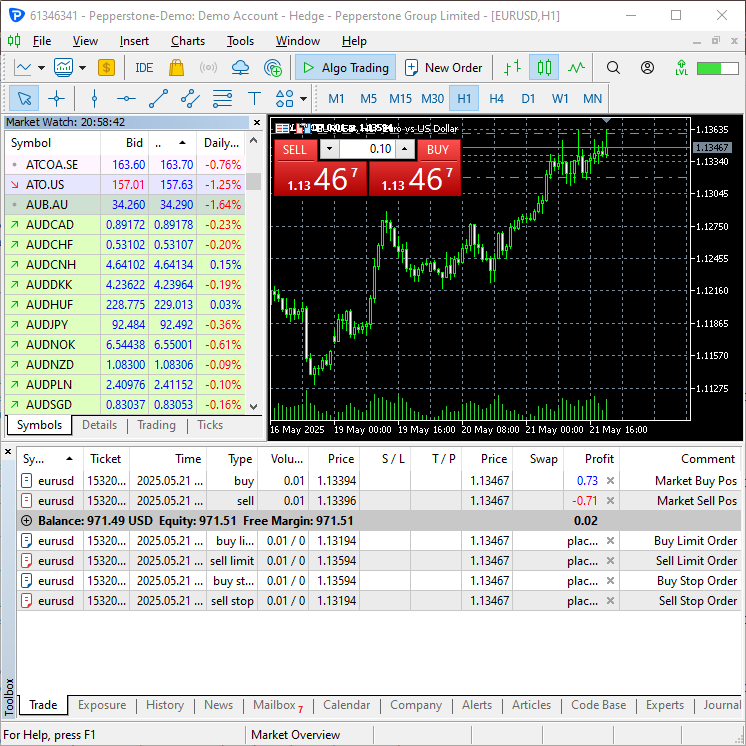
結論
取引クラスは、MQL5で導入された良い機能のひとつです。かつてはすべてをゼロから書く必要がありましたが、これは非常に手間がかかり、前述したように多くのバグを生みやすい作業でした。MetaTrader 5 Pythonパッケージを、MQL5の構文に非常に近いライブラリ(モジュール)として拡張することで、MQL5で培った知識をPythonアプリケーションでも活用できるようになります。
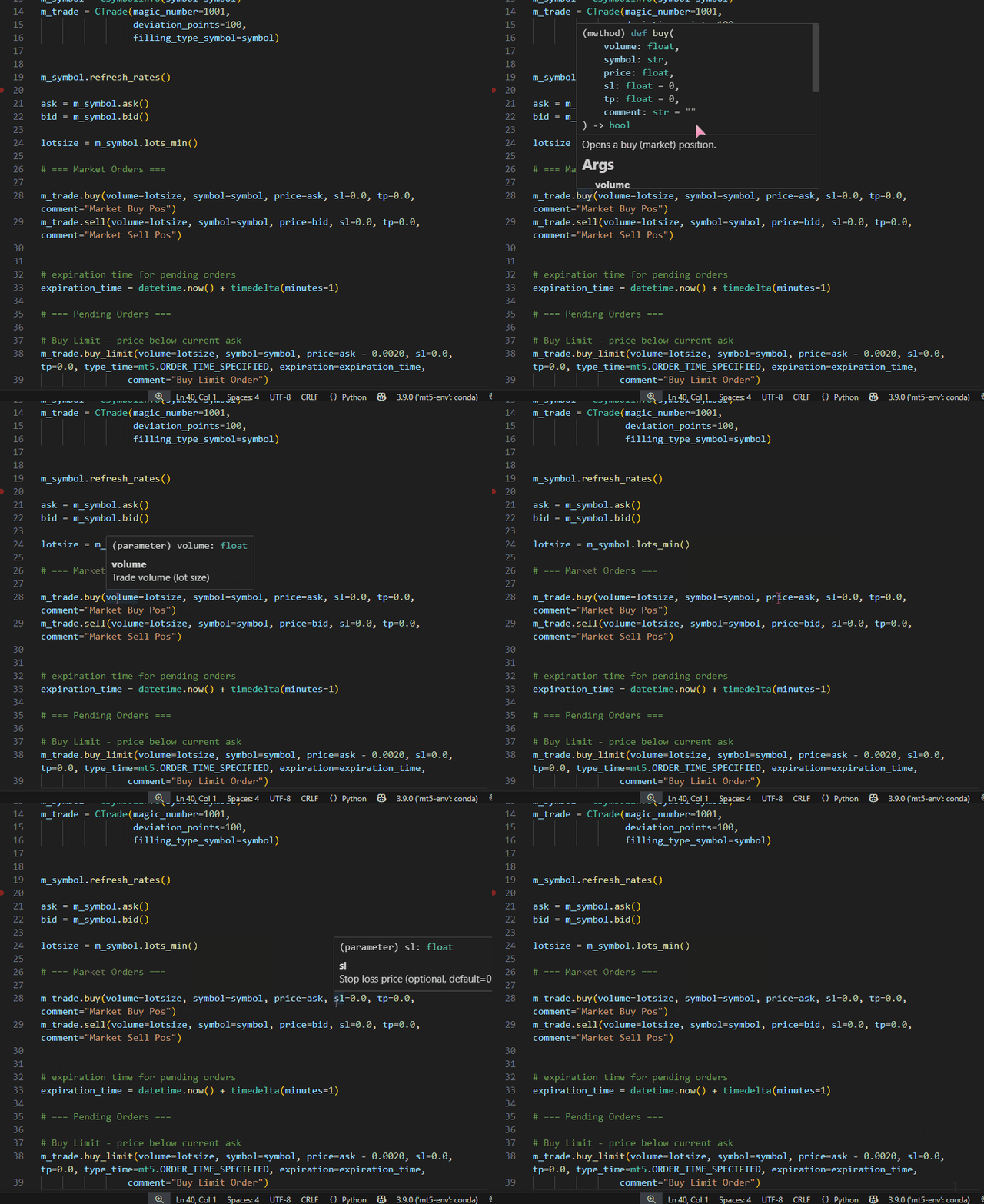
これらのカスタムPythonライブラリは、IntelliSenseのサポート不足の問題を軽減するのにも役立ちます。Python関数やクラスに「Docstring」を追加することで、Visual Studio Codeなどのテキストエディタがコードのドキュメント化を支援し、パラメータのハイライトなども行ってくれるため、コーディング作業が楽しく、より簡単になります。たとえば、CTradeクラスのbuyメソッド内には、関数の簡単な説明が記載されています。
class CTrade:
# ....

    def buy(self, volume: float, symbol: str, price: float, sl: float=0.0, tp: float=0.0, comment: str="") -> bool:

        """
        Opens a buy (market) position.

        Args:
            volume: Trade volume (lot size)
            symbol: Trading symbol (e.g., "EURUSD")
            price: Execution price
            sl: Stop loss price (optional, default=0.0)
            tp: Take profit price (optional, default=0.0)
            comment: Position comment (optional, default="")

        Returns:
            bool: True if order was sent successfully, False otherwise
        """
この関数はVS Codeで記述されるようになります。
簡単に言うと、本記事は私がPythonプログラミング言語で作成したMetaTrader 5用取引クラスのドキュメントとしての役割を果たします。ご意見はぜひディスカッション欄でお聞かせください。
ご一読、誠にありがとうございました。
添付ファイルの表
ファイル名とパス | 説明と使用法 |
|---|---|
モジュール(ライブラリ) | |
| Trade\AccountInfo.py | CAccountInfoクラス |
| Trade\DealInfo.py | CDealInfoクラス |
| Trade\HistoryOrderInfo.py | CHistoryOrderInfoクラス |
| Trade\OrderInfo.py | COrderInfoクラス |
| Trade\PositionInfo.py | CPositionInfoクラス |
| Trade\SymbolInfo.py | CSymbolInfoクラス |
| Trade\TerminalInfo.py | CTerminalInfoクラス |
| Trade\Trade.py | CTradeクラス |
テストファイル | |
| accountinfo_test.py | CAccountInfoクラスで提供されているメソッドをテストするためのスクリプト |
| dealinfo_test.py | CDealInfoクラスで提供されているメソッドをテストするためのスクリプト |
| error_description.py | エラーコードと戻りコードを人間が読める文字列に記述する関数 |
| historyorderinfo_test.py | CHistoryOrderInfoクラスで提供されているメソッドをテストするためのスクリプト |
| orderinfo_test.py | COrderInfoクラスで提供されているメソッドをテストするためのスクリプト |
| positioninfo_test.py | CPositionInfoクラスで提供されているメソッドをテストするためのスクリプト |
| symbolinfo_test.py | CSymbolInfoクラスで提供されているメソッドをテストするためのスクリプト |
| terminalinfo_test.py | CTerminalクラスで提供されているメソッドをテストするためのスクリプト |
| main.py | CTradeクラスで提供されているメソッドをテストするためのスクリプト。Pythonの最終的な自動売買ロボットと考えてください。 |
MetaQuotes Ltdにより英語から翻訳されました。
元の記事: https://www.mql5.com/en/articles/18208
警告: これらの資料についてのすべての権利はMetaQuotes Ltd.が保有しています。これらの資料の全部または一部の複製や再プリントは禁じられています。
この記事はサイトのユーザーによって執筆されたものであり、著者の個人的な見解を反映しています。MetaQuotes Ltdは、提示された情報の正確性や、記載されているソリューション、戦略、または推奨事項の使用によって生じたいかなる結果についても責任を負いません。

 MQL5経済指標カレンダーを使った取引(第10回):シームレスなニュースナビゲーションのためのドラッグ可能ダッシュボードとインタラクティブホバー効果
 初心者からエキスパートへ:自動幾何解析システム
 MQL5で自己最適化エキスパートアドバイザーを構築する(第7回):複数期間での同時取引
 プライスアクション分析ツールキットの開発(第24回):プライスアクション定量分析ツール

- 無料取引アプリ
- 8千を超えるシグナルをコピー
- 金融ニュースで金融マーケットを探索
公開された記事MQL5で提示されたものと同様に、MetaTrader 5で取引するためのPythonクラスを作成する:
著者:Omega J Msigwa
ありがとうございます!今後のプロジェクトに とても役立つ記事ですね。