

使用 MetaTrader 5 Python 构建类似 MQL5 的交易类
 689
689
 2
2

目录
- 概述
- CAccountInfo 类
- CSymbolInfo 类
- COrderInfo 类
- CHistoryOrderInfo 类
- CPositionInfo 类
- CDealInfo 类
- CTerminalInfo 类
- CTrade 类
- 结论
概述
MetaEditor 中预装的标准库使用 MQL5 编程语言构建算法交易系统变得更加容易。这些模块(库)包含各种函数和变量,可以简化开仓、验证、平仓等操作。
如果没有这些依赖项,即使是编写一个简单的程序也会变得更加困难,例如编写一个简单的脚本来开立买入仓位(交易)。
没有 CTrade 类
void OnStart()
  {
   MqlTradeRequest request;
   MqlTradeResult result;

   MqlTick ticks;
   SymbolInfoTick(Symbol(), ticks);

//--- setting a trade request

   ZeroMemory(request);
   request.action   =TRADE_ACTION_DEAL;
   request.symbol   =Symbol();
   request.magic    =2025;
   request.volume   =0.01;
   request.type     =ORDER_TYPE_BUY;
   request.price    =ticks.ask;
   request.sl       =0;
   request.tp       =0;
   request.deviation   = 10;  // Max price slippage in points
   request.magic       = 2025;
   request.comment     = "Buy Order";
   request.type_filling= ORDER_FILLING_IOC;   // or ORDER_FILLING_IOC, ORDER_FILLING_RETURN
   request.type_time   = ORDER_TIME_GTC;      // Good till canceled

//--- action and return the result

   if(!OrderSend(request, result))
    {
      Print("OrderSend failed retcode: ", result.retcode);
    }
  }
含有 CTrade 类
#include <Trade\Trade.mqh>
CTrade m_trade;
//+------------------------------------------------------------------+
//| Script program start function                                    |
//+------------------------------------------------------------------+
void OnStart()
  {
//---
    MqlTick ticks;
    SymbolInfoTick(Symbol(), ticks);

    m_trade.SetTypeFillingBySymbol(Symbol());
    m_trade.SetExpertMagicNumber(2025);
    m_trade.SetDeviationInPoints(10); //Slippage

    m_trade.Buy(0.01, Symbol(), ticks.ask,0,0,"Buy Order");
  }
这两个函数都可以在 MetaTrader 5 中开立买入仓位,但是,第一种方法非常粗糙、耗时,并且由于您应该编写大量代码来获得简单的功能,因此增加了产生错误的可能性。
更不用说它还要求你具备更强的技术能力(才能理解在 MetaTrader 5 中发送买入仓位的整个过程)。
有一个名为 MetaTrader 5 的 Python 包,它使 Python 开发人员能够访问该平台,获取平台的几乎所有信息(交易品种、已开仓位等),并能够发送一些命令来开立、修改、删除交易等。这与我们使用 MQL5 编程语言所能做的事情类似。
虽然这个软件包很有用,但它没有像 MQL5 语言中那样的内置模块来帮助我们进行开发过程。
与第一个编码示例类似,用 Python 编写一个简单的程序需要编写更多行代码,更糟糕的是,这个 MetaTrade5 Python 包与大多数集成开发环境 (IDE)(例如 Visual Studio Code )的兼容性不佳,这意味着您将无法获得非常有用的 Intellisense 编码支持。
由于 IDE 不支持此软件包,因此您经常会发现自己需要查阅文档来理解忘记的简单概念,而不是在 IDE 中自行解决。这会导致使用此软件包的糟糕体验。
在本文中,我们将基于 MetaTrader 5 包在 Python 中实现交易类,以帮助我们像使用 MQL5 一样有效地用 Python 编写程序。
CAccountInfo 类
在 MQL5 中,此类用于处理交易账户属性。可以使用此类访问经纪商交易账户的所有信息,让我们用 Python 实现它的等效功能。
Python 自定义 CAccountInfo 交易类 | MQL5 内置 CAccountInfo 交易类 | 描述 |
|---|---|---|
整数和字符串类型属性 | ||
login() | Login | 获取账户编号。 |
trade_mode() | TradeMode | 获取交易模式。 |
trade_mode_description() | TradeModeDescription | 以字符串形式获取交易模式。 |
leverage() | Leverage | 获得给定的杠杆倍数。 |
stopout_mode() | StopoutMode | 获取强制平仓模式。 |
stopout_mode_description() | StopoutModeDescription | 获取强制平仓设置模式的字符串。 |
margin_mode() | MarginMode | 获取预付款计算模式。 |
margin_mode_description() | MarginModeDescription | 获取预付款计算模式的字符串形式。 |
trade_allowed() | TradeAllowed | 获取允许交易的标志。 |
trade_expert() | TradeExpert | 获得是否允许自动交易的标志。 |
limit_orders() | LimitOrders | 获取允许的最大挂单数量。 |
双精度类型属性 | ||
balance() | Balance | 获取 MetaTrader 5 账户余额。 |
credit() | Credit | 获得给予的积分。 |
profit() | Profit | 获取账户中的当前利润金额 |
equity() | Equity | 获取账户中当前的净值金额。 |
margin() | Margin | 获取预留保证金的金额。 |
free_margin() | FreeMargin | 获取可用预付款金额。 |
margin_level() | MarginLevel | 获取预付款水平。 |
margin_call() | MarginCall | 获取存款保证金水平。 |
margin_stopout() | MarginStopOut | 获取强制平仓的保证金水平。 |
文本类型属性 | ||
name() | Name | 获取帐户名 |
server() | Server | 获取交易服务器名称 |
company() | Company | 获取为该帐户提供服务的公司名称 |
currency() | Currency | 获取存款货币名称。 |
额外的方法 | ||
margin_check(self, symbol, order_type, volume, price) | MarginCheck | 获取执行交易操作所需的预付款金额。 |
free_margin_check(self, symbol, order_type, volume, price) | FreeMarginCheck | 获取交易操作执行后剩余的可用预付款金额。 |
order_profit_check(self, symbol, order_type, volume, price_open, price_close) | OrderProfitCheck | 根据传入的参数计算出评估后的利润。 |
max_lot_check(self, symbol, order_type, price, percent=100) | MaxLotCheck | 获得最大可能的交易量。 |
用法示例
import MetaTrader5 as mt5
from Trade.AccountInfo import CAccountInfo

if not mt5.initialize(r"c:\Users\Omega Joctan\AppData\Roaming\Pepperstone MetaTrader 5\terminal64.exe"):
    print("Failed to initialize Metatrader5 Error = ",mt5.last_error())
    quit()

acc = CAccountInfo()

print(f"""
Account Information
-------------------
Login: {acc.login()}
Name: {acc.name()}
Server: {acc.server()}
Company: {acc.company()}
Currency: {acc.currency()}
Trade Mode: {acc.trade_mode()} ({acc.trade_mode_description()})
Leverage: {acc.leverage()}
Stopout Mode: {acc.stopout_mode()} ({acc.stopout_mode_description()})
Margin Mode: {acc.margin_mode()} ({acc.margin_mode_description()})
Trade Allowed: {acc.trade_allowed()}
Trade Expert: {acc.trade_expert()}
Limit Orders: {acc.limit_orders()}
-------------------
Balance: {acc.balance()}
Credit: {acc.credit()}
Profit: {acc.profit()}
Equity: {acc.equity()}
Margin: {acc.margin()}
Free Margin: {acc.free_margin()}
Margin Level: {acc.margin_level()}
Margin Call: {acc.margin_call()}
Margin StopOut: {acc.margin_stopout()}
-------------------
""")

mt5.shutdown()
输出
Account Information
-------------------
Login: 61346344
Name: John Doe
Server: MetaQuotes-Demo
Company: MetaQuotes Software Corp
Currency: USD
Trade Mode: 0 (Demo)
Leverage: 400
Stopout Mode: 0 (Percent)
Margin Mode: 2 (Retail Hedging)
Trade Allowed: True
Trade Expert: True
Limit Orders: 500
-------------------
Balance: 928.42
Credit: 0.0
Profit: -2.21
Equity: 926.21
Margin: 2.81
Free Margin: 923.4
Margin Level: 32961.20996441281
Margin Call: 90.0
Margin StopOut: 20.0
-------------------
CSymbolInfo 类
此类提供对交易品种属性的访问。
Python 自定义 CSymbolInfo 类 | MQL5 内置的 CSymbolInfo 类 | 描述 |
|---|---|---|
控制 | ||
refresh() | Refresh | 刷新交易品种数据。 |
refresh_rates() | RefreshRates | 刷新交易品种报价 |
属性 | ||
name() | Name | 获取交易品种名称。 |
select(self, select=True) | Select | 在“市场报价”中添加或移除交易品种 |
is_synchronized() | IsSynchronized | 检查交易品种与服务器的同步情况。 |
| 交易量 | ||
volume() | Volume | 获取上一笔交易的交易量。 |
volume_high() | VolumeHigh | 获取一天内的最大交易量 |
volume_low() | VolumeLow | 获取一天的最小交易量。 |
杂项 | ||
time() | Time | 获取上次报价的时间。 |
spread() | Spread | 获取点差值(以点数为单位)。 |
spread_float() | SpreadFloat | 获取浮动点差的标志。 |
ticks_book_depth() | TicksBookDepth | 获取保存分时报价的深度。 |
水平 | ||
stops_level() | StopsLevel | 获取订单距现价的最小距离 (以点数为单位)。 |
freeze_level() | FreezeLevel | 获取交易操作的冻结距离 (以点数为单位)。 |
卖出价格 | ||
bid() | Bid | 获取当前卖出价格。 |
bid_high() | BidHigh | 获取日内最高卖出价格。 |
bid_low() | BidLow | 获取日内最低卖出价格。 |
买入价格 | ||
ask() | Ask | 获取当前买入价格 |
ask_high() | AskHigh | 获取日内最高买入价格 |
ask_low() | AskLow | 获取日内最低买入价格 |
价格 | ||
last() | Last | 返回当前最后价格 |
last_high() | LastHigh | 返回日内最高最后价格 |
last_low() | LastLow | 返回日内最低最后价格 |
| 交易模式 | ||
trade_calc_mode() | TradeCalcMode | 获取合约成本的整数格式计算模式。 |
trade_calc_mode_description() | TradeCalcModeDescription | 获取合约成本的字符串格式计算模式。 |
trade_mode() | TradeMode | 以整数格式获取订单执行类型。 |
trade_mode_description() | TradeModeDescription | 以字符串格式获取订单执行类型。 |
trade_execution() | TradeExecution | 获取整数格式的交易执行模式。 |
trade_execution_description() | TradeExecutionDescription | 获取字符串格式的交易执行模式 |
库存费 | ||
swap_mode() | SwapMode | 获取整数格式的库存费计算模式 |
swap_mode_description() | SwapModeDescription | 获取字符串格式的库存费计算模式 |
swap_rollover_3days() | SwapRollover3days | 获取当日三重库存费用的整数值 |
swap_rollover_3days_description() | SwapRollover3daysDescription | 获取三重库存费用的日期字符串。 |
预付款 | ||
margin_initial() | MarginInitial | 获取初始预付款的值。 |
margin_maintenance() | MarginMaintenance | 获取维持预付款的值 |
margin_hedged() | 返回给定交易品种的对冲预付款的值。 | |
margin_hedged_use_leg() | 返回一个布尔值,指示对冲预付款是否分别适用于每个仓位(持仓方)。 | |
分时报价信息 | ||
digits() | Digits | 获取小数点后的数字位数。 |
point() | Point | 获取一个点的值 |
tick_value() | TickValue | 获取价格最小变动值(价格的最小变化量) |
tick_value_profit() | TickValueProfit | 获取盈利仓位的计算最小价格变动单位。 |
tick_value_loss() | TickValueLoss | 获取亏损仓位的计算最小价格变动单位。 |
tick_size() | TickSize | 获得最小的价格变动 |
合约规模 | ||
contract_size() | ContractSize | 获取交易合约金额 |
lots_min() | LotsMin | 达到达成交易所需的最低交易量 |
lots_max() | LotsMax | 获得达成交易的最大成交量 |
lots_step() | LotsStep | 获取交易量变化的最小步长以完成交易 |
lots_limit() | LotsLimit | 获取一个品种的最大允许开仓和挂单交易量 |
库存费大小 | ||
swap_long() | SwapLong | 获取多头头寸库存费的值 |
swap_short() | SwapShort | 获取空头头寸库存费的值 |
交易品种/货币信息 | ||
currency_base() | CurrencyBase | 获取基础货币的交易品种名称 |
currency_profit() | CurrencyProfit | 获取利润货币名称 |
currency_margin() | CurrencyMargin | 获取预付款货币名称 |
bank() | Bank | 获取当前报价来源的名称 |
description() | Description | 获取交易品种的字符串描述 |
path() | Path | 获取交易品种树中的路径 |
page() | 包含该交易品种信息的网页地址 | |
时段信息 | ||
session_deals() | SessionDeals | 获取当前时段中的交易数量 |
session_buy_orders() | SessionBuyOrders | 获取当前的买单数量 |
session_sell_orders() | SessionSellOrders | 获取当前的卖单数量 |
session_turnover() | SessionTurnover | 获取当前时段流水摘要 |
session_interest() | SessionInterest | 获取当前时段的持仓摘要 |
session_buy_orders_volume() | SessionBuyOrdersVolume | 获取买单交易量 |
session_sell_orders_volume() | SessionSellOrdersVolume | 获取卖单交易量 |
session_open() | SessionOpen | 获取当前交易时段的开盘价 |
session_close() | SessionClose | 获取当前交易时段的收盘价 |
session_aw() | SessionAW | 获取当前交易时段的加权平均价格 |
session_price_settlement() | SessionPriceSettlement | 获取当前交易时段的结算价格 |
session_price_limit_min() | SessionPriceLimitMin | 获取当前会话的最低价格 |
session_price_limit_max() | SessionPriceLimitMax | 获取当前交易时段的最高价格 |
这些是 Python 类中的一些方法,完整的列表可以在 SymbolInfo.py 文件中查看。
用法示例
import MetaTrader5 as mt5
from Trade.SymbolInfo import CSymbolInfo


if not mt5.initialize(r"c:\Users\Omega Joctan\AppData\Roaming\Pepperstone MetaTrader 5\terminal64.exe"):
    print("Failed to initialize Metatrader5 Error = ",mt5.last_error())
    quit()

m_symbol = CSymbolInfo("EURUSD")

print(f"""
Symbol Information
---------------------
Name: {m_symbol.name()}
Selected: {m_symbol.select()}
Synchronized: {m_symbol.is_synchronized()}

--- Volumes ---
Volume: {m_symbol.volume()}
Volume High: {m_symbol.volume_high()}
Volume Low: {m_symbol.volume_low()}

--- Time & Spread ---
Time: {m_symbol.time()}
Spread: {m_symbol.spread()}
Spread Float: {m_symbol.spread_float()}
Ticks Book Depth: {m_symbol.ticks_book_depth()}

--- Trade Levels ---
Stops Level: {m_symbol.stops_level()}
Freeze Level: {m_symbol.freeze_level()}

--- Bid Parameters ---
Bid: {m_symbol.bid()}
Bid High: {m_symbol.bid_high()}
Bid Low: {m_symbol.bid_low()}

--- Ask Parameters ---
Ask: {m_symbol.ask()}
Ask High: {m_symbol.ask_high()}
Ask Low: {m_symbol.ask_low()}

--- Last Parameters ---
Last: {m_symbol.last()}
Last High: {m_symbol.last_high()}
Last Low: {m_symbol.last_low()}

--- Order & Trade Modes ---
Trade Calc Mode: {m_symbol.trade_calc_mode()} ({m_symbol.trade_calc_mode_description()})
Trade Mode: {m_symbol.trade_mode()} ({m_symbol.trade_mode_description()})
Trade Execution Mode: {m_symbol.trade_execution()}  ({m_symbol.trade_execution_description()})

--- Swap Terms ---
Swap Mode: {m_symbol.swap_mode()} ({m_symbol.swap_mode_description()})
Swap Rollover 3 Days: {m_symbol.swap_rollover_3days()} ({m_symbol.swap_rollover_3days_description()})

--- Futures Dates ---
Start Time: {m_symbol.start_time()}
Expiration Time: {m_symbol.expiration_time()}

--- Margin Parameters ---
Initial Margin: {m_symbol.margin_initial()}
Maintenance Margin: {m_symbol.margin_maintenance()}
Hedged Margin: {m_symbol.margin_hedged()}
Hedged Margin Use Leg: {m_symbol.margin_hedged_use_leg()}

--- Tick Info ---

Digits: {m_symbol.digits()}
Point: {m_symbol.point()}
Tick Value: {m_symbol.tick_value()}
Tick Value Profit: {m_symbol.tick_value_profit()}
Tick Value Loss: {m_symbol.tick_value_loss()}
Tick Size: {m_symbol.tick_size()}

--- Contracts sizes---
Contract Size: {m_symbol.contract_size()}
Lots Min: {m_symbol.lots_min()}
Lots Max: {m_symbol.lots_max()}
Lots Step: {m_symbol.lots_step()}
Lots Limit: {m_symbol.lots_limit()}

--- Swap sizes

Swap Long: {m_symbol.swap_long()}
Swap Short: {m_symbol.swap_short()}

--- Currency Info ---
Currency Base: {m_symbol.currency_base()}
Currency Profit: {m_symbol.currency_profit()}
Currency Margin: {m_symbol.currency_margin()}
Bank: {m_symbol.bank()}
Description: {m_symbol.description()}
Path: {m_symbol.path()}
Page: {m_symbol.page()}

--- Session Info ---
Session Deals: {m_symbol.session_deals()}
Session Buy Orders: {m_symbol.session_buy_orders()}
Session Sell Orders: {m_symbol.session_sell_orders()}
Session Turnover: {m_symbol.session_turnover()}
Session Interest: {m_symbol.session_interest()}
Session Buy Volume: {m_symbol.session_buy_orders_volume()}
Session Sell Volume: {m_symbol.session_sell_orders_volume()}
Session Open: {m_symbol.session_open()}
Session Close: {m_symbol.session_close()}
Session AW: {m_symbol.session_aw()}
Session Price Settlement: {m_symbol.session_price_settlement()}
Session Price Limit Min: {m_symbol.session_price_limit_min()}
Session Price Limit Max: {m_symbol.session_price_limit_max()}
---------------------
""")

mt5.shutdown()
输出
Symbol Information
---------------------
Name: EURUSD
Selected: True
Synchronized: True

--- Volumes ---
Volume: 0
Volume High: 0
Volume Low: 0

--- Time & Spread ---
Time: 2025-05-21 20:30:36
Spread: 0
Spread Float: True
Ticks Book Depth: 0

--- Trade Levels ---
Stops Level: 0
Freeze Level: 0

--- Bid Parameters ---
Bid: 1.1335600000000001
Bid High: 1.13623
Bid Low: 1.12784

--- Ask Parameters ---
Ask: 1.1335600000000001
Ask High: 1.13623
Ask Low: 1.12805

--- Last Parameters ---
Last: 0.0
Last High: 0.0
Last Low: 0.0

--- Order & Trade Modes ---
Trade Calc Mode: 0 (Calculation of profit and margin for Forex)
Trade Mode: 4 (No trade restrictions)
Trade Execution Mode: 2  (Market execution)

--- Swap Terms ---
Swap Mode: 1 (Swaps are calculated in points)
Swap Rollover 3 Days: 3 (Wednesday)

--- Futures Dates ---
Start Time: 0
Expiration Time: 0

--- Margin Parameters ---
Initial Margin: 100000.0
Maintenance Margin: 0.0
Hedged Margin: 0.0
Hedged Margin Use Leg: False

--- Tick Info ---

Digits: 5
Point: 1e-05
Tick Value: 1.0
Tick Value Profit: 1.0
Tick Value Loss: 1.0
Tick Size: 1e-05

--- Contracts sizes---
Contract Size: 100000.0
Lots Min: 0.01
Lots Max: 100.0
Lots Step: 0.01
Lots Limit: 0.0

--- Swap sizes

Swap Long: -8.99
Swap Short: 4.5

--- Currency Info ---
Currency Base: EUR
Currency Profit: USD
Currency Margin: EUR
Bank: Pepperstone
Description: Euro vs US Dollar
Path: Markets\Forex\Majors\EURUSD
Page:

--- Session Info ---
Session Deals: 1
Session Buy Orders: 647
Session Sell Orders: 2
Session Turnover: 10.0
Session Interest: 0.0
Session Buy Volume: 3.0
Session Sell Volume: 13.0
Session Open: 1.12817
Session Close: 1.12842
Session AW: 0.0
Session Price Settlement: 0.0
Session Price Limit Min: 0.0
Session Price Limit Max: 0.0
---------------------
COrderInfo 类
此类提供对挂单属性的访问权限。
Python 自定义 OrderInfo 类 | MQL5 内置的 OrderInfo 类 | Description |
|---|---|---|
整数和日期时间类型属性 | ||
ticket() | Ticket | 获取先前已选定访问的订单的编号。 |
type_time() | TypeTime | 获取到期时的订单类型。 |
type_time_description() | TypeTimeDescription | 按到期时间获取订单类型字符串。 |
time_setup() | TimeSetup | 获取订单下单时间。 |
time_setup_msc() | TimeSetupMsc | 接收自 1970 年 1 月 1 日以来下单的时间(以毫秒为单位)。 |
order_type() | OrderType | 获取订单类型的整数格式。 |
order_type_description() | OrderTypeDescription | 获取订单类型的字符串格式。 |
state() | State | 获取订单状态的整数格式。 |
state_description() | StateDescription | 获取订单状态的字符串格式。 |
magic() | Magic | 获取下单的 EA 交易的 ID。 |
position_id() | PositionId | 获取仓位 ID。 |
type_filling() | TypeFilling | 以填充类型获取订单执行类型的整数形式 |
type_filling_description() | TypeFillingDescription | 以填充类型获取订单执行类型的字符串描述 |
time_done() | TimeDone | 获取订单执行或取消的时间。 |
time_done_msc() | TimeDoneMsc | 获取订单执行或取消的时间,数值是自1970 年 1 月 1 日以来的毫秒数 |
time_expiration() | TimeExpiration | 获取订单到期时间。 |
双精度类型属性 | ||
volume_initial() | VolumeInitial | 获取初始订单交易量。 |
volume_current() | VolumeCurrent | 获取订单的未填充交易量。 |
price_open() | PriceOpen | 获取订单价格。 |
price_current() | PriceCurrent | 根据订单交易品种获取当前价格。 |
stop_loss() | StopLoss | 获取订单的止损价。 |
take_profit() | TakeProfit | 获取订单的止盈价。 |
price_stop_limit() | PriceStopLimit | 获取限价单的价格。 |
访问文本属性 | ||
comment() | Symbol | 获取订单备注。 |
symbol() | Comment | 获取订单交易品种的名称。 |
选择 | ||
select_order(self, order) -> bool | 从 MetaTrader5.orders_get() 函数返回的订单列表中,根据订单对象(字典)选择订单。 |
用法示例
import MetaTrader5 as mt5
from Trade.OrderInfo import COrderInfo

if not mt5.initialize(r"c:\Users\Omega Joctan\AppData\Roaming\Pepperstone MetaTrader 5\terminal64.exe"):
    print("Failed to initialize Metatrader5 Error = ",mt5.last_error())
    quit()

# Get all orders from MT5
orders = mt5.orders_get()

# Loop and print info
m_order = COrderInfo()

for i, order in enumerate(orders):
    if m_order.select_order(order=order):
        print(f"""
Order #{i}

--- Integer & datetime type properties ---

Ticket: {m_order.ticket()}
Type Time: {m_order.type_time()} ({m_order.type_time_description()})
Time Setup: {m_order.time_setup()}
Time Setup (ms): {m_order.time_setup_msc()}
State: {m_order.state()} ({m_order.state_description()})
Order Type: {m_order.order_type()} ({m_order.order_type_description()})
Magic Number: {m_order.magic()}
Position ID: {m_order.position_id()}
Type Filling: {m_order.type_filling()} ({m_order.type_filling_description()})
Time Done: {m_order.time_done()}
Time Done (ms): {m_order.time_done_msc()}
Time Expiration: {m_order.time_expiration()}
External ID: {m_order.external_id()}

--- Double type properties ---

Volume Initial: {m_order.volume_initial()}
Volume Current: {m_order.volume_current()}
Price Open: {m_order.price_open()}
Price Current: {m_order.price_current()}
Stop Loss: {m_order.stop_loss()}
Take Profit: {m_order.take_profit()}
Price StopLimit: {m_order.price_stop_limit()}

--- Text type properties ---

Comment: {m_order.comment()}
Symbol: {m_order.symbol()}

""")

mt5.shutdown()
输出
Order #0

--- Integer & datetime type properties ---

Ticket: 153201235
Type Time: 2 (ORDER_TIME_SPECIFIED)
Time Setup: 2025-05-21 23:56:16
Time Setup (ms): 1747860976672
State: 1 (Order accepted)
Order Type: 3 (Sell Limit pending order)
Magic Number: 1001
Position ID: 0
Type Filling: 2 (IOC (Immediate or Cancel))
Time Done: 1970-01-01 03:00:00
Time Done (ms): 0
Time Expiration: 2025-05-21 23:57:14.940000
External ID:

--- Double type properties ---

Volume Initial: 0.01
Volume Current: 0.01
Price Open: 1.13594
Price Current: 1.1324
Stop Loss: 0.0
Take Profit: 0.0
Price StopLimit: 0.0

--- Text type properties ---

Comment: Sell Limit Order
Symbol: EURUSD
CHistoryOrderInfo 类
此类提供了对历史订单属性的便捷访问。
Python 自定义 CHistoryOrderInfo 类 | MQL5 内置的 CHistoryOrderInfo 类 | Description |
|---|---|---|
整数、日期时间和字符串类型属性 | ||
time_setup() | TimeSetup | 获取订单下单时间。 |
time_setup_msc() | TimeSetupMsc | 获取订单设置时间,数值是自1970 年 1 月 1 日以来的毫秒数 |
time_done() | TimeDone | 获取订单执行或取消的时间。 |
time_done_msc() | TimeDoneMsc | 获取订单执行或取消的时间,数值是自1970 年 1 月 1 日以来的毫秒数 |
magic() | Magic | 获取下达所选订单的 EA 交易的 ID |
ticket() | 返回所选订单的编号。 | |
order_type() | OrderType | 返回所选订单的类型。 |
order_type_description() | OrderTypeDescription | 返回所选订单的类型的字符串格式。 |
state() | State | 返回订单状态的整数形式。 |
state_description() | StateDescription | 返回订单状态的字符串形式。 |
time_expiration() | TimeExpiration | 获取所选订单的到期时间。 |
type_filling() | TypeFilling | 以填充类型获取订单执行类型的整数形式。 |
type_filling_description() | TypeFillingDescription | 以填充类型获取订单执行类型的字符串描述 |
type_time() | TypeTime | 获取过期订单的类型的整数形式。 |
type_time_description() | TypeTimeDescription | 获取过期订单的类型的字符串形式。 |
position_id() | PositionId | 获取仓位 ID |
双精度类型属性 | ||
volume_initial() | VolumeInitial | 获取所选订单的初始交易量 |
volume_current() | VolumeCurrent | 获取所选订单的未完成交易量。 |
price_open() | PriceOpen | 获取选定的订单价格。 |
price_current() | PriceCurrent | 根据订单交易品种获取当前价格。 |
stop_loss() | StopLoss | 获取所选订单的止损价。 |
take_profit() | TakeProfit | 获取所选订单的止盈价。 |
price_stop_limit() | PriceStopLimit | 获取选定限价单的价格。 |
| 文本属性 | ||
symbol() | Symbol | 返回所选订单的交易品种。 |
comment() | Comment | 返回所选订单的注释。 |
选择 | ||
select_order(self, order) -> bool | 从函数 MetaTrader5.history_orders_get 返回的对象(字典)列表中选择订单对象。 |
用法示例
import MetaTrader5 as mt5
from Trade.HistoryOrderInfo import CHistoryOrderInfo
from datetime import datetime, timedelta

if not mt5.initialize(r"c:\Users\Omega Joctan\AppData\Roaming\Pepperstone MetaTrader 5\terminal64.exe"):
    print("Failed to initialize Metatrader5 Error = ",mt5.last_error())
    quit()

# The date range

from_date = datetime.now() - timedelta(hours=5)
to_date = datetime.now()

# Get history orders

history_orders = mt5.history_orders_get(from_date, to_date)

if history_orders == None:
    print(f"No deals, error code={mt5.last_error()}")
    exit()

# m_order instance
m_order = CHistoryOrderInfo()

# Loop and print each order
for i, order in enumerate(history_orders):
    if m_order.select_order(order):
        print(f"""
History Order #{i}

--- Integer, Datetime & String type properties ---

Time Setup: {m_order.time_setup()}
Time Setup (ms): {m_order.time_setup_msc()}
Time Done: {m_order.time_done()}
Time Done (ms): {m_order.time_done_msc()}
Magic Number: {m_order.magic()}
Ticket: {m_order.ticket()}
Order Type: {m_order.order_type()} ({m_order.type_description()})
Order State: {m_order.state()} ({m_order.state_description()})
Expiration Time: {m_order.time_expiration()}
Filling Type: {m_order.type_filling()} ({m_order.type_filling_description()})
Time Type: {m_order.type_time()} ({m_order.type_time_description()})
Position ID: {m_order.position_id()}
Position By ID: {m_order.position_by_id()}

--- Double type properties ---

Volume Initial: {m_order.volume_initial()}
Volume Current: {m_order.volume_current()}
Price Open: {m_order.price_open()}
Price Current: {m_order.price_current()}
Stop Loss: {m_order.stop_loss()}
Take Profit: {m_order.take_profit()}
Price Stop Limit: {m_order.price_stop_limit()}

--- Access to text properties ---

Symbol: {m_order.symbol()}
Comment: {m_order.comment()}
""")

mt5.shutdown()
输出
History Order #79

--- Integer, Datetime & String type properties ---

Time Setup: 2025-05-21 23:56:17
Time Setup (ms): 1747860977335
Time Done: 2025-05-22 01:57:47
Time Done (ms): 1747868267618
Magic Number: 1001
Ticket: 153201241
Order Type: 5 (Sell Stop pending order)
Order State: 4 (Order fully executed)
Expiration Time: 2025-05-21 23:57:14.940000
Filling Type: 1 (FOK (Fill or Kill))
Time Type: 2 (ORDER_TIME_SPECIFIED)
Position ID: 153201241
Position By ID: 0

--- Double type properties ---

Volume Initial: 0.01
Volume Current: 0.0
Price Open: 1.13194
Price Current: 1.13194
Stop Loss: 0.0
Take Profit: 0.0
Price Stop Limit: 0.0

--- Access to text properties ---

Symbol: EURUSD
Comment: Sell Stop Order
CPositionInfo 类
此类提供了对未平仓位属性的便捷访问。
Python 自定义 CPositionInfo 类 | MQL5 内置的 CPositionInfo 类 | 描述 |
|---|---|---|
整数和日期时间类型属性 | ||
ticket() | 获取先前选定的访问权限仓位的单号。 | |
time() | Time | 获取开仓时间。 |
time_msc() | TimeMsc | 获取开仓时间, 数值是自1970 年 1 月 1 日以来的毫秒数。 |
time_update() | TimeUpdate | 获取持仓变更时间, 数值是自1970 年 1 月 1 日以来的秒数。 |
time_update_msc() | TimeUpdateMsc | 获取持仓变更时间, 数值是自1970 年 1 月 1 日以来的毫秒数。 |
position_type() | PositionType | 获取持仓类型的整数形式。 |
position_type_description() | TypeDescription | 获取持仓类型的字符串形式。 |
magic() | Magic | 获取开仓的 EA 交易的 ID。 |
position_id() | Identifier | 获取仓位 ID。 |
双精度类型属性 | ||
volume() | Volume | 获取仓位的交易量。 |
price_open() | PriceOpen | 获取开仓价格。 |
stop_loss() | StopLoss | 获取持仓止损价格。 |
take_profit() | TakeProfit | 获取持仓止盈价格。 |
price_current() | PriceCurrent | 获取仓位交易品种的当前价格。 |
profit() | Profit | 获取当前持仓的盈利金额。 |
swap() | Swap | 获取仓位的的库存费金额。 |
访问文本属性 | ||
comment() | Comment | 获取该仓位的注释。 |
symbol() | Symbol | 获取持仓交易品种的名称。 |
选择 | ||
select_position(self, position) -> bool | 从 MetaTrader5.positions_get() 函数返回的持仓列表中选择持仓对象(字典)。 |
用法示例
import MetaTrader5 as mt5
from Trade.PositionInfo import CPositionInfo

if not mt5.initialize(r"c:\Users\Omega Joctan\AppData\Roaming\Pepperstone MetaTrader 5\terminal64.exe"):
    print("Failed to initialize Metatrader5 Error = ",mt5.last_error())
    quit()

positions = mt5.positions_get()
m_position = CPositionInfo()

# Loop and print each position
for i, position in enumerate(positions):
    if m_position.select_position(position):
        print(f"""
Position #{i}

--- Integer type properties ---

Time Open: {m_position.time()}
Time Open (ms): {m_position.time_msc()}
Time Update: {m_position.time_update()}
Time Update (ms): {m_position.time_update_msc()}
Magic Number: {m_position.magic()}
Ticket: {m_position.ticket()}
Position Type: {m_position.position_type()} ({m_position.position_type_description()})

--- Double type properties ---

Volume: {m_position.volume()}
Price Open: {m_position.price_open()}
Price Current: {m_position.price_current()}
Stop Loss: {m_position.stop_loss()}
Take Profit: {m_position.take_profit()}
Profit: {m_position.profit()}
Swap: {m_position.swap()}

--- Access to text properties ---

Symbol: {m_position.symbol()}
Comment: {m_position.comment()}

""")

mt5.shutdown()
输出
Position #1

--- Integer type properties ---

Time Open: 2025-05-22 15:02:06
Time Open (ms): 1747915326225
Time Update: 2025-05-22 15:02:06
Time Update (ms): 1747915326225
Magic Number: 0
Ticket: 153362497
Position Type: 1 (Sell)

--- Double type properties ---

Volume: 0.1
Price Open: 1.12961
Price Current: 1.1296
Stop Loss: 0.0
Take Profit: 0.0
Profit: 0.1
Swap: 0.0

--- Access to text properties ---

Symbol: EURUSD
Comment:
CDealInfo 类
该类提供对 MetaTrader 5 程序中交易属性的访问。
Python 自定义 CDealInfo 类 | MQL5 内置 CDealInfo 类 | 描述 |
|---|---|---|
整数和日期时间类型属性 | ||
ticket() | 提供所选交易的编号 | |
time() | Time | 获取交易执行时间。 |
time_msc() | TimeMsc | 获取成交单执行时间, 数值是自1970 年 1 月 1 日以来的毫秒数。 |
deal_type() | DealType | 获得交易类型 |
type_description() | TypeDescription | 获取交易类型的字符串形式。 |
entry() | Entry | 获取交易方向。 |
entry_description() | EntryDescription | 获取交易方向字符串。 |
magic() | Magic | 获取执行交易的 EA 交易的 ID。 |
position_id() | PositionId | 获取交易所涉及的仓位 ID。 |
双精度类型属性 | ||
volume() | Volume | 获取交易量(手数大小)。 |
price() | Price | 获取成交价格。 |
commission() | Commision | 获取成交佣金。 |
swap() | Swap | 获取平仓时的库存费金额。 |
profit() | Profit | 获取交易的财务结果(利润) |
字符串类型属性 | ||
symbol() | Symbol | 获取所选交易的交易品种名称。 |
comment() | Comment | 获取所选成交单的注释。 |
选择 | ||
select_by_index(self, index) | 通过索引选择成交单。 | |
select_deal(self, deal) -> bool | 从 MetaTrader5.history_deals_get 函数返回的交易列表中,根据交易对象(字典)选择成交单。 |
用法示例
import MetaTrader5 as mt5
from datetime import datetime, timedelta
from Trade.DealInfo import CDealInfo

# The date range
from_date = datetime.now() - timedelta(hours=24)
to_date = datetime.now()

if not mt5.initialize(r"c:\Users\Omega Joctan\AppData\Roaming\Pepperstone MetaTrader 5\terminal64.exe"):
    print("Failed to initialize Metatrader5 Error = ",mt5.last_error())
    quit()

m_deal = CDealInfo()

# Get all deals from MT5 history
deals = mt5.history_deals_get(from_date, to_date)

for i, deal in enumerate(deals):

    if (m_deal.select_deal(deal=deal)):
        print(f"""
Deal #{i}

--- integer and dateteime properties ---

Ticket: {m_deal.ticket()}
Time: {m_deal.time()}
Time (ms): {m_deal.time_msc()}
Deal Type: {m_deal.deal_type()} ({m_deal.type_description()})
Entry Type: {m_deal.entry()} ({m_deal.entry_description()})
Order: {m_deal.order()}
Magic Number: {m_deal.magic()}
Position ID: {m_deal.position_id()}

--- double type properties ---

Volume: {m_deal.volume()}
Price: {m_deal.price()}
Commission: {m_deal.commission()}
Swap: {m_deal.swap()}
Profit: {m_deal.profit()}

--- string type properties ---

Comment: {m_deal.comment()}
Symbol: {m_deal.symbol()}

External ID: {m_deal.external_id()}
""")

mt5.shutdown()
输出
Deal #53

--- integer and dateteime properties ---

Ticket: 0
Time: 2025-05-22 01:57:47
Time (ms): 1747868267618
Deal Type: 1 (SELL)
Entry Type: 0 (IN)
Order: 153201241
Magic Number: 1001
Position ID: 153201241

--- double type properties ---

Volume: 0.01
Price: 1.13194
Commission: -0.04
Swap: 0.0
Profit: 0.0

--- string type properties ---

Comment: Sell Stop Order
Symbol: EURUSD

External ID:
CTerminalInfo 类
该类提供对 MetaTrader 5 程序环境属性的访问。
Python 自定义 CTerminalInfo 类 | MQL5 内置的 CTerminalInfo 类 | 描述 |
|---|---|---|
字符串类型属性 | ||
name() | Name | 获取客户端终端的名称。 |
company() | Company | 获取客户端终端的公司名称。 |
language() | Language | 获取客户端终端的语言。 |
path() | Path | 获取客户端终端所在的文件夹。 |
data_path() | DataPath | 获取客户端终端的数据文件夹。 |
common_data_path() | CommonDataPath | 获取所有客户端终端的公共数据文件夹(计算机上安装的所有 MetaTrade5 应用程序)。 |
整数类型属性 | ||
build() | Build | 获取客户端终端的构建版本号。 |
is_connected() | IsConnected | 获取与交易服务器的连接信息。 |
is_dlls_allowed() | IsDLLAllowed | 获取有关 DLL 使用权限的信息。 |
is_trade_allowed() | IsTradeAllowed | 获取有关交易权限的信息。 |
is_email_enabled() | IsEmailEnabled | 获取发送电子邮件至 SMTP 服务器的权限和登录信息, 在终端设置里指定。 |
is_ftp_enabled() | IsFtpEnabled | 获取发送交易报告至 FTP 服务器的权限和登录信息, 在终端设置里指定。 |
are_notifications_enabled() | 检查 MetaTrader 5 终端设置中是否启用了推送通知。 | |
is_community_account() | 检查当前终端是否已登录到mql5.com (本网站)上的 MetaTrader 社区。 | |
is_community_connection() | 检查终端是否与 MQL5 社区服务建立了活动连接。 | |
is_mqid() | 检查用户是否已使用其 MQID(MetaQuotes ID)登录。 | |
is_tradeapi_disabled() | 检查 MetaTrader 5 设置中是否禁用了 Trade API。 | |
max_bars() | MaxBars | 获取图表上最大柱形数量的信息。 |
code_page() | 返回表示 MetaTrader 5 终端当前使用的代码页(字符编码)的整数值。 | |
ping_last() | 返回 MetaTrader 终端与经纪商服务器之间最后记录的 ping 时间(以微秒为单位)。 | |
community_balance() | 返回用户 MQL5 社区帐户的当前余额。 | |
retransmission() | 返回服务器到终端的数据重传速率。 |
用法示例
import MetaTrader5 as mt5
from Trade.TerminalInfo import CTerminalInfo


if not mt5.initialize(r"c:\Users\Omega Joctan\AppData\Roaming\Pepperstone MetaTrader 5\terminal64.exe"):
    print("Failed to initialize Metatrader5 Error = ",mt5.last_error())
    quit()

terminal = CTerminalInfo()

print(f"""
Terminal Information

--- String type ---

Name: {terminal.name()}
Company: {terminal.company()}
Language: {terminal.language()}
Terminal Path: {terminal.path()}
Data Path: {terminal.data_path()}
Common Data Path: {terminal.common_data_path()}

--- Integers type ---

Build: {terminal.build()}
Connected: {terminal.is_connected()}
DLLs Allowed: {terminal.is_dlls_allowed()}
Trade Allowed: {terminal.is_trade_allowed()}
Email Enabled: {terminal.is_email_enabled()}
FTP Enabled: {terminal.is_ftp_enabled()}
Notifications Enabled: {terminal.are_notifications_enabled()}
Community Account: {terminal.is_community_account()}
Community Connected: {terminal.is_community_connection()}
MQID: {terminal.is_mqid()}
Trade API Disabled: {terminal.is_tradeapi_disabled()}
Max Bars: {terminal.max_bars()}
Code Page: {terminal.code_page()}
Ping Last (μs): {terminal.ping_last()}
Community Balance: {terminal.community_balance()}
Retransmission Rate: {terminal.retransmission()}
""")

mt5.shutdown()
输出
Terminal Information

--- String type ---

Name: Pepperstone MetaTrader 5
Company: Pepperstone Group Limited
Language: English
Terminal Path: c:\Users\Omega Joctan\AppData\Roaming\Pepperstone MetaTrader 5
Data Path: C:\Users\Omega Joctan\AppData\Roaming\MetaQuotes\Terminal\F4F6C6D7A7155578A6DEA66D12B1D40D
Common Data Path: C:\Users\Omega Joctan\AppData\Roaming\MetaQuotes\Terminal\Common

--- Integers type ---

Build: 4755
Connected: True
DLLs Allowed: True
Trade Allowed: True
Email Enabled: True
FTP Enabled: False
Notifications Enabled: False
Community Account: True
Community Connected: True
MQID: False
Trade API Disabled: False
Max Bars: 100000000
Code Page: 0
Ping Last (μs): 251410
Community Balance: 900.026643
Retransmission Rate: 0.535847326494355
CTrade 类
本类提供对交易函数的便捷访问。与之前返回有关交易品种、MetaTrader 5 终端、历史交易和账户信息的类不同,这个功能是我们开仓交易所需要的。
设置参数
在我们的 Python 类中,我们不用像 CTrade MQL5 类那样使用单独的函数来设置幻数、成交类型和点偏差值等参数,而是在一个类构造函数中配置所有这些参数。
class CTrade:

    def __init__(self, magic_number: int, filling_type_symbol: str, deviation_points: int):
这样可以减少出错的可能性,因为调用单独的函数可能会被遗忘,从而导致运行时错误,例如由于空值或没有值而导致的错误。
Python 自定义 CTrade 类 | MQL5 内置 CTrade 类 | |
|---|---|---|
订单操作 | ||
order_open(self, symbol: str, volume: float, order_type: int, price: float, sl: float = 0.0, tp: float = 0.0, type_time: int = mt5.ORDER_TIME_GTC, expiration: datetime = None, comment: str = "") -> bool | OrderOpen | 设置一份带有指定参数的挂单。 |
order_modify(self, ticket: int, price: float, sl: float, tp: float, type_time: int = mt5.ORDER_TIME_GTC, expiration: datetime = None, stoplimit: float = 0.0) -> bool: | OrderModify | 使用指定参数修改挂单。 |
order_delete(self, ticket: int) -> bool | OrderDelete | 删除一个挂单。 |
操作仓位 | ||
position_open(self, symbol: str, volume: float, order_type: int, price: float, sl: float, tp: float, comment: str="") -> bool | PositionOpen | 根据指定参数开仓。 |
position_modify(self, ticket: int, sl: float, tp: float) -> bool | PositionModify | 根据指定的编号修改持仓参数。 |
position_close(self, ticket: int, deviation: float=float("nan")) -> bool | PositionClose | 平掉指定交易品种的仓位。 |
额外的方法 | ||
buy(self, volume: float, symbol: str, price: float, sl: float=0.0, tp: float=0.0, comment: str="") -> bool | Buy | 使用指定参数开立多头头寸 |
sell(self, volume: float, symbol: str, price: float, sl: float=0.0, tp: float=0.0, comment: str="") -> bool | Sell | 使用指定参数开立空头头寸 |
buy_limit(self, volume: float, price: float, symbol: str, sl: float=0.0, tp: float=0.0, type_time: float=mt5.ORDER_TIME_GTC, expiration: datetime=None, comment: str="") -> bool | BuyLimit | 开立一个指定参数的买入限价单。 |
sell_limit(self, volume: float, price: float, symbol: str, sl: float=0.0, tp: float=0.0, type_time: float=mt5.ORDER_TIME_GTC, expiration: datetime=None, comment: str="") -> bool | SellLimit | 开立一个指定参数的卖出限价挂单。 |
buy_stop(self, volume: float, price: float, symbol: str, sl: float=0.0, tp: float=0.0, type_time: float=mt5.ORDER_TIME_GTC, expiration: datetime=None, comment: str="") -> bool | BuyStop | 设置一个带有指定参数的买入止损类型挂单。 |
sell_stop(self, volume: float, price: float, symbol: str, sl: float=0.0, tp: float=0.0, type_time: float=mt5.ORDER_TIME_GTC, expiration: datetime=None, comment: str="") -> bool | SellStop | 设置一个指定参数的卖出止损类型的挂单 |
buy_stop_limit(self, volume: float, price: float, symbol: str, sl: float=0.0, tp: float=0.0, type_time: float=mt5.ORDER_TIME_GTC, expiration: datetime=None, comment: str="") -> bool | BuyStopLimit | 设置一个具有指定参数的买入止损限价单 |
sell_stop_limit(self, volume: float, price: float, symbol: str, sl: float=0.0, tp: float=0.0, type_time: float=mt5.ORDER_TIME_GTC, expiration: datetime=None, comment: str="") -> bool | SellStopLimit | 设置一个带有指定参数的卖出止损限价单。 |
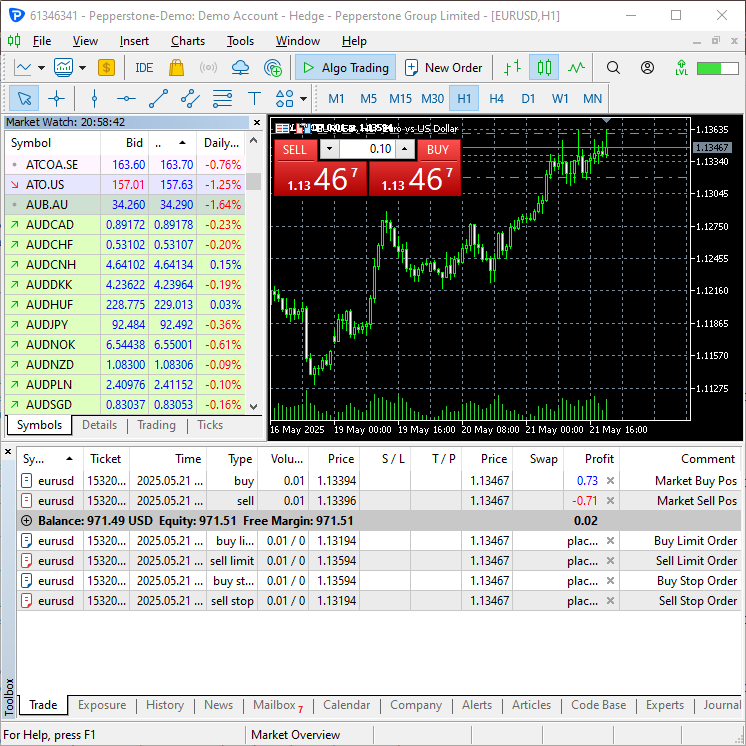
现在,让我们使用 Python 中的 CTrade 类来开设几个仓位和挂单。
import MetaTrader5 as mt5
from Trade.Trade import CTrade
from Trade.SymbolInfo import CSymbolInfo
from datetime import datetime, timedelta

if not mt5.initialize(r"c:\Users\Omega Joctan\AppData\Roaming\Pepperstone MetaTrader 5\terminal64.exe"):
    print("Failed to initialize Metatrader5 Error = ",mt5.last_error())
    quit()

symbol = "EURUSD"

m_symbol = CSymbolInfo(symbol=symbol)
m_trade = CTrade(magic_number=1001,
                 deviation_points=100,
                 filling_type_symbol=symbol)

m_symbol.refresh_rates()

ask = m_symbol.ask()
bid = m_symbol.bid()

lotsize = m_symbol.lots_min()

# === Market Orders ===

m_trade.buy(volume=lotsize, symbol=symbol, price=ask, sl=0.0, tp=0.0, comment="Market Buy Pos")
m_trade.sell(volume=lotsize, symbol=symbol, price=bid, sl=0.0, tp=0.0, comment="Market Sell Pos")

# expiration time for pending orders
expiration_time = datetime.now() + timedelta(minutes=1)

# === Pending Orders ===

# Buy Limit - price below current ask
m_trade.buy_limit(volume=lotsize, symbol=symbol, price=ask - 0.0020, sl=0.0, tp=0.0, type_time=mt5.ORDER_TIME_SPECIFIED, expiration=expiration_time,
                comment="Buy Limit Order")

# Sell Limit - price above current bid
m_trade.sell_limit(volume=lotsize, symbol=symbol, price=bid + 0.0020, sl=0.0, tp=0.0, type_time=mt5.ORDER_TIME_SPECIFIED, expiration=expiration_time,
                   comment="Sell Limit Order")

# Buy Stop - price above current ask
m_trade.buy_stop(volume=lotsize, symbol=symbol, price=ask + 0.0020, sl=0.0, tp=0.0, type_time=mt5.ORDER_TIME_SPECIFIED, expiration=expiration_time,
                 comment="Buy Stop Order")

# Sell Stop - price below current bid
m_trade.sell_stop(volume=lotsize, symbol=symbol, price=bid - 0.0020, sl=0.0, tp=0.0, type_time=mt5.ORDER_TIME_SPECIFIED, expiration=expiration_time,
                  comment="Sell Stop Order")

# Buy Stop Limit - stop price above ask, limit price slightly lower (near it)
m_trade.buy_stop_limit(volume=lotsize, symbol=symbol, price=ask + 0.0020, sl=0.0, tp=0.0, type_time=mt5.ORDER_TIME_SPECIFIED, expiration=expiration_time,
                       comment="Buy Stop Limit Order")

# Sell Stop Limit - stop price below bid, limit price slightly higher (near it)
m_trade.sell_stop_limit(volume=lotsize, symbol=symbol, price=bid - 0.0020, sl=0.0, tp=0.0, type_time=mt5.ORDER_TIME_SPECIFIED, expiration=expiration_time,
                        comment="Sell Stop Limit Order")

mt5.shutdown()
结果
结论
MQL5 中的交易类是件好东西,以前我们都是从头开始编写所有东西,这非常麻烦,而且正如我之前解释的那样,会导致很多错误。通过将 MetaTrader 5 python 包扩展到 Python 中语法与 MQL5 非常相似的库(模块),可以帮助开发人员利用他们已经掌握的 MQL5 知识来开发 Python 应用程序。
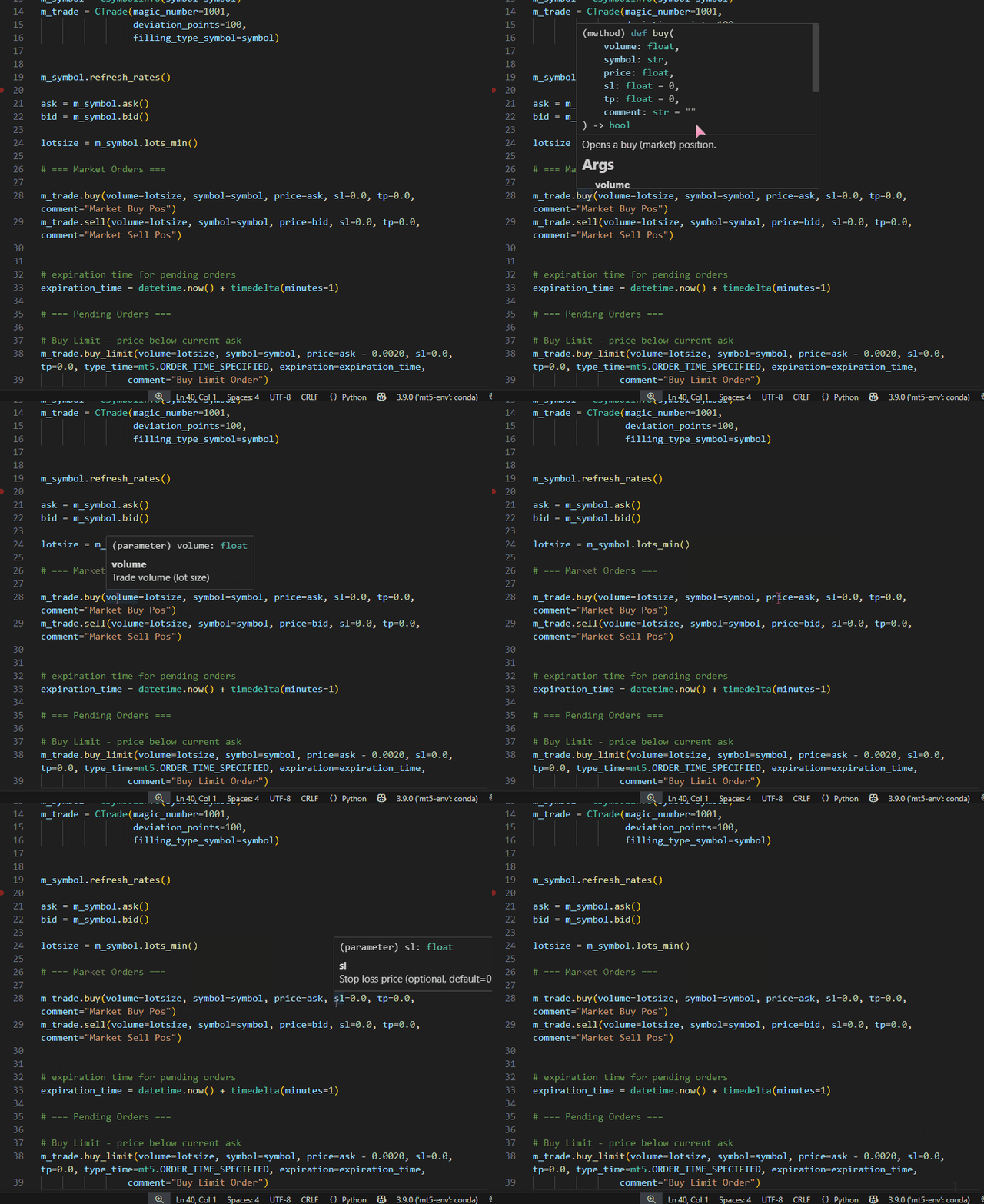
这些自定义 Python 库可以通过在 Python 函数和类中添加 “Docstrings” 来帮助缓解 Intellisense 支持问题,文本编辑器(例如 Visual Studio Code)可以帮助记录代码并突出显示参数,从而使编码过程变得有趣且更容易。例如,在 CTrade 类的 buy 方法中,有一个关于该函数的简短描述。
class CTrade:
# ....

    def buy(self, volume: float, symbol: str, price: float, sl: float=0.0, tp: float=0.0, comment: str="") -> bool:

        """
        Opens a buy (market) position.

        Args:
            volume: Trade volume (lot size)
            symbol: Trading symbol (e.g., "EURUSD")
            price: Execution price
            sl: Stop loss price (optional, default=0.0)
            tp: Take profit price (optional, default=0.0)
            comment: Position comment (optional, default="")

        Returns:
            bool: True if order was sent successfully, False otherwise
        """
现在将在 VS Code 中描述此函数。
简而言之,本文记录了我用 Python 编程语言为 MetaTrader5 编写的交易类,请在讨论区告诉我您的想法。
顺致敬意。
附件表
文件名和路径 | 描述与用途 |
|---|---|
模块(库) | |
| Trade\AccountInfo.py | 包含 CAccountInfo 类 |
| Trade\DealInfo.py | 包含 CDealInfo 类 |
| Trade\HistoryOrderInfo.py | 包含 CHistoryOrderInfo 类 |
| Trade\OrderInfo.py | 包含 OrderInfo 类 |
| Trade\PositionInfo.py | 包含 CPositionInfo 类 |
| Trade\SymbolInfo.py | 包含 CSymbolInfo 类 |
| Trade\TerminalInfo.py | 包含 CTerminalInfo 类 |
| Trade\Trade.py | 包含 CTrade 类 |
测试文件 | |
| accountinfo_test.py | 用于测试 CAccountInfo 类提供的方法的脚本 |
| dealinfo_test.py | 用于测试 CDealInfo 类提供的各种方法的脚本 |
| error_description.py | 包含将错误代码和返回代码描述为人类可读字符串的函数 |
| historyorderinfo_test.py | 用于测试 CHistoryOrderInfo 类提供的方法的脚本 |
| orderinfo_test.py | 用于测试 COrderInfo 类提供的方法的脚本 |
| positioninfo_test.py | 用于测试 CPositionInfo 类提供的方法的脚本 |
| symbolinfo_test.py | 用于测试 CSymbolInfo 类提供的各种方法的脚本 |
| terminalinfo_test.py | 用于测试 CTerminal 类提供的各种方法的脚本 |
| main.py | 这是一个用于测试 CTrade 类的脚本,可以把它看作是用 Python 编写的最终交易机器人。 |
本文由MetaQuotes Ltd译自英文
原文地址: https://www.mql5.com/en/articles/18208
注意: MetaQuotes Ltd.将保留所有关于这些材料的权利。全部或部分复制或者转载这些材料将被禁止。
本文由网站的一位用户撰写,反映了他们的个人观点。MetaQuotes Ltd 不对所提供信息的准确性负责,也不对因使用所述解决方案、策略或建议而产生的任何后果负责。

 MQL5 MVC模式中表格的视图组件:基础图形元素
 在MQL5中创建交易管理员面板(第十一部分):现代化功能通信接口(1)
 交易中的神经网络:基于 ResNeXt 模型的多任务学习
 从新手到专家:自动几何分析系统

已发布文章在 MetaTrader 5 中创建用于交易的 Python 类,与 MQL5 中的类类似:
作者:Omega J Msigwa
非常感谢!您的文章对今后的项目 非常有用.....