

MQL5で他の言語の実用的なモジュールを実装する(第2回):Pythonに着想を得たREQUESTSライブラリの構築
 253
253
 0
0

内容
- はじめに
- Webリクエストの作成
- 各種Webリクエストを異なる関数で処理する方法
- ファイルをWebにアップロードする
- Webからファイルを受信・ダウンロードする
- セッションとCookieの処理
- 基本認証
- URLパラメータの扱い
- 結論
はじめに
MetaTrader 5から直接HTTPリクエストを送信できるようになったことは、MQL5言語にとって画期的な進化のひとつです。この機能により、トレーダーは外部Webサイトやサーバー、取引アプリケーションなどと連携できるようになりました。
これにより、取引プラットフォーム内で外部データの取得、取引通知の送信など、さまざまな操作を行うことができるようになります。
この機能は、MQL5で利用できるWebRequest関数によって実現されています。この関数を使用することで、以下のようなあらゆるHTTPアクションを実行することが可能です。
- 「POST」リクエストを送信して外部サーバーに情報を送信する
- 「GET」リクエストを使用してWebから情報を取得する
- 「PATCH」リクエストを送信してサーバーデータベース上の情報を修正する
- 「PUT」リクエストを送信してサーバーデータベース内の値を更新する
これらはHTTP操作の一例にすぎません。
しかし、この単一のWebRequest関数は非常に強力である反面、扱いが難しく、ユーザーフレンドリーとは言えません。
単純なリクエストを送るだけでも多くの作業が必要で、HTTPメソッドやヘッダの設定などを手動でおこなわなければなりません。さらに、送受信するデータの処理も自分でハードコードする必要があります。

過去にWebフレームワークや他言語で同様のタスクを扱った経験がある方なら、MQL5以外の多くのフレームワークは、このような基本的な作業を自動的に処理できるよう設計されていることにお気づきでしょう。
その代表的な例が、Pythonのrequestsモジュールです。
Requestsモジュールは「HTTP for Humans(人間のためのHTTP)」と呼ばれるほど、シンプルでありながら洗練されたHTTPライブラリです。
このライブラリを使えば、PythonプログラマーはHTTP/1.1リクエストを非常に簡単に送信できるため、
URL内にクエリ文字列を手動で追加したり、PUTやPOSTデータをエンコードしたりする必要がありません。すべての処理が適切に設計され、開発者が技術的な細部を意識せずに操作できるようになっています。
本記事では、このPythonのrequestsモジュールに類似した機能、構文、操作性を持つモジュールをMQL5で実装します。これにより、MQL5でもPythonと同様に、簡潔で直感的にWebRequestをおこなえることを目指します。
Webリクエストの作成
これが、requestsモジュールにおける主要な機能です。request関数は、Web上でさまざまな形式のデータや情報を送受信するための中核となる関数です。
Pythonのrequestsモジュールで提供されているこのメソッドを再現する前に、まずはその関数の仕組みを確認してみましょう。
Pythonにおけるrequestメソッドは、以下のような形になっています。
def request(
    method: str | bytes,
    url: str | bytes,
    *,
    params: _Params | None = ...,
    data: _Data | None = ...,
    headers: _HeadersMapping | None = ...,
    cookies: CookieJar | _TextMapping | None = ...,
    files: _Files | None = ...,
    auth: _Auth | None = ...,
    timeout: _Timeout | None = ...,
    allow_redirects: bool = ...,
    proxies: _TextMapping | None = ...,
    hooks: _HooksInput | None = ...,
    stream: bool | None = ...,
    verify: _Verify | None = ...,
    cert: _Cert | None = ...,
    json: Any | None = None
) -> Response
この関数は、HTTP Webリクエストをおこなう際にいくつかの引数を受け取ります。ここではまず、基本的なパラメータのみを使って構築を始めましょう。使用する引数は、method、url、data、headers、timeout、jsonです。
CResponse CSession::request(const string method, //HTTP method GET, POST, etc
                             const string url, //endpoint url
                             const string data = "", //The data you want to send if the method is POST or PUT
                             const string headers = "", //HTTP headers
                             const int timeout = 5000, //Request timeout (milliseconds)
                             const bool is_json=true) //Checks whether the given data is in JSON format
  {
   char data_char[];
   char result[];
   string result_headers;
   string temp_data = data;

   CResponse response; //a structure containing various response fields

//--- Managing the headers

   string temp_headers = m_headers;
   if (headers != "") // If the user provided additional headers, append them
      temp_headers += headers;

//--- Updating the headers with the information received

   if(is_json) //If the information parsed is
     {
         //--- Convert dictionary to JSON string

         CJAVal js(NULL, jtUNDEF);
         bool b = js.Deserialize(data, CP_UTF8);

         string json;
         js.Serialize(json); //Get the serialized Json outcome
         temp_data = json; //Assign the resulting serialized Json to the temporary data array

         //--- Set "Content-Type: application/json"

         temp_headers = UpdateHeader(temp_headers, "Content-Type", "application/json");
         if (MQLInfoInteger(MQL_DEBUG))
           printf("%s: %s",__FUNCTION__,temp_headers);
     }
    else
      {
         temp_headers = UpdateHeader(temp_headers, headers);
         if (MQLInfoInteger(MQL_DEBUG))
           printf("%s: %s",__FUNCTION__,temp_headers);
      }

//--- Convert data to byte array (for POST, PUT, etc.)

   if (StringToCharArray(temp_data, data_char, 0, StringLen(temp_data), CP_UTF8)<0) //Convert the data in a string format to a uchar
      {
         printf("%s, Failed to convert data to a Char array. Error = %s",__FUNCTION__,ErrorDescription(GetLastError()));
         return response;
      }

//--- Perform the WebRequest

   uint start = GetTickCount(); //starting time of the request

   int status = WebRequest(method, url, temp_headers, timeout, data_char, result, result_headers); //trigger a webrequest function
   if(status == -1)
     {
      PrintFormat("WebRequest failed with error %s", ErrorDescription(GetLastError()));
      response.status_code = 0;
      return response;
     }

//--- Fill the response struct

   response.elapsed = (GetTickCount() - start);

   string results_string = CharArrayToString(result);
   response.text = results_string;

   CJAVal js;

   if (!js.Deserialize(result))
      if (MQLInfoInteger(MQL_DEBUG))
         printf("Failed to serialize data received from WebRequest");

   response.json = js;

   response.cookies = js["cookies"].ToStr();

   response.status_code = status;
   ArrayCopy(response.content, result);
   response.headers = result_headers;
   response.url = url;
   response.ok = (status >= 200 && status < 400);
   response.reason = WebStatusText(status); // a custom helper for translating status codes

   return response;
  }
Pythonのrequest関数では、HTTPリクエストにデータを渡す方法として2つの引数が用意されています。1つはdata引数で、非JSON形式のデータ(HTML、プレーンテキストなど)を送信するためのもの。もう1つはjson引数で、JSON形式のデータを送信するためのものです。
どちらの引数もサーバーに送る情報を指定しますが、同時に使用することはできません。つまり、送信できるのは「生データ」か「JSON形式のデータ」のいずれか一方のみです。
Pythonのrequest関数では、渡されたデータの種類(JSONかそれ以外か)を自動的に判別し、ユーザーが指定したヘッダをもとに適切に調整します。たとえば、JSONデータが与えられた場合には、ヘッダに「Content-Type: application/json」を追加または修正します。
一方、MQL5でも同様の2つの引数を持たせることは可能ですが、それではコードが煩雑になり混乱を招く恐れがあります。そのため、本記事で実装するMQL5の関数では、送信データを指定する引数をdataのみとし、is_jsonというブール型の引数を新たに設けて、dataに含まれる情報がJSON形式かどうかを区別するようにします。
このis_json引数がtrueに設定されている場合、ヘッダにContent-Type: application/jsonを追加または変更してからWebに送信します。ただし、その前に、関数内部で受け取ったdataを正しいJSON形式にシリアライズします。
//--- Updating the headers with the information received

   if(is_json) //If the information parsed is
     {
         //--- Convert dictionary to JSON string

         CJAVal js(NULL, jtUNDEF);
         bool b = js.Deserialize(data, CP_UTF8);

         string json;
         js.Serialize(json); //Get the serialized Json outcome
         temp_data = json; //Assign the resulting serialized Json to the temporary data array

         //--- Set "Content-Type: application/json"

         temp_headers = UpdateHeader(temp_headers, "Content-Type", "application/json");
         if (MQLInfoInteger(MQL_DEBUG))
           printf("%s: %s",__FUNCTION__,temp_headers);
     }
    else
      {
         temp_headers = UpdateHeader(temp_headers, headers);
         if (MQLInfoInteger(MQL_DEBUG))
           printf("%s: %s",__FUNCTION__,temp_headers);
      }
Pythonのrequestsモジュールで提供されているrequestメソッドは、HTTPレスポンスに応じて多数の変数を返し、リクエストの状態、受信データ、エラー情報などを含みます。
import requests

r = requests.get('https://api.github.com/events')

# Print the raw response
print("Raw response:", r)

# Status code
print("Status Code:", r.status_code)

# Reason phrase
print("Reason:", r.reason)

# URL (final URL after redirects)
print("URL:", r.url)

# Headers (dictionary)
print("Headers:")

#... other responses
これを実現するには、MQL5クラスに同様の構造が必要です。
ファイルrequests.mqh内にはCResponseクラスがあります。
struct CResponse
  {
   int               status_code; // HTTP status code (e.g., 200, 404)
   string            text;        // Raw response body as string

   CJAVal            json;        // Parses response as JSON
   uchar             content[];   // Raw bytes of the response
   string            headers;     // Dictionary of response headers
   string            cookies;     // Cookies set by the server
   string            url;         // Final URL after redirects
   bool              ok;          // True if status_code < 400
   uint              elapsed;     // Time taken for the response in ms
   string            reason;      // Text reason (e.g., "OK", "Not Found")
  };
これは、関数requestがCSessionクラス内で返す構造体です。これについては後ほど説明します。
記録のために、CResponseクラス内で保持される変数とその情報を以下の表にまとめます。
| 変数 | データ型 | 説明 |
|---|---|---|
| status_code | int | サーバーから返されたHTTPステータスコード(200=OK、404=Not Foundなど) |
| text | string | レスポンス本文の生文字列(HTML、JSON、テキストなど) |
| json | CJAVal | レスポンス本文をパースしたJSONオブジェクト(シリアライズ成功時) |
| content[] | uchar | レスポンス本文の生バイト配列(バイナリレスポンスに有用) |
| headers | string | HTTPレスポンスヘッダを格納する辞書。必要に応じてJSONに変換可能 |
| cookies | string | サーバーが設定したCookie(Set-cookieヘッダから抽出) |
| url | string | リダイレクト後の最終URL |
| ok | bool | ステータスコードが400未満の場合true(クライアント/サーバーエラーなし) |
| elapsed | uint | リクエスト完了までにかかった時間(ミリ秒) |
| reason | string | HTTPステータスコードのテキスト形式(人間が読める形式) |
以下は、request関数の使用例です。
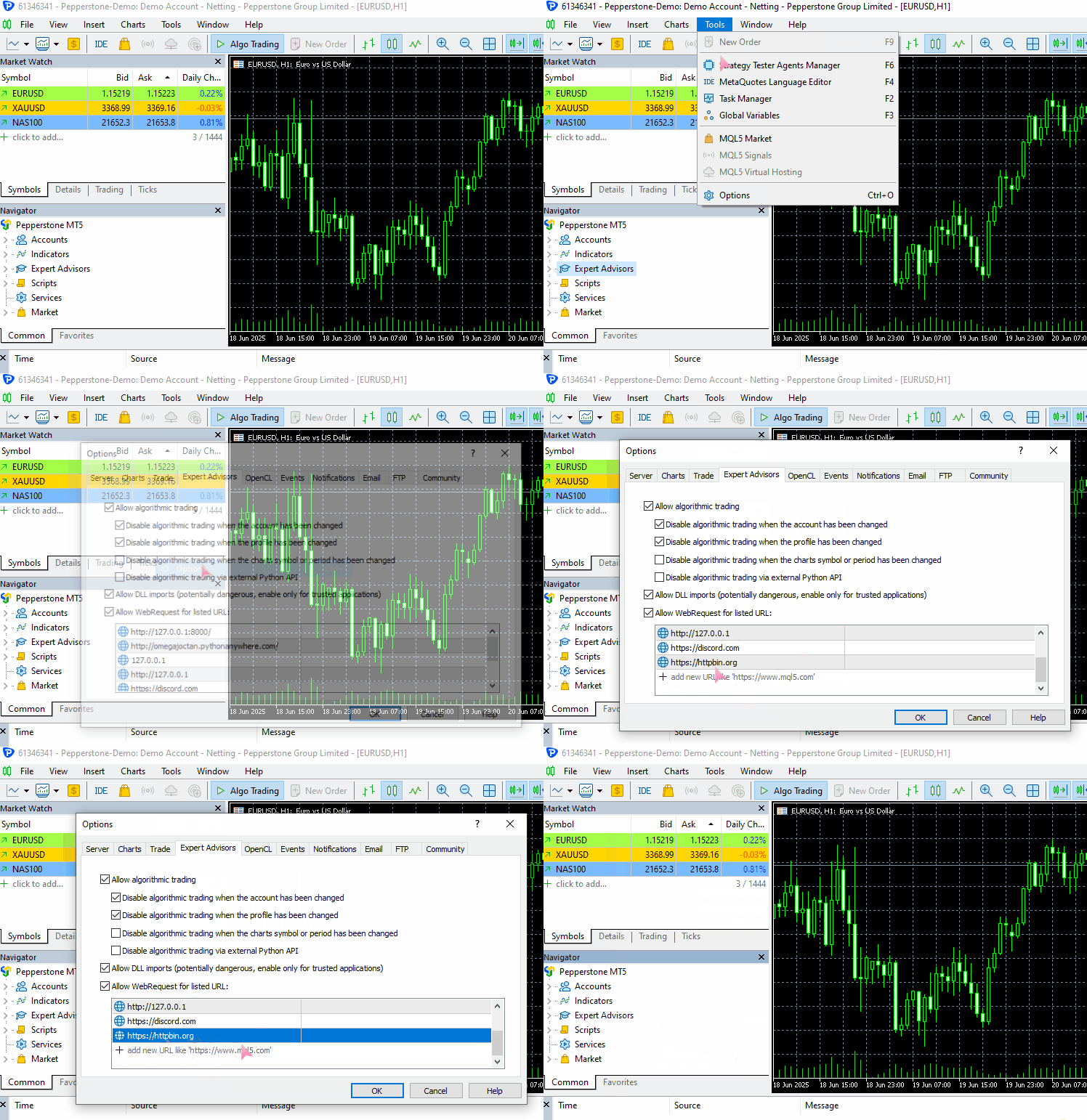
この例を実際に動作させるには、MetaTrader 5のURL許可リストにhttps://httpbin.org(テスト用URL)を追加してください。
(a):JSONデータの送信
#include <requests.mqh>
//+------------------------------------------------------------------+
//| Script program start function                                    |
//+------------------------------------------------------------------+
void OnStart()
  {
//---

     string json = "{\"username\": \"omega\", \"password\": \"secret123\"}";

     CResponse response = CSession::request("POST","https://httpbin.org/post", json, NULL, 5000, true);

      Print("Status Code: ", response.status_code);
      Print("Reason: ", response.reason);
      Print("URL: ", response.url);
      Print("OK: ", (string)response.ok);
      Print("Elapsed Time (ms): ", response.elapsed);

      Print("Headers:\n", response.headers);
      Print("Cookies: ", response.cookies);
      Print("Response: ",response.text);
      Print("JSON:\n", response.json["url"].ToStr());
 }
以下が出力です。
JF      0       08:10:33.226    Requests test (XAUUSD,D1)       CSession::request: Content-Type: application/json
GF      0       08:10:33.226    Requests test (XAUUSD,D1)
MI      0       08:10:34.578    Requests test (XAUUSD,D1)       Status Code: 200
PS      0       08:10:34.578    Requests test (XAUUSD,D1)       Reason: OK
LH      0       08:10:34.578    Requests test (XAUUSD,D1)       URL: https://httpbin.org/post
HP      0       08:10:34.578    Requests test (XAUUSD,D1)       OK: true
IF      0       08:10:34.578    Requests test (XAUUSD,D1)       Elapsed Time (ms): 1343
HO      0       08:10:34.578    Requests test (XAUUSD,D1)       Headers:
QE      0       08:10:34.578    Requests test (XAUUSD,D1)       Date: Fri, 04 Jul 2025 05:10:35 GMT
MG      0       08:10:34.578    Requests test (XAUUSD,D1)       Content-Type: application/json
HQ      0       08:10:34.578    Requests test (XAUUSD,D1)       Content-Length: 619
IH      0       08:10:34.578    Requests test (XAUUSD,D1)       Connection: keep-alive
JL      0       08:10:34.578    Requests test (XAUUSD,D1)       Server: gunicorn/19.9.0
QD      0       08:10:34.578    Requests test (XAUUSD,D1)       Access-Control-Allow-Origin: *
IO      0       08:10:34.578    Requests test (XAUUSD,D1)       Access-Control-Allow-Credentials: true
PI      0       08:10:34.578    Requests test (XAUUSD,D1)
GO      0       08:10:34.578    Requests test (XAUUSD,D1)       Cookies:
HH      0       08:10:34.578    Requests test (XAUUSD,D1)       Response: {
QL      0       08:10:34.578    Requests test (XAUUSD,D1)         "args": {},
FK      0       08:10:34.578    Requests test (XAUUSD,D1)         "data": "{\"username\":\"omega\",\"password\":\"secret123\"}",
MN      0       08:10:34.578    Requests test (XAUUSD,D1)         "files": {},
RH      0       08:10:34.578    Requests test (XAUUSD,D1)         "form": {},
OP      0       08:10:34.578    Requests test (XAUUSD,D1)         "headers": {
CH      0       08:10:34.578    Requests test (XAUUSD,D1)           "Accept": "*/*",
GM      0       08:10:34.578    Requests test (XAUUSD,D1)           "Accept-Encoding": "gzip, deflate",
HQ      0       08:10:34.578    Requests test (XAUUSD,D1)           "Accept-Language": "en;q=0.5",
GH      0       08:10:34.578    Requests test (XAUUSD,D1)           "Content-Length": "43",
IR      0       08:10:34.578    Requests test (XAUUSD,D1)           "Content-Type": "application/json",
EI      0       08:10:34.578    Requests test (XAUUSD,D1)           "Host": "httpbin.org",
NH      0       08:10:34.578    Requests test (XAUUSD,D1)           "User-Agent": "MetaTrader 5 Terminal/5.5120 (Windows NT 10.0.19045; x64)",
HK      0       08:10:34.578    Requests test (XAUUSD,D1)           "X-Amzn-Trace-Id": "Root=1-6867624b-422e528808290adf61a651a3"
IN      0       08:10:34.578    Requests test (XAUUSD,D1)         },
GD      0       08:10:34.578    Requests test (XAUUSD,D1)         "json": {
CN      0       08:10:34.578    Requests test (XAUUSD,D1)           "password": "secret123",
KD      0       08:10:34.578    Requests test (XAUUSD,D1)           "username": "omega"
QM      0       08:10:34.578    Requests test (XAUUSD,D1)         },
EJ      0       08:10:34.578    Requests test (XAUUSD,D1)         "origin": "197.250.227.26",
FQ      0       08:10:34.578    Requests test (XAUUSD,D1)         "url": "https://httpbin.org/post"
EG      0       08:10:34.578    Requests test (XAUUSD,D1)       }
PR      0       08:10:34.578    Requests test (XAUUSD,D1)
NF      0       08:10:34.578    Requests test (XAUUSD,D1)       JSON:
CR      0       08:10:34.578    Requests test (XAUUSD,D1)       https://httpbin.org/post
(b):非JSONデータの送信
以下ではフォームデータを例に説明します。
#include <requests.mqh>
CSession requests;
//+------------------------------------------------------------------+
//| Script program start function                                    |
//+------------------------------------------------------------------+
void OnStart()
  {
//---

     string form_data = "username=omega&password=secret123"; //mimicking how the final form data is collected in the web

     CResponse response = CSession::post("https://httpbin.org/post", form_data, "Content-Type: application/x-www-form-urlencoded", 5000, false);

      Print("Status Code: ", response.status_code);
      Print("Reason: ", response.reason);
      Print("URL: ", response.url);
      Print("OK: ", (string)response.ok);
      Print("Elapsed Time (ms): ", response.elapsed);

      Print("Headers:\n", response.headers);
      Print("Cookies: ", response.cookies);
      Print("Response: ",response.text);
      Print("JSON:\n", response.json["url"].ToStr());
 }
以下が出力です。
DD      0       08:20:01.411    Requests test (XAUUSD,D1)       Status Code: 200
IN      0       08:20:01.411    Requests test (XAUUSD,D1)       Reason: OK
EG      0       08:20:01.411    Requests test (XAUUSD,D1)       URL: https://httpbin.org/post
QM      0       08:20:01.411    Requests test (XAUUSD,D1)       OK: true
RI      0       08:20:01.411    Requests test (XAUUSD,D1)       Elapsed Time (ms): 1547
QR      0       08:20:01.411    Requests test (XAUUSD,D1)       Headers:
EH      0       08:20:01.411    Requests test (XAUUSD,D1)       Date: Fri, 04 Jul 2025 05:20:02 GMT
DL      0       08:20:01.411    Requests test (XAUUSD,D1)       Content-Type: application/json
MD      0       08:20:01.411    Requests test (XAUUSD,D1)       Content-Length: 587
PM      0       08:20:01.411    Requests test (XAUUSD,D1)       Connection: keep-alive
OK      0       08:20:01.411    Requests test (XAUUSD,D1)       Server: gunicorn/19.9.0
HS      0       08:20:01.411    Requests test (XAUUSD,D1)       Access-Control-Allow-Origin: *
PD      0       08:20:01.411    Requests test (XAUUSD,D1)       Access-Control-Allow-Credentials: true
IF      0       08:20:01.411    Requests test (XAUUSD,D1)
RD      0       08:20:01.411    Requests test (XAUUSD,D1)       Cookies:
QM      0       08:20:01.411    Requests test (XAUUSD,D1)       Response: {
HK      0       08:20:01.411    Requests test (XAUUSD,D1)         "args": {},
OR      0       08:20:01.411    Requests test (XAUUSD,D1)         "data": "",
JE      0       08:20:01.411    Requests test (XAUUSD,D1)         "files": {},
RL      0       08:20:01.411    Requests test (XAUUSD,D1)         "form": {
DF      0       08:20:01.411    Requests test (XAUUSD,D1)           "password": "secret123",
PM      0       08:20:01.411    Requests test (XAUUSD,D1)           "username": "omega"
RE      0       08:20:01.411    Requests test (XAUUSD,D1)         },
PL      0       08:20:01.411    Requests test (XAUUSD,D1)         "headers": {
DE      0       08:20:01.411    Requests test (XAUUSD,D1)           "Accept": "*/*",
LP      0       08:20:01.411    Requests test (XAUUSD,D1)           "Accept-Encoding": "gzip, deflate",
CF      0       08:20:01.411    Requests test (XAUUSD,D1)           "Accept-Language": "en;q=0.5",
EK      0       08:20:01.411    Requests test (XAUUSD,D1)           "Content-Length": "33",
EL      0       08:20:01.411    Requests test (XAUUSD,D1)           "Content-Type": "application/x-www-form-urlencoded",
PH      0       08:20:01.411    Requests test (XAUUSD,D1)           "Host": "httpbin.org",
GO      0       08:20:01.411    Requests test (XAUUSD,D1)           "User-Agent": "MetaTrader 5 Terminal/5.5120 (Windows NT 10.0.19045; x64)",
FQ      0       08:20:01.411    Requests test (XAUUSD,D1)           "X-Amzn-Trace-Id": "Root=1-68676482-6439a0a071c275773681a193"
LM      0       08:20:01.411    Requests test (XAUUSD,D1)         },
JE      0       08:20:01.411    Requests test (XAUUSD,D1)         "json": null,
LM      0       08:20:01.411    Requests test (XAUUSD,D1)         "origin": "197.250.227.26",
KH      0       08:20:01.411    Requests test (XAUUSD,D1)         "url": "https://httpbin.org/post"
LN      0       08:20:01.411    Requests test (XAUUSD,D1)       }
IK      0       08:20:01.411    Requests test (XAUUSD,D1)
CO      0       08:20:01.411    Requests test (XAUUSD,D1)       JSON:
NK      0       08:20:01.411    Requests test (XAUUSD,D1)       https://httpbin.org/post
うまくいきました。同じWebリクエスト関数を使用して、2つの異なるデータ型を送信することができました。
注意点として、非JSONデータ(この場合はフォームデータ)を送信する際には、request関数のheaders引数でContent-Typeを明示的に設定して、送信するデータ形式に対応させる必要があります。
JSONデータの場合は、自動的にシリアライズされ、適切なHTTPヘッダ(Content-Type: application/json)が設定されるため、手動で指定する必要はありません。
詳細については、https://beeceptor.com/docs/concepts/content-type/index.htmlをご覧ください。
このrequest関数は、MQL5のネイティブ関数と同様にあらゆる種類のHTTPリクエストを送信できるようになっており、ほぼその拡張版といえます。
しかし、この関数は非常に柔軟である反面、操作を誤るとエラーが発生しやすくなります。たとえば、GETリクエストでWebから情報を取得したい場合を考えます。
ご存じの通り、GETリクエストは本来データを送信するためのものではないため、誤ってデータを送信するのは適切ではありません。このようなエラーを減らすため、Pythonのrequestsモジュールには、特定の用途に合わせた高レベルの関数が用意されており、リクエストの種類に応じて適切な処理が自動で行われるようになっています。
各種Webリクエストを異なる関数で処理する方法
前のセクションで実装したrequest関数を基に、HTTPの各種操作に対応する複数の関数を作成できます。
(a):get関数
static CResponse         get(const string url, const string headers = "", const int timeout = 5000)
  {
    return request("GET", url, "", headers, timeout, false);
  }
この関数は、指定したURLに対してGETリクエストを送信します。GETリクエストは情報を取得するためのものであり、呼び出した際にURLへデータを送信することはありません。
使用法
#include <requests.mqh>
//+------------------------------------------------------------------+
//| Script program start function                                    |
//+------------------------------------------------------------------+
void OnStart()
  {
//---

      CResponse response = CSession::get("https://httpbin.org/get");

      Print("Status Code: ", response.status_code);
      Print("Reason: ", response.reason);
      Print("URL: ", response.url);
      Print("OK: ", (string)response.ok);
      Print("Elapsed Time (ms): ", response.elapsed);

      Print("Headers:\n", response.headers);
      Print("Cookies: ", response.cookies);
      Print("Response: ",response.text);
      Print("JSON:\n", response.json["url"].ToStr());
  }
以下が出力です。
LM      0       09:50:48.904    Requests test (XAUUSD,D1)       Status Code: 200
QF      0       09:50:48.904    Requests test (XAUUSD,D1)       Reason: OK
GQ      0       09:50:48.904    Requests test (XAUUSD,D1)       URL: https://httpbin.org/get
CD      0       09:50:48.904    Requests test (XAUUSD,D1)       OK: true
EQ      0       09:50:48.904    Requests test (XAUUSD,D1)       Elapsed Time (ms): 1782
KJ      0       09:50:48.904    Requests test (XAUUSD,D1)       Headers:
JQ      0       09:50:48.904    Requests test (XAUUSD,D1)       Date: Fri, 04 Jul 2025 06:50:49 GMT
JD      0       09:50:48.904    Requests test (XAUUSD,D1)       Content-Type: application/json
NL      0       09:50:48.904    Requests test (XAUUSD,D1)       Content-Length: 379
NE      0       09:50:48.904    Requests test (XAUUSD,D1)       Connection: keep-alive
MS      0       09:50:48.904    Requests test (XAUUSD,D1)       Server: gunicorn/19.9.0
NH      0       09:50:48.904    Requests test (XAUUSD,D1)       Access-Control-Allow-Origin: *
FL      0       09:50:48.904    Requests test (XAUUSD,D1)       Access-Control-Allow-Credentials: true
KM      0       09:50:48.904    Requests test (XAUUSD,D1)
LL      0       09:50:48.904    Requests test (XAUUSD,D1)       Cookies:
CE      0       09:50:48.904    Requests test (XAUUSD,D1)       Response: {
FS      0       09:50:48.904    Requests test (XAUUSD,D1)         "args": {},
DJ      0       09:50:48.904    Requests test (XAUUSD,D1)         "headers": {
PR      0       09:50:48.904    Requests test (XAUUSD,D1)           "Accept": "*/*",
DF      0       09:50:48.904    Requests test (XAUUSD,D1)           "Accept-Encoding": "gzip, deflate",
KO      0       09:50:48.904    Requests test (XAUUSD,D1)           "Accept-Language": "en;q=0.5",
JL      0       09:50:48.904    Requests test (XAUUSD,D1)           "Host": "httpbin.org",
QK      0       09:50:48.904    Requests test (XAUUSD,D1)           "User-Agent": "MetaTrader 5 Terminal/5.5120 (Windows NT 10.0.19045; x64)",
JI      0       09:50:48.904    Requests test (XAUUSD,D1)           "X-Amzn-Trace-Id": "Root=1-686779c9-147d77346060e72a2fa2282f"
FH      0       09:50:48.904    Requests test (XAUUSD,D1)         },
RI      0       09:50:48.904    Requests test (XAUUSD,D1)         "origin": "197.250.227.26",
CJ      0       09:50:48.904    Requests test (XAUUSD,D1)         "url": "https://httpbin.org/get"
PR      0       09:50:48.904    Requests test (XAUUSD,D1)       }
QG      0       09:50:48.904    Requests test (XAUUSD,D1)
KK      0       09:50:48.904    Requests test (XAUUSD,D1)       JSON:
DQ      0       09:50:48.904    Requests test (XAUUSD,D1)       https://httpbin.org/get
get関数では、HTTPリクエストにヘッダを渡すことは可能ですが、ヘッダでContent-Typeを指定しても、サーバーから受信するコンテンツの種類を制御することはできません。
(b):post関数
static CResponse         post(const string url, const string data = "", const string headers = "", const int timeout = 5000, const bool is_json=true)
  {
    return request("POST", url, data, headers, timeout, is_json);
  }
この関数は、指定したURLに対してPOSTリクエストを送信し、必要に応じてデータペイロードを付加できます。request関数と同様に、引数is_jsonがtrueの場合は、自動的にContent-Typeを設定します。
使用法
#include <requests.mqh>
//+------------------------------------------------------------------+
//| Script program start function                                    |
//+------------------------------------------------------------------+
void OnStart()
  {
//---

      string json = "{\"username\": \"omega\", \"password\": \"secret123\"}";
      CResponse response = CSession::post("https://httpbin.org/post",json);

      Print("Status Code: ", response.status_code);
      Print("Reason: ", response.reason);
      Print("URL: ", response.url);
      Print("OK: ", (string)response.ok);
      Print("Elapsed Time (ms): ", response.elapsed);

      Print("Headers:\n", response.headers);
      Print("Cookies: ", response.cookies);
      Print("Response: ",response.text);
      Print("JSON:\n", response.json["url"].ToStr());
 }
以下が出力です。
NK      0       15:32:13.093    Requests test (XAUUSD,D1)       Status Code: 200
OP      0       15:32:13.093    Requests test (XAUUSD,D1)       Reason: OK
KE      0       15:32:13.093    Requests test (XAUUSD,D1)       URL: https://httpbin.org/post
GR      0       15:32:13.093    Requests test (XAUUSD,D1)       OK: true
LD      0       15:32:13.093    Requests test (XAUUSD,D1)       Elapsed Time (ms): 1578
GL      0       15:32:13.093    Requests test (XAUUSD,D1)       Headers:
PK      0       15:32:13.093    Requests test (XAUUSD,D1)       Date: Fri, 04 Jul 2025 12:32:13 GMT
NR      0       15:32:13.093    Requests test (XAUUSD,D1)       Content-Type: application/json
GG      0       15:32:13.093    Requests test (XAUUSD,D1)       Content-Length: 619
JN      0       15:32:13.093    Requests test (XAUUSD,D1)       Connection: keep-alive
II      0       15:32:13.093    Requests test (XAUUSD,D1)       Server: gunicorn/19.9.0
RF      0       15:32:13.093    Requests test (XAUUSD,D1)       Access-Control-Allow-Origin: *
JR      0       15:32:13.093    Requests test (XAUUSD,D1)       Access-Control-Allow-Credentials: true
OK      0       15:32:13.093    Requests test (XAUUSD,D1)
HQ      0       15:32:13.093    Requests test (XAUUSD,D1)       Cookies:
GK      0       15:32:13.093    Requests test (XAUUSD,D1)       Response: {
RN      0       15:32:13.093    Requests test (XAUUSD,D1)         "args": {},
EN      0       15:32:13.093    Requests test (XAUUSD,D1)         "data": "{\"username\":\"omega\",\"password\":\"secret123\"}",
NL      0       15:32:13.093    Requests test (XAUUSD,D1)         "files": {},
QJ      0       15:32:13.093    Requests test (XAUUSD,D1)         "form": {},
PS      0       15:32:13.093    Requests test (XAUUSD,D1)         "headers": {
DJ      0       15:32:13.093    Requests test (XAUUSD,D1)           "Accept": "*/*",
HO      0       15:32:13.093    Requests test (XAUUSD,D1)           "Accept-Encoding": "gzip, deflate",
GG      0       15:32:13.093    Requests test (XAUUSD,D1)           "Accept-Language": "en;q=0.5",
HJ      0       15:32:13.093    Requests test (XAUUSD,D1)           "Content-Length": "43",
JM      0       15:32:13.093    Requests test (XAUUSD,D1)           "Content-Type": "application/json",
FK      0       15:32:13.093    Requests test (XAUUSD,D1)           "Host": "httpbin.org",
MN      0       15:32:13.093    Requests test (XAUUSD,D1)           "User-Agent": "MetaTrader 5 Terminal/5.5120 (Windows NT 10.0.19045; x64)",
IM      0       15:32:13.093    Requests test (XAUUSD,D1)           "X-Amzn-Trace-Id": "Root=1-6867c9cd-64a83cd77115a2575214fecd"
JS      0       15:32:13.093    Requests test (XAUUSD,D1)         },
HJ      0       15:32:13.093    Requests test (XAUUSD,D1)         "json": {
DL      0       15:32:13.093    Requests test (XAUUSD,D1)           "password": "secret123",
LK      0       15:32:13.093    Requests test (XAUUSD,D1)           "username": "omega"
RS      0       15:32:13.093    Requests test (XAUUSD,D1)         },
FG      0       15:32:13.093    Requests test (XAUUSD,D1)         "origin": "197.250.227.26",
EO      0       15:32:13.093    Requests test (XAUUSD,D1)         "url": "https://httpbin.org/post"
FE      0       15:32:13.093    Requests test (XAUUSD,D1)       }
OL      0       15:32:13.093    Requests test (XAUUSD,D1)
MD      0       15:32:13.093    Requests test (XAUUSD,D1)       JSON:
DD      0       15:32:13.093    Requests test (XAUUSD,D1)       https://httpbin.org/post
(c):put関数
この関数は、指定したデータを用いてURL上のリソースを更新するために、PUTリクエストを送信します。
static CResponse         put(const string url, const string data = "", const string headers = "", const int timeout = 5000, const bool is_json=true)
  {
    return request("PUT", url, data, headers, timeout, is_json);
  }
使用例
#include <requests.mqh>
//+------------------------------------------------------------------+
//| Script program start function                                    |
//+------------------------------------------------------------------+
void OnStart()
  {
//---

      string json = "{\"username\": \"omega\", \"password\": \"secret123\"}";
      CResponse response = CSession::put("https://httpbin.org/put",json);

      Print("Status Code: ", response.status_code);
      Print("Reason: ", response.reason);
      Print("URL: ", response.url);
      Print("OK: ", (string)response.ok);
      Print("Elapsed Time (ms): ", response.elapsed);

      Print("Headers:\n", response.headers);
      Print("Cookies: ", response.cookies);
      Print("Response: ",response.text);
      Print("JSON:\n", response.json["url"].ToStr());
 }
以下が出力です。
#include <requests.mqh>
//+------------------------------------------------------------------+
//| Script program start function                                    |
//+------------------------------------------------------------------+
void OnStart()
  {
//---

      string json = "{\"update\": true}";
      CResponse response = CSession::put("https://httpbin.org/put", json, "", 5000, true);

      Print("Reason: ", response.reason);
      Print("Response: ",response.text);
  }
以下が出力です。
MG      0       15:51:02.874    Requests test (XAUUSD,D1)       Reason: OK
EQ      0       15:51:02.874    Requests test (XAUUSD,D1)       Response: {
HG      0       15:51:02.874    Requests test (XAUUSD,D1)         "args": {},
JM      0       15:51:02.874    Requests test (XAUUSD,D1)         "data": "{\"update\":true}",
LJ      0       15:51:02.874    Requests test (XAUUSD,D1)         "files": {},
CM      0       15:51:02.874    Requests test (XAUUSD,D1)         "form": {},
FE      0       15:51:02.874    Requests test (XAUUSD,D1)         "headers": {
RO      0       15:51:02.874    Requests test (XAUUSD,D1)           "Accept": "*/*",
JI      0       15:51:02.874    Requests test (XAUUSD,D1)           "Accept-Encoding": "gzip, deflate",
QL      0       15:51:02.874    Requests test (XAUUSD,D1)           "Accept-Language": "en;q=0.5",
KE      0       15:51:02.874    Requests test (XAUUSD,D1)           "Content-Length": "15",
LG      0       15:51:02.874    Requests test (XAUUSD,D1)           "Content-Type": "application/json",
PL      0       15:51:02.874    Requests test (XAUUSD,D1)           "Host": "httpbin.org",
KD      0       15:51:02.874    Requests test (XAUUSD,D1)           "User-Agent": "MetaTrader 5 Terminal/5.5120 (Windows NT 10.0.19045; x64)",
KH      0       15:51:02.874    Requests test (XAUUSD,D1)           "X-Amzn-Trace-Id": "Root=1-6867ce36-76b6e4053cd661ec5e4faa1b"
HI      0       15:51:02.874    Requests test (XAUUSD,D1)         },
NG      0       15:51:02.874    Requests test (XAUUSD,D1)         "json": {
DQ      0       15:51:02.874    Requests test (XAUUSD,D1)           "update": true
PG      0       15:51:02.874    Requests test (XAUUSD,D1)         },
PS      0       15:51:02.874    Requests test (XAUUSD,D1)         "origin": "197.250.227.26",
HD      0       15:51:02.874    Requests test (XAUUSD,D1)         "url": "https://httpbin.org/put"
RH      0       15:51:02.874    Requests test (XAUUSD,D1)       }
CI      0       15:51:02.874    Requests test (XAUUSD,D1)
(d):patch関数
static CResponse         patch(const string url, const string data = "", const string headers = "", const int timeout = 5000, const bool is_json=true)
  {
    return request("PATCH", url, data, headers, timeout, is_json);
  }
この関数は、指定したデータを用いてURL上のリソースを部分的に更新するために、PATCHリクエストを送信します。
使用例
#include <requests.mqh>
//+------------------------------------------------------------------+
//| Script program start function                                    |
//+------------------------------------------------------------------+
void OnStart()
  {
//---

      string json = "{\"patched\": 1}";
      CResponse response = CSession::patch("https://httpbin.org/patch", json, "", 5000, true);

      Print("Reason: ", response.reason);
      Print("Response: ",response.text);
  }
以下が出力です。
GR      0       16:33:45.258    Requests test (XAUUSD,D1)       Reason: OK
OF      0       16:33:45.258    Requests test (XAUUSD,D1)       Response: {
RR      0       16:33:45.258    Requests test (XAUUSD,D1)         "args": {},
GJ      0       16:33:45.258    Requests test (XAUUSD,D1)         "data": "{\"patched\":1}",
NL      0       16:33:45.258    Requests test (XAUUSD,D1)         "files": {},
IK      0       16:33:45.258    Requests test (XAUUSD,D1)         "form": {},
HS      0       16:33:45.258    Requests test (XAUUSD,D1)         "headers": {
LE      0       16:33:45.258    Requests test (XAUUSD,D1)           "Accept": "*/*",
HO      0       16:33:45.258    Requests test (XAUUSD,D1)           "Accept-Encoding": "gzip, deflate",
OF      0       16:33:45.258    Requests test (XAUUSD,D1)           "Accept-Language": "en;q=0.5",
CJ      0       16:33:45.258    Requests test (XAUUSD,D1)           "Content-Length": "13",
RM      0       16:33:45.258    Requests test (XAUUSD,D1)           "Content-Type": "application/json",
FK      0       16:33:45.258    Requests test (XAUUSD,D1)           "Host": "httpbin.org",
MN      0       16:33:45.258    Requests test (XAUUSD,D1)           "User-Agent": "MetaTrader 5 Terminal/5.5120 (Windows NT 10.0.19045; x64)",
GN      0       16:33:45.258    Requests test (XAUUSD,D1)           "X-Amzn-Trace-Id": "Root=1-6867d837-47b9eb772b7ec6300016aa79"
JS      0       16:33:45.258    Requests test (XAUUSD,D1)         },
HJ      0       16:33:45.258    Requests test (XAUUSD,D1)         "json": {
MR      0       16:33:45.258    Requests test (XAUUSD,D1)           "patched": 1
FH      0       16:33:45.258    Requests test (XAUUSD,D1)         },
RI      0       16:33:45.258    Requests test (XAUUSD,D1)         "origin": "197.250.227.26",
KK      0       16:33:45.258    Requests test (XAUUSD,D1)         "url": "https://httpbin.org/patch"
DS      0       16:33:45.258    Requests test (XAUUSD,D1)       }
(e):delete関数
static CResponse         delete_(const string url, const string headers = "", const int timeout = 5000, const bool is_json=true)
  {
    return request("DELETE", url, "", headers, timeout, is_json);
  }
この関数は、指定したURL上のリソースを削除するために、DELETEリクエストを送信します。データペイロードは使用されません。
使用例
#include <requests.mqh>
//+------------------------------------------------------------------+
//| Script program start function                                    |
//+------------------------------------------------------------------+
void OnStart()
  {
//---

      CResponse response = CSession::delete_("https://httpbin.org/delete", "", 5000, true);

      Print("Reason: ", response.reason);
      Print("Response: ",response.text);
 }
以下が出力です。
ML      0       16:43:03.046    Requests test (XAUUSD,D1)       Reason: OK
EL      0       16:43:03.046    Requests test (XAUUSD,D1)       Response: {
HH      0       16:43:03.046    Requests test (XAUUSD,D1)         "args": {},
OR      0       16:43:03.046    Requests test (XAUUSD,D1)         "data": "",
JD      0       16:43:03.046    Requests test (XAUUSD,D1)         "files": {},
ER      0       16:43:03.046    Requests test (XAUUSD,D1)         "form": {},
DK      0       16:43:03.046    Requests test (XAUUSD,D1)         "headers": {
PR      0       16:43:03.046    Requests test (XAUUSD,D1)           "Accept": "*/*",
LG      0       16:43:03.046    Requests test (XAUUSD,D1)           "Accept-Encoding": "gzip, deflate",
KO      0       16:43:03.046    Requests test (XAUUSD,D1)           "Accept-Language": "en;q=0.5",
QQ      0       16:43:03.046    Requests test (XAUUSD,D1)           "Content-Length": "0",
HE      0       16:43:03.046    Requests test (XAUUSD,D1)           "Content-Type": "application/json",
LS      0       16:43:03.046    Requests test (XAUUSD,D1)           "Host": "httpbin.org",
GF      0       16:43:03.046    Requests test (XAUUSD,D1)           "User-Agent": "MetaTrader 5 Terminal/5.5120 (Windows NT 10.0.19045; x64)",
JK      0       16:43:03.046    Requests test (XAUUSD,D1)           "X-Amzn-Trace-Id": "Root=1-6867da67-1926ebf246353ab24461aed9"
LK      0       16:43:03.046    Requests test (XAUUSD,D1)         },
FL      0       16:43:03.046    Requests test (XAUUSD,D1)         "json": null,
PG      0       16:43:03.046    Requests test (XAUUSD,D1)         "origin": "197.250.227.26",
PO      0       16:43:03.046    Requests test (XAUUSD,D1)         "url": "https://httpbin.org/delete"
HE      0       16:43:03.046    Requests test (XAUUSD,D1)       }
QL      0       16:43:03.046    Requests test (XAUUSD,D1)
ファイルをWebにアップロードする
Pythonのrequestsモジュールは、インターネット上でファイルを送受信する作業を非常に簡単におこなえますが、MQL5の標準WebRequest関数では同様の処理は容易ではありません。
現代の取引環境では、ファイルをWebに送信できることは効果的なコミュニケーションに欠かせません。たとえば、取引の進捗を示すチャートのスクリーンショットを送信したり、MetaTrader 5のチャートから直接取引設定や視覚的シグナルを示したりすることがあります。
これはCSession-MQL5クラスにおいて最も難しい部分のひとつです。ユーザーがアップロードできるファイル形式を考慮し、ファイルから抽出したバイナリ情報に適切なエンコードを適用する必要があります。また、各ファイル形式に応じた正しいHTTPヘッダを設定することも求められます。
CResponse CSession::request(const string method,
                             const string url,
                             const string data,
                             const string &files[],
                             const string headers = "",
                             const int timeout = 5000,
                             const bool is_json=true)
 {
   char result[];
   string result_headers;
   string temp_headers = m_headers;
   string boundary = "----WebKitFormBoundary7MA4YWxkTrZu0gW"; //for setting boundaries between data types and files in the form data
   CArrayChar final_body; //Final body uchar array

   CResponse response; //a structure containing various response fields

   // Append user headers
   if (headers != "")
      temp_headers += headers;

   bool use_multipart = ArraySize(files) > 0; //Check if files are attached

//--- Create a multi part request

   if (use_multipart) // If multipart, assemble full body (JSON + files)
    {
      temp_headers = UpdateHeader(temp_headers, "Content-Type", "multipart/form-data; boundary=" + boundary + "\r\n"); //Update the headers

      //--- JSON part (or form data)
      if (StringLen(data) > 0)
      {
         string json_data = "";
         if (is_json) //if Json data is given alongside the files
          {
            CJAVal js(NULL, jtUNDEF);
            if (js.Deserialize(data, CP_UTF8))
               js.Serialize(json_data); //Serialize the JSON data
          }

         string json_part = "--" + boundary + "\r\n";
         json_part += "Content-Disposition: form-data; name=\"metadata\"\r\n";
         json_part += "Content-Type: application/json\r\n\r\n";
         json_part += json_data + "\r\n";

         char json_bytes[];
         StringToCharArray(json_part, json_bytes, 0, StringLen(json_part), CP_UTF8);

         final_body.AddArray(json_bytes);
      }

      //--- File parts
      for (uint i = 0; i < files.Size(); i++)
       {
         string filename = GetFileName(files[i]);

         char file_data[]; //for storing the file data in binary format

         int file_handle = FileOpen(filename, FILE_BIN | FILE_SHARE_READ); // Read the file in binary format
         if (file_handle == INVALID_HANDLE)
          {
            printf("func=%s line=%d, Failed to read the file '%s'. Error = %s",__FUNCTION__,__LINE__,filename,ErrorDescription(GetLastError()));
            continue; //skip to the next file if the current file is invalid
          }

         int fsize = (int)FileSize(file_handle);
         ArrayResize(file_data, fsize);
         if (FileReadArray(file_handle, file_data, 0, fsize)==0)
           {
              printf("func=%s line=%d, No data found in the file '%s'. Error = %s",__FUNCTION__,__LINE__,filename,ErrorDescription(GetLastError()));
              FileClose(file_handle);
              continue; //skip to the next file if the current file is invalid
           }

         FileClose(file_handle); //close the current file

         //--- Append files header and content type as detected to the request

         string file_part = "--" + boundary + "\r\n";
         file_part += StringFormat("Content-Disposition: form-data; name=\"file\"; filename=\"%s\"\r\n", filename);
         file_part += StringFormat("Content-Type: %s\r\n\r\n", GuessContentType(filename));

         char file_header[];
         StringToCharArray(file_part, file_header, 0, StringLen(file_part), CP_UTF8); //UTF-8 Encoding is a must

         final_body.AddArray(file_header); //Add the file header
         final_body.AddArray(file_data); //Add the file in binary format, the actual file

         //--- append the new line — critical for HTTP form parsing.

         final_body.Add('\r');
         final_body.Add('\n');
      }

      //--- Final boundary
      string closing = "--" + boundary + "--\r\n";
      char closing_part[];
      StringToCharArray(closing, closing_part);

      final_body.AddArray(closing_part);
    }
   else // no files attached
    {
      //--- If it's just JSON or plain form data
      string body_data = data;
      if (is_json)
       {
         CJAVal js(NULL, jtUNDEF);
         if (js.Deserialize(data, CP_UTF8))
            js.Serialize(body_data);

         temp_headers = UpdateHeader(temp_headers, "Content-Type", "application/json");
       }
      else
         temp_headers = UpdateHeader(temp_headers, headers);

      //---

      char array[];
      StringToCharArray(body_data, array, 0, StringLen(body_data), CP_UTF8); //Use UTF-8 similar requests in Python, This is very crucial
      final_body.AddArray(array);
    }

   char final_body_char_arr[];
   CArray2Array(final_body, final_body_char_arr);

   if (MQLInfoInteger(MQL_DEBUG))
     Print("Final body:\n",CharArrayToString(final_body_char_arr, 0 , final_body.Total(), CP_UTF8));

//--- Send the request

   uint start = GetTickCount(); //starting time of the request
   int status = WebRequest(method, url, temp_headers, timeout, final_body_char_arr, result, result_headers); //trigger a webrequest function

   if(status == -1)
     {
      PrintFormat("WebRequest failed with error %s", ErrorDescription(GetLastError()));
      response.status_code = 0;
      return response;
     }

//--- Fill the response struct

   response.elapsed = GetTickCount() - start;
   response.text = CharArrayToString(result);
   response.status_code = status;
   response.headers = result_headers;
   response.url = url;
   response.ok = (status >= 200 && status < 400);
   response.reason = WebStatusText(status);
   ArrayCopy(response.content, result);

//---

   CJAVal js;
   if (js.Deserialize(response.text))
      response.json = js;

   return response;
 }
前回のrequest関数と同様に、この関数もWebへのリクエストを実行しますが、ユーザーが引数として渡したファイルを検出し、HTTPリクエストに組み込むことが可能です。
files配列が空の場合、つまりユーザーがファイルを指定しなかった場合は、通常のHTTPリクエストとして処理されます。しかし、filesが渡された場合には、HTTPヘッダをmultipart/form-dataに更新し、異なる情報やデータ形式をHTTPリクエストが区別できるようにします。
temp_headers = UpdateHeader(temp_headers, "Content-Type", "multipart/form-data; boundary=" + boundary + "\r\n"); //Update the headers さらに、final_body配列は、コンテンツとファイルをひとつの文字配列(char配列)にまとめる役割を果たします。これはWeb上のフォーム送信と同様の仕組みで、files配列に含まれるすべてのファイルをループ処理で結合し、一度にサーバーへ送信できるようにします。
      //--- File parts
      for (uint i = 0; i < files.Size(); i++)
       {
         string filename = GetFileName(files[i]);

         char file_data[]; //for storing the file data in binary format

         int file_handle = FileOpen(filename, FILE_BIN | FILE_SHARE_READ); // Read the file in binary format
         if (file_handle == INVALID_HANDLE)
          {
            printf("func=%s line=%d, Failed to read the file '%s'. Error = %s",__FUNCTION__,__LINE__,filename,ErrorDescription(GetLastError()));
            continue; //skip to the next file if the current file is invalid
          }

         int fsize = (int)FileSize(file_handle);
         ArrayResize(file_data, fsize);
         if (FileReadArray(file_handle, file_data, 0, fsize)==0)
           {
              printf("func=%s line=%d, No data found in the file '%s'. Error = %s",__FUNCTION__,__LINE__,filename,ErrorDescription(GetLastError()));
              FileClose(file_handle);
              continue; //skip to the next file if the current file is invalid
           }

         FileClose(file_handle); //close the current file

         //--- Append files header and content type as detected to the request

         string file_part = "--" + boundary + "\r\n";
         file_part += StringFormat("Content-Disposition: form-data; name=\"file\"; filename=\"%s\"\r\n", filename);
         file_part += StringFormat("Content-Type: %s\r\n\r\n", GuessContentType(filename));

         char file_header[];
         StringToCharArray(file_part, file_header, 0, StringLen(file_part), CP_UTF8); //UTF-8 Encoding is a must

         final_body.AddArray(file_header); //Add the file header
         final_body.AddArray(file_data); //Add the file in binary format, the actual file

         //--- append the new line — critical for HTTP form parsing.

         final_body.Add('\r');
         final_body.Add('\n');
      }
この関数を使うことで、動画、画像、Microsoftドキュメントなど、さまざまな種類のファイルを1つの関数でサーバーに送信できるようになります。
GuessContentType関数は、ファイルの拡張子に基づいてファイル形式を判別し、HTTPのmultipart/form-dataヘッダに追加すべき正しいContent-Typeを返します。
string CSession::GuessContentType(string filename)
{
   StringToLower(filename); // Normalize for case-insensitivity

   if(StringFind(filename, ".txt")   >= 0) return "text/plain";
   if(StringFind(filename, ".json")  >= 0) return "application/json";
   if(StringFind(filename, ".xml")   >= 0) return "application/xml";
   //... other files

   //--- Images
   if(StringFind(filename, ".png")   >= 0) return "image/png";
   if(StringFind(filename, ".jpg")   >= 0 || StringFind(filename, ".jpeg") >= 0) return "image/jpeg";
   if(StringFind(filename, ".gif")   >= 0) return "image/gif";
   //...etc

   //--- Audio
   if(StringFind(filename, ".mp3")   >= 0) return "audio/mpeg";
   if(StringFind(filename, ".wav")   >= 0) return "audio/wav";
   if(StringFind(filename, ".ogg")   >= 0) return "audio/ogg";

   //--- Video
   if(StringFind(filename, ".mp4")   >= 0) return "video/mp4";
   if(StringFind(filename, ".avi")   >= 0) return "video/x-msvideo";
   if(StringFind(filename, ".mov")   >= 0) return "video/quicktime";
   if(StringFind(filename, ".webm")  >= 0) return "video/webm";
   if(StringFind(filename, ".mkv")   >= 0) return "video/x-matroska";

   //--- Applications
   if(StringFind(filename, ".pdf")   >= 0) return "application/pdf";
   if(StringFind(filename, ".zip")   >= 0) return "application/zip";
   //... etc

   //--- Microsoft Office
   if(StringFind(filename, ".doc")   >= 0) return "application/msword";
   if(StringFind(filename, ".docx")  >= 0) return "application/vnd.openxmlformats-officedocument.wordprocessingml.document";
   if(StringFind(filename, ".xls")   >= 0) return "application/vnd.ms-excel";
   //...etc

   return "application/octet-stream"; // Default fallback
}
使用例
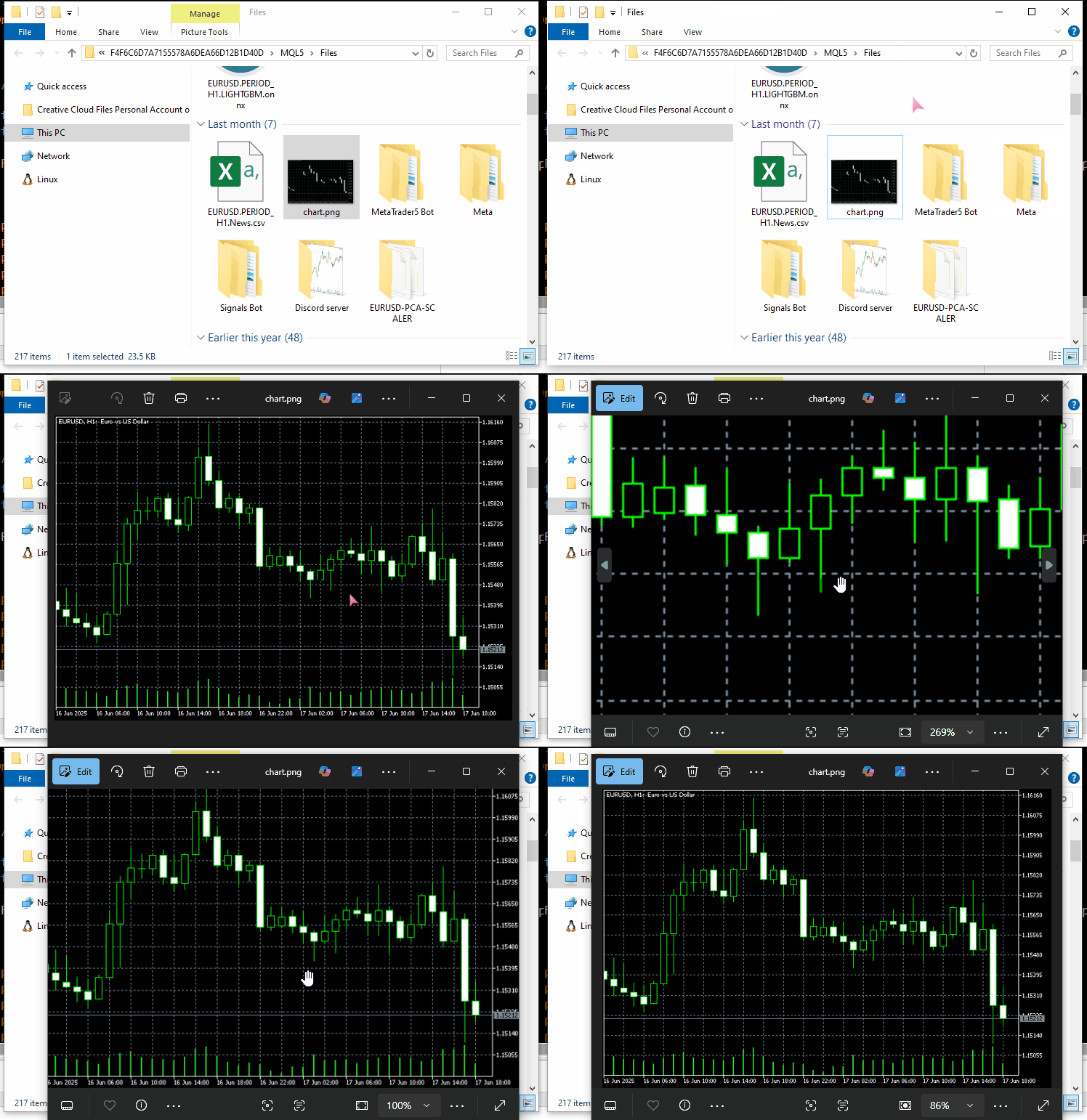
たとえば、MetaTrader 5のチャートから取得したスクリーンショットをサーバーに送信したい場合を考えます。
これらのファイルを扱いやすくするためには、ファイルが必ずMQL5のDataPath内に保存されていることを確認する必要があります。
APIエンドポイントとしてtempfiles.orgサーバーを使用します。
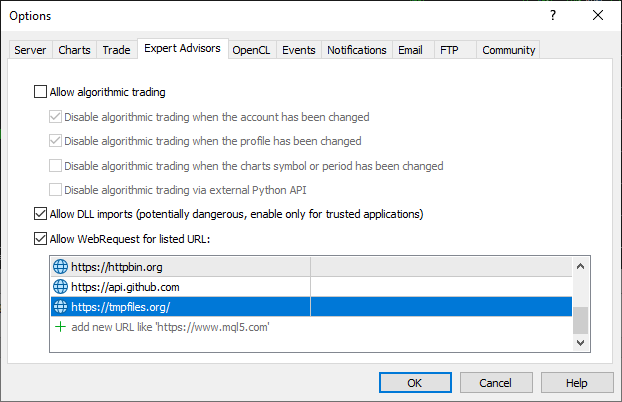
この機能を動作させるには、MetaTrader 5の許可されたURLリストにtempfiles.orgを追加しておく必要があります。
#include <requests.mqh>
//+------------------------------------------------------------------+
//| Script program start function                                    |
//+------------------------------------------------------------------+
void OnStart()
  {
//---

     string files[] = {"chart.jpg"};

     CResponse response = CSession::request("POST","https://tmpfiles.org/api/v1/upload","",files);

      Print("Status Code: ", response.status_code);
      Print("Reason: ", response.reason);
      Print("URL: ", response.url);
      Print("OK: ", (string)response.ok);
      Print("Elapsed Time (ms): ", response.elapsed);

      Print("Headers:\n", response.headers);
      Print("Cookies: ", response.cookies);
      Print("Response: ",response.text);
      Print("JSON:\n", response.json["url"].ToStr());
  }
以下が出力です。
CF      0       17:06:25.063    Requests test (XAUUSD,D1)       Status Code: 200
RL      0       17:06:25.063    Requests test (XAUUSD,D1)       Reason: OK
QM      0       17:06:25.063    Requests test (XAUUSD,D1)       URL: https://tmpfiles.org/api/v1/upload
FN      0       17:06:25.063    Requests test (XAUUSD,D1)       OK: true
OH      0       17:06:25.063    Requests test (XAUUSD,D1)       Elapsed Time (ms): 1594
FQ      0       17:06:25.063    Requests test (XAUUSD,D1)       Headers:
RN      0       17:06:25.063    Requests test (XAUUSD,D1)       Server: nginx/1.22.1
QO      0       17:06:25.063    Requests test (XAUUSD,D1)       Content-Type: application/json
KJ      0       17:06:25.063    Requests test (XAUUSD,D1)       Transfer-Encoding: chunked
CS      0       17:06:25.063    Requests test (XAUUSD,D1)       Connection: keep-alive
KE      0       17:06:25.063    Requests test (XAUUSD,D1)       Cache-Control: no-cache, private
RM      0       17:06:25.063    Requests test (XAUUSD,D1)       Date: Thu, 10 Jul 2025 14:06:25 GMT
DF      0       17:06:25.063    Requests test (XAUUSD,D1)       X-RateLimit-Limit: 60
GN      0       17:06:25.063    Requests test (XAUUSD,D1)       X-RateLimit-Remaining: 59
CN      0       17:06:25.063    Requests test (XAUUSD,D1)       Access-Control-Allow-Origin: *
NF      0       17:06:25.063    Requests test (XAUUSD,D1)
ED      0       17:06:25.063    Requests test (XAUUSD,D1)       Cookies:
RM      0       17:06:25.063    Requests test (XAUUSD,D1)       Response: {"status":"success","data":{"url":"http://tmpfiles.org/5459540/chart.png"}}
LS      0       17:06:25.063    Requests test (XAUUSD,D1)       JSON:
HJ      0       17:06:25.063    Requests test (XAUUSD,D1)
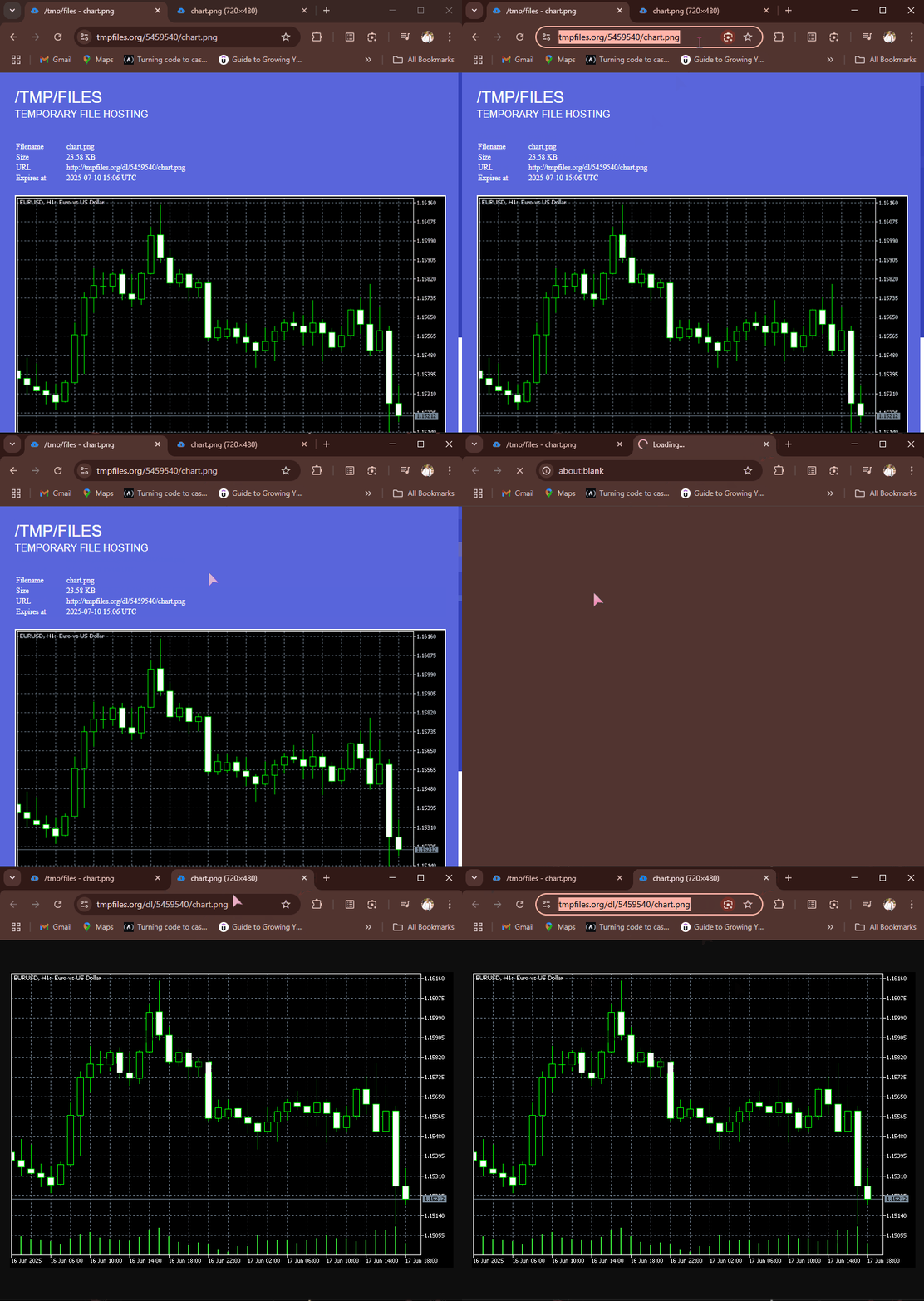
POSTリクエストが正常に完了すると、tempfiles.orgはJSON形式のレスポンスを返します。このレスポンスには、アップロードされたファイルがホストされているURLが含まれています。そのURLにアクセスすれば、Webブラウザ上で画像ファイルを確認できます。
Webからファイルを受信・ダウンロードする
インターネットは情報やファイルを共有するためのものです。MQL5でさまざまなファイルを受信できる機能は非常に便利で、CSVやExcel形式のデータを取得したり、学習済みの機械学習モデルやそのパラメータをバイナリ形式で受け取ったりすることが可能です。
実装したget関数は、適切なAPIエンドポイントを指定すれば、このようなファイル取得にも対応できます。
例として、 httpbin.orgから画像を取得し、MQL5のDataPathに保存してみましょう。
#include <requests.mqh>
CSession requests;
//+------------------------------------------------------------------+
//| Script program start function                                    |
//+------------------------------------------------------------------+
void OnStart()
  {
      //--- Get the image file from the web
      CResponse response = requests.get("https://httpbin.org/image/jpeg");
 }
この関数が正常に実行されると、取得した画像ファイルやデータは暗号化されたバイナリ形式で返されます。
取得されたファイルは、CResponse::content変数に格納されます。
void OnStart()
  {
      //--- Get the image file from the web
      CResponse response = requests.get("https://httpbin.org/image/jpeg");

      //--- Saving an image received in binary format stored in response.content

      int handle = FileOpen("image.jpg", FILE_WRITE|FILE_BIN|FILE_SHARE_WRITE); //Open a .jpg file for writting an image to it
      if (handle == INVALID_HANDLE) //Check the handle
         {
            printf("Failed to open an Image. Error=%s",ErrorDescription(GetLastError()));
            return;
         }

      if (FileWriteArray(handle, response.content)==0) //write all binary data to a image.jpg file
         {
            printf("Failed to write an Image. Error=%s",ErrorDescription(GetLastError()));
            return;
         }

      FileClose(handle);
  }
以下が出力です。
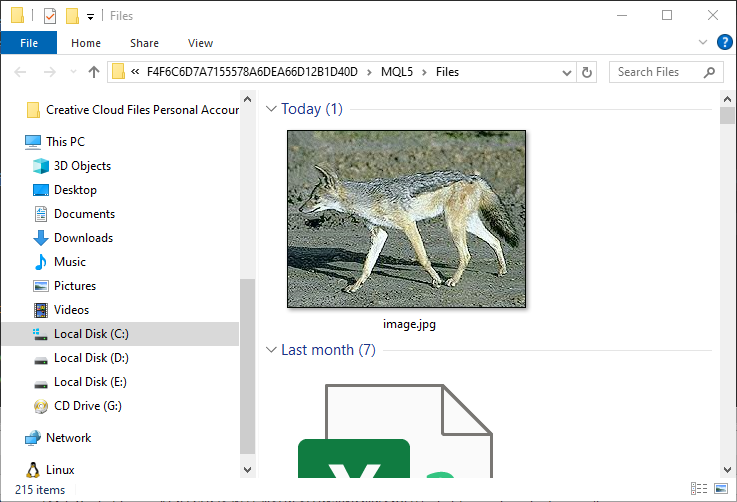
キツネ(または他の動物)を含む画像はMQL5/Filesフォルダに保存されます。
セッションとCookieの処理
ご覧の通り、CSessionクラス内のすべての関数はstaticとして定義されており、このクラスは「静的クラス」として設計されています。
class CSession
  {
protected:
   //.... other lines of code

public:

                            CSession(const string headers, const string cookies=""); // Provides headers cookies persistance
                           ~CSession(void);

   static void SetCookie(const string cookie)
      {
         if (StringLen(m_cookies) > 0)
            m_cookies += "; ";
         m_cookies += cookie;
      }

   static void ClearCookies()
      {
         m_cookies = "";
      }

   static void              SetBasicAuth(const string username, const string password);

   //---

   static CResponse         request(const string method, const string url, const string data, const string &files[], const string headers = "", const int timeout = 5000, const bool is_json=true);

   // High-level request helpers
   static CResponse         get(const string url, const string headers = "", const int timeout = 5000)
     {
       string files[];
       return request("GET", url, "", files, headers, timeout, false);
     }

     //... other functions
 }
これは、開発者がrequestsライブラリを部分的に使用することも、全体として使用することもできるように設計されており、Pythonのrequestsモジュールの操作感を再現することを目的としています。
(a):クラスオブジェクト全体を使用する
#include <requests.mqh>
//+------------------------------------------------------------------+
//| Script program start function                                    |
//+------------------------------------------------------------------+
void OnStart()
  {
//---

     string headers = "Content-Type: application/json;";
     string cookies = "sessionid=abc123";

     CSession session(headers, cookies); //New session, class constructor calle with
     CResponse response = session.get("https://httpbin.org/cookies"); //receive cookies from the server

      Print("HTTP response");
      Print("--> Status Code: ", response.status_code);
      Print("--> Reason: ", response.reason);
      Print("--> URL: ", response.url);
      Print("--> OK: ", (string)response.ok);
      Print("--> Elapsed Time (ms): ", response.elapsed);

      Print("--> Headers:\n", response.headers);
      Print("--> Cookies: ", response.cookies);
      Print("--> Response text: ",response.text);
      Print("--> JSON:\n", response.json.ToStr());
}
以下が出力です。
DS      0       11:38:36.272    Requests test (XAUUSD,D1)       HTTP response
RI      0       11:38:36.272    Requests test (XAUUSD,D1)       --> Status Code: 200
KR      0       11:38:36.272    Requests test (XAUUSD,D1)       --> Reason: OK
NG      0       11:38:36.272    Requests test (XAUUSD,D1)       --> URL: https://httpbin.org/cookies
IF      0       11:38:36.272    Requests test (XAUUSD,D1)       --> OK: true
QQ      0       11:38:36.272    Requests test (XAUUSD,D1)       --> Elapsed Time (ms): 2141
IH      0       11:38:36.272    Requests test (XAUUSD,D1)       --> Headers:
FQ      0       11:38:36.272    Requests test (XAUUSD,D1)       Date: Sat, 12 Jul 2025 08:38:36 GMT
RE      0       11:38:36.272    Requests test (XAUUSD,D1)       Content-Type: application/json
FO      0       11:38:36.272    Requests test (XAUUSD,D1)       Content-Length: 49
DE      0       11:38:36.272    Requests test (XAUUSD,D1)       Connection: keep-alive
CR      0       11:38:36.272    Requests test (XAUUSD,D1)       Server: gunicorn/19.9.0
PK      0       11:38:36.272    Requests test (XAUUSD,D1)       Access-Control-Allow-Origin: *
HM      0       11:38:36.272    Requests test (XAUUSD,D1)       Access-Control-Allow-Credentials: true
QN      0       11:38:36.272    Requests test (XAUUSD,D1)
DL      0       11:38:36.272    Requests test (XAUUSD,D1)       --> Cookies:
LG      0       11:38:36.272    Requests test (XAUUSD,D1)       --> Response text: {
EP      0       11:38:36.272    Requests test (XAUUSD,D1)         "cookies": {
HJ      0       11:38:36.272    Requests test (XAUUSD,D1)           "sessionid": "abc123"
RN      0       11:38:36.272    Requests test (XAUUSD,D1)         }
DE      0       11:38:36.272    Requests test (XAUUSD,D1)       }
EM      0       11:38:36.272    Requests test (XAUUSD,D1)
MD      0       11:38:36.272    Requests test (XAUUSD,D1)       --> JSON:
GH      0       11:38:36.272    Requests test (XAUUSD,D1)
クラス全体を使用する場合は、コンストラクタを呼び出し、ヘッダやCookie(任意)を渡すことで、グローバルなヘッダ値を管理し、同じクラスインスタンスを使ったすべてのHTTPリクエストで同じCookieを利用できます。これがいわゆるHTTPセッションです。
(b):クラスの関数を個別に使用する
HTTPセッションを作成せず、毎回新しいヘッダやCookieを管理しながらシンプルなHTTPリクエストをおこないたい場合には、CSessionクラスの関数をインスタンス化せずに直接使用できます。
以下は、クラスオブジェクトを生成せずにCSessionクラスの関数を直接使う方法です。
#include <requests.mqh>
//+------------------------------------------------------------------+
//| Script program start function                                    |
//+------------------------------------------------------------------+
void OnStart()
  {
//---

     CResponse response = CSession::get("https://httpbin.org/get"); //The get request

      Print("HTTP response");
      Print("--> Status Code: ", response.status_code);
      Print("--> Reason: ", response.reason);
      Print("--> URL: ", response.url);
      Print("--> OK: ", (string)response.ok);
      Print("--> Elapsed Time (ms): ", response.elapsed);

      Print("--> Headers:\n", response.headers);
      Print("--> Cookies: ", response.cookies);
      Print("--> Response text: ",response.text);
      Print("--> JSON:\n", response.json.ToStr());
 }
Basic認証
Pythonのrequestsモジュールにあるすべての関数には、サーバーに対してBasic認証の情報を送信するオプションが用意されています。
import requests

response = requests.get("https://httpbin.org/headers", auth=("user", "pass"))
print(response.text)
以下はMQL5クラスにおける同様の機能です。
void CSession::SetBasicAuth(const string username, const string password)
  {
   string credentials = username + ":" + password;
   string encoded = Base64Encode(credentials); //Encode the credentials

   m_headers = UpdateHeader(m_headers, "Authorization", "Basic " + encoded); //Update HTTP headers with the authentication information
  }
Pythonのモジュールでは、開発者が関数内で直接認証パラメータを送信できますが、MQL5のクラスでは少し異なります。ユーザーは、ベーシック認証のパラメータを別の関数で送信します。
SetBasicAuth関数は、クラス内のヘッダを更新し、認証情報を追加します。この設定は、同じクラスインスタンスを使って呼び出されるすべての関数で利用可能になります。
#include <requests.mqh>
//+------------------------------------------------------------------+
//| Script program start function                                    |
//+------------------------------------------------------------------+
void OnStart()
  {
//---

     CSession::SetBasicAuth("user", "pass");   //Sets authentication parameters to the HTTP header
     CResponse response = CSession::get("https://httpbin.org/headers"); //Get the headers from the server

      Print("HTTP response");
      Print("--> Headers:\n", response.headers);
      Print("--> Response text: ",response.text);
 }
以下が出力です。
IE      0       14:23:23.885    Requests test (XAUUSD,D1)       HTTP response
FQ      0       14:23:23.885    Requests test (XAUUSD,D1)       --> Headers:
KI      0       14:23:23.885    Requests test (XAUUSD,D1)       Date: Sat, 12 Jul 2025 11:23:23 GMT
MM      0       14:23:23.885    Requests test (XAUUSD,D1)       Content-Type: application/json
HK      0       14:23:23.885    Requests test (XAUUSD,D1)       Content-Length: 385
IR      0       14:23:23.885    Requests test (XAUUSD,D1)       Connection: keep-alive
JJ      0       14:23:23.885    Requests test (XAUUSD,D1)       Server: gunicorn/19.9.0
IS      0       14:23:23.885    Requests test (XAUUSD,D1)       Access-Control-Allow-Origin: *
QE      0       14:23:23.885    Requests test (XAUUSD,D1)       Access-Control-Allow-Credentials: true
HF      0       14:23:23.885    Requests test (XAUUSD,D1)
KG      0       14:23:23.885    Requests test (XAUUSD,D1)       --> Response text: {
KP      0       14:23:23.885    Requests test (XAUUSD,D1)         "headers": {
GH      0       14:23:23.885    Requests test (XAUUSD,D1)           "Accept": "*/*",
CM      0       14:23:23.885    Requests test (XAUUSD,D1)           "Accept-Encoding": "gzip, deflate",
DQ      0       14:23:23.885    Requests test (XAUUSD,D1)           "Accept-Language": "en;q=0.5",
NE      0       14:23:23.885    Requests test (XAUUSD,D1)           "Authorization": "Basic dXNlcjpwYXNz",
NS      0       14:23:23.885    Requests test (XAUUSD,D1)           "Cookie": "session=abc123;max-age=60;",
KL      0       14:23:23.885    Requests test (XAUUSD,D1)           "Host": "httpbin.org",
HK      0       14:23:23.885    Requests test (XAUUSD,D1)           "User-Agent": "MetaTrader 5 Terminal/5.5120 (Windows NT 10.0.19045; x64)",
NI      0       14:23:23.885    Requests test (XAUUSD,D1)           "X-Amzn-Trace-Id": "Root=1-687245ab-2065056c28f0024b71a6446f"
GH      0       14:23:23.885    Requests test (XAUUSD,D1)         }
IF      0       14:23:23.885    Requests test (XAUUSD,D1)       }
URLパラメータの扱い
Pythonのrequestsモジュールのもうひとつ便利な機能は、最終的なWebリクエストを送信する前に、受け取ったURLとそのパラメータを自動的に管理してくれる点です。
import requests

response = requests.get("https://httpbin.org/get", params={"param1": "value1"})
print(response.url)
以下が出力です。
https://httpbin.org/get?param1=value1
MQL5クラスでは少し異なるアプローチを取ります。すべての関数にURLパラメータを渡してしまうと複雑になるため、別のユーティリティ関数を用意し、元のURLと関連するパラメータから最終的なURLを生成するようにしています。
#include <requests.mqh>
//+------------------------------------------------------------------+
//| Script program start function                                    |
//+------------------------------------------------------------------+
void OnStart()
  {
//---
      string keys[]   = {"user", "id", "lang"};
      string values[] = {"omega", "123", "mql5 test"};

      string parent_url = "https://httpbin.org/get";
      string final_url =  CSession::BuildUrlWithParams(parent_url, keys, values); //builds a URL with the given parameters

      Print("final url: ",final_url);
 }
以下が出力です。
2025.07.12 15:41:57.924 Requests test (XAUUSD,D1) final url: https://httpbin.org/get?user=omega&id=123&lang=mql5+test パラメータを付加してURLを生成した後、そのURLを使ってHTTP Webリクエストを送信できます。
      CResponse response = CSession::get(final_url); //Get the headers from the server

      Print("HTTP response");
      Print("--> Headers:\n", response.headers);
      Print("--> Response text: ",response.text);
以下が出力です。
JK      0       15:42:00.398    Requests test (XAUUSD,D1)       --> Headers:
QP      0       15:42:00.398    Requests test (XAUUSD,D1)       Date: Sat, 12 Jul 2025 12:41:59 GMT
QK      0       15:42:00.398    Requests test (XAUUSD,D1)       Content-Type: application/json
PM      0       15:42:00.398    Requests test (XAUUSD,D1)       Content-Length: 525
ED      0       15:42:00.398    Requests test (XAUUSD,D1)       Connection: keep-alive
FP      0       15:42:00.398    Requests test (XAUUSD,D1)       Server: gunicorn/19.9.0
MH      0       15:42:00.398    Requests test (XAUUSD,D1)       Access-Control-Allow-Origin: *
EK      0       15:42:00.398    Requests test (XAUUSD,D1)       Access-Control-Allow-Credentials: true
LM      0       15:42:00.398    Requests test (XAUUSD,D1)
OI      0       15:42:00.398    Requests test (XAUUSD,D1)       --> Response text: {
RQ      0       15:42:00.398    Requests test (XAUUSD,D1)         "args": {
CR      0       15:42:00.398    Requests test (XAUUSD,D1)           "id": "123",
KF      0       15:42:00.398    Requests test (XAUUSD,D1)           "lang": "mql5 test",
HI      0       15:42:00.398    Requests test (XAUUSD,D1)           "user": "omega"
KP      0       15:42:00.398    Requests test (XAUUSD,D1)         },
MP      0       15:42:00.398    Requests test (XAUUSD,D1)         "headers": {
IH      0       15:42:00.398    Requests test (XAUUSD,D1)           "Accept": "*/*",
QL      0       15:42:00.398    Requests test (XAUUSD,D1)           "Accept-Encoding": "gzip, deflate",
JQ      0       15:42:00.398    Requests test (XAUUSD,D1)           "Accept-Language": "en;q=0.5",
NF      0       15:42:00.398    Requests test (XAUUSD,D1)           "Cookie": "session=abc123;max-age=60;",
KQ      0       15:42:00.398    Requests test (XAUUSD,D1)           "Host": "httpbin.org",
HP      0       15:42:00.398    Requests test (XAUUSD,D1)           "User-Agent": "MetaTrader 5 Terminal/5.5120 (Windows NT 10.0.19045; x64)",
ND      0       15:42:00.398    Requests test (XAUUSD,D1)           "X-Amzn-Trace-Id": "Root=1-68725817-67dc04cf43ac75b012094481"
KE      0       15:42:00.398    Requests test (XAUUSD,D1)         },
CQ      0       15:42:00.398    Requests test (XAUUSD,D1)         "origin": "197.250.227.235",
MD      0       15:42:00.398    Requests test (XAUUSD,D1)         "url": "https://httpbin.org/get?user=omega&id=123&lang=mql5+test"
IK      0       15:42:00.398    Requests test (XAUUSD,D1)       }
LN      0       15:42:00.398    Requests test (XAUUSD,D1)
うまくいきました。サーバーからのレスポンスJSONにargsキーが含まれていることから、URLにパラメータを付加する処理が正しくおこなわれたことが確認できます。
まとめ
現代では、公開されている無料でオープンな知識や情報を活用すれば、コーディングは決して難しくありません。
Pythonのrequestsモジュールの仕組みを学んだ後、MetaTrader 5から外部サーバーへのHTTPリクエストを支援する、同様のモジュールをMQL5で実装することができました。
ただし、Pythonのrequestsモジュールと似た構文や関数呼び出しが可能とはいえ、このMQL5モジュールはまだ完成バージョンではありません。十分なテストをおこない、改良を続ける必要があります。そのため、Forge MQL5上にリポジトリを作成しました(https://forge.mql5.io/omegajoctan/Requests)。
ぜひこちらからコードを更新してください。また、ディスカッション欄でフィードバックをお寄せください。
では、また。
添付ファイルの表
| ファイル名 | 説明と使用方法 |
|---|---|
| Include\errordescription.mqh | MQL5およびMetaTrader 5で発生するすべてのエラーコードの説明を含むファイル |
| Include\Jason.mqh | JSON風の形式で文字列をシリアル化およびデシリアル化するためのライブラリ |
| Include\requests.mqh | Pythonのrequestsモジュールに似たメインモジュール |
| Scripts\Requests test.mq5 | この記事で説明されているすべての関数とメソッドをテストするためのメインスクリプト |
MetaQuotes Ltdにより英語から翻訳されました。
元の記事: https://www.mql5.com/en/articles/18728
警告: これらの資料についてのすべての権利はMetaQuotes Ltd.が保有しています。これらの資料の全部または一部の複製や再プリントは禁じられています。
この記事はサイトのユーザーによって執筆されたものであり、著者の個人的な見解を反映しています。MetaQuotes Ltdは、提示された情報の正確性や、記載されているソリューション、戦略、または推奨事項の使用によって生じたいかなる結果についても責任を負いません。

 知っておくべきMQL5ウィザードのテクニック(第75回):Awesome Oscillatorとエンベロープの使用
 MQL5取引ツール(第4回):動的配置とトグル機能による多時間軸スキャナダッシュボードの改善
 MQL5で自己最適化エキスパートアドバイザーを構築する(第9回):二重移動平均クロスオーバー
 プライスアクション分析ツールキットの開発(第31回):Python Candlestick Recognitionエンジン(I) - 手動検出

- 無料取引アプリ
- 8千を超えるシグナルをコピー
- 金融ニュースで金融マーケットを探索