

MQL5で他の言語の実用的なモジュールを実装する(第1回):Pythonにヒントを得たSQLite3ライブラリの構築
 335
335
 0
0

内容
- はじめに
- Pythonが提供するsqlite3モジュールとは
- SQLiteデータベースへの接続
- SQL文の実行
- データベースからのテキスト(文字列)値の操作
- データベーストランザクション制御
- sqlite3モジュールのその他のメソッド
- 取引履歴のデータベースへの記録
- 結論
はじめに
これまでに、「お気に入りのモジュールやライブラリ、フレームワークなどを、他のプログラミング言語(特にMQL5)でも使えたらいいのに」と思ったことはありませんか。私自身、そのように感じたことが何度もあります。
MQL5コミュニティには、さまざまなプログラミング背景を持つ開発者が多く存在します。たとえば、私のようにWeb開発出身の方、Android開発出身の方、そしてその他にもさまざまな分野から来たプログラマーがいます。つまり、多くの開発者がJavaScript、Java、Python、C++、C#など、複数の言語に精通しているのです。
それぞれの言語には便利なツール(モジュールやライブラリ)があり、「どこでも使いたい」と思うような有用なものが少なくありません。たとえば、私はPythonのNumPyモジュールを数学的計算に使うのが大好きで、以前それに似たライブラリをMQL5上で実装したこともあります(その内容については別の記事で紹介しました)。
もちろん、ある言語のモジュールやフレームワークなどを別の言語(この場合はMQL5)に実装する試みは、言語仕様の違いにより、完全に同一の機能や結果を再現できるとは限りません。しかし、似たような構文や操作感を持たせることができれば、他言語経験者にとってMQL5上での開発がより簡単で、かつ楽しいものになるでしょう。さらに、その過程でプログラミング全般における知識を深めることも期待できます。

本記事から始まる新連載では、「他言語のあらゆるモジュールをMQL5へ移植する」わけではなく、MQL5上で実用的に活用できるモジュールに限定して実装をおこなっていきます。たとえば、数学計算、データ保存、データ分析などの分野で役立つモジュールが対象です。
連載第1回として、Pythonに標準搭載されているsqlite3モジュールをMQL5上で再現していきます。
Pythonで提供されているSqlite3モジュールとは
まずはSQLiteデータベースについて理解していきましょう。
SQLiteデータベースとは、軽量で自己完結型、かつサーバーレスのSQLデータベースエンジンです。シンプルでローカルなデータ保存が必要なアプリケーションで広く利用されています。SQLiteはファイルベースのデータベースであり、スキーマ、テーブル、インデックス、データといったすべての情報を単一の「.sqlite」または「.db」ファイルに格納します。
MySQLやPostgreSQLのように、サーバーや設定、管理作業を必要とするデータベースとは異なり、SQLiteはそれらを一切必要としません。ディスクへの読み書きを直接おこなうため、すぐに利用を開始することができます。
MQL5プログラミング言語には、SQLiteデータベースを操作するための組み込み関数がすでに用意されています。これらの関数だけでも十分に動作しますが、Pythonのsqlite3モジュールと比べると、使い勝手はそれほど良くありません。
たとえば、Pythonでsqlite3モジュールを使えば、非常にシンプルな方法で「example」というデータベースを作成し、usersというテーブルに情報を挿入することができます。しかも、そのテーブルが存在しない場合には、自動的に作成されます。
Python sqliteモジュールの使用
import sqlite3

conn = sqlite3.connect("example.db")

cursor = conn.cursor()

cursor.execute("""
    CREATE TABLE IF NOT EXISTS users (
        id INTEGER PRIMARY KEY AUTOINCREMENT,
        name TEXT NOT NULL,
        age INTEGER,
        email TEXT UNIQUE
    )
""") # Execute a query

try:
    cursor.execute("INSERT INTO users (name, age, email) VALUES (?, ?, ?)",
                   ("Bruh", 30, "bruh@example.com"))

    conn.commit() # commit the transaction | save the new information to a database

except sqlite3.DatabaseError as e:
    print("Insert failed:", e)

conn.close() # closing the database
ネイティブMQL5関数の使用
void OnStart()
  {
//---

   int db_handle = DatabaseOpen("example.db", DATABASE_OPEN_READWRITE | DATABASE_OPEN_CREATE);
   if (db_handle == INVALID_HANDLE)
     {
       printf("Failed to open a database. Error = %s",ErrorDescription(GetLastError()));
       return;
     }

    string sql =
       "   CREATE TABLE IF NOT EXISTS users ("
       "   id INTEGER PRIMARY KEY AUTOINCREMENT,"
       "   name TEXT NOT NULL,"
       "   age INTEGER,"
       "   email TEXT UNIQUE"
       ")";

    if (!DatabaseExecute(db_handle, sql)) //Execute a sql query
      {
         printf("Failed to execute a query to the database. Error = %s",ErrorDescription(GetLastError()));
         return;
      }

    if (!DatabaseTransactionBegin(db_handle)) //Begin the transaction
      {
         printf("Failed to begin a transaction. Error = %s",ErrorDescription(GetLastError()));
         return;
      }

    sql = "INSERT INTO users (name, age, email) VALUES ('Bruh', 30, 'bruh@example.com')";

    if (!DatabaseExecute(db_handle, sql)) //Execute a query
      {
         printf("Failed to execute a query to the database. Error = %s",ErrorDescription(GetLastError()));
         return;
      }

   if (!DatabaseTransactionCommit(db_handle)) //Commit the transaction | push the changes to a database
      {
         printf("Failed to commit a transaction. Error = %s",ErrorDescription(GetLastError()));
         return;
      }

    DatabaseClose(db_handle); //Close the database
 }
私たちは皆、Pythonでsqlite3を使用することで、ネイティブのMQL5関数を使用する場合よりもコードが格段にすっきりしたという点に同意できると思います。ネイティブのMQL5関数では、エラー処理や返される情報、データベースへの追加処理などを自分で管理する必要があります。
一方、sqlite3モジュールは、コマンドの実行やトランザクション管理における多くの不要な手順を自動的に処理してくれるため、ユーザーがSQLiteデータベースからデータを取得・挿入する作業を、手間なく簡単におこなうことができます。
そこで、MQL5においても同様のモジュールを実装してみましょう。
SQLiteデータベースへの接続
Pythonのsqlite3におけるconnectメソッドは、指定したデータベース名が存在しない場合には新しいデータベースを作成し、ディスク上のデータベースへの接続を表す接続オブジェクトを返します。
import sqlite3
con = sqlite3.connect("example.db")
MQL5においては、この接続はデータベースハンドルに相当します。したがって、技術的には、MQL5ライブラリ内でハンドルを返す必要はありません。クラス内のすべての関数でこのハンドルを内部的に使用するためです。
class CSqlite3
  {
protected:

   int m_request;

public:
                     int m_db_handle;
 //... Other functions
 }
bool CSqlite3::connect(const string db_name, const bool common=false, const bool database_in_memory=false)
 {
   int flags = DATABASE_OPEN_READWRITE | DATABASE_OPEN_CREATE;

   if (common) //Open the database from the common folder
      flags |= DATABASE_OPEN_COMMON;

   if (database_in_memory) //Open the database in memory
      flags |= DATABASE_OPEN_MEMORY;

   m_db_handle = DatabaseOpen(db_name, flags);

//---

   if (m_db_handle == INVALID_HANDLE)
     {
       printf("func=%s line=%d, Failed to open a database. Error = %s",__FUNCTION__, __LINE__, ErrorDescription(GetLastError()));
       return false;
     }

   return true;
 }
MQL5では、データをデータパス(フォルダ)または共通データパス(フォルダ)のいずれかに保存するオプションが用意されています。common引数をtrueに設定すると、通常のデータパスではなく、共通データパスからデータベースが読み込まれます。
また、ユーザーに対して、データベースをメモリ(RAM)上で開くか、ディスク上で開くかを選択できるようにすることも可能です。変数database_in_memoryがtrueに設定されている場合、データベースはディスクではなくRAM上に作成され、逆の場合はディスク上に作成されます。
ここでは、データベースを読み取り専用モードで開くためのフラグ、すなわちDATABASE_OPEN_READONLYを無視しています。その理由は単純です。データベースに書き込みを行いたくない場合は、そもそも「INSERT」クエリを実行しなければよいからです。ご理解いただけますでしょうか。
SQL文の実行
これは、SQLiteデータベースを扱う際に最も重要な関数のひとつです。この関数は、データベース内の情報を取得したり、データの挿入、更新、削除、変更をおこなったりできるようにします。
この関数は、データベース上でSQL文やコマンドを直接実行するためのものです。
Pythonのsqlite3モジュールにおけるexecute()関数は、非常にスムーズかつシームレスに動作します。この関数は、情報の取得や挿入など、あらゆるコマンドを受け取り、自動的に「いつ」「何を」返すべきか、あるいは返さないべきかを判断します。
一方、MQL5には、DatabaseExecuteという組み込み関数が用意されており、これはPythonのsqlite3におけるexecute()関数と似た働きをします。両者とも、指定されたデータベースまたはテーブルに対してリクエストを実行する機能を持っています。ただし、MQL5のDatabaseExecuteはすべてのリクエストの実行に対応していますが、「SELECT」キーワードを含むデータの読み取りリクエストに関しては適していません。
データベースから情報を効果的に読み取るためには、DatabasePrepare関数を使用します。この関数はリクエストのハンドルを作成し、その後DatabaseReadを使用して実行することができます。
MQL5で、クエリの種類に依存せず柔軟に実行できる関数を作成するためには、SQLクエリの種類を判別し、それぞれのクエリに応じて正しい情報を返すように設計する必要があります。
execute_res_structure CSqlite3::execute(const string sql)
 {
   execute_res_structure res;

   string trimmed_sql = sql;
   StringTrimLeft(trimmed_sql); //Trim the leading white space

   string first_word = trimmed_sql;

   // Find the index of the first space (to isolate the first SQL keyword)
   int space_index = StringFind(trimmed_sql, " ");
   if (space_index != -1)
      first_word = StringSubstr(trimmed_sql, 0, space_index); // Extract the first word from the query

   StringToUpper(first_word); //Convert the first word in the query to uppercase for comparison

   if (first_word == "SELECT")
    {
      // SELECT query – prepare and expect data
      m_request = DatabasePrepare(m_db_handle, sql);
      res.request = m_request;

      return res;
    }
   else
    {
      // INSERT/UPDATE/DELETE – execute directly
       if (!m_transaction_active)
         {
            if (!this.begin())
               return res;
            else
                m_transaction_active_auto = true; //The transaction was started automatically by the execute function
         }

       ResetLastError();
       if (!DatabaseExecute(m_db_handle, sql))
         {
            printf("func=%s line=%d, Failed to execute a query to the database. Error = %s",__FUNCTION__,__LINE__,ErrorDescription(GetLastError()));
         }
    }

   return res;
 }
Pythonのexecute関数と同様に、すべての非SELECT文は、begin関数を使用して暗黙的にトランザクションを開始します。このトランザクションは、変更内容をデータベースに保存する前にコミットする必要があります。
execute関数を呼び出してデータベースに情報を挿入した後はcommitメソッドを呼び出して変更をデータベースに保存する必要があります。この関数については、後ほど本記事内で詳しく説明します。
SELECT以外の文またはクエリでこの関数を呼び出した場合、データベース内の情報を更新・変更・挿入する処理をおこなうため、値を返しません。一方、SELECTタイプのクエリで呼び出された場合には、データ構造を返します。ここでは、そのデータ構造について詳しく見ていきましょう。
1. fetchoneメソッド
Pythonで提供されているsqlite3モジュールは、SQL文の結果として返される情報の一部または全体を動的に取得することが可能です。
まず最初に、データベースから1行分の情報を返す機能について説明します。
import sqlite3
conn = sqlite3.connect("example.db")

cursor = conn.cursor()
print(conn.execute("SELECT * FROM users").fetchone())
SQL文でSQLiteデータベース内のすべての情報を要求した場合でも、fetchone関数は、execute関数がデータベースから1行以上のデータを返すことを制限します。
以下がデータベースです。
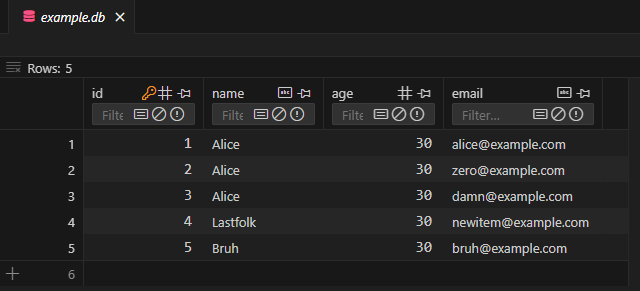
以下が出力です。
(mcm-env) C:\Users\Omega Joctan\OneDrive\Desktop\MCM>C:/Anaconda/envs/mcm-env/python.exe "c:/Users/Omega Joctan/OneDrive/Desktop/MCM/sqlite_test.py"
(1, 'Alice', 30, 'alice@example.com')
MQL5のクラス内でも同様の関数が必要です。この関数は、execute関数によって返されるexecute_res_structureという構造体の内部で実装されます。
struct execute_res_structure
  {
   int request;
   CLabelEncoder le;

   vector fetchone()
      {
         int cols = DatabaseColumnsCount(request);
         vector row = vector::Zeros(cols);

         while (DatabaseRead(request))  // Essential, read the entire database
          {
            string row_string = "(";

            for (int i = 0; i < cols; i++)
             {
               int int_val; //Integer variable
               double dbl_val; //double
               string str_val; //string variable

               ENUM_DATABASE_FIELD_TYPE col_type = DatabaseColumnType(request, i);
               string col_name;

               if (!DatabaseColumnName(request, i, col_name))
                {
                  printf("func=%s line=%d, Failed to read database column name. Error = %s", __FUNCTION__, __LINE__, ErrorDescription(GetLastError()));
                  continue;
                }

                 switch (col_type) //Detect a column datatype and assign the value read from every row of that column to the suitable variable
                  {
                     case DATABASE_FIELD_TYPE_INTEGER:
                        if (!DatabaseColumnInteger(request, i, int_val))
                           printf("func=%s line=%d, Failed to read Integer. Error = %s", __FUNCTION__, __LINE__, ErrorDescription(GetLastError()));
                        else
                          {
                             row_string += StringFormat("%d", int_val);
                             row[i] = int_val;
                           }
                        break;

                     case DATABASE_FIELD_TYPE_FLOAT:
                        if (!DatabaseColumnDouble(request, i, dbl_val))
                           printf("func=%s line=%d, Failed to read Double. Error = %s", __FUNCTION__, __LINE__, ErrorDescription(GetLastError()));
                        else
                          {
                            row_string += StringFormat("%.5f", dbl_val);
                            row[i] = dbl_val;
                          }
                        break;

                     case DATABASE_FIELD_TYPE_TEXT:
                        if (!DatabaseColumnText(request, i, str_val))
                           printf("func=%s line=%d, Failed to read Text. Error = %s", __FUNCTION__, __LINE__, ErrorDescription(GetLastError()));
                        else
                          {
                             row_string += "'" + str_val + "'";
                             row[i] = (double)str_val;
                          }
                        break;

                     default:
                             if (MQLInfoInteger(MQL_DEBUG))
                                PrintFormat("%s = <Unknown or Unsupported column Type by this Class>", col_name);
                        break;
                  }

               // Add comma if not last element
               if (i < cols - 1)
                  row_string += ", ";
             }

            row_string += ")";
            if (MQLInfoInteger(MQL_DEBUG))
               Print(row_string);  // Print the full row once

            break;
          }

         DatabaseFinalize(request);
         return row;  // Replace with actual parsed return if needed
      }

 //... Other functions
}
MetaEditorの同様のデータベースから
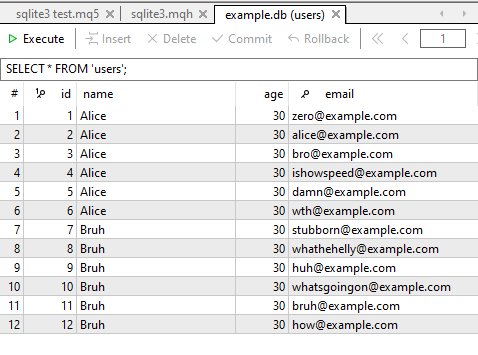
以下は、データベーステーブルで利用可能なすべての情報を要求するクエリを送信し、返される情報の量を1行のデータに制限する方法を示しています。
#include <sqlite3.mqh>

CSqlite3 sqlite3;
//+------------------------------------------------------------------+
//| Script program start function                                    |
//+------------------------------------------------------------------+
void OnStart()
  {
//---

    sqlite3.connect("example.db");
    Print(sqlite3.execute("SELECT * FROM users").fetchone());

    sqlite3.close();
  }
以下が出力です。
RJ      0       13:25:04.402    sqlite3 test (XAUUSD,H1)        (1, 'Alice', 30, 'zero@example.com')
DQ      0       13:25:04.402    sqlite3 test (XAUUSD,H1)        [1,0,30,0]
素晴らしいことに、これでデータベースから1行分のデータをほとんど手間なく取得できるようになりました。しかし、現在の関数ではすべてのバイナリ値を無視しており、文字列の処理やエンコードも行われません。そのため、返されるベクター内では、すべての「TEXT」型または文字列型のデータがゼロとして割り当てられています。
また、Pythonの配列は異なるデータ型の値を格納できますが、MQL5のベクトルや配列ではそれができません。これについては後ほど、対応方法を見ていきます。
2. fetchallメソッド
fetchoneメソッドとは異なり、このメソッドはexecuteメソッドで指定されたSQL文に基づき、要求されたすべての情報を受け取ります。
struct execute_res_structure
  {
   int request;
  //... Other functions

   matrix fetchall()
      {
         int cols = DatabaseColumnsCount(request);
         vector row = vector::Zeros(cols);

         int CHUNK_SIZE = 1000; //For optimized matrix handling
         matrix results_matrix = matrix::Zeros(CHUNK_SIZE, cols);
         int rows_found = 0; //for counting the number of rows seen in the database

         while (DatabaseRead(request))  // Essential, read the entire database
          {
            string row_string = "("; //for printing purposes only. Similar to how Python prints

            for (int i = 0; i < cols; i++)
             {
               int int_val; //Integer variable
               double dbl_val; //double variable
               string str_val; //string variable

               ENUM_DATABASE_FIELD_TYPE col_type = DatabaseColumnType(request, i);
               string col_name;

               if (!DatabaseColumnName(request, i, col_name))
                {
                  printf("func=%s line=%d, Failed to read database column name. Error = %s", __FUNCTION__, __LINE__, ErrorDescription(GetLastError()));
                  continue;
                }

                 switch (col_type) //Detect a column datatype and assign the value read from every row of that column to the suitable variable
                  {
                     case DATABASE_FIELD_TYPE_INTEGER:
                        if (!DatabaseColumnInteger(request, i, int_val))
                           printf("func=%s line=%d, Failed to read Integer. Error = %s", __FUNCTION__, __LINE__, ErrorDescription(GetLastError()));
                        else
                          {
                             row_string += StringFormat("%d", int_val);  //For printing purposes only
                             row[i] = int_val;
                           }
                        break;

                     case DATABASE_FIELD_TYPE_FLOAT:
                        if (!DatabaseColumnDouble(request, i, dbl_val))
                           printf("func=%s line=%d, Failed to read Double. Error = %s", __FUNCTION__, __LINE__, ErrorDescription(GetLastError()));
                        else
                          {
                            row_string += StringFormat("%.5f",dbl_val);  //For printing purposes only
                            row[i] = dbl_val;
                          }
                        break;

                     case DATABASE_FIELD_TYPE_TEXT:
                        if (!DatabaseColumnText(request, i, str_val))
                           printf("func=%s line=%d, Failed to read Text. Error = %s", __FUNCTION__, __LINE__, ErrorDescription(GetLastError()));
                        else
                          {
                             row_string += "'" + str_val + "'";
                             row[i] = (double)str_val;
                          }
                        break;

                     default:
                             if (MQLInfoInteger(MQL_DEBUG))
                                PrintFormat("%s = <Unknown or Unsupported column Type by this Class>", col_name);
                        break;
                  }

               // Add comma if not last element
               if (i < cols - 1)
                  row_string += ", ";
             }

          //---

            row_string += ")";
            if (MQLInfoInteger(MQL_DEBUG))
               Print(row_string);  // Print the full row once

          //---

            rows_found++; //Increment the rows counter
            if (rows_found > (int)results_matrix.Rows())
               results_matrix.Resize(results_matrix.Rows()+CHUNK_SIZE, cols); //Resizing the array after 1000 rows

            results_matrix.Row(row, rows_found-1); //Insert a row into the matrix
          }

         results_matrix.Resize(rows_found, cols); //Resize the matrix according to the number of unknown rows found in the database | Final trim

         DatabaseFinalize(request); //Removes a request created in DatabasePrepare().
         return results_matrix;  // return the final matrix
      }

  //... Other lines of code
}
今回はベクトルではなく行列を返すようにして、二次元lのテーブル全体を格納できるようにしました。
この関数の難しい部分は、結果として得られる行列を動的にリサイズする処理の取り扱いです。データベースのテーブルは非常に大きくなることがあり(10万行以上を含むこともあります)、行数という観点でデータベースやテーブルのサイズを事前に把握することは困難です。そのため、各反復ごとに結果の行列をリサイズすると、行をループするたびに関数が非常に遅くなってしまいます。これは、MQL5においてResize関数が最も計算コストの高い関数のひとつであるためです。
このため、上記の関数ではResizeメソッドを呼び出す回数を減らすために、1000回の反復ごとに行列をリサイズするようにしました。
以下が関数の使用法です。
#include <sqlite3.mqh>
CSqlite3 sqlite3;
//+------------------------------------------------------------------+
//| Script program start function                                    |
//+------------------------------------------------------------------+
void OnStart()
  {
//---

    sqlite3.connect("example.db");
    Print(sqlite3.execute("SELECT * FROM users").fetchall());

    sqlite3.close();
  }
MetaTrader 5の[エキスパート]タブには、以下が出力されます。
IF      0       13:30:33.649    sqlite3 test (XAUUSD,H1)        (1, 'Alice', 30, 'zero@example.com')
FR      0       13:30:33.649    sqlite3 test (XAUUSD,H1)        (2, 'Alice', 30, 'alice@example.com')
FD      0       13:30:33.649    sqlite3 test (XAUUSD,H1)        (3, 'Alice', 30, 'bro@example.com')
QQ      0       13:30:33.650    sqlite3 test (XAUUSD,H1)        (4, 'Alice', 30, 'ishowspeed@example.com')
MO      0       13:30:33.650    sqlite3 test (XAUUSD,H1)        (5, 'Alice', 30, 'damn@example.com')
MD      0       13:30:33.650    sqlite3 test (XAUUSD,H1)        (6, 'Alice', 30, 'wth@example.com')
QN      0       13:30:33.650    sqlite3 test (XAUUSD,H1)        (7, 'Bruh', 30, 'stubborn@example.com')
NO      0       13:30:33.650    sqlite3 test (XAUUSD,H1)        (8, 'Bruh', 30, 'whathehelly@example.com')
ED      0       13:30:33.650    sqlite3 test (XAUUSD,H1)        (9, 'Bruh', 30, 'huh@example.com')
PO      0       13:30:33.650    sqlite3 test (XAUUSD,H1)        (10, 'Bruh', 30, 'whatsgoingon@example.com')
FS      0       13:30:33.650    sqlite3 test (XAUUSD,H1)        (11, 'Bruh', 30, 'bruh@example.com')
FF      0       13:30:33.650    sqlite3 test (XAUUSD,H1)        (12, 'Bruh', 30, 'how@example.com')
JO      0       13:30:33.650    sqlite3 test (XAUUSD,H1)        [[1,0,30,0]
RG      0       13:30:33.650    sqlite3 test (XAUUSD,H1)         [2,0,30,0]
QN      0       13:30:33.650    sqlite3 test (XAUUSD,H1)         [3,0,30,0]
LE      0       13:30:33.650    sqlite3 test (XAUUSD,H1)         [4,0,30,0]
KL      0       13:30:33.650    sqlite3 test (XAUUSD,H1)         [5,0,30,0]
NS      0       13:30:33.650    sqlite3 test (XAUUSD,H1)         [6,0,30,0]
MJ      0       13:30:33.650    sqlite3 test (XAUUSD,H1)         [7,0,30,0]
HQ      0       13:30:33.650    sqlite3 test (XAUUSD,H1)         [8,0,30,0]
GH      0       13:30:33.650    sqlite3 test (XAUUSD,H1)         [9,0,30,0]
OL      0       13:30:33.650    sqlite3 test (XAUUSD,H1)         [10,0,30,0]
RE      0       13:30:33.650    sqlite3 test (XAUUSD,H1)         [11,0,30,0]
JS      0       13:30:33.650    sqlite3 test (XAUUSD,H1)         [12,0,30,0]]
データベースに存在する全12行が、execute関数によって返されました。
なお、MQL5の配列は単一の配列内で異なる型の変数を保持できないため、現時点では、データベーステーブルに文字列が含まれる行についてはすべてゼロとして扱われます。
3. fetchmanyメソッド
fetchallメソッドと同様に、この関数はテーブルから取得した値を含む行列を返します。ただし、このメソッドでは返される行数を制御することが可能です。
struct execute_res_structure
  {
   int request;

//... other lines of code

   matrix fetchmany(uint size)
      {
         int cols = DatabaseColumnsCount(request);
         vector row = vector::Zeros(cols);

         matrix results_matrix = matrix::Zeros(size, cols);
         int rows_found = 0;

         while (DatabaseRead(request))  // Essential, read the entire database
          {
            string row_string = "(";

            for (int i = 0; i < cols; i++)
             {
               int int_val; //Integer variable
               double dbl_val; //double variable
               string str_val; //string variable

               ENUM_DATABASE_FIELD_TYPE col_type = DatabaseColumnType(request, i);
               string col_name;

               if (!DatabaseColumnName(request, i, col_name))
                {
                  printf("func=%s line=%d, Failed to read database column name. Error = %s", __FUNCTION__, __LINE__, ErrorDescription(GetLastError()));
                  continue;
                }

                 switch (col_type) //Detect a column datatype and assign the value read from every row of that column to the suitable variable
                  {
                     case DATABASE_FIELD_TYPE_INTEGER:
                        if (!DatabaseColumnInteger(request, i, int_val))
                           printf("func=%s line=%d, Failed to read Integer. Error = %s", __FUNCTION__, __LINE__, ErrorDescription(GetLastError()));
                        else
                          {
                             row_string += StringFormat("%d", int_val);
                             row[i] = int_val;
                           }
                        break;

                     case DATABASE_FIELD_TYPE_FLOAT:
                        if (!DatabaseColumnDouble(request, i, dbl_val))
                           printf("func=%s line=%d, Failed to read Double. Error = %s", __FUNCTION__, __LINE__, ErrorDescription(GetLastError()));
                        else
                          {
                            row_string += StringFormat("%.5f", dbl_val);
                            row[i] = dbl_val;
                          }
                        break;

                     case DATABASE_FIELD_TYPE_TEXT:
                        if (!DatabaseColumnText(request, i, str_val))
                           printf("func=%s line=%d, Failed to read Text. Error = %s", __FUNCTION__, __LINE__, ErrorDescription(GetLastError()));
                        else
                          {
                             row_string += "'" + str_val + "'";
                             row[i] = (double)str_val;
                          }
                        break;

                     default:
                             if (MQLInfoInteger(MQL_DEBUG))
                                PrintFormat("%s = <Unknown or Unsupported column Type by this Class>", col_name);
                        break;
                  }
             }

            results_matrix.Row(row, rows_found);
            rows_found++;

            if (rows_found >= (int)size)
               break;

            row_string += ")";
            if (MQLInfoInteger(MQL_DEBUG))
               Print(row_string);  // Print the full row once
          }

         results_matrix.Resize(rows_found, cols); //Resize the matrix according to the number of unknown rows found in the database | Final trim

         DatabaseFinalize(request); //Removes a request created in DatabasePrepare().
         return results_matrix;  // return the final matrix
      }

  //... other functions
}
以下が関数の使用法です。
#include <sqlite3.mqh>
CSqlite3 sqlite3;
//+------------------------------------------------------------------+
//| Script program start function                                    |
//+------------------------------------------------------------------+
void OnStart()
  {
//---

    sqlite3.connect("example.db");
    Print(sqlite3.execute("SELECT * FROM users").fetchmany(5));

    sqlite3.close();
  }
以下が出力です。
EG      0       13:45:25.480    sqlite3 test (XAUUSD,H1)        (1'Alice'30'zero@example.com')
IR      0       13:45:25.481    sqlite3 test (XAUUSD,H1)        (2'Alice'30'alice@example.com')
EJ      0       13:45:25.481    sqlite3 test (XAUUSD,H1)        (3'Alice'30'bro@example.com')
NS      0       13:45:25.481    sqlite3 test (XAUUSD,H1)        (4'Alice'30'ishowspeed@example.com')
CD      0       13:45:25.481    sqlite3 test (XAUUSD,H1)        [[1,0,30,0]
KR      0       13:45:25.481    sqlite3 test (XAUUSD,H1)         [2,0,30,0]
LI      0       13:45:25.481    sqlite3 test (XAUUSD,H1)         [3,0,30,0]
QP      0       13:45:25.481    sqlite3 test (XAUUSD,H1)         [4,0,30,0]
EJ      0       13:45:25.481    sqlite3 test (XAUUSD,H1)         [5,0,30,0]]
これらの3つの関数はいずれも、行列に格納するデータ量を制御することが可能ですが、最終的にはSQL文に依存しています。どの情報を返すかを決定しているのは、あくまでSQL文そのものです。ここまでで説明した3つの関数は、SQL文で要求されたデータを受け取るための単なるゲートウェイに過ぎません。
4. 追加メソッド:execute関数のステータスの確認
デフォルトでは、この関数は「SELECT」タイプのSQL文実行後に取得したデータを返す際に便利な関数群が格納された構造体を返します。しかし、非SELECTタイプのSQL文でexecuteメソッドを呼び出すことも多くあります。この場合、この関数は成功したかどうかを確認するために使用できるデータを返さないようになっています。
この状態を確認するためには、execute関数が返す構造体内のbooleanという変数を使用する必要があります。
{
    sqlite3.connect("indicators.db");

    sqlite3.execute(
       "   CREATE TABLE IF NOT EXISTS EURUSD ("
       "   id INTEGER PRIMARY KEY AUTOINCREMENT,"
       "   example_indicator FLOAT,"
       ")"
    );

    if (!sqlite3.execute(StringFormat("INSERT INTO USDJPY (example_indicator) VALUES (%.5f)",(double)rand())).boolean) //A SQL query with a purposefully placed error
      printf("The execute function failed!");
 }
ブール変数はbool型の変数であり、関数が成功した場合はtrueになり、失敗した場合はfalseになります。
以下が出力です。
QK      2       18:27:00.575    sqlite3 test (XAUUSD,H1)        database error, near ")": syntax error
DN      0       18:27:00.576    sqlite3 test (XAUUSD,H1)        func=CSqlite3::execute line=402, Failed to execute a query to the database. Error = Generic database error
GE      2       18:27:00.578    sqlite3 test (XAUUSD,H1)        database error, no such table: USDJPY
PS      0       18:27:00.578    sqlite3 test (XAUUSD,H1)        func=CSqlite3::execute line=402, Failed to execute a query to the database. Error = Generic database error
IS      0       18:27:00.578    sqlite3 test (XAUUSD,H1)        The execute function failed!
「SELECT」タイプのクエリでデータを返す場合に、関数が正常に実行されたかどうかを確認するには、返された行列またはベクトルのサイズを評価する必要があります。
もし行列の行数が0 (rows == 0)またはベクトルのサイズが0 (size == 0)であった場合、これはexecute関数の実行は失敗したことを意味します。
データベースからのテキスト(文字列)値の操作
前の章で説明した通り、簡易化されたexecute関数では、行列やベクトル内で文字列を返すことはできません。しかし、文字列や文字列値は他の変数と同じように有用です。そのため、データベースから取得した全ての値を行列に格納した後、文字列を含む列については別途抽出して処理する必要があります。
#include <sqlite3.mqh>
CSqlite3 sqlite3;
//+------------------------------------------------------------------+
//| Script program start function                                    |
//+------------------------------------------------------------------+
void OnStart()
  {
//---

    sqlite3.connect("example.db");

    Print("database matrix:\n",sqlite3.execute("SELECT * FROM users").fetchall());

    string name_col[];
    sqlite3.execute("SELECT name FROM users").fetch_column("name", name_col);

    ArrayPrint(name_col);
}
この文字列値の配列をもとに、それらを行列が受け入れ可能な変数(double、floatなど)にエンコードする方法を考え、再度行列に組み込むことができます。
以下が出力です。
LS      0       12:48:12.456    sqlite3 test (XAUUSD,H1)        (1, 'Alice', 30, 'zero@example.com')
KG      0       12:48:12.456    sqlite3 test (XAUUSD,H1)        (2, 'Alice', 30, 'alice@example.com')
KH      0       12:48:12.456    sqlite3 test (XAUUSD,H1)        (3, 'Alice', 30, 'bro@example.com')
OM      0       12:48:12.457    sqlite3 test (XAUUSD,H1)        (4, 'Alice', 30, 'ishowspeed@example.com')
GH      0       12:48:12.457    sqlite3 test (XAUUSD,H1)        (5, 'Alice', 30, 'damn@example.com')
KH      0       12:48:12.457    sqlite3 test (XAUUSD,H1)        (6, 'Alice', 30, 'wth@example.com')
OR      0       12:48:12.457    sqlite3 test (XAUUSD,H1)        (7, 'Bruh', 30, 'stubborn@example.com')
LJ      0       12:48:12.457    sqlite3 test (XAUUSD,H1)        (8, 'Bruh', 30, 'whathehelly@example.com')
OG      0       12:48:12.457    sqlite3 test (XAUUSD,H1)        (9, 'Bruh', 30, 'huh@example.com')
RS      0       12:48:12.457    sqlite3 test (XAUUSD,H1)        (10, 'Bruh', 30, 'whatsgoingon@example.com')
PF      0       12:48:12.457    sqlite3 test (XAUUSD,H1)        (11, 'Bruh', 30, 'bruh@example.com')
DS      0       12:48:12.457    sqlite3 test (XAUUSD,H1)        (12, 'Bruh', 30, 'how@example.com')
NL      0       12:48:12.457    sqlite3 test (XAUUSD,H1)        (13, 'John', 83, 'johndoe@example.com')
IE      0       12:48:12.457    sqlite3 test (XAUUSD,H1)        (14, 'John', 83, 'johndoe2@example.com')
KP      0       12:48:12.457    sqlite3 test (XAUUSD,H1)        (15, 'John', 83, 'johndoe3@example.com')
IN      0       12:48:12.457    sqlite3 test (XAUUSD,H1)        (16, 'John', 83, 'johndoe4@example.com')
KD      0       12:48:12.457    sqlite3 test (XAUUSD,H1)        database matrix:
HP      0       12:48:12.457    sqlite3 test (XAUUSD,H1)        [[1,0,30,0]
PF      0       12:48:12.457    sqlite3 test (XAUUSD,H1)         [2,0,30,0]
OM      0       12:48:12.457    sqlite3 test (XAUUSD,H1)         [3,0,30,0]
ND      0       12:48:12.457    sqlite3 test (XAUUSD,H1)         [4,0,30,0]
MK      0       12:48:12.457    sqlite3 test (XAUUSD,H1)         [5,0,30,0]
LR      0       12:48:12.457    sqlite3 test (XAUUSD,H1)         [6,0,30,0]
KI      0       12:48:12.457    sqlite3 test (XAUUSD,H1)         [7,0,30,0]
JP      0       12:48:12.457    sqlite3 test (XAUUSD,H1)         [8,0,30,0]
IG      0       12:48:12.457    sqlite3 test (XAUUSD,H1)         [9,0,30,0]
QM      0       12:48:12.457    sqlite3 test (XAUUSD,H1)         [10,0,30,0]
LF      0       12:48:12.457    sqlite3 test (XAUUSD,H1)         [11,0,30,0]
KO      0       12:48:12.457    sqlite3 test (XAUUSD,H1)         [12,0,30,0]
RP      0       12:48:12.457    sqlite3 test (XAUUSD,H1)         [13,0,83,0]
MI      0       12:48:12.457    sqlite3 test (XAUUSD,H1)         [14,0,83,0]
PR      0       12:48:12.457    sqlite3 test (XAUUSD,H1)         [15,0,83,0]
DF      0       12:48:12.457    sqlite3 test (XAUUSD,H1)         [16,0,83,0]]
LQ      0       12:48:12.458    sqlite3 test (XAUUSD,H1)        "Alice" "Alice" "Alice" "Alice" "Alice" "Alice" "Bruh"  "Bruh"  "Bruh"  "Bruh"  "Bruh"  "Bruh"  "John"  "John"  "John"  "John"
データベーストランザクション制御
Pythonのsqlite3モジュールは、データベーストランザクションがいつ、どのように開始・終了されるかを制御する複数のメソッドを提供しています。これと同様の形式を自作クラスに取り入れることで、SQLitデータベースを扱う際のトランザクション管理が容易になります。
| 関数 | 説明 | 備考 |
|---|---|---|
bool CSqlite3::commit(void) | 現在のトランザクションをコミットし、データベースへの変更を確定します。 | autocommitがfalseの場合、INSERT、UPDATE、DELETEタイプのSQLクエリ実行後に呼び出す必要があります。 |
bool CSqlite3::rollback(void) | 現在のトランザクションをロールバックし、未コミットの変更をすべて取り消します。 | エラー処理に役立ちます。 |
bool CSqlite3::begin(void) | 後でデータベースにコミットされるトランザクションを開始します。 | データベースに変更を加える前に明示的な構文として使用します。autocommitがtrueの場合、execute()関数が自動的に呼び出されます。 |
bool CSqlite3::in_transaction() | トランザクションがアクティブかどうかを確認するブール関数 | トランザクションがアクティブな場合にtrueを返します。 |
CSqlite3(bool autocommit=false) | 任意ですが推奨はされません。クラスコンストラクタ内でautocommitの値を変更することで、execute関数内でトランザクションを自動コミットするかどうかを設定できます。 |
begin、rollback、commitの3つの関数は、MQL5の組み込み関数をベースにトランザクション処理の上に構築されています。
bool CSqlite3::commit(void)
 {
   if (!DatabaseTransactionCommit(m_db_handle))
      {
         printf("func=%s line=%d, Failed to commit a transaction. Error = %s",__FUNCTION__,__LINE__,ErrorDescription(GetLastError()));
         return false;
      }

   m_transaction_active = false; //Reset the transaction after commit
   m_transaction_active_auto = false;

   return true;
 }
//+------------------------------------------------------------------+
//|                                                                  |
//+------------------------------------------------------------------+
bool CSqlite3::begin(void)
  {
   if (m_transaction_active)
     {
       if (!m_transaction_active_auto) //print only if the user started the transaction not when it was started automatically by the execute() function
         printf("Can not begin, already in a transaction. Call the function rollback() to disregard it, or commit() to save the changes");
       return false;
     }

//---

   if (!DatabaseTransactionBegin(m_db_handle))
      {
         printf("func=%s line=%d, Failed to begin a transaction. Error = %s",__FUNCTION__,__LINE__,ErrorDescription(GetLastError()));
         return false;
      }

   m_transaction_active = true;
   m_transaction_active_auto = false;

   return m_transaction_active;
  }
//+------------------------------------------------------------------+
//|                                                                  |
//+------------------------------------------------------------------+
bool CSqlite3::rollback(void)
 {
   if (!DatabaseTransactionRollback(m_db_handle))
      {
         printf("func=%s line=%d, Failed to rollback a transaction. Error = %s",__FUNCTION__,__LINE__,ErrorDescription(GetLastError()));
         return false;
      }

   m_transaction_active = false; //Reset the transaction after rollback
   m_transaction_active_auto = false;

   return true;
 }
sqlite3モジュールのその他のメソッド
このモジュールには使用頻度は低いものの、さまざまなタスクで便利に使える関数がいくつかあります。
1. executemanyメソッド
この関数を使うと、複数の行を一度にデータベーステーブルに挿入することができます。
例えば、複数行を格納した行列があり、各列に特定の種類のインジケーター値が含まれていて、それらをまとめてデータベースに挿入したい場合、この関数はまさにその用途に適しています。
#include <sqlite3.mqh>
CSqlite3 sqlite3;
//+------------------------------------------------------------------+
//| Script program start function                                    |
//+------------------------------------------------------------------+
void OnStart()
  {
//---

    sqlite3.connect("indicators.db");

    sqlite3.execute(
       "   CREATE TABLE IF NOT EXISTS EURUSD ("
       "   id INTEGER PRIMARY KEY AUTOINCREMENT,"
       "   INDICATOR01 FLOAT,"
       "   INDICATOR02 FLOAT,"
       "   INDICATOR03 FLOAT"
       ")"
    );

    matrix data = {{101, 25, 001},
                   {102, 32, 002},
                   {103, 29, 003}};

    sqlite3.executemany("INSERT INTO EURUSD (INDICATOR01, INDICATOR02, INDICATOR03) VALUES (?,?,?)", data);
    sqlite3.commit();
    sqlite3.close();
  }
以下が出力です。
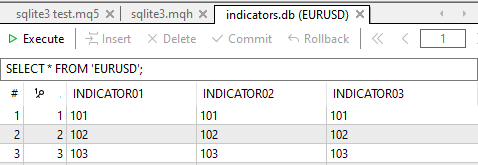
executemany関数を使用する際、VALUESキーワードの後にある疑問符の数は、params行列の列数と同じでなければなりません。そうしないと、エラーが発生します。
また、行列は単一の型(同種の変数)しか格納できないという制限があるため、この関数を使用して異なるデータ型を同時にデータベースに追加することはできません。たとえば、文字列とdouble型の列を同時に挿入することはできません。
2. executescriptメソッド
この関数は、複数のSQL文をまとめて実行したい場合に便利です。たとえば、テーブルの作成や複数行の挿入などを1文で実行できます。以下は、この関数の主な特徴です。
void OnStart()
  {
//---
     sqlite3.connect("indicators.db");

     // Use executescript to log actions
     sqlite3.executescript(
              "CREATE TABLE IF NOT EXISTS logs ("
              "id INTEGER PRIMARY KEY AUTOINCREMENT,"
              "event TEXT NOT NULL"
          ");"

          "INSERT INTO logs (event) VALUES ('Users batch inserted');"
      );

     sqlite3.close();
  }
- セミコロン(;)で区切られた複数のSQL文を1つの文字列として受け取ります。
- execute()やexecutemany()のようにパラメータ化や解析はおこなわず、すべての文を一度に実行します。
- 実行結果は返さず、コマンドのバッチを単に実行するだけです。
以下が出力です。
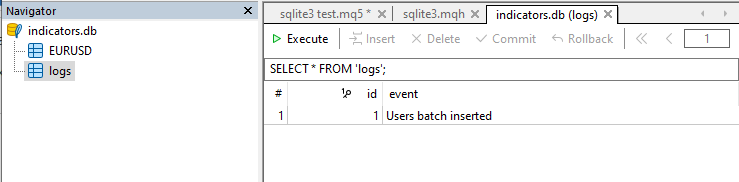
executescript関数は開いているトランザクションを自動的にコミットするため、特別な制御が必要な場合を除き、通常は明示的にcommit関数を呼び出す必要はありません。
3. 追加メソッド:print_tableメソッド
Pythonのsqlite3モジュールで提供されるcursor.descriptionのように、SQLクエリやデータベース、テーブルの構造を取得する機能を再現することができます。
MQL5では、組み込み関数DatabasePrintを使用することで、同様の結果を得ることが可能です。
void CSqlite3::print_table(const string table_name_or_sql, const int flags=0) // Prints a table or an SQL request execution result in the Experts journal.
  {
    if (DatabasePrint(m_db_handle, table_name_or_sql, flags)<0)
       printf("func=%s line=%d, Failed to print the table or query result. Error = %s",__FUNCTION__,__LINE__, ErrorDescription(GetLastError()));
  }
以下が使用法です。
sqlite3.print_table("SELECT * FROM users");以下が出力です。
CM      0       13:17:19.028    sqlite3 test (XAUUSD,H1)         #| id name  age email
PJ      0       13:17:19.028    sqlite3 test (XAUUSD,H1)        --+--------------------------------------
MH      0       13:17:19.028    sqlite3 test (XAUUSD,H1)         1|  1 Alice  30 zero@example.com
KS      0       13:17:19.028    sqlite3 test (XAUUSD,H1)         2|  2 Alice  30 alice@example.com
NO      0       13:17:19.028    sqlite3 test (XAUUSD,H1)         3|  3 Alice  30 bro@example.com
NI      0       13:17:19.028    sqlite3 test (XAUUSD,H1)         4|  4 Alice  30 ishowspeed@example.com
IL      0       13:17:19.028    sqlite3 test (XAUUSD,H1)         5|  5 Alice  30 damn@example.com
LO      0       13:17:19.028    sqlite3 test (XAUUSD,H1)         6|  6 Alice  30 wth@example.com
EE      0       13:17:19.028    sqlite3 test (XAUUSD,H1)         7|  7 Bruh   30 stubborn@example.com
EM      0       13:17:19.028    sqlite3 test (XAUUSD,H1)         8|  8 Bruh   30 whathehelly@example.com
ER      0       13:17:19.028    sqlite3 test (XAUUSD,H1)         9|  9 Bruh   30 huh@example.com
HK      0       13:17:19.028    sqlite3 test (XAUUSD,H1)        10| 10 Bruh   30 whatsgoingon@example.com
IQ      0       13:17:19.028    sqlite3 test (XAUUSD,H1)        11| 11 Bruh   30 bruh@example.com
LQ      0       13:17:19.028    sqlite3 test (XAUUSD,H1)        12| 12 Bruh   30 how@example.com
GG      0       13:17:19.028    sqlite3 test (XAUUSD,H1)        13| 13 John   83 johndoe@example.com
GK      0       13:17:19.028    sqlite3 test (XAUUSD,H1)        14| 14 John   83 johndoe2@example.com
NQ      0       13:17:19.028    sqlite3 test (XAUUSD,H1)        15| 15 John   83 johndoe3@example.com
QF      0       13:17:19.028    sqlite3 test (XAUUSD,H1)        16| 16 John   83 johndoe4@example.com
取引をデータベースに記録する
これまで、SQL文を実行してデータベースに値を追加する簡単な例などを見てきました。ここで、ようやく実用的な内容に進みましょう。MetaTrader 5の取引履歴にあるすべての取引をSQLiteデータベースに挿入する方法を解説します。
この例はこちらの記事から引用したものです。
sqlite3を使用しない場合
//--- auxiliary variables
   ulong    deal_ticket;         // deal ticket
   long     order_ticket;        // a ticket of an order a deal was executed by
   long     position_ticket;     // ID of a position a deal belongs to
   datetime time;                // deal execution time
   long     type ;               // deal type
   long     entry ;              // deal direction
   string   symbol;              // a symbol a deal was executed for
   double   volume;              // operation volume
   double   price;               // price
   double   profit;              // financial result
   double   swap;                // swap
   double   commission;          // commission
   long     magic;               // Magic number (Expert Advisor ID)
   long     reason;              // deal execution reason or source
//--- go through all deals and add them to the database
   bool failed=false;
   int deals=HistoryDealsTotal();
// --- lock the database before executing transactions
   DatabaseTransactionBegin(database);
   for(int i=0; i<deals; i++)
     {
      deal_ticket=    HistoryDealGetTicket(i);
      order_ticket=   HistoryDealGetInteger(deal_ticket, DEAL_ORDER);
      position_ticket=HistoryDealGetInteger(deal_ticket, DEAL_POSITION_ID);
      time= (datetime)HistoryDealGetInteger(deal_ticket, DEAL_TIME);
      type=           HistoryDealGetInteger(deal_ticket, DEAL_TYPE);
      entry=          HistoryDealGetInteger(deal_ticket, DEAL_ENTRY);
      symbol=         HistoryDealGetString(deal_ticket, DEAL_SYMBOL);
      volume=         HistoryDealGetDouble(deal_ticket, DEAL_VOLUME);
      price=          HistoryDealGetDouble(deal_ticket, DEAL_PRICE);
      profit=         HistoryDealGetDouble(deal_ticket, DEAL_PROFIT);
      swap=           HistoryDealGetDouble(deal_ticket, DEAL_SWAP);
      commission=     HistoryDealGetDouble(deal_ticket, DEAL_COMMISSION);
      magic=          HistoryDealGetInteger(deal_ticket, DEAL_MAGIC);
      reason=         HistoryDealGetInteger(deal_ticket, DEAL_REASON);
      //--- add each deal to the table using the following query
      string request_text=StringFormat("INSERT INTO DEALS (ID,ORDER_ID,POSITION_ID,TIME,TYPE,ENTRY,SYMBOL,VOLUME,PRICE,PROFIT,SWAP,COMMISSION,MAGIC,REASON)"
                                       "VALUES (%d, %d, %d, %d, %d, %d, '%s', %G, %G, %G, %G, %G, %d, %d)",
                                       deal_ticket, order_ticket, position_ticket, time, type, entry, symbol, volume, price, profit, swap, commission, magic, reason);
      if(!DatabaseExecute(database, request_text))
        {
         PrintFormat("%s: failed to insert deal #%d with code %d", __FUNCTION__, deal_ticket, GetLastError());
         PrintFormat("i=%d: deal #%d  %s", i, deal_ticket, symbol);
         failed=true;
         break;
        }
     }
//--- check for transaction execution errors
   if(failed)
     {
      //--- roll back all transactions and unlock the database
      DatabaseTransactionRollback(database);
      PrintFormat("%s: DatabaseExecute() failed with code %d", __FUNCTION__, GetLastError());
      return(false);
     }
//--- all transactions have been performed successfully - record changes and unlock the database
   DatabaseTransactionCommit(database);
sqlite3を使用した場合
#include <sqlite3.mqh>
CSqlite3 sqlite3;
//+------------------------------------------------------------------+
//| Script program start function                                    |
//+------------------------------------------------------------------+
void OnStart()
  {
//---
    sqlite3.connect("Trades_database.db");

//--- auxiliary variables

    ulong    deal_ticket;         // deal ticket
    long     order_ticket;        // a ticket of an order a deal was executed by
    long     position_ticket;     // ID of a position a deal belongs to
    datetime time;                // deal execution time
    long     type ;               // deal type
    long     entry ;              // deal direction
    string   symbol;              // a symbol a deal was executed for
    double   volume;              // operation volume
    double   price;               // price
    double   profit;              // financial result
    double   swap;                // swap
    double   commission;          // commission
    long     magic;               // Magic number (Expert Advisor ID)
    long     reason;              // deal execution reason or source

//--- go through all deals and add them to the database

   HistorySelect(0, TimeCurrent());
   int deals=HistoryDealsTotal();

   sqlite3.execute("CREATE TABLE IF NOT EXISTS DEALS ("
                     "ID          INT KEY NOT NULL,"
                     "ORDER_ID    INT     NOT NULL,"
                     "POSITION_ID INT     NOT NULL,"
                     "TIME        INT     NOT NULL,"
                     "TYPE        INT     NOT NULL,"
                     "ENTRY       INT     NOT NULL,"
                     "SYMBOL      CHAR(10),"
                     "VOLUME      REAL,"
                     "PRICE       REAL,"
                     "PROFIT      REAL,"
                     "SWAP        REAL,"
                     "COMMISSION  REAL,"
                     "MAGIC       INT,"
                     "REASON      INT );"
   ); //Creates a table if it doesn't exist

   sqlite3.begin(); //Start the transaction

// --- lock the database before executing transactions

   for(int i=0; i<deals; i++) //loop through all deals
     {
      deal_ticket=    HistoryDealGetTicket(i);
      order_ticket=   HistoryDealGetInteger(deal_ticket, DEAL_ORDER);
      position_ticket=HistoryDealGetInteger(deal_ticket, DEAL_POSITION_ID);
      time= (datetime)HistoryDealGetInteger(deal_ticket, DEAL_TIME);
      type=           HistoryDealGetInteger(deal_ticket, DEAL_TYPE);
      entry=          HistoryDealGetInteger(deal_ticket, DEAL_ENTRY);
      symbol=         HistoryDealGetString(deal_ticket, DEAL_SYMBOL);
      volume=         HistoryDealGetDouble(deal_ticket, DEAL_VOLUME);
      price=          HistoryDealGetDouble(deal_ticket, DEAL_PRICE);
      profit=         HistoryDealGetDouble(deal_ticket, DEAL_PROFIT);
      swap=           HistoryDealGetDouble(deal_ticket, DEAL_SWAP);
      commission=     HistoryDealGetDouble(deal_ticket, DEAL_COMMISSION);
      magic=          HistoryDealGetInteger(deal_ticket, DEAL_MAGIC);
      reason=         HistoryDealGetInteger(deal_ticket, DEAL_REASON);

      //--- add each deal to the table using the following query
      string request_text=StringFormat("INSERT INTO DEALS (ID,ORDER_ID,POSITION_ID,TIME,TYPE,ENTRY,SYMBOL,VOLUME,PRICE,PROFIT,SWAP,COMMISSION,MAGIC,REASON)"
                                       "VALUES (%d, %d, %d, %d, %d, %d, '%s', %G, %G, %G, %G, %G, %d, %d)",
                                       deal_ticket, order_ticket, position_ticket, time, type, entry, symbol, volume, price, profit, swap, commission, magic, reason);

      sqlite3.execute(request_text);
     }

    sqlite3.commit(); //Commit all deals to the database at once
    sqlite3.close(); //close the database
  }
以下が結果です。
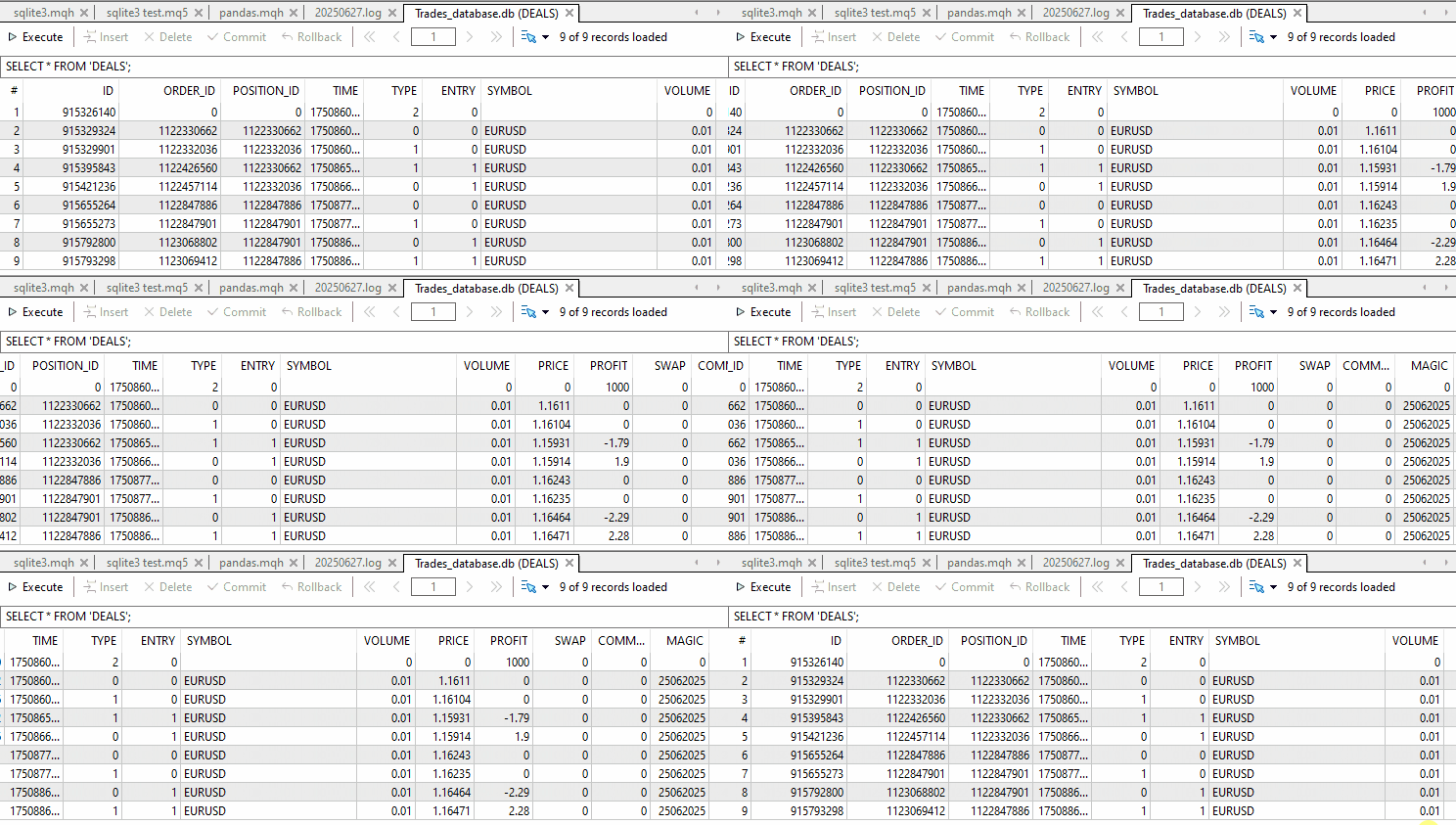
最後に
Pythonのsqlite3モジュールをMQL5で再現することは、やりがいのある挑戦でした。これにより、Pythonと比較した場合のMQL5の柔軟性と制限の両方が浮き彫りになりました。MQL5はSQLiteデータベース用のオーソライザーやコンテキストマネージャなどの高度な機能を標準でサポートしていませんが、適切な抽象化とメソッド設計を行うことで、非常に近い開発体験を実現することができます。
このカスタムCSqlite3クラスにより、MQL5開発者はSQLiteデータベースと構造化されたPython的な方法で対話できるようになりました。クエリ実行、トランザクション管理、commit / rollback制御、fetchone()、fetchmany()、fetchall()などの取得操作もサポートされています。
Pythonから移行してくる方にとっても、このモジュールは馴染みやすく、使いやすいものになっているはずです。
お疲れ様でした。
添付ファイルの表
| ファイル名 | 説明と使用法 |
|---|---|
| Include\errordescription.mqh | MQL5およびMetaTrader 5で発生するすべてのエラーコードの説明を含むファイル |
| Include\sqlite3.mqh | SQLiteデータベースをPython風に扱うためのCSqlite3クラスを含むファイル |
| Scripts\sqlite3 test.mq5 | CSqlite3クラスのテスト用スクリプト |
MetaQuotes Ltdにより英語から翻訳されました。
元の記事: https://www.mql5.com/en/articles/18640
警告: これらの資料についてのすべての権利はMetaQuotes Ltd.が保有しています。これらの資料の全部または一部の複製や再プリントは禁じられています。
この記事はサイトのユーザーによって執筆されたものであり、著者の個人的な見解を反映しています。MetaQuotes Ltdは、提示された情報の正確性や、記載されているソリューション、戦略、または推奨事項の使用によって生じたいかなる結果についても責任を負いません。

 共和分株式による統計的裁定取引(第1回):エングル=グレンジャーおよびジョハンセンの共和分検定
 プライスアクション分析ツールキットの開発(第30回):コモディティチャンネル指数(CCI)、Zero Line EA
 MQL5での取引戦略の自動化(第22回):Envelopes Trend取引のためのZone Recoveryシステムの作成
 知っておくべきMQL5ウィザードのテクニック(第72回):教師あり学習でMACDとOBVのパターンを活用する

- 無料取引アプリ
- 8千を超えるシグナルをコピー
- 金融ニュースで金融マーケットを探索