MT4 for Discord Signals

The utility is designed to send a signal from MT4 to Discord. It has a number of unique features, allowing you not only to send trading signals, but also to perform the following functions:

  • Send messages directly from the terminal to Discord
  • Sending emojis along with custom text
  • Send text and images directly from the MT4 terminal to Discord

All this allows the user to maintain a channel with signals, focusing on trading and finding quality signals.

Instructions for the utility


Fully customizable messages

The signal message can be fully customized:

  • Specify your own header and footer
  • Insert link at the bottom of the message
  • Display a comment from an advisor or manual order

Support for multiple languages

The utility supports 14 languages for messages:

  • English
  • Spanish
  • Russian
  • German
  • Italian
  • French
  • Portuguese
  • Turkish
  • Malay
  • Chinese
  • Japanese
  • Korean
  • Arab
  • Hindi

The translation concerns specifically the messages that are sent to your channel.

Message broadcasting capabilities

The utility allows you to broadcast messages about:

  • Opening an order
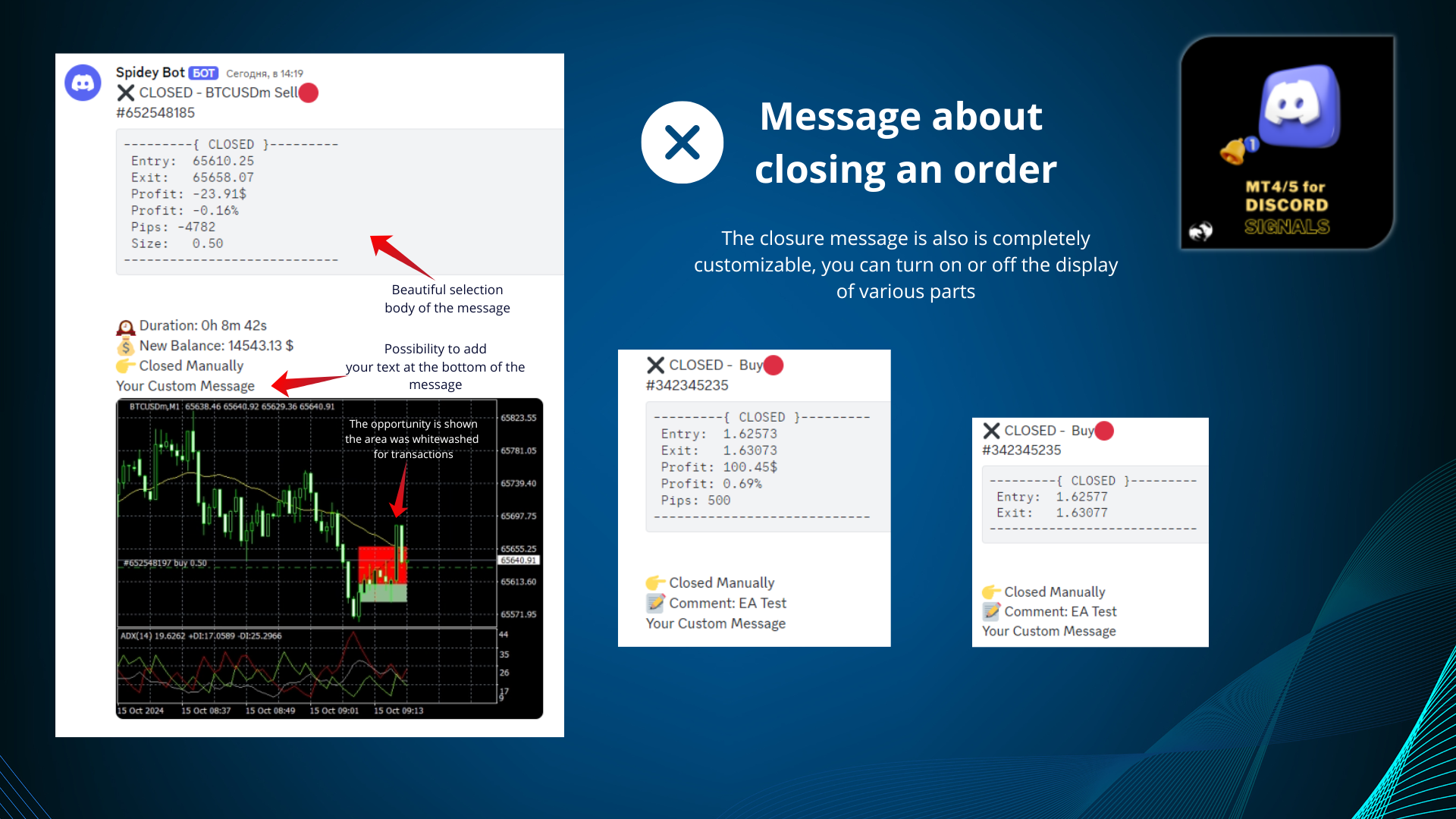
  • Closing the order
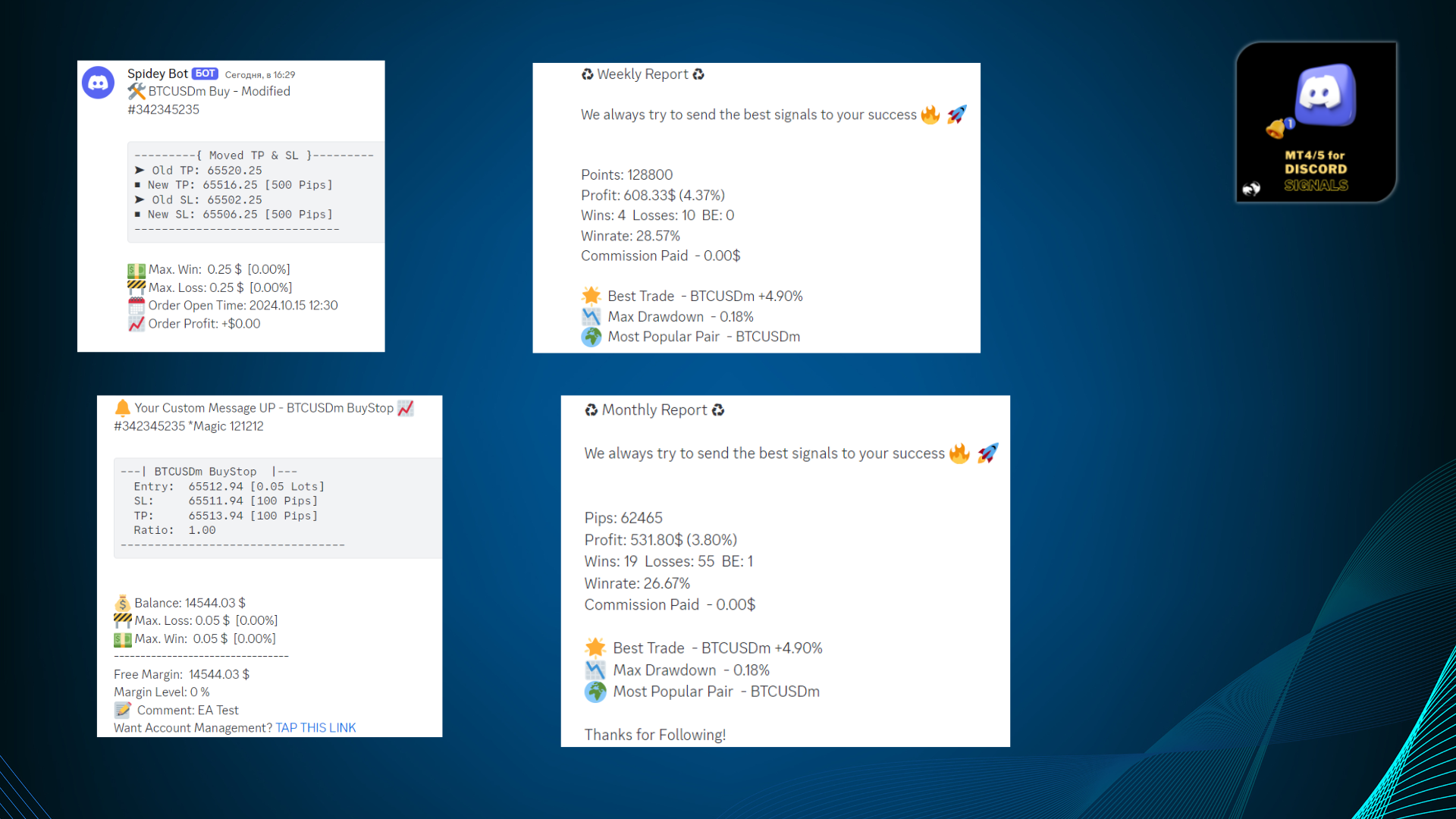
  • Order modifications
  • Partial closure
  • Changing stop loss and take profit levels
  • Activation of pending orders
  • Sending trading reports with the ability to select a schedule for sending reports by day

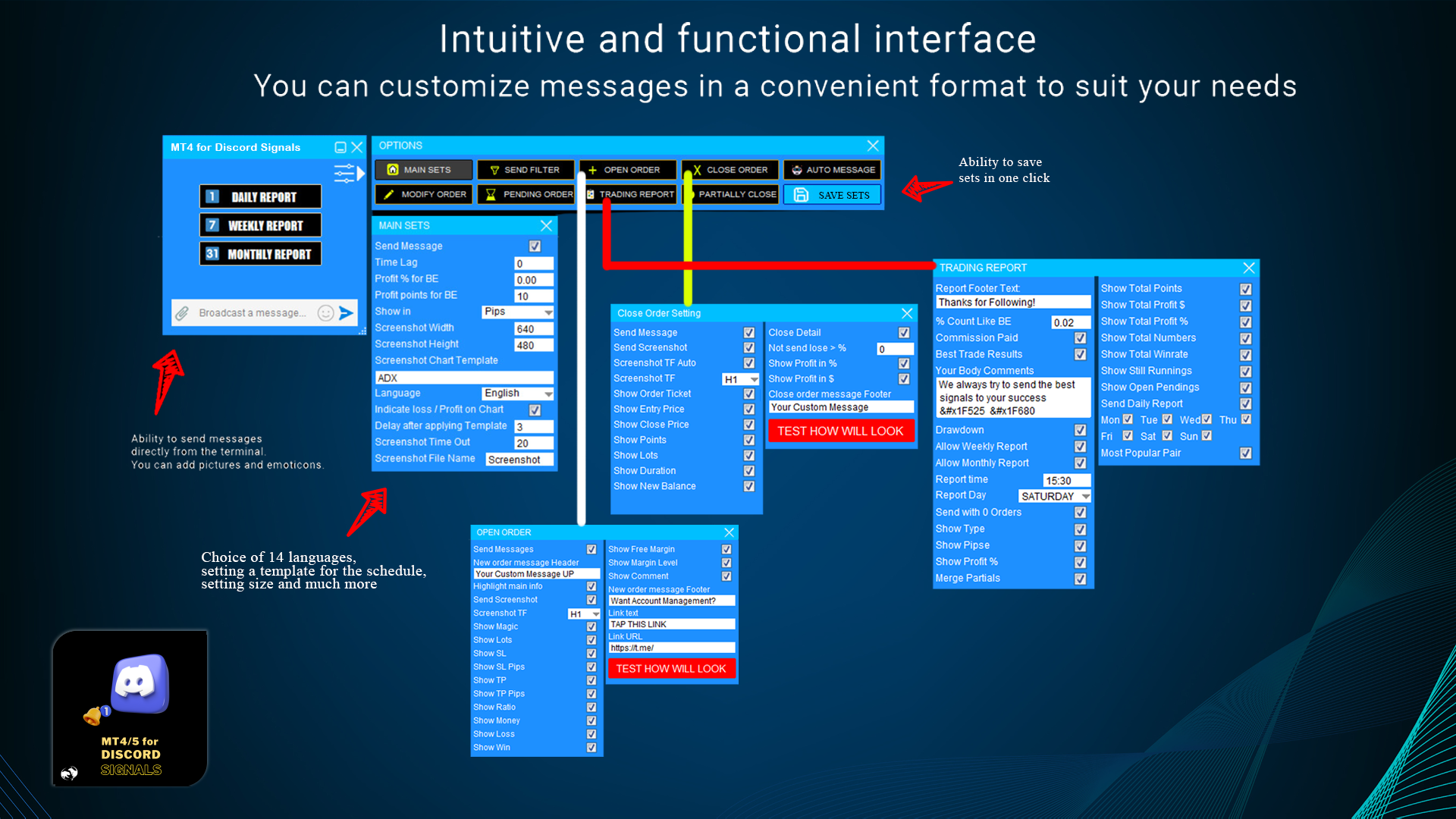
User-friendly graphical interface

The utility is equipped with a graphical interface for user convenience. It is constantly being improved and refined. We wish you successful work with our MT4 for Discord Signals utility.

#MT4Discord #DiscordTrading #MT4UtilityforDiscord #DiscordBot #ForexCommunity #MT4DiscordIntegratio #AlgoTrading



Recommended products
RiskManager
Roman Zhitnik
5 (4)
The Expert Advisor is a risk manager helping users to control their trading. In the settings, it is possible to specify the parameters at which the risk manager force closes the opened trades and closes the terminal as well, if it is needed to prevent opening trades on emotions, which do not correspond to the trading strategy. Risk Manager settings Check limit to close - check the equity limit Limit to close (account currency)   - equity limit that is checked when  Check limit to close is activ
Drawdown Partial Closure
Jerome Thierry Francois Delobel
Drawdown Partial Closure Expert Advisor Description: The Drawdown Partial Closure Expert Advisor is a tool designed for MetaTrader 4 that assists traders in managing their positions during drawdown periods. It monitors the drawdown of the trading account in real-time and automatically closes a portion of losing positions when the drawdown exceeds a specified threshold. This helps traders to mitigate losses during adverse market conditions while allowing profitable positions to remain open. Featu
MT4 to Discord Signals
Diego Arribas Lopez
5 (1)
[ MT5 Version ] [ Telegram Signals ]  MT4 to Discord Signals Connect your broker account with Discord and stop missing important notifications.  Would you like to receive Discord notifications? Are you looking for a simple way to share trade signals with your followers? Do you need to start documenting your trades with an automated trading diary? This utility is simple to use and supports a wide variety of settings: Pick your desired Discord channel and enter its webhook URL Get notified when or
One Click Trader is a tool designed for MetaTrader 4 platform, which enables you to take your trading to the next level. It enables you to open, manage and close your trades in simple an efficient way by just one click of your mouse button. Up arrow minimizes the OCT panel Down arrow maximizes the OCT panel Right arrow displays the next panel with additional features Left arrow hides the panel with additional features Red SELL button enables you to open short market orders Red SELL STOP button e
DrawDownControl
Andrey Shvecov
This Expert Advisor is designed to control drawdown by the symbol it is set to. The Expert Advisor does not carry out trading operations on opening positions, only closing open positions on the symbol on which it is set under certain conditions! There are three drawdown levels implemented in the Expert Advisor. The drawdown size for each level is set in the input parameters and the profit size is assigned (it can be either positive or negative), upon reaching which the ADVISER will close all po
[ MT5 Version ] [ Discord Signals ]  MT4 to Telegram Signals Connect your broker account with Telegram and stop missing important notifications.  Would you like to receive   Telegram   notifications? Are you looking for a simple way to share trade signals with your followers? Do you need to start documenting your trades with an automated trading diary? This utility is simple to use and supports a wide variety of settings: Pick your desired Telegram group and enter the bot token and the chat id G
MT4 for Telegram Signals
Sergey Batudayev
5 (4)
The utility is designed to send signals from MT4 to Telegram. It has several unique features, allowing not only the sending of trade signals but also the following functionalities: Send messages directly from the terminal to Telegram Send emojis along with custom text Send text and images from Telegram All of these features enable users to manage a signal channel while focusing on trading and finding quality signals. [DEMO and  Instruction for utility] Customizable Signal Messages You can fully
CloseIfProfitorLoss with Trailing
Vladislav Andruschenko
4.87 (31)
Closing positions in MetaTrader 4 upon reaching the total profit/loss with the profit trailing function. You can enable the Virtual stops (Separate Order) , Calculating and closing for BUY and SELL positions separately (Separate BUY SELL) , Closing and calculating all symbols or the current symbol only (All Symbols) , Enable trailing for profit ( Trailing Profit) Close on total profit and loss in deposit currency, points, or % of the balance. The application is designed for use on any account t
DepoControl
Evgeniy Zhdan
DepoControl – Full Control Over the Deposit Closers   Expert Advisor controls the overall account status and closes ALL market orders on the account when certain conditions occur. The trading robot closes ALL orders on the account in the following cases (by profit): Close ALL orders by a total profit on the account   in monetary terms . For example, suppose that the settings specify that   positions should be closed when profit of 100 is reached. In this case, the Expert Advisor closes all mark
NEW :    integration with Ofir Signals to send personalized alerts Ofir Notify is a tool which send alerts on trades to Telegram Alert on any event concerning a position : Opening, Closing, modification (SL, TP) Send alerts to Chats, Groups and Channel Alert on Equity change Display Risk, Reward and progress of profit/lost for each position Customization of alerts Sending charts screenshots with alerts Send signals from your indicators or experts Daily, weekly and monthly summaries Reply mode:
Closing Orders At Specified Time is a utility which helps you to close opened orders and delete pending orders at a specified time - especially when you cannot be online and do it by yourself at that time. You can schedule a specific time for closing orders, and additionally you can choose what type of orders should be closed (all, only opened or only pending), what symbols (all or you can enter names of three symbols) and with what Magic Number. You can also select to close only profitable or o
HotKeys MT4
Alexey Valeev
3 (1)
This utility provides the ability to use hot keys in manual trading instantly responding to the current market situation. You can assign hot keys to open/close positions by their type, close all positions on the current chart and remove all orders on the current chart. You can also assign hot keys for five predefined trade volumes and switch between them if necessary with no need to change the volume manually from time to time. It is also possible to set the auto calculation of a trade volume in
THIS EA WILL PROTECT YOUR ACCOUNT IN MANY WAYS  KEY FEATURES ARE :  1. CLOSE ALL TRADES IN ONE CLICK. 2. CLOSE ALL TRADES WHEN INPUT MENTIONED LOSS LIMIT REACH. 3. CLOSE ALL TRADES WHEN INPUT MENTIONED PROFIT LIMIT REACH. 4. IF REVERSE MODE IS ON THIS EA WILL TAKE OPPOSITE TRADES IF YOUR OTHERS EA MAKES LOSS OR MANUAL TRADING ALSO IF YOU ARE GETTING ALWAYS LOSS THEN YOU CAN SWITCH ON REVERSE MODE SO IT WILL TAKE OPPOSITE TRADES WHENEVER ANY TRADES PLACED IN YOUR ACCOUNTS. 5. FIX LOT SIZE 6. STOP
Crosshair
Daniel Stein
Visit our all-new   Stein Investments Welcome Page   to get the latest information, updates and trading strategies. Do you want to become a constantly profitable 5-star forex trader? Then  get our Stein Investments trading tools  and send us a screenshot to get your personal invitation to our exclusive trading chat with 500+ members. Crosshair is a fantastic tool that simplifies our chart analysis by bringing the price candles perfectly in line with the indicator values in the subwindows. You
================================ ENGLISH MANUAL ================================ Product Name: One-Click Close Utility v9.4 Developer: Gemini Partner Version: 9.40 Platform: MetaTrader 4 Type: Expert Advisor I. PRODUCT OVERVIEW --------------- One-Click Close is a professional order management utility designed for  MetaTrader 4 platform. It provides rapid batch closing operations through  intuitive button interface, integrated with intelligent risk management  system. Suitable for both manual
OpenOrders
Andrey Chiganaev
The script allows you to quickly and easily open trades (place orders) on the market. Features Buy and sell at a market price; Place pending orders: Buy/Sell Limit and Buy/Sell Stop; Open a trade with a custom volume; Calculate and set TakeProfit; Calculate and set StopLoss; Auto defining the number of decimal places; Auto defining a symbol the script has been applied to. What you get with the script Ability to calculate each trade instantly; Ability not to enter all calculated values manually
Fixer
Dimitri Nepomniachtchi
Track your orders, build a unified equity across selected symbols, magic numbers, terminals, and trading accounts. Closes orders when specified conditions are met. Creates new portfolios and adapts to already running portfolios according to your conditions. In short, take a look — it is worth it. If you have questions, write. If you are not sure about the settings, ask, I will help. Virtual SL, TP, Trailing.  * * * * It may seem like nothing special, but in practice they often help more than
Close Assistant
Gheis Mohammadi
5 (2)
Close Assistant (CA)  is a full featured utility for monitoring and closing a set of positions placed by trader or EA. It closes filtered orders in specified time or level or candle patterns or when a certain profit or loss of the total positions is reached. CA uses Zero Profit Lock function to save deposit when total profit falls to zero. Profit and loss levels can be set in fixed amount of account currency or percentage of balance or equity or margin. CA only monitors and works on filtered po
Modify SELL orders
Hafis Mohamed Yacine
Modify SELL orders v1.0    Managing Orders   During trading, you may need to modify   orders, i.e.   to change stop levels or  take profit. This can be done with one click with  the script Modify SELL orders v1.0 The script modifies all orders (market )  with specified Take Profit and Stop Loss.(pip or price) If the take profit or(and) stop loss is incorrect, then the value is not changed. Parameters script : Take Profit (PIP) Stop Loss (PIP) Take Profit (price) Stop Loss (price)
Complete Pending Orders Grid System opens any combinations of Buy Stop, Sell Stop, Buy Limit and Sell Limit pending orders and closes all existing pending orders. You just need to drop this script on the chart of a desired currency pair. Before placing all pending orders, the input window is opened allowing you to modify all input parameters: DeleteAllPendings – if true , then all pending orders (for current currency) will be deleted. BuyStop – if true , BuyStop order is opened. SellStop – if tr
Hedge Trader
Mohamed Amine Talbi
Hedge Trader is a panel that helps traders who use the hedging strategy in their trading. The panel style in simple and intuitive, and have the necessary shortcuts a fast trader would need for fast order execution. Features: - Auto double the lot after executing an order. The user only specifies the initial order, then the panel will automatically double the lot after an order execution. - Using basket for auto closing all orders on a predefined floating profit (with the possibility to turn it
FastMove
Adrian Ferreyra
FastMove is a panel with 5 buttons, a notification area and a text entry. Its goal is to enable quick and simple execution. Buttons: MOVE - Move the interface BUY - Start of buy process SELL - Start of sell process L - Select quantity of lots % - Select quantity of percent of balance Keyboard inputs ' ESC ' - Cancels the operation or return to the previous stage. ' F ' - Lock or unlock interface to prevent accidental executions. M - Move the interface. P - Exchange between pending orders or mark
This indicator allows you to monitor the vitals of your account and notifies of some events, in accordance with user settings. Keep your finger on the pulse of trading. Control elements Main panel of the indicator shows the following values: chart symbol, bid/ask prices, spread, free margin, equity, total number of orders and total profit/loss. There are also two buttons: "Alarm" and "Mute". "Alarm" button starts up a timer, which will notify user in a period of time, defined in the settings. I
FREE
EX Pro EA
AL MOOSAWI ABDULLAH JAFFER BAQER
Time frame: M1                                                 Leverage : Higher the better Spread: Lower the better Account type : All types (EA may enter hedge positions, if you want to disable this feature deactivate either Buy, or Sell from the setting) Please please do not take unnecessary risks. (Trading is risky, and there are no guarantees for winning)   We wish you successful trading. (Trading is risky, and there are no guarantees for winning


Smart Keys Sniper Entry
Stephen Sanjeeve Sahayam
This 2 in 1 trade manager is ideal for trading candle breakouts. It can cost average a trade by placing additional limit orders on pullbacks. This ensures you get the best price on all your positions and a higher RR on your wins. Risk is calculated by the most recently closed candle height. The trade assistant buttons help manage all manually placed orders. Use it with any entry method; price action or indicators and for any trading style; scalping, intraday or swing trading. Features: Trade ca


The "Binary Lab Simulator" is a tool designed for practicing and verifying trading strategies. This tool operates 24/7, including weekends and non-trading hours, and supports various expiration periods such as 30 seconds, 1 minute, and 3 minutes, creating an environment similar to real trading. It is compatible with external tools for analyzing entry results. Multiple templates can be saved easily, allowing for seamless testing from the online environment to the simulator. "Binary Lab Simulator"

The utility is designed to send signals from MT4 to Telegram. It has several unique features, allowing not only the sending of trade signals but also the following functionalities: Send messages directly from the terminal to Telegram All of these features enable users to manage a signal channel while focusing on trading and finding quality signals. User-Friendly Interface Installation Telegram bot Create a Telegram bot that sends messages from the MT4 to the chat, channel or group. Set Up Tele
BreakEven ProSync EA – Trade Management & Risk Control Tool Overview BreakEven ProSync EA is an expert advisor for   MetaTrader 4  that helps traders manage open positions efficiently by   automating stop-loss adjustments   and ensuring position synchronization. This tool is designed for traders who want to standardize their stop-loss and take-profit levels across multiple trades while integrating a break-even function. The EA works by calculating the  average price   of all open positions and
Introducing Genius EA Creator for MetaTrader 4: Simplify Your Automated Trading Like Never Before Ready to automate your trading without worrying about coding? Genius EA Creator for MetaTrader 4 is here to transform the way you trade by offering a flexible and powerful platform that anyone can use. Whether you’re a beginner or an experienced trader, you’ll appreciate how this tool allows you to design and execute strategies tailored to your needs—no programming skills required! Key Features and


Moderate EA
AL MOOSAWI ABDULLAH JAFFER BAQER
Time frame: M1                                                 Leverage : Higher the better Spread: Lower the better Account type : All types (EA may enter hedge positions, if you want to disable this feature deactivate either Buy, or Sell from the setting) Please please do not take unnecessary risks. (Trading is risky, and there are no guarantees for winning)   We wish you successful trading. (Trading is risky, and there are no guarantees for winning



Buyers of this product also purchase
Local Trade Copier EA MT4
Juvenille Emperor Limited
4.96 (109)
Experience exceptionally  fast trade copying with the Local Trade Copier EA MT4 . With its easy 1-minute setup, this trade copier allows you to copy trades between multiple MetaTrader terminals on the same Windows computer or Windows VPS with lightning-fast copying speeds of under 0.5 seconds. Whether you're a beginner or a professional trader, the Local Trade Copier EA MT4 offers a wide range of options to customize it to your specific needs. It's the ultimate solution for anyone looking to inc
Trade Assistant MT4
Evgeniy Kravchenko
4.43 (194)
It helps to calculate the risk per trade, the easy installation of a new order, order management with partial closing functions, trailing stop of 7 types and other useful functions. Additional materials and instructions Installation instructions   -   Application instructions   -   Trial version of the application for a demo account Line function -   shows on the chart the Opening line, Stop Loss, Take Profit. With this function it is easy to set a new order and see its additional characteris
Forex Trade Manager MT4
InvestSoft
4.98 (433)
Welcome to Trade Manager MT4 - the ultimate   risk management tool   designed to make trading more intuitive, precise, and efficient. This is not just an order placement tool; it's a comprehensive solution for seamless trade planning, position management, and enhanced control over risk. Whether you're a beginner taking your first steps, an advanced trader, or a scalper needing rapid executions, Trade Manager MT4 adapts to your needs, offering flexibility across all markets, from forex and indice
The product will copy all telegram signal to MT4   ( which you are member  ) , also it can work as remote copier.  Easy to set up, copy order instant, can work with almost signal formats, image signal, s upport to translate other language to English Work with all type of channel or group, even channel have "Restrict Saving Content", work with  multi channel, multi MT5 Work as remote copier: with signal have ticket number, it will copy exactly via ticket number. Support to backtest signal. How to
TradePanel MT4
Alfiya Fazylova
4.84 (94)
Trade Panel is a multi-functional trading assistant. The app contains over 50 trading functions for manual trading and allows you to automate most trading tasks. Attention! Discounts are limited in time, every Tuesday the price will increase by $5 (up to $90). Before making a purchase, you can test the demo version on a demo account. Download the trial version of the application for a demonstration account: https://www.mql5.com/en/blogs/post/750865 . Full instructions here . Trade. Allows you to
Exp COPYLOT CLIENT for MT4
Vladislav Andruschenko
4.65 (66)
Trade copier for MetaTrader 4.   It copies forex trades, positions, and orders from any accounts. It is one of the best trade copiers   MT4-MT4, MT5 - MT4   for the   COPYLOT MT4   version (or   MT4 - MT5 MT5 - MT5   for the   COPYLOT MT5   version).        MT5 version Full Description +DEMO +PDF   How To Buy    How To Install     How to get Log Files    How To Test and Optimize    All products from Expforex Copier  version for      MetaTrader 5  terminal ( МТ5 - МТ5, МТ4 - МТ5 )-  Copylot Cli
Trading History MT4
Siarhei Vashchylka
5 (9)
Trading History - A program for trading and money management on the history of quotes in stratagy tester. It can work with pending and immediate orders, and is equipped with trailing stop, breakeven and take profit functions. Very good for training and testing different strategies. Manual (Be sure to read before purchasing) Advantages 1. Allows you to test any trading strategy in the shortest possible time 2. An excellent simulator for trading training. You can gain months of trading experience
Copy Cat More Trade Copier MT4 is not just a simple local trade copier; it is a complete risk management and execution framework designed for today’s trading challenges. From prop firm challenges to personal portfolio management, it adapts to every situation with its blend of robust execution, capital protection, flexible configuration, and advanced trade handling. The copier works in both   Master (sender) and Slave (receiver)   modes, with real-time synchronization of market and pending orders
Seconds Chart is a unique tool for creating second-based charts in MetaTrader 4 . With Seconds Chart , you can construct charts with timeframes set in seconds, providing unparalleled flexibility and precision in analysis that is unavailable with standard minute or hourly charts. For example, the S15 timeframe indicates a chart with candles lasting 15 seconds. You can use any indicators, Expert Advisors (EAs), and scripts, operating as conveniently as with standard charts. Unlike standard tools,
Risk Manager for MT4
Sergey Batudayev
4.6 (10)
Expert Advisor Risk Manager for MT4 is a very important and in my opinion necessary program for every trader. With this Expert Advisor, you will be able to control the risk in your trading account. Risk and profit control can be carried out both in monetary terms and in percentage terms. For the Expert Advisor to work, simply attach it to the currency pair chart and set the acceptable risk values ​​in the deposit currency or in % of the current balance. Version for MT5 -  https://www.mql5.com
DrawDown Limiter MT4
Haidar Lionel Haj Ali
5 (8)
Drawdown Limiter EA You are in the right place if you were searching for Drawdown control, Drawdown limiter, Balance protection, Equity Protection or Daily Drawdown Limit related to Prop Firm, FTMO, or Funded account trading, or if you want to protect your trading account. Have you suffered from controlling your drawdown when trading funded accounts? This EA is meant for you. Prop firms usually set a rule called “Trader Daily Drawdown”, and if it is not respected, you are disqualified.  I am an
Trader Evolution MT4
Siarhei Vashchylka
5 (2)
" Trader Evolution " - A utility designed for traders who use wave and technical analysis in their work. One tab of the utility is capable of money management and opening orders, and the other can help in making Elliott wave and technical analysis. Manual (Be sure to read before purchasing) | Version for MT5 Advantages 1. Trading in a few clicks. Immediate and pending orders are available in the panel 2. Money management. The program automatically selects the appropriate lot size 3. Simplifies
Telegram to MT4 Coppy
Sergey Batudayev
3.75 (8)
Telegram to MT4: The Ultimate Signal Copying Solution Streamline your trading with Telegram to MT4 , the cutting-edge utility designed to copy trading signals directly from Telegram channels and chats to your MetaTrader 4 platform—without the need for DLLs. This robust solution ensures seamless execution of signals with unparalleled precision and customization options, saving you time and boosting your efficiency. [ Instructions and DEMO ] [ FAQ ] [ How atach logs properly ] [Settings descrition
RS Trade Copier
Boris Sedov
5 (1)
Professional solution for copying trades between terminals. RS Trade Copier is a reliable and flexible system for copying trading operations between MetaTrader 4 terminals. The program suits experienced traders, signal providers, and individual investors, enabling high-precision trade replication with minimal latency. It supports simple automatic configuration as well as advanced manual settings. Does not interfere with manually opened trades or other expert advisors. All operations executed loc
VirtualTradePad mt4 Extra
Vladislav Andruschenko
4.85 (61)
Trading Panel for trading in 1 click.  Working with positions and orders!  Trading from the chart or the keyboard. Using our trading panel, you can trade in one click from the chart and perform trading operations 30 times faster than the standard MetaTrader control. Automatic calculations of parameters and functions that make life easier for a trader and help a trader conduct their trading activities much faster and more conveniently. Graphic tips and full information on trade deals on the chart
EchoTrade Telegram to MT4 Copier
Perpetual Chinemerem Vincent
5 (2)
EchoTrade Telegram to MT5 Copier Seamless, Instant, and Reliable Signal Copying - Direct from Telegram to MetaTrader 4! The product does not run in the strategy tester but you can get free trial version   here  for testing before purchase. Tired of manually executing trades from Telegram signals? EchoTrade automates the process, instantly copying trades from any Telegram channel or group directly into your MT5 account—accurately, efficiently, and without delay. Key Features: Universal Compatib
Trade Dashboard MT4
Fatemeh Ameri
4.92 (53)
Tired of complex order placement and manual calculations? Trade Dashboard is your solution. With its user-friendly interface, placing orders becomes effortless, by a single click, you can open trades, set stop loss and take profit levels, manage trade lot size, and calculate risk to reward ratios, allowing you to only focus on your strategy. Say goodbye to manual calculations and streamline your trading experience with Trade Dashboard. Download  Demo Version  right now. You can find  Details of
Chart Button
Chantal Sala
3 (1)
Chart Button is a very useful indicator that allows you to navigate all charts with a simple click. This tool has been designed to work both vertically and horizontally. The particularity of this navigator is that you can change more charts simultaneously setting the input value. This tool will give you the ability to optimize your navigation and speed up all your analyzes. Input Values Direction (the direction of symbols buttons) Horizontal Vertical 32 SYMBOLS Forex_Suffix_Symbols (add Forex S
ManHedger MT4
Peter Mueller
5 (2)
THIS EA IS A SEMI-AUTO EA, IT NEEDS USER INPUT. Manual & Test Version Please TEST this product before   BUYING  and watch my video about it. Contact me for user support or bug reports, or if you want the MT5 version! MT5 Version I do not guarantee any profits or financial success using this EA. With this Expert Advisor, you can: Implement your own   Zone Recovery   strategy to capitalize on trending markets. Create   Grid   trading strategies, to profit from ranging markets. Place orders easil
Trading Special – 40% OFF Advanced Trade Manager – The Ultimate All-in-One Solution for Faster, Smarter, and Safer Manual Trading. Transform your manual trading with NextGen Trade Manager AI – the professional on-chart panel that combines instant execution, visual trade planning, and powerful risk management into one intuitive tool. Execute orders, manage risk, and protect profits faster than ever before, all without leaving your chart. Perfect for all traders looking to enhance their precisi
Comprehensive on chart trade panel with the unique ability to be controllable from mobile as well. Plus has a library of downloadable configuration, e.g. exit rules, extra panel buttons, pending order setup and more. Please see our product video. Works with all symbols not just currency pairs. Features On chart panel plus controllable from free app for Windows, iPhone and Android Built-in script engine with library of downloadable configuration, e.g. add 'Close All Trades in Profit' button, exit
MT4 Professional Copy Trading System (MT4 Edition) The MT4 Professional Copy Trading System is an industrial-grade, ultra-fast LOCAL Trade Copier , designed for professional traders, signal providers, and institutional-style multi-account management. Industrial LOCAL Architecture (Faster, More Stable) This is a true LOCAL copier , designed to operate when terminals are hosted in the same Windows environment (same PC or the same Windows VPS instance). Key advantages: Ultra-fast synchronization
The News Filter
Leolouiski Gan
5 (25)
This product filters all expert advisors and manual charts during news time. It is able to remove any of your EA during news and automatically reattach them after news ends. This product also comes with a complete  order management system that can handle your open positions and pending orders before the release of any news. Once you purchase The News Filter , you will no longer need to rely on built-in news filters for future expert advisors, as this product can filter them all from here onwards
Riskless Pyramid
Snapdragon Systems Ltd
5 (1)
Introduction This powerful MT4 trade mangement EA offers a way potentially to aggressively multiply trade profits in a riskfree manner. Once a trade has been entered with a defined stoploss and take profit target then the EA will add three pyramid add-on trades in order to increase the overall level of profit. The user sets the total combined profit target to be gained if everything works out. This can be specified either as a multiple of the original trade profit or as a total dollar amount. Fo
TradeMirror is a trade copier EA for MT4/MT5 platform. Why TradeMirror We understand the importance of security, stability and privacy for financial software, so we've gone the extra mile to harden these three elements in detail: Provides a user-friendly graphical interface that is easy to operate Focus on privacy and security, suitable for various financial scenarios with privacy requirements for order distribution Precise replication of orders, millisecond distribution Support full platform, M
Eezeorder 2
Tawanda Tinarwo
5 (2)
NEW VERSION!  NB: IF YOU ARE USING A VERY HIGH RESOLUTION MACHINE AND THE EA DISPLAY LOOKS TOO SMALL, CONTACT ME SO I CAN HELP YOU. Open Multiple Trades on MT4 in 1 click at one price. Enter the Lot size Specify the number of trades you want to open Choose whether you want TP SL or Trailing Stop Once you are done, click Buy or Sell Open Multiple Pending Orders on MT4 in 1 click at one price. Enter the Lot size Specify the gap from the current price, where you want to place the pending order Spe
Length Movement
Pavel Verveyko
5 (1)
Measures the length of the selected movement in points, shows the duration of the movement, as well as the speed of movement.   Outputs the average value of each dimension. It is designed to calculate the expected target based on typical market movements. The intended goal will provide information about the ratio of the stop size to the possible profit and will allow you not to open positions with a small expected profit. It will also help you determine the point at which it is more logical to c
Grid Manual MT4
Alfiya Fazylova
4.71 (17)
Grid Manual is a trading panel for working with grid strategies. The utility is universal, has flexible settings and an intuitive interface. It works with a grid of orders not only in the direction of averaging losses, but also in the direction of increasing profits. The trader does not need to create and maintain a grid of orders, the utility will do it. It is enough to open an order and the Grid manual will automatically create a grid of orders for it and will accompany it until the close. Ful
Exp4 Duplicator
Vladislav Andruschenko
4.5 (22)
The Expert Advisor repeats trades and positions a preset number of times on your account  MetaTrader 4 . It copies all deals opened manually or by another Expert Advisor. Copies positions and increases the lot from positions ! Increases the lot of other EAs. The following functions are supported: custom lot for copied trades, copying Stop Loss, Take Profit, use of trailing stop.        MT5 version Full Description +DEMO +PDF   How To Buy    How To Install       How to get Log Files     How To
Ultimate Trade Copier
BLAKE STEVEN RODGER
5 (2)
This trade copy utility allows you to instantly and seamlessly replicate and synchronize unlimited orders from multiple master accounts to multiple slave accounts on your local machine. You can create custom channels (or portfolios) with advanced filtering capabilities to copy from multiple master accounts to multiple slave accounts. Moreover, you can tailor these channels with a range of lot sizing and trade condition options to ensure that copied trades outperform the original source. You can
More from author
GoldPro MT5
Sergey Batudayev
5 (5)
GoldPro (MT5) — XAUUSD Expert Advisor with 2 selectable modes: Classic & Scalping GoldPro is an automated trading system for XAUUSD (Gold) built for traders who want structure, clear risk controls and an EA that can work in different market tempos. Inside one EA you can choose how it trades : 1) Classic Mode — calm logic for swings & pullbacks A classic approach focused on reversal / mean-reversion behavior (entries from market “exhaustion” zones) and structured position management. Basket-style
GoldPro
Sergey Batudayev
5 (2)
GoldPro (MT4) — XAUUSD Expert Advisor with 2 selectable modes: Classic & Scalping GoldPro is an automated trading system for   XAUUSD (Gold)   built for traders who want structure, clear risk controls and an EA that can work in different market tempos. Inside one EA you can choose   how it trades : 1) Classic Mode — calm logic for swings & pullbacks A classic approach focused on reversal / mean-reversion behavior (entries from market “exhaustion” zones) and structured position management. Basket
Telegram to MT5 Coppy
Sergey Batudayev
5 (8)
Telegram to MT5: The Ultimate Signal Copying Solution Simplify your trading with Telegram to MT5, the modern tool that copies trading signals directly from Telegram channels and chats to your MetaTrader 5 platform, without the need for DLLs. This powerful solution ensures precise signal execution, extensive customization options, saves time, and boosts your efficiency. [ Instructions and DEMO ] [ FAQ ] [ How atach logs properly ] [ Settings descrition ] Key Features Direct Telegram API Integrati
Risk Manager for MT4
Sergey Batudayev
4.6 (10)
Expert Advisor Risk Manager for MT4 is a very important and in my opinion necessary program for every trader. With this Expert Advisor, you will be able to control the risk in your trading account. Risk and profit control can be carried out both in monetary terms and in percentage terms. For the Expert Advisor to work, simply attach it to the currency pair chart and set the acceptable risk values ​​in the deposit currency or in % of the current balance. Version for MT5 -  https://www.mql5.com
Risk Manager for MT5
Sergey Batudayev
4.35 (17)
Expert Advisor Risk Manager for MT5 is a very important and in my opinion necessary program for every trader. With this Expert Advisor, you will be able to control the risk in your trading account. Risk and profit control can be carried out both in monetary terms and in percentage terms. For the Expert Advisor to work, simply attach it to the currency pair chart and set the acceptable risk values ​​in the deposit currency or in % of the current balance. [Instruction for Risk Manager parameter
Telegram to MT4 Coppy
Sergey Batudayev
3.75 (8)
Telegram to MT4: The Ultimate Signal Copying Solution Streamline your trading with Telegram to MT4 , the cutting-edge utility designed to copy trading signals directly from Telegram channels and chats to your MetaTrader 4 platform—without the need for DLLs. This robust solution ensures seamless execution of signals with unparalleled precision and customization options, saving you time and boosting your efficiency. [ Instructions and DEMO ] [ FAQ ] [ How atach logs properly ] [Settings descrition
True Supply and Demand indicator       - will allow you to quickly determine the location of resistance and support levels on all timeframes. The indicator will be useful for those who use technical analysis in their trading. The indicator is easy to use, just drag and drop on the chart and the indicator will show you the most likely support and resistance levels. When switching timeframes, you will see the levels for the newly selected timeframe. Recommended Robot Scalper       -       test  
EasyTradePad for MT5
Sergey Batudayev
5 (5)
EasyTradePad – Trading Panel for MetaTrader 5 EasyTradePad is a tool for manual and semi-automated trading. The panel allows quick management of orders and positions, as well as risk management calculations in one click. [ DEMO and Instruction ] Panel Features: Open and close trades with predefined risk (% or deposit currency) Set SL and TP in points, percentages, or monetary values Calculate risk-to-reward ratio automatically Move stop loss to breakeven Partial position closing Trailing stop
Averaging Helper
Sergey Batudayev
5 (2)
Averaging Helper - This sort of trading helper instrument will help you average out your previously unprofitable positions using two techniques: standard averaging hedging with the subsequent opening of positions according to the trend The utility has the ability to sort out several open positions in different directions at once, both for buy and for sell. For example, you opened 1 position for a sell and the second for a buy, and they are both unprofit, or one is in the unprofit and one is in
HYT utility
Sergey Batudayev
HYT (Help Your Trading) is a tool designed to help you average down your losing positions using two main techniques: Standard averaging. Hedging with subsequent opening of positions in the direction of the trend. This tool allows you to manage multiple positions opened in different directions, both for buying and selling. HYT automatically calculates the size of the next position, order price, direction for averaging, and closing the position with a specified take-profit level. It also provides
AI Trade Analyzer   is an intelligent market analysis tool implemented in the indicator format. The program visualizes signals on the chart and helps the trader evaluate the market situation based on technical indicators and news background. Supported Models: Compatible with the latest ChatGPT versions — GPT-5.1 , GPT-4o , GPT-4o-mini , O1 , and GPT-3.5-turbo . GPT-5.1 provides the highest precision, advanced context understanding, and deep analysis of complex trading situations. GPT-4o offers
Automated trading should help you grow your capital — not confuse you with endless settings and theories. SPARK is a lightweight yet effective Expert Advisor designed to give beginners a confident start with a focus on precision and simplicity. Why is SPARK different? Focused on EUR/USD: The EA is specifically optimized for EUR/USD, one of the most liquid and stable currency pairs. Built on liquidity breakout logic: SPARK identifies and reacts to unique liquidity zones where price is likely to b
FREE
The utility is designed to send a signal from MT5 to Discord. It has a number of unique features, allowing you not only to send trading signals, but also to perform the following functions: Send messages directly from the terminal to Discord Sending emojis along with custom text Send text and images directly from the MT5 terminal to Discord All this allows the user to maintain a channel with signals, focusing on trading and finding quality signals. Instructions for the utility Fully customizabl
Market Screener for MT4
Sergey Batudayev
5 (1)
This is a screener that allows to identify assets that are more than usually overbought (% growth) or oversold (% fall)  within a selected period of time (time frame). The market is ruled by the law, buy cheaper, sell more expensive,  but without an automatic scanner it is very difficult to identify assets overbought or oversold, say, within the current week, or the current hour, or month. There can be dozens or hundreds of instruments, sometimes it is simply not possible to physically analyze e
Coppy Master MT5
Sergey Batudayev
5 (1)
Coppy Master MT5 is a trade copier tool for MetaTrader 4 and MetaTrader 5 terminals. It supports copying in both directions: from MT5 to MT4, from MT4 to MT5, as well as between accounts of the same type. To work correctly, all terminals must be running on the same PC or VPS. [ Instruction  and Demo ]  For copying to MetaTrader 4, a separate version — Coppy Master MT4 — is required. Main Features: Copying Modes Supports both Master and Receiver roles. Flexible setup for sending and receiving tr
Indicator iPump for MT4
Sergey Batudayev
3 (2)
The iPump indicator is a versatile indicator   that combines the advantages of three categories of indicators. simultaneous trend detection on several Timeframes defining zones of resistance and support determination of overbought and oversold zones Indicator functions: Defining a trend This function will be necessary for all traders who want to objectively assess the current market direction and avoid subjectivity. It will be clear and intuitive. Determination of support and resistance levels
SwiftScalper
Sergey Batudayev
SwiftScalper   is a powerful Expert Advisor ideal for trading EUR/USD and GBP/USD on the optimal M30 time frame. It uses advanced analysis techniques including technical indicators and price action patterns to effectively identify scalping opportunities. Main features of SwiftScalper: Adaptability   : Designed to operate in volatile market conditions, providing effective signals based on up-to-date data. Accurate Signals   : Uses comprehensive analysis to identify the best entry and exit points,
MT5 for Telegram Signals
Sergey Batudayev
5 (10)
The utility is designed to send signals from MT4 to Telegram. It has several unique features, allowing not only the sending of trade signals but also the following functionalities: Send messages directly from the terminal to Telegram Send emojis along with custom text Send text and images from Telegram All of these features enable users to manage a signal channel while focusing on trading and finding quality signals. [DEMO and  Instruction for utility] Customizable Signal Messages You can fully
Smart Grid Set EA is a flexible and user-friendly expert advisor for placing pending orders in a grid. It supports breakeven logic, multiple trailing-stop modes, manual grid placement, customisable lot sizes, and an intuitive on-chart interface. It is ideal for traders who employ grid or averaging strategies. Key Features Places Buy Stop and Sell Stop orders in a customisable grid Supports individual lot sizes for each grid level Built-in trailing stop: classic, by candle highs/lows, or by movin
FREE
Work logic The importance of this indicator lies in the fact that it allows you to understand how much “fuel is still left at the instrument.” Imagine the situation, you left in a car with a half-discharged battery, on average, this amount of energy is usually enough for a car for 250 km, so if you want to, you cannot overcome a distance of 700 km. So for each instrument, there is a certain daily price movement, and as a result of statistical observations, it was revealed that 95% of the time t
Description of the advisor Smart Expert Advisor is an automatic grid trading advisor with auto-selection of settings for each trading pair. The Expert Advisor automatically selects the settings for each currency pair, thus you do not need to define the parameters for each pair, calculations are based on the volatility of the instrument being traded. At the time of trading, you can set the direction of entry points. Enable filter by trend. About strategy The EA is based on the logic of catching
PercentTradePad
Sergey Batudayev
The panel has the most intuitive interface that every beginner can handle. In the SLp column  – you need to specify the SL size in pips. If the value turns gray and at the same time the Bay / Sell buttons are also inactive, then you have specified a SL value that is less than that allowed before it was set by your broker. In the TP% column   – you indicate TP in% of the account balance. In the settings, you can choose on the basis of what this indicator will be calculated, by equity, balance or
EasyTradePad
Sergey Batudayev
5 (5)
EasyTradePad – Trading Panel for MetaTrader 4 EasyTradePad is a tool for manual and semi-automated trading. The panel allows quick management of orders and positions, as well as risk management calculations in one click. [ DEMO and Instruction ] Panel Features: Open and close trades with predefined risk (% or deposit currency) Set SL and TP in points, percentages, or monetary values Calculate risk-to-reward ratio automatically Move stop loss to breakeven Partial position closing Trailing stop
MetaTrader utility MTI (Main Trading Info) – shows the basic trading information for a trader, namely: average and current spread size Swap size for short and long positions Cost of 1 pip for 1 trading lot Stop Level size (minimum distance for placing pending orders) Time until the end of the current (red) and time until the start of the next (gray) trading session The time until the end of the current trading session is displayed in red, the time until the opening of the next session is display
Impuls Pro MT4
Sergey Batudayev
5 (2)
The EA’s strategy is based on  Swing trading , with entries after sharp impulses calculated by the iPump indicator. The advisor has the ability to open manual trades with automatic support – for a downtrend ↓ we enter a trade after a corrective rise in the price, the asset falls into the overbought zone, we sell along the trend. – for an uptrend ↑, we enter a trade after a corrective fall in the price, the asset falls into the oversold zone, we buy along the trend. When trading on the selected
Work logic Stop Out utility is a simple but very convenient indicator showing how many points are left to the Stop Out level / Its benefit lies in the fact that many traders deliberately overestimate the risk in trading in pursuit of profit, use the available margin at the maximum, and for this case it is very important to know where the broker can forcibly close your positions. Just place the indicator on the chart and depending on the open position in Buy or Sell, you will see the border m
EA Pump and Dump for MT4
Sergey Batudayev
5 (1)
Strategy logic Pump and Dump Expert Advisor is a fully automated trading advisor created by a trader for traders. The strategy is “buy cheaper, sell more expensive”. Orders are opened after a significant rise / fall in price. The basic meaning of the Pump and Dump strategy is to buy an asset cheaper when the price falls, and sell it higher when the price rises. You have probably noticed that after sharp price movements in the market, a significant price rollback occurs in the opposite direction
Close All Orders for MT4 script - closes absolutely all orders, whether pending or market ones. Orders are closed at the current profit/loss indicators at the time of closing. The script is suitable for moments when you need to quickly close all orders at the current indicators. The script is very easy to use, just drag the script onto the chart and it will do its job. Add me as a friend , I have many other useful products.
EA Ice Cube Scalper
Sergey Batudayev
4.71 (21)
Trading Advisor Ice Cube Scalper -       it is a day scalper , making a large number of trades daily, taking several points with each transaction. The EA's strategy is based trade with the trend using the RSI indicator. The EA uses averaging with a multiplier lot, you need to understand this before using the EA, however the strategy performed well in both backtesting and live trading. Before use test the work of the adviser in the strategy tester for more understanding his work. To control risks
Script Close All Positive Orders for MT4       - will allow you to quickly close all profitable orders on your account. The script is   suitable   for moments   when you need to quickly close all profitable orders   . The script has the only parameter for setting Profit_in_pips - in it you specify how many points of profit should be on the order so that it falls under the conditions for closing the position. The script is very easy to use   , just drag and drop the script onto the chart and it w
Filter:
No reviews
Reply to review