Exp4 VirtualTradePad PRO SE for MT4

VirtualTradePad PRO SE MT4 — advanced trading panel and chart workspace for MetaTrader 4

VirtualTradePad PRO SE is a professional trading panel and trade-management workspace for MetaTrader 4. It helps traders open, manage, protect, close and analyze trades faster from one chart-based interface.

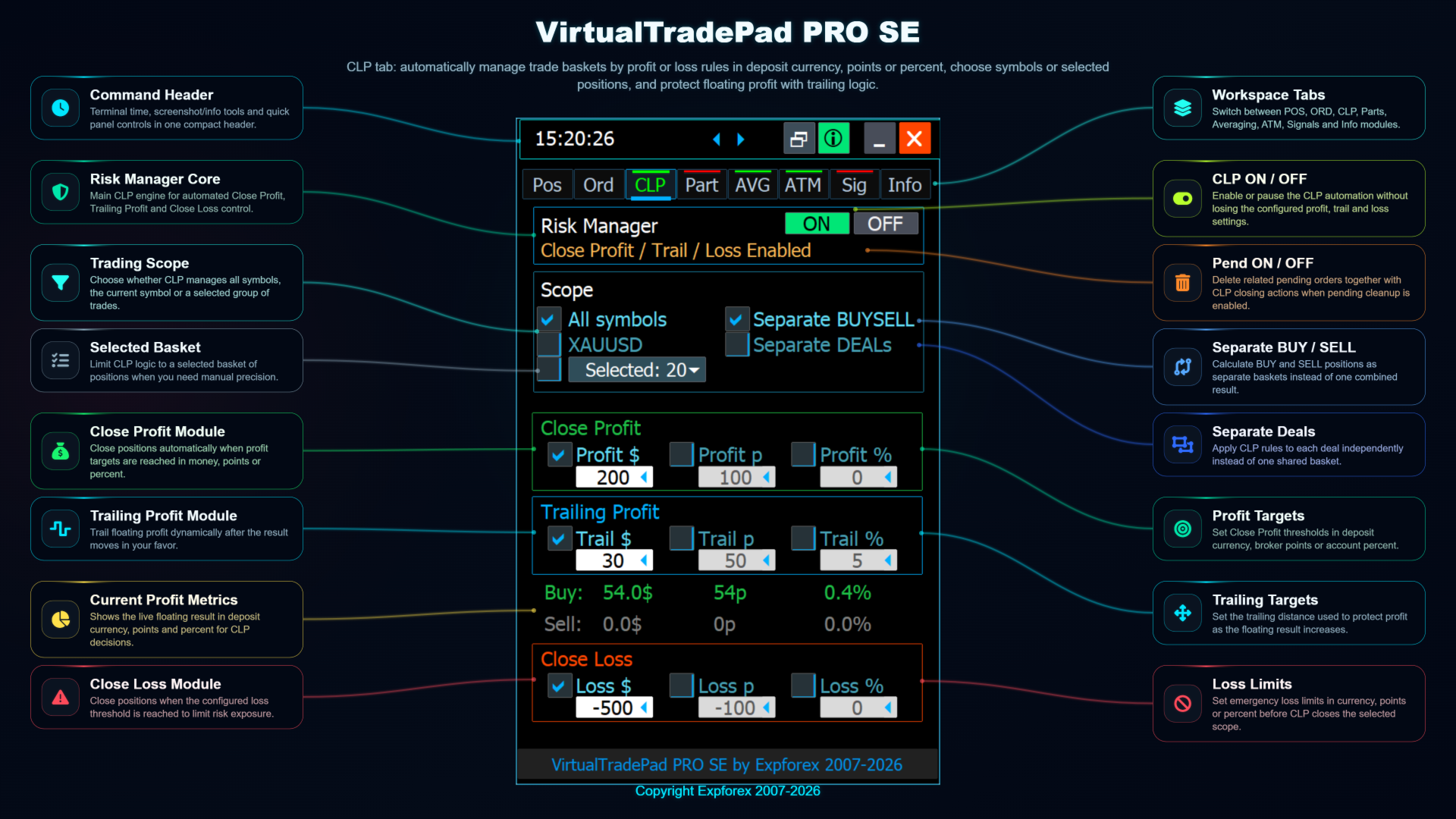
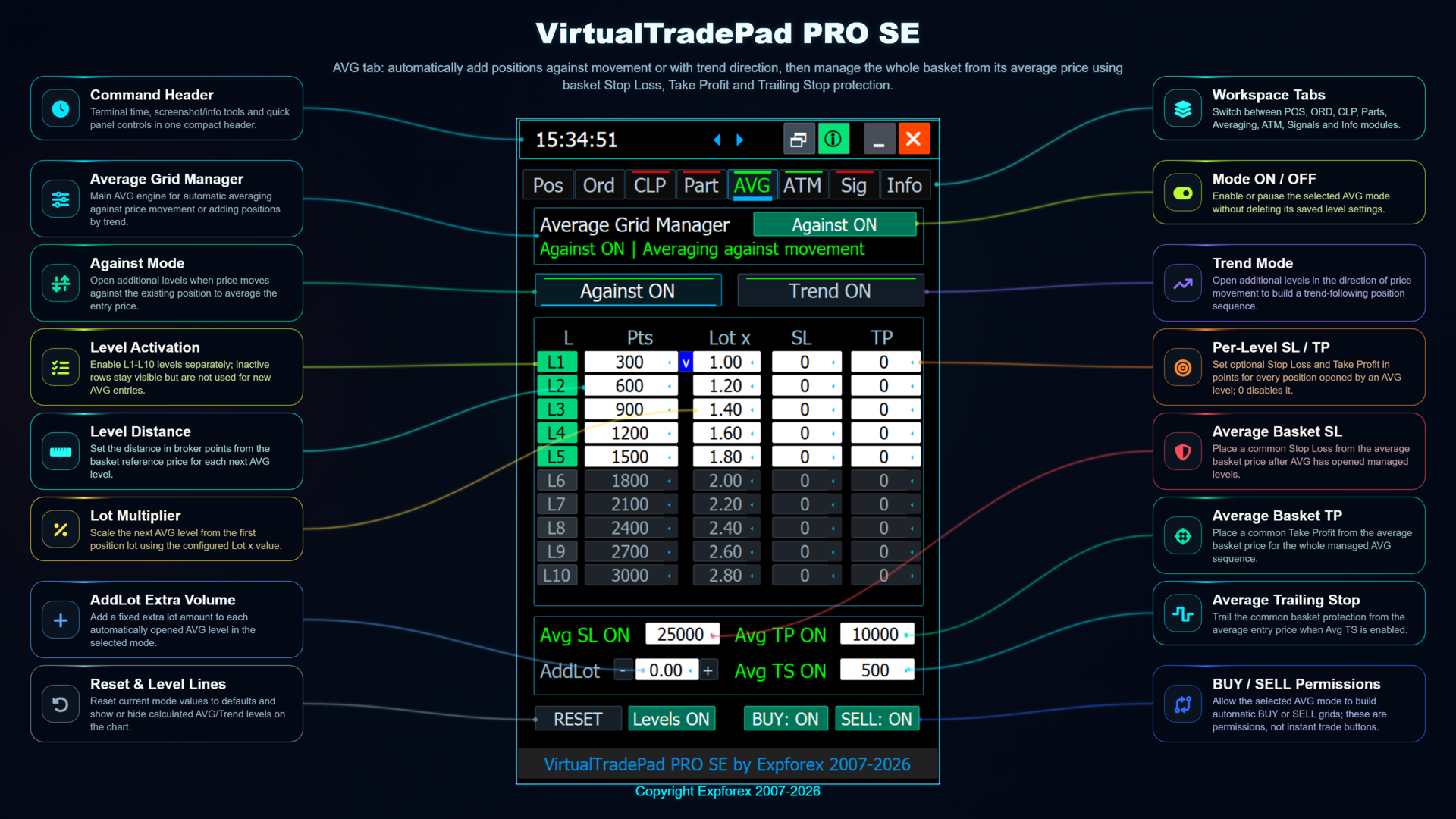
The product was created for active manual traders who need more than a simple set of buttons. PRO SE combines one-click execution, pending orders, position control, partial close, basket profit/loss logic, averaging levels, ATM rules, signal monitoring, market information, Strategy Tester workflow and VPS-oriented preparation in one structured workspace.

Advantages over ordinary manual trading

  • One workspace instead of many windows — trade execution, position control, risk information and management tools stay on the chart.
  • Faster trade handling — fewer repeated clicks for opening, closing, reversing, locking and modifying positions.
  • Better visibility — the trader sees current position state, floating result, exposure, levels and important account information faster.
  • More control over exits — use partial close, basket closing, trailing profit and structured management instead of closing everything manually.
  • Visual planning — pending orders, Magic Target, AVG levels and chart-side tools make the trading plan easier to read.
  • Rule-based discipline — ATM helps prepare management scenarios with actions and conditions instead of only reacting manually.
  • Testing before real use — the Strategy Tester workflow helps study behavior before using complex settings on a live account.

Core features

  • Manual trading control — BUY, SELL, Close, Reverse, Lock, Stop Loss, Take Profit, trailing and breakeven.
  • Chart-based position management — live information, quick actions and visual control directly from the chart.
  • Pending orders — Buy Stop, Sell Stop, Buy Limit, Sell Limit and Magic Target planning.
  • CLP module — close positions by total profit, total loss or trailing profit.
  • PART module — manage structured partial exits instead of closing the whole position at one price.
  • AVG module — plan averaging or trend-add levels and manage basket protection.
  • ATM module — create advanced trade-management rules with action, condition, details and review logic.
  • SIG module — monitor signal direction, alerts, push notifications and optional trade permissions.
  • INFO module — market status, spread, floating result, exposure, drawdown and closed P/L statistics.
  • Visual testing — study panel behavior and advanced modules in the Strategy Tester.
  • VPS preparation — configure stable presets before migration to a VPS environment.

For serious MetaTrader workflow

Ordinary manual trading can become slow and fragmented: one window for orders, another for positions, separate scripts for actions, manual calculations for levels and constant switching between terminal tabs. VirtualTradePad PRO SE reduces this routine by placing execution, control and information into one professional panel.

The panel is useful for scalping, intraday trading, semi-automatic management, basket control, position series, partial closing, visual level planning and disciplined workflow building. The trader can start with simple manual trading and then gradually use advanced modules when needed.

Important: this product is a professional execution and trade-management tool. It is not an automatic profit system and it does not replace your trading strategy. Always use responsible risk management and check broker conditions, minimum lot, lot step, spread, stop level and execution rules.

Read the full product guide with screenshots, module explanations, installation notes, testing workflow and VPS information: VirtualTradePad PRO SE full description.

MetaQuotes VPS guide | All Expforex products

Tags: MetaTrader 4 trading panel, MT4 trade manager, one click trading, manual trading, chart trading, pending orders, partial close, basket profit, Close Profit, Close Loss, averaging levels, ATM rules, signals, Strategy Tester, Expforex
Recommended products
Trade Assistant Pro 36 in 1
Makarii Gubaydullin
4.76 (21)
Multifunctional tool: Lot Calculator, Grid Orders, R/R ratio, Trade Manager, Supply and Demand zones, Price Action and much more Demo version   |   User manual Trade Assistant   doesn't work in the strategy tester: you can download the Demo Version HERE  to test the utility . Contact me for any questions  / ideas for improvement / in case of a bug found If you need a MT5 version, it is available   here Simplify, speed up and automate your trading process . Expand the standard terminal capabilit
Risk Commander
Adisorn Soodkanueng
Product Name: Risk Commander: Trade Assistant & Strategy Simulator Risk Commander is more than just a trade panel—it is a complete Manual Trading Ecosystem . It serves two powerful purposes: Live Assistant: Helps you execute trades with speed, precision, and perfect risk management in real-time markets. Training Simulator: Fully compatible with the Strategy Tester (Visual Mode) , allowing you to practice manual trading on historical data without risking a cent. NEW! Built-in Simulator Mode Stop
This tool will perform Trailing stop loss and Break even management for orders. Helps you limit or reduce the time spend watching orders on the screen, especially when you need to go to sleep. Just add this EA to 1 chart, you can manage all pairs. You can filter orders by comment, magic number, symbol, and order ticket number. When Breakeven it can add shift/offset pips (to cover the commission...). You can try in strategy tester before purchase. The EA will add Buy and Sell alternately, so yo
CoPilot dashboard MT4
Frederic Jacques Collomb
CoPilot — Daily Trading Dashboard Know your numbers. Trade with clarity. MT5 version What is CoPilot? CoPilot is a professional-grade trading assistant that displays in real time all your daily performance statistics directly on the chart — with a live equity curve that updates trade by trade. Designed for active traders who need instant visibility into their session without leaving the chart, CoPilot aggregates every closed trade of the day across all symbols and presents them in a clean, color
The Perspective Trend indicator tracks the market trend with very high reliability. All intersection points will be ideal points at which the direction of the trend changes. Sharp price fluctuations, as well as noise around averaged prices, are ignored. Signal points, places where color changes, can be used as points of potential market reversal. The indiuctor algorithm implements a kind of technical analysis based on the idea that the market is cyclical in nature. This development can be used b
VR Cub
Vladimir Pastushak
VR Cub is an indicator for getting high-quality entry points. The indicator was developed to facilitate mathematical calculations and simplify the search for entry points into a position. The trading strategy for which the indicator was written has been proving its effectiveness for many years. The simplicity of the trading strategy is its great advantage, which allows even novice traders to successfully trade with it. VR Cub calculates position opening points and Take Profit and Stop Loss targe
ForexcopyLocalMT4
Wei Ming Ding
3 (1)
Instructions for use: https://www.mql5.com/zh/blogs/post/754946 MT4 version: https://www.mql5.com/EN/market/product/88205 MT5 version: https://www.mql5.com/EN/market/product/88204 ---------------------------------------------- 1. Copy orders, from 12 master accounts to 100 slave accounts. The number of slave accounts can be customized, from 12 to 100. 2. Support MT4 to MT4, MT4 to MT5, MT5 to MT4, MT5 to MT5. 3. Identify the suffixes of trading varieties on different platforms, such as EURUSD,
Angry bull Option Binary
Fabio Oliveira Magalhaes
1 (1)
Angry Bull Option Binary   This is a Binary Options robot, which contains 7 strategies, you can backtest it to check what the best strategies are Settings Initial Batch Value Dynamic Investment = If activated it will use an automatic lot according to its capital Balance ($) w/ backtest = Starting balance to backtest PorcRiscoInvestment = It will be the value of % for the automatic lot if it is activated Expiration (in minutes) = It will be the expiration time of orders in Binary Options Magic
GlodWinner
Jia Jie Tian
GLOD Winner EA is the most efficient EA on the market. I spent a lot of time and effort to make this software sophisticated with possibilities of high potential returns while keeping the drawdown below 20%. The algorithms of the robot provide investors of any level of training with an investment opportunity that is both safe and aggressive. Golden Coup EA imitating the work of the brain, capable of learning and adapting to changing conditions and predicting situations. When applied to trading in
Magical Arrow
Ranguni Abdulsamir Abdulmajid
Magical Arrow Indicator – Clear & Reliable Signals The Magical Arrow Indicator is a non-repainting, trend-following tool that gives you crystal-clear Buy and Sell signals . It  high-probability reversals and entries . No more guesswork – just follow the arrows on your chart! The Magical Arrow Indicator is a powerful, easy-to-use trading tool that helps you catch the most profitable Buy and Sell opportunities in the Forex market. It is designed for beginners and professional traders , giving you
Trade Auto Close
Makarii Gubaydullin
Automatic Trade Closure: at time, or Profit / Loss trigger With this utility, you can automate the trade closure under a given condition. Multifunctional tility : 66+ features, including this tool  |   Contact me  if you have any questions  |   MT5 version To activate the Auto-Close, you need to set the following parameters (on the panel): 1. Symbol   for which the function will be applied: for a specific   [Symbol]   / or for   [ALL]   symbols. 2.   Condition,   when to close: [if total] / [if
Lucky Trade Panel MT4
Nina Yermolenko
5 (1)
Trading panel for manual trading. Has a fairly wide functionality. Allows you to automatically calculate the order size, open both market and pending orders. It has a wide range of options for closing orders, it is possible to partially close orders, close orders after reaching a certain profit or loss, separately close profitable and unprofitable, buy and sell, as well as pending orders. The panel also contains a simple implementation of a grid of pending orders, reverse and lock functions, tr
Unlimited Binary Options Copier Remote is a powerful tool to copy binary options trades remotely between multiple accounts at different locations over internet. This is an ideal solution for signal provider, who want to share his binary options trades with the others globally on his own rules. One provider can copy trades to unlimited receivers and one receiver can get trade from unlimited providers as well. The provider can set the subscription expiry for each receiver, so that receiver will no
It is so very disappointing when the price does not have enough points to achieve Take Profit and makes a reversal. This EA sets virtual levels near the TakeProfit levels. This EA sets virtual levels next to TakeProfit orders. If these levels are reached by price, breakeven or trailing stop is applied for an order. Features This EA does not set new orders. The aim of this EA is to manage stop losses of existing orders that are set by another EA or manually (magic number equals 0). For correct w
Noize Absorption Index MT4
Ekaterina Saltykova
5 (1)
Noize Absorption Index - is the manual trading system that measures the difference of pressure between bears forces and bulls forces. Green line - is a noize free index that showing curent situation. Zero value of index shows totally choppy/flat market.Values above zero level shows how powerfull bullish wave is and values below zero measures bearish forces.Up arrow appears on bearish market when it's ready to reverse, dn arrow appears on weak bullish market, as a result of reverse expectation. S
Riko Trend
Nadiya Mirosh
The Riko Trend indicator is a revolutionary trend trading and filtering solution with all the important features of a trend tool built into one tool! The Riko Trend indicator is good for any trader, suitable for any trader for both forex and binary options. You don’t need to configure anything, everything is perfected by time and experience, it works great during a flat and in a trend. The Riko Trend indicator is a technical analysis tool for financial markets that reflects the current price f
Daily Candle Predictor is an indicator that predicts the closing price of a candle. The indicator is primarily intended for use on D1 charts. This indicator is suitable for both traditional forex trading and binary options trading. The indicator can be used as a standalone trading system, or it can act as an addition to your existing trading system. This indicator analyzes the current candle, calculating certain strength factors inside the body of the candle itself, as well as the parameters of
Gold mcda ahp
Francisco Juan Cardenes Gil
This indicator combines 5 market metrics into a single score ( GOLD SCORE , from 0 to 100) using a mathematical decision-making methodology called AHP (Analytic Hierarchy Process) . Indicator Composition Trend (EMA 21/55): Evaluates price direction relative to moving averages. Momentum (RSI 13): Measures market speed and overbought/oversold conditions. MACD (8, 21, 5): Analyzes momentum strength and crossovers. Volume (SMA 20): Compares current volume against its recent average. Trend Strength (
Equity Master Stop v2
Frank William Jr Colbert
Trading tool combining a sophisticated equity stop-loss, dynamic take-profit management (Breakeven & Trailing), and symbol-group-based closing logic. It is a complete risk management and trade supervision tool. Features: All features of `Equity Master Stop v1` (floating profit/loss limits, exit protection, skip hours). Take-Profit Override: Can force a TP on any order to lock in a `MAX_FLOATING_PROFIT`. Step Breakeven: Locks in increasing amounts of profit as a trade moves favorably (e.g., aft
Forex Gump
Andrey Kozak
2.4 (5)
Forex Gump is a fully finished semi-automatic trading system. In the form of arrows, signals are displayed on the screen for opening and closing deals. All you need is to follow the instructions of the indicator. When the indicator shows a blue arrow, you need to open a buy order. When the indicator shows a red arrow, you need to open a sell order. Close orders when the indicator draws a yellow cross. In order to get the most effective result, we recommend using the timeframes H1, H4, D1. There
Smartility
Syed Oarasul Islam
This utility is designed to help you with your Manual Trading. It allows different ways of closing trades. It can display total number of BUY and SELL orders individually and also their individual profits. It can enter trades without stopl loss and take profits. However upon selecting UseStopLossTakeProfit from the settings it can use best possible stop loss and take profits based on the market conditions. Upon selecting the CloseOppositeTrades  from the settings it can close opposite trades. Fo
EARLY REMINDER: The Starting price is 65 price will rise soon up to 365$ and then 750$ after first 10 copies of sales. Grab this offer now! Introduction Hello, traders! Welcome to the demonstration of the Forex Beast Indicator , a comprehensive tool designed to assist aspiring traders in navigating the complexities of the forex market. This indicator incorporates seven essential components to provide a well-rounded trading experience: Moving Averages Colored Zones Support and Resistance Levels
AnyChart MT4
Irek Gilmutdinov
AnyChart is a multifunctional tool allowing you to work with non-standard charts in MetaTrader 4. It includes collector of ticks and generator of charts for trading (hst files) and testing (fxt files). Supported chart types are second, tick and renko ones. Settings Starting Date - start date for chart plotting. Ending Date - end date for chart plotting. Chart Type - chart type: Time - time chart, each bar contains a certain time interval; Tick - volume chart, each bar contains a certain number
YPY Check Your Broker is a universal multifunctional software complex which uses primary tick data. It allows traders to perform comparative analysis of the trading conditions and execution quality, identify abnormal BID prices outside the indicative quotes. It also reflects the facts of redrawing bars in the terminal, spread extension, controls the leverage stop out level values, speed of execution and server connection breaks, maintains a detailed statistics on the slippages. The YPY Check You
We present you the indicator "Candle closing counter", which will become your indispensable assistant in the world of trading. That’s why knowing when the candle will close can help: If you like to trade using candle patterns, you will know when the candle will be closed. This indicator will allow you to check if a known pattern has formed and if there is a possibility of trading. The indicator will help you to prepare for market opening and market closure. You can set a timer to create a pre
PassPropFirm mt4
Yana Korchevska
Pass Prop Firm is a high-frequency trading Expert Advisor specifically designed to help traders pass the prop firm evaluation phase (such as the HFT Challenge). With powerful scalping and smart order management logic, this EA aims to hit profit targets quickly and efficiently—ideal for traders seeking to meet demo account goals in record time. MT5 version myfxbook.com/portfolio/pass-prop-firm-mt5/11625306 myfxbook.com/portfolio/pass-prop-firm-mt4/11622480 Currency Pair : Optimized for DE40 (DAX
Exp Swing
Vladislav Andruschenko
4.45 (65)
It uses the model of a famous strategy called Swinger (Pendulum, Cheburashka) - alternate placing of pending orders with increased lot. The strategy lies in placing two opposite pending orders. When the price moves in a certain direction, one pending order is triggered, while the lot size of the other order is increased. The EA provides three types of opening pending orders (TypeofTrade) Auto-opening after placement (Instant opening AutoTrade) Opening and management after manual opening (Manual
FREE
TSTrendLineSymbol
Salvatore Labriola
Utility, which draws buy or sell trendlines, which can also become support or resistances able to close any position on the screen Algorithm that calculates the gain of the position, at the touch closure of the line.   The benefits you get: Works on forex and CFD, timeframe from M1 to Weekly. Easy to use screen control panel. Audible warning messages at the touch of the line. Easy to use.
Trade Manager MT4 DaneTrades
Levi Dane Benjamin
4.09 (11)
DaneTrades Trade Manager is a professional trade panel for MetaTrader 4, designed for fast, accurate execution with built‑in risk control. Place market or pending orders directly from the chart while the panel automatically calculates position size from your chosen risk, helping you stay consistent and avoid emotional decision‑making. The Trade Manager is built for manual traders who want structure: clear risk/reward planning, automation for repeatable management, and safeguards that help reduc
Symbol Manager
Taras Slobodyanik
5 (4)
Symbol Manager or Grid Manager, designed to group orders into one position (by Symbol or by Magic Number). This utility will be useful to multi-currency traders (many EAs), who can have multiple orders on several pairs. You will be able to see the total number of lots, the total profit, and set virtual stop loss and virtual take profit. To set a real TP (or SL), you must first set the virtual value, and then enter the command in this cell: "set". If you want to set real TP/SL for all orders at
Buyers of this product also purchase
Telegram to MT4 Multi-Channel Copier   automatically copies trading signals from your Telegram and Discord channels straight to MetaTrader 4. No bots, no browser extensions, no manual copying. A signal arrives in Telegram or Discord and the EA opens the trade in your terminal within seconds. And before you copy a channel, the built-in backtester shows you what that channel would have done in your account. The product has two components: a Windows application that listens to your Telegram channel
The product will copy all telegram signal to MT4   ( which you are member  ) , also it can work as remote copier.  Easy to set up, copy order instant, can work with almost signal formats, image signal, s upport to translate other language to English Work with all type of channel or group, even channel have "Restrict Saving Content", work with  multi channel, multi MT5 Work as remote copier: with signal have ticket number, it will copy exactly via ticket number. Support to backtest signal. How to
Unlimited Trade Copier Pro is a tool to copy trade remotely to multiple MT4, MT5 and cTrader accounts at different computers/locations over internet. This is an ideal solution for you if you are a signal provider and want to copy your trades to other receivers globally on your own rules. One provider can copy trades to multiple receivers and one receiver can get trade from multiple providers as well. The provider can even set the subscription expiry for each receiver, so that receiver will not b
Strategy Builder offers an incredible amount of functionality. It combines a trade panel with configurable automation (covert indicators into an EA), real-time statistics (profit & draw down) plus automatic optimization of SL, TP/exit, trading hours, indicator inputs. Multiple indicators can be combined into an single alert/trade signal and can include custom indicators, even if just have ex4 file or purchased from Market. The system is easily configured via a CONFIG button and associated pop-up
EasyInsight AIO MT4
Alain Verleyen
4 (2)
EASY Insight AIO – All-In-One Power for AI-Driven Trading Want to skip the setup and start scanning the entire market – Forex, Gold, Crypto, Indices, and even Stocks – in seconds? EASY Insight AIO is the complete plug-and-play solution for AI-powered trade analysis. It includes all core Stein Investments indicators built-in and automatically exports clean, structured CSV files – perfect for backtesting, AI prompts, and live market decision-making. No need to install or configure indicators manu
The FFx Hidden Manager panel will help you to manage easily your orders directly on the chart. Below all features described: TP, SL and TrailingStop are hidden Each order has its own lines on chart Drag & Drop any line to change the TP/SL as per your need Option to move automatically the SL line at breakeven when TP #1 is reached Option to choose the TP/SL type (by pips or price) Option to choose the TrailingStop type (by pips, MA, Fractals, PSAR or ATR) Define which order(s) you want to manage
FFx Risk Calculator
Eric Venturi-Bloxs
FFx Risk Calculator panel will help you to calculate very easily your trades size, SL or the risk directly on the chart. All features are described below: Option to select which parameter to calculate: Risk, Stop Loss or Lot Size The panel will show if the lot size is allowed according to the current account free margin Button to maximize/minimize the panel Drag and Drop the panel anywhere on the chart How to use it? Select the parameter you want to be calculated. It will be based on the 2 other
Trade Copier Pro
Vu Trung Kien
4.29 (14)
Trade Copier Pro is a tool to copy trade remotely to MT4, MT5 and cTrader accounts at different computers/locations over internet. This is an ideal solution for you if you are a signal provider and want to copy your trades to other receivers globally on your own rules. One provider can copy trades to multiple receivers and one receiver can get trade from multiple providers as well. The provider can even set the subscription expiry for each receiver, so that receiver will not be able to receive t
News Trader Pro
Vu Trung Kien
4.38 (16)
News Trader Pro is a unique robot that allows you to trade the news by your predefined strategy. It loads every piece of news from several popular Forex websites. You can choose any news and preset the strategy to trade it, and then News Trader Pro will trade that news by selected strategy automatically when the news comes. News release gives opportunity to have pips since the price usually has big move at that time. Now, with this tool, trading news becomes easier, more flexible and more exciti
FFx Watcher PRO
Eric Venturi-Bloxs
The FFx Watcher PRO is a dashboard displaying on a single chart the current direction of up to 15 standard indicators and up to 9 timeframes. It has 2 different modes: 1. Watcher mode: Multi Indicators User is able to select up to 15 indicators to be displayed User is able to select up to 9 timeframes to be displayed 2. Watcher mode: Multi Pairs User is able to select any number of pairs/symbols User is able to select up to 9 timeframes to be displayed This mode uses one of the standard indicat
The product combines a manual trade panel with the ability to perform actions automatically in a highly configurable way. Actions include capturing indicator values and then based on those values raising alerts, open/close or partially close trades, scale-in, setting up pending orders, adjusting stop loss, take profit and more. On-chart controls can be configured, such as tick boxes and buttons, so can be fully interactive. The EA also handles money management, news events, hidden stop loss, tak
Binary Options Copier Remote is an EA that allows to copy binary options trades between MT4 accounts at different computers. This is an ideal solution for signal provider, who want to share his trade with the others globally on his own rules. Provider can give free bonus license to 10 receivers. That means those 10 receivers can copy from provider by using Binary Options Receiver Free (no cost). From 11th one, receiver have to buy Binary Options Receiver Pro (paid version) in order to copy from
Price Action DashBoard
Chantal Sala
4.17 (6)
The Price Action Dashboard is an innovative tool to help the trader to control a large number of financial instruments. This tool is designed to automatically suggest signals and price conditions. The Dashboard analyzes all major Time Frame suggesting price action conditions with graphic elements. The Dashboard can suggest you the strength of the trend identifying directional movement, it is an indispensable tool for those who want to open position themselves using market trends identifiers. The
Elliott Wave Counter is a panel for rapid and user-friendly manual markup of Elliott waves. One can select a color and a level of marks. There are also functions for removing the last markup and the entire markup made by the tool. Markup is made in one click. Click five times - have five waves! Elliott Wave Counter will be a great instrument both for beginners and professional analysts of Elliott waves. Elliott Wave Counter Installation & Inputs Guide if you want to get   notifications  about th
If you wish to draw Support and Resistance lines, view: daily market opening, classical pivot levels, Fibonacci pivot levels, trend lines, Fibonacci levels, the remaining time to candle closing, and current spread. If you seek to place your orders with the exact lot that meets your desired stop loss risk. If you wish to do all this and more with just one click, then this is the perfect tool to use. This tool will allow you to feel more relaxed when deciding to open orders, as well as predicting
Partial Close Expert
Omar Alkassar
5 (1)
Partial Close Expert is tool combines many functions into one automated system. This EA can help traders manage their positions more effectively by offeringmultiple options for managing risk and maximizing potential gains. With Partial Close Expert, traders can set a   partial close   level to lock in profits, a   trailing stop   level to protect profits and limit losses, a   break-even   level to ensure that the trade will break even if the price moves against them, and several other functions
Master Trend Dashboard
Chantal Sala
4.67 (3)
Master Trend Dashboard is a new generation indicator, compact, light and efficient. Each element of this Dashboard is designed to return specific signals as: Price Action, Breakout, Net Change (performance of the instrument), algorithmic studies, correlations and statistical calculations. This tool will change your way of trading allowing you to receive important information. See the Graphic Signals to understand every single signal below: Graphic Signals Symbol name and arrow color Green = Cur
Trade Copier Agent is designed to copy trades between multi MetaTrader(4/5) accounts/terminals. With this tool, you can act as either a provider (source) or a receiver (destination). All trading actions will be copied from the provider to the receiver with no delay. This tool allows you to copy trades between multiple MetaTrader terminals on the same computer with lightning-fast copying speeds of under 0.5 seconds. Trade Copier Agent Installation & Inputs Guide Please Apply the settings on the
This is an Expert Adviser use for manual trading as a background EA or combine with external EA to open orders. Loss Recovery Trading is one of your options to handle the lose positions instead of using stop loss by setting a zone recovery area and target to exit the turn rounds sequence. How It Work? If the market goes against your first positions direction at the specific of losing points, the EA will open an opposite direction position with calculated larger lot size and also keep the first
Great for scalper/intraday weapon for your ease daily trading. Scalper weapon will suit's you for any trading condition, whether it's intraday / scalper this tool is important for you which providing the missing function on the native MT4 platform. You have to check Allow Auto Trading by pressing Ctrl+O, going to Expert Advisors tab, and checking " Allow automated trading" . also to ensure the " auto trading " is green. Input Parameters _MINIMIZED_AT_START: to chose whether the panel is minimiz
Market Pressure Dashboard is a new generation utility. Its main function is to assist you and give you operational ideas optimizing your analytical work. Using this utility you could monitor a lots of financial instruments (max 28 symbols FOREX) in a very simple way. The Market Pressure indicator allows you to customize the internal list of the symbols to be monitored. The opening function and position management with this panel will be much more comfortable and navigation charts very powerful.
Contact/message me if you encounter any issue using the product or need extra feature to add on the base version. There is a demo version of this panel Dashboard Trading Made Simple Demo in my product list, please try it out to get familiar with all functionalities free, LINK . This system basically utilizes TDI as the main indicator to generate trading signal mainly on H1 and H4 timeframes. The signal will be further filtered and trimmed. Stochastic; Heiken Ashi candle direction and candle siz
Telegram Publisher Agent  is an add-on that allows traders to send signals to their Telegram channels and groups in real-time. With customizable messages, chart screenshots, and other features, the tool helps traders share their trading insights and strategies with their followers. The tool also features a beautiful design with light and dark theme switch, providing users with an aesthetic and functional trading experience. Telegram Publisher Agent was designed to Publish all your trades as sig
如果产品有任何问题或者您需要在此产品上添加功能,请联系我 Contact/message me if you encounter any issue using the product or need extra feature to add on the base version. There is a Demo version of this panel Dashboard Currency Strength Meter AdvancedDemo in my product list, please try it out to get familiar with all functionalities free, LINK . The Dashboard Currency Strength Meter Advanced gives you a quick visual guide to which currencies are strong, and which ones are weak over the customized 4 time-frames and period.
如果产品有任何问题或者您需要在此产品上添加功能,请联系我 Contact/message me if you encounter any issue using the product or need extra feature to add on the base version. There is Demo version of this panel Dashboard Genesis Matrix Trading Demo in my product list, please try it out to get familiar with all functionalities free, LINK . This system basically utilizes Genesis Indi Set (TVI, CCI, GannHilo, and T3) as the core indicators to generate trading signal mainly on time-frame M15. The signal will be further filtered a
如果产品有任何问题或者您需要在此产品上添加功能,请联系我 Contact/message me if you encounter any issue using the product or need extra feature to add on the base version. There is Demo version of this panel Dashboard Symphonie Trader System Demo in my product list, please try it out to get familiar with all functionalities free, LINK . This system basically utilizes Symphonie Indicator Set (Extreme, Emotion, Trend, and Sentiment) as the core indicators to generate trading signal mainly on time-frame M15. The signal will b
如果产品有任何问题或者您需要在此产品上添加功能,请联系我 Contact/message me if you encounter any issue using the product or need extra feature to add on the base version. There is Demo version of this panel Dashboard Babon Scalping System Demo in my product list, please try it out to get familiar with all functionalities for free, LINK . This system basically utilizes TDI, Heiken Ashi Trend, Price Trend on H1 time-frame and TMA on H1&H4 time-frame to generate the trend (big picture). Then the system will zoom in to genera
‌Demo version here: https://www.mql5.com/en/market/product/21344 P‌urpose: F‌or those who trade with trend line manually, this expert is suitable for you to manage your trade in easy way. U‌sage: Draw a trend line or horizontal line, and rename it according to input parameter in example "sell" >> for more details please watch the video below. A‌ction: ea will identify the trend line, and trade based on the selected mode (Touch/Break), ea will also set the TP/SL/Lot automatically according to in
Pairs Trade
Oleg Pechenezhskiy
The Pairs Trade indicator is a utility for semi-automatic pair trading. It allows combining the charts of two arbitrary instruments, even if the schedules of their trading sessions are different. It displays a spread chart in the form of a histogram with an overlaying moving average. It calculates the swap that will be charged for the synthetic position (in the deposit currency). It is possible to set a level for automatic opening of a synthetic position on the spread chart (analogous to the 'se
Corporate Report
Pavel Verveyko
5 (1)
The script displays info about the share's corporate reports and dividends. The data is downloaded from   investing.com : Report date Profit per share (EPS) Revenue Market capitalization Amount of dividends Date of payment of dividends Dividend income The product cannot be tested in the tester (since it is not possible to receive data from the Internet). Before launching:  Add 2   URL   https://ru.investing.com/earnings-calendar/Service/getCalendarFilteredData  and   https://ru.investing.com/di
More from author
Exp COPYLOT CLIENT for MT5
Vladislav Andruschenko
3.97 (35)
Professional Trade Copier for MetaTrader 5 Fast, professional, and reliable trade copier for MetaTrader . COPYLOT allows you to copy Forex trades between MT4 and MT5 terminals with support for Hedge and Netting accounts. COPYLOT MT5 version supports: - MT5 Hedge to MT5 Hedge - MT5 Hedge to MT5 Netting - MT5 Netting to MT5 Hedge - MT5 Netting to MT5 Netting - MT4 to MT5 Hedge - MT4 to MT5 Netting MT4 version Full Description +DEMO +PDF How To Buy How To Install How to get Log Files H
Exp COPYLOT CLIENT for MT4
Vladislav Andruschenko
4.69 (65)
Professional Trade Copier for MetaTrader 4 Fast, professional, and reliable trade copier for MetaTrader 4 . COPYLOT helps you copy Forex trades between MetaTrader 4 and MetaTrader 5 terminals with flexible synchronization for different account setups. COPYLOT MT4 version supports: MetaTrader 4 to MetaTrader 4 MetaTrader 5 Hedge to MetaTrader 4 MetaTrader 5 Netting to MetaTrader 4   MT5 version Full Description + DEMO + PDF How To Buy How To Install How to get Log Files How To Test and Optimize A
VirtualTradePad PRO SE MT5 — professional trading control center for MetaTrader 5 VirtualTradePad PRO SE is a premium chart-based trading panel and trade-management workspace for MetaTrader 5 . It is designed for traders who want faster execution, clearer position control, structured trade management, visual level planning and a professional workflow directly from the chart. This is not only a BUY / SELL panel. PRO SE combines manual trading, pending orders, position management, partial exits, b
Exp5 Swing PRO for MT5
Vladislav Andruschenko
3 (2)
The Swing model-based trading strategy involves placing two opposing pending orders with increased lots. As the market price moves in a certain direction, one of the orders is triggered while the lot size of the other is increased.  This approach allows traders to capture profit while minimizing risks, making it a reliable way to trade forex, stocks, and commodities. The use of this strategy in financial trading has been widely recognized for its ability to facilitate informed decision-making,
VirtualTradePad One Click Trading Panel
Vladislav Andruschenko
4.59 (74)
Trading Panel for MetaTrader 5 — professional one-click trading from chart and keyboard A powerful trading panel for active manual trading, designed to open, manage, and close trades far faster and more efficiently than the standard MetaTrader interface. This panel is built for traders who want full control over positions, pending orders, profit management, and trading execution inside one professional workspace. This is not just another utility. It is a complete trading cockpit for MetaTrader
Exp5 AI Sniper for MT5
Vladislav Andruschenko
2 (3)
AI Sniper for MetaTrader 5 — Smart Trading Robot Built for Precision AI Sniper is a powerful and intelligent trading robot for MetaTrader 5 , designed for traders who want more than a basic Expert Advisor. It combines advanced market logic, adaptive trading behavior, and smart entry timing to help identify high-probability BUY and SELL opportunities in fast-moving markets. AI Sniper is a self-optimizing MT5 trading system created to analyze the market in real time, react to changing conditions,
Exp TickSniper PRO FULL
Vladislav Andruschenko
3.9 (58)
TickSniper for MetaTrader 5 — High-Speed Tick Scalper with Automatic Parameter Adaptation A professional fully automated tick scalper that automatically adapts its working parameters to the current trading instrument. TickSniper for MetaTrader 5 is built for traders who want a fast, intelligent, and nearly ready-to-run trading system without manually adjusting dozens of settings for every currency pair. The Expert Advisor analyzes quote flow, tick speed, spread behavior, and symbol specificatio
Exp5 Duplicator
Vladislav Andruschenko
4.78 (9)
Duplicator for MetaTrader 5 — professional position duplicator inside one terminal A reliable Expert Advisor for traders who want to automatically duplicate already opened positions in MetaTrader 5, increase volume, apply custom lot settings, and manage duplicates with precise rules. It is a practical tool for manual trading, algorithmic systems, and flexible management of existing positions inside one terminal. Duplicator for MT5 does not open positions by its own trading strategy. Its role is
Averager FULL
Vladislav Andruschenko
4.64 (14)
Averager for MetaTrader 5 — professional averaging and position series management system A powerful Expert Advisor designed to average positions that move into drawdown, with support for additional entries both against the trend and in the trend direction. This product is made for traders who need more than a simple averaging tool — it is a flexible position-management solution for controlling a trade series, improving the average entry price, and managing the entire basket toward a common prof
Exp TickSniper
Vladislav Andruschenko
3.97 (30)
TickSniper for MetaTrader 4 — High-Speed Tick Scalper with Automatic Parameter Adaptation A professional fully automated Expert Advisor for tick scalping that automatically adapts its working parameters to each currency pair. TickSniper for MetaTrader 4 was created for traders who want a fast, intelligent, and practically ready-to-use trading system without manually optimizing dozens of settings for every instrument. The Expert Advisor analyzes current quotes, tick arrival speed, symbol specifi
SAFETYLOCK for MetaTrader 5 — premium protective locking and risk-management system SAFETYLOCK for MT5 is a professional utility for MetaTrader 5 that automatically creates an opposite protective pending order for an already opened position. When a trader or another Expert Advisor opens a trade, SAFETYLOCK can place a protective Buy Stop or Sell Stop at the specified distance. If the market moves against the original position, this order is activated and forms a controlled safety lock structure.
VirtualTradePad mt4 Extra
Vladislav Andruschenko
4.85 (61)
Trading Panel for trading in 1 click.  Working with positions and orders!  Trading from the chart or the keyboard. Using our trading panel, you can trade in one click from the chart and perform trading operations 30 times faster than the standard MetaTrader control. Automatic calculations of parameters and functions that make life easier for a trader and help a trader conduct their trading activities much faster and more conveniently. Graphic tips and full information on trade deals on the chart
Profit or Loss Pad
Vladislav Andruschenko
4.27 (11)
Close If Profit or Loss with Trailing for MetaTrader 5 — automatic profit and loss control for your trading account A professional risk-management utility for MetaTrader 5, designed to automatically close positions when the total profit or total loss reaches your predefined level. The Expert Advisor can monitor open trades, calculate floating profit or loss, apply profit trailing, and close positions according to your trading rules. This is not just a simple close-all script. It is a complete a
Exp Tick Hamster MT4
Vladislav Andruschenko
3.62 (13)
Tick Hamster for MetaTrader 4 — Fully Automatic Trading Expert Trading without complicated setup. Tick Hamster is an automated trading Expert Advisor for MetaTrader 4 designed for traders who want a simple, ready-to-run solution with automatic internal optimization. The system is built for users who prefer to start quickly, avoid deep parameter tuning, and use an Expert Advisor that adapts its logic to the current trading symbol. Install it, set your lot size, and let the algorithm work. Tick Ha
Lib5 EAPadPRO for MT5
Vladislav Andruschenko
4.5 (6)
EAPADPRO Library for MetaTrader 5 is a free professional interface library for adding a modern information panel to your Expert Advisor. The library is created for MQL5 developers who want to give their trading programs a cleaner, more informative and more professional visual presentation directly on the MetaTrader 5 chart. MetaTrader 5 Expert Advisors often contain complex logic, multiple settings, Magic number filters, order execution rules and strategy values. EAPADPRO helps present this info
FREE
Exp5 Tester PAD for Strategy Tester
Vladislav Andruschenko
4.53 (30)
The utility allows you to manually test your strategies in the strategy tester. One-click trading on the visualization chart. Convenient and complete functionality for testing trading skills is now available in the strategy tester as well. Forex Tester Pad is a trading simulator for strategy tester. Trading using indicators. The main functions of our utility        MT4 version Full Description +DEMO +PDF   How To Buy    How To Install       How to get Log Files     How To Test and Optimize    
FREE
Exp Assistant 5
Vladislav Andruschenko
4.77 (126)
Auto Setting, stop loss, take profit, trailing stop, breakeven levels, enabling virtual stop loss and take profit. Exp Assistant will help you organize maintenance of your positions. This program, the Expert Advisor, is designed to automatically set the  Real or Virtual   Stop Loss and Take Profit  levels for your positions while trading.  You can easily manage all the operations of the Expert Advisor from the control panel on the chart.  If you face any difficulty in setting stop loss, take pro
FREE
CloseIfProfitorLoss with Trailing
Vladislav Andruschenko
4.88 (32)
Close If Profit or Loss with Trailing for MetaTrader 4 — automatic closing by total profit or loss A reliable trade-management utility for MetaTrader 4 that automatically closes positions when the total profit or total loss reaches the level you set. The Expert Advisor monitors open trades, calculates floating profit and loss, can trail profit, and helps close positions faster than manual reaction. MetaTrader 4 is still used by many manual traders, grid traders, scalpers, and Expert Advisor use
Exp5 The xCustomEA for MT5
Vladislav Andruschenko
4.27 (11)
The xCustomEA for MetaTrader 5 — Universal Trading Expert Advisor for Custom Indicators Turn almost any custom indicator into a fully automated trading workflow. The xCustomEA for MetaTrader 5 is a universal Expert Advisor designed to read signals from your custom indicators and execute trades based on the logic you define. You only need to specify the indicator name, signal buffers, and core parameters. The EA then uses this data to automate execution, trade management, and signal handling. It
Exp4 The xCustomEA for MT4
Vladislav Andruschenko
4 (5)
The xCustomEA for MetaTrader 4 — Universal Trading Expert Advisor for Custom Indicators Build your own trading system around almost any custom indicator. The xCustomEA for MetaTrader 4 is a universal Expert Advisor designed to receive signals from your custom indicators and execute trades according to your configured logic. You define the indicator name, signal buffers, and core parameters, and the EA uses this data to automate trading. It is a practical solution for traders and developers who n
Exp5 COPYLOT MASTER for MT5
Vladislav Andruschenko
4.42 (12)
Exp5 - COPYLOT MASTER is a trade copier for МetaТrader 5 and MetaTrader 4. It copies Forex trades from any accounts. Installation This Expert Advisor is a master copier. Install the Expert Advisor in the terminal from which you want to copy trades. Specify any text label name as pathWrite, for example, "COPY". Install COPYLOT MASTER for MT5 on the terminal from which you want to copy trades.  Then install  COPYLOT Client MT4  on the MT4  terminal to which you want to copy. Or  Copylot Client MT5
FREE
Exp Swing
Vladislav Andruschenko
4.45 (65)
It uses the model of a famous strategy called Swinger (Pendulum, Cheburashka) - alternate placing of pending orders with increased lot. The strategy lies in placing two opposite pending orders. When the price moves in a certain direction, one pending order is triggered, while the lot size of the other order is increased. The EA provides three types of opening pending orders (TypeofTrade) Auto-opening after placement (Instant opening AutoTrade) Opening and management after manual opening (Manual
FREE
Exp Tick Hamster MT5
Vladislav Andruschenko
3.59 (17)
Tick Hamster for MetaTrader 5 — Fully Automatic Trading Expert Advisor Trading without complicated setup. Tick Hamster for MetaTrader 5 is a fully automated Expert Advisor created for traders who want a simple, ready-to-run solution with automatic internal optimization for any trading symbol. This product is designed for users who prefer a clean start, minimal setup, and a trading system that adapts its internal logic automatically. Install it on a chart, set the lot size, and let the algorithm
Exp COPYLOT MASTER for MT4
Vladislav Andruschenko
4.52 (27)
Trade copier for МetaТrader 4. It copies forex trades, positions, orders  from any accounts. # It is one of the best МТ4   -   МТ4, МТ5   -   МТ5, МТ4   -   МТ5, МТ5   -   МТ4   trade copiers today. #  The unique copying algorithm exactly copies all trades from the master account to your client account. High operation speed. Tough error handling. A powerful set of features. #  All these qualities are combined in a single program - EXP - COPYLOT . #  The program can be run on multiple terminal b
FREE
Premium Partial Close and Trailing Stop assistant EA for MetaTrader 5. Automatically closes part of a profitable position during a rollback and continues managing the remaining volume with smart trailing logic. Exp Trail Partial Close PRO for MT5 is a professional trade management Expert Advisor designed to protect floating profit step by step. The EA tracks an open profitable position, fixes profit levels as price moves forward, waits for a controlled rollback, then closes a selected part of
Exp Assistant 4
Vladislav Andruschenko
4.88 (76)
AutoSetting stop loss, take profit, trailing stop, breakeven levels, enabling virtual stops. Exp Assistant will help you organize maintenance of your positions. This Expert Advisor will set all the necessary stop loss and take profit levels for your positions. All the Expert Advisor operation is managed from the control panel on the chart. If you have open positions, but your Expert Advisor cannot set stop loss, take profit, trailing stop or breakeven, and if you trade manually, you can use the
FREE
Ind5 Extra Report Pad
Vladislav Andruschenko
4.77 (35)
Traders Diary: This is a statistics panel providing analysis of your trading account for MetaTrader 5. The analysis results are displayed on the chart in real time. Multicurrency trading is very popular.        MT4 version Full Description +PDF   How To Buy    How To Install       How to get Log Files     How To Test and Optimize     All products from Expforex However, greater the amount of trades, the more difficult it is to analyze the profitability of each of them. Analyzing trades by mont
FREE
Exp Averager
Vladislav Andruschenko
4.82 (22)
Averager for MetaTrader 4 — advanced trade recovery and position series management system A professional Expert Advisor created for traders who need a controlled way to average losing positions, build a structured trade basket, and manage exits with more flexibility. Averager is designed to open additional trades when positions move into drawdown, helping you improve the average entry price and manage the entire series as one coordinated structure. This is not just another averaging utility. It
Ind5 InfoPad Information Panel
Vladislav Andruschenko
4.89 (9)
INFOPad is an information panel that creates information on the selected currency pair in the MetaTrader 5 terminal. There are 5 functions of this indicator: Shows the main and main information on the selected symbol: Ask BID, Spread, Stop Level, Swap, Tick value, Commission prices; Shows the future targets of SL target and TP Target (The number of points of the established stop loss and take profit, the dollar amount); It shows the profit received for the periods: Today, Week, Month, Year, Tot
FREE
Exp5 Close Minus by Plus for MT5
Vladislav Andruschenko
4.43 (7)
EA can close unprofitable positions by searching for and closing profitable positions . This assistant  looks  for, among all positions, the most  unprofitable position  in the terminal. Further, by searching for the remaining profitable positions, he calculates a series of positions that can cover the loss when the  profit  of one or more positions is greater than the loss of another position. If a set of such positions is found, then the adviser closes them. A series of positions can consist
FREE
Filter:
No reviews
Reply to review