VirtualTradePad mt4 Extra

4.85
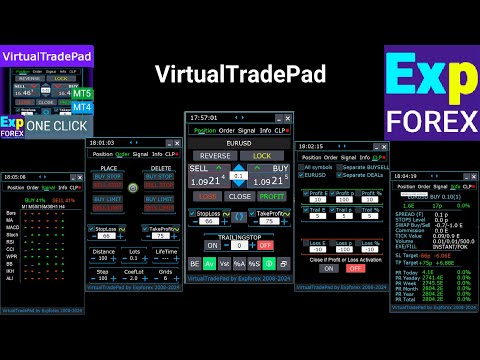
Trading Panel for trading in 1 click. Working with positions and orders! Trading from the chart or the keyboard.
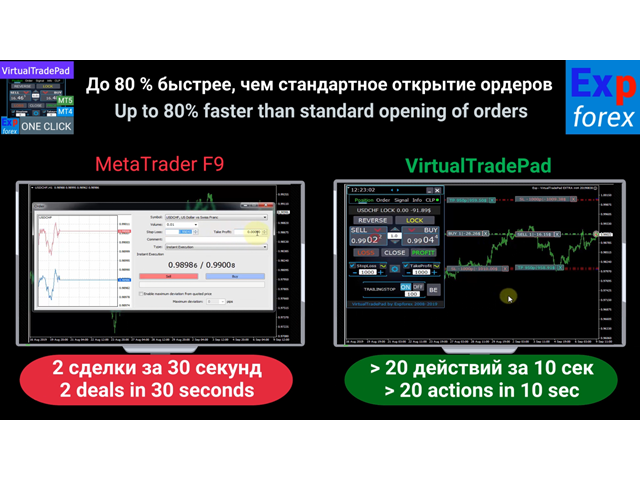
  • Using our trading panel, you can trade in one click from the chart and perform trading operations 30 times faster than the standard MetaTrader control.
  • Automatic calculations of parameters and functions that make life easier for a trader and help a trader conduct their trading activities much faster and more conveniently.
  • Graphic tips and full information on trade deals on the chart.

Opening and Closing, Reverse and Lock, Partial Closing / Autolot. Virtual/real stop loss/take profit / trailing stop/breakeven, Grid of orders...

The trading control panel for МetaТrader 4: buy, sell, buystop, buylimit, sellstop, selllimit, close, delete, modify, trailing stop, stoploss, takeproft.

Links

  • For full automated trading, I recommend The XCustom 
  • If you want to learn how to trade in the  strategy tester, check out our free TesterPad utility

Working tabs

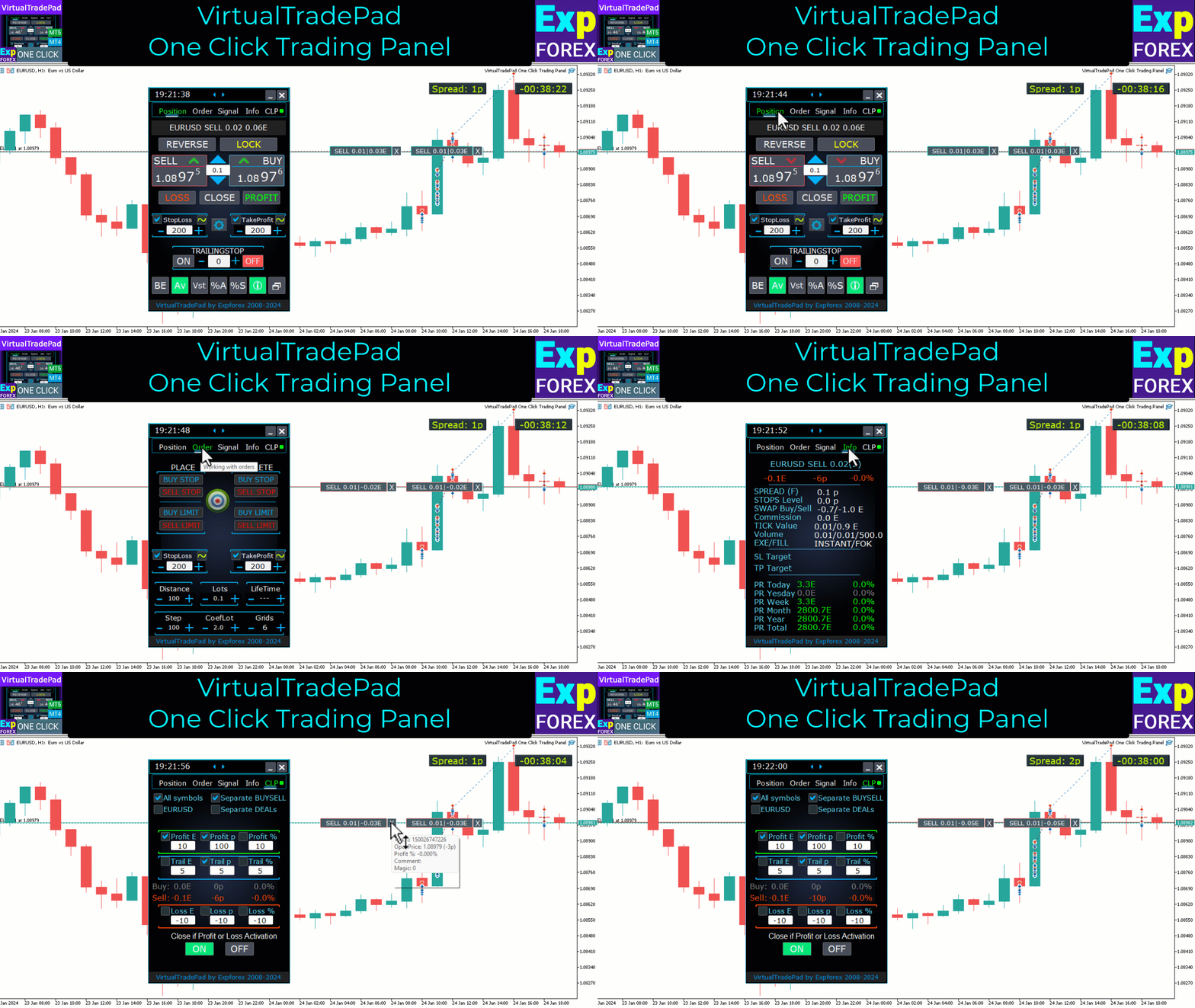
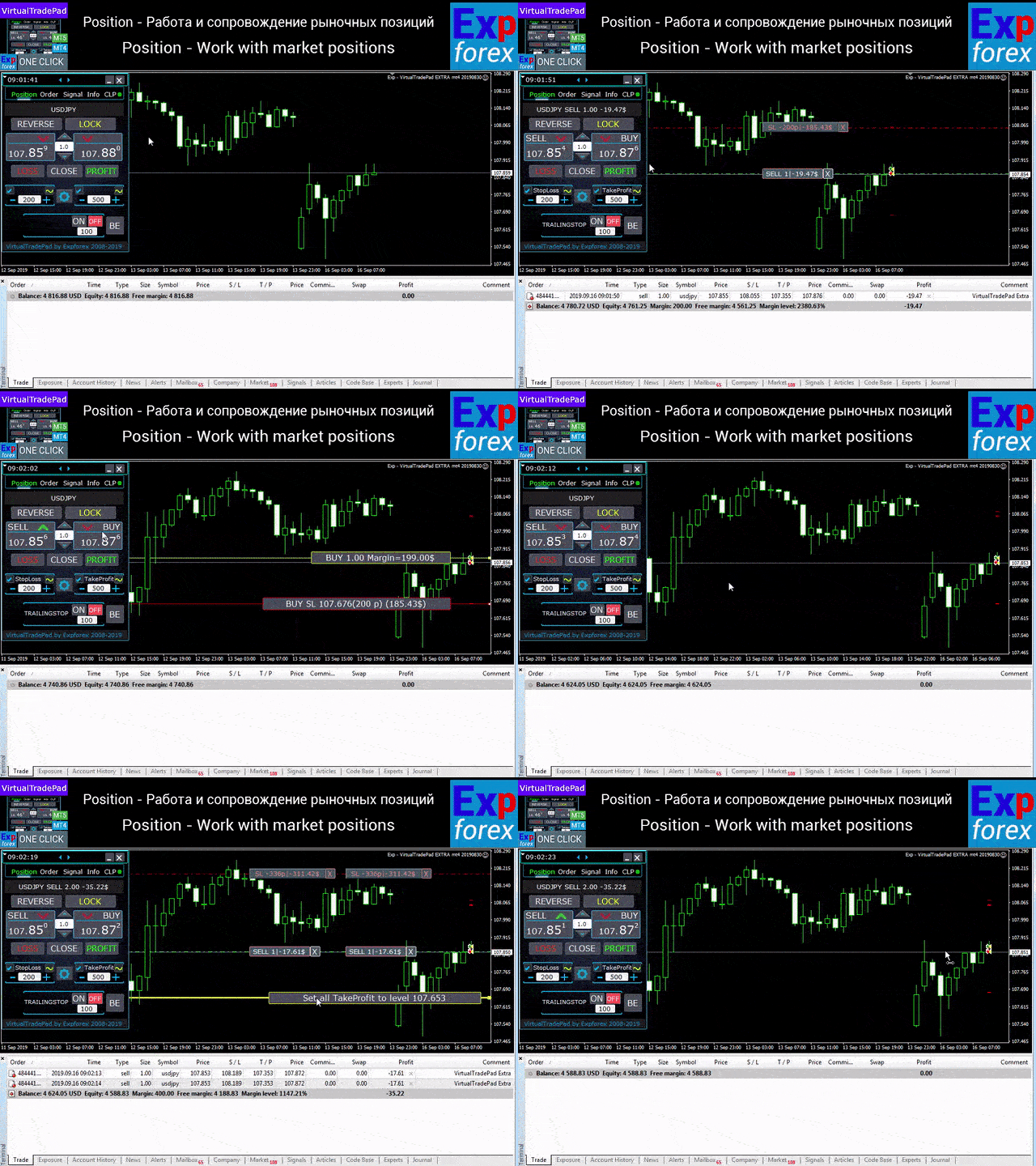
Positions tab - Work with positions:

  • Opening / Closing BUY and SELL,
  • Reverse all positions,
  • Locking a common position,
  • Stop Loss / Take Profit ,
  • Setup a common stop loss / take profit for position grid,
  • Trailing stop,
  • Breakeven
  • Closing only profitable / loss-making positions,
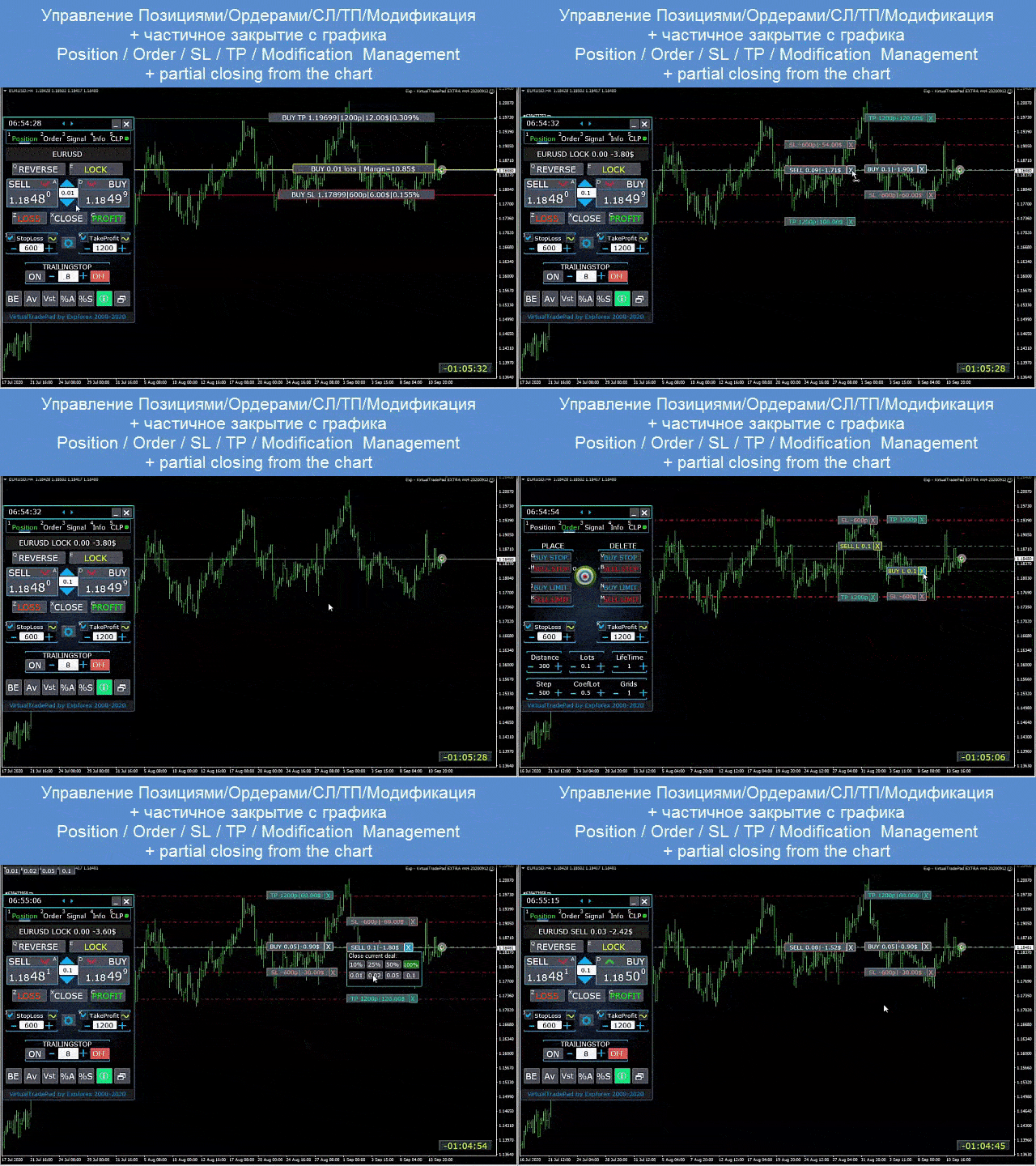
  • Position management / stop loss / take profit from the terminal chart,
  • Partial closing of positions on the chart;
  • Autolot / Dynamic lot as a percentage of the balance or the set stop loss
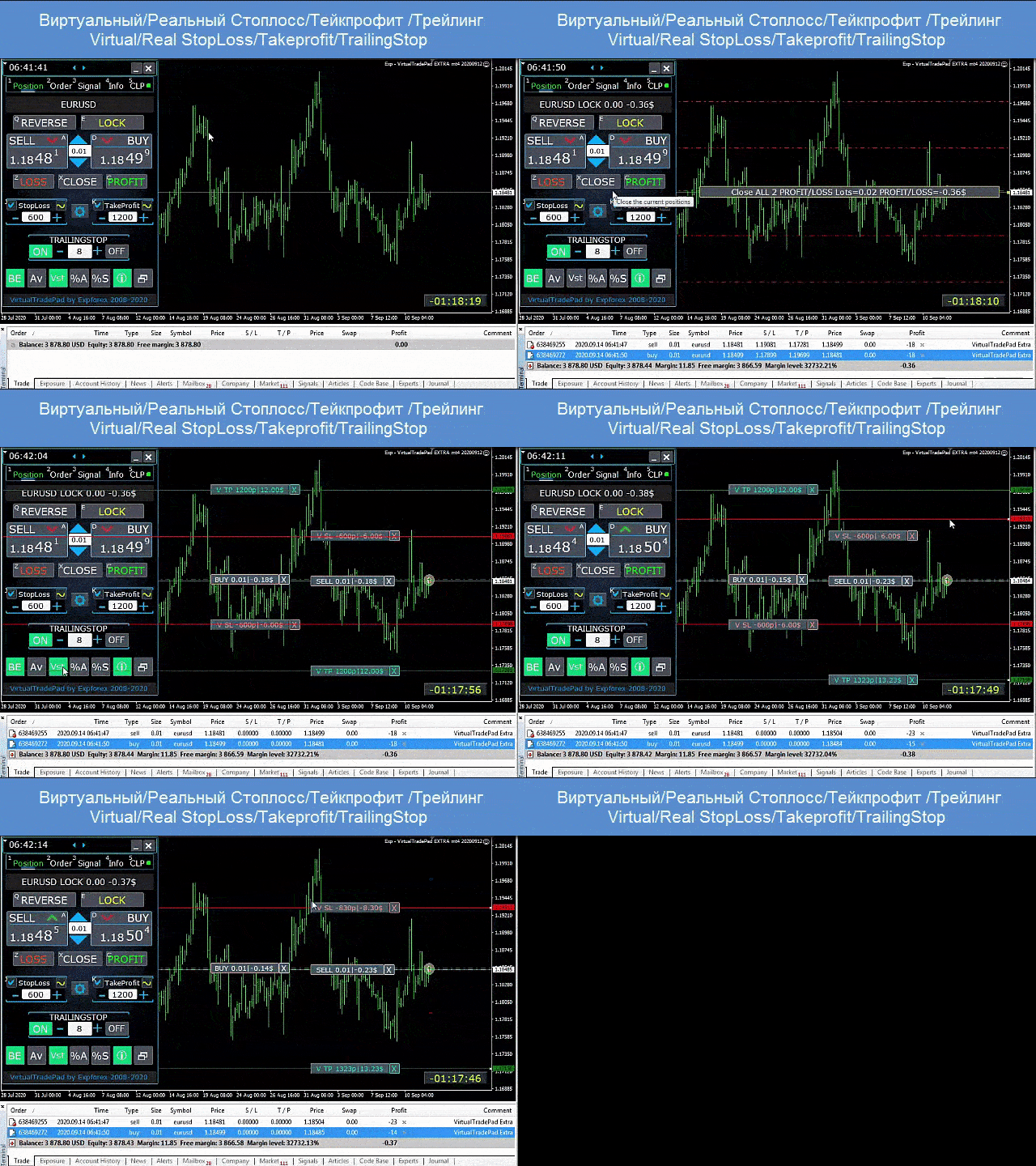
  • Enabling / Disabling Real / Virtual Stop Loss and Take Profit
  • Total Average Trailing Stop / Breakeven Positions Grids from the Average Price

Orders tab - Work with Pending and limit orders:

  • Pending / Delete BuyStop SellStop BuyLimit SellLimit,
  • Building a grid of orders with an increase in lots, grid distance,
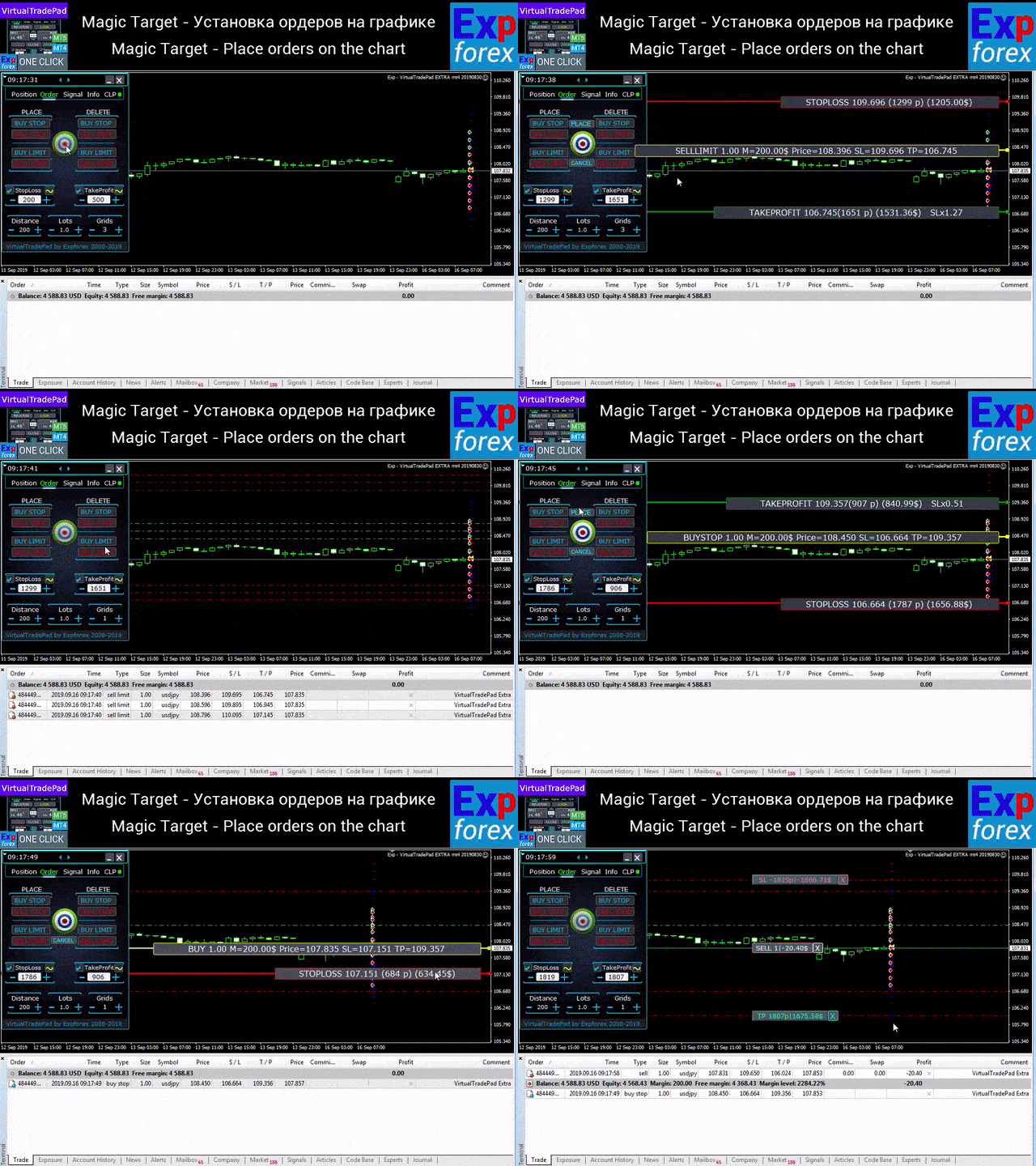
  • Setting orders / positions with the mouse and lines on the chart,
  • Setting a common stop loss / take profit for the entire series of orders,
  • Working with pending orders from the chart! Removing, Modifying orders directly from the chart.

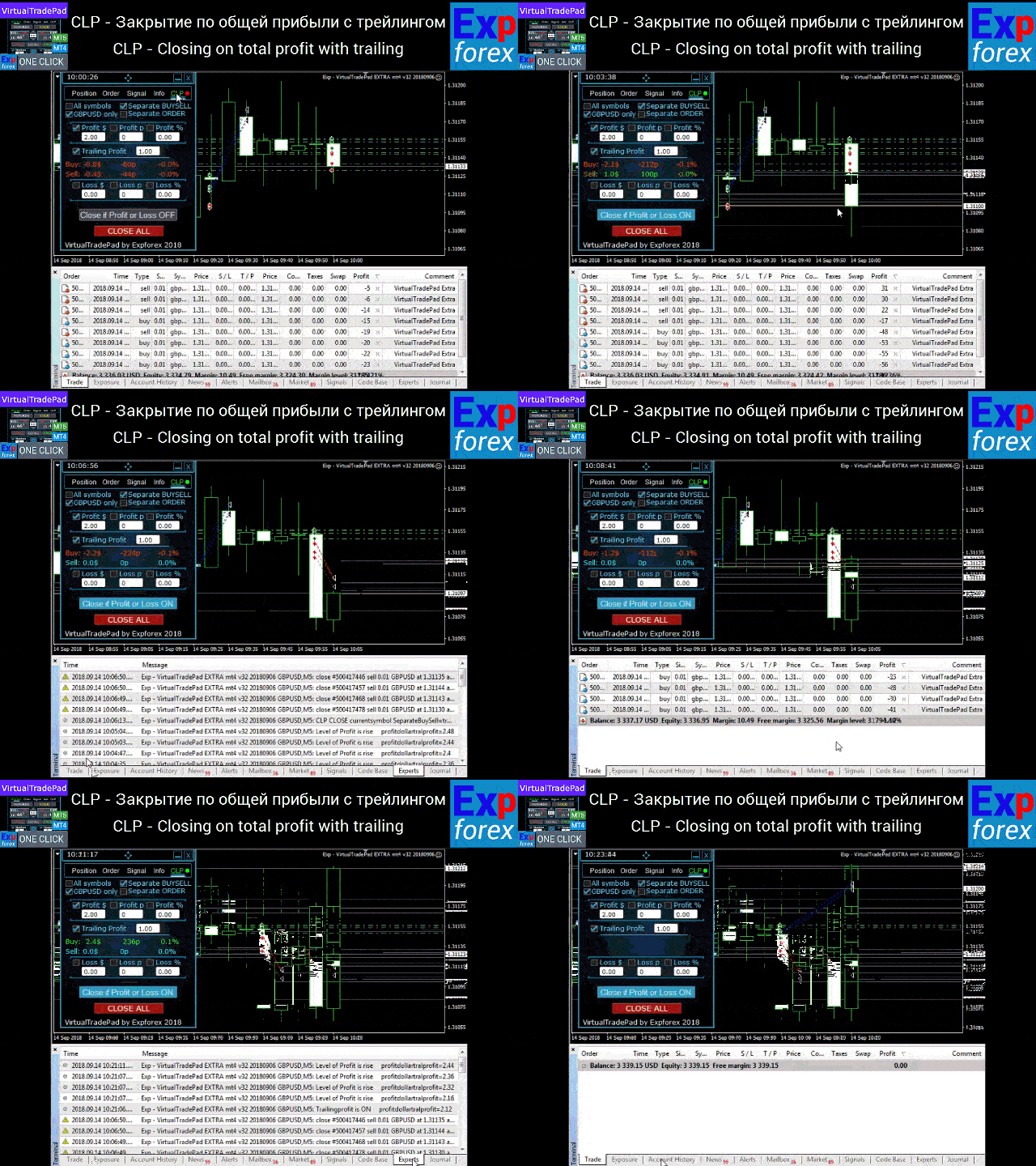
CLP tab - Work with the close function for total profit or loss.

  • Closing at total profit / loss in points, dollars, percent.
  • Close separately BUY / SELL,
  • Enable virtual stop loss / take profit for a separate / general position.
  • Trailingstop of total profit in points, dollars, percent.

    Signals tab 

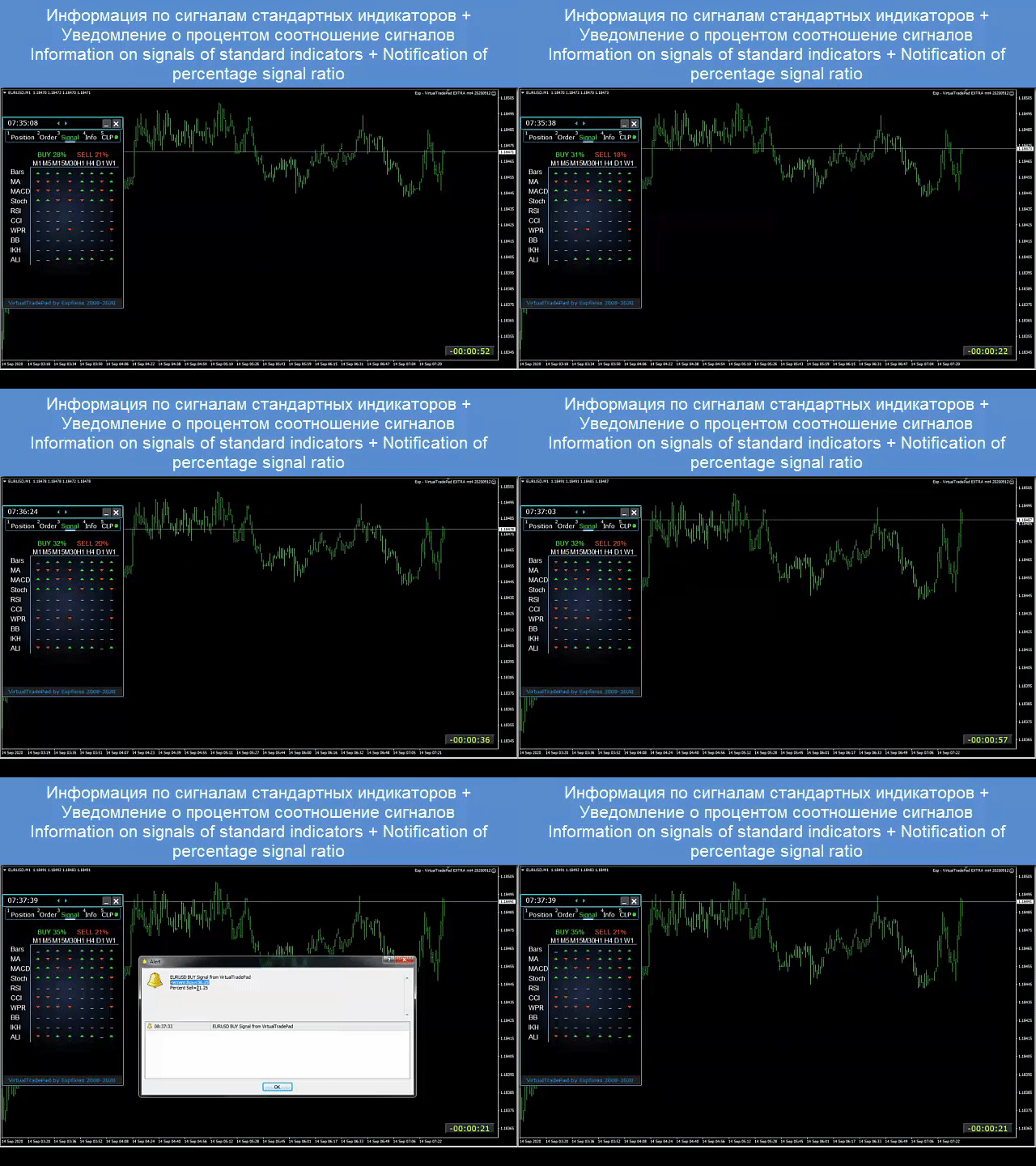
    shows the signal from 10 standard indicators and 8 timeframes. It also shows the cumulative percentage of signals in the BUY and SELL directions. It is also possible to open positions automatically when the cumulative signal is exceeded.

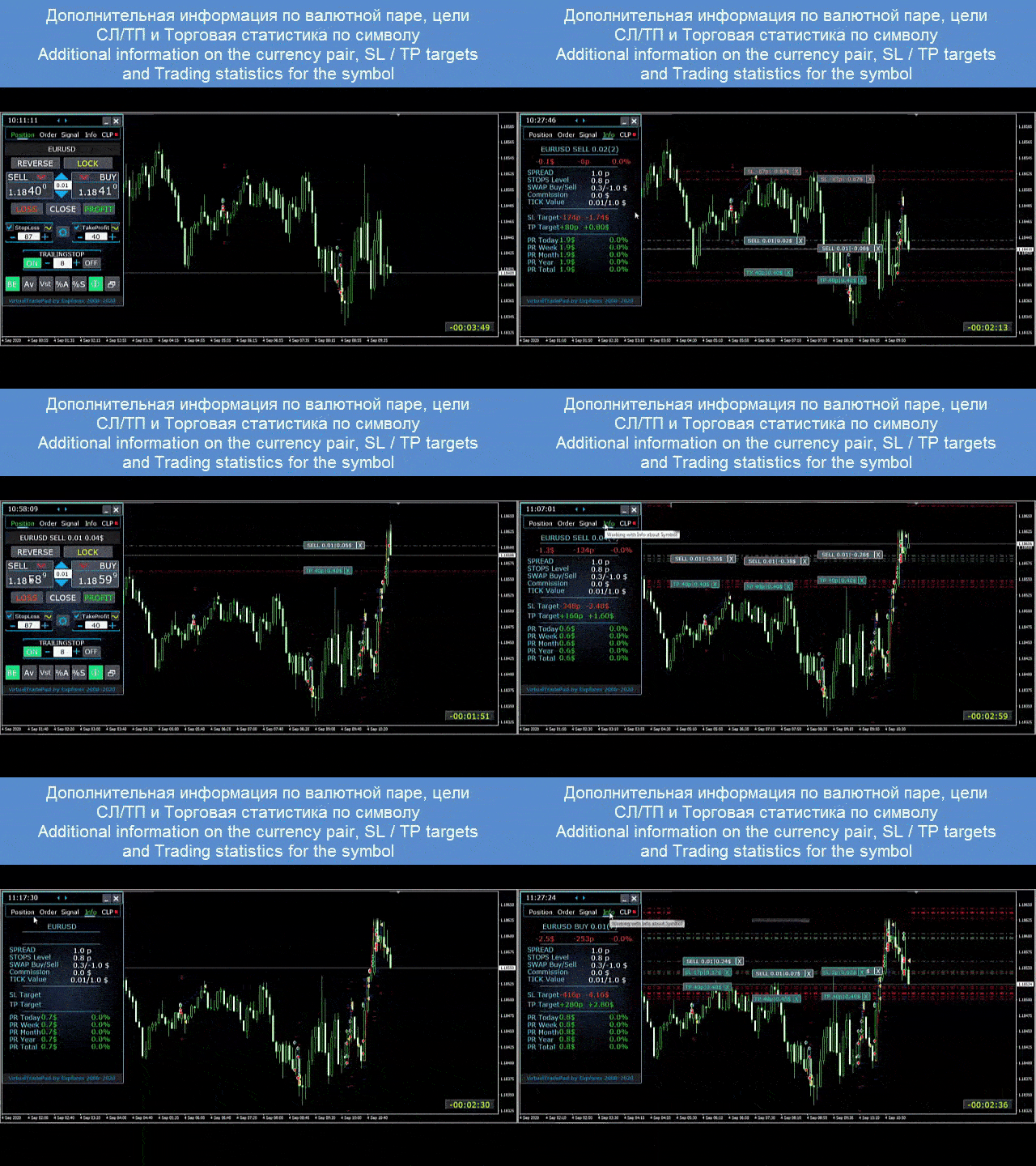
    INFO tab

     displays the current specification of the selected symbol, the current stop loss and take profit targets, as well as the profit for the current day, past day, week, month.

    Main features:

    • Works on any account type and a broker.
    • It does not require specific skills.
    • Intuitive and straightforward interface.
    • Only the most important functions.
    • Quick response to any command.
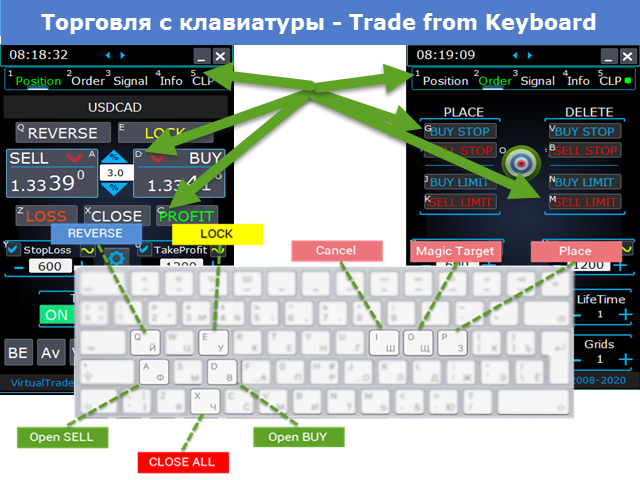
    • Trade using the keyboard (To do this, set TRUE the KeyBoardTrade parameter in the settings) or buttons on the chart

      Working tabs descriptions

      Positions tab - Work with positions:


      1. Lots field is the object of lot management.
        • When you press the “+” buttons, the lots will increase in increments of the minimum available lot on the server. The lot does not fall below the lot minimum allowed on the server.
        • The increment of the lot can be adjusted in the settings.
        • You can also include a dynamic lot as a percentage of the balance, as well as from the StopLoss. Then, in the Lot field – you specify the Percent level;
      2.  —- Button “% A” – This is to enable/disable the AutoLot function (DynamicLotAuto) from the chart.
        • Now you can enable autolot from the panel.
      3.  —- Button “% S” – This enables/disables the AutoLotStopLoss function from the chart.
        • Now you can enable autolot by stop loss from the panel.—— Attention! To turn off autolot, press the green button “% A” or “% S”.
        • —— The functions DynamicLotAuto and DynamicLotStopLoss in the EA settings now only regulate the method of calculating the autolot (Free margin or Current balance)
      4.  BUY – opening a position to buy (Ask price at the top);
      5.  SELL – opening a position for sell (the Bid price at the top);
      6.  REVERSE – the function of reverse positions. StopLoss and TakeProfit set a new one from the StopLoss and TakeProfit fields.
        • For example, Buy positions are opened when you click on Reverse – all BUY positions are closed, and the SELL position opens. If there is a BUY and SELL position in the trade, then using the Reverse button – all positions will be reversed;
      7.  LOCK – Lock positions.
        • For example, If you open BUY positions with lot 0.3 and/or SELL position with lot 0.1, then when you use the LOCK button, the expert advisor will open the SELL position with lot 0.2 and remove all stop-loss and take-profit from all positions. (BUY 0.3 + SELL 0.1 = SELL 0.2)
      8.  CLOSE – closing all positions;
      9.  LOSS – closing all positions that are at a loss, that is, a profit position is less than 0.
      10.  PROFIT – closing all positions that are at a Profit, that is, profit position is greater than 0.
      11.  Takeprofit Stoploss– the Take-Profit and Stop-loss for the position.
        • When you press the “+” buttons, the take profit/stop loss will increase in steps by 1 point (the step can be adjusted in the settings).
        • TakeProfit / StopLoss does not go below 0 or the minimum available on the server. From the zero value, when you click on “+” Take Profit immediately takes the lowest possible value on the server.
        • If Take Profit / Stop Loss = 0, its value is displayed in red.
        • If Take Profit / Stop Loss is not 0, its value is displayed in green;
        • Also, you can use VIRTUAL SL and TP
      12.  CheckBox Takeprofit Stoploss turns ON or turns OFF the use of Takeprofit / Stoploss.
      13.  Target / STOPLOSS / TAKEPROFIT – Set the general stop loss or take ProfitProfit of all positions in one direction!
        •  After clicking on the Target button, you can specify the price on the chart, and all the Stop Loss or Take Profit of all positions will be set at this price!
        •  You can also set the stop loss/take profit to a certain level in percentage/points/deposit currency.
      14.  MODIFY – urgent modification of positions with a specified TakeProfit / StopLoss. Here, you can reset stop levels to 0 or change them;
      15.  Trailing stop– the selection of tracking an open position using the standard Trailingstop;
      16.  ON button – Turn the Trailing Stop on. It is enabled for the currently selected pair. 
      17.  OFF button – Turn the Trailing Stop off
      18.  The field for entering the distance of the Trailingstop
        • It is installed in points. Set the distance to start the trailing stop. 
        • For example, = 100, the expert advisor modifies the stop loss to 0 (the opening price) when the position gains 100 points of ProfitProfit. 
        • The next stoploss will be tightened for the price. With an increase in ProfitProfit of 110 points, stop-loss is modified to +10 points from the opening price. The step of increasing stoploss can be adjusted in the settings.
      19.  —- “Vst” button – Working with virtual stop loss / take profit / trailing stop/breakeven.
        • —— Full work with Virtual Stop Loss and Take Profit levels. Turn on, turn off.
        • ——– All levels will be virtual and displayed on the chart as lines.
        • ——– You can move these levels on the chart. Just drag the line to the desired location.
        • ——– Attention! This is a virtual closing of positions. This means that when the price crosses the line of virtual stop loss / take ProfitProfit, then the advisor sends a command to close to the server.
        • ——– There may be slippages in the close at requotes and other broker delays.
        • ——– Attention! Works only on a switched-on computer and a connected terminal.
        • ——– Attention! In MT4, virtual levels work with both positions and orders.
        • ——– Attention! In MT5, virtual levels work only with positions! Pending and limit orders will work with real stop loss and take profit levels.
        • ——– Attention! There may be slippages when closing positions. It depends on broker requotes and delays.
        • ———- Attention! When you click on the “Vst” button, the advisor modifies all stop losses and takes profit levels into virtual/real levels.
        • When modifying, there may be broker restrictions on the minimum stop level, and then the advisor will not be able to modify some stop loss and take profit.
      20.  —- “Av” button – Trailing stop / breakeven functions from the common center line.
        • —— Turns on/off the general Trailing Stop / Breakeven from the middle line. Separately for the Buy and Sell directions.
        • ——– This function allows you to follow the entire grid of positions (Buy or SELL separately) with a general trailing stop or Breakeven.
        • ——– VirtualTradePad will automatically calculate the average line based on open positions and set the overall average trailing stop or Breakeven from this center line.
      21.  – Button “BE” – Set stop-loss to Breakeven for all profitable positions.
        • The MovingInWLUSE function has been moved to the panel in the BE function.—- You can turn on the BE button on the Position panel, and Breakeven will always work.
        •  BE – On the Positions tab, the BE button is added – Set stoploss to lossless for all profitable positions.
        • —- Settings of the breakeven distance – can be configured in the external parameters of the advisor!
        • —- In order to use the function 1 time (old version), turn the BE button on the panel on and off!
        • —- If Trailing Stop is enabled and distance = 0, then Trailing Stop will work with the lowest possible stop level on your server.
      22.  —- “ScreenShot” button – Saves a snapshot of your current chart, with all indicators and objects in the size of your chart.
        • All screenshots will be saved to the Folder of your terminal/MQL*/Files/VTP/
      23.  —- Button “ShowInfo” – Hides / Shows information labels of our panel from the chart. Turn on, turn off.
        • If you need to analyze the chart without unnecessary information, the “ShowInfo” button will help to hide all unnecessary information from the chart.

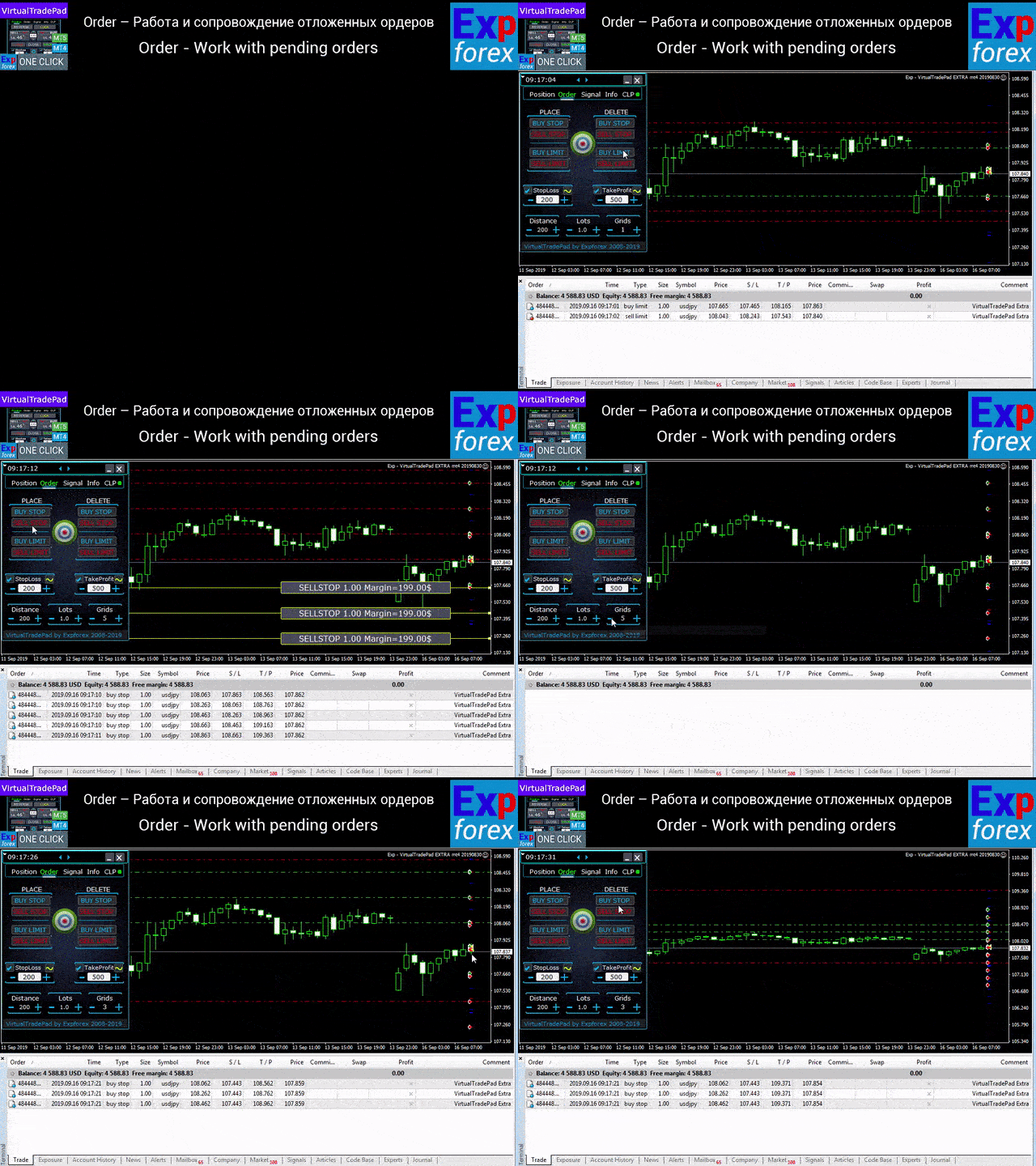
      Orders tab - Work with Pending and limit orders:

      1. Block PLACE – options for opening pending orders: Buy Stop, Sell Stop, Buy Limit, Sell Limit;
      2. Block DELETE – options for deleting pending orders: Buy Stop, Sell Stop, Buy Limit, Sell Limit;
      3. Distance – The distance in points for placing a pending order. 
        • As with TakeProfit StopLoss, this value can not be set to less than the minimum allowed on the server. 
        • The step of changing the distance can be adjusted in the expert advisor’s settings;
      4.  TakeProfit – TakeProfit for a pending order in points;
      5.  StopLoss – StopLoss for a pending order in points;
      6.  Lots – trading volume (in lots or percentages, depending on external settings) for a pending order;
      7.  “LifeTime” button – Order lifetime in minutes!
        • —— Lifetime in minutes works virtually for all pending orders.
        • —— After the LifeTime expires, the order will be deleted.
        • —— Attention! Works separately with the DayToExpiration option (Expiration time in days).
      8. GRIDs – the number of opened orders.
        • If there is more than 1, then the grid of pending orders is opened at Distance points from each other. The lot increment can be adjusted in the external settings.
      9.  —- “Step” button – Step of each next order in the grid!
        • —— Used in conjunction with the Grids parameter.
        • —— Allows you to set the step for the grid from the first pending order in the grid.
        • Attention! Distance parameter – This is the distance from the current price to the first pending order.
      10.  —- Button “CoefLot” – The CoefLotForGridOrders parameter from the parameters has been moved to the panel.
        • —— Multiplication factor of the next lot in the grid of pending orders when used on the Orders tab
        • Example: “CoefLot” = 2, Grid = 5, then lots will be opened like this: 0.1, 0.2, 0.4, 0.8, 0.16
      11. Target STOPLOSS / TAKEPROFIT – sets the general stop loss or take profit of all orders in one direction!
        • After clicking on the Target button, you can specify the price on the chart, and all the stop-loss or take profit of all orders will be set at this price!


      CLP tab - Work with the close function for total profit or loss.

      1. All Symbols – Use closing on all symbols.
      2.  XXXXXX only – Use closing only on the current currency pair on which the advisor is installed.
      3.  Separate BuySell – Use a separate closing for positions BUY and SELL.
      4.  Separate Order– Use a separate closing for each deal/position separately.
      5.  Profit $ -Turns on/off the closing on the total Profit in dollars or the deposit currency.
      6.  Profit p – Turns on/off the closing of the total Profit in points.
      7.  Profit % – Turns on/off the closing on the total Profit as a percentage of the current balance.
      8. Trail $ – distance from Profit $, at which the trailing of Profit started.
      9. Trail p – distance from Profit p, at which the trailing of Profit started.
      10. Trail % – distance from Profit %, at which the trailing of Profit started.
      11.  Loss $ – Turns on/off the closing for the total loss in dollars or the deposit currency.
      12.  Loss p – Turns on/off the closing of the total loss in points.
      13.  Loss % – Turns on/off the closing of the total loss in percent of the current balance.
      14.  Close if Profit or Loss ON – The closing function for total Profit or loss is ON
      15.  Close if Profit or Loss OFF – The closing function for total Profit or loss is OFF
      #tags Expforex, Vladon, Manual Trade , Trade Panel ,Panel Trade,Trade Utility ,Self Test ,Take Profit ,Tool Management ,Management Tool ,Forex helper ,Forex Trade ,Training virtual trade ,Quick Tool, Manual Tester, Manual Backtest,TesterPad, Tradepad, Virtual Trade Pad, Торговая панель , Trader Assistant ,CLP,CloseifProfitorLoss,Close Profit,Total Profit, Close if Profit or Loss , Trailing Profit, Smart Trailing Stop


      Reviews 89
      Chris Jacobs
      285
      Chris Jacobs 2026.03.26 18:35 
       

      since I've bought the virtual tradepanel my tradng improved alot and the developer just release an update and it is amazing Thanks for you hard work Vladislav and Vladislav is always available to answered questions

      talavera.merced
      66
      talavera.merced 2026.01.09 18:59 
       

      He cambiado ordenador por rotura, trato de instalar en uno nuevo y dice que no quedan activaciones. Si el otro no funciona y no está en uso, no se puede usar el indicador en el nuevo? hay que comprarlo de nuevo?

      hurshid
      33
      hurshid 2024.09.25 20:25 
       

      👍

      Recommended products
      Smartility
      Syed Oarasul Islam
      This utility is designed to help you with your Manual Trading. It allows different ways of closing trades. It can display total number of BUY and SELL orders individually and also their individual profits. It can enter trades without stopl loss and take profits. However upon selecting UseStopLossTakeProfit from the settings it can use best possible stop loss and take profits based on the market conditions. Upon selecting the CloseOppositeTrades  from the settings it can close opposite trades. Fo
      Candlestick Pattern Scanner is a multi-timeframe and multi-symbol dashboard and alert system that checks all timeframes and currency pairs for different candlestick patterns that are formed in them. Scanner is integrated with support and resistance zones so you can check the candlestick patterns in the most important areas of the chart to find breakout and reversal patterns in the price chart. Download demo version   (works on M30,D1,W1 timeframes and 20 symbols of Market Watch window) Read the
      TradePilot
      Hossein Khalil Alishir
      TradePilot Expert Advisor (EA) for MetaTrader 4 TradePilot is a professional and user-friendly Expert Advisor (EA) for MetaTrader 4 (MT4) . It simplifies automated trading , risk management , and trade execution using a smart trading panel . Perfect for beginners and experienced traders looking for a reliable trade manager EA with automated lot size calculation . Key Advantages User-Friendly Trading Panel: Customizable panel with buttons and hotkeys. Smart Risk Management: Supports percen
      Virtual Collider Manual   is a trading assistant with a built-in panel for manual trading. It automatically moves a position opened by a trader in profit using innovative adaptive grid algorithm of averaging and adaptive pyramiding Know-how of the grid algorithm of averaging and pyramiding of the   Virtual Collider Manual   trading robot is based on fully automatic adaptation of all characteristics of dynamically build order grid and pyramid with actual price movement with no need for adjusting
      Panel "panel_kjutaMultiTerminal" for trading. Opens, modifies, closes and deletes trading and pending orders from the chart using virtual lines, buttons and the active information terminal. Automatically opens an order by indicator levels. Hints in Russian, English or disabled. It has a number of functions for trailing virtual Take Profit lines and limit orders. Displays information on the active information terminal.  Hides and includes virtual lines S/L , T / P, buttons "<>","M","X", as well a
      Exp Averager
      Vladislav Andruschenko
      4.82 (22)
      Averager for MetaTrader 4 — advanced trade recovery and position series management system A professional Expert Advisor created for traders who need a controlled way to average losing positions, build a structured trade basket, and manage exits with more flexibility. Averager is designed to open additional trades when positions move into drawdown, helping you improve the average entry price and manage the entire series as one coordinated structure. This is not just another averaging utility. It
      This panel is a part of the SupDem-Pro trading system and is used to search for the best opportunities for any available instruments. Which can be selected manually in the Market Watch (open it with CTRL + M). Using this trading panel in combination with ShvedSupDem-Pro_Zone allows to analyze multiple currency pairs with a single click. The panel allows to load any instruments from the Market Watch, from 6 major currency pairs up to all instruments (480). The indicator parameters Button Width -
      VN Trade Panel II
      Vyacheslav Nekipelov
      4 (1)
      The new version of the trading panel, which now has the ability to separately close Buy and Sell orders, display targets for all orders on the chart, as well as the ability to use the panel to trade with brokers working on the FIFO rule. Also, the new version adds option buttons for separate management of open orders. It has a convenient visualized interface and intuitive control without a lot of additional tabs to which traders have to be distracted and switch their attention. Thanks to this,
      TSTrendLineSymbol
      Salvatore Labriola
      Utility, which draws buy or sell trendlines, which can also become support or resistances able to close any position on the screen Algorithm that calculates the gain of the position, at the touch closure of the line.   The benefits you get: Works on forex and CFD, timeframe from M1 to Weekly. Easy to use screen control panel. Audible warning messages at the touch of the line. Easy to use.
      Risk Commander
      Adisorn Soodkanueng
      Product Name: Risk Commander: Trade Assistant & Strategy Simulator Risk Commander is more than just a trade panel—it is a complete Manual Trading Ecosystem . It serves two powerful purposes: Live Assistant: Helps you execute trades with speed, precision, and perfect risk management in real-time markets. Training Simulator: Fully compatible with the Strategy Tester (Visual Mode) , allowing you to practice manual trading on historical data without risking a cent. NEW! Built-in Simulator Mode Stop
      About The Secret of Dow The Secret of Dow  is an unique system running on a complex set of algorithms and advanced machine learning computation mechanism to analyze massive sets of data from the neural network, and combines with a special set of price action movement analysis to optimize the trading decision, and it will then predicts the next best possible and potential moves of the Dow Jones (US30) prices. The advantages of The Secret of Dow:- Easy plug and play, worry free with easy param
      TP1 TP2 TP3 panel
      Denis Paul Richard Remanjon
      3.5 (2)
      TP1 TP2 TP3 panel is a simple tool designed for manual trading. It helps you to follow free or paid forex signals with multiple take profit (TP1 TP2 TP3). Fill the fields (volume, SL, TP1, TP2, TP3) in pips or price, press the ‘Sell’ or ‘Buy’ buttons and the program opens 3 identical orders. It also adds TP1 and TP2 lines on chart. When TP1 is reached, the program automatically closes order #1 and moves SL for order #2 and order #3 according to your settings. When TP2 is reached, the program aut
      Daily Candle Predictor is an indicator that predicts the closing price of a candle. The indicator is primarily intended for use on D1 charts. This indicator is suitable for both traditional forex trading and binary options trading. The indicator can be used as a standalone trading system, or it can act as an addition to your existing trading system. This indicator analyzes the current candle, calculating certain strength factors inside the body of the candle itself, as well as the parameters of
      Trade Assistant Pro 36 in 1
      Makarii Gubaydullin
      4.76 (21)
      Multifunctional tool: Lot Calculator, Grid Orders, R/R ratio, Trade Manager, Supply and Demand zones, Price Action and much more Demo version   |   User manual Trade Assistant   doesn't work in the strategy tester: you can download the Demo Version HERE  to test the utility . Contact me for any questions  / ideas for improvement / in case of a bug found If you need a MT5 version, it is available   here Simplify, speed up and automate your trading process . Expand the standard terminal capabilit
      Utility for automatic order and risk management. Allows you to take the maximum from profits and limit your losses. Created by a practicing trader for traders. The utility is easy to use, works with any market orders opened manually by a trader or with the help of advisors. Can filter trades by magic number. The utility can work with any number of orders at the same time. Has the following functions: 1. Setting stop loss and take profit levels; 2. Closing trades by trailing stop levels; 3
      VR Cub
      Vladimir Pastushak
      VR Cub is an indicator for getting high-quality entry points. The indicator was developed to facilitate mathematical calculations and simplify the search for entry points into a position. The trading strategy for which the indicator was written has been proving its effectiveness for many years. The simplicity of the trading strategy is its great advantage, which allows even novice traders to successfully trade with it. VR Cub calculates position opening points and Take Profit and Stop Loss targe
      | Fully-automated Smart Money Concept (ICT) inspired trading solution with multi-strategy capabilities | Built by a grid trader >> for grid traders.  This is MT4 version, click  here  for  Blue CARA MT5  (settings and logics are same in both versions)     Real monitoring signal  -->  Cara Gold Intro Blue CARA EA   ('CARA') - short for  C omprehensive  A lgorithmic R esponsive A dvisor is a next-gen  multi-currency    multi-timeframe  EA base on the widely known (and perhapse most popular) Inn
      The analyzer panel allows traders to add the pending order grid (Buy Limit, Sell Limit, Buy Stop, Sell Stop) quickly and efficiently.   Parameters stop mode - select stop setting mode every order - stop levels are set for each order separately position as - common stop levels for all orders order type - select pending order type Buy Limit Sell Limit Buy Stop Sell Stop magic - set a magic number for open orders if necessary. If position as mode is enabled, stop levels are corrected for all orders
      Savage Trades M.T.A.  is a Manual Trade Assistant expert advisor. This EA contains self-adaptive market algorithm, which uses price action patterns and standard trading indicators. 1.) Quickly Execute trade entries with the click of a button with your own predetermined Stop Loss and Take Profit. 2.) Non-Repainting retracement and reversal warnings indicated by arrows and system alert. 3.) Auto adjusting Support and Resistance levels with strength indicated by color shade. 4.) Auto adjusting Fibo
      The Infinity Expert Advisor is a scalper. When the resistance and support levels are broken, trades are opened in the direction of the price movement. Open positions are managed by several algorithms based on the current market situation (fixed stop loss and take profit, trailing stop, holding positions in case of trend indication, etc.). Requirements for the broker The EA is sensitive to spread, slippages and execution quality. It is strongly recommended not to use the EA for currencies with s
      Lucky Trade Panel MT4
      Nina Yermolenko
      5 (1)
      Trading panel for manual trading. Has a fairly wide functionality. Allows you to automatically calculate the order size, open both market and pending orders. It has a wide range of options for closing orders, it is possible to partially close orders, close orders after reaching a certain profit or loss, separately close profitable and unprofitable, buy and sell, as well as pending orders. The panel also contains a simple implementation of a grid of pending orders, reverse and lock functions, tr
      Vizzion
      Joel Protusada
      Vizzion is a fully automated scalping Expert Advisor that can be run successfully using GBPJPY currency pair at H1 timeframe. Very Important This Expert Advisor can not run with any EAs in the same account. As part of the money management plan, it calculates and monitors the Margin Level % and assumes that all open trades are created by it. If you want an Expert Advisor that trades in a daily basis, this EA is not for you because using this requires a patience to wait for a few days or weeks on
      Trade with Gann on your side!! MASTER CIRCLE 360 CIRCLE CHART, originally created by Gann admitted that this is “The Mother of all charts”. It is one of the last studies that this great trader left for us. The numeric tab le is apparently quite simple like all the tables and is based on square numbers, the SQUARE OF 12 and is by evolution, one of the most important square numbers. Here we can find CYCLE, PRICE AND TIME thanks to angles and grades, to show past and future support and resistance.
      "Impulses and Corrections 4" is created to help traders navigate the market situation. The indicator shows multi-time frame upward and downward "Impulses" of price movements. These impulses are the basis for determining the "Base" , which is composed of zones of corrections of price movements, as well as "Potential" zones for possible scenarios of price movement. Up and down impulses are determined based on a modified formula of Bill Williams' "Fractals" indicator. The last impulse is always "U
      PatternMMB
      Mikhail Bilan
      The PatternMMB trading indicator finds the most common candlestick analysis patterns and provides trading recommendations based on them. The PatternMMB trading indicator is designed to search for candlestick patterns on the price chart and issue trading recommendations depending on the nature of the found candlestick pattern. It is also possible to send sound notifications when all or any of the selected patterns appear, with an explanation of the pattern and its interpretation. In addition, th
      Indicator function This index buys and sells according to the color, using time is one hour,Please run the test on a 30-minute cycle It is best to use 1H for testing   About update questions In order to be more suitable for market fluctuations, the company regularly updates the indicators   Product cycle and trading time applicable to indicators Applicable mainstream currency pair EUR/USD GBP/USD NZD/USD AUD/USD USD/JPY USD/CAD USD/CHF Applicable mainstream cross currency pair EUR/JPY EUR/GBP E
      Trading Helper
      Siarhei Vashchylka
      Trading Helper - Program for trading and money management. It works with pending and immediate orders, and is equipped with trailing stop, breakeven and take profit functions. Manual (Be sure to read before purchasing) Advantages 1. Comfortable trading in a few clicks. Immediate and pending orders are available in the panel 2. Fixed percent method. The panel can select the lot size based on a predetermined risk 3. Trading with a fixed lot. In a few clicks, select a lot and open a Trade 4. Posi
      Automatic profit locking when target profit is reached EquityTargetCloser   — is a utility expert advisor for MetaTrader 5 that automatically closes all market positions and deletes pending orders as soon as   equity exceeds the current balance by a specified profit amount . After all positions are closed, the target automatically increases: the new threshold = new balance + specified profit. The EA does not open trades, it only manages existing positions, helping to reliably lock in profit and
      The “ SG Opposit Grid ” EA works with Virtual TakeProfit(or real) - at the trader's choice. The EA looks for signals to enter the market along the trend on D1 and H1 . If the signals coincide, the EA on the working period ( М1 - М30 depends on the trader's choice) looks for a confirming pattern and opens a position in the direction of the trend. If, after opening a position, the price moves in a profitable direction, the position is closed upon reaching the virtual TProfit with a profit. If the
      Noize Absorption Index MT4
      Ekaterina Saltykova
      5 (1)
      Noize Absorption Index - is the manual trading system that measures the difference of pressure between bears forces and bulls forces. Green line - is a noize free index that showing curent situation. Zero value of index shows totally choppy/flat market.Values above zero level shows how powerfull bullish wave is and values below zero measures bearish forces.Up arrow appears on bearish market when it's ready to reverse, dn arrow appears on weak bullish market, as a result of reverse expectation. S
      Buyers of this product also purchase
      Forex Trade Manager MT4
      InvestSoft
      4.98 (435)
      Welcome to Trade Manager MT4 - the ultimate   risk management tool   designed to make trading more intuitive, precise, and efficient. This is not just an order placement tool; it's a comprehensive solution for seamless trade planning, position management, and enhanced control over risk. Whether you're a beginner taking your first steps, an advanced trader, or a scalper needing rapid executions, Trade Manager MT4 adapts to your needs, offering flexibility across all markets, from forex and indice
      Copy Cat More Trade Copier MT4 is not just a simple local trade copier; it is a complete risk management and execution framework designed for today’s trading challenges. From prop firm challenges to personal portfolio management, it adapts to every situation with its blend of robust execution, capital protection, flexible configuration, and advanced trade handling. The copier works in both   Master (sender) and Slave (receiver)   modes, with real-time synchronization of market and pending orders
      The product will copy all telegram signal to MT4   ( which you are member  ) , also it can work as remote copier.  Easy to set up, copy order instant, can work with almost signal formats, image signal, s upport to translate other language to English Work with all type of channel or group, even channel have "Restrict Saving Content", work with  multi channel, multi MT5 Work as remote copier: with signal have ticket number, it will copy exactly via ticket number. Support to backtest signal. How to
      Edge Zone EA
      FXsolutions
      5 (1)
      With this Expert Advisor you will follow the sound trading principle Buy Low and Sell High by default ! And you can do that even with a normal day job . You will be even able to trade on lower timeframes which you could never do without such an Expert Advisor. And the best thing is that you are in control! You can tell the Edge Zone EA where it has to enter and where it has to exit. And you can do that even many hours before the trade will occur . This EA is therefore an excellent assistant for
      MultiOrder Assistent V3.0   - Your professional trading assistant for MetaTrader 4 The  MultiOrder Manager  is a powerful trading tool designed to optimize your trading while managing risk efficiently. With intuitive features and a user-friendly interface, this Tool is ideal for traders who want to manage multiple orders simultaneously without losing track.   Symbols: FX pairs, gold and cryptocurrencies Here you get a detailed description of the parameters and functions Manual     Features and
      Auto Trade Copier
      Vu Trung Kien
      4.76 (85)
      Auto Trade Copier is designed to copy trades to multiple MT4, MT5 and cTrader accounts/terminals with 100% accuracy. The provider and receiver accounts must be on the same PC/VPS. With this tool, you can copy trades to receiver accounts on the same PC/VPS. All trading actions will be copied from provider to receiver perfectly. This version can be used on MT4 accounts only. For MT5 accounts, you must use Auto Trade Copier for MT5 . Reference: - For MT4 receiver, please download Trade Receiver Fre
      Trade Manager MT4 DaneTrades
      Levi Dane Benjamin
      4.09 (11)
      DaneTrades Trade Manager is a professional trade panel for MetaTrader 4, designed for fast, accurate execution with built‑in risk control. Place market or pending orders directly from the chart while the panel automatically calculates position size from your chosen risk, helping you stay consistent and avoid emotional decision‑making. The Trade Manager is built for manual traders who want structure: clear risk/reward planning, automation for repeatable management, and safeguards that help reduc
      Telegram to MT4 Coppy
      Sergey Batudayev
      3.89 (9)
      Telegram to MT4: The Ultimate Signal Copying Solution Streamline your trading with Telegram to MT4 , the cutting-edge utility designed to copy trading signals directly from Telegram channels and chats to your MetaTrader 4 platform—without the need for DLLs. This robust solution ensures seamless execution of signals with unparalleled precision and customization options, saving you time and boosting your efficiency. [ Instructions and DEMO ] [ FAQ ] [ How atach logs properly ] [Settings descrition
      Crystal Trade Manager PRO – Advanced MT4 Risk & Trade Control System Overview Free :- https://www.mql5.com/en/market/product/150632 Crystal Trade Manager PRO (CTM) is a fully–featured trade execution and risk management utility for MetaTrader 4. It is built for traders who require disciplined execution, strong risk protection, and intelligent automation on MT4. The system manages risk, protects equity, enforces daily limits, automates SL/TP logic, and provides a fast one-click trade panel with p
      MT4 to Telegram Signal Provider   turns your trading account into a signal provider. Every trade action, whether manual, by EA or from your phone, is instantly sent as a message to Telegram. You can fully customize the format or use a ready-made template for quick setup. [ Demo ] [ Manual ] [ MT5 Version ] [ Discord Version ]  New: [ Telegram To MT5 ] Setup A step by step user guide is available. Key Features Ability to customize order details sent to subscribers You can create a tiered subs
      Riskless Pyramid
      Snapdragon Systems Ltd
      5 (1)
      Introduction This powerful MT4 trade mangement EA offers a way potentially to aggressively multiply trade profits in a riskfree manner. Once a trade has been entered with a defined stoploss and take profit target then the EA will add three pyramid add-on trades in order to increase the overall level of profit. The user sets the total combined profit target to be gained if everything works out. This can be specified either as a multiple of the original trade profit or as a total dollar amount. Fo
      ManHedger MT4
      Peter Mueller
      5 (2)
      THIS EA IS A SEMI-AUTO EA, IT NEEDS USER INPUT. Manual & Test Version Please TEST this product before   BUYING  and watch my video about it. Contact me for user support or bug reports, or if you want the MT5 version! MT5 Version I do not guarantee any profits or financial success using this EA. With this Expert Advisor, you can: Implement your own   Zone Recovery   strategy to capitalize on trending markets. Create   Grid   trading strategies, to profit from ranging markets. Place orders easil
      Effortlessly manage multiple trading accounts The Local Trade Copier EA is a solution for individual traders or account managers who need to execute trade signals from external sources or who need to manage several accounts at the same time, without the need for a MAM or a PAMM account. It copies from up to 8 master accounts to unlimited slave accounts . [ Installation Guide | Update Guide | Troubleshooting | FAQ | All Products ] 100% self hosted Easy to install and use It can copy from MT4 to
      Trader Evolution MT4
      Siarhei Vashchylka
      5 (2)
      " Trader Evolution " - A utility designed for traders who use wave and technical analysis in their work. One tab of the utility is capable of money management and opening orders, and the other can help in making Elliott wave and technical analysis. Manual (Be sure to read before purchasing) | Version for MT5 Advantages 1. Trading in a few clicks. Immediate and pending orders are available in the panel 2. Money management. The program automatically selects the appropriate lot size 3. Simplifies
      EchoTrade Telegram to MT4 Copier
      Perpetual Chinemerem Vincent
      5 (2)
      EchoTrade Telegram to MT5 Copier Seamless, Instant, and Reliable Signal Copying - Direct from Telegram to MetaTrader 4! The product does not run in the strategy tester but you can get free trial version   here  for testing before purchase. Tired of manually executing trades from Telegram signals? EchoTrade automates the process, instantly copying trades from any Telegram channel or group directly into your MT5 account—accurately, efficiently, and without delay. Key Features: Universal Compatib
      Comprehensive on chart trade panel with the unique ability to be controllable from mobile as well. Plus has a library of downloadable configuration, e.g. exit rules, extra panel buttons, pending order setup and more. Please see our product video. Works with all symbols not just currency pairs. Features On chart panel plus controllable from free app for Windows, iPhone and Android Built-in script engine with library of downloadable configuration, e.g. add 'Close All Trades in Profit' button, exit
      Custom Alerts AIO: All-in-One Market Scanner – No Setup Required Overview Custom Alerts AIO is the fastest and easiest way to monitor multiple markets for real-time trading signals—without any setup or extra licenses. It comes with all required Stein Investments indicators already embedded, making it the perfect plug-and-play solution for traders who value simplicity and performance. Just load it to any chart and start receiving alerts across Forex, Metals, Crypto, and Indices. Shares can be a
      The MT4 to Discord Signal Provider is a user-friendly, fully customizable utility designed for sending trading signals directly to Discord. This tool transforms your trading account into an efficient signal provider. Customize message formats to suit your style! For ease of use, select from pre-designed templates and choose which message elements to include or exclude. [ Demo ] [ Manual ] [ MT5 Version ] [ Telegram Version ]  New: [ Telegram To MT5 ] Setup Follow our detailed user guide for eas
      Unlimited Trade Copier Pro is a tool to copy trade remotely to multiple MT4, MT5 and cTrader accounts at different computers/locations over internet. This is an ideal solution for you if you are a signal provider and want to copy your trades to other receivers globally on your own rules. One provider can copy trades to multiple receivers and one receiver can get trade from multiple providers as well. The provider can even set the subscription expiry for each receiver, so that receiver will not b
      --------------Welcome to use [MQL5 Signal Analyze Master]------------------  Function: Draw order tracks of MQL5 MT4 and MT5 signal on MT4 chart. [Using guide] 1.Use it as Experts. 2.Download history record from MQL5 signal(MT4 signal or MT5 signal).  3.Paste history record file below "MQL4/Files/" 4.Load [Signal Analyze Master] on the symbol chart what you want to analyze. 5.Paste the history record file name to parameter 'FileName' 6.Select  SignalType  match the history you download on MT4
      The product will copy all  Discord  signal   to MT4   ( which you are member  ) , also it can work as remote copier.  Easy to set up. Work with almost signal formats, support to translate other language to English Work with multi channel, multi MT4. Work with Image signal. Copy order instant, auto detect symbol. Work as remote copier: with signal have ticket number, it will copy exactly via ticket number. How to setup and guide: Let read all details about setup and download Discord To MetaTrader
      EasyInsight AIO MT4
      Alain Verleyen
      4 (2)
      EASY Insight AIO – All-In-One Power for AI-Driven Trading Want to skip the setup and start scanning the entire market – Forex, Gold, Crypto, Indices, and even Stocks – in seconds? EASY Insight AIO is the complete plug-and-play solution for AI-powered trade analysis. It includes all core Stein Investments indicators built-in and automatically exports clean, structured CSV files – perfect for backtesting, AI prompts, and live market decision-making. No need to install or configure indicators manu
      MT4 Professional Copy Trading System (MT4 Edition) The MT4 Professional Copy Trading System is an industrial-grade, ultra-fast LOCAL Trade Copier , designed for professional traders, signal providers, and institutional-style multi-account management. Industrial LOCAL Architecture (Faster, More Stable) This is a true LOCAL copier , designed to operate when terminals are hosted in the same Windows environment (same PC or the same Windows VPS instance). Key advantages: Ultra-fast synchronization
      Strategy Builder offers an incredible amount of functionality. It combines a trade panel with configurable automation (covert indicators into an EA), real-time statistics (profit & draw down) plus automatic optimization of SL, TP/exit, trading hours, indicator inputs. Multiple indicators can be combined into an single alert/trade signal and can include custom indicators, even if just have ex4 file or purchased from Market. The system is easily configured via a CONFIG button and associated pop-up
      Trading Special – 40% OFF Advanced Trade Manager – The Ultimate All-in-One Solution for Faster, Smarter, and Safer Manual Trading. Transform your manual trading with NextGen Trade Manager AI – the professional on-chart panel that combines instant execution, visual trade planning, and powerful risk management into one intuitive tool. Execute orders, manage risk, and protect profits faster than ever before, all without leaving your chart. Perfect for all traders looking to enhance their precisi

      Dashboard Trade Manager
      Moegamat Luqmaan Titus
      Dashboard.mq4 – The Ultimate All-In-One Trading Command Center In trading, time is money. Stop wrestling with clunky interfaces, scattered tools, and slow execution. **Dashboard** is not just a trade manager; it is a complete professional trading terminal designed for MT4. It combines execution, risk management, technical analysis, and market news into one lightning-fast, intuitive interface. Designed for the serious manual trader, Dashboard replaces your chart clutter with precision tools that
      RedFox Copier Pro
      Rui Manh Tien
      4.7 (10)
      Time saving and fast execution Whether you’re traveling or sleeping, always know that Telegram To Mt4 performs the trades for you. In other words, Our   Telegram MT4 Signal Trader  will analyze the trading signals you receive on your selected Telegram channels and execute them to your Telegram to MT4 account. Reduce The Risk Telegram To Mt4   defines the whole experience of copying signals from   Telegram signal copier to mt4 platforms. Users not only can follow all instructions from the signa
      PZ Trade Pad Pro MT4
      PZ TRADING SLU
      5 (2)
      Effortlessly calculate lot sizes and manage trades to save time and avoid costly errors The Trade Pad Pro EA is a tool for the Metatrader Platform that aims to help traders manage their trades more efficiently and effectively. It has a user-friendly visual interface that allows users to easily place and manage an unlimited number of trades, helping to avoid human errors and enhance their trading activity. [ Installation Guide | Update Guide | Troubleshooting | FAQ | All Products ] One of the k
      TradeMirror is a trade copier EA for MT4/MT5 platform. Why TradeMirror We understand the importance of security, stability and privacy for financial software, so we've gone the extra mile to harden these three elements in detail: Provides a user-friendly graphical interface that is easy to operate Focus on privacy and security, suitable for various financial scenarios with privacy requirements for order distribution Precise replication of orders, millisecond distribution Support full platform, M
      Ultimate Extractor - Professional Trading Analytics for MT4 Ultimate Extractor transforms your MetaTrader 4 trading history into actionable insights with comprehensive analytics, interactive charts, and real-time performance tracking. Ability to combine multiple accounts and MT4 and MT5 into a single dashboard. What It Does Automatically analyzes your MT4 trading history across all Expert Advisors and generates detailed HTML reports with interactive visualizations. Tracks live performance metric
      More from author
      Exp COPYLOT CLIENT for MT5
      Vladislav Andruschenko
      3.82 (34)
      Professional Trade Copier for MetaTrader 5 Fast, professional, and reliable trade copier for MetaTrader . COPYLOT allows you to copy Forex trades between MT4 and MT5 terminals with support for Hedge and Netting accounts. COPYLOT MT5 version supports: - MT5 Hedge to MT5 Hedge - MT5 Hedge to MT5 Netting - MT5 Netting to MT5 Hedge - MT5 Netting to MT5 Netting - MT4 to MT5 Hedge - MT4 to MT5 Netting MT4 version Full Description +DEMO +PDF How To Buy How To Install How to get Log Files H
      VirtualTradePad One Click Trading Panel
      Vladislav Andruschenko
      4.59 (74)
      Trading Panel for MetaTrader 5 — professional one-click trading from chart and keyboard A powerful trading panel for active manual trading, designed to open, manage, and close trades far faster and more efficiently than the standard MetaTrader interface. This panel is built for traders who want full control over positions, pending orders, profit management, and trading execution inside one professional workspace. This is not just another utility. It is a complete trading cockpit for MetaTrader
      Exp TickSniper PRO FULL
      Vladislav Andruschenko
      3.97 (58)
      TickSniper for MetaTrader 5 — High-Speed Tick Scalper with Automatic Parameter Adaptation A professional fully automated tick scalper that automatically adapts its working parameters to the current trading instrument. TickSniper for MetaTrader 5 is built for traders who want a fast, intelligent, and nearly ready-to-run trading system without manually adjusting dozens of settings for every currency pair. The Expert Advisor analyzes quote flow, tick speed, spread behavior, and symbol specificatio
      Exp COPYLOT CLIENT for MT4
      Vladislav Andruschenko
      4.65 (66)
      Professional Trade Copier for MetaTrader 4 Fast, professional, and reliable trade copier for MetaTrader 4 . COPYLOT helps you copy Forex trades between MetaTrader 4 and MetaTrader 5 terminals with flexible synchronization for different account setups. COPYLOT MT4 version supports: MetaTrader 4 to MetaTrader 4 MetaTrader 5 Hedge to MetaTrader 4 MetaTrader 5 Netting to MetaTrader 4   MT5 version Full Description + DEMO + PDF How To Buy How To Install How to get Log Files How To Test and Optimize A
      Averager FULL
      Vladislav Andruschenko
      4.64 (14)
      Averager for MetaTrader 5 — professional averaging and position series management system A powerful Expert Advisor designed to average positions that move into drawdown, with support for additional entries both against the trend and in the trend direction. This product is made for traders who need more than a simple averaging tool — it is a flexible position-management solution for controlling a trade series, improving the average entry price, and managing the entire basket toward a common prof
      Exp5 Swing PRO for MT5
      Vladislav Andruschenko
      5 (1)
      The Swing model-based trading strategy involves placing two opposing pending orders with increased lots. As the market price moves in a certain direction, one of the orders is triggered while the lot size of the other is increased.  This approach allows traders to capture profit while minimizing risks, making it a reliable way to trade forex, stocks, and commodities. The use of this strategy in financial trading has been widely recognized for its ability to facilitate informed decision-making,
      Profit or Loss Pad
      Vladislav Andruschenko
      4.27 (11)
      Close If Profit or Loss with Trailing for MetaTrader 5 — automatic profit and loss control for your trading account A professional risk-management utility for MetaTrader 5, designed to automatically close positions when the total profit or total loss reaches your predefined level. The Expert Advisor can monitor open trades, calculate floating profit or loss, apply profit trailing, and close positions according to your trading rules. This is not just a simple close-all script. It is a complete a
      Exp SafetyLock PRO
      Vladislav Andruschenko
      4.57 (28)
      SAFETYLOCK for MetaTrader 4 is a premium trade-protection utility built to defend open positions against sharp market reversals by placing an opposite safety order automatically. As soon as a trader or an Expert Advisor (EA) opens a position, SAFETYLOCK for MT4 creates a corresponding pending order (Buy Stop or Sell Stop) in the opposite direction. If the market moves against the original trade, the pending order is triggered and forms a protective lock, helping the trader control drawdown and o
      SAFETYLOCK for MetaTrader 5 — premium protective locking and risk-management system SAFETYLOCK for MT5 is a professional utility for MetaTrader 5 that automatically creates an opposite protective pending order for an already opened position. When a trader or another Expert Advisor opens a trade, SAFETYLOCK can place a protective Buy Stop or Sell Stop at the specified distance. If the market moves against the original position, this order is activated and forms a controlled safety lock structure.
      Exp Tick Hamster MT5
      Vladislav Andruschenko
      3.59 (17)
      Tick Hamster for MetaTrader 5 — Fully Automatic Trading Expert Advisor Trading without complicated setup. Tick Hamster for MetaTrader 5 is a fully automated Expert Advisor created for traders who want a simple, ready-to-run solution with automatic internal optimization for any trading symbol. This product is designed for users who prefer a clean start, minimal setup, and a trading system that adapts its internal logic automatically. Install it on a chart, set the lot size, and let the algorithm
      Exp4 AI Sniper for MT4
      Vladislav Andruschenko
      2.33 (3)
      AI Sniper is a smart, adaptive trading robot developed specifically for MT4 terminals. AI Sniper for MT4 was created for traders who want more than a simple Forex bot. It is a precision-built Expert Advisor designed to analyze the market, detect strong trading opportunities, and execute trades with logic, discipline, and speed. Powered by advanced algorithmic logic and refined trading methodologies, AI Sniper helps traders turn raw market movement into structured trading decisions. The system c
      Exp Assistant 5
      Vladislav Andruschenko
      4.77 (125)
      Auto Setting, stop loss, take profit, trailing stop, breakeven levels, enabling virtual stop loss and take profit. Exp Assistant will help you organize maintenance of your positions. This program, the Expert Advisor, is designed to automatically set the  Real or Virtual   Stop Loss and Take Profit  levels for your positions while trading.  You can easily manage all the operations of the Expert Advisor from the control panel on the chart.  If you face any difficulty in setting stop loss, take pro
      FREE
      Exp5 AI Sniper for MT5
      Vladislav Andruschenko
      2 (2)
      AI Sniper for MetaTrader 5 — Smart Trading Robot Built for Precision AI Sniper is a powerful and intelligent trading robot for MetaTrader 5 , designed for traders who want more than a basic Expert Advisor. It combines advanced market logic, adaptive trading behavior, and smart entry timing to help identify high-probability BUY and SELL opportunities in fast-moving markets. AI Sniper is a self-optimizing MT5 trading system created to analyze the market in real time, react to changing conditions,
      Lib5 EAPadPRO for MT5
      Vladislav Andruschenko
      4.5 (6)
      Library to add the Information Panel to your Expert Advisor for MetaTrader 5. We can not guarantee that the information and interface of the program will give you a profit on deals, but we will definitely say that even the simplest interface of the program can strengthen the first impression. Detailed description and instructions for adding our panel to your Expert Advisor are in our blog: LIB - EAPADPRO Step-by-step instruction Detailed description of our panel and instructions for using EAPADP
      FREE
      Exp5 Tester PAD for Strategy Tester
      Vladislav Andruschenko
      4.53 (30)
      The utility allows you to manually test your strategies in the strategy tester. One-click trading on the visualization chart. Convenient and complete functionality for testing trading skills is now available in the strategy tester as well. Forex Tester Pad is a trading simulator for strategy tester. Trading using indicators. The main functions of our utility        MT4 version Full Description +DEMO +PDF   How To Buy    How To Install       How to get Log Files     How To Test and Optimize    
      FREE
      Exp4 Duplicator
      Vladislav Andruschenko
      4.5 (22)
      Duplicator for MetaTrader 4 — professional trade and order duplicator inside one terminal A powerful Expert Advisor for traders who want to automatically duplicate existing trades, scale volume, apply their own lot settings, and manage duplicate positions with precise logic. This is a practical working tool for manual trading, algorithmic systems, and flexible management of positions that already exist in the terminal. Duplicator does not open trades by its own trading strategy. Its role is to
      Exp Swing
      Vladislav Andruschenko
      4.51 (59)
      It uses the model of a famous strategy called Swinger (Pendulum, Cheburashka) - alternate placing of pending orders with increased lot. The strategy lies in placing two opposite pending orders. When the price moves in a certain direction, one pending order is triggered, while the lot size of the other order is increased. The EA provides three types of opening pending orders (TypeofTrade) Auto-opening after placement (Instant opening AutoTrade) Opening and management after manual opening (Manual
      FREE
      Exp5 COPYLOT MASTER for MT5
      Vladislav Andruschenko
      4.42 (12)
      Exp5 - COPYLOT MASTER is a trade copier for МetaТrader 5 and MetaTrader 4. It copies Forex trades from any accounts. Installation This Expert Advisor is a master copier. Install the Expert Advisor in the terminal from which you want to copy trades. Specify any text label name as pathWrite, for example, "COPY". Install COPYLOT MASTER for MT5 on the terminal from which you want to copy trades.  Then install  COPYLOT Client MT4  on the MT4  terminal to which you want to copy. Or  Copylot Client MT5
      FREE
      Exp5 Duplicator
      Vladislav Andruschenko
      4.78 (9)
      Duplicator for MetaTrader 5 — professional position duplicator inside one terminal A reliable Expert Advisor for traders who want to automatically duplicate already opened positions in MetaTrader 5, increase volume, apply custom lot settings, and manage duplicates with precise rules. It is a practical tool for manual trading, algorithmic systems, and flexible management of existing positions inside one terminal. Duplicator for MT5 does not open positions by its own trading strategy. Its role is
      Exp TickSniper
      Vladislav Andruschenko
      3.97 (30)
      TickSniper for MetaTrader 4 — High-Speed Tick Scalper with Automatic Parameter Adaptation A professional fully automated Expert Advisor for tick scalping that automatically adapts its working parameters to each currency pair. TickSniper for MetaTrader 4 was created for traders who want a fast, intelligent, and practically ready-to-use trading system without manually optimizing dozens of settings for every instrument. The Expert Advisor analyzes current quotes, tick arrival speed, symbol specifi
      Exp THE X FULL
      Vladislav Andruschenko
      4.79 (29)
      Universal automatic Expert Advisor for MetaTrader 5 working on standard indicators. UniversalEA  The Constructor EA is provided with a large set of functions. You can select one of 20 signals to open a position and 5 of 20 filters to sort out the signals of the standard indicators included in the MetaTrader package. Besides, you can adjust the indicator parameters, select a timeframe, and specify a signal bar for each signal. You can also download The X EA for the MetaTrader 4 terminal  The X f
      CloseIfProfitorLoss with Trailing
      Vladislav Andruschenko
      4.87 (31)
      Close If Profit or Loss with Trailing for MetaTrader 4 — automatic closing by total profit or loss A reliable trade-management utility for MetaTrader 4 that automatically closes positions when the total profit or total loss reaches the level you set. The Expert Advisor monitors open trades, calculates floating profit and loss, can trail profit, and helps close positions faster than manual reaction. MetaTrader 4 is still used by many manual traders, grid traders, scalpers, and Expert Advisor use
      Ind5 Extra Report Pad
      Vladislav Andruschenko
      4.76 (34)
      Traders Diary: This is a statistics panel providing analysis of your trading account for MetaTrader 5. The analysis results are displayed on the chart in real time. Multicurrency trading is very popular.        MT4 version Full Description +PDF   How To Buy    How To Install       How to get Log Files     How To Test and Optimize     All products from Expforex However, greater the amount of trades, the more difficult it is to analyze the profitability of each of them. Analyzing trades by mont
      FREE
      Exp Assistant 4
      Vladislav Andruschenko
      4.88 (76)
      AutoSetting stop loss, take profit, trailing stop, breakeven levels, enabling virtual stops. Exp Assistant will help you organize maintenance of your positions. This Expert Advisor will set all the necessary stop loss and take profit levels for your positions. All the Expert Advisor operation is managed from the control panel on the chart. If you have open positions, but your Expert Advisor cannot set stop loss, take profit, trailing stop or breakeven, and if you trade manually, you can use the
      FREE
      Exp COPYLOT MASTER for MT4
      Vladislav Andruschenko
      4.52 (27)
      Trade copier for МetaТrader 4. It copies forex trades, positions, orders  from any accounts. # It is one of the best МТ4   -   МТ4, МТ5   -   МТ5, МТ4   -   МТ5, МТ5   -   МТ4   trade copiers today. #  The unique copying algorithm exactly copies all trades from the master account to your client account. High operation speed. Tough error handling. A powerful set of features. #  All these qualities are combined in a single program - EXP - COPYLOT . #  The program can be run on multiple terminal b
      FREE
      Exp5 The xCustomEA for MT5
      Vladislav Andruschenko
      4.27 (11)
      The xCustomEA for MetaTrader 5 — Universal Trading Expert Advisor for Custom Indicators Turn almost any custom indicator into a fully automated trading workflow. The xCustomEA for MetaTrader 5 is a universal Expert Advisor designed to read signals from your custom indicators and execute trades based on the logic you define. You only need to specify the indicator name, signal buffers, and core parameters. The EA then uses this data to automate execution, trade management, and signal handling. It
      Exp4 Tester PAD for Strategy Tester
      Vladislav Andruschenko
      4.9 (20)
      The utility allows you to manually test your strategies in the strategy tester. One-click trading on the visualization chart. The latest version of the utility offers advanced features for traders to manually test their trading strategies. With the strategy tester, you can now evaluate the effectiveness of your trading strategies in a simulated environment. This functionality allows you to analyze the performance of your trading techniques and refine them to improve your trading skills. Moreover
      FREE
      Exp Averager
      Vladislav Andruschenko
      4.82 (22)
      Averager for MetaTrader 4 — advanced trade recovery and position series management system A professional Expert Advisor created for traders who need a controlled way to average losing positions, build a structured trade basket, and manage exits with more flexibility. Averager is designed to open additional trades when positions move into drawdown, helping you improve the average entry price and manage the entire series as one coordinated structure. This is not just another averaging utility. It
      Ind5 InfoPad Information Panel
      Vladislav Andruschenko
      4.89 (9)
      INFOPad is an information panel that creates information on the selected currency pair in the MetaTrader 5 terminal. There are 5 functions of this indicator: Shows the main and main information on the selected symbol: Ask BID, Spread, Stop Level, Swap, Tick value, Commission prices; Shows the future targets of SL target and TP Target (The number of points of the established stop loss and take profit, the dollar amount); It shows the profit received for the periods: Today, Week, Month, Year, Tot
      FREE
      Market Time Pad
      Vladislav Andruschenko
      4.29 (7)
      The indicator that displays current time at the main markets of the world. It also displays the current session. Very easy to use. It doesn't occupy much space on a chart. It can be used together with Expert Advisors and other panels, such as VirtualTradePad . The classic style version. Dear friends and users of our EAs, please add your ratings in the  Reviews  section. All updates to our forex software are  free ! This is a free trading utility! Other Features: There is an option in the input
      FREE
      Filter:
      Chris Jacobs
      285
      Chris Jacobs 2026.03.26 18:35 
       

      since I've bought the virtual tradepanel my tradng improved alot and the developer just release an update and it is amazing Thanks for you hard work Vladislav and Vladislav is always available to answered questions

      Vladislav Andruschenko
      305456
      Reply from developer Vladislav Andruschenko 2026.03.27 02:25
      Thank you 😊
      talavera.merced
      66
      talavera.merced 2026.01.09 18:59 
       

      He cambiado ordenador por rotura, trato de instalar en uno nuevo y dice que no quedan activaciones. Si el otro no funciona y no está en uso, no se puede usar el indicador en el nuevo? hay que comprarlo de nuevo?

      Vladislav Andruschenko
      305456
      Reply from developer Vladislav Andruschenko 2026.01.10 02:33
      Lamentablemente, no es posible transferir una activación del ordenador antiguo al nuevo.
      Sin embargo, el producto incluye 10 activaciones.
      ¿Has utilizado ya las 10 activaciones?
      Jose Antonio Camara Martinez
      236
      Jose Antonio Camara Martinez 2025.05.28 18:10 
       

      User didn't leave any comment to the rating

      Vladislav Andruschenko
      305456
      Reply from developer Vladislav Andruschenko 2025.05.29 03:42
      ¡Hola!
      Claro, puede habilitar la función para eliminar las órdenes pendientes una vez que se alcanza el beneficio total. Para ello, en la configuración del Asesor Experto (F7), establezca la opción en "true":
      CLP_DeleteStopOrders
      Eliminar órdenes pendientes cuando se cierra por “beneficio o pérdida total”.
      Esto garantizará que las órdenes pendientes se eliminen automáticamente al cerrarse la operación con ganancia o pérdida general.
      tehass
      29
      tehass 2025.03.02 15:56 
       

      it's not good workingin tester strategy...

      Vladislav Andruschenko
      305456
      Reply from developer Vladislav Andruschenko 2025.03.02 16:59
      unfortunately, in the strategy tester there are big limitations in the panels. but these are limitations from metaquotes. I can't do anything.
      hurshid
      33
      hurshid 2024.09.25 20:25 
       

      👍

      MariolaCampos
      24
      MariolaCampos 2024.07.16 18:12 
       

      Mt5? Metatrader 5?

      Vladislav Andruschenko
      305456
      Reply from developer Vladislav Andruschenko 2024.07.16 18:44
      💎 VirtualTradePad MT5: https://www.mql5.com/en/market/product/167
      Pongthep Laprom
      225
      Pongthep Laprom 2024.05.11 02:18 
       

      It's a very good tool. The seller answers questions and solves problems clearly.

      CLÉCIO ALVES
      33
      CLÉCIO ALVES 2024.05.02 21:09 
       

      Good afternoon!! I bought the one click product today, or around 11 am, in the MT4 version. However, the platform I am operating does not accept operations in less than 5 minutes. In this sense, you need to change the version to MT5. Can you help me? You can see that only 01 activation of the product was carried out.

      It is worth mentioning that the information in the product description is that it would work for any platform and broker and it didn't work!!

      Vladislav Andruschenko
      305456
      Reply from developer Vladislav Andruschenko 2024.05.02 21:46
      you can write to the service desk, but if you have already completed the activation, the purchase cannot be canceled. These are the market rules, not mine. I don't have access to activation.
      Mohamedshah
      186
      Mohamedshah 2024.04.28 21:31 
       

      I have just purchased VirtualTradePad. I can see that the developer has put a huge effort and commitment to make the Virtual Tradepad perfect in all its parameters and functions available. I have checked many similar EA's in MQL5 and this the only EA I can recommend. Thank You! Vladislav Andruschenko for providing this robust EA at an affordable price.

      Vladislav Andruschenko
      305456
      Reply from developer Vladislav Andruschenko 2024.04.29 12:53
      Thank you very much. )))
      Andy Aryanto
      323
      Andy Aryanto 2024.04.20 16:47 
       

      Very good! Have been using it for 3 days, it increases my profits! Thank you very much

      Vladislav Andruschenko
      305456
      Reply from developer Vladislav Andruschenko 2024.04.20 17:11
      Thank you )))
      Gary
      92
      Gary 2024.03.28 09:25 
       

      User didn't leave any comment to the rating

      Vladislav Andruschenko
      305456
      Reply from developer Vladislav Andruschenko 2024.03.28 09:27
      Hello.
      All updates are free. You can download them from the terminal.
      How to do it: Instructions: You can install/buy/update any advisor from the terminal/website: 🏬🏬🏬
      MARKET MQL5.COM: HOW TO INSTALL ea from terminal?: https://www.mql5.com/en/blogs/post/734585
      ▶️Youtube: https://www.youtube.com/watch?v=zT76FoAjX9A
      romeito_x
      46
      romeito_x 2023.10.27 16:16 
       

      I was happy with it until after using it for a while it started placing orders with a lot of LAG or delay. It has cost me a lot of money because when I open the operations the virtualpad does nothing for a few seconds and suddenly it enters a lot of operations because when I pressed for it to enter several operations it did not enter them and I tried again and it still did not enter them and Of course, when the virtualpad suddenly reacted, it gave me a lot of orders. It has been doing this for several weeks and it is not because of my computer since it is very powerful. An Intel i7900 cost me €2,500. It's because of the virtualpad. Any possible solution? thank you

      Vladislav Andruschenko
      305456
      Reply from developer Vladislav Andruschenko 2023.12.17 14:01
      Hello. Do you have more info?
      Processing of chart events occurs on the MetaTrader terminal. After processing the “button” event, the order is sent to the server and the panel waits for a response.
      If you press the button several times, then the panel will send several orders to the server!
      jmparejog
      34
      jmparejog 2023.09.28 11:15 
       

      Hola. Sería posible añadir botones para el cierre de los buy y de los sell? Gracias.

      Vladislav Andruschenko
      305456
      Reply from developer Vladislav Andruschenko 2023.09.28 11:26
      Hola. Lamentablemente no podemos agregarlo ahora. sin posibilidad.
      marlowyip
      86
      marlowyip 2023.09.04 02:30 
       

      User didn't leave any comment to the rating

      lorrenzs
      71
      lorrenzs 2023.07.06 16:59 
       

      User didn't leave any comment to the rating

      Vladislav Andruschenko
      305456
      Reply from developer Vladislav Andruschenko 2023.07.06 19:53
      I don't have the opportunity to freelance. The program algorithm does not change with the update. In 2023, I only updated the compilation on the latest build of the terminal. Everything else works the same as before.
      Gabriel Muela Garcia
      159
      Gabriel Muela Garcia 2023.02.01 12:21 
       

      Hola necesitaría saber como activar una de las licencias en otro boker para poder usar el virtual Pad , si alguien me puede ayudar lo agradecería mucho .

      Vladislav Andruschenko
      305456
      Reply from developer Vladislav Andruschenko 2023.02.01 12:51
      Hola.
      Instrucciones: Puede instalar / comprar / actualizar cualquier asesor desde el terminal / sitio web: 🏬🏬🏬
      MARKET MQL5.COM: ¿CÓMO INSTALAR EA desde la terminal?: https://www.mql5.com/es/blogs/post/742965
      ppseksraygm
      36
      ppseksraygm 2022.12.23 23:02 
       

      Good morning I can't download the virtual .. can you solve this for me? thanks

      Vladislav Andruschenko
      305456
      Reply from developer Vladislav Andruschenko 2022.12.24 07:44
      Hello. What error you have ? Please write in discussion page.
      Instructions: You can install / buy / update any advisor from the terminal / website: 🏬🏬🏬
      MARKET MQL5.COM: HOW TO INSTALL ea from terminal?: https://www.mql5.com/en/blogs/post/734585
      Alexander Men
      1691
      Alexander Men 2022.12.21 20:43 
       

      Very useful too for manual scalping. Thank you

      Gregory Knobloch
      373
      Gregory Knobloch 2022.11.14 18:45 
       

      Vlad. Please test and upgrade this product. It has great potential but moving those yellow lines around to set stops and take profit does not work. It is too slow. this is a great concept but it seems that you are not testing your products in a live environment. Please help.

      Vladislav Andruschenko
      305456
      Reply from developer Vladislav Andruschenko 2022.11.14 20:00
      Thank you. Unfortunately, at the moment I do not have a working tool for this project to do something.
      Salah Abdulla Abdul Alteneiji
      218
      Salah Abdulla Abdul Alteneiji 2022.06.26 19:19 
       

      User didn't leave any comment to the rating

      Reply to review