DrawDown Limiter MT4

5

DrawDown Limiter v5.0 — Advanced Account Protection Controller

DrawDown Limiter v5.0 is a client-side account protection controller designed to supervise your trading account and automatically react when configured risk, profit, news, schedule, rollover, or position limits are reached.

It can monitor manual trades, automated strategies, multiple Expert Advisors, pending orders and floating positions from one dedicated chart. It can protect the complete account or be configured to supervise a specific EA or group of EAs using Magic Numbers.

The objective of DrawDown Limiter is not only to display your drawdown. Its purpose is to actively enforce your configured trading rules and keep enforcing them while a protection condition remains active.

DrawDown Limiter v5.0 is designed to supervise not only how much you are losing, but when your strategies are allowed to continue operating, what exposure may remain, when trading should stop, and when your automated environment can safely resume.

Need help or have questions? Check DrawDown Limiter User Guide

I am Lio, don't hesitate to reach out!  We are always available to respond, help, and improve.


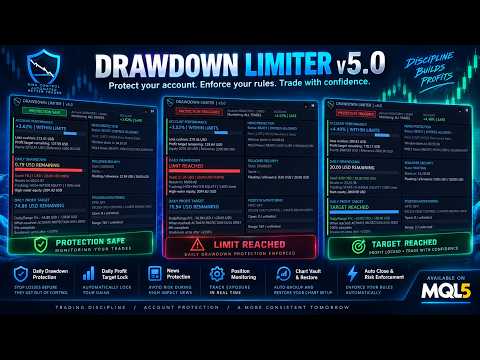
One Unified Protection System

DrawDown Limiter v5.0 introduces a unified protection response. Depending on your configuration, when a protection condition is triggered the EA can:

  • Activate a shared entry-block signal for compatible Expert Advisors.
  • Isolate local strategy charts before closing trades.
  • Delete protected pending orders.
  • Close protected positions or preserve only pre-existing exposure.
  • Continue removing new exposure while protection remains active.
  • Quarantine newly opened strategy charts during protection.
  • Automatically restore captured charts when all protection conditions have safely cleared.

Closing strategy charts before positions is especially important when other EAs are running on the same terminal: it helps prevent a strategy from immediately recreating a position that DrawDown Limiter has just closed.

Protection Conditions

DrawDown Limiter v5.0 can activate protection for multiple independent reasons:

  • Maximum Daily Drawdown
  • Maximum Account Drawdown
  • Maximum Account Profit
  • Daily Profit Target
  • Breakeven Protection
  • Rollover Security
  • Scheduled Protection
  • Economic News Protection
  • Holiday and All-Day News Protection
  • Maximum Open Positions
  • Maximum Positions Opened During the Trading Range

Several protection causes can exist at the same time. The EA does not release protection simply because one condition has cleared. Full protection remains active until every active protection cause is legitimately cleared.

Daily Drawdown — Choose How Your Risk Is Actually Calculated

Different trading programs and account rules calculate daily drawdown differently. DrawDown Limiter v5.0 therefore separates the daily risk reference from the method used to measure the current loss.

Daily risk reference options:

  • Initial Deposit
  • Account Balance at the beginning of the range
  • Account Equity at the beginning of the range
  • Higher of Equity or Balance
  • Fixed Risk in Account Currency

Daily drawdown tracking methods:

  • Open And Closed Positions — combines negative closed P/L since reset with current floating P/L.
  • Start-Of-Range Equity — measures the decline from the equity captured when the current protection range started.
  • High-Water Equity — tracks the highest equity reached during the range and measures drawdown from that peak.

Swap and commission can also be included in the calculations when required.

This flexibility allows the limiter to be configured according to the actual drawdown formula you need rather than forcing every account to use the same calculation.

Flexible Daily Reset Cycle

A trading day does not necessarily reset at midnight on your computer or even at midnight on the broker server.

DrawDown Limiter can define the protection range using:

  • Daily Bar Open
  • Broker Server Time
  • A Configured Time Zone

Configured Time Zone mode supports a fixed standard UTC offset together with optional European or United States daylight-saving rules.

The selected range controls the reset of daily drawdown calculations, daily targets, breakeven state, schedules and range-position counters.

Chart Vault — Isolate, Protect and Restore Your Strategies

One of the major additions in DrawDown Limiter v5.0 is the Chart Vault.

When chart protection is enabled, DrawDown Limiter can capture eligible strategy charts before closing them. The captured information includes the symbol, timeframe, chart configuration and saved template information required to reopen the chart later.

During an active protection event the Chart Vault can:

  • Save eligible strategy charts.
  • Close those charts before protected positions are closed.
  • Keep the DrawDown Limiter controller running.
  • Quarantine newly opened strategy charts while protection remains active.
  • Track captured, closed, restored and failed charts.

With Close + Restore Charts, the saved charts can automatically reopen when all protection causes have cleared, the new range is valid and the system confirms that restoration is safe.

A Manual Reopen mode is also available when you prefer to decide when the captured charts should be restored.

Choose What Happens to Existing Positions

Protection does not always have to mean closing everything. v5.0 provides two main trade-response modes:

  • Close Protected Trades — repeatedly closes positions and removes pending orders within the configured scope while protection remains active.
  • Keep Pre-Existing Exposure — preserves exposure that existed when protection started while deleting pending orders and preventing additional exposure from being maintained.

This allows temporary restrictions such as news or schedules to protect against new exposure while still permitting an existing position to remain under management when your trading rules allow it.

Daily Profit Target

DrawDown Limiter is not limited to loss protection.

A Daily Profit Target can be defined as either:

  • A percentage of the daily reference, or
  • A fixed amount in account currency.

When the target is reached you can choose between:

  • Notify Only, or
  • Activate Protection Until Reset.

This can be used to enforce a daily trading objective and stop additional trading once the desired result for the current range has been reached.

Breakeven Protection

v5.0 also introduces Breakeven Protection.

You can configure a positive daily result at which breakeven protection becomes armed. If the trading result subsequently returns to breakeven, DrawDown Limiter activates the configured protection response.

For example, the system can arm after a profitable start to the day and protect the account if that accumulated result is later completely given back.

Maximum Account Profit Protection

A separate Maximum Account Profit level can be configured as an account-wide objective.

When the configured account profit level is reached, DrawDown Limiter activates the full protection response and prevents continued trading under that configuration.

This is independent from the Daily Profit Target and is intended for objectives that apply to the complete account rather than a single trading day.

News Protection

DrawDown Limiter v5.0 can automatically activate protection around selected economic events.

Depending on platform and configuration, supported news sources include the MQL5 Economic Calendar, Forex Factory and Investing.com.

News protection can be filtered using:

  • Selected currencies
  • Low, moderate and high impact events
  • Included event keywords
  • Excluded event keywords
  • Minutes before an event
  • Minutes after an event
  • Holiday protection
  • All-day protection

When a qualifying news restriction becomes active, it uses the same configurable trade and chart protection system as the other full protection conditions.

If news protection is enabled and the configured source cannot provide reliable data, DrawDown Limiter uses a fail-closed approach rather than assuming that it is safe to trade.

Scheduled Protection

DrawDown Limiter can automatically activate protection at a scheduled broker-server time.

The schedule can run:

  • Every day, or
  • On a selected weekday.

Once triggered, the selected protection response remains active until the next legitimate daily range begins.

This can be useful when your strategy should stop trading before a specific market period, rollover, weekend or other predefined time.

Rollover Security Zone

A profitable trading day can hide a large floating loss that becomes dangerous immediately after the daily reset.

The Rollover Security Zone specifically addresses this situation.

During the configured number of minutes before the next daily reset, DrawDown Limiter can enforce a maximum floating loss expressed as a percentage of the daily risk allowance.

If the floating loss reaches this rollover allowance, full protection is triggered before the account enters the next trading range.

Overtrading Protection — Without Closing Your Allowed Trades

DrawDown Limiter provides two independent position controls:

  • Maximum Simultaneously Open Positions
  • Maximum Positions Opened During the Current Range

Unlike a full drawdown protection event, position-count protection uses excess-only control.

Positions already inside the permitted allowance remain open and strategy charts remain available. Additional or excess exposure is removed while the valid positions can continue to be managed.

Pending orders that could exceed the allowed exposure can also be deleted.

New-Trade Risk Alerts

DrawDown Limiter can inspect newly detected positions and provide advisory alerts when:

  • A trade has no visible Stop Loss.
  • The estimated risk exceeds a configured percentage of balance.
  • The estimated risk exceeds a configured percentage of equity.
  • The estimated risk exceeds a configured fixed monetary value.

These checks are alerts. They do not modify the trade or automatically add a Stop Loss.

Protect the Whole Account or Individual Strategies

DrawDown Limiter supports three monitoring scopes:

  • All Trades
  • One EA Magic Number
  • Multiple EA Magic Numbers

This makes it possible to create a layered portfolio-protection structure.

For example, one master DrawDown Limiter can protect the complete account while additional instances supervise smaller risk budgets assigned to individual Expert Advisors or groups of strategies.

The account master continues to control the complete portfolio even when individual strategy limits are configured separately.

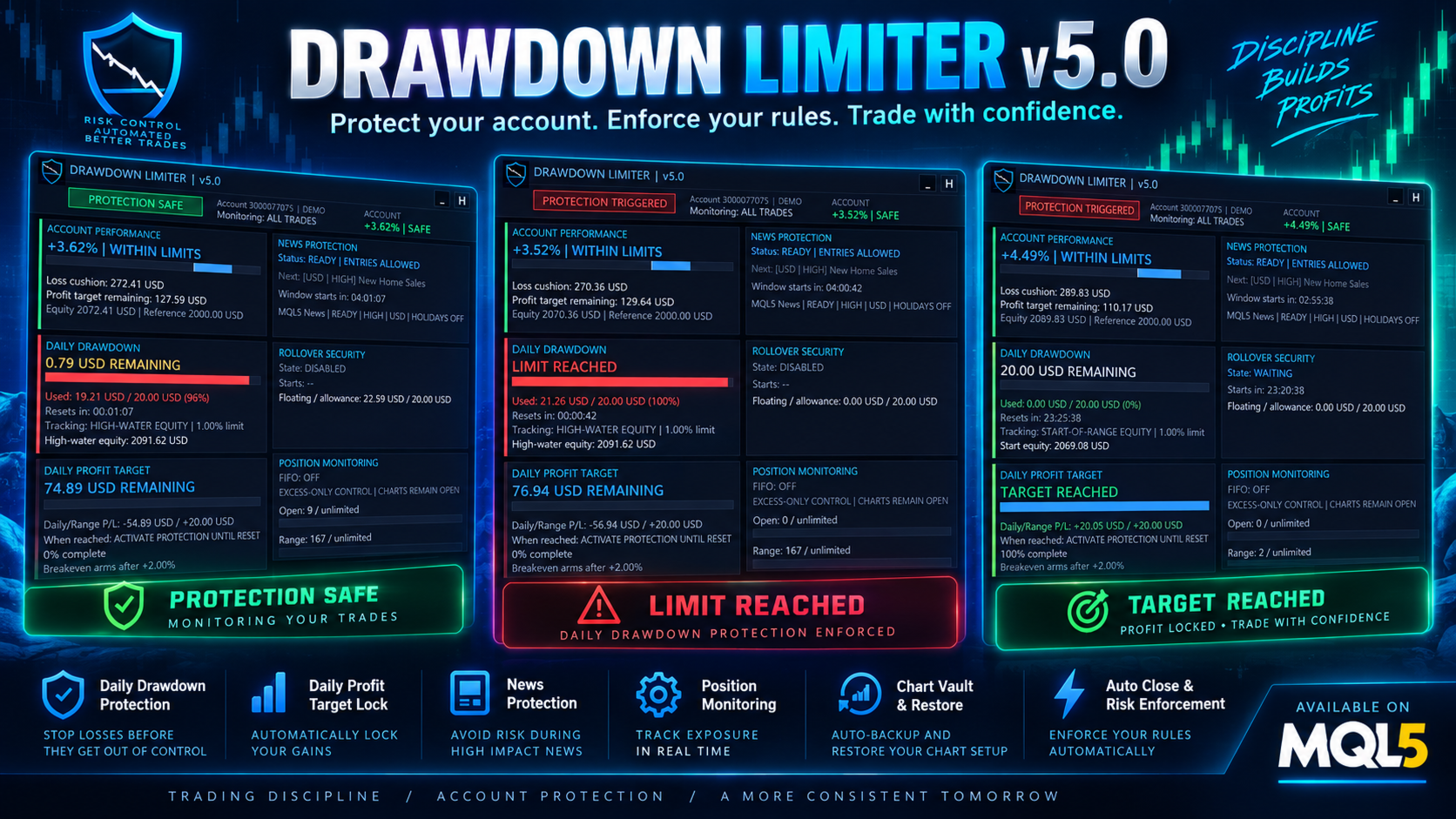
Advanced Protection Dashboard

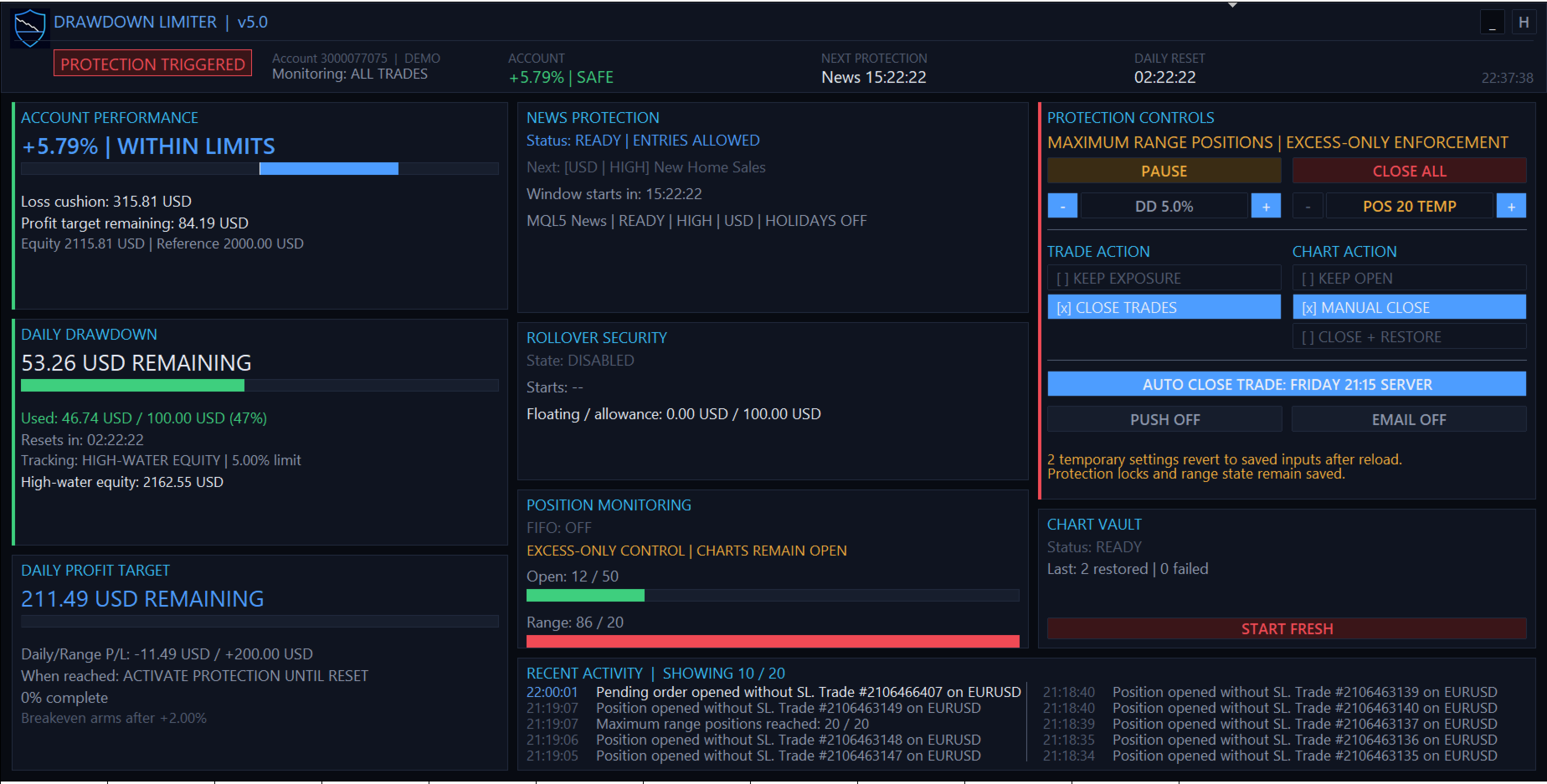
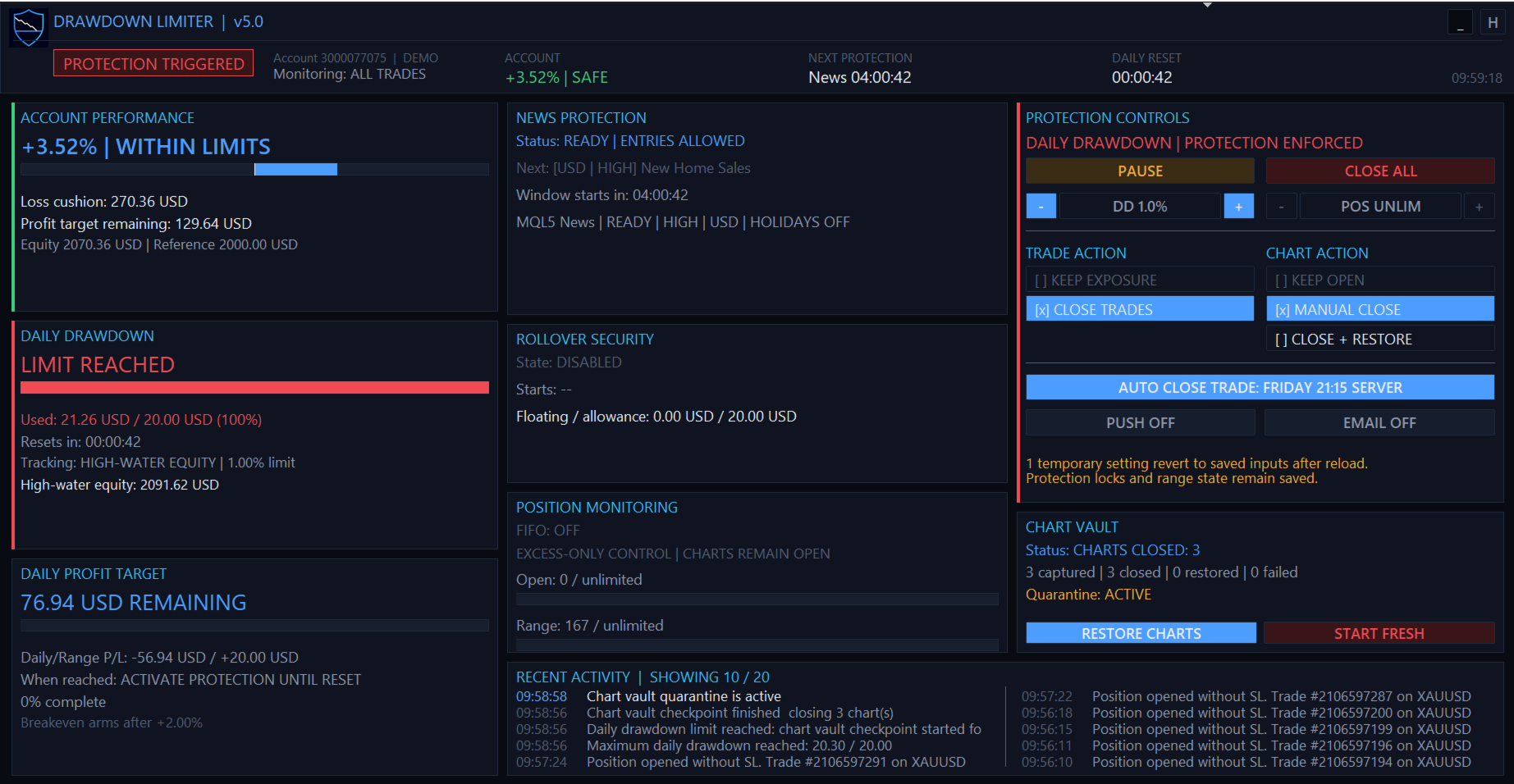
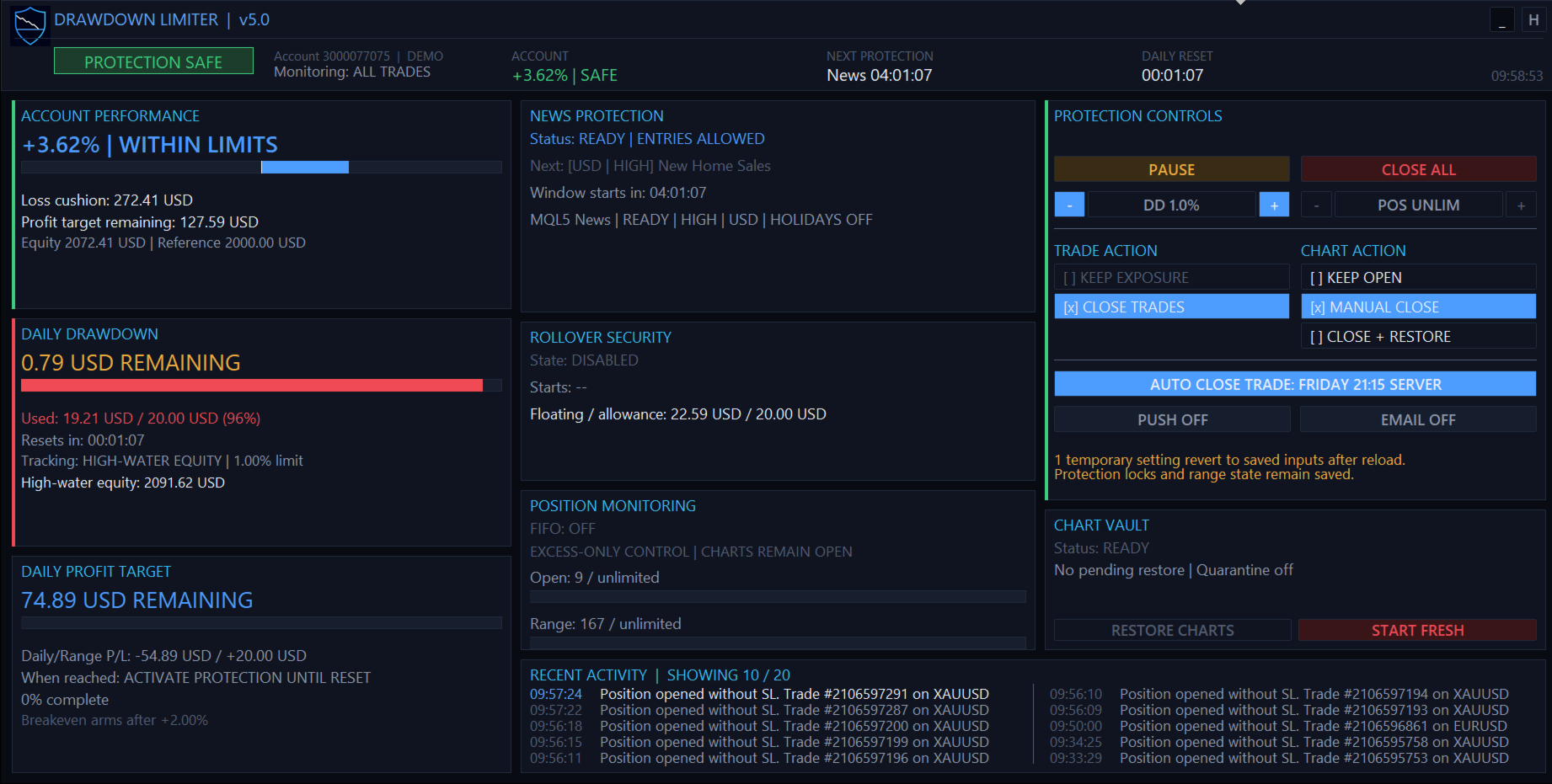
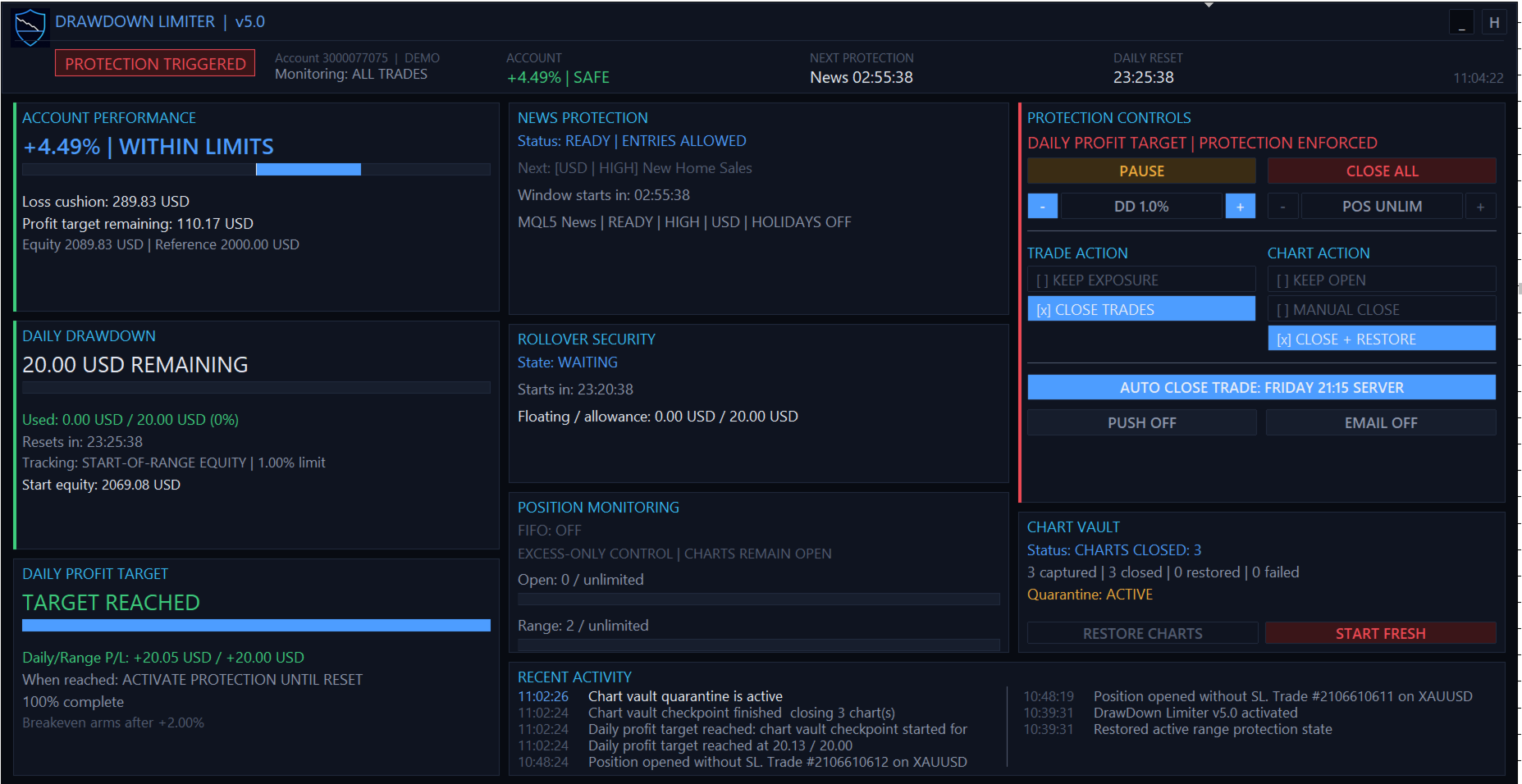
v5.0 introduces a responsive protection dashboard designed to display the account state and active protection system rather than simply showing isolated indicators.

The dashboard provides information including:

  • Current protection status
  • Account performance
  • Account loss cushion
  • Daily drawdown used and remaining
  • Daily and account profit progress
  • Next protection event
  • Daily reset countdown
  • News protection status
  • Rollover security status
  • Open and range-position limits
  • Selected trade and chart actions
  • Chart Vault status
  • Recent protection activity

The dashboard automatically adapts between wide, standard, dense and minimal layouts according to the available chart size.

Direct Controls From the Dashboard

The protection dashboard also provides operational controls, including:

  • PAUSE for eligible temporary protections and advisory checks.
  • CLOSE ALL for an emergency one-time close of managed exposure.
  • Temporary adjustment of the daily drawdown percentage.
  • Temporary adjustment of the maximum range-position limit.
  • Trade-action selection.
  • Chart-action selection.
  • Push and email notification toggles.
  • Scheduled auto-protection control.
  • Manual chart restoration where applicable.

Temporary dashboard changes do not silently overwrite your saved EA inputs. Reloading the EA returns temporary settings to the configured input values while persistent protection state remains protected.

Persistent Protection State

A protection event is not cancelled simply by removing and reattaching the EA or restarting MetaTrader.

DrawDown Limiter persists important protection and range state so that an active restriction cannot normally be bypassed by restarting the EA.

If persistence or range-transition information becomes invalid, the system is designed to fail closed and retain protection until a valid state can be recovered.

A guarded Start Fresh procedure is available when you intentionally need to discard an old limiter state and initialize a completely new protection range.

Developer Integration

DrawDown Limiter can publish a shared MetaTrader Global Variable that compatible Expert Advisors can check before attempting a new entry.

Developers can integrate this entry-block contract directly into their own EAs so their strategies cooperate with DrawDown Limiter instead of waiting for a newly opened trade to be detected and removed.

FIFO Support

For accounts requiring FIFO handling, DrawDown Limiter provides configurable FIFO closing modes, including support for partial-close handling where applicable.

Notifications

Protection events can be reported using:

  • Panel and terminal logging
  • MetaTrader push notifications
  • Email notifications
  • Push and email together

Designed for Funded Accounts and Personal Risk Management

DrawDown Limiter can be configured for strict funded-account rules as well as personal trading-account discipline.

The included protection model can accommodate different:

  • Daily loss formulas
  • Overall account loss limits
  • Profit objectives
  • Daily reset time zones
  • News restrictions
  • Position limits
  • Rollover requirements
  • EA-specific risk budgets

Preset configurations can therefore be built for different trading programs while retaining a safety margin between the limiter's trigger and the external account limit.

Important — Understand the Protection Model

DrawDown Limiter is a client-side MetaTrader controller.

It observes the state visible to the terminal and then applies the configured protection response. It cannot force a broker to reject an order before the broker accepts it.

Trades submitted from a mobile application, web terminal, API, signal service, copier, another MetaTrader terminal or another external system cannot be controlled before they become visible to the terminal running DrawDown Limiter.

The EA also cannot act while the MetaTrader terminal is closed, disconnected, frozen or unable to trade.

For this reason, configure an appropriate safety buffer between your DrawDown Limiter thresholds and any hard external limit. Execution latency, spread, slippage, commission, swap and fast market movements can affect the final closing result.

Recommended Setup

For maximum local account protection:

  1. Run DrawDown Limiter on one dedicated chart.
  2. Use All Trades scope for account-wide protection.
  3. Configure the daily reset and drawdown calculation to match your actual account rules.
  4. Use Close Protected Trades when exposure must be removed.
  5. Use Close + Restore Charts when local automated strategies should be isolated during protection.
  6. Configure a safety margin below any external maximum loss threshold.
  7. Test the complete protection and restoration workflow on a demo account before live use.
Reviews 10
studentspower
171
studentspower 2024.08.30 10:11 
 

everything I need. Fortunatly it didn't need to close yet. But the settings are very good for all kinds of prop firm requirements.

Juan Antonio Rojo Pereira
516
Juan Antonio Rojo Pereira 2023.10.10 21:13 
 

All right, thanks

Inakis Srl
1127
Enrico De Landerset 2023.10.09 21:40 
 

5 stars to the product that is simply perfect and 5.000 stars for the Author and his fantastic support.!

Recommended products
SF Adaptive Scalper EA m
DMITRII GRIDASOV
5 (1)
SwapFree   Adaptive Scalper EA  - is smart, safe and reliable fully automatic   multi-pair  scalping   trading system! This is   "set and forget"   Expert Adviser which is doing all trading job for you!  9 Set_files available for 9 pairs! Download EA Set_files for testing and trading: GBPCHF Set_file EURAUD Set_file GBPCAD Set_file EURCHF Set_file GBPAUD Set_file AUDCAD Set_file USDCAD Set_file EURCAD Set_file USDCHF Set_file Features of EA: Scalping techniques. No Rollover influence. No Swaps i
By :ForextraderEanow   Green Mower 10.0                                                                                                                                                                                                                                                                                                        This EA is Famous Grid Strategy that open grid of trades with the same size (not martingale)  and make PROFIT even when the Forex price moves in the WRONG Direction
H4 GBPUSD Trend Scalper is a trend signal scalper The EA trades according to the trend strategy using original built-in indicator for opening and closing orders. The external inputs for limiting trading on Fridays and Mondays are available. The purpose of the strategy is to use the current trend with the most benefit. According to the results of testing and working on demo and real accounts, the best results achieved by using the Н4 timeframe on the GBP/USD pair Works on MetaTrader 4 Build 971+
EA specially made for currency pair XAUUSD. It uses artificial intelligence and complex mathematical operations, all with the goal of as little risk as possible and constant profit. I am an electrical engineer and a professor of informatics, so everything with me is calculated to the maximum and there must be no mistakes. The EA will provide mathematically processed information with the aim of as little risk as possible, , and if you wish, you can increase the Lot in order to achieve the desired
The basis of the strategy is the identification of quick corrective movements between the crosses of a working currency pair or metal. At the moment of differences in prices of trading instruments, the adviser analyzes the possible direction of price movement on a working instrument and starts work. Each position has a stop loss and take profit. A unique position tracking algorithm allows you to control the superiority of profit over loss. The adviser does not use dangerous trading methods.
Hedging Strategy EA
Christianiel Robles Faustino
Automatically Hedge Your Open Trades Hedging Strategy EA is an trading utility designed to automatically manage and hedge an existing position when the configured conditions are met. Instead of manually monitoring every price movement, let the EA handle the hedging sequence, trade conditions, spread protection, pending orders, and margin controls according to your settings. KEY FEATURES Automatic Hedging Automatically opens a hedge position after an initial trade according to your conf
MARKET MAKER EXPERT is an customizable advanced, fully automated Grid Trading Expert Advisor developed to trade on MULTIPAIR MODE ( EURUSD,USDJPY,USDCHF,USDCAD,EURCHF ), by spreading out risks. Expanding Grid is its speciality. It focuses on opening a large number of orders. The currency pairs have been chosen carefully to run this system. Once it analyze the market, it does a hedge order immediately, (so margin levels are not affected on the initial trade) Starts grid when the price move aga
如果产品有任何问题或者您需要在此产品上添加功能,请联系我 Contact/message me if you encounter any issue using the product or need extra feature to add on the base version. There is Demo version of this panel Dashboard Super Three MA Demo in my product list, please try it out to get familiar with all functionalities free, LINK . This system basically utilizes PA and three adjustable Moving Average as the main indicator set to generate trading signal. With the feature that all MA_timeframe, MA_period, MA_applied_price are ad
| Fully-automated Smart Money Concept (ICT) inspired trading solution with multi-strategy capabilities | Built by a grid trader >> for grid traders.  This is MT4 version, click  here  for  Blue CARA MT5  (settings and logics are same in both versions)     Real monitoring signal  -->  Cara Gold Intro Blue CARA EA   ('CARA') - short for  C omprehensive  A lgorithmic R esponsive A dvisor is a next-gen  multi-currency    multi-timeframe  EA base on the widely known (and perhapse most popular) Inn
King Scalper EA  is an automatic trading robot to trade  USACAD . Using advanced calculations it opens and manages trading for you automatically. Its a strategy based on a series of indicators that measure the strength of the market to enter trades, when market conditions allow it. No experience is required and it’s easy to set up.  Using King Scalper is a way to improve your trading result instantly. With an Expert Advisor like King Scalper you can instantly start trading, a working system re
Unicorn XU
Andrii Garkusha
Description of the strategy: A highly professionally developed strategy from a trader with 25 years of experience. The strategy is based on the breakdown of levels. It has been thoroughly tested over a 20-year history using the entire range of stress tests (spread widening, slippage, application in other markets, changes in parameters, etc.). Average annual return 362%. Maximum drawdown 41.3%. In portfolio mode, the average annual return is 225%, drawdown 15.2%. Work with a single entry with ta
MT4 Version : https://www.mql5.com/en/market/product/99489 MT5 Version : https://www.mql5.com/en/market/product/99490 Hedging Locking — Multi-Symbol Hedging Grid EA Hedging Locking is an automated trading system for MetaTrader 4/5 designed around a hedged entry + adaptive locking/grid management concept. The EA starts a cycle by opening BUY and SELL simultaneously on selected symbols, then manages the exposure using a dynamic step distance. This approach is built to work best in ranging / osc
Max ScalperSpeed
Paranchai Tensit
Max ScalperSpeed   is a fully automated expert advisor. This system has been developed to improve the efficiency of generating more returns. Rely on scalping trading strategies and recovery strategies with appropriate trading frequencies, and also able to work well in all market conditions, whether trend or sideways, able to trade full time in all conditions. Enable or disable news filtering according to user needs. Added a proportional lot size adjustment function, where users can choose to ad
Jet Punch
Didit Haryadi Saputra
Jet Punch is another best expert advisor for MT4,  can help you make money while you sleep by automatically entering and exiting trades. It trades by opening trades every day and closing them at the right time to ensure you always earn a profit. The software is very simple and can be used by both beginner and experienced traders.  Jet Punch was tested and has successfully passed the stress test with slippage and commission approximate to the real market condition. Recommendations: Currency pair:
Robot scalper for M5 timeframe. Trades on the GBPUSD currency pair. This robot has been specially developed by a company of professional traders for trading in the pound sterling. The robot approximately opens 5 to 15 trades every day. It is best to trade with brokers that have a low spread on GBPUSD up to 10 pips. The recommended minimum deposit to start is $500 or more. Advantages: does not use martingale. not a net. every trade has a stop loss. professional bot specifically for the GBPUSD p
如果产品有任何问题或者您需要在此产品上添加功能,请联系我 Contact/message me if you encounter any issue using the product or need extra feature to add on the base version. There is Demo version of this panel Dashboard Super MA RSI CCI Demo in my product list, pls try it out to get familiar with all functionalities free . Dashboard Super MA RSI CCI is an intuitive, and handy graphic tool to help you to: Have 28 pairs under control with one dashboard Monitor price movement, identify possible trend based on MA, RSI, and CCI i
Financial Radar GFX
Yasir Mohammed Sachit Sachit
Gold Trend Rider – Automated Expert Advisor for XAUUSD Trading Disclaimer : Trading Gold (XAUUSD) involves significant risk. Past performance does not guarantee future results. Test on a demo account and apply proper risk management before live trading. Overview Gold Trend Rider is a fully automated Expert Advisor specifically designed for Gold trading. It leverages the Parabolic SAR indicator to detect trend direction and open trades accordingly. Its trailing stop mechanism manages positions d
Ilan MT4
Andrey Khatimlianskii
5 (1)
The original Ilan EA for MetaTrader 4 This is the original Ilan EA for the MetaTrader 4 trading terminal. The strategy needs no advertising as it is well known even to novice traders. Settings of the Expert Advisor The Expert Advisor can easily be set, while allowing you to adjust any important parameters of the strategy. Available Features: Unique  MagicNumber  for identification of trades; Trade direction option ( Trade direction ): buy only, sell only, or both directions simultaneously; Step
Usdchf Miner 46
Catur Sulistiyanto A Md Tem
This robot uses a strategy with hedge definite calculations, so that when it closes it is definitely profitable. how the robot works: 1. the first time the robot will open a buy position, - if the profit position is according to the target it will be closed automatically and re-open a buy position again - if a loss position the robot will open a buy and sell position simultaneously, if the position is still a loss the robot will open a position  buy sell together again and close profit short po
DYJ ScalpingBurg EA is a fully automated Expert Advisor. The Burg algorithm filter are used for entries. The advisor needs a hedging and ECN account type. The order loss is bailed out by the game and becomes a profit. If the order direction is wrong. You can disable the   game   strategy at any time. General Recommendations Recommend ECN accounts, xauusd spreads between 8 and 11 or lower, EURUSD spreads 1 The minimum deposit is $200.  Please download the xauusd and EURUSD settings file in the p
Forex Diamond EA
Lachezar Krastev
5 (6)
FOREX MEGA SALE! 50% OFF! Buy Forex Diamond EA with a huge –50% discount ! Promo Price: $267 (Regular Price: $547 — You Save $280! ) Act now before this deal ends! Live Results:   https://www.mql5.com/en/signals/2379493 Forex Diamond EA – Reliable Automated Trading Powered by Smart Algorithms Forex Diamond EA is a proven expert advisor designed to deliver consistent results using a combination of trend and counter-trend strategies. Trusted by thousands of traders since its launch, Forex Diamo
Win Sniper Follow
Nirundorn Promphao
1 (1)
I will support only my client. สำหรับลูกค้า Win Sniper Follow  is a fully automated Expert Advisor with no use of martingale. Night scalping strategy. The RSI indicator and an ATR-based filter are used for entries. Real operation monitoring as well as my other products can be found here :  https://www.mql5.com/en/users/winwifi/ General Recommendations The minimum deposit is 100 USD, the recommended timeframe is M15, H1, H4. Use a broker with good execution and with a spread of 2-5 points. A ver
Gbpusd Miner 46
Catur Sulistiyanto A Md Tem
This robot uses a strategy with hedge definite calculations, so that when it closes it is definitely profitable. how the robot works: 1. the first time the robot will open a buy position, - if the profit position is according to the target it will be closed automatically and re-open a buy position again - if a loss position the robot will open a buy and sell position simultaneously, if the position is still a loss the robot will open a position  buy sell together again and close profit short po
Impuls Pro MT4
Sergey Batudayev
5 (2)
The EA’s strategy is based on  Swing trading , with entries after sharp impulses calculated by the iPump indicator. The advisor has the ability to open manual trades with automatic support – for a downtrend ↓ we enter a trade after a corrective rise in the price, the asset falls into the overbought zone, we sell along the trend. – for an uptrend ↑, we enter a trade after a corrective fall in the price, the asset falls into the oversold zone, we buy along the trend. When trading on the selected
GoldMine EA MT4
Jerald Jay Cruz
No force entry and not martingale!!! This EA is designed to identify the best setup trades, executing approximately 3 to 5 high-quality trades per week on each currency pair. This Expert Advisor (EA) is tailored for XAU/USD (Gold)  and operates on a 5-minute time frame . The strategy combines the Commodity Channel Index (CCI) with a Moving Average (MA) to identify trade opportunities and manage exits effectively. Key Features: CCI-Based Entry : The EA watches for the CCI to cross extreme l
MHA Local Trade Copier
Mohammad Hanif Ansari
MHA Local Trade Copier It's an EA to copy trade from one MT4 account to another MT4 account. Also you can copy trades from single master account to multiple slave accounts. Only you should run master and slave accounts at same PC or VPS. Master account could use main password or investor password, but slave accounts needs to login by main password. Using this copier you can copy trades between different brokers with different symbol suffix. For example if broker of master account has EURUSDi
Bear vs Bull EA MT4
Nguyen Nghiem Duy
Bear vs Bull EA Is a automated adviser for daily operation of the FOREX currency market in a volatile and calm market. Suitable for both experienced traders and beginners. It works with any brokers, including American brokers, requiring FIFO to close primarily previously opened transactions. *In order to enable the panel, it is necessary to set the parameter DRAW_INFORMATION = true in the settings; -  Recommendations Before using on real money, test the adviser with minimal risk on a cent trad
How the EA works (simple explanation) Trades on   M5   timeframe Uses   H1 timeframe   to analyze global market context Analyzes   2 or 3 timeframes simultaneously On each timeframe: Checks price position relative to one or two Moving Averages Evaluates MA angle and distance between price and MA Entry logic is based on   trend + volatility conditions , not on random signals The full algorithm is illustrated in the screenshots. Recommended usage Symbol:   EURUSD Timeframe:   M5 Trading
Gold Pulse AI MT4
Rodrigo Arana Garcia
Only   4 /10   copies left at this price ---> Next price 175$ //  MT5 Version Launch offer: Get a free EA with your purchase !!! Gold Pulse AI was created using TensorTrade, an open-source Python framework designed specifically for building, training, evaluating, and deploying robust trading algorithms using reinforcement learning. The strategy of the algorithm is to take advantage of the momentum in the gold market by using pending orders. After analyzing previous candlesticks to identify area
Baby Shark Trader
Thi Tra Mi Duong
EA Baby Shark Trader is a smart trading system developed over the years and continuously improved. The EA uses trend and momentum scalping strategies. When the signal appeared, it quickly entered and then exited the position quickly. The strategy has an exclusive Stop Loss strategy to protect the account and optimize performance. Because the EA's Stop Loss is a complex and flexible market-based strategy, there are no specific parameters for Stop Loss. Stop Loss will be triggered under specific
Buyers of this product also purchase
Trade Indicator Assistant is a powerful MT4 utility designed to turn indicators into automated trading systems. Its main feature is the ability to automatically detect an indicator’s   BUY and SELL signal buffers , without requiring you to know the buffer numbers, search through indicator settings, or modify the indicator source code. Bonus Indicator: After purchasing Trade Indicator Assistant, contact me to receive Trade Signal Pro completely free as a bonus indicator. [Download Demo Version]
Telegram to MT4 Multi-Channel Copier   automatically copies trading signals from your Telegram channels straight to MetaTrader 4. No bots, no browser extensions, no manual copying. A signal arrives in Telegram and the EA opens the trade in your terminal within seconds. And before you copy a channel, the built-in backtester shows you what that channel would have done in your account. The product has two components: a Windows application that listens to your Telegram channels, and this Expert Advi
The product will copy all telegram signal to MT4   ( which you are member  ) , also it can work as remote copier.  Easy to set up, copy order instant, can work with almost signal formats, image signal, s upport to translate other language to English Work with all type of channel or group, even channel have "Restrict Saving Content", work with  multi channel, multi MT5 Work as remote copier: with signal have ticket number, it will copy exactly via ticket number. Support to backtest signal. How to
Unlimited Trade Copier Pro is a tool to copy trade remotely to multiple MT4, MT5 and cTrader accounts at different computers/locations over internet. This is an ideal solution for you if you are a signal provider and want to copy your trades to other receivers globally on your own rules. One provider can copy trades to multiple receivers and one receiver can get trade from multiple providers as well. The provider can even set the subscription expiry for each receiver, so that receiver will not b
Strategy Builder offers an incredible amount of functionality. It combines a trade panel with configurable automation (covert indicators into an EA), real-time statistics (profit & draw down) plus automatic optimization of SL, TP/exit, trading hours, indicator inputs. Multiple indicators can be combined into an single alert/trade signal and can include custom indicators, even if just have ex4 file or purchased from Market. The system is easily configured via a CONFIG button and associated pop-up
A professional panel for manual trading that keeps the whole trade cycle in one window on the chart, from a precise entry to protecting your account. Size every position strictly to a defined risk, build the trade with lines directly on the chart using the RR Tool, and place market and pending orders, grids and OCO. The panel takes position management off your hands: partial closing across up to five levels, six types of trailing stop, breakeven and Virtual SL/TP. Daily, weekly and monthly limit
Riskless Pyramid
Snapdragon Systems Ltd
5 (1)
Introduction This powerful MT4 trade mangement EA offers a way potentially to aggressively multiply trade profits in a riskfree manner. Once a trade has been entered with a defined stoploss and take profit target then the EA will add three pyramid add-on trades in order to increase the overall level of profit. The user sets the total combined profit target to be gained if everything works out. This can be specified either as a multiple of the original trade profit or as a total dollar amount. Fo
VirtualTradePad PRO SE MT4 — advanced trading panel and chart workspace for MetaTrader 4 VirtualTradePad PRO SE is a professional trading panel and trade-management workspace for MetaTrader 4 . It helps traders open, manage, protect, close and analyze trades faster from one chart-based interface. The product was created for active manual traders who need more than a simple set of buttons. PRO SE combines one-click execution, pending orders, position control, partial close, basket profit/loss log
EasyInsight AIO MT4
Alain Verleyen
4 (2)
EASY Insight AIO – All-In-One Power for AI-Driven Trading Want to skip the setup and start scanning the entire market – Forex, Gold, Crypto, Indices, and even Stocks – in seconds? EASY Insight AIO is the complete plug-and-play solution for AI-powered trade analysis. It includes all core Stein Investments indicators built-in and automatically exports clean, structured CSV files – perfect for backtesting, AI prompts, and live market decision-making. No need to install or configure indicators manu
RedFox Copier Pro
Rui Manh Tien
4.7 (10)
Time saving and fast execution Whether you’re traveling or sleeping, always know that Telegram To Mt4 performs the trades for you. In other words, Our   Telegram MT4 Signal Trader  will analyze the trading signals you receive on your selected Telegram channels and execute them to your Telegram to MT4 account. Reduce The Risk Telegram To Mt4   defines the whole experience of copying signals from   Telegram signal copier to mt4 platforms. Users not only can follow all instructions from the signa
The FFx Hidden Manager panel will help you to manage easily your orders directly on the chart. Below all features described: TP, SL and TrailingStop are hidden Each order has its own lines on chart Drag & Drop any line to change the TP/SL as per your need Option to move automatically the SL line at breakeven when TP #1 is reached Option to choose the TP/SL type (by pips or price) Option to choose the TrailingStop type (by pips, MA, Fractals, PSAR or ATR) Define which order(s) you want to manage
FFx Risk Calculator
Eric Venturi-Bloxs
FFx Risk Calculator panel will help you to calculate very easily your trades size, SL or the risk directly on the chart. All features are described below: Option to select which parameter to calculate: Risk, Stop Loss or Lot Size The panel will show if the lot size is allowed according to the current account free margin Button to maximize/minimize the panel Drag and Drop the panel anywhere on the chart How to use it? Select the parameter you want to be calculated. It will be based on the 2 other
Trade Copier Pro
Vu Trung Kien
4.29 (14)
Trade Copier Pro is a tool to copy trade remotely to MT4, MT5 and cTrader accounts at different computers/locations over internet. This is an ideal solution for you if you are a signal provider and want to copy your trades to other receivers globally on your own rules. One provider can copy trades to multiple receivers and one receiver can get trade from multiple providers as well. The provider can even set the subscription expiry for each receiver, so that receiver will not be able to receive t
News Trader Pro
Vu Trung Kien
4.38 (16)
News Trader Pro is a unique robot that allows you to trade the news by your predefined strategy. It loads every piece of news from several popular Forex websites. You can choose any news and preset the strategy to trade it, and then News Trader Pro will trade that news by selected strategy automatically when the news comes. News release gives opportunity to have pips since the price usually has big move at that time. Now, with this tool, trading news becomes easier, more flexible and more exciti
FFx Watcher PRO
Eric Venturi-Bloxs
The FFx Watcher PRO is a dashboard displaying on a single chart the current direction of up to 15 standard indicators and up to 9 timeframes. It has 2 different modes: 1. Watcher mode: Multi Indicators User is able to select up to 15 indicators to be displayed User is able to select up to 9 timeframes to be displayed 2. Watcher mode: Multi Pairs User is able to select any number of pairs/symbols User is able to select up to 9 timeframes to be displayed This mode uses one of the standard indicat
NickZ Tool
Nicolas Zouein
This is a must have tool for a serious trader. It saves your precious time spent for opening/closing trades, creating pending trades and modifying your TP/SL in bulk according to either pips or price. If you need to quickly open several pending orders (Buy Stop, Sell Stop) at a certain distance from each other, this script will do all the routine for you! The first time you use this handy tool, you will realize it has already paid for itself. Instructions: Drag and drop this script onto a chart.
The product combines a manual trade panel with the ability to perform actions automatically in a highly configurable way. Actions include capturing indicator values and then based on those values raising alerts, open/close or partially close trades, scale-in, setting up pending orders, adjusting stop loss, take profit and more. On-chart controls can be configured, such as tick boxes and buttons, so can be fully interactive. The EA also handles money management, news events, hidden stop loss, tak
Binary Options Copier Remote is an EA that allows to copy binary options trades between MT4 accounts at different computers. This is an ideal solution for signal provider, who want to share his trade with the others globally on his own rules. Provider can give free bonus license to 10 receivers. That means those 10 receivers can copy from provider by using Binary Options Receiver Free (no cost). From 11th one, receiver have to buy Binary Options Receiver Pro (paid version) in order to copy from
One Click FX Panel
Chantal Sala
5 (2)
This panel is very simple to use and it is a very ally to manage your positions and orders. Also you can modify your risk, writing in fields directly on Panel. One click on buttons and the operation on market is done! Operations possible: BUY/SELL Break Even Split (close 50% all orders) Close All positions Hedging (opens reverse positions to cover) Close only BUY positions Close only SELL positions Close All pending orders Reverse all positions Please watch the video to verify the very simple u
Slow Pips OCO Trade Panel is an advanced trading panel for placing pending orders. Traders can use this panel to place two pending orders at once. One pending order would be of buy entry type and the other one would be of sell entry type. Both orders will have Stop Loss and Take Profit parameters. Since two pending orders are placed at the same time, the pending order for which the price hits first gets converted into a market order and the other pending order gets deleted (one order cancels the
This indicator changes the timeframe and chart profile for multiple charts. If you dispatched many charts (10~20 or more) in single MetaTrader terminal, it is very boring and difficult work to manage the timeframe and chart profile individually. If the indicators you use in a chart are numerous and the setting values are different from the default one, you might give up adding all the indicators to all charts. The changing of timeframes on multiple charts has the same problem, too. Whenever you
Price Action DashBoard
Chantal Sala
4.17 (6)
The Price Action Dashboard is an innovative tool to help the trader to control a large number of financial instruments. This tool is designed to automatically suggest signals and price conditions. The Dashboard analyzes all major Time Frame suggesting price action conditions with graphic elements. The Dashboard can suggest you the strength of the trend identifying directional movement, it is an indispensable tool for those who want to open position themselves using market trends identifiers. The
Elliott Wave Counter is a panel for rapid and user-friendly manual markup of Elliott waves. One can select a color and a level of marks. There are also functions for removing the last markup and the entire markup made by the tool. Markup is made in one click. Click five times - have five waves! Elliott Wave Counter will be a great instrument both for beginners and professional analysts of Elliott waves. Elliott Wave Counter Installation & Inputs Guide if you want to get   notifications  about th
If you wish to draw Support and Resistance lines, view: daily market opening, classical pivot levels, Fibonacci pivot levels, trend lines, Fibonacci levels, the remaining time to candle closing, and current spread. If you seek to place your orders with the exact lot that meets your desired stop loss risk. If you wish to do all this and more with just one click, then this is the perfect tool to use. This tool will allow you to feel more relaxed when deciding to open orders, as well as predicting
One Click Analysis Tool is a   keyboard shortcut-based object creation   and copying tool for MetaTrader. It makes it easy to use analysis tools in MetaTrader with just a click. With our tool, you can quickly draw support and resistance levels, Fibonacci levels, shapes, channels, trend lines, and all other objects on your chart. Simply click the button, move the mouse, and One Click Analysis Tool will do the rest for you. This can save you time and make your chart analysis more efficient, allowi
Partial Close Expert
Omar Alkassar
5 (1)
Partial Close Expert is tool combines many functions into one automated system. This EA can help traders manage their positions more effectively by offeringmultiple options for managing risk and maximizing potential gains. With Partial Close Expert, traders can set a   partial close   level to lock in profits, a   trailing stop   level to protect profits and limit losses, a   break-even   level to ensure that the trade will break even if the price moves against them, and several other functions
Master Trend Dashboard
Chantal Sala
4.67 (3)
Master Trend Dashboard is a new generation indicator, compact, light and efficient. Each element of this Dashboard is designed to return specific signals as: Price Action, Breakout, Net Change (performance of the instrument), algorithmic studies, correlations and statistical calculations. This tool will change your way of trading allowing you to receive important information. See the Graphic Signals to understand every single signal below: Graphic Signals Symbol name and arrow color Green = Cur
Trade Copier Agent is designed to copy trades between multi MetaTrader(4/5) accounts/terminals. With this tool, you can act as either a provider (source) or a receiver (destination). All trading actions will be copied from the provider to the receiver with no delay. This tool allows you to copy trades between multiple MetaTrader terminals on the same computer with lightning-fast copying speeds of under 0.5 seconds. Trade Copier Agent Installation & Inputs Guide Please Apply the settings on the
Unlimited Binary Options Copier Remote is a powerful tool to copy binary options trades remotely between multiple accounts at different locations over internet. This is an ideal solution for signal provider, who want to share his binary options trades with the others globally on his own rules. One provider can copy trades to unlimited receivers and one receiver can get trade from unlimited providers as well. The provider can set the subscription expiry for each receiver, so that receiver will no
This is an Expert Adviser use for manual trading as a background EA or combine with external EA to open orders. Loss Recovery Trading is one of your options to handle the lose positions instead of using stop loss by setting a zone recovery area and target to exit the turn rounds sequence. How It Work? If the market goes against your first positions direction at the specific of losing points, the EA will open an opposite direction position with calculated larger lot size and also keep the first
More from author
ORB Revolution
Haidar Lionel Haj Ali
5 (24)
ORB Revolution — MetaTrader 5 Expert Advisor ORB Revolution is a professional-grade Opening Range Breakout (ORB) Expert Advisor for MetaTrader 5 designed for disciplined, risk-controlled automated trading . Built with institutional standards in mind, this system prioritizes capital protection , repeatable execution , and transparent decision logic — ideal for serious traders and prop-firm challenge participants. ORB Revolution fully supports NETTING and HEDGING accounts and includes internal saf
Swing Sniper EA
Haidar Lionel Haj Ali
5 (2)
Swing Sniper — Smart Money Concepts Expert Advisor for MetaTrader 5 Swing Sniper is a Smart Money Concepts Expert Advisor for MetaTrader 5 designed to automate a disciplined liquidity sweep strategy with structured confirmation , controlled risk , and transparent execution logic . The EA does not randomly enter the market and does not rely on grid , martingale , or dangerous averaging. Instead, it follows a strict confirmation model based on swing structure , liquidity sweep detection , momentum
Gravity Bands MT5
Haidar Lionel Haj Ali
5 (7)
A powerful all-in-one market structure, momentum, and trend framework for any intraday trader. Pay attention limited copies are sold at 49 USD! Next Price 69 USD With the indicator you get a full mechanical trading plan and free EA code to automate your trading!   Contact us   after you have purchased the indicator! The Gravity Bands Indicator is designed for traders who want clarity, not noise. Whether you scalp or day-trade, this tool gives you a clean visual structure of the market: Where the

DrawDown Limiter
Haidar Lionel Haj Ali
5 (23)
DrawDown Limiter v5.0 — Advanced Account Protection Controller DrawDown Limiter v5.0 is a client-side account protection controller designed to supervise your trading account and automatically react when configured risk, profit, news, schedule, rollover, or position limits are reached. It can monitor manual trades, automated strategies, multiple Expert Advisors, pending orders and floating positions from one dedicated chart. It can protect the complete account or be configured to supervise a spe
FVG EA Pro
Haidar Lionel Haj Ali
4.63 (35)
FVG EA PRO   is a must-have smart money concept EA, highly customizable and using advanced techniques of FVG "Fair Value Gap" and market structure to capture high probability trades.  It is highly configurable,  you can build various strategies based on market structure and FVG as entry criteria. FVG EA PRO can be used to trade Kill Zones and Silver Bullet Windows. It is fully compatible with swing trade strategies. It contains all the functionalities  needed by any  successful traders to automa
Ultimate SMC
Haidar Lionel Haj Ali
4.67 (6)
Ultimate SMC is a sophisticated MetaTrader 5 Expert Advisor designed to act as a framework for traders using advanced Smart Money Concepts (SMC). If you are a smart money concept trader and want to enhance and automate your trading strategies, this EA is for you. It is designed to cater to advanced traders seeking a robust and versatile tool to implement precise and strategic trading maneuvers based on the smart money concept. The EA combines multiple sophisticated trading techniques and risk ma
T Manager for Price action Traders
Haidar Lionel Haj Ali
4.5 (10)
T Manager, the ultimate trade management solution designed by traders for traders. If you are searching for a simple and efficient trade panel, trade manager, or trade assistant, you are at the right place.   The market contains a diverse number of those tools , but this one is designed by traders for traders . I designed this tool, and I am using it daily. Take my advice and stop buying tools blended with un-useful features that you will never use,   T Manager provides you with the essential y
Structure Blocks
Haidar Lionel Haj Ali
5 (4)
Structure Blocks: a structured way to analyze market structure  This indicator is for you if you are a price action or smart money concept trader. It identifies market trends' ultimate highs and lows and intermediaries' swing lows and highs. It adjusts based on candles' body where most of the volume is, disregarding wicks. Need help or have questions? I am   Lio , don't hesitate to reach out! I am always available to respond, help, and improve.  How it works: Each block consists of a move with
FREE
ICT Silver Bullet MT4
Haidar Lionel Haj Ali
5 (14)
ICT Silver Bullet If you are searching for a reliable indicator to trade the ICT Silver Bullet concept, or ICT concepts, Smart Money Concepts, or SMC, this indicator will respond to your need!  This indicator will help you identify the following: FVG - fair value gaps Market structure: BOS and CHOCH. It is based on ZIGZAG as it is the most subjective way to do it. ICT Silver Bullet windows and related notifications when it starts and when an FVG appears  Swing High and low that are potential bu
ICT Silver Bullet MT5
Haidar Lionel Haj Ali
5 (21)
ICT Silver Bullet If you are searching for a reliable indicator to trade the ICT Silver Bullet concept, or ICT concepts, Smart Money Concepts, or SMC, this indicator will respond to your need!  Before version 2.2, this indicator was focused only on ICT Silver Bullet, but moving forward, we will include the different elements for smart money concept trading. This indicator will help you identify the following: FVG - fair value gaps Market structure: BOS and CHOCH. It is based on swing high and l
NewStorm
Haidar Lionel Haj Ali
5 (2)
N ewStorm  is designed  mainly to trade after news events, and to open trades based on news results.  The EA can be used for swing trading by opening positions based on fundamental analysis with its SL and TP, or it can be used as scalper to profit from quick market move during the news to book some profit. An advanced grid recovery system is included that incorporates several advanced features such as ATR‐based grid spacing, dynamic lot allocation, smart drawdown reduction, trailing stops, and
Step Ahead
Haidar Lionel Haj Ali
4.87 (15)
"Step Ahead" is the ultimate breakout expert advisor The basic strategy is trading breakouts from a time range. It takes a start time and an end time as inputs. The EA sets breakout trades at the end of the ranges and manages the trades via breakeven and trailing stops mechanisms. The trades will be closed if SL or TP hits, and you can configure to close all open trades and orders at a specific time as part of the range settings. The strategy requires an SL for each trade. It is not a risky stra
Filter:
studentspower
171
studentspower 2024.08.30 10:11 
 

everything I need. Fortunatly it didn't need to close yet. But the settings are very good for all kinds of prop firm requirements.

Haidar Lionel Haj Ali
21693
Reply from developer Haidar Lionel Haj Ali 2024.08.30 12:09
I am glad to read your review! Thanks a lot, and just let us know if you need help.
Luca Madeddu
159
Luca Madeddu 2023.10.25 15:22 
 

User didn't leave any comment to the rating

Haidar Lionel Haj Ali
21693
Reply from developer Haidar Lionel Haj Ali 2023.10.25 15:32
Thanks a lot, I am very happy to see your review! Anything you need just let me know.
Juan Antonio Rojo Pereira
516
Juan Antonio Rojo Pereira 2023.10.10 21:13 
 

All right, thanks

Haidar Lionel Haj Ali
21693
Reply from developer Haidar Lionel Haj Ali 2023.10.10 21:30
Thanks a lotb⭐⭐⭐⭐⭐
Inakis Srl
1127
Enrico De Landerset 2023.10.09 21:40 
 

5 stars to the product that is simply perfect and 5.000 stars for the Author and his fantastic support.!

Haidar Lionel Haj Ali
21693
Reply from developer Haidar Lionel Haj Ali 2023.10.09 21:42
Hey, you made my day with this review! Thanks a lot. Looking to have more awesome clients like you that will benefit from this EA
bl4ck0pal55
154
bl4ck0pal55 2023.09.02 13:50 
 

Best drawdown limiter on the market! It works perfectly and might help you on your trading journey. Easy to understand and the support is really fast.

Haidar Lionel Haj Ali
21693
Reply from developer Haidar Lionel Haj Ali 2023.09.02 13:51
Awesome review, thanks a lot 👍
Viachaslau Kulakou
402
Viachaslau Kulakou 2023.07.18 17:46 
 

Excellent product

Haidar Lionel Haj Ali
21693
Reply from developer Haidar Lionel Haj Ali 2023.07.18 17:48
Thanks a lot
marpl
76
marpl 2023.07.13 18:53 
 

I definitely recommend this product. It is perfect for my challenges as well as for securing my private account. Very good service and help with startup and installation. Great choice. Thank you

Haidar Lionel Haj Ali
21693
Reply from developer Haidar Lionel Haj Ali 2023.07.13 23:01
Thanks a lot for your review! Much appreciated!
Wes Joe
23
Wes Joe 2023.05.27 18:56 
 

Excellent EA - Very happy with it! Haidar is also very responsive and helpful as an author.

Haidar Lionel Haj Ali
21693
Reply from developer Haidar Lionel Haj Ali 2023.05.27 19:00
Grateful for your review! Thanks a lot.
RUTTO2
436
RUTTO2 2023.05.16 21:30 
 

User didn't leave any comment to the rating

Haidar Lionel Haj Ali
21693
Reply from developer Haidar Lionel Haj Ali 2023.05.16 21:34
Hey, thanks for your review, I am glad that you liked the EA!
ieik99
30
ieik99 2023.05.15 14:49 
 

This EA is a real gem. It is a fundamental tool for any trader, being able to have an automatic brake allows you to maintain an excellent risk management by having a maximum daily loss and maximum amount of trades at the same time. In my particular case it was an incredible help when I had to get out of a drawdown, since then I always keep it active. ABSOLUTELY recommended !!!

Haidar Lionel Haj Ali
21693
Reply from developer Haidar Lionel Haj Ali 2023.05.15 14:51
Thanks a lot for your review and recommendation.
Reply to review