MT4 for Discord Signals

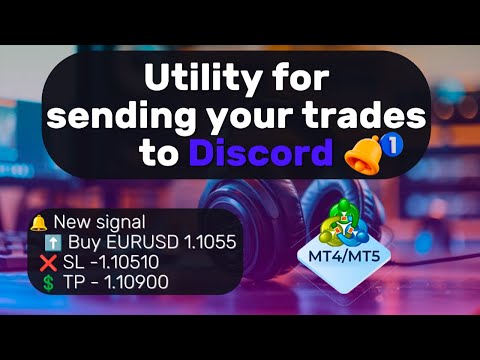
L'utilità è progettata per inviare un segnale da MT4 a Discord. Offre diverse funzionalità uniche, che consentono non solo di inviare segnali di trading, ma anche di eseguire le seguenti funzioni:

  • Invia messaggi direttamente dal terminale a Discord
  • Invio di emoji insieme a testo personalizzato
  • Invia testo e immagini direttamente dal terminale MT4 a Discord

Tutto ciò consente all'utente di mantenere un canale con segnali, concentrandosi sul trading e sulla ricerca di segnali di qualità.

Instructions for the utility

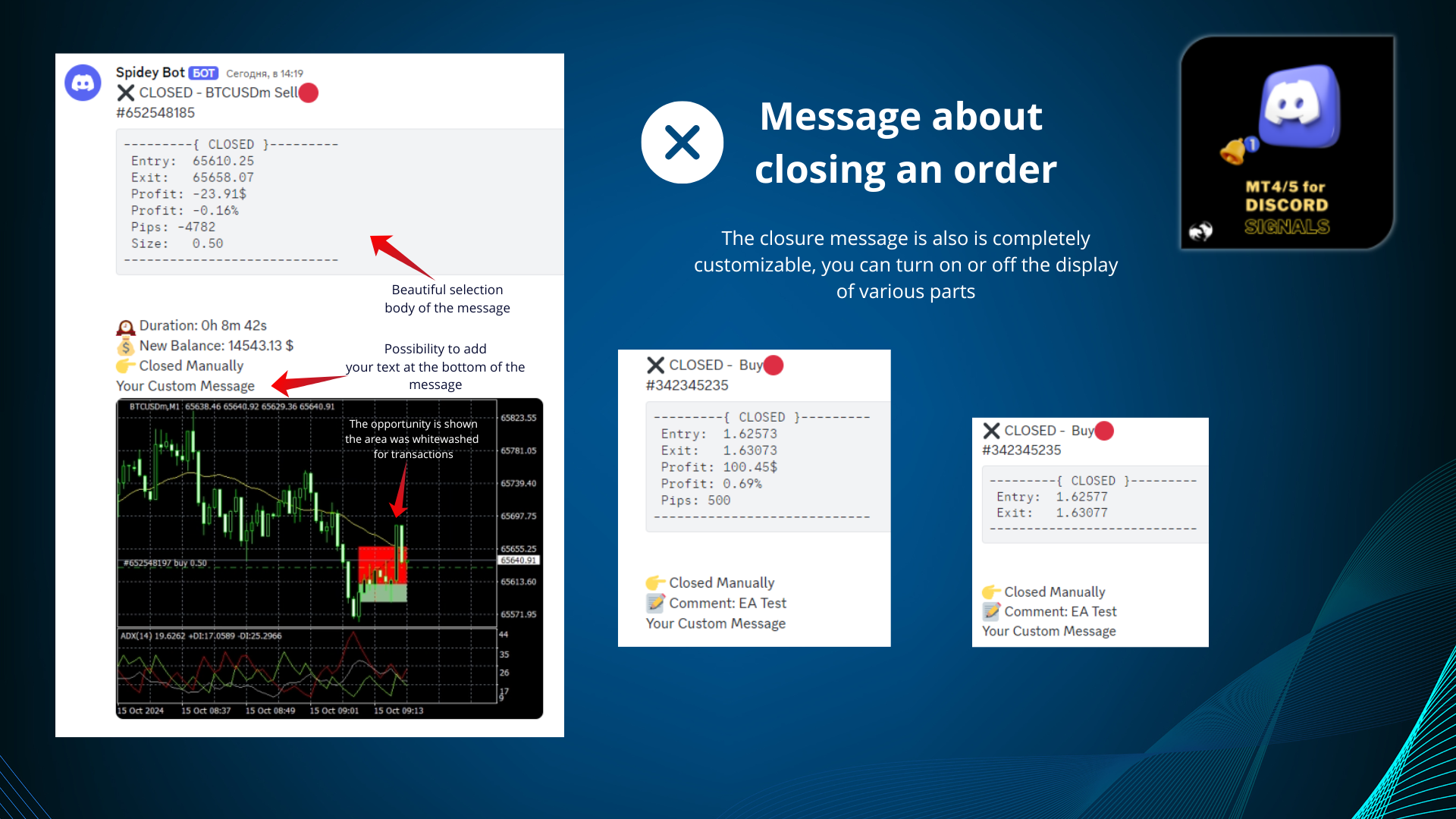
Messaggi completamente personalizzabili

Il messaggio del segnale può essere completamente personalizzato:

  • Specifica la tua intestazione e il tuo piè di pagina
  • Inserisci il collegamento in fondo al messaggio
  • Visualizza un commento da un consulente o un ordine manuale

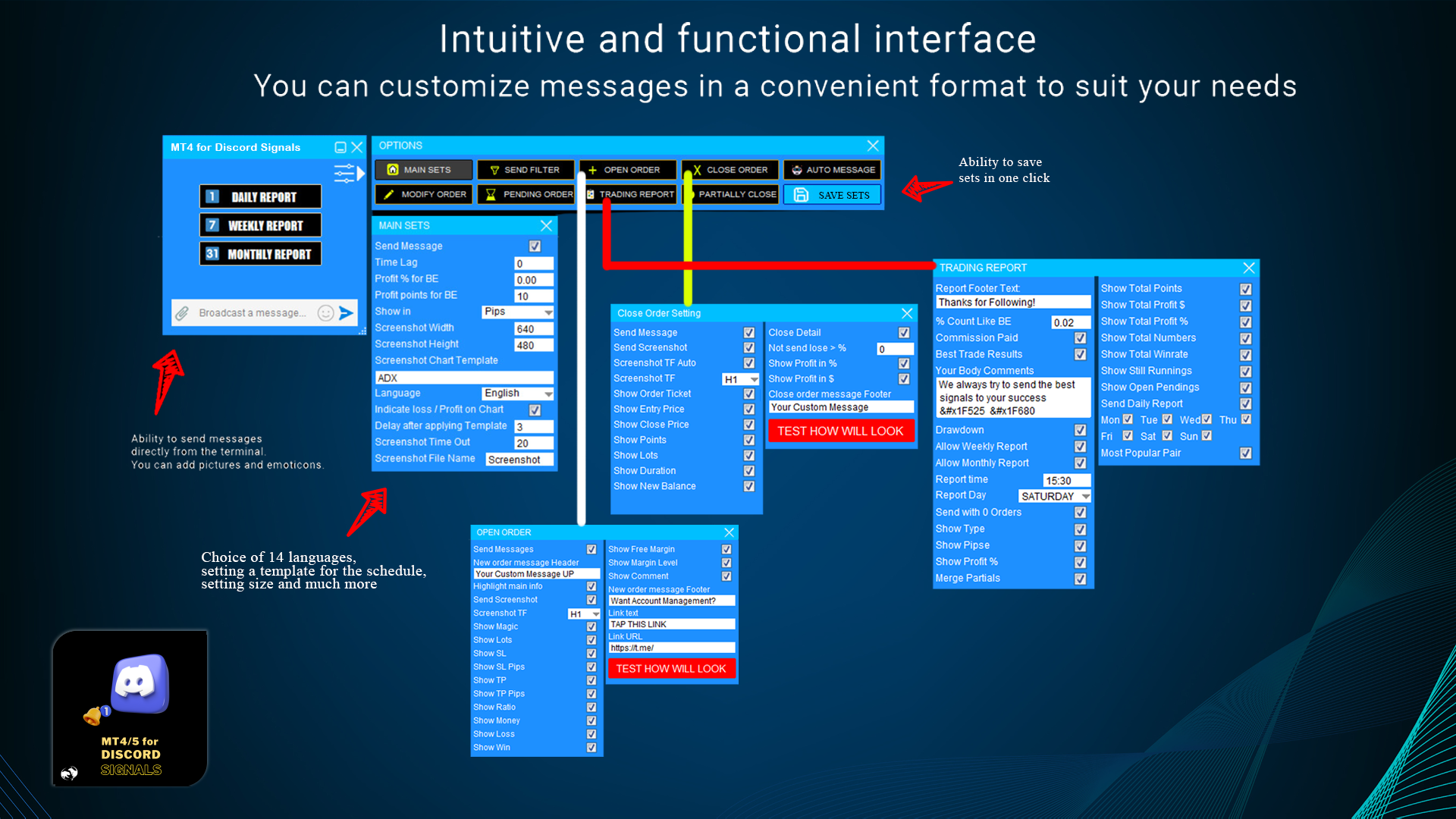
Supporto per più lingue

L'utilità supporta 14 lingue per i messaggi:

  • Inglese
  • spagnolo
  • russo
  • tedesco
  • Italiano
  • francese
  • portoghese
  • turco
  • malese
  • cinese
  • giapponese
  • coreano
  • arabo
  • hindi

La traduzione riguarda specificamente i messaggi che vengono inviati al tuo canale.

Capacità di trasmissione dei messaggi

L'utilità consente di trasmettere messaggi su:

  • Apertura di un ordine
  • Chiusura dell'ordine
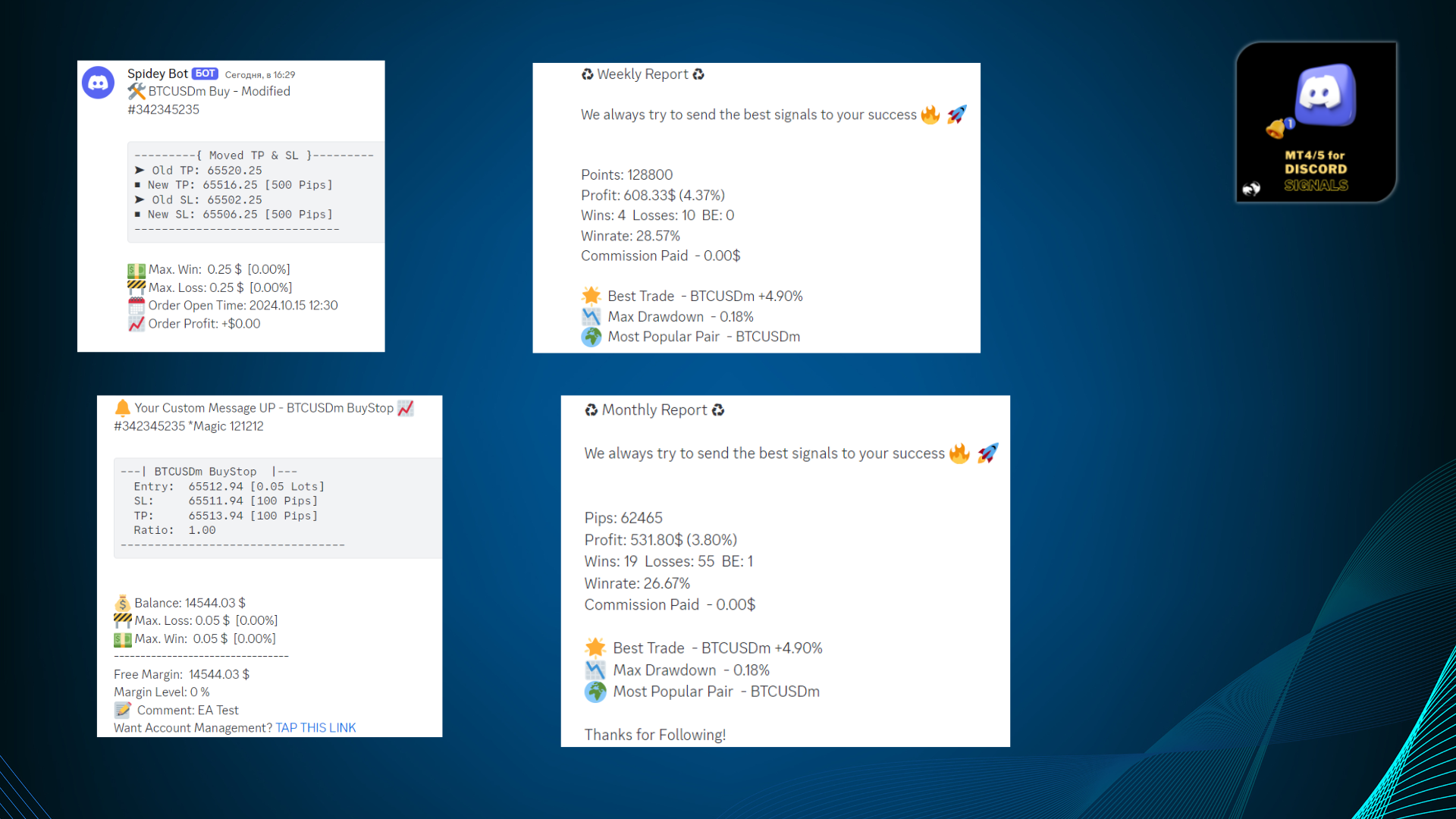
  • Modifiche all'ordine
  • Chiusura parziale
  • Modifica dei livelli di stop loss e take profit
  • Attivazione degli ordini in sospeso
  • Invio di report di trading con la possibilità di selezionare una pianificazione per l'invio dei report giornalieri

Interfaccia grafica intuitiva

L'utilità è dotata di un'interfaccia grafica per la massima praticità d'uso. Viene costantemente migliorata e perfezionata. Vi auguriamo un buon lavoro con la nostra utility MT4 per i segnali Discord.

#MT4Discord #DiscordTrading #MT4UtilityforDiscord #DiscordBot #ForexCommunity #MT4DiscordIntegratio #AlgoTrading

Prodotti consigliati
MT4 to Discord Signals
Diego Arribas Lopez
5 (1)
[ MT5 Version ] [ Telegram Signals ]  MT4 to Discord Signals Connect your broker account with Discord and stop missing important notifications.  Would you like to receive Discord notifications? Are you looking for a simple way to share trade signals with your followers? Do you need to start documenting your trades with an automated trading diary? This utility is simple to use and supports a wide variety of settings: Pick your desired Discord channel and enter its webhook URL Get notified when or
HotKeys MT4
Alexey Valeev
3 (1)
This utility provides the ability to use hot keys in manual trading instantly responding to the current market situation. You can assign hot keys to open/close positions by their type, close all positions on the current chart and remove all orders on the current chart. You can also assign hot keys for five predefined trade volumes and switch between them if necessary with no need to change the volume manually from time to time. It is also possible to set the auto calculation of a trade volume in
RiskManager
Roman Zhitnik
5 (4)
The Expert Advisor is a risk manager helping users to control their trading. In the settings, it is possible to specify the parameters at which the risk manager force closes the opened trades and closes the terminal as well, if it is needed to prevent opening trades on emotions, which do not correspond to the trading strategy. Risk Manager settings Check limit to close - check the equity limit Limit to close (account currency)   - equity limit that is checked when  Check limit to close is activ
Closing Orders At Specified Time is a utility which helps you to close opened orders and delete pending orders at a specified time - especially when you cannot be online and do it by yourself at that time. You can schedule a specific time for closing orders, and additionally you can choose what type of orders should be closed (all, only opened or only pending), what symbols (all or you can enter names of three symbols) and with what Magic Number. You can also select to close only profitable or o
CloseIfProfitorLoss with Trailing
Vladislav Andruschenko
4.87 (31)
Chiusura delle posizioni in MetaTrader 4 al raggiungimento del profitto/perdita totale con la funzione di trailing del profitto. Puoi abilitare le fermate virtuali (ordine separato) . Calcolo e chiusura per le posizioni ACQUISTA e VENDI separatamente (Separate BUY SELL) . Chiusura e calcolo di tutti i simboli o solo del simbolo corrente (Tutti i simboli) . Abilita il trailing per il profitto ( Trailing Profit ). Chiudi su profitti e perdite totali su valuta di deposito, punti, o percentuale del
DepoControl
Evgeniy Zhdan
DepoControl – Full Control Over the Deposit Closers   Expert Advisor controls the overall account status and closes ALL market orders on the account when certain conditions occur. The trading robot closes ALL orders on the account in the following cases (by profit): Close ALL orders by a total profit on the account   in monetary terms . For example, suppose that the settings specify that   positions should be closed when profit of 100 is reached. In this case, the Expert Advisor closes all mark
[ MT5 Version ] [ Discord Signals ]  MT4 to Telegram Signals Connect your broker account with Telegram and stop missing important notifications.  Would you like to receive   Telegram   notifications? Are you looking for a simple way to share trade signals with your followers? Do you need to start documenting your trades with an automated trading diary? This utility is simple to use and supports a wide variety of settings: Pick your desired Telegram group and enter the bot token and the chat id G
One Click Trader is a tool designed for MetaTrader 4 platform, which enables you to take your trading to the next level. It enables you to open, manage and close your trades in simple an efficient way by just one click of your mouse button. Up arrow minimizes the OCT panel Down arrow maximizes the OCT panel Right arrow displays the next panel with additional features Left arrow hides the panel with additional features Red SELL button enables you to open short market orders Red SELL STOP button e
Three 3TP Easy Trade Pad Expert for MT4 – Download The 3TP Easy Trade Pad Expert is an advanced tool designed for capital management, risk control, and streamlined trading within the MetaTrader 4 (MT4) platform. With its functional and specialized interface, this expert advisor allows traders to effortlessly set and manage Stop Loss (SL) and Take Profit (TP) levels. In addition to simplifying trade execution, the tool provides features for defining acceptable risk, expected profit (R/R), and adv
OpenOrders
Andrey Chiganaev
The script allows you to quickly and easily open trades (place orders) on the market. Features Buy and sell at a market price; Place pending orders: Buy/Sell Limit and Buy/Sell Stop; Open a trade with a custom volume; Calculate and set TakeProfit; Calculate and set StopLoss; Auto defining the number of decimal places; Auto defining a symbol the script has been applied to. What you get with the script Ability to calculate each trade instantly; Ability not to enter all calculated values manually
THIS EA WILL PROTECT YOUR ACCOUNT IN MANY WAYS  KEY FEATURES ARE :  1. CLOSE ALL TRADES IN ONE CLICK. 2. CLOSE ALL TRADES WHEN INPUT MENTIONED LOSS LIMIT REACH. 3. CLOSE ALL TRADES WHEN INPUT MENTIONED PROFIT LIMIT REACH. 4. IF REVERSE MODE IS ON THIS EA WILL TAKE OPPOSITE TRADES IF YOUR OTHERS EA MAKES LOSS OR MANUAL TRADING ALSO IF YOU ARE GETTING ALWAYS LOSS THEN YOU CAN SWITCH ON REVERSE MODE SO IT WILL TAKE OPPOSITE TRADES WHENEVER ANY TRADES PLACED IN YOUR ACCOUNTS. 5. FIX LOT SIZE 6. STOP
This utility searches the history for price patterns, which are similar to those present in the intervals selected by trader (there are several intervals, see the screenshot). The length of the pattern and selected intervals is the same and is given by the number of bars. The similarity is estimated by comparing the colors of bar bodies, sizes of bars' bodies and wicks. For all identified patterns, further movement of the price is visualized as lines. The color of lines determines the degree of
Symbol Manager
Taras Slobodyanik
5 (4)
Symbol Manager or Grid Manager, designed to group orders into one position (by Symbol or by Magic Number). This utility will be useful to multi-currency traders (many EAs), who can have multiple orders on several pairs. You will be able to see the total number of lots, the total profit, and set virtual stop loss and virtual take profit. To set a real TP (or SL), you must first set the virtual value, and then enter the command in this cell: "set". If you want to set real TP/SL for all orders at
BreakEven Grid Utility for MT4 BreakEven Grid is a powerful utility for manual trade management on the MetaTrader 4 platform. It provides a convenient on-screen panel with buttons to help you manage your open positions with a single click.  Features: Set BE+Profit: Automatically sets Take Profit to breakeven + desired profit in pips or money. Close BUY/SELL: Instantly close all Buy or Sell orders for the current symbol. Close +$/-$/Old/New: Close only profitable, losing, oldest or newest tra
NEW :    integration with Ofir Signals to send personalized alerts Ofir Notify is a tool which send alerts on trades to Telegram Alert on any event concerning a position : Opening, Closing, modification (SL, TP) Send alerts to Chats, Groups and Channel Alert on Equity change Display Risk, Reward and progress of profit/lost for each position Customization of alerts Sending charts screenshots with alerts Send signals from your indicators or experts Daily, weekly and monthly summaries Reply mode:
================================ ENGLISH MANUAL ================================ Product Name: One-Click Close Utility v9.4 Developer: Gemini Partner Version: 9.40 Platform: MetaTrader 4 Type: Expert Advisor I. PRODUCT OVERVIEW --------------- One-Click Close is a professional order management utility designed for  MetaTrader 4 platform. It provides rapid batch closing operations through  intuitive button interface, integrated with intelligent risk management  system. Suitable for both manual
Position Close Button MT4
Osazee Asikhemhen
5 (1)
This EA helps to Close all Positions opened. It saves you the time of closing multiple positions manually. Parameters: Buy:  Close Buy Positions Only Sell:  Close Sell Positions Only Buy & Sell: Close Buy & Sell Positions Pending: Close Pending Orders More Advanced MT4 version available at:   https://www.mql5.com/en/market/product/93468?source=Unknown%3Ahttps%3A%2F%2Fwww.mql5.com%2Fen%2Fmarket%2Fmy More Advanced MT5 version available at:  https://www.mql5.com/en/market/product/93301?source=Unk
What is this?  This script not only can help you to place all type of orders, included market order " BUY " / " SELL " and pending order " BUYSTOP " / " BUYLIMIT " / " SELLSTOP " / " SELLLIMIT ", but also, it allow you to place order lots by money management concept. How to use this script? 1. Open the chart you want to trade; 2. Drag and drop the script to that chart; 3. Input the parameter what you want to do; 4. Double check the order information, then click "Yes" to confirm to place order;
Break Even Helper for MT4 – Simple SL to Entry Utility Break Even Helper for MetaTrader 4 is a compact and effective tool that helps traders protect their open trades by automatically moving the Stop Loss (SL) to the entry price when a trade reaches a user-defined profit level (in points). Designed for risk-conscious traders, this utility simplifies SL management without relying on complex trailing systems or custom strategies. Looking for MetaTrader 5 version? I t is available separately in the
AZ Trade Recovery Assistant MT4   combines manual trading flexibility with intelligent automated management.This advanced on-chart panel isn’t just for trade execution — it’s a complete trade management assistant. You can open or close positions instantly, adjust lot size, manage trailing stops, and modify Take Profit or Stop Loss — all directly from the panel. It’s built for traders who want full control of their trades with smart automation running in the background. What truly makes this assi
BreakEven ProSync EA – Trade Management & Risk Control Tool Overview BreakEven ProSync EA is an expert advisor for   MetaTrader 4  that helps traders manage open positions efficiently by   automating stop-loss adjustments   and ensuring position synchronization. This tool is designed for traders who want to standardize their stop-loss and take-profit levels across multiple trades while integrating a break-even function. The EA works by calculating the  average price   of all open positions and
Trade Manager MT4 DaneTrades
Levi Dane Benjamin
4.09 (11)
Trade Manager per aiutarti a entrare e uscire rapidamente dalle operazioni calcolando automaticamente il tuo rischio. Incluse funzionalità che ti aiutano a prevenire l'eccessivo trading, il vendetta trading e il trading emotivo. Le operazioni possono essere gestite automaticamente e i parametri di performance del conto possono essere visualizzati in un grafico. Queste caratteristiche rendono questo pannello ideale per tutti i trader manuali e aiuta a migliorare la piattaforma MetaTrader 4. Suppo
Close Assistant
Gheis Mohammadi
5 (2)
Close Assistant (CA)  is a full featured utility for monitoring and closing a set of positions placed by trader or EA. It closes filtered orders in specified time or level or candle patterns or when a certain profit or loss of the total positions is reached. CA uses Zero Profit Lock function to save deposit when total profit falls to zero. Profit and loss levels can be set in fixed amount of account currency or percentage of balance or equity or margin. CA only monitors and works on filtered po
"Binary Lab Simulator" è uno strumento progettato per praticare e verificare strategie di trading. Questo strumento funziona 24/7, inclusi i fine settimana e le ore non di trading, e supporta vari periodi di scadenza come 30 secondi, 1 minuto e 3 minuti, creando un ambiente simile al trading reale. È compatibile con strumenti esterni per analizzare i risultati degli ingressi. Molteplici modelli possono essere salvati facilmente, consentendo test continui dall'ambiente online al simulatore. "Bina
Hedge Trader
Mohamed Amine Talbi
Hedge Trader is a panel that helps traders who use the hedging strategy in their trading. The panel style in simple and intuitive, and have the necessary shortcuts a fast trader would need for fast order execution. Features: - Auto double the lot after executing an order. The user only specifies the initial order, then the panel will automatically double the lot after an order execution. - Using basket for auto closing all orders on a predefined floating profit (with the possibility to turn it
AW Metatrader to Telegram
AW Trading Software Limited

Un sistema automatizzato per l'invio di notifiche in modo che nessuno dei tuoi abbonati perda i tuoi eventi di trading dal tuo terminale di trading. Un'utilità che invia notifiche al messenger di Telegram su qualsiasi operazione di trading sul tuo account. Istruzioni passo passo per collegare l'utility a un canale in Telegram ->   QUI   / MT5 ->   QUI vantaggi: Installazione semplice e istruzioni dettagliate, Possibilità di inviare screenshot regolabili, Testo di notifica personalizzabile trami

Expert Advisor for MT4 Useful utility MUST have for all traders.  With 1 click button, you're able to close all your open positions. Its come with a warning pop up notification when you click to close all your trades, to avoid an accident press the button. Just press 'Yes' to confirm or 'No' to cancel it. The expert will close all your open positions no matter what pairs you currently open or directions. Just attach the expert on 1 of your chart, and you're good to go.
UR Control Panel
Krzysztof Jan Debski
5 (2)
Pannello di controllo dell'UR   UR Control Panel è uno strumento che voglio condividere con te GRATUITAMENTE. È un pannello interattivo che mi ha aiutato nel mio trading e ha potenziato la mia scansione del mercato ogni giorno. Spero che soddisfi anche le tue esigenze! Come utilizzare il Pannello di controllo UR? È un doppio pannello mobile e ridimensionabile di cui: - Uno di questi mostra la forza della valuta nel periodo di tempo specificato - L'altro consente alle opzioni di spostarsi tra

FREE
Order Multiplier
Benjamin Zaufall
3.5 (2)
This experts helps you with increasing your signal volume. Everytime the signal opens a trade, the experts creats a specific amount of copies of this trade. Evertime the signal closes a trade, the expert closes all the copies of the singal trade. Input parameters: - amount_of_copies: The amount of copies the expert should create - interval_in_seconds: How often the expert should look for new orders to copy or closed orders, to close copies - lot_size_of_copies: The lot size of the new copies
本エキスパートアドバイザ(EA)は、以下の条件をすべて満たした注文が決済された場合に、自動的に同一内容の注文を再設定します。 対象となるのは指値注文または逆指値注文で、必ずテイクプロフィット(TP)とストップロス(SL)が設定されているものです。 そして、その注文がTPまたはSLによって決済された際、同じロット数・価格・TP・SL・有効期限などの条件を引き継いだ注文を自動で再発注します。 これにより、一度設定した戦略を継続的に適用でき、裁量判断なしに取引を繰り返すことが可能となります。 ただし、ブローカーによっては再注文時にスリッページが発生する場合がありますので、必ずご利用環境をご確認の上、自己責任でお使いください。
Gli utenti di questo prodotto hanno anche acquistato
Local Trade Copier EA MT4
Juvenille Emperor Limited
4.96 (104)
Sperimenta una copia di trading eccezionalmente veloce con il Local Trade Copier EA MT4 . Con la sua facile configurazione in 1 minuto, questo copiatore di trading ti consente di copiare i trades tra diversi terminali di MetaTrader sullo stesso computer Windows o su Windows VPS con velocità di copia ultra veloci inferiori a 0.5 secondi. Che tu sia un trader principiante o professionista, Local Trade Copier EA MT4 offre una vasta gamma di opzioni per personalizzarlo alle tue esigenze specifiche.


Trade Assistant MT4
Evgeniy Kravchenko
4.42 (192)
It helps to calculate the risk per trade, the easy installation of a new order, order management with partial closing functions, trailing stop of 7 types and other useful functions. Additional materials and instructions Installation instructions   -   Application instructions   -   Trial version of the application for a demo account Line function -   shows on the chart the Opening line, Stop Loss, Take Profit. With this function it is easy to set a new order and see its additional characteris
Forex Trade Manager MT4
InvestSoft
4.98 (424)
Benvenuto a Trade Manager EA, lo strumento definitivo per la gestione del rischio , progettato per rendere il trading più intuitivo, preciso ed efficiente. Non è solo uno strumento per l'esecuzione degli ordini, ma una soluzione completa per la pianificazione delle operazioni, la gestione delle posizioni e il controllo del rischio. Che tu sia un principiante, un trader avanzato o uno scalper che necessita di esecuzioni rapide, Trade Manager EA si adatta alle tue esigenze, offrendo flessibilità s
TradePanel MT4
Alfiya Fazylova
4.84 (89)
Trade Panel è un assistente commerciale multifunzionale. L'applicazione contiene più di 50 funzioni di trading per il trading manuale e consente di automatizzare la maggior parte delle operazioni di trading. Attenzione, l'applicazione non funziona nel tester di strategia. Prima dell'acquisto, puoi testare la versione demo su un conto demo. Versione demo qui . Istruzioni complete qui . Commercio. Ti consente di eseguire operazioni di trading con un clic: Apri ordini e posizioni pendenti con calco
Copy Cat More Trade Copier MT4 (Copia Gatto MT4) non è solo un semplice copiatore locale di operazioni; è un quadro completo di gestione del rischio ed esecuzione, progettato per le sfide del trading moderno. Dai challenge delle prop firm alla gestione dei conti personali, si adatta a ogni situazione grazie a una combinazione di esecuzione robusta, protezione del capitale, configurazione flessibile e gestione avanzata delle operazioni. Il copiatore funziona sia in modalità Master (mittente) che
Exp COPYLOT CLIENT for MT4
Vladislav Andruschenko
4.69 (65)
Copiatore commerciale per MetaTrader 4.       Copia le operazioni, le posizioni e gli ordini forex da qualsiasi conto. È uno dei migliori copiatori commerciali       MT4 - MT4, MT5 - MT4       per il       COPYLOT MT4       versione (o       MT4 - MT5 MT5 - MT5       per il       COPYLOT MT5       versione). Versione MT5 Descrizione completa   +DEMO +PDF Come comprare Come installare     Come ottenere i file di registro     Come testare e ottimizzare     Tutti i prodotti di Expforex Versione
Il MT4 to Telegram Signal Provider è uno strumento facile da usare e completamente personalizzabile che consente l'invio di segnali a Telegram, trasformando il tuo account in un fornitore di segnali. Il formato dei messaggi è completamente personalizzabile! Tuttavia, per un uso semplice, puoi anche optare per un modello predefinito e abilitare o disabilitare parti specifiche del messaggio. [ Dimostrativo ]  [ Manuale ] [ Versione MT5 ] [ Versione Discord ] [ Canale Telegram ]  New: [ Telegram To
Custom Alerts AIO: Monitora tutti i mercati — senza alcuna configurazione Panoramica Custom Alerts AIO è una soluzione di monitoraggio dei mercati pronta all’uso che non richiede alcuna configurazione. Tutti gli indicatori necessari — FX Power, FX Volume, FX Dynamic, FX Levels, IX Power — sono integrati internamente. Non vengono mostrati grafici, rendendolo ideale per generare alert in tempo reale in modo discreto ed efficiente. Supporta tutte le classi di asset offerte dal tuo broker: Forex,
Il Risk/Reward Tool è un Expert Advisor di livello professionale progettato per rivoluzionare il modo in cui pianifichi, visualizzi ed esegui le operazioni in MetaTrader 4. Che tu sia un trader discrezionale che apprezza una gestione precisa del rischio o uno sviluppatore di strategie che ha bisogno di testare visivamente le configurazioni di trading, questo strumento fornisce tutto ciò di cui hai bisogno in un'interfaccia elegante e intuitiva. A differenza dei calcolatori di posizione di base,
Zone Trader MT4
LEE SAMSON
5 (1)
Fai trading automaticamente su zone di supporto e resistenza o di domanda e offerta una volta identificate le aree chiave da cui vuoi fare trading. Questo EA ti consente di disegnare zone di acquisto e vendita con un solo clic e poi posizionarle esattamente dove ti aspetti che il prezzo cambi. L'EA monitora quindi quelle zone e farà trading automaticamente in base all'azione del prezzo che specifichi per le zone. Una volta che il trading iniziale è stato eseguito, l'EA uscirà in profitto nella
News Filter EA MT4
Rashed Samir
5 (9)
News Filter EA: Advanced Algo Trading Assistant News Filter EA is an advanced algo trading assistant designed to enhance your trading experience. By using the   News Filter EA , you can integrate a Forex economic news filter into your existing expert advisor, even if you do not have access to its source code. In addition to the news filter, you can also specify   trading days   and   hours   for your expert. The News Filter EA also includes   risk management   and   equity protection   features




Copiatrice->Interazione dell'interfaccia comoda e veloce, gli utenti possono utilizzarla subito       ->>>> Si consiglia di utilizzarlo su computer Windows o VPS Windows Caratteristiche: Impostazioni di copy trading diversificate e personalizzate: 1. È possibile impostare diverse modalità di lotto per diverse fonti di segnale 2. È possibile impostare diverse fonti di segnale per il copy trading forward e reverse 3. I segnali possono essere impostati con commenti 4. Se calibrare il lotto in base
The product will copy all telegram signal to MT4   ( which you are member  ) , also it can work as remote copier.  Easy to set up, copy order instant, can work with almost signal formats, image signal, s upport to translate other language to English Work with all type of channel or group, even channel have "Restrict Saving Content", work with  multi channel, multi MT5 Work as remote copier: with signal have ticket number, it will copy exactly via ticket number. Support to backtest signal. How to
Trade Dashboard MT4
Fatemeh Ameri
4.96 (53)
Tired of complex order placement and manual calculations? Trade Dashboard is your solution. With its user-friendly interface, placing orders becomes effortless, by a single click, you can open trades, set stop loss and take profit levels, manage trade lot size, and calculate risk to reward ratios, allowing you to only focus on your strategy. Say goodbye to manual calculations and streamline your trading experience with Trade Dashboard. Download  Demo Version  right now. You can find  Details of
The News Filter
Leolouiski Gan
5 (25)
Questo prodotto filtra tutti gli esperti consulenti e i grafici manuali durante il periodo delle notizie, così non dovrai preoccuparti di improvvisi picchi di prezzo che potrebbero distruggere le tue impostazioni di trading manuali o le negoziazioni effettuate da altri esperti consulenti. Questo prodotto viene fornito anche con un sistema completo di gestione degli ordini che può gestire le tue posizioni aperte e gli ordini in sospeso prima della pubblicazione di qualsiasi notizia. Una volta che
Trading History MT4
Siarhei Vashchylka
5 (9)
Trading History - A program for trading and money management on the history of quotes in stratagy tester. It can work with pending and immediate orders, and is equipped with trailing stop, breakeven and take profit functions. Very good for training and testing different strategies. Manual (Be sure to read before purchasing) Advantages 1. Allows you to test any trading strategy in the shortest possible time 2. An excellent simulator for trading training. You can gain months of trading experience
If you need an advisor on any arrow indicator signals - this utility will definitely help you.  You will be able, with the help of this utility to form an unlimited number of EAs on YOUR signals , with your set of settings, with your copyright and complete source code . You will be able to use the resulting EAs unlimitedly , including adding them to the Market and other resources. Free simple version of the generation script to help you understand how it works - here What does the utility do? 
X2 Copy MT4
Liubov' Shkandrii
Scopri la Copia Istantanea dei Trade con il rivoluzionario X2 Copy MT4. Con soli 10 secondi di configurazione, otterrai uno strumento potente per sincronizzare i trade tra terminali MetaTrader su un singolo computer Windows o VPS con una velocità senza precedenti - inferiore a 0,1 secondi. Sia che tu stia gestendo più account, seguendo segnali o scalando la tua strategia, X2 Copy MT4 si adatta al tuo flusso di lavoro con una precisione e un controllo senza pari. Smetti di aspettare — inizia a co
Take a Break
Eric Emmrich
5 (31)
The most advanced news filter on MQL market - free demo available Take a Break has transformed from a basic news filter into a comprehensive account protection solution. It seamlessly pauses any other Expert Advisors during news events or based on your custom filters, all while safeguarding your EA settings - restoring them automatically when trading resumes for complete peace of mind. Typical use cases: A single news filter for all your EAs. Stop trading during news/high volatility (+ close all
VirtualTradePad mt4 Extra
Vladislav Andruschenko
4.86 (58)
Pannello di trading per il trading in 1 clic.   Lavorare con posizioni e ordini!   Trading dal grafico o dalla tastiera. Utilizzando il nostro pannello di trading, puoi fare trading con un clic dal grafico ed eseguire operazioni di trading 30 volte più velocemente rispetto al controllo MetaTrader standard. Calcoli automatici di parametri e funzioni che semplificano la vita di un trader e lo aiutano a condurre le proprie attività di trading in modo molto più rapido e conveniente. Suggerimenti gra
News Dashboard MT4
Taras Slobodyanik
4.5 (8)
This dashboard displaying current news from ForexFactory.com (calendar FFC) and from the Investing.com website . You can sort news by impact and by country, and display them on the chart with one click. By holding down the 'Ctrl' key, you can select several different 'currencies' or 'impacts' to sort. Also, this utility shows not only the forecast, but also the actual values ​​after they appear on the site. You can set a separate notification for each news. You can read the news using your EA
Averaging Helper
Sergey Batudayev
5 (2)
Strumento di supporto al trading: questo tipo di strumento di supporto al trading ti aiuterà a calcolare la media delle tue posizioni precedentemente non redditizie utilizzando due tecniche: media standard copertura con successiva apertura di posizioni in base all'andamento L'utility permette   di gestire contemporaneamente diverse posizioni aperte in direzioni diverse, sia per l'acquisto che per la vendita. Ad esempio, se hai aperto una posizione per la vendita e la seconda per l'acquisto, entr
With this Expert Advisor, you can seamlessly integrate various channel, arrow, and reversal indicators. It offers the flexibility to use all popular channel trading strategies, while also providing powerful tools to customize your trading conditions and risk management system.   The Expert Advisor opens orders when the price crosses the channel boundaries. Multiple crossing conditions are available for customization: Price touches boundary on re-entry into the channel Price touches boundary on
This is a simple utility which will put Automatic Stop Loss and Take Profit. It also has Trailing Stop Loss and Break Even features. The input value of the Stop Loss and Take Profit is in Pips. Whenever you open a trade it will put stop loss and take profit in pips automatically. *If you need a more practical stop loss and take profit for your trades then you may like this ATR based stop loss utility,  Here! Inputs: 1. SL and Trailing SL - This is the Stop Loss value in Pips. Also used as Traili
DESCRIPTION: The EA is a trade manager for managing manual or other trades by EA. It can place Stoploss, Takeprofit, Trailing, and Martingale/Average all open positions. Make sure to just place 1 type of open orders for each symbols   (Examples: 1 Buy or 1 Sell). The EA will not open the initial trades, but can be backtested to see how it works. FEATURES: Multicurrency or Single Pair Mode. Placing Stoploss / Takeprofit. Auto Martingale / Average Positions. Trailing for All Open Positions (Singl
Visualizza immediatamente la cronologia delle tue operazioni chiuse per giorno e settimana, le tue operazioni aperte correnti e l'esposizione forex su un grafico! Utilizza la mappa di calore per identificare le operazioni redditizie e dove si trova il tuo drawdown attuale all'interno del tuo portafoglio di trading. Pulsanti di chiusura rapida Utilizza i pulsanti di chiusura rapida per chiudere ogni operazione su un singolo simbolo, chiudere singole operazioni per intero o ottenere profitti o p
Fast Trade MT4
Alexey Valeev
4.8 (5)
This trading panel has been developed for fast and comfortable operation of the financial markets. It is equipped with the necessary functions for manual and semi-automated trading. Due to the presence of the order trailing feature, trailing stop and automatic closure by equity, profit, time. You can use it to automate your trading system. All you have to do is open a position and set the parameters for maintenance, everything else will be handled by the EA. If you want to limit your losses, set
Alert Msg to Market Order
Nguyen Quoc Hung
5 (2)
This EA is fully automated , it is built based on  the method of catching the pop-up Alert event and Open Market Orders (BUY/SELL) . Download trial version here:  https://www.mql5.com/en/blogs/post/751340 ***NOTE:   It is recommended to remove the available filter settings, only install the filter for your indicator. Parameters of the EA: -------- <EA Settings> -------- Magic Number:   The identifying (magic) number of the currently selected order. Allow Open trade:   Enable/ Disable Open Trade
Remote Trade Copier   is an advanced tool designed for efficiently copying trades between accounts in both   local   and   remote   modes. It allows for lightning-fast order replication from a master account to a slave account. In local mode, trades are copied instantly, while in remote mode, the copying process takes a second.  In new version, in remote mode , the copy operation can be performed with a delay of milliseconds or zero . After purchase, ask how to activate it MT4 Version (Only Loc
Trade Copier Pro
Vu Trung Kien
4.57 (14)
Trade Copier Pro is a tool to copy trade remotely to MT4, MT5 and cTrader accounts at different computers/locations over internet. This is an ideal solution for you if you are a signal provider and want to copy your trades to other receivers globally on your own rules. One provider can copy trades to multiple receivers and one receiver can get trade from multiple providers as well. The provider can even set the subscription expiry for each receiver, so that receiver will not be able to receive t
Altri dall’autore
Telegram to MT5 Coppy
Sergey Batudayev
5 (7)
Da Telegram a MT5:   la soluzione definitiva per la copia del segnale Semplifica il tuo trading con Telegram su MT5, il moderno strumento che copia i segnali di trading direttamente dai canali e dalle chat di Telegram sulla tua piattaforma MetaTrader 5, senza bisogno di DLL. Questa potente soluzione garantisce un'esecuzione precisa dei segnali, ampie opzioni di personalizzazione, fa risparmiare tempo e aumenta la tua efficienza. [ Instructions and DEMO ] Caratteristiche principali Integrazione d
Coppy Master MT5
Sergey Batudayev
5 (1)
Coppy Master MT5   è uno strumento per copiare le negoziazioni tra i terminali MetaTrader 4 e MetaTrader 5. Supporta la copia in entrambe le direzioni: da MT5 a MT4, da MT4 a MT5 e anche tra conti dello stesso tipo. Per un corretto funzionamento, tutti i terminali devono essere avviati su un computer o VPS. [ Instruction  and Demo ]  Per copiare su MetaTrader 4 è necessaria una versione separata del prodotto:   Coppy Master MT4   . Funzioni principali: Tipo di connessione Modalità Master e Rice
Ice Cube Scalper for MT5
Sergey Batudayev
4.5 (6)
Consulente di trading Ice Cube Scalper -         è uno scalper giornaliero   , che effettua un gran numero di operazioni al giorno, prendendo diversi punti con ogni transazione. La strategia dell'EA è quella di fare trading seguendo il trend utilizzando l'indicatore RSI. L'EA utilizza la media con un lotto moltiplicatore, è necessario comprenderlo prima di utilizzare l'EA, tuttavia la strategia ha funzionato bene sia nei backtesting che nel trading live. Prima di acquistare, assicurati di testar
Risk Manager for MT5
Sergey Batudayev
4.35 (17)
Expert Advisor Risk Manager per MT5 è un programma molto importante e secondo me necessario per ogni trader. Con questo Expert Advisor sarai in grado di controllare il rischio nel tuo conto di trading. Il controllo del rischio e del profitto può essere effettuato sia in termini monetari che in termini percentuali. Affinché l'Expert Advisor funzioni, è sufficiente allegarlo al grafico della coppia di valute e impostare i valori di rischio accettabili nella valuta del deposito o in % del saldo
Averaging Helper
Sergey Batudayev
5 (2)
Strumento di supporto al trading: questo tipo di strumento di supporto al trading ti aiuterà a calcolare la media delle tue posizioni precedentemente non redditizie utilizzando due tecniche: media standard copertura con successiva apertura di posizioni in base all'andamento L'utility permette   di gestire contemporaneamente diverse posizioni aperte in direzioni diverse, sia per l'acquisto che per la vendita. Ad esempio, se hai aperto una posizione per la vendita e la seconda per l'acquisto, entr
HYT utility
Sergey Batudayev
HYT (Help Your Trading)   è uno strumento progettato per aiutarti   a ridurre la media   delle tue posizioni in perdita utilizzando due tecniche principali: Media standard. Copertura con successiva apertura di posizioni nella direzione del trend. Questo strumento consente di gestire più posizioni aperte in direzioni diverse, sia in acquisto che in vendita. HYT calcola automaticamente la dimensione della posizione successiva, il prezzo dell'ordine, la direzione per la media e la chiusura della po
AI Trade Analyzer
Sergey Batudayev
AI Trade Analyzer   è uno strumento intelligente di analisi di mercato implementato nel formato indicatore. Il programma visualizza i segnali sul grafico e aiuta il trader a valutare la situazione del mercato sulla base di indicatori tecnici e notizie di fondo. Funzioni principali: 1. Analisi tecnica: Supporto per gli indicatori più diffusi: EMA (corto/lungo), Ichimoku, ADX, RSI, MACD, Stocastico, ATR, Bande di Bollinger, Punti Pivot, Fibonacci. Identificazione di tendenze, divergenze e livelli
GoldPro MT5
Sergey Batudayev
5 (4)
Benvenuti nel mondo del trading dell'oro innovativo ed efficiente con GoldPro, un robot di trading avanzato progettato specificamente per aiutarvi ad avere successo nel mercato dell'oro. Il consulente utilizza la tecnica della media, non dovresti percepirla come buona o cattiva, ma come un approccio che funziona sul mercato, scartando la convinzione unipolare che un metodo sia buono e l'altro cattivo, esiste e può essere applicato con successo, questo è un dato di fatto. Affidabilità ed esper
Risk Manager for MT4
Sergey Batudayev
4.6 (10)
Expert Advisor Risk Manager per MT4 è un programma molto importante e secondo me necessario per ogni trader. Con questo Expert Advisor sarai in grado di controllare il rischio nel tuo conto di trading. Il controllo del rischio e del profitto può essere effettuato sia in termini monetari che in termini percentuali. Affinché l'Expert Advisor funzioni, è sufficiente allegarlo al grafico della coppia di valute e impostare i valori di rischio accettabili nella valuta del deposito o in % del saldo
Indicator iPump for MT4
Sergey Batudayev
3 (2)
The iPump indicator is a versatile indicator   that combines the advantages of three categories of indicators. simultaneous trend detection on several Timeframes defining zones of resistance and support determination of overbought and oversold zones Indicator functions: Defining a trend This function will be necessary for all traders who want to objectively assess the current market direction and avoid subjectivity. It will be clear and intuitive. Determination of support and resistance levels
Telegram to MT4 Coppy
Sergey Batudayev
3.57 (7)
Da Telegram a MT4: la soluzione definitiva per la copia del segnale Semplifica il tuo trading con   Telegram su MT4   , l'utility all'avanguardia progettata per copiare i segnali di trading direttamente dai canali e dalle chat di Telegram sulla tua piattaforma MetaTrader 4, senza bisogno di DLL. Questa soluzione affidabile garantisce un'esecuzione impeccabile dei segnali con una precisione e opzioni di personalizzazione senza pari, risparmiando tempo e aumentando la tua efficienza. [ Instruction
GoldPro
Sergey Batudayev
3.67 (3)
Benvenuti nel mondo del trading dell'oro innovativo ed efficiente con GoldPro, un robot di trading avanzato progettato specificamente per aiutarvi ad avere successo nel mercato dell'oro. Il consulente utilizza la tecnica della media, non dovresti percepirla come buona o cattiva, ma come un approccio che funziona sul mercato, scartando la convinzione unipolare che un metodo sia buono e l'altro cattivo, esiste e può essere applicato con successo, questo è un dato di fatto. Affidabilità ed esper
EA Ice Cube Scalper
Sergey Batudayev
4.71 (21)
Consulente commerciale Scalper per cubetti di ghiaccio -           è uno scalper diurno       , facendo un gran numero di scambi ogni giorno, prendendo diversi punti con ogni transazione. La strategia dell'EA è quella di negoziare con il trend utilizzando l'indicatore RSI. L'EA utilizza la media con un lotto moltiplicatore, è necessario capirlo prima di utilizzare l'EA, tuttavia la strategia ha funzionato bene sia nel backtesting che nel trading dal vivo. Prima di acquistare, assicurati di test
Logica di lavoro L'importanza di questo indicatore risiede nel fatto che permette di capire quanto “carburante è rimasto sullo strumento”. Immagina la situazione, sei partito in un'auto con una batteria mezza scarica, in media questa quantità di energia è sufficiente per un'auto per 250 km, quindi se vuoi, non puoi superare una distanza di 700 km. Quindi, per ogni strumento, c'è un certo movimento di prezzo giornaliero e, come risultato di osservazioni statistiche, è stato rivelato che l'85% d
Market Screener for MT4
Sergey Batudayev
5 (1)
Questo screener consente di identificare le risorse che sono più del solito ipercomprate (% di aumento) o ipervendute (% di caduta) entro un periodo di tempo selezionato (intervallo di tempo). Il mercato è regolato dalla legge, compra a meno, vendi di più, ma senza uno scanner automatico sarà molto difficile per te identificare valute/azioni che sono in ipercomprato o ipervenduto più del solito, diciamo, entro la settimana in corso, o l'attuale ora o mese. Possono essere decine o centinaia di s
MT5 for Telegram Signals
Sergey Batudayev
5 (9)
The utility is designed to send signals from MT4 to Telegram. It has several unique features, allowing not only the sending of trade signals but also the following functionalities: Send messages directly from the terminal to Telegram Send emojis along with custom text Send text and images from Telegram All of these features enable users to manage a signal channel while focusing on trading and finding quality signals. Customizable Signal Messages You can fully customize the signal message: Specif
Stop Out Line MT5
Sergey Batudayev
Logica di lavoro L'utilità Stop Out è un indicatore semplice ma molto comodo che mostra quanti punti sono rimasti al livello Stop Out / Il suo vantaggio sta nel fatto che molti trader sopravvalutano deliberatamente il rischio nel trading in cerca di profitto, utilizzano al massimo il margine disponibile, e in questo caso è molto importante sapere dove il broker può forzare la chiusura delle proprie posizioni. Basta posizionare l'indicatore sul grafico e, a seconda della posizione aperta in C
Coppy Master MT4
Sergey Batudayev
3.5 (2)
Copy Master MT4       è uno strumento di copia delle transazioni per i terminali MetaTrader 4 e MetaTrader 5. Supporta la copia in entrambe le direzioni: da MT4 a MT5, da MT5 a MT4, nonché tra conti dello stesso tipo MT4 a MT4. Per funzionare correttamente, tutti i terminali devono essere in esecuzione sullo stesso PC o VPS. [ Instruction  and Demo ]  Per la copia su MetaTrader 4, una versione separata —       Copy Master MT5       - è obbligatorio. Caratteristiche principali: Modalità di copia
Il trading automatizzato dovrebbe aiutarti a far crescere il tuo capitale, non a confonderti con infinite impostazioni e teorie. SPARK   è uno strumento Expert Advisor leggero ma efficace, progettato per offrire ai principianti un inizio sicuro, focalizzato su precisione e semplicità. Perché SPARK è diverso? Concentrato su EUR/USD:   l'EA è specificamente ottimizzato per EUR/USD, una delle coppie di valute più liquide e stabili. Basato sulla logica di breakout della liquidità:   SPARK identifica
FREE
Impuls Pro
Sergey Batudayev
La strategia di EA si basa sullo Swing trading , con entrate dopo forti impulsi calcolate dall'indicatore iPump. Come accennato in precedenza, l'EA ha la capacità di aprire operazioni manuali con supporto automatico. - per un trend ribassista ↓ entriamo in un trade dopo un rialzo correttivo del prezzo, l'asset cade nella zona di ipercomprato, vendiamo lungo il trend. - per un trend rialzista ↑, entriamo in un'operazione dopo un calo correttivo del prezzo, l'asset cade nella zona di ipervenduto,
L'utilità è progettata per inviare un segnale da MT5 a Discord. Offre diverse funzionalità uniche, che consentono non solo di inviare segnali di trading, ma anche di eseguire le seguenti funzioni: Invia messaggi direttamente dal terminale a Discord Invio di emoji insieme a testo personalizzato Invia testo e immagini direttamente dal terminale MT5 a Discord Tutto ciò consente all'utente di mantenere un canale con segnali, concentrandosi sul trading e sulla ricerca di segnali di qualità. Instructi
Fast Grid Orders
Sergey Batudayev
The "Open grid of pending orders" script is designed to automate the process of creating buy (Buy) and sell (Sell) orders on the MT4 trading platform. It provides the user with the ability to set the distance between orders and the number of orders in this grid.       This script allows traders to quickly build a grid of orders that covers a specific price range. The main functions of the script include: Ability to select the direction of orders: Buy (purchase) or Sell (sale). Setting the distan
Smart Grid set EA
Sergey Batudayev
Smart Grid Set EA   è un consulente esperto flessibile e intuitivo per l'inserimento di ordini in sospeso in una griglia. Supporta la logica di pareggio, diverse modalità di trailing-stop, il posizionamento manuale della griglia, dimensioni dei lotti personalizzabili e un'interfaccia intuitiva sul grafico. È ideale per i trader che utilizzano strategie di griglia o di media. Caratteristiche principali Posiziona gli ordini   Buy Stop   e   Sell Stop   in una griglia personalizzabile Supporta dime
FREE
Close All Orders for MT4 script - closes absolutely all orders, whether pending or market ones. Orders are closed at the current profit/loss indicators at the time of closing. The script is suitable for moments when you need to quickly close all orders at the current indicators. The script is very easy to use, just drag the script onto the chart and it will do its job. Add me as a friend , I have many other useful products.
Descrizione del consulente Smart Expert Advisor è un consulente di trading automatico a griglia con selezione automatica delle impostazioni per ogni coppia di trading. L'Expert Advisor seleziona automaticamente le impostazioni per ogni coppia di valute, quindi non è necessario definire i parametri per ogni coppia, i calcoli si basano sulla volatilità dello strumento negoziato. Al momento del trading, puoi impostare la direzione dei punti di ingresso. Abilita il filtro per trend. A proposito di
PercentTradePad
Sergey Batudayev
The panel has the most intuitive interface that every beginner can handle. In the SLp column  – you need to specify the SL size in pips. If the value turns gray and at the same time the Bay / Sell buttons are also inactive, then you have specified a SL value that is less than that allowed before it was set by your broker. In the TP% column   – you indicate TP in% of the account balance. In the settings, you can choose on the basis of what this indicator will be calculated, by equity, balance or
EasyTradePad
Sergey Batudayev
5 (5)
EasyTradePad – Pannello di trading per MetaTrader 4 EasyTradePad   è uno strumento per il trading manuale e semi-automatico. Il pannello consente una rapida gestione di ordini e posizioni, nonché calcoli di gestione del rischio con un solo clic. Caratteristiche del pannello: Apri e chiudi le negoziazioni con rischio predefinito (% o valuta di deposito) Imposta SL e TP in punti, percentuali o valori monetari Calcola automaticamente il rapporto rischio/rendimento Sposta lo stop loss al pareggio C
Main Trading Info
Sergey Batudayev
Utilità MetaTrader MTI (Main Trading Info) – mostra le informazioni di trading di base per un trader, vale a dire: dimensione media e attuale dello spread Scambia le dimensioni per posizioni corte e lunghe Costo di 1 pip per 1 lotto di trading Dimensione del livello di stop (distanza minima per effettuare ordini in sospeso) Tempo fino alla fine della sessione di trading corrente (rossa) e tempo fino all'inizio della sessione di trading successiva (grigia). Il tempo fino alla fine della sessione
Impuls Pro MT4
Sergey Batudayev
5 (2)
La strategia di EA si basa sullo Swing trading , con entrate dopo forti impulsi calcolate dall'indicatore iPump. Come accennato in precedenza, l'EA ha la capacità di aprire operazioni manuali con supporto automatico. - per un trend ribassista ↓ entriamo in un trade dopo un rialzo correttivo del prezzo, l'asset cade nella zona di ipercomprato, vendiamo lungo il trend. - per un trend rialzista ↑, entriamo in un'operazione dopo un calo correttivo del prezzo, l'asset cade nella zona di ipervenduto,
Logica di lavoro L'utilità Stop Out è un indicatore semplice ma molto comodo che mostra quanti punti sono rimasti al livello Stop Out / Il suo vantaggio sta nel fatto che molti trader sopravvalutano deliberatamente il rischio nel trading in cerca di profitto, utilizzano al massimo il margine disponibile, e in questo caso è molto importante sapere dove il broker può forzare la chiusura delle proprie posizioni. Basta posizionare l'indicatore sul grafico e, a seconda della posizione aperta in C
Filtro:
Nessuna recensione
Rispondi alla recensione