Telegram to MT4 Coppy

3.57

Telegram to MT4: The Ultimate Signal Copying Solution

Streamline your trading with Telegram to MT4, the cutting-edge utility designed to copy trading signals directly from Telegram channels and chats to your MetaTrader 4 platform—without the need for DLLs. This robust solution ensures seamless execution of signals with unparalleled precision and customization options, saving you time and boosting your efficiency.

[Instructions and DEMO]

Key Features

  1. Direct Telegram API Integration

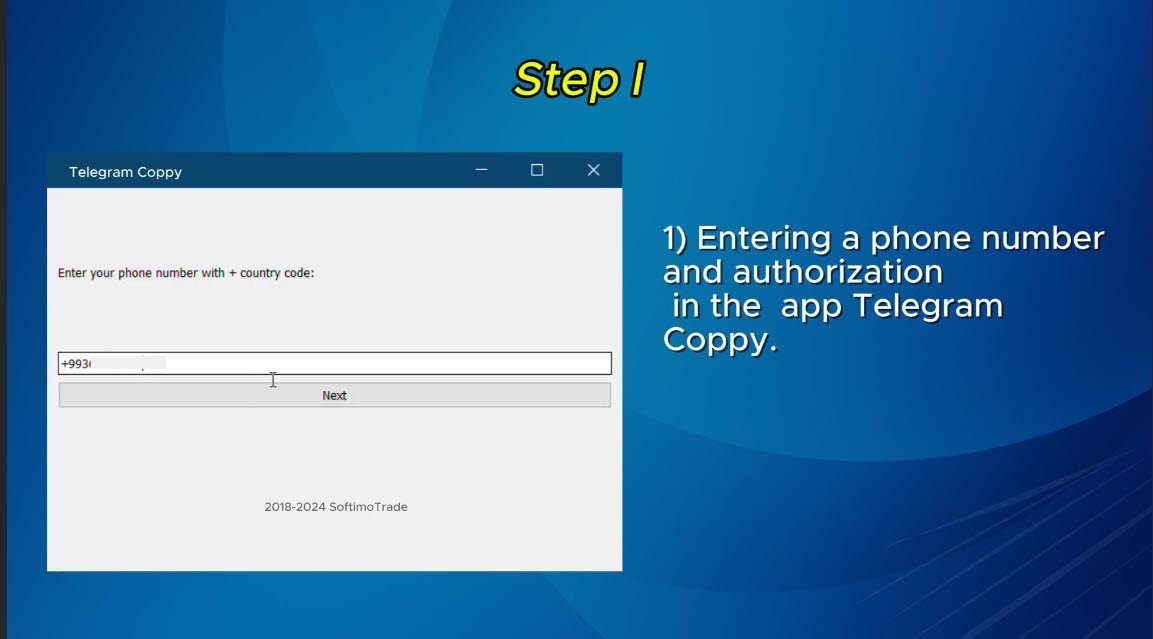
    • Authenticate via phone number and secure code.
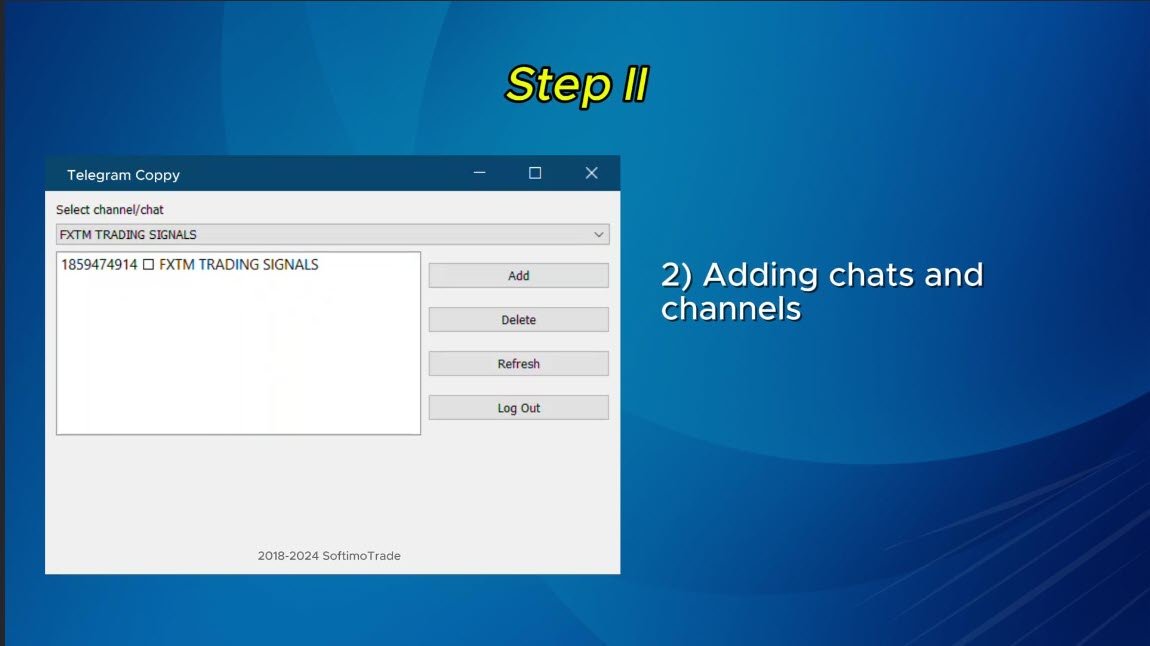
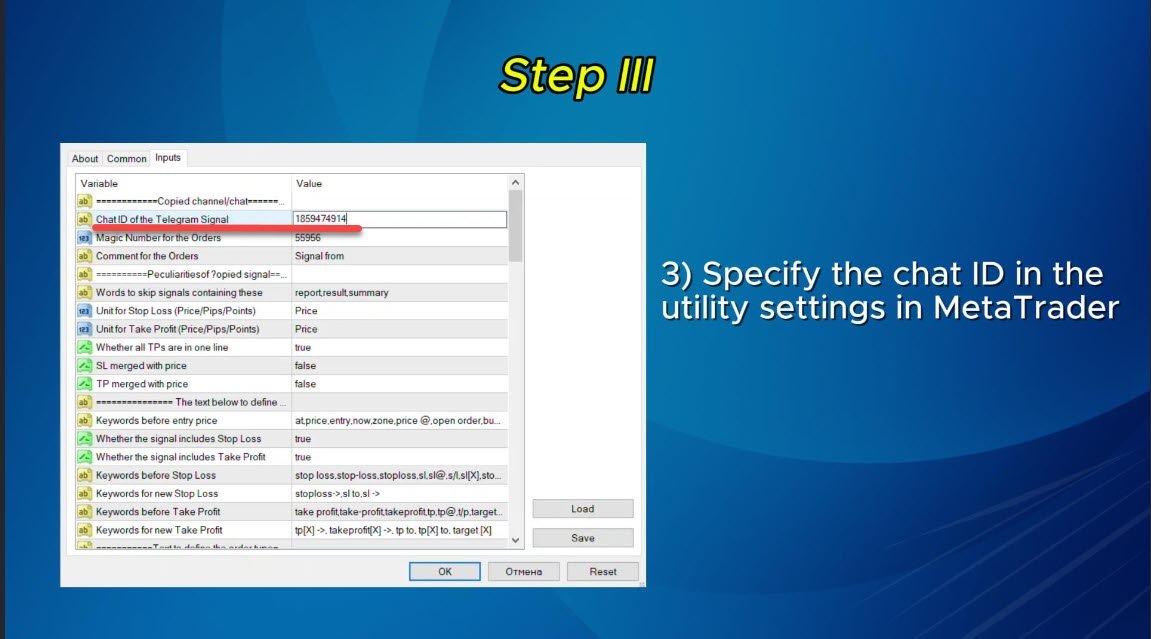
    • Effortlessly fetch and manage Chat IDs using a user-friendly EXE bridge.
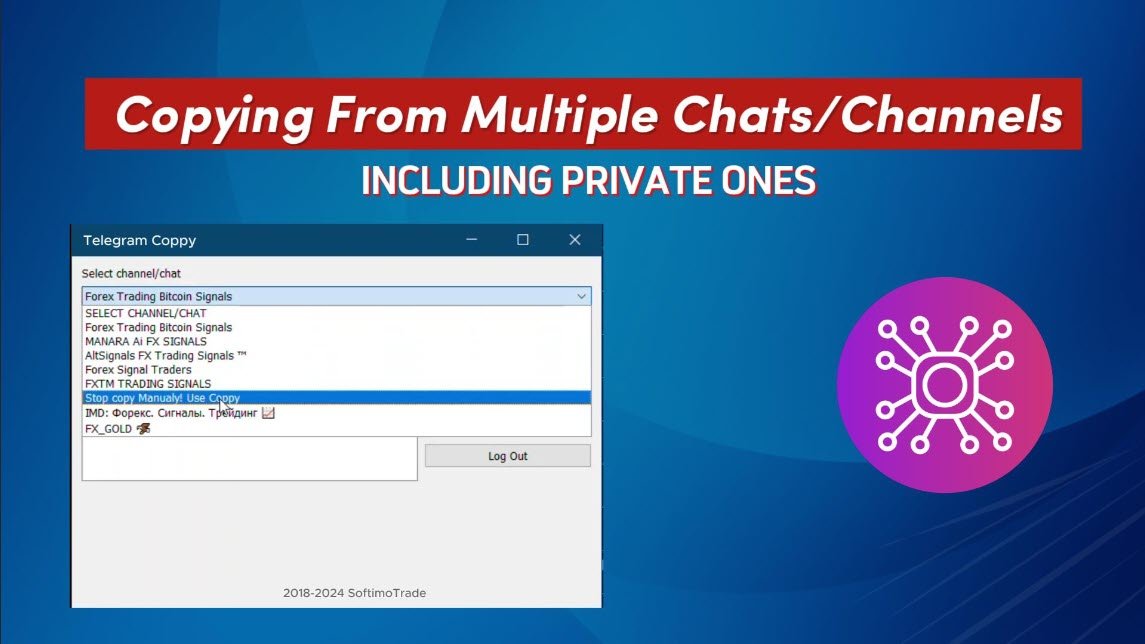
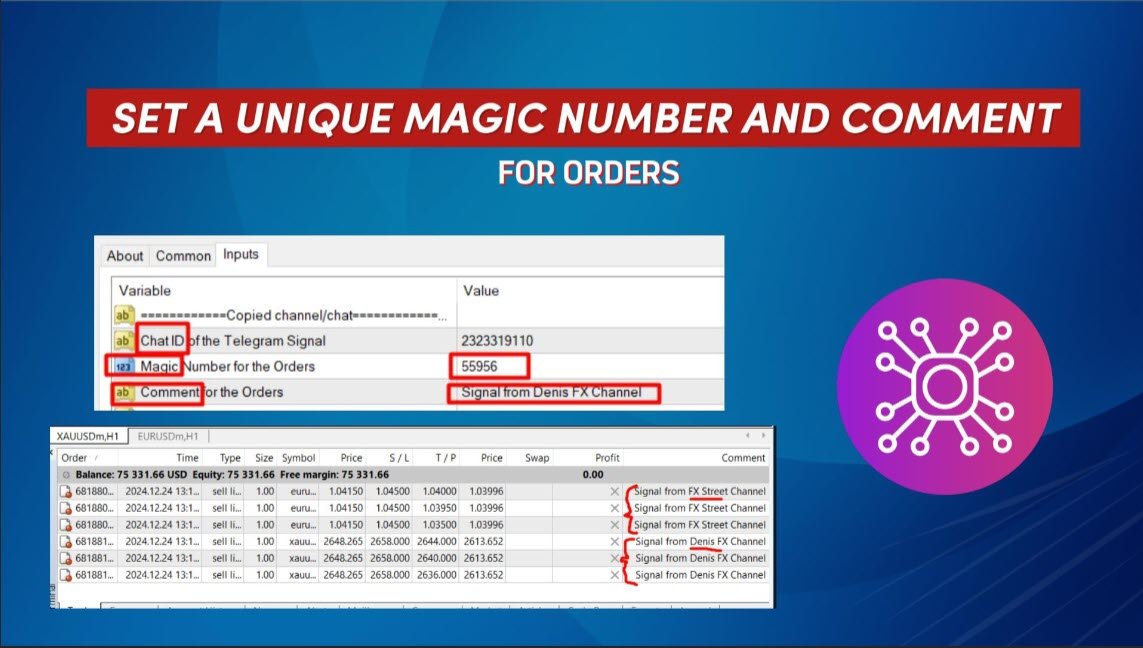
    • Add, delete, and refresh multiple channels/chats for simultaneous signal copying.
  2. Signal Parsing with Advanced Filters

    • Skips unwanted signals containing custom exception words (e.g., "report," "summary").
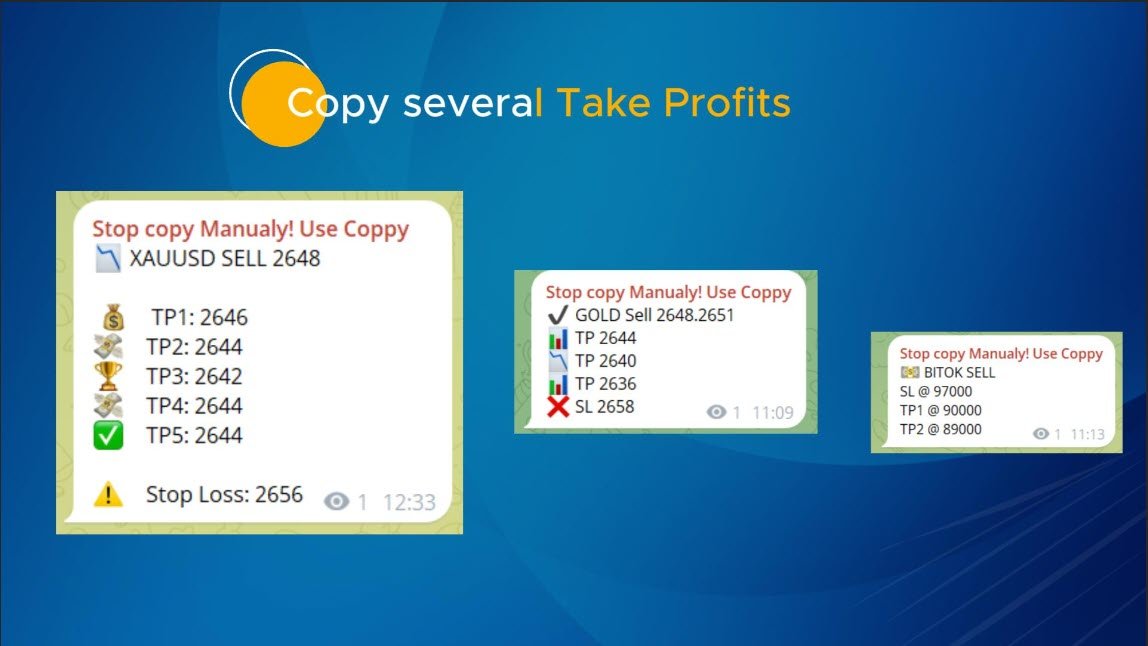
    • Supports flexible SL and TP formats: Price, pips, or points.
    • Automatically calculates entry points when signals specify points instead of prices.
  3. Order Customization and Flexibility

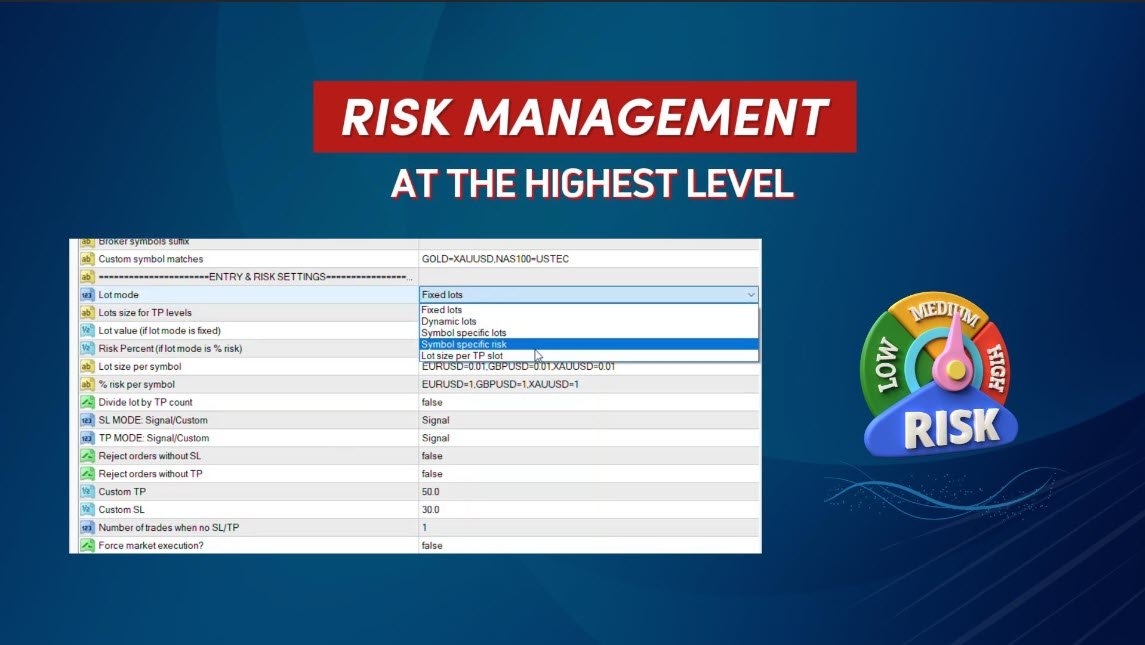
    • Tailor order size with multiple modes: Fixed lots, dynamic lots (% risk), or symbol-specific lots.
    • Adjust SL/TP using signal data or custom parameters.
    • Configure slippage, pending order expiration, and retry settings for perfect execution.
  4. Comprehensive Symbol Management

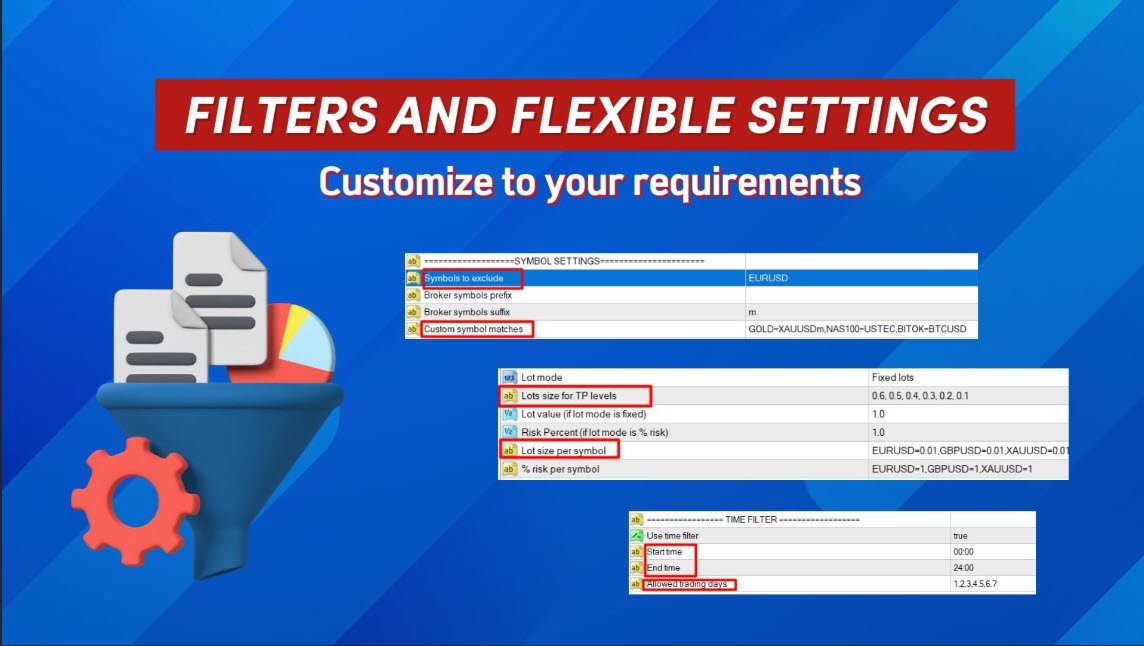
    • Exclude specific symbols or match custom broker symbols.
    • Map signal symbols to broker-specific names (e.g., GOLD=XAUUSD).
  5. Advanced Risk and Trade Management

    • Set daily, weekly, or monthly loss limits in percentage or currency.
    • Automatically stop copying when loss limits are reached.
    • Enable breakeven and dynamic trailing stop for optimized profits.
  6. Time and Trade Filters

    • Use time filters to control trading hours and allowable days.
    • Limit the maximum number of trades or losses per day.
  7. Seamless Integration and Easy Setup

    • Simple EXE interface for secure Telegram login and chat/channel management.
    • Copy from multiple channels simultaneously by deploying the utility across separate charts.
  8. Flexible Command Recognition

    • Handles advanced commands for closing, modifying, or deleting orders based on signal text.
    • Supports phrases like "close all positions," "move SL to breakeven," and more.

Who Is This Utility For?

Whether you are a retail trader looking to automate your strategy or a signal service subscriber, Telegram to MT4 ensures you never miss a trade. With its intuitive interface, detailed customization, and robust parsing capabilities, this utility simplifies trading like never before.

Why Choose Telegram to MT4?

  • No external DLLs required, ensuring maximum security and compatibility.
  • Fully customizable settings to suit your trading style and risk appetite.
  • Reliable signal parsing even with complex messages or unconventional formats.

Get Started Today

Transform your trading experience with Telegram to MT4. Gain efficiency, accuracy, and confidence in every trade you make.

The main reasons for not copying a signal:

  • You did not run the program as an administrator, for correct operation, run the exe file (bridge to telegram) as an administrator 
  • If Telegram is blocked in your country, then you should use a VPN on the entire PC that will allow the EXE bridge file to connect to Telegram; one solution is to place the copier on a VPN that does not have Telegram blocked. 
  • Auto trading is not enabled, you must enable auto trading in the terminal settings


Reviews 8
Lucas Eduardo
23
Lucas Eduardo 2025.10.01 08:50 
 

EA opens this order, everything is fine with tp and sl correct, But when the tp hits the group I'm in, the admin sends it in this format and the ea is opening the purchase order again. Is there a way to adjust this so it doesn't open the order like that? The admin puts gold buy tp3 done and the ea is opening the order again. Is there a way to fix it?

Forexcz74
189
Forexcz74 2025.02.21 09:08 
 

I am very satisfied with the Telegram copier for MT4 Coppy created by Sergey. This is my second purchase from him. It works with all the Telegram channels I have so far. I haven't had time to thoroughly set up and explore all the features, of which there are really many, but I can already say that this copier has great potential. The support from Sergey has been excellent – I always received quick responses to my questions and assistance with any issues I had. It’s clear that he cares about the satisfaction of his users. I recommend this copier to everyone who wants to improve their trading results, whether you are a beginner or an experienced trader. Great job, Sergey! Marek

Hassan Elyakoubi
217
Hassan Elyakoubi 2025.01.12 05:54 
 

I recently purchased the Telegram to MT4 Coppy after initially testing a free trial version the seller kindly provided. From the moment I tried it, I was impressed with how smoothly it transferred signals from Telegram into my MT4 platform. The seller has been incredibly supportive, promptly answering all of my questions and even recording a helpful video to guide me through the setup. he also took the time to log into my demo account (with my permission) to fine-tune the settings, ensuring everything met my trading requirements. I highly recommend this copier EA—and its exceptional customer support—to anyone looking for a reliable solution.

Recommended products
Hello Guys! I want to share with you a very useful tools. Anyone of us who has used MT4 for some time knows how impractical this platform can be for discretionary trading. That's why I created this graphical interface!  Interface is very simple, all the info that you need are in the video and in the screenshot. NB: Before to run the EA Interface, remember to copy the file in the comment in your MT4 folder "Controls". PATH: .../MQL4/INCLUDE/CONTROLS NB: unfortunately the interface can't be test
Fibo Color Levels
Marlon Campos da Silva
4 (4)
Fibo Color Levels is an amazing tool for Fibonacci lovers. You can customize your preferred values, styles and formats of each level and set the color levels according to their importance. Fibo Color Levels Not add object fibonacci retracement automatically . The purpose of this indicator is not it. So you need to manually add the Fibonacci Retracement in your chart, as usually already do. Use the standard tool Fibonacci Retracement in your MT4, draw the Fibo according to the swing-high and/or s
Working Bot
Dmitry Shutov
1 (1)
This Expert Advisor is based on advanced neural networks. Main EA features After training, the EA remembers the patterns of each currency pair . Therefore, re-training the currency pair is not required when changing a currency pair. Fixed Take Profit and Stop Loss levels are set in the inputs. Multi-currency trading . ‌Monitoring of my accounts: https://www.mql5.com/en/signals/author/mizrael Preparing for trade and training It is recommended to train the EA. For better understanding, we posted
Online Accounts Manager MT4
Kyra Nickaline Watson-gordon
5 (1)
OneClick Online Account Manager is a powerful utility that helps you to manage all your accounts from a centralized panel. It is suitable for all single account traders and specially for multiple accounts traders. The utility help you to : Monitor status of all accounts on a private web page. Some information such as account connection status, account profit, DD, Balance, Equity, Margin Level, Number of positions and orders, Daily and Weekly profit/loss and also overall summation of all these p
Golden Scalper PRO
Felipe Jose Costa Pereira
3.83 (12)
Golden Scalper PRO: Our Technology by Your Side! Manual and configuration files: Contact me after purchase to receive the manual and configuration files. Price: The price increases according to the number of licenses sold. Available copies: 3 Trading gold, one of the most volatile assets in the financial market, requires high precision, thorough analysis, and extremely effective risk management. Golden Scalper PRO was developed precisely to integrate these pillars into a robust and sophisticate
Canadian Taiga
Charbel Abboud
CANADIAN TAIGA is a professional portfolio EA using trend-following trading system based on principles of volatility breakout and breakouts of support/ resistance levels. It works on all Canadian Dollar pairs. The core principle of the Canadian Taiga is to capture trading opportunities on all CAD pairs, using a sophisticated hedging module. Download CANADIAN TAIGA and test it on all Canadian Dollar Pairs as recommended, and if it does not what it is intended to do as described, do not purchase i
Советник  представляет собой многофункциональную торговую систему BBMA Oma Ally с интеграцией Telegram для удаленного управления и получения уведомлений. Основная специализация - анализ паттернов ценового действия и автоматическое оповещение о торговых возможностях. Основные функции 1. Система оповещений через Telegram Управление командами: Отслеживание и выполнение команд из Telegram Уведомления: Мгновенные оповещения о торговых сигналах Удаленное управление: Возможность управления советнико
ExincExp
Stanislav Vereshchagin
Hello dear traders! I present to your attention the ExincExp trading robot. The robot is based on the Price Action "Outside Bar" trading strategy. The Expert Advisor is designed for the H1 timeframe, best suited for the EUR-USD pair. There will be not many trades, but filtering them very well, which will make only the most accurate market entries for you. The robot calculates and places stop-loss and take-profit on its own. Also, it is not based on any indicators, the EA takes all information
Designed with advanced algorithms and utilizing deep learning technology, our Haiau Capital MT4 (EA) is crafted to assist you in the intricate world of forex trading. The system analyzes market behaviors and conducts transactions based on specific criteria, empowering you to engage with market trends more effectively. With the backing of nearly a decade of data, the EA employs deep learning to examine past market conditions, aiming to provide enhanced decision-making. Recommendations: Curren
Hello all The expert works by hanging pending deals moving with the price when activating a transaction It closes on the stop loss or on a profit from the pursuit of profit Work on low spread currency pairs Like dollar yen currency The work is done with the same settings as the expert, or it can be modified as the user likes Work on a timing of 15M or more as the user likes parameters: Transaction_Movement : Movement =true  . no Movement=false . Lot1: Manual Lot Size Auto_Lot: Set true to auto
Psychology
Tais Miranda Hoffmann
5 (3)
The most different product of the site: This tool is an auxiliary tool aimed at managing your trades and psychological discussions. As you probably know, more than 70% of the reason for the success of big traders is psychological issues. Only 30% is related to your strategy. So it is better to strengthen this big part with a tool. With a free tool, I allow you to become a better trader   This tool consists of several rules. In version 1.0, we have 7 rules. In later versions, we will add more ru
FREE
CloneChartMT4
Andrei Novichkov
5 (2)
This utility clones the chart it is running on. It opens the same chart with the same graphical objects, set of indicators (saving the parameters) and the rest of the elements. In essence, it performs a deep copying of the original chart, transferring the template to the opened chart. The symbol and the timeframe of the original chart are also saved.
FREE
Hello everyone, the expert works on pending deals moving with the price When a deal is activated, the take profit and stop loss are placed When moving with the profit, the other pending deal moves with the price Until it closes with a profit or loss and works again in the same way There are no complications or indicators in the expert The expert is very simple in his work Work on the five minutes, capital $ 100 or more The lot size will work based on the capital Work on gold A zero is placed on
GridderEA Pro
Nikolaos Pantzos
3.83 (6)
It's a multi-currency grid and martingale system that can trade all input pairs from one chart. The expert will close all orders for each pair using a profit level. The expert has the possibility to trade up to 100 pairs. Information Chose a broker with fast execution and low spreads for effective results. Please make some tests on a demo account to see how the expert works before using it on a real account. For 0.01 lot size and leverage 1:500, you need an initial balance of at least 10,000 f
FREE
LENA Scalp
Cence Jk Oizeijoozzisa
4.4 (5)
LENA Scalp   With advanced stop-loss technology utilizing artificial intelligence, Lena Expert Advisor provides an innovative trading experience. Lena’s robot avoids large stop-loss levels, Martingale, and grid trading. Instead, it features a dynamic stop-loss system that adapts to market conditions. AI-driven analysis supports identifying key market opportunities, aligning with its carefully designed strategy. This automated trading solution is based on a robust, well-tested approach crafted b
Market Monitor
Rodrigo Rethka Goncalves
Market Monitor – Smart Asset Performance Dashboard for MT4 Turn your MetaTrader 4 into a professional trading intelligence center! Market Monitor is a powerful monitoring tool that displays, in real time, the most relevant performance metrics of each symbol being traded — helping you make faster, smarter, and more strategic decisions. What Does This Indicator Do? Market Monitor scans all open and historical orders, consolidates the data by symbol, and displays everything in visual pa
THIS PRODUCT CAN NOT BE TEST IN STRATEGY TESTER. PLEASE TRY DEMO VERSION: https: //www.mql5.com/en/market/product/58082 FIRST 10 COPIES AT 30 USD, NEXT PRICE WOULD BE 50 USD RISK AND TRADE MANAGER RISK AND TRADE MANAGER   is an advanced trading panel designed for manual trading.   Utility helps to manage trades effectively and efficiently with a single click. MAIN FEATURES Convert and display Stop Loss (SL)   Pips into % and amount to view the clear picture of the trades if SL hits. Fund alloca
Next Generation
Volodymyr Zubov
Automatically trading advisor for the MT4 terminal. Any trading instruments. Minimum settings. Detailed display of style and trading conditions on the screen of your terminal. It starts working immediately after installation and connection to your MT4 account. Any timeframe below H4. Recommended timeframe for displaying trading sessions H1. You choose the optimal working time for a trading robot. Best wishes and a passing trend.
Donchian Channel Pro EA 1. OVERVIEW The Donchian Channel EA is a breakout trading system that leverages the Donchian Channel to identify key support and resistance levels based on price highs and lows over a set period. The EA automatically executes trades when price breaks out of these levels, aiming to capture strong trending movements. It includes features such as time filters, ATR-based stop-loss and take-profit levels. 2. Unique Features   Ø Donchian Channel Breakout Strategy – Trades only
UniTradeXpert
Tsz Fung Wong
Introducing UniTradeXpert: Your Ultimate Forex Program! Uncover the extraordinary potential of UniTradeXpert, a cutting-edge expert advisor meticulously crafted to enhance your forex trading experience. With nearly 7 years of comprehensive data analysis support , this EA provides a decisive edge in the fiercely competitive market with an astounding accuracy rate of 99.9% . UniTradeXpert excels in oscillation trading within the one-hour timeframe of the AUDCAD currency pair. This professional app
LayerStop
Norhisham Mohd Rudin
LayerStop EA only performs an action open pending order BUYSTOP or SELLSTOP, thus only monitor the trailing stoploss. No specific conditions are used to open pending order. Pending order BUYSTOP or SELLSTOP will generated immediately after an Expert Advisor is attach in the chart. Suitable for News High Impact. If you already attach LayerStop EA in the chart, and want LayerStop EA performs new one an action open pending order BUYSTOP or SELLSTOP, you need to remove LayerStop EA from chart a
Simple script to analyze posibility of profit for whole market all Symbols. You can specify minimum and maximum profit in percent and number of steps for each period. Script will found most interesting symbols depend on your configuration. You will get a quick and current analyze of whole market which can help you to make right choice of trades, you never miss oportunity again.
FREE
Euro Pulse EA
Andreas Smigadis
Euro Pulse EA — Description Type: Expert Advisor (EURUSD, H1) Platform: MetaTrader 4 (hedging account type supported). The strategy itself does not open opposing positions simultaneously. Execution: Fully automated; no martingale; no grid. Method Rules-based breakout after volatility compression. A TEMA(5) anchor is combined with a Bollinger Band Width Ratio trigger to place stop entries when band-width acceleration indicates a momentum break. Trading Rules Entries Long (stop): Entry = TEMA(5)[
Kakarot Ea
Pham Xuan Can
PROFITABLE HIGHER AND SAFER - Kakarot EA uses indicators combined with AI algorithm according to the principle of trend detection and trend matching. - The principle of order balancing, low DD protects accounts better for high profits. - Flexible command entry and exit - Works on all pairs, preferable to major USD pairs. - Support trade manual methods. - Provide effective bot management parameters at your own discretion to be able to bring a much higher profit. Help Manual Bot configu
Calculated
Vitalii Zakharuk
Calculated trend indicator, can be used with an optimal risk to profit ratio, shows successful signals. Uses two options for settings. Shows favorable moments for entering the market with arrows. The probability of a successful trend is not very bad! The indicator can be used both for pipsing on small periods, and for long-term trading. The indicator does not redraw and does not lag. It works on all currency pairs and on all timeframes.
Unbrekeable
SHEYLA SOFTWARE
4 (1)
Limited number of copies will be sold on MQL5 market.  Price $69.99 4 of 10 left at this Price Next 10 copies $149.99. Expert will be available on sale untill 1 of January.   Unbrekeable for XAUUSD is a fully automated EA designed to trade GOLD only. It is based on machine learning analysis and an incredible trend detection system.   This EA tries to win 1% of the account in each of the trades!!!! works like magic :)   EA contains self-adaptive market algorithm, which uses   XAUUSD in 2015-2020
CloseDelet Orders
Hafis Mohamed Yacine
CloseDelet_Orders CloseAtProfit is an EA that I use only to close orders after defined profit, or loss,  close all orders  ,  also delete pending orders.  I am using it in live trading.  The speed of closing depends on time when it trades, on broker you are using and symbols you are trading. INPUTS: win_USD_All   =    close all orders (sell+buy)  when the profit is greater than defined profit to close; win_USD_BUY =    close only orders buy   when the profit is greater than defined profit to cl
OwlGrid01
Angel Perez Sanchez
This Expert Advisor makes simplicity effective. It allows you to customize your risk level according to your profile and capital through an adjustable lot summing system. Manage your investments with precision. It's ideal for combining different sets of conservative operations to achieve controlled and steady profits. In the image section, you can see a couple of backtests as well as the behavior of 8 sets on different instruments in real-time (one image shows the aggregate and the next shows th
Mega Dashboard MT4
Paul Anscombe
4.71 (7)
The Ultimate Dashboard Save $10 now - normal price $79 Indicators are useful for traders, but when you put them into a dashboard that can scan 28 symbols at once they become even better, and when you can also combine different indicators and timeframes to give you synchronized alerts, then they become awesome. This easy to use dashboard provides you with 23 leading indicators, use them individually or together, to create powerful combination alerts. So when you want to know that RSI is above 2
The indicator is the main part of Michael Huddleston's ICT (Inner Circle Trader) trading strategy. His legendary trading strategy is based on the concept of "Smart Money". To analyze the medium -term trend , the  ICT offers an analysis based on  twenty -day levels . The indicator builds levels , while showing the turning points with arrows . An important feature of the indicator is the automatic display of levels for different periods . You do not have to change the indicator settings when chang

Buyers of this product also purchase
Forex Trade Manager MT4
InvestSoft
4.98 (423)
Welcome to Trade Manager MT4 - the ultimate   risk management tool   designed to make trading more intuitive, precise, and efficient. This is not just an order placement tool; it's a comprehensive solution for seamless trade planning, position management, and enhanced control over risk. Whether you're a beginner taking your first steps, an advanced trader, or a scalper needing rapid executions, Trade Manager MT4 adapts to your needs, offering flexibility across all markets, from forex and indice
Copy Cat More Trade Copier MT4 is not just a simple local trade copier; it is a complete risk management and execution framework designed for today’s trading challenges. From prop firm challenges to personal portfolio management, it adapts to every situation with its blend of robust execution, capital protection, flexible configuration, and advanced trade handling. The copier works in both   Master (sender) and Slave (receiver)   modes, with real-time synchronization of market and pending orders
With this Expert Advisor, you can seamlessly integrate various channel, arrow, and reversal indicators. It offers the flexibility to use all popular channel trading strategies, while also providing powerful tools to customize your trading conditions and risk management system.   The Expert Advisor opens orders when the price crosses the channel boundaries. Multiple crossing conditions are available for customization: Price touches boundary on re-entry into the channel Price touches boundary on
VirtualTradePad mt4 Extra
Vladislav Andruschenko
4.86 (58)
Trading Panel for trading in 1 click.  Working with positions and orders!  Trading from the chart or the keyboard. Using our trading panel, you can trade in one click from the chart and perform trading operations 30 times faster than the standard MetaTrader control. Automatic calculations of parameters and functions that make life easier for a trader and help a trader conduct their trading activities much faster and more conveniently. Graphic tips and full information on trade deals on the chart
The product will copy all telegram signal to MT4   ( which you are member  ) , also it can work as remote copier.  Easy to set up, copy order instant, can work with almost signal formats, image signal, s upport to translate other language to English Work with all type of channel or group, even channel have "Restrict Saving Content", work with  multi channel, multi MT5 Work as remote copier: with signal have ticket number, it will copy exactly via ticket number. Support to backtest signal. How to
Exp COPYLOT CLIENT for MT4
Vladislav Andruschenko
4.69 (65)
Trade copier for MetaTrader 4.   It copies forex trades, positions, and orders from any accounts. It is one of the best trade copiers   MT4-MT4, MT5 - MT4   for the   COPYLOT MT4   version (or   MT4 - MT5 MT5 - MT5   for the   COPYLOT MT5   version).        MT5 version Full Description +DEMO +PDF   How To Buy    How To Install     How to get Log Files    How To Test and Optimize    All products from Expforex Copier  version for      MetaTrader 5  terminal ( МТ5 - МТ5, МТ4 - МТ5 )-  Copylot Cli
Ultimate Extractor - Professional Trading Analytics for MT4 Ultimate Extractor transforms your MetaTrader 4 trading history into actionable insights with comprehensive analytics, interactive charts, and real-time performance tracking. Ability to combine multiple accounts and MT4 and MT5 into a single dashboard. What It Does Automatically analyzes your MT4 trading history across all Expert Advisors and generates detailed HTML reports with interactive visualizations. Tracks live performance metric
MT4 to Telegram Signal Provider   turns your trading account into a signal provider. Every trade action, whether manual, by EA or from your phone, is instantly sent as a message to Telegram. You can fully customize the format or use a ready-made template for quick setup. [ Demo ] [ Manual ] [ MT5 Version ] [ Discord Version ]  New: [ Telegram To MT5 ] Setup A step by step user guide is available. Key Features Ability to customize order details sent to subscribers You can create a tiered subs
Telegram To MT4 Receiver
Levi Dane Benjamin
4.2 (5)
Copy Signals from any channel that you are a member (including private and restricted) straight to your MT4.  This tool has been designed with the user in mind while offering many features you need to manage and monitor the trades. This product is presented in an easy-to-use and visually attractive graphical interface. Customise your settings and start using the product within minutes! User Guide + Demo  | MT5 Version | Discord Version If you want to try a demo please go to user guide. The Tel

Custom Alerts MT4
Daniel Stein
5 (7)
Custom Alerts: Monitor Multiple Markets and Never Miss a Key Setup Overview Custom Alerts is a dynamic solution for traders who want a consolidated way to track potential setups across multiple instruments. By integrating data from our flagship tools—such as FX Power, FX Volume, FX Dynamic, FX Levels, and IX Power— Custom Alerts automatically notifies you of crucial market developments without juggling multiple charts or missing prime opportunities. With support for all asset classes your brok
Zone Trader MT4
LEE SAMSON
5 (1)
Trade support and resistance or supply and demand zones automatically once you have identified the key areas you want to trade from. This EA allows you to draw buy and sell zones with a single click and then place them exactly where you expect price to turn. The EA then monitors those zones and will automatically take trades based on price action you specify for the zones. Once the initial trade is taken, the EA will then get out in profit at the opposite zone you place, which becomes the target
Take a Break
Eric Emmrich
5 (30)
The most advanced news filter on MQL market - free demo available Take a Break has transformed from a basic news filter into a comprehensive account protection solution. It seamlessly pauses any other Expert Advisors during news events or based on your custom filters, all while safeguarding your EA settings - restoring them automatically when trading resumes for complete peace of mind. Typical use cases: A single news filter for all your EAs. Stop trading during news/high volatility (+ close all

ManHedger MT4
Peter Mueller
5 (1)
THIS EA IS A SEMI-AUTO EA, IT NEEDS USER INPUT. Manual & Test Version Please   DON'T BUY   this product before   TESTING  and watching my video about it. Contact me for user support or bug reports, or if you want the MT5 version! MT5 Version I do not guarantee any profits or financial success using this EA. With this Expert Advisor, you can: Implement your own   Zone Recovery   strategy to capitalize on trending markets. Create   Grid   trading strategies, to profit from ranging markets. Place
The Ultimate Drawdown Recovery & Trade Protection EA for MT4! Your Trades Deserve a Second Chance. Give Them This Soldier. Struggling with floating losses or sudden drawdowns that threaten your account? Stop watching your trades drown in red and let the Ultimate Drawdown Recovery EA (UDR) recover, protect, and empower your trading strategy automatically. What Is UDR? UDR is an ultra-smart, lightning-fast MT4 Expert Advisor designed to recover drawdowns, secure break-even exits, manage trades wi
The product will copy all  Discord  signal   to MT4   ( which you are member  ) , also it can work as remote copier.  Easy to set up. Work with almost signal formats, support to translate other language to English Work with multi channel, multi MT4. Work with Image signal. Copy order instant, auto detect symbol. Work as remote copier: with signal have ticket number, it will copy exactly via ticket number. How to setup and guide: Let read all details about setup and download Discord To MetaTrader
Trade Manager MT4 DaneTrades
Levi Dane Benjamin
4.09 (11)
Trade Manager to help you quickly enter and exit trades while automatically calculating your risk. Including features to help prevent you from Over Trading, Revenge Trading and Emotional Trading. Trades can be managed automatically and the account performance metrics can be visualised in a graph. These features make this panel ideal for all manual traders and it helps to enhance the MetaTrader 4 platform. Multi Language support. MT5 Version  |   User Guide + Demo The Trade Manager does not work
The Expert Advisor will help you forward all pop-up alert with screenshot from  MetaTrader 4 to Telegram channel/ group, also forward all notifications to Telegram. Parameters  -  Telegram Bot Token - create bot on Telegram and get token.  -  Telegram Chat ID  - input your Telegram user ID,  group / channel ID  -  Forward Alert - default true, to forward alert.  -  Send message as caption of Screenshot - default false, set true to send message below Screenshot  How to setup and guide  - Telegram
EchoTrade Telegram to MT4 Copier
Perpetual Chinemerem Vincent
5 (2)
EchoTrade Telegram to MT5 Copier Seamless, Instant, and Reliable Signal Copying - Direct from Telegram to MetaTrader 4! The product does not run in the strategy tester but you can get free trial version   here  for testing before purchase. Tired of manually executing trades from Telegram signals? EchoTrade automates the process, instantly copying trades from any Telegram channel or group directly into your MT5 account—accurately, efficiently, and without delay. Key Features: Universal Compatib
EasyInsight AIO MT4
Alain Verleyen
4 (2)
EASY Insight AIO – All-In-One Power for AI-Driven Trading Want to skip the setup and start scanning the entire market – Forex, Gold, Crypto, Indices, and even Stocks – in seconds? EASY Insight AIO is the complete plug-and-play solution for AI-powered trade analysis. It includes all core Stein Investments indicators built-in and automatically exports clean, structured CSV files – perfect for backtesting, AI prompts, and live market decision-making. No need to install or configure indicators manu
Everything for chart Technical Analysis indicator MT4 in one tool Draw your supply demand zone with rectangle and support resistance with trendline and get alerts to mobile phone or email alert -  Risk reward indicator Video tutorials, manuals, DEMO download   here .  Find contacts on my   profile . 1.   Extended rectangles and trendlines Object will be extended to the right edge of the chart when price will draw new candles on chart. This is rectangle extender or trendline extender. 2. Price to
The News Filter
Leolouiski Gan
5 (25)
This product filters all expert advisors and manual charts during news time. It is able to remove any of your EA during news and automatically reattach them after news ends. This product also comes with a complete  order management system that can handle your open positions and pending orders before the release of any news. Once you purchase The News Filter , you will no longer need to rely on built-in news filters for future expert advisors, as this product can filter them all from here onwards
Click and Go Trade Manager
Victor Christiaanse
5 (8)
Click and Go Trade Manager, the ultimate solution for seamless trading execution. With a simple click on the chart, you can effortlessly define your stop loss, entry price, and target levels. No more hassle of inputting values manually - it's made incredibly intuitive and easy. Embedded risk management is a key feature of our Trade Manager. We understand the importance of protecting your investments, which is why the Click and Go Trade Manager incorporates risk management. When placing orders,
Custom Alerts AIO: All-in-One Market Scanner – No Setup Required Overview Custom Alerts AIO is the fastest and easiest way to monitor multiple markets for real-time trading signals—without any setup or extra licenses. It comes with all required Stein Investments indicators already embedded, making it the perfect plug-and-play solution for traders who value simplicity and performance. Just load it to any chart and start receiving alerts across Forex, Metals, Crypto, and Indices. Shares can be a
Year-End Trading SALE – Save 50% While It Lasts! Advanced Trade Manager – The Ultimate All-in-One Solution for Faster, Smarter, and Safer Manual Trading. Transform your manual trading with NextGen Trade Manager AI – the professional on-chart panel that combines instant execution, visual trade planning, and powerful risk management into one intuitive tool. Execute orders, manage risk, and protect profits faster than ever before, all without leaving your chart. Perfect for all traders looking t
The MT4 to Discord Signal Provider is a user-friendly, fully customizable utility designed for sending trading signals directly to Discord. This tool transforms your trading account into an efficient signal provider. Customize message formats to suit your style! For ease of use, select from pre-designed templates and choose which message elements to include or exclude. [ Demo ] [ Manual ] [ MT5 Version ] [ Telegram Version ]  New: [ Telegram To MT5 ] Setup Follow our detailed user guide for eas
FiboPlusMultiTF
Sergey Malysh
5 (1)
A ready-made multitimeframe trading system based on automatic plotting and tracking of Fibonacci levels for buying and selling any symbol. Advantages Determines the trend direction based on a complex of 14 indicators ( Cx ), extremums of ZigZag ( Z ), RSI ( R ), Impulse ( I ) Displaying the values of 14 indicators comprising the trend direction ( Cx ) Plotting horizontal levels, support and resistance lines, channels View the plotting option of Fibonacci levels on any timeframe, with the abilit
Gann Model Forecast
Kirill Borovskii
5 (1)
I present to your attention a powerful utility for predicting the future movement of an asset based on W.D. Ganna’s law of vibration. This utility analyzes the selected market model and provides codes for future possible market movement patterns. If you enter the selected code into the appropriate box, you will receive a forecast of the potential market movement. The utility has the ability to display several potential forecast models. The forecast is not yet tied to time and price and gives th
Advanced trading tool: One click smart orders that execute under your conditions Developed by trader for trading community:  position size calculator (lot size), open position after price action, strategy builder, set and forget trading, mobile notifications Risk Management -  Risk percentage position size calculator, gain percentage, target risk reward ratio, spread and commissions are included in calculations 7 Advanced order types   - Set and forget trading with price action automation (OCO,
Auto Trade Copier
Vu Trung Kien
4.76 (84)
Auto Trade Copier is designed to copy trades to multiple MT4, MT5 and cTrader accounts/terminals with 100% accuracy. The provider and receiver accounts must be on the same PC/VPS. With this tool, you can copy trades to receiver accounts on the same PC/VPS. All trading actions will be copied from provider to receiver perfectly. This version can be used on MT4 accounts only. For MT5 accounts, you must use Auto Trade Copier for MT5 . Reference: - For MT4 receiver, please download Trade Receiver Fre
Averaging Helper
Sergey Batudayev
5 (2)
Averaging Helper - This sort of trading helper instrument will help you average out your previously unprofitable positions using two techniques: standard averaging hedging with the subsequent opening of positions according to the trend The utility has the ability to sort out several open positions in different directions at once, both for buy and for sell. For example, you opened 1 position for a sell and the second for a buy, and they are both unprofit, or one is in the unprofit and one is in
More from author
Ice Cube Scalper for MT5
Sergey Batudayev
4.5 (6)
Trading Advisor Ice Cube Scalper -     it is a day scalper , making a large number of trades daily, taking several points with each transaction. The EA's strategy is to trade with the trend using the RSI indicator. The EA uses averaging with a multiplier lot, you need to understand this before using the EA, however the strategy performed well in both backtesting and live trading. Before buying, be sure to test the work of the adviser in the strategy tester. Сontrol risks   To control risks in th
Telegram to MT5 Coppy
Sergey Batudayev
5 (7)
Telegram to MT5: The Ultimate Signal Copying Solution Simplify your trading with Telegram to MT5, the modern tool that copies trading signals directly from Telegram channels and chats to your MetaTrader 5 platform, without the need for DLLs. This powerful solution ensures precise signal execution, extensive customization options, saves time, and boosts your efficiency. [ Instructions and DEMO ] Key Features Direct Telegram API Integration Authenticate via phone number and secure code. Easily man
Risk Manager for MT5
Sergey Batudayev
4.35 (17)
Expert Advisor Risk Manager for MT5 is a very important and in my opinion necessary program for every trader. With this Expert Advisor, you will be able to control the risk in your trading account. Risk and profit control can be carried out both in monetary terms and in percentage terms. For the Expert Advisor to work, simply attach it to the currency pair chart and set the acceptable risk values ​​in the deposit currency or in % of the current balance. [Instruction for Risk Manager parameter
Risk Manager for MT4
Sergey Batudayev
4.6 (10)
Expert Advisor Risk Manager for MT4 is a very important and in my opinion necessary program for every trader. With this Expert Advisor, you will be able to control the risk in your trading account. Risk and profit control can be carried out both in monetary terms and in percentage terms. For the Expert Advisor to work, simply attach it to the currency pair chart and set the acceptable risk values ​​in the deposit currency or in % of the current balance. Version for MT5 -  https://www.mql5.com
GoldPro MT5
Sergey Batudayev
5 (4)
Welcome to the world of innovative and efficient gold trading with GoldPro - an advanced trading robot specifically designed to help you achieve success in the Gold market. The advisor uses the averaging technique, you should perceive this not as good or bad, but as an approach that works in the market, discarding the unipolar belief that one method is good and the other is bad, it exists and can be successfully applied, this is a fact. Reliability and Experience: GoldPro is the result of car
AI Trade Analyzer   is an intelligent market analysis tool implemented in the indicator format. The program visualizes signals on the chart and helps the trader evaluate the market situation based on technical indicators and news background. Supported Models: Compatible with the latest ChatGPT versions — GPT-5.1 , GPT-4o , GPT-4o-mini , O1 , and GPT-3.5-turbo . GPT-5.1 provides the highest precision, advanced context understanding, and deep analysis of complex trading situations. GPT-4o offers
GoldPro
Sergey Batudayev
3.67 (3)
Welcome to the world of innovative and efficient gold trading with GoldPro - an advanced trading robot specifically designed to help you achieve success in the Gold market. The advisor uses the averaging technique, you should perceive this not as good or bad, but as an approach that works in the market, discarding the unipolar belief that one method is good and the other is bad, it exists and can be successfully applied, this is a fact. Reliability and Experience: GoldPro is the result of car
Coppy Master MT5
Sergey Batudayev
5 (1)
Coppy Master MT5 is a trade copier tool for MetaTrader 4 and MetaTrader 5 terminals. It supports copying in both directions: from MT5 to MT4, from MT4 to MT5, as well as between accounts of the same type. To work correctly, all terminals must be running on the same PC or VPS. [ Instruction  and Demo ]  For copying to MetaTrader 4, a separate version — Coppy Master MT4 — is required. Main Features: Copying Modes Supports both Master and Receiver roles. Flexible setup for sending and receiving tr
Averaging Helper
Sergey Batudayev
5 (2)
Averaging Helper - This sort of trading helper instrument will help you average out your previously unprofitable positions using two techniques: standard averaging hedging with the subsequent opening of positions according to the trend The utility has the ability to sort out several open positions in different directions at once, both for buy and for sell. For example, you opened 1 position for a sell and the second for a buy, and they are both unprofit, or one is in the unprofit and one is in
The utility is designed to send a signal from MT4 to Discord. It has a number of unique features, allowing you not only to send trading signals, but also to perform the following functions: Send messages directly from the terminal to Discord Sending emojis along with custom text Send text and images directly from the MT4 terminal to Discord All this allows the user to maintain a channel with signals, focusing on trading and finding quality signals. Instructions for the utility Fully customizabl
MT5 for Telegram Signals
Sergey Batudayev
5 (9)
The utility is designed to send signals from MT4 to Telegram. It has several unique features, allowing not only the sending of trade signals but also the following functionalities: Send messages directly from the terminal to Telegram Send emojis along with custom text Send text and images from Telegram All of these features enable users to manage a signal channel while focusing on trading and finding quality signals. [DEMO and  Instruction for utility] Customizable Signal Messages You can fully
Coppy Master MT4
Sergey Batudayev
3.5 (2)
Coppy Master MT4   is a trade copier tool for MetaTrader 4 and MetaTrader 5 terminals. It supports copying in both directions: from MT4 to MT5, from MT5 to MT4, as well as between accounts of the same type MT4 to MT4. To work correctly, all terminals must be running on the same PC or VPS. [ Instruction  and Demo ]  For copying to MetaTrader 4, a separate version —   Coppy Master MT5   — is required. Main Features: Copying Modes Supports both Master and Receiver roles. Flexible setup for sending
Work logic Stop Out utility is a simple but very convenient indicator showing how many points are left to the Stop Out level / Its benefit lies in the fact that many traders deliberately overestimate the risk in trading in pursuit of profit, use the available margin at the maximum, and for this case it is very important to know where the broker can forcibly close your positions. Just place the indicator on the chart and depending on the open position in Buy or Sell, you will see the border m
Automated trading should help you grow your capital — not confuse you with endless settings and theories. SPARK is a lightweight yet effective Expert Advisor designed to give beginners a confident start with a focus on precision and simplicity. Why is SPARK different? Focused on EUR/USD: The EA is specifically optimized for EUR/USD, one of the most liquid and stable currency pairs. Built on liquidity breakout logic: SPARK identifies and reacts to unique liquidity zones where price is likely to b
FREE
True Supply and Demand indicator       - will allow you to quickly determine the location of resistance and support levels on all timeframes. The indicator will be useful for those who use technical analysis in their trading. The indicator is easy to use, just drag and drop on the chart and the indicator will show you the most likely support and resistance levels. When switching timeframes, you will see the levels for the newly selected timeframe. Recommended Robot Scalper       -       test  
Impuls Pro
Sergey Batudayev
The EA’s strategy is based on  Swing trading , with entries after sharp impulses calculated by the iPump indicator. The advisor has the ability to open manual trades with automatic support – for a downtrend ↓ we enter a trade after a corrective rise in the price, the asset falls into the overbought zone, we sell along the trend. – for an uptrend ↑, we enter a trade after a corrective fall in the price, the asset falls into the oversold zone, we buy along the trend. When trading on the selected
The utility is designed to send a signal from MT5 to Discord. It has a number of unique features, allowing you not only to send trading signals, but also to perform the following functions: Send messages directly from the terminal to Discord Sending emojis along with custom text Send text and images directly from the MT5 terminal to Discord All this allows the user to maintain a channel with signals, focusing on trading and finding quality signals. Instructions for the utility Fully customizabl
Fast Grid Orders
Sergey Batudayev
The "Open grid of pending orders" script is designed to automate the process of creating buy (Buy) and sell (Sell) orders on the MT4 trading platform. It provides the user with the ability to set the distance between orders and the number of orders in this grid.       This script allows traders to quickly build a grid of orders that covers a specific price range. The main functions of the script include: Ability to select the direction of orders: Buy (purchase) or Sell (sale). Setting the distan
MT4 for Telegram Signals
Sergey Batudayev
5 (4)
The utility is designed to send signals from MT4 to Telegram. It has several unique features, allowing not only the sending of trade signals but also the following functionalities: Send messages directly from the terminal to Telegram Send emojis along with custom text Send text and images from Telegram All of these features enable users to manage a signal channel while focusing on trading and finding quality signals. [DEMO and  Instruction for utility] Customizable Signal Messages You can fully
Close All Orders for MT4 script - closes absolutely all orders, whether pending or market ones. Orders are closed at the current profit/loss indicators at the time of closing. The script is suitable for moments when you need to quickly close all orders at the current indicators. The script is very easy to use, just drag the script onto the chart and it will do its job. Add me as a friend , I have many other useful products.
Smart Grid Set EA is a flexible and user-friendly expert advisor for placing pending orders in a grid. It supports breakeven logic, multiple trailing-stop modes, manual grid placement, customisable lot sizes, and an intuitive on-chart interface. It is ideal for traders who employ grid or averaging strategies. Key Features Places Buy Stop and Sell Stop orders in a customisable grid Supports individual lot sizes for each grid level Built-in trailing stop: classic, by candle highs/lows, or by movin
FREE
Description of the advisor Smart Expert Advisor is an automatic grid trading advisor with auto-selection of settings for each trading pair. The Expert Advisor automatically selects the settings for each currency pair, thus you do not need to define the parameters for each pair, calculations are based on the volatility of the instrument being traded. At the time of trading, you can set the direction of entry points. Enable filter by trend. About strategy The EA is based on the logic of catching


PercentTradePad
Sergey Batudayev
The panel has the most intuitive interface that every beginner can handle. In the SLp column  – you need to specify the SL size in pips. If the value turns gray and at the same time the Bay / Sell buttons are also inactive, then you have specified a SL value that is less than that allowed before it was set by your broker. In the TP% column   – you indicate TP in% of the account balance. In the settings, you can choose on the basis of what this indicator will be calculated, by equity, balance or
EasyTradePad
Sergey Batudayev
5 (5)
EasyTradePad – Trading Panel for MetaTrader 4 EasyTradePad is a tool for manual and semi-automated trading. The panel allows quick management of orders and positions, as well as risk management calculations in one click. [ DEMO and Instruction ] Panel Features: Open and close trades with predefined risk (% or deposit currency) Set SL and TP in points, percentages, or monetary values Calculate risk-to-reward ratio automatically Move stop loss to breakeven Partial position closing Trailing stop
Indicator iPump for MT4
Sergey Batudayev
3 (2)
The iPump indicator is a versatile indicator   that combines the advantages of three categories of indicators. simultaneous trend detection on several Timeframes defining zones of resistance and support determination of overbought and oversold zones Indicator functions: Defining a trend This function will be necessary for all traders who want to objectively assess the current market direction and avoid subjectivity. It will be clear and intuitive. Determination of support and resistance levels
Market Screener for MT4
Sergey Batudayev
5 (1)
This is a screener that allows to identify assets that are more than usually overbought (% growth) or oversold (% fall)  within a selected period of time (time frame). The market is ruled by the law, buy cheaper, sell more expensive,  but without an automatic scanner it is very difficult to identify assets overbought or oversold, say, within the current week, or the current hour, or month. There can be dozens or hundreds of instruments, sometimes it is simply not possible to physically analyze e
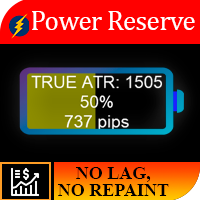
Work logic The importance of this indicator lies in the fact that it allows you to understand how much “fuel is still left at the instrument.” Imagine the situation, you left in a car with a half-discharged battery, on average, this amount of energy is usually enough for a car for 250 km, so if you want to, you cannot overcome a distance of 700 km. So for each instrument, there is a certain daily price movement, and as a result of statistical observations, it was revealed that 95% of the time t
MetaTrader utility MTI (Main Trading Info) – shows the basic trading information for a trader, namely: average and current spread size Swap size for short and long positions Cost of 1 pip for 1 trading lot Stop Level size (minimum distance for placing pending orders) Time until the end of the current (red) and time until the start of the next (gray) trading session The time until the end of the current trading session is displayed in red, the time until the opening of the next session is display
Impuls Pro MT4
Sergey Batudayev
5 (2)
The EA’s strategy is based on  Swing trading , with entries after sharp impulses calculated by the iPump indicator. The advisor has the ability to open manual trades with automatic support – for a downtrend ↓ we enter a trade after a corrective rise in the price, the asset falls into the overbought zone, we sell along the trend. – for an uptrend ↑, we enter a trade after a corrective fall in the price, the asset falls into the oversold zone, we buy along the trend. When trading on the selected
Work logic Stop Out utility is a simple but very convenient indicator showing how many points are left to the Stop Out level / Its benefit lies in the fact that many traders deliberately overestimate the risk in trading in pursuit of profit, use the available margin at the maximum, and for this case it is very important to know where the broker can forcibly close your positions. Just place the indicator on the chart and depending on the open position in Buy or Sell, you will see the border m
Filter:
Lucas Eduardo
23
Lucas Eduardo 2025.10.01 08:50 
 

EA opens this order, everything is fine with tp and sl correct, But when the tp hits the group I'm in, the admin sends it in this format and the ea is opening the purchase order again. Is there a way to adjust this so it doesn't open the order like that? The admin puts gold buy tp3 done and the ea is opening the order again. Is there a way to fix it?

Sergey Batudayev
25796
Reply from developer Sergey Batudayev 2025.10.01 10:58
Hi Lucas Eduardo!
Thank you for your review — it really motivates me to keep improving the product and providing support.
However, next time, please post your questions in the comments section. This helps other users, makes the support process more transparent, and prevents people who play dirty from leaving baseless statements in the reviews. As for your question about how to set up the utility to ignore certain messages from your signals, I recorded a video tutorial — you can check it out in this YouTube video - https://youtu.be/iIcSna9Mm08
Ifeanyichukwu Chukwuemeka Emenike
242
 

This telegram copier is "TOO SLOW". I am a developer, I believe a copier should capture signals from the telegram channel, parse, analyse it and enter/ insert all signals as market execution or signals provider price(pending) and possess fast execution in 0.300 milliseconds from signal receive!. A signal should be placed at the market execution if it’s within slippage else pending order. I was actually looking for a fast copier to take my trades for me so I bought this copier because of the review of jkeita (2025.01.05), according to jkeita, "this specific developer's EA captures the signal even before it is posted on the Telegram channel. Sometimes by 10 seconds. If you are an experienced trader, then you understand what 1 second means" My expectation is that All signals should be put in market execution or pending order within a few seconds. I have used this copier for about 5 months now and I’m very disappointed with this copier because it is so slow even when I set the slippage to 500. My observations: 1. More than 70% of my signals are being skipped and the remaining 30% signals entered very late, sometimes it takes up to 45 mins to 4hours or more to be copied to MT4 from telegram even when I set it for Force market execution. (See Mohamed Hesham Ahmed’s review) Sergey, have tried to resolve this but has not been able to rectify the issue, he even gave me a set file, which had no effect. He told me that the trades will be taken immediately they are given on the telegram channel, he gave me a set file to enable it take the trades immediately they are provided but it still does not work 2. I am convinced that no matter how much you tweak the settings, the copier will take the trades at its convenience (usually very late). According to Sergey, "the copier puts the trades in the MT4 as soon as there is an opportunity to execute a transaction". Really??? 3. This copier does not follow your signal provider's entry price or execute Telegram signals directly at market price as soon as providers send them. 4. The settings in the EA don’t all work; I think this copier is a work in progress. 5. If you delete any trade you do not want, the copier puts again the second time. 6. If a trade is modified in the telegram, the copier treats it as a new trade. 7. The user guide is not comprehensive at all and is not very useful. 8. Sometimes the copier mis-reads the stop loss from the signal and puts a wrong one. 9. You may not be able to run this copier on the same, phone number and another computer in case you upgrade or reinstall your windows on your computer. 10. Sergey, finds it difficult to understand your point and asks you to send him a video shot of what you are talking about. 11. On the 13th May 2025, I suggested to allow the user specify which TP to copy but he asked me to give him $40 to add this functionality. He then went ahead to include it. (I never paid him, why would I pay him just for my suggestion?) This confirms waynet’s review. Based on my suggestion, he added this functionality to some extent. My final word: This copier works but slow and has limited working functions I suggest Sergey to: 1. Rewrite the logic of this code to allow for fast execution within 0.5 milliseconds from receiving the signal. 2. Get a software tester to help you do a professional test and use the feedback to improve your copier. 3. Create a log file for all trades skipped or taken to make it easy for monitoring and reporting issues. 4. Provide a feedback on the chat to enable someone know the status of the EA. 5. Handle multiple take profits intelligently, splitting lot sizes across different TPs automatically. 6. Get someone to write a comprehensive user guide for this copier.


Sergey Batudayev
25796
Reply from developer Sergey Batudayev 2025.09.05 09:41
Dear Ifeanyichukwu, Thank you for taking the time to write such a long review. I understand your frustration, but I must clarify a few things: Settings matter – The copier requires correct configuration. All methods and set files were already provided, but it seems you have not applied or understood them properly. Without proper setup, no copier will ever work as expected. Video guide – To make it easier, I recorded a detailed video showing step-by-step how to set up the copier and how to avoid delays: https://youtu.be/XgOX8rDzsT0 . Please watch it carefully before making conclusions. Unrealistic expectations – Execution speed depends not only on the EA, but also on your computer performance, internet connection, broker server, and Telegram API. Expecting 0.3 ms execution in retail trading is simply not realistic. Functionality – Many of the things you describe as “missing” are already implemented, but they must be configured correctly. I explained this several times in support. The copier works, but it requires proper setup. I respect every client, but please also respect the developer’s time and effort. All tools and instructions are available — it only depends on whether you are willing to use them. Best regards,


Sergey /////////////////////////////////////////////
It’s also worth noting that you wrote yourself you have been using the copier for 5 months. If it was really “useless”, why would anyone continue using it for so long instead of moving to another solution? This contradiction speaks for itself. For everyone who is hesitating before purchase — I provide a FREE DEMO VERSION: https://www.mql5.com/en/blogs/post/760443 . You can test it yourself and clearly see what the copier can and cannot do. This way, you don’t have to rely on negative comments from people who prefer to complain instead of learning how to use the product properly. /////////////////////////////////////////////
Some people prefer to write endless “bla-bla-bla” in long texts, but where are the real facts? I record videos, I show proofs, I demonstrate the copier in action. Meanwhile, this reviewer never provided even a short video to demonstrate any actual delay or malfunction. Without facts or evidence, such words remain only empty complaints.
Mohamed Hesham Ahmed
239
Mohamed Hesham Ahmed 2025.08.28 09:03 
 

I have been testing the Telegram to MT4 Copier for a little over two months. Overall, it works but there are some mixed experiences. The software offers many parameters, but several of them are not clearly explained in the documentation or videos. This makes the initial setup somewhat confusing. On the positive side, the developer is responsive, helpful, and open to feedback, which is appreciated. During my first weeks of use, the copier performed reliably and copied trades as expected. However, in the last few days I noticed inconsistent behavior — sometimes trades are copied, other times they are not, even though I’m using the same setup and Telegram group as before. This makes me suspect there might be server stability issues that need attention. In summary, the copier has potential and good developer support, but it still needs clearer documentation and more consistent performance for me to fully rely on it.

Sergey Batudayev
25796
Reply from developer Sergey Batudayev 2025.08.29 06:29
Hello Mohamed! Thank you for your detailed feedback — it’s very valuable for improving the product. You mentioned that some parameters and parts of the setup are not very clear here a full atricle about all parameters https://www.mql5.com/en/blogs/post/763098 . Update: After the conversation, the person was given information regarding all product settings. As well as recommendations regarding improving the size of the RAM of his VPS so that copying would be even more stable.
waynet
1135
waynet 2025.08.14 11:38 
 

Wants an extra $50 to help set up this piece of trash. If I were you I would look elsewhere for an easier setup because this one is a nightmare.

He has no duty of care for his customers, just treats them like a cash register.

Sergey Batudayev
25796
Reply from developer Sergey Batudayev 2025.08.28 15:50
The user received full installation instructions, video tutorials, and free text-based support, which are sufficient for setup.
Their request was for a personal installation via AnyDesk, which requires one-on-one time and therefore comes with an additional fee. I remain available to all customers for full written support and step-by-step guidance.
Hibriguy
172
Hibriguy 2025.04.11 05:03 
 

User didn't leave any comment to the rating

Sergey Batudayev
25796
Reply from developer Sergey Batudayev 2025.08.14 14:27
Hello! Here a video instruction https://t.me/SignalCopier_utility/74, in which I clearly showed how to place an order exactly at the market, even if the signal price differs from the current market price. However, you continue to claim the opposite, ignoring obvious evidence.
I also have records video confirming how to do the correct operation of the advisor for a as I think similar situation like your https://t.me/SignalCopier_utility/81 , including successful placement of market orders under various conditions.
Please do not mislead other users. If you have technical difficulties, I am always open to dialogue and help. But spreading false information is wrong and unfair to other clients and the developer. Best regards,
Sergey
Forexcz74
189
Forexcz74 2025.02.21 09:08 
 

I am very satisfied with the Telegram copier for MT4 Coppy created by Sergey. This is my second purchase from him. It works with all the Telegram channels I have so far. I haven't had time to thoroughly set up and explore all the features, of which there are really many, but I can already say that this copier has great potential. The support from Sergey has been excellent – I always received quick responses to my questions and assistance with any issues I had. It’s clear that he cares about the satisfaction of his users. I recommend this copier to everyone who wants to improve their trading results, whether you are a beginner or an experienced trader. Great job, Sergey! Marek

Hassan Elyakoubi
217
Hassan Elyakoubi 2025.01.12 05:54 
 

I recently purchased the Telegram to MT4 Coppy after initially testing a free trial version the seller kindly provided. From the moment I tried it, I was impressed with how smoothly it transferred signals from Telegram into my MT4 platform. The seller has been incredibly supportive, promptly answering all of my questions and even recording a helpful video to guide me through the setup. he also took the time to log into my demo account (with my permission) to fine-tune the settings, ensuring everything met my trading requirements. I highly recommend this copier EA—and its exceptional customer support—to anyone looking for a reliable solution.

jkeita
78
jkeita 2025.01.05 10:07 
 

If you don't know then you don't know but this specific developer's EA captures the signal even before it it is posted on the Telegram channel. Sometimes by 10 seconds. If you are an experienced trader, then you understand what 1 second means. This is truly an undiscovered gem of a product and definitely a game changer for me. Thank you Sergey.

Reply to review