Risk Manager for MT5

4.35
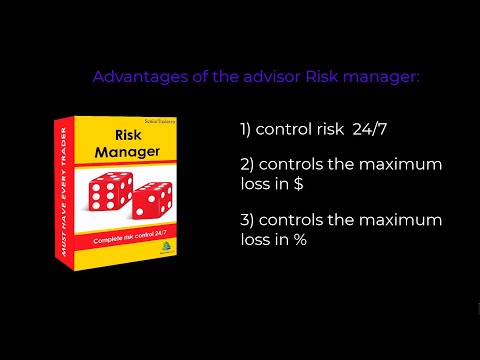
Expert Advisor Risk Manager for MT5 is a very important and in my opinion necessary program for every trader.

With this Expert Advisor, you will be able to control the risk in your trading account. Risk and profit control can be carried out both in monetary terms and in percentage terms.

For the Expert Advisor to work, simply attach it to the currency pair chart and set the acceptable risk values ​​in the deposit currency or in % of the current balance.

[Instruction for Risk Manager parameters]

Advisor functions


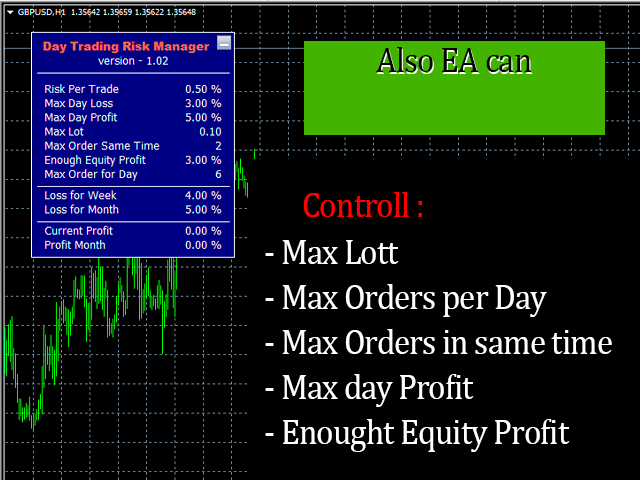
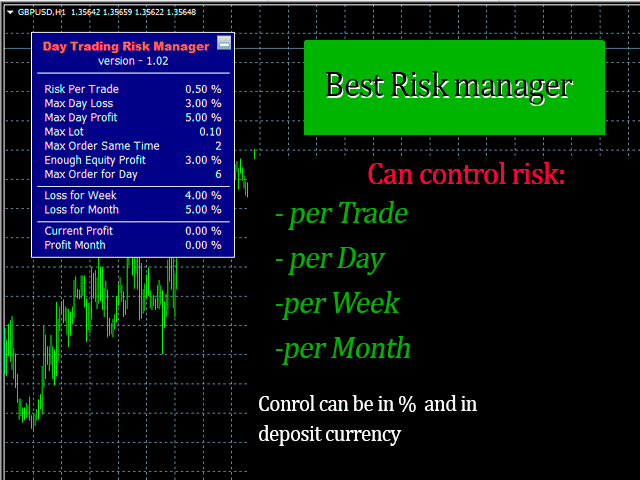
This risk manager will help you control risks:
  • for a deal
  • for the day
  • for a week
  • for a month
You can also control
  1. Maximum allowable lot when trading
  2. maximum number of orders per day
  3. maximum profit per day
  4. set profit taking on Equity
That's not all, the adviser can also set the default SL and TP for you if you specify automatic setting in the settings.

The adviser accompanies each event with an alert, and will explain to you the reason for deleting the order. For example, you opened, you opened the 6th order, and according to your rules you allowed to open only 5 orders per day, the adviser will immediately delete 6 and explain the reason.

For example, you opened a deal with a larger lot than you originally indicated to yourself, the adviser will delete the order and explain the reason. For example, you earned 5% per day and, according to the rules, you should no longer trade today, because you set yourself such a condition, but because of greed you also want to open a new order - the adviser will delete it and will not allow you to trade until the next day. Advisor Risk manager for manual trading - will replace your paratrooper Uncle Vanya with a baton, which will not allow you to lose more than what you have indicated in advance, and will also help save the money you have earned.

So if you want to control the risks in your manual trading, be sure to arm yourself with this Expert Advisor.

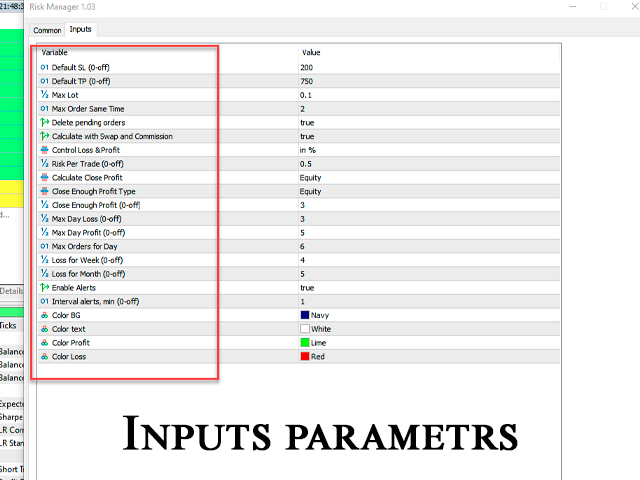
Description of settings

Default SL (0-off) - the ability to automatically set a Stop Loss when opening a deal, if this is not necessary, then set it to 0.

Default TP (0-off) - the ability to automatically set Take Profit when opening a deal, if this is not necessary, then set it to 0.

Max Lot - the maximum allowable lot on the account

Max Order Same Time - the maximum number of orders that can be opened simultaneously

Delete pending orders - deletion of pending orders in case of excess risk

Calculate with Swap and Commission - take into account swap and commission when closing profit / loss

Control Loss & Profit - in% or in $ - in this setting you need to choose how you want to control the risk in% or in the account currency, although there is a $ sign here, but it will also work if your account is in euros, rubles, yen and other currencies.

Risk Per Trade (0-off) - risk per trade, set to 0 if you want to turn it off.

Calculate Close Profit - Equity / Balance - setting allows you to set exactly how you want to control DAILY profit / loss, by equity or by balance, if set by balance, profit will be controlled after you close the deal. For example, you set a plan for $500 per day, and chose balance control, then after you close transactions and your daily profit is more than $500, the adviser will not allow more transactions to be kept in the market, it will immediately close them.

Enough Profit_type - by Trade / By Equity - here you can set profit control for OPEN positions, if you set by Trade then profit will be controlled per trade, if by equity then control will be carried out as follows, for example, you set Close Enough Profit = 15 $ and at the moment you have a profit of $20 on one transaction and minus $5 on the other, but in total you now have a floating profit of +$15, respectively, your 2 transactions will be closed.

Enough Profit (0-off) - set the amount of profit to be fixed, depending on what you chose in the previous setting by Trade or By Equity.

Max Day Loss (0-off) - maximum loss per day

Max Day Profit (0-off) - maximum daily profit

Max Orders for Day - Maximum number of orders per day

Loss for Week (0-off) - maximum loss for a week

Loss for Month (0-off) - maximum loss for a month

Enable Alerts - enable alerts or not

Interval alerts, min (0-off) - interval in minutes for alerts

Cut loss by equity for day_week_month setting: when the setting is enabled, you can more accurately monitor the level of daily, weekly, monthly risk. 

Allowing Trading Pair setting - allows you to set acceptable pairs for trading, the listing must be separated by commas, if the setting is left empty, then you can trade on all pairs.


In order for the control to be more strict, I recommend putting the adviser on the VPS, and giving the password to another person.
Reviews 22
facudomin
41
facudomin 2025.03.22 22:13 
 

hola muy buen asesor gracias por el trabajo . consulta : para cambiar un parametro de riesgo , hay que esperar un periodo de seguridad? o se cambia al momento y puedo continuar operando por ej?

Aleksandr Schmied
31
Aleksandr Schmied 2024.11.17 15:58 
 

Очень доволен продуктом и жаль что не знал раньше о нем. Сергею спасибо и за терпение и помощь в настройке

YCX
121
YCX 2024.10.30 02:44 
 

This is a very good risk management tool that I highly recommend every trader to use it. At the beginning, I found a minor bug and informed the seller. Almost immediately, the seller (Sergey) helped to rectify the issue and provided an update within 24 hours. I am very impressed with Sergey's product and customer care. Thank you very much.

Recommended products
Tiger Lite
Dang Cong Duong
Tiger Lite recreate the history of entry and exit orders. The goal is that you can grasp their strategy how to play. CSV format support for WEB, MT4 and MT5 platforms. The sequence of steps is described in the photo. Note: Please choose the existing date and symbol on the CSV file. For MT4/5, export historical data and copy the records to excel, save it with the extension CSV. For MT4/MT5/WEB, save the name with format mt4.csv/mt5.csv/web.csv If you get the history from another source and your
FREE
Signals Executor for Telegram is a Utility that allows you to execute and manage positions from messages sent in Telegram Chats. Chat messages are processed to check for the existence of commands, and the command will be executed if its parameters are valid. You need the Telegram Bot Token and Chat Id to configure the input parameters. It is possible to restrict the sending of commands through the User Id, which must be configured in the input parameters. Valid Commands: Buy and Sell: Market or
Local Trade Copier   is an advanced tool designed for efficiently copying trades between accounts in the   local   mode. It allows for lightning-fast order replication from a master account to a slave account. In local mode, trades are copied instantly, while in remote mode, the copying process takes less than 1 second. MT4 Version MT5 Full Version (Local & Remote) MT4 Full Version (Local & Remote) Local mode refers to both MetaTrader platforms being installed on the same system. It fully suppo
Multi Symbol Trailing
Vladimir Karputov
5 (1)
The "   Multi Symbol Trailing   " utility moves Stop Loss for all positions that are currently open (multi-symbol trailing). It is intended primarily to assist in manual trading. There are no restrictions for the utility either by the name of the currency pair or by the individual identifier (Magic number) - the utility processes absolutely all positions that are currently open. The unit of measurement for the "   Trailing Stop   " and "   Trailing Step   " parameters is points (the difference
The Goat Scalper
Giordan Cogotti
The Goat Scalper EA — Smart, Fast, and Built for Real Market Performance Overview The Goat Scalper EA is a next-generation trading system built to capture decisive market moves with surgical precision. Unlike typical scalpers that rely on risky methods such as martingale, grid, hedging, or arbitrage, The Goat uses a pure breakout logic based on advanced supply and demand zone detection, ensuring stable and transparent results in any condition. Core Strengths Smart Risk Management Stop Loss on
AutoCloseTPSL
Calvin Andrew Jenkins
Expert advisor that automatically closes all open positions when a specific profit amount or loss amount is reached. The profit and loss amounts are configurable inputs and can be set when attaching the EA to a chart. This EA has proven to be useful in high quantity trading strategies to control and minimize risk. The EA works for all account currencies and is designed to close out all trades once the desired profit or loss is hit.

Set an order in advanced. Literally, set and forget. ========================================== INPUTS: EA magic number (should be unique):   Set the magic number to be used when opening and closing trades. If you have other EAs on the account, make sure they use different magic numbers. DASHBOARD INPUTS: Lot Size: Set the lot size to use for the order. Default is the minimum lot size for the chart symbol. Order Type:   Choose between buy or sell. SL Points (0 = no SL): Set the stoploss to use a
Trading panel for manual trading. Has a fairly wide functionality. Allows you to automatically calculate the order size, open both market and pending orders. It has a wide range of options for closing orders, it is possible to partially close orders, close orders after reaching a certain profit or loss, separately close profitable and unprofitable, buy and sell, as well as pending orders. The panel also contains a simple implementation of a grid of pending orders, reverse and lock functions, tr
Boleta de negociação, adiciona automáticamente as ordens Take Profit e Stop Loss quando excutada uma ordem de compra ou venda. Ao apertar as teclas de atalho (A, D, ou TAB), serão inseridas duas linhas de pre-visualização, representando as futuras ordens de take profit (azul) e stop loss (vermelho), as quais irão manter o distanciamento especificado pelo usuário. Ditas ordens só serão adicionadas ao ser executada a ordem inicial. Ao operar a mercado, as ordens pendentes de take profit, e stop lo
Exp Tick Hamster MT5
Vladislav Andruschenko
3.59 (17)
Expert  with automatic optimization of all parameters for any trading symbol for MetaTrader 5. Trading EA without settings! Tick   Hamster  - This is an  automated trading expert for newbies and users who want to avoid setting up an advisor! Make trading easier than ever before with our automated trading expert, which is designed especially for beginners. Say goodbye to the hassle of setting up an advisor and hello to stress-free trading. Get started today and take your first steps towards succe
One Click Trader Utility MT5
AL MOOSAWI ABDULLAH JAFFER BAQER
One-Click Trader Utility for MT5 Professional Trading at Your Fingertips One-Click Trader Utility is a premium MT5 tool designed for active traders who need lightning-fast execution and real-time performance metrics. For just $30, transform your trading experience with institutional-grade technology previously available only to professional traders. Key Features Ultra-Fast Execution - Open and close positions with a single click, critical for scalpers and news traders Real-Time Market Metrics -
Telegram to mt5 signal copier
Chukwuemeka Kingsley Anyanwu
5 (1)
Copies Signal from any Telegram channel and instantly executes the trade on MT5 without admin rights! Do you receive trading signals on Telegram and wish they could execute instantly on Meta Trader 5? READ THIS FOR SETUP GUIDE Telegram to MT5 Signal Copier is a powerful bridge between your Telegram signal channels and MetaTrader 5. It listens to messages from a specific Telegram channel and automatically extracts trading signals — including symbol, action, entry price, stop loss, and take prof
Manual Trade Panel EA MT5
Juvenille Emperor Limited
5 (2)
Manual Trade Panel EA MT5   is the most straightforward and easy to use trade panel you can find for MT5. It has all its options and functions in one surface, without the need of opening additional windows or panels. It is an order management, risk calculator, partial closure and account protector utility all in one extremely convenient to use interface! By using   Manual Trade Panel EA MT5   you can trade many times faster and more accurate than traditional manual trading methods and that gives
Keyboard Trading MT5 is a hotkey MT5 utility The chart in which the EA is loaded on must be the active chart (clicked by the mouse) in order to trade with the hotkeys. If many positions are opened, the stoploss moved is that of the first trade but the rest need to be adjusted with the mouse.   Inputs to choose:   1. Add notes 1 and 2 to display on top left 1. Lot size (minimum 0.01) 2. StopLoss and TakeProfit in points (0 = disabled): apply to all orders 3. Pre-defined distance in points: the d
Instructions for Using Reverse Copier EA Attach EA to Charts Open MetaTrader and attach the EA to any chart on both accounts (master & slave). Make sure AutoTrading is enabled. Master Account (Signal Sender) Set Mode = Master in EA settings. This account will send trade signals. Slave Account (Signal Receiver) Set Mode = Slave in EA settings. This account will receive trades in reverse (opposite direction). Lot Multiplier In Slave EA settings, set Multiplier to control lot size. Example: 1.0
SP2L Poursamadi Strategy Indicator MetaTrader 5 The SP2L Poursamadi Strategy Indicator is a professional trading strategy developed for MetaTrader 5 , built on the concepts of spike price movements and the AB=CD two-leg pattern . It delivers precise buy and sell signals, specifically optimized for short-term trading environments. This indicator is designed for price action traders, scalpers, and fast scalpers , offering highly accurate entry points on the 1-minute (M1) and 5-minute (M5) timefram
Please leave a 5 stars rating if you like this free tool! Thank you so much :) The "Risk Management Assistant" Expert Advisor Collection is a comprehensive suite of tools designed to enhance trading strategies by effectively managing risk across various market conditions. This collection comprises three key components: averaging, switching, and hedging expert advisors, each offering distinct advantages tailored to different trading scenarios. This EA is a development of standard risk managemen
FREE
Protected profit
Vasiliy Pritchin
Protected profit это логическое продолжение проекта Equity monitor. Исправлены недочёты и внесены дополнительные моменты. В данном продукте разработан процентный  Traling stop, как на отдельную позицию, так и на дневную прибыль в целом. Есть возможность закрыть позицию по заданному проценту убытка, а так же можно закрыть все позиции по проценту дневной прибыли. Настройки просты и понятны.  Например: Риск на позицию 1% Позиция закроется если процент убытка превысит 1%. Traling 3% допустимое сниже
TradeX Chart Trading
Jose Roque Do Carmo Junior
5 (1)
Welcome to TradeX Chart Trading Netting and Hedge accounts. Functionalities SHIFT to buy; CTRL to sell; Breakeven; Visual flag of pending orders on the chart; Blocking the BUY/EJECT/SELL buttons to prevent accidental sending of orders; Spread visualization when clicking on the asset being traded; Candlestick countdown; List of open positions; Percentage balance of all transactions for the current day. Warning It does not work in Strategy Tester. Updates and improvements coming soon!
Symbol Manager for MT5
Taras Slobodyanik
5 (3)
Symbol Manager or Grid Manager, designed to group orders into one position (by Symbol or by Magic Number). This utility will be useful to multi-currency traders (many EAs), who can have multiple orders on several pairs. You will be able to see the total number of lots, the total profit, and set virtual stop loss and virtual take profit. To set a real TP (or SL), you must first set the virtual value, and then enter the command in this cell: "set". If you want to set real TP/SL for all orders at
Pro BTB Poursamadi Robot Expert Advisor MetaTrader 5 The Pro BTB Poursamadi Robot Expert Advisor is an advanced algorithmic trading system developed based on spike detection , Breaker Block structures , Fair Value Gaps (FVG) , and the Unicorn trading methodology . By integrating precise price action analysis with Poursamadi’s proprietary trading rules , this Expert Advisor identifies low-risk, high-probability entry and exit points , delivering structured and rule-based trading decisions directl
Phoenix Magic Number Dashboard
PHOENIX GLOBAL INVESTMENTS LTD
Phoenix Magic Number Dashboard (MT5)   Real-time multi-EA monitoring dashboard for MetaTrader 5. Tracks multiple Expert Advisors simultaneously using magic numbers, displaying live open and closed profit/loss for each strategy.   Purpose   Running multiple Expert Advisors without consolidated oversight creates blind spots in risk, performance, and exposure. Monitoring EAs individually wastes time and increases the chance of missed drawdown or silent failures.   The Phoenix Magic Number Dashboar
FREE
PROMO: ONLY 10 LEFT AT $90! Next price:        $199 Price will be kept high to limit number of users for this strategy. This EA starts trading at the open of   London (UK) Session . It is based on analysis of advanced statistical distributions combined with short to medium term reversal patterns which have mean-reversion attributes. The EA includes several smart features and allows you to trade with a fixed or automatic lot size. The EA is not sensitive to spreads but can be backtested on both
Turbo Close All
Phami Thanh Hoang
Turbo Close All is a powerful and versatile script designed to help traders quickly and efficiently manage their trading positions and pending orders on MetaTrader 5. With its advanced features and customizable settings, this script is an essential tool for traders who want to streamline their trading process and maintain control over their positions and orders. Key Features: Comprehensive Closing Options: Turbo Close All allows you to close all market positions and/or delete pending orders bas
50% off. Original price: $60 Ichimoku Assistant is a multi-timeframe panel and alert system that scans all timeframes for multiple rules related to different ichimoku strategies. The Ichimoku indicator has 5 different lines, including Tenkan-sen, Kijun-sen, Senku Span A, Senku Span B and Chikou Span. This scanner checks the status of these lines compared to each other and gives alerts based on your selected rules. If you are using ichimoku kinko hyo in your trading strategy, this scanner and it
RC Trade Helper is a comprehensive trading assistant designed for manual traders. The application provides a suite of visual tools for rapid order placement, advanced risk management, and efficient trade management directly on the chart. Attention:   Before purchasing, you can test the application on a demo account. The product does not operate in the Strategy Tester. Trading Operations Allows for execution and management of trades with a single click: Open market and pending orders (Stop, Limi
A Média Móvel é um indicador que faz parte da Análise Técnica. Com ela, é possível identificar o equilíbrio dos preços no mercado, observando tendências de alta, neutra ou baixa. Este indicador customizado traz opções extras pera definir o método de cálculo podendo-se esclolher entre SMA,EMA,SSMA,LWMA,JJMA,JurX,ParMA,T3,Vidya,AMA,HULL MA. Também conta com varias opções para escolher o método de cálculo para o preço base a ser usado no cáculo da média.
This tool can help you close all open orders with one click, just click "Close all". If you only want to close profitable orders, click the "Close profitable" button. After clicking, all floating orders will be closed; If you only want to close the orders with floating losses, click the "Close losable" button. After clicking, all orders with floating losses will be closed. This tool has been tested for a year. The one-click position closing function is very complete, the position closing is time
HotKey Trade
Juan Pablo Sanchez Correa
HotKey Trade is a fast-execution panel that lets you trade with just the press of a key. Open BUY (C), SELL (V), or close all (X) orders instantly, without menus or clicks. Additionally, you can adjust the lot size with the ↑↓ arrows and view P&L, margin, and lot size in real time. Ideal for scalpers, manual traders, and those who value speed. Key-based operation - P&L and margin display - Dynamic lot size control - Compatible with any symbol and timeframe Key to BUY (Default: C) Key to SELL (De
Hedge Scalper EA Hedge Scalper EA is an advanced MQL5 Expert Advisor designed for scalping on volatile indices.Built on the foundation of the popular EA Bull Scalper v4, it extends buy-side grid trading with limited hedging capabilities—allowing long positions for bullish momentum capture, while capping shorts for controlled downside protection. Key Features: Dynamic Grid Spacing : Uses AI-driven calculations (based on candle volatility and bearish sentiment) or manual points to maintain a minim
Buyers of this product also purchase
Trade Assistant MT5
Evgeniy Kravchenko
4.41 (205)
It helps to calculate the risk per trade, the easy installation of a new order, order management with partial closing functions, trailing stop of 7 types and other useful functions. Additional materials and instructions Installation instructions - Application instructions - Trial version of the application for a demo account Line function -   shows on the chart the Opening line, Stop Loss, Take Profit. With this function it is easy to set a new order and see its additional characteristics bef
Forex Trade Manager MT5
InvestSoft
4.97 (585)
Welcome to Trade Manager MT5 - the ultimate risk management tool designed to make trading more intuitive, precise, and efficient. This is not just an order placement tool; it's a comprehensive solution for seamless trade planning, position management, and enhanced control over risk. Whether you're a beginner taking your first steps, an advanced trader, or a scalper needing rapid executions, Trade Manager MT5 adapts to your needs, offering flexibility across all markets, from forex and indices t
TradePanel MT5
Alfiya Fazylova
4.86 (148)
Trade Panel is a multifunctional trading assistant. The application contains more than 50 trading functions for manual trading and allows you to automate most trading operations. Attention, the application does not work in the strategy tester. Before purchasing, you can test the demo version on a demo account. The demo version is here . Full instructions here . Trade. Allows you to perform trading operations in one click: Open pending orders and positions with automatic risk calculation. Open mu
Beta Release The Telegram to MT5 Signal Trader is nearly at the official alpha release. Some features are still under development and you may encounter minor bugs. If you experience issues, please report them, your feedback helps improve the software for everyone. The price will increase after 20 sales. Remaining copies at $90: 2/20 . Telegram to MT5 Signal Trader is a powerful tool that automatically copies trading signals from Telegram channels or groups directly to your MetaTrader 5 account
Ultimate Extractor
Clifton Creath
5 (9)
Ultimate Extractor - Professional Trading Analytics for MT5 *****this is the local HTML version of Ultimate Extractor. Check out Ultimate Extractor Cloud on mql5 for the Cloud version****** Ultimate Extractor transforms your MetaTrader 5 trading history into actionable insights with comprehensive analytics, interactive charts, and real-time performance tracking. What It Does Automatically analyzes your MT5 trading history across all Expert Advisors and generates detailed HTML reports with inte
HINN Lazy Trader
ALGOFLOW OÜ
5 (2)
Lazy Trader is your personal risk management assistant that independently finds the best market entries, manages positions, and helps you extract maximum profit from every trading idea! It monitors charts from M1 to W1 , finds optimal entry points based on your parameters, and manages trades without your involvement: - Got an idea on the daily chart? No need to wait for lower timeframes to form a signal — Lazy Trader will check everything and open all necessary positions while you live your lif
Smart Stop Scanner – Multi-Asset Stop-Loss Intelligence for Modern Traders Overview The Smart Stop Scanner brings professional stop-loss monitoring to every chart. It analyzes market structure, detects meaningful breakouts, and identifies the most relevant protective levels across Forex, Gold, Indices, Metals, Crypto, and more. All results appear inside one clean, DPI-aware dashboard designed for clarity, speed, and instant decision-making. How Stop-Loss Levels Are Identified Instead of rely
MT5 to Telegram Signal Provider turns your trading account into a signal provider. Every trade action, whether manual, by EA or from your phone, is instantly sent as a message to Telegram. You can fully customize the format or use a ready-made template for quick setup. [ Demo ] [ Manual ] [ MT4 Version ] [ Discord Version ]     New: [ Telegram To MT5 ] Setup A step by step user guide is available. Key Features Ability to customize order details sent to subscribers You can create a tiered subs
Trade Manager DaneTrades
Levi Dane Benjamin
4.33 (27)
DaneTrades Trade Manager is a professional trade panel for MetaTrader 5, designed for fast, accurate execution with built‑in risk control. Place market or pending orders directly from the chart while the panel automatically calculates position size from your chosen risk, helping you stay consistent and avoid emotional decision‑making. The Trade Manager is built for manual traders who want structure: clear risk/reward planning, automation for repeatable management, and safeguards that help reduc
Smart Stop Manager – Automated Stop-Loss Execution with Professional Precision Overview The Smart Stop Manager is the execution layer of the Smart Stop lineup, built for traders who require structured, reliable, and fully automated stop-loss management across multiple open positions. It continuously monitors active trades, calculates the optimal stop level using Smart Stop market-structure logic, and updates stops automatically with clean, transparent rules. Whether managing a single asset or
Exp COPYLOT CLIENT for MT5
Vladislav Andruschenko
3.82 (34)
Trade copier for MT5 is a trade copier for the МetaТrader 5 platform. It copies forex trades  between any accounts   MT5 - MT5, MT4 - MT5 for the COPYLOT MT5 version (or MT4 - MT4 MT5 - MT4 for the COPYLOT MT4 version)    Reliable copier!         MT4 version Full Description +DEMO +PDF   How To Buy    How To Install     How to get Log Files    How To Test and Optimize    All products from Expforex You can also copy trades in the МТ4 terminal (МТ4 - МТ4, МТ5 - МТ4):     COPYLOT CLIENT for MT4
Telegram To MT5 Receiver
Levi Dane Benjamin
4.53 (15)
Copy trade signals from Telegram channels you already belong to (including private and restricted channels) directly into MetaTrader 5. Set your risk rules once, monitor execution, and manage positions with built-in protections designed to reduce mistakes and overtrading. Fast setup : configure your channels, select what to copy, and start within minutes using a clean on-chart interface. User Guide + Demo | MT4 Version | Discord Version Who this is for Traders who follow one or more signal provi
EasyInsight AIO MT5
Alain Verleyen
4.91 (11)
EASY Insight AIO – All-In-One Power for AI-Driven Trading Want to skip the setup and start scanning the entire market – Forex, Gold, Crypto, Indices, and even Stocks – in seconds? EASY Insight AIO is the complete plug-and-play solution for AI-powered trade analysis. It includes all core Stein Investments indicators built-in and automatically exports clean, structured CSV files – perfect for backtesting, AI prompts, and live market decision-making. No need to install or configure indicators manu
YuClusters
Yury Kulikov
4.93 (43)
Attention: You can view the program operation in the free version  YuClusters DEMO .  YuClusters is a professional market analysis system. The trader has unique opportunities to analyze the flow of orders, trade volumes, price movements using various charts, profiles, indicators, and graphical objects. YuClusters operates on data based on Time&Sales or ticks information, depending on what is available in the quotes of a financial instrument. YuClusters allows you to build graphs by combining da
Copy Cat More Trade Copier MT5 is a local trade copier and a complete risk management and execution framework designed for today’s trading challenges. From prop firm challenges to personal portfolio management, it adapts to every situation with a blend of robust execution, capital protection, flexible configuration, and advanced trade handling. The copier works in both Master (sender) and Slave (receiver) modes, with real-time synchronization of market and pending orders, trade modifications, pa
Telegram to MT5 Coppy
Sergey Batudayev
5 (7)
Telegram to MT5: The Ultimate Signal Copying Solution Simplify your trading with Telegram to MT5, the modern tool that copies trading signals directly from Telegram channels and chats to your MetaTrader 5 platform, without the need for DLLs. This powerful solution ensures precise signal execution, extensive customization options, saves time, and boosts your efficiency. [ Instructions and DEMO ] Key Features Direct Telegram API Integration Authenticate via phone number and secure code. Easily man
The News Filter MT5
Leolouiski Gan
4.74 (19)
This product filters   all expert advisors and manual charts   during news time.  It is able to remove any of your EA during news and automatically reattach them after news ends. This product also comes with a complete  order management system   that can handle your open positions and pending orders before the release of any news. Once you purchase   The News Filter , you will no longer need to rely on built-in news filters for future expert advisors, as this product can filter them all from her
VirtualTradePad One Click Trading Panel
Vladislav Andruschenko
4.58 (72)
Trading Panel for trading in One click.  Working with positions and orders!  Trading from the  chart  or the  keyboard . With our trading panel, you can execute trades with a single click directly from the chart and perform trading operations 30 times faster than with the standard MetaTrader control. Automatic calculations of parameters and functions make trading faster and more convenient for traders. Graphic tips, info labels, and full information on trade deals are on the chart MetaTrader.  
Comprehensive on chart trade panel with the unique ability to be controllable from mobile as well. Plus has a library of downloadable configuration, e.g. exit rules, extra panel buttons, pending order setup and more. Please see our product video. Works with all symbols not just currency pairs. Features On chart panel plus controllable from free app for Windows, iPhone and Android Built-in script engine with library of downloadable configuration, e.g. add 'Close All Trades in Profit' button, exit
Trade Manager DashPlus
Henry Lyubomir Wallace
5 (12)
DashPlus is an advanced trade management tool designed to enhance your trading efficiency and effectiveness on the MetaTrader 5 platform. It offers a comprehensive suite of features, including risk calculation, order management, advanced grid systems, chart-based tools, and performance analytics. Key Features 1. Recovery Grid Implements an averaging and flexible grid system to manage trades during adverse market conditions. Allows for strategic entry and exit points to optimize trade recovery
Auto Trade Copier for MT5
Vu Trung Kien
4.41 (27)
Auto Trade Copier is designed to copy trades to multiple MT4, MT5 and cTrader accounts/terminals with 100% accuracy. The provider and receiver accounts must be on the same PC/VPS. With this tool, you can copy trades to receiver accounts on the same PC/VPS. All trading actions will be copied from provider to receiver perfectly. This version can be used on MT5 accounts only. For MT4 accounts, you must use Auto Trade Copier (for MT4). Reference: - For MT4 receiver, please download Trade Receiver Fr
Everything for chart Technical Analysis indicator MT5 in one tool Draw your supply demand zone with rectangle and support resistance with trendline and get alerts to mobile phone or email alert -  Risk reward indicator mt5 Video tutorials, manuals, DEMO download   here .   Find contacts on my   profile . 1.   Extended rectangles and trendlines Object will be extended to the right edge of the chart when price will draw new candles on chart. This is rectangle extender or trendline extender. 2. Pri
Mt5 To InterativeBrokers Copier allows you to copy deals from MT5 account to Interactive Brokers. With this, you can run your EA strategy on a MT5 Demo/Real Account, then copy all the deals to Interactive Brokers account real time. Features: 1. Copy or Invert-Copy deals Realtime from MT5 to IB Account. 2. Synchronizing positions of both accounts periodicaly, in case any missing copying. 3. You can choose only Buy position or Sell position. Symbols Setup: General Format:  {MT Symbol} -> {IB S
The product will copy all telegram signal to MT5 ( which you are member) , also it can work as remote copier.  Easy to set up, copy order instant, can work with almost signal formats, image signal,  s upport to translate other language to English Work with all type of channel or group, even channel have "Restrict Saving Content", work with  multi channel, multi MT5 Work as remote copier: with signal have ticket number, it will copy exactly via ticket number. Support to backtest signal. How to s
DrawDown Limiter
Haidar, Lionel Haj Ali
5 (20)
Drawdown Limiter EA You are in the right place if you were searching for Drawdown control, Drawdown limiter, Balance protection, Equity Protection or Daily Drawdown Limit related to Prop Firm, FTMO, or Funded account trading, or if you want to protect your trading account. Have you suffered from controlling your drawdown when trading funded accounts? This EA is meant for you. Prop firms usually set a rule called “Trader Daily Drawdown”, and if it is not respected, you are disqualified.  I am an
News Filter EA: Advanced Algo Trading Assistant News Filter EA is an advanced algo trading assistant designed to enhance your trading experience. By using the News Filter EA , you can integrate a Forex economic news filter into your existing expert advisor, even if you do not have access to its source code. In addition to the news filter, you can also specify trading days and hours for your expert. The News Filter EA also includes risk management  and equity protection features. MT4 Version KEY
Copier->Convenient and fast interface interaction, users can use it right away   ->>>> Recommended to use on Windows computers or VPS Windows Features: Diversified and personalized copy trading settings: 1. Different lot modes can be set for different signal sources 2. Different signal sources can be set for forward and reverse copy trading 3. Signals can be set with comments 4. Whether to calibrate the lot according to the contract lot Diversified and personalized copy order settings 2: 1. Dif
Entry In The Zone and SMC Multi Timeframe  is a real-time market analysis tool developed based on Smart Money Concepts (SMC). It is designed to help traders analyze market structure systematically and gain a clearer view of overall market direction. The system analyzes  Reversal Points, Key Zones, and Market Structure  across multiple timeframes, while displaying  Point Of Interest (POI) , No Repaint Signals, and Auto Fibonacci Levels  to help detect pullbacks and reversal points with precision.
Darwin Reports Tool MT5
Guillaume Duportal
5 (4)
Darwin Reports Tool EA Exceptional introductory price!    35 USD DESCRIPTION: Darwin Reports Tool EA is the new product in the Darwin range. The Darwin products are recognized and reputed on MQL5 for their qualities and their performances. This time it is not an Expert Advisor that I propose to you, but a utility intended to automate tasks. Essentially, to make reports of your performances EXPLANATIONS : Indeed, thanks to this utility, you will have the possibility to send any performanc
Take a Break MT5
Eric Emmrich
4.83 (23)
The most advanced news filter on MQL market - free demo available Take a Break has transformed from a basic news filter into a comprehensive account protection solution. It seamlessly pauses any other Expert Advisors during news events or based on your custom filters, all while safeguarding your EA settings - restoring them automatically when trading resumes for complete peace of mind. Typical use cases: A single news filter for all your EAs. Stop trading during news/high volatility (+ close all
More from author
Telegram to MT5 Coppy
Sergey Batudayev
5 (7)
Telegram to MT5: The Ultimate Signal Copying Solution Simplify your trading with Telegram to MT5, the modern tool that copies trading signals directly from Telegram channels and chats to your MetaTrader 5 platform, without the need for DLLs. This powerful solution ensures precise signal execution, extensive customization options, saves time, and boosts your efficiency. [ Instructions and DEMO ] Key Features Direct Telegram API Integration Authenticate via phone number and secure code. Easily man
Averaging Helper
Sergey Batudayev
5 (2)
Averaging Helper - This sort of trading helper instrument will help you average out your previously unprofitable positions using two techniques: standard averaging hedging with the subsequent opening of positions according to the trend The utility has the ability to sort out several open positions in different directions at once, both for buy and for sell. For example, you opened 1 position for a sell and the second for a buy, and they are both unprofit, or one is in the unprofit and one is in
HYT utility
Sergey Batudayev
HYT (Help Your Trading) is a tool designed to help you average down your losing positions using two main techniques: Standard averaging. Hedging with subsequent opening of positions in the direction of the trend. This tool allows you to manage multiple positions opened in different directions, both for buying and selling. HYT automatically calculates the size of the next position, order price, direction for averaging, and closing the position with a specified take-profit level. It also provides
Telegram to MT4 Coppy
Sergey Batudayev
3.57 (7)
Telegram to MT4: The Ultimate Signal Copying Solution Streamline your trading with Telegram to MT4 , the cutting-edge utility designed to copy trading signals directly from Telegram channels and chats to your MetaTrader 4 platform—without the need for DLLs. This robust solution ensures seamless execution of signals with unparalleled precision and customization options, saving you time and boosting your efficiency. [ Instructions and DEMO ] Key Features Direct Telegram API Integration Authenticat
The utility is designed to send a signal from MT5 to Discord. It has a number of unique features, allowing you not only to send trading signals, but also to perform the following functions: Send messages directly from the terminal to Discord Sending emojis along with custom text Send text and images directly from the MT5 terminal to Discord All this allows the user to maintain a channel with signals, focusing on trading and finding quality signals. Instructions for the utility Fully customizabl
MT5 for Telegram Signals
Sergey Batudayev
5 (10)
The utility is designed to send signals from MT4 to Telegram. It has several unique features, allowing not only the sending of trade signals but also the following functionalities: Send messages directly from the terminal to Telegram Send emojis along with custom text Send text and images from Telegram All of these features enable users to manage a signal channel while focusing on trading and finding quality signals. [DEMO and  Instruction for utility] Customizable Signal Messages You can fully
AI Trade Analyzer   is an intelligent market analysis tool implemented in the indicator format. The program visualizes signals on the chart and helps the trader evaluate the market situation based on technical indicators and news background. Supported Models: Compatible with the latest ChatGPT versions — GPT-5.1 , GPT-4o , GPT-4o-mini , O1 , and GPT-3.5-turbo . GPT-5.1 provides the highest precision, advanced context understanding, and deep analysis of complex trading situations. GPT-4o offers
Coppy Master MT5
Sergey Batudayev
5 (1)
Coppy Master MT5 is a trade copier tool for MetaTrader 4 and MetaTrader 5 terminals. It supports copying in both directions: from MT5 to MT4, from MT4 to MT5, as well as between accounts of the same type. To work correctly, all terminals must be running on the same PC or VPS. [ Instruction  and Demo ]  For copying to MetaTrader 4, a separate version — Coppy Master MT4 — is required. Main Features: Copying Modes Supports both Master and Receiver roles. Flexible setup for sending and receiving tr
Indicator iPump for MT4
Sergey Batudayev
3 (2)
The iPump indicator is a versatile indicator   that combines the advantages of three categories of indicators. simultaneous trend detection on several Timeframes defining zones of resistance and support determination of overbought and oversold zones Indicator functions: Defining a trend This function will be necessary for all traders who want to objectively assess the current market direction and avoid subjectivity. It will be clear and intuitive. Determination of support and resistance levels
GoldPro MT5
Sergey Batudayev
5 (4)
GoldPro (MT5) — XAUUSD Expert Advisor with 2 selectable modes: Classic & Scalping GoldPro is an automated trading system for XAUUSD (Gold) built for traders who want structure, clear risk controls and an EA that can work in different market tempos. Inside one EA you can choose how it trades : 1) Classic Mode — calm logic for swings & pullbacks A classic approach focused on reversal / mean-reversion behavior (entries from market “exhaustion” zones) and structured position management. Basket-style
Ice Cube Scalper for MT5
Sergey Batudayev
4.5 (6)
Trading Advisor Ice Cube Scalper -     it is a day scalper , making a large number of trades daily, taking several points with each transaction. The EA's strategy is to trade with the trend using the RSI indicator. The EA uses averaging with a multiplier lot, you need to understand this before using the EA, however the strategy performed well in both backtesting and live trading. Before buying, be sure to test the work of the adviser in the strategy tester. Сontrol risks   To control risks in th
Work logic The importance of this indicator lies in the fact that it allows you to understand how much “fuel is still left at the instrument.” Imagine the situation, you left in a car with a half-discharged battery, on average, this amount of energy is usually enough for a car for 250 km, so if you want to, you cannot overcome a distance of 700 km. So for each instrument, there is a certain daily price movement, and as a result of statistical observations, it was revealed that 95% of the time t
Market Screener for MT4
Sergey Batudayev
5 (1)
This is a screener that allows to identify assets that are more than usually overbought (% growth) or oversold (% fall)  within a selected period of time (time frame). The market is ruled by the law, buy cheaper, sell more expensive,  but without an automatic scanner it is very difficult to identify assets overbought or oversold, say, within the current week, or the current hour, or month. There can be dozens or hundreds of instruments, sometimes it is simply not possible to physically analyze e
GoldPro
Sergey Batudayev
3.67 (3)
GoldPro (MT4) — XAUUSD Expert Advisor with 2 selectable modes: Classic & Scalping GoldPro is an automated trading system for   XAUUSD (Gold)   built for traders who want structure, clear risk controls and an EA that can work in different market tempos. Inside one EA you can choose   how it trades : 1) Classic Mode — calm logic for swings & pullbacks A classic approach focused on reversal / mean-reversion behavior (entries from market “exhaustion” zones) and structured position management. Basket
Risk Manager for MT4
Sergey Batudayev
4.6 (10)
Expert Advisor Risk Manager for MT4 is a very important and in my opinion necessary program for every trader. With this Expert Advisor, you will be able to control the risk in your trading account. Risk and profit control can be carried out both in monetary terms and in percentage terms. For the Expert Advisor to work, simply attach it to the currency pair chart and set the acceptable risk values ​​in the deposit currency or in % of the current balance. Version for MT5 -  https://www.mql5.com
Automated trading should help you grow your capital — not confuse you with endless settings and theories. SPARK is a lightweight yet effective Expert Advisor designed to give beginners a confident start with a focus on precision and simplicity. Why is SPARK different? Focused on EUR/USD: The EA is specifically optimized for EUR/USD, one of the most liquid and stable currency pairs. Built on liquidity breakout logic: SPARK identifies and reacts to unique liquidity zones where price is likely to b
FREE
Coppy Master MT4
Sergey Batudayev
3.5 (2)
Coppy Master MT4   is a trade copier tool for MetaTrader 4 and MetaTrader 5 terminals. It supports copying in both directions: from MT4 to MT5, from MT5 to MT4, as well as between accounts of the same type MT4 to MT4. To work correctly, all terminals must be running on the same PC or VPS. [ Instruction  and Demo ]  For copying to MetaTrader 4, a separate version —   Coppy Master MT5   — is required. Main Features: Copying Modes Supports both Master and Receiver roles. Flexible setup for sending
EA Ice Cube Scalper
Sergey Batudayev
4.71 (21)
Trading Advisor Ice Cube Scalper -       it is a day scalper , making a large number of trades daily, taking several points with each transaction. The EA's strategy is based trade with the trend using the RSI indicator. The EA uses averaging with a multiplier lot, you need to understand this before using the EA, however the strategy performed well in both backtesting and live trading. Before use test the work of the adviser in the strategy tester for more understanding his work. To control risks
Work logic Stop Out utility is a simple but very convenient indicator showing how many points are left to the Stop Out level / Its benefit lies in the fact that many traders deliberately overestimate the risk in trading in pursuit of profit, use the available margin at the maximum, and for this case it is very important to know where the broker can forcibly close your positions. Just place the indicator on the chart and depending on the open position in Buy or Sell, you will see the border m
Impuls Pro
Sergey Batudayev
The EA’s strategy is based on  Swing trading , with entries after sharp impulses calculated by the iPump indicator. The advisor has the ability to open manual trades with automatic support – for a downtrend ↓ we enter a trade after a corrective rise in the price, the asset falls into the overbought zone, we sell along the trend. – for an uptrend ↑, we enter a trade after a corrective fall in the price, the asset falls into the oversold zone, we buy along the trend. When trading on the selected
The utility is designed to send a signal from MT4 to Discord. It has a number of unique features, allowing you not only to send trading signals, but also to perform the following functions: Send messages directly from the terminal to Discord Sending emojis along with custom text Send text and images directly from the MT4 terminal to Discord All this allows the user to maintain a channel with signals, focusing on trading and finding quality signals. Instructions for the utility Fully customizabl
Smart Grid Set EA is a flexible and user-friendly expert advisor for placing pending orders in a grid. It supports breakeven logic, multiple trailing-stop modes, manual grid placement, customisable lot sizes, and an intuitive on-chart interface. It is ideal for traders who employ grid or averaging strategies. Key Features Places Buy Stop and Sell Stop orders in a customisable grid Supports individual lot sizes for each grid level Built-in trailing stop: classic, by candle highs/lows, or by movin
FREE
Close All Orders for MT4 script - closes absolutely all orders, whether pending or market ones. Orders are closed at the current profit/loss indicators at the time of closing. The script is suitable for moments when you need to quickly close all orders at the current indicators. The script is very easy to use, just drag the script onto the chart and it will do its job. Add me as a friend , I have many other useful products.
Description of the advisor Smart Expert Advisor is an automatic grid trading advisor with auto-selection of settings for each trading pair. The Expert Advisor automatically selects the settings for each currency pair, thus you do not need to define the parameters for each pair, calculations are based on the volatility of the instrument being traded. At the time of trading, you can set the direction of entry points. Enable filter by trend. About strategy The EA is based on the logic of catching
PercentTradePad
Sergey Batudayev
The panel has the most intuitive interface that every beginner can handle. In the SLp column  – you need to specify the SL size in pips. If the value turns gray and at the same time the Bay / Sell buttons are also inactive, then you have specified a SL value that is less than that allowed before it was set by your broker. In the TP% column   – you indicate TP in% of the account balance. In the settings, you can choose on the basis of what this indicator will be calculated, by equity, balance or
EasyTradePad
Sergey Batudayev
5 (5)
EasyTradePad – Trading Panel for MetaTrader 4 EasyTradePad is a tool for manual and semi-automated trading. The panel allows quick management of orders and positions, as well as risk management calculations in one click. [ DEMO and Instruction ] Panel Features: Open and close trades with predefined risk (% or deposit currency) Set SL and TP in points, percentages, or monetary values Calculate risk-to-reward ratio automatically Move stop loss to breakeven Partial position closing Trailing stop
MetaTrader utility MTI (Main Trading Info) – shows the basic trading information for a trader, namely: average and current spread size Swap size for short and long positions Cost of 1 pip for 1 trading lot Stop Level size (minimum distance for placing pending orders) Time until the end of the current (red) and time until the start of the next (gray) trading session The time until the end of the current trading session is displayed in red, the time until the opening of the next session is display
Impuls Pro MT4
Sergey Batudayev
5 (2)
The EA’s strategy is based on  Swing trading , with entries after sharp impulses calculated by the iPump indicator. The advisor has the ability to open manual trades with automatic support – for a downtrend ↓ we enter a trade after a corrective rise in the price, the asset falls into the overbought zone, we sell along the trend. – for an uptrend ↑, we enter a trade after a corrective fall in the price, the asset falls into the oversold zone, we buy along the trend. When trading on the selected
Work logic Stop Out utility is a simple but very convenient indicator showing how many points are left to the Stop Out level / Its benefit lies in the fact that many traders deliberately overestimate the risk in trading in pursuit of profit, use the available margin at the maximum, and for this case it is very important to know where the broker can forcibly close your positions. Just place the indicator on the chart and depending on the open position in Buy or Sell, you will see the border m
EA Pump and Dump for MT4
Sergey Batudayev
5 (1)
Strategy logic Pump and Dump Expert Advisor is a fully automated trading advisor created by a trader for traders. The strategy is “buy cheaper, sell more expensive”. Orders are opened after a significant rise / fall in price. The basic meaning of the Pump and Dump strategy is to buy an asset cheaper when the price falls, and sell it higher when the price rises. You have probably noticed that after sharp price movements in the market, a significant price rollback occurs in the opposite direction
Filter:
D M
23
D M 2025.11.07 11:40 
 

Рботает с горем пополам. Единственное, что работает - это время для трейдинга. Все остальное не работает, можно установить хоть 0.3% риск на сделку и зайти на 1%. Risk per day тоже не работает. Пожалел, что купил

Sergey Batudayev
26140
Reply from developer Sergey Batudayev 2025.11.07 17:50
Risk Manager контролирует фактический риск уже открытых позиций и закрывает их при превышении лимита — он не рассчитывает лот до входа. Параметр Risk Per Trade срабатывает, когда реальный убыток позиции (с учётом комиссии и свапа, если Use Swap and Commission = true) достигает заданного порога.
Он не “входит” на 0.3%, а закрывает, когда убыток достиг 0.3% от Balance или Equity (в зависимости от Type Close Profit). Также контролируются: Max Day Loss / Profit, Loss for Week / Month, Max Lot, Max Order Same Time, Max Orders for Day, Enough Profit, Default SL / TP — выставляет, если их не было. Если нужно считать риск до входа по размеру Stop Loss, используйте EasyTradePad или RiskTradePad (могу выдать бесплатно на время для теста, если потребуется). Учтите, что при срабатывании риск может немного отличаться: закрытие происходит на следующем тике после превышения лимита, возможны проскакивания цены, а также влияет стоимость пункта и размер лота.
Для пары EURUSD при лоте 0.1 один пункт ≈ $0.11, а при 1.0 лоте ≈ $11, поэтому отклонение на несколько тиков при закрытии — абсолютно нормальное явление в реальных рыночных условиях. Если считаете, что советник работает иначе — покажите это на видео с вашими настройками (Risk Per Trade, Type Close Profit, Use Swap and Commission) и фактическим моментом закрытия. Без доказательств подобные утверждения не имеют веса.
AlBelTrader
136
AlBelTrader 2025.04.13 13:07 
 

User didn't leave any comment to the rating

facudomin
41
facudomin 2025.03.22 22:13 
 

hola muy buen asesor gracias por el trabajo . consulta : para cambiar un parametro de riesgo , hay que esperar un periodo de seguridad? o se cambia al momento y puedo continuar operando por ej?

Sergey Batudayev
26140
Reply from developer Sergey Batudayev 2025.03.22 23:13
Hello! It is better to do this on weekends, after all transactions are closed.
Aleksandr Schmied
31
Aleksandr Schmied 2024.11.17 15:58 
 

Очень доволен продуктом и жаль что не знал раньше о нем. Сергею спасибо и за терпение и помощь в настройке

YCX
121
YCX 2024.10.30 02:44 
 

This is a very good risk management tool that I highly recommend every trader to use it. At the beginning, I found a minor bug and informed the seller. Almost immediately, the seller (Sergey) helped to rectify the issue and provided an update within 24 hours. I am very impressed with Sergey's product and customer care. Thank you very much.

Emil Yusifli
59
Emil Yusifli 2024.10.12 21:18 
 

Perfect script that will automatize your risk management. I have recently purchased it and I am fully satisfied. It is definitely worth the money spent.

RedMan_7777777
20
RedMan_7777777 2024.07.24 14:09 
 

I chose this product for the following risk control configuration (VPS + Risk manager). Everything is easy to install and configure (intuitively) for each instrument being traded. Excellent technical support, explained all the details. As an addition, I would like to add such an option as a pause between trades. It might help during active trading to pause and breathe))

Hauke Niehuisen
24
Hauke Niehuisen 2024.06.24 22:40 
 

User didn't leave any comment to the rating

Serge_alx
47
Serge_alx 2024.06.22 12:34 
 

Отличный скрипт

Opeyemi Jonah
24
Opeyemi Jonah 2024.01.25 22:39 
 

User didn't leave any comment to the rating

Aleksandr
21
Aleksandr 2024.01.06 21:32 
 

Хороший Риск менеджмент, еще не до конца разобрался с нюансами настроек, но это с опытом, а так в целом уже проверил, хорошо работает. То что надо трейдеру одиночке:) Поддержка хорошая отзывчивая, Сергей отвечает даже когда занят на выходных. Все понравилось.

Kostyann
23
Kostyann 2024.01.05 12:00 
 

User didn't leave any comment to the rating

alex0036
20
alex0036 2023.12.06 14:32 
 

Очень полезный советник, помогает держать себя в руках во время очередного тильта. Огромная благодарность Сергею. Поддержка на высоте, редко такое встретишь.

DecentOne
788
DecentOne 2023.09.27 22:23 
 

User didn't leave any comment to the rating

vedana
21
vedana 2023.08.10 07:53 
 

This is a useful thing for those who cannot control themselves or want to build such a strategy so as not to be constantly behind the monitor. Technical support is also at the proper level, upon request I received help with specific settings and detailed explanations

Sergey Batudayev
26140
Reply from developer Sergey Batudayev 2023.08.10 09:32
Thank you, I'm glad you liked the product and my support!
INZU PK
43
INZU PK 2023.08.06 19:27 
 

Hi traders, this is very much confusing EA. I just lost money.. And there is not enough support from the developer. Please be careful before u buy, ask a demo version with full user guide. Otherwise u will be searching for another EA...

I messaged the developer many times, and he is just trying to skip the support...

Sergey Batudayev
26140
Reply from developer Sergey Batudayev 2023.11.02 16:57
I'm still ready to answer your questions. Please get in touch, I wrote you a private message and for more than 12 hours I have been waiting for an answer from you, which has not been received.
***/////
Update: I've been waiting for a response from a person for 2 days already, he hasn't even gotten in touch yet, why write a comment that you don't get support and don't reply to messages yourself!
**////
Update: 5 days have passed, the person has not answered https://prnt.sc/33GP02bYpe6z what kind of support he is talking about, if he himself does not even want to get in touch, he wrote a bad review without facts and arguments and disappeared!
/// Update 02/11/2023 Still no answer!
Jean Pierre Zambrano Andrade
136
Jean Pierre Zambrano Andrade 2023.04.28 15:35 
 

Wooow, you are a genius friend. I definitely fully understood how it works, this will allow me to not lose any more accounts from overtrading like I used to. Thank you very much for the explanation and for creating this program.

Sergey Batudayev
26140
Reply from developer Sergey Batudayev 2023.04.28 15:43
Thanks a lot dear!
Eduardo Terra
3060
Eduardo Terra 2023.03.21 17:58 
 

Useless Expert Advisor

Sergey Batudayev
26140
Reply from developer Sergey Batudayev 2023.04.07 11:45
Hello! Interesting review what exactly you don't like about the EA. This risk control advisor is liked by many traders, as it can be used to control most of the risk parameters. Please justify your review.
It has been 2 weeks since waiting for a response and silence!
Big Profit
141
Big Profit 2023.01.13 10:31 
 

A very good product! After a long time I have my lot size and daily limit under control. To recommend!

Sergey Batudayev
26140
Reply from developer Sergey Batudayev 2023.01.13 11:33
Thank you! You are welcome 🤗!
krisnara123
2114
krisnara123 2022.02.01 15:41 
 

Nice tool for controlling daily and weekly losses mainly along with many other settings.

12
Reply to review