Exp5 Trail Partial Close PRO MT5
- Utilities
-
Vladislav Andruschenko
 👋 Welcome to Expforex
I’m Vladislav, a professional MQL4/MQL5 developer creating MetaTrader tools since 2007.
Expforex develops practical trading solutions for MetaTrader 4 and MetaTrader 5: - Version: 26.921
- Updated: 22 September 2026
- Activations: 10
Premium Partial Close and Trailing Stop assistant EA for MetaTrader 5.
Automatically closes part of a profitable position during a rollback and continues managing the remaining volume with smart trailing logic.
Exp Trail Partial Close PRO for MT5 is a professional trade management Expert Advisor designed to protect floating profit step by step.
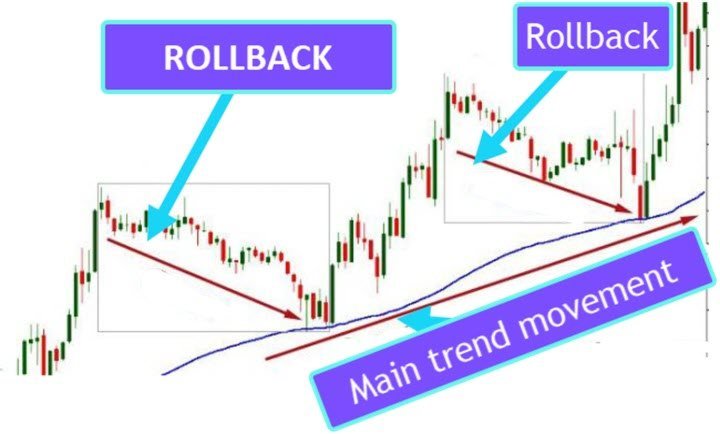
The EA tracks an open profitable position, fixes profit levels as price moves forward, waits for a controlled rollback, then closes a selected part of the volume and continues managing the rest of the trade.
This algorithm helps traders secure profit gradually instead of closing the whole position at once.
It is especially useful for trend trading, swing trading, and manual positions that need disciplined exit management.
| Exp Trail Partial Close FREE for MT4 | Full Description +PDF | How To Buy | How To Install | How to get Log Files | How To Test and Optimize | All products from Expforex |
- The Expert Advisor monitors an open position.
- When the price moves in the direction of profit, the EA fixes the first profit control level.
- If the market continues moving in profit, the rollback level is moved further.
- When the price rolls back by the specified distance, the EA closes part of the position volume.
- After partial closure, the EA sets the next profit level for the next management step.
- The EA can automatically move Stop Loss to breakeven and activate trailing logic.
- The process continues until the full trade management cycle is completed.
You can test the Expert Advisor in the MetaTrader 5 strategy tester and use it together with our EAPADPRO toolbar in visual mode!
Why traders use Exp Trail Partial Close PRO for MT5
- Protect profit gradually instead of closing the whole trade too early.
- Automate partial close during rollback after a profitable move.
- Reduce emotional decisions during active market movement.
- Keep a part of the position in the market for larger trends.
- Combine rollback logic, breakeven, and trailing stop in one EA.
- Suitable for manual trading, semi-automatic trading, and portfolio management.
Example
- Buy position opened with 2.00 lot.
- The market moves into profit and the first control level is fixed.
- The price rolls back and the EA closes 0.40 lot.
- The remaining volume stays open and the next level is fixed higher.
- The price continues moving in profit and another rollback happens.
- The EA closes the next 0.40 lot.
- The cycle repeats according to your settings.
- The final part of the position can be protected by breakeven or trailing stop.
Settings
StartPointToTrail - the number of points in profit required to activate the partial close algorithm.Example: StartPointToTrail = 200. As soon as the position reaches 200 points in profit, the EA fixes the first profit level.
RollbackPoint - the number of points the price must roll back from the fixed level to trigger a partial close.
Example: StartPointToTrail = 200, RollbackPoint = 100. When the price rolls back 100 points from the fixed profit level, part of the position is closed.
StepPointToFixLevel - the number of points used to set the next profit control level.
Example: StartPointToTrail = 200, RollbackPoint = 100, StepPointToFixLevel = 150. After a partial close, the next level will be fixed at 350 points.
DisableLockClose - disables the partial close algorithm if a lock of opposite positions with equal lot size is detected on the account.
Example: if you use the SafetyLock PRO Expert Advisor and the account has a safe lock, this option (DisableLockClose = true) prevents partial close from interfering with the lock logic.
PercentLotToClose - percentage of the initial position volume to close at each partial close step.
Example: if a position is opened with 2.0 lot and PercentLotToClose = 20%, the EA calculates 0.4 lot for each partial close.
FixLotToClose - fixed lot size to close at each step. If set to 0, the EA uses the value from PercentLotToClose.
CloseOnlyOnProfitZone - apply partial close only when the position is still in profit.
NumbersOfClose - number of partial closes allowed.
Example: NumbersOfClose = 3, PercentLotToClose = 20%, initial lot = 2.0. The EA closes 0.4 lot three times, and the remaining 0.8 lot stays open.
MovingInWLUSETRAIL - move Stop Loss to breakeven after the first partial close.
FixTrailingStopLevel - fixed Stop Loss distance for trailing after new control levels appear.
Example: FixTrailingStopLevel = 100. When the price breaks the next profit level, Stop Loss is moved to the current protected level with the specified distance.
Key advantages
Smart Profit Protection - secure floating profit step by step during strong market movement.Rollback-Based Partial Close - close part of the position only after a controlled pullback, not randomly.
Flexible Volume Management - use percentage-based or fixed-lot closing logic.
Breakeven and Trailing Stop Support - protect the remaining position automatically after each management step.
Optimized for MetaTrader 5 - built for MT5 position management and strategy testing.
Dear friends and users of our EAs, please add your ratings in the Reviews section.
All updates to our forex software are free!
Developer of forex tools: Expforex
Expforex, Vladislav, Vladon, Partial Close , Rollback