CloseIfProfitorLoss with Trailing

4.87

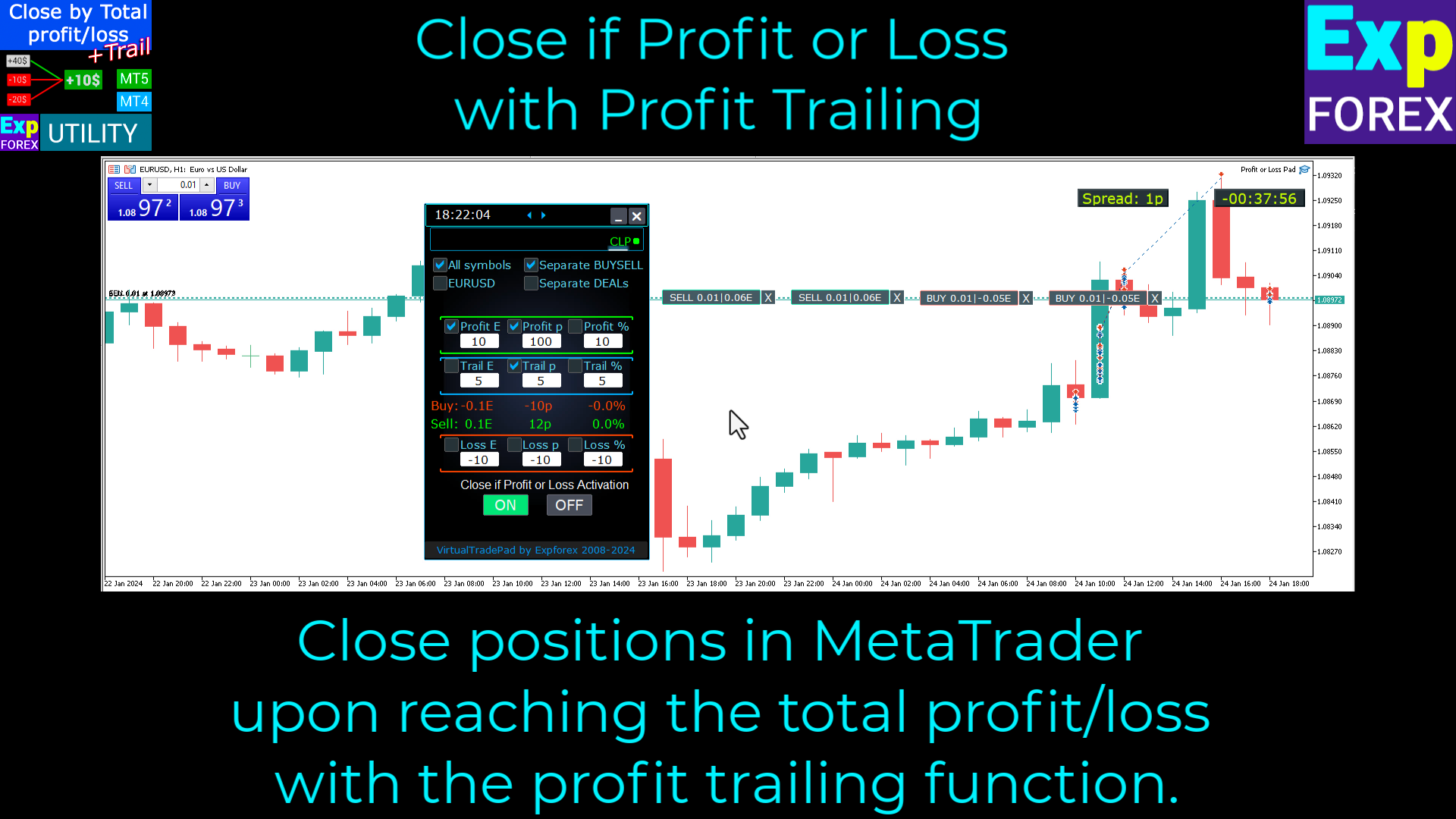
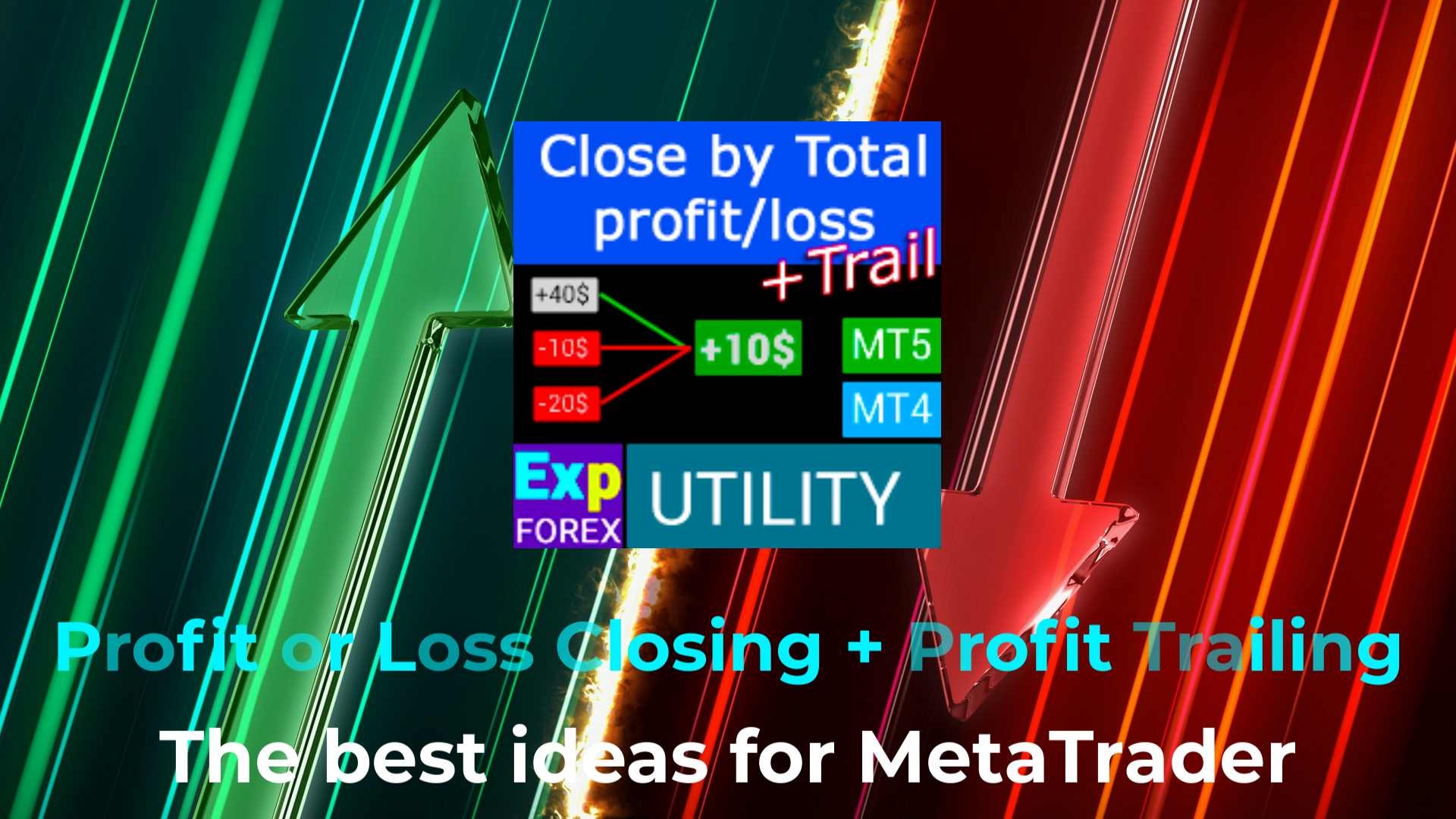
Closing positions in MetaTrader 4 upon reaching the total profit/loss with the profit trailing function.

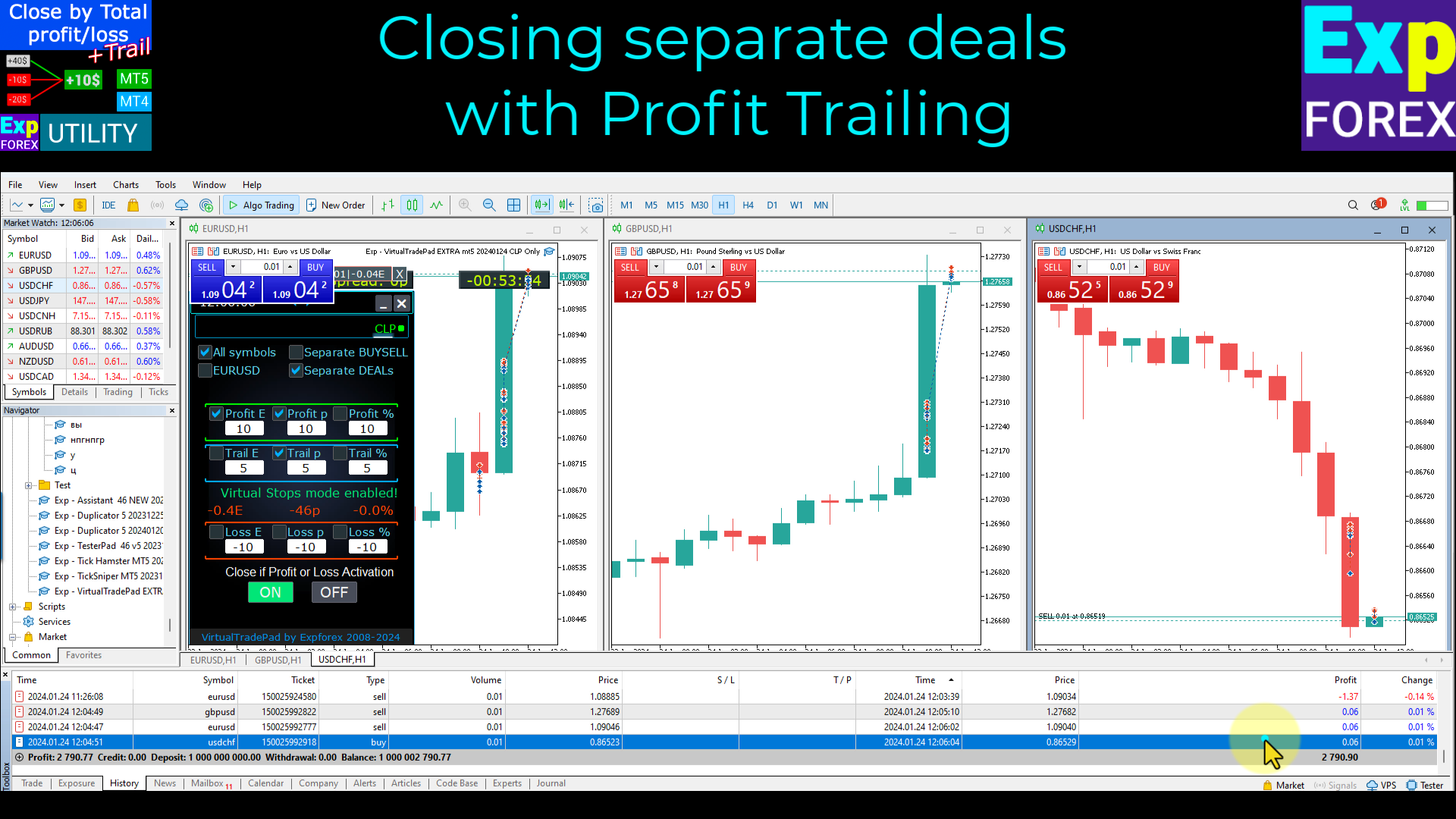
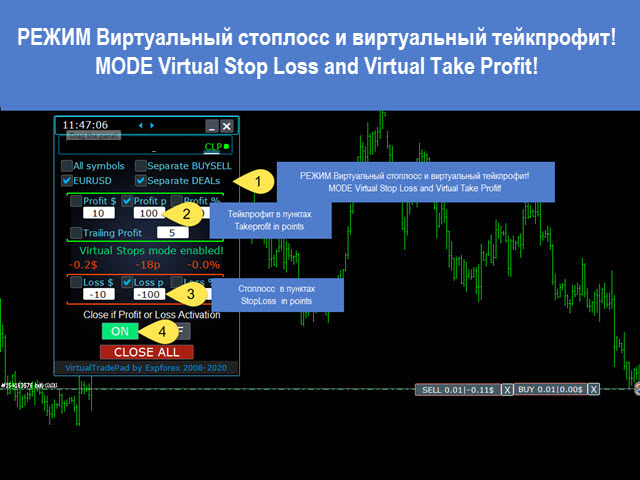
  • You can enable the Virtual stops (Separate Order),
  • Calculating and closing for BUY and SELL positions separately (Separate BUY SELL),
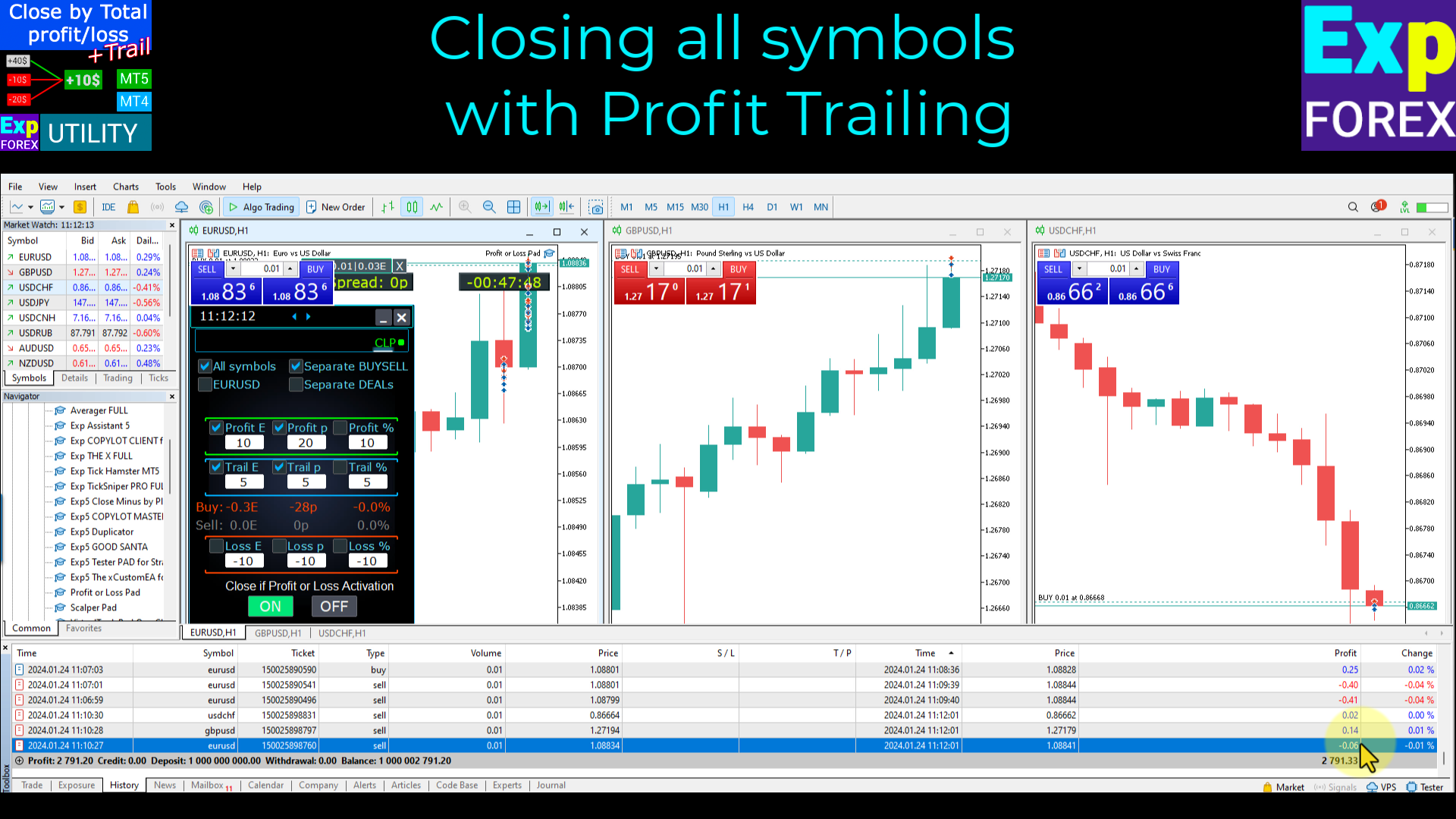
  • Closing and calculating all symbols or the current symbol only (All Symbols),
  • Enable trailing for profit (Trailing Profit)
  • Close on total profit and loss in deposit currency, points, or % of the balance.

The application is designed for use on any account together with any other EA or in combination with manual trading.

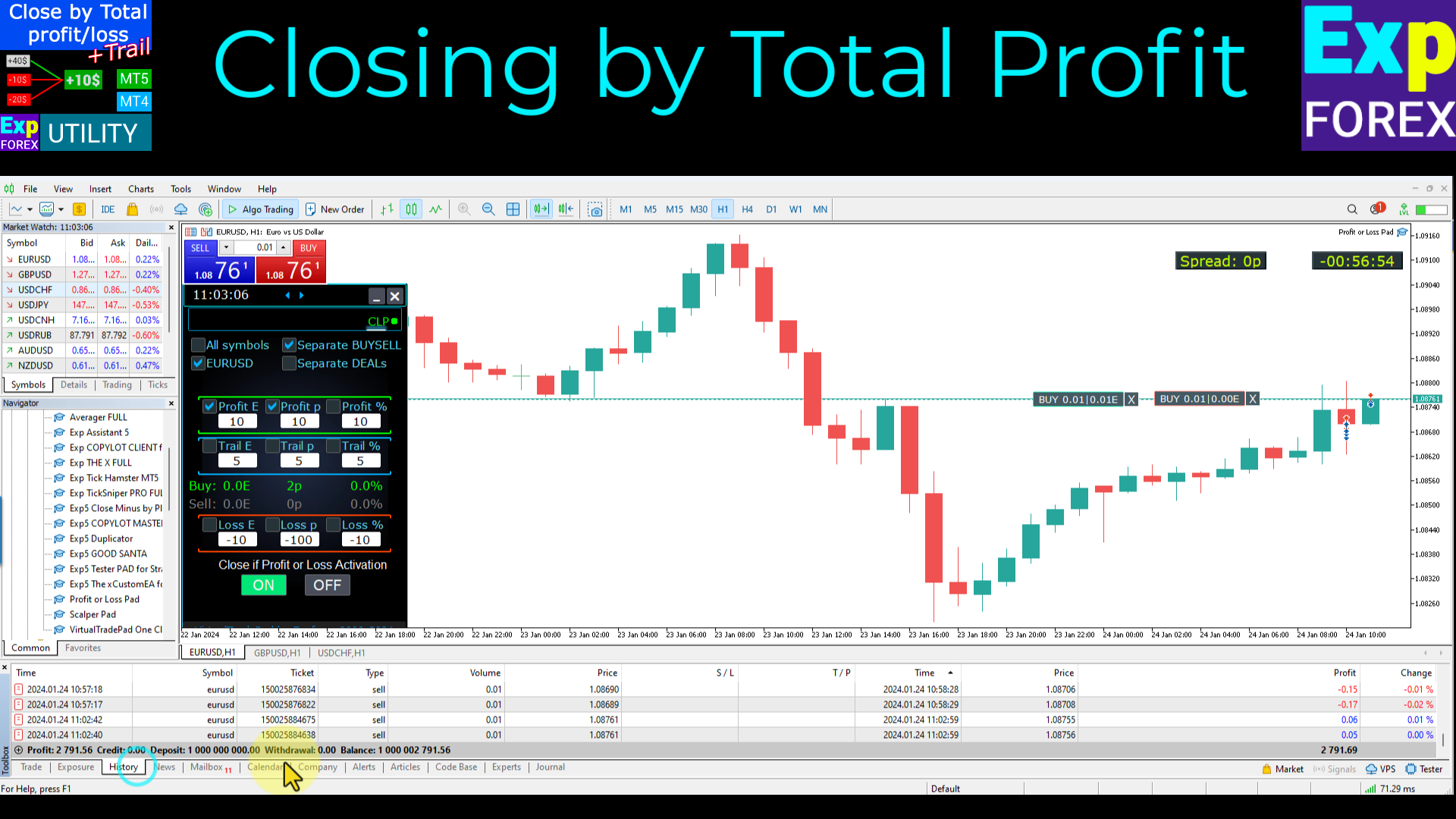
As soon as the total balance of trades on some pair or all pairs is greater than or equal to the value specified in the settings, all positions are closed and orders are deleted.

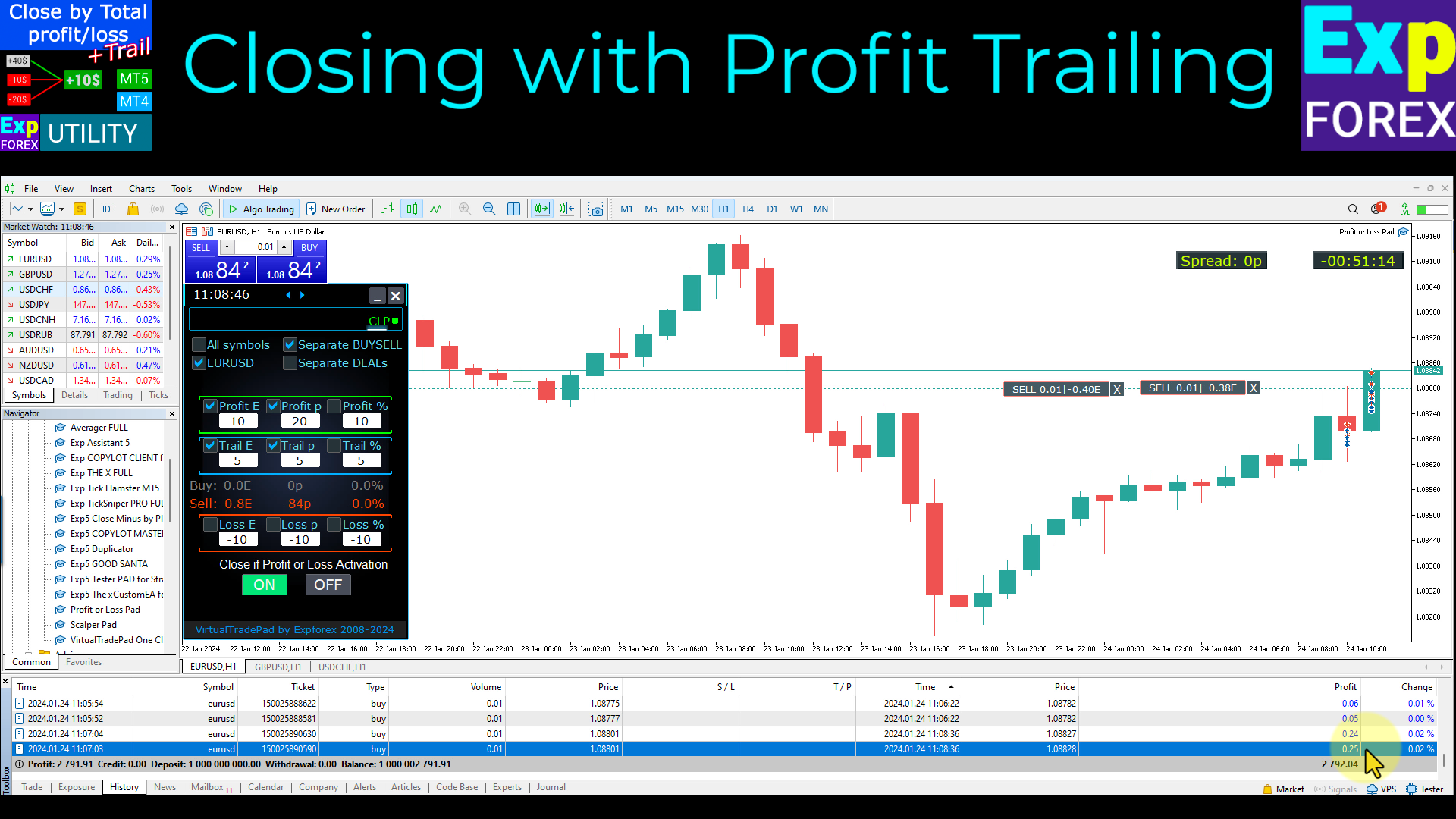
This version is not only capable of closing a position at the specified profit level, but can also trail profit for better results.

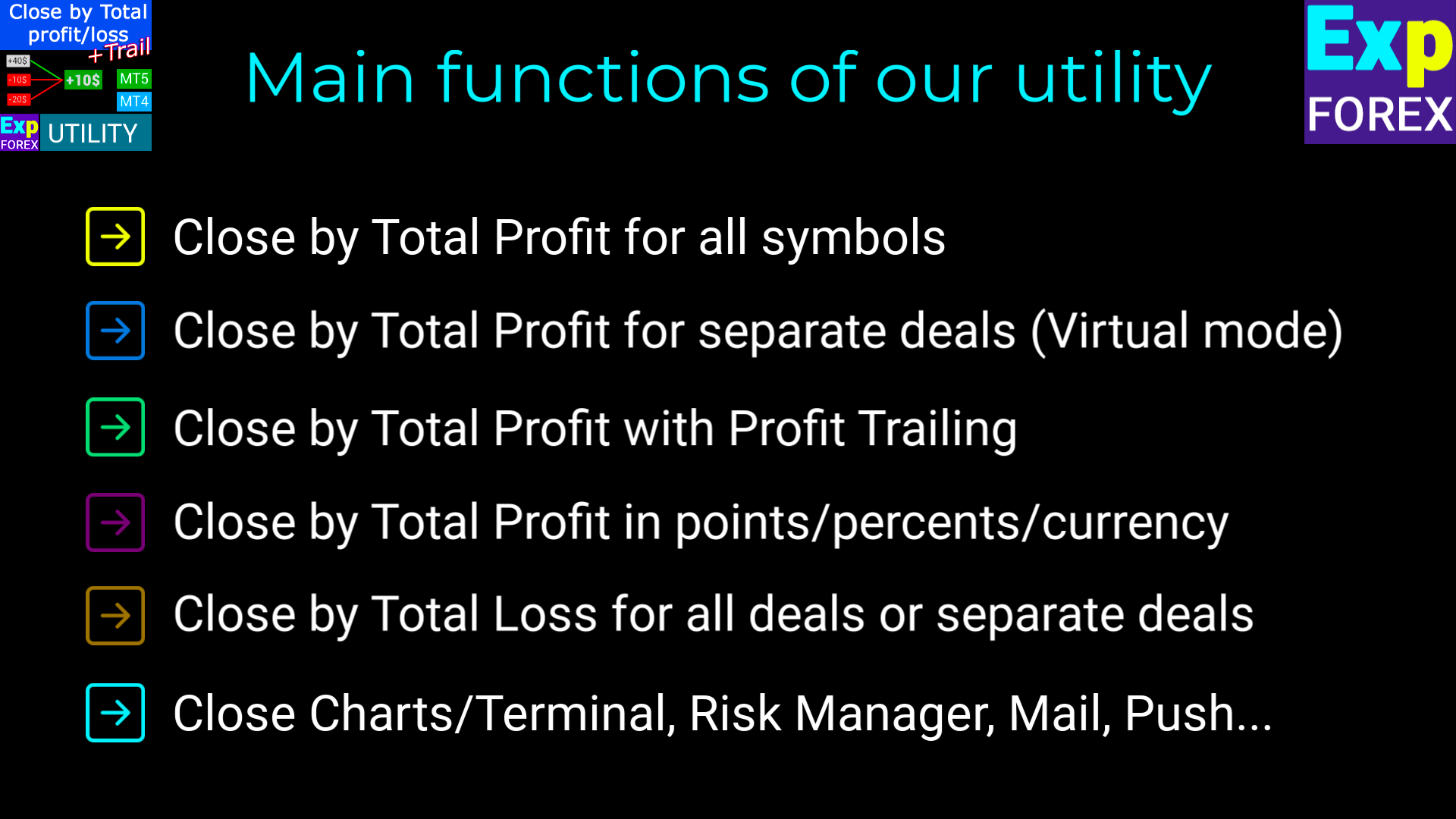
The main functions of our utility

Close by Total Profit for all symbols;

Close by Total Profit for separate deals (Virtual mode);

Close by Total Profit with Profit Trailing;

Close by Total Profit in points, percents, or currency;

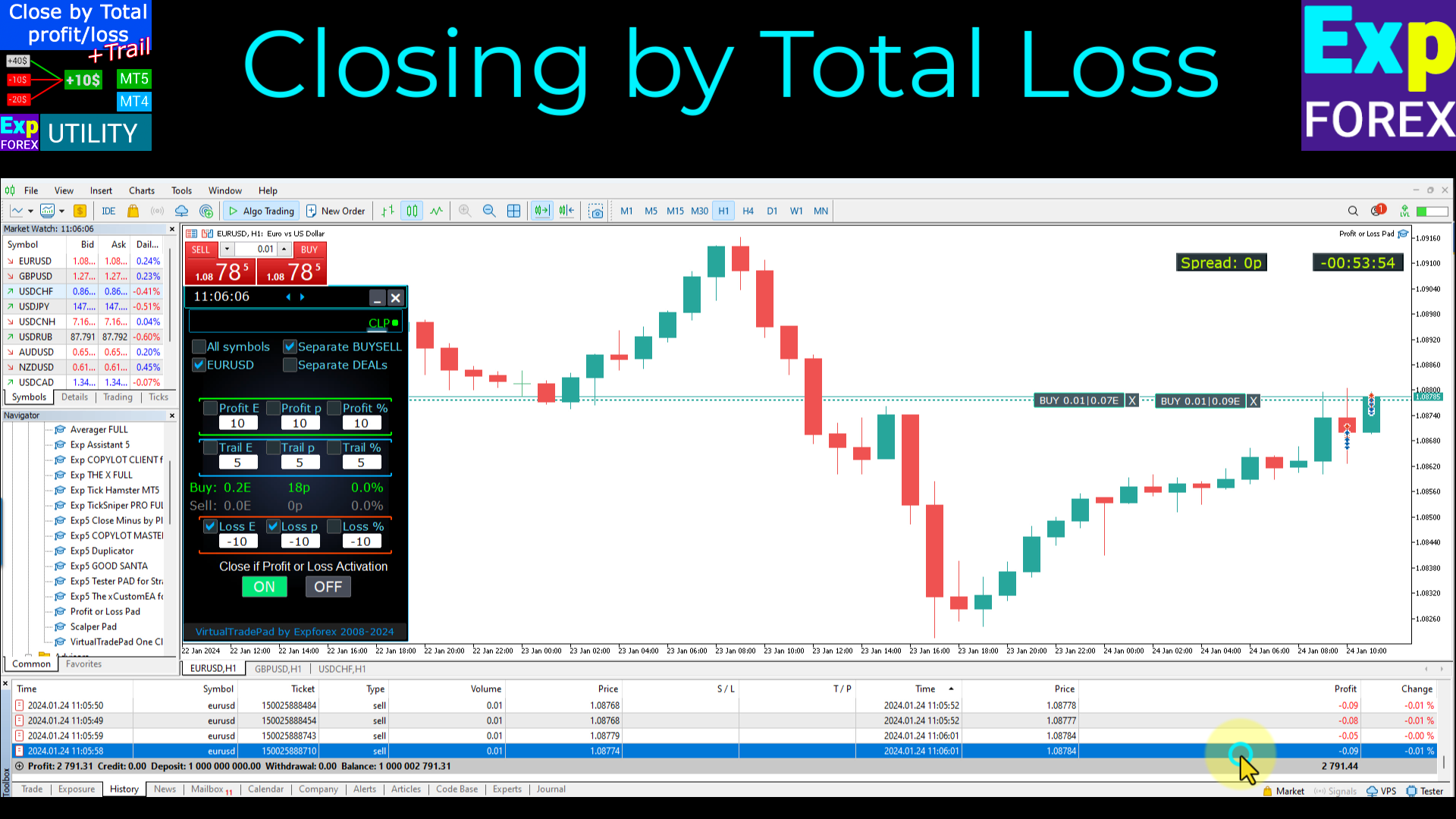
Close by Total Loss for all deals or separate deals;

Close Charts and Terminal after closing deals, Risk Manager, Mail with information about closing, Push notification, and so on.

Links

  • This pad EA is part of our "One Click Trading " - VirtualTradePad system. and contains only the CLP tab.

Usage

  1. Start the panel on your currency pair chart.
  2. On the panel select the option to close positions by all symbols or by the current symbol.
  3. To activate the options for selecting the close type, you need to specify a non-zero value for the corresponding parameters.
  4. Check the options you want to use for closing (Profit\Loss in pips\dollars\percent).
  5. Enable the Close if Profit or Loss button, it should become blue. It means that the Expert Advisor has started working.
  6. Once the profit or loss of your position crosses the set levels, the positions will be closed.
  7. The emergency button CLOSE ALL is intended for closing all positions instantly.

Management

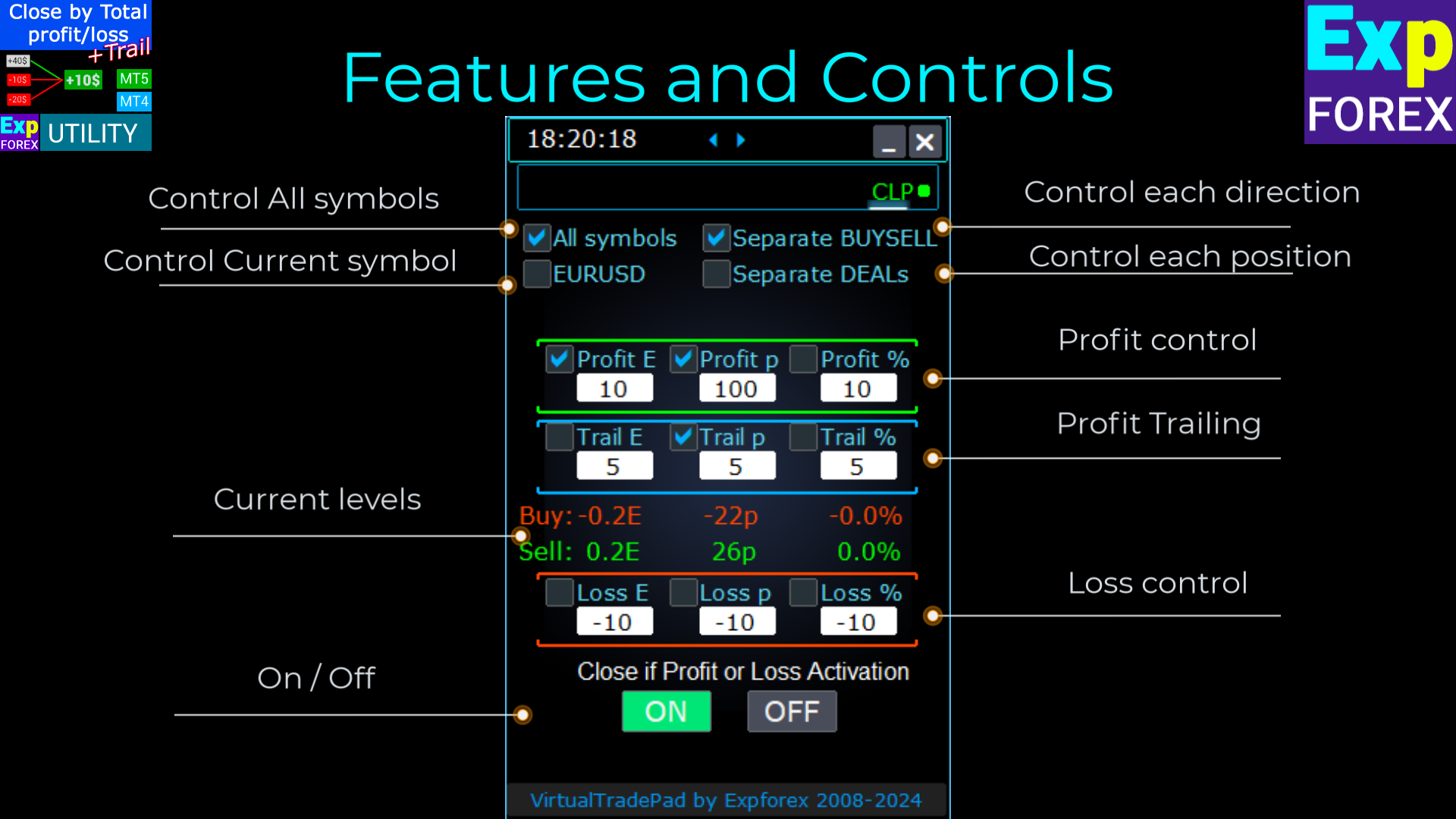
  1. All Symbols - enables closing for all symbols.
  2. XXXXXX only - only closing on the current pair the EA is running on.
  3. Separate BuySell - enables separate closing for BUY and SELL positions.
  4. Separate Order - separate closing for each separate position.
  5. Profit $ - enables\disables closing by a total profit in USD or deposit currency.
  6. Profit p - enables\disables closing by a total profit in pips.
  7. Profit % - enables\disables closing by a total profit in percent of current balance.
  8. Loss $ - enables\disables closing by a total loss in USD or deposit currency.
  9. Loss p - enables\disables closing by a total loss in pips.
  10. Loss % - enables\disables closing by a total loss in percent of current balance.
  11. Close if Profit or Loss ON / OFF - the function for closing by a total profit or loss is enabled/disabled

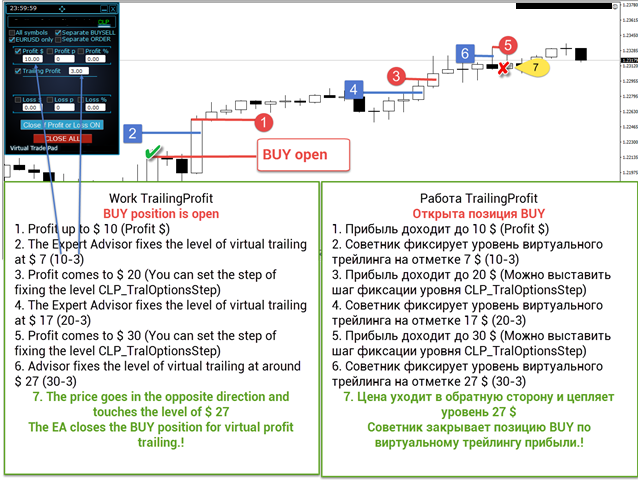
Trailing Profit

Trailing based on configured parameters.

This function enables trailing for profit (floating profit) at closing.
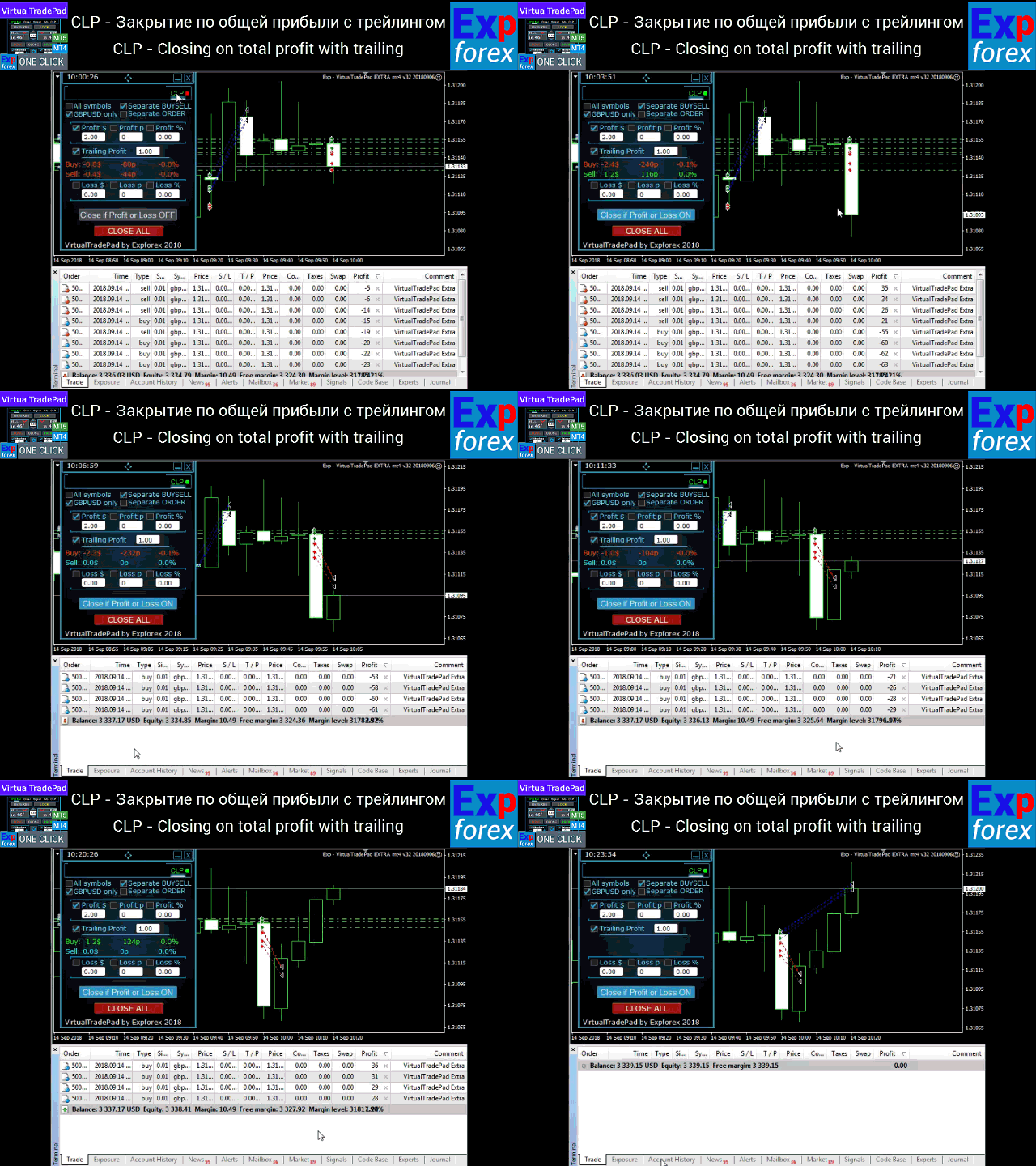
In this case, the profit is not fixed but is closed with a trailing of the specified value. As soon as the profit reaches the specified value, the Expert Advisor saves the current profit level and starts trailing the profit.

Example:

  • If Profit $ is set to 10 and TrailingProfit is set to 5, the Trailing Stop will be set at 5 dollars.
  • The Trailing Stop will come into play when the Expert Advisor passes the 10 dollar line and starts moving following the profit.
  • When the total profit falls below the last fixed level, TrailingProfit, the Expert Advisor will perform forced closing of all positions.

External Variables and Settings

Language: Select interface language (Spanish, Portuguese (Brazil), German, Chinese, Japanese). Defaults to terminal language.

MagicNumber (int): Assigns a unique magic number to identify positions/orders opened by this EA. 0 means no magic number.

UseAllMagicFromAllAccount (bool): true: Monitors all positions for the current symbol across the account. false: Only monitors positions with specified MagicNumber(s).

Show_Future_BE_TP_SL: Displays break-even, take profit, and stop loss levels on the current chart based on profit/loss settings. Only for the current symbol and when separate orders mode is off.

CLP_TralOptionsStep (double): Defines the step size for adjusting the trailing profit level (in points, currency, or percent).

Use_Commission_in_CLP (bool): Includes commission in profit/loss calculations when closing positions.

AutoCorrect_LevelCLP (bool): Automatically corrects profit/loss input values to ensure valid entries.

CLP_DeleteStopOrders (bool): Deletes pending orders when closing positions based on total profit or loss.

Use_Lots_in_CLP_Points (bool): Considers lot size when calculating profit/loss points, useful for hedge accounts with varying lot sizes.

CPL_CloseAllCharts_per_CloseAllDeals: Closes all charts with the EA before closing positions, saving chart templates (MT5 only).

CPL_CloseTerminalAfterClose (bool): Closes the terminal after all positions are closed.

ShowCloseAllButton (bool): Displays a "Close All" button on the panel to immediately close all transactions.

ClosingCurrentTicketOnly (bool): Closes only the current list of tickets, ignoring new positions opened by other EAs.

ClosebyFIFO (bool): Closes positions using FIFO (First In, First Out) order.

VPS_CLP_Activation (bool): Activates CLP settings for VPS, allowing external variable management.

VPS_CLP_Parameters: Various settings to manage profit, loss, and trailing options specifically for VPS environments.

LimitFor: Time frame for checking open/closed deals to limit profit/loss.

LimitForLosses & LimitForProfits: Sets loss and profit limits that trigger alerts.

LimitForLotsDeals & LimitForCountDeals: Limits on lot sizes and number of deals that trigger alerts.


    #tags Expforex, Vladon, Manual Trade, Trade Panel, Panel Trade, Trade Utility, Self Test, Take Profit, Tool Management, Management Tool, Forex helper, Forex Trade, Training virtual trade, Quick Tool, Manual Tester, Manual Backtest, TesterPad, Tradepad, Virtual Trade Pad, Торговая панель, Trader Assistant, CLP, CloseifProfitorLoss, Close Profit, Total Profit, Close if Profit or Loss, Trailing Profit, Smart Trailing Stop


    Reviews 37
    Shengzu Zhong
    3255
    Shengzu Zhong 2025.11.04 09:34 
     

    it is okay, not bad!

    Brandon Thames
    263
    Brandon Thames 2024.07.19 00:12 
     

    Works as intended.

    Max
    1619
    Max 2023.12.27 22:01 
     

    Amazing product, works very well and neat, what I was looking for and also have other his other products like full trade pad, good producer, many detailed functions buttons on chart and also in settings!

    Recommended products
    Order Multiplier
    Benjamin Zaufall
    3.5 (2)
    This experts helps you with increasing your signal volume. Everytime the signal opens a trade, the experts creats a specific amount of copies of this trade. Evertime the signal closes a trade, the expert closes all the copies of the singal trade. Input parameters: - amount_of_copies: The amount of copies the expert should create - interval_in_seconds: How often the expert should look for new orders to copy or closed orders, to close copies - lot_size_of_copies: The lot size of the new copies
    Copier of transactions via   Telegram       channel. Will help you instantly publish your trade to the   Telegram   channel or copy transactions from   Telegram       channel. The utility can work in two directions: receiving signals in MT4 and transmitting signals to   Telegram   . No more missed deals No more panic Capital Management Ease of use DEMO  https://www.mql5.com/en/market/product/54082 You can use it for: copying your own transactions via   Telegram       channel (via the Internet
    Manage trades
    Makarii Gubaydullin
    Management of active and pending orders: automatic breakeven, TP/SL changes, partial / full closing, visual display of levels on the chart Check out my #1  Utility : 66+ features, including PRO trade management   |    Contact me  if you have any questions 1) Main window: to manage orders, you can set a specific symbol [Symbol], or select all symbols [ALL] Close all active positions [ALL] Close all profitable trades [profits] Close all loosing trades [losses] Close all long trades (for buy) [long
    Copier->Convenient and fast interface interaction, users can use it right away   ->>>> Recommended to use on Windows computers or VPS Windows Features: Diversified and personalized copy trading settings: 1. Different lot modes can be set for different signal sources 2. Different signal sources can be set for forward and reverse copy trading 3. Signals can be set with comments 4. Whether to calibrate the lot according to the contract lot Diversified and personalized copy order settings 2: 1. Dif
    Fixer
    Dimitri Nepomniachtchi
    Track your orders, build a unified equity across selected symbols, magic numbers, terminals, and trading accounts. Closes orders when specified conditions are met. Creates new portfolios and adapts to already running portfolios according to your conditions. In short, take a look — it is worth it. If you have questions, write. If you are not sure about the settings, ask, I will help. Virtual SL, TP, Trailing.  * * * * It may seem like nothing special, but in practice they often help more than
    Trendline EA
    Carlos Oliveira
    4.5 (10)
    Trendline EA MT4 Trendline EA MT4 is a semi-automated Expert Advisor for MetaTrader 4 designed to execute trading actions or alerts based on trendlines drawn by the user. MetaTrader 4 does not provide native functionality to place or manage trades directly from trendlines. This Expert Advisor extends standard platform behavior by monitoring user-defined trendlines and executing predefined actions when price interacts with them. The Expert Advisor does not define or apply any trading strategy. Al
    One Click Trader is a tool designed for MetaTrader 4 platform, which enables you to take your trading to the next level. It enables you to open, manage and close your trades in simple an efficient way by just one click of your mouse button. Up arrow minimizes the OCT panel Down arrow maximizes the OCT panel Right arrow displays the next panel with additional features Left arrow hides the panel with additional features Red SELL button enables you to open short market orders Red SELL STOP button e
    本エキスパートアドバイザ(EA)は、以下の条件をすべて満たした注文が決済された場合に、自動的に同一内容の注文を再設定します。 対象となるのは指値注文または逆指値注文で、必ずテイクプロフィット(TP)とストップロス(SL)が設定されているものです。 そして、その注文がTPまたはSLによって決済された際、同じロット数・価格・TP・SL・有効期限などの条件を引き継いだ注文を自動で再発注します。 これにより、一度設定した戦略を継続的に適用でき、裁量判断なしに取引を繰り返すことが可能となります。 ただし、ブローカーによっては再注文時にスリッページが発生する場合がありますので、必ずご利用環境をご確認の上、自己責任でお使いください。
    Slow Pips OCO Trade Panel is an advanced trading panel for placing pending orders. Traders can use this panel to place two pending orders at once. One pending order would be of buy entry type and the other one would be of sell entry type. Both orders will have Stop Loss and Take Profit parameters. Since two pending orders are placed at the same time, the pending order for which the price hits first gets converted into a market order and the other pending order gets deleted (one order cancels the
    BreakEven Grid Utility for MT4 BreakEven Grid is a powerful utility for manual trade management on the MetaTrader 4 platform. It provides a convenient on-screen panel with buttons to help you manage your open positions with a single click.  Features: Set BE+Profit: Automatically sets Take Profit to breakeven + desired profit in pips or money. Close BUY/SELL: Instantly close all Buy or Sell orders for the current symbol. Close +$/-$/Old/New: Close only profitable, losing, oldest or newest tra
    BuyLimit_SellLimit_Grid script opens BuyLimit and SellLimit pending orders. You just need to drop this script on the chart with a desired currency pair.  Before placing all pending orders, the input window is opened allowing you to modify all input parameters: LongPos - if TRUE, BuyLimit order is opened. ShortPos - if TRUE, SellLimit order is opened. InitLot - initial lot. LotCoeff - if 1, all pending orders will have the same lot size. InitStep - difference between two consecutive orders in poi
    Grid Trading Manager EA
    Ibrahim Mohamed Ibrahim Mohamed Elsahafy
    Professional grid management EA with 3-tab GUI, progressive placement, 5 take profit levels (TP1-TP5), basket breakeven protection, and advanced trailing stop. Automatically manages manual trades with intelligent limit order distribution. --- ### KEY FEATURES **3-Tab Interactive GUI** - STATUS: Real-time monitoring, profit tracking, trailing targets - SETTINGS: Runtime configuration without EA restart - TAKE PROFIT: Configure 5 sequential TP levels **Progressive Order Placement** - Wave-
    FREE
    SwiftEdge Scalper Professional Tick Scalping EA with Full Manual Control Scalping demands split-second decisions, precise risk management, and seamless order execution. Managing breakeven calculations, trailing stops, and multiple positions while watching price action is overwhelming without the right tools. SwiftEdge Scalper is your professional trading assistant designed for active scalpers and day traders. Execute trades with one click or keyboard shortcut, while the EA handles breakeven, tra
    A powerful assistant for manual trading. Execute a deal with one click and manage the trade volume, stop loss and take profit, according to your trading strategy, without being distracted from the chart. The product can also visually preview your levels of entry into the market, stop loss and take profit before placing an order. Advantages easy and intuitive interface the control panel in real time 3 modes of setting the order volume 6 stop loss setting modes 5 profit take setting modes calcula
    RiskManager
    Roman Zhitnik
    5 (4)
    The Expert Advisor is a risk manager helping users to control their trading. In the settings, it is possible to specify the parameters at which the risk manager force closes the opened trades and closes the terminal as well, if it is needed to prevent opening trades on emotions, which do not correspond to the trading strategy. Risk Manager settings Check limit to close - check the equity limit Limit to close (account currency)   - equity limit that is checked when  Check limit to close is activ
    Pro Manager EA
    Konanani Mushiyana
    Pro Manager EA What is Pro Manager EA? The Advanced Pro Manager EA is a professional trade management Expert Advisor for MetaTrader 4 that  does not open trades  but provides comprehensive management of your existing open positions. Key Features Multi-Instrument Management No need to load EA on multiple charts, works on just one Manages all trades across all currency pairs from a single chart         2.  Multiple Exit Methods: Trailing Stop Loss - With start trigger and following distance Profi
    Virtual Collider Manual   is a trading assistant with a built-in panel for manual trading. It automatically moves a position opened by a trader in profit using innovative adaptive grid algorithm of averaging and adaptive pyramiding Know-how of the grid algorithm of averaging and pyramiding of the   Virtual Collider Manual   trading robot is based on fully automatic adaptation of all characteristics of dynamically build order grid and pyramid with actual price movement with no need for adjusting
    MultiStopOrder
    Agus Wahyu Pratomo
    MultiStopOrder Tis Script will help us to put multiple stop order with single one click. This is a script not an EA Will place BUYSTOP and SELLSTOP with single click Main Feature 1. Put Multiple Stop Order 2. Specify how much stop orders will make 3. Set distance from current price 4. Set distance for each stop order 5. Set Take Profit dan Stop Loss  6. Use it on MT4 7. Set lot size with minmum 0.01 lots 8. Use with single one clicks
    Remote control phone
    Makarii Gubaydullin
    Close   all   trades   at   once ,   managing   directly   from   your   mobile  MT4  app . This  utility   can   close   9   different   categories   of   trades. To   activate   the   action ,   you  just  need   to   place   a   pending   order   at   a   predetermined   price   (can be done  remotely   via   a   mobile  MT 4 app ). After   that , the   utility   will   detect   the   order   and   close   all   necessary   trades. This   way   you   can   manage   a   group   of   trades  
    AZ Trade Recovery Assistant MT4   combines manual trading flexibility with intelligent automated management.This advanced on-chart panel isn’t just for trade execution — it’s a complete trade management assistant. You can open or close positions instantly, adjust lot size, manage trailing stops, and modify Take Profit or Stop Loss — all directly from the panel. It’s built for traders who want full control of their trades with smart automation running in the background. What truly makes this assi

    DepoControl
    Evgeniy Zhdan
    DepoControl – Full Control Over the Deposit Closers   Expert Advisor controls the overall account status and closes ALL market orders on the account when certain conditions occur. The trading robot closes ALL orders on the account in the following cases (by profit): Close ALL orders by a total profit on the account   in monetary terms . For example, suppose that the settings specify that   positions should be closed when profit of 100 is reached. In this case, the Expert Advisor closes all mark
    ================================ ENGLISH MANUAL ================================ Product Name: One-Click Close Utility v9.4 Developer: Gemini Partner Version: 9.40 Platform: MetaTrader 4 Type: Expert Advisor I. PRODUCT OVERVIEW --------------- One-Click Close is a professional order management utility designed for  MetaTrader 4 platform. It provides rapid batch closing operations through  intuitive button interface, integrated with intelligent risk management  system. Suitable for both manual
    HotKeys MT4
    Alexey Valeev
    3 (1)
    This utility provides the ability to use hot keys in manual trading instantly responding to the current market situation. You can assign hot keys to open/close positions by their type, close all positions on the current chart and remove all orders on the current chart. You can also assign hot keys for five predefined trade volumes and switch between them if necessary with no need to change the volume manually from time to time. It is also possible to set the auto calculation of a trade volume in
    This tool will perform Trailing stop loss and Break even management for orders. Helps you limit or reduce the time spend watching orders on the screen, especially when you need to go to sleep. Just add this EA to 1 chart, you can manage all pairs. You can filter orders by comment, magic number, symbol, and order ticket number. When Breakeven it can add shift/offset pips (to cover the commission...). You can try in strategy tester before purchase. The EA will add Buy and Sell alternately, so yo
    Manual Trade Panel EA MT4
    Juvenille Emperor Limited
    5 (5)
    Manual Trade Panel EA MT4 is the most straightforward and easy to use trade panel you can find for MT4. It has all its options and functions in one surface, without the need of opening additional windows or panels. It is an order management, risk calculator, partial closure and account protector utility all in one extremely convenient to use interface! By using Manual Trade Panel EA MT4 you can trade many times faster and more accurate than traditional manual trading methods and that gives you m
    Exp Swing
    Vladislav Andruschenko
    4.5 (58)
    It uses the model of a famous strategy called Swinger (Pendulum, Cheburashka) - alternate placing of pending orders with increased lot. The strategy lies in placing two opposite pending orders. When the price moves in a certain direction, one pending order is triggered, while the lot size of the other order is increased. The EA provides three types of opening pending orders (TypeofTrade) Auto-opening after placement (Instant opening AutoTrade) Opening and management after manual opening (Manual
    FREE
    The "Binary Lab Simulator" is a tool designed for practicing and verifying trading strategies. This tool operates 24/7, including weekends and non-trading hours, and supports various expiration periods such as 30 seconds, 1 minute, and 3 minutes, creating an environment similar to real trading. It is compatible with external tools for analyzing entry results. Multiple templates can be saved easily, allowing for seamless testing from the online environment to the simulator. "Binary Lab Simulator"
    Open by Clik
    Dariusz Grywaczewski
    Open by Clik is a tool that allows you to open positions with two mouse clicks. The place of the click and the direction of clicking decide what position will be opened. Opening of positions is quick and intuitive. If the second click is above the first click, opened are positions Long. If the second click is belowe the first click, opened are positions Short. By clicking in the chart area, opened are Market Order (BUY and SELL). By clicking in the area in front of the chart, opened are Pendin
    Expert RSI PRO
    Aleksandr Shtoyko
    Возможности : 1) Утилита, при поступлении сигнала от индикатора RSI, открывает позицию, и далее следит за этой позицией, если убыток, открывает новые позиции. Пока серия не закрыта все сигналы от индикатора игнорируются. 2) Трейдер открывает первую сделку в ручном режиме,  а далее утилита уже следит за ситуацией, если был убыток, то открывает новые ордера. 3) Серия состоит из 22 - х позиций, на каждую позицию лот, TP и SL задаются в настройках утилиты. В случае если первая сделка была закрыта по
    Buyers of this product also purchase
    Local Trade Copier EA MT4
    Juvenille Emperor Limited
    4.96 (106)
    Experience exceptionally  fast trade copying with the Local Trade Copier EA MT4 . With its easy 1-minute setup, this trade copier allows you to copy trades between multiple MetaTrader terminals on the same Windows computer or Windows VPS with lightning-fast copying speeds of under 0.5 seconds. Whether you're a beginner or a professional trader, the Local Trade Copier EA MT4 offers a wide range of options to customize it to your specific needs. It's the ultimate solution for anyone looking to inc
    Trade Assistant MT4
    Evgeniy Kravchenko
    4.42 (193)
    It helps to calculate the risk per trade, the easy installation of a new order, order management with partial closing functions, trailing stop of 7 types and other useful functions. Additional materials and instructions Installation instructions   -   Application instructions   -   Trial version of the application for a demo account Line function -   shows on the chart the Opening line, Stop Loss, Take Profit. With this function it is easy to set a new order and see its additional characteris
    Forex Trade Manager MT4
    InvestSoft
    4.98 (429)
    Welcome to Trade Manager MT4 - the ultimate   risk management tool   designed to make trading more intuitive, precise, and efficient. This is not just an order placement tool; it's a comprehensive solution for seamless trade planning, position management, and enhanced control over risk. Whether you're a beginner taking your first steps, an advanced trader, or a scalper needing rapid executions, Trade Manager MT4 adapts to your needs, offering flexibility across all markets, from forex and indice
    The product will copy all telegram signal to MT4   ( which you are member  ) , also it can work as remote copier.  Easy to set up, copy order instant, can work with almost signal formats, image signal, s upport to translate other language to English Work with all type of channel or group, even channel have "Restrict Saving Content", work with  multi channel, multi MT5 Work as remote copier: with signal have ticket number, it will copy exactly via ticket number. Support to backtest signal. How to
    Copy Cat More Trade Copier MT4 is not just a simple local trade copier; it is a complete risk management and execution framework designed for today’s trading challenges. From prop firm challenges to personal portfolio management, it adapts to every situation with its blend of robust execution, capital protection, flexible configuration, and advanced trade handling. The copier works in both   Master (sender) and Slave (receiver)   modes, with real-time synchronization of market and pending orders
    Exp COPYLOT CLIENT for MT4
    Vladislav Andruschenko
    4.69 (65)
    Trade copier for MetaTrader 4.   It copies forex trades, positions, and orders from any accounts. It is one of the best trade copiers   MT4-MT4, MT5 - MT4   for the   COPYLOT MT4   version (or   MT4 - MT5 MT5 - MT5   for the   COPYLOT MT5   version).        MT5 version Full Description +DEMO +PDF   How To Buy    How To Install     How to get Log Files    How To Test and Optimize    All products from Expforex Copier  version for      MetaTrader 5  terminal ( МТ5 - МТ5, МТ4 - МТ5 )-  Copylot Cli
    Comprehensive on chart trade panel with the unique ability to be controllable from mobile as well. Plus has a library of downloadable configuration, e.g. exit rules, extra panel buttons, pending order setup and more. Please see our product video. Works with all symbols not just currency pairs. Features On chart panel plus controllable from free app for Windows, iPhone and Android Built-in script engine with library of downloadable configuration, e.g. add 'Close All Trades in Profit' button, exit
    Telegram to MT4 Coppy
    Sergey Batudayev
    3.75 (8)
    Telegram to MT4: The Ultimate Signal Copying Solution Streamline your trading with Telegram to MT4 , the cutting-edge utility designed to copy trading signals directly from Telegram channels and chats to your MetaTrader 4 platform—without the need for DLLs. This robust solution ensures seamless execution of signals with unparalleled precision and customization options, saving you time and boosting your efficiency. [ Instructions and DEMO ] [ FAQ ] Key Features Direct Telegram API Integration Aut
    Trading History MT4
    Siarhei Vashchylka
    5 (9)
    Trading History - A program for trading and money management on the history of quotes in stratagy tester. It can work with pending and immediate orders, and is equipped with trailing stop, breakeven and take profit functions. Very good for training and testing different strategies. Manual (Be sure to read before purchasing) Advantages 1. Allows you to test any trading strategy in the shortest possible time 2. An excellent simulator for trading training. You can gain months of trading experience
    Trade Dashboard MT4
    Fatemeh Ameri
    4.96 (53)
    Tired of complex order placement and manual calculations? Trade Dashboard is your solution. With its user-friendly interface, placing orders becomes effortless, by a single click, you can open trades, set stop loss and take profit levels, manage trade lot size, and calculate risk to reward ratios, allowing you to only focus on your strategy. Say goodbye to manual calculations and streamline your trading experience with Trade Dashboard. Download  Demo Version  right now. You can find  Details of
    Copy Master mt4
    Evgenii Aksenov
    5 (5)
    This utility will allow you to copy any trades from one terminal with the Master setting to other terminals with the Slave setting At the same time, you can choose which pairs to copy, set the size of the copied order by several parameters. Set the limit losses by DrawDown or copy only profitable trades You can copy deals from MT4/MT5 to MT4/MT5 other brokers Now it will not be difficult to copy the signals of any Expert Advisor working in MT4 to the MT5 terminal or back Use Copy Master to copy
    MetaQuant Pro
    Mohamed Hassan
    MetaQuant PRO is a professional account analytics dashboard for MetaTrader 4, built to give traders a clear, visual, and data-driven view of their trading performance directly inside MT4. It converts your account history into clean metrics, charts, and insights without relying on external websites or spreadsheets. Main features • Overview (full account) • Daily (today only) • Monthly (current month) • All-Time (entire history) Visual performance analysis • Smooth equity curve from real closed t
    MT4 to Telegram Signal Provider   turns your trading account into a signal provider. Every trade action, whether manual, by EA or from your phone, is instantly sent as a message to Telegram. You can fully customize the format or use a ready-made template for quick setup. [ Demo ] [ Manual ] [ MT5 Version ] [ Discord Version ]  New: [ Telegram To MT5 ] Setup A step by step user guide is available. Key Features Ability to customize order details sent to subscribers You can create a tiered subs
    My Trade History PRO
    Bernhard Schweigert
    5 (3)
    CURRENTLY 20% OFF !! Best Solution for any Newbie or Expert Trader! Review your trades is the first step to a successful trader. Successful traders have a habit of regularly reviewing their trading performance. This tool will help you to do just that. The review process will be most effective with this tool to track your trading. Analyse your manual trades or the trades of your EA. Use the 3 general view. To switch between just click on the button. Closed Trades Open Trades Close+Open Trades Al
    TradePanel MT4
    Alfiya Fazylova
    4.85 (91)
    Trade Panel is a multifunctional trading assistant. The application contains more than 50 trading functions for manual trading and allows you to automate most trading operations. Attention, the application does not work in the strategy tester. Before purchasing, you can test the demo version on a demo account. The demo version is here . Full instructions here . Trade. Allows you to perform trading operations in one click: Open pending orders and positions with automatic risk calculation. Open mu
    Upgrade Your Manual Trading: Enhanced Precision and Control with Trade Manager Assistant Learn how to maximize the benefits of the trade panel by exploring comprehensive setup guides in our complimentary demo version. For further insights, visit this resource: https://www.mql5.com/en/blogs/post/758625 . Manual trading demands careful analysis and quick decisions. However, challenges such as slow execution, poor risk management, and improper configurations often lead to reduced earnings and incre
    Exp SafetyLock PRO
    Vladislav Andruschenko
    4.57 (28)
    SAFETYLOCK is a powerful tool that enables traders to shield their positions from sudden market reversals by automatically placing an opposite order for any open trade. When a trader or an Expert Advisor (EA) initiates a position, SAFETYLOCK immediately sets a corresponding pending order (Buy Stop or Sell Stop). If the original position starts incurring losses, the pending order is triggered, creating a protective lock that helps mitigate risk. This Expert Advisor offers flexibility, allowing y
    TPSpro Trade PRO
    Roman Podpora
    4.67 (6)
    A tool that can instantly calculate position size or risk based on a given stop-loss level is critical for both professional and novice traders. The TRADE PRO trading utility provides fast and accurate calculations, helping you make decisions in time-sensitive and volatile market conditions. MT5 VERSION    /    Additional installation materials Main functions: Original. Simple. Effective. A unique and convenient way to open the main trading panel: Hover your mouse over the right side of the ch
    News Loader Pro
    Vu Trung Kien
    4.2 (5)
    News Loader Pro is a tool that automatically updates every economic news in real time with detailed information from several online data sources. It uses the unique technology to load data with full details from popular Forex websites. An alert will be sent to your mobile/email before an upcoming news release. Moreover, it also marks the news release points on the chart for further review and research. In Forex trading, news is one of the important factors that move the market. Sticking with new
    EasyInsight AIO MT4
    Alain Verleyen
    4 (2)
    EASY Insight AIO – All-In-One Power for AI-Driven Trading Want to skip the setup and start scanning the entire market – Forex, Gold, Crypto, Indices, and even Stocks – in seconds? EASY Insight AIO is the complete plug-and-play solution for AI-powered trade analysis. It includes all core Stein Investments indicators built-in and automatically exports clean, structured CSV files – perfect for backtesting, AI prompts, and live market decision-making. No need to install or configure indicators manu
    PnL Calendar MT4
    Keni Chetankumar Gajanan -
    PnL Calendar ... analyse to profit PnL Calendar transforms your trading history into a clear calendar view, helping you spot profitable days, monitor risk in real time, and unify accounts with the new Multi‑Broker data export feature. Core Features Calendar Panel: Profit breakdowns by day, week, month, and year Account Panel: Balance, equity, margin alerts, multi‑timeframe summaries, overnight gap adjustments Risk Dashboard: Leverage, drawdown, profit factor, consistency ratio, holding time, ri
    Unlimited Trade Copier Pro is a tool to copy trade remotely to multiple MT4, MT5 and cTrader accounts at different computers/locations over internet. This is an ideal solution for you if you are a signal provider and want to copy your trades to other receivers globally on your own rules. One provider can copy trades to multiple receivers and one receiver can get trade from multiple providers as well. The provider can even set the subscription expiry for each receiver, so that receiver will not b
    --------------Welcome to use [MQL5 Signal Analyze Master]------------------  Function: Draw order tracks of MQL5 MT4 and MT5 signal on MT4 chart. [Using guide] 1.Use it as Experts. 2.Download history record from MQL5 signal(MT4 signal or MT5 signal).  3.Paste history record file below "MQL4/Files/" 4.Load [Signal Analyze Master] on the symbol chart what you want to analyze. 5.Paste the history record file name to parameter 'FileName' 6.Select  SignalType  match the history you download on MT4
    Symbol Linking
    Ruslan Jakishev
    This tool for linking charts in Metatrader 4. Thanks to this tool you have to change symbol only in the main window and all other change automatically. Add this tool to all charts that you want to be linked with each other. Set one chart as a main. Change symbol in the main window and linked windows change automatically to the new symbol. Input parameter isMainChart - set true only for the main chart window. Set false for all other linked windows.
    Exp Averager
    Vladislav Andruschenko
    4.82 (22)
    Exp-Averager  is designed to Average your trades that have received a certain drawdown by opening averaging trades. The advisor has the ability to open new positions in on trend or against the current trend.  It also includes a smart trailing stop feature that applies to a series of positions.  The advisor can increase or decrease the lot size of the positions.  This is a widely used strategy for bringing losing positions to the average price.        MT5 version Full Description +DEMO +PDF   H
    EchoTrade Telegram to MT4 Copier
    Perpetual Chinemerem Vincent
    5 (2)
    EchoTrade Telegram to MT5 Copier Seamless, Instant, and Reliable Signal Copying - Direct from Telegram to MetaTrader 4! The product does not run in the strategy tester but you can get free trial version   here  for testing before purchase. Tired of manually executing trades from Telegram signals? EchoTrade automates the process, instantly copying trades from any Telegram channel or group directly into your MT5 account—accurately, efficiently, and without delay. Key Features: Universal Compatib
    Eezeorder 2
    Tawanda Tinarwo
    5 (2)
    NEW VERSION!  NB: IF YOU ARE USING A VERY HIGH RESOLUTION MACHINE AND THE EA DISPLAY LOOKS TOO SMALL, CONTACT ME SO I CAN HELP YOU. Open Multiple Trades on MT4 in 1 click at one price. Enter the Lot size Specify the number of trades you want to open Choose whether you want TP SL or Trailing Stop Once you are done, click Buy or Sell Open Multiple Pending Orders on MT4 in 1 click at one price. Enter the Lot size Specify the gap from the current price, where you want to place the pending order Spe
    EA Schedule Launcher
    BLAKE STEVEN RODGER
    5 (1)
    It may be true that “Time waits for no one [human],” but at least now you can control the marching time of all your robots. EA Schedule Launcher (ESL) can launch and close any number of your EAs and/or indicators at custom beginning and ending times. You save your EA and/or indicator to a template and input when to open and close them. The power to control your EAs trading time window can improve both strategy performance and terminal/computer performance. Note: EA cannot be run with the visual
    ManHedger MT4
    Peter Mueller
    5 (1)
    THIS EA IS A SEMI-AUTO EA, IT NEEDS USER INPUT. Manual & Test Version Please TEST this product before   BUYING  and watch my video about it. Contact me for user support or bug reports, or if you want the MT5 version! MT5 Version I do not guarantee any profits or financial success using this EA. With this Expert Advisor, you can: Implement your own   Zone Recovery   strategy to capitalize on trending markets. Create   Grid   trading strategies, to profit from ranging markets. Place orders easil
    Smart EA Summary MT4
    Abderrahmane Benali
    Smart EA Summary MT4 – EA Profit Panel by Magic Number Do you run multiple Expert Advisors and want to track their individual performance? Smart EA Summary is a smart visual tool that displays the net profit/loss of all closed trades, grouped by Magic Number and Symbol, directly on your chart in a clean. Click Here for MT5 Version * Introductory Offer : the current price is only   49 USD   After the first 10 purchases, the price will increase to   75 USD , and gradually up to  99  USD   with up
    More from author
    Exp COPYLOT CLIENT for MT5
    Vladislav Andruschenko
    3.82 (34)
    Trade copier for MT5 is a trade copier for the МetaТrader 5 platform. It copies forex trades  between any accounts   MT5 - MT5, MT4 - MT5 for the COPYLOT MT5 version (or MT4 - MT4 MT5 - MT4 for the COPYLOT MT4 version)    Reliable copier!         MT4 version Full Description +DEMO +PDF   How To Buy    How To Install     How to get Log Files    How To Test and Optimize    All products from Expforex You can also copy trades in the МТ4 terminal (МТ4 - МТ4, МТ5 - МТ4):     COPYLOT CLIENT for MT4
    Exp COPYLOT CLIENT for MT4
    Vladislav Andruschenko
    4.69 (65)
    Trade copier for MetaTrader 4.   It copies forex trades, positions, and orders from any accounts. It is one of the best trade copiers   MT4-MT4, MT5 - MT4   for the   COPYLOT MT4   version (or   MT4 - MT5 MT5 - MT5   for the   COPYLOT MT5   version).        MT5 version Full Description +DEMO +PDF   How To Buy    How To Install     How to get Log Files    How To Test and Optimize    All products from Expforex Copier  version for      MetaTrader 5  terminal ( МТ5 - МТ5, МТ4 - МТ5 )-  Copylot Cli
    VirtualTradePad One Click Trading Panel
    Vladislav Andruschenko
    4.59 (73)
    Trading Panel for trading in One click.  Working with positions and orders!  Trading from the  chart  or the  keyboard . With our trading panel, you can execute trades with a single click directly from the chart and perform trading operations 30 times faster than with the standard MetaTrader control. Automatic calculations of parameters and functions make trading faster and more convenient for traders. Graphic tips, info labels, and full information on trade deals are on the chart MetaTrader.  
    Exp5 AI Sniper for MT5
    Vladislav Andruschenko
    3 (3)
    Our team is thrilled to introduce Trading Robot, the cutting-edge Smart Trading Expert Advisor for the MetaTrader terminal. AI Sniper is an intelligent, self-optimizing trading robot designed for MT5 . It leverages a smart algorithm and advanced trading strategies to maximize your trading potential. With 15 years of experience in trading exchanges and the stock market, we have developed innovative strategy management features, additional intelligent functions, and a user-friendly graphical inte
    Exp TickSniper PRO FULL
    Vladislav Andruschenko
    3.97 (58)
    Exp-TickSniper -  high-speed tick scalper with auto-selection of parameters for each currency pair automatically. Do you dream of an adviser who will automatically calculate trading parameters? Automatically optimized and tuned? The full version of the system for MetaTrader 4:   TickSniper  scalper  for MetaTrader 4 TickSniper - Full Description   + DEMO + PDF The EA has been developed based on experience gained in almost 10 years of EA programming. The EA strategy works with any SYMBOLS. The
    Exp SafetyLock PRO
    Vladislav Andruschenko
    4.57 (28)
    SAFETYLOCK is a powerful tool that enables traders to shield their positions from sudden market reversals by automatically placing an opposite order for any open trade. When a trader or an Expert Advisor (EA) initiates a position, SAFETYLOCK immediately sets a corresponding pending order (Buy Stop or Sell Stop). If the original position starts incurring losses, the pending order is triggered, creating a protective lock that helps mitigate risk. This Expert Advisor offers flexibility, allowing y
    Exp5 Duplicator
    Vladislav Andruschenko
    4.75 (8)
    Expert Advisor Duplicator repeats trades/positions a preset number of times on your account  MetaTrader 5 . It copies all deals opened manually or by another Expert Advisor. It is possible to increase the lot size of the signals. Copies signals and increases the lot from signals! MQL5 Signal Lot Increase; The following functions are supported: custom lot for copied trades, copying StopLoss, TakeProfit, use of trailing stop and much more.        MT4 version Full Description +DEMO +PDF   How To
    Exp Averager
    Vladislav Andruschenko
    4.82 (22)
    Exp-Averager  is designed to Average your trades that have received a certain drawdown by opening averaging trades. The advisor has the ability to open new positions in on trend or against the current trend.  It also includes a smart trailing stop feature that applies to a series of positions.  The advisor can increase or decrease the lot size of the positions.  This is a widely used strategy for bringing losing positions to the average price.        MT5 version Full Description +DEMO +PDF   H
    Exp Assistant 5
    Vladislav Andruschenko
    4.77 (122)
    Auto Setting, stop loss, take profit, trailing stop, breakeven levels, enabling virtual stop loss and take profit. Exp Assistant will help you organize maintenance of your positions. This program, the Expert Advisor, is designed to automatically set the  Real or Virtual   Stop Loss and Take Profit  levels for your positions while trading.  You can easily manage all the operations of the Expert Advisor from the control panel on the chart.  If you face any difficulty in setting stop loss, take pro

    FREE
    Exp5 Swing PRO for MT5
    Vladislav Andruschenko
    The Swing model-based trading strategy involves placing two opposing pending orders with increased lots. As the market price moves in a certain direction, one of the orders is triggered while the lot size of the other is increased.  This approach allows traders to capture profit while minimizing risks, making it a reliable way to trade forex, stocks, and commodities. The use of this strategy in financial trading has been widely recognized for its ability to facilitate informed decision-making,
    Exp5 The xCustomEA for MT5
    Vladislav Andruschenko
    4.27 (11)
    Universal trading adviser on custom indicators for MetaTrader 5. Builder of strategy. Write the name of your indicator with Arrow and signal buffers, and our EA xCustomEA trades on these signals. You can also use many of our built-in functions. Version for MetaTrader4:  The xCustomEA  version  for MetaTrader 4 terminal The functionality of the universal trading adviser The xCustomEA exactly duplicates all the parameters of our advisor  The X  except one: The xCustomEA  works on a custom indicat
    Lib5 EAPadPRO for MT5
    Vladislav Andruschenko
    4.5 (6)
    Library to add the Information Panel to your Expert Advisor for MetaTrader 5. We can not guarantee that the information and interface of the program will give you a profit on deals, but we will definitely say that even the simplest interface of the program can strengthen the first impression. Detailed description and instructions for adding our panel to your Expert Advisor are in our blog: LIB - EAPADPRO Step-by-step instruction Detailed description of our panel and instructions for using EAPADP
    FREE
    Exp5 COPYLOT MASTER for MT5
    Vladislav Andruschenko
    4.36 (11)
    Exp5 - COPYLOT MASTER is a trade copier for МetaТrader 5 and MetaTrader 4. It copies Forex trades from any accounts. Installation This Expert Advisor is a master copier. Install the Expert Advisor in the terminal from which you want to copy trades. Specify any text label name as pathWrite, for example, "COPY". Install COPYLOT MASTER for MT5 on the terminal from which you want to copy trades.  Then install  COPYLOT Client MT4  on the MT4  terminal to which you want to copy. Or  Copylot Client MT5
    FREE
    Exp5 Tester PAD for Strategy Tester
    Vladislav Andruschenko
    4.52 (29)
    The utility allows you to manually test your strategies in the strategy tester. One-click trading on the visualization chart. Convenient and complete functionality for testing trading skills is now available in the strategy tester as well. Forex Tester Pad is a trading simulator for strategy tester. Trading using indicators. The main functions of our utility        MT4 version Full Description +DEMO +PDF   How To Buy    How To Install       How to get Log Files     How To Test and Optimize    
    FREE
    Exp Swing
    Vladislav Andruschenko
    4.5 (58)
    It uses the model of a famous strategy called Swinger (Pendulum, Cheburashka) - alternate placing of pending orders with increased lot. The strategy lies in placing two opposite pending orders. When the price moves in a certain direction, one pending order is triggered, while the lot size of the other order is increased. The EA provides three types of opening pending orders (TypeofTrade) Auto-opening after placement (Instant opening AutoTrade) Opening and management after manual opening (Manual
    FREE
    VirtualTradePad mt4 Extra
    Vladislav Andruschenko
    4.86 (59)
    Trading Panel for trading in 1 click.  Working with positions and orders!  Trading from the chart or the keyboard. Using our trading panel, you can trade in one click from the chart and perform trading operations 30 times faster than the standard MetaTrader control. Automatic calculations of parameters and functions that make life easier for a trader and help a trader conduct their trading activities much faster and more conveniently. Graphic tips and full information on trade deals on the chart
    Averager FULL
    Vladislav Andruschenko
    4.62 (13)
    Exp-Averager  is designed to Average your trades that have received a certain drawdown by opening averaging trades. The adviser can open additional positions on the trend and against the trend! Includes an average trailing stop for a series of positions! They are increasing and decreasing the lot. A popular strategy for bringing unprofitable positions to the average Price.        MT4 version Full Description +DEMO +PDF   How To Buy    How To Install       How to get Log Files     How To Test
    Exp TickSniper
    Vladislav Andruschenko
    3.97 (30)
    Exp-TickSniper is a fast tick scalper that automatically selects parameters for each currency pair separately. The EA has been developed based on experience gained in almost 10 years of EA programming. The EA performs short-term trades using smart trailing stop and based on the current currency pair data, its quotes, specification and spread. The averaging strategy is used to prevent losses caused by the signals detection algorithm. If an open position suffers a certain loss, then the function
    Exp Assistant 4
    Vladislav Andruschenko
    4.88 (76)
    AutoSetting stop loss, take profit, trailing stop, breakeven levels, enabling virtual stops. Exp Assistant will help you organize maintenance of your positions. This Expert Advisor will set all the necessary stop loss and take profit levels for your positions. All the Expert Advisor operation is managed from the control panel on the chart. If you have open positions, but your Expert Advisor cannot set stop loss, take profit, trailing stop or breakeven, and if you trade manually, you can use the
    FREE
    Profit or Loss Pad
    Vladislav Andruschenko
    4.27 (11)
    Closing positions in MetaTrader 5 upon reaching the total profit/loss with the profit trailing function.   CloseIfProfitorLoss with Trailing You can enable the  Virtual stops (Separate Order) , calculating and closing for  BUY and SELL positions separately (Separate BUY SELL) , closing and calculating  all symbols or the current symbol only (All Symbols) , enable trailing for profit ( Trailing  Profit) Positions are closed based on a value  in deposit currency, points, % and drawdown . The appl

    Exp4 The xCustomEA for MT4
    Vladislav Andruschenko
    4 (5)
    Universal trading adviser on custom indicators for MetaTrader 4. Builder strategy. Write the name of your indicator with Arrow and signal buffers, and our EA xCustomEA trades on these signals. You can also use many of our built-in functions. Version for MetaTrader 4:  The xCustomEA  version  for MetaTrader 5 terminal The functionality of the universal trading adviser The xCustomEA exactly duplicates all the parameters of our advisor  The X  except one: The xCustomEA  works on a custom indicator
    Exp COPYLOT MASTER for MT4
    Vladislav Andruschenko
    4.52 (27)
    Trade copier for МetaТrader 4. It copies forex trades, positions, orders  from any accounts. # It is one of the best МТ4   -   МТ4, МТ5   -   МТ5, МТ4   -   МТ5, МТ5   -   МТ4   trade copiers today. #  The unique copying algorithm exactly copies all trades from the master account to your client account. High operation speed. Tough error handling. A powerful set of features. #  All these qualities are combined in a single program - EXP - COPYLOT . #  The program can be run on multiple terminal b
    FREE
    Ind5 Extra Report Pad
    Vladislav Andruschenko
    4.76 (34)
    Traders Diary: This is a statistics panel providing analysis of your trading account for MetaTrader 5. The analysis results are displayed on the chart in real time. Multicurrency trading is very popular.        MT4 version Full Description +PDF   How To Buy    How To Install       How to get Log Files     How To Test and Optimize     All products from Expforex However, greater the amount of trades, the more difficult it is to analyze the profitability of each of them. Analyzing trades by mont
    FREE
    Exp4 Tester PAD for Strategy Tester
    Vladislav Andruschenko
    4.89 (19)
    The utility allows you to manually test your strategies in the strategy tester. One-click trading on the visualization chart. The latest version of the utility offers advanced features for traders to manually test their trading strategies. With the strategy tester, you can now evaluate the effectiveness of your trading strategies in a simulated environment. This functionality allows you to analyze the performance of your trading techniques and refine them to improve your trading skills. Moreover
    FREE
    Exp4 Duplicator
    Vladislav Andruschenko
    4.5 (22)
    The Expert Advisor repeats trades and positions a preset number of times on your account  MetaTrader 4 . It copies all deals opened manually or by another Expert Advisor. Copies signals and increases the lot from signals ! Increases the lot of other EAs. The following functions are supported: custom lot for copied trades, copying Stop Loss, Take Profit, use of trailing stop.        MT5 version Full Description +DEMO +PDF   How To Buy    How To Install       How to get Log Files     How To Tes
    Ind5 InfoPad Information Panel
    Vladislav Andruschenko
    4.89 (9)
    INFOPad is an information panel that creates information on the selected currency pair in the MetaTrader 5 terminal. There are 5 functions of this indicator: Shows the main and main information on the selected symbol: Ask BID, Spread, Stop Level, Swap, Tick value, Commission prices; Shows the future targets of SL target and TP Target (The number of points of the established stop loss and take profit, the dollar amount); It shows the profit received for the periods: Today, Week, Month, Year, Tot

    FREE
    Exp4 AI Sniper for MT4
    Vladislav Andruschenko
    2.33 (3)
    AI Sniper   is an intelligent, self-optimizing trading robot designed for MT4   terminals. Utilizing a sophisticated algorithm and cutting-edge trading methodologies, AI Sniper epitomizes excellence in trading optimization. With over 15 years of extensive experience in both exchange and stock markets, our team has crafted this Expert Advisor, incorporating innovative strategy management features, intelligent functionalities, and an intuitive graphical interface. Each facet of AI Sniper is metic
    Ind4 Extra Report Pad
    Vladislav Andruschenko
    4.62 (39)
    Traders Diary: This is a statistics panel providing analysis of your trading account for MetaTrader 4. The analysis results are displayed on the chart in real time. Multicurrency trading is quite popular nowadays. However, the greater the amount of trades, the more difficult it is to analyze the profitability of each of them.        MT5 version Full Description +PDF   How To Buy    How To Install       How to get Log Files     How To Test and Optimize     All products from Expforex Analyzing


    FREE
    Exp Tick Hamster MT5
    Vladislav Andruschenko
    3.59 (17)
    Expert  with automatic optimization of all parameters for any trading symbol for MetaTrader 5. Trading EA without settings! Tick   Hamster  - This is an  automated trading expert for newbies and users who want to avoid setting up an advisor! Make trading easier than ever before with our automated trading expert, which is designed especially for beginners. Say goodbye to the hassle of setting up an advisor and hello to stress-free trading. Get started today and take your first steps towards succe
    Exp THE X FULL
    Vladislav Andruschenko
    4.79 (29)
    Universal automatic Expert Advisor for MetaTrader 5 working on standard indicators. UniversalEA  The Constructor EA is provided with a large set of functions. You can select one of 20 signals to open a position and 5 of 20 filters to sort out the signals of the standard indicators included in the MetaTrader package. Besides, you can adjust the indicator parameters, select a timeframe, and specify a signal bar for each signal. You can also download The X EA for the MetaTrader 4 terminal  The X f
    Filter:
    Shengzu Zhong
    3255
    Shengzu Zhong 2025.11.04 09:34 
     

    it is okay, not bad!

    Vladislav Andruschenko
    300555
    Reply from developer Vladislav Andruschenko 2025.11.04 10:17
    Thank you. What does it take to be the best of the best?
    Fxpro Trader Technical
    1141
    Fxpro Trader Technical 2025.06.01 00:00 
     

    Been using this ea for a long time and works perfectly, hoping vlad can add a breakeven functions to this ea to make a even more solid ea for everyone. Thanks and lookng forward to your next update. Thank you AA+++

    Vladislav Andruschenko
    300555
    Reply from developer Vladislav Andruschenko 2025.06.01 05:33
    Thank you
    Brandon Thames
    263
    Brandon Thames 2024.07.19 00:12 
     

    Works as intended.

    Max
    1619
    Max 2023.12.27 22:01 
     

    Amazing product, works very well and neat, what I was looking for and also have other his other products like full trade pad, good producer, many detailed functions buttons on chart and also in settings!

    wingliu27
    20
    wingliu27 2023.11.24 00:07 
     

    I have install ea, but why my ea didn’t have close all button ? Please help .Thanks

    Vladislav Andruschenko
    300555
    Reply from developer Vladislav Andruschenko 2023.12.13 10:23
    You can enable this button in the EA settings
    lorrenzs
    71
    lorrenzs 2023.05.29 03:06 
     

    Thanks for your response. Once again this ea is the best ea ever made in my opinion but one critical feature is missing, let me explain.

    I make a series of trades or just one trade, I hit a profit of $100 for example, now I want to place my trailing profit between 15% to 20% of my profit (not my balance and not my equity, just my profit alone). Now I set my trailing profit at 17.5% of my profit, meaning the profit will trail by $17.5 but as i keep getting more profit the value of the 17.5% keeps changing. For example if profit still rises from $100 to $150 my new trailing profit value would be $26.25. Immediately the trade begins to move in the loss direction it activates the most recent stop loss value and closes the trade if it falls to that value but throughout the trade 17.5% of my total profit was used in trailing my total profit.

    It has been rigorously proven that a trailing profit of 15% to 20% of the total profit itself is the most profitable take-profit strategy, taken from a sample of 50 years of trading pool, the article supporting this findings can be found online, that is why I am using 17.5% as my trailing profit exit strategy in the example.

    Also you asked if I am requesting for a new feature, the answer is yes, please make this new feature available, I am pleading.

    Feature: TRAILING PROFIT IN PERCENTAGE OF TOTAL PROFIT.

    Thanks for your kind understanding .

    I gave it 4 stars for now, 5th star after update, thanks in advance.

    Terek
    222
    Terek 2021.11.26 19:32 
     

    User didn't leave any comment to the rating

    Vladislav Andruschenko
    300555
    Reply from developer Vladislav Andruschenko 2021.11.26 20:30
    Приветствую. Спасибо. Подтормаживание обусловлено тем, что главное алгоритм, поэтому обновление информации происходит реже, чтобы не тормозить основной алгоритм.
    Есть. Кажется опция отключение терминала и закрытие всех графиков. В в маркете запрещено использовать длл, которая отключает автоторговлю.
    Gregory Knobloch
    373
    Gregory Knobloch 2021.06.29 23:56 
     

    Awesome Products from this vendor

    Vladislav Andruschenko
    300555
    Reply from developer Vladislav Andruschenko 2021.06.30 05:22
    Thank you.
    thrzk01
    44
    thrzk01 2021.05.04 06:53 
     

    It's excellent toll for multi entry trading management(brake even T/P with profit you want in Long/Short Separately).

    Vladislav Andruschenko
    300555
    Reply from developer Vladislav Andruschenko 2021.05.04 07:02
    Thank you for the feedback.
    rvstrade
    70
    rvstrade 2020.09.27 07:51 
     

    exactly what I needed. great tool. recommended. A+ product and seller.

    Agnaldo Donizete Prata
    701
    Agnaldo Donizete Prata 2020.05.11 14:56 
     

    Excellent toll, I have been looking for a good trade manager EA for long time and now I found it, I have been testing it on my live account and it works like a charm.Thanks for the developer, great job done!

    Saitama
    23
    Saitama 2020.03.24 08:25 
     

    Very great EA and Vladislav is very helpful and responsive with prompt reply to my questions.

    spetrosyan1979
    525
    spetrosyan1979 2020.02.25 20:35 
     

    Полезный помощник. Не стал мелочиться, купил сразу. Окупился при первом же запуске )) Спасибо.

    Maik Siebel
    801
    Maik Siebel 2019.08.28 07:32 
     

    User didn't leave any comment to the rating

    Phoutsamay Tonmany
    401
    Phoutsamay Tonmany 2019.08.10 09:10 
     

    this is great product that help you to discipline your trading strategy. :)

    empol
    31
    empol 2019.08.02 12:41 
     

    It doesn't work for me, I don't see all the buttons, I can't open the store from the app.

    Wolfgang Rockert
    2343
    Wolfgang Rockert 2019.07.02 14:18 
     

    Very useful, works combined with other EAs, great work!!!

    pllm2708
    2206
    pllm2708 2019.04.25 10:01 
     

    Dear Vladislav,

    Just purchased this EA a few hours ago and I am already thoroughly enjoying all the rich features. It is really value for money for only $30.00. It is almost everything that I have been looking for EXCEPT the fact that the EA does NOT delete any of the pending orders after the pre-set profit level has been reached. As my EAs trade in a cycle and needs to restart a fresh cycle after the closing of the on-going cycle and the fact that my EAs will only restart a fresh cycle upon all the pending orders being deleted - as a result, all the pending orders which were not deleted are being triggered now and my EAs would just continue to trade the just closed cycle as if nothing had happened. This obviously defeats the whole strategy employed by my EAs.

    So Vladislav, can we have an urgent update of the EA to include the deletion of ALL the pending orders of the same symbol when the pre-set TP or SL is reached??? The EA would be perfect if you could do that.

    Also, it would also be an excellent idea if the EA can somehow instruct all the EAs under its management to restart afresh every time when the pre-set TP or SL is hit/reached.

    If the above two suggestions could be implemented, the EA would really be PERFECT! So, for now, 4 stars only.

    sincerely,

    Philip Lee

    Update

    I wrote the above review less than 1 hour ago and Mr Vladislav PM me immediately to point out to me that there is already an option in the settings to choose whether or not to delete all pending orders - and I have just tried it and can confirm that there is an option to delete all pending orders. this is BRILLIANT, I really think this EA is all that one could ever ask for in as far as this kind of utility EA is concerned - it has everything and it works beautifully. I highly recommend this EA - this is a real no brainer - for only $30 - go ahead and buy it immediately, no need to think twice. Updated my rating to full 5 stars. Simply BRILLIANT!

    Mahen Weerakkody
    266
    Mahen Weerakkody 2019.04.09 05:45 
     

    Excellent utility

    adam7samuel
    143
    adam7samuel 2018.11.07 18:57 
     

    User didn't leave any comment to the rating

    12
    Reply to review