

MQL5 MVC模式中表格的视图组件:基础图形元素
 353
353
 0
0

内容
概述
在现代编程中,MVC(模型-视图-控制器)范式是开发复杂应用程序的流行方法之一。它将应用程序逻辑划分为三个独立组件:模型(数据模型)、视图(展示层)和控制器。该方法使代码开发、测试和维护更加简便,提升了代码的结构性和可读性。
在本系列文章框架下,我们将探讨在MQL5中采用MVC(模型-视图-控制器)范式创建表格的过程。在前两篇文章中,我们实现了数据模型(Model)和表格的基础架构。现在,是时候转向负责数据可视化以及用户交互部分的视图组件了。
在本文中,我们将实现一个在画布上绘制的基础对象,该对象将成为构建表格及其他所有控件视觉组件的基础。该对象将包含以下功能:
- 各种状态下的颜色管理(标准状态、聚焦状态、点击状态、锁定状态);
- 支持透明度和动态调整大小;
- 沿容器边界裁剪对象的功能;
- 管理对象的可见性和锁定状态;
- 将图形分为两层:背景层和前景层。
这部分中,我们暂不考虑与已创建的模型组件的集成。此外,控制器组件尚未创建,但我们在设计开发中的类时会考虑未来的集成需求。这将进一步简化将视觉元素与数据和控制逻辑链接起来的过程,确保在MVC范式框架内实现全面交互。最终,我们获得了一个灵活的工具,可用于创建表格和其他图形元素,以供在我们的项目中使用。
由于在MQL5中实现视图组件的架构需要耗费大量时间,涉及众多辅助类和继承关系,因此我们约定采用比较精简的总结方式。即定义一个类,提供简要描述,然后再简要介绍其实现。现在,我们有五个这样的类:
- 所有图形对象的基础类,
- 颜色管理类,
- 管理图形元素各种状态颜色的类,
- 矩形区域控制类,
- 在画布上绘制图形元素的基础类。
最后,所有这些类都是图形元素绘制基础类所必需的。在实现各种控件(特别是表格控件)时创建的所有其他类,都将继承自该基础类。
本列表中的前四个类是辅助类,可以方便地实现图形元素绘制基础类(5)的功能,我们将进一步继承该基础类以创建所有控件及其组件。
辅助类
如果终端目录\MQL5\Scripts\下尚不存在,请新建一个名为Tables的文件夹,并在该文件夹内再创建一个Controls文件夹。该文件夹将用于存储在本系列关于创建表格视图组件的文章中创建的所有文件。
在此新文件夹中,创建一个新的包含文件Base.mqh。今天,我们将在此实现基础对象类代码,以创建控件。首先,实现宏替换、枚举和函数:
//+------------------------------------------------------------------+
//|                                                         Base.mqh |
//|                                  Copyright 2025, MetaQuotes Ltd. |
//|                                             https://www.mql5.com |
//+------------------------------------------------------------------+
#property copyright "Copyright 2025, MetaQuotes Ltd."
#property link      "https://www.mql5.com"

//+------------------------------------------------------------------+
//| Include libraries                                                |
//+------------------------------------------------------------------+
#include <Canvas\Canvas.mqh>              // CCanvas class
#include <Arrays\List.mqh>                // CList class

//+------------------------------------------------------------------+
//| Macro substitutions                                              |
//+------------------------------------------------------------------+
#define  clrNULL              0x00FFFFFF  // Transparent color for CCanvas
#define  MARKER_START_DATA    -1          // Data start marker in a file

//+------------------------------------------------------------------+
//| Enumerations                                                     |
//+------------------------------------------------------------------+
enum ENUM_ELEMENT_TYPE                    // Enumeration of graphical element types
  {
   ELEMENT_TYPE_BASE = 0x10000,           // Basic object of graphical elements
   ELEMENT_TYPE_COLOR,                    // Color object
   ELEMENT_TYPE_COLORS_ELEMENT,           // Color object of the graphical object element
   ELEMENT_TYPE_RECTANGLE_AREA,           // Rectangular area of the element
   ELEMENT_TYPE_CANVAS_BASE,              // Basic canvas object for graphical elements
  };

enum ENUM_COLOR_STATE                     // Enumeration of element state colors
  {
   COLOR_STATE_DEFAULT,                   // Normal state color
   COLOR_STATE_FOCUSED,                   // Color when hovering over an element
   COLOR_STATE_PRESSED,                   // Color when clicking on an element
   COLOR_STATE_BLOCKED,                   // Blocked element color
  };
//+------------------------------------------------------------------+
//| Functions                                                        |
//+------------------------------------------------------------------+
//+------------------------------------------------------------------+
//|  Return the element type as a string                             |
//+------------------------------------------------------------------+
string ElementDescription(const ENUM_ELEMENT_TYPE type)
  {
   string array[];
   int total=StringSplit(EnumToString(type),StringGetCharacter("_",0),array);
   string result="";
   for(int i=2;i<total;i++)
     {
      array[i]+=" ";
      array[i].Lower();
      array[i].SetChar(0,ushort(array[i].GetChar(0)-0x20));
      result+=array[i];
     }
   result.TrimLeft();
   result.TrimRight();
   return result;
  }
//+------------------------------------------------------------------+
//| Classes                                                          |
//+------------------------------------------------------------------+
在先前的文章中,我们实现了一个函数,该函数能以字符串形式返回对象类型。而这个以字符串形式返回控件类型的函数,与之前实现的函数完全一致。该函数只是简单地将枚举字符串使用“_”分隔符拆分成子字符串,并利用这些子字符串拼接成最终的字符串。
既然这两个完全相同的函数目前位于不同的文件中,就暂时保持原样。接下来,当我们将所有文件整合到一个项目中时,会对这两个函数进行重构,将它们合并为一个函数,该函数将根据传入的字符串而非枚举值来返回名称。如此一来,相同的算法就能以一致的方式返回对象、元素等的名称。关键在于,所有枚举的常量名称必须遵循相同的结构规则:OBJECT_TYPE_XXX_YYY、ELEMENT_TYPE_XXX_YYY、ANYOTHER_TYPE_XXX_YYY_ZZZ……在此情况下,函数将返回XXX_YYY(或XXX_YYY_ZZZ等)部分的内容,而黄色标记部分则会被截断。
在所有的图形元素对象和辅助类中,每个对象都包含相同的变量及其访问方法——即标识符和对象名称。借助这些属性,我们可以对列表中的项目进行搜索和排序操作。因此,将这些变量及其访问方法封装到一个独立的类中是合理的,其他所有元素都可以继承这个类。
以下就是图形元素对象的基础类:
//+------------------------------------------------------------------+
//| Base class of graphical elements                                 |
//+------------------------------------------------------------------+
class CBaseObj : public CObject
  {
protected:
   int               m_id;                                     // ID
   ushort            m_name[];                                 // Name

public:
//--- Set (1) name and (2) ID
   void              SetName(const string name)                { ::StringToShortArray(name,this.m_name);    }
   void              SetID(const int id)                       { this.m_id=id;                              }
//--- Return (1) name and (2) ID
   string            Name(void)                          const { return ::ShortArrayToString(this.m_name);  }
   int               ID(void)                            const { return this.m_id;                          }

//--- Virtual (1) comparison and object type (2) methods
   virtual int       Compare(const CObject *node,const int mode=0) const;
   virtual int       Type(void)                          const { return(ELEMENT_TYPE_BASE); }

//--- Constructors/destructor
                     CBaseObj (void) : m_id(-1) {}
                    ~CBaseObj (void) {}
  };
//+------------------------------------------------------------------+
//| CBaseObj::Compare two objects                                    |
//+------------------------------------------------------------------+
int CBaseObj::Compare(const CObject *node,const int mode=0) const
  {
   const CBaseObj *obj=node;
   switch(mode)
     {
      case 0   :  return(this.Name()>obj.Name() ? 1 : this.Name()<obj.Name() ? -1 : 0);
      default  :  return(this.ID()>obj.ID()     ? 1 : this.ID()<obj.ID()     ? -1 : 0);
     }
  }
简介:
所有图形对象的基础类:
- 该类包含标识符(m_id)和名称(m_name)等共有属性,
- 提供用于比较对象(Compare)和获取对象类型(Type)的基础方法,
- 它作为所有其他类的父类,确保了类层次结构的统一性。
该类为每个图形元素对象提供了必不可少的基础属性集合。通过继承此类,我们无需在每个新类中重复声明这些变量,也无需为它们实现访问方法——这些变量和方法将在继承类中直接可用。相应地,Compare方法将为每个继承自该基类的对象提供基于这两个属性进行搜索和排序的功能。
色彩管理类
在构建控制器组件时,有必要对用户与图形元素的交互进行可视化设计。展示对象活跃状态的一种方式是,当鼠标悬停在图形元素区域上、对象对鼠标点击作出响应,或处于软件锁定状态时,改变其颜色。
每个对象都包含三个可在各种用户交互事件中改变颜色的组成元素——背景色、边框色和文本色。这三个元素中的每一个都可以针对不同状态设置各自的颜色集合。为了方便地控制单个元素的颜色,以及控制所有会改变颜色的元素,需要实现两个辅助类。
颜色类
//+------------------------------------------------------------------+
//| Color class                                                      |
//+------------------------------------------------------------------+
class CColor : public CBaseObj
  {
protected:
   color             m_color;                                  // Color

public:
//--- Set color
   bool              SetColor(const color clr)
                       {
                        if(this.m_color==clr)
                           return false;
                        this.m_color=clr;
                        return true;
                       }
//--- Return color
   color             Get(void)                           const { return this.m_color;              }

//--- (1) Return and (2) display the object description in the journal
   virtual string    Description(void);
   void              Print(void);

//--- Virtual methods of (1) comparing, (2) saving to file, (3) loading from file, (4) object type
   virtual int       Compare(const CObject *node,const int mode=0) const;
   virtual bool      Save(const int file_handle);
   virtual bool      Load(const int file_handle);
   virtual int       Type(void)                          const { return(ELEMENT_TYPE_COLOR);       }

//--- Constructors/destructor
                     CColor(void) : m_color(clrNULL)                          { this.SetName("");  }
                     CColor(const color clr) : m_color(clr)                   { this.SetName("");  }
                     CColor(const color clr,const string name) : m_color(clr) { this.SetName(name);}
                    ~CColor(void) {}
  };
//+------------------------------------------------------------------+
//| CColor::Return the object description                            |
//+------------------------------------------------------------------+
string CColor::Description(void)
  {
   string color_name=(this.Get()!=clrNULL ? ::ColorToString(this.Get(),true) : "clrNULL (0x00FFFFFF)");
   return(this.Name()+(this.Name()!="" ? " " : "")+"Color: "+color_name);
  }
//+------------------------------------------------------------------+
//| CColor::Display object description in the journal                |
//+------------------------------------------------------------------+
void CColor::Print(void)
  {
   ::Print(this.Description());
  }
//+------------------------------------------------------------------+
//| CColor::Save to file                                             |
//+------------------------------------------------------------------+
bool CColor::Save(const int file_handle)
  {
//--- Check the handle
   if(file_handle==INVALID_HANDLE)
      return false;
//--- Save data start marker - 0xFFFFFFFFFFFFFFFF
   if(::FileWriteLong(file_handle,-1)!=sizeof(long))
      return false;
//--- Save the object type
   if(::FileWriteInteger(file_handle,this.Type(),INT_VALUE)!=INT_VALUE)
      return false;

//--- Save the color
   if(::FileWriteInteger(file_handle,this.m_color,INT_VALUE)!=INT_VALUE)
      return false;
//--- Save the ID
   if(::FileWriteInteger(file_handle,this.m_id,INT_VALUE)!=INT_VALUE)
      return false;
//--- Save the name
   if(::FileWriteArray(file_handle,this.m_name)!=sizeof(this.m_name))
      return false;

//--- All is successful
   return true;
  }
//+------------------------------------------------------------------+
//| CColor::Load from file                                           |
//+------------------------------------------------------------------+
bool CColor::Load(const int file_handle)
  {
//--- Check the handle
   if(file_handle==INVALID_HANDLE)
      return false;
//--- Load and check the data start marker - 0xFFFFFFFFFFFFFFFF
   if(::FileReadLong(file_handle)!=-1)
      return false;
//--- Load the object type
   if(::FileReadInteger(file_handle,INT_VALUE)!=this.Type())
      return false;

//--- Load the color
   this.m_color=(color)::FileReadInteger(file_handle,INT_VALUE);
//--- Load the ID
   this.m_id=::FileReadInteger(file_handle,INT_VALUE);
//--- Load the name
   if(::FileReadArray(file_handle,this.m_name)!=sizeof(this.m_name))
      return false;

//--- All is successful
   return true;
  }
类简要描述:
色彩管理类:
- 将颜色以颜色类型值(m_color)的形式存储,
- 提供设置和获取颜色的方法(SetColor、Get),
- 实现将颜色保存到文件和从文件加载颜色的方法(Save、Load),
- 可用于表示图形元素中的任意颜色。
图形对象元素的颜色类
//+------------------------------------------------------------------+
//| Color class of a graphical object element                        |
//+------------------------------------------------------------------+
class CColorElement : public CBaseObj
  {
protected:
   CColor            m_current;                                // Current color. It could be one of the following
   CColor            m_default;                                // Normal state color
   CColor            m_focused;                                // Color on hover
   CColor            m_pressed;                                // Color on click
   CColor            m_blocked;                                // Blocked element color

//--- Convert RGB to color
   color             RGBToColor(const double r,const double g,const double b) const;
//--- Write RGB component values to variables
   void              ColorToRGB(const color clr,double &r,double &g,double &b);
//--- Return (1) Red, (2) Green, (3) Blue color components
   double            GetR(const color clr)                     { return clr&0xFF;                           }
   double            GetG(const color clr)                     { return(clr>>8)&0xFF;                       }
   double            GetB(const color clr)                     { return(clr>>16)&0xFF;                      }

public:
//--- Return a new color
   color             NewColor(color base_color, int shift_red, int shift_green, int shift_blue);

//--- Initialize colors for different states
   bool              InitDefault(const color clr)              { return this.m_default.SetColor(clr);       }
   bool              InitFocused(const color clr)              { return this.m_focused.SetColor(clr);       }
   bool              InitPressed(const color clr)              { return this.m_pressed.SetColor(clr);       }
   bool              InitBlocked(const color clr)              { return this.m_blocked.SetColor(clr);       }

//--- Set colors for all states
   void              InitColors(const color clr_default, const color clr_focused, const color clr_pressed, const color clr_blocked);
   void              InitColors(const color clr);

//--- Return colors of different states
   color             GetCurrent(void)                    const { return this.m_current.Get();               }
   color             GetDefault(void)                    const { return this.m_default.Get();               }
   color             GetFocused(void)                    const { return this.m_focused.Get();               }
   color             GetPressed(void)                    const { return this.m_pressed.Get();               }
   color             GetBlocked(void)                    const { return this.m_blocked.Get();               }

//--- Set one of the colors from the list as the current one
   bool              SetCurrentAs(const ENUM_COLOR_STATE color_state);

//--- (1) Return and (2) display the object description in the journal
   virtual string    Description(void);
   void              Print(void);

//--- Virtual methods of (1) comparing, (2) saving to file, (3) loading from file, (4) object type
   virtual int       Compare(const CObject *node,const int mode=0) const;
   virtual bool      Save(const int file_handle);
   virtual bool      Load(const int file_handle);
   virtual int       Type(void)                          const { return(ELEMENT_TYPE_COLORS_ELEMENT);       }

//--- Constructors/destructor
                     CColorElement(void);
                     CColorElement(const color clr);
                     CColorElement(const color clr_default,const color clr_focused,const color clr_pressed,const color clr_blocked);
                    ~CColorElement(void) {}
  };
//+-----------------------------------------------------------------------------+
//| CColorControl::Constructor with setting the transparent colors of the object|
//+-----------------------------------------------------------------------------+
CColorElement::CColorElement(void)
  {
   this.InitColors(clrNULL,clrNULL,clrNULL,clrNULL);
   this.m_default.SetName("Default"); this.m_default.SetID(1);
   this.m_focused.SetName("Focused"); this.m_focused.SetID(2);
   this.m_pressed.SetName("Pressed"); this.m_pressed.SetID(3);
   this.m_blocked.SetName("Blocked"); this.m_blocked.SetID(4);
   this.SetCurrentAs(COLOR_STATE_DEFAULT);
   this.m_current.SetName("Current");
   this.m_current.SetID(0);
  }
//+------------------------------------------------------------------+
//| CColorControl::Constructor specifying the object colors          |
//+------------------------------------------------------------------+
CColorElement::CColorElement(const color clr_default,const color clr_focused,const color clr_pressed,const color clr_blocked)
  {
   this.InitColors(clr_default,clr_focused,clr_pressed,clr_blocked);
   this.m_default.SetName("Default"); this.m_default.SetID(1);
   this.m_focused.SetName("Focused"); this.m_focused.SetID(2);
   this.m_pressed.SetName("Pressed"); this.m_pressed.SetID(3);
   this.m_blocked.SetName("Blocked"); this.m_blocked.SetID(4);
   this.SetCurrentAs(COLOR_STATE_DEFAULT);
   this.m_current.SetName("Current");
   this.m_current.SetID(0);
  }
//+------------------------------------------------------------------+
//| CColorControl::Constructor specifying the object colors          |
//+------------------------------------------------------------------+
CColorElement::CColorElement(const color clr)
  {
   this.InitColors(clr);
   this.m_default.SetName("Default"); this.m_default.SetID(1);
   this.m_focused.SetName("Focused"); this.m_focused.SetID(2);
   this.m_pressed.SetName("Pressed"); this.m_pressed.SetID(3);
   this.m_blocked.SetName("Blocked"); this.m_blocked.SetID(4);
   this.SetCurrentAs(COLOR_STATE_DEFAULT);
   this.m_current.SetName("Current");
   this.m_current.SetID(0);
  }
//+------------------------------------------------------------------+
//| CColorControl::Set colors for all states                         |
//+------------------------------------------------------------------+
void CColorElement::InitColors(const color clr_default,const color clr_focused,const color clr_pressed,const color clr_blocked)
  {
   this.InitDefault(clr_default);
   this.InitFocused(clr_focused);
   this.InitPressed(clr_pressed);
   this.InitBlocked(clr_blocked);
  }
//+----------------------------------------------------------------------+
//| CColorControl::Set the colors for all states based on the current one|
//+----------------------------------------------------------------------+
void CColorElement::InitColors(const color clr)
  {
   this.InitDefault(clr);
   this.InitFocused(this.NewColor(clr,-3,-3,-3));
   this.InitPressed(this.NewColor(clr,-6,-6,-6));
   this.InitBlocked(clrSilver);
  }
//+---------------------------------------------------------------------+
//|CColorControl::Set one of the colors from the list as the current one|
//+---------------------------------------------------------------------+
bool CColorElement::SetCurrentAs(const ENUM_COLOR_STATE color_state)
  {
   switch(color_state)
     {
      case COLOR_STATE_DEFAULT   :  return this.m_current.SetColor(this.m_default.Get());
      case COLOR_STATE_FOCUSED   :  return this.m_current.SetColor(this.m_focused.Get());
      case COLOR_STATE_PRESSED   :  return this.m_current.SetColor(this.m_pressed.Get());
      case COLOR_STATE_BLOCKED   :  return this.m_current.SetColor(this.m_blocked.Get());
      default                    :  return false;
     }
  }
//+------------------------------------------------------------------+
//| CColorControl::Convert RGB to color                              |
//+------------------------------------------------------------------+
color CColorElement::RGBToColor(const double r,const double g,const double b) const
  {
   int int_r=(int)::round(r);
   int int_g=(int)::round(g);
   int int_b=(int)::round(b);
   int clr=0;
   clr=int_b;
   clr<<=8;
   clr|=int_g;
   clr<<=8;
   clr|=int_r;

   return (color)clr;
  }
//+------------------------------------------------------------------+
//| CColorControl::Get RGB component values                          |
//+------------------------------------------------------------------+
void CColorElement::ColorToRGB(const color clr,double &r,double &g,double &b)
  {
   r=this.GetR(clr);
   g=this.GetG(clr);
   b=this.GetB(clr);
  }
//+------------------------------------------------------------------+
//| CColorControl::Return color with a new color component           |
//+------------------------------------------------------------------+
color CColorElement::NewColor(color base_color, int shift_red, int shift_green, int shift_blue)
  {
   double clrR=0, clrG=0, clrB=0;
   this.ColorToRGB(base_color,clrR,clrG,clrB);
   double clrRx=(clrR+shift_red  < 0 ? 0 : clrR+shift_red  > 255 ? 255 : clrR+shift_red);
   double clrGx=(clrG+shift_green< 0 ? 0 : clrG+shift_green> 255 ? 255 : clrG+shift_green);
   double clrBx=(clrB+shift_blue < 0 ? 0 : clrB+shift_blue > 255 ? 255 : clrB+shift_blue);
   return this.RGBToColor(clrRx,clrGx,clrBx);
  }
//+------------------------------------------------------------------+
//| CColorElement::Return the object description                     |
//+------------------------------------------------------------------+
string CColorElement::Description(void)
  {
   string res=::StringFormat("%s Colors. %s",this.Name(),this.m_current.Description());
   res+="\n  1: "+this.m_default.Description();
   res+="\n  2: "+this.m_focused.Description();
   res+="\n  3: "+this.m_pressed.Description();
   res+="\n  4: "+this.m_blocked.Description();
   return res;
  }
//+------------------------------------------------------------------+
//| CColorElement::Display object description in the journal         |
//+------------------------------------------------------------------+
void CColorElement::Print(void)
  {
   ::Print(this.Description());
  }
//+------------------------------------------------------------------+
//| CColorElement::Save to file                                      |
//+------------------------------------------------------------------+
bool CColorElement::Save(const int file_handle)
  {
//--- Check the handle
   if(file_handle==INVALID_HANDLE)
      return false;
//--- Save data start marker - 0xFFFFFFFFFFFFFFFF
   if(::FileWriteLong(file_handle,-1)!=sizeof(long))
      return false;
//--- Save the object type
   if(::FileWriteInteger(file_handle,this.Type(),INT_VALUE)!=INT_VALUE)
      return false;

//--- Save the ID
   if(::FileWriteInteger(file_handle,this.m_id,INT_VALUE)!=INT_VALUE)
      return false;
//--- Save the name of the element colors
   if(::FileWriteArray(file_handle,this.m_name)!=sizeof(this.m_name))
      return false;
//--- Save the current color
   if(!this.m_current.Save(file_handle))
      return false;
//--- Save the color of the normal state
   if(!this.m_default.Save(file_handle))
      return false;
//--- Save the color when hovering the cursor
   if(!this.m_focused.Save(file_handle))
      return false;
//--- Save the color when clicking
   if(!this.m_pressed.Save(file_handle))
      return false;
//--- Save the color of the blocked element
   if(!this.m_blocked.Save(file_handle))
      return false;

//--- All is successful
   return true;
  }
//+------------------------------------------------------------------+
//| CColorElement::Load from file                                    |
//+------------------------------------------------------------------+
bool CColorElement::Load(const int file_handle)
  {
//--- Check the handle
   if(file_handle==INVALID_HANDLE)
      return false;
//--- Load and check the data start marker - 0xFFFFFFFFFFFFFFFF
   if(::FileReadLong(file_handle)!=-1)
      return false;
//--- Load the object type
   if(::FileReadInteger(file_handle,INT_VALUE)!=this.Type())
      return false;

//--- Load the ID
   this.m_id=::FileReadInteger(file_handle,INT_VALUE);
//--- Load the name of the element colors
   if(::FileReadArray(file_handle,this.m_name)!=sizeof(this.m_name))
      return false;
//--- Load the current color
   if(!this.m_current.Load(file_handle))
      return false;
//--- Load the normal state color
   if(!this.m_default.Load(file_handle))
      return false;
//--- Load the color on hover
   if(!this.m_focused.Load(file_handle))
      return false;
//--- Load the color on click
   if(!this.m_pressed.Load(file_handle))
      return false;
//--- Load the color of the blocked element
   if(!this.m_blocked.Load(file_handle))
      return false;

//--- All is successful
   return true;
  }
类简要描述:
用于管理图形元素不同状态颜色的类:
- 存储四种状态的颜色:常规状态(m_default)、聚焦状态(m_focused)、按下状态(m_pressed)和锁定状态(m_blocked),
- 支持当前颜色(m_current),可将其设置为上述任一状态对应的颜色,
- 提供初始化所有状态颜色的方法(InitColors)和切换当前颜色的方法(SetCurrentAs),
- 包含根据基础颜色生成新颜色的方法(NewColor),该方法需指定颜色分量的偏移量,
- 实现将所有颜色保存到文件和从文件加载所有颜色的方法(Save、Load),
- 适用于创建按钮、表格行或单元格等交互式元素。
矩形区域控制类
在终端的\MQL5\Include\controls\文件夹中,Rect.mqh文件里展示了一个颇具实用性的CRect结构体。该结构体提供了一系列方法,用于控制一个矩形窗口,该窗口能够围绕图形元素上的指定轮廓进行框定。借助这些轮廓,你几乎可以高亮显示单个元素的多个区域,并追踪它们的坐标与边界。这将使你能够追踪鼠标光标在高亮显示区域上的坐标,并组织与图形元素区域的鼠标交互操作。
最简单的例子便是整个图形元素的边框。另一个已定义区域的例子,可以是状态栏、滚动条或表格表头所在的区域。
利用所展示的这个结构体,我们可以创建一个特殊对象,该对象允许在图形元素上设置一个矩形区域。而这样一组对象的列表,则能让您在单个图形元素上存储多个被监控的区域,每个区域都服务于各自特定的目的,并且可以通过区域名称或标识符来访问。
为了将此类结构体存储在对象列表中,我们必须创建一个继承自CObject的类。声明该结构体:
//+------------------------------------------------------------------+
//| Rectangular region class                                         |
//+------------------------------------------------------------------+
class CBound : public CBaseObj
  {
protected:
   CRect             m_bound;                                  // Rectangular area structure

public:
//--- Change the bounding rectangular (1) width, (2) height and (3) size
   void              ResizeW(const int size)                   { this.m_bound.Width(size);                        }
   void              ResizeH(const int size)                   { this.m_bound.Height(size);                       }
   void              Resize(const int w,const int h)           { this.m_bound.Width(w); this.m_bound.Height(h);   }

//--- Set (1) X, (2) Y and (3) both coordinates of the bounding rectangle
   void              SetX(const int x)                         { this.m_bound.left=x;                             }
   void              SetY(const int y)                         { this.m_bound.top=y;                              }
   void              SetXY(const int x,const int y)            { this.m_bound.LeftTop(x,y);                       }

//--- (1) Set and (2) shift the bounding rectangle by the specified coordinates/offset size
   void              Move(const int x,const int y)             { this.m_bound.Move(x,y);                          }
   void              Shift(const int dx,const int dy)          { this.m_bound.Shift(dx,dy);                       }

//--- Returns the object coordinates, dimensions, and boundaries
   int               X(void)                             const { return this.m_bound.left;                        }
   int               Y(void)                             const { return this.m_bound.top;                         }
   int               Width(void)                         const { return this.m_bound.Width();                     }
   int               Height(void)                        const { return this.m_bound.Height();                    }
   int               Right(void)                         const { return this.m_bound.right-1;                     }
   int               Bottom(void)                        const { return this.m_bound.bottom-1;                    }

//--- (1) Return and (2) display the object description in the journal
   virtual string    Description(void);
   void              Print(void);

//--- Virtual methods of (1) comparing, (2) saving to file, (3) loading from file, (4) object type
   virtual int       Compare(const CObject *node,const int mode=0) const;
   virtual bool      Save(const int file_handle);
   virtual bool      Load(const int file_handle);
   virtual int       Type(void)                          const { return(ELEMENT_TYPE_RECTANGLE_AREA);             }

//--- Constructors/destructor
                     CBound(void) { ::ZeroMemory(this.m_bound); }
                     CBound(const int x,const int y,const int w,const int h) { this.SetXY(x,y); this.Resize(w,h); }
                    ~CBound(void) { ::ZeroMemory(this.m_bound); }
  };
//+------------------------------------------------------------------+
//| CBound::Return the object description                            |
//+------------------------------------------------------------------+
string CBound::Description(void)
  {
   string nm=this.Name();
   string name=(nm!="" ? ::StringFormat(" \"%s\"",nm) : nm);
   return ::StringFormat("%s%s: x %d, y %d, w %d, h %d",
                         ElementDescription((ENUM_ELEMENT_TYPE)this.Type()),name,
                         this.X(),this.Y(),this.Width(),this.Height());
  }
//+------------------------------------------------------------------+
//| CBound::Display the object description in the journal            |
//+------------------------------------------------------------------+
void CBound::Print(void)
  {
   ::Print(this.Description());
  }
//+------------------------------------------------------------------+
//| CBound::Save to file                                             |
//+------------------------------------------------------------------+
bool CBound::Save(const int file_handle)
  {
//--- Check the handle
   if(file_handle==INVALID_HANDLE)
      return false;
//--- Save data start marker - 0xFFFFFFFFFFFFFFFF
   if(::FileWriteLong(file_handle,-1)!=sizeof(long))
      return false;
//--- Save the object type
   if(::FileWriteInteger(file_handle,this.Type(),INT_VALUE)!=INT_VALUE)
      return false;

//--- Save the ID
   if(::FileWriteInteger(file_handle,this.m_id,INT_VALUE)!=INT_VALUE)
      return false;
//--- Save the name
   if(::FileWriteArray(file_handle,this.m_name)!=sizeof(this.m_name))
      return false;
   //--- Save the area structure
   if(::FileWriteStruct(file_handle,this.m_bound)!=sizeof(this.m_bound))
      return(false);

//--- All is successful
   return true;
  }
//+------------------------------------------------------------------+
//| CBound::Load from file                                           |
//+------------------------------------------------------------------+
bool CBound::Load(const int file_handle)
  {
//--- Check the handle
   if(file_handle==INVALID_HANDLE)
      return false;
//--- Load and check the data start marker - 0xFFFFFFFFFFFFFFFF
   if(::FileReadLong(file_handle)!=-1)
      return false;
//--- Load the object type
   if(::FileReadInteger(file_handle,INT_VALUE)!=this.Type())
      return false;

//--- Load the ID
   this.m_id=::FileReadInteger(file_handle,INT_VALUE);
//--- Load the name
   if(::FileReadArray(file_handle,this.m_name)!=sizeof(this.m_name))
      return false;
   //--- Load the region structure
   if(::FileReadStruct(file_handle,this.m_bound)!=sizeof(this.m_bound))
      return(false);

//--- All is successful
   return true;
  }
类简要描述:
矩形区域控制类:
- 以CRect(m_bound)结构体的形式存储区域边界,
- 提供调整大小(Resize、ResizeW、ResizeH)、设置坐标(SetX、SetY、SetXY)以及移动区域(Move、Shift)的方法,
- 允许获取区域的坐标和尺寸(X、Y、Width、Height、Right、Bottom),
- 实现将区域保存到文件和从文件加载区域的方法(Save、Load),
- 用于定义图形元素的边界或其内部的矩形区域。
利用上述辅助类,我们可以开始创建所有图形元素的基类。
绘图基类
该类内容较为丰富,因此,在开始创建之前,为了更好地理解,请先阅读其简要描述:
画布上图形元素操作的基础类:
- 包含两个画布:背景画布(m_background)和前景画布(m_foreground),
- 存储元素边界(m_bound)以及容器信息(m_container),
- 通过CColorElement对象支持背景、前景和边框的颜色管理,
- 实现管理可见性(Hide、Show)、锁定(Block、Unblock)以及沿容器边界裁剪(ObjectTrim)方法,
- 支持动态调整大小和更改坐标(ObjectResize、ObjectSetX、ObjectSetY),
- 提供绘制(Draw)、更新(Update)和清除(Clear)图形元素的方法,
- 实现将对象保存到文件和从文件加载对象的方法(Save、Load),
- 是创建复杂图形元素(如表格单元格、行和表头)的基础。
图形元素画布的基类
//+------------------------------------------------------------------+ //| Base class of graphical elements canvas | //+------------------------------------------------------------------+ class CCanvasBase : public CBaseObj { protected: CCanvas m_background; // Background canvas CCanvas m_foreground; // Foreground canvas CBound m_bound; // Object boundaries CCanvasBase *m_container; // Parent container object CColorElement m_color_background; // Background color control object CColorElement m_color_foreground; // Foreground color control object CColorElement m_color_border; // Border color control object long m_chart_id; // Chart ID int m_wnd; // Chart subwindow index int m_wnd_y; // Cursor Y coordinate offset in the subwindow int m_obj_x; // Graphical object X coordinate int m_obj_y; // Graphical object Y coordinate uchar m_alpha; // Transparency uint m_border_width; // Frame width string m_program_name; // Program name bool m_hidden; // Hidden object flag bool m_blocked; // Blocked element flag bool m_focused; // Element flag in focus private: //--- Return the offset of the initial drawing coordinates on the canvas relative to the canvas and the object coordinates int CanvasOffsetX(void) const { return(this.ObjectX()-this.X()); } int CanvasOffsetY(void) const { return(this.ObjectY()-this.Y()); } //--- Return the adjusted coordinate of a point on the canvas, taking into account the offset of the canvas relative to the object int AdjX(const int x) const { return(x-this.CanvasOffsetX()); } int AdjY(const int y) const { return(y-this.CanvasOffsetY()); } protected: //--- Returns the adjusted chart ID long CorrectChartID(const long chart_id) const { return(chart_id!=0 ? chart_id : ::ChartID()); } //--- Get the boundaries of the parent container object int ContainerLimitLeft(void) const { return(this.m_container==NULL ? this.X() : this.m_container.LimitLeft()); } int ContainerLimitRight(void) const { return(this.m_container==NULL ? this.Right() : this.m_container.LimitRight()); } int ContainerLimitTop(void) const { return(this.m_container==NULL ? this.Y() : this.m_container.LimitTop()); } int ContainerLimitBottom(void) const { return(this.m_container==NULL ? this.Bottom() : this.m_container.LimitBottom()); } //--- Return the graphical object coordinates, boundaries and dimensions int ObjectX(void) const { return this.m_obj_x; } int ObjectY(void) const { return this.m_obj_y; } int ObjectWidth(void) const { return this.m_background.Width(); } int ObjectHeight(void) const { return this.m_background.Height(); } int ObjectRight(void) const { return this.ObjectX()+this.ObjectWidth()-1; } int ObjectBottom(void) const { return this.ObjectY()+this.ObjectHeight()-1; } //--- Change the bounding rectangular (1) width, (2) height and (3) size void BoundResizeW(const int size) { this.m_bound.ResizeW(size); } void BoundResizeH(const int size) { this.m_bound.ResizeH(size); } void BoundResize(const int w,const int h) { this.m_bound.Resize(w,h); } //--- Set (1) X, (2) Y and (3) both coordinates of the bounding rectangle void BoundSetX(const int x) { this.m_bound.SetX(x); } void BoundSetY(const int y) { this.m_bound.SetY(y); } void BoundSetXY(const int x,const int y) { this.m_bound.SetXY(x,y); } //--- (1) Set and (2) shift the bounding rectangle by the specified coordinates/offset size void BoundMove(const int x,const int y) { this.m_bound.Move(x,y); } void BoundShift(const int dx,const int dy) { this.m_bound.Shift(dx,dy); } //--- Change the graphical object (1) width, (2) height and (3) size bool ObjectResizeW(const int size); bool ObjectResizeH(const int size); bool ObjectResize(const int w,const int h); //--- Set the graphical object (1) X, (2) Y and (3) both coordinates bool ObjectSetX(const int x); bool ObjectSetY(const int y); bool ObjectSetXY(const int x,const int y) { return(this.ObjectSetX(x) && this.ObjectSetY(y)); } //--- (1) Set and (2) relocate the graphical object by the specified coordinates/offset size bool ObjectMove(const int x,const int y) { return this.ObjectSetXY(x,y); } bool ObjectShift(const int dx,const int dy) { return this.ObjectSetXY(this.ObjectX()+dx,this.ObjectY()+dy); } //--- Limit the graphical object by the container dimensions virtual void ObjectTrim(void); public: //--- Return the pointer to the canvas (1) background and (2) foreground CCanvas *GetBackground(void) { return &this.m_background; } CCanvas *GetForeground(void) { return &this.m_foreground; } //--- Return the pointer to the color management object for the (1) background, (2) foreground and (3) border CColorElement *GetBackColorControl(void) { return &this.m_color_background; } CColorElement *GetForeColorControl(void) { return &this.m_color_foreground; } CColorElement *GetBorderColorControl(void) { return &this.m_color_border; } //--- Return the (1) background, (2) foreground and (3) border color color BackColor(void) const { return this.m_color_background.GetCurrent(); } color ForeColor(void) const { return this.m_color_foreground.GetCurrent(); } color BorderColor(void) const { return this.m_color_border.GetCurrent(); } //--- Set background colors for all states void InitBackColors(const color clr_default, const color clr_focused, const color clr_pressed, const color clr_blocked) { this.m_color_background.InitColors(clr_default,clr_focused,clr_pressed,clr_blocked); } void InitBackColors(const color clr) { this.m_color_background.InitColors(clr); } //--- Set foreground colors for all states void InitForeColors(const color clr_default, const color clr_focused, const color clr_pressed, const color clr_blocked) { this.m_color_foreground.InitColors(clr_default,clr_focused,clr_pressed,clr_blocked); } void InitForeColors(const color clr) { this.m_color_foreground.InitColors(clr); } //--- Set border colors for all states void InitBorderColors(const color clr_default, const color clr_focused, const color clr_pressed, const color clr_blocked) { this.m_color_border.InitColors(clr_default,clr_focused,clr_pressed,clr_blocked); } void InitBorderColors(const color clr) { this.m_color_border.InitColors(clr); } //--- Initialize the color of (1) background, (2) foreground and (3) frame with initial values void InitBackColorDefault(const color clr) { this.m_color_background.InitDefault(clr); } void InitForeColorDefault(const color clr) { this.m_color_foreground.InitDefault(clr); } void InitBorderColorDefault(const color clr) { this.m_color_border.InitDefault(clr); } //--- Initialize the color of (1) background, (2) foreground and (3) frame on hover with initial values void InitBackColorFocused(const color clr) { this.m_color_background.InitFocused(clr); } void InitForeColorFocused(const color clr) { this.m_color_foreground.InitFocused(clr); } void InitBorderColorFocused(const color clr) { this.m_color_border.InitFocused(clr); } //--- Initialize the color of (1) background, (2) foreground and (3) frame on click with initial values void InitBackColorPressed(const color clr) { this.m_color_background.InitPressed(clr); } void InitForeColorPressed(const color clr) { this.m_color_foreground.InitPressed(clr); } void InitBorderColorPressed(const color clr) { this.m_color_border.InitPressed(clr); } //--- Initialize the color of (1) background, (2) foreground and (3) frame of a blocked object with initial values void InitBackColorBlocked(const color clr) { this.m_color_background.InitBlocked(clr); } void InitForeColorBlocked(const color clr) { this.m_color_foreground.InitBlocked(clr); } void InitBorderColorBlocked(const color clr) { this.m_color_border.InitBlocked(clr); } //--- Set the current background color to different states bool BackColorToDefault(void) { return this.m_color_background.SetCurrentAs(COLOR_STATE_DEFAULT); } bool BackColorToFocused(void) { return this.m_color_background.SetCurrentAs(COLOR_STATE_FOCUSED); } bool BackColorToPressed(void) { return this.m_color_background.SetCurrentAs(COLOR_STATE_PRESSED); } bool BackColorToBlocked(void) { return this.m_color_background.SetCurrentAs(COLOR_STATE_BLOCKED); } //--- Set the current foreground color to different states bool ForeColorToDefault(void) { return this.m_color_foreground.SetCurrentAs(COLOR_STATE_DEFAULT); } bool ForeColorToFocused(void) { return this.m_color_foreground.SetCurrentAs(COLOR_STATE_FOCUSED); } bool ForeColorToPressed(void) { return this.m_color_foreground.SetCurrentAs(COLOR_STATE_PRESSED); } bool ForeColorToBlocked(void) { return this.m_color_foreground.SetCurrentAs(COLOR_STATE_BLOCKED); } //--- Set the current frame color to different states bool BorderColorToDefault(void) { return this.m_color_border.SetCurrentAs(COLOR_STATE_DEFAULT); } bool BorderColorToFocused(void) { return this.m_color_border.SetCurrentAs(COLOR_STATE_FOCUSED); } bool BorderColorToPressed(void) { return this.m_color_border.SetCurrentAs(COLOR_STATE_PRESSED); } bool BorderColorToBlocked(void) { return this.m_color_border.SetCurrentAs(COLOR_STATE_BLOCKED); } //--- Set the current colors of the element to different states bool ColorsToDefault(void); bool ColorsToFocused(void); bool ColorsToPressed(void); bool ColorsToBlocked(void); //--- Set the pointer to the parent container object void SetContainerObj(CCanvasBase *obj); //--- Create OBJ_BITMAP_LABEL bool Create(const long chart_id,const int wnd,const string name,const int x,const int y,const int w,const int h); //--- Return (1) the object's belonging to the program, the flag (2) of a hidden element, (3) a blocked element and (4) the graphical object name bool IsBelongsToThis(void) const { return(::ObjectGetString(this.m_chart_id,this.NameBG(),OBJPROP_TEXT)==this.m_program_name); } bool IsHidden(void) const { return this.m_hidden; } bool IsBlocked(void) const { return this.m_blocked; } bool IsFocused(void) const { return this.m_focused; } string NameBG(void) const { return this.m_background.ChartObjectName(); } string NameFG(void) const { return this.m_foreground.ChartObjectName(); } //--- (1) Return and (2) set transparency uchar Alpha(void) const { return this.m_alpha; } void SetAlpha(const uchar value) { this.m_alpha=value; } //--- (1) Return and (2) set the frame width uint BorderWidth(void) const { return this.m_border_width; } void SetBorderWidth(const uint width) { this.m_border_width=width; } //--- Returns the object coordinates, dimensions, and boundaries int X(void) const { return this.m_bound.X(); } int Y(void) const { return this.m_bound.Y(); } int Width(void) const { return this.m_bound.Width(); } int Height(void) const { return this.m_bound.Height(); } int Right(void) const { return this.m_bound.Right(); } int Bottom(void) const { return this.m_bound.Bottom(); } //--- Set the new (1) X, (2) Y, (3) XY coordinate for the object bool MoveX(const int x); bool MoveY(const int y); bool Move(const int x,const int y); //--- Shift the object by (1) X, (2) Y, (3) XY xis by the specified offset bool ShiftX(const int dx); bool ShiftY(const int dy); bool Shift(const int dx,const int dy); //--- Return the object boundaries considering the frame int LimitLeft(void) const { return this.X()+(int)this.m_border_width; } int LimitRight(void) const { return this.Right()-(int)this.m_border_width; } int LimitTop(void) const { return this.Y()+(int)this.m_border_width; } int LimitBottom(void) const { return this.Bottom()-(int)this.m_border_width; } //--- (1) Hide and (2) display the object on all chart periods, //--- (3) bring the object to the front, (4) block, (5) unblock the element, //--- (6) fill the object with the specified color with the set transparency virtual void Hide(const bool chart_redraw); virtual void Show(const bool chart_redraw); virtual void BringToTop(const bool chart_redraw); virtual void Block(const bool chart_redraw); virtual void Unblock(const bool chart_redraw); void Fill(const color clr,const bool chart_redraw); //--- (1) Fill the object with a transparent color, (2) update the object to reflect the changes, //--- (3) draw the appearance and (4) destroy the object virtual void Clear(const bool chart_redraw); virtual void Update(const bool chart_redraw); virtual void Draw(const bool chart_redraw); virtual void Destroy(void); //--- (1) Return and (2) display the object description in the journal virtual string Description(void); void Print(void); //--- Virtual methods of (1) comparing, (2) saving to file, (3) loading from file, (4) object type virtual int Compare(const CObject *node,const int mode=0) const; virtual bool Save(const int file_handle); virtual bool Load(const int file_handle); virtual int Type(void) const { return(ELEMENT_TYPE_CANVAS_BASE); } //--- Constructors/destructor CCanvasBase(void) : m_program_name(::MQLInfoString(MQL_PROGRAM_NAME)), m_chart_id(::ChartID()), m_wnd(0), m_alpha(0), m_hidden(false), m_blocked(false), m_focused(false), m_border_width(0), m_wnd_y(0) { } CCanvasBase(const long chart_id,const int wnd,const string name,const int x,const int y,const int w,const int h); ~CCanvasBase(void); };
该类整合了图形元素的属性列表、上述各类讨论的对象列表,以及用于访问辅助类变量和方法的函数方法列表。
最终,我们得到了一个相当灵活的对象,它使我们能够控制图形元素的属性和外观。这是一个为所有派生类提供基础功能的对象,这些功能既已在对象中实现,又可在继承类中进一步扩展。
下面让我们来探究类方法。
参数型构造函数
//+------------------------------------------------------------------+
//| CCanvasBase::Constructor                                         |
//+------------------------------------------------------------------+
CCanvasBase::CCanvasBase(const long chart_id,const int wnd,const string name,const int x,const int y,const int w,const int h) :
   m_program_name(::MQLInfoString(MQL_PROGRAM_NAME)), m_wnd(wnd<0 ? 0 : wnd), m_alpha(0), m_hidden(false), m_blocked(false), m_focused(false), m_border_width(0)
  {
//--- Get the adjusted chart ID and the distance in pixels along the vertical Y axis
//--- between the upper frame of the indicator subwindow and the upper frame of the chart main window
   this.m_chart_id=this.CorrectChartID(chart_id);
   this.m_wnd_y=(int)::ChartGetInteger(this.m_chart_id,CHART_WINDOW_YDISTANCE,this.m_wnd);
//--- If the graphical resource and graphical object are created
   if(this.Create(this.m_chart_id,this.m_wnd,name,x,y,w,h))
     {
      //--- Clear the background and foreground canvases and set the initial coordinate values,
      //--- names of graphic objects and properties of text drawn in the foreground
      this.Clear(false);
      this.m_obj_x=x;
      this.m_obj_y=y;
      this.m_color_background.SetName("Background");
      this.m_color_foreground.SetName("Foreground");
      this.m_color_border.SetName("Border");
      this.m_foreground.FontSet("Calibri",12);
      this.m_bound.SetName("Perimeter");
     }
  }
创建中的对象的初始属性被传递给构造函数,同时会创建用于绘制背景和前景的图形资源与对象,设置图形对象的坐标值和名称,还会设置前景中显示文本的字体参数。
在类析构函数中,对象将被销毁:
//+------------------------------------------------------------------+
//| CCanvasBase::Destructor                                          |
//+------------------------------------------------------------------+
CCanvasBase::~CCanvasBase(void)
  {
   this.Destroy();
  }
一种为背景和前景创建图形对象的方法
//+------------------------------------------------------------------+
//| CCanvasBase::Create background and foreground graphical objects  |
//+------------------------------------------------------------------+
bool CCanvasBase::Create(const long chart_id,const int wnd,const string name,const int x,const int y,const int w,const int h)
  {
//--- Get the adjusted chart ID
   long id=this.CorrectChartID(chart_id);
//--- Create a graphical object name for the background and create a canvas
   string obj_name=name+"_BG";
   if(!this.m_background.CreateBitmapLabel(id,(wnd<0 ? 0 : wnd),obj_name,x,y,(w>0 ? w : 1),(h>0 ? h : 1),COLOR_FORMAT_ARGB_NORMALIZE))
     {
      ::PrintFormat("%s: The CreateBitmapLabel() method of the CCanvas class returned an error creating a \"%s\" graphic object",__FUNCTION__,obj_name);
      return false;
     }
//--- Create a graphical object name for the foreground and create a canvas
   obj_name=name+"_FG";
   if(!this.m_foreground.CreateBitmapLabel(id,(wnd<0 ? 0 : wnd),obj_name,x,y,(w>0 ? w : 1),(h>0 ? h : 1),COLOR_FORMAT_ARGB_NORMALIZE))
     {
      ::PrintFormat("%s: The CreateBitmapLabel() method of the CCanvas class returned an error creating a \"%s\" graphic object",__FUNCTION__,obj_name);
      return false;
     }
//--- If created successfully, enter the program name into the OBJPROP_TEXT property of the graphical object
   ::ObjectSetString(id,this.NameBG(),OBJPROP_TEXT,this.m_program_name);
   ::ObjectSetString(id,this.NameFG(),OBJPROP_TEXT,this.m_program_name);

//--- Set the dimensions of the rectangular area and return 'true'
   this.m_bound.SetXY(x,y);
   this.m_bound.Resize(w,h);
   return true;
  }
使用CCanvas类的OBJ_BITMAP_LABEL图形对象创建方法,创建用于绘制背景和前景的对象,并设置整个对象的坐标和尺寸。值得注意的是,程序名称会被插入到所创建的OBJPROP_TEXT图形对象的属性中。这使得无需在图形对象名称中指定对应程序,即可识别哪些图形对象属于特定程序。
设置指向父容器对象指针的方法
//+------------------------------------------------------------------+
//| CCanvasBase::Set the pointer                                     |
//| to the parent container object                                   |
//+------------------------------------------------------------------+
void CCanvasBase::SetContainerObj(CCanvasBase *obj)
  {
//--- Set the passed pointer to the object
   this.m_container=obj;
//--- If the pointer is empty, leave
   if(this.m_container==NULL)
      return;
//--- If an invalid pointer is passed, zero it in the object and leave
   if(::CheckPointer(this.m_container)==POINTER_INVALID)
     {
      this.m_container=NULL;
      return;
     }
//--- Clip the object along the boundaries of the container assigned to it
   this.ObjectTrim();
  }
每个图形元素都可以成为其父元素的一部分。例如,按钮、下拉列表以及任何其他控件都可以放置在面板上。为了让子对象能够沿着其父元素的边界进行裁剪,必须将指向该父元素的指针传递给子对象。
任何父元素都有返回其坐标和边界的方法。如果子元素因任何原因超出了容器的边界,就会沿着这些边界进行裁剪。例如,这种情况可能出现在滚动大型表格内容时。
沿着容器轮廓裁剪图形对象的方法
//+-----------------------------------------------------------------------+
//| CCanvasBase::Crop a graphical object to the outline of its container  |
//+-----------------------------------------------------------------------+
void CCanvasBase::ObjectTrim()
  {
//--- Get the container boundaries
   int container_left   = this.ContainerLimitLeft();
   int container_right  = this.ContainerLimitRight();
   int container_top    = this.ContainerLimitTop();
   int container_bottom = this.ContainerLimitBottom();

//--- Get the current object boundaries
   int object_left   = this.X();
   int object_right  = this.Right();
   int object_top    = this.Y();
   int object_bottom = this.Bottom();

//--- Check if the object is completely outside the container and hide it if it is
   if(object_right <= container_left || object_left >= container_right ||
      object_bottom <= container_top || object_top >= container_bottom)
     {
      this.Hide(true);
      this.ObjectResize(this.Width(),this.Height());
      return;
     }

//--- Check whether the object extends horizontally and vertically beyond the container boundaries
   bool modified_horizontal=false;     // Horizontal change flag
   bool modified_vertical  =false;     // Vertical change flag

//--- Horizontal cropping
   int new_left = object_left;
   int new_width = this.Width();
//--- If the object extends beyond the container left border
   if(object_left<=container_left)
     {
      int crop_left=container_left-object_left;
      new_left=container_left;
      new_width-=crop_left;
      modified_horizontal=true;
     }
//--- If the object extends beyond the container right border
   if(object_right>=container_right)
     {
      int crop_right=object_right-container_right;
      new_width-=crop_right;
      modified_horizontal=true;
     }
//--- If there were changes horizontally
   if(modified_horizontal)
     {
      this.ObjectSetX(new_left);
      this.ObjectResizeW(new_width);
     }

//--- Vertical cropping
   int new_top=object_top;
   int new_height=this.Height();
//--- If the object extends beyond the top edge of the container
   if(object_top<=container_top)
     {
      int crop_top=container_top-object_top;
      new_top=container_top;
      new_height-=crop_top;
      modified_vertical=true;
     }
//--- If the object extends beyond the bottom border of the container
   if(object_bottom>=container_bottom)
     {
      int crop_bottom=object_bottom-container_bottom;
      new_height-=crop_bottom;
      modified_vertical=true;
     }
//--- If there were vertical changes
   if(modified_vertical)
     {
      this.ObjectSetY(new_top);
      this.ObjectResizeH(new_height);
     }

//--- After calculations, the object may be hidden, but is now in the container area - display it
   this.Show(false);

//--- If the object has been changed, redraw it
   if(modified_horizontal || modified_vertical)
     {
      this.Update(false);
      this.Draw(false);
     }
  }
这是一个虚方法,意味着它可以在继承类中被重新定义。该方法的逻辑在代码注释中有详细说明。任何图形元素在进行某些变换(移动、调整大小等)时,总会检查其是否超出了所在容器的范围。如果对象没有容器,则不会对其进行裁剪。
设置图形对象X坐标的方法
//+------------------------------------------------------------------+
//| CCanvasBase::Set the X coordinate of the graphical object        |
//+------------------------------------------------------------------+
bool CCanvasBase::ObjectSetX(const int x)
  {
//--- If an existing coordinate is passed, return 'true'
   if(this.ObjectX()==x)
      return true;
//--- If failed to set a new coordinate in the background and foreground graphical objects, return 'false'
   if(!::ObjectSetInteger(this.m_chart_id,this.NameBG(),OBJPROP_XDISTANCE,x) || !::ObjectSetInteger(this.m_chart_id,this.NameFG(),OBJPROP_XDISTANCE,x))
      return false;
//--- Set the new coordinate to the variable and return 'true'
   this.m_obj_x=x;
   return true;
  }
只有当背景画布和前景画布这两个图形对象的坐标都成功设置后,该方法才会返回true。
设置图形对象Y坐标的方法
//+------------------------------------------------------------------+
//| CCanvasBase::Set the Y coordinate of the graphical object        |
//+------------------------------------------------------------------+
bool CCanvasBase::ObjectSetY(const int y)
  {
//--- If an existing coordinate is passed, return 'true'
   if(this.ObjectY()==y)
      return true;
//--- If failed to set a new coordinate in the background and foreground graphical objects, return 'false'
   if(!::ObjectSetInteger(this.m_chart_id,this.NameBG(),OBJPROP_YDISTANCE,y) || !::ObjectSetInteger(this.m_chart_id,this.NameFG(),OBJPROP_YDISTANCE,y))
      return false;
//--- Set the new coordinate to the variable and return 'true'
   this.m_obj_y=y;
   return true;
  }
该方法与上述讨论的方法完全相同。
更改图形对象宽度的的方法
//+------------------------------------------------------------------+
//| CCanvasBase::Change the graphical object width                   |
//+------------------------------------------------------------------+
bool CCanvasBase::ObjectResizeW(const int size)
  {
//--- If an existing width is passed, return 'true'
   if(this.ObjectWidth()==size)
      return true;
//--- If the passed size is greater than 0, return the result of changing the background and foreground widths, otherwise - 'false'
   return(size>0 ? (this.m_background.Resize(size,this.ObjectHeight()) && this.m_foreground.Resize(size,this.ObjectHeight())) : false);
  }
仅接受大于0的宽度值进行处理。只有当背景画布和前景画布的宽度均成功更改时,该方法才会返回true。
更改图形对象高度的方法
//+------------------------------------------------------------------+
//| CCanvasBase::Change the graphical object height                  |
//+------------------------------------------------------------------+
bool CCanvasBase::ObjectResizeH(const int size)
  {
//--- If an existing height is passed, return 'true'
   if(this.ObjectHeight()==size)
      return true;
//--- If the passed size is greater than 0, return the result of changing the background and foreground heights, otherwise - 'false'
   return(size>0 ? (this.m_background.Resize(this.ObjectWidth(),size) && this.m_foreground.Resize(this.ObjectWidth(),size)) : false);
  }
该方法与上述讨论的方法完全相同。
调整图形对象大小的方法
//+------------------------------------------------------------------+
//| CCanvasBase::Change the graphical object size                    |
//+------------------------------------------------------------------+
bool CCanvasBase::ObjectResize(const int w,const int h)
  {
   if(!this.ObjectResizeW(w))
      return false;
   return this.ObjectResizeH(h);
  }
这部分中,宽度和高度更改方法会交替调用。只有当宽度和高度均成功更改时,该方法才会返回true 。
为对象设置新X和Y坐标的方法
//+------------------------------------------------------------------+
//| CCanvasBase::Set new X and Y object coordinates                  |
//+------------------------------------------------------------------+
bool CCanvasBase::Move(const int x,const int y)
  {
   if(!this.ObjectMove(x,y))
      return false;
   this.BoundMove(x,y);
   this.ObjectTrim();
   return true;
  }
首先,将背景和前景的图形对象移动至指定的坐标位置。如果图形对象的新坐标设置成功,则将相同的坐标设置给对象本身。随后检查对象是否未超出容器边界,如果未超出则返回true。
为对象设置新X坐标的方法
//+------------------------------------------------------------------+
//| CCanvasBase::Set the object new X coordinate                     |
//+------------------------------------------------------------------+
bool CCanvasBase::MoveX(const int x)
  {
   return this.Move(x,this.ObjectY());
  }
一个仅设置水平坐标的辅助方法。垂直坐标保持当前值不变。
为对象设置新Y坐标的方法
//+------------------------------------------------------------------+
//| CCanvasBase::Set the object new Y coordinate                     |
//+------------------------------------------------------------------+
bool CCanvasBase::MoveY(const int y)
  {
   return this.Move(this.ObjectX(),y);
  }
一个仅设置垂直坐标的辅助方法。水平坐标保持当前值不变。
按指定偏移量沿X轴和Y轴移动对象的方法
//+--------------------------------------------------------------------------------+
//| CCanvasBase::Offset the object along the X and Y axes by the specified offset  |
//+--------------------------------------------------------------------------------+
bool CCanvasBase::Shift(const int dx,const int dy)
  {
   if(!this.ObjectShift(dx,dy))
      return false;
   this.BoundShift(dx,dy);
   this.ObjectTrim();
   return true;
  }
与为对象设置屏幕坐标的Move方法不同,Shift方法指定的是相对于对象当前屏幕坐标的像素偏移量(局部偏移)。首先,移动背景和前景的图形对象。然后,将相同的偏移量应用到对象本身。接下来,检查对象是否超出容器边界,如果未超出则返回true。
按指定偏移量沿X轴移动对象的方法
//+-------------------------------------------------------------------------------+
//| CCanvasBase::Offset the object along the X axis by the specified offset       |
//+-------------------------------------------------------------------------------+
bool CCanvasBase::ShiftX(const int dx)
  {
   return this.Shift(dx,0);
  }
一个仅水平移动对象的辅助方法。垂直坐标保持当前值不变。
按指定偏移量沿Y轴移动对象的方法
//+-------------------------------------------------------------------------------+
//| CCanvasBase::Offset the object along the Y axis by the specified offset       |
//+-------------------------------------------------------------------------------+
bool CCanvasBase::ShiftY(const int dy)
  {
   return this.Shift(0,dy);
  }
一个仅垂直移动对象的辅助方法。水平坐标保持当前值不变。
在所有图表周期隐藏对象的方法
//+------------------------------------------------------------------+
//| CCanvasBase::Hide the object on all chart periods                |
//+------------------------------------------------------------------+
void CCanvasBase::Hide(const bool chart_redraw)
  {
//--- If the object is already hidden, leave
   if(this.m_hidden)
      return;
//--- If the visibility change for background and foreground is successfully set
//--- in the chart command queue - set the hidden object flag
   if(::ObjectSetInteger(this.m_chart_id,this.NameBG(),OBJPROP_TIMEFRAMES,OBJ_NO_PERIODS) &&
      ::ObjectSetInteger(this.m_chart_id,this.NameFG(),OBJPROP_TIMEFRAMES,OBJ_NO_PERIODS)
      ) this.m_hidden=true;
//--- If specified, redraw the chart
   if(chart_redraw)
      ::ChartRedraw(this.m_chart_id);
  }
要在图表上隐藏图形对象,需将其OBJPROP_TIMEFRAMES属性设置为OBJ_NO_PERIODS值。如果背景对象和前景对象(已排队等待图表事件)的该属性均成功设置,则设置隐藏对象标识,并在指定时重绘图表。
在所有图表周期显示对象的方法
//+------------------------------------------------------------------+
//| CCanvasBase::Display an object on all chart periods              |
//+------------------------------------------------------------------+
void CCanvasBase::Show(const bool chart_redraw)
  {
//--- If the object is already visible, leave
   if(!this.m_hidden)
      return;
//--- If the visibility change for background and foreground is successfully set
//--- in the chart command queue - reset the hidden object flag
   if(::ObjectSetInteger(this.m_chart_id,this.NameBG(),OBJPROP_TIMEFRAMES,OBJ_ALL_PERIODS) &&
      ::ObjectSetInteger(this.m_chart_id,this.NameFG(),OBJPROP_TIMEFRAMES,OBJ_ALL_PERIODS)
      ) this.m_hidden=false;
//--- If specified, redraw the chart
   if(chart_redraw)
      ::ChartRedraw(this.m_chart_id);
  }
要在图表上显示图形对象,需将其OBJPROP_TIMEFRAMES属性设置为OBJ_ALL_PERIODS值。如果背景对象和前景对象(已排队等待图表事件)的该属性均成功设置,则移除隐藏对象标识,并在指定时重绘图表。
将对象置于前景的方法
//+------------------------------------------------------------------+
//| CCanvasBase::Bring an object to the foreground                   |
//+------------------------------------------------------------------+
void CCanvasBase::BringToTop(const bool chart_redraw)
  {
   this.Hide(false);
   this.Show(chart_redraw);
  }
为了将图形对象置于图表上的所有其他对象之上,需要依次隐藏该对象并立即重新显示,这正是此方法所实现的功能。
在不同状态下进行对象颜色管理的方法
//+------------------------------------------------------------------+
//| CCanvasBase::Set the current element colors                      |
//| to default state                                                 |
//+------------------------------------------------------------------+
bool CCanvasBase::ColorsToDefault(void)
  {
   bool res=true;
   res &=this.BackColorToDefault();
   res &=this.ForeColorToDefault();
   res &=this.BorderColorToDefault();
   return res;
  }
//+------------------------------------------------------------------+
//| CCanvasBase::Set the current element colors                      |
//| to on-hover state                                                |
//+------------------------------------------------------------------+
bool CCanvasBase::ColorsToFocused(void)
  {
   bool res=true;
   res &=this.BackColorToFocused();
   res &=this.ForeColorToFocused();
   res &=this.BorderColorToFocused();
   return res;
  }
//+------------------------------------------------------------------+
//| CCanvasBase::Set the current element colors                      |
//| to on-click state                                                |
//+------------------------------------------------------------------+
bool CCanvasBase::ColorsToPressed(void)
  {
   bool res=true;
   res &=this.BackColorToPressed();
   res &=this.ForeColorToPressed();
   res &=this.BorderColorToPressed();
   return res;
  }
//+------------------------------------------------------------------+
//| CCanvasBase::Set the current element colors                      |
//| to blocked state                                                 |
//+------------------------------------------------------------------+
bool CCanvasBase::ColorsToBlocked(void)
  {
   bool res=true;
   res &=this.BackColorToBlocked();
   res &=this.ForeColorToBlocked();
   res &=this.BorderColorToBlocked();
   return res;
  }
图形元素由三个可以分别设置颜色的部分组成:
- 背景颜色,
- 文本颜色,
- 边框颜色。
这三种元素可以根据元素状态更改颜色。可能的状态包括:
- 图形元素的正常状态,
- 鼠标悬停在元素上时(聚焦状态),
- 点击元素时(点击状态),
- 元素被禁用时。
每个单独元素(背景、文本、边框)的颜色均可以单独设置和调整。但通常这三个组件会根据与用户交互时的元素状态同步更改颜色。
上述方法允许同时为对象的三种元素设置不同状态下的颜色。
禁用元素的方法
//+------------------------------------------------------------------+
//| CCanvasBase::Block the element                                   |
//+------------------------------------------------------------------+
void CCanvasBase::Block(const bool chart_redraw)
  {
//--- If the element has already been blocked, leave
   if(this.m_blocked)
      return;
//--- Set the current colors as the colors of the blocked element,
//--- redraw the object and set the block flag
   this.ColorsToBlocked();
   this.Draw(chart_redraw);
   this.m_blocked=true;
  }
当元素被锁定时,可以设置锁定状态下的颜色,重绘对象以显示新颜色,并设置锁定标识。
解锁元素的方法
//+------------------------------------------------------------------+
//| CCanvasBase::Unblock the element                                 |
//+------------------------------------------------------------------+
void CCanvasBase::Unblock(const bool chart_redraw)
  {
//--- If the element has already been unblocked, leave
   if(!this.m_blocked)
      return;
//--- Set the current colors as the colors of the element in its normal state,
//--- redraw the object and reset the block flag
   this.ColorsToDefault();
   this.Draw(chart_redraw);
   this.m_blocked=false;
  }
当元素解锁时,可以设置正常状态下的颜色,重绘对象以显示新颜色,并移除锁定标识。
用指定颜色填充对象的方法
//+------------------------------------------------------------------+
//| CCanvasBase::Fill an object with the specified color             |
//| with transparency set to                                         |
//+------------------------------------------------------------------+
void CCanvasBase::Fill(const color clr,const bool chart_redraw)
  {
   this.m_background.Erase(::ColorToARGB(clr,this.m_alpha));
   this.m_background.Update(chart_redraw);
  }
有时需要完全用某种颜色填充对象的整个背景区域。该方法使用指定颜色填充对象背景,且不影响前景内容。填充时采用预先设置在m_alpha类变量中的透明度参数。随后通过更新画布并设置图表重绘标识来固化修改效果。
如果重绘标识被置位,则画布更新后将立即显示变更。如果图表更新标识被复位,那么对象外观将在新数据到达或下次调用图表更新命令时更新。当需要同时重绘多个对象时,这种处理方式尤为必要。重绘标识应仅在最后一个待重绘对象上置位。
该逻辑普遍适用于所有图形对象变更场景——无论是单个元素修改后立即更新,还是批量处理多个元素时仅在最后一个图形元素修改后重绘图表。
用透明色填充对象的方法
//+------------------------------------------------------------------+
//| CCanvasBase::Fill an object with transparent color               |
//+------------------------------------------------------------------+
void CCanvasBase::Clear(const bool chart_redraw)
  {
   this.m_background.Erase(clrNULL);
   this.m_foreground.Erase(clrNULL);
   this.Update(chart_redraw);
  }
背景画布和前景画布均以透明色填充,同时通过设置图表重绘标识来更新这两个对象。
更新对象以显示变更的方法
//+------------------------------------------------------------------+
//| CCanvasBase::Update the object to display the changes            |
//+------------------------------------------------------------------+
void CCanvasBase::Update(const bool chart_redraw)
  {
   this.m_background.Update(false);
   this.m_foreground.Update(chart_redraw);
  }
背景画布在更新时不触发图表重绘,而更新前景画布时则根据指定的图表重绘标识值决定是否重绘。这种方法允许同时更新两个CCanvas对象,同时通过为方法指定重绘标识来控制多个对象的图表重绘行为。
绘制对象外观的方法
//+------------------------------------------------------------------+
//| CCanvasBase::Draw the appearance                                 |
//+------------------------------------------------------------------+
void CCanvasBase::Draw(const bool chart_redraw)
  {
   return;
  }
而这只是一个虚方法。它的实现必须在派生类中完成。由于基础对象本身不应在图表上进行任何渲染操作(它仅作为实现控件的基础对象),因此该方法在此处不做任何操作。
销毁对象的方法
//+------------------------------------------------------------------+
//| CCanvasBase::Destroy the object                                  |
//+------------------------------------------------------------------+
void CCanvasBase::Destroy(void)
  {
   this.m_background.Destroy();
   this.m_foreground.Destroy();
  }
两个画布均通过调用CCanvas类的Destroy方法进行销毁。
返回对象描述信息的方法
//+------------------------------------------------------------------+
//| CCanvasBase::Return the object description                       |
//+------------------------------------------------------------------+
string CCanvasBase::Description(void)
  {
   string nm=this.Name();
   string name=(nm!="" ? ::StringFormat(" \"%s\"",nm) : nm);
   string area=::StringFormat("x %d, y %d, w %d, h %d",this.X(),this.Y(),this.Width(),this.Height());
   return ::StringFormat("%s%s (%s, %s): ID %d, %s",ElementDescription((ENUM_ELEMENT_TYPE)this.Type()),name,this.NameBG(),this.NameFG(),this.ID(),area);
  }
该方法返回对象的描述信息,包含对象描述文本、标识符、为其设置的背景与前景图形对象名称,并按照以下格式指定对象的坐标和尺寸:
Canvas Base "Rectangle 1" (TestScr1_BG, TestScr1_FG): ID 1, x 100, y 40, w 100, h 100
Canvas Base "Rectangle 2" (TestScr2_BG, TestScr2_FG): ID 2, x 110, y 50, w 80, h 80
将对象描述信息输出到日志的方法
//+------------------------------------------------------------------+
//| CCanvasBase::Display the object description in the journal       |
//+------------------------------------------------------------------+
void CCanvasBase::Print(void)
  {
   ::Print(this.Description());
  }
将通过Description方法返回的对象描述信息打印到日志中。
将图形元素保存到文件及从文件加载的方法尚未实现——仅预留了相关接口位置:
//+------------------------------------------------------------------+
//| CCanvasBase::Save to file                                        |
//+------------------------------------------------------------------+
bool CCanvasBase::Save(const int file_handle)
  {
//--- Method temporarily disabled
   return false;

//--- Check the handle
   if(file_handle==INVALID_HANDLE)
      return false;
//--- Save data start marker - 0xFFFFFFFFFFFFFFFF
   if(::FileWriteLong(file_handle,-1)!=sizeof(long))
      return false;
//--- Save the object type
   if(::FileWriteInteger(file_handle,this.Type(),INT_VALUE)!=INT_VALUE)
      return false;

/*
//--- Store the properties

*/
//--- All is successful
   return true;
  }
//+------------------------------------------------------------------+
//| Load from file                                                   |
//+------------------------------------------------------------------+
bool CCanvasBase::Load(const int file_handle)
  {
//--- Method temporarily disabled
   return false;

//--- Check the handle
   if(file_handle==INVALID_HANDLE)
      return false;
//--- Load and check the data start marker - 0xFFFFFFFFFFFFFFFF
   if(::FileReadLong(file_handle)!=-1)
      return false;
//--- Load the object type
   if(::FileReadInteger(file_handle,INT_VALUE)!=this.Type())
      return false;

/*
//--- Load properties

*/
//--- All is successful
   return true;
  }
由于这是基础对象的首个版本,且后续可能进一步开发,因此尚未实现文件操作相关方法。在完善此类时,如果需要添加新属性或优化现有功能,需同步修改文件操作方法。为避免重复劳动,建议待图形元素基础对象开发完全完成后再实现Save和Load方法。
我们现在进入测试阶段。
测试结果
为了测试类的运行效果,创建两个重叠对象:第一个对象作为第二个对象的容器。第二个对象则通过代码在父元素内沿所有可能方向移动。这样一来将验证元素移动、尺寸调整及子元素裁剪至容器尺寸等方法的正确性。在工作结束前,将锁定标识设置给第二个对象以测试其功能。
但是这样存在一个问题:基础对象中的Draw方法为空,由于所有对象均为完全透明状态,因此我们无法观察类的实际运行效果。
解决方案如下:仅为第一个对象填充颜色并绘制边框。由于该对象不会移动或改变尺寸,因此无需重绘。仅在创建后绘制一次即可。而第二个对象需持续更新外观(因 ObjectTrim() 方法会调用对象重绘方法)。但是在该类中,此方法不执行任何操作。因此,需临时修改Draw方法,确保对象上能绘制内容:
//+------------------------------------------------------------------+
//| CCanvasBase::Draw the appearance                                 |
//+------------------------------------------------------------------+
void CCanvasBase::Draw(const bool chart_redraw)
  {
   //return;
   Fill(BackColor(),false);
   m_background.Rectangle(this.AdjX(0),this.AdjY(0),AdjX(this.Width()-1),AdjY(this.Height()-1),ColorToARGB(this.BorderColor()));

   m_foreground.Erase(clrNULL);
   m_foreground.TextOut(AdjX(6),AdjY(6),StringFormat("%dx%d (%dx%d)",this.Width(),this.Height(),this.ObjectWidth(),this.ObjectHeight()),ColorToARGB(this.ForeColor()));
   m_foreground.TextOut(AdjX(6),AdjY(16),StringFormat("%dx%d (%dx%d)",this.X(),this.Y(),this.ObjectX(),this.ObjectY()),ColorToARGB(this.ForeColor()));

   Update(chart_redraw);
  }
这部分中,针对背景画布,使用预设的背景色填充背景区域,并用预设的边框色绘制边框。
针对前景画布,清空画布后,用预设的文本颜色分两行显示以下内容:
- 第一行显示对象自身的宽高,并在括号内标注背景/前景图形对象的宽高;
- 第二行显示对象自身的X/Y坐标,并在括号内标注背景/前景图形对象的X/Y坐标。
测试完成后,请从方法中移除这段临时代码。
在\MQL5\Scripts\tables\文件夹下创建测试脚本文件TestControls.mq5:
//+------------------------------------------------------------------+
//|                                                 TestControls.mq5 |
//|                                  Copyright 2025, MetaQuotes Ltd. |
//|                                             https://www.mql5.com |
//+------------------------------------------------------------------+
#property copyright "Copyright 2025, MetaQuotes Ltd."
#property link      "https://www.mql5.com"
#property version   "1.00"

//+------------------------------------------------------------------+
//| Include libraries                                                |
//+------------------------------------------------------------------+
#include "Controls\Base.mqh"

CCanvasBase *obj1=NULL;       // Pointer to the first graphical element
CCanvasBase *obj2=NULL;       // Pointer to the second graphical element

//+------------------------------------------------------------------+
//| Script program start function                                    |
//+------------------------------------------------------------------+
void OnStart()
  {
//--- Create the first graphical element
   obj1=new CCanvasBase(0,0,"TestScr1",100,40,160,160);
   obj1.SetAlpha(250);        // Transparency
   obj1.SetBorderWidth(6);    // Frame width
//--- Fill the background with color and draw a frame with an indent of one pixel from the set frame width
   obj1.Fill(clrDodgerBlue,false);
   uint wd=obj1.BorderWidth();
   obj1.GetBackground().Rectangle(wd-2,wd-2,obj1.Width()-wd+1,obj1.Height()-wd+1,ColorToARGB(clrWheat));
   obj1.Update(false);
//--- set the name and ID of the element and display its description in the journal
   obj1.SetName("Rectangle 1");
   obj1.SetID(1);
   obj1.Print();

//--- Create a second element inside the first one, set its transparency
//--- and specify the first element as a container for the second one
   int shift=10;
   int x=obj1.X()+shift;
   int y=obj1.Y()+shift;
   int w=obj1.Width()-shift*2;
   int h=obj1.Height()-shift*2;
   obj2=new CCanvasBase(0,0,"TestScr2",x,y,w,h);
   obj2.SetAlpha(250);
   obj2.SetContainerObj(obj1);

//--- Initialize the background color, specify the color for the blocked element
//--- and set the default background color of the element as the current color
   obj2.InitBackColors(clrLime);
   obj2.InitBackColorBlocked(clrLightGray);
   obj2.BackColorToDefault();

//--- Initialize the foreground color, specify the color for the blocked element
//--- and set the default text color of the element as the current foreground color
   obj2.InitForeColors(clrBlack);
   obj2.InitForeColorBlocked(clrDimGray);
   obj2.ForeColorToDefault();

//--- Initialize the frame color, specify the color for the blocked element
//--- and set the default frame color of the element as the current color
   obj2.InitBorderColors(clrBlue);
   obj2.InitBorderColorBlocked(clrSilver);
   obj2.BorderColorToDefault();
//--- Set the element name and ID,
//--- display its description in the journal and draw the element
   obj2.SetName("Rectangle 2");
   obj2.SetID(2);
   obj2.Print();
   obj2.Draw(true);

//--- Check if the element is clipped by its container boundaries
   int ms=1;         // Offset delay in milliseconds
   int total=obj1.Width()-shift; // Number of offset loop iterations

//--- Wait a second and move the inner object beyond the left edge of the container
   Sleep(1000);
   ShiftHorisontal(-1,total,ms);
//--- Wait a second and return the internal object to its original location
   Sleep(1000);
   ShiftHorisontal(1,total,ms);

//--- Wait a second and move the inner object beyond the right edge of the container
   Sleep(1000);
   ShiftHorisontal(1,total,ms);
//--- Wait a second and return the internal object to its original location
   Sleep(1000);
   ShiftHorisontal(-1,total,ms);


//--- Wait a second and move the inner object beyond the top edge of the container
   Sleep(1000);
   ShiftVertical(-1,total,ms);
//--- Wait a second and return the internal object to its original location
   Sleep(1000);
   ShiftVertical(1,total,ms);

//--- Wait a second and move the inner object beyond the bottom edge of the container
   Sleep(1000);
   ShiftVertical(1,total,ms);
//--- Wait a second and return the internal object to its original location
   Sleep(1000);
   ShiftVertical(-1,total,ms);

//--- Wait a second and set the blocked element flag for the inside object
   Sleep(1000);
   obj2.Block(true);

//--- Clean up in three seconds before finishing work
   Sleep(3000);
   delete obj1;
   delete obj2;
  }
//+------------------------------------------------------------------+
//| Shift the object horizontally                                    |
//+------------------------------------------------------------------+
void ShiftHorisontal(const int dx, const int total, const int delay)
  {
   for(int i=0;i<total;i++)
     {
      if(obj2.ShiftX(dx))
         ChartRedraw();
      Sleep(delay);
     }
  }
//+------------------------------------------------------------------+
//| Shift the object vertically                                      |
//+------------------------------------------------------------------+
void ShiftVertical(const int dy, const int total, const int delay)
  {
   for(int i=0;i<total;i++)
     {
      if(obj2.ShiftY(dy))
         ChartRedraw();
      Sleep(delay);
     }
  }
//+------------------------------------------------------------------+
脚本代码已添加详细注释。所有逻辑均可通过注释直接理解。
在图表上编译并运行该脚本:
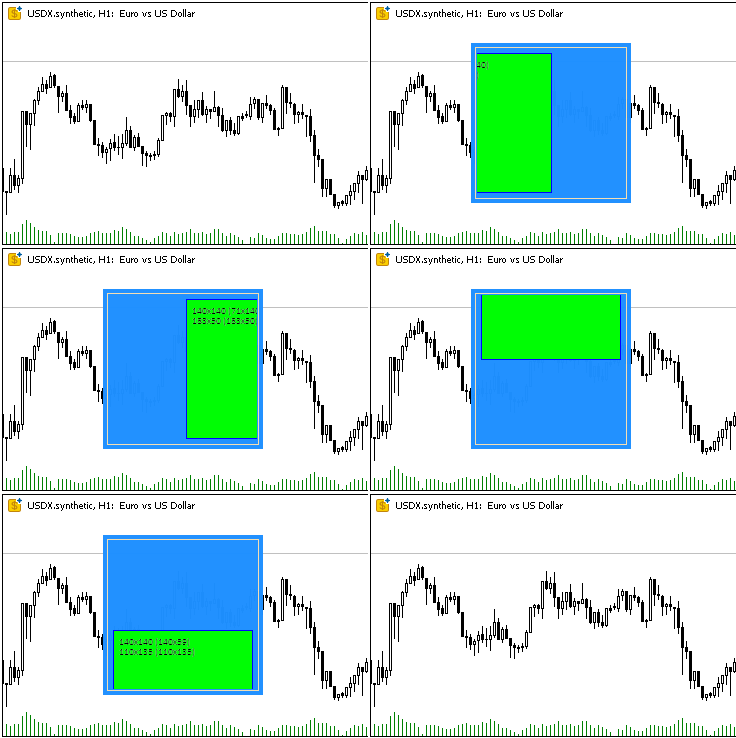
子对象会正确沿容器区域边界(而非对象边缘,需扣除边框宽度)进行裁剪,锁定对象时其会以锁定状态的颜色重绘。
容器内嵌套对象移动时出现的轻微"抖动"是GIF录制缺陷所致,并非类方法运行延迟。
运行脚本后,日志中将输出两行描述已创建对象的文本:
Canvas Base "Rectangle 1" (TestScr1_BG, TestScr1_FG): ID 1, x 100, y 40, w 160, h 160
Canvas Base "Rectangle 2" (TestScr2_BG, TestScr2_FG): ID 2, x 110, y 50, w 140, h 140
结论
现在我们为创建任意图形元素奠定了基础——每个类均承担明确界定的职责,这种模块化架构使得系统易于扩展。
已实现的类为构建复杂图形元素提供了坚实基础,并支持在MVC设计范式中将其无缝集成至模型与控制器组件。
下一篇文章中,我们将着手构建用于创建和管理表格的所有必要元素。由于MQL语言通过图表事件,将事件模型集成到创建的对象中,后续所有控件的事件处理机制都将围绕实现视图组件与控制器组件的交互而设计。
本文中使用的程序:
| # | 名称 | 类型 | 描述 |
|---|---|---|---|
| 1 | Base.mqh | 类库 | 用于创建控件基础对象的类 |
| 2 | TestControls.mq5 | 测试脚本 | 基础对象类操作测试脚本 |
| 3 | MQL5.zip | 归档 | 供解压至客户端MQL5目录的上述文件归档包 |
Base.mqh库中的类
| # | 名称 | 描述 |
|---|---|---|
| 1 | CBaseObj | 所有图形对象的基础类 |
| 2 | CColor | 色彩管理类 |
| 3 | CColorElement | 用于管理图形元素不同状态颜色的类 |
| 4 | CBound | 矩形区域控制类 |
| 5 | CCanvasBase | 画布上图形元素操作的基础类 |
本文由MetaQuotes Ltd译自俄文
原文地址: https://www.mql5.com/ru/articles/17960
注意: MetaQuotes Ltd.将保留所有关于这些材料的权利。全部或部分复制或者转载这些材料将被禁止。
本文由网站的一位用户撰写,反映了他们的个人观点。MetaQuotes Ltd 不对所提供信息的准确性负责,也不对因使用所述解决方案、策略或建议而产生的任何后果负责。

 交易中的神经网络:基于 ResNeXt 模型的多任务学习
 使用 MetaTrader 5 Python 构建类似 MQL5 的交易类
 斐波那契(Fibonacci)数列在外汇交易中的应用(第一部分):探究价格与时间的关系
 在MQL5中创建交易管理员面板(第十一部分):现代化功能通信接口(1)
