

在 MQL5 中实现其他语言的实用模块(第 02 部分):构建受 Python 启发的 REQUESTS 库
 493
493
 0
0

目录
概述
MetaTrader 5 能够直接向 Web 发送 HTTP 请求,这是 MQL5 编程语言有史以来最棒的功能之一。有了这种能力,交易者可以与他们的外部网站、服务器、交易应用程序等进行通信。
这使我们能够在交易平台内做几乎所有事情,比如从外部来源获取数据,向同行发送交易通知等等。
MQL5 中提供的 WebRequest 函数使得这种能力成为可能,它使我们能够执行任何 HTTP 操作,例如:
- 发送 “POST” 请求以向外部服务器发送信息。
- 使用著名的 “GET” 请求从 web 获取信息。
- 向 web 发送 PATCH 请求以修改服务器数据库中的信息。
- 向 web 发送 PUT 请求以更新服务器数据库中存在的值。
这只是举几个 HTTP 操作的例子。
然而,这个单一函数有时可能会让人感到不知所措,而且并不方便用户使用。
发送一个简单的 Web 请求来执行上述任何操作都需要做很多工作,而且由于还要考虑 HTTP 方法、报头等等,工作量就更大了。更不用说,您需要硬编码处理要发送或接收的数据的过程。

如果你在编码生涯中曾经使用过 Web 框架或模块来完成类似的任务,你可能会注意到,MQL5 之外的大多数框架都能够处理 MQL5 中的 WebRequest 函数无法处理的大部分基本任务和操作。
其中一个是来自 Python 编程语言的 requests 模块。
Requests 模块 —— 被称为“面向人类的 HTTP”:
这是一个简单而优雅的 HTTP 库,它允许程序员非常轻松地发送 HTTP/1.1 请求。
使用这个库,Python 开发人员不需要在 URL 中手动添加查询字符串,也不需要对 PUT 和 POST 数据进行形式编码,而且更重要的是,即使对于“非技术”开发人员来说,一切都是精心设计和简化的。
在本文中,我们将实现一个具有类似功能、语法和能力的类似模块。希望能够像在 Python 中一样,轻松便捷地使用 MQL5 执行 Web 请求。
发出 Web 请求
这是 requests 模块的主要功能。request 函数是向 web 发送和接收不同格式的内容和信息的。
在模仿 Python 的 requests 模块中提供的类似方法之前,让我们先来看一下这个函数。
Python 中的 request 方法如下所示。
def request(
    method: str | bytes,
    url: str | bytes,
    *,
    params: _Params | None = ...,
    data: _Data | None = ...,
    headers: _HeadersMapping | None = ...,
    cookies: CookieJar | _TextMapping | None = ...,
    files: _Files | None = ...,
    auth: _Auth | None = ...,
    timeout: _Timeout | None = ...,
    allow_redirects: bool = ...,
    proxies: _TextMapping | None = ...,
    hooks: _HooksInput | None = ...,
    stream: bool | None = ...,
    verify: _Verify | None = ...,
    cert: _Cert | None = ...,
    json: Any | None = None
) -> Response
该函数接受几个用于 HTTP Web 请求的参数。我们先从几个参数开始构建它:method、URL、data、headers、timeout 和 json 参数。
CResponse CSession::request(const string method, //HTTP method GET, POST, etc
                             const string url, //endpoint url
                             const string data = "", //The data you want to send if the method is POST or PUT
                             const string headers = "", //HTTP headers
                             const int timeout = 5000, //Request timeout (milliseconds)
                             const bool is_json=true) //Checks whether the given data is in JSON format
  {
   char data_char[];
   char result[];
   string result_headers;
   string temp_data = data;

   CResponse response; //a structure containing various response fields

//--- Managing the headers

   string temp_headers = m_headers;
   if (headers != "") // If the user provided additional headers, append them
      temp_headers += headers;

//--- Updating the headers with the information received

   if(is_json) //If the information parsed is
     {
         //--- Convert dictionary to JSON string

         CJAVal js(NULL, jtUNDEF);
         bool b = js.Deserialize(data, CP_UTF8);

         string json;
         js.Serialize(json); //Get the serialized Json outcome
         temp_data = json; //Assign the resulting serialized Json to the temporary data array

         //--- Set "Content-Type: application/json"

         temp_headers = UpdateHeader(temp_headers, "Content-Type", "application/json");
         if (MQLInfoInteger(MQL_DEBUG))
           printf("%s: %s",__FUNCTION__,temp_headers);
     }
    else
      {
         temp_headers = UpdateHeader(temp_headers, headers);
         if (MQLInfoInteger(MQL_DEBUG))
           printf("%s: %s",__FUNCTION__,temp_headers);
      }

//--- Convert data to byte array (for POST, PUT, etc.)

   if (StringToCharArray(temp_data, data_char, 0, StringLen(temp_data), CP_UTF8)<0) //Convert the data in a string format to a uchar
      {
         printf("%s, Failed to convert data to a Char array. Error = %s",__FUNCTION__,ErrorDescription(GetLastError()));
         return response;
      }

//--- Perform the WebRequest

   uint start = GetTickCount(); //starting time of the request

   int status = WebRequest(method, url, temp_headers, timeout, data_char, result, result_headers); //trigger a webrequest function
   if(status == -1)
     {
      PrintFormat("WebRequest failed with error %s", ErrorDescription(GetLastError()));
      response.status_code = 0;
      return response;
     }

//--- Fill the response struct

   response.elapsed = (GetTickCount() - start);

   string results_string = CharArrayToString(result);
   response.text = results_string;

   CJAVal js;

   if (!js.Deserialize(result))
      if (MQLInfoInteger(MQL_DEBUG))
         printf("Failed to serialize data received from WebRequest");

   response.json = js;

   response.cookies = js["cookies"].ToStr();

   response.status_code = status;
   ArrayCopy(response.content, result);
   response.headers = result_headers;
   response.url = url;
   response.ok = (status >= 200 && status < 400);
   response.reason = WebStatusText(status); // a custom helper for translating status codes

   return response;
  }
Python 中的 request 函数提供了两种使用两个不同参数将数据传递给 web 请求的选项;data 参数用于传递所有非 JSON 数据, json 参数用于传递 JSON 数据。
由于两个参数都提供了要传递给请求的信息,但只能使用一个参数来发送数据,即你可以发送原始数据(HTML、纯文本等)或 JSON 格式的数据。
因此,Python 中的函数会检测给定数据类型(JSON 或其他),并根据用户给出的报头调整其报头。例如,当提供 JSON 数据时,它会将报头附加或修改为 Content-Type: application/json。
虽然我们也可以在 MQL5 函数中同时使用这两个参数,但我发现这种做法非常令人困惑,而且增加了不必要的复杂性。因此,我们 MQL5 类中的函数只接受一个名为 data 的参数,用于向 Web 发送数据;名为 is_json 的布尔参数负责区分函数内部名为 data 的变量中接收到的信息(JSON 和其他类型)。
同样,当参数 is_json 设置为 true 时,该函数会将接收到的报头附加或修改为值 ( Content-Type: application/json )。但是在此之前,从参数 data 接收到的数据会被序列化为正确的 JSON 格式,然后再发送到 web。
//--- Updating the headers with the information received

   if(is_json) //If the information parsed is
     {
         //--- Convert dictionary to JSON string

         CJAVal js(NULL, jtUNDEF);
         bool b = js.Deserialize(data, CP_UTF8);

         string json;
         js.Serialize(json); //Get the serialized Json outcome
         temp_data = json; //Assign the resulting serialized Json to the temporary data array

         //--- Set "Content-Type: application/json"

         temp_headers = UpdateHeader(temp_headers, "Content-Type", "application/json");
         if (MQLInfoInteger(MQL_DEBUG))
           printf("%s: %s",__FUNCTION__,temp_headers);
     }
    else
      {
         temp_headers = UpdateHeader(temp_headers, headers);
         if (MQLInfoInteger(MQL_DEBUG))
           printf("%s: %s",__FUNCTION__,temp_headers);
      }
Python 的 requests 模块提供的 request 方法会根据 HTTP 响应返回大量变量;其中包含有关请求状态、接收到的数据、错误等信息。
import requests

r = requests.get('https://api.github.com/events')

# Print the raw response
print("Raw response:", r)

# Status code
print("Status Code:", r.status_code)

# Reason phrase
print("Reason:", r.reason)

# URL (final URL after redirects)
print("URL:", r.url)

# Headers (dictionary)
print("Headers:")

#... other responses
为了实现这一点,我们需要在 MQL5 类中采用类似的结构。
在 requests.mqh 文件中,下面是 CResponse 类。
struct CResponse
  {
   int               status_code; // HTTP status code (e.g., 200, 404)
   string            text;        // Raw response body as string

   CJAVal            json;        // Parses response as JSON
   uchar             content[];   // Raw bytes of the response
   string            headers;     // Dictionary of response headers
   string            cookies;     // Cookies set by the server
   string            url;         // Final URL after redirects
   bool              ok;          // True if status_code < 400
   uint              elapsed;     // Time taken for the response in ms
   string            reason;      // Text reason (e.g., "OK", "Not Found")
  };
这是 CSession 类中 request 函数返回的结构 —— 我们稍后会讨论它。
为了方便记录,下面是CResponse 类中所有变量及其所包含信息的表格列表。
| 变量 | 数据类型 | 描述 |
|---|---|---|
| status_code | int | 服务器返回的 HTTP 状态码(例如,200=OK,404=未找到,等等)。 |
| text | string | 以原始字符串形式(例如,HTML、JSON 或文本)返回完整的响应体 |
| json | CJAVal | 如果序列化过程成功,则返回响应正文中的已解析 JSON 对象。 |
| content[] | uchar | 响应体的原始字节数组(适用于二进制响应)。 |
| headers | string | 包含 HTTP 响应头的字典。 如果需要,可以将其转换为 JSON 格式。 |
| cookies | string | 服务器设置的 Cookie(从 Set-cookie 标头中提取,如果有)。 |
| url | string | 重定向后的最终 URL。 |
| ok | bool | 如果状态码小于 400,则为 true,即过程中没有发生客户端/服务器错误。 |
| elapsed | uint | 完成请求所花费的时间(以毫秒为单位) |
| reason | string | HTTP 状态代码的文本格式 —— 人类可读。 |
以下是如何使用 request 函数。
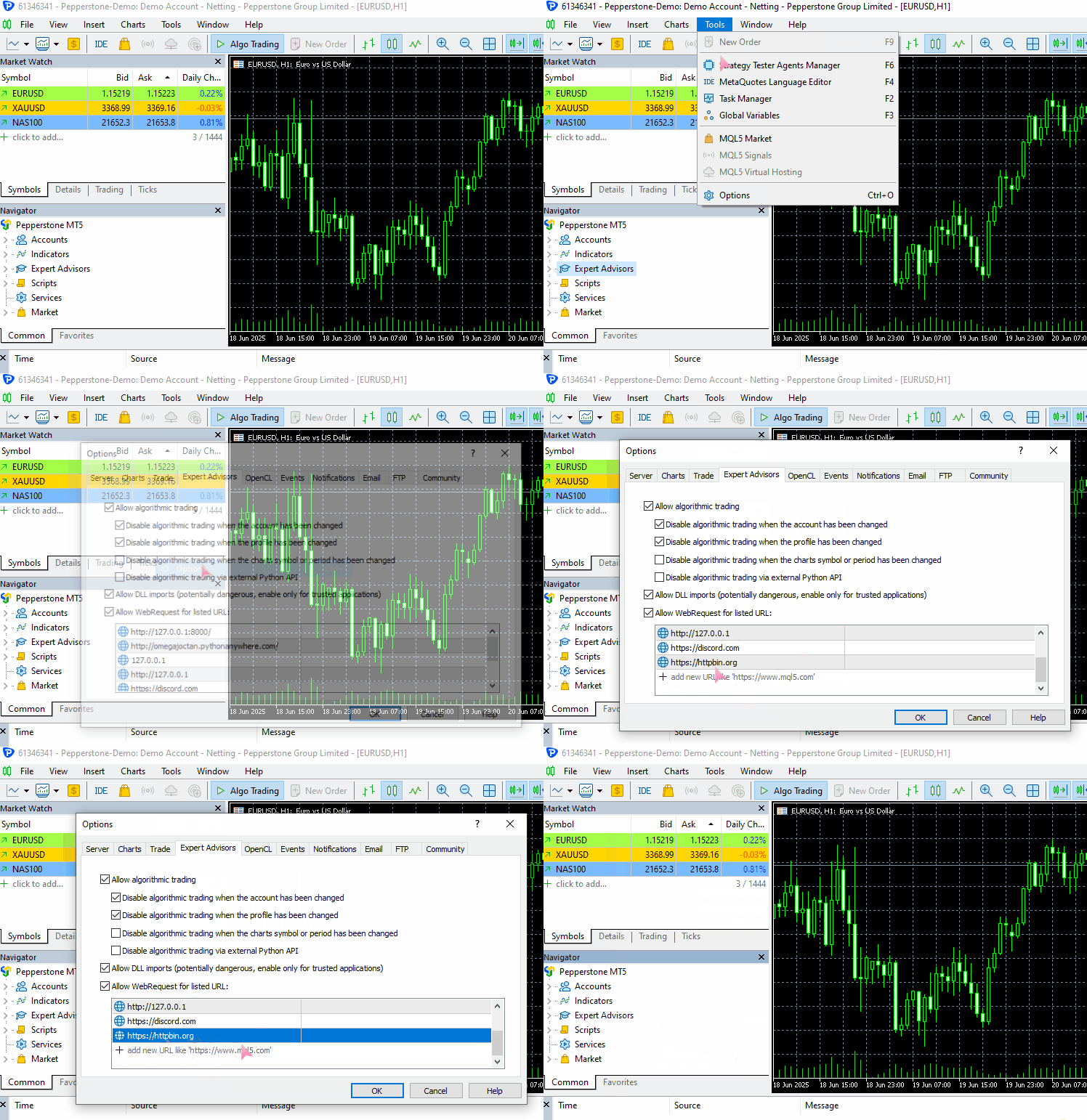
要使此示例在您的计算机上运行,请确保将 https://httpbin.org (测试 URL)添加到 MetaTrader 5 的允许 URL 列表中。
(a):发送 JSON 数据
#include <requests.mqh>
//+------------------------------------------------------------------+
//| Script program start function                                    |
//+------------------------------------------------------------------+
void OnStart()
  {
//---

     string json = "{\"username\": \"omega\", \"password\": \"secret123\"}";

     CResponse response = CSession::request("POST","https://httpbin.org/post", json, NULL, 5000, true);

      Print("Status Code: ", response.status_code);
      Print("Reason: ", response.reason);
      Print("URL: ", response.url);
      Print("OK: ", (string)response.ok);
      Print("Elapsed Time (ms): ", response.elapsed);

      Print("Headers:\n", response.headers);
      Print("Cookies: ", response.cookies);
      Print("Response: ",response.text);
      Print("JSON:\n", response.json["url"].ToStr());
 }
输出。
JF      0       08:10:33.226    Requests test (XAUUSD,D1)       CSession::request: Content-Type: application/json
GF      0       08:10:33.226    Requests test (XAUUSD,D1)
MI      0       08:10:34.578    Requests test (XAUUSD,D1)       Status Code: 200
PS      0       08:10:34.578    Requests test (XAUUSD,D1)       Reason: OK
LH      0       08:10:34.578    Requests test (XAUUSD,D1)       URL: https://httpbin.org/post
HP      0       08:10:34.578    Requests test (XAUUSD,D1)       OK: true
IF      0       08:10:34.578    Requests test (XAUUSD,D1)       Elapsed Time (ms): 1343
HO      0       08:10:34.578    Requests test (XAUUSD,D1)       Headers:
QE      0       08:10:34.578    Requests test (XAUUSD,D1)       Date: Fri, 04 Jul 2025 05:10:35 GMT
MG      0       08:10:34.578    Requests test (XAUUSD,D1)       Content-Type: application/json
HQ      0       08:10:34.578    Requests test (XAUUSD,D1)       Content-Length: 619
IH      0       08:10:34.578    Requests test (XAUUSD,D1)       Connection: keep-alive
JL      0       08:10:34.578    Requests test (XAUUSD,D1)       Server: gunicorn/19.9.0
QD      0       08:10:34.578    Requests test (XAUUSD,D1)       Access-Control-Allow-Origin: *
IO      0       08:10:34.578    Requests test (XAUUSD,D1)       Access-Control-Allow-Credentials: true
PI      0       08:10:34.578    Requests test (XAUUSD,D1)
GO      0       08:10:34.578    Requests test (XAUUSD,D1)       Cookies:
HH      0       08:10:34.578    Requests test (XAUUSD,D1)       Response: {
QL      0       08:10:34.578    Requests test (XAUUSD,D1)         "args": {},
FK      0       08:10:34.578    Requests test (XAUUSD,D1)         "data": "{\"username\":\"omega\",\"password\":\"secret123\"}",
MN      0       08:10:34.578    Requests test (XAUUSD,D1)         "files": {},
RH      0       08:10:34.578    Requests test (XAUUSD,D1)         "form": {},
OP      0       08:10:34.578    Requests test (XAUUSD,D1)         "headers": {
CH      0       08:10:34.578    Requests test (XAUUSD,D1)           "Accept": "*/*",
GM      0       08:10:34.578    Requests test (XAUUSD,D1)           "Accept-Encoding": "gzip, deflate",
HQ      0       08:10:34.578    Requests test (XAUUSD,D1)           "Accept-Language": "en;q=0.5",
GH      0       08:10:34.578    Requests test (XAUUSD,D1)           "Content-Length": "43",
IR      0       08:10:34.578    Requests test (XAUUSD,D1)           "Content-Type": "application/json",
EI      0       08:10:34.578    Requests test (XAUUSD,D1)           "Host": "httpbin.org",
NH      0       08:10:34.578    Requests test (XAUUSD,D1)           "User-Agent": "MetaTrader 5 Terminal/5.5120 (Windows NT 10.0.19045; x64)",
HK      0       08:10:34.578    Requests test (XAUUSD,D1)           "X-Amzn-Trace-Id": "Root=1-6867624b-422e528808290adf61a651a3"
IN      0       08:10:34.578    Requests test (XAUUSD,D1)         },
GD      0       08:10:34.578    Requests test (XAUUSD,D1)         "json": {
CN      0       08:10:34.578    Requests test (XAUUSD,D1)           "password": "secret123",
KD      0       08:10:34.578    Requests test (XAUUSD,D1)           "username": "omega"
QM      0       08:10:34.578    Requests test (XAUUSD,D1)         },
EJ      0       08:10:34.578    Requests test (XAUUSD,D1)         "origin": "197.250.227.26",
FQ      0       08:10:34.578    Requests test (XAUUSD,D1)         "url": "https://httpbin.org/post"
EG      0       08:10:34.578    Requests test (XAUUSD,D1)       }
PR      0       08:10:34.578    Requests test (XAUUSD,D1)
NF      0       08:10:34.578    Requests test (XAUUSD,D1)       JSON:
CR      0       08:10:34.578    Requests test (XAUUSD,D1)       https://httpbin.org/post
(b):发送非 JSON 数据
以表单数据为例。
#include <requests.mqh>
CSession requests;
//+------------------------------------------------------------------+
//| Script program start function                                    |
//+------------------------------------------------------------------+
void OnStart()
  {
//---

     string form_data = "username=omega&password=secret123"; //mimicking how the final form data is collected in the web

     CResponse response = CSession::post("https://httpbin.org/post", form_data, "Content-Type: application/x-www-form-urlencoded", 5000, false);

      Print("Status Code: ", response.status_code);
      Print("Reason: ", response.reason);
      Print("URL: ", response.url);
      Print("OK: ", (string)response.ok);
      Print("Elapsed Time (ms): ", response.elapsed);

      Print("Headers:\n", response.headers);
      Print("Cookies: ", response.cookies);
      Print("Response: ",response.text);
      Print("JSON:\n", response.json["url"].ToStr());
 }
输出。
DD      0       08:20:01.411    Requests test (XAUUSD,D1)       Status Code: 200
IN      0       08:20:01.411    Requests test (XAUUSD,D1)       Reason: OK
EG      0       08:20:01.411    Requests test (XAUUSD,D1)       URL: https://httpbin.org/post
QM      0       08:20:01.411    Requests test (XAUUSD,D1)       OK: true
RI      0       08:20:01.411    Requests test (XAUUSD,D1)       Elapsed Time (ms): 1547
QR      0       08:20:01.411    Requests test (XAUUSD,D1)       Headers:
EH      0       08:20:01.411    Requests test (XAUUSD,D1)       Date: Fri, 04 Jul 2025 05:20:02 GMT
DL      0       08:20:01.411    Requests test (XAUUSD,D1)       Content-Type: application/json
MD      0       08:20:01.411    Requests test (XAUUSD,D1)       Content-Length: 587
PM      0       08:20:01.411    Requests test (XAUUSD,D1)       Connection: keep-alive
OK      0       08:20:01.411    Requests test (XAUUSD,D1)       Server: gunicorn/19.9.0
HS      0       08:20:01.411    Requests test (XAUUSD,D1)       Access-Control-Allow-Origin: *
PD      0       08:20:01.411    Requests test (XAUUSD,D1)       Access-Control-Allow-Credentials: true
IF      0       08:20:01.411    Requests test (XAUUSD,D1)
RD      0       08:20:01.411    Requests test (XAUUSD,D1)       Cookies:
QM      0       08:20:01.411    Requests test (XAUUSD,D1)       Response: {
HK      0       08:20:01.411    Requests test (XAUUSD,D1)         "args": {},
OR      0       08:20:01.411    Requests test (XAUUSD,D1)         "data": "",
JE      0       08:20:01.411    Requests test (XAUUSD,D1)         "files": {},
RL      0       08:20:01.411    Requests test (XAUUSD,D1)         "form": {
DF      0       08:20:01.411    Requests test (XAUUSD,D1)           "password": "secret123",
PM      0       08:20:01.411    Requests test (XAUUSD,D1)           "username": "omega"
RE      0       08:20:01.411    Requests test (XAUUSD,D1)         },
PL      0       08:20:01.411    Requests test (XAUUSD,D1)         "headers": {
DE      0       08:20:01.411    Requests test (XAUUSD,D1)           "Accept": "*/*",
LP      0       08:20:01.411    Requests test (XAUUSD,D1)           "Accept-Encoding": "gzip, deflate",
CF      0       08:20:01.411    Requests test (XAUUSD,D1)           "Accept-Language": "en;q=0.5",
EK      0       08:20:01.411    Requests test (XAUUSD,D1)           "Content-Length": "33",
EL      0       08:20:01.411    Requests test (XAUUSD,D1)           "Content-Type": "application/x-www-form-urlencoded",
PH      0       08:20:01.411    Requests test (XAUUSD,D1)           "Host": "httpbin.org",
GO      0       08:20:01.411    Requests test (XAUUSD,D1)           "User-Agent": "MetaTrader 5 Terminal/5.5120 (Windows NT 10.0.19045; x64)",
FQ      0       08:20:01.411    Requests test (XAUUSD,D1)           "X-Amzn-Trace-Id": "Root=1-68676482-6439a0a071c275773681a193"
LM      0       08:20:01.411    Requests test (XAUUSD,D1)         },
JE      0       08:20:01.411    Requests test (XAUUSD,D1)         "json": null,
LM      0       08:20:01.411    Requests test (XAUUSD,D1)         "origin": "197.250.227.26",
KH      0       08:20:01.411    Requests test (XAUUSD,D1)         "url": "https://httpbin.org/post"
LN      0       08:20:01.411    Requests test (XAUUSD,D1)       }
IK      0       08:20:01.411    Requests test (XAUUSD,D1)
CO      0       08:20:01.411    Requests test (XAUUSD,D1)       JSON:
NK      0       08:20:01.411    Requests test (XAUUSD,D1)       https://httpbin.org/post
非常好!我们能够使用同一个 Web request 函数发送两种不同的数据类型。
请注意,在发送非 JSON 数据类型(本例中为表单数据)时,我在请求函数的标头参数中显式设置了 “Content-type”,以适应表单数据。
因此,除非您发送的是 JSON 数据(该数据会自动序列化,并且正确的 HTTP 标头会自动更新以适应这种数据类型),否则您必须显式设置 Content-type 以适应您要发送的数据类型。
更多信息请阅读 -> https://beeceptor.com/docs/concepts/content-type/index.html
现在,这个 request 函数能够像原生 MQL5 函数一样发送各种 HTTP 请求,这大致是对其的扩展。
由于该函数非常灵活,因此容易变得复杂且容易出错。假设你想发送一个 GET 请求来从 web 接收一些信息。
我们都知道,用 GET 请求发送数据是不合适的,因为它本来就不是做这个的。为了减少出错的可能性,Python 中的 requests 模块提供了几个高级函数,用于发送各种类型的 web 请求,这些函数会考虑到特定请求的需求。
不同函数中的不同 Web 请求
我们可以基于上一节中实现的 request 函数,构建多个函数,用于不同的 HTTP 操作,如下所示:
(a):get 函数
static CResponse         get(const string url, const string headers = "", const int timeout = 5000)
  {
    return request("GET", url, "", headers, timeout, false);
  }
此函数向指定的 URL 发送 GET 请求。调用此函数时,不会向 URL 发送任何数据,因为它仅用于接收信息。
用法。
#include <requests.mqh>
//+------------------------------------------------------------------+
//| Script program start function                                    |
//+------------------------------------------------------------------+
void OnStart()
  {
//---

      CResponse response = CSession::get("https://httpbin.org/get");

      Print("Status Code: ", response.status_code);
      Print("Reason: ", response.reason);
      Print("URL: ", response.url);
      Print("OK: ", (string)response.ok);
      Print("Elapsed Time (ms): ", response.elapsed);

      Print("Headers:\n", response.headers);
      Print("Cookies: ", response.cookies);
      Print("Response: ",response.text);
      Print("JSON:\n", response.json["url"].ToStr());
  }
输出。
LM      0       09:50:48.904    Requests test (XAUUSD,D1)       Status Code: 200
QF      0       09:50:48.904    Requests test (XAUUSD,D1)       Reason: OK
GQ      0       09:50:48.904    Requests test (XAUUSD,D1)       URL: https://httpbin.org/get
CD      0       09:50:48.904    Requests test (XAUUSD,D1)       OK: true
EQ      0       09:50:48.904    Requests test (XAUUSD,D1)       Elapsed Time (ms): 1782
KJ      0       09:50:48.904    Requests test (XAUUSD,D1)       Headers:
JQ      0       09:50:48.904    Requests test (XAUUSD,D1)       Date: Fri, 04 Jul 2025 06:50:49 GMT
JD      0       09:50:48.904    Requests test (XAUUSD,D1)       Content-Type: application/json
NL      0       09:50:48.904    Requests test (XAUUSD,D1)       Content-Length: 379
NE      0       09:50:48.904    Requests test (XAUUSD,D1)       Connection: keep-alive
MS      0       09:50:48.904    Requests test (XAUUSD,D1)       Server: gunicorn/19.9.0
NH      0       09:50:48.904    Requests test (XAUUSD,D1)       Access-Control-Allow-Origin: *
FL      0       09:50:48.904    Requests test (XAUUSD,D1)       Access-Control-Allow-Credentials: true
KM      0       09:50:48.904    Requests test (XAUUSD,D1)
LL      0       09:50:48.904    Requests test (XAUUSD,D1)       Cookies:
CE      0       09:50:48.904    Requests test (XAUUSD,D1)       Response: {
FS      0       09:50:48.904    Requests test (XAUUSD,D1)         "args": {},
DJ      0       09:50:48.904    Requests test (XAUUSD,D1)         "headers": {
PR      0       09:50:48.904    Requests test (XAUUSD,D1)           "Accept": "*/*",
DF      0       09:50:48.904    Requests test (XAUUSD,D1)           "Accept-Encoding": "gzip, deflate",
KO      0       09:50:48.904    Requests test (XAUUSD,D1)           "Accept-Language": "en;q=0.5",
JL      0       09:50:48.904    Requests test (XAUUSD,D1)           "Host": "httpbin.org",
QK      0       09:50:48.904    Requests test (XAUUSD,D1)           "User-Agent": "MetaTrader 5 Terminal/5.5120 (Windows NT 10.0.19045; x64)",
JI      0       09:50:48.904    Requests test (XAUUSD,D1)           "X-Amzn-Trace-Id": "Root=1-686779c9-147d77346060e72a2fa2282f"
FH      0       09:50:48.904    Requests test (XAUUSD,D1)         },
RI      0       09:50:48.904    Requests test (XAUUSD,D1)         "origin": "197.250.227.26",
CJ      0       09:50:48.904    Requests test (XAUUSD,D1)         "url": "https://httpbin.org/get"
PR      0       09:50:48.904    Requests test (XAUUSD,D1)       }
QG      0       09:50:48.904    Requests test (XAUUSD,D1)
KK      0       09:50:48.904    Requests test (XAUUSD,D1)       JSON:
DQ      0       09:50:48.904    Requests test (XAUUSD,D1)       https://httpbin.org/get
虽然 get 函数允许您将标头传递给 HTTP 请求,但即使您将标头设置为某种 Content-type,您也无法控制从服务器接收的内容类型。
(b):post 函数
static CResponse         post(const string url, const string data = "", const string headers = "", const int timeout = 5000, const bool is_json=true)
  {
    return request("POST", url, data, headers, timeout, is_json);
  }
该函数向指定的 URL 发送 POST 请求,并可选择性地附带数据负载。与 request 函数类似,当参数 is_json 设置为 true 时,它会自动设置 Content-Type 。
用法。
#include <requests.mqh>
//+------------------------------------------------------------------+
//| Script program start function                                    |
//+------------------------------------------------------------------+
void OnStart()
  {
//---

      string json = "{\"username\": \"omega\", \"password\": \"secret123\"}";
      CResponse response = CSession::post("https://httpbin.org/post",json);

      Print("Status Code: ", response.status_code);
      Print("Reason: ", response.reason);
      Print("URL: ", response.url);
      Print("OK: ", (string)response.ok);
      Print("Elapsed Time (ms): ", response.elapsed);

      Print("Headers:\n", response.headers);
      Print("Cookies: ", response.cookies);
      Print("Response: ",response.text);
      Print("JSON:\n", response.json["url"].ToStr());
 }
输出。
NK      0       15:32:13.093    Requests test (XAUUSD,D1)       Status Code: 200
OP      0       15:32:13.093    Requests test (XAUUSD,D1)       Reason: OK
KE      0       15:32:13.093    Requests test (XAUUSD,D1)       URL: https://httpbin.org/post
GR      0       15:32:13.093    Requests test (XAUUSD,D1)       OK: true
LD      0       15:32:13.093    Requests test (XAUUSD,D1)       Elapsed Time (ms): 1578
GL      0       15:32:13.093    Requests test (XAUUSD,D1)       Headers:
PK      0       15:32:13.093    Requests test (XAUUSD,D1)       Date: Fri, 04 Jul 2025 12:32:13 GMT
NR      0       15:32:13.093    Requests test (XAUUSD,D1)       Content-Type: application/json
GG      0       15:32:13.093    Requests test (XAUUSD,D1)       Content-Length: 619
JN      0       15:32:13.093    Requests test (XAUUSD,D1)       Connection: keep-alive
II      0       15:32:13.093    Requests test (XAUUSD,D1)       Server: gunicorn/19.9.0
RF      0       15:32:13.093    Requests test (XAUUSD,D1)       Access-Control-Allow-Origin: *
JR      0       15:32:13.093    Requests test (XAUUSD,D1)       Access-Control-Allow-Credentials: true
OK      0       15:32:13.093    Requests test (XAUUSD,D1)
HQ      0       15:32:13.093    Requests test (XAUUSD,D1)       Cookies:
GK      0       15:32:13.093    Requests test (XAUUSD,D1)       Response: {
RN      0       15:32:13.093    Requests test (XAUUSD,D1)         "args": {},
EN      0       15:32:13.093    Requests test (XAUUSD,D1)         "data": "{\"username\":\"omega\",\"password\":\"secret123\"}",
NL      0       15:32:13.093    Requests test (XAUUSD,D1)         "files": {},
QJ      0       15:32:13.093    Requests test (XAUUSD,D1)         "form": {},
PS      0       15:32:13.093    Requests test (XAUUSD,D1)         "headers": {
DJ      0       15:32:13.093    Requests test (XAUUSD,D1)           "Accept": "*/*",
HO      0       15:32:13.093    Requests test (XAUUSD,D1)           "Accept-Encoding": "gzip, deflate",
GG      0       15:32:13.093    Requests test (XAUUSD,D1)           "Accept-Language": "en;q=0.5",
HJ      0       15:32:13.093    Requests test (XAUUSD,D1)           "Content-Length": "43",
JM      0       15:32:13.093    Requests test (XAUUSD,D1)           "Content-Type": "application/json",
FK      0       15:32:13.093    Requests test (XAUUSD,D1)           "Host": "httpbin.org",
MN      0       15:32:13.093    Requests test (XAUUSD,D1)           "User-Agent": "MetaTrader 5 Terminal/5.5120 (Windows NT 10.0.19045; x64)",
IM      0       15:32:13.093    Requests test (XAUUSD,D1)           "X-Amzn-Trace-Id": "Root=1-6867c9cd-64a83cd77115a2575214fecd"
JS      0       15:32:13.093    Requests test (XAUUSD,D1)         },
HJ      0       15:32:13.093    Requests test (XAUUSD,D1)         "json": {
DL      0       15:32:13.093    Requests test (XAUUSD,D1)           "password": "secret123",
LK      0       15:32:13.093    Requests test (XAUUSD,D1)           "username": "omega"
RS      0       15:32:13.093    Requests test (XAUUSD,D1)         },
FG      0       15:32:13.093    Requests test (XAUUSD,D1)         "origin": "197.250.227.26",
EO      0       15:32:13.093    Requests test (XAUUSD,D1)         "url": "https://httpbin.org/post"
FE      0       15:32:13.093    Requests test (XAUUSD,D1)       }
OL      0       15:32:13.093    Requests test (XAUUSD,D1)
MD      0       15:32:13.093    Requests test (XAUUSD,D1)       JSON:
DD      0       15:32:13.093    Requests test (XAUUSD,D1)       https://httpbin.org/post
(c):put 函数
该函数发送 PUT 请求,以使用给定的数据更新 URL 处的资源。
static CResponse         put(const string url, const string data = "", const string headers = "", const int timeout = 5000, const bool is_json=true)
  {
    return request("PUT", url, data, headers, timeout, is_json);
  }
使用示例。
#include <requests.mqh>
//+------------------------------------------------------------------+
//| Script program start function                                    |
//+------------------------------------------------------------------+
void OnStart()
  {
//---

      string json = "{\"username\": \"omega\", \"password\": \"secret123\"}";
      CResponse response = CSession::put("https://httpbin.org/put",json);

      Print("Status Code: ", response.status_code);
      Print("Reason: ", response.reason);
      Print("URL: ", response.url);
      Print("OK: ", (string)response.ok);
      Print("Elapsed Time (ms): ", response.elapsed);

      Print("Headers:\n", response.headers);
      Print("Cookies: ", response.cookies);
      Print("Response: ",response.text);
      Print("JSON:\n", response.json["url"].ToStr());
 }
输出。
#include <requests.mqh>
//+------------------------------------------------------------------+
//| Script program start function                                    |
//+------------------------------------------------------------------+
void OnStart()
  {
//---

      string json = "{\"update\": true}";
      CResponse response = CSession::put("https://httpbin.org/put", json, "", 5000, true);

      Print("Reason: ", response.reason);
      Print("Response: ",response.text);
  }
输出。
MG      0       15:51:02.874    Requests test (XAUUSD,D1)       Reason: OK
EQ      0       15:51:02.874    Requests test (XAUUSD,D1)       Response: {
HG      0       15:51:02.874    Requests test (XAUUSD,D1)         "args": {},
JM      0       15:51:02.874    Requests test (XAUUSD,D1)         "data": "{\"update\":true}",
LJ      0       15:51:02.874    Requests test (XAUUSD,D1)         "files": {},
CM      0       15:51:02.874    Requests test (XAUUSD,D1)         "form": {},
FE      0       15:51:02.874    Requests test (XAUUSD,D1)         "headers": {
RO      0       15:51:02.874    Requests test (XAUUSD,D1)           "Accept": "*/*",
JI      0       15:51:02.874    Requests test (XAUUSD,D1)           "Accept-Encoding": "gzip, deflate",
QL      0       15:51:02.874    Requests test (XAUUSD,D1)           "Accept-Language": "en;q=0.5",
KE      0       15:51:02.874    Requests test (XAUUSD,D1)           "Content-Length": "15",
LG      0       15:51:02.874    Requests test (XAUUSD,D1)           "Content-Type": "application/json",
PL      0       15:51:02.874    Requests test (XAUUSD,D1)           "Host": "httpbin.org",
KD      0       15:51:02.874    Requests test (XAUUSD,D1)           "User-Agent": "MetaTrader 5 Terminal/5.5120 (Windows NT 10.0.19045; x64)",
KH      0       15:51:02.874    Requests test (XAUUSD,D1)           "X-Amzn-Trace-Id": "Root=1-6867ce36-76b6e4053cd661ec5e4faa1b"
HI      0       15:51:02.874    Requests test (XAUUSD,D1)         },
NG      0       15:51:02.874    Requests test (XAUUSD,D1)         "json": {
DQ      0       15:51:02.874    Requests test (XAUUSD,D1)           "update": true
PG      0       15:51:02.874    Requests test (XAUUSD,D1)         },
PS      0       15:51:02.874    Requests test (XAUUSD,D1)         "origin": "197.250.227.26",
HD      0       15:51:02.874    Requests test (XAUUSD,D1)         "url": "https://httpbin.org/put"
RH      0       15:51:02.874    Requests test (XAUUSD,D1)       }
CI      0       15:51:02.874    Requests test (XAUUSD,D1)
(d):patch 函数
static CResponse         patch(const string url, const string data = "", const string headers = "", const int timeout = 5000, const bool is_json=true)
  {
    return request("PATCH", url, data, headers, timeout, is_json);
  }
该函数发送 PATCH 请求,以使用提供的数据对 URL 处的资源进行部分更新。
使用示例。
#include <requests.mqh>
//+------------------------------------------------------------------+
//| Script program start function                                    |
//+------------------------------------------------------------------+
void OnStart()
  {
//---

      string json = "{\"patched\": 1}";
      CResponse response = CSession::patch("https://httpbin.org/patch", json, "", 5000, true);

      Print("Reason: ", response.reason);
      Print("Response: ",response.text);
  }
输出。
GR      0       16:33:45.258    Requests test (XAUUSD,D1)       Reason: OK
OF      0       16:33:45.258    Requests test (XAUUSD,D1)       Response: {
RR      0       16:33:45.258    Requests test (XAUUSD,D1)         "args": {},
GJ      0       16:33:45.258    Requests test (XAUUSD,D1)         "data": "{\"patched\":1}",
NL      0       16:33:45.258    Requests test (XAUUSD,D1)         "files": {},
IK      0       16:33:45.258    Requests test (XAUUSD,D1)         "form": {},
HS      0       16:33:45.258    Requests test (XAUUSD,D1)         "headers": {
LE      0       16:33:45.258    Requests test (XAUUSD,D1)           "Accept": "*/*",
HO      0       16:33:45.258    Requests test (XAUUSD,D1)           "Accept-Encoding": "gzip, deflate",
OF      0       16:33:45.258    Requests test (XAUUSD,D1)           "Accept-Language": "en;q=0.5",
CJ      0       16:33:45.258    Requests test (XAUUSD,D1)           "Content-Length": "13",
RM      0       16:33:45.258    Requests test (XAUUSD,D1)           "Content-Type": "application/json",
FK      0       16:33:45.258    Requests test (XAUUSD,D1)           "Host": "httpbin.org",
MN      0       16:33:45.258    Requests test (XAUUSD,D1)           "User-Agent": "MetaTrader 5 Terminal/5.5120 (Windows NT 10.0.19045; x64)",
GN      0       16:33:45.258    Requests test (XAUUSD,D1)           "X-Amzn-Trace-Id": "Root=1-6867d837-47b9eb772b7ec6300016aa79"
JS      0       16:33:45.258    Requests test (XAUUSD,D1)         },
HJ      0       16:33:45.258    Requests test (XAUUSD,D1)         "json": {
MR      0       16:33:45.258    Requests test (XAUUSD,D1)           "patched": 1
FH      0       16:33:45.258    Requests test (XAUUSD,D1)         },
RI      0       16:33:45.258    Requests test (XAUUSD,D1)         "origin": "197.250.227.26",
KK      0       16:33:45.258    Requests test (XAUUSD,D1)         "url": "https://httpbin.org/patch"
DS      0       16:33:45.258    Requests test (XAUUSD,D1)       }
(e):delete 函数
static CResponse         delete_(const string url, const string headers = "", const int timeout = 5000, const bool is_json=true)
  {
    return request("DELETE", url, "", headers, timeout, is_json);
  }
此函数发送 DELETE 请求以删除给定 URL 处的资源。不使用任何数据有效载荷。
使用示例。
#include <requests.mqh>
//+------------------------------------------------------------------+
//| Script program start function                                    |
//+------------------------------------------------------------------+
void OnStart()
  {
//---

      CResponse response = CSession::delete_("https://httpbin.org/delete", "", 5000, true);

      Print("Reason: ", response.reason);
      Print("Response: ",response.text);
 }
输出。
ML      0       16:43:03.046    Requests test (XAUUSD,D1)       Reason: OK
EL      0       16:43:03.046    Requests test (XAUUSD,D1)       Response: {
HH      0       16:43:03.046    Requests test (XAUUSD,D1)         "args": {},
OR      0       16:43:03.046    Requests test (XAUUSD,D1)         "data": "",
JD      0       16:43:03.046    Requests test (XAUUSD,D1)         "files": {},
ER      0       16:43:03.046    Requests test (XAUUSD,D1)         "form": {},
DK      0       16:43:03.046    Requests test (XAUUSD,D1)         "headers": {
PR      0       16:43:03.046    Requests test (XAUUSD,D1)           "Accept": "*/*",
LG      0       16:43:03.046    Requests test (XAUUSD,D1)           "Accept-Encoding": "gzip, deflate",
KO      0       16:43:03.046    Requests test (XAUUSD,D1)           "Accept-Language": "en;q=0.5",
QQ      0       16:43:03.046    Requests test (XAUUSD,D1)           "Content-Length": "0",
HE      0       16:43:03.046    Requests test (XAUUSD,D1)           "Content-Type": "application/json",
LS      0       16:43:03.046    Requests test (XAUUSD,D1)           "Host": "httpbin.org",
GF      0       16:43:03.046    Requests test (XAUUSD,D1)           "User-Agent": "MetaTrader 5 Terminal/5.5120 (Windows NT 10.0.19045; x64)",
JK      0       16:43:03.046    Requests test (XAUUSD,D1)           "X-Amzn-Trace-Id": "Root=1-6867da67-1926ebf246353ab24461aed9"
LK      0       16:43:03.046    Requests test (XAUUSD,D1)         },
FL      0       16:43:03.046    Requests test (XAUUSD,D1)         "json": null,
PG      0       16:43:03.046    Requests test (XAUUSD,D1)         "origin": "197.250.227.26",
PO      0       16:43:03.046    Requests test (XAUUSD,D1)         "url": "https://httpbin.org/delete"
HE      0       16:43:03.046    Requests test (XAUUSD,D1)       }
QL      0       16:43:03.046    Requests test (XAUUSD,D1)
将文件上传到 Web
Python 中的 requests 模块可以轻松地从互联网共享和接收文件,这与 MQL5 中的内置 WebRequest 函数不同。
在当今世界,能够通过 web 发送文件是有效沟通的必要条件。我们经常希望发送图表截图来展示我们的交易进度,有时还会直接展示来自 MetaTrader 5 图表的交易设置和一些视觉信号。
这是我们 CSession MQL5 类中最棘手的部分,因为我们必须注意用户可以上传到 web 的文件类型,并对直接从文件中提取的二进制信息应用正确的编码。更何况,我们还需要为每种类型的文件设置正确的 HTTP 标头。
CResponse CSession::request(const string method,
                             const string url,
                             const string data,
                             const string &files[],
                             const string headers = "",
                             const int timeout = 5000,
                             const bool is_json=true)
 {
   char result[];
   string result_headers;
   string temp_headers = m_headers;
   string boundary = "----WebKitFormBoundary7MA4YWxkTrZu0gW"; //for setting boundaries between data types and files in the form data
   CArrayChar final_body; //Final body uchar array

   CResponse response; //a structure containing various response fields

   // Append user headers
   if (headers != "")
      temp_headers += headers;

   bool use_multipart = ArraySize(files) > 0; //Check if files are attached

//--- Create a multi part request

   if (use_multipart) // If multipart, assemble full body (JSON + files)
    {
      temp_headers = UpdateHeader(temp_headers, "Content-Type", "multipart/form-data; boundary=" + boundary + "\r\n"); //Update the headers

      //--- JSON part (or form data)
      if (StringLen(data) > 0)
      {
         string json_data = "";
         if (is_json) //if Json data is given alongside the files
          {
            CJAVal js(NULL, jtUNDEF);
            if (js.Deserialize(data, CP_UTF8))
               js.Serialize(json_data); //Serialize the JSON data
          }

         string json_part = "--" + boundary + "\r\n";
         json_part += "Content-Disposition: form-data; name=\"metadata\"\r\n";
         json_part += "Content-Type: application/json\r\n\r\n";
         json_part += json_data + "\r\n";

         char json_bytes[];
         StringToCharArray(json_part, json_bytes, 0, StringLen(json_part), CP_UTF8);

         final_body.AddArray(json_bytes);
      }

      //--- File parts
      for (uint i = 0; i < files.Size(); i++)
       {
         string filename = GetFileName(files[i]);

         char file_data[]; //for storing the file data in binary format

         int file_handle = FileOpen(filename, FILE_BIN | FILE_SHARE_READ); // Read the file in binary format
         if (file_handle == INVALID_HANDLE)
          {
            printf("func=%s line=%d, Failed to read the file '%s'. Error = %s",__FUNCTION__,__LINE__,filename,ErrorDescription(GetLastError()));
            continue; //skip to the next file if the current file is invalid
          }

         int fsize = (int)FileSize(file_handle);
         ArrayResize(file_data, fsize);
         if (FileReadArray(file_handle, file_data, 0, fsize)==0)
           {
              printf("func=%s line=%d, No data found in the file '%s'. Error = %s",__FUNCTION__,__LINE__,filename,ErrorDescription(GetLastError()));
              FileClose(file_handle);
              continue; //skip to the next file if the current file is invalid
           }

         FileClose(file_handle); //close the current file

         //--- Append files header and content type as detected to the request

         string file_part = "--" + boundary + "\r\n";
         file_part += StringFormat("Content-Disposition: form-data; name=\"file\"; filename=\"%s\"\r\n", filename);
         file_part += StringFormat("Content-Type: %s\r\n\r\n", GuessContentType(filename));

         char file_header[];
         StringToCharArray(file_part, file_header, 0, StringLen(file_part), CP_UTF8); //UTF-8 Encoding is a must

         final_body.AddArray(file_header); //Add the file header
         final_body.AddArray(file_data); //Add the file in binary format, the actual file

         //--- append the new line — critical for HTTP form parsing.

         final_body.Add('\r');
         final_body.Add('\n');
      }

      //--- Final boundary
      string closing = "--" + boundary + "--\r\n";
      char closing_part[];
      StringToCharArray(closing, closing_part);

      final_body.AddArray(closing_part);
    }
   else // no files attached
    {
      //--- If it's just JSON or plain form data
      string body_data = data;
      if (is_json)
       {
         CJAVal js(NULL, jtUNDEF);
         if (js.Deserialize(data, CP_UTF8))
            js.Serialize(body_data);

         temp_headers = UpdateHeader(temp_headers, "Content-Type", "application/json");
       }
      else
         temp_headers = UpdateHeader(temp_headers, headers);

      //---

      char array[];
      StringToCharArray(body_data, array, 0, StringLen(body_data), CP_UTF8); //Use UTF-8 similar requests in Python, This is very crucial
      final_body.AddArray(array);
    }

   char final_body_char_arr[];
   CArray2Array(final_body, final_body_char_arr);

   if (MQLInfoInteger(MQL_DEBUG))
     Print("Final body:\n",CharArrayToString(final_body_char_arr, 0 , final_body.Total(), CP_UTF8));

//--- Send the request

   uint start = GetTickCount(); //starting time of the request
   int status = WebRequest(method, url, temp_headers, timeout, final_body_char_arr, result, result_headers); //trigger a webrequest function

   if(status == -1)
     {
      PrintFormat("WebRequest failed with error %s", ErrorDescription(GetLastError()));
      response.status_code = 0;
      return response;
     }

//--- Fill the response struct

   response.elapsed = GetTickCount() - start;
   response.text = CharArrayToString(result);
   response.status_code = status;
   response.headers = result_headers;
   response.url = url;
   response.ok = (status >= 200 && status < 400);
   response.reason = WebStatusText(status);
   ArrayCopy(response.content, result);

//---

   CJAVal js;
   if (js.Deserialize(response.text))
      response.json = js;

   return response;
 }
与之前用于向 web 执行任何请求的请求函数类似,此函数执行类似的任务,但它能够检测用户在函数参数中提供的文件,并将它们嵌入到 HTTP 请求中。
当文件数组为空,即表示用户未提供任何文件。如前所述,上述函数执行常规的 HTTP 请求,但当收到文件时,它会将 HTTP 标头更新为 multipart/form-data 内容类型,使 HTTP 请求能够区分给定的不同信息和数据类型。
temp_headers = UpdateHeader(temp_headers, "Content-Type", "multipart/form-data; boundary=" + boundary + "\r\n"); //Update the headers final_body 数组负责将所有数据(内容和文件)粘合到一个字符(char)数组变量中,类似于网页上的表单所做的那样。这是在一个循环中完成的,该循环遍历文件数组,该数组包含您想要一次性发送到服务器的所有文件。
      //--- File parts
      for (uint i = 0; i < files.Size(); i++)
       {
         string filename = GetFileName(files[i]);

         char file_data[]; //for storing the file data in binary format

         int file_handle = FileOpen(filename, FILE_BIN | FILE_SHARE_READ); // Read the file in binary format
         if (file_handle == INVALID_HANDLE)
          {
            printf("func=%s line=%d, Failed to read the file '%s'. Error = %s",__FUNCTION__,__LINE__,filename,ErrorDescription(GetLastError()));
            continue; //skip to the next file if the current file is invalid
          }

         int fsize = (int)FileSize(file_handle);
         ArrayResize(file_data, fsize);
         if (FileReadArray(file_handle, file_data, 0, fsize)==0)
           {
              printf("func=%s line=%d, No data found in the file '%s'. Error = %s",__FUNCTION__,__LINE__,filename,ErrorDescription(GetLastError()));
              FileClose(file_handle);
              continue; //skip to the next file if the current file is invalid
           }

         FileClose(file_handle); //close the current file

         //--- Append files header and content type as detected to the request

         string file_part = "--" + boundary + "\r\n";
         file_part += StringFormat("Content-Disposition: form-data; name=\"file\"; filename=\"%s\"\r\n", filename);
         file_part += StringFormat("Content-Type: %s\r\n\r\n", GuessContentType(filename));

         char file_header[];
         StringToCharArray(file_part, file_header, 0, StringLen(file_part), CP_UTF8); //UTF-8 Encoding is a must

         final_body.AddArray(file_header); //Add the file header
         final_body.AddArray(file_data); //Add the file in binary format, the actual file

         //--- append the new line — critical for HTTP form parsing.

         final_body.Add('\r');
         final_body.Add('\n');
      }
可以使用这个函数将不同类型的文件(视频、图像、Microsoft 文档等)发送到服务器。
GuessContentType 函数根据文件的扩展名检测给定文件的类型,并返回要添加到 HTTP multipart-form 标头的正确 Content-type。
string CSession::GuessContentType(string filename)
{
   StringToLower(filename); // Normalize for case-insensitivity

   if(StringFind(filename, ".txt")   >= 0) return "text/plain";
   if(StringFind(filename, ".json")  >= 0) return "application/json";
   if(StringFind(filename, ".xml")   >= 0) return "application/xml";
   //... other files

   //--- Images
   if(StringFind(filename, ".png")   >= 0) return "image/png";
   if(StringFind(filename, ".jpg")   >= 0 || StringFind(filename, ".jpeg") >= 0) return "image/jpeg";
   if(StringFind(filename, ".gif")   >= 0) return "image/gif";
   //...etc

   //--- Audio
   if(StringFind(filename, ".mp3")   >= 0) return "audio/mpeg";
   if(StringFind(filename, ".wav")   >= 0) return "audio/wav";
   if(StringFind(filename, ".ogg")   >= 0) return "audio/ogg";

   //--- Video
   if(StringFind(filename, ".mp4")   >= 0) return "video/mp4";
   if(StringFind(filename, ".avi")   >= 0) return "video/x-msvideo";
   if(StringFind(filename, ".mov")   >= 0) return "video/quicktime";
   if(StringFind(filename, ".webm")  >= 0) return "video/webm";
   if(StringFind(filename, ".mkv")   >= 0) return "video/x-matroska";

   //--- Applications
   if(StringFind(filename, ".pdf")   >= 0) return "application/pdf";
   if(StringFind(filename, ".zip")   >= 0) return "application/zip";
   //... etc

   //--- Microsoft Office
   if(StringFind(filename, ".doc")   >= 0) return "application/msword";
   if(StringFind(filename, ".docx")  >= 0) return "application/vnd.openxmlformats-officedocument.wordprocessingml.document";
   if(StringFind(filename, ".xls")   >= 0) return "application/vnd.ms-excel";
   //...etc

   return "application/octet-stream"; // Default fallback
}
使用示例。
假设我们有一张图片 —— 一张从 MetaTrader 5 图表截取的屏幕截图,我们想将其发送到服务器。
要轻松处理这些文件,必须确保它们位于 MQL5 数据路径下。
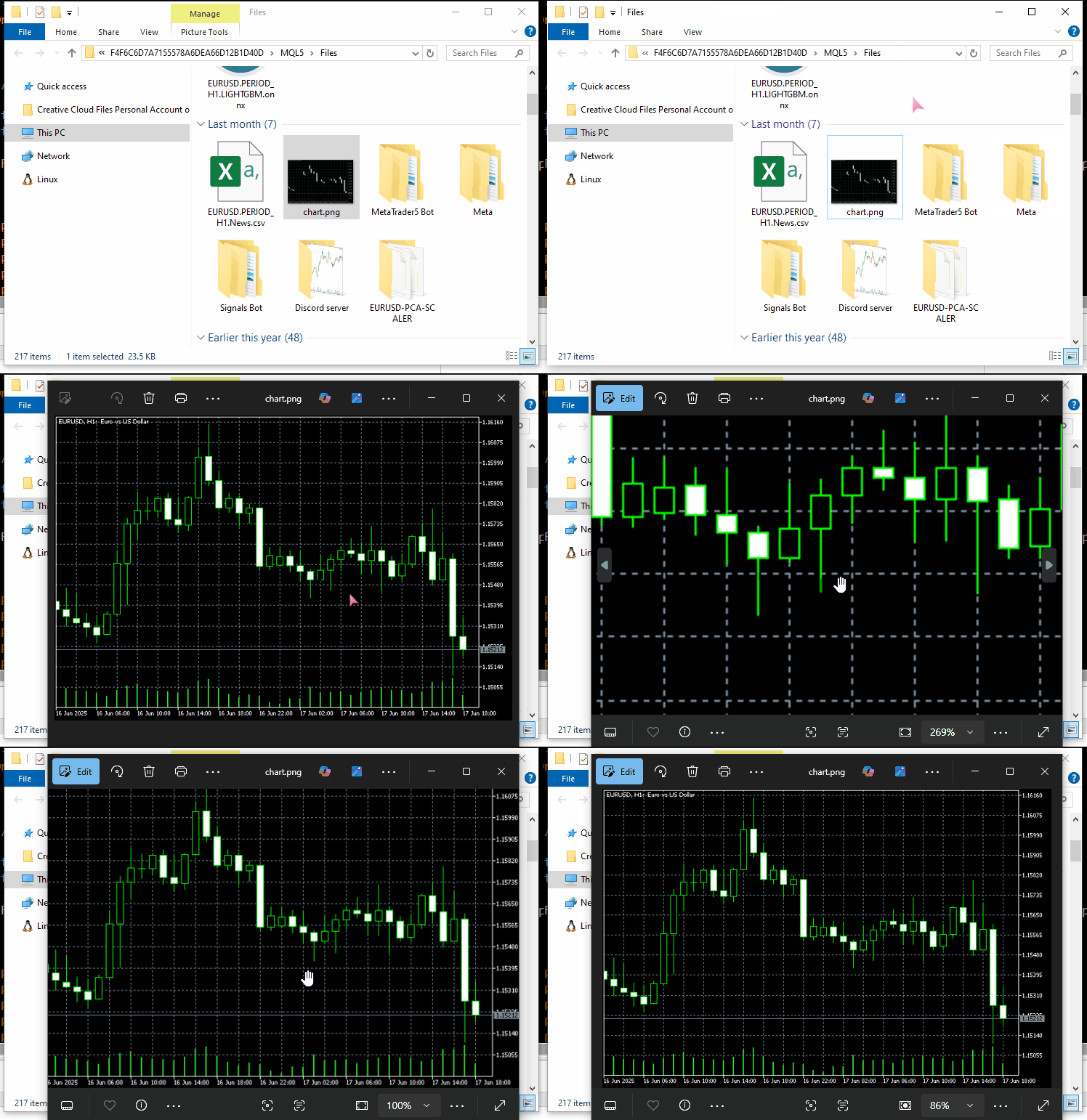
使用 tempfiles.org 服务器作为我们的 API 端点。
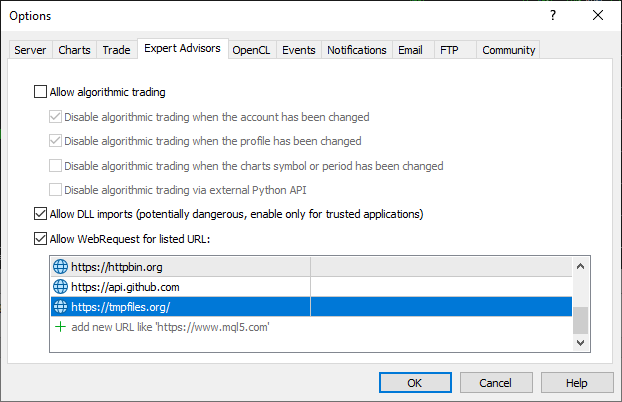
同样,为了使此方法生效,请确保将 URL tempfiles.org 添加到 MetaTrader 5 的允许 URL 列表中;
#include <requests.mqh>
//+------------------------------------------------------------------+
//| Script program start function                                    |
//+------------------------------------------------------------------+
void OnStart()
  {
//---

     string files[] = {"chart.jpg"};

     CResponse response = CSession::request("POST","https://tmpfiles.org/api/v1/upload","",files);

      Print("Status Code: ", response.status_code);
      Print("Reason: ", response.reason);
      Print("URL: ", response.url);
      Print("OK: ", (string)response.ok);
      Print("Elapsed Time (ms): ", response.elapsed);

      Print("Headers:\n", response.headers);
      Print("Cookies: ", response.cookies);
      Print("Response: ",response.text);
      Print("JSON:\n", response.json["url"].ToStr());
  }
输出。
CF      0       17:06:25.063    Requests test (XAUUSD,D1)       Status Code: 200
RL      0       17:06:25.063    Requests test (XAUUSD,D1)       Reason: OK
QM      0       17:06:25.063    Requests test (XAUUSD,D1)       URL: https://tmpfiles.org/api/v1/upload
FN      0       17:06:25.063    Requests test (XAUUSD,D1)       OK: true
OH      0       17:06:25.063    Requests test (XAUUSD,D1)       Elapsed Time (ms): 1594
FQ      0       17:06:25.063    Requests test (XAUUSD,D1)       Headers:
RN      0       17:06:25.063    Requests test (XAUUSD,D1)       Server: nginx/1.22.1
QO      0       17:06:25.063    Requests test (XAUUSD,D1)       Content-Type: application/json
KJ      0       17:06:25.063    Requests test (XAUUSD,D1)       Transfer-Encoding: chunked
CS      0       17:06:25.063    Requests test (XAUUSD,D1)       Connection: keep-alive
KE      0       17:06:25.063    Requests test (XAUUSD,D1)       Cache-Control: no-cache, private
RM      0       17:06:25.063    Requests test (XAUUSD,D1)       Date: Thu, 10 Jul 2025 14:06:25 GMT
DF      0       17:06:25.063    Requests test (XAUUSD,D1)       X-RateLimit-Limit: 60
GN      0       17:06:25.063    Requests test (XAUUSD,D1)       X-RateLimit-Remaining: 59
CN      0       17:06:25.063    Requests test (XAUUSD,D1)       Access-Control-Allow-Origin: *
NF      0       17:06:25.063    Requests test (XAUUSD,D1)
ED      0       17:06:25.063    Requests test (XAUUSD,D1)       Cookies:
RM      0       17:06:25.063    Requests test (XAUUSD,D1)       Response: {"status":"success","data":{"url":"http://tmpfiles.org/5459540/chart.png"}}
LS      0       17:06:25.063    Requests test (XAUUSD,D1)       JSON:
HJ      0       17:06:25.063    Requests test (XAUUSD,D1)
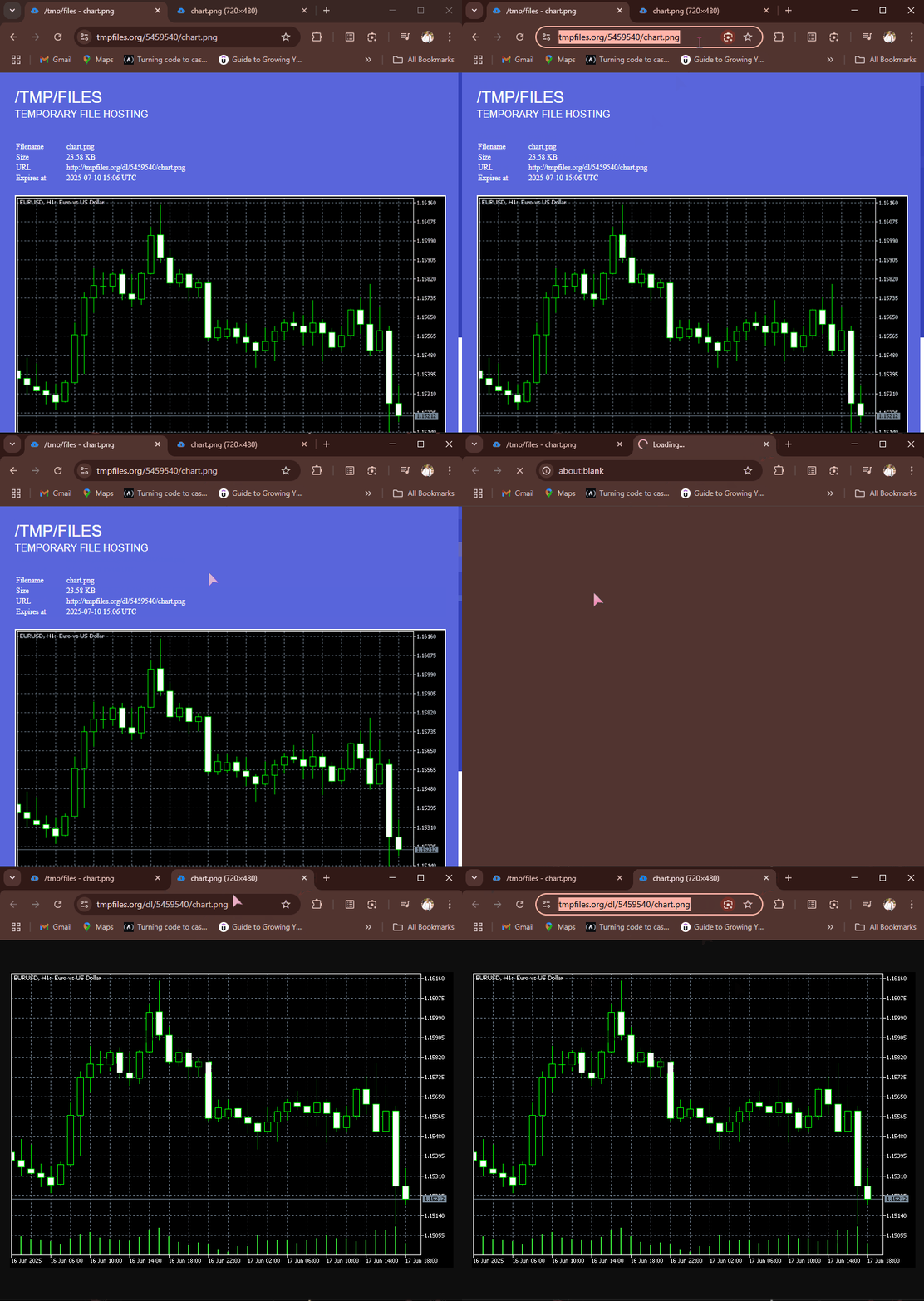
POST 请求成功后, tempfiles.org 返回一个 JSON 响应,其中包含文件托管位置的 URL 端点。我们可以点击这个链接,在网页浏览器中查看图像文件。
从 web 接收和下载文件
再次强调,互联网的目的是为了共享各种信息和文件,能够以 MQL5 接收不同的文件非常方便,因为它有助于接收 CSV 和 Excel 格式的数据;接收不同二进制格式的训练好的机器学习模型及其参数等等。
只要提供正确的 API 端点,已实现的 get 函数就能做到这一点。
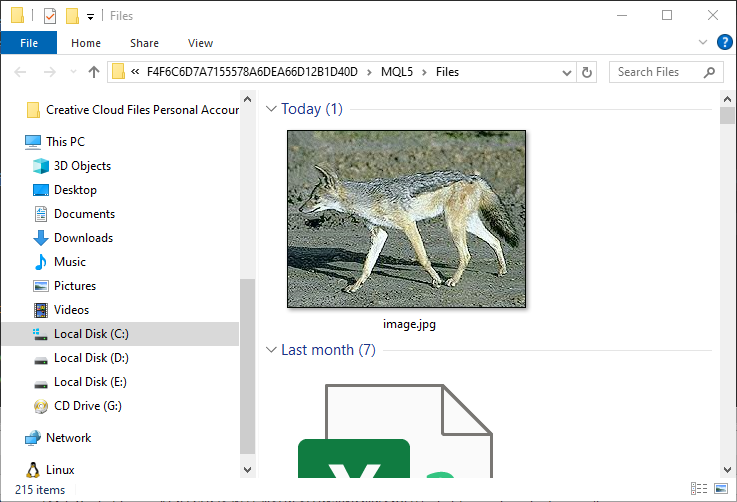
例如;让我们从 httpbin.org 获取图像并将其保存到 MQL5 数据路径中。
#include <requests.mqh>
CSession requests;
//+------------------------------------------------------------------+
//| Script program start function                                    |
//+------------------------------------------------------------------+
void OnStart()
  {
      //--- Get the image file from the web
      CResponse response = requests.get("https://httpbin.org/image/jpeg");
 }
当此函数成功执行时,它将返回加密的图像文件/数据(二进制格式)。
该文件位于变量 CResponse::content 中。
void OnStart()
  {
      //--- Get the image file from the web
      CResponse response = requests.get("https://httpbin.org/image/jpeg");

      //--- Saving an image received in binary format stored in response.content

      int handle = FileOpen("image.jpg", FILE_WRITE|FILE_BIN|FILE_SHARE_WRITE); //Open a .jpg file for writting an image to it
      if (handle == INVALID_HANDLE) //Check the handle
         {
            printf("Failed to open an Image. Error=%s",ErrorDescription(GetLastError()));
            return;
         }

      if (FileWriteArray(handle, response.content)==0) //write all binary data to a image.jpg file
         {
            printf("Failed to write an Image. Error=%s",ErrorDescription(GetLastError()));
            return;
         }

      FileClose(handle);
  }
输出。
MQL5/Files 文件夹下存储着一张包含狐狸(或其他动物)的图片。
会话和 Cookie 处理
您可能已经注意到, CSession 类中的所有函数都是静态的,因此该类是一个 “静态类”。
class CSession
  {
protected:
   //.... other lines of code

public:

                            CSession(const string headers, const string cookies=""); // Provides headers cookies persistance
                           ~CSession(void);

   static void SetCookie(const string cookie)
      {
         if (StringLen(m_cookies) > 0)
            m_cookies += "; ";
         m_cookies += cookie;
      }

   static void ClearCookies()
      {
         m_cookies = "";
      }

   static void              SetBasicAuth(const string username, const string password);

   //---

   static CResponse         request(const string method, const string url, const string data, const string &files[], const string headers = "", const int timeout = 5000, const bool is_json=true);

   // High-level request helpers
   static CResponse         get(const string url, const string headers = "", const int timeout = 5000)
     {
       string files[];
       return request("GET", url, "", files, headers, timeout, false);
     }

     //... other functions
 }
这样做的目的是为了让开发者可以选择部分或全部使用 requests 库,以模仿 Python 中 requests 模块的运行方式。
(a):使用整个类对象
#include <requests.mqh>
//+------------------------------------------------------------------+
//| Script program start function                                    |
//+------------------------------------------------------------------+
void OnStart()
  {
//---

     string headers = "Content-Type: application/json;";
     string cookies = "sessionid=abc123";

     CSession session(headers, cookies); //New session, class constructor calle with
     CResponse response = session.get("https://httpbin.org/cookies"); //receive cookies from the server

      Print("HTTP response");
      Print("--> Status Code: ", response.status_code);
      Print("--> Reason: ", response.reason);
      Print("--> URL: ", response.url);
      Print("--> OK: ", (string)response.ok);
      Print("--> Elapsed Time (ms): ", response.elapsed);

      Print("--> Headers:\n", response.headers);
      Print("--> Cookies: ", response.cookies);
      Print("--> Response text: ",response.text);
      Print("--> JSON:\n", response.json.ToStr());
}
输出。
DS      0       11:38:36.272    Requests test (XAUUSD,D1)       HTTP response
RI      0       11:38:36.272    Requests test (XAUUSD,D1)       --> Status Code: 200
KR      0       11:38:36.272    Requests test (XAUUSD,D1)       --> Reason: OK
NG      0       11:38:36.272    Requests test (XAUUSD,D1)       --> URL: https://httpbin.org/cookies
IF      0       11:38:36.272    Requests test (XAUUSD,D1)       --> OK: true
QQ      0       11:38:36.272    Requests test (XAUUSD,D1)       --> Elapsed Time (ms): 2141
IH      0       11:38:36.272    Requests test (XAUUSD,D1)       --> Headers:
FQ      0       11:38:36.272    Requests test (XAUUSD,D1)       Date: Sat, 12 Jul 2025 08:38:36 GMT
RE      0       11:38:36.272    Requests test (XAUUSD,D1)       Content-Type: application/json
FO      0       11:38:36.272    Requests test (XAUUSD,D1)       Content-Length: 49
DE      0       11:38:36.272    Requests test (XAUUSD,D1)       Connection: keep-alive
CR      0       11:38:36.272    Requests test (XAUUSD,D1)       Server: gunicorn/19.9.0
PK      0       11:38:36.272    Requests test (XAUUSD,D1)       Access-Control-Allow-Origin: *
HM      0       11:38:36.272    Requests test (XAUUSD,D1)       Access-Control-Allow-Credentials: true
QN      0       11:38:36.272    Requests test (XAUUSD,D1)
DL      0       11:38:36.272    Requests test (XAUUSD,D1)       --> Cookies:
LG      0       11:38:36.272    Requests test (XAUUSD,D1)       --> Response text: {
EP      0       11:38:36.272    Requests test (XAUUSD,D1)         "cookies": {
HJ      0       11:38:36.272    Requests test (XAUUSD,D1)           "sessionid": "abc123"
RN      0       11:38:36.272    Requests test (XAUUSD,D1)         }
DE      0       11:38:36.272    Requests test (XAUUSD,D1)       }
EM      0       11:38:36.272    Requests test (XAUUSD,D1)
MD      0       11:38:36.272    Requests test (XAUUSD,D1)       --> JSON:
GH      0       11:38:36.272    Requests test (XAUUSD,D1)
通过调用类构造函数并传递标头和 cookie(可选)来使用整个类,可以让你使用全局标头值,并在使用同一类实例发出的所有 HTTP 请求中使用相同的 cookie,这就是我们所说的 HTTP 会话。
(b):单独使用类中的函数
用于在不建立 HTTP 会话的情况下发出简单的 HTTP 请求,即每次都管理 HTTP 新标头和 cookie。
下面介绍如何在不实例化类对象的情况下直接使用 CSession 类 中的函数。
#include <requests.mqh>
//+------------------------------------------------------------------+
//| Script program start function                                    |
//+------------------------------------------------------------------+
void OnStart()
  {
//---

     CResponse response = CSession::get("https://httpbin.org/get"); //The get request

      Print("HTTP response");
      Print("--> Status Code: ", response.status_code);
      Print("--> Reason: ", response.reason);
      Print("--> URL: ", response.url);
      Print("--> OK: ", (string)response.ok);
      Print("--> Elapsed Time (ms): ", response.elapsed);

      Print("--> Headers:\n", response.headers);
      Print("--> Cookies: ", response.cookies);
      Print("--> Response text: ",response.text);
      Print("--> JSON:\n", response.json.ToStr());
 }
基本身份验证
Python 中 requests 模块提供的所有函数都有一个选项,可以将基本(简单)身份验证的详细信息发送到服务器。
import requests

response = requests.get("https://httpbin.org/headers", auth=("user", "pass"))
print(response.text)
下面介绍的是我们 MQL5 类中的类似功能。
void CSession::SetBasicAuth(const string username, const string password)
  {
   string credentials = username + ":" + password;
   string encoded = Base64Encode(credentials); //Encode the credentials

   m_headers = UpdateHeader(m_headers, "Authorization", "Basic " + encoded); //Update HTTP headers with the authentication information
  }
与 Python 模块中开发人员可以直接在函数中发送这些身份验证参数不同,我们的 MQL5 类允许用户在单独的函数中发送基本身份验证参数,从而略有不同。
SetBasicAuth 函数通过添加授权凭据来更新类中的标头;这些值将可用于以后使用同一类实例调用的所有函数。
#include <requests.mqh>
//+------------------------------------------------------------------+
//| Script program start function                                    |
//+------------------------------------------------------------------+
void OnStart()
  {
//---

     CSession::SetBasicAuth("user", "pass");   //Sets authentication parameters to the HTTP header
     CResponse response = CSession::get("https://httpbin.org/headers"); //Get the headers from the server

      Print("HTTP response");
      Print("--> Headers:\n", response.headers);
      Print("--> Response text: ",response.text);
 }
输出。
IE      0       14:23:23.885    Requests test (XAUUSD,D1)       HTTP response
FQ      0       14:23:23.885    Requests test (XAUUSD,D1)       --> Headers:
KI      0       14:23:23.885    Requests test (XAUUSD,D1)       Date: Sat, 12 Jul 2025 11:23:23 GMT
MM      0       14:23:23.885    Requests test (XAUUSD,D1)       Content-Type: application/json
HK      0       14:23:23.885    Requests test (XAUUSD,D1)       Content-Length: 385
IR      0       14:23:23.885    Requests test (XAUUSD,D1)       Connection: keep-alive
JJ      0       14:23:23.885    Requests test (XAUUSD,D1)       Server: gunicorn/19.9.0
IS      0       14:23:23.885    Requests test (XAUUSD,D1)       Access-Control-Allow-Origin: *
QE      0       14:23:23.885    Requests test (XAUUSD,D1)       Access-Control-Allow-Credentials: true
HF      0       14:23:23.885    Requests test (XAUUSD,D1)
KG      0       14:23:23.885    Requests test (XAUUSD,D1)       --> Response text: {
KP      0       14:23:23.885    Requests test (XAUUSD,D1)         "headers": {
GH      0       14:23:23.885    Requests test (XAUUSD,D1)           "Accept": "*/*",
CM      0       14:23:23.885    Requests test (XAUUSD,D1)           "Accept-Encoding": "gzip, deflate",
DQ      0       14:23:23.885    Requests test (XAUUSD,D1)           "Accept-Language": "en;q=0.5",
NE      0       14:23:23.885    Requests test (XAUUSD,D1)           "Authorization": "Basic dXNlcjpwYXNz",
NS      0       14:23:23.885    Requests test (XAUUSD,D1)           "Cookie": "session=abc123;max-age=60;",
KL      0       14:23:23.885    Requests test (XAUUSD,D1)           "Host": "httpbin.org",
HK      0       14:23:23.885    Requests test (XAUUSD,D1)           "User-Agent": "MetaTrader 5 Terminal/5.5120 (Windows NT 10.0.19045; x64)",
NI      0       14:23:23.885    Requests test (XAUUSD,D1)           "X-Amzn-Trace-Id": "Root=1-687245ab-2065056c28f0024b71a6446f"
GH      0       14:23:23.885    Requests test (XAUUSD,D1)         }
IF      0       14:23:23.885    Requests test (XAUUSD,D1)       }
处理 URL 参数
Python 中的 requests 模块还有一个很棒的功能,那就是它会在发送最终的 Web 请求之前管理接收到的 URL 及其参数。
import requests

response = requests.get("https://httpbin.org/get", params={"param1": "value1"})
print(response.url)
输出。
https://httpbin.org/get?param1=value1
我们在 MQL5 类中采用了一种略有不同的方法。我们没有将 URL 参数传递给所有函数,这会使它们变得复杂,而是有一个单独的实用函数,它有助于使用给定原始参数及其相关参数的参数创建最终的 URL。
#include <requests.mqh>
//+------------------------------------------------------------------+
//| Script program start function                                    |
//+------------------------------------------------------------------+
void OnStart()
  {
//---
      string keys[]   = {"user", "id", "lang"};
      string values[] = {"omega", "123", "mql5 test"};

      string parent_url = "https://httpbin.org/get";
      string final_url =  CSession::BuildUrlWithParams(parent_url, keys, values); //builds a URL with the given parameters

      Print("final url: ",final_url);
 }
输出。
2025.07.12 15:41:57.924 Requests test (XAUUSD,D1) final url: https://httpbin.org/get?user=omega&id=123&lang=mql5+test 创建包含相关参数的 URL 后,就可以使用它来发出 HTTP Web 请求。
      CResponse response = CSession::get(final_url); //Get the headers from the server

      Print("HTTP response");
      Print("--> Headers:\n", response.headers);
      Print("--> Response text: ",response.text);
输出。
JK      0       15:42:00.398    Requests test (XAUUSD,D1)       --> Headers:
QP      0       15:42:00.398    Requests test (XAUUSD,D1)       Date: Sat, 12 Jul 2025 12:41:59 GMT
QK      0       15:42:00.398    Requests test (XAUUSD,D1)       Content-Type: application/json
PM      0       15:42:00.398    Requests test (XAUUSD,D1)       Content-Length: 525
ED      0       15:42:00.398    Requests test (XAUUSD,D1)       Connection: keep-alive
FP      0       15:42:00.398    Requests test (XAUUSD,D1)       Server: gunicorn/19.9.0
MH      0       15:42:00.398    Requests test (XAUUSD,D1)       Access-Control-Allow-Origin: *
EK      0       15:42:00.398    Requests test (XAUUSD,D1)       Access-Control-Allow-Credentials: true
LM      0       15:42:00.398    Requests test (XAUUSD,D1)
OI      0       15:42:00.398    Requests test (XAUUSD,D1)       --> Response text: {
RQ      0       15:42:00.398    Requests test (XAUUSD,D1)         "args": {
CR      0       15:42:00.398    Requests test (XAUUSD,D1)           "id": "123",
KF      0       15:42:00.398    Requests test (XAUUSD,D1)           "lang": "mql5 test",
HI      0       15:42:00.398    Requests test (XAUUSD,D1)           "user": "omega"
KP      0       15:42:00.398    Requests test (XAUUSD,D1)         },
MP      0       15:42:00.398    Requests test (XAUUSD,D1)         "headers": {
IH      0       15:42:00.398    Requests test (XAUUSD,D1)           "Accept": "*/*",
QL      0       15:42:00.398    Requests test (XAUUSD,D1)           "Accept-Encoding": "gzip, deflate",
JQ      0       15:42:00.398    Requests test (XAUUSD,D1)           "Accept-Language": "en;q=0.5",
NF      0       15:42:00.398    Requests test (XAUUSD,D1)           "Cookie": "session=abc123;max-age=60;",
KQ      0       15:42:00.398    Requests test (XAUUSD,D1)           "Host": "httpbin.org",
HP      0       15:42:00.398    Requests test (XAUUSD,D1)           "User-Agent": "MetaTrader 5 Terminal/5.5120 (Windows NT 10.0.19045; x64)",
ND      0       15:42:00.398    Requests test (XAUUSD,D1)           "X-Amzn-Trace-Id": "Root=1-68725817-67dc04cf43ac75b012094481"
KE      0       15:42:00.398    Requests test (XAUUSD,D1)         },
CQ      0       15:42:00.398    Requests test (XAUUSD,D1)         "origin": "197.250.227.235",
MD      0       15:42:00.398    Requests test (XAUUSD,D1)         "url": "https://httpbin.org/get?user=omega&id=123&lang=mql5+test"
IK      0       15:42:00.398    Requests test (XAUUSD,D1)       }
LN      0       15:42:00.398    Requests test (XAUUSD,D1)
非常好!服务器甚至在我们的响应 JSON 文本中返回了 args 键,这表明构建带有相关参数的 URL 的过程已成功。
底线
向公众提供所有免费、开源的知识和信息。在当今世界,编码应该不难。
在了解了 Python 中 requests 模块的运行方式后,我能够在 MQL5 中实现一个类似的模块,以帮助我们从 MetaTrader 5 向外部服务器发出 HTTP 请求。
然而,虽然语法和函数调用可能看起来与 Python 中 requests 模块提供的类似,但这个 MQL5 模块远未完成;我们需要对其进行严格的测试并不断改进,这就是为什么我在 Forge 上创建了一个 MQL5 仓库,链接为 -> https://forge.mql5.io/omegajoctan/Requests 。
因此,不要犹豫,从那里更新代码,并在讨论部分告诉我们您的想法。
再见。
附件表
| 文件名 | 描述与用法 |
|---|---|
| Include\errordescription.mqh | 包含 MQL5 和 MetaTrader 5 生成的所有错误代码的说明 |
| Include\Jason.mqh | 用于以类似 JSON 的格式序列化和反序列化字符串的库。 |
| Include\requests.mqh | 主模块类似于 Python 中的 requests 模块。 |
| Scripts\Requests test.mq5 | 测试本文中描述的所有函数和方法的主脚本。 |
本文由MetaQuotes Ltd译自英文
原文地址: https://www.mql5.com/en/articles/18728
注意: MetaQuotes Ltd.将保留所有关于这些材料的权利。全部或部分复制或者转载这些材料将被禁止。
本文由网站的一位用户撰写,反映了他们的个人观点。MetaQuotes Ltd 不对所提供信息的准确性负责,也不对因使用所述解决方案、策略或建议而产生的任何后果负责。

 从新手到专家:使用 MQL5 制作动画新闻标题(六)—— 新闻交易的挂单策略
 您应当知道的 MQL5 向导技术(第 61 部分):结合 ADX 和 CCI 形态进行监督学习
 MQL5自优化智能交易系统(第八部分):多策略分析(2)
 价格行为分析工具开发(第二十八部分):开盘区间突破工具
