

在 MQL5 中实现其他语言的实用模块(第 01 部分):构建受 Python 启发的 SQLite3 库
 516
516
 0
0

目录
- 概述
- Python 中提供的 sqlite3 模块是什么?
- 连接到 SQLite 数据库
- 执行 SQL 语句
- 处理数据库中的文本(字符串)值
- 数据库事务控制
- sqlite3 模块中的其他方法
- 将交易记录到数据库
- 结论
概述
您是否曾想过,您希望在 MQL5 中以 MQL5 以外的另一种编程语言呈现一两个您最喜欢的模块、库、框架等?我经常遇到这种情况。
MQL5 社区中有大量来自不同编码背景的开发人员;有些像我一样来自 web 开发,有些来自安卓开发,还有更多的编码背景。这意味着大多数程序员都熟悉不同的语言,如 JavaScript、Java、Python、C++、C# 等。
在这些不同的语言中,程序员会遇到不同的编码工具(模块),这些有用的模块我们只想在任何可能的地方使用。例如,我非常喜欢使用 Python 中提供的 NumPy 模块进行数学计算,以至于我曾经在 MQL5 中实现过类似的库,在这篇文章中。
虽然尝试将模块、工具、框架等从一种语言实现到另一种语言,在这种情况下实现到 MQL5,由于编程语言的不同性质,可能会产生略有不同的功能和结果,但具有类似的语法或经验可能足以使 MQL5 中的产品开发变得容易,并为熟悉不同语言的开发人员提供有趣的体验。更不用说,在这个过程中,我们可能会学到一些有价值的信息,这些信息可以巩固我们的编程技能。

在这个新的文章系列中,我们将实现的不是来自其他语言的每个模块,而是来自另一种语言的 MQL5 中实用的每个模块。例如,数学计算、数据存储、数据分析等模块。
从 Python 编程语言内置的 sqlite3 模块开始。
Python 中提供的 SQLite3 模块是什么?
我们首先来了解一下 SQLite 数据库 :
SQLite 数据库是一个轻量级、独立、无服务器的 SQL 数据库引擎。它广泛应用于需要简单、嵌入式、本地数据存储解决方案的应用程序中。它是一种基于文件的数据库,将模式、表、索引和数据全部存储在单个 .sqlite 或 .db 文件中。
与需要一些设置、服务器和管理配置的 MySQL 或 PostgreSQL 数据库不同,SQLite 可以直接读写磁盘,无需任何设置、服务器和管理配置。
MQL5 编程语言内置了用于操作 SQLite 数据库的函数;这些内置函数已经足够用了。但是,与在 Python 中使用 sqlite3 模块相比,它们并不那么容易使用。
例如,尝试创建一个简单的 “example” 数据库,并将一些信息插入名为 users 的表中,如果该表不存在,则会自动创建该表。
使用 Python sqlite 模块
import sqlite3

conn = sqlite3.connect("example.db")

cursor = conn.cursor()

cursor.execute("""
    CREATE TABLE IF NOT EXISTS users (
        id INTEGER PRIMARY KEY AUTOINCREMENT,
        name TEXT NOT NULL,
        age INTEGER,
        email TEXT UNIQUE
    )
""") # Execute a query

try:
    cursor.execute("INSERT INTO users (name, age, email) VALUES (?, ?, ?)",
                   ("Bruh", 30, "bruh@example.com"))

    conn.commit() # commit the transaction | save the new information to a database

except sqlite3.DatabaseError as e:
    print("Insert failed:", e)

conn.close() # closing the database
使用原生 MQL5 函数
void OnStart()
  {
//---

   int db_handle = DatabaseOpen("example.db", DATABASE_OPEN_READWRITE | DATABASE_OPEN_CREATE);
   if (db_handle == INVALID_HANDLE)
     {
       printf("Failed to open a database. Error = %s",ErrorDescription(GetLastError()));
       return;
     }

    string sql =
       "   CREATE TABLE IF NOT EXISTS users ("
       "   id INTEGER PRIMARY KEY AUTOINCREMENT,"
       "   name TEXT NOT NULL,"
       "   age INTEGER,"
       "   email TEXT UNIQUE"
       ")";

    if (!DatabaseExecute(db_handle, sql)) //Execute a sql query
      {
         printf("Failed to execute a query to the database. Error = %s",ErrorDescription(GetLastError()));
         return;
      }

    if (!DatabaseTransactionBegin(db_handle)) //Begin the transaction
      {
         printf("Failed to begin a transaction. Error = %s",ErrorDescription(GetLastError()));
         return;
      }

    sql = "INSERT INTO users (name, age, email) VALUES ('Bruh', 30, 'bruh@example.com')";

    if (!DatabaseExecute(db_handle, sql)) //Execute a query
      {
         printf("Failed to execute a query to the database. Error = %s",ErrorDescription(GetLastError()));
         return;
      }

   if (!DatabaseTransactionCommit(db_handle)) //Commit the transaction | push the changes to a database
      {
         printf("Failed to commit a transaction. Error = %s",ErrorDescription(GetLastError()));
         return;
      }

    DatabaseClose(db_handle); //Close the database
 }
我们都同意,在 Python 中使用 sqlite3 比使用原生 MQL5 函数使我们的代码更清晰,后者要求我们处理错误、返回的信息或添加到数据库中的信息。
sqlite3 模块处理了大量执行命令和管理事务的不必要步骤,使用户更容易轻松地在 SQLite 数据库中获取和插入一些数据。
所以,让我们尝试在 MQL5 中实现一个类似的模块。
连接到 SQLite 数据库
Python 中的 sqlite3 的 connect 方法会在给定的数据库名称不存在时创建一个新的数据库,并返回一个表示与磁盘上数据库连接的连接对象。
import sqlite3
con = sqlite3.connect("example.db")
在 MQL5 中,此连接类似于数据库句柄,因此从技术上讲,我们不需要在我们的 MQL5 库中返回句柄,因为我们将在类中的所有函数中使用它。
class CSqlite3
  {
protected:

   int m_request;

public:
                     int m_db_handle;
 //... Other functions
 }
bool CSqlite3::connect(const string db_name, const bool common=false, const bool database_in_memory=false)
 {
   int flags = DATABASE_OPEN_READWRITE | DATABASE_OPEN_CREATE;

   if (common) //Open the database from the common folder
      flags |= DATABASE_OPEN_COMMON;

   if (database_in_memory) //Open the database in memory
      flags |= DATABASE_OPEN_MEMORY;

   m_db_handle = DatabaseOpen(db_name, flags);

//---

   if (m_db_handle == INVALID_HANDLE)
     {
       printf("func=%s line=%d, Failed to open a database. Error = %s",__FUNCTION__, __LINE__, ErrorDescription(GetLastError()));
       return false;
     }

   return true;
 }
MQL5 允许我们从数据路径(文件夹)或公共数据路径(文件夹)保存数据。当 common 参数设置为 true 时,数据库将从公共数据路径而不是常规数据路径读取。
我们还可以让用户选择是在内存(RAM)中还是在磁盘上打开数据库,因此当变量 database_in_memory 设置为 true 时,数据库将在内存中创建而不是在磁盘中创建,反之亦然。
我们忽略了一个标志,即 DATABASE_OPEN_READONLY,用于以只读模式打开数据库。原因很简单;如果你不想向数据库写入数据,你根本不会执行向该数据库执行的 “INSERT” 查询。有道理吗?
执行 SQL 语句
这是我们在使用 SQLite 数据库时经常用到的最关键的函数之一。此函数使我们能够获取信息、插入、更新、删除和修改数据库中的值等等。
该函数直接在我们的数据库上执行 SQL 语句和命令。
在 sqlite3 Python 中, execute() 函数运行流畅且毫不费力。它可以接受任何命令来插入或获取信息,并自动知道何时返回什么以及不返回什么。
在 MQL5 中,我们有一个名为 DatabaseExecute 的内置函数,它类似于 sqlite3 Python 中的 execute() 函数。它们都执行对指定数据库或表的请求。然而,这种 MQL5 方法适用于执行所有请求,但仅适用于使用关键字 “SELECT” 从数据库读取信息的请求。
为了有效地从数据库中读取信息,我们使用 DatabasePrepare 函数,因为它会创建一个请求句柄,然后可以使用 DatabaseRead 执行该请求。
为了在 MQL5 中创建类似的灵活函数,以便无论查询类型如何都能执行函数,我们需要区分 SQL 查询的类型,并使用正确的查询返回正确的信息。
execute_res_structure CSqlite3::execute(const string sql)
 {
   execute_res_structure res;

   string trimmed_sql = sql;
   StringTrimLeft(trimmed_sql); //Trim the leading white space

   string first_word = trimmed_sql;

   // Find the index of the first space (to isolate the first SQL keyword)
   int space_index = StringFind(trimmed_sql, " ");
   if (space_index != -1)
      first_word = StringSubstr(trimmed_sql, 0, space_index); // Extract the first word from the query

   StringToUpper(first_word); //Convert the first word in the query to uppercase for comparison

   if (first_word == "SELECT")
    {
      // SELECT query – prepare and expect data
      m_request = DatabasePrepare(m_db_handle, sql);
      res.request = m_request;

      return res;
    }
   else
    {
      // INSERT/UPDATE/DELETE – execute directly
       if (!m_transaction_active)
         {
            if (!this.begin())
               return res;
            else
                m_transaction_active_auto = true; //The transaction was started automatically by the execute function
         }

       ResetLastError();
       if (!DatabaseExecute(m_db_handle, sql))
         {
            printf("func=%s line=%d, Failed to execute a query to the database. Error = %s",__FUNCTION__,__LINE__,ErrorDescription(GetLastError()));
         }
    }

   return res;
 }
与 Python 中的 execute 函数类似,所有非 SELECT 语句都会使用 begin 函数隐式地打开一个事务,该事务需要在将更改保存到数据库之前提交。
调用 execute 函数并将一些信息插入数据库后,必须调用 commit 方法将更改保存到数据库。我们将在本文后面讨论这个函数。
当使用 非 SELECT 语句或查询调用该函数时,它不会返回任何值,因为它可能正在更新、修改和插入数据库中的信息。但是,当使用 SELECT 类型的查询调用该函数时,它会返回一个数据结构。让我们详细讨论一下这个结构。
1.fetchone 方法
Python 中提供的 sqlite3 模块能够动态返回从 SQL 语句接收到的全部或部分信息。
首先,它能够从数据库中返回一行信息。
import sqlite3
conn = sqlite3.connect("example.db")

cursor = conn.cursor()
print(conn.execute("SELECT * FROM users").fetchone())
尽管从 SQL 语句请求 SQLite 数据库中的所有可用信息,fetchone 函数仍限制 execute 函数从数据库返回多行数据。
数据库。
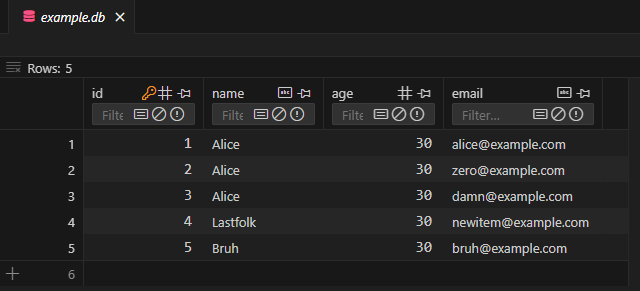
输出。
(mcm-env) C:\Users\Omega Joctan\OneDrive\Desktop\MCM>C:/Anaconda/envs/mcm-env/python.exe "c:/Users/Omega Joctan/OneDrive/Desktop/MCM/sqlite_test.py"
(1, 'Alice', 30, 'alice@example.com')
我们需要在 MQL5 类中实现类似的函数,该函数位于名为 execute_res_structure 的结构中,该结构由函数 execute 返回。
struct execute_res_structure
  {
   int request;
   CLabelEncoder le;

   vector fetchone()
      {
         int cols = DatabaseColumnsCount(request);
         vector row = vector::Zeros(cols);

         while (DatabaseRead(request))  // Essential, read the entire database
          {
            string row_string = "(";

            for (int i = 0; i < cols; i++)
             {
               int int_val; //Integer variable
               double dbl_val; //double
               string str_val; //string variable

               ENUM_DATABASE_FIELD_TYPE col_type = DatabaseColumnType(request, i);
               string col_name;

               if (!DatabaseColumnName(request, i, col_name))
                {
                  printf("func=%s line=%d, Failed to read database column name. Error = %s", __FUNCTION__, __LINE__, ErrorDescription(GetLastError()));
                  continue;
                }

                 switch (col_type) //Detect a column datatype and assign the value read from every row of that column to the suitable variable
                  {
                     case DATABASE_FIELD_TYPE_INTEGER:
                        if (!DatabaseColumnInteger(request, i, int_val))
                           printf("func=%s line=%d, Failed to read Integer. Error = %s", __FUNCTION__, __LINE__, ErrorDescription(GetLastError()));
                        else
                          {
                             row_string += StringFormat("%d", int_val);
                             row[i] = int_val;
                           }
                        break;

                     case DATABASE_FIELD_TYPE_FLOAT:
                        if (!DatabaseColumnDouble(request, i, dbl_val))
                           printf("func=%s line=%d, Failed to read Double. Error = %s", __FUNCTION__, __LINE__, ErrorDescription(GetLastError()));
                        else
                          {
                            row_string += StringFormat("%.5f", dbl_val);
                            row[i] = dbl_val;
                          }
                        break;

                     case DATABASE_FIELD_TYPE_TEXT:
                        if (!DatabaseColumnText(request, i, str_val))
                           printf("func=%s line=%d, Failed to read Text. Error = %s", __FUNCTION__, __LINE__, ErrorDescription(GetLastError()));
                        else
                          {
                             row_string += "'" + str_val + "'";
                             row[i] = (double)str_val;
                          }
                        break;

                     default:
                             if (MQLInfoInteger(MQL_DEBUG))
                                PrintFormat("%s = <Unknown or Unsupported column Type by this Class>", col_name);
                        break;
                  }

               // Add comma if not last element
               if (i < cols - 1)
                  row_string += ", ";
             }

            row_string += ")";
            if (MQLInfoInteger(MQL_DEBUG))
               Print(row_string);  // Print the full row once

            break;
          }

         DatabaseFinalize(request);
         return row;  // Replace with actual parsed return if needed
      }

 //... Other functions
}
来自 MetaEditor 中的类似数据库。
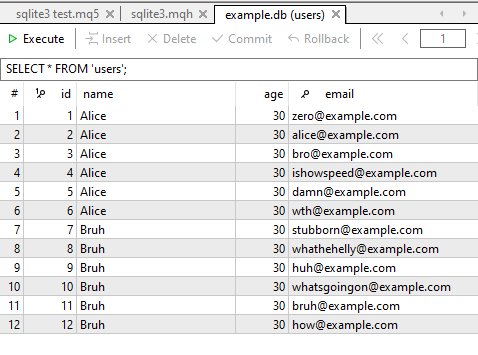
下面是我们如何发送一个查询,请求数据库表中的所有可用信息,然后将返回的信息量限制在单行数据中。
#include <sqlite3.mqh>

CSqlite3 sqlite3;
//+------------------------------------------------------------------+
//| Script program start function                                    |
//+------------------------------------------------------------------+
void OnStart()
  {
//---

    sqlite3.connect("example.db");
    Print(sqlite3.execute("SELECT * FROM users").fetchone());

    sqlite3.close();
  }
输出。
RJ      0       13:25:04.402    sqlite3 test (XAUUSD,H1)        (1, 'Alice', 30, 'zero@example.com')
DQ      0       13:25:04.402    sqlite3 test (XAUUSD,H1)        [1,0,30,0]
看起来很棒!现在,您可以轻松地从数据库中检索单行值。然而,当前函数忽略所有二进制值,不处理或编码字符串,这就是为什么在返回的向量中,所有 “TEXT” 或字符串数据类型都被赋值为零。
此外,与可以保存不同数据类型值的 Python 数组不同,MQL5 向量和数组不能做到这一点;我们稍后会看到如何处理这个问题。
2.fetchall 方法
与 fetchone 方法不同,此方法接收 execute 方法的 SQL 语句中请求的所有信息。
struct execute_res_structure
  {
   int request;
  //... Other functions

   matrix fetchall()
      {
         int cols = DatabaseColumnsCount(request);
         vector row = vector::Zeros(cols);

         int CHUNK_SIZE = 1000; //For optimized matrix handling
         matrix results_matrix = matrix::Zeros(CHUNK_SIZE, cols);
         int rows_found = 0; //for counting the number of rows seen in the database

         while (DatabaseRead(request))  // Essential, read the entire database
          {
            string row_string = "("; //for printing purposes only. Similar to how Python prints

            for (int i = 0; i < cols; i++)
             {
               int int_val; //Integer variable
               double dbl_val; //double variable
               string str_val; //string variable

               ENUM_DATABASE_FIELD_TYPE col_type = DatabaseColumnType(request, i);
               string col_name;

               if (!DatabaseColumnName(request, i, col_name))
                {
                  printf("func=%s line=%d, Failed to read database column name. Error = %s", __FUNCTION__, __LINE__, ErrorDescription(GetLastError()));
                  continue;
                }

                 switch (col_type) //Detect a column datatype and assign the value read from every row of that column to the suitable variable
                  {
                     case DATABASE_FIELD_TYPE_INTEGER:
                        if (!DatabaseColumnInteger(request, i, int_val))
                           printf("func=%s line=%d, Failed to read Integer. Error = %s", __FUNCTION__, __LINE__, ErrorDescription(GetLastError()));
                        else
                          {
                             row_string += StringFormat("%d", int_val);  //For printing purposes only
                             row[i] = int_val;
                           }
                        break;

                     case DATABASE_FIELD_TYPE_FLOAT:
                        if (!DatabaseColumnDouble(request, i, dbl_val))
                           printf("func=%s line=%d, Failed to read Double. Error = %s", __FUNCTION__, __LINE__, ErrorDescription(GetLastError()));
                        else
                          {
                            row_string += StringFormat("%.5f",dbl_val);  //For printing purposes only
                            row[i] = dbl_val;
                          }
                        break;

                     case DATABASE_FIELD_TYPE_TEXT:
                        if (!DatabaseColumnText(request, i, str_val))
                           printf("func=%s line=%d, Failed to read Text. Error = %s", __FUNCTION__, __LINE__, ErrorDescription(GetLastError()));
                        else
                          {
                             row_string += "'" + str_val + "'";
                             row[i] = (double)str_val;
                          }
                        break;

                     default:
                             if (MQLInfoInteger(MQL_DEBUG))
                                PrintFormat("%s = <Unknown or Unsupported column Type by this Class>", col_name);
                        break;
                  }

               // Add comma if not last element
               if (i < cols - 1)
                  row_string += ", ";
             }

          //---

            row_string += ")";
            if (MQLInfoInteger(MQL_DEBUG))
               Print(row_string);  // Print the full row once

          //---

            rows_found++; //Increment the rows counter
            if (rows_found > (int)results_matrix.Rows())
               results_matrix.Resize(results_matrix.Rows()+CHUNK_SIZE, cols); //Resizing the array after 1000 rows

            results_matrix.Row(row, rows_found-1); //Insert a row into the matrix
          }

         results_matrix.Resize(rows_found, cols); //Resize the matrix according to the number of unknown rows found in the database | Final trim

         DatabaseFinalize(request); //Removes a request created in DatabasePrepare().
         return results_matrix;  // return the final matrix
      }

  //... Other lines of code
}
这次,我们返回一个矩阵而不是一个向量,以便容纳整个二维表格。
此函数中的棘手部分是处理动态调整结果矩阵大小的过程。数据库表有时可能非常庞大(包含 10 万行以上),因此要了解数据库或表的行数大小是一个挑战。因此,每次迭代都调整所得矩阵的大小会使该函数运行速度极慢,因为我们不断循环遍历行,而 Resize 函数是 MQL5 中计算成本最高的函数之一。
这就是为什么,我选择在上述函数中每 1000 次迭代后调整矩阵的大小,以减少我们调用 Resize 方法的次数。
函数用法。
#include <sqlite3.mqh>
CSqlite3 sqlite3;
//+------------------------------------------------------------------+
//| Script program start function                                    |
//+------------------------------------------------------------------+
void OnStart()
  {
//---

    sqlite3.connect("example.db");
    Print(sqlite3.execute("SELECT * FROM users").fetchall());

    sqlite3.close();
  }
MetaTrader 5 的“专家”选项卡中的输出。
IF      0       13:30:33.649    sqlite3 test (XAUUSD,H1)        (1, 'Alice', 30, 'zero@example.com')
FR      0       13:30:33.649    sqlite3 test (XAUUSD,H1)        (2, 'Alice', 30, 'alice@example.com')
FD      0       13:30:33.649    sqlite3 test (XAUUSD,H1)        (3, 'Alice', 30, 'bro@example.com')
QQ      0       13:30:33.650    sqlite3 test (XAUUSD,H1)        (4, 'Alice', 30, 'ishowspeed@example.com')
MO      0       13:30:33.650    sqlite3 test (XAUUSD,H1)        (5, 'Alice', 30, 'damn@example.com')
MD      0       13:30:33.650    sqlite3 test (XAUUSD,H1)        (6, 'Alice', 30, 'wth@example.com')
QN      0       13:30:33.650    sqlite3 test (XAUUSD,H1)        (7, 'Bruh', 30, 'stubborn@example.com')
NO      0       13:30:33.650    sqlite3 test (XAUUSD,H1)        (8, 'Bruh', 30, 'whathehelly@example.com')
ED      0       13:30:33.650    sqlite3 test (XAUUSD,H1)        (9, 'Bruh', 30, 'huh@example.com')
PO      0       13:30:33.650    sqlite3 test (XAUUSD,H1)        (10, 'Bruh', 30, 'whatsgoingon@example.com')
FS      0       13:30:33.650    sqlite3 test (XAUUSD,H1)        (11, 'Bruh', 30, 'bruh@example.com')
FF      0       13:30:33.650    sqlite3 test (XAUUSD,H1)        (12, 'Bruh', 30, 'how@example.com')
JO      0       13:30:33.650    sqlite3 test (XAUUSD,H1)        [[1,0,30,0]
RG      0       13:30:33.650    sqlite3 test (XAUUSD,H1)         [2,0,30,0]
QN      0       13:30:33.650    sqlite3 test (XAUUSD,H1)         [3,0,30,0]
LE      0       13:30:33.650    sqlite3 test (XAUUSD,H1)         [4,0,30,0]
KL      0       13:30:33.650    sqlite3 test (XAUUSD,H1)         [5,0,30,0]
NS      0       13:30:33.650    sqlite3 test (XAUUSD,H1)         [6,0,30,0]
MJ      0       13:30:33.650    sqlite3 test (XAUUSD,H1)         [7,0,30,0]
HQ      0       13:30:33.650    sqlite3 test (XAUUSD,H1)         [8,0,30,0]
GH      0       13:30:33.650    sqlite3 test (XAUUSD,H1)         [9,0,30,0]
OL      0       13:30:33.650    sqlite3 test (XAUUSD,H1)         [10,0,30,0]
RE      0       13:30:33.650    sqlite3 test (XAUUSD,H1)         [11,0,30,0]
JS      0       13:30:33.650    sqlite3 test (XAUUSD,H1)         [12,0,30,0]]
execute 函数返回了数据库中所有 12 行数据。
同样,MQL5 数组不能在单个数组中保存非同质变量,因此我们最终得到的是数据库表中包含字符串的每一行都为零。至少现在是这样。
3.fetchmany 方法
与 fetchall 方法类似,此函数返回一个包含表中值的矩阵,但此方法允许您控制要返回的行数。
struct execute_res_structure
  {
   int request;

//... other lines of code

   matrix fetchmany(uint size)
      {
         int cols = DatabaseColumnsCount(request);
         vector row = vector::Zeros(cols);

         matrix results_matrix = matrix::Zeros(size, cols);
         int rows_found = 0;

         while (DatabaseRead(request))  // Essential, read the entire database
          {
            string row_string = "(";

            for (int i = 0; i < cols; i++)
             {
               int int_val; //Integer variable
               double dbl_val; //double variable
               string str_val; //string variable

               ENUM_DATABASE_FIELD_TYPE col_type = DatabaseColumnType(request, i);
               string col_name;

               if (!DatabaseColumnName(request, i, col_name))
                {
                  printf("func=%s line=%d, Failed to read database column name. Error = %s", __FUNCTION__, __LINE__, ErrorDescription(GetLastError()));
                  continue;
                }

                 switch (col_type) //Detect a column datatype and assign the value read from every row of that column to the suitable variable
                  {
                     case DATABASE_FIELD_TYPE_INTEGER:
                        if (!DatabaseColumnInteger(request, i, int_val))
                           printf("func=%s line=%d, Failed to read Integer. Error = %s", __FUNCTION__, __LINE__, ErrorDescription(GetLastError()));
                        else
                          {
                             row_string += StringFormat("%d", int_val);
                             row[i] = int_val;
                           }
                        break;

                     case DATABASE_FIELD_TYPE_FLOAT:
                        if (!DatabaseColumnDouble(request, i, dbl_val))
                           printf("func=%s line=%d, Failed to read Double. Error = %s", __FUNCTION__, __LINE__, ErrorDescription(GetLastError()));
                        else
                          {
                            row_string += StringFormat("%.5f", dbl_val);
                            row[i] = dbl_val;
                          }
                        break;

                     case DATABASE_FIELD_TYPE_TEXT:
                        if (!DatabaseColumnText(request, i, str_val))
                           printf("func=%s line=%d, Failed to read Text. Error = %s", __FUNCTION__, __LINE__, ErrorDescription(GetLastError()));
                        else
                          {
                             row_string += "'" + str_val + "'";
                             row[i] = (double)str_val;
                          }
                        break;

                     default:
                             if (MQLInfoInteger(MQL_DEBUG))
                                PrintFormat("%s = <Unknown or Unsupported column Type by this Class>", col_name);
                        break;
                  }
             }

            results_matrix.Row(row, rows_found);
            rows_found++;

            if (rows_found >= (int)size)
               break;

            row_string += ")";
            if (MQLInfoInteger(MQL_DEBUG))
               Print(row_string);  // Print the full row once
          }

         results_matrix.Resize(rows_found, cols); //Resize the matrix according to the number of unknown rows found in the database | Final trim

         DatabaseFinalize(request); //Removes a request created in DatabasePrepare().
         return results_matrix;  // return the final matrix
      }

  //... other functions
}
函数用法。
#include <sqlite3.mqh>
CSqlite3 sqlite3;
//+------------------------------------------------------------------+
//| Script program start function                                    |
//+------------------------------------------------------------------+
void OnStart()
  {
//---

    sqlite3.connect("example.db");
    Print(sqlite3.execute("SELECT * FROM users").fetchmany(5));

    sqlite3.close();
  }
输出。
EG      0       13:45:25.480    sqlite3 test (XAUUSD,H1)        (1'Alice'30'zero@example.com')
IR      0       13:45:25.481    sqlite3 test (XAUUSD,H1)        (2'Alice'30'alice@example.com')
EJ      0       13:45:25.481    sqlite3 test (XAUUSD,H1)        (3'Alice'30'bro@example.com')
NS      0       13:45:25.481    sqlite3 test (XAUUSD,H1)        (4'Alice'30'ishowspeed@example.com')
CD      0       13:45:25.481    sqlite3 test (XAUUSD,H1)        [[1,0,30,0]
KR      0       13:45:25.481    sqlite3 test (XAUUSD,H1)         [2,0,30,0]
LI      0       13:45:25.481    sqlite3 test (XAUUSD,H1)         [3,0,30,0]
QP      0       13:45:25.481    sqlite3 test (XAUUSD,H1)         [4,0,30,0]
EJ      0       13:45:25.481    sqlite3 test (XAUUSD,H1)         [5,0,30,0]]
尽管这三个函数能够控制矩阵中存储的数据量,但它们仍然依赖于您的 SQL 语句;首先,它控制着返回什么信息。以上讨论的 3 个函数只是接收 SQL 语句请求的数据的网关。
4.补充方法,检查执行函数状态
默认情况下,此函数返回一个结构体,其中包含许多函数,可用于返回执行 “SELECT” 类型的 SQL 语句后获得的数据。然而,我们可能经常调用非选择类型的 SQL 语句的 execute 方法,这使得此函数无法返回任何可用于检查其是否成功的数据。
为了实现这一点,我们必须使用 execute 函数返回的结构中的名为 boolean 的变量。
{
    sqlite3.connect("indicators.db");

    sqlite3.execute(
       "   CREATE TABLE IF NOT EXISTS EURUSD ("
       "   id INTEGER PRIMARY KEY AUTOINCREMENT,"
       "   example_indicator FLOAT,"
       ")"
    );

    if (!sqlite3.execute(StringFormat("INSERT INTO USDJPY (example_indicator) VALUES (%.5f)",(double)rand())).boolean) //A SQL query with a purposefully placed error
      printf("The execute function failed!");
 }
boolean 变量是一种布尔类型的变量,如果函数执行成功,则其值为 true;如果函数执行失败,则其值为 false。
输出。
QK      2       18:27:00.575    sqlite3 test (XAUUSD,H1)        database error, near ")": syntax error
DN      0       18:27:00.576    sqlite3 test (XAUUSD,H1)        func=CSqlite3::execute line=402, Failed to execute a query to the database. Error = Generic database error
GE      2       18:27:00.578    sqlite3 test (XAUUSD,H1)        database error, no such table: USDJPY
PS      0       18:27:00.578    sqlite3 test (XAUUSD,H1)        func=CSqlite3::execute line=402, Failed to execute a query to the database. Error = Generic database error
IS      0       18:27:00.578    sqlite3 test (XAUUSD,H1)        The execute function failed!
要检查当使用返回一些数据的 “SELECT” 类型查询时,该函数是否成功,您必须评估返回的矩阵或向量的大小。
如果它们为空(矩阵的行数为 0,向量的大小为 0),则表示 execute 函数失败。
处理数据库中的文本(字符串)值
如上一节所述,简化的 execute 函数无法返回矩阵或向量中的字符串值,我们知道;字符串或字符串值与其他变量一样有用,因此,在从数据库中获取存储在矩阵中的所有值后,必须分别提取所有包含字符串值的列。
#include <sqlite3.mqh>
CSqlite3 sqlite3;
//+------------------------------------------------------------------+
//| Script program start function                                    |
//+------------------------------------------------------------------+
void OnStart()
  {
//---

    sqlite3.connect("example.db");

    Print("database matrix:\n",sqlite3.execute("SELECT * FROM users").fetchall());

    string name_col[];
    sqlite3.execute("SELECT name FROM users").fetch_column("name", name_col);

    ArrayPrint(name_col);
}
给定这组字符串值,你可以找到方法将它们编码成矩阵接受的变量(double、float 等),然后将它们插入到矩阵中。
输出。
LS      0       12:48:12.456    sqlite3 test (XAUUSD,H1)        (1, 'Alice', 30, 'zero@example.com')
KG      0       12:48:12.456    sqlite3 test (XAUUSD,H1)        (2, 'Alice', 30, 'alice@example.com')
KH      0       12:48:12.456    sqlite3 test (XAUUSD,H1)        (3, 'Alice', 30, 'bro@example.com')
OM      0       12:48:12.457    sqlite3 test (XAUUSD,H1)        (4, 'Alice', 30, 'ishowspeed@example.com')
GH      0       12:48:12.457    sqlite3 test (XAUUSD,H1)        (5, 'Alice', 30, 'damn@example.com')
KH      0       12:48:12.457    sqlite3 test (XAUUSD,H1)        (6, 'Alice', 30, 'wth@example.com')
OR      0       12:48:12.457    sqlite3 test (XAUUSD,H1)        (7, 'Bruh', 30, 'stubborn@example.com')
LJ      0       12:48:12.457    sqlite3 test (XAUUSD,H1)        (8, 'Bruh', 30, 'whathehelly@example.com')
OG      0       12:48:12.457    sqlite3 test (XAUUSD,H1)        (9, 'Bruh', 30, 'huh@example.com')
RS      0       12:48:12.457    sqlite3 test (XAUUSD,H1)        (10, 'Bruh', 30, 'whatsgoingon@example.com')
PF      0       12:48:12.457    sqlite3 test (XAUUSD,H1)        (11, 'Bruh', 30, 'bruh@example.com')
DS      0       12:48:12.457    sqlite3 test (XAUUSD,H1)        (12, 'Bruh', 30, 'how@example.com')
NL      0       12:48:12.457    sqlite3 test (XAUUSD,H1)        (13, 'John', 83, 'johndoe@example.com')
IE      0       12:48:12.457    sqlite3 test (XAUUSD,H1)        (14, 'John', 83, 'johndoe2@example.com')
KP      0       12:48:12.457    sqlite3 test (XAUUSD,H1)        (15, 'John', 83, 'johndoe3@example.com')
IN      0       12:48:12.457    sqlite3 test (XAUUSD,H1)        (16, 'John', 83, 'johndoe4@example.com')
KD      0       12:48:12.457    sqlite3 test (XAUUSD,H1)        database matrix:
HP      0       12:48:12.457    sqlite3 test (XAUUSD,H1)        [[1,0,30,0]
PF      0       12:48:12.457    sqlite3 test (XAUUSD,H1)         [2,0,30,0]
OM      0       12:48:12.457    sqlite3 test (XAUUSD,H1)         [3,0,30,0]
ND      0       12:48:12.457    sqlite3 test (XAUUSD,H1)         [4,0,30,0]
MK      0       12:48:12.457    sqlite3 test (XAUUSD,H1)         [5,0,30,0]
LR      0       12:48:12.457    sqlite3 test (XAUUSD,H1)         [6,0,30,0]
KI      0       12:48:12.457    sqlite3 test (XAUUSD,H1)         [7,0,30,0]
JP      0       12:48:12.457    sqlite3 test (XAUUSD,H1)         [8,0,30,0]
IG      0       12:48:12.457    sqlite3 test (XAUUSD,H1)         [9,0,30,0]
QM      0       12:48:12.457    sqlite3 test (XAUUSD,H1)         [10,0,30,0]
LF      0       12:48:12.457    sqlite3 test (XAUUSD,H1)         [11,0,30,0]
KO      0       12:48:12.457    sqlite3 test (XAUUSD,H1)         [12,0,30,0]
RP      0       12:48:12.457    sqlite3 test (XAUUSD,H1)         [13,0,83,0]
MI      0       12:48:12.457    sqlite3 test (XAUUSD,H1)         [14,0,83,0]
PR      0       12:48:12.457    sqlite3 test (XAUUSD,H1)         [15,0,83,0]
DF      0       12:48:12.457    sqlite3 test (XAUUSD,H1)         [16,0,83,0]]
LQ      0       12:48:12.458    sqlite3 test (XAUUSD,H1)        "Alice" "Alice" "Alice" "Alice" "Alice" "Alice" "Bruh"  "Bruh"  "Bruh"  "Bruh"  "Bruh"  "Bruh"  "John"  "John"  "John"  "John"
数据库事务控制
Python 中的 sqlite3 模块提供了多种方法来控制数据库事务是否、何时以及如何打开和关闭。我们可以在类中采用相同的格式,这样在使用 SQLite 数据库时更容易处理事务。
| 函数 | 描述 | 注意事项 |
|---|---|---|
bool CSqlite3::commit(void) | 提交当前事务,使对数据库的所有更改永久生效。 | 如果 autocommit 设置为 false,则在执行 INSERT 、 UPDATE 或 DELETE 类型的 SQL 查询后需要执行此操作。 |
bool CSqlite3::rollback(void) | 回滚当前事务,撤销所有未提交的更改。 | 有助于错误处理。 |
bool CSqlite3::begin(void) | 启动稍后将提交到数据库的事务。 | 在对数据库进行任何更改之前,会使用更明确的语法。当 autocommit 设置为 true 时,execute() 函数会自动调用它。 |
bool CSqlite3::in_transaction() | 用于检查事务是否处于活动状态的布尔函数。 | 如果事务当前处于活动状态,则返回 true。 |
CSqlite3(bool autocommit=false) | 可选 — 不推荐,您可以在类构造函数中修改 autocommit 值,以启用或禁用 execute 函数内部事务的自动提交。 |
这三个函数(begin、rollback 和 commit)是建立在 MQL5 内置的用于处理数据库事务的函数之上的。
bool CSqlite3::commit(void)
 {
   if (!DatabaseTransactionCommit(m_db_handle))
      {
         printf("func=%s line=%d, Failed to commit a transaction. Error = %s",__FUNCTION__,__LINE__,ErrorDescription(GetLastError()));
         return false;
      }

   m_transaction_active = false; //Reset the transaction after commit
   m_transaction_active_auto = false;

   return true;
 }
//+------------------------------------------------------------------+
//|                                                                  |
//+------------------------------------------------------------------+
bool CSqlite3::begin(void)
  {
   if (m_transaction_active)
     {
       if (!m_transaction_active_auto) //print only if the user started the transaction not when it was started automatically by the execute() function
         printf("Can not begin, already in a transaction. Call the function rollback() to disregard it, or commit() to save the changes");
       return false;
     }

//---

   if (!DatabaseTransactionBegin(m_db_handle))
      {
         printf("func=%s line=%d, Failed to begin a transaction. Error = %s",__FUNCTION__,__LINE__,ErrorDescription(GetLastError()));
         return false;
      }

   m_transaction_active = true;
   m_transaction_active_auto = false;

   return m_transaction_active;
  }
//+------------------------------------------------------------------+
//|                                                                  |
//+------------------------------------------------------------------+
bool CSqlite3::rollback(void)
 {
   if (!DatabaseTransactionRollback(m_db_handle))
      {
         printf("func=%s line=%d, Failed to rollback a transaction. Error = %s",__FUNCTION__,__LINE__,ErrorDescription(GetLastError()));
         return false;
      }

   m_transaction_active = false; //Reset the transaction after rollback
   m_transaction_active_auto = false;

   return true;
 }
sqlite3 模块中的其他方法
这些是该模块中较少使用的函数,但它们对于各种任务仍然很方便。
1.executemany 方法
此函数允许您在单个函数调用中向数据库表插入多行。
假设你有一个包含多行的矩阵,每一列都包含特定类型的指标值,你想一次性将这些值插入到数据库中 —— 这就是直达函数。
#include <sqlite3.mqh>
CSqlite3 sqlite3;
//+------------------------------------------------------------------+
//| Script program start function                                    |
//+------------------------------------------------------------------+
void OnStart()
  {
//---

    sqlite3.connect("indicators.db");

    sqlite3.execute(
       "   CREATE TABLE IF NOT EXISTS EURUSD ("
       "   id INTEGER PRIMARY KEY AUTOINCREMENT,"
       "   INDICATOR01 FLOAT,"
       "   INDICATOR02 FLOAT,"
       "   INDICATOR03 FLOAT"
       ")"
    );

    matrix data = {{101, 25, 001},
                   {102, 32, 002},
                   {103, 29, 003}};

    sqlite3.executemany("INSERT INTO EURUSD (INDICATOR01, INDICATOR02, INDICATOR03) VALUES (?,?,?)", data);
    sqlite3.commit();
    sqlite3.close();
  }
输出。
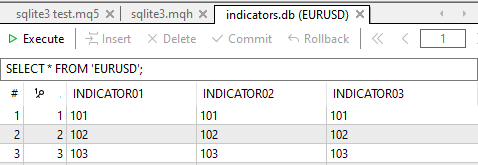
关键字 VALUES 后面的问号数量必须等于 params 矩阵中的列数,这样该函数才能正常工作而不报错。
请记住,由于矩阵对单个矩阵中同质变量的限制,您无法使用此函数一次将不同的数据类型添加到数据库中。例如,你不能同时向数据库中插入字符串类型和双精度浮点数类型的列。
2.executescript 方法
当您需要一次性执行多个 SQL 语句时,此函数非常方便。例如,在一条语句中创建表、插入行等。以下是该函数的主要特点。
void OnStart()
  {
//---
     sqlite3.connect("indicators.db");

     // Use executescript to log actions
     sqlite3.executescript(
              "CREATE TABLE IF NOT EXISTS logs ("
              "id INTEGER PRIMARY KEY AUTOINCREMENT,"
              "event TEXT NOT NULL"
          ");"

          "INSERT INTO logs (event) VALUES ('Users batch inserted');"
      );

     sqlite3.close();
  }
- 它接受以分号“;”分隔的多条 SQL 语句字符串。
- 它会一次性执行所有命令,不带参数,也不像 execute() 或 executemany() 那样进行解析。
- 它不返回结果,只执行一批命令。
输出。
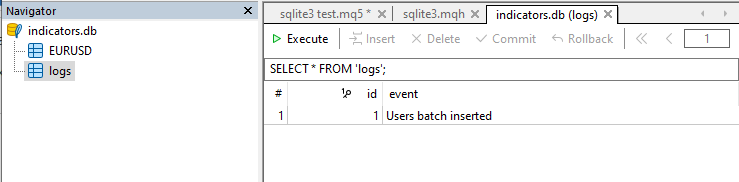
executescript 函数会自动提交所有未完成的事务,因此通常不需要显式调用 commit 函数,除非需要进行控制。
3.附加方法,print_table 方法
要获得类似于 Python 中 sqlite3 模块提供的 cursor.description 的 功能,该模块返回 SQL 查询、数据库或表的结构。
我们可以使用名为 DatabasePrint 的 MQL5 内置函数来获得类似的结果。
void CSqlite3::print_table(const string table_name_or_sql, const int flags=0) // Prints a table or an SQL request execution result in the Experts journal.
  {
    if (DatabasePrint(m_db_handle, table_name_or_sql, flags)<0)
       printf("func=%s line=%d, Failed to print the table or query result. Error = %s",__FUNCTION__,__LINE__, ErrorDescription(GetLastError()));
  }
用法。
sqlite3.print_table("SELECT * FROM users");输出。
CM      0       13:17:19.028    sqlite3 test (XAUUSD,H1)         #| id name  age email
PJ      0       13:17:19.028    sqlite3 test (XAUUSD,H1)        --+--------------------------------------
MH      0       13:17:19.028    sqlite3 test (XAUUSD,H1)         1|  1 Alice  30 zero@example.com
KS      0       13:17:19.028    sqlite3 test (XAUUSD,H1)         2|  2 Alice  30 alice@example.com
NO      0       13:17:19.028    sqlite3 test (XAUUSD,H1)         3|  3 Alice  30 bro@example.com
NI      0       13:17:19.028    sqlite3 test (XAUUSD,H1)         4|  4 Alice  30 ishowspeed@example.com
IL      0       13:17:19.028    sqlite3 test (XAUUSD,H1)         5|  5 Alice  30 damn@example.com
LO      0       13:17:19.028    sqlite3 test (XAUUSD,H1)         6|  6 Alice  30 wth@example.com
EE      0       13:17:19.028    sqlite3 test (XAUUSD,H1)         7|  7 Bruh   30 stubborn@example.com
EM      0       13:17:19.028    sqlite3 test (XAUUSD,H1)         8|  8 Bruh   30 whathehelly@example.com
ER      0       13:17:19.028    sqlite3 test (XAUUSD,H1)         9|  9 Bruh   30 huh@example.com
HK      0       13:17:19.028    sqlite3 test (XAUUSD,H1)        10| 10 Bruh   30 whatsgoingon@example.com
IQ      0       13:17:19.028    sqlite3 test (XAUUSD,H1)        11| 11 Bruh   30 bruh@example.com
LQ      0       13:17:19.028    sqlite3 test (XAUUSD,H1)        12| 12 Bruh   30 how@example.com
GG      0       13:17:19.028    sqlite3 test (XAUUSD,H1)        13| 13 John   83 johndoe@example.com
GK      0       13:17:19.028    sqlite3 test (XAUUSD,H1)        14| 14 John   83 johndoe2@example.com
NQ      0       13:17:19.028    sqlite3 test (XAUUSD,H1)        15| 15 John   83 johndoe3@example.com
QF      0       13:17:19.028    sqlite3 test (XAUUSD,H1)        16| 16 John   83 johndoe4@example.com
将交易记录到数据库
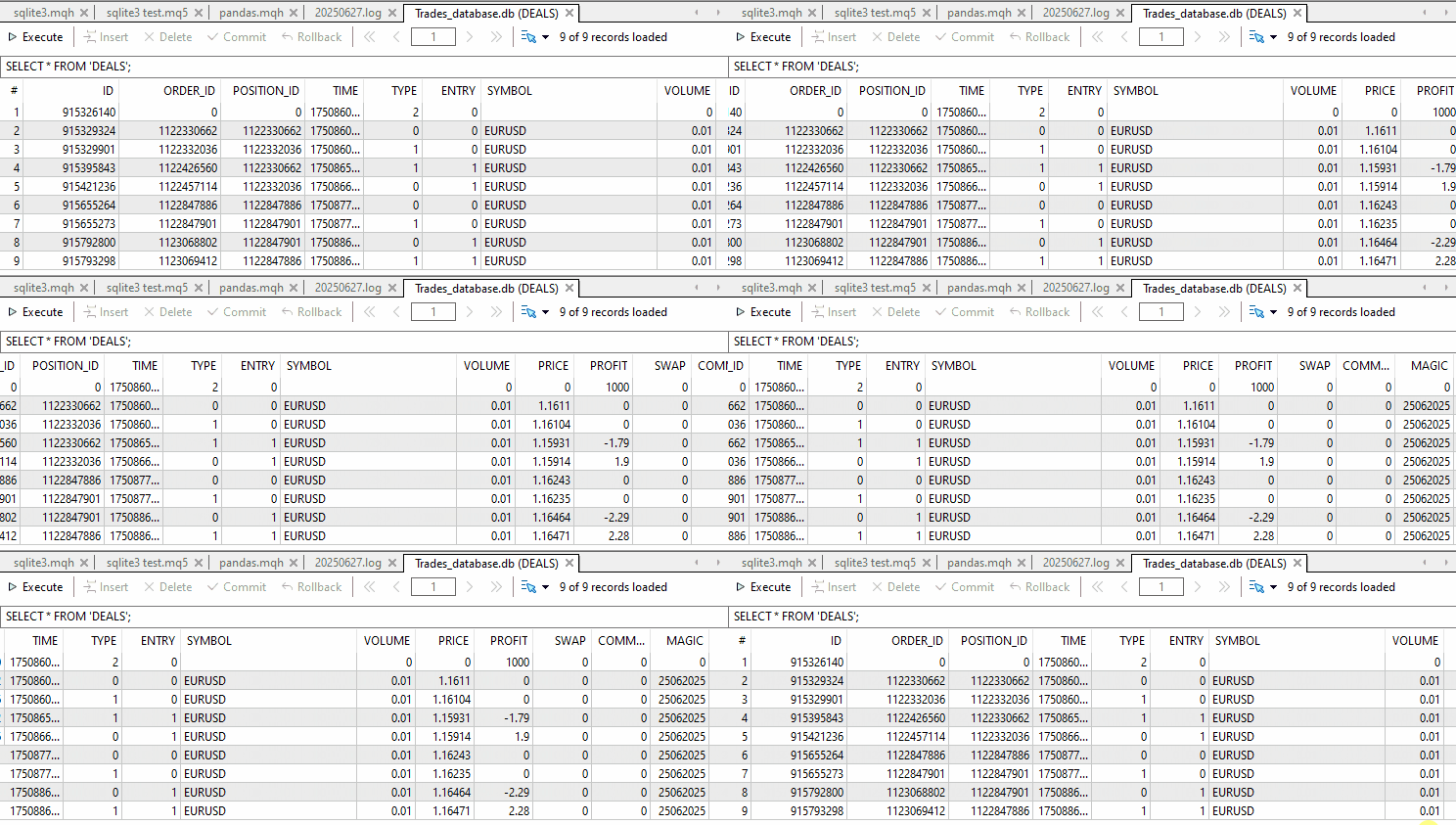
我们已经看到了一些关于如何执行 SQL 语句、向数据库添加一些值等的简单示例。让我们最终做一些有意义的事情;将 MetaTrader 5 历史记录中的所有交易插入 SQLite 数据库。
此示例取自这篇文章。
不使用 sqlite3。
//--- auxiliary variables
   ulong    deal_ticket;         // deal ticket
   long     order_ticket;        // a ticket of an order a deal was executed by
   long     position_ticket;     // ID of a position a deal belongs to
   datetime time;                // deal execution time
   long     type ;               // deal type
   long     entry ;              // deal direction
   string   symbol;              // a symbol a deal was executed for
   double   volume;              // operation volume
   double   price;               // price
   double   profit;              // financial result
   double   swap;                // swap
   double   commission;          // commission
   long     magic;               // Magic number (Expert Advisor ID)
   long     reason;              // deal execution reason or source
//--- go through all deals and add them to the database
   bool failed=false;
   int deals=HistoryDealsTotal();
// --- lock the database before executing transactions
   DatabaseTransactionBegin(database);
   for(int i=0; i<deals; i++)
     {
      deal_ticket=    HistoryDealGetTicket(i);
      order_ticket=   HistoryDealGetInteger(deal_ticket, DEAL_ORDER);
      position_ticket=HistoryDealGetInteger(deal_ticket, DEAL_POSITION_ID);
      time= (datetime)HistoryDealGetInteger(deal_ticket, DEAL_TIME);
      type=           HistoryDealGetInteger(deal_ticket, DEAL_TYPE);
      entry=          HistoryDealGetInteger(deal_ticket, DEAL_ENTRY);
      symbol=         HistoryDealGetString(deal_ticket, DEAL_SYMBOL);
      volume=         HistoryDealGetDouble(deal_ticket, DEAL_VOLUME);
      price=          HistoryDealGetDouble(deal_ticket, DEAL_PRICE);
      profit=         HistoryDealGetDouble(deal_ticket, DEAL_PROFIT);
      swap=           HistoryDealGetDouble(deal_ticket, DEAL_SWAP);
      commission=     HistoryDealGetDouble(deal_ticket, DEAL_COMMISSION);
      magic=          HistoryDealGetInteger(deal_ticket, DEAL_MAGIC);
      reason=         HistoryDealGetInteger(deal_ticket, DEAL_REASON);
      //--- add each deal to the table using the following query
      string request_text=StringFormat("INSERT INTO DEALS (ID,ORDER_ID,POSITION_ID,TIME,TYPE,ENTRY,SYMBOL,VOLUME,PRICE,PROFIT,SWAP,COMMISSION,MAGIC,REASON)"
                                       "VALUES (%d, %d, %d, %d, %d, %d, '%s', %G, %G, %G, %G, %G, %d, %d)",
                                       deal_ticket, order_ticket, position_ticket, time, type, entry, symbol, volume, price, profit, swap, commission, magic, reason);
      if(!DatabaseExecute(database, request_text))
        {
         PrintFormat("%s: failed to insert deal #%d with code %d", __FUNCTION__, deal_ticket, GetLastError());
         PrintFormat("i=%d: deal #%d  %s", i, deal_ticket, symbol);
         failed=true;
         break;
        }
     }
//--- check for transaction execution errors
   if(failed)
     {
      //--- roll back all transactions and unlock the database
      DatabaseTransactionRollback(database);
      PrintFormat("%s: DatabaseExecute() failed with code %d", __FUNCTION__, GetLastError());
      return(false);
     }
//--- all transactions have been performed successfully - record changes and unlock the database
   DatabaseTransactionCommit(database);
使用 sqlite3。
#include <sqlite3.mqh>
CSqlite3 sqlite3;
//+------------------------------------------------------------------+
//| Script program start function                                    |
//+------------------------------------------------------------------+
void OnStart()
  {
//---
    sqlite3.connect("Trades_database.db");

//--- auxiliary variables

    ulong    deal_ticket;         // deal ticket
    long     order_ticket;        // a ticket of an order a deal was executed by
    long     position_ticket;     // ID of a position a deal belongs to
    datetime time;                // deal execution time
    long     type ;               // deal type
    long     entry ;              // deal direction
    string   symbol;              // a symbol a deal was executed for
    double   volume;              // operation volume
    double   price;               // price
    double   profit;              // financial result
    double   swap;                // swap
    double   commission;          // commission
    long     magic;               // Magic number (Expert Advisor ID)
    long     reason;              // deal execution reason or source

//--- go through all deals and add them to the database

   HistorySelect(0, TimeCurrent());
   int deals=HistoryDealsTotal();

   sqlite3.execute("CREATE TABLE IF NOT EXISTS DEALS ("
                     "ID          INT KEY NOT NULL,"
                     "ORDER_ID    INT     NOT NULL,"
                     "POSITION_ID INT     NOT NULL,"
                     "TIME        INT     NOT NULL,"
                     "TYPE        INT     NOT NULL,"
                     "ENTRY       INT     NOT NULL,"
                     "SYMBOL      CHAR(10),"
                     "VOLUME      REAL,"
                     "PRICE       REAL,"
                     "PROFIT      REAL,"
                     "SWAP        REAL,"
                     "COMMISSION  REAL,"
                     "MAGIC       INT,"
                     "REASON      INT );"
   ); //Creates a table if it doesn't exist

   sqlite3.begin(); //Start the transaction

// --- lock the database before executing transactions

   for(int i=0; i<deals; i++) //loop through all deals
     {
      deal_ticket=    HistoryDealGetTicket(i);
      order_ticket=   HistoryDealGetInteger(deal_ticket, DEAL_ORDER);
      position_ticket=HistoryDealGetInteger(deal_ticket, DEAL_POSITION_ID);
      time= (datetime)HistoryDealGetInteger(deal_ticket, DEAL_TIME);
      type=           HistoryDealGetInteger(deal_ticket, DEAL_TYPE);
      entry=          HistoryDealGetInteger(deal_ticket, DEAL_ENTRY);
      symbol=         HistoryDealGetString(deal_ticket, DEAL_SYMBOL);
      volume=         HistoryDealGetDouble(deal_ticket, DEAL_VOLUME);
      price=          HistoryDealGetDouble(deal_ticket, DEAL_PRICE);
      profit=         HistoryDealGetDouble(deal_ticket, DEAL_PROFIT);
      swap=           HistoryDealGetDouble(deal_ticket, DEAL_SWAP);
      commission=     HistoryDealGetDouble(deal_ticket, DEAL_COMMISSION);
      magic=          HistoryDealGetInteger(deal_ticket, DEAL_MAGIC);
      reason=         HistoryDealGetInteger(deal_ticket, DEAL_REASON);

      //--- add each deal to the table using the following query
      string request_text=StringFormat("INSERT INTO DEALS (ID,ORDER_ID,POSITION_ID,TIME,TYPE,ENTRY,SYMBOL,VOLUME,PRICE,PROFIT,SWAP,COMMISSION,MAGIC,REASON)"
                                       "VALUES (%d, %d, %d, %d, %d, %d, '%s', %G, %G, %G, %G, %G, %d, %d)",
                                       deal_ticket, order_ticket, position_ticket, time, type, entry, symbol, volume, price, profit, swap, commission, magic, reason);

      sqlite3.execute(request_text);
     }

    sqlite3.commit(); //Commit all deals to the database at once
    sqlite3.close(); //close the database
  }
结果。
最后的探讨
在 MQL5 中重新创建 Python 的 sqlite3 模块是一项有意义的挑战,与 Python 相比,它突出了 MQL5 的灵活性和局限性。虽然 MQL5 缺乏对 SQLite 数据库的授权器或上下文管理器等高级功能的内置支持,但通过仔细的抽象和方法设计,可以获得非常相似的开发人员体验。
这个自定义的 CSqlite3 类现在允许 MQL5 开发人员以结构化的 Pythonic 方式与 SQLite 数据库进行交互 —— 完全支持查询、事务、提交/回滚控制以及 fetchone()、fetchmany()、fetchall() 等获取操作。
如果你之前使用过 Python,那么这个模块应该会让你感到熟悉,并且希望你会喜欢使用它。
再见。
附件表
| 文件名 | 描述与用途 |
|---|---|
| Include\errordescription.mqh | 包含 MQL5 和 MetaTrader 5 生成的所有错误代码的说明 |
| Include\sqlite3.mqh | 包含 CSqlite3 类,用于以类似 Python 的方式操作 SQLite 数据库。 |
| Scripts\sqlite3 test.mq5 | 用于测试 CSqlite3 类的脚本。 |
本文由MetaQuotes Ltd译自英文
原文地址: https://www.mql5.com/en/articles/18640
注意: MetaQuotes Ltd.将保留所有关于这些材料的权利。全部或部分复制或者转载这些材料将被禁止。
本文由网站的一位用户撰写,反映了他们的个人观点。MetaQuotes Ltd 不对所提供信息的准确性负责,也不对因使用所述解决方案、策略或建议而产生的任何后果负责。

 重构经典策略(第十三部分):让我们的交叉策略迈向新维度(2)
 精通日志记录(第八部分):具备自动翻译能力的错误日志记录
 从新手到专家:使用 MQL5 制作动画新闻标题(五)—— 事件提醒系统
 数据科学和机器学习(第 37 部分):利用烛条形态和人工智能战胜市场
