
Shortcuts MT5 Hotkeys Scalping
- Utilities
- Version: 7.9
- Updated: 15 October 2026
- Activations: 10

https://www.mql5.com/en/blogs/post/768319
Key Commands
- i - EA Control Panel.
- E - Trade Assistant.
- G - Performance Panel
- J - News Filter Panel
- B - Buy.
- S - Sell.
- 1-2-3 - Buy (customizable lots)
- 4-5-6 - Sell (customizable lots)
- L - Buy Limit.
- M - Sell Limit.
- U - Buy Stop.
- N - Sell Stop.
- Q - Remove Stop Loss.
- W - Remove Take Profit
- C - Closes all open positions.
- X - Closes a specific position.
- Z - Cancels all pending orders.
- T - Trailing stop.
- P - Partial.
- K - Breakeven.
- O - Positions
- 7-8-9 - Custom Timeframes
- A - Draw Risk/Reward Guide
- F - Draw Fibonacci Retracement
- R - Draw Rectangle
- V - Draw Vertical Line
- H - Draw Horizontal Line
- D - Draw Trendline
- Y - Draw Text
Hotkey control can be enabled or disabled as needed.
Note: Default shortcuts use uppercase letters. If the user reassigns any shortcut, the new key must be entered in uppercase in the input settings.
Control Panel
The EA includes a professional real-time Control Panel, designed to provide fast and intuitive access to the most important trading features directly from the chart.
Press "I" on the keyboard at any time to open or hide the panel.
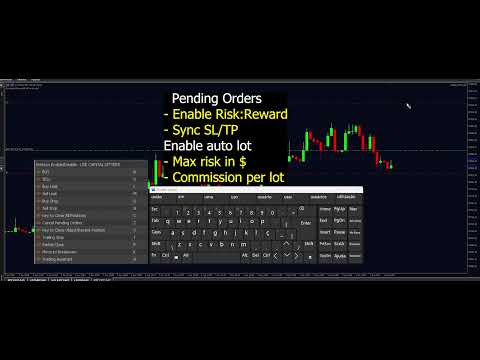
With the Control Panel, you can quickly adjust lot size, stop loss, take profit, trailing stop, risk/reward ratio, partial close settings, protection limits, scalping configurations, pending orders, and many other trading parameters without stopping the EA or reopening the settings window.
All functions are organized into 7 dedicated tabs:
"TRADE, SL/TP, TRAIL, PROTECT, SCALP, PENDING and R:R"
The panel works as a fast runtime modification layer. Changes made inside the panel take effect immediately during operation, but they do not modify the original fixed EA input parameters.
To permanently change the fixed EA parameters, you must open the EA properties directly from the chart and edit the inputs manually. The Control Panel always copies these fixed input values as its default configuration.
The Control Panel also includes a complete profile management system:
- "SAVE" — saves your current panel configuration
- "LOAD" — restores your saved configuration
- "RESET" — restores all panel settings back to the original EA input defaults
This system provides a faster, more practical, and professional trading experience, making real-time strategy adjustments easier during live market conditions.
Maximum Loss Protection (Max Loss)
When the defined loss limit is reached, the EA can close all orders or only the position that hits the loss.
Daily Loss Protection (Daily Loss)
When enabled and the defined daily loss limit is reached, the EA closes all positions and blocks new operations until the next day.
Maximum Profit Protection (Max Profit)
When the defined profit limit is reached, the EA can close all orders or only the position that hits the profit.
You can choose to close all orders or only the one that reaches the limit.
Performance Panel — hotkey "G"
New standalone visual panel, activated with the G hotkey, that displays the strategy's performance in real time directly on the chart — ideal for sharing results publicly without exposing the control panel or the EA's internal parameters.
Performance Mini-Calendar
The panel highlight is a navigable mini-calendar (< > arrows for previous months), where each day is colored according to its result:
- Green → profitable day
- Red → losing day
- Highlighted (different color) → current day
Hover the mouse over any day to see the exact P&L in a tooltip. This provides an immediate visual overview of the consistency (or inconsistency) of results throughout the month.
Configurable Analysis Period
Performance metrics can be calculated in three modes, selected directly from the panel:
- Daily
- Monthly
- Yearly
For each mode, it is possible to define how many periods to look back (e.g., last 3 months, last 2 years, etc.) — useful for comparing recent performance without changing inputs and recompiling.
Displayed Metrics
The panel calculates and displays the most relevant metrics every serious trader should monitor:
- Win Rate — percentage of winning trades
- Profit Factor — gross profit divided by gross loss (above 1.0 indicates a positive edge)
- Payoff Ratio — ratio between average profit and average loss
- Recovery Factor — net profit divided by maximum drawdown
- Sharpe Ratio (annualized) — risk-adjusted return based on daily result volatility
- Max Drawdown ($ and %) — largest equity decline during the analyzed period
- Avg Trades/Day and Avg Profit/Trade
- Best Day / Worst Day
- Current Streak — current sequence of consecutive winning or losing days
Monthly Balance Chart
Below the metrics, a bar chart displays month-by-month P&L for the selected year (also navigable by year), with the current month highlighted — providing a quick view of annual performance evolution.
News Filter Panel — hotkey "J"
Standalone panel, activated with the J hotkey, that automatically protects your trades from the volatility and slippage caused by high-impact economic news releases, without requiring you to manually watch the economic calendar.
Press "J" at any time to open or hide the News Filter Panel directly on the chart.
The panel displays, in table format, all relevant news events for the current day filtered by the currencies of the symbol in use, showing:
- Time — the scheduled release time of the event
- Impact — Low, Medium or High
- Event — the name of the news release
If the current time falls inside the blocking window of any event, that row is automatically highlighted on the panel, and a countdown shows exactly how much time remains until the blocking period ends.
Configurable Blocking Windows
For each impact level (Low, Medium and High), you can independently define how many minutes before and after the news release the EA should block new order openings.
Automatic Order Blocking
While inside a configured news window, the EA automatically blocks any new market or pending order. A confirmation message is displayed on screen, informing that it is currently news time and that the block is active.
Quick Enable/Disable from the Panel
A dedicated button on the News Filter Panel allows the filter to be turned ON or OFF instantly, without needing to reopen the EA settings or restart the chart.
The panel is also fully draggable, so it can be repositioned anywhere on the chart according to your preference.
Orders Panel (Hotkey "O")
The Orders Panel allows you to easily manage multiple positions on the same symbol.
When a position is selected, the position management hotkeys will affect only the selected position.
For example, pressing X will close only the selected position instead of all positions.
This allows precise control when multiple trades are open.
Important:
The C key always closes all positions, even if a position is selected.
Automatic Trailing Stop
Automatic Trailing Stop system with multiple configurable modes.
Each mode can be enabled and adjusted independently according to your trading style.
You can choose between:
- Trailing based on points (pips)
- Trailing based on profit in $ (money)
- Trailing based on previous candles (High/Low)
- Trailing based on Moving Average
- Trailing based on previous fractal (3C)
- Trailing based on ATR × Multiplier
Hotkeys Object Controls
"A" - Draw Risk/Reward Tool
"F" - Draw Fibonacci Retracement
"R" - Draw Rectangle
"V" - Draw Vertical Line
"H" - Draw Horizontal Line
"D" - Draw Trend Line
"Y" - Draw Text
To create multiple objects using the same hotkey, simply hold CTRL, click on the object, and drag it. This way, you duplicate the object.
When you press the same hotkey again for that object, only the object created by the hotkey will be removed, without affecting the others.
Timeframe Hotkeys
You can predefine 3 timeframes of your choice and activate them using the hotkeys 7, 8, and 9.
Risk Management Options:
- Fixed lot size or Percent of Account
- Risk ratio based on monetary value and stop loss distance
- Stop loss based on the previous bar's high or low with optional offset
- Stop loss based on a custom candle range
- Fixed SL and TP in points
- Automatic lot calculation with margin check
Features
- Configurable keyboard shortcuts for market and pending orders, closure, trailing stop, partial close, and breakeven.
- Support for Buy/Sell Limit with configurable distance in points.
- Trailing stop functionality based on the previous bar's high or low.
- Option to close all positions or cancel all pending orders simultaneously.
- Built-in economic news filter with configurable blocking windows by impact level (Low, Medium, High).
- Support for customizable lot size, stop loss, take profit, and Magic Number settings.
- Compatible with all symbols and timeframes on MetaTrader 5.























































I like this utility a lot and speed things up a little in the workflow when executing trades. I recommend it!