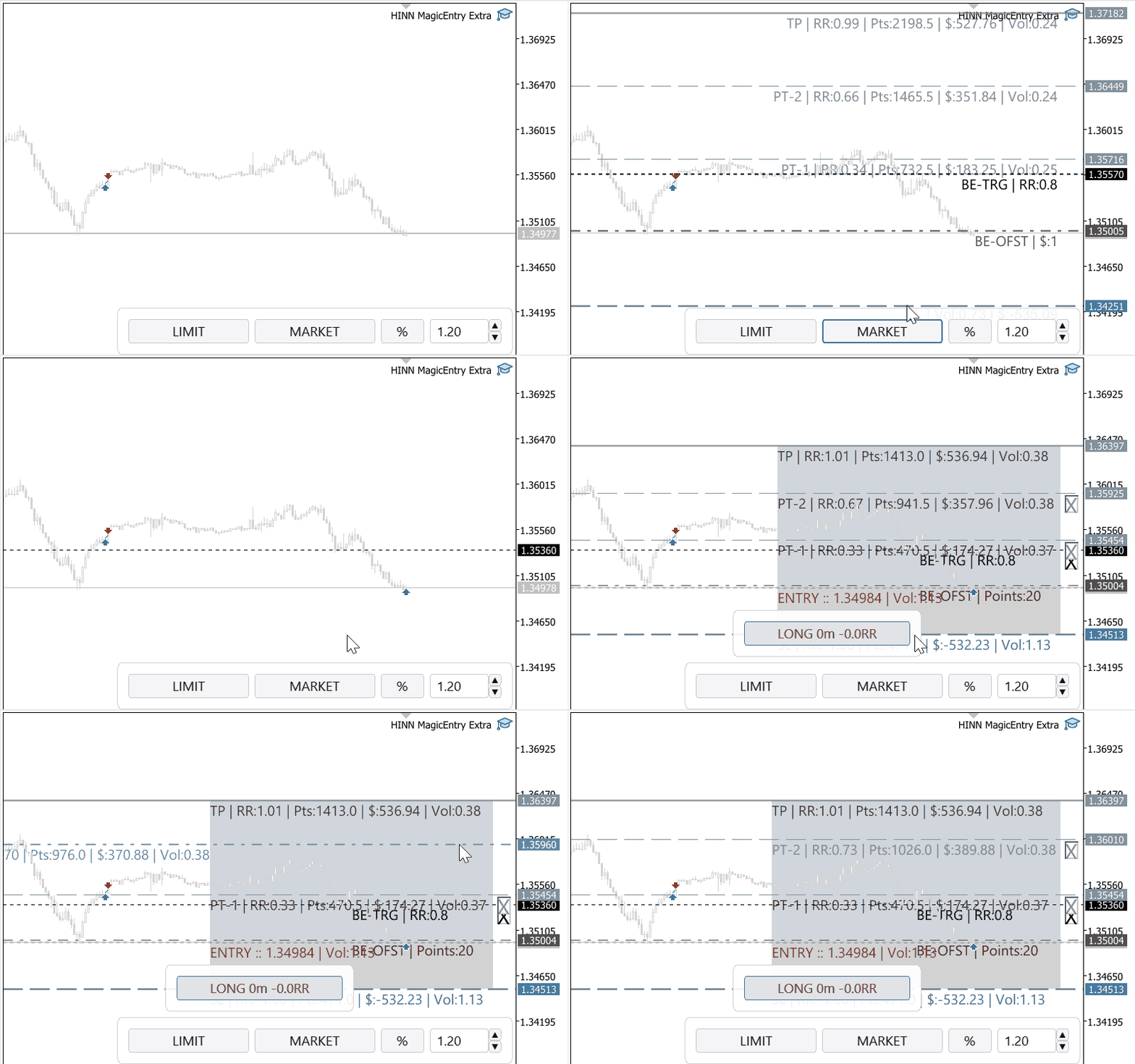
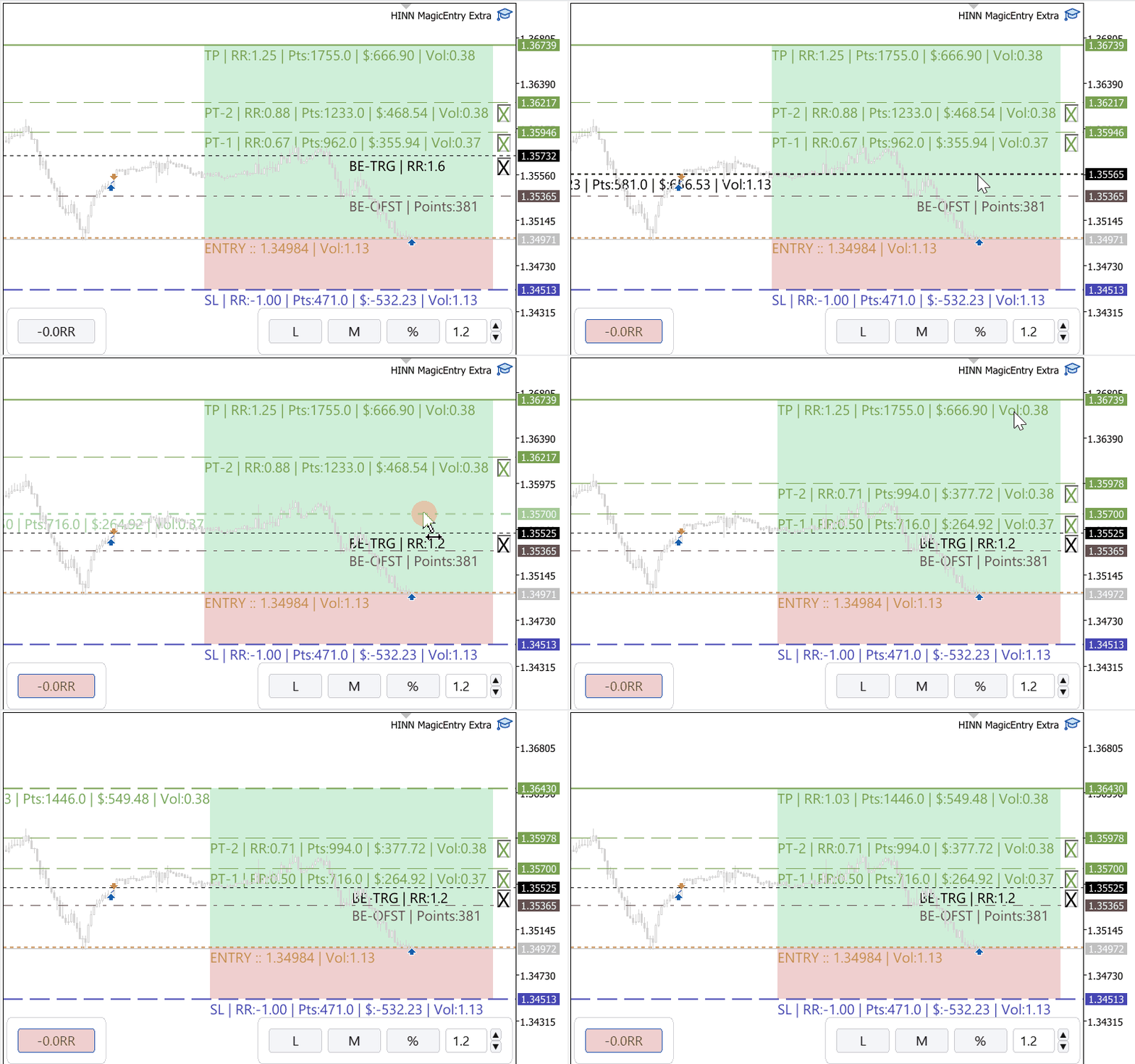
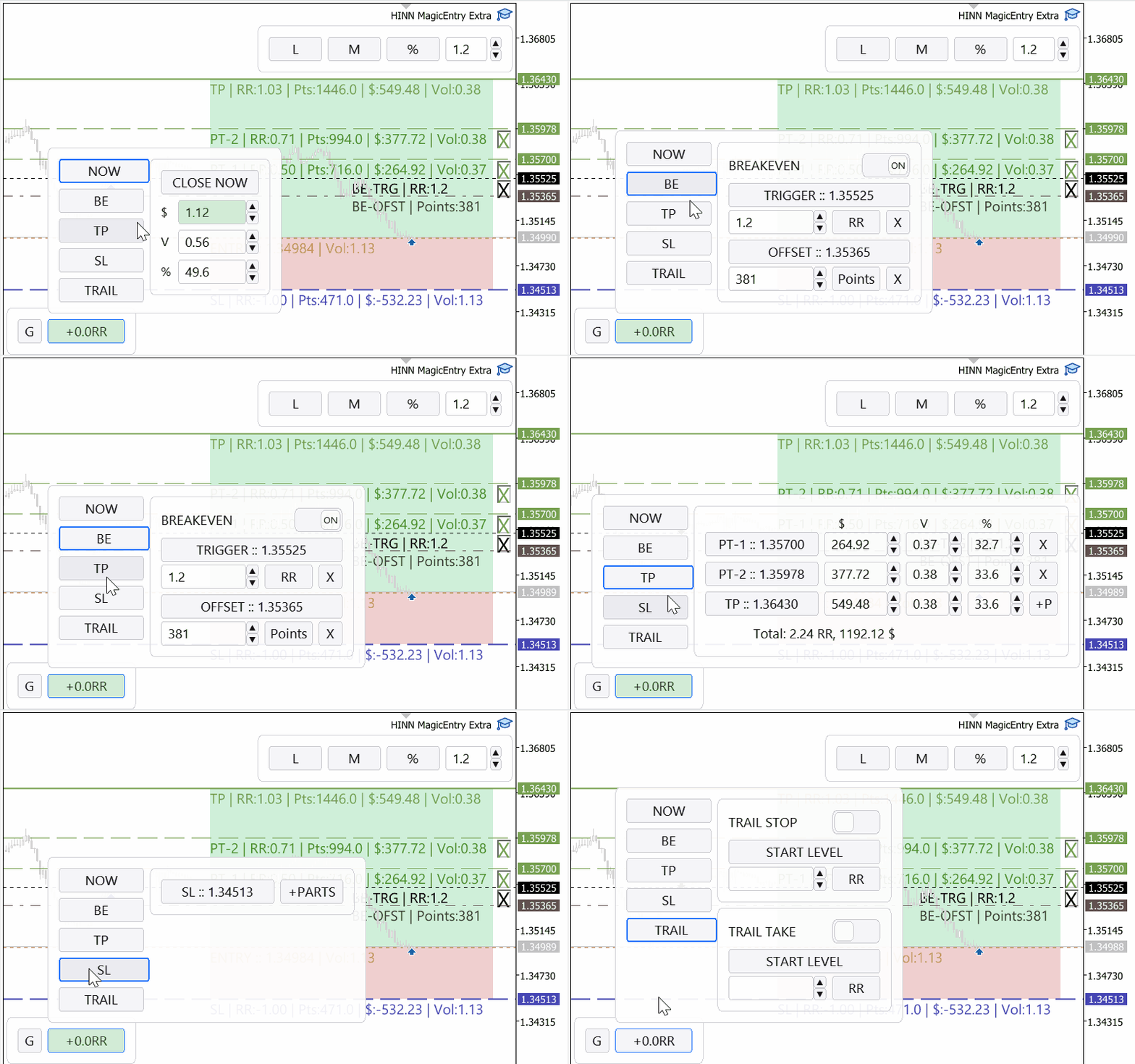
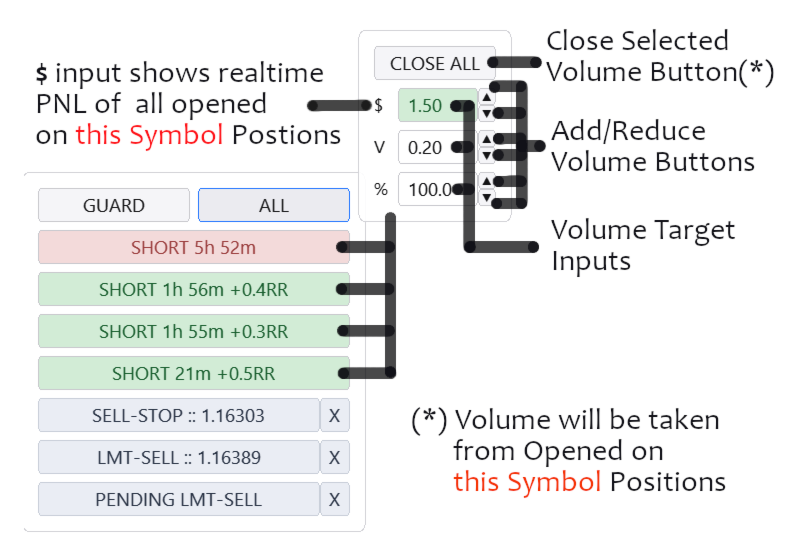
HINN MagicEntry Extra

4.74
HINN MAGIC ENTRY – the ultimate tool for entry and position management!
SIMPLE. FASTEST. INTUITIVE. MAX AUTOMATED. Place orders by selecting a level directly on the chart!
Key features:

- Market, limit, and pending orders
- Automatic lot size calculation
- Automatic spread and commission accounting
- Unlimited partitial take-profits 
- Breakeven and trailing stop-loss and take-profit functions
- Invalidation leves
- Intuitive, adaptive, and customizable interface
- Works with any assets and account types

Really feels like gamechanging tool. 

Join the ALGOFLOW channel to stay updated and get access to the developers' chat.

Reviews 23
Yuszp
19
Yuszp 2026.09.02 06:03 
 

Отличный советник! Практичный и удобный функционал настроек! Спасибо!

sergei-korda
40
sergei-korda 2026.07.17 08:03 
 

Отличный советник, так не хватало в метаке частичного фиксирования позиции на определенных уровнях, благодаря ему теперь это можно сделать и так же очень удобно то что есть перевод в безубыток по заданным параметрам

Мария Семенова
23
Мария Семенова 2026.05.30 20:04 
 

Не снижаю звезды. Советник очень хороший, Но, нужно устранить ошибки. У меня не срабатывает частичное закрытие позиции. Не всегда включается безубыток. Почти всегда открепляется от графика, нужно заново прикреплять. Ранее пользовалась бесплатной версией - мне очень нравилось. Эта версия содержит больше функций, но, ребята, пожалуйста, уберите баги.

Recommended products
Trade Panel MT5 by PGS
Giancarlo Giuseppi Bejar
PGS Trade Panel – Professional Trade Management Tool for MT5 Take full control of your trading with structured execution, real-time feedback, and customizable automation, all directly on your chart. Profit Guard System Trade Panel is an advanced on-chart trading tool designed to give you discipline, clarity, and precision in every trade. It supports manual, semi-automated, and automated workflows with multiple strategies that can be enabled, customized, or disabled at any time. Automatic Take P
Instructions for Using Reverse Copier EA Attach EA to Charts Open MetaTrader and attach the EA to any chart on both accounts (master & slave). Make sure AutoTrading is enabled. Master Account (Signal Sender) Set Mode = Master in EA settings. This account will send trade signals. Slave Account (Signal Receiver) Set Mode = Slave in EA settings. This account will receive trades in reverse (opposite direction). Lot Multiplier In Slave EA settings, set Multiplier to control lot size. Example: 1.0
Close All Pro MT5 – Fast PnL Control is a powerful trade manager MT5 utility that gives you total control over your trades. With a single click, you can close all MT5 orders, monitor real-time profit and loss, and manage your floating PnL directly from a clean on-chart panel. The tool is lightweight, responsive, and built to help traders save time, reduce emotional stress, and maintain focus. Whether you trade manually or through an EA, this MT5 profit panel provides the visibility and precisio
RealCost Auditor MT5 is an execution-cost monitor for MetaTrader 5. It does not open, close, or modify trades. It watches the chart symbol, samples live spread, records executed deals, estimates signed slippage when the terminal exposes the requested price, and saves a local CSV audit file. Many backtests use spread, slippage, commission, and swap assumptions that are cleaner than real trading conditions. This utility gives you broker and account data from your own terminal before you trust a s
QuantMatrix Historical Move Probability QuantMatrix Historical Move Probability is a statistical indicator for MetaTrader 5 that compares the current price movement with similar movements found in the historical data of the selected symbol and timeframe. Price movements are normalized using Average True Range (ATR). This allows movements from different historical periods to be compared relative to the volatility present at each period. The indicator searches the configured historical sample for
Twin Blade Trend EA – Precision Meets Patience Discover the power of precision with Twin Blade Trend - an Expert Advisor designed to cut through market noise like a razor-sharp blade. This isn’t just another trend-following bot; it uses a unique dual-layer range to identify high-probability entries with unmatched clarity. Imagine a system that patiently waits for the perfect alignment of conditions - no chasing trades, no guesswork - only clean, confident signals. When Twin Blade Trend strikes,
Stop Letting Brokers Hunt Your Stop Loss! Are you tired of price wicks hitting your Stop Loss exactly at the tip, only to reverse immediately in your favor? This is often caused by market noise or "Stop Hunting." TrailGuardian is a professional "Stealth" Trade Manager designed to protect your profits without revealing your exit levels to the market. It creates a virtual (invisible) stop-loss line internally, keeping your strategy hidden from your broker until the exact moment of execution.
Easy Chart Cleaner
Israr Hussain Shah
How the Chart Cleaner Script Works The Chart Cleaner is a one-click tool designed to instantly wipe your chart clean. When you drag and drop the script onto a chart, it scans for and removes all visual objects—including trend lines, horizontal lines, text labels, shapes, and any other drawings you have placed. The result is a completely clean, uncluttered chart, giving you a fresh workspace for your analysis. It's the fastest way to reset your chart to its default state.
LT Rainbow Trend
Thiago Duarte
5 (1)
== LT RAINBOW TREND - THE TREND INDICATOR WITH 36 MOVING AVERAGES == OVERVIEW LT Rainbow Trend is an advanced technical trend analysis indicator that utilizes 36 simultaneous Moving Averages with a smart color system (Rainbow). Developed for traders who want to trade in the direction of the main trend with maximum visual clarity, the indicator transforms the complexity of multi-timeframe analysis into a simple, colorful, and highly intuitive visualization. Ideal for traders who understand that
Crash300 Pro Trader is a fully automated Expert Advisor designed for trading Crash 300 index using a combination of trend detection, RSI filtering, and recovery-based trade management. Watch Video: 3 Years of Backtest The EA identifies market direction using Parabolic SAR on the Daily timeframe and executes trades only in the direction of the trend. To improve entry accuracy, it uses RSI filtering to avoid overbought and oversold false signals. A built-in recovery system is included to manage
Powerful and beautiful trading panel helps you in scheduling or placing multiple trades based on your presets in a single click. It is designed to execute orders immediately or schedule trades in advance to be executed at certain time using multiple filters to avoid non favorable market conditions (wide spread, reduced leverage etc.). Additional functionality developed to sycnhronize two instances of the expert over the internet (Master - Slave Mode), which means trader can open the panel in loc
You can change the time period of the chart at the touch of a button. You can also change multiple charts at the touch of a button. You can also change multiple charts at the touch of a button,   saving you the trouble of changing time periods. We are live-streaming the actual operation of the system. Please check for yourself if it is usable. Please check it out for yourself. https://www.youtube.com/@ganesha_forex We do not guarantee your investment results. Investments should be made at you
This Expert Advisor (EA) is designed to monitor trades on MetaTrader 5 and send notifications to one or more Telegram channels. It supports configurable messages, filters by symbol and magic number, and handles free trade signals on selected days. It also offers daily, weekly, and monthly trade reports. Features: - Sends notifications of trade openings, closings, and breakeven adjustments - Configurable message content, including simplified TP/SL/BE notifications with RR calculations - O
A standalone algorithm that operates on the removal of the Previous Day's High (PDH) and/or the removal of the Previous Day's Low (PDL). Configurable: - risk per trade as a % of the deposit - minimum delay between trades - aggressiveness level - expected* number of trades and drawdown (*) Expected values ​​will almost never match reality. Designed for use on the SP500 and NAS100 I DO NOT GUARANTEES ANY RETURN OR PROFIT! EXPECT TO LOSS! Livetest here
Xiao Dan Kuai Pao is a fast and clean one-click order panel for MetaTrader 5. Open and manage your trades instantly, with Stop Loss and Take Profit placed automatically — no more typing TP distances by hand. Key features: - One-click buttons: BUY, SELL, CLOSE, BREAK EVEN - Custom Stop Loss and Take Profit (in points) — set any distance you want - Flexible risk/reward — combine SL and TP freely to build any ratio, such as 1:1, 1:2, 1:3, 1:4 or 1:5 - Real-time price display (Bid) - Bar countdown t
Multi-Timeframe Trend Scanner (Top-Left) : Instantly tracks trend strength across M1, M5, M15, M30, and H1 timeframes using built-in EMA relationships. Daily Percentage Panel (Bottom-Center) : Displays active percentage gains and losses for up to 30 custom assets simultaneously, doubling as a quick-switch navigator. Dynamic RSI & Pullback Signals : Combines sequential trend retracement entries (at the 200, 250, and 300 EMAs) with dynamic RSI boundary alerts (calibrated specifically for Boom/Cra
QuickTrade Panel – Fast Order Execution & Risk Management The QuickTrade Panel is a powerful MetaTrader 5 trading tool that helps traders place orders faster, manage risk automatically, and control trades directly from the chart. It reduces manual work, improves trading accuracy, and makes trade management simple and efficient. Key Features On-Chart Trading: Change Lot Size, Risk %, Stop Loss (SL), Take Profit (TP), and Pending Distance without opening EA settings. Smart Position Sizing: Choose
Risk Manager for MT5
Sergey Batudayev
4.31 (16)
Expert Advisor Risk Manager for MT5 is a very important and in my opinion necessary program for every trader. With this Expert Advisor, you will be able to control the risk in your trading account. Risk and profit control can be carried out both in monetary terms and in percentage terms. For the Expert Advisor to work, simply attach it to the currency pair chart and set the acceptable risk values ​​in the deposit currency or in % of the current balance. [Instruction for Risk Manager parameter
Neuro Lines Mt5
Pieter Gerhardus Van Zyl
Neuro Lines MT5 is an advanced visual momentum and structure overlay designed to project internal market dynamics directly onto the price chart. Instead of isolating signals in a subwindow, it translates oscillation behavior into adaptive price-scaled lines, allowing traders to read strength, balance, and shifts in flow in direct relation to price action. The indicator plots two dynamic lines along with an optional reference center. These lines react smoothly to changing conditions, filtering o
This tool can help you close all open orders with one click, just click "Close all". If you only want to close profitable orders, click the "Close profitable" button. After clicking, all floating orders will be closed; If you only want to close the orders with floating losses, click the "Close losable" button. After clicking, all orders with floating losses will be closed. This tool has been tested for a year. The one-click position closing function is very complete, the position closing is time
SafePair Manual Trader Pro MultiPairs SafePair Manual Trader Pro MultiPairs is an advanced MetaTrader 5 Expert Advisor designed to support professional manual trading, semi-automatic trade management, multi-symbol monitoring, risk planning, and intelligent market analysis from one powerful dashboard. This EA is built for traders who want fast manual execution, structured risk control, smart trade assistance, and clear on-chart decision support without relying on random signals or slow dashboard
JP Track Monitor
Joseph Jaya Permana
Welcome to JP Track , an advanced, fully automated trading system designed for MetaTrader 5. Built specifically for traders who want to capitalize on rapid market movements, this EA captures explosive price velocity with precision, utilizing a smart pullback limit-order strategy to secure the best possible entry prices. Key Features & Functional Strengths Price Velocity & Spike Tracker: JP Track constantly monitors algorithmic price momentum. When a sharp price spike occurs, it doesn't blindl
Equity Lockdown
Jason Michael Mckay
Equity Lockdown is an account-level risk guard for MetaTrader 5. It does not generate signals, predict direction or open trades. It watches your account against limits you define, and when one of them is breached it cancels your pending orders, closes your open positions, and keeps the account flat until the next trading day begins. It acts on every position and every pending order in the terminal, whatever opened it - this tool, another Expert Advisor, or a manual click. A guard that only saw i
CHILLIUS NAVIGATOR Your All-in-One Chart Companion for MetaTrader 5 "Code with cool vibes" TIRED OF CLICKING THROUGH ENDLESS MENUS? Chillius Navigator brings symbol switching, synced crosshair, and fibonacci tools together in one sleek panel. Navigate your charts like a pro. KEY FEATURES THREE SYMBOL SOURCES   • Market Watch - Access all your watched symbols i
CosmiCLab SMC FIBO CosmiCLab SMC FIBO is a professional trading indicator designed for traders who use Smart Money Concepts (SMC), market structure analysis and Fibonacci retracement levels. The indicator automatically detects market swings and builds Fibonacci levels based on the latest impulse movement. It also identifies market structure changes such as BOS (Break of Structure) and CHOCH (Change of Character), helping traders understand the current market direction. CosmiCLab SMC FIBO also pr
Margin Call Shield – Defend Your Margin on Your Terms Margin Call Shield is a tool for MetaTrader 5 traders who want to decide for themselves which open positions are closed during margin call situations before the platform does so automatically based on its internal rules. By default, the broker or platform decides which positions to close, often using undisclosed algorithms. Margin Call Shield lets you set this order according to your own strategy. Why Was Margin Call Shield Created? In a mar
MT5 Drawdown Tracker – Track Your EA’s Performance with Precision! Take your trading analysis to the next level with our MT5 indicator designed to monitor, record, and report the drawdown of any Expert Advisor. Whether you’re fine-tuning your strategies or optimizing risk management, this tool gives you the insights you need. Key Features: Effortless Tracking: Automatically monitors the drawdown levels of your EAs with precision. Comprehensive Data Storage: Accurately logs each drawdown event,
DDKiller Pro
Njaratahiry Michael Randrianiaina
Stop Blowing Your Account. Once and For All. DDKiller Pro is the MT5 risk guardian that runs silently on your chart and shuts down trading the moment you hit a limit — whether you're grinding a prop firm challenge or managing your own CFD account. The problem every trader knows: You set your rules. You break them anyway. One revenge trade. One overleveraged position. One session that erases a month of gains. DDKiller Pro removes that decision from your hands entirely. What it does: The second yo
GDS Renko Pip ST Chart - Pip-Based Renko Chart Indicator for MetaTrader 5 GDS Renko Pip ST Chart is a pip-based Renko chart indicator for MetaTrader 5. It helps traders build and study cleaner Renko price movement using a practical fixed pip or point-based brick structure. This tool is designed as a Renko chart foundation for manual analysis. It does not predict the market, does not generate buy or sell signals and does not decide whether a trade should be opened. Renko EDGE EA Golden Delta | A
KS Auto Trade Close Manager Time Base  is a MetaTrader 5 Expert Advisor (EA) that automatically closes open trades at a user-defined local computer time, with a simple on-chart control panel. Main features Scheduled auto-close (optional) Closes trades at a specific local time (HH:MM, e.g. 23:55). Uses the terminal/computer’s local time ( TimeLocal() ), not server time. Three close modes (selectable from inputs or the panel) ALL – close every matching position PROFIT ONLY – close only positions c
Buyers of this product also purchase
Trade Assistant MT5
Evgeniy Kravchenko
4.43 (215)
It helps to calculate the risk per trade, the easy installation of a new order, order management with partial closing functions, trailing stop of 7 types and other useful functions. Additional materials and instructions Installation instructions - Application instructions - Trial version of the application for a demo account Line function -   shows on the chart the Opening line, Stop Loss, Take Profit. With this function it is easy to set a new order and see its additional characteristics bef
Forex Trade Manager MT5
InvestSoft
4.98 (676)
Trade Manager MT5 is an advanced position size calculator and trade management tool for MetaTrader 5, designed to help traders plan trades faster, control risk more precisely, and manage open positions directly from the chart. It combines order placement, risk based lot calculation, Stop Loss and Take Profit management, Break Even, Trailing Stop, Partial Close, Equity Protection, and external trade management in one panel. Whether you trade forex, indices, metals, commodities, crypto, or future
FarmedHedge Pair Trading Dashboard
Tanapisit Tepawarapruek
5 (5)
Farmed Hedge Yield Farming | All Markets (Manual - Hybrid - Semi/Automated EA) VERIFIED TRADING RESULTS - Farmed Hedge Yield Axi Copy:  https://www.mql5.com/en/signals/2356376 - Farmed Hedge Yield Exn Copy:   https://www.mql5.com/en/signals/2356404 - Farmed Hedge Yield V Copy:  https://www.mql5.com/en/signals/2357156 IMPORTANT NOTICE: FarmedHedge is a MANUAL-FOCUSED TRADING UTILITY ,not a fully automated EA. Results shown on this Signal include manual trades and overall strategic management.
Beta Release The Telegram to MT5 Signal Trader is nearly at the official alpha release. Some features are still under development and you may encounter minor bugs. If you experience issues, please report them, your feedback helps improve the software for everyone. Telegram to MT5 Signal Trader is a powerful tool that automatically copies trading signals from Telegram channels or groups directly to your MetaTrader 5 account. It supports both public and private Telegram channels, and you can conn
Telegram to MT5 MultiChannel Copier
Sergio Marquez Uroz
4.46 (13)
Telegram to MT5 Multi-Channel Copier   automatically copies trading signals from your Telegram channels straight to MetaTrader 5. No bots, no browser extensions, no manual copying. A signal arrives in Telegram and the EA opens the trade in your terminal within seconds. And before you copy a channel, the built-in backtester shows you what that channel would have done in your account. The product has two components: a Windows application that listens to your Telegram channels, and this Expert Advi
================================================================================ POC BREAKOUT - V20.72. Full Professional Grade Toolkit ================================================================================ POC Breakout is a full MetaTrader 5 trading dashboard for discretionary traders who want breakout signals, Point of Control (POC) context, volume profiles, order flow, market structure, news, alerts, and advanced trade planning in one professional workspace. Attached directly to you
TradePanel MT5
Alfiya Fazylova
4.88 (167)
Trade Panel is a multi-functional trading assistant. The app contains over 50 trading functions for manual trading and allows you to automate most trading tasks. Application instructions + video instructions: https://www.mql5.com/en/blogs/post/772292 Trial version of the application for a demo account: https://www.mql5.com/en/blogs/post/750865 How to install the application: https://www.mql5.com/en/blogs/post/756239 How to test the application in visual mode: https://www.mql5.com/en/blogs/post/7
Premium Trade Manager - The Trade Panel With a Coach Built In Series price: 89 USD until Sunday, 13 September 2026, then 111 USD again. The setup was the easy part. By the third order of the morning the lot size gets worked out in your head, the stop lands where the hand stops, and the numbers due in forty minutes sit in a tab you closed at breakfast. Premium Trade Manager takes that off you: one click sends the order at the size your risk allows, entry, stop and target as draggable lines and th
Astro Trade MT5
Indra Maulana
5 (7)
25% discount on the release of the tool: only for the next 3 buyers Send a message to receive a demo version. AstroTrade Trading Assistant AstroTrade is a comprehensive multi-functional trading utility developed for the MetaTrader 5 platform. It integrates essential tools for trade execution, risk management, and technical monitoring into a single unified interface. The application is designed to assist traders in managing their daily operations through a visual and structured environment. Vi
Exp COPYLOT CLIENT for MT5
Vladislav Andruschenko
3.97 (35)
Professional Trade Copier for MetaTrader 5 Fast, professional, and reliable trade copier for MetaTrader . COPYLOT allows you to copy Forex trades between MT4 and MT5 terminals with support for Hedge and Netting accounts. COPYLOT MT5 version supports: - MT5 Hedge to MT5 Hedge - MT5 Hedge to MT5 Netting - MT5 Netting to MT5 Hedge - MT5 Netting to MT5 Netting - MT4 to MT5 Hedge - MT4 to MT5 Netting MT4 version Full Description +DEMO +PDF How To Buy How To Install How to get Log Files H
Welcome to ENTRY IN THE ZONE WITH SMC MULTI TIMEFRAME Entry In The Zone and SMC Multi Timeframe is a real-time market analysis tool based on Smart Money Concepts (SMC), designed to analyze market structure, price direction, and key trading zones. It supports both Single-Timeframe Analysis and Multi-Timeframe Analysis, providing a clearer view of the overall market structure across multiple timeframes, with real-time BUY / SELL signals that do not repaint. It is designed to help filter trading op
EA Overfitter
Stephen J Martret
5 (1)
That backtest looks great. But will it still be making money tomorrow, next week, next month? EA Overfitter re-runs your EA on 100 price histories it has never seen. One score tells you if the edge is real. A backtest tells you what an EA did on one price history — the one that happened to occur. What you cannot tell from it is how much of that result was the strategy and how much was the particular path. EA Overfitter answers that. It builds up to 100 synthetic price histories your EA has n
Signal Trading View to MT5 Pro
Mirel Daniel Gheonu
4.5 (2)
Signal TradingView to MT5 Pro  Instant professional execution between TradingView and MetaTrader 5 Automate your trading strategy with the most robust communication bridge between TradingView alerts and real execution in MT5. Designed for traders who demand speed, flexibility, and impeccable risk management, this Expert Advisor transforms any alert message into a precise market or limit order.   Install and TEST the TRIAL version HERE STRENGTHS AND ADVANTAGES Universal Parsing Engine (Propriet
Anchor Trade Manager
Kalinskie Gilliam
5 (9)
Your EAs cannot see each other, but Anchor can. Anchor gives you one place to coordinate your EAs, manage risk, and decide when trading is allowed. It works alongside the trading bots you already use without any changes to them. The Problem One EA opens a trade. Then another starts trading. The next thing you know, you wake up to multiple grids built across your account. Each EA may be doing exactly what it was designed to do, but together they can place far more risk on your account than you in

MT5 to Telegram Signal Provider turns your trading account into a signal provider. Every trade action, whether manual, by EA or from your phone, is instantly sent as a message to Telegram. You can fully customize the format or use a ready-made template for quick setup. [ Demo ] [ Manual ] [ MT4 Version ] [ Discord Version ]     New: [ Telegram To MT5 ] Setup A step by step user guide is available. Key Features Ability to customize order details sent to subscribers You can create a tiered subs

Power Candles Strategy Scanner - Self-Optimizing Multi-Symbol Setup Finder Power Candles Strategy Scanner runs the same self-optimizing engine that powers the Power Candles indicator - on every symbol in your Market Watch, side by side. One panel tells you which symbols are statistically tradable right now, which strategy wins on each, the optimal Stop Loss / Take Profit pair, and pings you the moment a fresh signal fires. This tool is part of the Stein Investments ecosystem - 18+ tools plus Max
The product will copy all telegram signal to MT5 ( which you are member) , also it can work as remote copier.  Easy to set up, copy order instant, can work with almost signal formats, image signal,  s upport to translate other language to English Work with all type of channel or group, even channel have "Restrict Saving Content", work with  multi channel, multi MT5 Work as remote copier: with signal have ticket number, it will copy exactly via ticket number. Support to backtest signal. How to s
Footprint Chart Pro — Professional OrderFlow EA for MetaTrader 5 Version 6.34 | Professional tool for real traders | Institutional-Grade Visualization DEMO USERS - PLEASE SELECT EVERY TICK / REAL TICK WHEN TESTING AND YOU HAVE DOWNLOADED HISTORICAL DATA. IF YOU SEE A WAITING SCREEN AND IT IS NOT DOWNLOADING, IT MEANS YOU HAVE LOW HISTORICAL DATA. TRY 1 MIN AND 5 MIN FIRST ON 1 DAY DATA. ONE DAY DATA SHOULD BE THE NEWEST AND MOST CURRENT DATE. PLEASE WAIT UNTIL THE MARKET HAS ROLLED OVER PERIOD.
Timeless Charts
Samuel Manoel De Souza
5 (8)
Timeless Charts is an all-in-one trading utility for professional traders. It combines custom chart types such as Seconds Charts and Renko with advanced order flow analysis using Footprints , Clusters , Volume Profiles , VWAP studies, and anchored analysis tools for deeper market insight. Trading and position management are handled directly from the chart through an integrated trade management panel , while Market Replay and Virtual Accounts provide environments for practicing trading skills and
Trade Copier Ultimate
Janitha Sandaruwan Amaradasa Wickramasingha Arachchilage
5 (5)
Trade Copier Ultimate - Telegram to MT5 Signal Copier Trade Copier Ultimate automatically copies Telegram trading signals into MetaTrader 5. The EA can read signal messages, detect the symbol, order type, entry price, Stop Loss, Take Profit levels and selected update commands, then execute or manage the trade in MT5 using your lot and risk settings. It is more than a basic Telegram to MT5 copier. TCU also supports Bot API and user-account Bridge workflows, Discord signal routing, local MT5 to MT
Risk Manager Pro MT5
Roman Zhitnik
5 (8)
Risk Manager Pro MT5 is an account protection Expert Advisor for traders who want strict risk control inside MetaTrader 5. The utility monitors your account equity, daily and weekly results, drawdown, open positions, trade count, consecutive losses, and trading hours. When a configured limit is reached, it can automatically close positions, cancel pending orders, stop other EAs, send notifications, or close the terminal. Instead of relying on discipline during a stressful trading session, you de
Trade Indicator Assistant   is a powerful MT5 utility designed to turn indicators into automated trading systems. Its main feature is the ability to automatically detect an indicator’s   BUY and SELL signal buffers , without requiring you to know the buffer numbers, search through indicator settings, or modify the indicator source code. Bonus Indicator:   After purchasing Trade Indicator Assistant, contact me to receive   Trade Signal Pro   completely free as a bonus indicator. [Download Demo V
VirtualTradePad One Click Trading Panel
Vladislav Andruschenko
4.59 (74)
Trading Panel for MetaTrader 5 — professional one-click trading from chart and keyboard A powerful trading panel for active manual trading, designed to open, manage, and close trades far faster and more efficiently than the standard MetaTrader interface. This panel is built for traders who want full control over positions, pending orders, profit management, and trading execution inside one professional workspace. This is not just another utility. It is a complete trading cockpit for MetaTrader
Telegram To MT5 Receiver
Levi Dane Benjamin
4.53 (15)
Copy trade signals from Telegram channels you already belong to (including private and restricted channels) directly into MetaTrader 5. Set your risk rules once, monitor execution, and manage positions with built-in protections designed to reduce mistakes and overtrading. Fast setup : configure your channels, select what to copy, and start within minutes using a clean on-chart interface. User Guide + Demo | MT4 Version Who this is for Traders who follow one or more signal providers and want cons
The News Filter MT5
Leolouiski Gan
4.78 (23)
This product filters   all expert advisors and manual charts   during news time.  It is able to remove any of your EA during news and automatically reattach them after news ends. This product also comes with a complete  order management system   that can handle your open positions and pending orders before the release of any news. Once you purchase   The News Filter , you will no longer need to rely on built-in news filters for future expert advisors, as this product can filter them all from her
Trade Manager DashPlus
Henry Lyubomir Wallace
4.85 (13)
DashPlus is an advanced trade management tool designed to enhance your trading efficiency and effectiveness on the MetaTrader 5 platform. It offers a comprehensive suite of features, including risk calculation, order management, advanced grid systems, chart-based tools, and performance analytics. Key Features 1. Recovery Grid Implements an averaging and flexible grid system to manage trades during adverse market conditions. Allows for strategic entry and exit points to optimize trade recovery
Grid Manual MT5
Alfiya Fazylova
4.73 (22)
Grid Manual is a trading panel for working with grid strategies. The utility is universal, has flexible settings and an intuitive interface. It works with a grid of orders not only in the direction of averaging losses, but also in the direction of increasing profits. The trader does not need to create and maintain a grid of orders, the utility will do it. It is enough to open an order and the "Grid manual" will automatically create a grid of orders for it and will accompany it until the close. F
Trade Assistant 38 in 1
Makarii Gubaydullin
4.91 (23)
Multifunctional tool: Lot Calculator, Grid Orders, R/R ratio, Trade Manager, Supply and Demand zones, Price Action and much more Demo version   |   User manual Trade Assistant   doesn't work in the strategy tester : you can download the   Demo Version HERE  to test the utility . Contact me   for any questions  / ideas for improvement / in case of a bug found If you need a MT4 version, it is available here Simplify, speed up and automate your trading   process . Expand the standard terminal capa
Trump Shock Guard
Thomas Christoph Lipka
TRUMP SHOCK – Real-Time Market Protection for MT5 TRUMP SHOCK is a MetaTrader 5 risk-management utility designed to react to sudden market-moving news and unexpected volatility. Markets such as Gold, Oil and USD-related instruments can move within seconds following major political statements or breaking news. TRUMP SHOCK monitors important Truth Social posts and general breaking news and can automatically trigger predefined protective actions in MetaTrader 5 — helping you reduce unwanted exposur
Assistant: Trade Assistant-MT4 (click to download) Trade Assistant-MT5 (click to download) Please read the operating instructions carefully. Basics: Quick opening and closing of positions, one-click opening and closing of positions, one-click placing of orders Draw-Line Trade Auto sl/tp Close By Symbols Profit Protected Move SL Protect Trailing SL Account RiskControl Order's Shadow Auto-Add Orders Auto-Close Orders Close ReOpen Symbols Infomation Chats Open Data Statistics Support language
More from author
HINN Lazy Trader
ALGOFLOW OÜ
5 (1)
The core idea: using the user interface, you configure the parameters the chart must meet before entering a position (or positions), choose which entry models to use, and set the rules for when trading and planning should end. Lazy Trader  handles the rest: it  takes over all the routine chart watching and execution! full description  :: 3 key videos [1] ->  [2]   ->  [3] What can it do? - Understands Larry Williams market structure - Understands swing market structure by Michael Huddleston
Requires manual adjustment of the broker's time offset relative to New York by input offset parameter. Doesn't take into account summer-winter time shifts - adjust it yourself after the actual clock change using the same input parameter. Shows BiasMachine.net key levels:  DO(Day Open) = 18:00 NY local time NYM(New York Midnight) = 00:00 NY local time Algo Days(!) Highs and Lows (!) Algo-Day is the interval from NYM to the next NYM Shows only the levels themselves, not the probabilities of ach
FREE
A standalone algorithm that operates on the removal of the Previous Day's High (PDH) and/or the removal of the Previous Day's Low (PDL). Configurable: - risk per trade as a % of the deposit - minimum delay between trades - aggressiveness level - expected* number of trades and drawdown (*) Expected values ​​will almost never match reality. Designed for use on the SP500 and NAS100 I DO NOT GUARANTEES ANY RETURN OR PROFIT! EXPECT TO LOSS! Livetest here
An independent algorithm that identifies the nearest significant imbalances, waits for the nearest fractal to reach them, and opens positions in the opposite direction. Configurable: - risk per trade as a % of the deposit - minimum delay between trades - aggressiveness level - expected* number of trades and drawdown (*) Expected values ​​will almost never match reality. Designed for use on the SP500 and NAS100 I DO NOT GUARANTEES ANY RETURN OR PROFIT! EXPECT TO LOSS! Livetest here
PipQ
ALGOFLOW OÜ
Are you tilting? Clicking many stupid buys and sells? But if PipQ used, this wouldn't be happened agan! You specify a stop loss in points or a percentage of the price movement, and PipQ executes a click-through entry with a specified risk in currency or a percentage of the deposit. It can close positions in batches when an acceptable loss or profit target is reached, and it locks trading when a specified daily loss is reached. Candlestick/fractal stop loss = deposit loss. Candlestick target = s
Filter:
Yuszp
19
Yuszp 2026.09.02 06:03 
 

Отличный советник! Практичный и удобный функционал настроек! Спасибо!

ALGOFLOW OÜ
17632
Reply from developer Georg Vahi 2026.09.02 14:40
Благодарю за фидбек!
Evan Almazov
23
Evan Almazov 2026.08.29 19:31 
 

Georg, Здравствуйте! После последнего обновления в версии 3.33 появился баг! Я использую только один уровень TP и при включенном в настройках только "main TP" (остальные два 0), визуально при предварительном выставлении позиции по MARKET отображает уровень "preview TP" только для позиций в лонг, в шорт отображается только уровень потенциального SL !!!

ALGOFLOW OÜ
17632
Reply from developer Georg Vahi 2026.08.30 01:39
Здравствуйте! Спасибо за сообщение о найденном недочете отображения, исправим! Поддержка этого адвайзера организована в Телеграме ( https://t.me/+oCULVyza2-MzZDcy ), если сталкиваетесь с проявлением не задокументированного поведения - пишите туда, это позволит быстрее среагировать и устранить недостаток!
upd устранено в 3.34
MZBand
19
MZBand 2026.08.11 07:47 
 

После последнего обновления при открытия маркетом неправильно считает лоты,при этом пытаясь открыть лимитный ордер на маке заявка открывалась не корректно ,так же визуально не отображается уровень ентри как было версии ранее.

ALGOFLOW OÜ
17632
Reply from developer Georg Vahi 2026.08.11 08:43
Механизм рассчета лоттажа не менялся с самой первой версии - он использует встроенную мт-библиотеку, которая оперирует настройками брокера для подсчетов. Уровень ентри для маркетных ордеров - определяется ценами ask или bid, визуализация которых включается в настройках графика самого терминала. Возможно, что после обновления ТЕРМИНАЛА, эти настройки у Вас сбились. Но по факту, к адвайзеру они отношения не имеют. Все действия связанные с открытиями фиксируются в логе адвайзера, исследуя его самостоятельно или совместно со мной через Телеграм ( https://t.me/+oCULVyza2-MzZDcy ), - всегда можно узнать точную причину того или иного поведения. И, если выяснится, что эта причина хоть как-то завязана на работу адвайзера - я её сразу устраню. Спасибо.
sergei-korda
40
sergei-korda 2026.07.17 08:03 
 

Отличный советник, так не хватало в метаке частичного фиксирования позиции на определенных уровнях, благодаря ему теперь это можно сделать и так же очень удобно то что есть перевод в безубыток по заданным параметрам

ALGOFLOW OÜ
17632
Reply from developer Georg Vahi 2026.07.17 08:04
Благодарю за фидбек!
Мария Семенова
23
Мария Семенова 2026.05.30 20:04 
 

Не снижаю звезды. Советник очень хороший, Но, нужно устранить ошибки. У меня не срабатывает частичное закрытие позиции. Не всегда включается безубыток. Почти всегда открепляется от графика, нужно заново прикреплять. Ранее пользовалась бесплатной версией - мне очень нравилось. Эта версия содержит больше функций, но, ребята, пожалуйста, уберите баги.

ALGOFLOW OÜ
17632
Reply from developer Georg Vahi 2026.05.30 22:29
Спасибо за фидбек!
Для корректной работы функций частичной фиксации и безубытка необходимо чтобы терминал был включен, а компьютер на котором он запущен НЕ находился в состоянии сна/гибернации и имел при этом стабильное соединение с торговым сервером брокера, как с вашей стороны, так и со стороны последнего. То есть частичная фиксация и безубыток осуществляются из вашего терминала, их заданные уровни не хранятся ни на каких серверах, только локально на пк где запущен терминал. Так было всегда, во всех версиях Magic Entry, и это ограничение невозможно обойти без внешних, довольно дорогих сервисов. Помимо сотен пользователей, мы и сами используем советник для торговли ежедневно: ни у нас, ни у других пользователей проблем с частичной фиксацией и безубытком - не возникает. И если что-то и работает некорректно, то мы сразу это чиним, незамедлительно. Поэтому, скорей всего, описанные проблемы происходят не из-за советника. Так или иначе, это всегда можно проверить: поддержка этого адвайзера организована в Телеграме ( https://t.me/+oCULVyza2-MzZDcy ), присылайте туда либо в личные сообщения тут на mql лог из вкладки эксперты, разберемся!
enoruz
713
enoruz 2026.03.10 11:47 
 

good utility thanks

ALGOFLOW OÜ
17632
Reply from developer Georg Vahi 2026.03.10 11:52
Thank you for the feedback! Glad to hear the tool is useful for you.
lightman47
31
lightman47 2026.02.27 22:18 
 

Это очень крутой инструмент, я очень рад что купил, хоть и сомневался в начале, нужен ли он мне, но сейчас не знаю как я без него раньше торговал. Пользуюсь около месяца, теперь это незаменимая вещь для меня. Правда БУ глючит иногда при нажатии на кнопку сразу тригерится не давая возможности самому выставить в нужном уровне, а стоп обратно оттянуть не получается, только вручную нужно писать. Так же один раз закрыло позицию полностью когда я нажал кнопку NOW чтобы закрыть часть позы. Но в целом всё супер

ALGOFLOW OÜ
17632
Reply from developer Georg Vahi 2026.04.09 00:04
Благодарю за фидбек!
У безубытка, как и у прочих настроек, организовано локальное хранение. Вероятно, активируя тумблер включения, в него подставляется прошлое сохраненное значение - так сделано чтобы было удобней контролировать разные позиции на одном инструменте. Попробуйте действовать в следующем порядке: сначала выставляете триггер-уровень, затем переводите тумблер безубытка в состояние ON - тогда гарантированно будет использован выставленный уровень. Либо, что еще проще, используйте хоткей клавиатуры для выставления безубытка - тогда еще и тумблер включится автоматом при выставлении уровня. Закрытие через NOW может закрыть весь объем если таковы требования брокера к минимальному лоттажу. В любом случае, если происходит что-то, что кажется неправильным - присылайте логи - если что-то действительно работает не так как задумано - исправим, если нет - объясним в чем именно дело.
superviki7777
19
superviki7777 2026.02.16 18:56 
 

User didn't leave any comment to the rating

ALGOFLOW OÜ
17632
Reply from developer Georg Vahi 2026.02.17 12:43
Благодарю за фидбек!
halsky_trd
19
halsky_trd 2026.01.08 08:30 
 

Если честно бесплатный был лучше чем платный, ничего лишнего и работал идеально, этот иногда выдает глюки и куча ненужных уровней на графике. Но бесплатного уже нет здесь, так что пользуемся этим

ALGOFLOW OÜ
17632
Reply from developer Georg Vahi 2026.04.09 00:04
Благодарю за фидбек! У старой бесплатной версии было достаточно проблем, просто Вы их не заметили, так бывает. В текущей действительно больше функций, часть из которых может быть не всем интересна, например уровни, но их можно отключить в инпутах. Для развития продукта периодически провожу опросы пользователей, если хотите своим голосом внести вклад в развитие продукта, то всегда открыт для фидбека через формы опросов, таких как эта ( https://t.me/algoflowou/42 ), и через чаты поддержки
Vladimir Sheriagin
127
Vladimir Sheriagin 2025.12.23 13:27 
 

User didn't leave any comment to the rating

ALGOFLOW OÜ
17632
Reply from developer Georg Vahi 2025.12.23 13:55
Благодарю за фидбек!
sasho_bg3
25
sasho_bg3 2025.12.20 03:45 
 

Отличная программа. Я очень доволен покупкой. Очень быстрое открытие и закрытие позиций, автоматический расчёт объёма для входа. Настоятельно рекомендую всем, кто торгует на MT5.

ALGOFLOW OÜ
17632
Reply from developer Georg Vahi 2025.12.20 13:26
Благодарю за фидбек!
Yerish Dima
23
Yerish Dima 2025.12.15 18:59 
 

как решить проблему- Почему я не могу открыть позицию. пару дней назад все работало. проблему решил) спасибо все супер )))

ALGOFLOW OÜ
17632
Reply from developer Georg Vahi 2026.04.09 14:51
В 100 случаях из 100 проблема не в советнике.
Поддержка организована в Телеграме ( https://t.me/+oCULVyza2-MzZDcy ), присылайте туда либо в личные сообщения тут на mql лог из вкладки эксперты если что-то не получается, разберемся!
DiMa150281
19
DiMa150281 2025.12.01 09:32 
 

Отличный советник. Очень экономит время при входе в позицию. Трейлингом, фиксацией частями не пользуюсь, но для тех, кто использует это в своей торговой стратегии приятное дополнение. Всем рекомендую!

ALGOFLOW OÜ
17632
Reply from developer Georg Vahi 2025.12.01 10:34
Благодарю за фидбек!
Приятного пользования!
Voron163
19
Voron163 2025.12.01 09:32 
 

Не понятно почему много черных окон на МТ5 при включенном советнике, и они не убираются

ALGOFLOW OÜ
17632
Reply from developer Georg Vahi 2026.04.09 14:50
Спасибо за фидбек!
Закройте график и откройте новый чтобы избавиться от этих рудиментов! Этот нюанс действительно временно проявляется, будет выловлен и устранен в ближайших апдейтах! Если заметите еще какие-либо кейсы некорректной работы - можете сообщить о них в Телеграм ( https://t.me/+oCULVyza2-MzZDcy ) для получения более оперативных ответов!
Николай Гричановский
33
Николай Гричановский 2025.11.07 14:41 
 

Можете сделать для MT4

ALGOFLOW OÜ
17632
Reply from developer Georg Vahi 2025.11.10 12:56
Благодарю за фидбек!
В обозримом будущем релиза для MT4 не планируется.
Novikov70
19
Novikov70 2025.09.03 23:50 
 

Подскажите пожалуйста как изменить время в советнике ничего не получается , и бывает что выставляешь стоп и тейк , а оно просто не срабатывает , не пойму что делать ?

ALGOFLOW OÜ
17632
Reply from developer Georg Vahi 2026.04.09 14:51
Советник сам синхронизирует время с Нью-Йорком, время менять не надо, просто добавьте необходимые ресурсы в список разрешенных в настройках терминала - показывал как это сделать в видео(11:30) https://www.youtube.com/watch?v=WoEhRfD-VBI Стоплосс и финальный тейк всегда хранятся на стороне брокера, их выполнение не зависит от советника. Но промежуточные тейки и прочие уровни - хранятся на стороне клиента (в Вашем терминале на Вашем ПК), то есть для того чтобы они срабатывали - ПК должен быть включен, должен не спать/не быть в режиме гибернации и должен иметь доступ к интернету.
Поддержка этого адвайзера организована в Телеграме ( https://t.me/+oCULVyza2-MzZDcy ), присылайте туда либо в личные сообщения тут на mql лог из вкладки эксперты если что-то не получается, разберемся!
Pavel Sharihin
23
Pavel Sharihin 2025.08.25 16:31 
 

User didn't leave any comment to the rating

ALGOFLOW OÜ
17632
Reply from developer Georg Vahi 2025.08.26 13:54
Благодарю за фидбек!
Gurgen Manukian
520
Gurgen Manukian 2025.08.05 10:49 
 

Спасибо за прекрасный инструмент! Пользуюсь с удовольствием! Очень комфортно управлять ордерами!

ALGOFLOW OÜ
17632
Reply from developer Georg Vahi 2025.08.05 10:52
Благодарю за фидбек!
canyon12345
19
canyon12345 2025.07.31 13:12 
 

User didn't leave any comment to the rating

ALGOFLOW OÜ
17632
Reply from developer Georg Vahi 2026.04.09 14:50
Судя по описанию, скорей всего либо выключен алготрейдинг на стороне клиента(его надо включать в двух местах, либо адвайзеры отключены брокером - так бывает, иногда решается через обращение в саппорт брокера).
Поддержка этого адвайзера организована в Телеграме ( https://t.me/+oCULVyza2-MzZDcy ), присылайте туда либо в личные сообщения тут на mql лог из вкладки эксперты, разберемся!
Ksenia Heels
24
Ksenia Heels 2025.07.26 15:05 
 

Потрясающий помощник, значительно облегчает процесс торговли, сокращает время на расчёт рисков и не отвлекает на лишние действия. До этого была бесплатная версия, нисколько не жалею, что приобрела вариант EXTRA, благодарю разработчика, инструмент стоит того, чтобы за него заплатить и отблагодарить создателя! + всегда есть поддержка в тг канале, если возникают тех сложности или вопросы, Georg на связи. Рекомендую!

ALGOFLOW OÜ
17632
Reply from developer Georg Vahi 2025.07.26 16:38
Благодарю за фидбек!
12
Reply to review