Copy Cat More Trade Copier MT5

5

Working Demo Download

Copy Cat More Trade Copier MT5
is a local trade copier and a complete risk management and execution framework designed for today’s trading challenges. From prop firm challenges to personal portfolio management, it adapts to every situation with a blend of robust execution, capital protection, flexible configuration, and advanced trade handling.

The copier works in both Master (sender) and Slave (receiver) modes, with real-time synchronization of market and pending orders, trade modifications, partial closes, and close-by operations. It is compatible with both demo and live accounts, trading or investor logins, and ensures recovery through a persistent trade memory system even if the EA, terminal, or VPS restarts. Multiple masters and slaves can be managed simultaneously with unique IDs, and cross-broker differences are handled automatically through prefix/suffix adjustments or custom symbol mapping.

Working trial: Check-It-Out: You can download and exoerience the Copy Cat More Trade Copier MT5 check-it-out version from this link.

  1. After downloading, place the demo file in your terminal folder:
    MT5 » File » Open Data Folder » MQL5 » Experts
  2. Restart MetaTrader 5.

The check-it-out version is fully functional for 5 hours at a time and works on real/demo master accounts and only on slave demo accounts.  To reset the 5-hour trial period, go to MT5 » Tools » Global Variables , press Ctrl + A , then click Delete and restart your MT5. Paid version has no time session limit, works on unlimited number of account and unlimited number of MetaTrade 5 Terminals.

Manual/Settings | Copy Cat More MT4 | Discussion Group

Special Features:
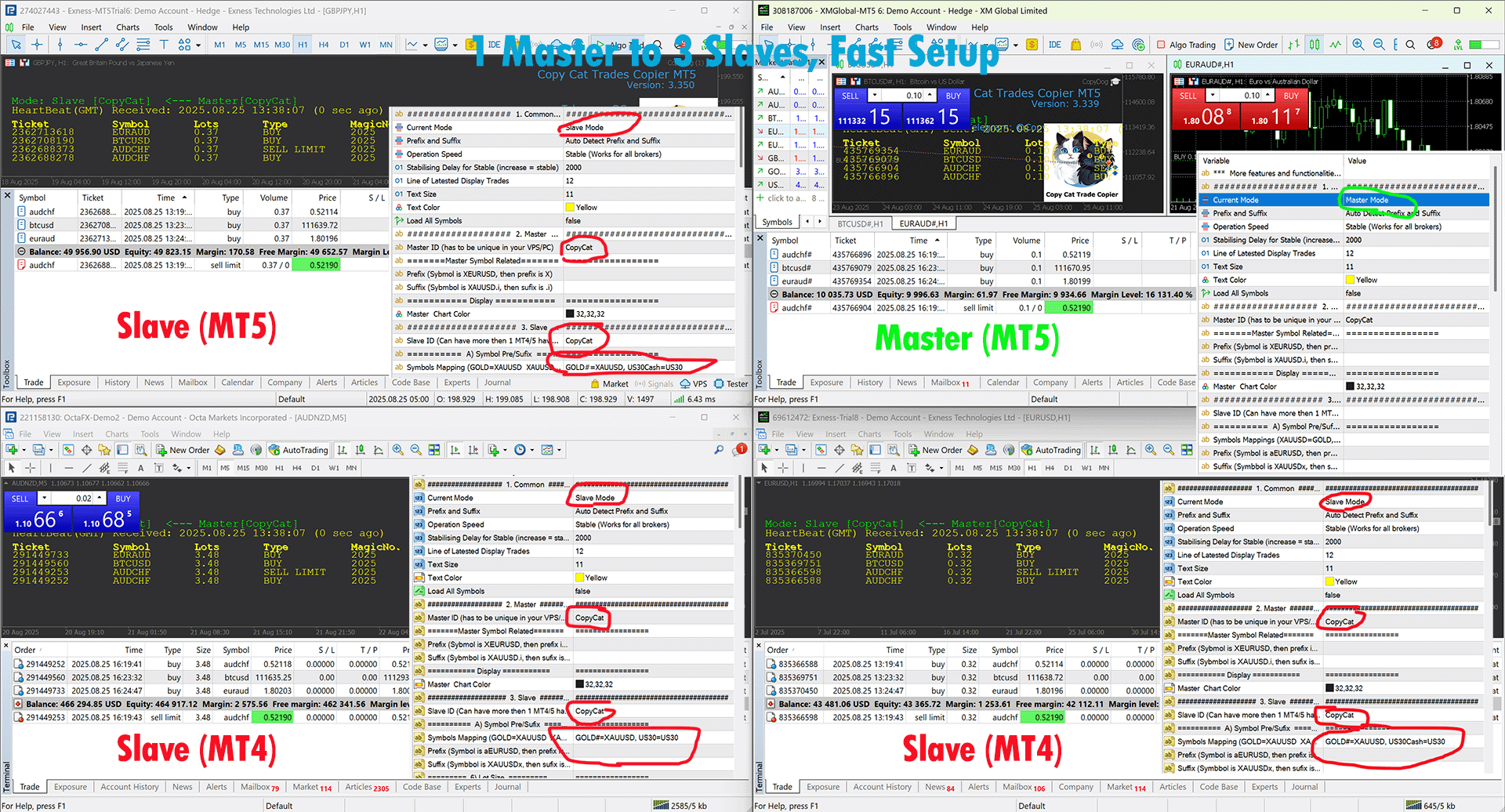
Easy to set up — as quick as 30 seconds (see video).
Copy from Investor, Real or Demo account
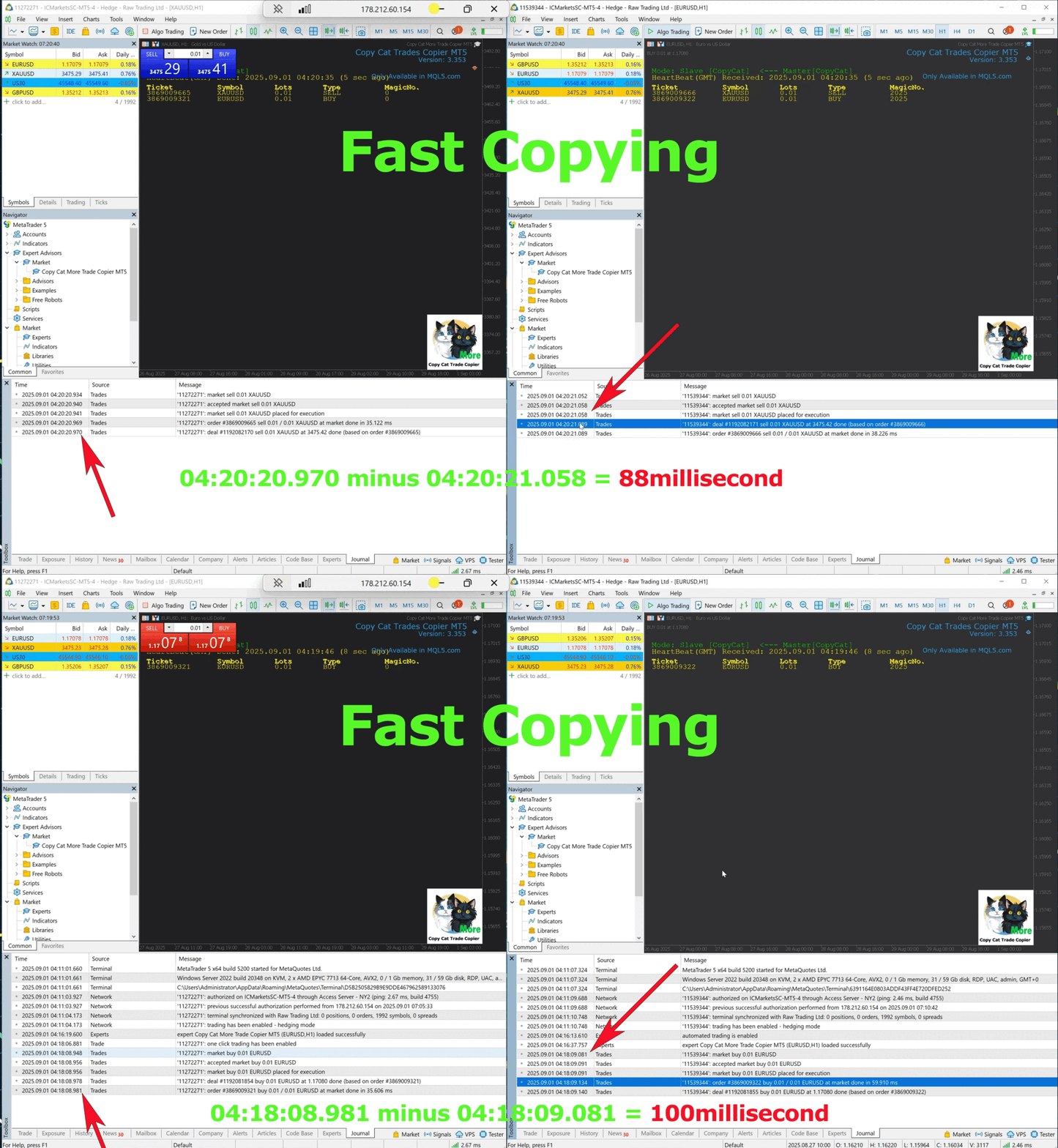
Fast, stable, and accurate — low latency copy in Turbo Mode (see screenshot).
High security — does not use potentially dangerous DLL or WebRequest.
New Filter or New Block 
Persistent trades memory to avoid orphan, missing, or inaccurate trades.
Copy from MT4 to MT5, Copy from MT5 to MT4, Copy from MT4 to MT4 and Copy from MT5 to MT5***.
Copy from manual or EA, across all account types.
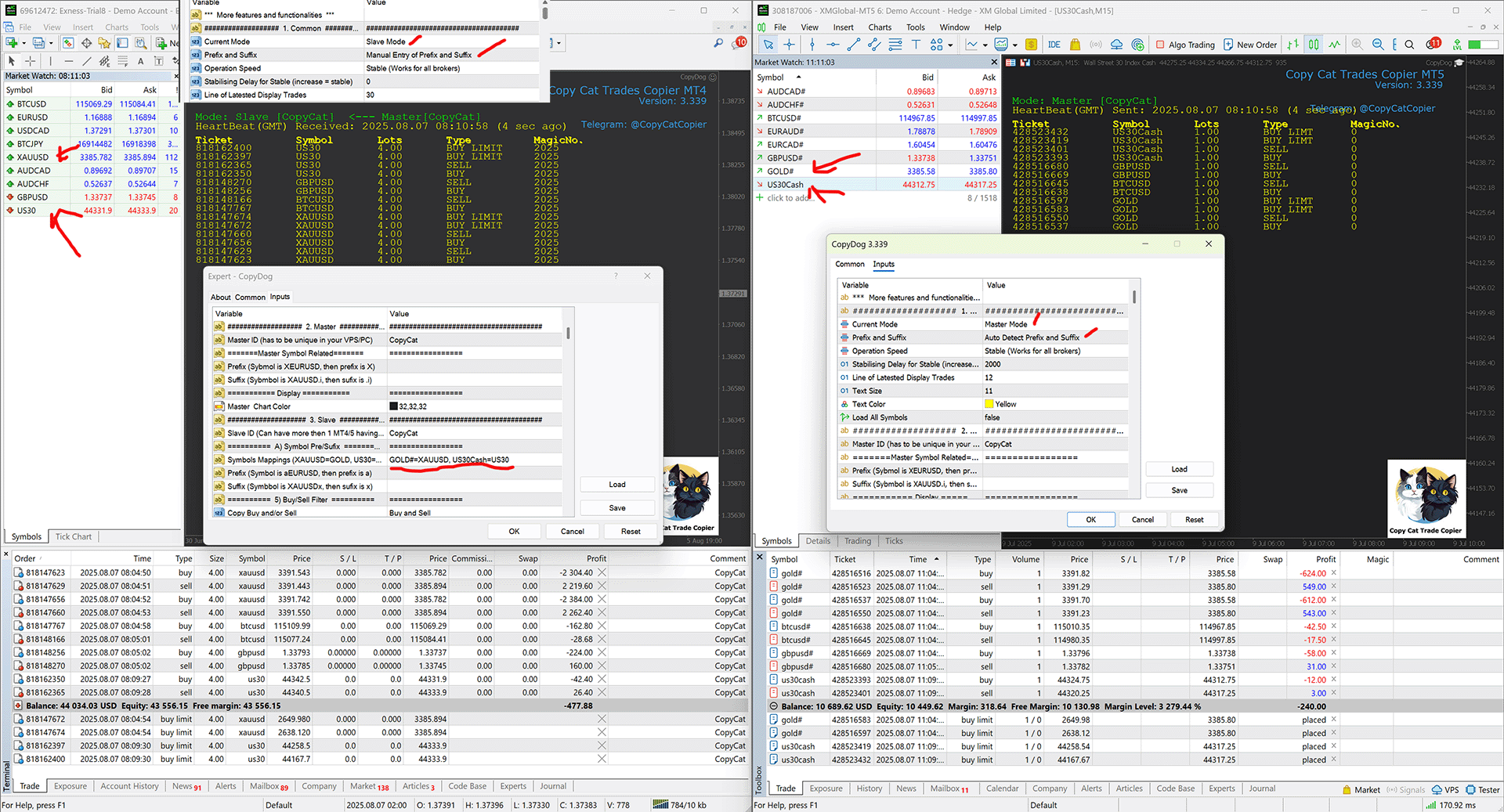
Auto prefix/suffix for symbols for fast setup; copy between MT4 and MT5.
Very flexible multi-master and multi-slave copying with simple setup.
Advanced methods: Partial Close for MT4/5, Reverse Trades, and Close By.
Blank copied trades’ Magic Number and Comments for appearance variations.
Account risk management and protection for broker and prop-firm accounts.
Trailing Stop, Take Profit, and Stop Loss options to manage risk and gains.
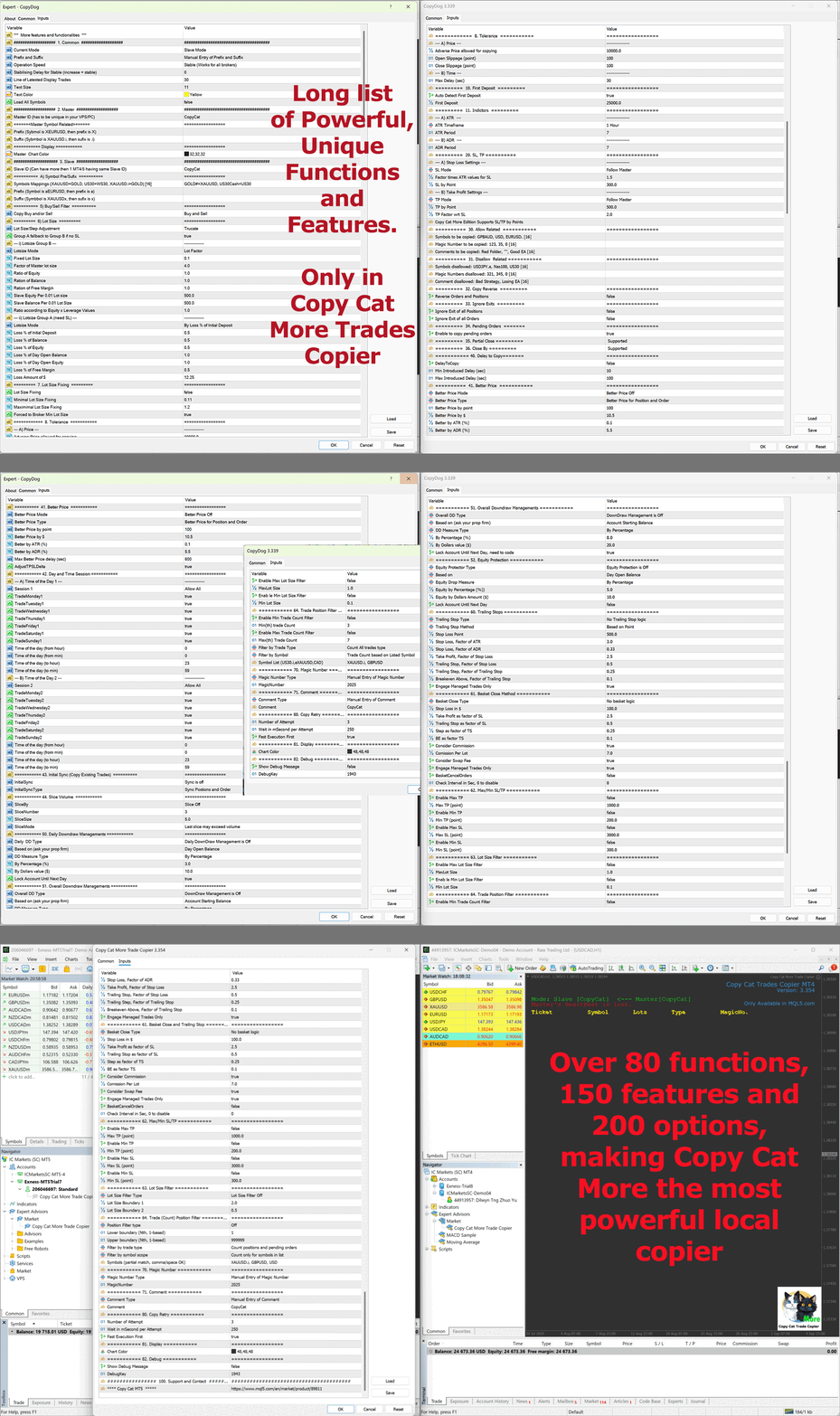
Extensive lot-size controls with more than 10 options.
Better Price based on account and/or individual trades to capture favorable entries.
Automatic retry on temporary broker/connectivity issues with fast execution logic.

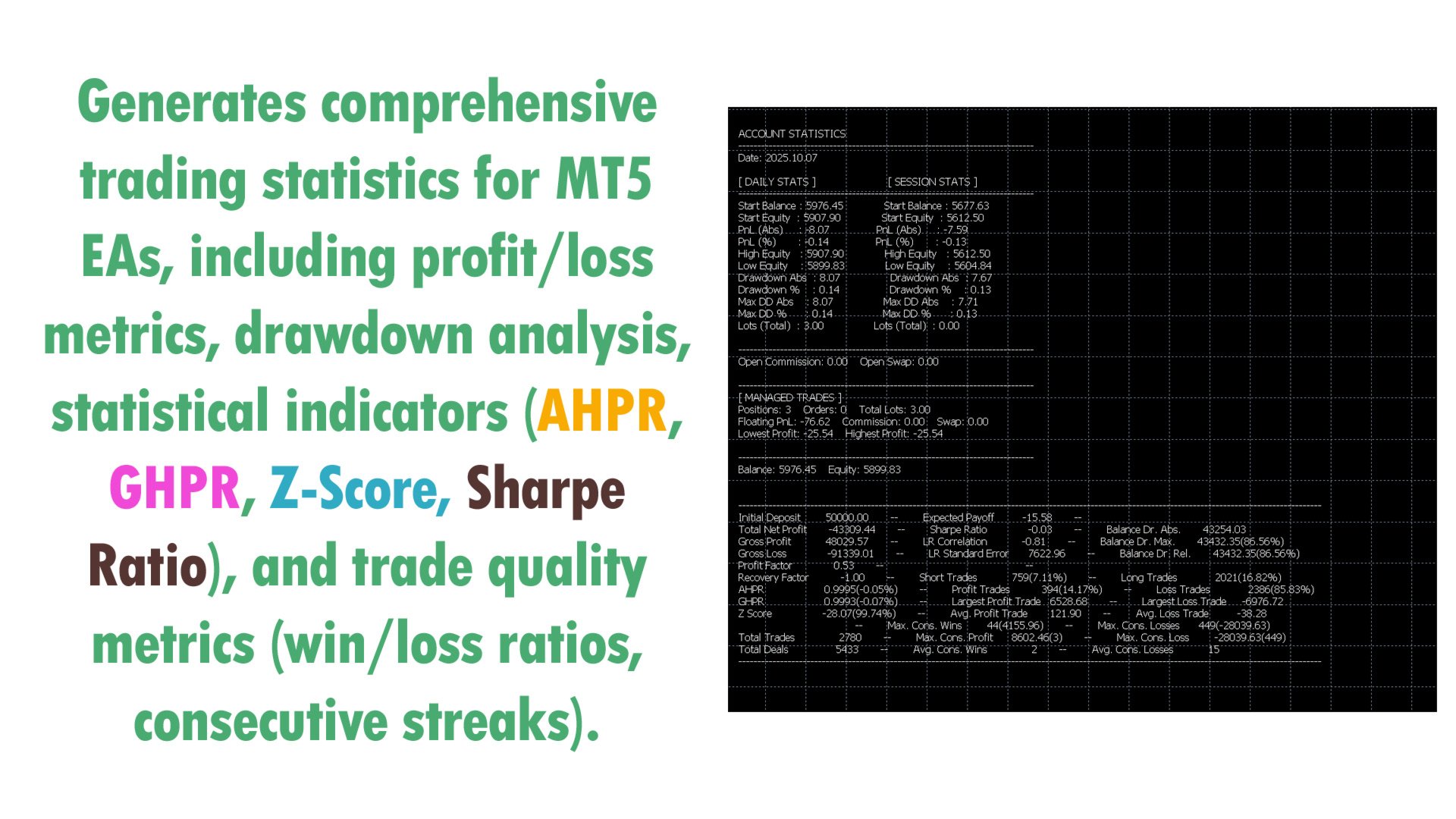
Detail Statistic and  Trade Signals to Telegram and Mobile MetaTraders
And a lot more advanced functions.

Stop Loss and Take Profit Management
Stop loss and take profit can follow the master, remain unset, be defined in points, or be dynamically calculated using ATR or ADR factors. TP can also be set as a multiplier relative to SL. All settings respect broker-imposed StopLevel and FreezeLevel restrictions to reduce execution rejections.

Trade Filtering and Control
Trades can be filtered by symbols, magic numbers, and comments, with both inclusion and exclusion lists available. These lists can handle partial matches (e.g., “USD” for all USD pairs) or full definitions for granular control. The copier also supports reverse copying (buy becomes sell and vice versa) and allows traders to ignore master exits when managing closures independently on the slave side. Pending orders can be copied or ignored, while both partial closes and close-by operations are detected and replicated accurately across platforms.

Copying Speed, Price Filters, and Sessions
Execution can be delayed intentionally using randomized timing to better align with prop-firm requirements. Traders may also enable Better Price Logic, filtering entries by point distance, dollar value, ATR percentage, or ADR percentage, with tolerance windows and automatic SL/TP delta adjustment. Time-based trade control is supported through two independent session filters, where trading can be restricted by day of the week and specific hours of the day to align with trading schedules, news events, or prop-firm restrictions.

Initial Sync and Volume Slicing
On startup, traders can choose whether to copy existing trades immediately, only profitable ones, only losing ones, or none. Trade volume can be adjusted via fixed, multiplier, and account-based modes (equity, balance, free margin, equity × leverage), and can also be sliced into smaller positions. Slicing can be done by lot size or by trade count, with overflow or remainder control, ensuring compatibility with strict broker lot-size limits.

Drawdown and Equity Protection
Daily drawdown, overall drawdown, and equity protection features help safeguard trading accounts, especially in prop-firm environments. Limits can be set by percentage or fixed dollar values, and when breached, the copier can automatically lock trading until the next day or until conditions reset. Protection can be applied against balance, equity, or initial account references, depending on prop-firm rules.

Advanced Risk Management Tools
The copier includes a Trailing Stop engine with multiple methods: fixed points, ATR, or ADR. Trailing can be defined as a factor of SL, with customizable trailing steps, break-even levels, and engagement only on managed trades. Additionally, a Basket Close system manages groups of trades collectively, with global stop loss, take profit, trailing stop, breakeven, and commission/swap awareness. Basket management supports strategies that rely on portfolio-level exits. Lot sizes can also be controlled with min/max filters, while trade count filters allow setting a minimum or maximum number of active trades per symbol or across all trades to keep risk exposure within limits.

Magic Numbers, Comments, and Retry Logic
Copied trades can carry no magic number (blank), inherit the master’s magic number, or use a manually specified input. The same flexibility applies to trade comments: they may be blank, copied from the master, or set as a custom user-defined string. A unique feature of Copy Cat Copier is the ability to leave the slave trade’s magic number and comment blank even if the master has them.

Updates:
Features and functions of Copy Cat More MT5 are constantly updated, and you will receive them at no additional cost after making a one-time purchase.

*** Purchase of both MT4 and MT5 version are needed, if you need from/to copy MT4 to/from MT5.

Try working version to check out compatibilty of your brokers or signal provider before your purchase
Reviews 8
Dmitrii Kozachenko
2464
Dmitrii Kozachenko 2026.04.08 04:53 
 

Hello everyone. After extensively testing numerous copy trading tools on the market, this one stood out as the clear winner. The execution speed is exceptional, and the reliability has been consistently impressive. If you're serious about copy trading, I highly recommend this platform without hesitation.

Tuan Anh Cao
232
Tuan Anh Cao 2026.04.01 11:02 
 

If you’re looking for a reliable trade copier, Copycat EA is definitely worth considering. One of the most impressive aspects is its execution speed — trades are copied almost instantly with very minimal delay, which is crucial for scalping or fast market conditions. The EA also comes packed with a wide range of features. From flexible risk management settings to advanced filtering options, it gives you a lot of control over how trades are copied and managed. Whether you’re a beginner or an experienced trader, the customization options make it easy to adapt to your strategy. Another big plus is the support from the developer. Responses are fast, professional, and genuinely helpful. You can tell they are committed to improving the product and assisting users whenever needed. Overall, Copycat EA stands out as a powerful, fast, and feature-rich solution, backed by a responsive and dedicated developer. Highly recommended.

Erlon Diamante Neiva
291
Erlon Diamante Neiva 2025.11.23 21:10 
 

Excelente Copiador, não tenho problema algum na replicação das ordens. Replico para diversas contas financiadas, umas com sufixo outra não, não tem falhas alguma na execução. Recomendo!!!

Recommended products
Trade Panel Pro — Professional Risk Management & Order Execution Terminal for MetaTrader 5 Trade Panel Pro is an advanced, all-in-one utility for MetaTrader 5, designed for active day traders and professionals. It combines precise risk calculation with lightning-fast order execution, helping you protect your capital and manage multi-target trades with ease. Main Advantages and Key Features Automated Lot Calculation: Forget manual volume calculations! The panel instantly calculates the exact
DR Trade and Risk Manager: The Foundational Algorithmic Risk Console for MT5 For the discretionary trader, the greatest adversary is not the market; it is the undisciplined self. You have a solid strategy, but in moments of high pressure, do you follow your rules with perfect consistency? Do you cut losses without hesitation? Do you let winners run without cutting them short out of fear? For most, the answer is no. This gap between strategy and execution is where profits are lost. DR Trade and R
HedgeSafe Trade Assistant A risk-first manual trading panel for MetaTrader 5. HedgeSafe helps you prepare, validate and manage a trade directly on the chart before you press BUY or SELL. HedgeSafe is not a signal service, market predictor, AI bot or automatic strategy. It does not choose trade direction and does not promise profit. You remain in control of every trading decision. Main capabilities Lot calculation from a percentage of account balance or a fixed amount in account currency. Stop Lo
Monitor Dashboard
Johann Dominique Carnevali
Clear EA & Internal Strategy Performance Separation The core purpose of MONIT Dashboard MT5 is to help traders clearly identify where their real performance comes from . On a MetaTrader 5 account, the global balance result is often not enough. A profitable account can hide a weak EA, an overactive strategy, a manual trading loss, or one specific Magic Number group generating most of the drawdown. This becomes even more important when several Expert Advisors are running on the same account, or w
TradePilotmt5
Hossein Khalil Alishir
TradePilot Expert Advisor (EA) for MetaTrader 5 TradePilot is a professional and user-friendly Expert Advisor (EA) for MetaTrader 5 (MT5) . It simplifies automated trading , risk management , and trade execution with a smart trading panel . Perfect for beginners and experienced traders looking for a reliable trade manager EA with automated lot size calculation and smart position management. Key Advantages User-Friendly Trading Panel: Customizable panel with buttons and hotkeys for fast ex
Bober Real MT5
Arnold Bobrinskii
4.88 (16)
Bober Real MT5 is a fully automatic Forex trading Expert Advisor. This robot was made in 2014 year and did a lot of profitbale trades during this period. So far over 7000% growth on my personal account. There was many updates but 2019 update is the best one. The robot can run on any instrument, but the results are better with EURGBP, GBPUSD, on the M5 timeframe. Robot doesn't show good results in tester or live account if you run incorrect sets. Set files for Live accounts availible only for cu
Auto SLTP Maker MT5
Oleg Remizov
5 (1)
Auto SLTP Maker MT5  is an assistant for all those who forget to set StopLoss and/or TakeProfit in deal parameters, or trade on a very fast market and fail to place them in time. This tool automatically tracks trades without StopLoss and/or TakeProfit and checks what level should be set in accordance with the settings. The tool works both with market and pending orders. The type of orders to work with can be set in the parameters. It can track either trades for the instrument it runs on, or all
Lot calculator tool MT5
Ernestas Kvedaras
3.67 (3)
More stable MetaTrader 4 version is available here:  Lot Calculator Tool . This tool helps you to automatically calculate and manage risk, conveniently place orders visually, schedule orders, trail stops, move them to break-even and more. Features Place market or pending orders using draggable lines Schedule orders Calculate and limit risk using various methods See current spread See time till next candle Set custom order comments Trail stops Move stops to break-even See order profit/loss in p
# Equity Monitor Pro  ## Short Description Equity Monitor Pro is a professional equity p**Equity Monitor Pro** is a powerful risk management tool that automatically protects your trading account by monitoring equity levels and enforcing prop firm style rules. Whether you're taking an FTMO challenge, trading a funded account, or just want to protect your capital, this EA runs silently alongside your trading strategy and takes action when it matters most. Protection tool designed for prop firm
Turbo Close All
Phami Thanh Hoang
Turbo Close All is a powerful and versatile script designed to help traders quickly and efficiently manage their trading positions and pending orders on MetaTrader 5. With its advanced features and customizable settings, this script is an essential tool for traders who want to streamline their trading process and maintain control over their positions and orders. Key Features: Comprehensive Closing Options: Turbo Close All allows you to close all market positions and/or delete pending orders bas
TradeOS is a panel for MetaTrader 5. It sizes the position from the risk you set, places the trade, manages it by your rules, watches your prop account limits and the news calendar. Afterwards it shows you what actually became of your plan. You pick the direction and the entry. TradeOS gives no signals and does not trade for you. Why another panel Everyone has a lot calculator. The difference starts after the order reaches the server. TradeOS remembers the plan you built and then checks it again
Risk-o-meter is a Risk calculator Panel designed to help people who are new to trading, better understand how much they are risking for potential profit or loss. Inputs: 1. Enter your Risk in % or currency 2. Enter your Return Ratio 3. Enter your Lot Size Results: 1. SL line 2. TP Line Features: 1. By moving the SL line, lot size will adjust to keep Risk fixed. 2. By moving the TP line, Risk Ration will adjust to keep Risk fixed.  
Introducing Neural Bitcoin Impulse - an innovative trading bot created using neural network training technology on voluminous market data sets. The built-in mathematical model of artificial intelligence searches for the potential impulse of each next market bar and uses the resulting patterns of divergence and convergence between the predictive indicators and the price to form high-precision reversal points for opening trading positions. The trading robot is based on the Neural Bar Impulse ind
SL TP Panel
Mikhail Ostashov
SL TP Panel — Visual Trading Panel for MT5 A convenient trading panel that lets you place pending orders by simply dragging lines on the chart. Stop Loss, Take Profit, order type, and lot size — everything is controlled with your mouse in seconds. Who is this for This panel is designed for manual traders who value speed of execution. Instead of opening the order window, filling in fields, and calculating levels — just drag a line to the desired price and click one button. Key Features Visua
JMM Trade Panel MT5
Sarah Joyce Walker
JMM Trade Panel MT5 JMM Trade Panel MT5 is a practical chart- based trading utility for MetaTrader 5. Execute Buy and Sell orders directly from the chart, adjust the displayed lot size quickly, monitor basket performance, and manage trades using configurable Magic Number and symbol- management rules. Full   User   Manual: DOWNLOAD Key Features On- chart Buy, Sell, and Close All buttons. Close all trades managed by the EA with one click. Optional management of all open trades regardless of Magi
Breakevan Utility
Jose Luis Thenier Villa
BreakEvan Utility  Is a simple tool in a panel with this utilities: This utility will draw a Golden Line in the chart applied showing the breakeven price, considering all the positions opened for that specific symbol. Also the information panel shows: Balance Breakeven Price for that chart Force Breakeven (for that symbol) as ON/OFF Force Breakeven Global (takes into account all trades opened) as ON/OFF Total Lots opened for Symbol Total Lots opened Global And two buttons: Force Breakeven: Whe
ManualEdge ∴ Manual Trading & Basket Risk Panel Trade by hand. Let the system watch your back. ManualEdge is a one-click chart panel built for discretionary traders who want the speed of manual execution combined with the discipline of automated risk management. Instead of choosing between a dumb button panel and a black-box EA, ManualEdge gives you both: you decide when to enter, the panel handles the boring ∴ and dangerous ∴ parts of managing the trade afterward. Protect yourself from bad habb
DeepTrade ScalpPanel
Yasir Mohammed Sachit Sachit
DeepTrade Scalp Panel is a fast, professional on-chart control panel built for scalpers who need to act in a fraction of a second. Open market orders instantly, drop pending orders with one tap, and let the panel handle Stop Loss, Take Profit, break-even and trailing automatically. No more fumbling with the order window while the move runs away from you.   KEY FEATURES - Instant BUY / SELL market execution with one tap - Fast pending orders: BUY STOP, SELL STOP, BUY LIMIT, SELL LIMIT placed at
This EA is there to take your trade closing stress away. Quickly close as many trades as you have opened at the click of a button, INCLUDING PENDING ORDERS. This works on the MT5 platform whether it be currencies, Indices, stocks or Deriv synthetic indices. I have saved it under utilities as it is a utility, however, to install this, you have to save the file in you "EA" folder. That is; Go to "File", then "Open Data Folder", "MQL5" and then "Experts". Paste this file there. Restart MT5 and you'
Trading Panel SL TP
Sirojiddin Sobitov
MQL5 Trading Panel SL TP — это мощный инструмент, призванный помочь трейдерам эффективно управлять своими позициями на платформе MetaTrader 5. Эта торговая панель предоставляет простой в использовании интерфейс для установки уровней Stop Loss (SL) и Take Profit (TP) для открытых позиций. MQL5 Trading Panel SL TP обладает широкими возможностями настройки и может быть адаптирована к конкретным потребностям отдельных трейдеров. Панель можно изменять в размере, перемещать и настраивать с помощью ра
Inverted_Chart_EA Utility Expert Advisor Inverted_Chart_EA creates and maintains a mirror-inverted chart of any symbol and timeframe. It automatically generates a custom instrument (e.g. US30_INV ) and keeps its price history updated in real time, with bars mirrored around a chosen pivot. This utility gives traders a new way to analyze the market from a different perspective by flipping the chart upside down. Why use an inverted chart? Highlight hidden patterns – price formations that look ordin
Tool Auto Modify SLTP – Protect Your Trades, Optimize Your Strategy In trading, risk is always present. Just one forgotten SL/TP can turn a promising trade into a loss. Even experienced traders occasionally make mistakes. That’s why Tool Auto Modify SLTP was created – to keep you protected and let you focus on your strategy. Key Features: Manage Orders for All Symbols: Monitor and adjust SL/TP for all your trading pairs. Three Flexible Risk Modes: Point-Based: Set fixed SL/TP distances. Account
The Ultimate All-In-One Trade Manager & Prop Firm Guardian for MT5. Nexus Pro Trade Manager is the most advanced, all-in-one trading assistant designed for both manual traders and Prop Firm challengers. Featuring a stunning, lag-free UI (Dark/Light mode), it completely transforms your MT5 into a professional trading terminal. Whether you are trading a personal account or trying to pass evaluations for FTMO, FundedNext, or other prop firms, Nexus Pro protects your capital, automates your risk cal
Trading Assistent is a multifunctional trading panel that combines all necessary tools for professional trading. The panel provides complete control over positions, in-depth risk analysis, and fast order execution. MAIN FUNCTIONAL BLOCKS Position Management: - Real-time viewing of all open positions - Sorting by symbol, profit, volume, and type - Visual indication of profitable and losing positions - Bulk closing operations - Breakeven function for profit protection Trading Operations: - I
XauG0D Assistant
Darell Valiente Taganas
XauG0D Assistant – Smart Trading Panel for XAUUSD (MT5) XauG0D Assistant is a powerful and modern trading panel designed for MetaTrader 5, built specifically for XAUUSD traders who want speed, precision, and full control. It transforms your chart into a complete trading command center, combining manual execution with smart automation. This EA allows you to execute trades instantly, manage risk efficiently, and monitor your performance in real-time — all from a sleek and intuitive interface. Key
Title: TradeMirror RM Analytics — Discipline Cost & Live Risk Guard Short description: See exactly what your lack of discipline costs you. TradeMirror builds a second "RM-compliant" equity curve alongside your real one — showing how you would have traded if you had followed your own risk rules — and warns you in real time before you break them. Body: Most traders don't lose because their strategy is bad. They lose because they break their own rules: one more trade after the daily limit, revenge
This Utility EA is a simple solution for editing many trades with ease , good for traders that ladder into positions. Syncs TP and SL Across All Trades Detects the TP and SL any trade. Updates all trades to match the highest trade's TP and SL if they change. Calculates Expected Profit and Loss Computes the total expected profit and loss in USD by considering TP, SL, lot size, and tick value.
The Daily candle
Vincent Albert Feugier
Daily Candle Overlay (MT5) — Visualize the Major Trend at a Glance Daily Candle Overlay is a technical indicator for MetaTrader 5 designed to simplify multi-timeframe (MTF) analysis. It displays the current daily (D1) candle in real-time directly on your lower timeframe charts (M1, M5, M15, H1, etc.). To prevent your charts from becoming cluttered or obstructing your indicators, the candle is drawn cleanly in the empty space to the right of the current price . Why Use This Indicator? In tradi
NRP Risk Manager Pro Institutional-Grade Trade Management & Prop Firm Protection Get the MetaTrader 4 Version Here: https://www.mql5.com/en/market/product/179888 Get the MetaTrader 5 Version Here: https://www.mql5.com/en/market/product/179885 Trading isn't just about finding the right entry; it is about flawlessly executing your edge while fiercely protecting your capital. NRP Risk Manager Pro is not an automated trading robot—it is a comprehensive, institutional-grade trade terminal d
CrossPoint5
Denis Trubachev
CrossPoint5   is an indicator that helps novice traders. In addition to the standard "Crosshair" function (Ctrl + F),   CrossPoint5   will show you how to set the StopLoss and TakeProfit levels correctly, taking into account the minimum allowable level, calculate the number of points between two points and convert this into the currency of the account, taking into account the expected lot of the transaction. Sometimes, when opening a deal, a novice trader completely forgets about the spread.
Buyers of this product also purchase
Trade Assistant MT5
Evgeniy Kravchenko
4.41 (216)
It helps to calculate the risk per trade, the easy installation of a new order, order management with partial closing functions, trailing stop of 7 types and other useful functions. Additional materials and instructions Installation instructions - Application instructions - Trial version of the application for a demo account Line function -   shows on the chart the Opening line, Stop Loss, Take Profit. With this function it is easy to set a new order and see its additional characteristics bef
Forex Trade Manager MT5
InvestSoft
4.98 (675)
Trade Manager MT5 is an advanced position size calculator and trade management tool for MetaTrader 5, designed to help traders plan trades faster, control risk more precisely, and manage open positions directly from the chart. It combines order placement, risk based lot calculation, Stop Loss and Take Profit management, Break Even, Trailing Stop, Partial Close, Equity Protection, and external trade management in one panel. Whether you trade forex, indices, metals, commodities, crypto, or future
================================================================================ POC BREAKOUT - V20.72. Full Professional Grade Toolkit ================================================================================ POC Breakout is a full MetaTrader 5 trading dashboard for discretionary traders who want breakout signals, Point of Control (POC) context, volume profiles, order flow, market structure, news, alerts, and advanced trade planning in one professional workspace. Attached directly to you
TradePanel MT5
Alfiya Fazylova
4.88 (167)
Trade Panel is a multi-functional trading assistant. The app contains over 50 trading functions for manual trading and allows you to automate most trading tasks. Application instructions + video instructions: https://www.mql5.com/en/blogs/post/756482 Trial version of the application for a demo account: https://www.mql5.com/en/blogs/post/750865 How to install the application: https://www.mql5.com/en/blogs/post/756239 How to test the application in visual mode: https://www.mql5.com/en/blogs/post/7
Beta Release The Telegram to MT5 Signal Trader is nearly at the official alpha release. Some features are still under development and you may encounter minor bugs. If you experience issues, please report them, your feedback helps improve the software for everyone. Telegram to MT5 Signal Trader is a powerful tool that automatically copies trading signals from Telegram channels or groups directly to your MetaTrader 5 account. It supports both public and private Telegram channels, and you can conn
Telegram to MT5 MultiChannel Copier
Sergio Marquez Uroz
4.46 (13)
Telegram to MT5 Multi-Channel Copier   automatically copies trading signals from your Telegram channels straight to MetaTrader 5. No bots, no browser extensions, no manual copying. A signal arrives in Telegram and the EA opens the trade in your terminal within seconds. The product has two components: a Windows application that listens to your Telegram channels, and this Expert Advisor that executes the signals in your MT5 terminal. An MT4 version is also available   here . Setup guide and appli
FarmedHedge Pair Trading Dashboard
Tanapisit Tepawarapruek
5 (4)
Farmed Hedge Yield Farming | All Markets (Manual - Hybrid - Semi/Automated EA) VERIFIED TRADING RESULTS - Farmed Hedge Yield Axi Copy:  https://www.mql5.com/en/signals/2356376 - Farmed Hedge Yield Exn Copy:   https://www.mql5.com/en/signals/2356404 - Farmed Hedge Yield V Copy:  https://www.mql5.com/en/signals/2357156 * Before purchasing, please feel free to send me a message if you have any questions about the product or setup. ** After purchase,  Contact me via private message to receive t
Astro Trade MT5
Indra Maulana
5 (4)
25% discount on the release of the tool: only for the next 3 buyers Send a message to receive a demo version. AstroTrade Trading Assistant AstroTrade is a comprehensive multi-functional trading utility developed for the MetaTrader 5 platform. It integrates essential tools for trade execution, risk management, and technical monitoring into a single unified interface. The application is designed to assist traders in managing their daily operations through a visual and structured environment. Vi
EA Overfitter
Stephen J Martret
That backtest looks great. But will it still be making money tomorrow, next week, next month? EA Overfitter re-runs your EA on 100 price histories it has never seen. One score tells you if the edge is real. A backtest tells you what an EA did on one price history — the one that happened to occur. What you cannot tell from it is how much of that result was the strategy and how much was the particular path. EA Overfitter answers that. It builds up to 100 synthetic price histories your EA has n
Exp COPYLOT CLIENT for MT5
Vladislav Andruschenko
3.97 (35)
Professional Trade Copier for MetaTrader 5 Fast, professional, and reliable trade copier for MetaTrader . COPYLOT allows you to copy Forex trades between MT4 and MT5 terminals with support for Hedge and Netting accounts. COPYLOT MT5 version supports: - MT5 Hedge to MT5 Hedge - MT5 Hedge to MT5 Netting - MT5 Netting to MT5 Hedge - MT5 Netting to MT5 Netting - MT4 to MT5 Hedge - MT4 to MT5 Netting MT4 version Full Description +DEMO +PDF How To Buy How To Install How to get Log Files H
Premium Trade Manager - The Trade Panel With a Coach Built In Premium Trade Manager puts a trading coach inside your chart, with a full execution engine underneath it. Set the trade up the way you always do, then let Max, your AI trading coach, read that exact setup against your live account and give you a straight verdict before you commit: is the stop disciplined, is the risk sane, is a high-impact release minutes away, are you near a prop-firm limit. Below sits the engine that runs everything
Trade Dashboard MT5
Fatemeh Ameri
4.95 (132)
Trade Dashboard simplifies how you open, manage, and control your trades, with built-in lot size calculation. It allows you to execute trades, manage risk, and control positions directly on the chart, with tools such as partial close, breakeven, and trailing stop. Designed to reduce manual work and help you stay focused on your trading decisions. A demo version is available for testing. Detailed explanations of features are provided within the MQL5 platform. Installation instructions are include
HINN MagicEntry Extra
ALGOFLOW OÜ
4.74 (19)
HINN MAGIC ENTRY – the ultimate tool for entry and position management! SIMPLE. FASTEST. INTUITIVE. MAX AUTOMATED. Place orders by selecting a level directly on the chart! full description   ::  demo-version  :: 60-sec-video-description Key features: - Market, limit, and pending orders - Automatic lot size calculation - Automatic spread and commission accounting - Unlimited partitial take-profits  - Breakeven and trailing stop-loss and take-profit  functions - Invalidation leves - Intuitive, a
Anchor Trade Manager
Kalinskie Gilliam
5 (8)
Anchor: The EA Manager Your EAs cannot see each other, but Anchor can. Anchor gives you one place to coordinate your EAs, manage risk, and decide when trading is allowed. It works alongside the trading bots you already use without any changes to them. The Problem One EA opens a trade. Then another starts trading. The next thing you know, you wake up to multiple grids built across your account. Each EA may be doing exactly what it was designed to do, but together they can place far more risk on y
Signal Trading View to MT5 Pro
Mirel Daniel Gheonu
4.5 (2)
Signal TradingView to MT5 Pro  Instant professional execution between TradingView and MetaTrader 5 Automate your trading strategy with the most robust communication bridge between TradingView alerts and real execution in MT5. Designed for traders who demand speed, flexibility, and impeccable risk management, this Expert Advisor transforms any alert message into a precise market or limit order.   Install and TEST the TRIAL version HERE STRENGTHS AND ADVANTAGES Universal Parsing Engine (Propriet
Timeless Charts
Samuel Manoel De Souza
5 (8)
Timeless Charts is an all-in-one trading utility for professional traders. It combines custom chart types such as Seconds Charts and Renko with advanced order flow analysis using Footprints , Clusters , Volume Profiles , VWAP studies, and anchored analysis tools for deeper market insight. Trading and position management are handled directly from the chart through an integrated trade management panel , while Market Replay and Virtual Accounts provide environments for practicing trading skills and
News Filter EA
Rashed Samir
5 (2)
News Filter EA: Advanced Algo Trading Assistant News Filter EA is an advanced algo trading assistant designed to enhance your trading experience. By using the News Filter EA , you can integrate a Forex economic news filter into your existing expert advisor, even if you do not have access to its source code. In addition to the news filter, you can also specify trading days and hours for your expert. The News Filter EA also includes risk management  and equity protection features. MT4 Version Ma
FUTURES ORDERFLOW FOOTPRINT CHART Professional OrderFlow EA for MetaTrader 5 Version 1.01| Professional tool for real traders | Institutional-Grade Visualization STRATEGY TESTER USERS - PLEASE SELECT EVERY REAL TICK WHEN TESTING AND YOU HAVE DOWNLOADED HISTORICAL DATA. IF YOU SEE A WAITING SCREEN AND IT IS NOT DOWNLOADING, IT MEANS YOU HAVE LOW HISTORICAL DATA. TRY 1 MIN AND 5 MIN FIRST ON 1 DAY DATA. ONE DAY DATA SHOULD BE THE NEWEST AND MOST CURRENT DATE. PLEASE WAIT UNTIL THE MARKET HAS ROL
The product will copy all telegram signal to MT5 ( which you are member) , also it can work as remote copier.  Easy to set up, copy order instant, can work with almost signal formats, image signal,  s upport to translate other language to English Work with all type of channel or group, even channel have "Restrict Saving Content", work with  multi channel, multi MT5 Work as remote copier: with signal have ticket number, it will copy exactly via ticket number. Support to backtest signal. How to s
YuClusters
Yury Kulikov
4.93 (43)
Attention: You can view the program operation in the free version  YuClusters DEMO .  YuClusters is a professional market analysis system. The trader has unique opportunities to analyze the flow of orders, trade volumes, price movements using various charts, profiles, indicators, and graphical objects. YuClusters operates on data based on Time&Sales or ticks information, depending on what is available in the quotes of a financial instrument. YuClusters allows you to build graphs by combining da
Power Candles Strategy Scanner - Self-Optimizing Multi-Symbol Setup Finder Power Candles Strategy Scanner runs the same self-optimizing engine that powers the Power Candles indicator - on every symbol in your Market Watch, side by side. One panel tells you which symbols are statistically tradable right now, which strategy wins on each, the optimal Stop Loss / Take Profit pair, and pings you the moment a fresh signal fires. This tool is part of the Stein Investments ecosystem - 18+ tools plus Max
MT5 to Telegram Signal Provider turns your trading account into a signal provider. Every trade action, whether manual, by EA or from your phone, is instantly sent as a message to Telegram. You can fully customize the format or use a ready-made template for quick setup. [ Demo ] [ Manual ] [ MT4 Version ] [ Discord Version ]     New: [ Telegram To MT5 ] Setup A step by step user guide is available. Key Features Ability to customize order details sent to subscribers You can create a tiered subs
Ultimate Extractor
Clifton Creath
5 (8)
Ultimate Extractor - Professional Trading Analytics for MT5 *****this is the local HTML version of Ultimate Extractor. !!!!!it is not compatible with Cloud!!!! For the online version please reach out to me directly****** Ultimate EA manager also now available when you use cloud pro and above for free!! Ultimate Extractor transforms your MetaTrader 5 trading history into actionable insights with comprehensive analytics, interactive charts, and real-time performance tracking. What It Does Automa
Quant AI Agents
Ho Tuan Thang
5 (1)
Quant AI Agents are independent trading Expert Advisors. Instead of trading using a fixed strategy like other conventional EAs, Quant AI Agents   is a   multi-agent AI trading framework   that turns natural-language strategy prompts into live.  WANT THE SAME RESULTS AS MY LIVE SIGNAL?   Use the exact same brokers I do:   IC MARKETS , IC TRADING   .  Unlike the centralized stock market, Forex has no single, unified price feed.  Every broker sources liquidity from different providers, creating un
Trade Copier Ultimate
Janitha Sandaruwan Amaradasa Wickramasingha Arachchilage
5 (5)
Trade Copier Ultimate - Telegram to MT5 Signal Copier Trade Copier Ultimate automatically copies Telegram trading signals into MetaTrader 5. The EA can read signal messages, detect the symbol, order type, entry price, Stop Loss, Take Profit levels and selected update commands, then execute or manage the trade in MT5 using your lot and risk settings. It is more than a basic Telegram to MT5 copier. TCU also supports Bot API and user-account Bridge workflows, Discord signal routing, local MT5 to MT
Footprint Chart Pro — Professional OrderFlow EA for MetaTrader 5 Version 6.34 | Professional tool for real traders | Institutional-Grade Visualization DEMO USERS - PLEASE SELECT EVERY TICK / REAL TICK WHEN TESTING AND YOU HAVE DOWNLOADED HISTORICAL DATA. IF YOU SEE A WAITING SCREEN AND IT IS NOT DOWNLOADING, IT MEANS YOU HAVE LOW HISTORICAL DATA. TRY 1 MIN AND 5 MIN FIRST ON 1 DAY DATA. ONE DAY DATA SHOULD BE THE NEWEST AND MOST CURRENT DATE. PLEASE WAIT UNTIL THE MARKET HAS ROLLED OVER PERIOD.
The News Filter MT5
Leolouiski Gan
4.78 (23)
This product filters   all expert advisors and manual charts   during news time.  It is able to remove any of your EA during news and automatically reattach them after news ends. This product also comes with a complete  order management system   that can handle your open positions and pending orders before the release of any news. Once you purchase   The News Filter , you will no longer need to rely on built-in news filters for future expert advisors, as this product can filter them all from her
Bots Builder Pro MT5
Andrey Barinov
4.17 (6)
This is exactly what the name says. Visual strategy builder . One of a kind. Turn your trading strategies and ideas into Expert Advisors without writing single line of code. Generate mql source code files with a few clicks and get your fully functional Expert Advisors, which are ready for live execution, strategy tester and cloud optimization. There are very few options for those who have no programming skills and can not create their trading solutions in the MQL language. Now, with Bots Builde
VirtualTradePad One Click Trading Panel
Vladislav Andruschenko
4.59 (74)
Trading Panel for MetaTrader 5 — professional one-click trading from chart and keyboard A powerful trading panel for active manual trading, designed to open, manage, and close trades far faster and more efficiently than the standard MetaTrader interface. This panel is built for traders who want full control over positions, pending orders, profit management, and trading execution inside one professional workspace. This is not just another utility. It is a complete trading cockpit for MetaTrader
SMC Trade Pilot MT5
Prime Horizon
5 (1)
SMC Trade Pilot MT5 Semi-automatic trading assistant for Smart Money Concepts traders. Receive rich signals on Telegram with chart screenshot, then place the trade with a single tap. Manage your positions from your phone, even when you are away from your computer. The problem this solves Smart Money setups don't wait for you. Order Blocks and Liquidity Sweeps form during the London open, the New York open, or in the middle of the Asian session, often when you are at work, in a meeting, or simply
More from author
TNG Gold
Dilwyn Tng
5 (8)
TNG (The Next Generation) Gold  Live Signals: VT Markets  and other brokers 1 Bonus EA: Quiet Owl, Gold Ambush or Gold Assault TNG Gold's scalping algorithm engineered exclusively for Gold. It takes a disciplined, transparent approach - clean entries, bounded risk, and honest execution. Every trade is placed and managed by rule, not by reaction. Entry. Precision pending stop orders at validated structural price levels - the EA waits, never chases. Every setup must clear a multi-timeframe reg
POBE Prop Firm
Dilwyn Tng
5 (5)
Pass or Breakeven (POBE) — Prop Firm Challenge EA One thing POBE users consistently report: the fear of a failed challenge is gone. With prop firms that set a lower target than their max drawdown — such as FTMO, FundedNext, and FundingPips — failing Phase 1 can leave the broker account recovering more than the original setup cost, net positive . Failing Phase 2 recovers even further above that. Every outcome — pass or fail — is calculated before a single trade is placed. The Phase 2 effect is wh
HFT PropFirm EA MT5
Dilwyn Tng
4.93 (83)
HFT PropFirm EA MT5 is  also known as Green Man due to its distinctive logo by Dilwyn Tng, is an Expert Advisor (EA) crafted specifically for overcoming challenges or evaluations from proprietary trading firms (prop firms) that permit High-Frequency Trading (HFT) strategies. NEW: Get funded, overall gain or breakeven for FTMO, Funded Next and ....., use POBE Prop Firm EA . Free  1 All-In-One Breakout EA account licence with purchase of HFT PropFirm EA MT5 Passing HFT MT5 Challenge Performance

Gold Ambush
Dilwyn Tng
3 (2)
Gold Ambush Gold Ambush a Gold scalping EA that adapts to your style. Run it with high leverage for aggressive daily scalping, or on a bigger account with low leverage as a conservative long-term system with compatible brokers. Same engine, your choice of risk and trading style. No martingale. No grid. No averaging down. One position per breakout, always with a hard stop-loss protecting your capital. Live Signals Several brokers' live signals are available. View verified live results across mu
Quant Lattice
Dilwyn Tng
5 (1)
1 Price for 3 different EA (Steady, Drive and Cruise) Live Signal:   QL Drive   |   QL Steady   |     QL Cruise  (new)       Setfiles:  Setfiles What Quant Lattice Is Quant Lattice is a fully automated Expert Advisor that trades one currency pair: AUDCAD. It comes with three different strategies — Steady, Drive and Cruise. You install it once, pick a strategy, choose the money management and it trades without you touching it. Why AUDCAD?  Both the Australian and Canadian dollars are commodity
Working Trial Download Copy Cat More Trade Copier MT4 is not just a simple local trade copier; it is a complete risk management and execution framework designed for today’s trading challenges. From prop firm challenges to personal portfolio management, it adapts to every situation with its blend of robust execution, capital protection, flexible configuration, and advanced trade handling. The copier works in both   Master (sender) and Slave (receiver)   modes, with real-time synchronization of
Range Breakout strategies are among the most time-tested, evergreen and reliable trading approaches. They aim to capture momentum at key price levels—usually after periods of market consolidation—where strong moves tend to follow. This makes breakout systems ideal for traders looking to ride intraday or session-based trends. All-In-One Breakout EA (AIOBO EA, AIO Breakout) is an open strategy (not a black box operation) equipped with a wide range of settings. It can be used “as is” or finely tune
Range Auto TP SL
Dilwyn Tng
4.57 (46)
Range Auto TP SL  is for you, 100% free for now, download it and give me a good review and you are free to use it for lifetime !!!! Range Auto TP SL is a EA to set Stop Loss and Take Profit level based on range using Average True Range (ATR). It works on both manually opened positions via PC MT5 Teriminals or MT5 Mobiles and EA/robots opened position. You can specify magic number for it to work on or it can work on all the positions. Many EA does not good Stop Loss and Take Profit function and
FREE
HFT Prop Firm EA
Dilwyn Tng
4.96 (635)
HFT Prop Firm EA is  also known as Green Man due to its distinctive logo, is an Expert Advisor (EA) crafted specifically for overcoming challenges or evaluations from proprietary trading firms (prop firms) that permit High-Frequency Trading (HFT) strategies. With version 5.8 and above GreenMan  HFT Prop Firm EA is plug and play for for almost true HFT prop firm challenges without setfiles with it newly improved automatic features. NEW:   Get funded, overall gain or breakeven for FTMO, Funded
News Hound for MT4 / MT5 A professional economic news calendar for every chart — MT4 and MT5 — from the same trusted MQL5.com source. MetaTrader 5 has a built-in economic calendar. MetaTrader 4 doesn't. This tool fixes that — and gives you a single, shared news feed that every chart on your PC or VPS can read, in both platforms. Why I built it This is the foundation for something bigger. All my upcoming Expert Advisors are built around this news engine. Instead of locking news filtering insid
FREE
News Hound for   MT4   / MT5 A professional economic news calendar for every chart —   MT4   and MT5 — from the same trusted MQL5.com source. MetaTrader 5 has a built-in economic calendar. MetaTrader 4 doesn't. This tool fixes that — and gives you a   single, shared news feed   that every chart on your PC or VPS can read, in both platforms. Why I built it This is the foundation for something bigger. All my upcoming   Expert Advisors   are built around this news engine. Instead of locking news
FREE
Protectron — Account Protection System A utility that monitors account equity in real time and closes all open positions automatically when a defined upper or lower threshold is reached. Works alongside any Expert Advisor or manual trading strategy without interfering with their logic. Overview Protectron attaches to a chart and monitors total account equity continuously — including floating positions. When equity reaches a configured threshold in either direction, all open positions are closed
FREE
Protectron — Account Protection System A utility that monitors account equity in real time and closes all open positions automatically when a defined upper or lower threshold is reached. Works alongside any Expert Advisor or manual trading strategy without interfering with their logic. Overview Protectron attaches to a chart and monitors total account equity continuously — including floating positions. When equity reaches a configured threshold in either direction, all open positions are closed
FREE
Prop Firm Equity Protector safe guard your hard earned prop firm account from balance or equity downdraw. It can be used for live/personal account too. It will close all positions if drawdown hit the preset level or percentage. It can be set to close other EA in the same MT4 terminal too.  This utility is not need to use conjuction with  HFT Prop Firm EA (Green Man),   HFT Prop Firm EA has it build-in equity protector and also it has ultra low drawdown. Setting: Prop Firm Account Size Drawdown
Prop Firm Toolbox contains the important tools for maximising your funded account prop firm accounts. It contains function: - Lot Size Consistency Advisor  (This is the number one reason of prop firm not paying if you soft bleach this rule) - Biggest Profit Size Warning  (This is the number two reason of prop firm not paying if you soft bleach this rule) - Spread Meter
Filter:
Dmitrii Kozachenko
2464
Dmitrii Kozachenko 2026.04.08 04:53 
 

Hello everyone. After extensively testing numerous copy trading tools on the market, this one stood out as the clear winner. The execution speed is exceptional, and the reliability has been consistently impressive. If you're serious about copy trading, I highly recommend this platform without hesitation.

Tuan Anh Cao
232
Tuan Anh Cao 2026.04.01 11:02 
 

If you’re looking for a reliable trade copier, Copycat EA is definitely worth considering. One of the most impressive aspects is its execution speed — trades are copied almost instantly with very minimal delay, which is crucial for scalping or fast market conditions. The EA also comes packed with a wide range of features. From flexible risk management settings to advanced filtering options, it gives you a lot of control over how trades are copied and managed. Whether you’re a beginner or an experienced trader, the customization options make it easy to adapt to your strategy. Another big plus is the support from the developer. Responses are fast, professional, and genuinely helpful. You can tell they are committed to improving the product and assisting users whenever needed. Overall, Copycat EA stands out as a powerful, fast, and feature-rich solution, backed by a responsive and dedicated developer. Highly recommended.

Erlon Diamante Neiva
291
Erlon Diamante Neiva 2025.11.23 21:10 
 

Excelente Copiador, não tenho problema algum na replicação das ordens. Replico para diversas contas financiadas, umas com sufixo outra não, não tem falhas alguma na execução. Recomendo!!!

Indra Pratama
443
Indra Pratama 2025.11.15 16:33 
 

I've been using CopyCat from the free version, until now and I've decided to buy the paid version because of the features it have. It has been running well in my accounts. The developer is also very active in responding to the chats and problems. Highly recommended.

kkandru12
593
kkandru12 2025.10.01 19:00 
 

It's simply excellent. Don't miss it, A must have utility and kudos to Author. I passed HFT PropFirms with ease.

----------------------------

Below is one minor issue to take care of : I use AMP Futures Demo Broker and at times on connection loss, I see below messages, may be normal, just bringing them to your notice. Thx. -------------------------------- PO 0 02:23:43.581

Copy Cat More Trade Copier MT5 (ENQZ25,M15) [WARNING] 2083 52S-myOrderModify: #Ticket 277083685 — OrderModify attempt #4 failed. Type: Sell, SL: 24768.00 → 24693.25, TP: 24482.00 → 24482.00, Bid=24661.25. Error #4756 ([4756] Trade request sending failed) OR 0

02:23:44.745 Copy Cat More Trade Copier MT5 (ENQZ25,M15) [WARNING] 2083 52S-myOrderModify: #Ticket 277083685 — OrderModify attempt #4 failed. Type: Sell, SL: 24768.00 → 24693.25, TP: 24482.00 → 24482.00, Bid=24661.25. Error #4756 ([4756] Trade request sending failed) NJ 0

02:23:50.814 Copy Cat More Trade Copier MT5 (ENQZ25,M15) Alert: [ERROR] 1762 52S-IsAccountTradeAllowedU: Trading is prohibited in this account. LD 0 02:23:50.814 Copy Cat More Trade Copier MT5 (ENQZ25,M15) [ERROR] 1762 52S-IsAccountTradeAllowedU: Trading is prohibited in this account. QI 0

02:23:53.144 Copy Cat More Trade Copier MT5 (ENQZ25,M15) [WARNING] 2083 52S-myOrderModify: #Ticket 277083685 — OrderModify attempt #4 failed. Type: Sell, SL: 24768.00 → 24693.25, TP: 24482.00 → 24482.00, Bid=24660.25. Error #4756 ([4756] Trade request sending failed)

UPDATED :

------------------------------------------

Thank you. Can you please do me a help?

Please simulate copy trades from ICMkts/VtMkts for XAUUSD to GCEZ25 ( AMP Futures for Gold ) for Fixed Lot of 1.


I'm doing the same and since I'm not able to find good Copier settings. Below are some logs and copied trades are ignored. Not all of them, but some of them .

-------------------------

2025.10.02 20:33:47.084 Copy Cat More Trade Copier MT5 (ENQZ25,M15) [INFO] 3017 52S-getLotSizeWOSL: Lot Calculation [Group B - LotFixed] for GCEZ25: Adjusted=1.00, MasterLot=0.10, SlaveEquity=11205.76, MasterEquity=1022.55

2025.10.02 20:33:47.084 Copy Cat More Trade Copier MT5 (ENQZ25,M15) [WARNING] 2202 52S-checkBeforeOrder: SL too close for BUY-type. Price=3848.2 SL=3861.7

Dilwyn Tng
59270
Reply from developer Dilwyn Tng 2025.10.16 05:28
Hello, if you need help, please approach me using MQL5.com chat, this is a review section, I am not able to give support at this section. You can either use Comments, Group or Chat to get help, use chat for faster response. ▫️XAUUSD to GCEZ25??? what is GCEZ25, let talk in PM. ▫️
Thank you
---------------------------
Thank you so much for the excellent feedback, kkandru12! 🙏 I’m really glad to hear Copy Cat More helped you pass prop firm challenges with ease — that’s exactly what I designed it for. Regarding the warnings you noticed on AMP Futures demo: those messages are normal during connection loss or when the broker temporarily restricts trading (like Error #4756 or account trade prohibition alerts), it is NOT an error. The copier automatically retries and keeps everything in sync, so your live accounts are safe. Still, I’ll review the handling logic again to see if I can make it even smoother. Thanks again for pointing it out and for the kudos — really appreciate your trust and support!
Cantaclaro
219
Cantaclaro 2025.09.29 16:55 
 

Amazing copier. Extremely fast and accurate. The developer is quick to answer any questions or concern. After using it for more than six months, I highly recommend this copier.

Dilwyn Tng
59270
Reply from developer Dilwyn Tng 2025.10.02 08:43
Developer's Reply:
Thank you so much, Cantaclaro! 🙏 I’m happy to hear the copier has been running fast and accurate for you over these six months. Your recommendation means a lot, and I’ll always be here to help if you have any questions in the future. Really appreciate your continued trust and support!
Grab
52
Grab 2025.09.17 10:11 
 

Been using Copy Cat MT5 and honestly its a beast. What really got me is the prop firm features, equity protector, delay copy, downdraw halts and ....., these life saving features protect my funded accounts from to be bleached and flagged as copy trades. Most copiers I tried before just can’t deal with that stuff right.

The copier keep all trades in memory too, so even if my VPS restart or MT5 crash, everything come back in sync. Thats huge relief for me cause I don’t gotta babysit it 24/7.

Super flexable with all the settings, I can manage multiple masters and slaves easy, and it just run smooth. For me this one is the top of the market, 5 stars no doubt.

Dilwyn Tng
59270
Reply from developer Dilwyn Tng 2025.10.02 08:42
Thank you, Grab! 🙏 I’m really glad you’ve found the prop firm features and protections useful — those were built exactly to solve the problems you mentioned. The persistent memory and crash recovery are also things I wanted to make rock-solid so traders don’t have to stress about VPS or PC issues. Great to hear it gives you peace of mind and smooth copying across masters and slaves. Thanks again for the 5-star support and trust!
Benson III
68
Benson III 2025.09.10 09:51 
 

Dudes. I've used loads of copiers and this is by far the best. Loads of functionality (including Close By and Close partial), you gotta get across how to use it and read the instructions but it will do anything you need your copier to do. The support guy/developer is super helpful. This is the only one I use now. Recommended from me. A++

Dilwyn Tng
59270
Reply from developer Dilwyn Tng 2025.10.16 03:58
Thank you, Benson! 🙏 I really appreciate your detailed feedback. It’s great to hear you’re making full use of the advanced features like Close By and Partial Close. I always try to design Copy Cat More with flexibility so traders can adapt it to any situation, and I’m glad it’s working well for you. Thanks also for highlighting the support — I’m always here to help if you need anything. Your recommendation means a lot!
Reply to review