SMC Venom Model BPR MT5
- Indicators
-
Ivan Butko
 Greetings, friends!
I write in mql4 and mql5. In my market you will find a variety of products, every day I develop something new, I research something. New indicators and advisors will appear in the near future. - Version: 1.20
- Updated: 1 November 2026
- Activations: 20
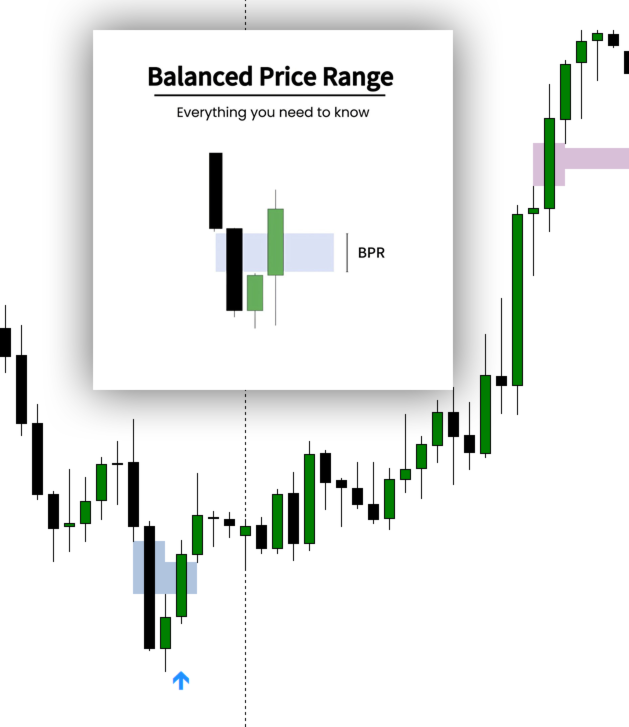
The SMC Venom Model BPR MT5 indicator is a tool for visual analysis of BPR/FVG zones within the Smart Money Concept (SMC). It automatically identifies key price imbalance zones on the chart and allows you to analyze them on both the current timeframe and multiple timeframes.
- FVG (Fair Value Gap) — a price imbalance zone identified from a three-candle formation, where an unfilled price range forms between the first and third candles.
- BPR (Balanced Price Range) — a structure involving two opposing FVG zones, forming an area of balance, retracement, or price interaction with a previously established imbalance.
The indicator helps you visually track BPR/FVG zones, their status, position relative to current price, and higher-timeframe context. It can be used as an additional tool for analyzing market structure, price imbalances, and potential areas of interest.
Zones are displayed as rectangles. The indicator also supports arrows, levels, flexible notifications, and interactive timeframe-layer management directly on the chart.
User Guide:
A detailed illustrated guide covering SMC Venom Model BPR features and settings, including MTF Dashboard, Settings Panel, BPR/FVG zones, filters, levels, arrows, and alerts.
Open the SMC Venom Model BPR User Guide
You can read the guide directly on the website or download the full PDF from the ZIP archive attached to the article.
Key Features:
- Detection and display of BPR and FVG zones.
- Support for bullish and bearish zones.
- Display modes: BPR, FVG, or combined BPR/FVG.
- Analysis of current and higher timeframe zones.
- Show or hide individual timeframe layers directly on the chart.
- Filter based on the number of bars between FVGs forming a BPR.
MTF Dashboard:
- Interactive multi-timeframe dashboard on the chart.
- Enable or disable individual timeframe layers.
- Independent control of current and higher timeframes.
- Quickly show or hide the dashboard without opening indicator properties.
Settings Panel:
- Dedicated panel for managing settings for each timeframe.
- Individual zone detection mode for each timeframe.
- Individual BPR/FVG zone colors for each timeframe.
- Separate zone filters, levels, and alert modes for each timeframe.
- Persistent settings and quick reset using the Reset button.
Zone Lifecycle:
- Fresh — a new zone that price has not yet interacted with.
- Touched — a zone that price has already touched.
- Mitigated — a zone that has been mitigated.
- Broken — a zone that has been broken.
Filters allow you to keep only the relevant zones on the chart and reduce visual clutter.
Additional Signal Visualization:
- Arrows for selected BPR/FVG signals.
- Choose from predefined arrow styles or enter custom Wingdings codes.
- Customize arrow colors, size, and offset relative to price.
- Optionally display a Wingdings reference table on the chart.
Levels:
- Optional projection of levels based on detected zones.
- Individual level display settings for each timeframe.
- Use levels as additional visual references for market structure analysis.
Time Filter:
- Restrict indicator analysis to a specified time window.
- Useful for analyzing specific trading sessions or selected intraday periods.
Flexible Alert System:
- Alert modes can be configured independently for each timeframe.
- Notifications for BPR, FVG, bullish, and bearish signals.
- Popup alerts.
- Push notifications to mobile devices.
- Email notifications.
- Sound alerts with a selectable audio file.
- Customizable alert message text.
Hotkeys:
- T — show or hide the MTF Dashboard.
- S — show or hide the Settings Panel.
If a panel is hidden, press the corresponding hotkey to display it again.
Chart and Performance Optimization:
- Limit the number of historical bars scanned to reduce workload.
- Optimized redrawing: where possible, only the modified timeframe layer is updated.
- Automatic object cleanup when the indicator is removed.
- Cleanup modes: delete only indicator objects, clear the entire chart, or leave the objects in place.
Versatility:
- Suitable for different currency pairs, instruments, and timeframes.
- Works with current timeframe analysis and higher-timeframe zone overlays on lower-timeframe charts.
BPR Trading Strategy
MT4 Version
Explore my other products in the MQL5 Market: https://www.mql5.com/en/users/capitalplus/seller
✅ If you find the indicator useful, please rate the product and leave a review. Your feedback helps me continue developing the project.
Wishing you successful trading and accurate market analysis!