DrawDown Limiter

5

DrawDown Limiter v5.0 — Advanced Account Protection Controller

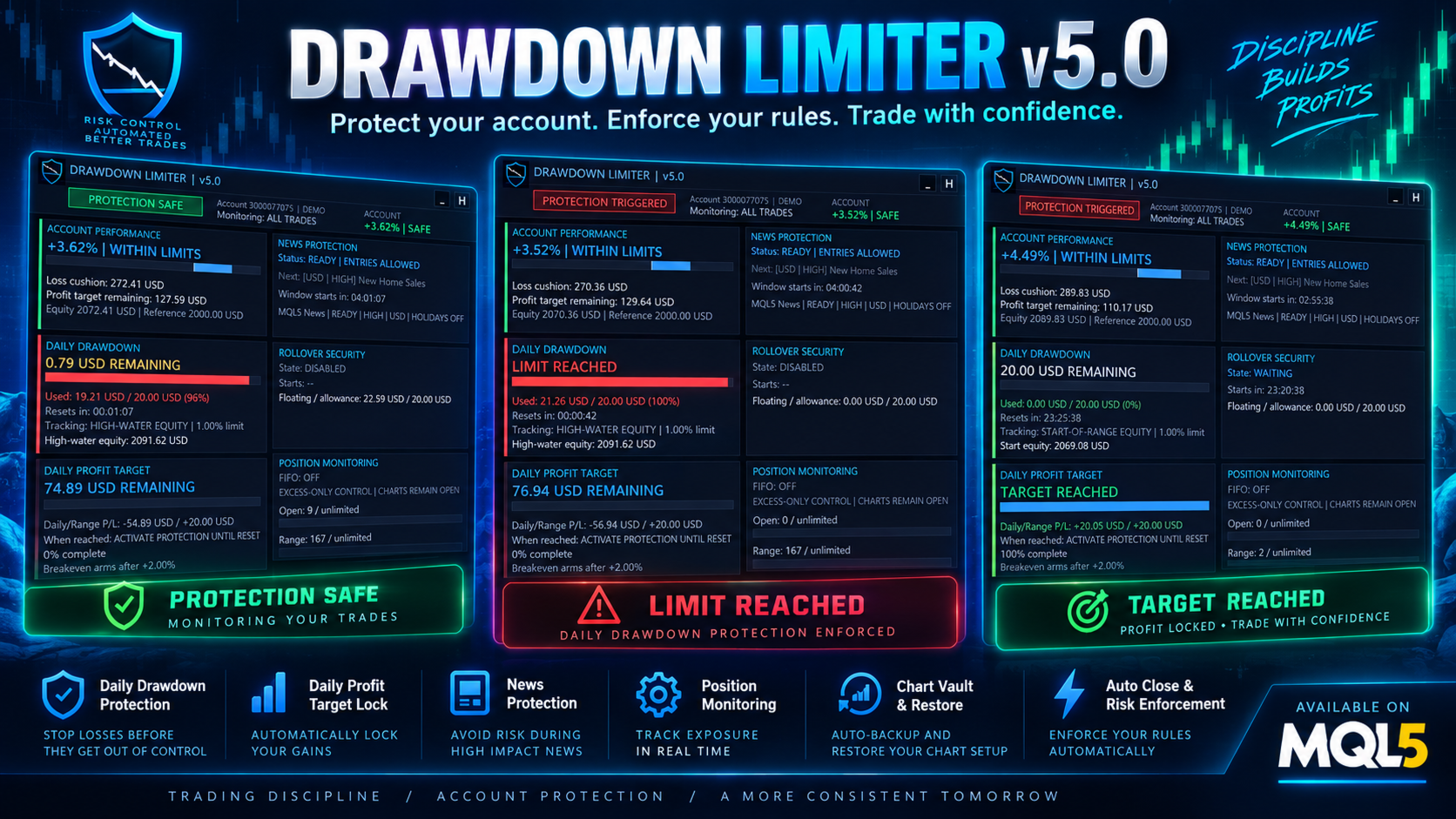
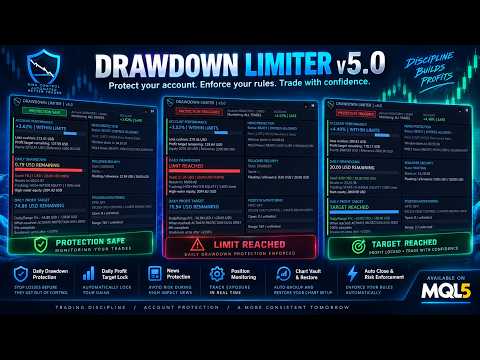
DrawDown Limiter v5.0 is a client-side account protection controller designed to supervise your trading account and automatically react when configured risk, profit, news, schedule, rollover, or position limits are reached.

It can monitor manual trades, automated strategies, multiple Expert Advisors, pending orders and floating positions from one dedicated chart. It can protect the complete account or be configured to supervise a specific EA or group of EAs using Magic Numbers.

The objective of DrawDown Limiter is not only to display your drawdown. Its purpose is to actively enforce your configured trading rules and keep enforcing them while a protection condition remains active.

DrawDown Limiter v5.0 is designed to supervise not only how much you are losing, but when your strategies are allowed to continue operating, what exposure may remain, when trading should stop, and when your automated environment can safely resume.

Need help or have questions? Check DrawDown Limiter User Guide

I am Lio, don't hesitate to reach out!  We are always available to respond, help, and improve.


One Unified Protection System

DrawDown Limiter v5.0 introduces a unified protection response. Depending on your configuration, when a protection condition is triggered the EA can:

  • Activate a shared entry-block signal for compatible Expert Advisors.
  • Isolate local strategy charts before closing trades.
  • Delete protected pending orders.
  • Close protected positions or preserve only pre-existing exposure.
  • Continue removing new exposure while protection remains active.
  • Quarantine newly opened strategy charts during protection.
  • Automatically restore captured charts when all protection conditions have safely cleared.

Closing strategy charts before positions is especially important when other EAs are running on the same terminal: it helps prevent a strategy from immediately recreating a position that DrawDown Limiter has just closed.

Protection Conditions

DrawDown Limiter v5.0 can activate protection for multiple independent reasons:

  • Maximum Daily Drawdown
  • Maximum Account Drawdown
  • Maximum Account Profit
  • Daily Profit Target
  • Breakeven Protection
  • Rollover Security
  • Scheduled Protection
  • Economic News Protection
  • Holiday and All-Day News Protection
  • Maximum Open Positions
  • Maximum Positions Opened During the Trading Range

Several protection causes can exist at the same time. The EA does not release protection simply because one condition has cleared. Full protection remains active until every active protection cause is legitimately cleared.

Daily Drawdown — Choose How Your Risk Is Actually Calculated

Different trading programs and account rules calculate daily drawdown differently. DrawDown Limiter v5.0 therefore separates the daily risk reference from the method used to measure the current loss.

Daily risk reference options:

  • Initial Deposit
  • Account Balance at the beginning of the range
  • Account Equity at the beginning of the range
  • Higher of Equity or Balance
  • Fixed Risk in Account Currency

Daily drawdown tracking methods:

  • Open And Closed Positions — combines negative closed P/L since reset with current floating P/L.
  • Start-Of-Range Equity — measures the decline from the equity captured when the current protection range started.
  • High-Water Equity — tracks the highest equity reached during the range and measures drawdown from that peak.

Swap and commission can also be included in the calculations when required.

This flexibility allows the limiter to be configured according to the actual drawdown formula you need rather than forcing every account to use the same calculation.

Flexible Daily Reset Cycle

A trading day does not necessarily reset at midnight on your computer or even at midnight on the broker server.

DrawDown Limiter can define the protection range using:

  • Daily Bar Open
  • Broker Server Time
  • A Configured Time Zone

Configured Time Zone mode supports a fixed standard UTC offset together with optional European or United States daylight-saving rules.

The selected range controls the reset of daily drawdown calculations, daily targets, breakeven state, schedules and range-position counters.

Chart Vault — Isolate, Protect and Restore Your Strategies

One of the major additions in DrawDown Limiter v5.0 is the Chart Vault.

When chart protection is enabled, DrawDown Limiter can capture eligible strategy charts before closing them. The captured information includes the symbol, timeframe, chart configuration and saved template information required to reopen the chart later.

During an active protection event the Chart Vault can:

  • Save eligible strategy charts.
  • Close those charts before protected positions are closed.
  • Keep the DrawDown Limiter controller running.
  • Quarantine newly opened strategy charts while protection remains active.
  • Track captured, closed, restored and failed charts.

With Close + Restore Charts, the saved charts can automatically reopen when all protection causes have cleared, the new range is valid and the system confirms that restoration is safe.

A Manual Reopen mode is also available when you prefer to decide when the captured charts should be restored.

Choose What Happens to Existing Positions

Protection does not always have to mean closing everything. v5.0 provides two main trade-response modes:

  • Close Protected Trades — repeatedly closes positions and removes pending orders within the configured scope while protection remains active.
  • Keep Pre-Existing Exposure — preserves exposure that existed when protection started while deleting pending orders and preventing additional exposure from being maintained.

This allows temporary restrictions such as news or schedules to protect against new exposure while still permitting an existing position to remain under management when your trading rules allow it.

Daily Profit Target

DrawDown Limiter is not limited to loss protection.

A Daily Profit Target can be defined as either:

  • A percentage of the daily reference, or
  • A fixed amount in account currency.

When the target is reached you can choose between:

  • Notify Only, or
  • Activate Protection Until Reset.

This can be used to enforce a daily trading objective and stop additional trading once the desired result for the current range has been reached.

Breakeven Protection

v5.0 also introduces Breakeven Protection.

You can configure a positive daily result at which breakeven protection becomes armed. If the trading result subsequently returns to breakeven, DrawDown Limiter activates the configured protection response.

For example, the system can arm after a profitable start to the day and protect the account if that accumulated result is later completely given back.

Maximum Account Profit Protection

A separate Maximum Account Profit level can be configured as an account-wide objective.

When the configured account profit level is reached, DrawDown Limiter activates the full protection response and prevents continued trading under that configuration.

This is independent from the Daily Profit Target and is intended for objectives that apply to the complete account rather than a single trading day.

News Protection

DrawDown Limiter v5.0 can automatically activate protection around selected economic events.

Depending on platform and configuration, supported news sources include the MQL5 Economic Calendar, Forex Factory and Investing.com.

News protection can be filtered using:

  • Selected currencies
  • Low, moderate and high impact events
  • Included event keywords
  • Excluded event keywords
  • Minutes before an event
  • Minutes after an event
  • Holiday protection
  • All-day protection

When a qualifying news restriction becomes active, it uses the same configurable trade and chart protection system as the other full protection conditions.

If news protection is enabled and the configured source cannot provide reliable data, DrawDown Limiter uses a fail-closed approach rather than assuming that it is safe to trade.

Scheduled Protection

DrawDown Limiter can automatically activate protection at a scheduled broker-server time.

The schedule can run:

  • Every day, or
  • On a selected weekday.

Once triggered, the selected protection response remains active until the next legitimate daily range begins.

This can be useful when your strategy should stop trading before a specific market period, rollover, weekend or other predefined time.

Rollover Security Zone

A profitable trading day can hide a large floating loss that becomes dangerous immediately after the daily reset.

The Rollover Security Zone specifically addresses this situation.

During the configured number of minutes before the next daily reset, DrawDown Limiter can enforce a maximum floating loss expressed as a percentage of the daily risk allowance.

If the floating loss reaches this rollover allowance, full protection is triggered before the account enters the next trading range.

Overtrading Protection — Without Closing Your Allowed Trades

DrawDown Limiter provides two independent position controls:

  • Maximum Simultaneously Open Positions
  • Maximum Positions Opened During the Current Range

Unlike a full drawdown protection event, position-count protection uses excess-only control.

Positions already inside the permitted allowance remain open and strategy charts remain available. Additional or excess exposure is removed while the valid positions can continue to be managed.

Pending orders that could exceed the allowed exposure can also be deleted.

New-Trade Risk Alerts

DrawDown Limiter can inspect newly detected positions and provide advisory alerts when:

  • A trade has no visible Stop Loss.
  • The estimated risk exceeds a configured percentage of balance.
  • The estimated risk exceeds a configured percentage of equity.
  • The estimated risk exceeds a configured fixed monetary value.

These checks are alerts. They do not modify the trade or automatically add a Stop Loss.

Protect the Whole Account or Individual Strategies

DrawDown Limiter supports three monitoring scopes:

  • All Trades
  • One EA Magic Number
  • Multiple EA Magic Numbers

This makes it possible to create a layered portfolio-protection structure.

For example, one master DrawDown Limiter can protect the complete account while additional instances supervise smaller risk budgets assigned to individual Expert Advisors or groups of strategies.

The account master continues to control the complete portfolio even when individual strategy limits are configured separately.

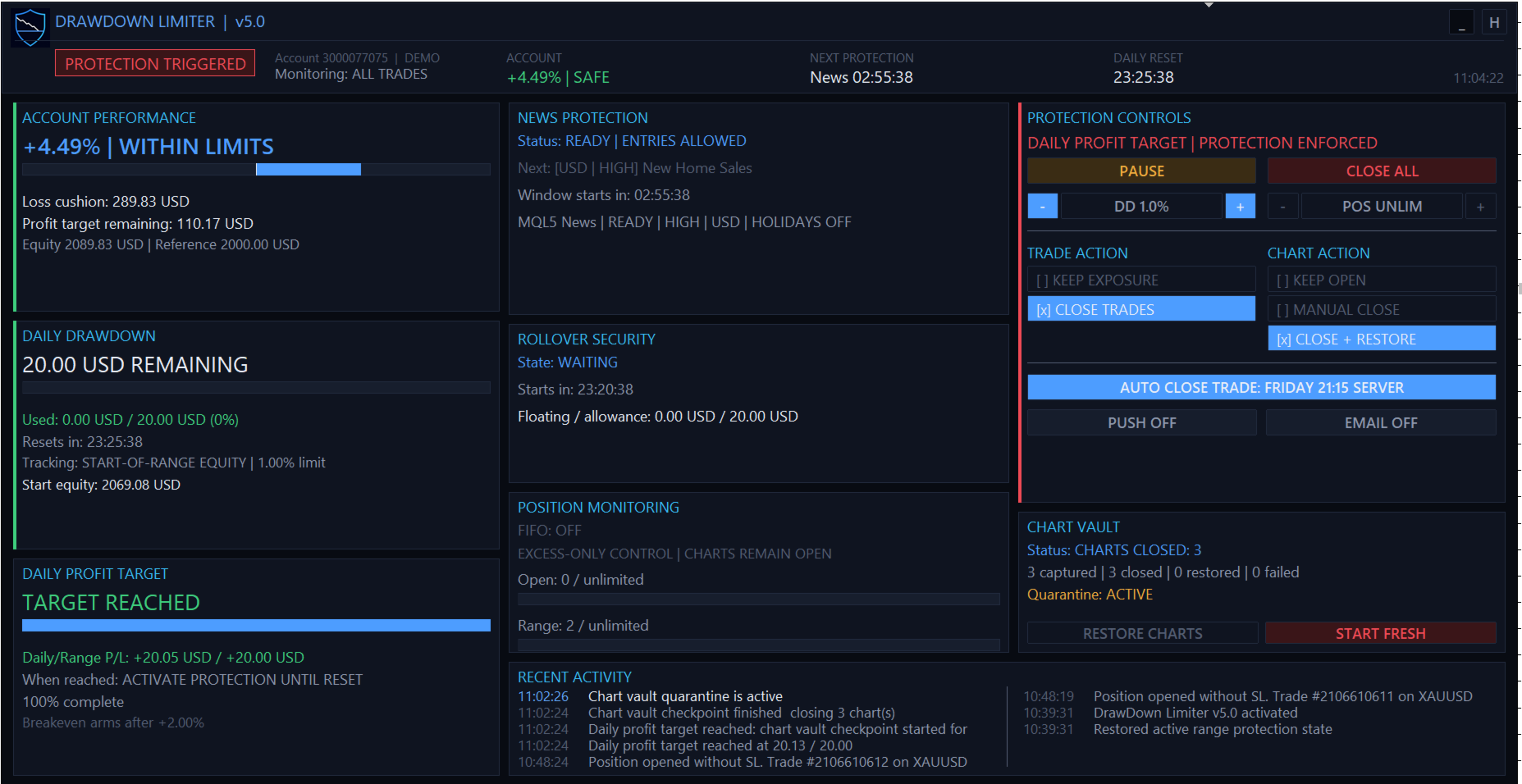
Advanced Protection Dashboard

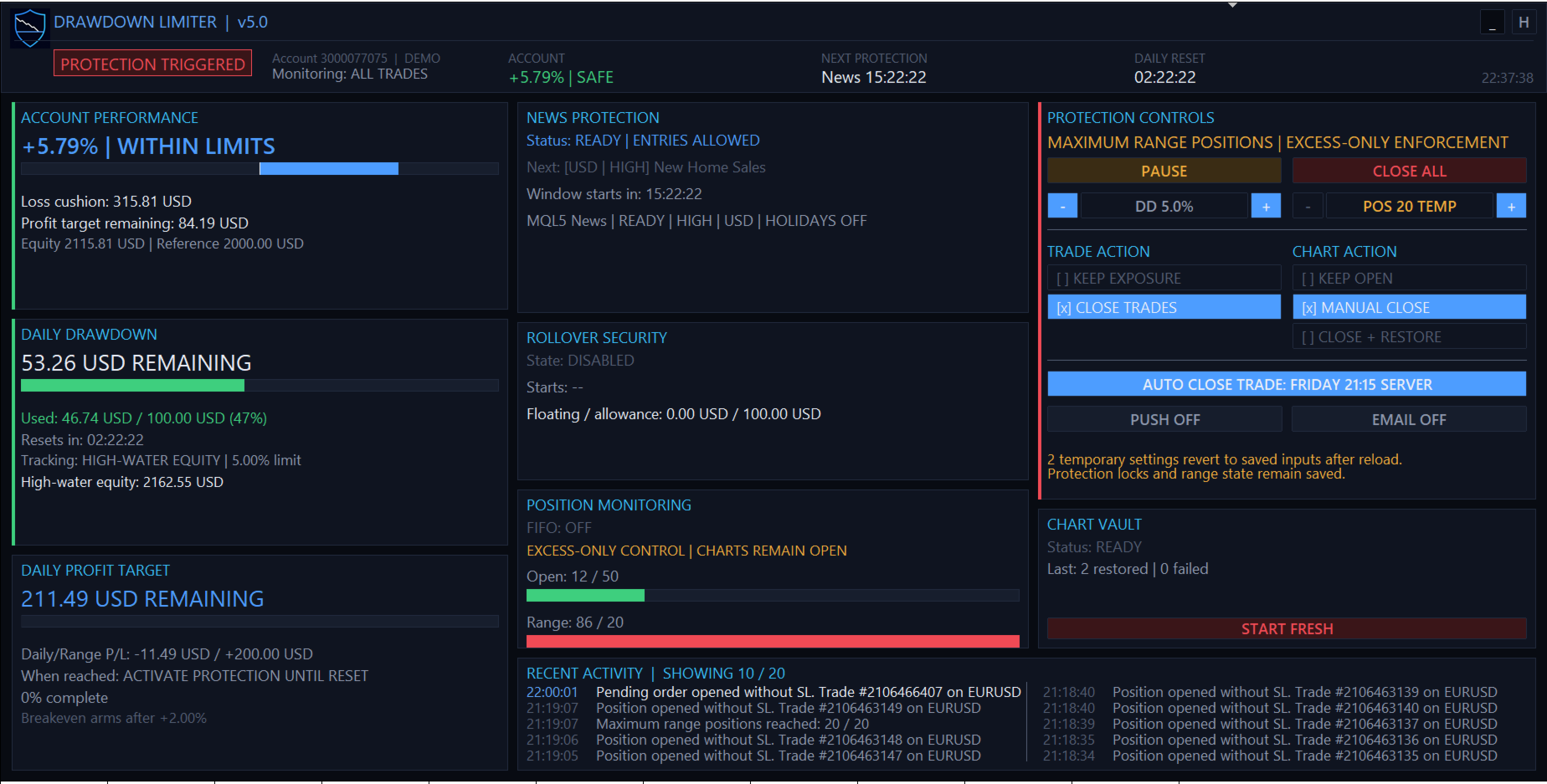
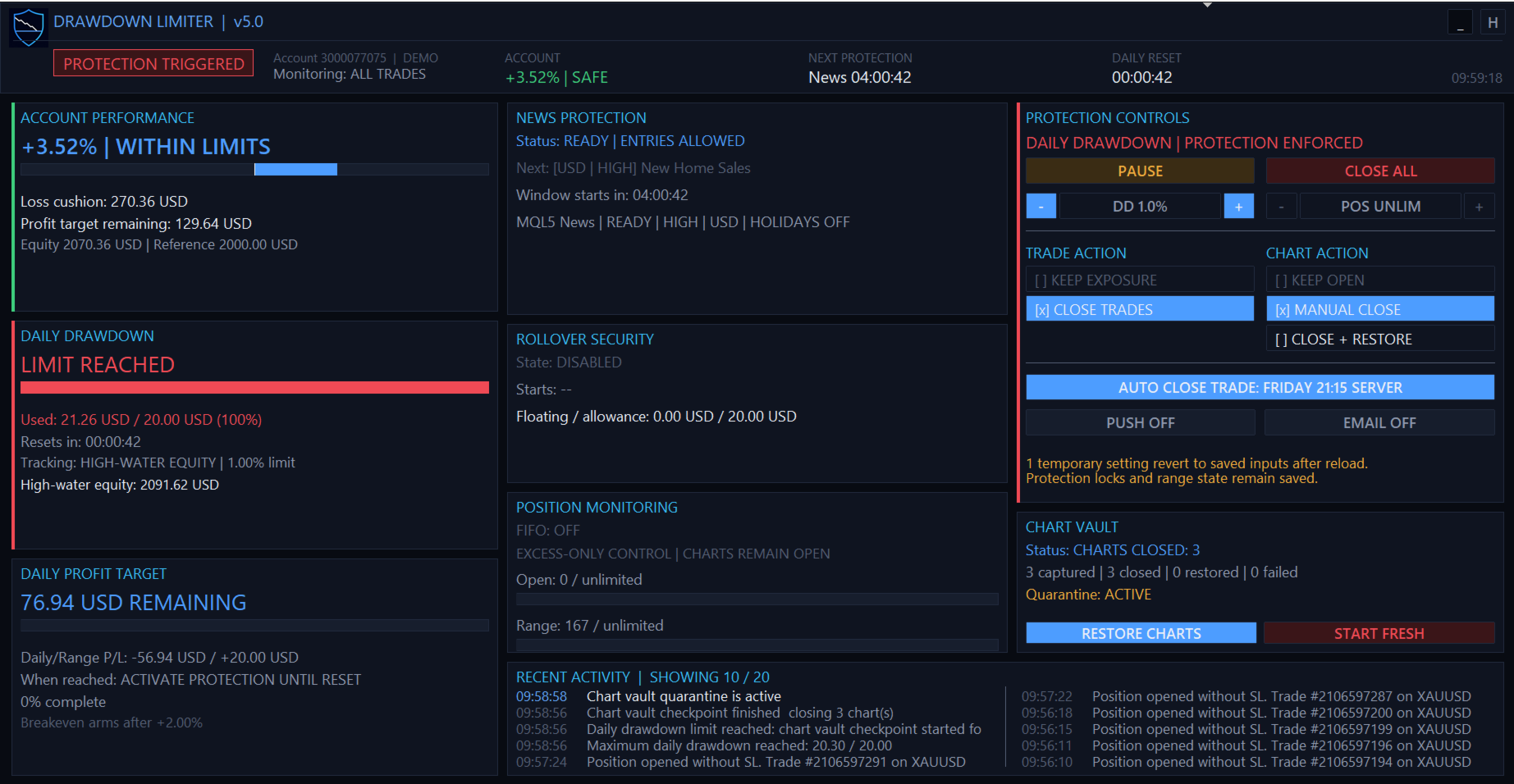
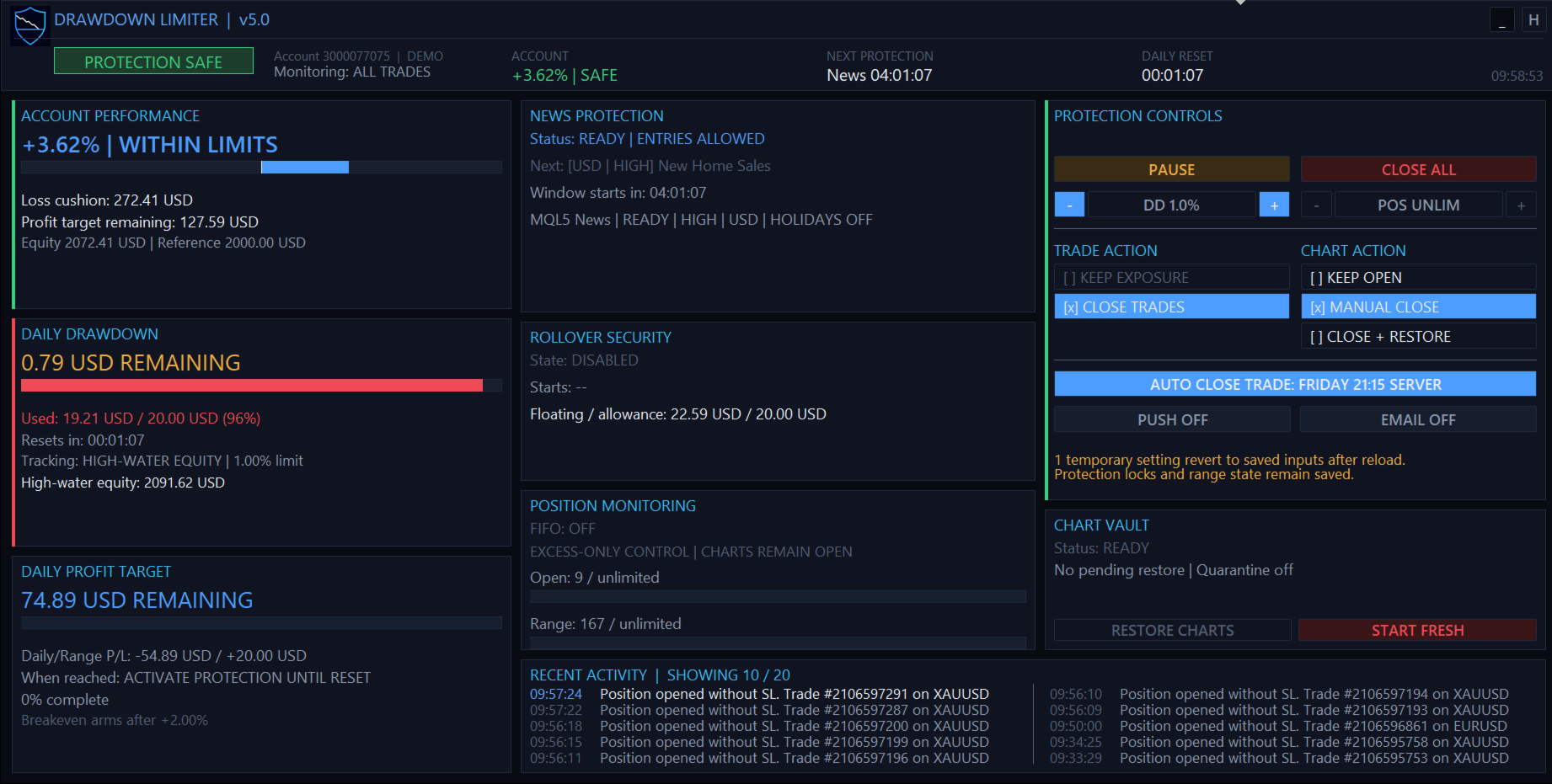
v5.0 introduces a responsive protection dashboard designed to display the account state and active protection system rather than simply showing isolated indicators.

The dashboard provides information including:

  • Current protection status
  • Account performance
  • Account loss cushion
  • Daily drawdown used and remaining
  • Daily and account profit progress
  • Next protection event
  • Daily reset countdown
  • News protection status
  • Rollover security status
  • Open and range-position limits
  • Selected trade and chart actions
  • Chart Vault status
  • Recent protection activity

The dashboard automatically adapts between wide, standard, dense and minimal layouts according to the available chart size.

Direct Controls From the Dashboard

The protection dashboard also provides operational controls, including:

  • PAUSE for eligible temporary protections and advisory checks.
  • CLOSE ALL for an emergency one-time close of managed exposure.
  • Temporary adjustment of the daily drawdown percentage.
  • Temporary adjustment of the maximum range-position limit.
  • Trade-action selection.
  • Chart-action selection.
  • Push and email notification toggles.
  • Scheduled auto-protection control.
  • Manual chart restoration where applicable.

Temporary dashboard changes do not silently overwrite your saved EA inputs. Reloading the EA returns temporary settings to the configured input values while persistent protection state remains protected.

Persistent Protection State

A protection event is not cancelled simply by removing and reattaching the EA or restarting MetaTrader.

DrawDown Limiter persists important protection and range state so that an active restriction cannot normally be bypassed by restarting the EA.

If persistence or range-transition information becomes invalid, the system is designed to fail closed and retain protection until a valid state can be recovered.

A guarded Start Fresh procedure is available when you intentionally need to discard an old limiter state and initialize a completely new protection range.

Developer Integration

DrawDown Limiter can publish a shared MetaTrader Global Variable that compatible Expert Advisors can check before attempting a new entry.

Developers can integrate this entry-block contract directly into their own EAs so their strategies cooperate with DrawDown Limiter instead of waiting for a newly opened trade to be detected and removed.

FIFO Support

For accounts requiring FIFO handling, DrawDown Limiter provides configurable FIFO closing modes, including support for partial-close handling where applicable.

Notifications

Protection events can be reported using:

  • Panel and terminal logging
  • MetaTrader push notifications
  • Email notifications
  • Push and email together

Designed for Funded Accounts and Personal Risk Management

DrawDown Limiter can be configured for strict funded-account rules as well as personal trading-account discipline.

The included protection model can accommodate different:

  • Daily loss formulas
  • Overall account loss limits
  • Profit objectives
  • Daily reset time zones
  • News restrictions
  • Position limits
  • Rollover requirements
  • EA-specific risk budgets

Preset configurations can therefore be built for different trading programs while retaining a safety margin between the limiter's trigger and the external account limit.

Important — Understand the Protection Model

DrawDown Limiter is a client-side MetaTrader controller.

It observes the state visible to the terminal and then applies the configured protection response. It cannot force a broker to reject an order before the broker accepts it.

Trades submitted from a mobile application, web terminal, API, signal service, copier, another MetaTrader terminal or another external system cannot be controlled before they become visible to the terminal running DrawDown Limiter.

The EA also cannot act while the MetaTrader terminal is closed, disconnected, frozen or unable to trade.

For this reason, configure an appropriate safety buffer between your DrawDown Limiter thresholds and any hard external limit. Execution latency, spread, slippage, commission, swap and fast market movements can affect the final closing result.

Recommended Setup

For maximum local account protection:

  1. Run DrawDown Limiter on one dedicated chart.
  2. Use All Trades scope for account-wide protection.
  3. Configure the daily reset and drawdown calculation to match your actual account rules.
  4. Use Close Protected Trades when exposure must be removed.
  5. Use Close + Restore Charts when local automated strategies should be isolated during protection.
  6. Configure a safety margin below any external maximum loss threshold.
  7. Test the complete protection and restoration workflow on a demo account before live use.
Reviews 24
Andrii Holub
155
Andrii Holub 2026.09.20 02:04 
 

I've been running v5.0 on a prop account. The name makes it sound like a simple drawdown counter — it isn't. Nothing else in this class on MQL5 comes close. Your firm's formula, not a generic one. Every prop firm calculates daily loss differently: from the initial deposit, from the balance at the start of the day, from the intraday equity high. Here the reference base and the measurement method are separate inputs, so you can reproduce your own rules exactly. The documentation includes ready-made presets for several firms. Your EA can't reopen what was just closed. The sequence is thought through: pending orders are deleted first, then the strategy chart is closed along with the EA, and only then the positions. Charts come back automatically once protection clears — after a short news window, right when it ends. No DLL — works on MQL5 VPS. DLL imports are not allowed on MQL5 VPS, so tools that kill algo trading through external libraries are useless there. This one works through the platform itself. No separate Windows VPS needed. The midnight zone. You close the day in profit, but one position is sitting in the red. At the reset your profit resets to zero and that floating loss eats straight into the new day's limit — a breach at 00:01 after a clean day. The tool closes such a position before that happens. News. The window before and after an event is configurable; I run three minutes on each side. Filters by currency, impact level and keywords. If the calendar feed is unavailable, entries are blocked rather than assumed safe. A restart won't bypass it. Triggered protection survives detaching the EA and restarting the terminal. Exactly what you want during an evaluation. Buffers instead of exact numbers. The presets trigger slightly before the published limits: by the time the terminal sees the loss and sends the close, you've added latency, spread and slippage. That buffer is the difference between "almost made it" and an account that's still alive. The documentation covers every input and the common failure cases, and the author is responsive and genuinely improves the product based on user feedback. A versatile tool for beginners and experienced traders alike — from strict prop rules to plain discipline on your own account. Set it up once and you won't want to trade without it. Buy it, you won't regret it.⭐⭐⭐⭐⭐

paulchan901
25
paulchan901 2026.08.07 20:04 
 

It's really a great tool! It helps risk management a lot. I can sleep well now and no need to worry about the drawdown.

Matthew Phillip Clarke
329
Matthew Phillip Clarke 2025.03.25 20:35 
 

Fantastic tool, now I get to enjoy the strict risk management enforced by a firm from my own home.

Recommended products
Smart Grid Multi Symbol EA
Thanat Thitithammaphong
Smart Grid Multi-Symbol EA Fully Automated Trading with Dynamic Lot Scaling & Risk Control Overview Smart Grid Multi-Symbol EA is a powerful automated trading system designed to trade multiple currency pairs and gold simultaneously using a dynamic grid strategy with intelligent lot scaling . Built for traders who want: Consistent execution Hands-free trading Flexible risk control Portfolio diversification ️ Core Strategy This EA uses a Grid + Position Scaling system : Opens positions base
By :ForextraderEanow   Green Mower 10.0                                                                                                                                                                                                                                                                                                        This EA is Famous Grid Strategy that open grid of trades with the same size (not martingale)  and make PROFIT even when the Forex price moves in the WRONG Direction
Neopips Engine EA
Md Billal Hossain
NeoPips Engine EA – The Ultimate Trading Revolution Has Arrived! “The real power of trading lies in seeing what others miss. NeoPips Engine doesn’t follow the market — it masters it.” About NeoPips Engine EA: Your Intelligent Trading Ally NeoPips Engine EA is not your average trading robot. It’s a multi-dimensional, AI-optimized expert advisor crafted for traders who demand precision, adaptability, and long-term performance. Unlike outdated bots with rigid rules, NeoPips Engine is a livin
Bober Real MT5
Arnold Bobrinskii
4.88 (16)
Bober Real MT5 is a fully automatic Forex trading Expert Advisor. This robot was made in 2014 year and did a lot of profitbale trades during this period. So far over 7000% growth on my personal account. There was many updates but 2019 update is the best one. The robot can run on any instrument, but the results are better with EURGBP, GBPUSD, on the M5 timeframe. Robot doesn't show good results in tester or live account if you run incorrect sets. Set files for Live accounts availible only for cu
Aurum Intraday EA
Rodrigo Leonardo Favreau Giuliodoro
Aurum Intraday EA – Advanced Gold Trading Algorithm The Aurum Intraday EA is a powerful automated trading system designed specifically for Gold (XAUUSD) traders who want to capture strong intraday movements while maintaining full control over risk and strategy configuration. Built with a robust algorithm and optimized for H1 and H4 timeframes (H4 recommended) , this Expert Advisor is capable of identifying high-probability opportunities in the gold market and executing trades with precision and
Wulf BTC Bot
Riaan Adriaan Swanepoel
Wulf BTC Bot is a high-precision automated algorithmic trading system engineered for Bitcoin (BTC) on the H1 timeframe. It leverages a robust entry logic combining cyclical momentum and trend exhaustion via the Schaff Trend Cycle (STC) , dynamic breakout boundaries ( Lowest/Highest Price channels), and volatility-adaptive exits powered by ATR . The Expert Advisor is 100% Standalone , packing all custom indicators and math engines directly inside the .ex5 binary, requiring zero external dependenc
如果产品有任何问题或者您需要在此产品上添加功能,请联系我 Contact/message me if you encounter any issue using the product or need extra feature to add on the base version. There is Demo version of this panel Dashboard Super Three MA MT5 Demo in my product list, please try it out to get familiar with all functionalities for free Free version: LINK MT4 version: LINK This system basically utilizes PA and three adjustable Moving Average as the main indicator set to generate trading signal. With the feature that all MA_timefram
| Fully-automated Smart Money Concept (ICT) inspired trading solution with multi-strategy capabilities | Built by a grid trader >> for grid traders.  This is MT5 version, click  here  for  Blue CARA MT4  (settings and logics are same in both versions)     Real monitoring signal  -->  Cara Gold Intro Blue CARA EA   ('CARA') - short for  C omprehensive  A lgorithmic   R esponsive   A dvisor is a next-gen  multi-currency    multi-timeframe  EA base on the widely known (and perhaps the most popul
Aureus Edge Gold Trader
Craig Joshua Binnekamp
️ Aureus Edge Gold Trader (v2.10) The Specialist Engine for XAUUSD Aureus Edge is not a "jack-of-all-trades" bot. It is a high-precision Expert Advisor engineered strictly for Gold (XAUUSD) . While it includes stability protocols to pass global market validation, every line of logic is optimized for the unique volatility and liquidity of the Gold market . ️ Built for Professional Capital Preservation Unlike popular EAs that use dangerous recovery grids, Aureus Edge focuses on disciplined br
CRT Master EA MT5
Javier Sobrino Vega
CRT Master EA is an automated trading system based on Candle Range Theory (CRT) and market structure concepts (Accumulation, Manipulation, and Distribution). The Expert Advisor identifies liquidity sweeps where price temporarily manipulates outside a defined accumulation range before returning inside. It automatically executes trades based on structural confirmation, managing position sizing, stops, targets, and trailing rules. A manual indicator version of this logic is available as the CRT Mas
Titan Sovereign
Abdul Qadir Memon
Note: Titan Sovereign is designed for Gold and performs best on Gold symbols such as XAUUSD. Titan Sovereign is a premium automated trading Expert Advisor built around a clean multi-timeframe strategy. It waits for strong market alignment before entering a trade, then manages risk with a predefined stop loss, take profit, and structured exit rules. This EA is built for traders who prefer disciplined automation instead of high-risk recovery systems. Key Advantages Best suited for Gold trading. N
如果产品有任何问题或者您需要在此产品上添加功能,请联系我 Contact/message me if you encounter any issue using the product or need extra feature to add on the base version. There is Demo version of this panel Dashboard Super MA RSI CCI Demo in my product list, please try it out to get familiar with all functionalities for free, LINK . Dashboard Super MA RSI CCI is an intuitive and handy graphic tool to help you to: Have 28 pairs under control with one dashboard Monitor price movement, identify possible trend based on MA, RS
Magic Grid MT5
Aliaksandr Charkes
4.14 (7)
Magic Grid MT5 is a non-indicator Expert Advisor using a grid strategy (on a hedging account). The strategy is based on automatic reopening of grid pending orders, after closing their market positions (by Take-Profit, Stop-Loss or manually). Pending orders are placed with a specified step from the initial prices, which can be entered manually or generated automatically (once at the beginning of the trade).   The robot can trade on any timeframe, on any currency pair, on several currency pairs,
Bitcoin Phantom EA
Vhutshilo Evidence Masithembi
Bitcoin Phantom EA – Key Features & Information Strategy: Martingale-based trading system Optimized Timeframe: Works best on the 2-hour (H2) chart Primary Asset: Designed for Bitcoin (BTC/USD) trading Trade Logic: Uses grid-style entries to average positions during market moves Customization: Adjustable lot sizes, multipliers, grid steps, and trade limits Platform: Compatible with MetaTrader Testing Recommended: Backtest and forward-test on demo accounts before live use Risk Warning: Uses a Mart
Gold Trends EA
Gaurav Chouhan
GOLD TRENDS EA Smart Trend Following with Adaptive Risk & Performance Scaling Overview Gold Trends EA   is a fully automated, non‑grid, non‑martingale Expert Advisor that identifies high‑probability trend entries using a proprietary multi‑filter approach. Unlike many EAs that rely on risky averaging strategies, this EA focuses on   clean trend entries   with built‑in   dynamic risk management   and a   unique performance‑based lot scaling   system that adapts to your account growth. Designed f
True Range Pro MT5
Smart Forex Lab.
5 (10)
Accurate Night Scalping & Smart Grid System The True Range Pro EA is a fully automated expert advisor that trades at night and exploits price reversion. The EA trades using limit orders with stop loss and take profit. This EA works best on EURUSD. The True Range Pro is designed to work on the MetaTrader 4/5 platform. It is easy to install and comes with detailed instructions on how to set it up. The EA is optimized for use on the M5 timeframe and can be used on any broker that offers the MetaT
SolarTrade Suite Financial Robot: LaunchPad Market Expert - designed to open trades! This is a trading robot that uses special innovative and advanced algorithms to calculate its values, Your Assistant in the World of Financial Markets. Use our set of indicators from the SolarTrade Suite series to better choose the moment to launch this robot. Check out our other products from the SolarTrade Suite series at the bottom of the description. Do you want to confidently navigate the world of inves
SL Limiter Pro
Carlito Manaloto Jr
Experience a new level of precision and control with the SL Limiter Pro , an enhanced version of the SL Limiter, now available on MetaTrader 5. Built for serious traders, SL Limiter Pro offers sophisticated features that allow you to manage your trades more effectively and with greater flexibility. Take your trading strategy to the next level with this powerful risk management tool! Whether manual trading, EA trading, or using Trade Signals, SL Limiter Pro will help you minimize your risk! Anoth
Hedging Locking MT5
Agus Santoso
5 (2)
MT4 Version : https://www.mql5.com/en/market/product/99489 MT5 Version : https://www.mql5.com/en/market/product/99490 Hedging Locking — Multi-Symbol Hedging Grid EA Hedging Locking is an automated trading system for MetaTrader 4/5 designed around a hedged entry + adaptive locking/grid management concept. The EA starts a cycle by opening BUY and SELL simultaneously on selected symbols, then manages the exposure using a dynamic step distance. This approach is built to work best in ranging / osc
Mango Scalper
Mahmoud M A Alkhatib
Mango Scalper  is a fully automated scalping robot that uses a very Good and Smart breakout strategy, advanced money management and probabilistic analysis. Most effective in the price consolidation stages that occupy the bulk of the market time. Proven itself on real accounts with an excellent risk-to-reward ratio. Does not need forced optimization, which is the main factor of its reliability and guarantee of stable profit in the future. S uitable for both beginners and experienced traders.  
Phoenix Plus
Dang Cong Duong
At first, I got my teeth into  Phoenix  Ultra   Expert Advisor. This   Expert Advisor  will support automatic close order if the direction is correct and perform recovery if the direction is wrong. If you enter an order: 1. The price goes in the right direction and hits the   Min Profit Point ,   trailing stop 20% of the current profit. 2. The price goes in the opposite direction, the Expert Advisor will place the order with the volume is   Recovery Volume Percent  at the input, the distance to
RSI Grid MT5
Joseph Anthony Aya-ay Yutig
GET OTHER EAs FOR FREE!!!  GET OTHER EAs FOR FREE!!!  GET OTHER EAs FOR FREE!!!  GET OTHER EAs FOR FREE!!!  GET OTHER EAs FOR FREE!!!  RSI Grid is based on the RSI overbought and oversold conditions and opens a grid when the trade is on the losing side of the market. The RSI provides technical traders with signals about bullish and bearish price momentum, and it is often plotted beneath the graph of an asset’s price. An asset is usually considered overbought when the RSI is above 70% and overso
The basis of the strategy is the identification of quick corrective movements between the crosses of a working currency pair or metal. At the moment of differences in prices of trading instruments, the adviser analyzes the possible direction of price movement on a working instrument and starts work. Each position has a stop loss and take profit. A unique position tracking algorithm allows you to control the superiority of profit over loss. The adviser does not use dangerous trading methods.
Max ScalperSpeed MT5   is a fully automated expert advisor. This system has been developed to improve the efficiency of generating more returns. Rely on scalping trading strategies and recovery strategies with appropriate trading frequencies, and also able to work well in all market conditions, whether trend or sideways, able to trade full time in all conditions. Enable or disable news filtering according to user needs. Added a proportional lot size adjustment function, where users can choose t
MT5 To Telegram Copier
Levi Dane Benjamin
2.67 (3)
Send fully customisable trade signals from MetaTrader 5 to Telegram and run your own signal channel. Configure what gets sent, how it looks, and which trades are included using an easy on-chart interface. Made for signal providers : keep messages consistent, branded, and informative without manual posting. User Guide + Demo | MT4 Version | Discord Version Main features Highly customisable signal format with many configuration options Add your own text before/after each signal (tags, links, chan
Title suggestion: LG Equity Protector Pro Product category: Utilities Short description: MetaTrader 5 equity protection utility with daily, weekly, monthly and floating profit/loss limits, automatic position closing, pending order deletion, Magic Number filtering and on-chart status panel. LG Equity Protector Pro Overview LG Equity Protector Pro is a MetaTrader 5 risk management utility designed to help traders protect account equity using predefined daily, weekly, monthly and floating pro
Galaxy Elegance
Gezani Paulus Nkuna
G.X.L (GALAXY ELEGANCE) Product Overview G.X.L is an automated trading robot for MetaTrader 5 that operates based on price action analysis. The system processes real-time market data to identify trading opportunities. It provides information and recommendations aligned with user-defined trading preferences. Core Functionality The robot analyzes price movements without relying on traditional lagging indicators. It focuses on current market structure, including swing points and fractals, to determ
Kiwi Gold Wave MT5
- Nguyen Ngoc Diep
Kiwi Gold Wave MT5 Kiwi Gold Wave MT5 is an automated Expert Advisor developed primarily for XAUUSD trading on MetaTrader 5. The EA combines Parabolic SAR direction analysis, two-bar breakout confirmation and controlled pending-order execution. It contains three independently configurable strategies, each using its own magic number, position management and drawdown control. Recommended setup Platform: MetaTrader 5 Primary instrument: XAUUSD / Gold Installation: Attach one EA instance to one cha
GapRider EA - Dynamic Buy-Side Gap Trading Expert Advisor Overview GapRider EA is a sophisticated, adaptive Expert Advisor (EA) designed for MetaTrader 5, specializing in buy-side gap trading. This EA identifies significant market gaps and places strategic buy orders, leveraging dynamic sizing based on market volatility to optimize trade entries and exits. With a robust set of features, GapRider offers traders a powerful tool to capitalize on price retracements following large market movements
Buyers of this product also purchase
Trade Assistant MT5
Evgeniy Kravchenko
4.43 (216)
It helps to calculate the risk per trade, the easy installation of a new order, order management with partial closing functions, trailing stop of 7 types and other useful functions. Additional materials and instructions Installation instructions - Application instructions - Trial version of the application for a demo account Line function -   shows on the chart the Opening line, Stop Loss, Take Profit. With this function it is easy to set a new order and see its additional characteristics bef
Forex Trade Manager MT5
InvestSoft
4.98 (684)
Trade Manager MT5 is an advanced position size calculator and trade management tool for MetaTrader 5, designed to help traders plan trades faster, control risk more precisely, and manage open positions directly from the chart. It combines order placement, risk based lot calculation, Stop Loss and Take Profit management, Break Even, Trailing Stop, Partial Close, Equity Protection, and external trade management in one panel. Whether you trade forex, indices, metals, commodities, crypto, or future
================================================================================ POC BREAKOUT - V20.72. Full Professional Grade Toolkit ================================================================================ POC Breakout is a full MetaTrader 5 trading dashboard for discretionary traders who want breakout signals, Point of Control (POC) context, volume profiles, order flow, market structure, news, alerts, and advanced trade planning in one professional workspace. Attached directly to you
Telegram to MT5 MultiChannel Copier
Sergio Marquez Uroz
4.59 (17)
Telegram to MT5 Multi-Channel Copier   automatically copies trading signals from your Telegram channels straight to MetaTrader 5. No bots, no browser extensions, no manual copying. A signal arrives in Telegram and the EA opens the trade in your terminal within seconds. And before you copy a channel, the built-in backtester shows you what that channel would have done in your account. The product has two components: a Windows application that listens to your Telegram channels, and this Expert Advi
TradePanel MT5
Alfiya Fazylova
4.88 (170)
Trade Panel is a multi-functional trading assistant. The app contains over 50 trading functions for manual trading and allows you to automate most trading tasks. Application instructions: https://www.mql5.com/en/blogs/post/756482 Trial version of the application for a demo account: https://www.mql5.com/en/blogs/post/750865 How to install the application: https://www.mql5.com/en/blogs/post/756239 How to test the application in visual mode: https://www.mql5.com/en/blogs/post/770277 How to install
Copy Telegram signals with your own trading rules Telegram to MT5 Signal Trader automatically copies text-based trading signals from public and private Telegram channels and groups into MetaTrader 5. Manage multiple providers and MT5 accounts from one desktop app, with individual risk and trade settings for each provider . No Telegram bot or API setup needed for copying. Simply sign in with your own Telegram account by phone or QR code and select the channels or groups you have already joined. Y
FarmedHedge Pair Trading Dashboard
Tanapisit Tepawarapruek
5 (5)
Farmed Hedge Yield Farming | All Markets (Manual - Hybrid - Semi/Automated EA) VERIFIED TRADING RESULTS - Farmed Hedge Yield Axi Copy:  https://www.mql5.com/en/signals/2356376 - Farmed Hedge Yield Exn Copy:   https://www.mql5.com/en/signals/2356404 - Farmed Hedge Yield V Copy:  https://www.mql5.com/en/signals/2357156 IMPORTANT NOTICE: FarmedHedge is a MANUAL-FOCUSED TRADING UTILITY ,not a fully automated EA. Results shown on this Signal include manual trades and overall strategic management.
Exp COPYLOT CLIENT for MT5
Vladislav Andruschenko
3.97 (35)
Professional Trade Copier for MetaTrader 5 Fast, professional, and reliable trade copier for MetaTrader . COPYLOT allows you to copy Forex trades between MT4 and MT5 terminals with support for Hedge and Netting accounts. COPYLOT MT5 version supports: - MT5 Hedge to MT5 Hedge - MT5 Hedge to MT5 Netting - MT5 Netting to MT5 Hedge - MT5 Netting to MT5 Netting - MT4 to MT5 Hedge - MT4 to MT5 Netting MT4 version Full Description +DEMO +PDF How To Buy How To Install How to get Log Files H
Power Candles Strategy Scanner - Self-Optimizing Multi-Symbol Setup Finder Self-optimizing settings work one chart at a time, and finding where they pay off right now means opening chart after chart. Power Candles Strategy Scanner runs the same self-optimizing engine as the Power Candles indicator on every symbol in your Market Watch, side by side. One panel ranks where it pays off: the winning strategy per symbol, its optimized Stop Loss and Take Profit. An alert fires the moment a fresh signal
Signal Trading View to MT5 Pro
Mirel Daniel Gheonu
4.5 (2)
Signal TradingView to MT5 Pro  Instant professional execution between TradingView and MetaTrader 5 Automate your trading strategy with the most robust communication bridge between TradingView alerts and real execution in MT5. Designed for traders who demand speed, flexibility, and impeccable risk management, this Expert Advisor transforms any alert message into a precise market or limit order.   Install and TEST the TRIAL version HERE STRENGTHS AND ADVANTAGES Universal Parsing Engine (Propriet
MT5 to Telegram Signal Provider turns your trading account into a signal provider. Every trade action, whether manual, by EA or from your phone, is instantly sent as a message to Telegram. You can fully customize the format or use a ready-made template for quick setup. [ Demo ] [ Manual ] [ MT4 Version ] [ Discord Version ]     New: [ Telegram To MT5 ] Setup A step by step user guide is available. Key Features Ability to customize order details sent to subscribers You can create a tiered subs
Premium Trade Manager - The Trade Panel With a Coach Built In Premium Trade Manager puts a trading coach inside your chart, with a full execution engine underneath it. Set the trade up the way you always do, then let Max, your AI trading coach, read that exact setup against your live account and give you a straight verdict before you commit: is the stop disciplined, is the risk sane, is a high-impact release minutes away, are you near a prop-firm limit. Below sits the engine that runs everything
EA Overfitter
Stephen J Martret
5 (1)
That backtest looks great. But will it still be making money tomorrow, next week, next month? EA Overfitter re-runs your EA on 100 price histories it has never seen. One score tells you if the edge is real. A backtest tells you what an EA did on one price history — the one that happened to occur. What you cannot tell from it is how much of that result was the strategy and how much was the particular path. EA Overfitter answers that. It builds up to 100 synthetic price histories your EA has n
Footprint Chart Pro — Professional OrderFlow EA for MetaTrader 5 Version 6.34 | Professional tool for real traders | Institutional-Grade Visualization DEMO USERS - PLEASE SELECT EVERY TICK / REAL TICK WHEN TESTING AND YOU HAVE DOWNLOADED HISTORICAL DATA. IF YOU SEE A WAITING SCREEN AND IT IS NOT DOWNLOADING, IT MEANS YOU HAVE LOW HISTORICAL DATA. TRY 1 MIN AND 5 MIN FIRST ON 1 DAY DATA. ONE DAY DATA SHOULD BE THE NEWEST AND MOST CURRENT DATE. PLEASE WAIT UNTIL THE MARKET HAS ROLLED OVER PERIOD.
EA Slipstream
Stephen J Martret
5 (1)
Your backtest filled every order at the price it asked for. Your account does not. EA Slipstream measures what execution costs your EA, using your own fills, slippages and spreads to show you the true performance of your EA. A backtest prices every trade at the level the EA named. In live trading a pending order fills at whatever price is available when it triggers, a stop closes wherever the market is when it is hit, and the spread at that moment is whatever the account was quoting. The differ
Trade Manager DaneTrades
Levi Dane Benjamin
4.23 (30)
DaneTrades Trade Manager is a professional trade panel for MetaTrader 5, designed for fast, accurate execution with built‑in risk control. Place market or pending orders directly from the chart while the panel automatically calculates position size from your chosen risk, helping you stay consistent and avoid emotional decision‑making. The Trade Manager is built for manual traders who want structure: clear risk/reward planning, automation for repeatable management, and safeguards that help reduc
Dynamic Fibonacci Grid
Tsvetan Tsvetanov
5 (1)
Introducing the latest version of the Dynamic Fibonacci Grid Dashboard for MT5. Now packed with many new features, this new dashboard transforms your trading experience and allows you to see the market and the price action from a completely different perspective. Discover new possibilities with simultaneous analysis of multiple timeframes covering multiple symbols. User-friendly interface for manual trading and management of positions and an expanded ability to apply predefined automated strate
Trade Indicator Assistant   is a powerful MT5 utility designed to turn indicators into automated trading systems. Its main feature is the ability to automatically detect an indicator’s   BUY and SELL signal buffers , without requiring you to know the buffer numbers, search through indicator settings, or modify the indicator source code. Bonus Indicator:   After purchasing Trade Indicator Assistant, contact me to receive   Trade Signal Pro   completely free as a bonus indicator. [Download Demo V
Welcome to ENTRY IN THE ZONE AND SMC MULTI TIMEFRAME Entry In The Zone and SMC Multi Timeframe is a real-time market analysis tool based on Smart Money Concepts (SMC), designed to analyze market structure, price direction, and key trading zones. It supports both Single-Timeframe Analysis and Multi-Timeframe Analysis, providing a clearer view of the overall market structure across multiple timeframes, with real-time BUY / SELL signals that do not repaint. It is designed to help filter trading opp
Grid Manual MT5
Alfiya Fazylova
4.73 (22)
Grid Manual is a trading panel for working with grid strategies. The utility is universal, has flexible settings and an intuitive interface. It works with a grid of orders not only in the direction of averaging losses, but also in the direction of increasing profits. The trader does not need to create and maintain a grid of orders, the utility will do it. It is enough to open an order and the "Grid manual" will automatically create a grid of orders for it and will accompany it until the close. F
The product will copy all telegram signal to MT5 ( which you are member) , also it can work as remote copier.  Easy to set up, copy order instant, can work with almost signal formats, image signal,  s upport to translate other language to English Work with all type of channel or group, even channel have "Restrict Saving Content", work with  multi channel, multi MT5 Work as remote copier: with signal have ticket number, it will copy exactly via ticket number. Support to backtest signal. How to s
Anchor Trade Manager
Kalinskie Gilliam
5 (9)
Your EAs cannot see each other, but Anchor can. Anchor gives you one place to coordinate your EAs, manage risk, and decide when trading is allowed. It works alongside the trading bots you already use without any changes to them. The Problem One EA opens a trade. Then another starts trading. The next thing you know, you wake up to multiple grids built across your account. Each EA may be doing exactly what it was designed to do, but together they can place far more risk on your account than you in
FUTURES ORDERFLOW FOOTPRINT CHART Professional OrderFlow EA for MetaTrader 5 Version 1.01| Professional tool for real traders | Institutional-Grade Visualization STRATEGY TESTER USERS - PLEASE SELECT EVERY REAL TICK WHEN TESTING AND YOU HAVE DOWNLOADED HISTORICAL DATA. IF YOU SEE A WAITING SCREEN AND IT IS NOT DOWNLOADING, IT MEANS YOU HAVE LOW HISTORICAL DATA. TRY 1 MIN AND 5 MIN FIRST ON 1 DAY DATA. ONE DAY DATA SHOULD BE THE NEWEST AND MOST CURRENT DATE. PLEASE WAIT UNTIL THE MARKET HAS ROL
The Expert Advisor will help you forward all alert from  MetaTrader 5 to Telegram channel/ group.  All alert must save to folder <Data folder>MQL5\Files\Alerts\ , text file with format *.txt and screenshot with format *.gif or *.png. Parameters: - Telegram Bot Token: - create bot on Telegram and get token. - Telegram Chat ID:  - input your Telegram user ID,  group / channel ID - Forward Alert: - default true, to forward alert. - Send message as caption of Screenshot: - default false, set true t
The product is used to trade base on any Alert signal in MT5 Easy to setup, simple format with custom keyword All option to management orders as trailing stop, breakeen, partial close, time filter, news filter ... Option to auto open grid orders How to setup and guide: Let read all details about setup and download indicator for auto get   Alert Signal   here Do not buy if you even can not install demo EA to your VPS ( some VPS block download EA from mql5 market) We always bring customers high q
Timeless Charts
Samuel Manoel De Souza
5 (8)
Timeless Charts is an all-in-one trading utility for professional traders. It combines custom chart types such as Seconds Charts and Renko with advanced order flow analysis using Footprints , Clusters , Volume Profiles , VWAP studies, and anchored analysis tools for deeper market insight. Trading and position management are handled directly from the chart through an integrated trade management panel , while Market Replay and Virtual Accounts provide environments for practicing trading skills and
Prop Guardian Risk Manager MT5 – Drawdown, Risk & Hedge Protection for Prop Firm and Managed Accounts Prop Guardian Risk Manager is a professional risk-control utility for MetaTrader 5, designed for prop firm traders, money managers and anyone who wants strict account-level risk protection. It does not generate trading signals, strategy entries or trading decisions. Instead, it runs in the background, monitors your account risk and can automatically block new exposure, close managed positions or
Mentfx Mmanage mt5
Anton Jere Calmes
4.25 (8)
The added video will showcase all functionality, effectiveness, and uses of the trade manager. Drag and Drop Trade Manager. Draw your entry and have the tool calculate the rest. Advanced targeting and close portions of a trade directly available in tool (manage trades while you sleep). Market order or limit order on either side with factored spread. Just draw the entry, the tool does the rest. Hotkey setup to make it simple. Draw where you want to enter, and the stop loss, the tool calculates al
Trade Manager DashPlus
Henry Lyubomir Wallace
4.85 (13)
DashPlus is an advanced trade management tool designed to enhance your trading efficiency and effectiveness on the MetaTrader 5 platform. It offers a comprehensive suite of features, including risk calculation, order management, advanced grid systems, chart-based tools, and performance analytics. Key Features 1. Recovery Grid Implements an averaging and flexible grid system to manage trades during adverse market conditions. Allows for strategic entry and exit points to optimize trade recovery
Trade Copier Ultimate
Janitha Sandaruwan Amaradasa Wickramasingha Arachchilage
Trade Copier Ultimate - Telegram to MT5 Signal Copier Trade Copier Ultimate automatically copies Telegram trading signals into MetaTrader 5. The EA can read signal messages, detect the symbol, order type, entry price, Stop Loss, Take Profit levels and selected update commands, then execute or manage the trade in MT5 using your lot and risk settings. It is more than a basic Telegram to MT5 copier. TCU also supports Bot API and user-account Bridge workflows, Discord signal routing, local MT5 to MT
More from author
Swing Sniper EA
Haidar Lionel Haj Ali
5 (2)
Swing Sniper — Smart Money Concepts Expert Advisor for MetaTrader 5 Swing Sniper is a Smart Money Concepts Expert Advisor for MetaTrader 5 designed to automate a disciplined liquidity sweep strategy with structured confirmation , controlled risk , and transparent execution logic . The EA does not randomly enter the market and does not rely on grid , martingale , or dangerous averaging. Instead, it follows a strict confirmation model based on swing structure , liquidity sweep detection , momentum
ORB Revolution
Haidar Lionel Haj Ali
5 (24)
ORB Revolution — MetaTrader 5 Expert Advisor ORB Revolution is a professional-grade Opening Range Breakout (ORB) Expert Advisor for MetaTrader 5 designed for disciplined, risk-controlled automated trading . Built with institutional standards in mind, this system prioritizes capital protection , repeatable execution , and transparent decision logic — ideal for serious traders and prop-firm challenge participants. ORB Revolution fully supports NETTING and HEDGING accounts and includes internal saf
FVG EA Pro
Haidar Lionel Haj Ali
4.63 (35)
FVG EA PRO   is a must-have smart money concept EA, highly customizable and using advanced techniques of FVG "Fair Value Gap" and market structure to capture high probability trades.  It is highly configurable,  you can build various strategies based on market structure and FVG as entry criteria. FVG EA PRO can be used to trade Kill Zones and Silver Bullet Windows. It is fully compatible with swing trade strategies. It contains all the functionalities  needed by any  successful traders to automa
Ultimate SMC
Haidar Lionel Haj Ali
4.67 (6)
Ultimate SMC is a sophisticated MetaTrader 5 Expert Advisor designed to act as a framework for traders using advanced Smart Money Concepts (SMC). If you are a smart money concept trader and want to enhance and automate your trading strategies, this EA is for you. It is designed to cater to advanced traders seeking a robust and versatile tool to implement precise and strategic trading maneuvers based on the smart money concept. The EA combines multiple sophisticated trading techniques and risk ma
DrawDown Limiter MT4
Haidar Lionel Haj Ali
5 (8)
DrawDown Limiter v5.0 — Advanced Account Protection Controller DrawDown Limiter v5.0 is a client-side account protection controller designed to supervise your trading account and automatically react when configured risk, profit, news, schedule, rollover, or position limits are reached. It can monitor manual trades, automated strategies, multiple Expert Advisors, pending orders and floating positions from one dedicated chart. It can protect the complete account or be configured to supervise a spe
Gravity Bands MT5
Haidar Lionel Haj Ali
5 (7)
A powerful all-in-one market structure, momentum, and trend framework for any intraday trader. Pay attention limited copies are sold at 49 USD! Next Price 69 USD With the indicator you get a full mechanical trading plan and free EA code to automate your trading!   Contact us   after you have purchased the indicator! The Gravity Bands Indicator is designed for traders who want clarity, not noise. Whether you scalp or day-trade, this tool gives you a clean visual structure of the market: Where the
T Manager for Price action Traders
Haidar Lionel Haj Ali
4.5 (10)
T Manager, the ultimate trade management solution designed by traders for traders. If you are searching for a simple and efficient trade panel, trade manager, or trade assistant, you are at the right place.   The market contains a diverse number of those tools , but this one is designed by traders for traders . I designed this tool, and I am using it daily. Take my advice and stop buying tools blended with un-useful features that you will never use,   T Manager provides you with the essential y
ICT Silver Bullet MT4
Haidar Lionel Haj Ali
5 (14)
ICT Silver Bullet If you are searching for a reliable indicator to trade the ICT Silver Bullet concept, or ICT concepts, Smart Money Concepts, or SMC, this indicator will respond to your need!  This indicator will help you identify the following: FVG - fair value gaps Market structure: BOS and CHOCH. It is based on ZIGZAG as it is the most subjective way to do it. ICT Silver Bullet windows and related notifications when it starts and when an FVG appears  Swing High and low that are potential bu
ICT Silver Bullet MT5
Haidar Lionel Haj Ali
5 (21)
ICT Silver Bullet If you are searching for a reliable indicator to trade the ICT Silver Bullet concept, or ICT concepts, Smart Money Concepts, or SMC, this indicator will respond to your need!  Before version 2.2, this indicator was focused only on ICT Silver Bullet, but moving forward, we will include the different elements for smart money concept trading. This indicator will help you identify the following: FVG - fair value gaps Market structure: BOS and CHOCH. It is based on swing high and l
Structure Blocks
Haidar Lionel Haj Ali
5 (4)
Structure Blocks: a structured way to analyze market structure  This indicator is for you if you are a price action or smart money concept trader. It identifies market trends' ultimate highs and lows and intermediaries' swing lows and highs. It adjusts based on candles' body where most of the volume is, disregarding wicks. Need help or have questions? I am   Lio , don't hesitate to reach out! I am always available to respond, help, and improve.  How it works: Each block consists of a move with
FREE
NewStorm
Haidar Lionel Haj Ali
5 (2)
N ewStorm  is designed  mainly to trade after news events, and to open trades based on news results.  The EA can be used for swing trading by opening positions based on fundamental analysis with its SL and TP, or it can be used as scalper to profit from quick market move during the news to book some profit. An advanced grid recovery system is included that incorporates several advanced features such as ATR‐based grid spacing, dynamic lot allocation, smart drawdown reduction, trailing stops, and
Step Ahead
Haidar Lionel Haj Ali
4.87 (15)
"Step Ahead" is the ultimate breakout expert advisor The basic strategy is trading breakouts from a time range. It takes a start time and an end time as inputs. The EA sets breakout trades at the end of the ranges and manages the trades via breakeven and trailing stops mechanisms. The trades will be closed if SL or TP hits, and you can configure to close all open trades and orders at a specific time as part of the range settings. The strategy requires an SL for each trade. It is not a risky stra
Filter:
Andrii Holub
155
Andrii Holub 2026.09.20 02:04 
 

I've been running v5.0 on a prop account. The name makes it sound like a simple drawdown counter — it isn't. Nothing else in this class on MQL5 comes close. Your firm's formula, not a generic one. Every prop firm calculates daily loss differently: from the initial deposit, from the balance at the start of the day, from the intraday equity high. Here the reference base and the measurement method are separate inputs, so you can reproduce your own rules exactly. The documentation includes ready-made presets for several firms. Your EA can't reopen what was just closed. The sequence is thought through: pending orders are deleted first, then the strategy chart is closed along with the EA, and only then the positions. Charts come back automatically once protection clears — after a short news window, right when it ends. No DLL — works on MQL5 VPS. DLL imports are not allowed on MQL5 VPS, so tools that kill algo trading through external libraries are useless there. This one works through the platform itself. No separate Windows VPS needed. The midnight zone. You close the day in profit, but one position is sitting in the red. At the reset your profit resets to zero and that floating loss eats straight into the new day's limit — a breach at 00:01 after a clean day. The tool closes such a position before that happens. News. The window before and after an event is configurable; I run three minutes on each side. Filters by currency, impact level and keywords. If the calendar feed is unavailable, entries are blocked rather than assumed safe. A restart won't bypass it. Triggered protection survives detaching the EA and restarting the terminal. Exactly what you want during an evaluation. Buffers instead of exact numbers. The presets trigger slightly before the published limits: by the time the terminal sees the loss and sends the close, you've added latency, spread and slippage. That buffer is the difference between "almost made it" and an account that's still alive. The documentation covers every input and the common failure cases, and the author is responsive and genuinely improves the product based on user feedback. A versatile tool for beginners and experienced traders alike — from strict prop rules to plain discipline on your own account. Set it up once and you won't want to trade without it. Buy it, you won't regret it.⭐⭐⭐⭐⭐

Haidar Lionel Haj Ali
21673
Reply from developer Haidar Lionel Haj Ali 2026.09.20 05:29
Thanks a lot Andrii for this super detailed review, I was super happy reading it and knowing that someone has discovered the full potential of this ea, not a simple limiter, but a very complete solution for anyone trading propfirm or even a personal account and want to protect it. Thanks again for your review
paulchan901
25
paulchan901 2026.08.07 20:04 
 

It's really a great tool! It helps risk management a lot. I can sleep well now and no need to worry about the drawdown.

Haidar Lionel Haj Ali
21673
Reply from developer Haidar Lionel Haj Ali 2026.08.08 08:52
Thanks for the review, much appreciated it
Matthew Phillip Clarke
329
Matthew Phillip Clarke 2025.03.25 20:35 
 

Fantastic tool, now I get to enjoy the strict risk management enforced by a firm from my own home.

Haidar Lionel Haj Ali
21673
Reply from developer Haidar Lionel Haj Ali 2025.03.26 03:41
Thanks a lot for the review! Awesome 😎
TradeSmart13
386
TradeSmart13 2025.01.16 20:05 
 

It is really good, it does the job properly, and the price is affordable, not unlike other utilities. I recommend it.

Haidar Lionel Haj Ali
21673
Reply from developer Haidar Lionel Haj Ali 2025.01.17 01:33
Thanks a lot for your review ⭐⭐⭐⭐⭐
impaulchua
160
impaulchua 2024.07.03 16:50 
 

Great versatile product! saved my account many times and has a time based kill all function as well. Developer is kind and professional. Must have EA

Haidar Lionel Haj Ali
21673
Reply from developer Haidar Lionel Haj Ali 2024.07.03 16:58
Thank you for this awesome review! I am glad the EA is doing what it should do and helping you with managing your account.
srfinviz
134
srfinviz 2024.04.17 14:35 
 

User didn't leave any comment to the rating

Haidar Lionel Haj Ali
21673
Reply from developer Haidar Lionel Haj Ali 2024.04.17 14:39
Thanks a lot for the review :)
royhimself2
156
royhimself2 2024.03.08 14:01 
 

This is the #1 product if you are trading propfirms. Must have!

Haidar Lionel Haj Ali
21673
Reply from developer Haidar Lionel Haj Ali 2024.03.08 14:11
Thanks a lot Roy, much appreciated the feedback 🌟
yitro.forex
40
yitro.forex 2024.01.23 22:56 
 

Used for 4 month and its been great. ITS VERY SIMPLE TO USE. The number of customizations is great. Great customer support. A+++++

Haidar Lionel Haj Ali
21673
Reply from developer Haidar Lionel Haj Ali 2024.03.08 13:49
late response but better then never, super thanks for your review :)
staylor2233
80
staylor2233 2023.12.13 23:32 
 

This EA has already protected a small account, which otherwise would have tanked. Its running on all accounts now, and I sleep well.

Haidar Lionel Haj Ali
21673
Reply from developer Haidar Lionel Haj Ali 2023.12.14 02:17
Super happy to hear that the EA is performing as it should be, thanks for your review and trust
gorilla-space
84
gorilla-space 2023.12.13 14:09 
 

Superb coding quality and support!

Haidar Lionel Haj Ali
21673
Reply from developer Haidar Lionel Haj Ali 2023.12.13 15:13
Thanks a lot 🙏
Hugalv16
39
Hugalv16 2023.10.10 19:31 
 

Must have tool if you are EA trading on a prop firm account, also the developer provides excellent customer support plus updates.

Haidar Lionel Haj Ali
21673
Reply from developer Haidar Lionel Haj Ali 2023.10.10 19:47
I want to thank you for your awesome review
Igor Isakov
1195
Igor Isakov 2023.10.10 08:03 
 

Hello, I am using this EA for 3+ months and I would recommend it to anyone, interested in keeping account safe. Reasonable price, rent option, plenty of excellent features, informative panel and, moreover, lighting fast support from author! Many thanks to Lionel for this high- quality, user- friendly product

Haidar Lionel Haj Ali
21673
Reply from developer Haidar Lionel Haj Ali 2023.10.10 08:24
Hey Igor, thanks a lot for this detailed review, I appreciate it, and I am very happy to have you as one of my clients. Thanks again
MikeJePan s.r.o
203
Mike Pan 2023.10.08 17:56 
 

The best Support team on whole MQL5 marketplace. Have video and text FAQ for every question and responding to DMs in a couple of minutes!

Haidar Lionel Haj Ali
21673
Reply from developer Haidar Lionel Haj Ali 2023.10.08 17:57
Thanks mike for your review, I really appreciated your review.
Gabriel Weinberg
46
Gabriel Weinberg 2023.09.08 12:38 
 

Haven't used DrawDown Limiter on a live account yet, but it seems to be working great! It seems reliable and trustworthy. Lio has obviously worked on it a lot and thought about all scenarios and different prop firm requirements. The EA is highly customizable to fit any needs. Yet simple to understand and intuitive. Documentation for it is great as well, complete with videos and FAQ. Like it was mentioned, I got the free Algo Trading Disabler for free right away. The communication with Lio was really good and he genuinely seems to care and take suggestions into account. All in all, you can confidently buy this EA if you're considering it.

Haidar Lionel Haj Ali
21673
Reply from developer Haidar Lionel Haj Ali 2023.09.08 12:50
Thanks a lot for the detailed review really appreciate it ⭐⭐⭐⭐⭐
Menewy Jerry
23
Menewy Jerry 2023.08.19 20:52 
 

very good EA and Great support team

Haidar Lionel Haj Ali
21673
Reply from developer Haidar Lionel Haj Ali 2023.08.19 20:55
Thanks a lot, happy to have you part of my clients
Milldoku
612
Milldoku 2023.08.16 00:53 
 

nice tool and communicative seller. Recommended.

Haidar Lionel Haj Ali
21673
Reply from developer Haidar Lionel Haj Ali 2023.08.16 06:33
Thanks a lot! Much appreciated 👍
Zheng Chen
193
Zheng Chen 2023.07.31 20:45 
 

For the Drawdown Limiter, I must say it's an excellent product, undoubtedly the best one in its category. The outstanding customer service further adds to its appeal, with responses coming in within proximately half a day, showcasing their promptness. The author behind this product is approachable and communicates effortlessly, making interactions a breeze. Moreover, I suggested the idea of incorporating multiple magic numbers to enhance its flexibility, which the author readily accepted and embraced. In conclusion, I highly recommend the Drawdown Limiter to anyone in need of such a solution. Its unmatched quality, exceptional customer service, and the author's receptive nature make it a standout choice among its peers. Don't hesitate to give it a try; you won't be disappointed.

Haidar Lionel Haj Ali
21673
Reply from developer Haidar Lionel Haj Ali 2023.07.31 20:49
I want really to thank you for this detailed review, thanks a lot, I am really happy to have you in my client circle.
elean_trading
27
elean_trading 2023.07.24 21:25 
 

User didn't leave any comment to the rating

Haidar Lionel Haj Ali
21673
Reply from developer Haidar Lionel Haj Ali 2023.07.24 21:29
Thanks a lot for your review, much appreciated ⭐⭐⭐⭐⭐
Phantom Trading Inc.
17916
Nithin Elbin 2023.07.12 21:28 
 

It has saved my funded today from getting f**ked. Excellent little helper tool!

Haidar Lionel Haj Ali
21673
Reply from developer Haidar Lionel Haj Ali 2023.07.12 21:31
Thanks for the review, Super happy for you :) , today was a bad day for me too, luckily I have drawdown limiter running and stopped everything on time.
Ben K
74
Ben K 2023.06.30 07:53 
 

saved my account 2 times in less than the first 24 hours of using it! not only that Haidar is a cool guy and can tell he really wants to help, telling all my friends to install this first before you do anything! Must have!

Haidar Lionel Haj Ali
21673
Reply from developer Haidar Lionel Haj Ali 2023.06.30 07:55
I am very happy of your review! Thanks Ben and wish you safe trading with drawdown limiter.
12
Reply to review