
Smart Stop Manager MT5
- Utilities
- Version: 3.1
- Updated: 19 October 2026
- Activations: 10

Smart Stop Manager - Automated Stop-Loss Execution with Professional Precision
Trailing a stop by hand on every open position takes your attention while the market keeps moving. Smart Stop Manager does the trailing for you: it reads the market structure on your SL timeframe and moves the stop of every position your filter covers, one way only, toward less risk. Once tightened, a stop holds.
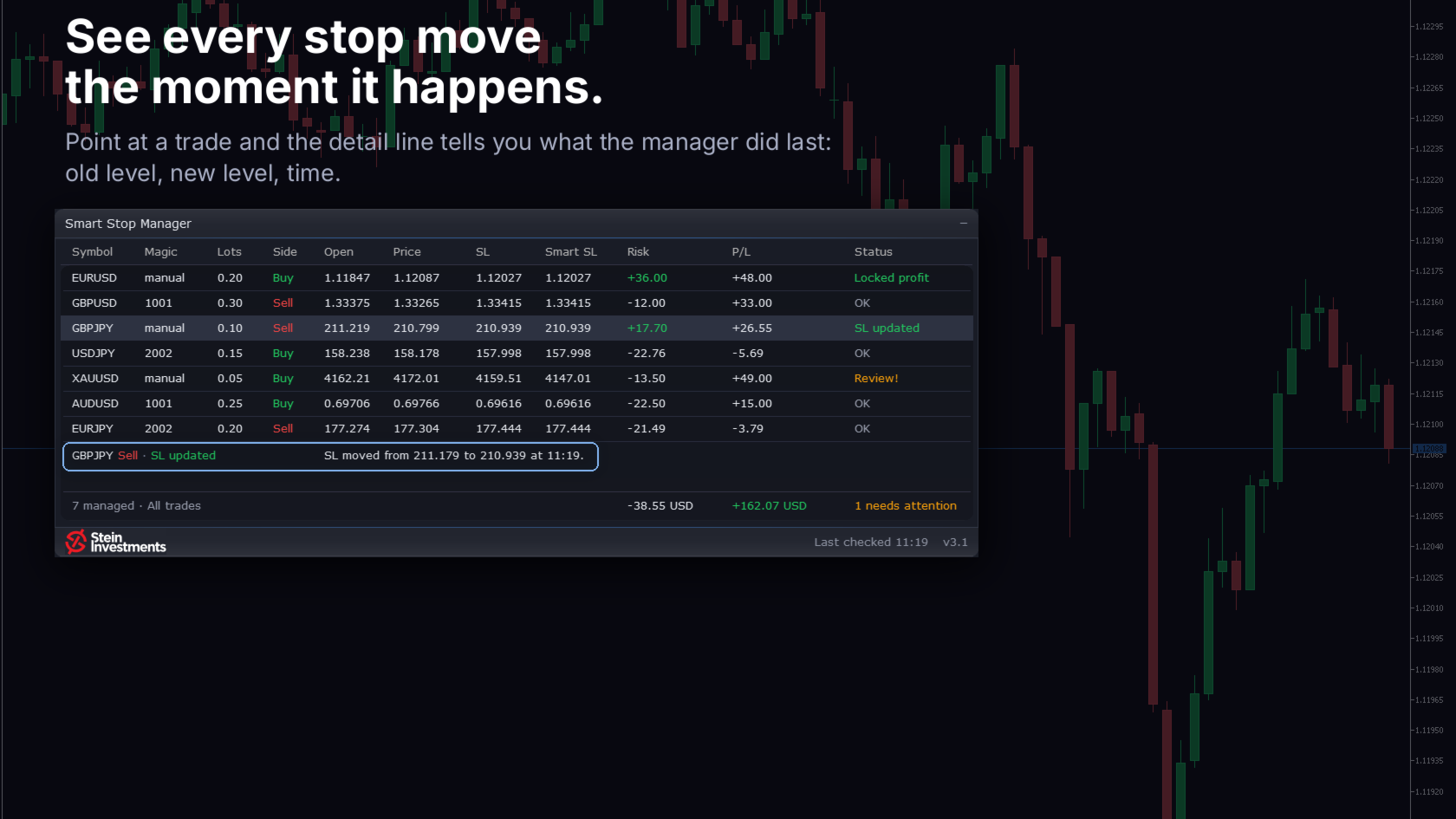
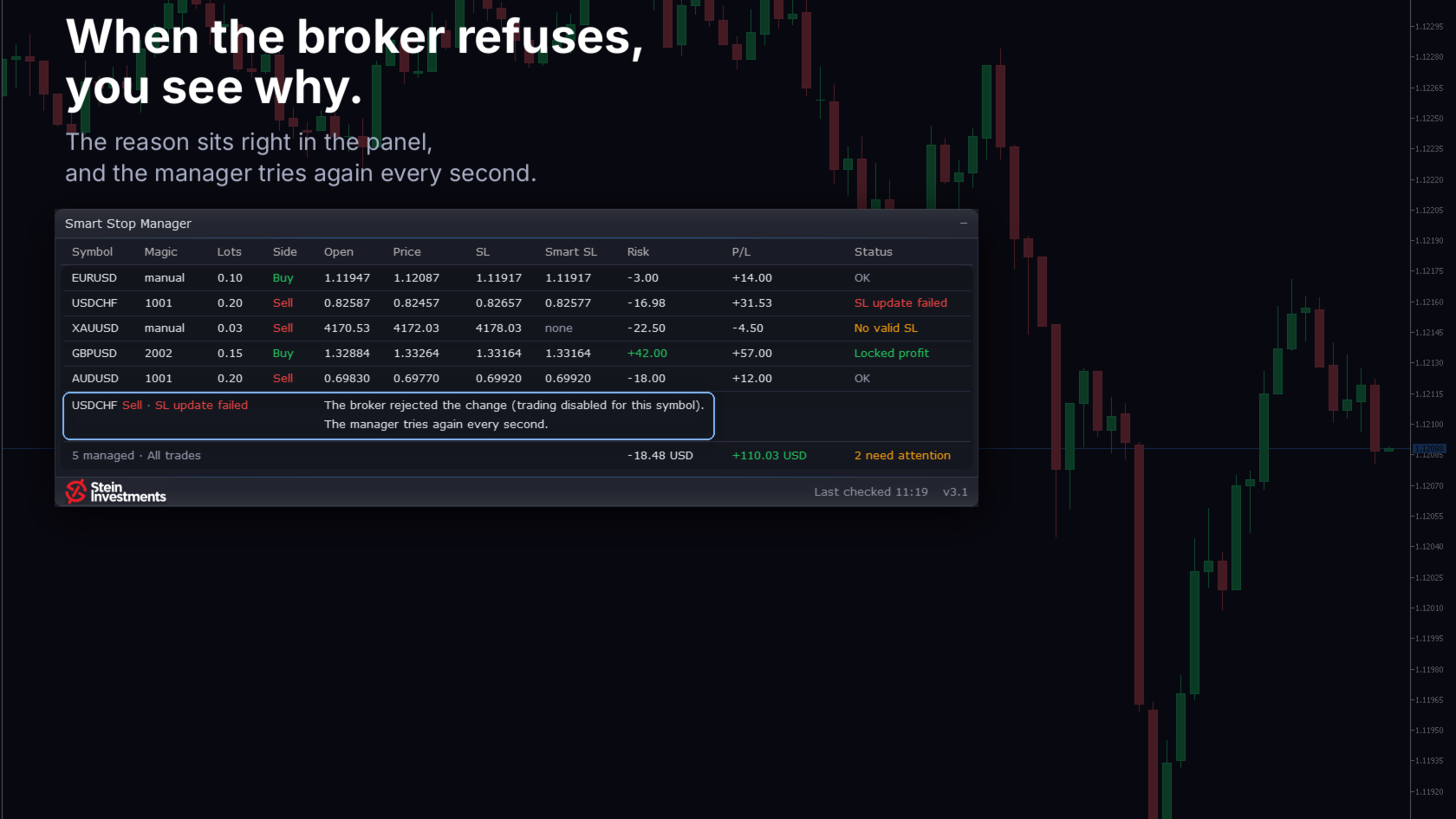
Every stop change stays in view for a minute, and the detail line names the old stop, the new stop and the time. The same line explains the most urgent status in plain words, or the status of the row under your mouse. A rejected change shows the broker's reason, and one line under the table sums up the managed positions, total risk and P/L. Short stops include the spread, by the same rule as the Smart Stop Indicator and the Smart Stop Scanner, and a magic filter manages only the numbers you list or all except them.
Highlights
Universal market compatibility• Works on Forex, Gold, Indices, Crypto, Stocks and more.
Automatic market-structure stop placement
• Evaluates every open position and automatically applies the optimal stop-loss level based on Smart Stop logic.Full portfolio overview in one panel
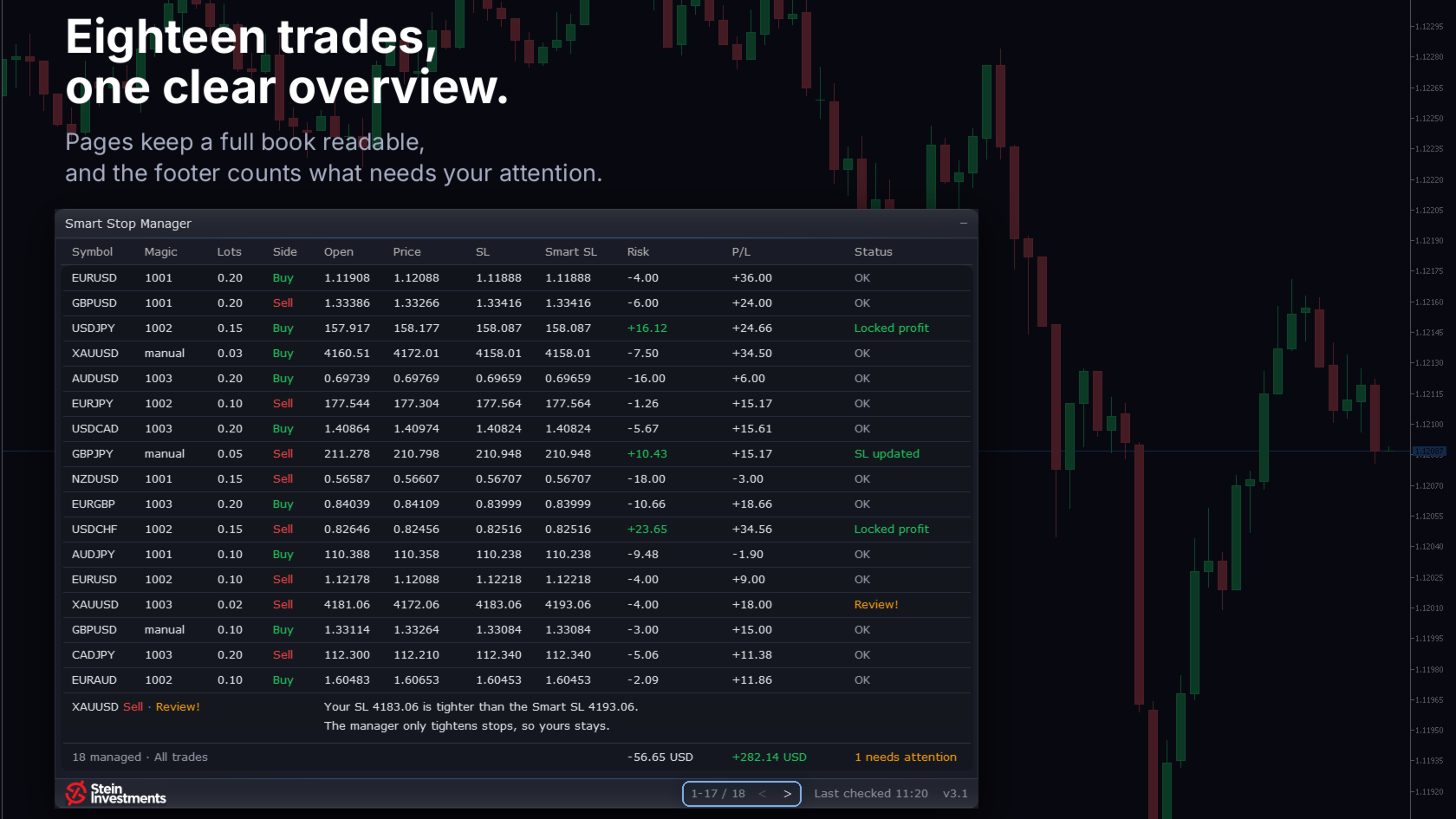
• Displays instrument, direction, magic number, lot size, entry price, current price, recommended stop, pip distance, floating P/L, risk exposure, and real-time status notes.DPI-aware, professional user interface
• Crisp rendering and dynamic layout for perfect clarity on modern high-resolution screens.Clear status labeling
• Each trade is tagged with a status showing whether action is needed — always know your risk exposure at a glance.Advanced special-case detection
• Identifies counter-trend trades, invalid levels, missing stops, or manual SL overrides and highlights them instantly.Universal market compatibility
• Works seamlessly on Forex, Metals, Indices, Crypto, and exotic assets through robust digits and tick-size handling.
With the Smart Stop Manager, traders gain a reliable and disciplined automation layer that mirrors the precision of the Smart Stop Indicator and the broad oversight of the Smart Stop Scanner. Together, they form a complete stop-management ecosystem that reduces stress, protects capital, and ensures consistent, objective execution in all market conditions.
Smart Stop Series – Full FAQ Now Available
For a complete overview of the entire Smart Stop Series, the new FAQ gives you everything in one place — how each tool works, when to use it, the differences between Indicator, Scanner, and Manager, live examples, best-practice workflows, and more.
The FAQ is continuously updated as new questions come in, so it evolves together with the Smart Stop Series.
If you ever have a question that is not yet covered, feel free to contact me directly or reach out in the corresponding chat groups.
Perfect together with Smart Stop Indicator & Smart Stop Scanner
The Smart Stop Manager completes the Smart Stop lineup: the Indicator provides precise on-chart stop logic, the Scanner monitors all symbols in real time, and the Manager executes stop-loss adjustments automatically for every open trade.
Explore the full Smart Stop lineup:
Smart Stop Indicator – on-chart stop logic
Smart Stop Scanner – multi-symbol SL monitoring
Smart Stop Manager – automated SL execution
This trio forms a fully integrated stop-loss system for modern discretionary and systematic traders, delivering clarity, structure, and high-precision execution across all market environments.
Status Labels Explained
OK
The current stop-loss matches the recommended Smart Stop level. The trade is fully protected and aligned with market structure.
SL updated
A stop-loss adjustment has just been applied. This status appears briefly and automatically returns to “OK”.
Locked profit
The recommended stop has moved above the entry price, securing guaranteed minimum profit while allowing further trend continuation.
Review
The current stop-loss is closer to price than the recommended SL. The Manager will not move the stop further away to avoid increasing financial risk. Manual review is required.
No valid SL
No structurally valid stop exists yet. This typically occurs in early counter-trend entries or reversals. A recommended SL appears once the market forms a stable structure.
User Input Parameter Guide
=== Trade Filtering ===
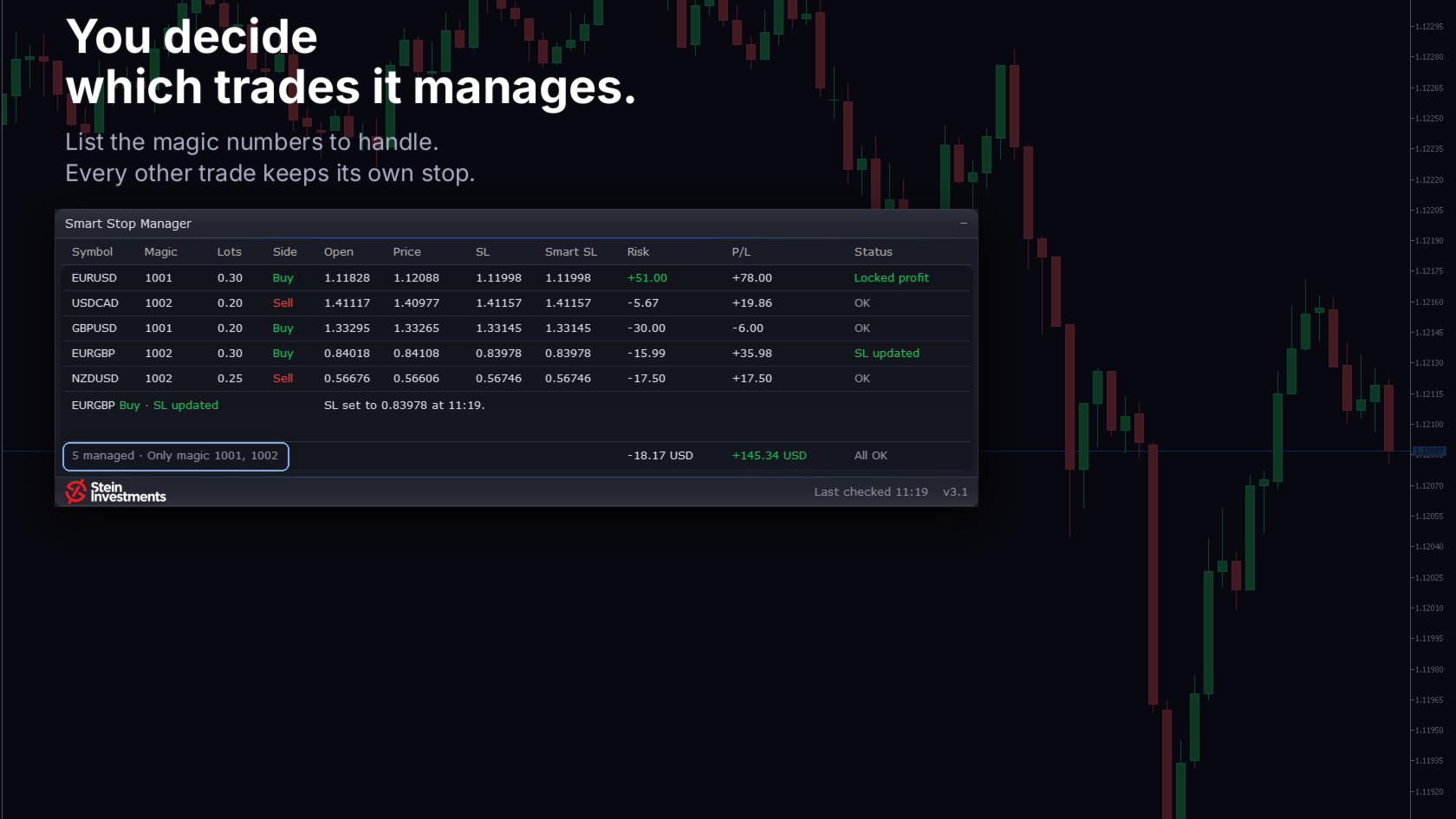
Only manage trades with this magic (0=all)
Manages only trades matching the specified magic number. Set to 0 to manage all active positions.
Timeframe for SL calculation
Global timeframe used to calculate and validate recommended stop-loss levels.
=== Status Colors ===
Text color
Color used for all text, numbers, and status labels in the panel.
Positive color
Color for bullish/positive conditions and confirmed protective stop states.
Negative color
Color used for bearish/negative conditions requiring attention.
Muted color
Color for inactive or secondary UI elements.
New color
Highlight color used for newly detected recommended stop levels.
Alert color
Color used for proximity or SL-warning conditions.
=== Miscellaneous ===
Update interval in seconds
Frequency (in seconds) with which the panel and all SL logic are refreshed.
Enable debug
Enables extended logging for diagnostics and troubleshooting.
More Resources
For tutorials, strategy guides, and product information, visit our central knowledge hub:
Stein Investments – Central Knowledge Hub
Watch detailed walkthroughs and real trading examples on our YouTube channel:
Stein Investments – YouTube Channel
SEO Keywords
smart stop manager, automated stop loss manager, stop loss automation tool, portfolio stop management mt5, risk management panel, trade management automation, market structure stop logic, forex stop manager, crypto stop manager, automated trade protection, professional risk management tool







































































This is a game changer for me, i am not very disciplined and have blown many accounts by not using proper sl's, coupled with the scanner, i get the entry and the stop sl, I place the order and the manager places the sl and trails it, absoolute perfection, wel done Daniel!! a safe profitable system with no stress