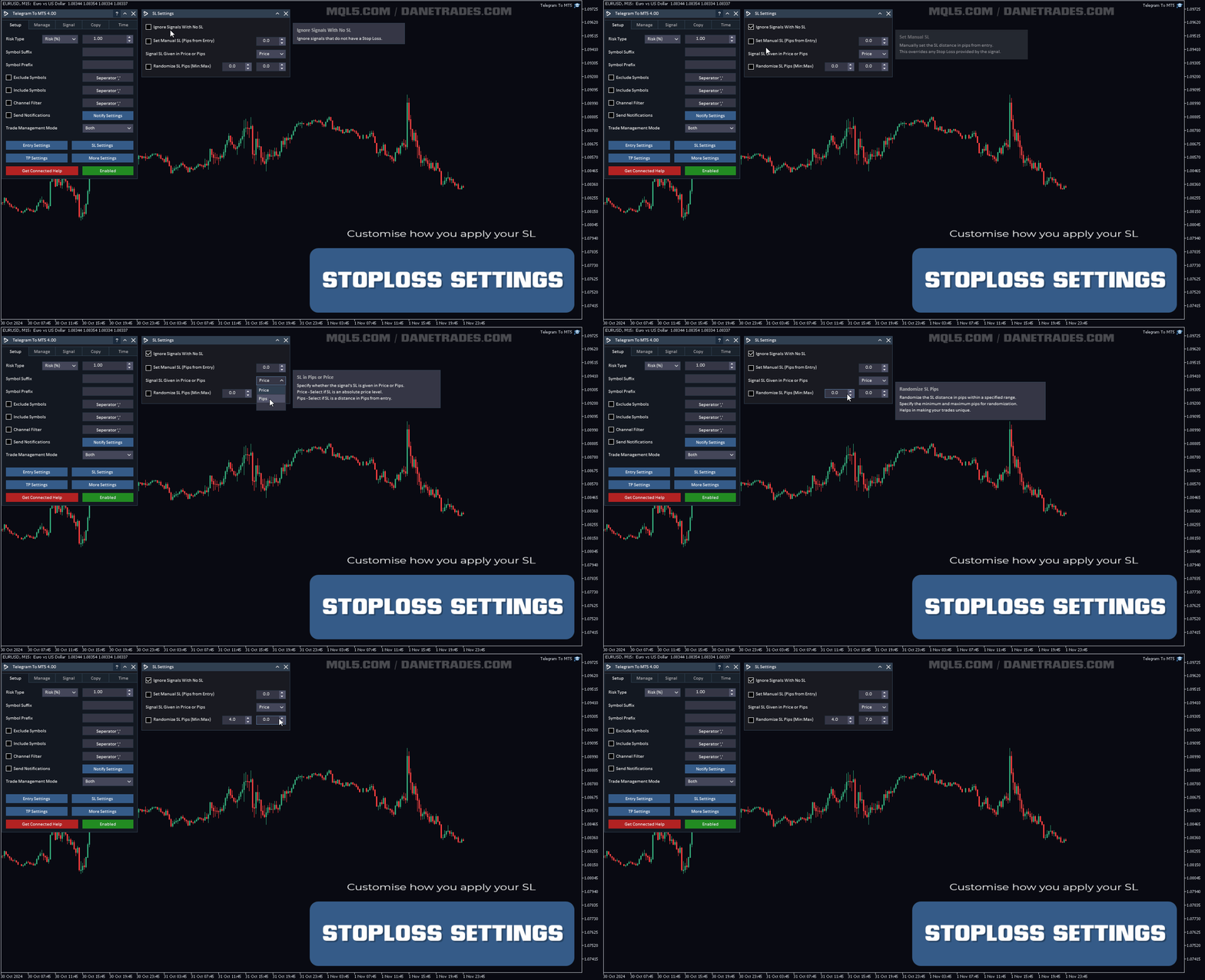
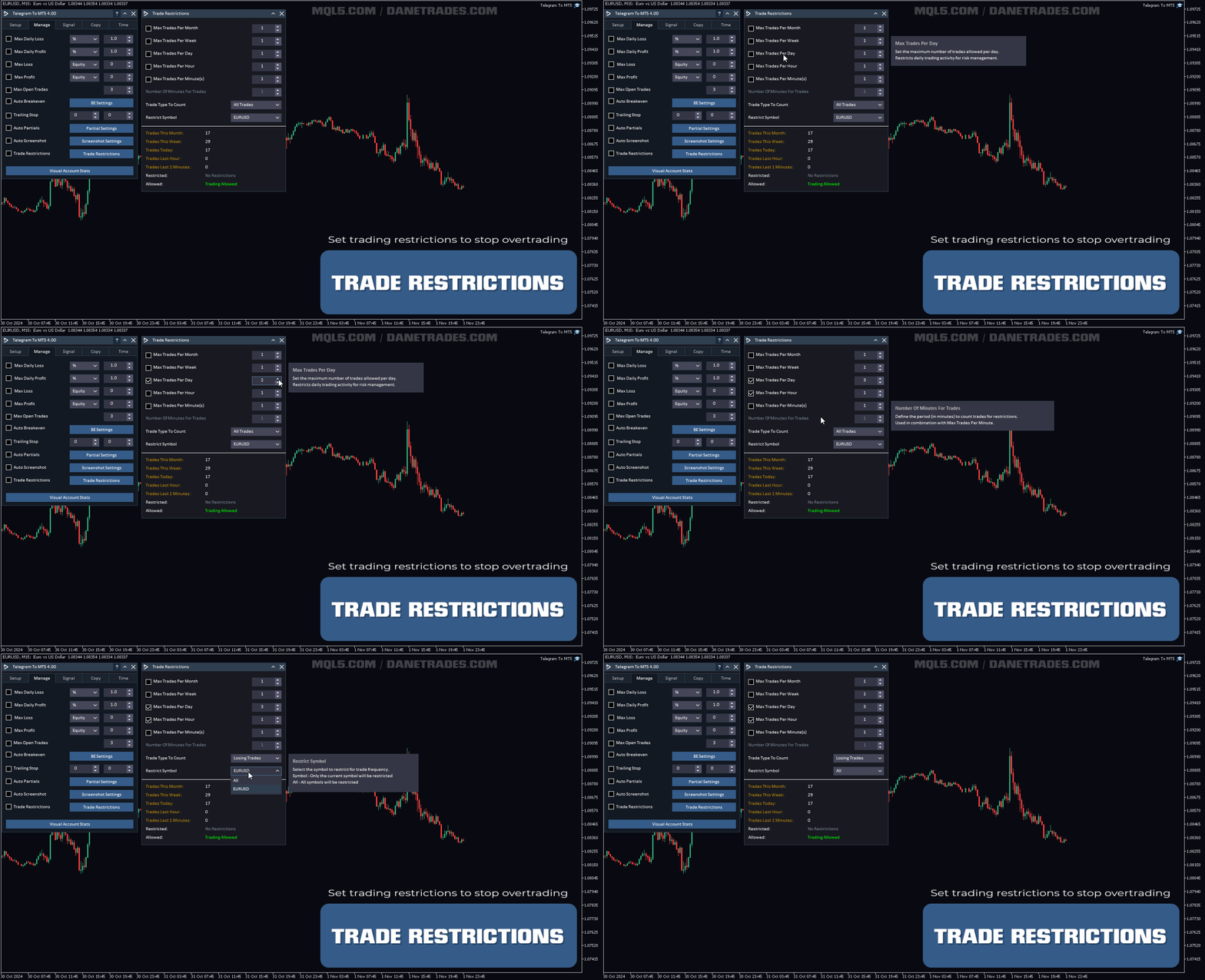
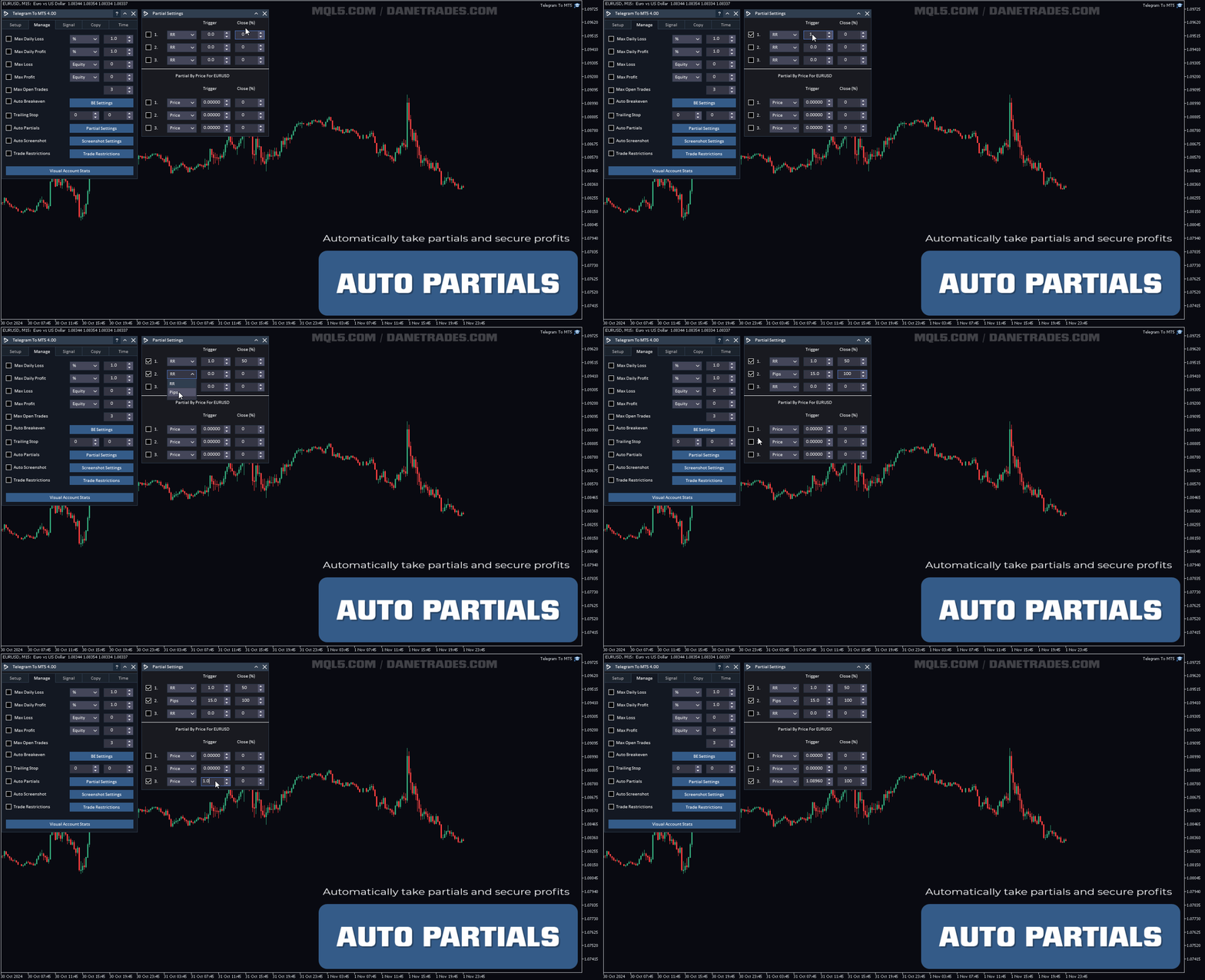
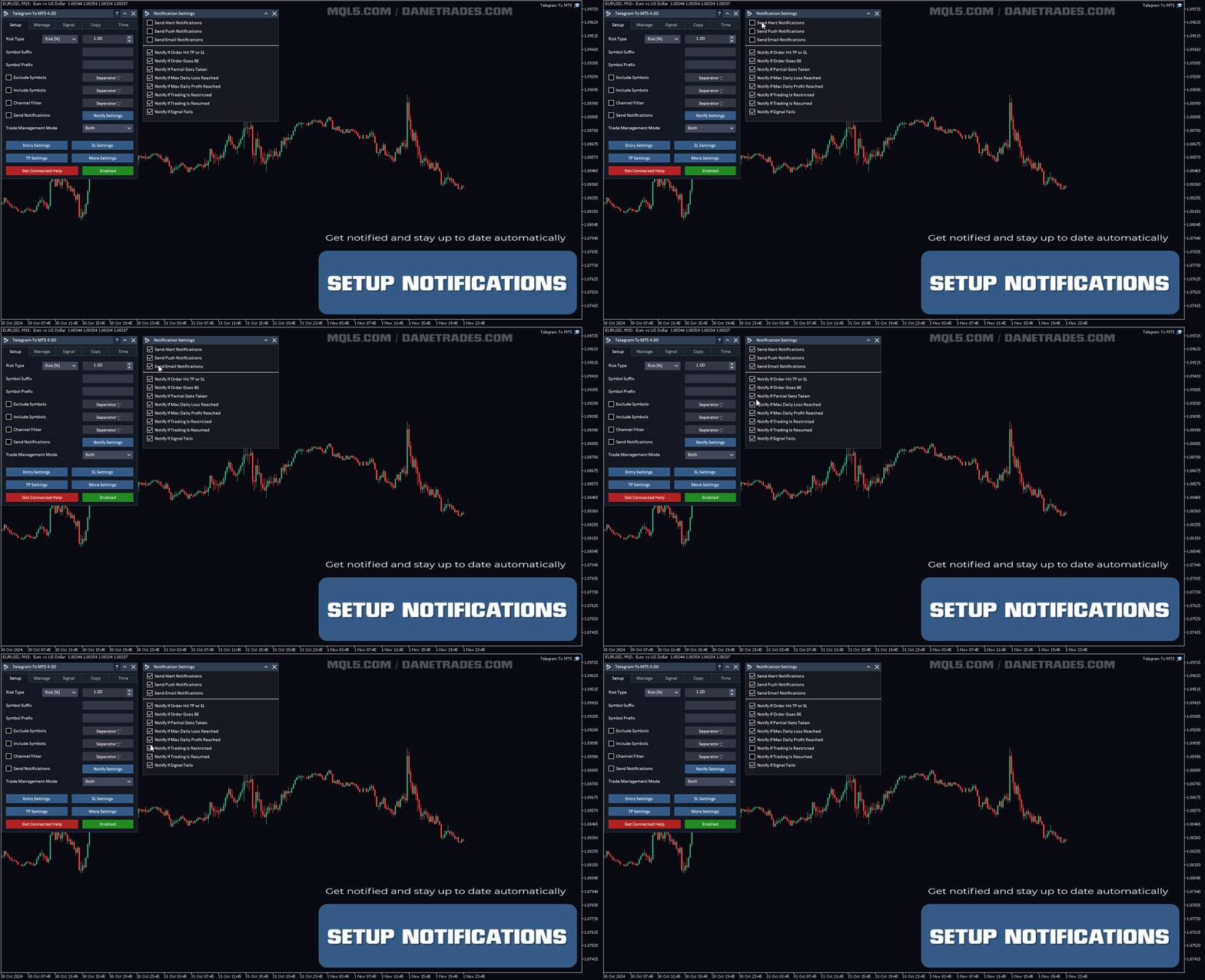
Telegram To MT5 Receiver

4.53

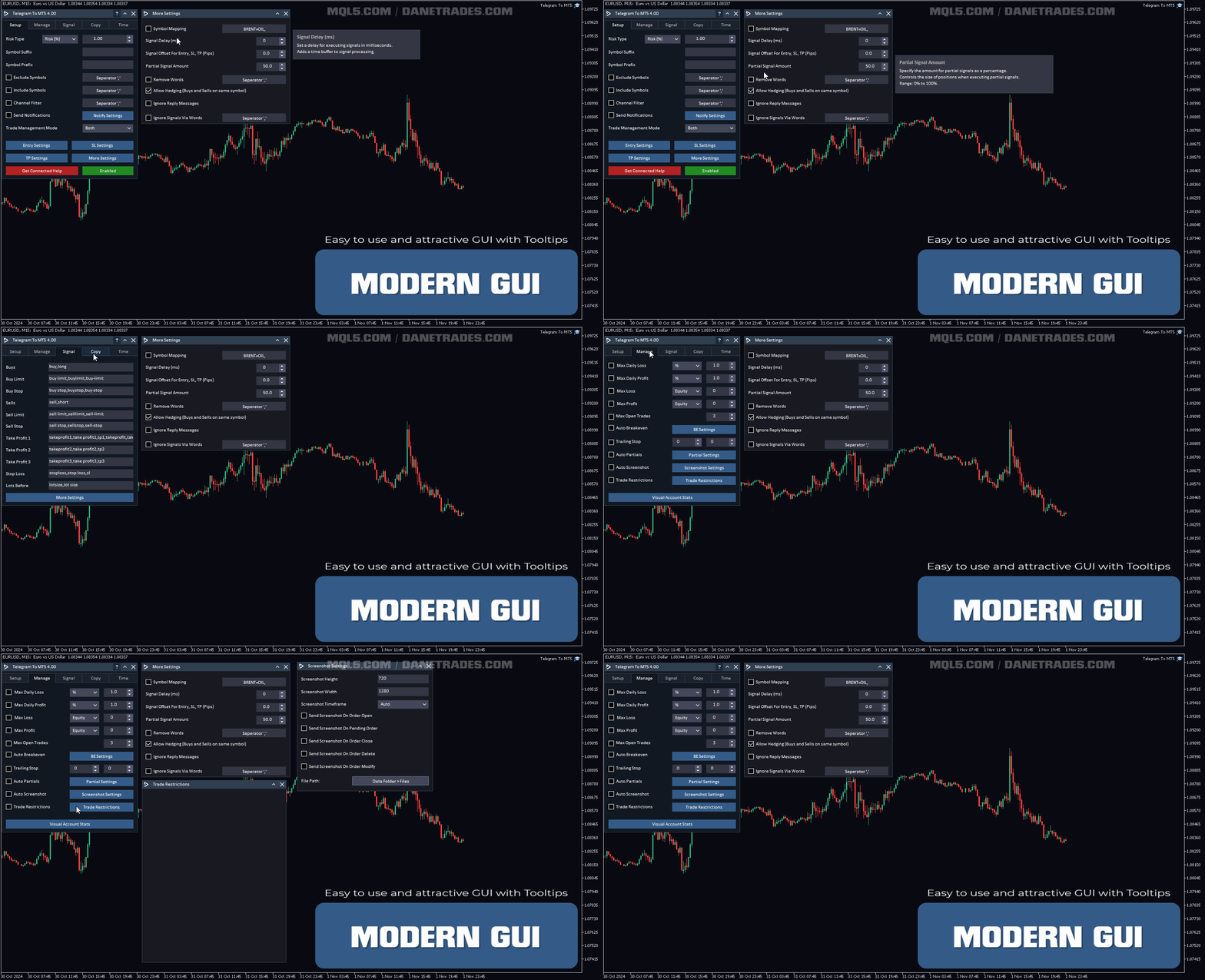
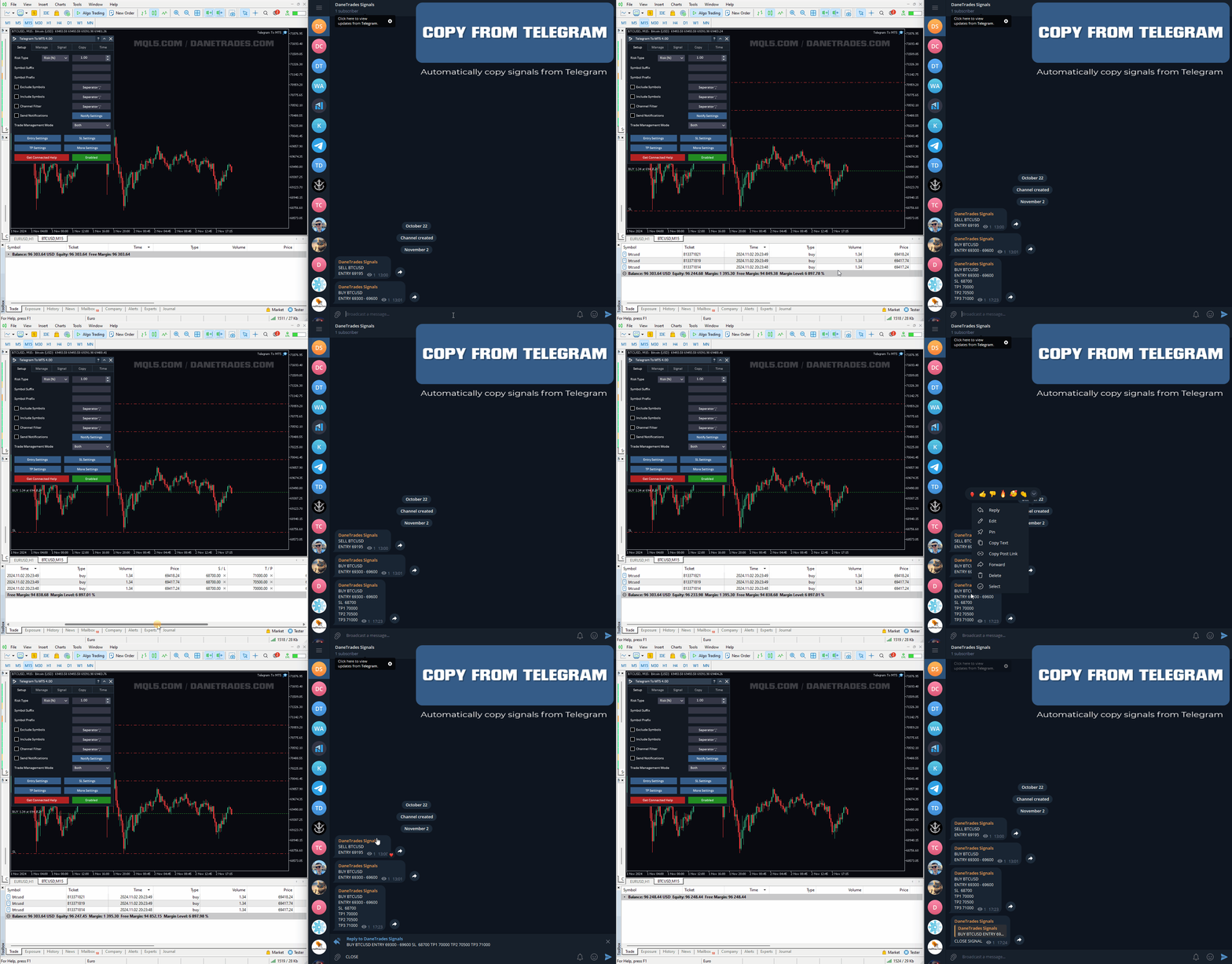
Copy trade signals from Telegram channels you already belong to (including private and restricted channels) directly into MetaTrader 5. Set your risk rules once, monitor execution, and manage positions with built-in protections designed to reduce mistakes and overtrading.

Fast setup: configure your channels, select what to copy, and start within minutes using a clean on-chart interface.

Who this is for

Traders who follow one or more signal providers and want consistent execution, flexible risk control, and trade management tools in MT5.

How it works

Attach the receiver to a chart, choose the channels to copy, set your risk and filters, then let it place and manage trades according to your rules. You can copy everything or only the signal formats you want.

Core copying features

  • Copy from multiple channels at once (including private and restricted)
  • No Bot Token or Chat ID required (optional if you prefer)
  • Channel filtering by name and keyword recognition for signal formats
  • Symbol exclusions and flexible “copy rules” (copy all or only selected types)
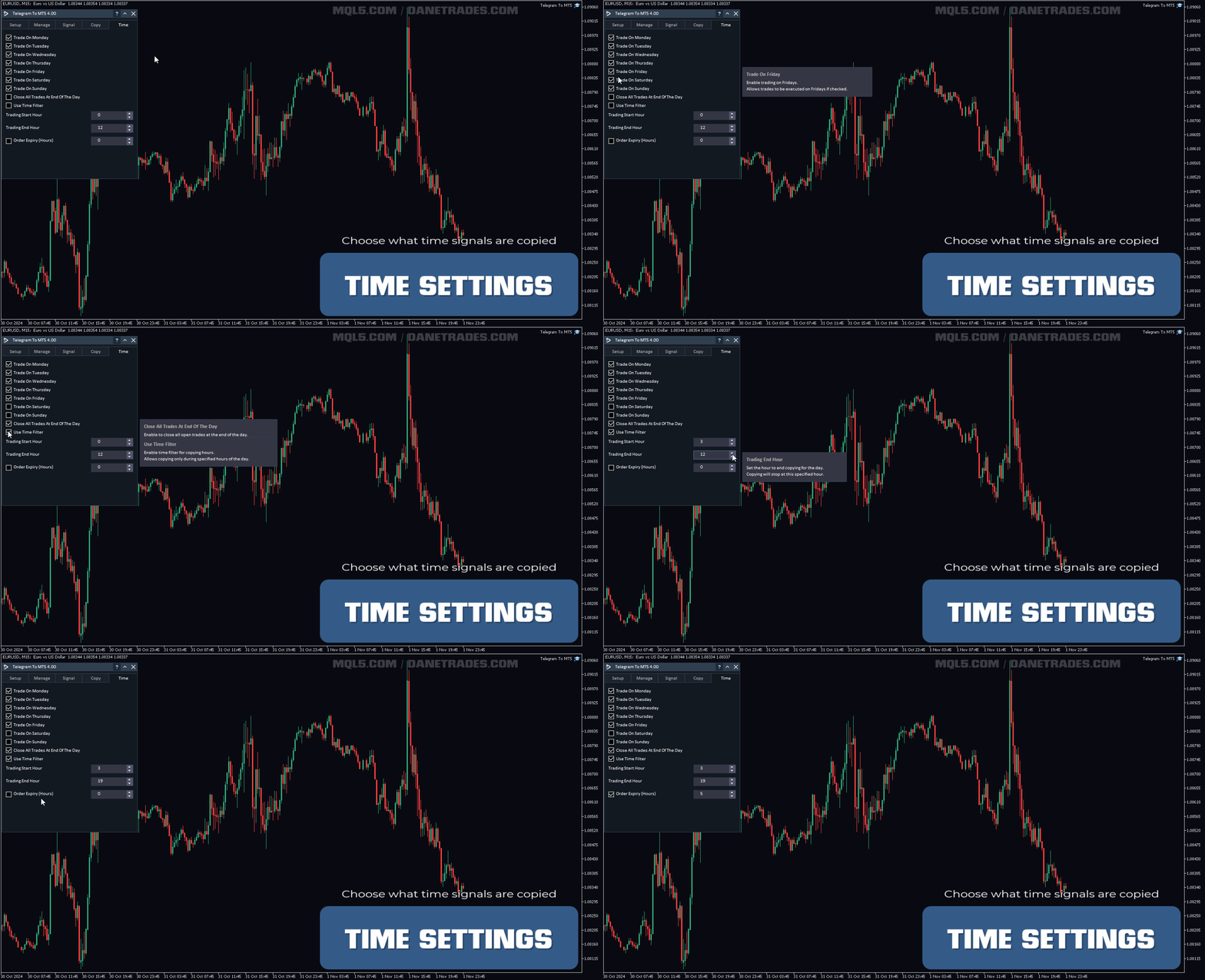
  • Time and day filters (copy only when you want)
  • Max open trades limit to control exposure
  • Entry zone / range support
  • Optional handling of reply messages
  • Works on non-hedging accounts (can close opposite positions when needed)

Risk & lot sizing

  • Risk by percent, risk by amount, or fixed lot size
  • Controls to reduce overtrading (limits by month, week, day, hour, or minutes)
  • Daily profit/loss controls to help protect your account

Trade & position management

  • Supports market and pending orders
  • Partial closes by RR, pips, or price
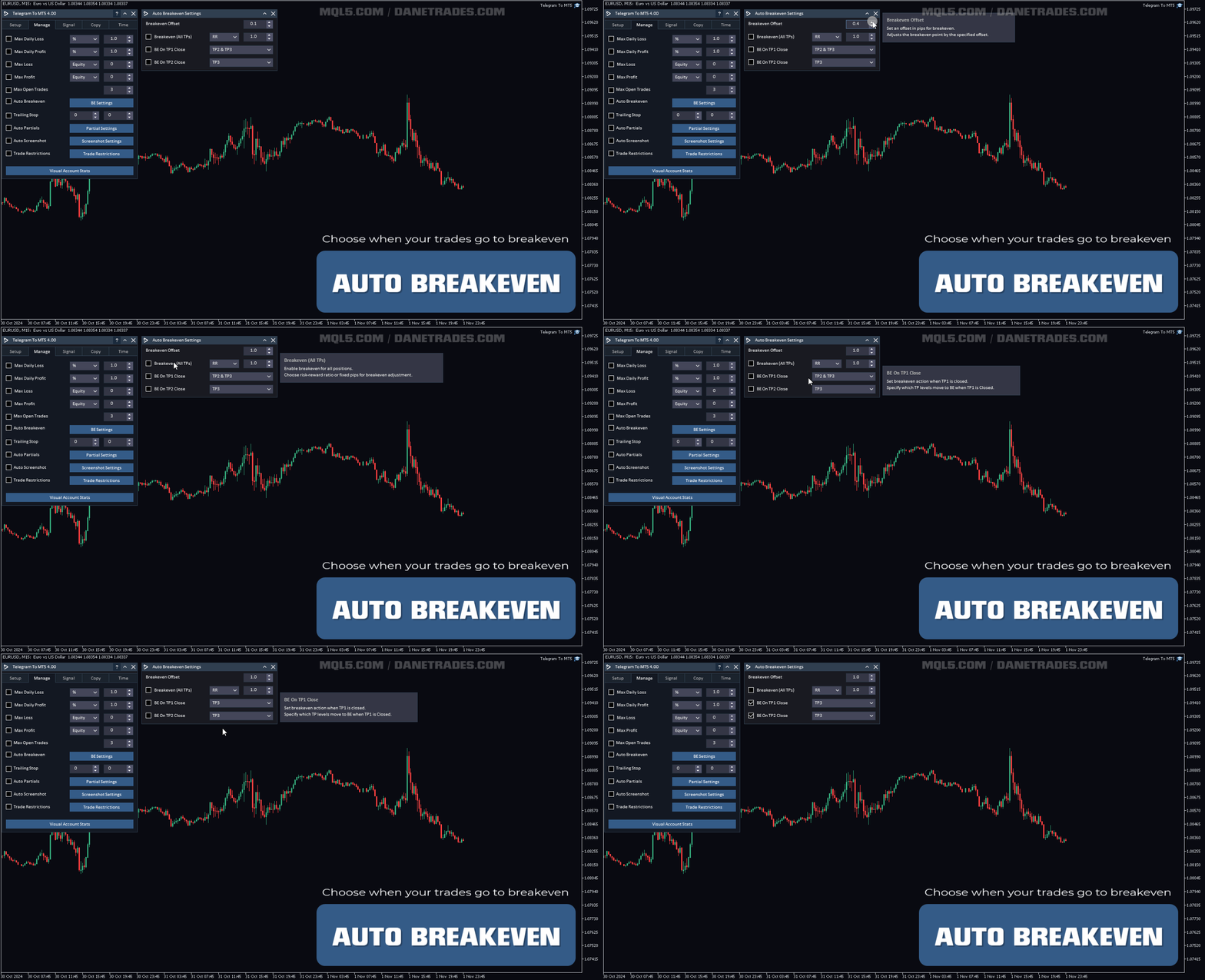
  • Breakeven automation when TP levels are reached
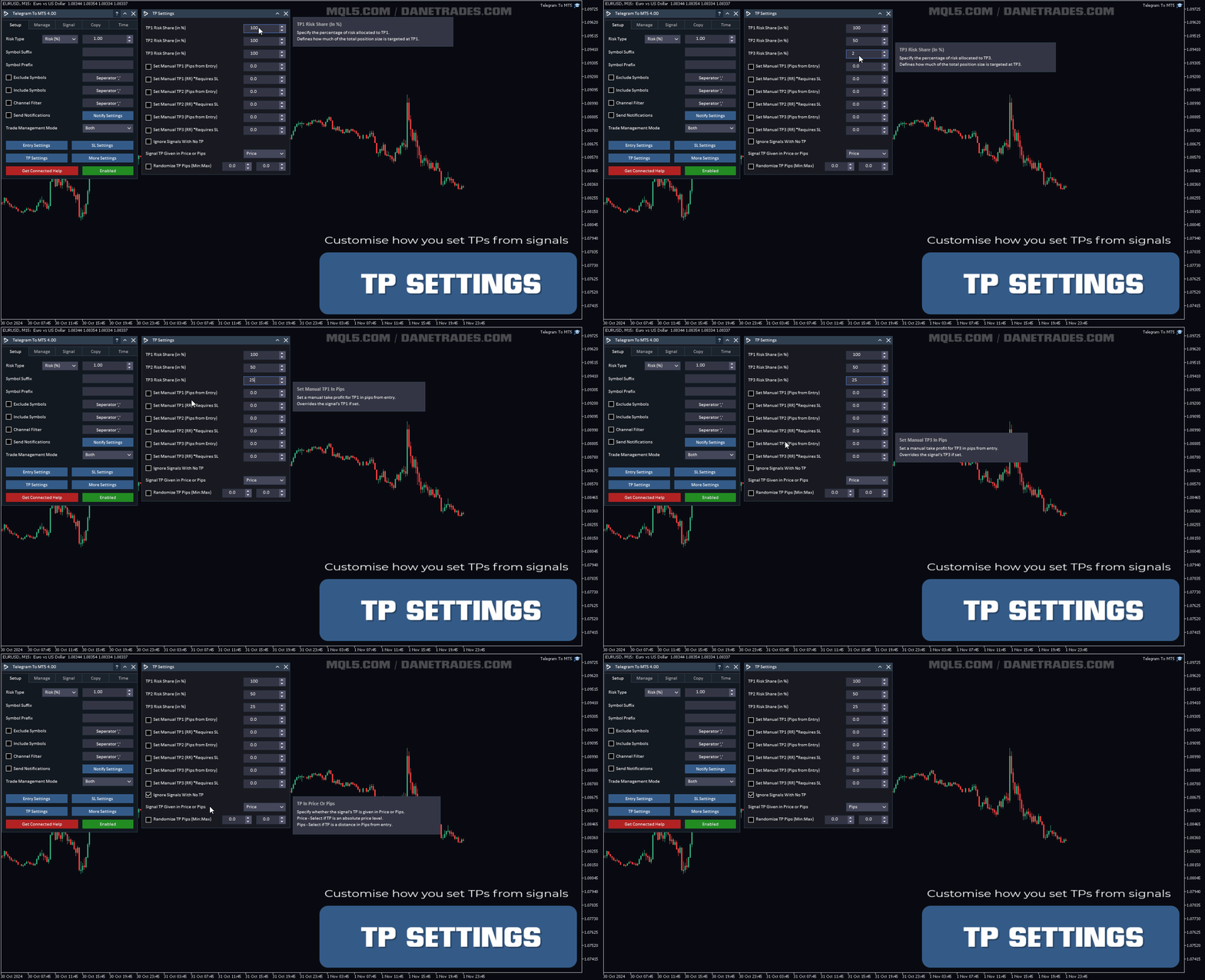
  • Optional custom TP/SL logic (pips or RR depending on your workflow)
  • Randomization options for SL, TP, and entry (configurable)
  • Layering tools using auto grid orders (optional)

Notifications

  • Alerts, push, and email notifications
  • Notifications for SL/TP, breakeven, partials, and restriction events
  • Notifications when daily targets are reached

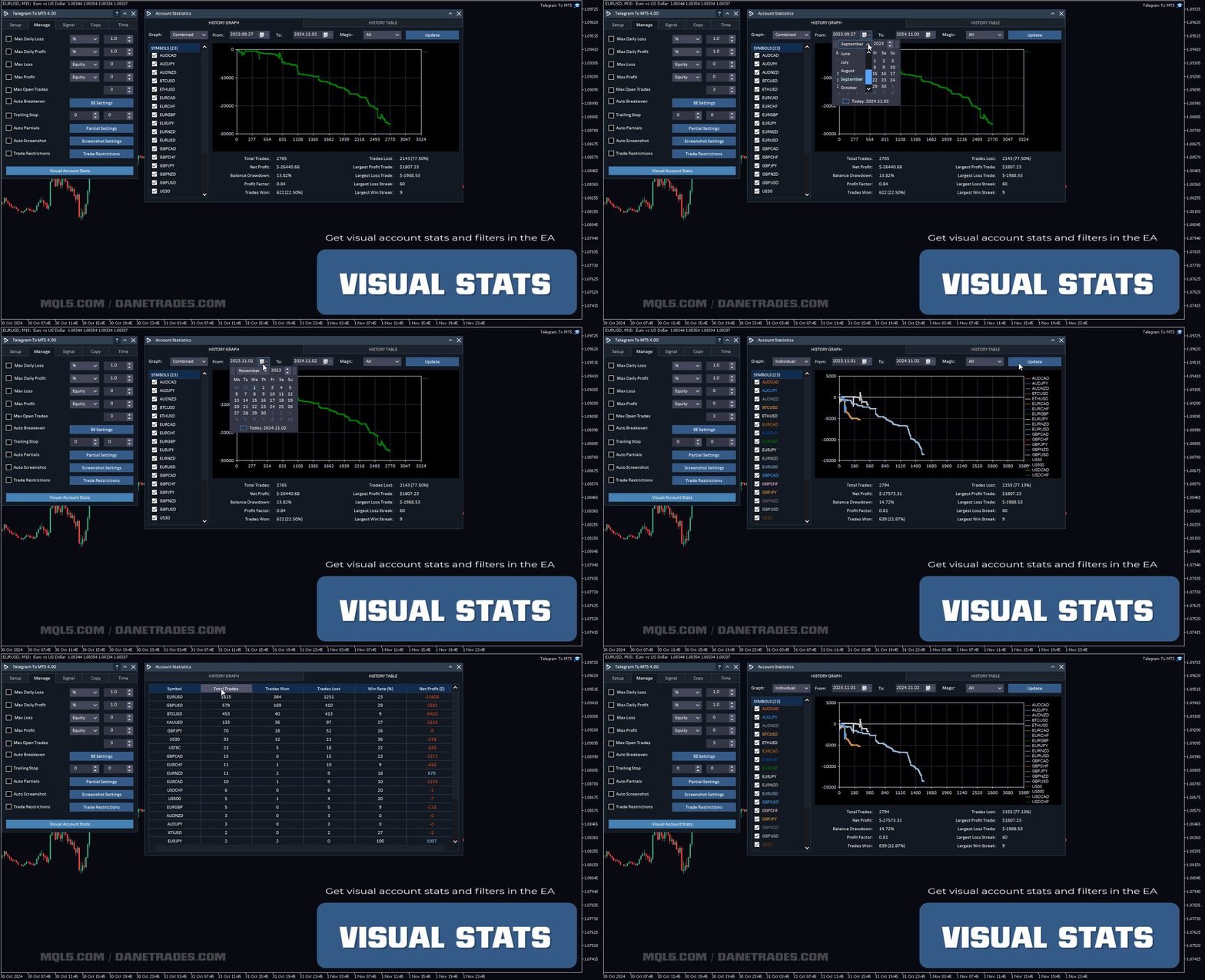
Visual account stats

  • Performance overview including win/loss stats and total trades
  • Filtered performance by symbol, magic number, and date range
  • Identify which channels/signals are most profitable

Important notes

The Telegram To MT5 Receiver does not work in the Strategy Tester. Please use the User Guide + Demo link above to verify workflow and setup before purchase.

Support & improvements

I actively improve the product based on user feedback. If you want a feature added or need help with setup, contact me via my MQL5 profile: message me.
Reviews 16
JoeW1987
31
JoeW1987 2025.06.03 08:48 
 

I rented the product initially, just to test it and make sure it worked. The download and install process was very easy, I ran into some difficulties on getting the system run on my VPS, quick zoom call with the support team and it transpired it was an issue with my VPS settings, quickly set up another VPS and the run program worked first time. I then followed the set up instructions which are very competent, the whole process was flawless and to get the actual copier set up with my telegram and have it running on the MT5 terminal took only a few minutes. The actual set up took about 30 minutes, but that is simply because the amount of options and settings the developer has created is incredible, pretty much if you can think of a process you want to happen, they have already built it in to the product. Getting the system to work with my test channel was very easy, getting it to work with the real signal channel was a bit harder. But this is where special credit to the support team come in, requested a zoom call, got one within 3 hours, they worked through the settings and identified an "at" being used in the signal message after the actual entry price, which was confusing the copier. So they simply removed the "at" in the signal dictionary and it wad fixed. As a couple of other people have already said, this is the real deal and an incredible EA if you use signal channels. Highly recommend this product.

Carlos Herreras Martinez
126
Carlos Herreras Martinez 2025.02.11 09:08 
 

I am talking with the creator. By now the problem seems is EA is not allowing Big (more than 3 channels) number copying. He is replying all my emails and working on that. I think it will be the best copier in mql5.

Update (11/02/2025): After having some problems with Channels Syncro, Author was in contact with me and told me about ZOOM session to fix this. Very good support. After the session problem was fixed and at the moment we are in contact and he requested me more feedback. By now, 5 stars.

Update (22/02/2025): We have progress. Sometimes the link between the TelegramLink Soft by Dane with Ea is failing... but little, maybe better in near future. I see he upload a new version, then He is working hard.

I am having problem with Entry Price, failing by now. He ask me about a lot of screenshoots and I think he is working in it.

Then, I re-say it can be the best copier in MQL5 if he continues working hard. This is the way.

Execution trades of Telegram Channels is very fast.

domii958
49
domii958 2024.12.13 19:13 
 

Amazing product works well, user support is also amazing I had a major issue on my side, and the author helped me fix it quickly. 10/10 I recommend!

Recommended products
This tool will perform Trailing stop loss and Break even management for orders. Helps you limit or reduce the time spend watching orders on the screen, especially when you need to go to sleep. Just add this EA to 1 chart, you can manage all pairs. You can filter orders by comment, magic number, symbol and order ticket number. When Breakeven it can add shift/offset pips (to cover the commission...). You can try in strategy tester before purchase. The EA will add Buy and Sell alternately, so you
Trade Manager DaneTrades
Levi Dane Benjamin
4.36 (28)
DaneTrades Trade Manager is a professional trade panel for MetaTrader 5, designed for fast, accurate execution with built‑in risk control. Place market or pending orders directly from the chart while the panel automatically calculates position size from your chosen risk, helping you stay consistent and avoid emotional decision‑making. The Trade Manager is built for manual traders who want structure: clear risk/reward planning, automation for repeatable management, and safeguards that help reduc
AZ Trade Recovery Assistant MT5 combines manual trading flexibility with intelligent automated management.This advanced on-chart panel isn’t just for trade execution — it’s a complete trade management assistant. You can open or close positions instantly, adjust lot size, manage trailing stops, and modify Take Profit or Stop Loss — all directly from the panel. It’s built for traders who want full control of their trades with smart automation running in the background. What truly makes this assist
Equity Shield Pro
Saad Janah
4.5 (2)
Equity Shield Pro 1.1 NEW VERSION  Equity Shield Pro 1.1 is a powerful utility EA designed to safeguard your trading account by actively monitoring and enforcing equity protection and profit management rules. Whether you’re trading personal accounts or working through proprietary firm challenges, this EA ensures strict adherence to risk and profit targets, enabling you to maintain discipline and consistency. Fully compatible with all challenge types, Equity Shield Pro 1.1 is specifically craft
Trade Managment
Marco Antonio Cruz Dawkins
Trade management is a system that helps you manage your operations, that is, you perform the analysis, and we manage the operations as follows: Automatic Stop Loss once the trade is opened is a short or long with a maximum risk of 1% of the account.  Trailing Stop as the price moves in your favor.  Risk management is handled in a 2:1 , once the operation reaches a 1:1 move Stop Loss to break even .  Once the trade reaches a 2:1 closes half the lot, securing the profit and allowing the operation
Auto SL TP adjustable
Rattanon Hirunyakarn
Manually enter the price for Buy position or Sell position. This EA will automatically open 3 orders and also 3 Pending (In deposited position) = Total 6 orders per one click Please see Screenshot or Videos for more explanation. - Easy to manage your different order. - Fast in modification for SL and TP. - Can modified the SL and TP depends on individual techniques.
Blues Protector
Andtle Austin Dube
Boost your forex profits with Blues Protector, an advanced MQL5 Expert Advisor designed for MetaTrader 5. This automated trading bot dynamically manages your stop-loss levels to secure gains and reduce risks. Blues Protector EA - User Manual   (For MT5 - Ready-to-Use EX5 File)   1. What This EA Does    The Blues Protector EA automatically secures your profits by smartly adjusting stop-loss levels when your trade reaches a predefined profit level. It works silently in the background, protecting
Automatic Trade Calculation Panel   One-Klick-Trading Automatic calculation of Lot sice Atuomatic calulation of Stop-Loss and TakeProfit Up to 3 partial closings Trailingstop (Stop-Loss moves automatically)   The lot size is calculated by the previously determined risk (e.g. 1.0% of the account size) and the distance of the Stop Loss from the entry point. The distance from the Stop Loss to the entry point results from the ATR indicator multiplied by a freely selectable factor. The Stop Loss and
How to Use the  Features           MT4 VERSION   TRADE COPIER Select Role: On the account sending trades, choose Sender (Master Account) . On the account receiving trades, choose Copier (Receiver Account) . Lot Size Mode: Same Lot Size as Master: Ignores multipliers, copies exactly what the Master has. Multiply Master Lot Size: Uses the "Lot Multiplier" field (e.g., Master 0.10, Multiplier 2.0 = Copier 0.20). Use Fixed Lot Size: Ignores Master's volume entirely, uses the "Fixed Lot Size" field f
Close Trades Pro
Osazee Asikhemhen
Introducing the Revolutionary   Trade Closing Assistant ! Are you tired of manually closing hundreds trades? Are you a   scalper ,   day trader ,   swing trader   and  you want to maximize your profits and minimize your losses by closing multiple positions at thesame time under different conditions? Are you a   Prop Firm Trader  who wishes to avoid hitting maximum daily drawdown? Search no further. This kit is the ultimate solution for all you. GUIDE TO USE THE KIT 1. Shows the total profit/los
Anti Grid Position Protector
Konstantinos Kalaitzidis
Anti Grid Position Protector is a utility tool designed to protect you from the temptation of adding to a losing position in a hope of a drawdown recovery, or trying to hedge when you're not intended too. --------------------------Inputs--------------------------- Allow Hedging on Losing Positions? - It's a true/false input (double click to switch its value) which allows/disallows opening a trade (either pending order or market execution) in the opposite direction on an existing losing position
Golden Gestion TP SL No Limit MT5
Matthias Hubert Patrick Snidaro
Auto SL/TP Manager EA – Gestion Automatique Intelligente Auto SL/TP Manager EA est un Expert Advisor conçu pour automatiser la gestion des commandes avec une efficacité maximale et une grande discrétion. Il gère automatiquement : Le Stop Loss (SL) et le Take Profit (TP) Le Profit Lock (verrouillage progressif des bénéfices) Le Trailing Stop avec plusieurs méthodes avancées L' affichage masqué du SL et du TP pour plus de discrétion (non visible par le courtisan) C'est l'outil idéal pour les
Take a Break MT5
Eric Emmrich
4.75 (24)
One tool to protect all your EAs — news filter, equity protection, time filter and more — free demo available Take a Break has evolved from a basic news filter into a comprehensive account protection solution. It pauses your other Expert Advisors during news events or based on custom filters. When trading resumes, it automatically restores your entire chart setup , including all EA settings. Typical use cases: One news filter for all your EAs. Pause trading during news or high volatility — and c
MANAGING YOUR FOREX TRADING LIKE A PROFESSIONAL WITH   POSITION SIZE   CALCULATOR Position Size Calculator – an MT5 indicator, is a user-friendly tool that allows you to determine your required forex trading size for each trade based on how much you want to risk and available capital in your forex trading account. Load the calculator onto your chart and simply draglines to show your stop loss and take profit level. The calculator will automatically calculate the trade size instantly. This indica
SFG Grid Manager MT5 – Smart Grid & Mirror System SFG Grid Manager MT5 is a professional automatic grid manager that follows an existing position (manual or EA) and opens one averaging trade per defined step (GridPips). When the primary trade closes or disappears, all the grid trades opened by the manager are closed automatically. It works on any broker with Netting or Hedging accounts and is fully compatible with manual trading or external Expert Advisors. ️ Main Features Follows a primar
Prop Firm Simulator
Abdeljalil El Kedmiri
Master prop firm challenges before risking real money!   Our advanced simulator recreates authentic prop firm trading environments, helping you practice, strategize, and pass challenges with confidence.   Using our Simulator, you can simulate any prop firm challenge using demo or live accounts, supports both manual trading strategies and automated trading via EAs ,  create personalized challenges for customized periods, and challenge yourself to develop the discipline needed for consistent profi
Position Assistant
Evann Desiree Gouzouguen
Transform Your Trading with Advanced Automation Management EA TRADE NEXUS PRO is a sophisticated MetaTrader 5 Expert Advisor designed specifically for every trading pair. This EA combines intelligent position management with precise risk control. Key Features That Set Us Apart Position Orchestrator System Risk Calculation Based on Stop Loss in Pips/Points. Orders : You can set pending orders such as limit orders, market orders and stop orders Dynamic Risk Control : Customizable risk p
Trade Assistant 38 in 1
Makarii Gubaydullin
4.91 (23)
Multifunctional tool: Lot Calculator, Grid Orders, R/R ratio, Trade Manager, Supply and Demand zones, Price Action and much more Demo version   |   User manual Trade Assistant   doesn't work in the strategy tester : you can download the   Demo Version HERE  to test the utility . Contact me   for any questions  / ideas for improvement / in case of a bug found If you need a MT4 version, it is available here Simplify, speed up and automate your trading   process . Expand the standard terminal capa
SLTPSetter
Raphael Djangmah Osro Agbo
SLTPSetter - StopLoss Take Profit Setter HOW DOES IT WORK? Risk and account management is a very critical aspect of trading. Before entering a position, you must be fully aware how much you will be willing to loss both in percentage and value. This is where SLTPSetter gets you covered.  All you need to do is attach the indicator on the chart and PRESS BUY OR SELL automatically, all parameters needed for placing the trades will be provided at the top left corner of the screen. Feel free to adjust
This is a common, simple and easy to use but effective tool to manage trading risks for all traders. It also help trader places stop loss and take profit levels at the same time the order is filled. How to set the expert advisor's parameters to support your trading style? Lots size. Fixed lots size - For traders who prefered to trade with fixed lots size, they can input the lots size in 'User lots' menu in the expert advisor's properties. The input value should be from the 'Minimum Volume' to th
Lock Bot
Artem Alekseev
This utility is designed to automatically maintain a "locking" position and reopen it when necessary, which is suitable for position maintenance and protection strategies. A simple utility (hereinafter referred to as the bot) that implements a locking strategy with an infinitely reloadable locking trade. How the bot works: - When launched, select a buy or sell order with a specified TP - Set the SL parameter for the locking trade - The bot monitors the distance between the opening price of the f
Dashpro Reborn
Muhammad Hassaan
Trade. Allows you to perform basic trading operations in one click directly from the chart. Trading operations: Open Buy and Sell market positions with one click. Specify lot size manually before opening a trade. Set Stop Loss and Take Profit as price levels . Stop Loss and Take Profit are automatically initialized at a fixed distance from the current market price (default: ±50 pips , symbol-aware). Fully supports Forex, Metals (XAUUSD), Indices, and other MT5 symbols with correct price formatti
Nebula Trading Manager
Sina Mohammadamin Shahriari Moghadam
This expert advisor named   TradeManager   provides a manual trading management panel in MetaTrader 5 that allows precise control over open positions. It is designed for traders who want dynamic management of Stop Loss (SL), Take Profit (TP), Break Even (BE), and Partial Close functionality. Key Features: Dynamic Trade Management : Manually set or drag-and-drop SL, TP, and BE levels. Supports partial closing at different profit levels (1:1, 1:1.5, 1:2). Automated Drawing : Automatically draw
With the 2UP Risk & Trade Management EA you will be able to enjoy seeing your positions being fulfilled all you gotta do is take the position and have the right lot size and the 2UP EA will do the rest - You can set your risk per position so your account never losses more than what is supposed to, it will close automatically once you reach a certain % of DrawDown. - You can set your reward as well based on %, how much do you wanna grow your account in % per trade ?,  it will close automatically
SwiftEdge Scalper Professional Tick Scalping EA with Full Manual Control Scalping demands split-second decisions, precise risk management, and seamless order execution. Managing breakeven calculations, trailing stops, and multiple positions while watching price action is overwhelming without the right tools. SwiftEdge Scalper is your professional trading assistant designed for active scalpers and day traders. Execute trades with one click or keyboard shortcut, while the EA handles breakeven, tra
Zone Trader is a professional semi-automated trading assistant designed to help manual traders execute precise grid strategies with built-in risk management. Instead of manually calculating lot sizes and placing individual pending orders, Zone Trader allows you to visually define your grid directly on the chart using drag-and-drop lines. With a single click, the EA calculates the risk, splits the volume across your specified layers, and places the necessary orders to fill the zone between your S
The Stop Loss Manger - SL Mange With the Stop Loss Manager you can finally sleep peacefully while it effectively manages your risk in stock market trading. Simply set your individual stop loss limits and let the manager trade for you. Never worry about losses again - the Stop Loss Manager takes care of it for you! Get the ultimate support for your trading now and maximize your profits with ease. Join the community of successful traders who swear by Stop Loss Manager today. Function overview: 1.
SmartTrail PRO MT5 — All-in-One Trade Management Panel Your all-in-one trade management companion for MetaTrader 5. SmartTrail PRO takes the stress out of position management. Whether you trade manually or use Expert Advisors, it protects your capital with intelligent, volatility-adaptive stop management — across all symbols, all account types, automatically. Why SmartTrail PRO? Most traders lose not because of bad entries, but because of poor exits. SmartTrail PRO solves this by providing a com
Smart Sl Tp Manager For Mt5 is a lightweight and reliable trading utility designed to help you manage risk automatically. It instantly sets Stop Loss and Take Profit levels for every manual trade you open, ensuring your positions are always protected. Perfect for traders who want more discipline, less stress, and consistent risk management. Key Advantages Automatic SL & TP for all manual trades Works with both Netting & Hedging accounts Re-applies SL/TP when you add new positions Simpl
FREE
Expert TP SL v04
Mikhail Ostashov
Expert TP SL v04 - Professional Trading Assistant with AI Motivation System Advanced manual trading tool with automatic risk management, overtrading protection, and intelligent psychological support for disciplined trading. PRODUCT OVERVIEW Expert TP SL v04 is a comprehensive trading assistant designed for manual traders who want to maintain emotional discipline while automating risk calculations. This isn't just another order placement tool - it's a complete trading psychology system that pr
Buyers of this product also purchase
FarmedHedge Pair Trading Dashboard
Tanapisit Tepawarapruek
5 (1)
VERIFIED TRADING RESULTS - Farmed Hedge Yield Axi Copy:  https://www.mql5.com/en/signals/2356376 - Farmed Hedge Yield Exn Copy:   https://www.mql5.com/en/signals/2356404 - Farmed Hedge Yield V Copy:  https://www.mql5.com/en/signals/2357156 Contact me via private message to receive the User Manual and Setup. * Thai Lauguage Support Available Farmed Hedge Yield Farming - Professional Pair Trading Dashboard (Manual - Hybrid - Semi/Automated EA) VERSION 3 - WILD HARVEST UPDATE Trading Approac
Ultimate Extractor
Clifton Creath
5 (9)
Ultimate Extractor - Professional Trading Analytics for MT5 *****this is the local HTML version of Ultimate Extractor. Check out Ultimate Extractor Cloud on mql5 for the Cloud version****** Ultimate Extractor transforms your MetaTrader 5 trading history into actionable insights with comprehensive analytics, interactive charts, and real-time performance tracking. What It Does Automatically analyzes your MT5 trading history across all Expert Advisors and generates detailed HTML reports with inte
Custom Alerts AIO: All-in-One Market Scanner – No Setup Required Overview Custom Alerts AIO is the fastest and easiest way to monitor multiple markets for real-time trading signals—without any setup or extra licenses. It comes with all required Stein Investments indicators already embedded, making it the perfect plug-and-play solution for traders who value simplicity and performance. Just load it to any chart and start receiving alerts across Forex, Metals, Crypto, and Indices. Shares can be a
The product will copy all telegram signal to MT5 ( which you are member) , also it can work as remote copier.  Easy to set up, copy order instant, can work with almost signal formats, image signal,  s upport to translate other language to English Work with all type of channel or group, even channel have "Restrict Saving Content", work with  multi channel, multi MT5 Work as remote copier: with signal have ticket number, it will copy exactly via ticket number. Support to backtest signal. How to s
ManHedger MT5
Peter Mueller
4.8 (5)
THIS EA IS A SEMI-AUTO EA, IT NEEDS USER INPUT. Manual & Test Version Please TEST this product before BUYING  and watch my video about it. The price of the ManHedger will increase to 250$ after 20 copies sold. Contact me for user support or bug reports or if you want the MT4 version! MT4 Version  I do not guarantee any profits or financial success using this EA. With this Expert Advisor, you can: Implement your own Zone Recovery strategy to capitalize on trending markets. Create Grid trading s
YuClusters
Yury Kulikov
4.93 (43)
Attention: You can view the program operation in the free version  YuClusters DEMO .  YuClusters is a professional market analysis system. The trader has unique opportunities to analyze the flow of orders, trade volumes, price movements using various charts, profiles, indicators, and graphical objects. YuClusters operates on data based on Time&Sales or ticks information, depending on what is available in the quotes of a financial instrument. YuClusters allows you to build graphs by combining da
Dynamic Fibonacci Grid
Tsvetan Tsvetanov
5 (1)
Introducing the latest version of the Dynamic Fibonacci Grid Dashboard for MT5. Now packed with many new features, this new dashboard transforms your trading experience and allows you to see the market and the price action from a completely different perspective. Discover new possibilities with simultaneous analysis of multiple timeframes covering multiple symbols. User-friendly interface for manual trading and management of positions and an expanded ability to apply predefined automated strate
Footprint Chart Pro — Professional Order Flow EA for MetaTrader 5 Version 6.34 | Professional tool for real traders | Institutional-Grade Visualization DEMO USERS - PLEASE SELECT EVERY TICK / REAL TICK WHEN TESTING AND YOU HAVE DOWNLOADED HISTORICAL DATA. IF YOU SEE A WAITING SCREEN AND IT IS NOT DOWNLOADING, IT MEANS YOU HAVE LOW HISTORICAL DATA. TRY 1 MIN AND 5 MIN FIRST ON 1 DAY DATA. ONE DAY DATA SHOULD BE THE NEWEST AND MOST CURRENT DATE. PLEASE WAIT UNTIL THE MARKET HAS ROLLED OVER PERIOD
EasyInsight AIO MT5
Alain Verleyen
4.92 (12)
EASY Insight AIO – All-In-One Power for AI-Driven Trading Want to skip the setup and start scanning the entire market – Forex, Gold, Crypto, Indices, and even Stocks – in seconds? EASY Insight AIO is the complete plug-and-play solution for AI-powered trade analysis. It includes all core Stein Investments indicators built-in and automatically exports clean, structured CSV files – perfect for backtesting, AI prompts, and live market decision-making. No need to install or configure indicators manu
Telegram Broadcast MT5
Volodymyr Hrybachov
3.67 (3)
The TELEGRAM BROADCAST utility helps you instantly publish your trade to the Telegram channel. If you have long wanted to create your own Telegram channel with FOREX signals, then this is what you need. TELEGRAM BROADCAST can send messages: Opening and closing deals; Placing and deleting pending orders; Modification of stop loss and take provision (last order); Stop loss and take prov triggered; Activation and deletion of a pending order: Sending trading reports; Sending a message for deposits
HINN Lazy Trader
ALGOFLOW OÜ
5 (2)
Lazy Trader is your personal risk management assistant that independently finds the best market entries, manages positions, and helps you extract maximum profit from every trading idea! It monitors charts from M1 to W1 , finds optimal entry points based on your parameters, and manages trades without your involvement: - Got an idea on the daily chart? No need to wait for lower timeframes to form a signal — Lazy Trader will check everything and open all necessary positions while you live your lif
The product will copy all  Discord  signal   to MT5   ( which you are member  ) , also it can work as remote copier.  Easy to set up. Work with almost signal formats, support to translate other language to English Work with multi channel, multi MT5. Work with Image signal. Copy order instant, auto detect symbol. Work as remote copier: with signal have ticket number, it will copy exactly via ticket number. How to setup and guide: Let read all details about setup and download Discord To MetaTrader
Mentfx Mmanage mt5
Anton Jere Calmes
4.25 (8)
The added video will showcase all functionality, effectiveness, and uses of the trade manager. Drag and Drop Trade Manager. Draw your entry and have the tool calculate the rest. Advanced targeting and close portions of a trade directly available in tool (manage trades while you sleep). Market order or limit order on either side with factored spread. Just draw the entry, the tool does the rest. Hotkey setup to make it simple. Draw where you want to enter, and the stop loss, the tool calculates al
VOLUME BUBBLES ORDERFLOW FOOTPRINT PROFESSIONAL Expert Advisor for MetaTrader 5 Complete Feature Documentation Introduction: Volume Bubbles OrderFlow Footprint Professional is an advanced order flow visualization tool designed for the MetaTrader 5 platform. It provides institutional-grade market analysis through real-time volume bubbles visualization, volume profiling, and sophisticated order flow analysis. This Expert Advisor transforms raw market data into actionable trading intelligence, hel
Trade Copier for MT5   Supports multiple master and slave terminals   Local operation without DLL usage   Optional slow monitoring mode   Compatible with prop firm and personal accounts   IMPORTANT – SYMBOL SUFFIX & SYMBOL MAPPING If your Master and Slave accounts are on different brokers, symbol suffixes may differ (e.g. XAUUSD vs XAUUSD.m). In such cases, trades will NOT be copied unless Symbol Mapping is configured correctly in the Expert settings. Example: XAUUSD:XAUUSD.m MT5 to MT5
Unlimited Trade Copier Pro MT5 is a tool to copy trade remotely to multiple MT4, MT5 and cTrader accounts at different computers/locations over internet. This is an ideal solution for you if you are a signal provider and want to copy your trades to other receivers globally on your own rules. One provider can copy trades to multiple receivers and one receiver can get trade from multiple providers as well. The provider can even set the subscription expiry for each receiver, so that receiver will n
Partial Close Expert  is tool combines many functions into one automated system. This EA can help traders manage their positions more effectively by offering multiple options for managing risk and maximizing potential gains. With Partial Close Expert, traders can set a   partial close   level to lock in profits, a   trailing stop   level to protect profits and limit losses, a   break-even   level to ensure that the trade will break even if the price moves against them, and several other functio
Spot vs Future Arbitrage EA  is a sophisticated, fully automated Expert Advisor engineered for MT5, delivering consistent profits through pure price arbitrage on Gold (XAUUSD). Spot vs Future Arbitrage EA  Requirement - Your Broker should provide SPOT and FUTURE for trading. This EA deploys a market-neutral hedge by simultaneously opening one long position in Gold spot and one short position in Gold futures. Risk is minimized via perfect offset—market swings affect both equally—while profits a
Time saving and fast execution Whether you’re traveling or sleeping, always know that Telegram To MT5 performs the trades for you. In other words, Our   Telegram MT5 Signal Trader  will analyze the trading signals you receive on your selected Telegram channels and execute them to your Telegram to MT5 account. Reduce The Risk Telegram To Mt5   defines the whole experience of copying signals from   Telegram signal copier to MT5 platforms. Users not only can follow all instructions from the signal
Crystal Trade Manager – Advanced MT5 Risk and Trade Control Utility Overview Crystal Trade Manager (CTM) is a professional MetaTrader 5 utility designed for risk management, trade automation, and instant execution control. It provides traders with an integrated system for protecting equity, managing daily drawdowns, controlling lot sizes, and applying automation features such as automatic SL/TP, break-even, and trailing stop. The tool is suitable for manual traders, prop-firm challenge particip
Crypto Charting
Rajesh Kumar Nait
5 (5)
Overview Crypto Charting for MT5 provides real-time OHLC data for various cryptocurrencies via WebSocket integration. It is designed for traders who require consistent and automated chart updates from multiple exchanges directly within the MetaTrader 5 platform. The product supports all standard MT5 timeframes and offers historical data synchronization features. Features Real-Time Charts via WebSocket Provides continuous, low-latency market data without relying on traditional API connections. A
Bots Builder Pro MT5
Andrey Barinov
4.17 (6)
This is exactly what the name says. Visual strategy builder . One of a kind. Turn your trading strategies and ideas into Expert Advisors without writing single line of code. Generate mql source code files with a few clicks and get your fully functional Expert Advisors, which are ready for live execution, strategy tester and cloud optimization. There are very few options for those who have no programming skills and can not create their trading solutions in the MQL language. Now, with Bots Builde
Mt5 To InterativeBrokers Copier allows you to copy deals from MT5 account to Interactive Brokers. With this, you can run your EA strategy on a MT5 Demo/Real Account, then copy all the deals to Interactive Brokers account real time. Features: 1. Copy or Invert-Copy deals Realtime from MT5 to IB Account. 2. Synchronizing positions of both accounts periodicaly, in case any missing copying. 3. You can choose only Buy position or Sell position. Symbols Setup: General Format:  {MT Symbol} -> {IB S
SSFx Ultimate Hedge Manager EA Description: The SSFx Ultimate Hedge Manager EA is the pinnacle of trade management tools for the MT5 platform. Combining the advanced trade management features of the SSFx Hedge Manager EA with the comprehensive backtesting capabilities of the SSFx Manual Backtester, this ultimate product empowers traders to refine and optimize their strategies with unmatched flexibility. This EA focuses on a hedging-based approach to risk management, providing traders with a dyn
Trading Chaos Expert
Gennadiy Stanilevych
5 (11)
This software has no equals in the world and represents a universal trade "console" covering trading signals, automated market entry, setting of Stop Loss and Take Profit, as well as Trailing Profit for multiple trades at the same time in a single open window. Intuitive control of the Expert Advisor in "three clicks" ensures a comprehensive use of all its functions on different computers, including tablets PCs. Interacting with additional signal indicators that mark the chart to give a real mark
Easy Strategy Builder 5
Gheis Mohammadi
5 (4)
The  Easy Strategy Builder (ESB)  is a " Do It Yourself " solution that allows you to create a wide range of the automated trading strategies without any line of codes. This is the world’s easiest method to automate your strategies that can be used in STP, ECN and FIFO brokers. No drag and drop is needed. Just by set conditions of your trading strategy and change settings on desired values and let it work in your account. ESB has hundreds of modules to define unlimited possibilities of strategi
GRat Crypto
Ivan Titov
4.5 (2)
Trade on crypto exchanges in MT5! GRat_Crypto is a tool for manual and automated trading , including ANY available EA, ANY  cryptocurrency  on most popular crypto exchanges in the familiar MT5 environment 24/7. Features 1. ALL instruments of the 9 most popular crypto exchanges are available: Binance, BingX, Bybit, Coinbase, CoinEx, Kraken,   KuCoin, MEXC and OKX . 2. The ability to place ANY type of order available in MT5, both market and pending, to modify orders and positions, to delete order
HotkeyTrader
Leonardo Andriulli
5 (1)
HotkeyTrader V5 – Your Ultimate Fast Trading Ally! ️ Enter the market, exit in profit – all with one key! Ever dreamed of buying, selling, setting break-even, or closing all trades with a simple keyboard shortcut or Stream Deck button? With HotkeyTrader V5, it's reality. No clicks, no distractions. Just pure speed. Description HotkeyTrader V5 is an advanced utility for manual traders, designed to simplify and execute scaling IN/OUT strategies precisely, quickly, and in a structured way
HYT utility
Sergey Batudayev
HYT (Help Your Trading) is a tool designed to help you average down your losing positions using two main techniques: Standard averaging. Hedging with subsequent opening of positions in the direction of the trend. This tool allows you to manage multiple positions opened in different directions, both for buying and selling. HYT automatically calculates the size of the next position, order price, direction for averaging, and closing the position with a specified take-profit level. It also provides
Overview Helios SmartFlow Scanner is a professional multi-symbol Expert Advisor that monitors up to 12 currency pairs and indices simultaneously. It detects high-probability setups using CRT (Consolidation, Retest, Trend) pattern methodology combined with correlation analysis and candlestick pattern recognition. The EA operates in manual signal mode with an on-chart dashboard or in fully automatic trading mode with per-symbol control. How It Works The EA identifies accumulation zones where price
More from author
Trade Manager DaneTrades
Levi Dane Benjamin
4.36 (28)
DaneTrades Trade Manager is a professional trade panel for MetaTrader 5, designed for fast, accurate execution with built‑in risk control. Place market or pending orders directly from the chart while the panel automatically calculates position size from your chosen risk, helping you stay consistent and avoid emotional decision‑making. The Trade Manager is built for manual traders who want structure: clear risk/reward planning, automation for repeatable management, and safeguards that help reduc
Trade Manager MT4 DaneTrades
Levi Dane Benjamin
4.09 (11)
DaneTrades Trade Manager is a professional trade panel for MetaTrader 4, designed for fast, accurate execution with built‑in risk control. Place market or pending orders directly from the chart while the panel automatically calculates position size from your chosen risk, helping you stay consistent and avoid emotional decision‑making. The Trade Manager is built for manual traders who want structure: clear risk/reward planning, automation for repeatable management, and safeguards that help reduc
MT5 To Telegram Copier
Levi Dane Benjamin
3 (2)
Send fully customisable trade signals from MetaTrader 5 to Telegram and run your own signal channel. Configure what gets sent, how it looks, and which trades are included using an easy on-chart interface. Made for signal providers : keep messages consistent, branded, and informative without manual posting. User Guide + Demo | MT4 Version | Discord Version Main features Highly customisable signal format with many configuration options Add your own text before/after each signal (tags, links, chan
MT5 To Notion
Levi Dane Benjamin
5 (3)
Export your MetaTrader trades directly into Notion using a simple, guided interface. Keep your trading journal clean, searchable, and easy to review without manual copy/paste. Built for speed : connect once, choose what to export, and send your history in a few clicks. Optionally keep Notion updated automatically as new trades close. User Guide + Demo | MT4 Version Main features Export all account history trades to Notion Export running trades and pending orders, with update support Export by ti
Telegram To MT4 Receiver
Levi Dane Benjamin
3.67 (6)
Copy trade signals from Telegram channels you already belong to (including private and restricted channels) directly into MetaTrader 4. Set your risk rules once, monitor execution, and manage positions with built-in protections designed to reduce mistakes and overtrading. Fast setup : configure your channels, select what to copy, and start within minutes using a clean on-chart interface. User Guide + Demo   |   MT5 Version   |   Discord Version Who this is for Traders who follow one or more sig
MT5 To Discord Sender
Levi Dane Benjamin
3.33 (3)
Send fully customisable trade signals from MetaTrader 5 to Discord and run your own signal server or channel. Control exactly what is sent, how it looks, and which trades are included using a simple on-chart interface. Made for signal providers : keep your posts consistent and professional without manual messages. User Guide + Demo | MT4 Version | Telegram Version Main features Highly customisable signal format with many configuration options Add your own text before/after each signal (tags, li
Indicator Alert
Levi Dane Benjamin
This powerful tool ensures you never miss important trading signals by providing instant Alerts whenever specific indicators generate signals. With its sleek and user-friendly interface, you can effortlessly stay on top of market opportunities. Once an alert is received, you have the flexibility to decide your next move, putting you in full control of your trading decisions. Does not work in the Strategy Tester! Indicator Alert Features Automatically get alerted when a chosen indicator produce
FREE
Copy trades locally between MetaTrader terminals with a simple interface and professional risk controls. Use it to mirror trades across accounts, brokers, and platforms in any MT4/MT5 combination. Designed for reliability : supports trade updates such as breakeven, trailing stop, partial closes, and more. User Guide + Demo | MT4 Version Important notes Local Trade Copier MT5 does not work in the Strategy Tester. For a demo, please use the User Guide + Demo link above. To copy to MT4, you will n
MT4 To Notion
Levi Dane Benjamin
5 (2)
Export your MetaTrader 4 trades into Notion using a simple, guided interface. Build a clean trading journal in Notion that’s easy to filter, search, and review. Fast workflow : connect once, export your history, then optionally keep Notion updated automatically as new trades close. User Guide + Demo | MT5 Version Main features Export all account history trades to Notion Export by time period (last day, week, month, or custom range) Automatically send new closed trades to Notion Choose which fie
MT4 To Telegram Sender
Levi Dane Benjamin
3.5 (4)
Send fully customisable trade signals from MetaTrader 4 to Telegram and run your own signal channel. Control exactly what is sent, how it looks, and which trades are included using a simple on-chart interface. Made for signal providers : keep your posts consistent and professional without manual messages. User Guide + Demo | MT5 Version | Discord Version Main features Highly customisable signal format with many configuration options Add your own text before/after each signal (tags, links, chann
MT4 To Discord Sender
Levi Dane Benjamin
3.67 (3)
Send fully customisable trade signals from MetaTrader 4 to Discord and run your own signal server or channel. Control exactly what is sent, how it looks, and which trades are included using a simple on-chart interface. Made for signal providers : keep your posts consistent and professional without manual messages. User Guide + Demo | MT5 Version | Telegram Version Main features Highly customisable signal format with many configuration options Add your own text before/after each signal (tags, li
Copy trades locally between MetaTrader terminals with a simple interface and strong risk controls. Mirror trades across accounts, brokers, and platforms in any MT4/MT5 combination. Designed for reliability : supports trade updates such as breakeven, trailing stop, partial closes, and more. User Guide + Demo | MT5 Version Important notes Local Trade Copier MT4 does not work in the Strategy Tester. For a demo, please use the User Guide + Demo link above. To copy to MT5, you will need to purchase
Revert Edge
Levi Dane Benjamin
2.56 (9)
Revert Edge is an automated Expert Advisor built around a mean-reversion approach. It is designed for traders who prefer a rules-based system with defined risk controls and a trade frequency that can vary with market conditions. The EA trades multiple instruments and can be used on pairs such as AUDCAD, AUDUSD, EURGBP, EURUSD, NZDCAD, USDJPY, XAUUSD, GER40, US500 and others. It is designed to run with minimal setup and can trade multiple symbols from one chart. EA Setup & Guide Why Revert Edge
Trend Alpha
Levi Dane Benjamin
5 (1)
Trend Alpha is an automated Expert Advisor from the DaneTrades EA portfolio. It is built around a rules-based trend-following breakout approach using price action, with additional price-action filters designed to help qualify setups. The EA is multi-currency and commonly used on trend-driven instruments such as JPY pairs, NAS100, SP500, XAUUSD, and BTCUSD. It is designed for minimal configuration and a straightforward setup process. Trend Alpha can be used alongside other systems that trade dif
Trend Apex
Levi Dane Benjamin
Trend Apex is an automated, trend-following Expert Advisor from the DaneTrades portfolio. It is designed for traders who want a clear rules-based approach, structured risk controls, and minimal day-to-day interaction. The system focuses on trend conditions using MACD with additional price-action filters to help qualify entries and manage exits. Instruments it is commonly used on include major JPY pairs, NAS100, SP500, US30, and XAUUSD. Important notes Trading involves risk and results vary by br
Filter:
Gus Mek
36
Gus Mek 2026.02.04 22:01 
 

User didn't leave any comment to the rating

Levi Dane Benjamin
17624
Reply from developer Levi Dane Benjamin 2026.02.04 22:10
You dont even wait for help and start complaining everywhere. I offered you help but you decide to moan publically. Also you havent even attempted to read or follow any user guides so you're impossible to help!
People ignore this person. They are being negative for no reason
Manorygaard
38
Manorygaard 2025.09.01 22:24 
 

Very difficult product to configure. Extremely complicated to install. Terrible user support. I rented it for 1 month and I could never use it. I just couldn't use it because it never worked. You have to configure the Buy and Sell terms and there are many variables to be configured. Summary: it never worked for me.

EGYPTIAN
183
EGYPTIAN 2025.07.04 21:38 
 

It's a very useful utility but it is also so slow also i noticed if i modify the settings its not modig=fied in the panel and i need to modify ot in panel as well any new update to fix this issues but in general very good utility

JoeW1987
31
JoeW1987 2025.06.03 08:48 
 

I rented the product initially, just to test it and make sure it worked. The download and install process was very easy, I ran into some difficulties on getting the system run on my VPS, quick zoom call with the support team and it transpired it was an issue with my VPS settings, quickly set up another VPS and the run program worked first time. I then followed the set up instructions which are very competent, the whole process was flawless and to get the actual copier set up with my telegram and have it running on the MT5 terminal took only a few minutes. The actual set up took about 30 minutes, but that is simply because the amount of options and settings the developer has created is incredible, pretty much if you can think of a process you want to happen, they have already built it in to the product. Getting the system to work with my test channel was very easy, getting it to work with the real signal channel was a bit harder. But this is where special credit to the support team come in, requested a zoom call, got one within 3 hours, they worked through the settings and identified an "at" being used in the signal message after the actual entry price, which was confusing the copier. So they simply removed the "at" in the signal dictionary and it wad fixed. As a couple of other people have already said, this is the real deal and an incredible EA if you use signal channels. Highly recommend this product.

ed1.abaasa
173
ed1.abaasa 2025.05.19 06:09 
 

I rented this, the settings are way too many but was careful to ensure I followed each. Today morning 1st signal was given but the EA already missed it. Not the best 1st impression. Will write to the owner to see what they say then I update the review. For now, it's not working for me.

Update 2: My provider changed channel names and I did refresh but it now stopped picking signals. To be honest, this needs alot of figuring out. Let me reachout to the developer to see if they can fix what I am facing and possibly extend my trial period because I can use it for many days now

Update: It seems the error came from my side because I did not include all assets on market watch panel. My broker has a suffix "x" so I have to add all assets manually which I have done. I will monitor for the next trade and see. For now, moving the review to 4 star from 2.

Update 2: Beautiful. Working well after updating market watch. updating 5 stars

Darius Kilincarslan
112
Darius Kilincarslan 2025.03.07 08:25 
 

Support is really helpful and always there your you!

Carlos Herreras Martinez
126
Carlos Herreras Martinez 2025.02.11 09:08 
 

I am talking with the creator. By now the problem seems is EA is not allowing Big (more than 3 channels) number copying. He is replying all my emails and working on that. I think it will be the best copier in mql5.

Update (11/02/2025): After having some problems with Channels Syncro, Author was in contact with me and told me about ZOOM session to fix this. Very good support. After the session problem was fixed and at the moment we are in contact and he requested me more feedback. By now, 5 stars.

Update (22/02/2025): We have progress. Sometimes the link between the TelegramLink Soft by Dane with Ea is failing... but little, maybe better in near future. I see he upload a new version, then He is working hard.

I am having problem with Entry Price, failing by now. He ask me about a lot of screenshoots and I think he is working in it.

Then, I re-say it can be the best copier in MQL5 if he continues working hard. This is the way.

Execution trades of Telegram Channels is very fast.

domii958
49
domii958 2024.12.13 19:13 
 

Amazing product works well, user support is also amazing I had a major issue on my side, and the author helped me fix it quickly. 10/10 I recommend!

heinzhammer
39
heinzhammer 2024.11.18 13:55 
 

So nice. Working beautiful with a lot of useful settings. One question. Is there the possibility for savety orders, or enter in a range, taht is given by the telegram signal? Thanks for your work!

Banano077
152
Banano077 2024.10.21 19:04 
 

best signal copier out there. It's very easy to use

Jonathan James Finley
199
Jonathan James Finley 2024.10.07 20:00 
 

so after some problems we are working though this, to get it working, will leave a review once iv fully tested

Alex Fernandes
28
Alex Fernandes 2024.09.26 09:58 
 

The app works great, apart from a error here and there, but the developer will try to fix it and is extremelly comprehensive.

Tu Lin Jiang
337
Tu Lin Jiang 2024.09.07 12:32 
 

I just bought it. I don't know if there is a function that can be added. In one message, a market order and a limit order as well as TP and SL are included. Now the limit order cannot be recognized. For example BTCUSD BUY @ 54280 SECOND BUY LIMIT @ 54180 SL @ 54000❌ TP @ 54750✔️ BUY LIMIT order cannot be obtained

Levi Dane Benjamin
17624
Reply from developer Levi Dane Benjamin 2024.09.07 12:33
Hi Tu Lin, Thanks for your review. I can look to implement this. Watch out for future updates
KURONKU
153
KURONKU 2024.08.27 15:52 
 

I have not fully understood how to use it yet, but the author is very helpful and the functionality is fine!

Levi Dane Benjamin
17624
Reply from developer Levi Dane Benjamin 2024.08.28 21:41
Thabks for your feedback. Glad you are enjoying it
Wiroo
29
Wiroo 2024.06.07 09:05 
 

This is genuine the best signal copier out there. It's very easy to use, no need to find chat codes and such to add it (even though this is also supported), just check some boxes and it's ready to go. Also great support. You can just log a ticket when you have an issue and they will handle it. Best feature for me is the SL mover when a TP is hit (even when you use 3 seperate TP orders), which I have not seen with any of the other programs.

Watcharaphon
256
Watcharaphon 2024.05.30 01:38 
 

Good utilities. Very easy to use.

Reply to review