Smart Stop Scanner MT5

5

Smart Stop Scanner – Multi-Asset Stop-Loss Intelligence for Modern Traders

Series price: 79 USD until Sunday, 11 October 2026, then 99 USD again.

Overview
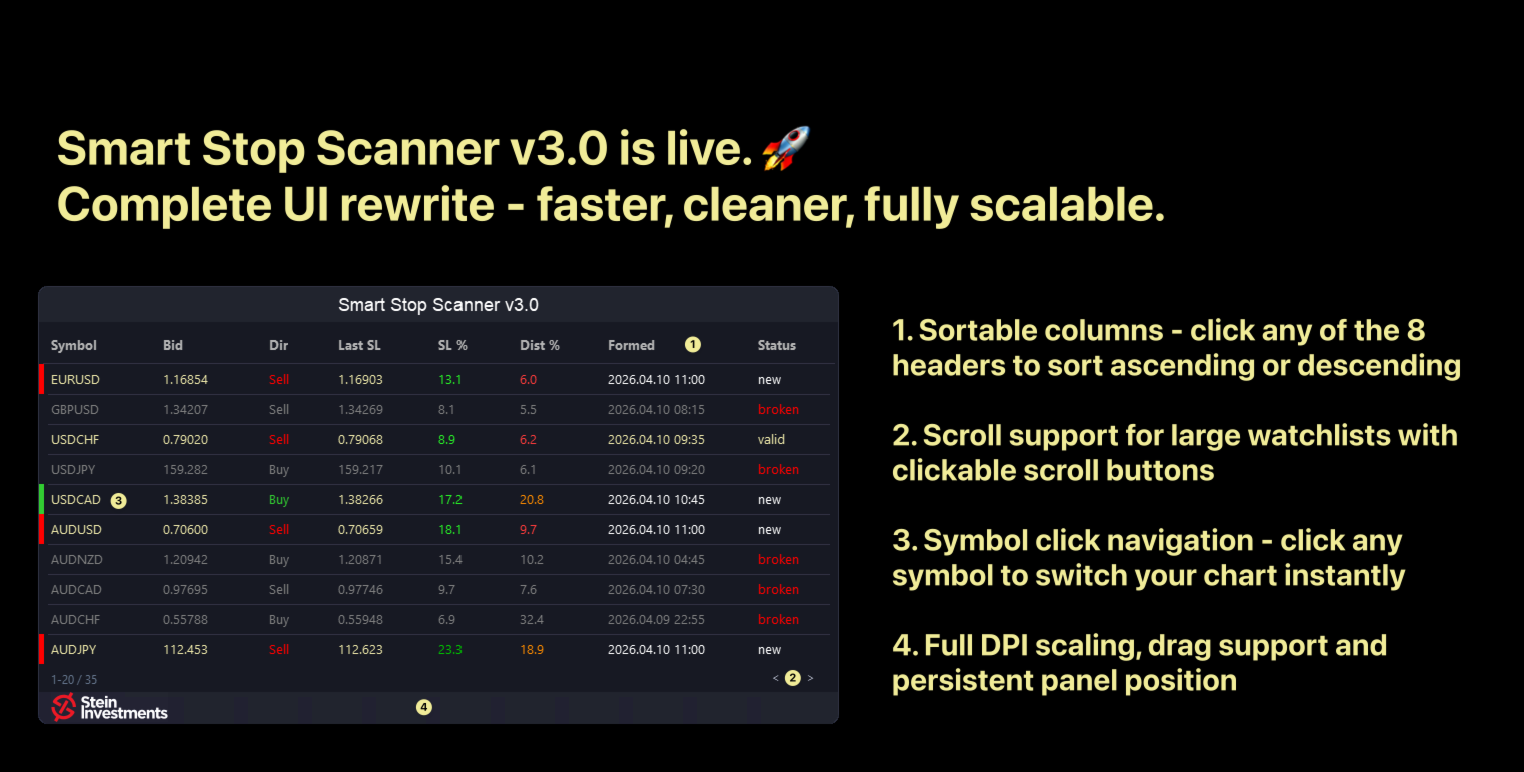
The Smart Stop Scanner brings professional stop-loss monitoring to every chart. It analyzes market structure, detects meaningful breakouts, and identifies the most relevant protective levels across Forex, Gold, Indices, Metals, Crypto, and more. All results appear inside one clean, DPI-aware dashboard designed for clarity, speed, and instant decision-making.

This tool is part of the Stein Investments ecosystem - 18+ tools plus Max, your 1-on-1 AI trading mentor. 

Always on, knows every indicator in depth, available the moment you need to think something through. 

How Stop-Loss Levels Are Identified
Instead of relying on indicators, volatility bands, or arbitrary formulas, the Scanner uses a price-action-based model that detects breakouts, higher highs, and lower lows to locate realistic and structurally meaningful stop-loss zones. This approach mirrors how professional traders interpret market structure: clean, objective, and directly tied to the underlying price action.

Highlights

• Multi-asset precision
Works seamlessly on Forex, Gold, Indices, Metals, Crypto, and exotic CFDs with full adaptive digit and tick-size handling.

• Instant structural context
New, broken, and active stop-loss levels are detected in real time, including direction, formation time, and distance from price.

• SL %ADR – adaptive stop quality rating
Each stop-loss level is compared to historical SL events of the same symbol. The adaptive color scale reveals whether a setup is very tight, tight, medium, wide, or very wide, based on statistically derived ranges – not arbitrary thresholds.

• Dist % – real-time stop proximity
Shows how close price is to the active stop as a percentage of ADR, providing a universal distance metric that works across all asset classes. The value is displayed with an adaptive risk-color scale that immediately shows whether the stop is in danger, risk zone, comfortable range, safe, or very safe territory.

• Formed Time (SL Creation Time)
Displays the exact candle where the stop-loss was created, providing instant clarity about freshness, reliability, and structural age.

• Clean, stateless tooltips
Tooltips offer compact explanations for SL %ADR, Dist %, and stop-range classification, giving traders instant insight without cluttering the panel.

• Robust alert system
Alerts fire only on meaningful events: new stop, broken stop, or critical distance. No noise, no duplicates – perfect for disciplined intraday or multi-asset setups.


Why It Matters

Every trader uses stop-losses, but almost nobody has a systematic way to evaluate them. The Smart Stop Scanner solves this problem by transforming raw levels into contextual insight:

• Where structure-based stops emerge

• How strong they are (SL %ADR)

• How close price is to breaking them (Dist %)

• When they were formed

• Whether they are still valid or already broken

Instead of guessing, traders see the full stop-loss landscape at a glance and make decisions with clarity and confidence.


Smart Stop Ecosystem

The Smart Stop Scanner is part of the integrated Smart Stop lineup:

Smart Stop Indicator – on-chart market-structure stop logic
Smart Stop Scanner – multi-symbol stop-loss monitoring
Smart Stop Manager – automated execution of recommended stops


Full FAQ of the Smart Stop Series:
Smart Stop – Full FAQ


User Inputs

  • Maximum symbols to scan – size of the dashboard
  • Scanning timeframe – global timeframe for SL logic
  • Symbol filter list – monitor specific instruments only
  • Panel filtering – choose which symbols appear in the panel
  • Status colors – customize Valid/New/Broken/Alert colors
  • Alert settings – new/broken/distance + popup/email/push/sound
  • ADR period – averaging period for volatility normalization
  • Distance threshold – Dist-% level that triggers warnings
  • Debug mode – extended logging for analysis

More Resources

All tutorials, guides, and live examples can be found here:
Stein Investments – Central Knowledge Hub

Follow live demonstrations and in-depth walkthroughs on YouTube:
Stein Investments – YouTube


SEO Keywords

smart stop scanner, market structure stop loss, multi-symbol stop tool, adr stop logic, adaptive stop loss model, forex stop dashboard, crypto stop scanner, gold stop loss system, professional risk tool, breakout stop logic, structural stop levels, mt5 stop monitor

Reviews 4
Marcus Kalipke
1619
Marcus Kalipke 2026.01.22 17:11 

⭐⭐⭐⭐⭐ Ich nutze den Smart Stop Scanner inzwischen regelmäßig und kann ihn absolut empfehlen – vor allem für alle, die nicht nur „ein paar Charts“ anschauen, sondern einen echten Marktüberblick brauchen und dabei strukturiert und effizient arbeiten wollen. Was den Scanner für mich besonders macht: Er ist nicht einfach ein „Stop-Rechner“, sondern ein sehr durchdachtes Scanning- und Übersichtstool, das einem hilft, Märkte schnell zu filtern, Chancen sauber einzuordnen und unnötigen Lärm auszublenden. Genau das ist im Trading-Alltag der größte Hebel: nicht noch mehr Informationen – sondern die richtigen Informationen in einer klaren Struktur. ✅ Stärken, die im Alltag wirklich zählen Schneller Marktüberblick: Der Scanner liefert eine klare Übersicht, ohne dass man sich durch endlose Charts klicken muss. Gerade wenn man viele Symbole beobachtet, spart das massiv Zeit. Konsistente Logik & nachvollziehbare Ergebnisse: Die Ausgaben wirken nicht „zufällig“, sondern stabil und wiederholbar. Das schafft Vertrauen und verhindert dieses typische „Tool-Hopping“, weil man nicht sicher ist, ob das Ergebnis morgen wieder anders aussieht. Perfekt als automatisiertes Screening: Für mich ist der größte Vorteil, dass der Scanner sich hervorragend eignet, um Märkte automatisiert vorzuselektieren. Dadurch wird der Workflow deutlich ruhiger: Erst kommt die Übersicht und Filterung – dann die Entscheidung. Stabilität & Performance: Läuft zuverlässig und unauffällig im Hintergrund. Keine unnötigen Hänger, keine Spielereien, kein Chaos – einfach ein Tool, das seine Aufgabe macht. Saubere Darstellung / gute Nutzbarkeit: Die Informationen sind so aufbereitet, dass man sie schnell interpretieren kann. Das klingt banal, ist aber in der Praxis ein riesiger Unterschied. Wichtig ist: Der Smart Stop Scanner ist für mich vor allem ein Markt- und Signal-Überblickswerkzeug. Das eigentliche Stop-Management löse ich über den Smart Stop Scanner. Genau diese Kombination macht es so stark: Der Scanner hilft dabei, systematisch zu erkennen, wo es sich überhaupt lohnt, genauer hinzuschauen – und sorgt damit für einen viel professionelleren Ablauf. 💡 Fazit Der Smart Stop Scanner ist ein Tool, das man schnell zu schätzen lernt, weil es im Kern das liefert, was viele Produkte versprechen, aber nur wenige wirklich können: Übersicht, Struktur, Konsistenz und Alltagstauglichkeit. Für alle, die effizient scannen, bessere Vorauswahl treffen und ihren Trading-Workflow stabiler machen wollen, ist das eine klare Empfehlung.

Mzwakhe Dela
361
Mzwakhe Dela 2025.11.29 09:50 

I’ve been using the Smart Stop Scanner since its release on the 4th of November 2025, and I’m genuinely impressed with how much clarity and efficiency it brings to my trading workflow. As a price action trader who confirms bias on the 1-hour and 4-hour charts but executes on the 5-minute chart, the Scanner has become invaluable. It consolidates stop-loss monitoring across multiple instruments into one panel, instantly detecting new, broken, and shifting stop levels. The precision alerts and state memory ensure I only get notified about meaningful structural changes, which keeps me focused on genuine opportunities rather than being distracted by noise. Importantly, I’ve found that new stop level notifications can be looked at in conjunction with other tools such as FXPower NG, which helps confirm trend direction while also revealing strength or weakness and divergence between currencies — adding another layer of confidence to my decision-making. The SL Percentage (ADR-based stop-loss distance) has been particularly impactful, giving me immediate insight into whether my setups are tight and efficient or riding strong momentum. Low SL% values highlight high R:R opportunities that fit perfectly with my intraday entries, while high SL% values help me lock in profits during peak momentum phases. Combined with its universal market compatibility and seamless integration with the Smart Stop Indicator and Manager, the Scanner feels like a multi-market radar that aligns perfectly with my market structure approach. It has elevated my confidence in execution, made my trading more systematic and disciplined, and when paired with FXPower NG, it provides a powerful synergy for confirming both structure and currency strength dynamics.

Legacy6
661
Legacy6 2025.11.19 21:47 

Once again, the team at Stein Investments has created another tool that is beneficial for traders to use. The Smart Stop Scanner is fantastic at using market structure to find reliable stop loss levels, based on that market structure. I have had the tool for a few days and already made profitable trades using it. The ease of use and understanding of the tools make for a quick learning curve. The team has already made multiple updates to the scanner which provide even more value. If you struggle with placing stop losses at reasonable areas based on the movement of the market, I highly suggest you give the scanner a try.

Recommended products
Tick Volume Chart is a unique tool for building charts based on tick volumes in MetaTrader 5 . With Tick Volume Chart , you can create charts where each candle is formed not by time, but by a specified number of ticks. This gives you perfect precision in analyzing market activity, which is unattainable on standard time-based charts. You can use any indicators and Expert Advisors that support custom symbols. Working with the resulting charts is just as convenient as with standard ones. Unlike sta
TRINITY TREND — One EA, Three Trend Markets (Bitcoin, Ethereum, USDJPY) AT A GLANCE (MT5 backtest — historical, not a live record) - One EA, three low-correlation trend markets from one BTCUSD H4 chart: BTCUSD, ETHUSD and USDJPY Donchian breakouts in the SMA200 direction - Long window (2019.01-2026.06, tester-modelled ticks): Standard (default) +1,021% / Profit Factor 1.91 / equity drawdown 14.1% - 100% real-tick check (2026.01-2026.08, 38 trades): Standard Profit Factor 1.25 / equity drawdown
VTB High Watermark Drawdown Lock EA for MT5 Advanced Equity Protection & Drawdown Management System VTB High Watermark Drawdown Lock is a professional risk management Expert Advisor designed to protect trading accounts, funded accounts, and proprietary trading challenges from excessive drawdown. Unlike traditional drawdown protection systems that calculate risk from the initial account balance, this EA uses a dynamic High Watermark (HWM) model that continuously protects both your original capita
The indicator builds current quotes, which can be compared with historical ones and on this basis make a price movement forecast. The indicator has a text field for quick navigation to the desired date. Options: Symbol - selection of the symbol that the indicator will display; SymbolPeriod - selection of the period from which the indicator will take data; IndicatorColor - indicator color; Inverse - true reverses quotes, false - original view; Next are the settings of the text field, in w
Volume Profile Utility
AL MOOSAWI ABDULLAH JAFFER BAQER
Volume Profile Discover where the market really trades. Make decisions based on volume, not guesswork. Volume Profile is a professional MetaTrader utility that analyzes trading activity across different price levels, allowing traders to identify where the highest concentration of market participation has occurred. Instead of focusing only on price movement over time, Volume Profile reveals the price levels where buyers and sellers have been most active, providing valuable insight into market str
Trading Console makes your trading experience comfortable! This application cannot be tested in the strategy tester. Please obtain the demo version from the following link and test it. Download DEMO ver. This is for a demo account. 1. Features to help you during trading: (1) Display and Notifications for Economic Indicators: Receive alerts, push notifications, and emails a few minutes before the release of economic indicators. The screen flashes during alerts, making it easy to notice. Customi
SMART EXIT Currency Strength Meter is a professional Forex currency strength indicator designed to identify the strongest and weakest currencies in real time. The indicator analyzes 27 major Forex pairs and ranks the 8 major currencies according to their relative strength. By combining EMA momentum analysis with volatility-adjusted calculations, traders can quickly identify market leaders and laggards without manually reviewing dozens of charts. Main Features • Real-time ranking of the 8 major c
ClusterSecondForex
Rafil Nurmukhametov
4.67 (3)
The utility allows you to build different types of graphs: Seconds chart from 1 second to 86400 seconds Tick chart from 1 tick and above The volume chart Delta chart Renko chart Range chart Product demo https://www.mql5.com/ru/channels/clustersecondforex Built-in indicators for volumetric analysis: daily market profile and market profile of the selected timeframe, Cluster Search Imbalance VWAP Dynamic POC, VAH, VAL the profile depth of the market vertical volume with various display options, del
IceFX VelocityMeter Mini is a very unique indicator on MetaTrader 4 platform which measures the speed of the Forex market . It is not a normal volume or other measurement indicator because IceFX VelocityMeter Mini is capable to understand market speed movements which are hidden in ticks and those valuable information cannot be read in an ordinary way from the candles. The software monitors the received ticks (frequency, magnitude of change) within a specified time range, analyzes these info and
Tick Exporter
Georgios Baizanis
The EA allows you to extract the tick data history from the Mt5 terminal of your broker for any symbol. Extraction is done on the common folder. Open the data folder from your Mt5 terminal, go back one tree and then look for the common folder. Parameters fields (default values can change and all fields are imputable): 1. Symbol: leave blank if extraction is for the current chart symbol 2.Date 3. Time 4. Seconds before the time stamp under field 2, the  tick data  extraction to start 5. Second
OB FVG Trade Copier: Unified Master & Slave EA Version: 2.00 Type: Trade Copier / Risk Management Utility Compatibility: MetaTrader 4 & MetaTrader 5 (Cross-compatible codebase) Overview The OB FVG Trade Copier is a professional-grade, unified trade copying system designed to mirror trades between Master and Slave accounts seamlessly. Built with a unified architecture, a single EA file serves as both the sender (Master) and receiver (Slave) simply by toggling the EA Mode in the settings. It uti
FREE
Gold Trade Manager PRO MT5 is a manual trade management utility for MetaTrader 5. It is designed for traders who want to open, protect and manage positions directly from the chart without switching between multiple terminal windows. Current price: $59 - increases by $10 after every 20 purchases until reaching the final price of $119 . Next price: $69 . Complete Buyer Kit: 40 Professional Resources included at no additional cost. MT5 Presets, PDF Guides, Checklists, Mindmaps, Reference Cards, and
Trade Manger
Israr Hussain Shah
Here   our more valuable tools SMC Trend Trading   ,  Easy SMC Trading  ,  Institutional SMC Architect Volume Analysis Tools  ,  Volume flow Profile  ,  Market volume profile  , FVG with Volume  , Liquidity Heatmap Profile  ,  Volume Spread Analysis You Give an Instruction: When you run the script, a window pops up with a dropdown menu. You choose exactly what you want it to do from the list (e.g., "Close Profit Only" or "Delete Pending Orders"). It Scans Your Positions: The script then reads
Aura Gold Pro Edition
Stanislav Tomilov
4.43 (7)
Built to dominate the gold market. Official Information Seller profile Official channel User Guide LIMITED PRICE — $599 Aura Gold Pro Edition is available for $599 until the end of October . Starting November  1 , the price will increase to $999 — secure your copy before the price goes up. Live Trading Signals  Roboforex https://www.mql5.com/en/signals/2366593 FPMarkets https://www.mql5.com/en/signals/2358523 ICTrading https://www.mql5.com/en/signals/2380859 Description Aura Gold PRO Edition is
Order Type Ledger reads this account's own order history - not its trade history - and counts what happened to every order that was placed. It does not predict and it does not advise. It never looks at trade results; it only counts outcomes: filled, cancelled, expired, rejected. WHY THIS EXISTS Most trading tools only look back at trades that filled. A pending order that expired untouched, a stop order that got rejected, an order that sat for hours before it filled - none of that shows up in a
NRP Risk Manager Pro Institutional-Grade Trade Management & Prop Firm Protection Get the MetaTrader 4 Version Here: https://www.mql5.com/en/market/product/179888 Get the MetaTrader 5 Version Here: https://www.mql5.com/en/market/product/179885 Trading isn't just about finding the right entry; it is about flawlessly executing your edge while fiercely protecting your capital. NRP Risk Manager Pro is not an automated trading robot—it is a comprehensive, institutional-grade trade terminal d
Money Flow Profile MT4  HERE   Use Guide Here our more valuable tools SMC Trend Trading   ,  Easy SMC Trading  ,  Institutional SMC Architect Volume Analysis Tools  ,  Volume flow Profile  ,  Market volume profile  , FVG with Volume  , Liquidity Heatmap Profile  ,  Volume Spread Analysis  Master Edition is a professional-grade analytical tool designed to visualize market structure through the lens of volume and money flow. Unlike standard volume indicators, this tool displays a Daily Vo
Drawdown Terminator
Sivakumar Paul Suyambu
5 (1)
Drawdown Terminator – Account-wide Equity Guardian for MT5 Protect your capital. Lock your profits. Sleep without watching every tick. ️ 1. What is Drawdown Terminator? Drawdown Terminator is an MT5 utility (non-trading Expert Advisor) designed to protect your entire account equity – not just a single EA or symbol. It continuously monitors your total account equity / capital , and when your Equity Profit Target or Equity Loss Limit is reached, it can automatically: Close all open position
This indicator allows you to enjoy the two most popular products for analyzing request volumes and market deals at a favorable price: Actual Depth of Market Chart Actual Tick Footprint Volume Chart This product combines the power of both indicators and is provided as a single file. The functionality of Actual COMBO Depth of Market AND Tick Volume Chart is fully identical to the original indicators. You will enjoy the power of these two products combined into the single super-indicator! Below is
Close by percentage MT5
Konstantin Kulikov
5 (1)
Hello friends. I wrote this utility specifically for use in my profile with a large number of Expert Advisors and sets ("Joint_profiles_from_grid_sets"   https://www.mql5.com/en/blogs/post/747929 ). Now, in order to limit losses on the account, there is no need to change the "Close_positions_at_percentage_of_loss" parameter on each chart. Just open   one   additional chart, attach this utility and set the desired percentage for closing all trades on the account. The utility has the following fu
Footprint Chart Pro — Professional OrderFlow EA for MetaTrader 5 Version 6.34 | Professional tool for real traders | Institutional-Grade Visualization DEMO USERS - PLEASE SELECT EVERY TICK / REAL TICK WHEN TESTING AND YOU HAVE DOWNLOADED HISTORICAL DATA. IF YOU SEE A WAITING SCREEN AND IT IS NOT DOWNLOADING, IT MEANS YOU HAVE LOW HISTORICAL DATA. TRY 1 MIN AND 5 MIN FIRST ON 1 DAY DATA. ONE DAY DATA SHOULD BE THE NEWEST AND MOST CURRENT DATE. PLEASE WAIT UNTIL THE MARKET HAS ROLLED OVER PERIOD.
Best Tested Pairs :-  Step Index (Also can use on other pairs which spread is lowest) How does the Magic Storm work The Magic Storm will commence only if the Initial Trade becomes a losing trade. In case the initial trade is a profitable one, or has been closed by the trader there is no need for the Magic Stormto be initiated. Let’s assume that the initial trade was a 1 lot buy trade with Recovery Zone Range Pips is 50 and Recovery Zone Exit Pips is 150 pips. The take profit for this tr
Stop wasting time scanning dozens of currency pairs. MaMI Pair Quality Engine v5 instantly shows which pairs deserve attention and which pairs should be avoided, helping traders focus only on the highest-quality currency pair opportunities. Full Product Description MaMI Pair Quality Engine v5 is a MetaTrader 5 indicator designed to help traders quickly identify which forex pairs deserve attention before moving to deeper analysis or execution. Instead of forcing you to scan many pairs manually,
RSI Currency Strength Meter is a powerful and elegant multi-currency indicator that measures the real-time relative strength of the 8 major currencies using RSI logic. By calculating the smoothed performance of each currency across its major pairs and applying the RSI formula, it delivers clean and responsive strength lines that make it easy to spot which currencies are truly strong or weak at any moment. This indicator is particularly useful for visualizing currency correlations and divergence
Honest Breakeven
Konstantin Gruzdev
Indicator gives an honest picture of changes in breakeven levels for transactions throughout the account history, and not just for open positions (screenshot 1). Accurate calculation of levels, taking into account accrued commissions, fees and swaps, allows you to evaluate trading results both visually and in Expert Advisors (screenshot 2). For Expert Advisors, the indicator in its standard form provides not only the break-even level, but also the number of positions, volume, and all additional
Advanced Trading Chaos  The main purpose of the indicator is to help the trader detect the signals described by Bill Williams in his books to make a quick and correct trading decision. 1)Bullish/Bearish Reversal Bar(BDB) 2) Divergent Bar(DB) 3) Second Sage Signal — the third consecutive Awesome Oscillator bar  4) Working fractals (Fractals that worked above/below the red forehead  5) Three bar coloring modes 5.1) Coloring of bars according to the AO indicator (Including the squatting bar) 5.2
Iconic BTC AI
Maurice Prang
5 (1)
ICONIC BTC AI+ | SYNAPSE.PHENOTYPE S6 ENGINE (Version 15.00) Launch Pricing Current price: 599 USD. Available licenses: 10. Next price tier: 699 USD. Final price: 1699 USD. Early access pricing reflects the current phase of the product release. Pricing will step up as the license contingent closes and subsequent tiers open. There is no scheduled date after which the current price remains available. Bitcoin is not a Forex pair. It does not behave like gold, does not respect session boundaries th
Arrow Micro Scalper - an indicator designed for scalping and short-term trading, integrated into any chart and financial instrument (currency, crypto, stocks, metals). In its work, it uses wave analysis and a trend direction filter. It is recommended to use on time frames from M1 to H4. How to work with the indicator. The indicator contains 2 external parameters for changing the settings, the rest are already configured by default. Large arrows indicate a change in trend direction, blue - the
ClusterSecond
Rafil Nurmukhametov
4.78 (32)
The utility allows you to build different types of graphs: Seconds chart from 1 second to 86400 seconds Tick chart from 1 tick and above The volume chart Delta chart Renko chart Range chart Demo version of the utility https://www.mql5.com/ru/channels/clustersecond Built-in indicators for volumetric analysis: daily market profile and market profile of the selected timeframe, Cluster Search Imbalance VWAP Dynamic POC, VAH, VAL the profile depth of the market vertical volume with various display op
try the free limited version first: https://www.mql5.com/en/market/product/188573?source=Site +Profile+Seller Unlock the full power of MT5 with NGA Pro Next Gen Assistant Pro — the most advanced trading assistant designed to give you full control over your trades… even from your phone! . -Risk calculation, dollars stop loss based: by using NGA you can set the exact amount you willing to lose each time, without having to deal with manual pips calculation,     just   drag the visual Stop lo
Buyers of this product also purchase
Trade Assistant MT5
Evgeniy Kravchenko
4.43 (216)
It helps to calculate the risk per trade, the easy installation of a new order, order management with partial closing functions, trailing stop of 7 types and other useful functions. Additional materials and instructions Installation instructions - Application instructions - Trial version of the application for a demo account Line function -   shows on the chart the Opening line, Stop Loss, Take Profit. With this function it is easy to set a new order and see its additional characteristics bef
Forex Trade Manager MT5
InvestSoft
4.98 (686)
Trade Manager MT5 is an advanced position size calculator and trade management tool for MetaTrader 5, designed to help traders plan trades faster, control risk more precisely, and manage open positions directly from the chart. It combines order placement, risk based lot calculation, Stop Loss and Take Profit management, Break Even, Trailing Stop, Partial Close, Equity Protection, and external trade management in one panel. Whether you trade forex, indices, metals, commodities, crypto, or future
Telegram to MT5 MultiChannel Copier
Sergio Marquez Uroz
4.63 (19)
Telegram to MT5 Multi-Channel Copier   automatically copies trading signals from your Telegram and Discord channels straight to MetaTrader 5. No bots, no browser extensions, no manual copying. A signal arrives in Telegram or Discord and the EA opens the trade in your terminal within seconds. And before you copy a channel, the built-in backtester shows you what that channel would have done in your account. The product has two components: a Windows application that listens to your Telegram channel
================================================================================ POC BREAKOUT - V20.72. Full Professional Grade Toolkit ================================================================================ POC Breakout is a full MetaTrader 5 trading dashboard for discretionary traders who want breakout signals, Point of Control (POC) context, volume profiles, order flow, market structure, news, alerts, and advanced trade planning in one professional workspace. Attached directly to you
TradePanel MT5
Alfiya Fazylova
4.88 (170)
Trade Panel is a multi-functional trading assistant. The app contains over 50 trading functions for manual trading and allows you to automate most trading tasks. Application instructions: https://www.mql5.com/en/blogs/post/756482 Trial version of the application for a demo account: https://www.mql5.com/en/blogs/post/750865 How to install the application: https://www.mql5.com/en/blogs/post/756239 How to test the application in visual mode: https://www.mql5.com/en/blogs/post/770277 How to install
The Patch
Mian Rameez Ali
The Patch It never opens a trade. It walks behind the ones that did. Every open position, every pending order — checked twice a second for the one thing that's easy to forget: a stop, a target. Found bare, it doesn't ask. It writes the missing number in, measured in points from wherever the position began, and moves on to the next. No strategy, no opinion on direction. Just the quiet assumption that nothing should ever sit on the market unprotected — not because someone decided it shouldn't,
Copy Telegram signals with your own trading rules Telegram to MT5 Signal Trader automatically copies text-based trading signals from public and private Telegram channels and groups into MetaTrader 5. Manage multiple providers and MT5 accounts from one desktop app, with individual risk and trade settings for each provider . No Telegram bot or API setup needed for copying. Simply sign in with your own Telegram account by phone or QR code and select the channels or groups you have already joined. Y
Floor Watch
Syed Tauqeer Hussain Shah
Floor Watch One number, watched every thirty seconds: how far equity has fallen since the day began — or since its highest point, if it's told to trail the peak instead of the open. Cross the line and it doesn't argue. Every open position closes, every pending order vanishes, and anything that slips through afterward gets shut the moment it appears. Not asked. Removed. The floor holds until the clock turns 5 AM Pakistan time — then, and only then, does the day start over. One rule. No except
Buy once. Get all my MT4 and MT5 indicators - available now and released in the future - at no extra cost. Contact me after purchase for instructions to receive them. The price is planned to rise by 50$ after every 10 purchases, up to 999$. The Market price at checkout applies. Keep the indicator you trust. Automate the work around it. Your signal. Your rules. Your execution. Already have an MT5 indicator you rely on, but still need to watch the chart, wait for a signal, calculate the lot, plac
Power Candles Strategy Scanner - Self-Optimizing Multi-Symbol Setup Finder Self-optimizing settings work one chart at a time, and finding where they pay off right now means opening chart after chart. Power Candles Strategy Scanner runs the same self-optimizing engine as the Power Candles indicator on every symbol in your Market Watch, side by side. One panel ranks where it pays off: the winning strategy per symbol, its optimized Stop Loss and Take Profit. An alert fires the moment a fresh signal
Grid Manual MT5
Alfiya Fazylova
4.73 (22)
Grid Manual is a trading panel for working with grid strategies. The utility is universal, has flexible settings and an intuitive interface. It works with a grid of orders not only in the direction of averaging losses, but also in the direction of increasing profits. The trader does not need to create and maintain a grid of orders, the utility will do it. It is enough to open an order and the "Grid manual" will automatically create a grid of orders for it and will accompany it until the close. F
MT5 to Telegram Signal Provider turns your trading account into a signal provider. Every trade action, whether manual, by EA or from your phone, is instantly sent as a message to Telegram. You can fully customize the format or use a ready-made template for quick setup. [ Demo ] [ Manual ] [ MT4 Version ] [ Discord Version ]     New: [ Telegram To MT5 ] Setup A step by step user guide is available. Key Features Ability to customize order details sent to subscribers You can create a tiered subs
Daily Trading Limiter
AL MOOSAWI ABDULLAH JAFFER BAQER
5 (8)
• Please test the product in the Strategy Tester before purchasing to understand how it works. • If you face any issues, contact me via private message—I’m always available to help. • After purchase, send me a screenshot of your order to receive a FREE EA as a gift. Daily Trading Limiter — the rule you cannot break Every trader knows the number. Three trades. Two percent. One bad day and stop. And every trader has watched themselves take the fourth trade anyway. The problem was never knowing th
Welcome to ENTRY IN THE ZONE with SMC MULTI TIMEFRAME SPECIAL BENEFIT / FOR OUR MQL5 CUSTOMERS FREE ACCESS TO THE NEW TOOL  — COMING SOON — Learn more on our official website  : https://www.fableedge.net Entry In The Zone with SMC Multi Timeframe is a real-time market analysis tool based on Smart Money Concepts (SMC), designed to analyze market structure, price direction, and key trading zones. It supports both Single-Timeframe and Multi-Timeframe Analysis, providing a clearer view of overall ma
VirtualTradePad PRO SE MT5 — professional trading control center for MetaTrader 5 VirtualTradePad PRO SE is a premium chart-based trading panel and trade-management workspace for MetaTrader 5 . It is designed for traders who want faster execution, clearer position control, structured trade management, visual level planning and a professional workflow directly from the chart. This is not only a BUY / SELL panel. PRO SE combines manual trading, pending orders, position management, partial exits, b
Trading Chaos Expert
Hennadii Stanilevych
5 (11)
This software has no equals in the world and represents a universal trade "console" covering trading signals, automated market entry, setting of Stop Loss and Take Profit, as well as Trailing Profit for multiple trades at the same time in a single open window. Intuitive control of the Expert Advisor in "three clicks" ensures a comprehensive use of all its functions on different computers, including tablets PCs. Interacting with additional signal indicators that mark the chart to give a real mark
Copy your MT5 trades to Interactive Brokers You keep using MT5. Every order you open or close is sent to your IB account. In real time. No coding. No changes to your strategy or EA. Try it first Rent 1 month: $30. Test on a live or paper account. What it does Real-time copying: same direction, reverse, or one side only. Map any MT5 symbol to any IB symbol. Set a lot ratio for each. Forex, Futures, Stocks, CFDs, Metals and Crypto. Position sync: both accounts checked, any difference fixed. Optio
Trade Manager DaneTrades
Levi Dane Benjamin
4.23 (30)
DaneTrades Trade Manager is a professional trade panel for MetaTrader 5, designed for fast, accurate execution with built‑in risk control. Place market or pending orders directly from the chart while the panel automatically calculates position size from your chosen risk, helping you stay consistent and avoid emotional decision‑making. The Trade Manager is built for manual traders who want structure: clear risk/reward planning, automation for repeatable management, and safeguards that help reduc
Premium Trade Manager - The Trade Panel With a Coach Built In Premium Trade Manager puts a trading coach inside your chart, with a full execution engine underneath it. Set the trade up the way you always do, then let Max, your AI trading coach, read that exact setup against your live account and give you a straight verdict before you commit: is the stop disciplined, is the risk sane, is a high-impact release minutes away, are you near a prop-firm limit. Below sits the engine that runs everything
Trade Indicator Assistant   is a powerful MT5 utility designed to turn indicators into automated trading systems. Its main feature is the ability to automatically detect an indicator’s   BUY and SELL signal buffers , without requiring you to know the buffer numbers, search through indicator settings, or modify the indicator source code. Bonus Indicator:   After purchasing Trade Indicator Assistant, contact me to receive   Trade Signal Pro   completely free as a bonus indicator. [Download Demo V
Anchor Trade Manager
Kalinskie Gilliam
5 (9)
Your EAs cannot see each other, but Anchor can. Anchor gives you one place to coordinate your EAs, manage risk, and decide when trading is allowed. It works alongside the trading bots you already use without any changes to them. The Problem One EA opens a trade. Then another starts trading. The next thing you know, you wake up to multiple grids built across your account. Each EA may be doing exactly what it was designed to do, but together they can place far more risk on your account than you in
EA Overfitter
Stephen J Martret
5 (1)
That backtest looks great. But will it still be making money tomorrow, next week, next month? EA Overfitter re-runs your EA on 100 price histories it has never seen. One score tells you if the edge is real. A backtest tells you what an EA did on one price history — the one that happened to occur. What you cannot tell from it is how much of that result was the strategy and how much was the particular path. EA Overfitter answers that. It builds up to 100 synthetic price histories your EA has n
FarmedHedge Pair Trading Dashboard
Tanapisit Tepawarapruek
5 (5)
Farmed Hedge Yield Farming | All Markets (Manual - Hybrid - Semi/Automated EA) VERIFIED TRADING RESULTS - Farmed Hedge Yield Axi Copy:  https://www.mql5.com/en/signals/2356376 - Farmed Hedge Yield Exn Copy:   https://www.mql5.com/en/signals/2356404 - Farmed Hedge Yield V Copy:  https://www.mql5.com/en/signals/2357156 IMPORTANT NOTICE: FarmedHedge is a MANUAL-FOCUSED TRADING UTILITY ,not a fully automated EA. Results shown on this Signal include manual trades and overall strategic management.
YuClusters
Yury Kulikov
4.93 (43)
Attention: You can view the program operation in the free version  YuClusters DEMO .  YuClusters is a professional market analysis system. The trader has unique opportunities to analyze the flow of orders, trade volumes, price movements using various charts, profiles, indicators, and graphical objects. YuClusters operates on data based on Time&Sales or ticks information, depending on what is available in the quotes of a financial instrument. YuClusters allows you to build graphs by combining da
The product will copy all telegram signal to MT5 ( which you are member) , also it can work as remote copier.  Easy to set up, copy order instant, can work with almost signal formats, image signal,  s upport to translate other language to English Work with all type of channel or group, even channel have "Restrict Saving Content", work with  multi channel, multi MT5 Work as remote copier: with signal have ticket number, it will copy exactly via ticket number. Support to backtest signal. How to s
Take a Break MT5
Eric Emmrich
4.76 (25)
Take a Break pauses your Expert Advisors when trading is a bad idea: before news, after a daily loss, outside your trading hours, or when a rule you wrote yourself says so. When the pause is over, your EAs simply continue. Account protection for all your EAs in one tool: news filter, drawdown and equity protection, time filter and custom rules. One EA on one chart protects the whole account, the free indicator gives every chart its own rules on top. Free demo | What is new in 26.09 | Support Ass
FUTURES ORDERFLOW FOOTPRINT CHART Professional OrderFlow EA for MetaTrader 5 Version 1.01| Professional tool for real traders | Institutional-Grade Visualization STRATEGY TESTER USERS - PLEASE SELECT EVERY REAL TICK WHEN TESTING AND YOU HAVE DOWNLOADED HISTORICAL DATA. IF YOU SEE A WAITING SCREEN AND IT IS NOT DOWNLOADING, IT MEANS YOU HAVE LOW HISTORICAL DATA. TRY 1 MIN AND 5 MIN FIRST ON 1 DAY DATA. ONE DAY DATA SHOULD BE THE NEWEST AND MOST CURRENT DATE. PLEASE WAIT UNTIL THE MARKET HAS ROL
is a lightweight but powerful utility designed for traders who need instant visual feedback and automated exit levels . It seamlessly integrates a customizable Information Panel directly onto your trading chart while managing your risk in the background . Dynamic UI: Move the information display to any of the four corners of your chart and customize the font, size, and colors to match your template . Precision Control: Define your Stop Loss and Take Profit in points, which the EA then calculates
AI Arbitron — an MT5 Spot vs Future Gold Arbitrage Bot designed to capture price discrepancies between correlated Spot and Future instruments through hedged, non-directional trading. Platform: MT5 Asset: Mainly Gold (XAUUSD) using Spot + Future/CFD price feeds. Core strategy: It monitors the price gap between Spot and Future. When the gap reaches your defined threshold, it opens hedged positions—typically Buy Spot + Sell Future (or the reverse depending on the gap). Exit: Positions are closed
EasyInsight AIO MT5
Alain Verleyen
4.92 (12)
EASY Insight AIO – All-In-One Power for AI-Driven Trading Want to skip the setup and start scanning the entire market – Forex, Gold, Crypto, Indices, and even Stocks – in seconds? EASY Insight AIO is the complete plug-and-play solution for AI-powered trade analysis. It includes all core Stein Investments indicators built-in and automatically exports clean, structured CSV files – perfect for backtesting, AI prompts, and live market decision-making. No need to install or configure indicators manu
More from author
Power Candles Strategy Scanner - Self-Optimizing Multi-Symbol Setup Finder Self-optimizing settings work one chart at a time, and finding where they pay off right now means opening chart after chart. Power Candles Strategy Scanner runs the same self-optimizing engine as the Power Candles indicator on every symbol in your Market Watch, side by side. One panel ranks where it pays off: the winning strategy per symbol, its optimized Stop Loss and Take Profit. An alert fires the moment a fresh signal
FX Trend MT5 NG
Daniel Stein
5 (6)
FX Trend NG: The Next Generation Multi-Market Trend Intelligence Overview FX Trend NG is a professional multi-timeframe trend and market monitoring tool designed to give you a complete structural overview of the market in seconds. Instead of switching between dozens of charts, you instantly see which symbols are trending, where momentum is fading, and where strong alignment exists across timeframes. This tool is part of the Stein Investments ecosystem - 18+ tools plus Max, your 1-on-1 AI tradi
Power Candles MT5
Daniel Stein
4.58 (12)
Power Candles - Self-Optimizing Strength Indicator Strength usually lives in a sub-window. The line runs below, the candle above, and your eye keeps connecting the two. Power Candles puts the strength into the candle itself, colored from dark red to dark green, so the chart reads at a glance and the sub-window stays closed. The indicator also finds its own settings for the symbol and timeframe in front of you. One click on [ Apply Best ] draws entry, Stop Loss and Take Profit at the exact prices
Premium Trade Manager - The Trade Panel With a Coach Built In Premium Trade Manager puts a trading coach inside your chart, with a full execution engine underneath it. Set the trade up the way you always do, then let Max, your AI trading coach, read that exact setup against your live account and give you a straight verdict before you commit: is the stop disciplined, is the risk sane, is a high-impact release minutes away, are you near a prop-firm limit. Below sits the engine that runs everything
FX Power MT5 NG
Daniel Stein
5 (33)
FX Power: Analyze Currency Strength for Smarter Trading Decisions Overview FX Power is your go-to tool for understanding the real strength of currencies and Gold in any market condition. By identifying strong currencies to buy and weak ones to sell, FX Power simplifies trading decisions and uncovers high-probability opportunities. Whether you’re looking to follow trends or anticipate reversals using extreme delta values, this tool adapts seamlessly to your trading style. Don’t just trade—trade
IX Power MT5
Daniel Stein
4.92 (13)
IX Power: Unlock Market Insights for Indices, Commodities, Cryptos, and Forex Overview IX Power is a versatile tool designed to analyze the strength of indices, commodities, cryptocurrencies, and forex symbols. While FX Power offers the highest precision for forex pairs by leveraging all available currency pair data, IX Power focuses exclusively on the underlying symbol’s market data. This makes IX Power an excellent choice for non-forex markets and a reliable option for forex charts when deta
Yukon
Daniel Stein
5 (1)
Yukon · The Gold EA That Reads the Market First Yukon runs four engines on XAUUSD under one market-state layer: every day, Yukon reads the gold market's state (trend, transition, range, volatility) and lets each engine trade only when the state favours it. The original Grid, a hierarchical Pattern Long, a Pattern Short, and a swing Breakout that trades only when a structure check confirms an established move. Built around a hard equity cap, live USD-news protection, weekend-flat positions and li
Smart Stop Manager MT5
Daniel Stein
4.5 (4)
Smart Stop Manager – Automated Stop-Loss Execution with Professional Precision Overview The Smart Stop Manager is the execution layer of the Smart Stop lineup, built for traders who require structured, reliable, and fully automated stop-loss management across multiple open positions. It continuously monitors active trades, calculates the optimal stop level using Smart Stop market-structure logic, and updates stops automatically with clean, transparent rules. Whether managing a single asset or
FX Volume MT5
Daniel Stein
4.79 (24)
FX Volume: Experience Genuine Market Sentiment from a Broker’s Perspective Quick Overview Looking to elevate your trading approach? FX Volume provides real-time insights into how retail traders and brokers are positioned—long before delayed reports like the COT. Whether you’re aiming for consistent gains or simply want a deeper edge in the markets, FX Volume helps you spot major imbalances, confirm breakouts, and refine your risk management. Get started now and see how genuine volume data can
FX Levels MT5
Daniel Stein
5 (15)
FX Levels: Exceptionally Accurate Support & Resistance for All Markets Quick Overview Looking for a reliable way to pinpoint support and resistance levels across any market—currencies, indices, stocks, or commodities? FX Levels merges our traditional “Lighthouse” method with a forward-thinking dynamic approach, offering near-universal accuracy. By drawing from real-world broker experience and automated daily plus real-time updates, FX Levels helps you identify reversal points, set profit targe
Smart Stop Indicator - Intelligent Stop-Loss Precision Directly on Your Chart A proven stop method can still take you out of a trade too early. Smart Stop Indicator reads the market structure and shows the most recent valid stop level for the current direction, BUY or SELL, right on your chart: the exact price, its distance as a percentage of the Average Daily Range, and its status live: new, valid or broken. When the structure forms a new stop, the level follows. Alerts report a new level and a
Custom Alerts AIO: All-in-One Market Scanner – No Setup Required Overview Custom Alerts AIO is the fastest and easiest way to monitor multiple markets for real-time trading signals—without any setup or extra licenses. It comes with all required Stein Investments indicators already embedded, making it the perfect plug-and-play solution for traders who value simplicity and performance. Just load it to any chart and start receiving alerts across Forex, Metals, Crypto, and Indices. Shares can be a

Crosshair MT5
Daniel Stein
5 (1)
This tool is part of the Stein Investments ecosystem - 18+ tools plus Max, your 1-on-1 AI trading mentor.  Always on, knows every indicator in depth, available the moment you need to think something through.  Meet him at https://stein.investments Crosshair is a fantastic tool that simplifies our chart analysis by bringing the price candles perfectly in line with the indicator values in the subwindows. You can enable and disable it via a single press on the "C" of your keyboard, and it provide
FREE
Custom Alerts MT5
Daniel Stein
5 (9)
Custom Alerts: Monitor Multiple Markets and Never Miss a Key Setup Overview Custom Alerts is a dynamic solution for traders who want a consolidated way to track potential setups across multiple instruments. By integrating data from our flagship tools—such as FX Power, FX Volume, FX Dynamic, FX Levels, and IX Power— Custom Alerts automatically notifies you of crucial market developments without juggling multiple charts or missing prime opportunities. With support for all asset classes your brok
IX Power MT4
Daniel Stein
4.82 (11)
IX Power: Unlock Market Insights for Indices, Commodities, Cryptos, and Forex Overview IX Power is a versatile tool designed to analyze the strength of indices, commodities, cryptocurrencies, and forex symbols. While FX Power offers the highest precision for forex pairs by leveraging all available currency pair data, IX Power focuses exclusively on the underlying symbol’s market data. This makes IX Power an excellent choice for non-forex markets and a reliable option for forex charts when deta
FX Power MT4 NG
Daniel Stein
4.95 (21)
FX Power: Analyze Currency Strength for Smarter Trading Decisions Overview FX Power is your go-to tool for understanding the real strength of currencies and Gold in any market condition. By identifying strong currencies to buy and weak ones to sell, FX Power simplifies trading decisions and uncovers high-probability opportunities. Whether you’re looking to follow trends or anticipate reversals using extreme delta values, this tool adapts seamlessly to your trading style. Don’t just trade—trade
FX Dynamic MT5
Daniel Stein
5 (5)
FX Dynamic: Track Volatility and Trends with Customized ATR Analysis Overview FX Dynamic is a powerful tool that leverages Average True Range (ATR) calculations to give traders unparalleled insights into daily and intraday volatility. By setting up clear volatility thresholds—such as 80%, 100%, and 130%—you can quickly identify potential profit opportunities or warnings when markets exceed typical ranges. FX Dynamic adapts to your broker’s time zone, helps you maintain a consistent measure of
See which strategy actually works on your symbol - before you risk real money. Power Bar detects extreme price bars on any symbol and any timeframe, then instantly backtests 3 different trading strategies so you can compare win rates, profit factors, and P&L side by side. All in a single interactive panel. No guessing. No curve-fitting. Just data. This tool is part of the Stein Investments ecosystem - 18+ tools plus Max, your 1-on-1 AI trading mentor.  Always on, knows every indicator in depth,
SI Connect MT5
Daniel Stein
5 (3)
SI Connect is a utility that establishes the connection to our servers to use FX Volume. This tool is part of the Stein Investments ecosystem - 18+ tools plus Max, your 1-on-1 AI trading mentor.  Always on, knows every indicator in depth, available the moment you need to think something through.  Meet him at https://stein.investments Technical instructions to prepare your terminal for the usage of SI Connect Allow web requests and insert https://stein.investments to the list of allowed URLs in
FREE
SI Connect
Daniel Stein
5 (3)
SI Connect is a utility that establishes the connection to our servers to use FX Volume. This tool is part of the Stein Investments ecosystem - 18+ tools plus Max, your 1-on-1 AI trading mentor.  Always on, knows every indicator in depth, available the moment you need to think something through.  Meet him at https://stein.investments Technical instructions to prepare your terminal for the usage of SI Connect Allow web requests and insert https://stein.investments to the list of allowed URLs in
FREE
Crosshair
Daniel Stein
This tool is part of the Stein Investments ecosystem - 18+ tools plus Max, your 1-on-1 AI trading mentor.  Always on, knows every indicator in depth, available the moment you need to think something through.  Meet him at https://stein.investments Crosshair is a fantastic tool that simplifies our chart analysis by bringing the price candles perfectly in line with the indicator values in the subwindows. You can enable and disable it via a single press on the "C" of your keyboard, and it provide
FREE
FX Levels MT4
Daniel Stein
5 (2)
FX Levels: Exceptionally Accurate Support & Resistance for All Markets Quick Overview Looking for a reliable way to pinpoint support and resistance levels across any market—currencies, indices, stocks, or commodities? FX Levels merges our traditional “Lighthouse” method with a forward-thinking dynamic approach, offering near-universal accuracy. By drawing from real-world broker experience and automated daily plus real-time updates, FX Levels helps you identify reversal points, set profit targe
FX Volume
Daniel Stein
4.63 (38)
FX Volume: Experience Genuine Market Sentiment from a Broker’s Perspective Quick Overview Looking to elevate your trading approach? FX Volume provides real-time insights into how retail traders and brokers are positioned—long before delayed reports like the COT. Whether you’re aiming for consistent gains or simply want a deeper edge in the markets, FX Volume helps you spot major imbalances, confirm breakouts, and refine your risk management. Get started now and see how genuine volume data can
Custom Alerts MT4
Daniel Stein
5 (7)
Custom Alerts: Monitor Multiple Markets and Never Miss a Key Setup Overview Custom Alerts is a dynamic solution for traders who want a consolidated way to track potential setups across multiple instruments. By integrating data from our flagship tools—such as FX Power, FX Volume, FX Dynamic, FX Levels, and IX Power— Custom Alerts automatically notifies you of crucial market developments without juggling multiple charts or missing prime opportunities. With support for all asset classes your brok
FX Dynamic: Track Volatility and Trends with Customized ATR Analysis Overview FX Dynamic is a powerful tool that leverages Average True Range (ATR) calculations to give traders unparalleled insights into daily and intraday volatility. By setting up clear volatility thresholds—such as 80%, 100%, and 130%—you can quickly identify potential profit opportunities or warnings when markets exceed typical ranges. FX Dynamic adapts to your broker’s time zone, helps you maintain a consistent measure of
Custom Alerts AIO: All-in-One Market Scanner – No Setup Required Overview Custom Alerts AIO is the fastest and easiest way to monitor multiple markets for real-time trading signals—without any setup or extra licenses. It comes with all required Stein Investments indicators already embedded, making it the perfect plug-and-play solution for traders who value simplicity and performance. Just load it to any chart and start receiving alerts across Forex, Metals, Crypto, and Indices. Shares can be a

REVDEN Terminal – AI-Powered Market Intelligence Directly in Your Chart Overview The REVDEN Terminal is a compact information panel that brings real-time market intelligence into your MetaTrader 5 chart. Three tabs - News Calendar, Symbol Analysis, and Market Weather - deliver a structured overview of what matters right now. A built-in alert system monitors your open positions and warns you before high-impact news events affect your trades. Dark Mode and Light Mode included. This tool is part
Scan your entire watchlist for extreme bars - in real time. Power Bar Scanner monitors all your symbols at once and alerts you the moment an extreme price bar appears. No more flipping through charts. See every opportunity in one panel. Works on any timeframe. Forex, Indices, Gold, Crypto - all in one view. This tool is part of the Stein Investments ecosystem - 18+ tools plus Max, your 1-on-1 AI trading mentor.  Always on, knows every indicator in depth, available the moment you need to think s

Filter:
Marcus Kalipke
1619
Marcus Kalipke 2026.01.22 17:11 

⭐⭐⭐⭐⭐ Ich nutze den Smart Stop Scanner inzwischen regelmäßig und kann ihn absolut empfehlen – vor allem für alle, die nicht nur „ein paar Charts“ anschauen, sondern einen echten Marktüberblick brauchen und dabei strukturiert und effizient arbeiten wollen. Was den Scanner für mich besonders macht: Er ist nicht einfach ein „Stop-Rechner“, sondern ein sehr durchdachtes Scanning- und Übersichtstool, das einem hilft, Märkte schnell zu filtern, Chancen sauber einzuordnen und unnötigen Lärm auszublenden. Genau das ist im Trading-Alltag der größte Hebel: nicht noch mehr Informationen – sondern die richtigen Informationen in einer klaren Struktur. ✅ Stärken, die im Alltag wirklich zählen Schneller Marktüberblick: Der Scanner liefert eine klare Übersicht, ohne dass man sich durch endlose Charts klicken muss. Gerade wenn man viele Symbole beobachtet, spart das massiv Zeit. Konsistente Logik & nachvollziehbare Ergebnisse: Die Ausgaben wirken nicht „zufällig“, sondern stabil und wiederholbar. Das schafft Vertrauen und verhindert dieses typische „Tool-Hopping“, weil man nicht sicher ist, ob das Ergebnis morgen wieder anders aussieht. Perfekt als automatisiertes Screening: Für mich ist der größte Vorteil, dass der Scanner sich hervorragend eignet, um Märkte automatisiert vorzuselektieren. Dadurch wird der Workflow deutlich ruhiger: Erst kommt die Übersicht und Filterung – dann die Entscheidung. Stabilität & Performance: Läuft zuverlässig und unauffällig im Hintergrund. Keine unnötigen Hänger, keine Spielereien, kein Chaos – einfach ein Tool, das seine Aufgabe macht. Saubere Darstellung / gute Nutzbarkeit: Die Informationen sind so aufbereitet, dass man sie schnell interpretieren kann. Das klingt banal, ist aber in der Praxis ein riesiger Unterschied. Wichtig ist: Der Smart Stop Scanner ist für mich vor allem ein Markt- und Signal-Überblickswerkzeug. Das eigentliche Stop-Management löse ich über den Smart Stop Scanner. Genau diese Kombination macht es so stark: Der Scanner hilft dabei, systematisch zu erkennen, wo es sich überhaupt lohnt, genauer hinzuschauen – und sorgt damit für einen viel professionelleren Ablauf. 💡 Fazit Der Smart Stop Scanner ist ein Tool, das man schnell zu schätzen lernt, weil es im Kern das liefert, was viele Produkte versprechen, aber nur wenige wirklich können: Übersicht, Struktur, Konsistenz und Alltagstauglichkeit. Für alle, die effizient scannen, bessere Vorauswahl treffen und ihren Trading-Workflow stabiler machen wollen, ist das eine klare Empfehlung.

Mzwakhe Dela
361
Mzwakhe Dela 2025.11.29 09:50 

I’ve been using the Smart Stop Scanner since its release on the 4th of November 2025, and I’m genuinely impressed with how much clarity and efficiency it brings to my trading workflow. As a price action trader who confirms bias on the 1-hour and 4-hour charts but executes on the 5-minute chart, the Scanner has become invaluable. It consolidates stop-loss monitoring across multiple instruments into one panel, instantly detecting new, broken, and shifting stop levels. The precision alerts and state memory ensure I only get notified about meaningful structural changes, which keeps me focused on genuine opportunities rather than being distracted by noise. Importantly, I’ve found that new stop level notifications can be looked at in conjunction with other tools such as FXPower NG, which helps confirm trend direction while also revealing strength or weakness and divergence between currencies — adding another layer of confidence to my decision-making. The SL Percentage (ADR-based stop-loss distance) has been particularly impactful, giving me immediate insight into whether my setups are tight and efficient or riding strong momentum. Low SL% values highlight high R:R opportunities that fit perfectly with my intraday entries, while high SL% values help me lock in profits during peak momentum phases. Combined with its universal market compatibility and seamless integration with the Smart Stop Indicator and Manager, the Scanner feels like a multi-market radar that aligns perfectly with my market structure approach. It has elevated my confidence in execution, made my trading more systematic and disciplined, and when paired with FXPower NG, it provides a powerful synergy for confirming both structure and currency strength dynamics.

Legacy6
661
Legacy6 2025.11.19 21:47 

Once again, the team at Stein Investments has created another tool that is beneficial for traders to use. The Smart Stop Scanner is fantastic at using market structure to find reliable stop loss levels, based on that market structure. I have had the tool for a few days and already made profitable trades using it. The ease of use and understanding of the tools make for a quick learning curve. The team has already made multiple updates to the scanner which provide even more value. If you struggle with placing stop losses at reasonable areas based on the movement of the market, I highly suggest you give the scanner a try.

Daniel Stein
112567
Reply from developer Daniel Stein 2025.11.20 09:22
Legacy6, thank you very much for taking the time to share this wonderful review. I’m glad to hear that the Smart Stop Scanner is already helping you find reliable stop-loss levels and profitable trades. Your feedback about the learning curve and the continuous updates means a lot, and it motivates me to keep improving the Smart Stop Series. I truly appreciate your support. 🙏🙂
404 strategy not found
599
404 strategy not found 2025.11.19 12:58 

User didn't leave any comment to the rating

Daniel Stein
112567
Reply from developer Daniel Stein 2025.11.19 17:08
Gerard, thank you so much for taking the time to share this detailed review. Your feedback is incredibly valuable, especially since this is the very first review for the Smart Stop Scanner. I’m glad to hear the combination with the Smart Stop Manager works so well for your trading workflow, and I truly appreciate your trust in the Smart Stop Series. 🙏🙂
Reply to review