Installing a copier
In addition to the file in the MT4/5 terminal, you will need an EXE file (bridge for Telegram)
- Downloading the program:
2. Our Telegram Utility Channel with video guides:
Here have a lot of examples how to use and how to configure the utility for copying signals recorded by me for the utility's clients.
- Installation:
- Unzip the file and place the folder with the copier in a convenient place on your computer.
- Authorization in Telegram:
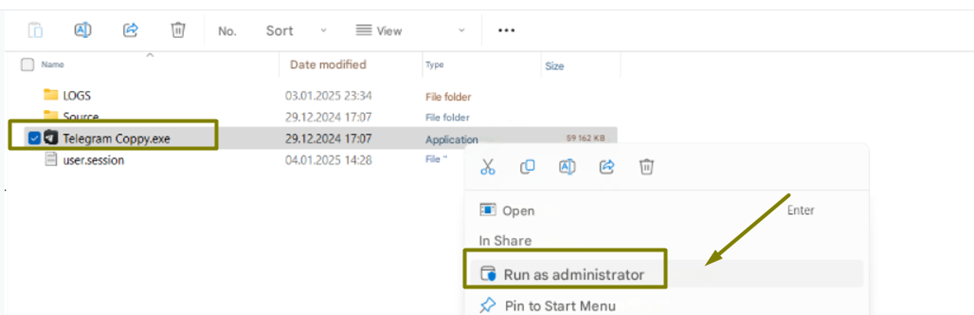
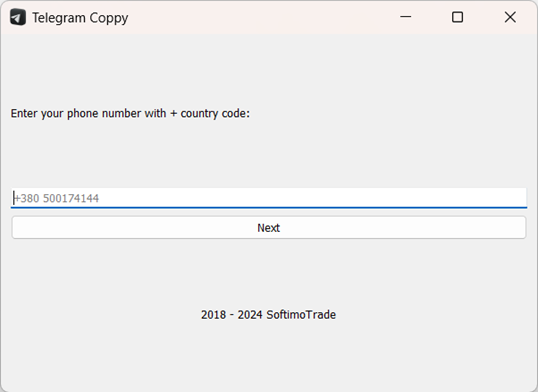
- Run as Administrator! When you first launch the program, you will be asked to enter a phone number to log in to Telegram. Enter the number and confirm the login using the code sent to Telegram
File is 100% safe, my reputation and responsibility are at stake, your data is not collected and not saved anywhere except your computer. I am a proven and verified MQL5 seller with many years of history and reputation.
Setting up the utility
Adding chats and filters
- Adding chats:
- Specify the identifier of the Telegram chat/channel from which signals will be copied. You can see this number by selecting the desired channel for copying in the EXE file
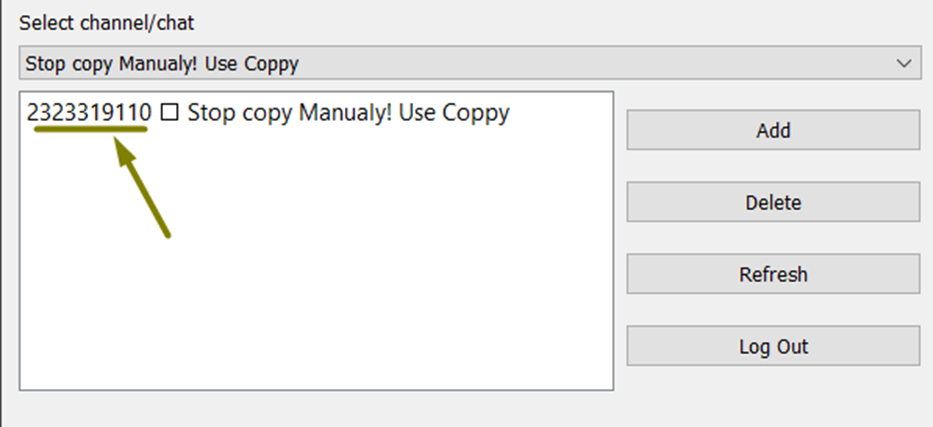
You can use CTRL+C and CTRL+V to copy and past this ID but delete the channel name from ID numbers.
Next, specify the chat ID in the utility in this column.
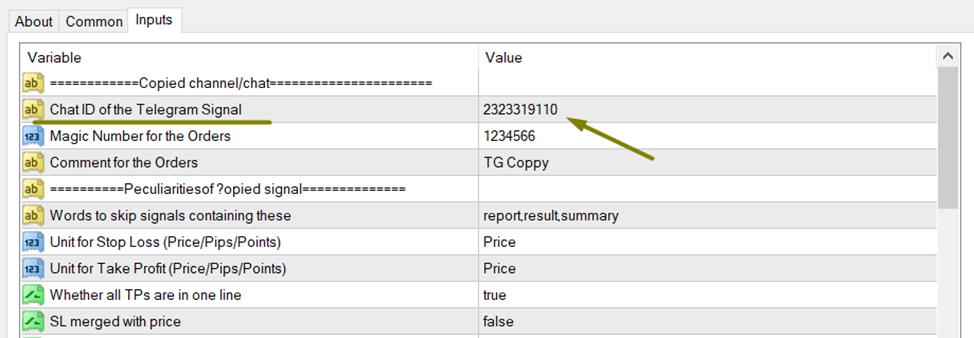
For 1 chat/channel you must open 1 separate chart and install the utility there by entering 1 chat ID and the required settings.
If you want to copy signals from 2 chats, then open another chart and hang the utility there again, entering the identifier of only the 2nd chat that you want to copy, in addition to the identifier, specify another magic number and a comment to the orders, this will allow you to easily analyze statistics in the future and see which channel sends the most profitable signals.
Demo version of Telegram Coppy and instruction how install and test
You can download demo version here.
Parameters that you can set
- Filters:
- Set up the keywords, symbols or types of trades you want to copy.
Risk setting
- Deposit percentage:
- Specify what percentage of the current balance will be used to calculate the lot.
- Fixed lot:
- Alternative: Specify the exact lot size for each trade.
- Risks:
- Daily, weekly and monthly risk are calculated based on the balance / equity:
- What to do if loss exceeds = Stop copying - after closing trades and reaching the specified limits, copying of new signals stops.
- What to do if loss exceeds = Delete and Stop copying If the option to close trades is enabled, the copier will also close all open positions created by the utility. The utility closes only after you have fixed the loss and it now exceeds your daily limits. For example, your balance at the beginning of the day is $1,000, the risk for the day is 1%, let's say you copied 5 trades, 3 of them were closed and the loss on them was -$15, your daily risk for the day is exhausted, the adviser will close its other open trades and stop copying signals.
Equity - that is, control over floating losses and open transactions. Balance - calculation of risk based on closed losses on transactions.
Multi-Take Profit
- TP levels:
- Specify the lot you need for each subsequent TP level
- Closing in parts:
- Set up partial closing of positions when each TP level is reached.
Additional functions
- Prohibition of copying trades without Stop Loss / Take Profit:
- Possibility to prohibit copying signals without SL/TP.
- Multitasking:
- Manage multiple Telegram chats simultaneously.
- Safety:
- Works without using external DLLs, which makes the utility safe.
Starting the copier
- Launching the program:
- Open the copy file. The program will automatically connect to the specified Telegram chats.
- Start copying:
- After setup, the program will start copying signals to MetaTrader 4/5 using the specified parameters.
- Monitoring:
- Monitor the process through the program interface. All signals and actions are displayed in real time.
Key variables
- TELEGRAM_CHAT_ID – ID of chats from which signals are copied.
- FILTER_KEYWORDS – keywords for filtering signals.
- MAX_DAILY_RISK – maximum daily risk in percentage/deposit currency from the balance.
- MAX_WEEKLY_RISK – maximum weekly risk in percentage/deposit currency from the balance.
- MAX_MONTHLY_RISK – maximum monthly risk in percentage/deposit currency from the balance.
- TAKE_PROFIT_LEVELS – Take Profit levels.
- USE_FIXED_LOT – use of fixed lot (True/False).
- RISK_PERCENT – percentage of the deposit for lot calculation.
How work Trailing By - Per TP hit
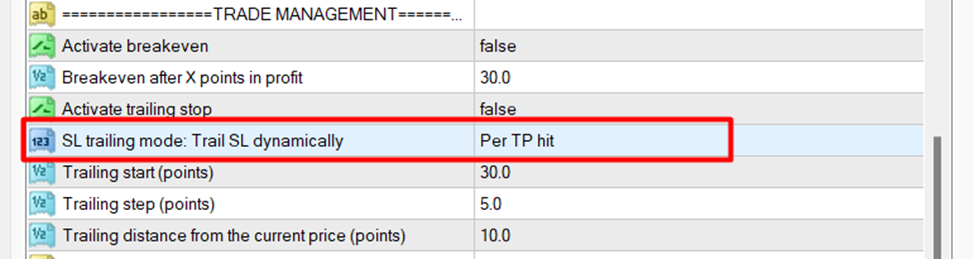
TP1 hit: Remaining TPs moved to breakeven
TP2 hit: Remaining TPs moved to TP1
...and so on...
How work Trailing Stop – Dynamic
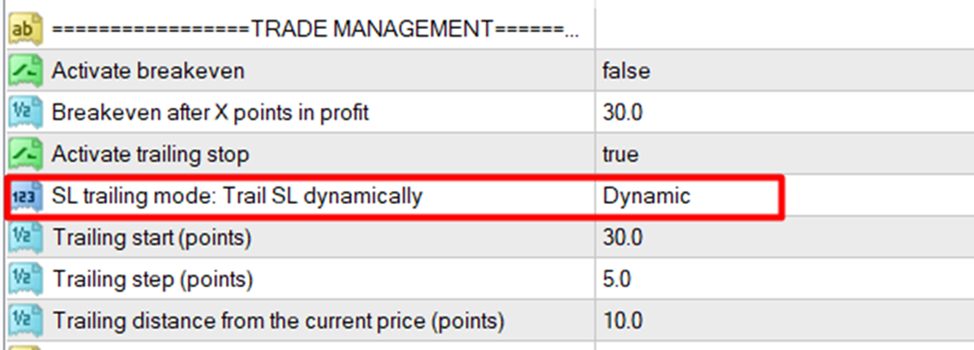
We trailing start – This is the number of points after which the trailing stop will be activated, the settings are indicated in the points.
"Trailing distance from the current price"> "Trailing step"
Trailing step - helps to control how frequently price is moved, if not set, SL will move on every tick to catch up with price.
It should be a small value, like 50 points or so, for regular pair like EURUSD
Just to avoid SL adjusting too frequently.
Trailing step - it should be a small value. Much smaller than trailing distance
More info about trailing you can find here.
More info about all variables you can find here
Conclusion
Telegram to MT4/5 Copier is a one-stop solution for traders looking to automate their work and manage risks effectively. Customize the utility to your needs and focus on analytics, not manual work.
Telegram to MT4/5 Coppy is high quality and functionality at a very favorable price.
🟡 Version Telegram Coppy for MT4
🔵 Version Telegram Coppy for MT5
More contacts and info about project you can find here
Our Telegram Channels:
My main trading Channel