Telegram to MT4 Coppy

3.57

TelegramからMT4へ:究極のシグナルコピーソリューション

Telegram to MT4は、DLLを必要とせず、TelegramのチャンネルやチャットからMetaTrader 4プラットフォームに取引シグナルを直接コピーできる最先端のユーティリティです。この堅牢なソリューションは、比類のない精度とカスタマイズオプションにより、シグナルのシームレスな実行を保証し、時間を節約し、効率性を向上させます。

[Instructions and DEMO]

主な特徴

  1. 直接的なTelegram API統合

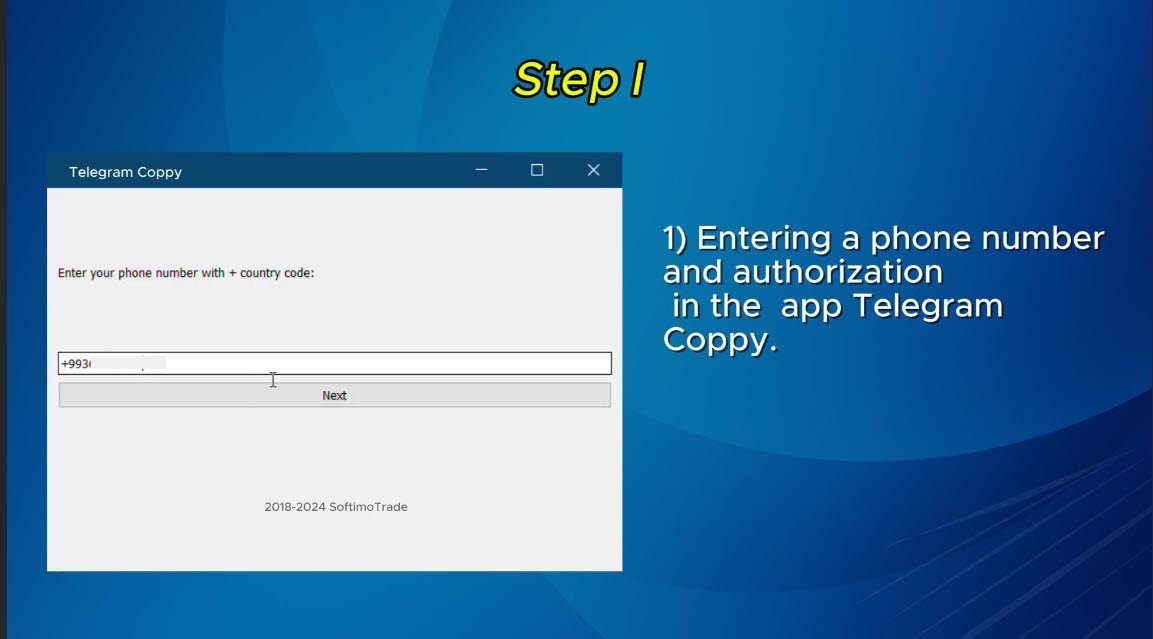
    • 電話番号とセキュアコードで認証します。
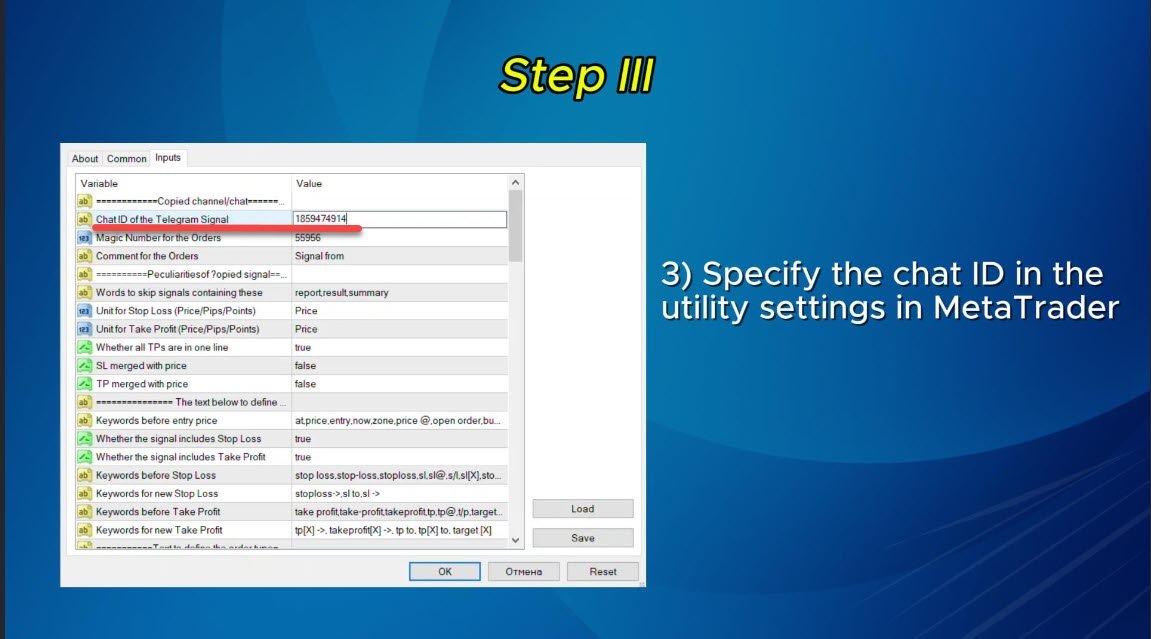
    • ユーザーフレンドリーな EXE ブリッジを使用して、チャット ID を簡単に取得および管理します。
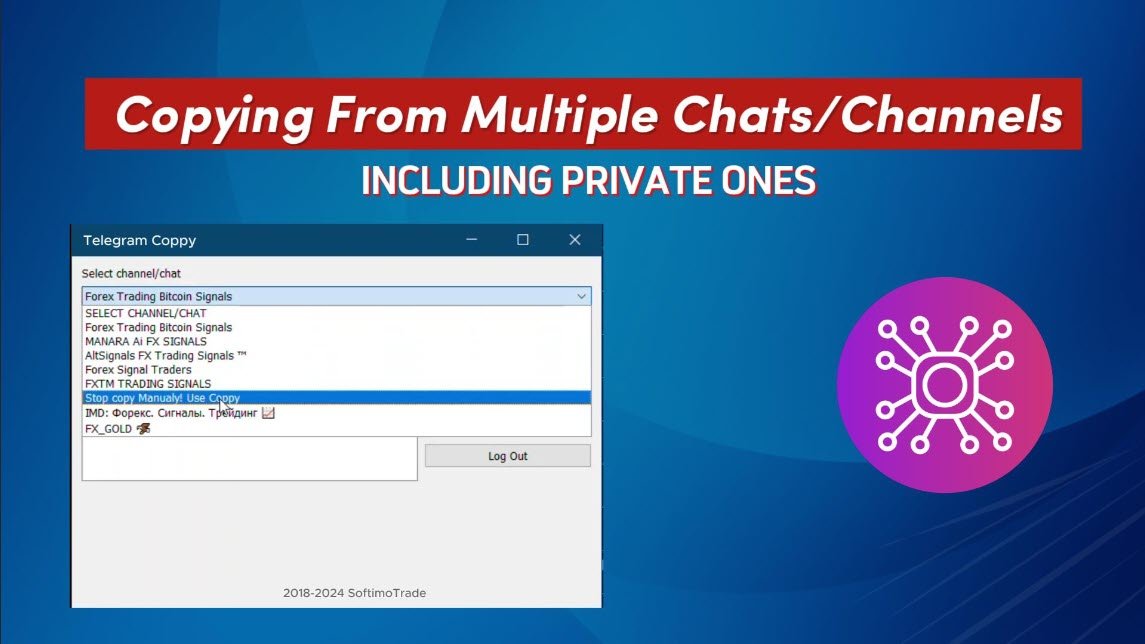
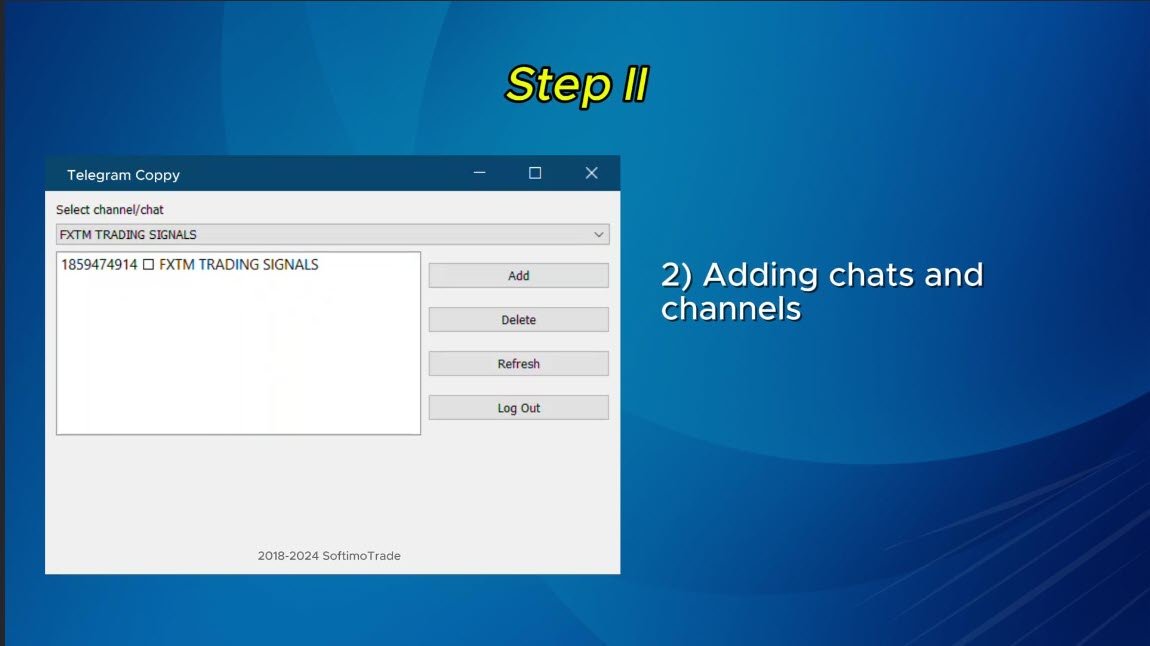
    • 複数のチャネル/チャットを追加、削除、更新して、同時に信号をコピーします。
  2. 高度なフィルターによる信号解析

    • カスタム例外語 (例: 「レポート」、「概要」) を含む不要な信号をスキップします。
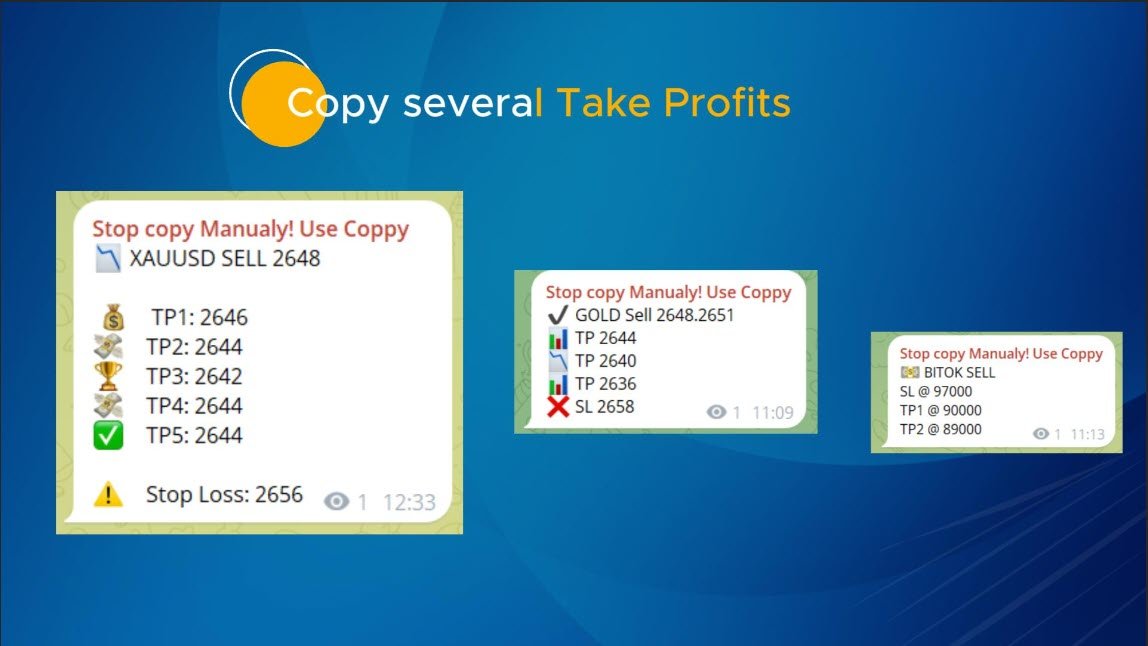
    • 柔軟な SL および TP 形式 (価格、ピップ、ポイント) をサポートします。
    • シグナルが価格ではなくポイントを指定する場合、エントリ ポイントを自動的に計算します。
  3. 注文のカスタマイズと柔軟性

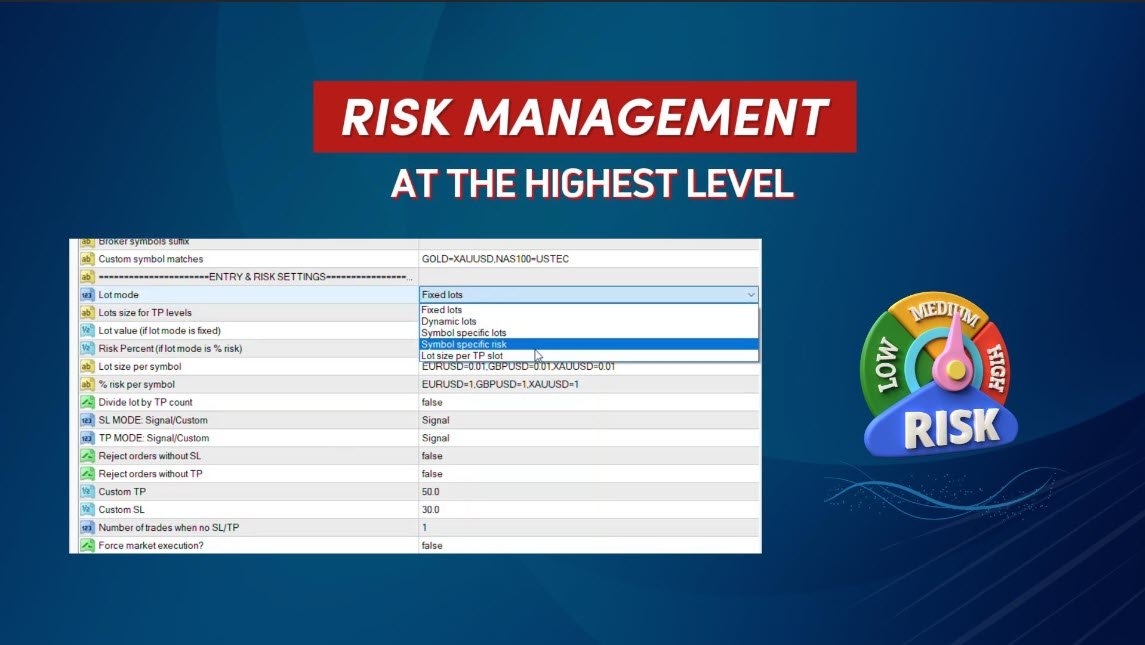
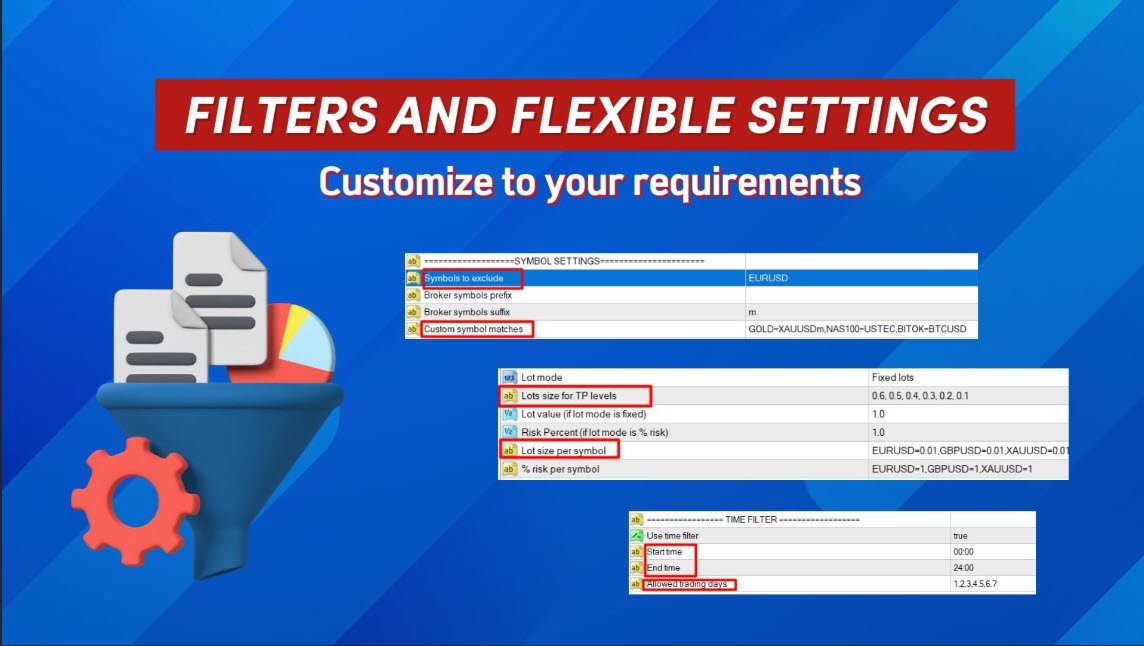
    • 複数のモード(固定ロット、動的ロット(%リスク)、またはシンボル固有のロット)で注文サイズをカスタマイズします。
    • シグナルデータまたはカスタムパラメータを使用して SL/TP を調整します。
    • 完璧な実行のために、スリッページ、保留注文の有効期限、再試行設定を構成します。
  4. 包括的なシンボル管理

    • 特定のシンボルを除外するか、カスタム ブローカー シンボルを一致させます。
    • シグナル シンボルをブローカー固有の名前にマップします (例: GOLD=XAUUSD)。
  5. 高度なリスクと取引管理

    • 毎日、毎週、毎月の損失制限をパーセンテージまたは通貨で設定します。
    • 損失制限に達すると自動的にコピーを停止します。
    • 損益分岐点と動的トレーリングストップを有効にして利益を最適化します。
  6. 時間と取引フィルター

    • 時間フィルターを使用して、取引時間と許容日数を制御しましょう。
    • 1 日あたりの取引または損失の最大数を制限します。
  7. シームレスな統合と簡単なセットアップ

    • 安全な Telegram ログインとチャット/チャンネル管理のためのシンプルな EXE インターフェイス。
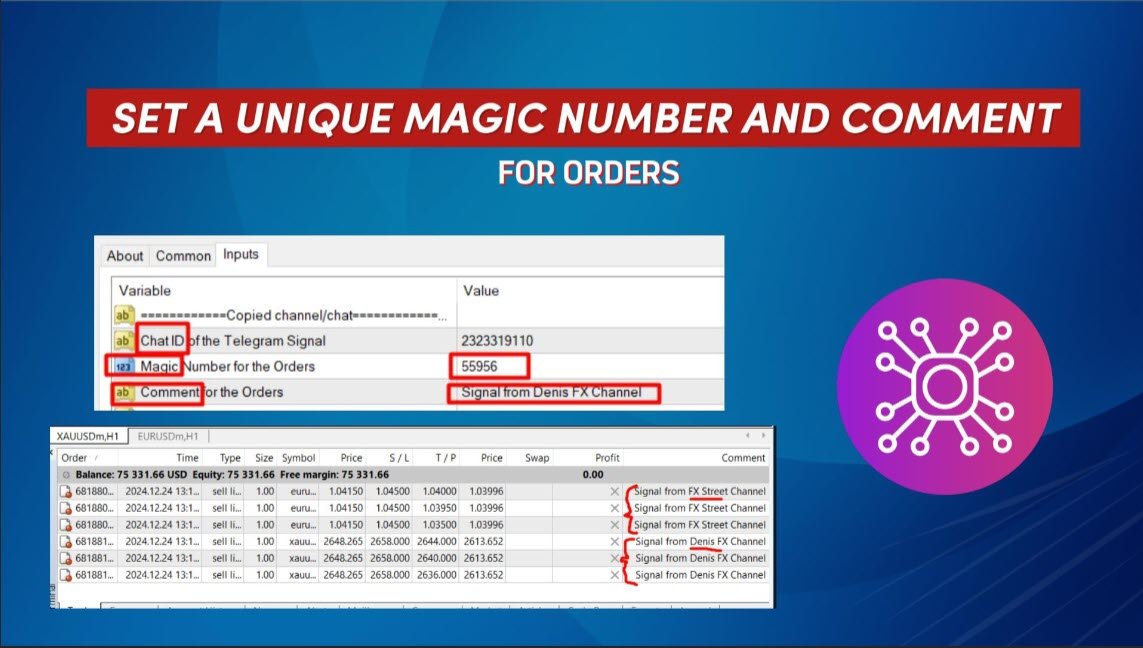
    • ユーティリティを別々のチャートに展開して、複数のチャネルから同時にコピーします。
  8. 柔軟なコマンド認識

    • シグナル テキストに基づいて注文をクローズ、変更、または削除するための高度なコマンドを処理します。
    • 「すべてのポジションをクローズする」、「SL を損益分岐点に移動する」などのフレーズをサポートします。

このユーティリティは誰向けですか?

戦略の自動化を目指す個人トレーダーでも、シグナルサービスの加入者でも、 Telegram to MT4を使えば、取引を逃すことはありません。直感的なインターフェース、きめ細やかなカスタマイズ、そして強力な解析機能を備えたこのユーティリティは、これまでにないほど取引を簡素化します。

MT4 よりも Telegram を選択する理由

  • 外部 DLL は不要で、最大限のセキュリティと互換性が保証されます。
  • 取引スタイルやリスク許容度に合わせて設定を完全にカスタマイズできます。
  • 複雑なメッセージや通常とは異なる形式であっても、信頼性の高い信号解析が可能です。

今すぐ始めましょう

TelegramでMT4を使いこなし、取引体験を変革しましょう。あらゆる取引において、効率性、正確性、そして自信を高めましょう。

シグナルをコピーしない主な理由:

  • 管理者としてプログラムを実行していません。正しく操作するには、exeファイル(Telegramへのブリッジ)を管理者として実行してください。
  • あなたの国で Telegram がブロックされている場合は、EXE ブリッジ ファイルが Telegram に接続できるように、PC 全体で VPN を使用する必要があります。1 つの解決策は、Telegram がブロックされていない VPN にコピー機を配置することです。
  • 自動取引が有効になっていません。端末設定で自動取引を有効にする必要があります。



レビュー 8
Lucas Eduardo
23
Lucas Eduardo 2025.10.01 08:50 
 

EA opens this order, everything is fine with tp and sl correct, But when the tp hits the group I'm in, the admin sends it in this format and the ea is opening the purchase order again. Is there a way to adjust this so it doesn't open the order like that? The admin puts gold buy tp3 done and the ea is opening the order again. Is there a way to fix it?

Forexcz74
190
Forexcz74 2025.02.21 09:08 
 

I am very satisfied with the Telegram copier for MT4 Coppy created by Sergey. This is my second purchase from him. It works with all the Telegram channels I have so far. I haven't had time to thoroughly set up and explore all the features, of which there are really many, but I can already say that this copier has great potential. The support from Sergey has been excellent – I always received quick responses to my questions and assistance with any issues I had. It’s clear that he cares about the satisfaction of his users. I recommend this copier to everyone who wants to improve their trading results, whether you are a beginner or an experienced trader. Great job, Sergey! Marek

Hassan Elyakoubi
217
Hassan Elyakoubi 2025.01.12 05:54 
 

I recently purchased the Telegram to MT4 Coppy after initially testing a free trial version the seller kindly provided. From the moment I tried it, I was impressed with how smoothly it transferred signals from Telegram into my MT4 platform. The seller has been incredibly supportive, promptly answering all of my questions and even recording a helpful video to guide me through the setup. he also took the time to log into my demo account (with my permission) to fine-tune the settings, ensuring everything met my trading requirements. I highly recommend this copier EA—and its exceptional customer support—to anyone looking for a reliable solution.

おすすめのプロダクト
Hello Guys! I want to share with you a very useful tools. Anyone of us who has used MT4 for some time knows how impractical this platform can be for discretionary trading. That's why I created this graphical interface!  Interface is very simple, all the info that you need are in the video and in the screenshot. NB: Before to run the EA Interface, remember to copy the file in the comment in your MT4 folder "Controls". PATH: .../MQL4/INCLUDE/CONTROLS NB: unfortunately the interface can't be test
Fibo Color Levels
Marlon Campos da Silva
4 (4)
Fibo Color Levels is an amazing tool for Fibonacci lovers. You can customize your preferred values, styles and formats of each level and set the color levels according to their importance. Fibo Color Levels Not add object fibonacci retracement automatically . The purpose of this indicator is not it. So you need to manually add the Fibonacci Retracement in your chart, as usually already do. Use the standard tool Fibonacci Retracement in your MT4, draw the Fibo according to the swing-high and/or s
Working Bot
Dmitry Shutov
1 (1)
This Expert Advisor is based on advanced neural networks. Main EA features After training, the EA remembers the patterns of each currency pair . Therefore, re-training the currency pair is not required when changing a currency pair. Fixed Take Profit and Stop Loss levels are set in the inputs. Multi-currency trading . ‌Monitoring of my accounts: https://www.mql5.com/en/signals/author/mizrael Preparing for trade and training It is recommended to train the EA. For better understanding, we posted
Online Accounts Manager MT4
Kyra Nickaline Watson-gordon
5 (1)
OneClick Online Account Manager is a powerful utility that helps you to manage all your accounts from a centralized panel. It is suitable for all single account traders and specially for multiple accounts traders. The utility help you to : Monitor status of all accounts on a private web page. Some information such as account connection status, account profit, DD, Balance, Equity, Margin Level, Number of positions and orders, Daily and Weekly profit/loss and also overall summation of all these p
Golden Scalper PRO
Felipe Jose Costa Pereira
3.83 (12)
Golden Scalper PRO:私たちのテクノロジーがあなたのために働きます! マニュアルと設定ファイル:購入後にご連絡いただければ、完全なマニュアルと設定ファイルをお渡しします。 価格:販売ライセンスが増えるごとに価格は上がります。 残りライセンス数:3 ゴールド取引は非常に高いボラティリティとリスクが伴うため、金融市場の中でも最も難しい分野の一つです。 Golden Scalper PRO は、この課題を克服するために設計されています。高度なテクノロジーと効果的な戦略を組み合わせ、利益を最大化します。初心者からプロのトレーダーまで、安全かつ安定した取引をサポートします。 Golden Scalper は、適応型インテリジェントシステム、マルチタイムフレーム分析、自動ロット調整、高度なリスク管理を搭載し、市場の変化に迅速に対応し、常に資金を守ります。 取引銘柄 XAUUSD(ゴールド) 時間足 M5 最低入金額 500 USD 対応ブローカー 全てのブローカー 口座タイプ 全て(低スプレッド口座推奨) レバレッジ 1:500以上推奨 VPS 推奨(必須ではない) 取引銘柄
CANADIAN TAIGAは、ボラティリティーブレイクアウトとサポート/レジスタンスレベルのブレイクアウトの原則に基づいたトレンドフォロー型の取引システムを使用したプロフェッショナルポートフォリオEAです。すべてのカナダドルのペアで動作します。カナディアン・タイガの中核となる原理は、洗練されたヘッジモジュールを使用して、すべてのCADペアで取引機会を捉えることです。 CANADIAN TAIGAをダウンロードして、推奨されているようにすべてのカナダドルペアでテストしてみて、説明されているように意図されていることができない場合は、購入しないでください。主に最低時間枠(M5)で動作するため、モデリングの質の高さはあまり気にしないでください。 自動売買ボタンを無効にした状態でEAをチャート上で起動し、初期化後に自動売買を再度有効にするか、市場の時間外、できれば週末にチャート上で自動売買を有効にすることが非常に重要であり、強く推奨されます。なぜならば、EAは高速実行品質テストを行うために、初期化時に1回の迅速な単一取引(即時のオープンおよびクローズポジション)を実行する可能性があり、おそ
Советник  представляет собой многофункциональную торговую систему BBMA Oma Ally с интеграцией Telegram для удаленного управления и получения уведомлений. Основная специализация - анализ паттернов ценового действия и автоматическое оповещение о торговых возможностях. Основные функции 1. Система оповещений через Telegram Управление командами: Отслеживание и выполнение команд из Telegram Уведомления: Мгновенные оповещения о торговых сигналах Удаленное управление: Возможность управления советнико
ExincExp
Stanislav Vereshchagin
Hello dear traders! I present to your attention the ExincExp trading robot. The robot is based on the Price Action "Outside Bar" trading strategy. The Expert Advisor is designed for the H1 timeframe, best suited for the EUR-USD pair. There will be not many trades, but filtering them very well, which will make only the most accurate market entries for you. The robot calculates and places stop-loss and take-profit on its own. Also, it is not based on any indicators, the EA takes all information
Designed with advanced algorithms and utilizing deep learning technology, our Haiau Capital MT4 (EA) is crafted to assist you in the intricate world of forex trading. The system analyzes market behaviors and conducts transactions based on specific criteria, empowering you to engage with market trends more effectively. With the backing of nearly a decade of data, the EA employs deep learning to examine past market conditions, aiming to provide enhanced decision-making. Recommendations: Curren
Hello all The expert works by hanging pending deals moving with the price when activating a transaction It closes on the stop loss or on a profit from the pursuit of profit Work on low spread currency pairs Like dollar yen currency The work is done with the same settings as the expert, or it can be modified as the user likes Work on a timing of 15M or more as the user likes parameters: Transaction_Movement : Movement =true  . no Movement=false . Lot1: Manual Lot Size Auto_Lot: Set true to auto
Psychology
Tais Miranda Hoffmann
5 (3)
The most different product of the site: This tool is an auxiliary tool aimed at managing your trades and psychological discussions. As you probably know, more than 70% of the reason for the success of big traders is psychological issues. Only 30% is related to your strategy. So it is better to strengthen this big part with a tool. With a free tool, I allow you to become a better trader   This tool consists of several rules. In version 1.0, we have 7 rules. In later versions, we will add more ru
FREE
CloneChartMT4
Andrei Novichkov
5 (2)
This utility clones the chart it is running on. It opens the same chart with the same graphical objects, set of indicators (saving the parameters) and the rest of the elements. In essence, it performs a deep copying of the original chart, transferring the template to the opened chart. The symbol and the timeframe of the original chart are also saved.
FREE
Hello everyone, the expert works on pending deals moving with the price When a deal is activated, the take profit and stop loss are placed When moving with the profit, the other pending deal moves with the price Until it closes with a profit or loss and works again in the same way There are no complications or indicators in the expert The expert is very simple in his work Work on the five minutes, capital $ 100 or more The lot size will work based on the capital Work on gold A zero is placed on
GridderEA Pro
Nikolaos Pantzos
3.83 (6)
It's a multi-currency grid and martingale system that can trade all input pairs from one chart. The expert will close all orders for each pair using a profit level. The expert has the possibility to trade up to 100 pairs. Information Chose a broker with fast execution and low spreads for effective results. Please make some tests on a demo account to see how the expert works before using it on a real account. For 0.01 lot size and leverage 1:500, you need an initial balance of at least 10,000 f
FREE
LENA Scalp
Cence Jk Oizeijoozzisa
4.4 (5)
LENA Scalp 高度なストップロステクノロジーと人工知能を活用したLena Expert Advisorは、革新的なトレーディング体験を提供します。 Lenaのロボットは、大きなストップロス、マーチンゲール、またはグリッドトレーディングを使用しません。代わりに、市場の状況に適応する動的なストップロスシステムを採用しています。 人工知能による分析は、戦略に基づいた市場の重要な機会を特定するのに役立ちます。 この自動化されたトレーディングソリューションは、経験豊富なトレーダーによって設計された堅実で実証済みのアプローチに基づいており、信頼性と効率性を提供します。 大きな損失制限は使用せず、アクティブ化が無効であることを検出すると、可能な限り最小限の損失で終了し、ライブ口座での取引 (これは人工知能の検出です) を終了します。 完全版を購入すると、 Hijack の無料コピーが送られます。       HiJack: https://www.mql5.com/en/market/product/133565      1ヶ月未満で150%の利益        -----------
Market Monitor
Rodrigo Rethka Goncalves
Market Monitor – Smart Asset Performance Dashboard for MT4 Turn your MetaTrader 4 into a professional trading intelligence center! Market Monitor is a powerful monitoring tool that displays, in real time, the most relevant performance metrics of each symbol being traded — helping you make faster, smarter, and more strategic decisions. What Does This Indicator Do? Market Monitor scans all open and historical orders, consolidates the data by symbol, and displays everything in visual pa
THIS PRODUCT CAN NOT BE TEST IN STRATEGY TESTER. PLEASE TRY DEMO VERSION: https: //www.mql5.com/en/market/product/58082 FIRST 10 COPIES AT 30 USD, NEXT PRICE WOULD BE 50 USD RISK AND TRADE MANAGER RISK AND TRADE MANAGER   is an advanced trading panel designed for manual trading.   Utility helps to manage trades effectively and efficiently with a single click. MAIN FEATURES Convert and display Stop Loss (SL)   Pips into % and amount to view the clear picture of the trades if SL hits. Fund alloca
Automatically trading advisor for the MT4 terminal. Any trading instruments. Minimum settings. Detailed display of style and trading conditions on the screen of your terminal. It starts working immediately after installation and connection to your MT4 account. Any timeframe below H4. Recommended timeframe for displaying trading sessions H1. You choose the optimal working time for a trading robot. Best wishes and a passing trend.
The Ultimate Drawdown Recovery & Trade Protection EA for MT4! Your Trades Deserve a Second Chance. Give Them This Soldier. Struggling with floating losses or sudden drawdowns that threaten your account? Stop watching your trades drown in red and let the Ultimate Drawdown Recovery EA (UDR) recover, protect, and empower your trading strategy automatically. What Is UDR? UDR is an ultra-smart, lightning-fast MT4 Expert Advisor designed to recover drawdowns, secure break-even exits, manage trades wi
Donchian Channel Pro EA 1. OVERVIEW The Donchian Channel EA is a breakout trading system that leverages the Donchian Channel to identify key support and resistance levels based on price highs and lows over a set period. The EA automatically executes trades when price breaks out of these levels, aiming to capture strong trending movements. It includes features such as time filters, ATR-based stop-loss and take-profit levels. 2. Unique Features   Ø Donchian Channel Breakout Strategy – Trades only
UniTradeXpertをご紹介します:あなたの究極の外国為替プログラム! UniTradeXpertの非凡な潜在力を明らかにする、洗練されたエキスパートアドバイザーで、外国為替取引の体験を向上させることを目的としています。ほぼ7年にわたる包括的なデータ分析のサポートにより、このEAは99.9%の驚異的な正確さで競争の激しい市場で決定的な優位性を提供します。 UniTradeXpertの優れた点は、AUDCAD通貨ペアの1時間のタイムフレームでの振動取引に焦点を当てていることです。このプロフェッショナルなアプローチは、市場の振動の本質を捉えることで、最大の効率と収益性を確保します。 UniTradeXpertはリスク管理に注力し、堅固なストップロスメカニズムを組み込んでおり、市場の変動中に資本を保護し、安心感を提供します。この戦略的アプローチにより、マーチンゲールのような高リスクな戦略を採用することなく、長期的な成功を確保します。 UniTradeXpertの真の特長は、ユーザーセントリックなアプローチにあります。3つの推奨される資金管理戦略を慎重に組み込み、視覚的に魅力的なグラフィ
LayerStop
Norhisham Mohd Rudin
LayerStop EA only performs an action open pending order BUYSTOP or SELLSTOP, thus only monitor the trailing stoploss. No specific conditions are used to open pending order. Pending order BUYSTOP or SELLSTOP will generated immediately after an Expert Advisor is attach in the chart. Suitable for News High Impact. If you already attach LayerStop EA in the chart, and want LayerStop EA performs new one an action open pending order BUYSTOP or SELLSTOP, you need to remove LayerStop EA from chart a
市場全体のすべてのシンボルの利益の可能性を分析するためのシンプルなスクリプト。 各期間の最小および最大利益をパーセントおよびステップ数で指定できます。 スクリプトは、構成に応じて最も興味深い記号を見つけます。 あなたはあなたが取引の正しい選択をするのを助けることができる市場全体の迅速で最新の分析を得るでしょう、あなたは二度と機会を逃すことはありません。 市場全体のすべてのシンボルの利益の可能性を分析するためのシンプルなスクリプト。 各期間の最小および最大利益をパーセントおよびステップ数で指定できます。 スクリプトは、構成に応じて最も興味深い記号を見つけます。 あなたはあなたが取引の正しい選択をするのを助けることができる市場全体の迅速で最新の分析を得るでしょう、あなたは二度と機会を逃すことはありません。
FREE
PROFITABLE HIGHER AND SAFER - Kakarot EA uses indicators combined with AI algorithm according to the principle of trend detection and trend matching. - The principle of order balancing, low DD protects accounts better for high profits. - Flexible command entry and exit - Works on all pairs, preferable to major USD pairs. - Support trade manual methods. - Provide effective bot management parameters at your own discretion to be able to bring a much higher profit. Help Manual Bot configu
Calculated trend indicator, can be used with an optimal risk to profit ratio, shows successful signals. Uses two options for settings. Shows favorable moments for entering the market with arrows. The probability of a successful trend is not very bad! The indicator can be used both for pipsing on small periods, and for long-term trading. The indicator does not redraw and does not lag. It works on all currency pairs and on all timeframes.
Unbrekeable
SHEYLA SOFTWARE
4 (1)
Limited number of copies will be sold on MQL5 market.  Price $69.99 4 of 10 left at this Price Next 10 copies $149.99. Expert will be available on sale untill 1 of January.   Unbrekeable for XAUUSD is a fully automated EA designed to trade GOLD only. It is based on machine learning analysis and an incredible trend detection system.   This EA tries to win 1% of the account in each of the trades!!!! works like magic :)   EA contains self-adaptive market algorithm, which uses   XAUUSD in 2015-2020
CloseDelet_Orders CloseAtProfit is an EA that I use only to close orders after defined profit, or loss,  close all orders  ,  also delete pending orders.  I am using it in live trading.  The speed of closing depends on time when it trades, on broker you are using and symbols you are trading. INPUTS: win_USD_All   =    close all orders (sell+buy)  when the profit is greater than defined profit to close; win_USD_BUY =    close only orders buy   when the profit is greater than defined profit to cl
OwlGrid01
Angel Perez Sanchez
この専門家アドバイザーは単純なものを効果的にします。調整可能なロットの合計システムを介して、プロフィールと資本に応じてリスクレベルをカスタマイズできます。正確に投資を管理します。コントロールされた安定した利益を得るために、さまざまな保守的な操作のセットを組み合わせるのに最適です。画像セクションでは、いくつかのバックテストと、異なるインストゥルメントでの8つのセットの動作(1つの画像には集計が表示され、次の画像には各セットの曲線が個別に表示されます)をリアルタイムで確認できます。適切な研究が常に必要であることを覚えておいてください。ボタンを押すことほど簡単なものはありません。さらに情報が必要ですか?お気軽にお問い合わせください。 _____________________________________________
The Ultimate Dashboard New Year Sale - save $20 (normal price $79) Indicators are useful for traders, but when you put them into a dashboard that can scan 28 symbols at once they become even better, and when you can also combine different indicators and timeframes to give you synchronized alerts, then they become awesome. This easy to use dashboard provides you with 23 leading indicators, use them individually or together, to create powerful combination alerts. So when you want to know that RS
The indicator is the main part of Michael Huddleston's ICT (Inner Circle Trader) trading strategy. His legendary trading strategy is based on the concept of "Smart Money". To analyze the medium -term trend , the  ICT offers an analysis based on  twenty -day levels . The indicator builds levels , while showing the turning points with arrows . An important feature of the indicator is the automatic display of levels for different periods . You do not have to change the indicator settings when chang
このプロダクトを購入した人は以下も購入しています
Trade Manager EAへようこそ。これは、取引をより直感的、正確、そして効率的にするために設計された究極の リスク管理ツール です。これは単なるオーダー実行ツールではなく、包括的な取引計画、ポジション管理、リスク管理のためのソリューションです。初心者から上級者、迅速な実行を必要とするスキャルパーまで、Trade Manager EAはあらゆるニーズに対応し、為替、指数、商品、暗号通貨などさまざまな市場で柔軟に対応します。 Trade Manager EAを使用すると、複雑な計算が過去のものになります。市場を分析し、エントリーポイント、ストップロス、テイクプロフィットのレベルをチャート上のラインでマークし、リスクを設定するだけで、Trade Managerが最適なポジションサイズを即座に計算し、SLとTPをピップ、ポイント、口座通貨でリアルタイムに表示します。すべての取引が簡単かつ効果的に管理されます。 主な機能: ポジションサイズ計算機 :定義されたリスクに基づいて取引サイズを瞬時に決定します。 簡単な取引計画 :エントリー、ストップロス、テイクプロフィットを設定するためのド
The product will copy all telegram signal to MT4   ( which you are member  ) , also it can work as remote copier.  Easy to set up, copy order instant, can work with almost signal formats, image signal, s upport to translate other language to English Work with all type of channel or group, even channel have "Restrict Saving Content", work with  multi channel, multi MT5 Work as remote copier: with signal have ticket number, it will copy exactly via ticket number. Support to backtest signal. How to
Ultimate Extractor - Professional Trading Analytics for MT4 Ultimate Extractor transforms your MetaTrader 4 trading history into actionable insights with comprehensive analytics, interactive charts, and real-time performance tracking. Ability to combine multiple accounts and MT4 and MT5 into a single dashboard. What It Does Automatically analyzes your MT4 trading history across all Expert Advisors and generates detailed HTML reports with interactive visualizations. Tracks live performance metric
TradePanel MT4
Alfiya Fazylova
4.84 (89)
Trade Panel は、多機能の取引アシスタントです。このアプリケーションには手動取引用の 50 を超える取引機能が含まれており、ほとんどの取引操作を自動化できます。 注意、アプリケーションはストラテジー テスターでは動作しません。購入する前に、デモアカウントでデモ版をテストできます。デモ版 ここ 。 完全な手順 こちら 。 取引。 ワンクリックで取引操作を実行できます: 自動リスク計算を使用して未決の注文とポジションをオープンします。 ワンクリックで複数の注文とポジションをオープンします。 注文グリッドを開きます。 未決の注文とポジションをグループごとにクローズします。 ポジション反転 (買いを閉じて売りを開く、または売りを閉じて買いを開く)。 ポジションをロックします(買いポジションと売りポジションの量を均等にする追加のポジションをオープンします)。 ワンクリックですべてのポジションを部分的にクローズします。 すべてのポジションのテイクプロフィットとストップロスを同じ価格レベルに設定します。 すべてのポジションのストップロスをポジションの損益分岐点レベルに設定します。 注文とポ
MT4 to Telegram Signal Provider は使いやすく、完全にカスタマイズ可能なツールで、Telegramに信号を送信し、あなたのアカウントを信号提供者に変えることができます。 メッセージのフォーマットは 完全にカスタマイズ可能です! しかし、簡単な使用のために、あらかじめ定義されたテンプレートを選択し、メッセージの特定の部分を有効または無効にすることもできます。 [ デモ ]   [ マニュアル ] [ MT5バージョン ] [ Discordバージョン ] [ Telegramチャンネル ]  New: [ Telegram To MT5 ] セットアップ ステップバイステップの ユーザーガイド が利用可能です。 Telegram APIの知識は必要ありません。開発者が必要なものをすべて提供します。 主要機能 購読者に送信される注文の詳細をカスタマイズする機能 例えばブロンズ、シルバー、ゴールドなど、階層型のサブスクリプションモデルを作成できます。ゴールドサブスクリプションでは、すべての信号が得られますなど。 ID、シンボル、またはコメントによる注文のフ
Copy Cat More Trade Copier MT4 (コピー猫MT4) は単なるローカル取引コピーツールではなく、現代の取引課題に対応するために設計された完全なリスク管理と実行フレームワークです。Propファームのチャレンジから個人の資産管理まで、強力な実行力、資金保護、柔軟な設定、高度な取引処理を組み合わせ、あらゆる状況に適応します。 このコピーツールは Master(送信側) と Slave(受信側) の両モードで動作し、成行注文や指値注文のリアルタイム同期、取引修正、部分決済、Close By 操作をサポートします。デモ口座・リアル口座の両方に対応し、取引用パスワードまたは投資家パスワードでも利用可能です。Persistent Trade Memory 技術により、EA・ターミナル・VPS が再起動しても復元可能です。複数の Master と Slave を同時に管理でき、ブローカー間の違いはプレフィックス/サフィックスの自動調整やシンボルマッピングで処理されます。 マニュアル/設定: Copy Cat Trading Copier マニュアル Copy Cat Mo
Draw Agent は、すべてのチャート分析、落書き、メモなどを作成および管理するための美しく革新的な方法として設計されています。 このツールは、チャート スペースを黒板として扱い、手で描くためのフリーハンド描画方法を提供します。 このフリーハンド描画ツールを使用すると、MT4/MT5 チャートに描画して、チャート上のイベントをマークまたは強調表示できます。 エリオット波動を手で下書きしたり、チャートに線を引いたり、チャートにアイデアを示したりしたい場合に 役立つツールです。クライアント向けのライブウェビナーを実行している場合、またはスクリーンショットやチャートファイルを人々に配布している場合に特に役立ちます同じように。 Draw Agent のインストールと入力ガイド EA追加URL(   http://autofxhub.com   )MT4/MT5端末(スクリーンショット参照) に関する通知を受け取りたい場合 。 MT4 バージョン https://www.mql5.com/en/market/product/14929 MT5 バージョン https://www.mql5.
特定のストップロス レベルに基づいてポジション サイズやリスクを即座に計算できるツールは、プロのトレーダーと初心者のトレーダーの両方にとって重要です。 TRADE PRO 取引ユーティリティは、高速かつ正確な計算を提供し、時間的制約のある不安定な市場状況での意思決定を支援します。 MT5バージョン      /   追加の設置資材 主な機能: オリジナル。シンプル。効果的。 メインの取引パネルを開くためのユニークで便利な方法: チャートの右側にマウスを移動し、適切な方向をクリックして将来の注文を配置します。 市場注文のクイックセットアップ TRADE PROを使用して、残高または資本の割合でリスクレベルを設定するか、具体的なリスク額を指定します。チャート上でストップロスレベルを視覚的に定義することで、ツールが各通貨ペアの最適なポジションサイズを自動計算します。また、指定されたリスクリワード比率に基づいて、利益目標(テイクプロフィット)を自動的に設定することもできます。 複数の指値注文を出し、総リスクを分散します (グリッド モード)。 複数の売買取引を行う場合でも、グリッド戦略に従
DFGX Dashboard
Tsvetan Tsvetanov
5 (2)
Take your trading to the next level with DFGX - our second generation Dynamic Fibonacci Grid. This new, powerful and easy to use application is specially designed and optimized for contrarian intraday trading, scalping and news trading on the Forex market. This system is the ideal solution for active professional traders and scalpers who are looking for innovative ways to optimize their strategy. The system also provides excellent opportunity for new traders who want to learn to trade in a syste
The most advanced news filter on MQL market - free demo available Take a Break has transformed from a basic news filter into a comprehensive account protection solution. It seamlessly pauses any other Expert Advisors during news events or based on your custom filters, all while safeguarding your EA settings - restoring them automatically when trading resumes for complete peace of mind. Typical use cases: A single news filter for all your EAs. Stop trading during news/high volatility (+ close all
平均化ヘルパー - この種の取引ヘルパー ツールは、次の 2 つのテクニックを使用して、以前は利益がなかったポジションを平均化するのに役立ちます。 標準平均 トレンドに応じてポジションを開くヘッジ このユーティリティは、買いと売りの両方の異なる方向の複数のオープンポジションを一度に整理する機能を備えています 。例えば、売りポジションを1つ、買いポジションを1つオープンしたが、どちらも利益が出ていない場合、あるいは1つは利益が出ているものの利益が十分でない場合、この2つのポジションを平均化してプラスで取引を終了したい場合などです。これは、私の平均化支援ユーティリティが役立ちます。 平均化ヘルパー ユーティリティ - 次のポジションのサイズ、注文価格、ポジションを平均化する方向、指定した利益確定サイズでプラスでポジションをクローズする方向を自動的に計算できます。 このユーティリティでは、「買い」と「売り」ボタンを使ってポジションを開くこともできます。希望する利益確定額と開始ロットを指定するだけです。ユーティリティ自体は、最初に指定した利益確定額でポジションをクローズするか、ポジションを平均
With this Expert Advisor, you can seamlessly integrate various channel, arrow, and reversal indicators. It offers the flexibility to use all popular channel trading strategies, while also providing powerful tools to customize your trading conditions and risk management system.   The Expert Advisor opens orders when the price crosses the channel boundaries. Multiple crossing conditions are available for customization: Price touches boundary on re-entry into the channel Price touches boundary on
Custom Alerts AIO:マルチマーケット監視を一括で実現 — 設定不要ですぐに使えるインテリジェントツール 概要 Custom Alerts AIO は、追加のインジケーター設定が不要で、インストール後すぐに利用できる高機能マーケットスキャナーです。FX Power、FX Volume、FX Dynamic、FX Levels、IX Power を内部にすべて統合し、主要なすべての資産クラス(為替、金属、指数、暗号資産)を一括監視できます。MetaTrader の仕様により、株式は個別のシンボルとして追加可能ですが、一般的には利用頻度は低めです。 1. なぜ Custom Alerts AIO を選ぶべきか 追加ライセンス不要 • 必要なすべての Stein Investments インジケーターが内蔵されており、すぐに使用可能です。 • チャートに表示されるグラフィックは省略されており、アラート生成に特化した構成です。 市場を広範囲にカバー • 為替、金属、暗号資産、株価指数に対応(株式は手動追加可能)。 • シンボル名を入力する必要はなく、プロパティで資産クラス
取引したい主要エリアを特定したら、サポートとレジスタンス、または供給と需要のゾーンを自動的に取引します。この EA を使用すると、1 回のクリックで買いゾーンと売りゾーンを描画し、価格が反転すると予想される場所に正確に配置できます。EA はそれらのゾーンを監視し、ゾーンに指定した価格アクションに基づいて自動的に取引を行います。最初の取引が行われると、EA は、ターゲット エリアとなる、配置した反対のゾーンで利益を出して終了します。その後、2 つの選択肢があります。取引を終了して新しいゾーンを描画してエントリーするか、利益を出して終了し、すぐに反対方向に取引を反転して、「常に市場に参加する」スタイルの戦略を作成します。 入力と戦略を含む完全なマニュアルはこちら: https://www.mql5.com/en/blogs/post/760256 この EA は、市場で固定またはハード ストップ ロスを使用しないポジション トレーダーまたはドル コスト平均法の取引戦略向けに設計されています。代わりに、次の利用可能なサポートまたはレジスタンス ゾーンで同じ方向に新しい取引を行うことで、
Trade Manager は、リスクを自動的に計算しながら、取引を迅速に開始および終了するのに役立ちます。 過剰取引、復讐取引、感情的な取引を防止する機能が含まれています。 取引は自動的に管理され、アカウントのパフォーマンス指標はグラフで視覚化できます。 これらの機能により、このパネルはすべてのマニュアル トレーダーにとって理想的なものとなり、MetaTrader 4 プラットフォームの強化に役立ちます。多言語サポート。 MT5バージョン  |  ユーザーガイド + デモ Trade Manager はストラテジー テスターでは機能しません。 デモについてはユーザーガイドをご覧ください。 危機管理 % または $ に基づくリスクの自動調整 固定ロットサイズを使用するか、ボリュームとピップに基づいた自動ロットサイズ計算を使用するオプション RR、Pips、または価格を使用した損益分岐点ストップロス設定 トレーリングストップロス設定 目標に達したときにすべての取引を自動的に終了するための 1 日あたりの最大損失 (%)。 過度のドローダウンからアカウントを保護し、オーバートレードを防ぎま
Remote Trade Copier   is an advanced tool designed for efficiently copying trades between accounts in both   local   and   remote   modes. It allows for lightning-fast order replication from a master account to a slave account. In local mode, trades are copied instantly, while in remote mode, the copying process takes a second.  In new version, in remote mode , the copy operation can be performed with a delay of milliseconds or zero . After purchase, ask how to activate it MT4 Version (Only Loc
Trade Copier Pro is a tool to copy trade remotely to MT4, MT5 and cTrader accounts at different computers/locations over internet. This is an ideal solution for you if you are a signal provider and want to copy your trades to other receivers globally on your own rules. One provider can copy trades to multiple receivers and one receiver can get trade from multiple providers as well. The provider can even set the subscription expiry for each receiver, so that receiver will not be able to receive t
この製品は、ニュースタイム中にすべてのエキスパートアドバイザーと手動チャートをフィルタリングするため、急激な価格変動によるマニュアルトレードのセットアップの破壊や他のエキスパートアドバイザーによって入力された取引について心配する必要はありません。この製品には、ニュースのリリース前にオープンポジションとペンディングオーダーを処理できる完全な注文管理システムも付属しています。 The News Filter  を購入すると、将来のエキスパートアドバイザーのためにビルトインのニュースフィルターに頼る必要はなく、今後はすべてのエキスパートアドバイザーをここからフィルタリングできます。 ニュース選択 ニュースソースは、Forex Factoryの経済カレンダーから取得されます。 USD、EUR、GBP、JPY、AUD、CAD、CHF、NZD、CNYなど、任意の通貨数に基づいて選択できます。 Non-Farm(NFP)、FOMC、CPIなどのキーワード識別に基づいて選択することもできます。 影響レベルによってフィルタリングするニュースを選択することができ、低、中、高の影響範囲から選択できます。
あなたがメンバーである任意のチャンネル(プライベートおよび制限されたチャンネルを含む)からのシグナルを、直接あなたのMT4にコピーします。 このツールは、ユーザーを念頭に置いて設計されており、取引を管理および監視するために必要な多くの機能を提供しています。 この製品は、使いやすく視覚的に魅力的なグラフィカルインターフェースで提供されています。設定をカスタマイズして、数分で製品を使用開始できます! ユーザーガイド + デモ  | MT5版 | Discord版 デモを試したい場合は、ユーザーガイドを参照してください。 Telegram To MT5レシーバーは、ストラテジーテスターでは機能しません! Telegram To MT4の特長 一度に複数のチャンネルからシグナルをコピー プライベートおよび制限されたチャンネルからシグナルをコピー BotトークンやチャットIDは不要です(必要な場合は引き続き使用できます) リスク%または固定ロットを使用して取引 特定のシンボルを除外 すべてのシグナルをコピーするか、コピーするシグナルをカスタマイズするかを選択 すべてのシグナルを認識するため
If you need an advisor on any arrow indicator signals - this utility will definitely help you.  You will be able, with the help of this utility to form an unlimited number of EAs on YOUR signals , with your set of settings, with your copyright and complete source code . You will be able to use the resulting EAs unlimitedly , including adding them to the Market and other resources. Free simple version of the generation script to help you understand how it works - here What does the utility do? 
I present to your attention a powerful utility for predicting the future movement of an asset based on W.D. Ganna’s law of vibration. This utility analyzes the selected market model and provides codes for future possible market movement patterns. If you enter the selected code into the appropriate box, you will receive a forecast of the potential market movement. The utility has the ability to display several potential forecast models. The forecast is not yet tied to time and price and gives th
THIS EA IS A SEMI-AUTO EA, IT NEEDS USER INPUT. Manual & Test Version Please   DON'T BUY   this product before   TESTING  and watching my video about it. Contact me for user support or bug reports, or if you want the MT5 version! MT5 Version I do not guarantee any profits or financial success using this EA. With this Expert Advisor, you can: Implement your own   Zone Recovery   strategy to capitalize on trending markets. Create   Grid   trading strategies, to profit from ranging markets. Place
The Expert Advisor will help you forward all pop-up alert with screenshot from  MetaTrader 4 to Telegram channel/ group, also forward all notifications to Telegram. Parameters  -  Telegram Bot Token - create bot on Telegram and get token.  -  Telegram Chat ID  - input your Telegram user ID,  group / channel ID  -  Forward Alert - default true, to forward alert.  -  Send message as caption of Screenshot - default false, set true to send message below Screenshot  How to setup and guide  - Telegram
EASY Insight AIO – スマートで手間いらずな取引のオールインワンソリューション 概要 数秒で市場全体——FX、ゴールド、暗号資産、指数、さらには株式まで——を、手作業のチャート確認や複雑なセットアップ・インジケーター導入なしにスキャンできたらどうでしょうか? EASY Insight AIO はAIトレードのための究極のプラグ&プレイ型エクスポートツールです。市場全体のスナップショットを、クリーンなCSVファイルで一括出力。ChatGPT、Claude、Gemini、Perplexityなど、さまざまなAIプラットフォームで即座に解析できます。 ウィンドウの切り替えやグラフのごちゃごちゃしたオーバーレイはもう不要。自動エクスポートされる純粋で構造化されたインサイトだけで、無駄なチャート監視に悩まされず、スマートなデータ主導の判断に集中できます。 なぜEASY Insight AIOなのか? 本当のオールインワン • セットアップ不要、インジケーターのインストール不要、チャートへのオーバーレイ不要。インストールして起動し、エクスポートするだけです。 マルチアセット対
Everything for chart Technical Analysis indicator MT4 in one tool Draw your supply demand zone with rectangle and support resistance with trendline and get alerts to mobile phone or email alert -  Risk reward indicator Video tutorials, manuals, DEMO download   here .  Find contacts on my   profile . 1.   Extended rectangles and trendlines Object will be extended to the right edge of the chart when price will draw new candles on chart. This is rectangle extender or trendline extender. 2. Price to
This is an Expert Adviser use for manual trading as a background EA or combine with external EA to open orders. Loss Recovery Trading is one of your options to handle the lose positions instead of using stop loss by setting a zone recovery area and target to exit the turn rounds sequence. How It Work? If the market goes against your first positions direction at the specific of losing points, the EA will open an opposite direction position with calculated larger lot size and also keep the first
Advanced trading tool: One click smart orders that execute under your conditions Developed by trader for trading community:  position size calculator (lot size), open position after price action, strategy builder, set and forget trading, mobile notifications Risk Management -  Risk percentage position size calculator, gain percentage, target risk reward ratio, spread and commissions are included in calculations 7 Advanced order types   - Set and forget trading with price action automation (OCO,
This EA Utility allows you to manage (with advanced filtering) unlimited open orders (manual or EA) with 16 trailing stop methods: fixed, percent, ATR Exit, Chandelier Exit, Moving Average, Candle High Low Exit, Bollinger Bands, Parabolic, Envelope, Fractal, Ichimoku Kijun-Sen, Alligator, Exit After X Minutes or Bars, RSI and Stochastic. The trailing stop can be either real or virtual, and you can exit fully or with a partial close percent on touch or bar close.  Moreover, you can add (overrid
The product will copy all  Discord  signal   to MT4   ( which you are member  ) , also it can work as remote copier.  Easy to set up. Work with almost signal formats, support to translate other language to English Work with multi channel, multi MT4. Work with Image signal. Copy order instant, auto detect symbol. Work as remote copier: with signal have ticket number, it will copy exactly via ticket number. How to setup and guide: Let read all details about setup and download Discord To MetaTrader
EchoTrade Telegram to MT5 Copier Seamless, Instant, and Reliable Signal Copying - Direct from Telegram to MetaTrader 4! The product does not run in the strategy tester but you can get free trial version   here  for testing before purchase. Tired of manually executing trades from Telegram signals? EchoTrade automates the process, instantly copying trades from any Telegram channel or group directly into your MT5 account—accurately, efficiently, and without delay. Key Features: Universal Compatib
作者のその他のプロダクト
TelegramからMT5へ: 究極のシグナルコピーソリューション Telegram to MT5 を使えば、取引がシンプルになります。DLL を必要とせず、Telegram のチャンネルやチャットから MetaTrader 5 プラットフォームに取引シグナルを直接コピーできる最新ツールです。この強力なソリューションは、正確なシグナル実行、豊富なカスタマイズオプション、時間の節約、そして効率性の向上を実現します。 [ Instructions and DEMO ] 主な特徴 直接的なTelegram API統合 電話番号とセキュアコードで認証します。 ユーザーフレンドリーな EXE ブリッジを通じてチャット ID を簡単に管理できます。 複数のチャネル/チャットを追加、削除、更新して、同時に信号をコピーします。 高度なフィルターによる信号解析 例外的な単語 (例: 「レポート」、「結果」) を含む不要な信号をスキップします。 柔軟な SL および TP 形式 (価格、ピップ、ポイント) をサポートします。 価格ではなくポイントを指定するシグナルのエントリ ポイントを自動的に計算します。
トレーディングアドバイザー アイスキューブスキャルパー -       これはデイスキャルパーであり 、毎日大量の取引を行い、各取引で数ポイントを獲得します。 EA の戦略は、RSI インジケーターを使用してトレンドに合わせて取引することです。 EA は乗数ロットによる平均化を使用するため、EA を使用する前にこれを理解する必要がありますが、この戦略はバックテストとライブ取引の両方で良好なパフォーマンスを示しました。 購入する前に、必ず戦略テスターでアドバイザーの作業をテストしてください。 リスク管理   エキスパートアドバイザーでリスクを制御するには、平均化の注文の最大数と株式リスクを制限することができます。 アドバイザーがどのように機能するかを理解するために、無料のシグナルを購読すると、アドバイザーがどのように機能するか、およびその可能性を理解することができます。 MT4用Ice Cube Scalperバージョン 購入後は必ずご連絡ください。         設定に関してはいつでもお手伝いさせていただきます。 アドバイザーのオンライン監視 -           https://
MT5のエキスパートアドバイザーリスクマネージャーは非常に重要であり、私の意見ではすべてのトレーダーにとって必要なプログラムです。 このエキスパートアドバイザーを使用すると、取引口座のリスクを管理することができます。リスクと利益の管理は、金銭的およびパーセンテージの両方で実行できます。 エキスパートアドバイザーが機能するには、それを通貨ペアチャートに添付し、許容可能なリスク値を預金通貨または現在の残高の%で設定するだけです。 [Instruction for Risk Manager parameters] アドバイザ機能 このリスクマネージャーは、リスクの管理を支援します。 -取引のために -1日あたり - 1週間 - ひと月ほど 制御することもできます 1)取引時の最大許容ロット 2)1日あたりの最大注文数 3)1日あたりの最大利益 4)エクイティを引き受ける利益を設定する それだけではありません。設定で自動設定を指定した場合、アドバイザーはデフォルトのSLとTPを設定することもできます。 アドバイザーは各イベントにアラートを添えて、注文を削除する理由を説明し
平均化ヘルパー - この種の取引ヘルパー ツールは、次の 2 つのテクニックを使用して、以前は利益がなかったポジションを平均化するのに役立ちます。 標準平均 トレンドに応じてポジションを開くヘッジ このユーティリティは、買いと売りの両方の異なる方向の複数のオープンポジションを一度に整理する機能を備えています 。例えば、売りポジションを1つ、買いポジションを1つオープンしたが、どちらも利益が出ていない場合、あるいは1つは利益が出ているものの利益が十分でない場合、この2つのポジションを平均化してプラスで取引を終了したい場合などです。これは、私の平均化支援ユーティリティが役立ちます。 平均化ヘルパー ユーティリティ - 次のポジションのサイズ、注文価格、ポジションを平均化する方向、指定した利益確定サイズでプラスでポジションをクローズする方向を自動的に計算できます。 このユーティリティでは、「買い」と「売り」ボタンを使ってポジションを開くこともできます。希望する利益確定額と開始ロットを指定するだけです。ユーティリティ自体は、最初に指定した利益確定額でポジションをクローズするか、ポジションを平均
HYT (Help Your Trading) は、主に次の 2 つのテクニックを使用して、損失ポジション を平均化 できるように設計されたツールです。 標準平均化。 トレンドの方向に沿ってポジションをオープンすることでヘッジします。 このツールを使用すると、買いと売りの両方において、異なる方向に開かれた複数のポジションを管理できます。 HYT は、次のポジションのサイズ、注文価格、平均化の方向、指定された利益確定レベルでのポジションのクローズを自動的に計算します。 また、希望する利益確定レベルと初期ロットを指定して、「購入」ボタンと「販売」ボタンを使用してポジションを開くオプションも提供します。 使用を開始する には、ツールをチャートにドラッグし、利益確定レベルを設定して、「平均化を開始」ボタンをクリックするだけです。 初期ポジションが大きすぎない ことを確認し、平均を下げるときにツールによってポジション サイズが拡大されるため、追加費用が発生することを覚悟してください。 HYTは 自動取引 も可能です。自動取引を有効にすると、ツールは指定されたパラメータに従ってポジションを開閉しま
AI トレード アナライザーは、 インジケーター形式で実装されたインテリジェントな市場分析ツールです。このプログラムはチャート上のシグナルを視覚化し、テクニカル指標とニュースの背景に基づいてトレーダーが市場の状況を評価するのを支援します。 主な機能: 1. テクニカル分析: 人気の指標のサポート: EMA (ショート/ロング)、一目均衡表、ADX、RSI、MACD、ストキャスティクス、ATR、ボリンジャー バンド、ピボット ポイント、フィボナッチ。 トレンド、相違、主要レベルを特定します。 2. ニュースの背景を扱う: 指定されたパラメータ (時間枠、日付) に従って経済イベントを受信します。 マクロ経済データが市場に及ぼす可能性のある影響を考慮に入れる。 3. 自動化とカスタマイズ性: 潜在的なエントリ ポイント、SL、TP を計算して分析結論を形成します。 確立されたパラメータに従って情報を解釈する能力を使用して市場の状況を評価します。 4. 多言語サポート: 結果はロシア語、英語、ドイツ語、インドネシア語で表示できます。 5. 柔軟なインターフェース: ユーザーは、コントロール
GoldPro MT5
Sergey Batudayev
5 (4)
GoldPro による革新的で効率的な金取引の世界へようこそ。GoldPro は、金市場での成功を支援するために特別に設計された高度な取引ロボットです。 アドバイザーは平均化手法を使用しますが、これを良いとか悪いとかではなく、市場で機能するアプローチとして認識する必要があります。1 つの方法が良くて、他の方法が悪いという単極的な考えを捨ててください。平均化手法は存在し、うまく適用できます。これは事実です。 信頼性と経験:GoldProは、金融および技術の専門家チームによる綿密な調査と長年の経験に基づいて開発されました。当社のロボットは、実績のある信頼性の高い戦略に基づいており、市場の動きを効果的に分析し、情報に基づいた意思決定を行うことができます。 適応性と精度:GoldProは、変化する市場状況に迅速に適応できる独自のアルゴリズムを備えています。ロボットは潜在的な取引機会を特定し、取引の最適なタイミングを判断するのに役立つ正確なシグナルを提供します。 自動化された効率性:GoldProは、金取引を完全に自動化するアプローチを提供します。これにより、手動取引に伴う感情的な判断や
Coppy Master MT5 は、   MetaTrader 4 端末と MetaTrader 5 端末間で取引をコピーするためのツールです。両方向のコピーをサポートします: MT5 から MT4、MT4 から MT5、また同じタイプのアカウント間でも可能です。 正しく動作させるには、すべてのターミナルを 1 台のコンピューターまたは VPS で起動する必要があります。 [ Instruction  and Demo ]  MetaTrader 4 にコピーするには、製品の別のバージョンである Coppy Master MT4 が 必要です。 主な機能: 接続タイプ マスターモードとレシーバーモード。注文の送受信ロジックを柔軟に設定できます。 注文管理 成行注文と保留注文のコピー。取引の同期クローズ、部分クローズ、取引の反転、SL/TP の変更のサポート。 シンボルの操作 プレフィックスとサフィックスのサポート。個々の文字の除外/包含。アセットにカスタム名を割り当てる機能。 制限とリスク管理 1 日あたりの取引回数、1 日の最大損失、コピーを停止する残高レベルの制限。 音量

iPumpインジケーターは、3つのカテゴリーのインジケーターの利点を組み合わせた用途の広いインジケーターです。 複数のTFでの同時トレンド検出 抵抗とサポートのゾーンを定義する 買われ過ぎと売られ過ぎのゾーンの決定 インジケーター機能: トレンドの定義 この機能は、現在の市場の方向性を客観的に評価し、主観を避けたいすべてのトレーダーに必要です。ほんの一瞬で、最も重要な時間枠でトレンドの方向を比較することができ、これは明確で直感的になります。 サポートとレジスタンスレベルの決定 iPumpインジケーターを使用すると、数秒以内に資産の潜在的な価格障壁を評価できます。 また、インジケーターは目の前にあるレベルのタイプを示します。 テストレベル(抵抗/サポート) 逆転レベル 弱いレベル テストされていないレベル 買われ過ぎと売られ過ぎのゾーンの決定 このタスクでは、インジケーターに遅延や再描画のないシグナルオシレーターがあり、アセットの現在の状態を示します。このデータに基づいて、次のことができます。 購入するのが面白くなる時期を正確に知る 資産を売却することが興味深い場合のゾーン
GoldPro
Sergey Batudayev
3.67 (3)
GoldPro による革新的で効率的な金取引の世界へようこそ。GoldPro は、金市場での成功を支援するために特別に設計された高度な取引ロボットです。 アドバイザーは平均化手法を使用しますが、これを良いとか悪いとかではなく、市場で機能するアプローチとして認識する必要があります。1 つの方法が良くて、他の方法が悪いという単極的な考えを捨ててください。平均化手法は存在し、うまく適用できます。これは事実です。 信頼性と経験:GoldProは、金融および技術の専門家チームによる綿密な調査と長年の経験に基づいて開発されました。当社のロボットは、実績のある信頼性の高い戦略に基づいており、市場の動きを効果的に分析し、情報に基づいた意思決定を行うことができます。 適応性と精度:GoldProは、変化する市場状況に迅速に適応できる独自のアルゴリズムを備えています。ロボットは潜在的な取引機会を特定し、取引の最適なタイミングを判断するのに役立つ正確なシグナルを提供します。 自動化された効率性:GoldProは、金取引を完全に自動化するアプローチを提供します。これにより、手動取引に伴う感情的な判断や
作業ロジック この指標の重要性は、「燃料が機器に残っている」量を理解できるという事実にあります。状況を想像してみてください。あなたが半分放電したバッテリーを搭載した車に残した場合、平均して、この量のエネルギーは通常250 kmの車に十分であるため、必要に応じて700kmの距離を超えることはできません。そのため、商品ごとに一定の日次価格変動があり、統計的観察の結果、資産が1日あたり1 ATRを通過する時間の85%、2以上のATRを通過する時間の15%のみであることが明らかになりました。 例、毎日のATR EURUSD = 682ピップ。トレードに参加します。たとえば、TPが500ピップのレベルのブレイクアウトの場合、正しいTPサイズを設定したように見えますが、資産がすでに1日のATRの90%を通過していることを考慮していません。取引が開始された時間、したがって、楽器にはTPを受け取るのに十分なエネルギーがない可能性があります。楽器の残りのチャージが10%しかない場合は、TPを調整するか、取引にはまったく参加しません。 パワーリザーブインジケーターは、計測器が慣性を使い果たした量を%
このスクリーナーを使用すると、選択した期間(時間枠)内に通常よりも買われ過ぎ(成長率)または売られ過ぎ(減少率)の資産を特定できます。 市場は法律によって支配されており、より安く購入し、より高価に販売しますが、自動スキャナーがないと、たとえば今週内に、通常よりも買われ過ぎまたは売られ過ぎの通貨/株を特定することは非常に困難です。現在の時間、または月。 数十または数百の機器が存在する可能性があり、すべてを手動で分析する時間がないことが物理的に可能な場合もあります。これらの問題は、Screenerを使用して簡単に解決できます。 スクリーナーができること スキャナーはどのTFでも使用できます スキャナーは、通貨、株式、暗号通貨、商品、インデックス、およびその他の機器で動作します 資産を特定するロジックは、市場の基本法則に基づいているため、普遍的です。 スクリーナーの助けを借りて、あなたはさまざまな戦略に従って作業することができます、最も一般的なものの1つはポンプとダンプです 各商品の平均値を明らかにする-SoftimoTradeScreenerは、選択したTFの資産の買われ過ぎと売られ過ぎ
The utility is designed to send signals from MT4 to Telegram. It has several unique features, allowing not only the sending of trade signals but also the following functionalities: Send messages directly from the terminal to Telegram Send emojis along with custom text Send text and images from Telegram All of these features enable users to manage a signal channel while focusing on trading and finding quality signals. Customizable Signal Messages You can fully customize the signal message: Specif
MT4のエキスパートアドバイザーリスクマネージャーは非常に重要であり、私の意見ではすべてのトレーダーにとって必要なプログラムです。 このエキスパートアドバイザーを使用すると、取引口座のリスクを管理することができます。リスクと利益の管理は、金銭的およびパーセンテージの両方で実行できます。 エキスパートアドバイザーが機能するには、それを通貨ペアチャートに添付し、許容可能なリスク値を預金通貨または現在の残高の%で設定するだけです。 アドバイザ機能 このリスクマネージャーは、リスクの管理を支援します。 -取引のために -1日あたり - 1週間 - ひと月ほど 制御することもできます 1)取引時の最大許容ロット 2)1日あたりの最大注文数 3)1日あたりの最大利益 4)エクイティを引き受ける利益を設定する それだけではありません。設定で自動設定を指定した場合、アドバイザーはデフォルトのSLとTPを設定することもできます。 アドバイザーは各イベントにアラートを添えて、注文を削除する理由を説明します。たとえば、あなたが開封し、6番目の注文を開封し、1日あたり5つの注文のみを開封す
自動取引は、無限の設定や理論で混乱させるのではなく、資本を増やすのに役立ちます。 SPARK は 、精度とシンプルさを重視して初心者が自信を持って始められるように設計された、軽量でありながら効果的なエキスパート アドバイザーです。 SPARK が他と違うのはなぜですか? EUR/USD に重点を置きます:   EA は、最も流動性と安定性に優れた通貨ペアの 1 つである EUR/USD に特化して最適化されています。 流動性ブレイクアウトロジックに基づいて構築:   SPARK は、価格がブレイクアウトする可能性のある独自の流動性ゾーンを識別して反応し、高確率の取引を実現します。 設定のストレスは不要。EUR   /USDチャートに貼り付けて実行するだけです。すべて事前に設定されています。 自動保護:   EA はスリッページとスプレッド条件を管理して、不適切な取引エントリーを回避します。 一貫したロジック: 取引は動的なゾーン検出アルゴリズムによってフィルタリングされ、よりスマートかつタイムリーなエントリーが可能になります。 物語ではなく、実際の結果 過去の月間収益性: +3.98%
FREE
作業ロジック ストップアウトユーティリティは、ストップアウトレベルまで残っているポイント数を示すシンプルですが非常に便利なインジケーターです。 その利点は、多くのトレーダーが利益を追求して取引する際のリスクを故意に過大評価し、利用可能なマージンを最大限に使用するという事実にあります。この場合、ブローカーがあなたのポジションを強制的に閉じることができる場所を知ることは非常に重要です。 チャートにインジケーターを配置するだけで、買いまたは売りのオープンポジションに応じて、チャート上にこの取引の価格の境界マークが表示されます。 ポジションを開くまで、ラインはチャートに表示されません。 チャートに線が表示されない場合、これはユーティリティが機能しないことを意味するものではなく、おそらく取引のリスクが最小限であり、預金が大きい場合は、ストップアウトラインをはるかに高く探す必要があります/現在のリスクではストップアウトから遠く離れているため、トレードよりも低くなります。 ご不明な点がございましたら、ディスカッションセクションにご記入ください。幸せな取引。 Recommended Ro
Coppy Master MT4
Sergey Batudayev
3.5 (2)
コピーマスター MT4       MetaTrader 4およびMetaTrader 5ターミナル用のトレードコピーツールです。双方向のコピーをサポートしています。 MT4 から MT5、MT5 から MT4、同じタイプのアカウント間での MT4 から MT4 への移行も可能です。 正しく動作するには、すべての端末が同じ PC または VPS 上で実行されている必要があります。 [ Instruction  and Demo ]  MetaTrader 4にコピーする場合は、別のバージョンが必要です。       コピーマスター MT5       - が必要です。 主な特徴: コピーモード マスターとレシーバーの両方の役割をサポートします。取引の送受信を柔軟に設定できます。 注文管理 成行注文と未決済注文をコピーします。同期決済、部分決済、取引反転、SL/TP変更をサポートします。 シンボル処理 プレフィックスとサフィックスをサポートします。特定のシンボルを除外または含めたり、アセットにカスタム名を割り当てたりできます。 リスク管理と制限 1 日の取引制限、最大損失制限、お

EA Ice Cube Scalper
Sergey Batudayev
4.71 (21)
トレーディングアドバイザーアイスキューブスカルパー-     それはデイスカルパー であり、毎日多数の取引を行い、各取引でいくつかのポイントを取ります。 EAの戦略は、RSI指標を使用したトレンドとの取引に基づいています。 EAは乗数ロットによる平均化を使用します。EAを使用する前にこれを理解する必要がありますが、戦略はバックテストとライブ取引の両方でうまく機能しました。 購入する前に、必ずストラテジーテスターでアドバイザーの仕事をテストしてください。 Expert Advisorでリスクを管理するために、平均化する注文の最大数と株式リスクを制限できます。 アドバイザーがどのように機能するかを理解するために、無料のシグナルをサブスクライブして、アドバイザーがどのように機能し、その可能性を理解できるようにすることができます。 ご購入後、必ずご連絡ください。     私はいつも設定を手伝います。また、すべてのバイヤーにとって、 アドバイザーのオンライン監視-       https://www.mql5.com/en/signals/author/batudaev?orderby=gain
EAの戦略はスウィングトレードに基づいており、iPumpインジケーターによって計算された鋭いインパルスの後のエントリーがあります。 前述のように、EAには自動サポートで手動取引を開始する機能があります。 -下降トレンドの場合↓価格が修正された後に取引を開始し、資産が買われ過ぎゾーンに入り、トレンドに沿って販売します。 -上昇トレンド↑の場合、価格が修正的に下落した後に取引を開始し、資産が売られ過ぎゾーンに分類され、トレンドに沿って購入します。 選択した資産で取引する場合、アドバイザーはトレンドを考慮し、現在のトレンドに従ってのみ取引を開始します。不採算の取引は、停止と平均化の両方を使用して閉じることができます。2番目のオプションは確かにより収益性が高く、リスクも高くなります。 利点 さまざまなTFのレベルを分析するための組み込みレベルインジケーター チャート上で手動で平均化のレベルを選択する機能 多くのピラミッド型注文を開くことによって利益を増やす能力(注文数は自分で制御できます) iPumpインジケーターのリバースシグナルに基づいて、TPを%で設定するためのより多くの基準 「ハン



このユーティリティは、MT4からDiscordにシグナルを送信するために設計されています。数多くの独自の機能を備えており、取引シグナルの送信だけでなく、以下の機能も実行できます。 ターミナルからDiscordに直接メッセージを送信する カスタムテキストと一緒に絵文字を送信する MT4ターミナルからDiscordに直接テキストと画像を送信します これにより、ユーザーはシグナルを含むチャネルを維持し、取引と質の高いシグナルの発見に集中できるようになります。 Instructions for the utility 完全にカスタマイズ可能なメッセージ 信号メッセージは完全にカスタマイズできます。 独自のヘッダーとフッターを指定する メッセージの下部にリンクを挿入します アドバイザーまたは手動注文からのコメントを表示する 複数の言語をサポート このユーティリティは、メッセージに 14 の言語をサポートしています。 英語 スペイン語 ロシア ドイツ語 イタリア語 フランス語 ポルトガル語 トルコ語 マレー語 中国語 日本語 韓国語 アラブ ヒンディー語 翻訳は、特にあなたのチャンネルに送信される



このユーティリティは、MT5からDiscordにシグナルを送信するために設計されています。数多くの独自の機能を備えており、取引シグナルの送信だけでなく、以下の機能も実行できます。 ターミナルからDiscordに直接メッセージを送信する カスタムテキストと一緒に絵文字を送信する MT5ターミナルからDiscordに直接テキストと画像を送信します これにより、ユーザーはシグナルを含むチャネルを維持し、取引と質の高いシグナルの発見に集中できるようになります。 Instructions for the utility 完全にカスタマイズ可能なメッセージ 信号メッセージは完全にカスタマイズできます。 独自のヘッダーとフッターを指定する メッセージの下部にリンクを挿入します アドバイザーまたは手動注文からのコメントを表示する 複数の言語をサポート このユーティリティは、メッセージに 14 の言語をサポートしています。 英語 スペイン語 ロシア ドイツ語 イタリア語 フランス語 ポルトガル語 トルコ語 マレー語 中国語 日本語 韓国語 アラブ ヒンディー語 翻訳は、特にあなたのチャンネルに送信され
Close All Orders for MT4 script - closes absolutely all orders, whether pending or market ones. Orders are closed at the current profit/loss indicators at the time of closing. The script is suitable for moments when you need to quickly close all orders at the current indicators. The script is very easy to use, just drag the script onto the chart and it will do its job. Add me as a friend , I have many other useful products.
Smart Grid Set EAは、グリッド上に指値注文を配置するための、柔軟で使いやすいエキスパートアドバイザーです。損益分岐ロジック、複数のトレーリングストップモード、手動グリッド配置、カスタマイズ可能なロットサイズ、そして直感的なチャートインターフェースをサポートしています。 グリッド戦略や平均化戦略を採用するトレーダーに最適です。 主な特徴 カスタマイズ可能なグリッドに 買いストップ注文 と 売りストップ 注文を配置します 各グリッドレベルごとに個別の区画サイズをサポート トレーリングストップを内蔵: クラシック、ローソク足の高値/安値、または移動平均 自動損益分岐機能 グリッドのカスタム開始価格を設定する機能 画面上のボタンによる手動グリッド起動 チャート上に直接ボタンと編集可能なフィールドを備えたビジュアルコントロールパネル 時間枠変更後の注文の再作成(オプション) コミュニティに参加する     MQL5 と Telegram で結果、質問、フィードバックを共有してください。 MQL5チャンネル Telegramチャンネル @AlgoTrader_Sergey 入力パラ
FREE
アドバイザーの説明 Smart Expert Advisorは、各トレーディングペアの設定を自動選択する自動グリッドトレーディングアドバイザーです。 Expert Advisorは、各通貨ペアの設定を自動的に選択するため、各ペアのパラメーターを定義する必要はありません。計算は、取引されている商品のボラティリティに基づいています。 取引時に、エントリーポイントの方向を設定できます。トレンドによるフィルターを有効にします。 戦略について EAはプルバックの動きをキャッチするロジックに基づいており、価格がロールバックするとEAは取引を開始します。価格が取引の方向に進むと、ピラミッドのグリッドが構築されます。価格が価格に反する場合は、アドバイザは平均化を使用します。 リスク管理 リスクコントロールを設定するには、最大DD設定を使用します。これは、ポジションへの入力に失敗した場合にグリッドを閉じる必要がある最大ドローダウン%を設定します。 誰もが自分の裁量でこの設定を設定します。実際には、私は資本の30%を展示しています。 リスクを超えたときにすべての注文を削除するには、M_DD後の注文の削除
パネルには、すべての初心者が処理できる最も直感的なインターフェイスがあります。 SLp列で-SLサイズをピップで指定する必要があります。値が灰色に変わり、同時にベイ/セルボタンも非アクティブになっている場合は、ブローカーによって設定される前に許可されていた値よりも小さいSL値を指定しています。 [TP%]列で、アカウント残高の%でTPを示します。設定では、この指標の計算内容に基づいて、資本、残高、または自由証拠金を選択できます。 R%列では、取引のリスク値を設定できます。 Insボタン。 -設定値ですぐに注文を開くことができます。無効になっている場合は、取引のパラメータをチャートに直接プリセットできます。 上部の左上隅にあるマイナス記号をクリックすると、グラフのパネルを最小化できます。 パネル名の下にある+ボタンと-ボタンを調整することで、パネル自体のサイズを拡大または縮小することもできます。 保留中の注文を開いてBUへの転送、トレーリングストップ、注文を開くためのさまざまな設定の保存、さまざまな手法での注文のサポートも必要な場合は、より機能的なEasyTradePad

EasyTradePad
Sergey Batudayev
5 (5)
EasyTradePad – MetaTrader 4用取引パネル EasyTradePadは 、手動および半自動取引のためのツールです。パネルでは、注文とポジションを迅速に管理できるほか、リスク管理の計算もワンクリックで行えます。 パネルの機能: 事前に定義されたリスク(%または預金通貨)で取引を開始および終了します SLとTPをポイント、パーセンテージ、または金額で設定します リスクと報酬の比率を自動計算 損切りを損益分岐点に移動する 部分的なポジションのクローズ トレーリングストップ(ポイントまたはローソク足の影による) ポジションの平均化とピラミッディング アクティブな取引のパラメータを変更する [   デモ ] [   説明 ] 追加機能: ピラミッド化 価格がテイクプロフィットに近づくにつれて、段階的に取引を追加します。新規取引ごとのリスクを軽減できます。追加する取引数は簡単に設定できます。 平均化 チャート上のカスタムレベルで追加注文を出すことができます。ポジションは平均エントリー価格で決済されます。 損益分岐点移転 価格が指定された利益幅に達した後、ストップロ
MetaTraderユーティリティMTI(メイントレーディング情報)–トレーダーの基本的なトレーディング情報を表示します。 平均および現在のスプレッドサイズ ショートポジションとロングポジションのスワップサイズ 1つの取引ロットに対して1ピップのコスト ストップレベルサイズ(保留中の注文を出すための最小距離) 現在の(赤)終了までの時間と次の(灰色)取引セッションの開始までの時間 現在の取引セッションが終了するまでの時間は赤で表示され、次のセッションが開始されるまでの時間は灰色で表示されます。色は、インジケーターのプロパティで個別に調整できます。 おすすめのロボットスキャルパー-       https://www.mql5.com/en/market/product/77108 表示は次の方法で実行されます。 欧州貿易セッション(EU旗) アメリカの貿易セッション(米国旗) オセアニア貿易セッション(オーストラリア国旗) アジア貿易セッション(日の丸) 取引セッションの終了と変更の時間を知ることは重要です。なぜなら、取引セッションの終了までに、多くのトレーダーはポジションを修正し、
Impuls Pro MT4
Sergey Batudayev
5 (2)
EAの戦略はスウィングトレードに基づいており、iPumpインジケーターによって計算された鋭いインパルスの後のエントリーがあります。 前述のように、EAには自動サポートで手動取引を開始する機能があります。 -下降トレンドの場合↓価格が修正された後に取引を開始し、資産が買われ過ぎゾーンに入り、トレンドに沿って販売します。 -上昇トレンド↑の場合、価格が修正的に下落した後に取引を開始し、資産が売られ過ぎゾーンに分類され、トレンドに沿って購入します。 選択した資産で取引する場合、アドバイザーはトレンドを考慮し、現在のトレンドに従ってのみ取引を開始します。不採算の取引は、停止と平均化の両方を使用して閉じることができます。2番目のオプションは確かにより収益性が高く、リスクも高くなります。 利点 さまざまなTFのレベルを分析するための組み込みレベルインジケーター チャート上で手動で平均化のレベルを選択する機能 多くのピラミッド型注文を開くことによって利益を増やす能力(注文数は自分で制御できます) iPumpインジケーターのリバースシグナルに基づいて、TPを%で設定するためのより多くの基準 「ハンド



作業ロジック ストップアウトユーティリティは、ストップアウトレベルまで残っているポイント数を示すシンプルですが非常に便利なインジケーターです。 その利点は、多くのトレーダーが利益を追求して取引する際のリスクを故意に過大評価し、利用可能な証拠金を最大限に使用するという事実にあります。この場合、ブローカーがあなたのポジションを強制的に閉じることができる場所を知ることは非常に重要です。 チャートにインジケーターを配置するだけで、買いまたは売りのオープンポジションに応じて、チャート上にこの取引の価格の境界マークが表示されます。 ポジションを開くまで、ラインはチャートに表示されません。 おすすめのロボットスキャルパー-       https://www.mql5.com/en/market/product/77108 変数 フォントサイズ-ラベルのフォントサイズ エッジインデント-エッジからインデントします 線の色-線の色 テキストの色-テキストの色
戦略ロジック Pump and Dump Expert Advisorは、トレーダーがトレーダーのために作成した完全に自動化されたトレーディングアドバイザーです。 戦略は「より安く購入し、より高価に販売する」です。価格が大幅に上昇/下降した後、注文が開始されます。 ポンプアンドダンプ戦略の基本的な意味は、価格が下がると資産を安く購入し、価格が上がると資産を高く売ることです。 市場での急激な価格変動の後、反対方向に大幅な価格ロールバックが発生し、いわゆる「ヘアピン」が描画され、EAが力強い成長または価格の下落の瞬間を捉え、に基づいて市場に参入することにお気づきかもしれません。これらの信号。ビデオとスクリーンショットで詳しく説明します。 アドバイザの戦略は、iPumpインジケーターを使用した%価格変動の分析に基づいて資産の買われ過ぎ/売られ過ぎゾーンを識別するアルゴリズムに基づいています。インジケーターは資産の買われ過ぎ/売られ過ぎレベルを評価し、これに基づいてアドバイザーは取引された商品の最適な売買ゾーン、そして市場に参入します。 利点 アカウントドローダウンの最大許容レベルを最初
フィルタ:
Lucas Eduardo
23
Lucas Eduardo 2025.10.01 08:50 
 

EA opens this order, everything is fine with tp and sl correct, But when the tp hits the group I'm in, the admin sends it in this format and the ea is opening the purchase order again. Is there a way to adjust this so it doesn't open the order like that? The admin puts gold buy tp3 done and the ea is opening the order again. Is there a way to fix it?

Sergey Batudayev
26074
開発者からの返信 Sergey Batudayev 2025.10.01 10:58
Hi Lucas Eduardo!
Thank you for your review — it really motivates me to keep improving the product and providing support.
However, next time, please post your questions in the comments section. This helps other users, makes the support process more transparent, and prevents people who play dirty from leaving baseless statements in the reviews. As for your question about how to set up the utility to ignore certain messages from your signals, I recorded a video tutorial — you can check it out in this YouTube video - https://youtu.be/iIcSna9Mm08
Ifeanyichukwu Chukwuemeka Emenike
242
 

This telegram copier is "TOO SLOW". I am a developer, I believe a copier should capture signals from the telegram channel, parse, analyse it and enter/ insert all signals as market execution or signals provider price(pending) and possess fast execution in 0.300 milliseconds from signal receive!. A signal should be placed at the market execution if it’s within slippage else pending order. I was actually looking for a fast copier to take my trades for me so I bought this copier because of the review of jkeita (2025.01.05), according to jkeita, "this specific developer's EA captures the signal even before it is posted on the Telegram channel. Sometimes by 10 seconds. If you are an experienced trader, then you understand what 1 second means" My expectation is that All signals should be put in market execution or pending order within a few seconds. I have used this copier for about 5 months now and I’m very disappointed with this copier because it is so slow even when I set the slippage to 500. My observations: 1. More than 70% of my signals are being skipped and the remaining 30% signals entered very late, sometimes it takes up to 45 mins to 4hours or more to be copied to MT4 from telegram even when I set it for Force market execution. (See Mohamed Hesham Ahmed’s review) Sergey, have tried to resolve this but has not been able to rectify the issue, he even gave me a set file, which had no effect. He told me that the trades will be taken immediately they are given on the telegram channel, he gave me a set file to enable it take the trades immediately they are provided but it still does not work 2. I am convinced that no matter how much you tweak the settings, the copier will take the trades at its convenience (usually very late). According to Sergey, "the copier puts the trades in the MT4 as soon as there is an opportunity to execute a transaction". Really??? 3. This copier does not follow your signal provider's entry price or execute Telegram signals directly at market price as soon as providers send them. 4. The settings in the EA don’t all work; I think this copier is a work in progress. 5. If you delete any trade you do not want, the copier puts again the second time. 6. If a trade is modified in the telegram, the copier treats it as a new trade. 7. The user guide is not comprehensive at all and is not very useful. 8. Sometimes the copier mis-reads the stop loss from the signal and puts a wrong one. 9. You may not be able to run this copier on the same, phone number and another computer in case you upgrade or reinstall your windows on your computer. 10. Sergey, finds it difficult to understand your point and asks you to send him a video shot of what you are talking about. 11. On the 13th May 2025, I suggested to allow the user specify which TP to copy but he asked me to give him $40 to add this functionality. He then went ahead to include it. (I never paid him, why would I pay him just for my suggestion?) This confirms waynet’s review. Based on my suggestion, he added this functionality to some extent. My final word: This copier works but slow and has limited working functions I suggest Sergey to: 1. Rewrite the logic of this code to allow for fast execution within 0.5 milliseconds from receiving the signal. 2. Get a software tester to help you do a professional test and use the feedback to improve your copier. 3. Create a log file for all trades skipped or taken to make it easy for monitoring and reporting issues. 4. Provide a feedback on the chat to enable someone know the status of the EA. 5. Handle multiple take profits intelligently, splitting lot sizes across different TPs automatically. 6. Get someone to write a comprehensive user guide for this copier.

Sergey Batudayev
26074
開発者からの返信 Sergey Batudayev 2025.09.05 09:41
Dear Ifeanyichukwu, Thank you for taking the time to write such a long review. I understand your frustration, but I must clarify a few things: Settings matter – The copier requires correct configuration. All methods and set files were already provided, but it seems you have not applied or understood them properly. Without proper setup, no copier will ever work as expected. Video guide – To make it easier, I recorded a detailed video showing step-by-step how to set up the copier and how to avoid delays: https://youtu.be/XgOX8rDzsT0 . Please watch it carefully before making conclusions. Unrealistic expectations – Execution speed depends not only on the EA, but also on your computer performance, internet connection, broker server, and Telegram API. Expecting 0.3 ms execution in retail trading is simply not realistic. Functionality – Many of the things you describe as “missing” are already implemented, but they must be configured correctly. I explained this several times in support. The copier works, but it requires proper setup. I respect every client, but please also respect the developer’s time and effort. All tools and instructions are available — it only depends on whether you are willing to use them. Best regards,
Sergey /////////////////////////////////////////////
It’s also worth noting that you wrote yourself you have been using the copier for 5 months. If it was really “useless”, why would anyone continue using it for so long instead of moving to another solution? This contradiction speaks for itself. For everyone who is hesitating before purchase — I provide a FREE DEMO VERSION: https://www.mql5.com/en/blogs/post/760443 . You can test it yourself and clearly see what the copier can and cannot do. This way, you don’t have to rely on negative comments from people who prefer to complain instead of learning how to use the product properly. /////////////////////////////////////////////
Some people prefer to write endless “bla-bla-bla” in long texts, but where are the real facts? I record videos, I show proofs, I demonstrate the copier in action. Meanwhile, this reviewer never provided even a short video to demonstrate any actual delay or malfunction. Without facts or evidence, such words remain only empty complaints.
Mohamed Hesham Ahmed
239
Mohamed Hesham Ahmed 2025.08.28 09:03 
 

I have been testing the Telegram to MT4 Copier for a little over two months. Overall, it works but there are some mixed experiences. The software offers many parameters, but several of them are not clearly explained in the documentation or videos. This makes the initial setup somewhat confusing. On the positive side, the developer is responsive, helpful, and open to feedback, which is appreciated. During my first weeks of use, the copier performed reliably and copied trades as expected. However, in the last few days I noticed inconsistent behavior — sometimes trades are copied, other times they are not, even though I’m using the same setup and Telegram group as before. This makes me suspect there might be server stability issues that need attention. In summary, the copier has potential and good developer support, but it still needs clearer documentation and more consistent performance for me to fully rely on it.

Sergey Batudayev
26074
開発者からの返信 Sergey Batudayev 2025.08.29 06:29
Hello Mohamed! Thank you for your detailed feedback — it’s very valuable for improving the product. You mentioned that some parameters and parts of the setup are not very clear here a full atricle about all parameters https://www.mql5.com/en/blogs/post/763098 . Update: After the conversation, the person was given information regarding all product settings. As well as recommendations regarding improving the size of the RAM of his VPS so that copying would be even more stable.
waynet
1135
waynet 2025.08.14 11:38 
 

Wants an extra $50 to help set up this piece of trash. If I were you I would look elsewhere for an easier setup because this one is a nightmare.

He has no duty of care for his customers, just treats them like a cash register.

Sergey Batudayev
26074
開発者からの返信 Sergey Batudayev 2025.08.28 15:50
The user received full installation instructions, video tutorials, and free text-based support, which are sufficient for setup.
Their request was for a personal installation via AnyDesk, which requires one-on-one time and therefore comes with an additional fee. I remain available to all customers for full written support and step-by-step guidance.
Hibriguy
172
Hibriguy 2025.04.11 05:03 
 

ユーザーは評価に対して何もコメントを残しませんでした

Sergey Batudayev
26074
開発者からの返信 Sergey Batudayev 2025.08.14 14:27
Hello! Here a video instruction https://t.me/SignalCopier_utility/74, in which I clearly showed how to place an order exactly at the market, even if the signal price differs from the current market price. However, you continue to claim the opposite, ignoring obvious evidence.
I also have records video confirming how to do the correct operation of the advisor for a as I think similar situation like your https://t.me/SignalCopier_utility/81 , including successful placement of market orders under various conditions.
Please do not mislead other users. If you have technical difficulties, I am always open to dialogue and help. But spreading false information is wrong and unfair to other clients and the developer. Best regards,
Sergey
Forexcz74
190
Forexcz74 2025.02.21 09:08 
 

I am very satisfied with the Telegram copier for MT4 Coppy created by Sergey. This is my second purchase from him. It works with all the Telegram channels I have so far. I haven't had time to thoroughly set up and explore all the features, of which there are really many, but I can already say that this copier has great potential. The support from Sergey has been excellent – I always received quick responses to my questions and assistance with any issues I had. It’s clear that he cares about the satisfaction of his users. I recommend this copier to everyone who wants to improve their trading results, whether you are a beginner or an experienced trader. Great job, Sergey! Marek

Hassan Elyakoubi
217
Hassan Elyakoubi 2025.01.12 05:54 
 

I recently purchased the Telegram to MT4 Coppy after initially testing a free trial version the seller kindly provided. From the moment I tried it, I was impressed with how smoothly it transferred signals from Telegram into my MT4 platform. The seller has been incredibly supportive, promptly answering all of my questions and even recording a helpful video to guide me through the setup. he also took the time to log into my demo account (with my permission) to fine-tune the settings, ensuring everything met my trading requirements. I highly recommend this copier EA—and its exceptional customer support—to anyone looking for a reliable solution.

jkeita
78
jkeita 2025.01.05 10:07 
 

If you don't know then you don't know but this specific developer's EA captures the signal even before it it is posted on the Telegram channel. Sometimes by 10 seconds. If you are an experienced trader, then you understand what 1 second means. This is truly an undiscovered gem of a product and definitely a game changer for me. Thank you Sergey.

レビューに返信