Telegram to MT4 Coppy

4.09

Télégramme vers MT4 : la solution ultime pour copier des signaux

Simplifiez votre trading avec Telegram vers MT4 , l'utilitaire de pointe conçu pour copier les signaux de trading directement depuis les canaux et chats Telegram vers votre plateforme MetaTrader 4, sans DLL. Cette solution robuste garantit une exécution fluide des signaux avec une précision et des options de personnalisation inégalées, vous faisant gagner du temps et optimisant votre efficacité.

[Instructions and DEMO]

Caractéristiques principales

  1. Intégration directe de l'API Telegram

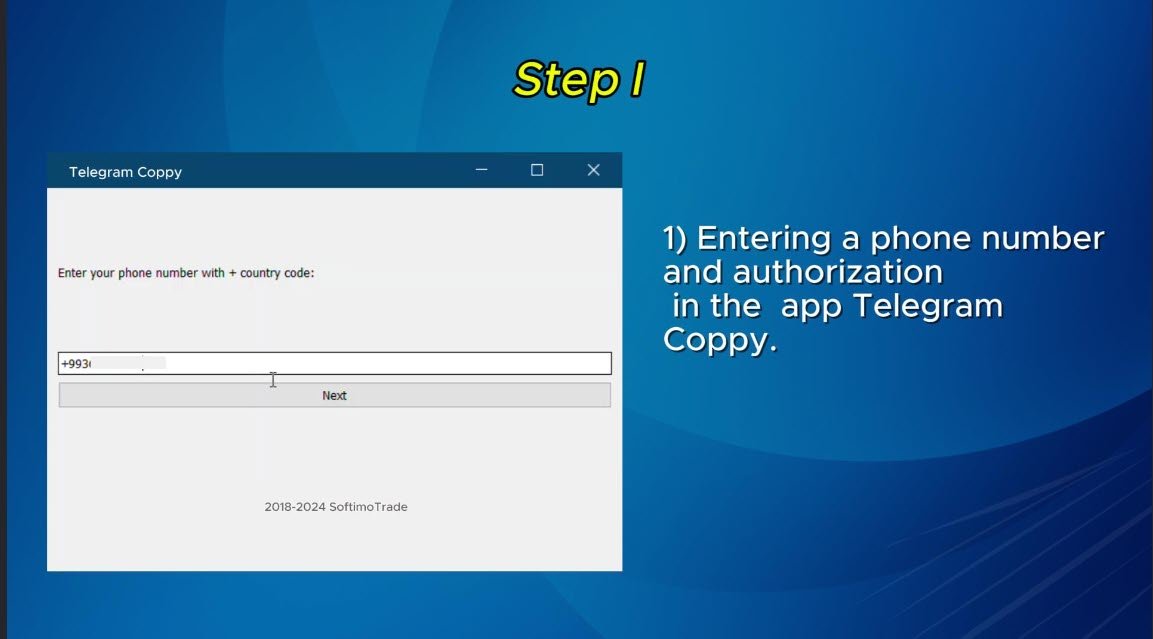
    • Authentifiez-vous via un numéro de téléphone et un code sécurisé.
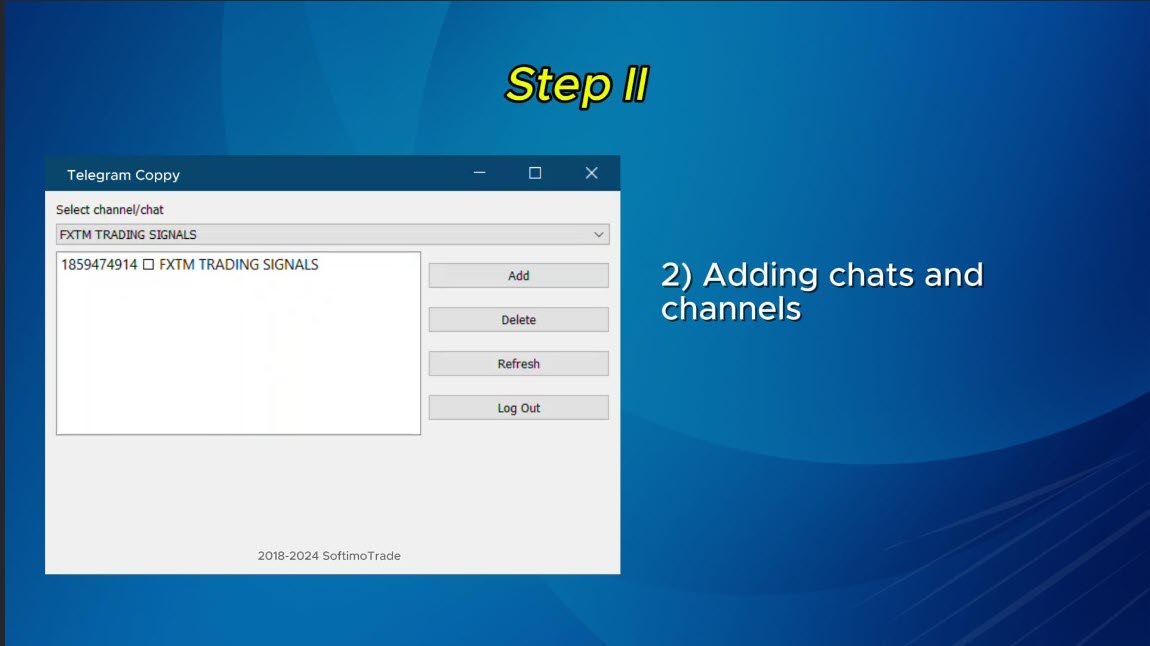
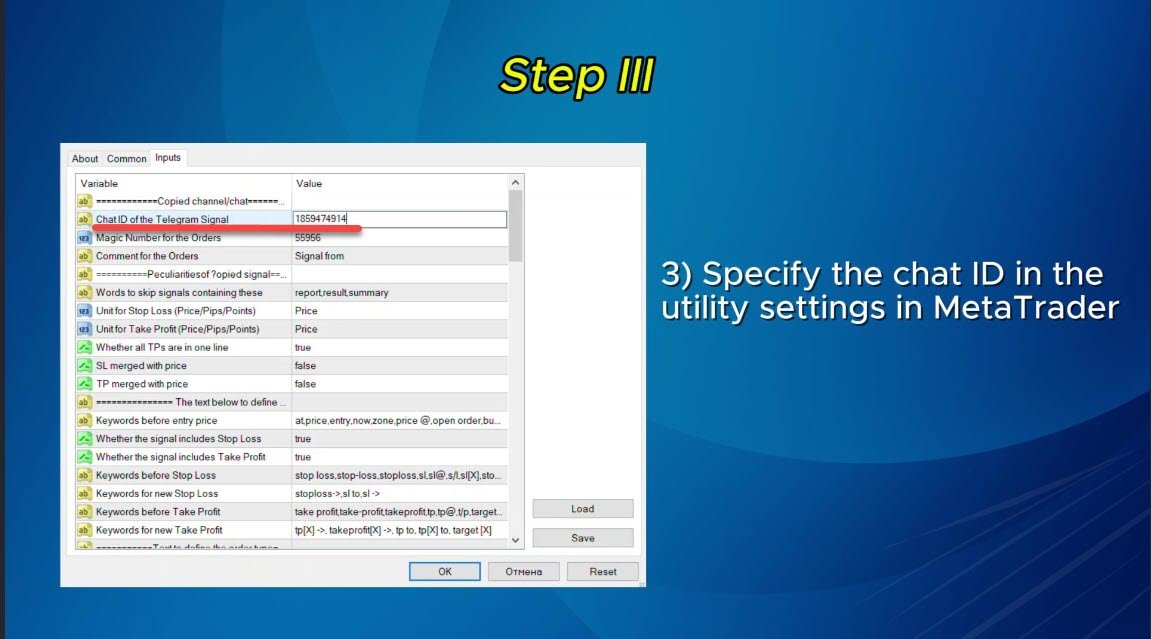
    • Récupérez et gérez sans effort les identifiants de discussion à l'aide d'un pont EXE convivial.
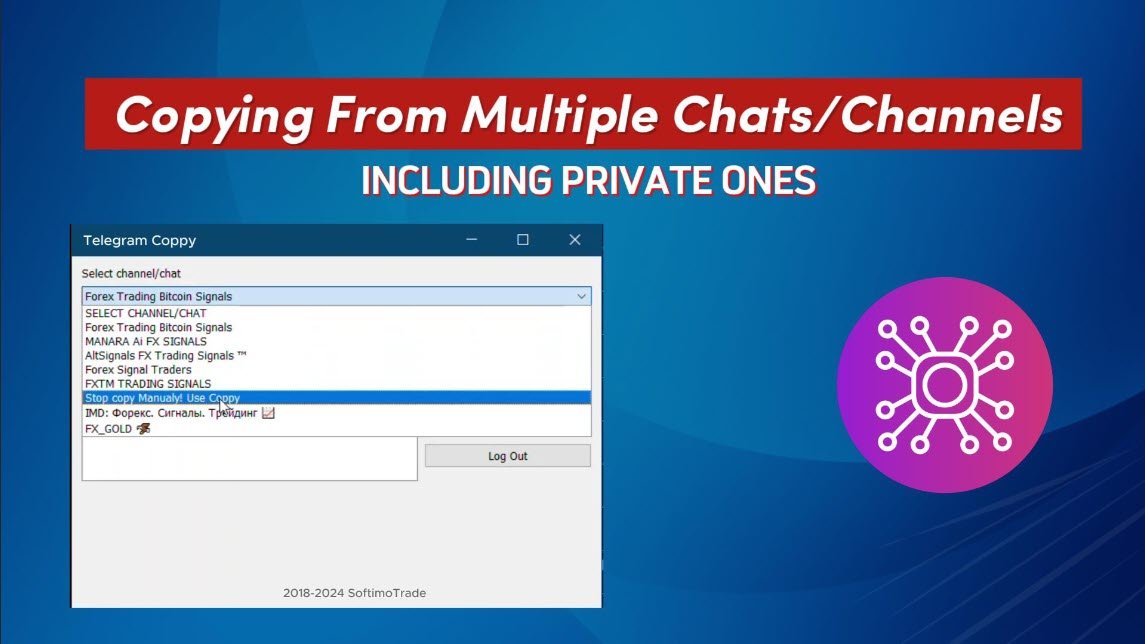
    • Ajoutez, supprimez et actualisez plusieurs canaux/chats pour la copie simultanée du signal.
  2. Analyse du signal avec des filtres avancés

    • Ignore les signaux indésirables contenant des mots d'exception personnalisés (par exemple, « rapport », « résumé »).
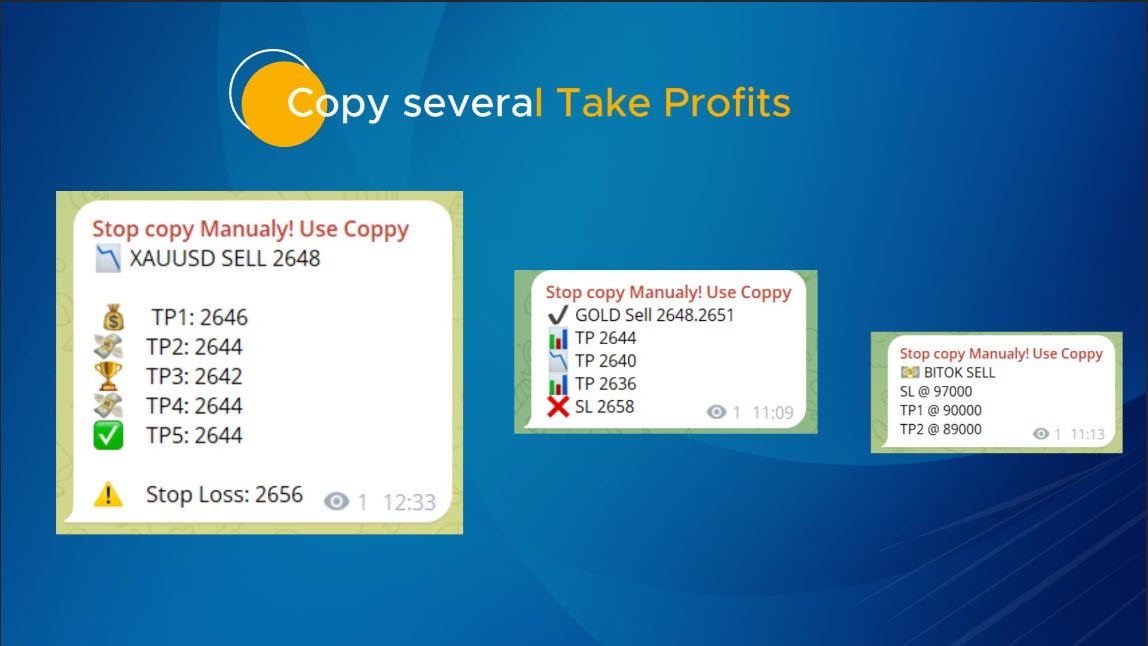
    • Prend en charge les formats SL et TP flexibles : prix, pips ou points.
    • Calcule automatiquement les points d'entrée lorsque les signaux spécifient des points au lieu des prix.
  3. Personnalisation et flexibilité des commandes

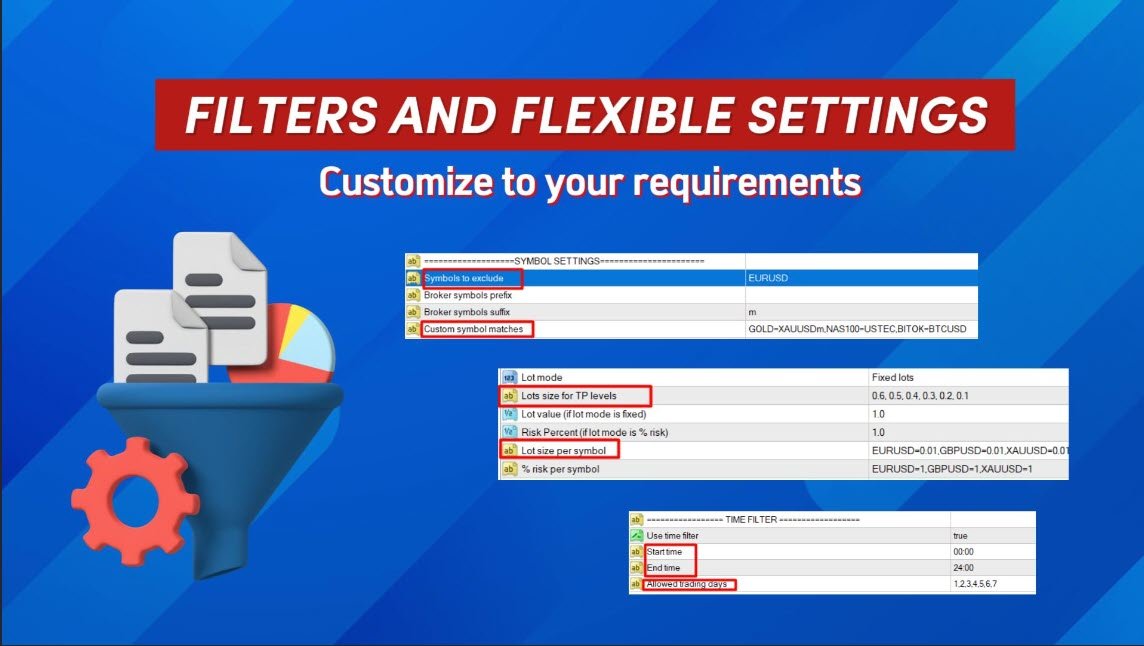
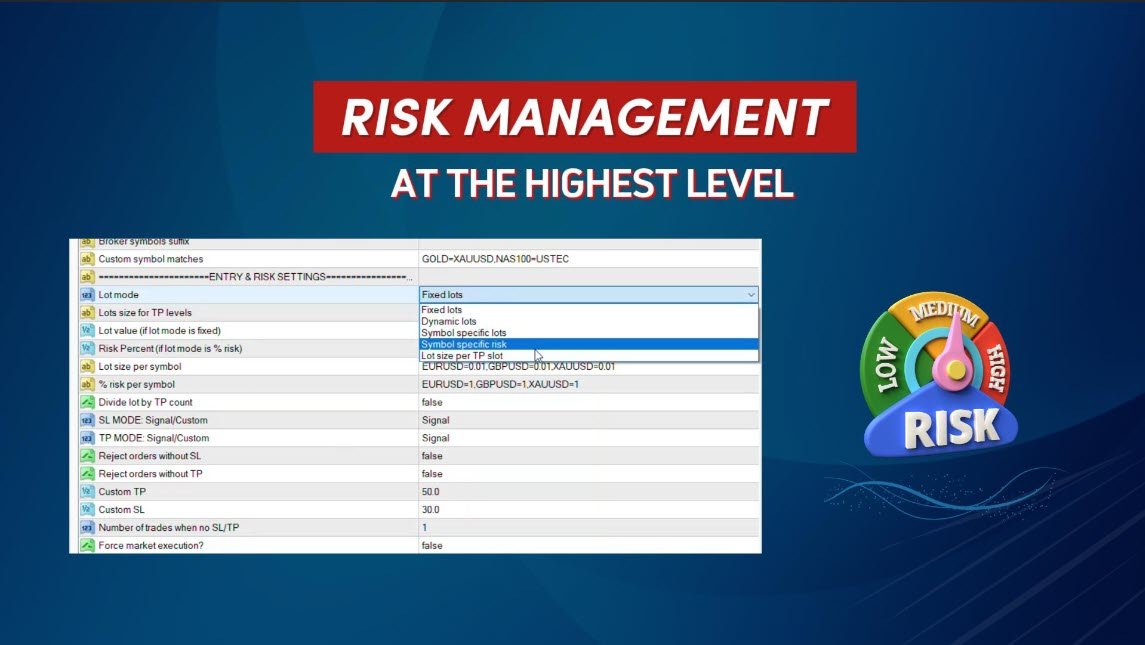
    • Personnalisez la taille de la commande avec plusieurs modes : lots fixes, lots dynamiques (% de risque) ou lots spécifiques à un symbole.
    • Ajustez SL/TP à l'aide de données de signal ou de paramètres personnalisés.
    • Configurez les paramètres de glissement, d'expiration de commande en attente et de nouvelle tentative pour une exécution parfaite.
  4. Gestion complète des symboles

    • Exclure des symboles spécifiques ou faire correspondre des symboles de courtier personnalisés.
    • Associez les symboles de signal aux noms spécifiques du courtier (par exemple, GOLD=XAUUSD).
  5. Gestion avancée des risques et des échanges commerciaux

    • Définissez des limites de perte quotidiennes, hebdomadaires ou mensuelles en pourcentage ou en devise.
    • Arrêtez automatiquement la copie lorsque les limites de perte sont atteintes.
    • Activez le seuil de rentabilité et le stop suiveur dynamique pour des profits optimisés.
  6. Filtres de temps et d'échange

    • Utilisez des filtres temporels pour contrôler les heures de négociation et les jours autorisés.
    • Limitez le nombre maximum de transactions ou de pertes par jour.
  7. Intégration transparente et configuration facile

    • Interface EXE simple pour une connexion sécurisée à Telegram et une gestion du chat/canal.
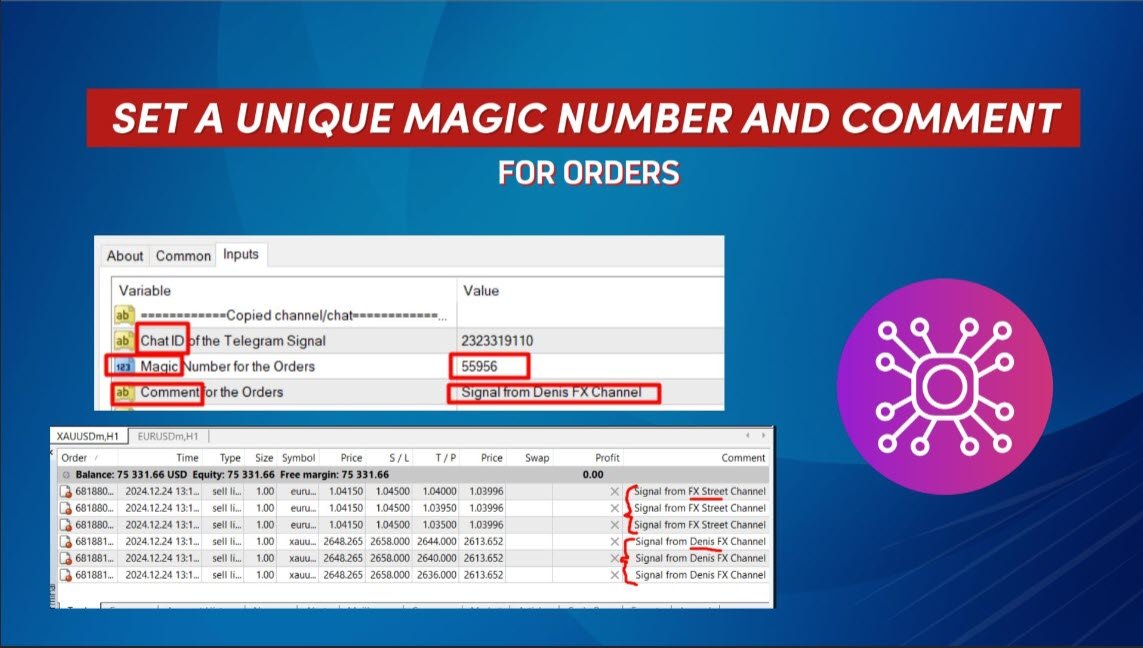
    • Copiez à partir de plusieurs canaux simultanément en déployant l'utilitaire sur des graphiques distincts.
  8. Reconnaissance flexible des commandes

    • Gère les commandes avancées pour fermer, modifier ou supprimer des commandes en fonction du texte du signal.
    • Prend en charge des expressions telles que « fermer toutes les positions », « déplacer SL au seuil de rentabilité », et bien plus encore.

À qui s'adresse cet utilitaire ?

Que vous soyez un trader particulier souhaitant automatiser sa stratégie ou un abonné à un service de signaux, Telegram pour MT4 vous garantit de ne manquer aucune transaction. Grâce à son interface intuitive, ses fonctionnalités de personnalisation détaillées et ses puissantes capacités d'analyse, cet utilitaire simplifie le trading comme jamais auparavant.

Pourquoi choisir Telegram pour MT4 ?

  • Aucune DLL externe requise, garantissant une sécurité et une compatibilité maximales.
  • Paramètres entièrement personnalisables pour s'adapter à votre style de trading et à votre appétit pour le risque.
  • Analyse fiable des signaux même avec des messages complexes ou des formats non conventionnels.

Commencez dès aujourd'hui

Transformez votre expérience de trading avec Telegram en MT4 . Gagnez en efficacité, précision et confiance à chaque transaction.

Les principales raisons pour lesquelles il ne faut pas copier un signal :

  • Vous n'avez pas exécuté le programme en tant qu'administrateur, pour un fonctionnement correct, exécutez le fichier exe (pont vers Telegram) en tant qu'administrateur
  • Si Telegram est bloqué dans votre pays, vous devez utiliser un VPN sur l'ensemble du PC qui permettra au fichier de pont EXE de se connecter à Telegram ; une solution consiste à placer le copieur sur un VPN sur lequel Telegram n'est pas bloqué.
  • Le trading automatique n'est pas activé, vous devez activer le trading automatique dans les paramètres du terminal

Avis 12
Rohit22t
63
Rohit22t 2026.07.08 03:01 

will it work vps ?

michael987654
55
michael987654 2026.05.12 19:41 

Fantastic Expert Advisor! It has been performing incredibly well and exactly as described. Many useful features and "lightning fast" execution Huge shoutout to the seller, who went above and beyond to help me with the problems i had. I tried some other copiers and this one was the best Highly recommended for anyone looking for a reliable copier from telegram to mt4 Great job!!!

Mark Genber Escartin
221
Mark Genber Escartin 2026.04.16 17:35 

Excellent Telegram to MT4 Copier ⭐️⭐️⭐️⭐️⭐️ A powerful and reliable tool for copying Telegram signals directly to MT4. Setup is simple, execution is fast, and the signal parsing handles different formats accurately. The risk management features (loss limits, breakeven, trailing stop) and flexible lot sizing make it highly customizable for any trading style. No DLLs is a big plus for security. Just make sure AutoTrading is enabled and run the bridge as admin. Overall: fast, flexible, and highly efficient definitely recommended.

Produits recommandés
Hello Guys! I want to share with you a very useful tools. Anyone of us who has used MT4 for some time knows how impractical this platform can be for discretionary trading. That's why I created this graphical interface!  Interface is very simple, all the info that you need are in the video and in the screenshot. NB: Before to run the EA Interface, remember to copy the file in the comment in your MT4 folder "Controls". PATH: .../MQL4/INCLUDE/CONTROLS NB: unfortunately the interface can't be test
Undefeated Triangle MT4
Nauris Zukas
4.56 (9)
Description Ce produit a été créé dans le cadre du projet "PULSE OF MARKET" . L’EA "Undefeated Triangle" fonctionne sur l’interaction des prix entre les devises AUD, CAD et NZD. D’après les observations, ces paires présentent souvent des mouvements corrélés, où le prix peut revenir après un mouvement fort. Cela permet d’utiliser une approche de type grid pour gérer les positions. L’EA utilise 3 paires : AUDCAD, AUDNZD et NZDCAD. Version MT5 Avantages Prix inférieur par rapport à des produits sim
Fibo Color Levels
Marlon Campos da Silva
4 (4)
Fibo Color Levels is an amazing tool for Fibonacci lovers. You can customize your preferred values, styles and formats of each level and set the color levels according to their importance. Fibo Color Levels Not add object fibonacci retracement automatically . The purpose of this indicator is not it. So you need to manually add the Fibonacci Retracement in your chart, as usually already do. Use the standard tool Fibonacci Retracement in your MT4, draw the Fibo according to the swing-high and/or s
Short Description A professional MT4 trade management utility for managing open trades, risk, trailing stop, break-even, partial close, daily loss guard and trade history directly from the chart. Full Description Smart Trade Manager Dashboard MT4 is a professional trade management panel built for traders who want faster control, clearer account visibility and stronger risk discipline directly from the chart. It is not a signal system and it does not open trades automatically. The dashboard focus
Automated Timeframe cycling with Symbols centered.  Force every timeframe onto one clock window, so the story you see on Daily is the same story you are slicing on H4, H1, and M1.  Traders usually flip timeframes and lose the span. A Daily chart shows a few weeks, then M15 shows a few hours, and the eye treats them as different markets. This indicator locks the window to N bars of the highest enabled timeframe — default 10 Daily — and maps every lower timeframe to that same stretch. You stay ins
FREE
Hidden Gap by MMD MT4
Mariusz Maciej Drozdowski
Hidden Gap by MMD Hidden Gap by MMD is a unique indicator that detects hidden gaps between three consecutive candles. This observation isn't my own, but in the MMD methodology, it has its application alongside other original indicators. You can apply this indicator to the chart multiple times and set the interval from which you want to see the hidden gaps. You can show or hide these gaps as needed. For example, you can view the chart at an M5 interval and see hidden gaps from an M15 chart, etc.
Fortress Axis — Strategic Market Control System Fortress Axis is an Expert Advisor for MetaTrader 4 built around a structured trading framework that combines price behavior analysis, configurable entry logic, layered confirmation, and systematic position management. Its philosophy is centered on controlled execution and coordinated trade management. Instead of treating every market movement as an isolated opportunity, Fortress Axis uses a sequence of analytical conditions and configurable tradin
Slippage Execution Monitor
Eugenio Garcia Pastoriza
Overview Slippage Execution Monitor is a utility panel designed for traders who require precise transparency regarding order execution quality. While traditional post-analysis tools rely on closed trading history where the initial click quote has already been lost, Slippage Execution Monitor captures the exact Bid/Ask prices locally at the very instant you send the order and benchmarks it against the broker fill price. This allows you to accurately measure latency slippage, liquidity gaps, an
Psychology
Tais Miranda Hoffmann
4.6 (5)
The most different product of the site: This tool is an auxiliary tool aimed at managing your trades and psychological discussions. As you probably know, more than 70% of the reason for the success of big traders is psychological issues. Only 30% is related to your strategy. So it is better to strengthen this big part with a tool. With a free tool, I allow you to become a better trader   This tool consists of several rules. In version 1.0, we have 7 rules. In later versions, we will add more ru
FREE
MT4 to Telegram & Discord Notifier MT4 to Telegram & Discord Notifier is a lightweight and practical notification utility for MetaTrader 4 that automatically sends real-time trade updates to your Telegram and Discord channels. It is designed for traders who want to stay informed about trading activity without constantly watching the terminal. Once connected, the notifier delivers instant alerts whenever a trade is opened or closed, helping you monitor live activity, improve communication, and ke
FREE
Online Accounts Manager MT4
Kyra Nickaline Watson-gordon
5 (1)
OneClick Online Account Manager is a powerful utility that helps you to manage all your accounts from a centralized panel. It is suitable for all single account traders and specially for multiple accounts traders. The utility help you to : Monitor status of all accounts on a private web page. Some information such as account connection status, account profit, DD, Balance, Equity, Margin Level, Number of positions and orders, Daily and Weekly profit/loss and also overall summation of all these p
EuroPulse Day Levels — EMA Trend + Previous Day High/Low EA (Swap-Free) PRODUCT OVERVIEW EuroPulse Day Levels is a premium automated trading solution designed for MetaTrader 4, specialized for the EURUSD currency pair. The EA implements a simplified yet powerful trend-following strategy: • EMA 20/50 crossover for trend direction • Previous day high/low levels for confirmation • ATR-based stop loss and take profit • Daily loss protection • Swap-Free mode for Islamic accounts WHY
Equity Pulse MT4 Real-time equity, drawdown, and portfolio performance tracking in one clean trading panel. Equity Pulse MT4 is a practical account-monitoring indicator for MetaTrader 4. It helps traders see exactly where they stand across today, yesterday, recent days, the current week, month, and year. Instead of checking account history manually or relying only on the terminal’s floating profit number, Equity Pulse gives you a clear performance snapshot directly on the chart. It is designed
LayerStop
Norhisham Mohd Rudin
LayerStop EA only performs an action open pending order BUYSTOP or SELLSTOP, thus only monitor the trailing stoploss. No specific conditions are used to open pending order. Pending order BUYSTOP or SELLSTOP will generated immediately after an Expert Advisor is attach in the chart. Suitable for News High Impact. If you already attach LayerStop EA in the chart, and want LayerStop EA performs new one an action open pending order BUYSTOP or SELLSTOP, you need to remove LayerStop EA from chart a
Market Monitor
Rodrigo Rethka Goncalves
Market Monitor – Smart Asset Performance Dashboard for MT4 Turn your MetaTrader 4 into a professional trading intelligence center! Market Monitor is a powerful monitoring tool that displays, in real time, the most relevant performance metrics of each symbol being traded — helping you make faster, smarter, and more strategic decisions. What Does This Indicator Do? Market Monitor scans all open and historical orders, consolidates the data by symbol, and displays everything in visual pa
The indicator is the main part of Michael Huddleston's ICT (Inner Circle Trader) trading strategy. His legendary trading strategy is based on the concept of "Smart Money". To analyze the medium -term trend , the  ICT offers an analysis based on  twenty -day levels . The indicator builds levels , while showing the turning points with arrows . An important feature of the indicator is the automatic display of levels for different periods . You do not have to change the indicator settings when chang
Golden Scalper PRO
Felipe Jose Costa Pereira
3.73 (11)
Golden Scalper PRO : Notre technologie à vos côtés ! Manuel et fichiers de configuration : contactez-moi après l'achat pour recevoir le manuel et les fichiers de configuration. Prix : Le prix augmente en fonction du nombre de licences vendues. Copies disponibles : 3 Trader l'or, l'un des actifs les plus volatils du marché financier, nécessite une grande précision, une analyse rigoureuse et une gestion des risques extrêmement efficace. Golden Scalper PRO a été développé précisément pour intégrer
Various Trailing Manager EA Various Trailing Manager EA is a professional trader's tool that provides protection of floating profit on open trades. This EA Utility allows you to manage (with advanced filtering) unlimited open orders (manual or EA) with trailing stops based on 7 methods: percent, ATR, Moving Average, Candle, Parabolic, Fractal. The trailing stop can be either real or virtual, and you can exit fully or with a partial close percent on touch or bar close. Visualize all orders and t
CloneChartMT4
Andrei Novichkov
5 (2)
This utility clones the chart it is running on. It opens the same chart with the same graphical objects, set of indicators (saving the parameters) and the rest of the elements. In essence, it performs a deep copying of the original chart, transferring the template to the opened chart. The symbol and the timeframe of the original chart are also saved.
FREE
Советник  представляет собой многофункциональную торговую систему BBMA Oma Ally с интеграцией Telegram для удаленного управления и получения уведомлений. Основная специализация - анализ паттернов ценового действия и автоматическое оповещение о торговых возможностях. Основные функции 1. Система оповещений через Telegram Управление командами: Отслеживание и выполнение команд из Telegram Уведомления: Мгновенные оповещения о торговых сигналах Удаленное управление: Возможность управления советнико
Telegram and Discord to MT4 AI Trade Signal Copier, a signal copier for MetaTrader 4 that copies trades from your Telegram and Discord signal providers and manages each position with your own money management in your languages. The program screens and messages come in English, Russian, Chinese (Simplified and Traditional), Spanish, Portuguese, Japanese, German, Korean, French, Italian, Turkish, Thai, Indonesian and Vietnamese. Backtest first, then trade: run a signal provider's history on real M
THIS PRODUCT CAN NOT BE TEST IN STRATEGY TESTER. PLEASE TRY DEMO VERSION: https: //www.mql5.com/en/market/product/58082 FIRST 10 COPIES AT 30 USD, NEXT PRICE WOULD BE 50 USD RISK AND TRADE MANAGER RISK AND TRADE MANAGER   is an advanced trading panel designed for manual trading.   Utility helps to manage trades effectively and efficiently with a single click. MAIN FEATURES Convert and display Stop Loss (SL)   Pips into % and amount to view the clear picture of the trades if SL hits. Fund alloca
Designed with advanced algorithms and utilizing deep learning technology, our Haiau Capital MT4 (EA) is crafted to assist you in the intricate world of forex trading. The system analyzes market behaviors and conducts transactions based on specific criteria, empowering you to engage with market trends more effectively. With the backing of nearly a decade of data, the EA employs deep learning to examine past market conditions, aiming to provide enhanced decision-making. Recommendations: Curren
Working Bot
Dmitry Shutov
1 (1)
This Expert Advisor is based on advanced neural networks. Main EA features After training, the EA remembers the patterns of each currency pair . Therefore, re-training the currency pair is not required when changing a currency pair. Fixed Take Profit and Stop Loss levels are set in the inputs. Multi-currency trading . ‌Monitoring of my accounts: https://www.mql5.com/en/signals/author/mizrael Preparing for trade and training It is recommended to train the EA. For better understanding, we posted
ExincExp
Stanislav Vereshchagin
Hello dear traders! I present to your attention the ExincExp trading robot. The robot is based on the Price Action "Outside Bar" trading strategy. The Expert Advisor is designed for the H1 timeframe, best suited for the EUR-USD pair. There will be not many trades, but filtering them very well, which will make only the most accurate market entries for you. The robot calculates and places stop-loss and take-profit on its own. Also, it is not based on any indicators, the EA takes all information
Hello all The expert works by hanging pending deals moving with the price when activating a transaction It closes on the stop loss or on a profit from the pursuit of profit Work on low spread currency pairs Like dollar yen currency The work is done with the same settings as the expert, or it can be modified as the user likes Work on a timing of 15M or more as the user likes parameters: Transaction_Movement : Movement =true  . no Movement=false . Lot1: Manual Lot Size Auto_Lot: Set true to auto
CloseDelet Orders
Hafis Mohamed Yacine
CloseDelet_Orders CloseAtProfit is an EA that I use only to close orders after defined profit, or loss,  close all orders  ,  also delete pending orders.  I am using it in live trading.  The speed of closing depends on time when it trades, on broker you are using and symbols you are trading. INPUTS: win_USD_All   =    close all orders (sell+buy)  when the profit is greater than defined profit to close; win_USD_BUY =    close only orders buy   when the profit is greater than defined profit to cl
Hallo traders! Just finished a telegram utility which can be of interest for smartphone live traders. What is offered inside? Main settings of EA is simple and standard you can use any pair available in MetaTrader. Mainly it was created this for BTCUSD but will work with any pair. What is the main I wanna show: we have always fresh info from market inside buttons refreshing: After start it has 0.00 lots and it will not allow trade by accidental touch. You need to add a Risk + and get 0.01 :) In
SMT Trade Planner est un calculateur de risque professionnel et un panneau d'execution d'ordres directement sur le graphique MetaTrader. Il calcule la taille du lot, affiche des lignes visuelles d'entree, Stop Loss et Take Profit deplacables sur le graphique, valide le trade contre des regles de risque configurables et permet l'execution en un clic.   Fonctionnement Attachez le Trade Planner a n'importe quel graphique. Le panneau affiche les informations du compte et des boutons de selection rap
close all profitable orders The set contains scripts for different purposes, facilitating work in the MetaTrader 4 terminal. If necessary, a screen is provided for some scripts. Before working on a real account, check (on a demo account) whether the required script responds to your tasks (for example, there is a script for opening five orders at the same time, by default the lot is set to 10; so that you do not accidentally open five positions with a total volume of 50 lots - be attentive))) Use
Les acheteurs de ce produit ont également acheté
Bienvenue sur Trade Manager EA, l’outil ultime de gestion des risques conçu pour rendre le trading plus intuitif, précis et efficace. Ce n’est pas seulement un outil d’exécution d’ordres ; c’est une solution complète pour la planification des trades, la gestion des positions et le contrôle des risques. Que vous soyez débutant, trader expérimenté ou scalpeur ayant besoin d’une exécution rapide, Trade Manager EA s’adapte à vos besoins, offrant une flexibilité sur tous les marchés, des devises et i
Exp COPYLOT CLIENT for MT4
Vladislav Andruschenko
4.69 (65)
Copieur de trades professionnel pour MetaTrader 4 Un copieur de trades rapide, fiable et professionnel pour MetaTrader 4 . COPYLOT permet de copier des opérations Forex entre les terminaux MetaTrader 4 et MetaTrader 5 , avec une synchronisation flexible adaptée à différents types de comptes et styles de trading. La version COPYLOT MT4 prend en charge : MetaTrader 4 → MetaTrader 4 MetaTrader 5 Hedge → MetaTrader 4 MetaTrader 5 Netting → MetaTrader 4   Version MT5 Description complète + DEMO + PDF
Trade Assistant MT4
Evgeniy Kravchenko
4.43 (197)
It helps to calculate the risk per trade, the easy installation of a new order, order management with partial closing functions, trailing stop of 7 types and other useful functions. Additional materials and instructions Installation instructions   -   Application instructions   Line function -   shows on the chart the Opening line, Stop Loss, Take Profit. With this function it is easy to set a new order and see its additional characteristics before opening.   Risk management  - The risk calcu
Local Trade Copier EA MT4
Juvenille Emperor Limited
4.96 (111)
Local Trade Copier EA MT4 est un copieur de trades rapide et flexible permettant de copier et de gérer des trades entre plusieurs comptes MetaTrader 4 sur le même ordinateur Windows ou Windows VPS. Il combine la synchronisation locale des trades avec des contrôles côté Receiver pour la taille des lots, la gestion du risque, le filtrage des trades, le mappage des symboles, la gestion des trades et la protection du compte. Configurez vos terminaux Transmitter et Receiver en environ 1 minute et co
News Filter EA MT4
Rashed Samir
5 (10)
News Filter EA: Advanced Algo Trading Assistant News Filter EA is an advanced algo trading assistant designed to enhance your trading experience. By using the   News Filter EA , you can integrate a Forex economic news filter into your existing expert advisor, even if you do not have access to its source code. In addition to the news filter, you can also specify   trading days   and   hours   for your expert. The News Filter EA also includes   risk management   and   equity protection   features
RS Trade Copier
Boris Sedov
5 (1)
RS Trade Copier - le copieur de trades local ultra-rapide avec une véritable interface graphique. Arrêtez de saisir les numéros de compte manuellement. Fini les listes interminables de 200+ paramètres dans l'onglet Inputs. Un outil fiable et flexible pour copier les opérations de trading entre plusieurs terminaux MT4 et MT5. Il convient aux traders expérimentés, aux services de signaux ainsi qu'aux investisseurs privés. Il permet la synchronisation du trading d'un ou plusieurs Providers vers un
TradePanel MT4
Alfiya Fazylova
4.84 (95)
Trade Panel est un assistant commercial multifonction. L'application contient plus de 50 fonctions de trading pour le trading manuel et permet d'automatiser la plupart des tâches commerciales. Instructions d'utilisation : https://www.mql5.com/fr/blogs/post/762589 Version d'essai de l'application pour un compte démo : https://www.mql5.com/fr/blogs/post/762644 Comment installer l'application : https://www.mql5.com/fr/blogs/post/762645 Comment tester l'application en mode visuel : https://www.mql5.
Telegram to MT4 Multi-Channel Copier   copie automatiquement les signaux de trading de vos canaux Telegram et Discord directement vers MetaTrader 4. Pas de bots, pas d'extensions de navigateur, pas de copie manuelle. Un signal arrive sur Telegram ou Discord et l'EA ouvre le trade dans votre terminal en quelques secondes. Et avant de copier un canal, le backtester intégré vous montre ce que ce canal aurait fait sur votre compte. Le produit comprend deux composants : une application Windows qui éc
TradeMirror est un outil de copie d'ordres localisé, spécialement conçu pour les plateformes MT4/MT5, qui synchronise les opérations de trading en temps réel. Tutoriel Veuillez cliquer sur le lien Tutoriel Trademirror pour voir plus de tutoriels. Avantages du produit En se basant sur les normes élevées des logiciels financiers en matière de sécurité, de stabilité et de protection de la vie privée, nous avons procédé à des optimisations en profondeur sur trois dimensions principales : Une interfa
PZ Trade Pad Pro MT4
PZ TRADING SLU
3.67 (3)
Effortlessly calculate lot sizes and manage trades to save time and avoid costly errors The Trade Pad Pro EA is a tool for the Metatrader Platform that aims to help traders manage their trades more efficiently and effectively. It has a user-friendly visual interface that allows users to easily place and manage an unlimited number of trades, helping to avoid human errors and enhance their trading activity. [ Installation Guide | Update Guide | Troubleshooting | FAQ | All Products ] One of the k
Besoin d'aide ? Comment le configurer ? Des questions ? Demandez ici dans votre langue, réponse rapide : https://www.mql5.com/en/market/product/139089/comments Télécharger la version d'essai fonctionnelle Copy Cat More (Chat Copieur) — Copieur de Trades (Trade Copier) MT4 n'est pas un simple copieur de trades local ; c'est un cadre complet de gestion du risque et d'exécution (risk management and execution framework) conçu pour les défis du trading d'aujourd'hui. Des challenges de prop firm à
Trade Indicator Assistant is a powerful MT4 utility designed to turn indicators into automated trading systems. Its main feature is the ability to automatically detect an indicator’s   BUY and SELL signal buffers , without requiring you to know the buffer numbers, search through indicator settings, or modify the indicator source code. Bonus Indicator: After purchasing Trade Indicator Assistant, contact me to receive Trade Signal Pro completely free as a bonus indicator. [Download Demo Version]
Trading History MT4
Siarhei Vashchylka
5 (9)
Trading History - A program for trading and money management on the history of quotes in stratagy tester. It can work with pending and immediate orders, and is equipped with trailing stop, breakeven and take profit functions. Very good for training and testing different strategies. Manual (Be sure to read before purchasing) Advantages 1. Allows you to test any trading strategy in the shortest possible time 2. An excellent simulator for trading training. You can gain months of trading experience
Trade Manager Pro MT4
Bryan Djoufack Nguessong
Il s'agit d'un utilitaire pour faciliter votre trading en mettant en un ou quelques clics des tâches fastidieuses comme la gestion des ordres et la gestion des risques. Caractéristiques Gestion du risque  Calcule automatiquement les lots en fonction du risque spécifié en % ou en $ (paramètre d'entrée MoneyBasedRisk) dans le champ risque et vous laisse entrer en plaçant des lignes pour SL TP etc. et affiche le Risk Reward en temps réel. TrueRisk inclut les commissions lors du calcul de la ta
Copieur ->Interaction d'interface pratique et rapide, les utilisateurs peuvent l'utiliser immédiatement       ->>>> Recommandé pour une utilisation sur des ordinateurs Windows ou VPS Windows Caractéristiques: Paramètres de copy trading diversifiés et personnalisés : 1. Différents modes de lot peuvent être définis pour différentes sources de signaux 2. Différentes sources de signaux peuvent être définies pour le copy trading avant et arrière 3. Les signaux peuvent être définis avec des commentai
Shepherd Safety EA
AW Trading Software Limited
4.92 (13)
AW Shepherd Safety EA est un Expert Advisor qui accompagne les positions ouvertes. Le trader ouvre le premier ordre depuis le panneau, puis l'EA gère lui-même le panier : il ajoute des ordres de récupération filtrés par la tendance, clôture le côté par TakeProfit, trailing ou stop et affiche les niveaux de clôture sur le graphique. Les achats et les ventes sont gérés séparément, les deux côtés peuvent être ouverts simultanément. Un ordre de récupération ne s'ouvre pas simplement au pas de prix,
Trade Assistant Pro 36 in 1
Makarii Gubaydullin
4.76 (21)
Outil Multifonction : Calculatrice de Lots, Ordres Grid, Ratio R/R, Gestionnaire de Trades, Zones d'Offre et de Demande, Price Action et bien plus Version Démo   |   Manuel d'utilisation L'Assistant de Trading ne fonctionne pas dans le testeur de stratégies : vous pouvez télécharger la Version Démo ICI pour tester l' utilitaire . Contactez-moi pour toute question / idées d'amélioration / en cas de bug trouvé Si vous avez besoin d'une version MT5, elle est disponible ici Simplifiez, accélérez et
Trade Dashboard MT4
Fatemeh Ameri
4.96 (55)
Trade Dashboard simplifies how you open, manage, and control your trades, with built-in lot size calculation. It allows you to execute trades, manage risk, and control positions directly on the chart, with tools such as partial close, breakeven, and trailing stop. Designed to reduce manual work and help you stay focused on your trading decisions. A demo version is available for testing. Detailed explanations of features are provided within the MQL5 platform. Installation instructions are include
Le MT4 to Telegram Signal Provider est un outil facile à utiliser et entièrement personnalisable qui permet d'envoyer des signaux à Telegram, transformant ainsi votre compte en fournisseur de signaux. Le format des messages est entièrement personnalisable ! Cependant, pour une utilisation simple, vous pouvez également opter pour un modèle prédéfini et activer ou désactiver des parties spécifiques du message. [ Démonstration ]   [ Manuel ] [ Version MT5 ] [ Version Discord ] [ Canal Telegram ]  N
Easy Trade Executor est un outil de calcul rapide du volume, d’exécution d’ordres et de gestion des positions pour MT4. Placez directement les niveaux de Prix d'entrée, Stop Loss et Take Profit sur le graphique, obtenez automatiquement le volume adapté à votre risque et ouvrez vos trades en quelques clics seulement. Pourquoi choisir Easy Trade Executor ? Easy Trade Executor a été conçu pour les traders qui recherchent bien plus qu’un simple calculateur de risque. Ils veulent gérer leurs trades
The product will copy all telegram signal to MT4   ( which you are member  ) , also it can work as remote copier.  Easy to set up, copy order instant, can work with almost signal formats, image signal, s upport to translate other language to English Work with all type of channel or group, even channel have "Restrict Saving Content", work with  multi channel, multi MT5 Work as remote copier: with signal have ticket number, it will copy exactly via ticket number. Support to backtest signal. How to
KT Equity Protector MT4
KEENBASE SOFTWARE SOLUTIONS
3.75 (4)
An equity protection EA for MetaTrader that enforces your loss limits and profit target for you: when your account reaches a rule you set, it closes your trades on every symbol, before one bad day turns into a lost account. It suits prop firm challenges and personal accounts alike. Attach it to one chart, answer a few questions in the on-chart setup wizard, and it watches your whole account in the background while you trade by hand or with other EAs. What it protects Daily loss limit: a percenta
Unlimited Trade Copier Pro is a tool to copy trade remotely to multiple MT4, MT5 and cTrader accounts at different computers/locations over internet. This is an ideal solution for you if you are a signal provider and want to copy your trades to other receivers globally on your own rules. One provider can copy trades to multiple receivers and one receiver can get trade from multiple providers as well. The provider can even set the subscription expiry for each receiver, so that receiver will not b
King Trade Copier MT4
Mohammed Maher Al-sayed Mohammed Ahmed Saleh
5 (1)
King Trade Copier relie des terminaux MetaTrader qui tournent sur le même ordinateur ou le même VPS. Les trades ouverts sur un compte apparaissent sur les autres. Le fichier contient les deux rôles, de sorte que le même téléchargement devient l'émetteur ou un récepteur selon la valeur que vous donnez à Mode. Sur chaque graphique, le panneau indique si ce terminal envoie ou reçoit, nomme le compte de l'autre côté, compte les récepteurs qui ont répondu et donne l'ancienneté du dernier signal. Un

Strategy Builder offers an incredible amount of functionality. It combines a trade panel with configurable automation (covert indicators into an EA), real-time statistics (profit & draw down) plus automatic optimization of SL, TP/exit, trading hours, indicator inputs. Multiple indicators can be combined into an single alert/trade signal and can include custom indicators, even if just have ex4 file or purchased from Market. The system is easily configured via a CONFIG button and associated pop-up
Take a Break
Eric Emmrich
5 (31)
Take a Break pauses your Expert Advisors when trading is a bad idea: before news, after a daily loss, outside your trading hours, or when a rule you wrote yourself says so. When the pause is over, your EAs simply continue. Account protection for all your EAs in one tool: news filter, drawdown and equity protection, time filter and custom rules. One EA on one chart protects the whole account, the free indicator gives every chart its own rules on top. Free demo | What is new in 26.09 | Support Ass
Trade Manager MT4 DaneTrades
Levi Dane Benjamin
4.09 (11)
Trade Manager pour vous aider à entrer et sortir rapidement des transactions tout en calculant automatiquement votre risque. Y compris des fonctionnalités pour vous aider à éviter le sur-trading, le trading de vengeance et le trading émotionnel. Les transactions peuvent être gérées automatiquement et les mesures de performances du compte peuvent être visualisées dans un graphique. Ces fonctionnalités rendent ce panneau idéal pour tous les traders manuels et contribuent à améliorer la plateforme
Négociez automatiquement les zones de support et de résistance ou d'offre et de demande une fois que vous avez identifié les zones clés à partir desquelles vous souhaitez négocier. Cet EA vous permet de dessiner des zones d'achat et de vente en un seul clic, puis de les placer exactement là où vous vous attendez à ce que le prix change. L'EA surveille ensuite ces zones et effectuera automatiquement des transactions en fonction de l'action des prix que vous spécifiez pour les zones. Une fois la
VirtualTradePad mt4 Extra
Vladislav Andruschenko
4.85 (61)
Panneau de trading pour trader en 1 clic.   Travailler avec des positions et des commandes!   Trading à partir du graphique ou du clavier. En utilisant notre panel de trading, vous pouvez trader en un clic à partir du graphique et effectuer des opérations de trading 30 fois plus rapidement que le contrôle MetaTrader standard. Des calculs automatiques de paramètres et de fonctions qui facilitent la vie d'un trader et aident un trader à mener ses activités de trading beaucoup plus rapidement et pl
Riskless Pyramid
Snapdragon Systems Ltd
5 (1)
Introduction This powerful MT4 trade mangement EA offers a way potentially to aggressively multiply trade profits in a riskfree manner. Once a trade has been entered with a defined stoploss and take profit target then the EA will add three pyramid add-on trades in order to increase the overall level of profit. The user sets the total combined profit target to be gained if everything works out. This can be specified either as a multiple of the original trade profit or as a total dollar amount. Fo
Plus de l'auteur
GoldPro MT5
Sergey Batudayev
5 (6)
GoldPro (MT5) — Expert Advisor XAUUSD avec 2 modes sélectionnables : Classique et Scalping GoldPro est un système de trading automatisé pour   XAUUSD (Or)   conçu pour les traders qui recherchent une structure, des contrôles de risque clairs et un EA capable de fonctionner à différents rythmes de marché. Au sein d'un même EA, vous pouvez choisir   son mode de trading  : 1) Mode classique — logique calme pour les balancements et les replis Une approche classique axée sur le comportement de retour
Telegram to MT5 Coppy
Sergey Batudayev
5 (10)
Télégramme vers MT5 :   la solution ultime pour copier des signaux Simplifiez votre trading avec Telegram vers MT5, l'outil moderne qui copie les signaux de trading directement des canaux et chats Telegram vers votre plateforme MetaTrader 5, sans DLL. Cette solution puissante garantit une exécution précise des signaux, de nombreuses options de personnalisation, un gain de temps et une efficacité accrue. [ Instructions and DEMO ] Caractéristiques principales Intégration directe de l'API Telegram
EasyTradePad for MT5
Sergey Batudayev
5 (5)
EasyTradePad – Panneau de trading pour MetaTrader 5 EasyTradePad   est un outil de trading manuel et semi-automatisé. Son interface permet une gestion rapide des ordres et des positions, ainsi que des calculs de gestion des risques en un clic. Caractéristiques du panneau : Ouvrir et fermer des transactions avec un risque prédéfini (% ou devise de dépôt) Définissez SL et TP en points, en pourcentages ou en valeurs monétaires Calculer automatiquement le ratio risque/récompense Déplacez le stop lo
EA Ice Cube Scalper
Sergey Batudayev
4.71 (21)
Conseiller commercial Ice Cube Scalper -           c'est un scalpeur de jour       , effectuant quotidiennement un grand nombre de transactions, prenant plusieurs points à chaque transaction. La stratégie de l'EA consiste à négocier avec la tendance en utilisant l'indicateur RSI. L'EA utilise la moyenne avec un lot multiplicateur, vous devez comprendre cela avant d'utiliser l'EA, mais la stratégie a bien fonctionné à la fois dans le backtesting et le trading en direct. Avant d'acheter, assurez-
GoldPro
Sergey Batudayev
5 (2)
GoldPro (MT4) — Expert Advisor XAUUSD avec 2 modes sélectionnables : Classique et Scalping GoldPro est un système de trading automatisé pour   XAUUSD (Or)   conçu pour les traders qui recherchent une structure, des contrôles de risque clairs et un EA capable de fonctionner à différents rythmes de marché. Au sein d'un même EA, vous pouvez choisir   son mode de trading  : 1) Mode classique — logique calme pour les balancements et les replis Une approche classique axée sur le comportement de retou
Coppy Master MT5
Sergey Batudayev
5 (2)
Coppy Master MT5   est un outil permettant de copier des transactions entre les terminaux MetaTrader 4 et MetaTrader 5. Prend en charge la copie dans les deux sens : de MT5 à MT4, de MT4 à MT5, et également entre comptes du même type. Pour un fonctionnement correct, tous les terminaux doivent être lancés sur un seul ordinateur ou VPS. [ Instruction  and Demo ]  Pour copier vers MetaTrader 4, une version distincte du produit est requise -   Coppy Master MT4   . Fonctions principales : Type de con
Véritable indicateur de l'offre et de la demande       - vous permettra de déterminer rapidement l'emplacement des niveaux de résistance et de support sur toutes les périodes. L'indicateur sera utile pour ceux qui utilisent l'analyse technique dans leur trading. L'indicateur est facile à utiliser, il suffit de glisser-déposer sur le graphique et l'indicateur vous montrera les niveaux de support et de résistance les plus probables. Lorsque vous changez de période, vous verrez les niveaux de la n
Stop Out Line MT5
Sergey Batudayev
4 (1)
Logique de travail L'utilitaire Stop Out est un indicateur simple mais très pratique indiquant combien de points il reste au niveau Stop Out / Son avantage réside dans le fait que de nombreux traders surestiment délibérément le risque dans le trading à la recherche de profit, utilisent la marge disponible au maximum, et dans ce cas, il est très important de savoir où le courtier peut fermer de force vos positions. Placez simplement l'indicateur sur le graphique et, en fonction de la position
FREE
Le trading automatisé devrait vous aider à accroître votre capital, et non pas vous embrouiller avec des paramètres et des théories sans fin. SPARK   est un Expert Advisor léger mais efficace conçu pour donner aux débutants un démarrage en toute confiance en mettant l'accent sur la précision et la simplicité. Pourquoi SPARK est-il différent ? Concentré sur l'EUR/USD :   l'EA est spécifiquement optimisé pour l'EUR/USD, l'une des paires de devises les plus liquides et les plus stables. Construit s
FREE
Smart Grid set EA
Sergey Batudayev
5 (1)
Smart Grid Set EA est un conseiller expert flexible et convivial permettant de placer des ordres en attente sur une grille. Il prend en charge la logique de rentabilité, plusieurs modes de stop suiveur, le placement manuel sur la grille, la personnalisation des tailles de lots et une interface graphique intuitive. Il est idéal pour les traders qui utilisent des stratégies de grille ou de moyenne. Caractéristiques principales Place les ordres   Buy Stop   et   Sell Stop   dans une grille personna
FREE
The panel has the most intuitive interface that every beginner can handle. In the SLp column   – you need to specify the SL size in pips. If the value turns gray and at the same time the Bay / Sell buttons are also inactive, then you have specified a SL value that is less than that allowed before it was set by your broker. In the TP% column   – you indicate TP in% of the account balance. In the settings, you can choose on the basis of what this indicator will be calculated, by equity, balance or
FREE
MetaTrader utility MTI (Main Trading Info) – shows the basic trading information for a trader, namely: average and current spread size Swap size for short and long positions Cost of 1 pip for 1 trading lot Stop Level size (minimum distance for placing pending orders) Time until the end of the current (red) and time until the start of the next (gray) trading session Recommended Robot Scalper -   https://www.mql5.com/en/market/product/77108 The time until the end of the current trading session is
FREE
Logique de travail L'utilitaire Stop Out est un indicateur simple mais très pratique indiquant combien de points il reste au niveau Stop Out / Son avantage réside dans le fait que de nombreux traders surestiment délibérément le risque dans le trading à la recherche de profit, utilisent la marge disponible au maximum, et dans ce cas, il est très important de savoir où le courtier peut fermer de force vos positions. Placez simplement l'indicateur sur le graphique et, en fonction de la position
FREE
Description du conseiller Smart Expert Advisor est un conseiller de trading de grille automatique avec sélection automatique des paramètres pour chaque paire de trading. L'Expert Advisor sélectionne automatiquement les paramètres pour chaque paire de devises, vous n'avez donc pas besoin de définir les paramètres pour chaque paire, les calculs sont basés sur la volatilité de l'instrument négocié. Au moment de la négociation, vous pouvez définir la direction des points d'entrée. Activer le filtre
The panel has the most intuitive interface that every beginner can handle. In the SLp column  – you need to specify the SL size in pips. If the value turns gray and at the same time the Bay / Sell buttons are also inactive, then you have specified a SL value that is less than that allowed before it was set by your broker. In the TP% column   – you indicate TP in% of the account balance. In the settings, you can choose on the basis of what this indicator will be calculated, by equity, balance or
Risk Manager for MT4
Sergey Batudayev
4.6 (10)
Expert Advisor Risk Manager pour MT4 est un programme très important et, à mon avis, nécessaire pour chaque commerçant. Avec cet Expert Advisor, vous pourrez contrôler le risque de votre compte de trading. Le contrôle des risques et des bénéfices peut être effectué à la fois en termes monétaires et en termes de pourcentage. Pour que l'Expert Advisor fonctionne, attachez-le simplement au tableau des paires de devises et définissez les valeurs de risque acceptables dans la devise du dépôt ou en
EasyTradePad
Sergey Batudayev
5 (5)
EasyTradePad – Panneau de trading pour MetaTrader 4 EasyTradePad   est un outil de trading manuel et semi-automatisé. Son interface permet une gestion rapide des ordres et des positions, ainsi que des calculs de gestion des risques en un clic. Caractéristiques du panneau : Ouvrir et fermer des transactions avec un risque prédéfini (% ou devise de dépôt) Définissez SL et TP en points, en pourcentages ou en valeurs monétaires Calculer automatiquement le ratio risque/récompense Déplacez le stop lo
Indicator iPump for MT4
Sergey Batudayev
3 (2)
The iPump indicator is a versatile indicator   that combines the advantages of three categories of indicators. simultaneous trend detection on several Timeframes defining zones of resistance and support determination of overbought and oversold zones Indicator functions: Defining a trend This function will be necessary for all traders who want to objectively assess the current market direction and avoid subjectivity. It will be clear and intuitive. Determination of support and resistance levels
Market Screener for MT4
Sergey Batudayev
5 (1)
Ce filtre vous permet d'identifier les actifs qui sont plus que d'habitude surachetés (% d'augmentation) ou survendus (% de baisse) au cours d'une période de temps sélectionnée (intervalle de temps). Le marché est régi par la loi, achetez moins cher, vendez plus, mais sans scanner automatique, il vous sera très difficile d'identifier les devises / actions qui sont surachetées ou survendues plus que d'habitude, disons, au cours de la semaine en cours, ou du courant heure ou mois. Il peut y avoir
Logique de travail L'importance de cet indicateur réside dans le fait qu'il permet de comprendre combien de « carburant il reste encore sur l'instrument ». Imaginez la situation, vous êtes parti dans une voiture avec une batterie à moitié déchargée, en moyenne, cette quantité d'énergie est généralement suffisante pour une voiture pour 250 km, donc si vous le souhaitez, vous ne pouvez pas surmonter une distance de 700 km. Ainsi, pour chaque instrument, il existe un certain mouvement de prix quo
MetaTrader utility MTI (Main Trading Info) – shows the basic trading information for a trader, namely: average and current spread size Swap size for short and long positions Cost of 1 pip for 1 trading lot Stop Level size (minimum distance for placing pending orders) Time until the end of the current (red) and time until the start of the next (gray) trading session The time until the end of the current trading session is displayed in red, the time until the opening of the next session is display
Impuls Pro MT4
Sergey Batudayev
5 (2)
La stratégie de l'EA est basée sur le Swing trading , avec des entrées après des impulsions brutales calculées par l'indicateur iPump. Comme mentionné précédemment, l'EA a la capacité d'ouvrir des transactions manuelles avec un support automatique. - pour une tendance baissière ↓ on entre dans un trade après une hausse corrective du prix, l'actif tombe dans la zone de surachat, on vend le long de la tendance. - pour une tendance haussière ↑, on entre dans un trade après une baisse corrective du
EA Pump and Dump for MT4
Sergey Batudayev
5 (1)
Logique de stratégie Pump and Dump Expert Advisor est un conseiller de trading entièrement automatisé créé par un trader pour les traders. La stratégie est « acheter moins cher, vendre plus cher ». Les commandes sont ouvertes après une hausse/baisse importante du prix. Le sens de base de la stratégie Pump and Dump est d'acheter un actif moins cher lorsque le prix baisse et de le vendre plus haut lorsque le prix augmente. Vous avez probablement remarqué qu'après de brusques mouvements de prix
Close All Orders for MT4 script - closes absolutely all orders, whether pending or market ones. Orders are closed at the current profit/loss indicators at the time of closing. The script is suitable for moments when you need to quickly close all orders at the current indicators. The script is very easy to use, just drag the script onto the chart and it will do its job. Add me as a friend , I have many other useful products.
Script Fermer toutes les commandes positives pour MT4       - vous permettra de clôturer rapidement toutes les commandes rentables sur le compte. Le script   convient   aux moments   où vous devez clôturer rapidement toutes les commandes rentables   . Le script a le seul paramètre pour définir Profit_in_pips - dans celui-ci, vous spécifiez combien de points de profit doivent figurer sur la commande afin qu'elle tombe dans les conditions de clôture de la position. Le script est très facile à util
Risk Controller Expert Advisor, un programme qui vous permet de contrôler le risque total de vos conseillers en trading sur votre compte. Avec ce programme, vous pouvez contrôler le risque maximum qui sera autorisé sur le compte pour tous les conseillers. Par exemple, vous définissez le risque de 30% du drawdown maximum, ce qui signifie que si vos robots de trading actions dépassent le risque de 30%, le Risk Controller fermera toutes les positions des conseillers, et pourra également fermer tou
EA Long Term
Sergey Batudayev
Conseiller commercial       Long Term est un Forex Expert Advisor qui négocie en utilisant un stop loss fixe et n'utilise pas de grilles/moyennes. La stratégie du conseiller repose sur l'identification des zones de surachat et de survente d'un actif à l'aide de plusieurs indicateurs techniques. L'   Expert Advisor détermine les zones exactes d'entrée sur le marché et contrôle les transactions en tenant compte de la tendance actuelle et de l'état du marché. L'EA a un report sur les fonctions sans
Univers
Sergey Batudayev
5 (2)
Universe   trading advisor       is a trading robot for MT4, which has in its arsenal the ability to trade on the following indicators: MACD CCI WPR AO STOCHASTIC MOMENTUM DEMARKER The choice of a traded indicator can be made in the internal settings of the adviser. The working time frame of the H1 adviser, but it can also be used on a younger TF, this will increase the number of transactions, respectively profitability and risk. Recommended trading pairs EURUSD, GBPCAD, EURCAD and other flat pa



Averaging Helper
Sergey Batudayev
5 (2)
Aide à la moyenne - Ce type d'instrument d'aide au trading vous aidera à faire la moyenne de vos positions auparavant non rentables en utilisant deux techniques : moyenne standard couverture avec ouverture ultérieure de positions en fonction de la tendance Cet utilitaire permet   de trier simultanément plusieurs positions ouvertes dans des directions différentes, à l'achat comme à la vente. Par exemple, vous avez ouvert une position à la vente et une autre à l'achat, mais elles sont toutes deux
Forex Calculator   is a must-have program for every trader. This script allows you to calculate the percentage% risk of a deposit depending on the set Stop Loss in pips. The advantages of the script: You always know exactly what you are risking in every trade The calculator takes into account the contract specification Only 2 columns for data entry risk and Stop Loss size in pips Recommended Robot Scalper -   https://www.mql5.com/en/market/product/77108 Options Risk_in_%   – the percentage of
Filtrer:
Rohit22t
63
Rohit22t 2026.07.08 03:01 

will it work vps ?

Sergey Batudayev
28591
Réponse du développeur Sergey Batudayev 2026.07.08 03:08
Yes, you need windows VPS
michael987654
55
michael987654 2026.05.12 19:41 

Fantastic Expert Advisor! It has been performing incredibly well and exactly as described. Many useful features and "lightning fast" execution Huge shoutout to the seller, who went above and beyond to help me with the problems i had. I tried some other copiers and this one was the best Highly recommended for anyone looking for a reliable copier from telegram to mt4 Great job!!!

Mark Genber Escartin
221
Mark Genber Escartin 2026.04.16 17:35 

Excellent Telegram to MT4 Copier ⭐️⭐️⭐️⭐️⭐️ A powerful and reliable tool for copying Telegram signals directly to MT4. Setup is simple, execution is fast, and the signal parsing handles different formats accurately. The risk management features (loss limits, breakeven, trailing stop) and flexible lot sizing make it highly customizable for any trading style. No DLLs is a big plus for security. Just make sure AutoTrading is enabled and run the bridge as admin. Overall: fast, flexible, and highly efficient definitely recommended.

Дмитрий Станский
40
Дмитрий Станский 2026.01.16 07:47 

Продукт хороший, надежный, если есть стабильные источники копирования - один раз настроил и забыл. Шутка, разумеется, проверять настройки необходимо регулярно. И это не только вопрос дисциплины, серьезного подхода, это пресловутое "обслуживание" программного модуля. Лично у меня терминал MT4 стоит на VPS, я несколько раз в день просто проверяю удаленно, не вылетел ли сервер. На этом все, копир сам определяет поступление сигналов и открывает их в терминале в соответствии с логикой настроек. Пробовал облачные аналоги, есть вопросы с задержкой открытия сигнала (видимо, хромает обработка на сервере), настройками данных (слетающий объем лота). Это из того, что выносило мозг именно мне. Возможно, у других все работает идеально, не буду давать потенциальную антирекламу. Пробовал и "самопис" с GitHub - точно никому не советую, они, по большей части, построены на архитектуре авторизации при помощи Telethon (коды авторизации попросту не приходят в Telegram). Сергей, Вам желаю успешного развития продукта, поддержка радует, все четко, по делу! Благодарю!

Lucas Eduardo
23
Lucas Eduardo 2025.10.01 08:50 

EA opens this order, everything is fine with tp and sl correct, But when the tp hits the group I'm in, the admin sends it in this format and the ea is opening the purchase order again. Is there a way to adjust this so it doesn't open the order like that? The admin puts gold buy tp3 done and the ea is opening the order again. Is there a way to fix it?

Sergey Batudayev
28591
Réponse du développeur Sergey Batudayev 2025.10.01 10:58
Hi Lucas Eduardo!
Thank you for your review — it really motivates me to keep improving the product and providing support.
However, next time, please post your questions in the comments section. This helps other users, makes the support process more transparent, and prevents people who play dirty from leaving baseless statements in the reviews. As for your question about how to set up the utility to ignore certain messages from your signals, I recorded a video tutorial — you can check it out in this YouTube video - https://youtu.be/iIcSna9Mm08
Ifeanyichukwu Chukwuemeka Emenike
242
Ifeanyichukwu Chukwuemeka Emenike 2025.09.05 07:23 

This telegram copier is "TOO SLOW". I am a developer, I believe a copier should capture signals from the telegram channel, parse, analyse it and enter/ insert all signals as market execution or signals provider price(pending) and possess fast execution in 0.300 milliseconds from signal receive!. A signal should be placed at the market execution if it’s within slippage else pending order. I was actually looking for a fast copier to take my trades for me so I bought this copier because of the review of jkeita (2025.01.05), according to jkeita, "this specific developer's EA captures the signal even before it is posted on the Telegram channel. Sometimes by 10 seconds. If you are an experienced trader, then you understand what 1 second means" My expectation is that All signals should be put in market execution or pending order within a few seconds. I have used this copier for about 5 months now and I’m very disappointed with this copier because it is so slow even when I set the slippage to 500. My observations: 1. More than 70% of my signals are being skipped and the remaining 30% signals entered very late, sometimes it takes up to 45 mins to 4hours or more to be copied to MT4 from telegram even when I set it for Force market execution. (See Mohamed Hesham Ahmed’s review) Sergey, have tried to resolve this but has not been able to rectify the issue, he even gave me a set file, which had no effect. He told me that the trades will be taken immediately they are given on the telegram channel, he gave me a set file to enable it take the trades immediately they are provided but it still does not work 2. I am convinced that no matter how much you tweak the settings, the copier will take the trades at its convenience (usually very late). According to Sergey, "the copier puts the trades in the MT4 as soon as there is an opportunity to execute a transaction". Really??? 3. This copier does not follow your signal provider's entry price or execute Telegram signals directly at market price as soon as providers send them. 4. The settings in the EA don’t all work; I think this copier is a work in progress. 5. If you delete any trade you do not want, the copier puts again the second time. 6. If a trade is modified in the telegram, the copier treats it as a new trade. 7. The user guide is not comprehensive at all and is not very useful. 8. Sometimes the copier mis-reads the stop loss from the signal and puts a wrong one. 9. You may not be able to run this copier on the same, phone number and another computer in case you upgrade or reinstall your windows on your computer. 10. Sergey, finds it difficult to understand your point and asks you to send him a video shot of what you are talking about. 11. On the 13th May 2025, I suggested to allow the user specify which TP to copy but he asked me to give him $40 to add this functionality. He then went ahead to include it. (I never paid him, why would I pay him just for my suggestion?) This confirms waynet’s review. Based on my suggestion, he added this functionality to some extent. My final word: This copier works but slow and has limited working functions I suggest Sergey to: 1. Rewrite the logic of this code to allow for fast execution within 0.5 milliseconds from receiving the signal. 2. Get a software tester to help you do a professional test and use the feedback to improve your copier. 3. Create a log file for all trades skipped or taken to make it easy for monitoring and reporting issues. 4. Provide a feedback on the chat to enable someone know the status of the EA. 5. Handle multiple take profits intelligently, splitting lot sizes across different TPs automatically. 6. Get someone to write a comprehensive user guide for this copier.
I have actually written a copier for my self and is working perfectly, it is resolving the take profits, stop loss and channel names properly without missing any trades. I will soon be publishing.

Sergey Batudayev
28591
Réponse du développeur Sergey Batudayev 2026.04.16 17:54
Dear Ifeanyichukwu, Thank you for taking the time to write such a long review. I understand your frustration, but I must clarify a few things: Settings matter – The copier requires correct configuration. All methods and set files were already provided, but it seems you have not applied or understood them properly. Without proper setup, no copier will ever work as expected. Video guide – To make it easier, I recorded a detailed video showing step-by-step how to set up the copier and how to avoid delays: https://youtu.be/XgOX8rDzsT0 . Please watch it carefully before making conclusions. Unrealistic expectations – Execution speed depends not only on the EA, but also on your computer performance, internet connection, broker server, and Telegram API. Expecting 0.3 ms execution in retail trading is simply not realistic. Functionality – Many of the things you describe as “missing” are already implemented, but they must be configured correctly. I explained this several times in support. The copier works, but it requires proper setup. I respect every client, but please also respect the developer’s time and effort. All tools and instructions are available — it only depends on whether you are willing to use them. Best regards,

Sergey /////////////////////////////////////////////
It’s also worth noting that you wrote yourself you have been using the copier for 5 months. If it was really “useless”, why would anyone continue using it for so long instead of moving to another solution? This contradiction speaks for itself. For everyone who is hesitating before purchase — I provide a FREE DEMO VERSION: https://www.mql5.com/en/blogs/post/765088 . You can test it yourself and clearly see what the copier can and cannot do. This way, you don’t have to rely on negative comments from people who prefer to complain instead of learning how to use the product properly. /////////////////////////////////////////////
Some people prefer to write endless “bla-bla-bla” in long texts, but where are the real facts? I record videos, I show proofs, I demonstrate the copier in action. Meanwhile, this reviewer never provided even a short video to demonstrate any actual delay or malfunction. Without facts or evidence, such words remain only empty complaints.
Mohamed Hesham Ahmed
239
Mohamed Hesham Ahmed 2025.08.28 09:03 

I have been testing the Telegram to MT4 Copier for a little over two months. Overall, it works but there are some mixed experiences. The software offers many parameters, but several of them are not clearly explained in the documentation or videos. This makes the initial setup somewhat confusing. On the positive side, the developer is responsive, helpful, and open to feedback, which is appreciated. During my first weeks of use, the copier performed reliably and copied trades as expected. However, in the last few days I noticed inconsistent behavior — sometimes trades are copied, other times they are not, even though I’m using the same setup and Telegram group as before. This makes me suspect there might be server stability issues that need attention. In summary, the copier has potential and good developer support, but it still needs clearer documentation and more consistent performance for me to fully rely on it.

Sergey Batudayev
28591
Réponse du développeur Sergey Batudayev 2026.04.16 17:57
Hello Mohamed! Thank you for your detailed feedback — it’s very valuable for improving the product. You mentioned that some parameters and parts of the setup are not very clear here a full atricle about all parameters https://www.mql5.com/en/blogs/post/765088 . Update: After the conversation, the person was given information regarding all product settings. As well as recommendations regarding improving the size of the RAM of his VPS so that copying would be even more stable.
waynet
1158
waynet 2025.08.14 11:38 

Wants an extra $50 to help set up this piece of trash. If I were you I would look elsewhere for an easier setup because this one is a nightmare.

He has no duty of care for his customers, just treats them like a cash register.

Sergey Batudayev
28591
Réponse du développeur Sergey Batudayev 2025.08.28 15:50
The user received full installation instructions, video tutorials, and free text-based support, which are sufficient for setup.
Their request was for a personal installation via AnyDesk, which requires one-on-one time and therefore comes with an additional fee. I remain available to all customers for full written support and step-by-step guidance.
Hibriguy
178
Hibriguy 2025.04.11 05:03 

L'utilisateur n'a laissé aucun commentaire sur la note

Sergey Batudayev
28591
Réponse du développeur Sergey Batudayev 2025.08.14 14:27
Hello! Here a video instruction https://t.me/SignalCopier_utility/74, in which I clearly showed how to place an order exactly at the market, even if the signal price differs from the current market price. However, you continue to claim the opposite, ignoring obvious evidence.
I also have records video confirming how to do the correct operation of the advisor for a as I think similar situation like your https://t.me/SignalCopier_utility/81 , including successful placement of market orders under various conditions.
Please do not mislead other users. If you have technical difficulties, I am always open to dialogue and help. But spreading false information is wrong and unfair to other clients and the developer. Best regards,
Sergey
Forexcz74
208
Forexcz74 2025.02.21 09:08 

I am very satisfied with the Telegram copier for MT4 Coppy created by Sergey. This is my second purchase from him. It works with all the Telegram channels I have so far. I haven't had time to thoroughly set up and explore all the features, of which there are really many, but I can already say that this copier has great potential. The support from Sergey has been excellent – I always received quick responses to my questions and assistance with any issues I had. It’s clear that he cares about the satisfaction of his users. I recommend this copier to everyone who wants to improve their trading results, whether you are a beginner or an experienced trader. Great job, Sergey! Marek

Hassan Elyakoubi
239
Hassan Elyakoubi 2025.01.12 05:54 

I recently purchased the Telegram to MT4 Coppy after initially testing a free trial version the seller kindly provided. From the moment I tried it, I was impressed with how smoothly it transferred signals from Telegram into my MT4 platform. The seller has been incredibly supportive, promptly answering all of my questions and even recording a helpful video to guide me through the setup. he also took the time to log into my demo account (with my permission) to fine-tune the settings, ensuring everything met my trading requirements. I highly recommend this copier EA—and its exceptional customer support—to anyone looking for a reliable solution.

jkeita
78
jkeita 2025.01.05 10:07 

If you don't know then you don't know but this specific developer's EA captures the signal even before it it is posted on the Telegram channel. Sometimes by 10 seconds. If you are an experienced trader, then you understand what 1 second means. This is truly an undiscovered gem of a product and definitely a game changer for me. Thank you Sergey.

Répondre à l'avis