Easy Trade Executor MT4

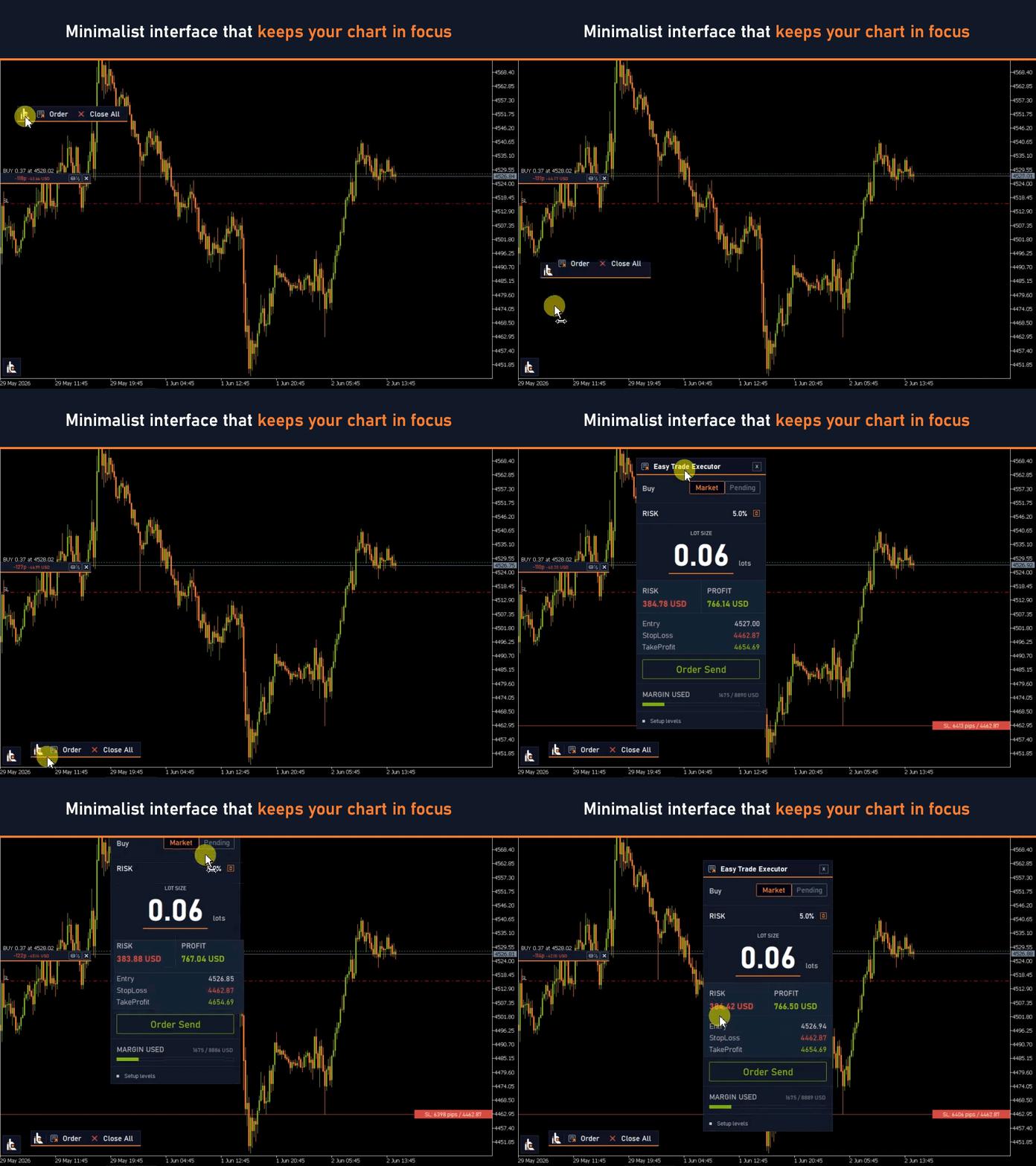
Easy Trade Executor is a tool for fast position sizing, trade execution, and trade management in MT4.

Place Open Price, Stop Loss, and Take Profit levels directly on the chart, get automatic position size calculations, and open trades with controlled risk in just a few clicks.


Why Easy Trade Executor?

Easy Trade Executor is designed for traders who want more than just risk calculations — they want to manage trades quickly and efficiently directly from the chart.

The tool combines position sizing, order execution, and trade management in a single workflow, allowing you to focus on trading instead of manual calculations and constantly switching between terminal windows.

Easy Trade Executor provides:
  • automatic risk-based position sizing;
  • Market and Pending order placement directly from the chart;
  • trailing stop for automated trade management;
  • one-click position closing;
  • 50% partial position closing;
  • breakeven adjustment including commissions and swaps;
  • a clean and minimalist interface;
  • a comfortable workflow for both beginner and experienced traders.


Open Trades Directly from the Chart

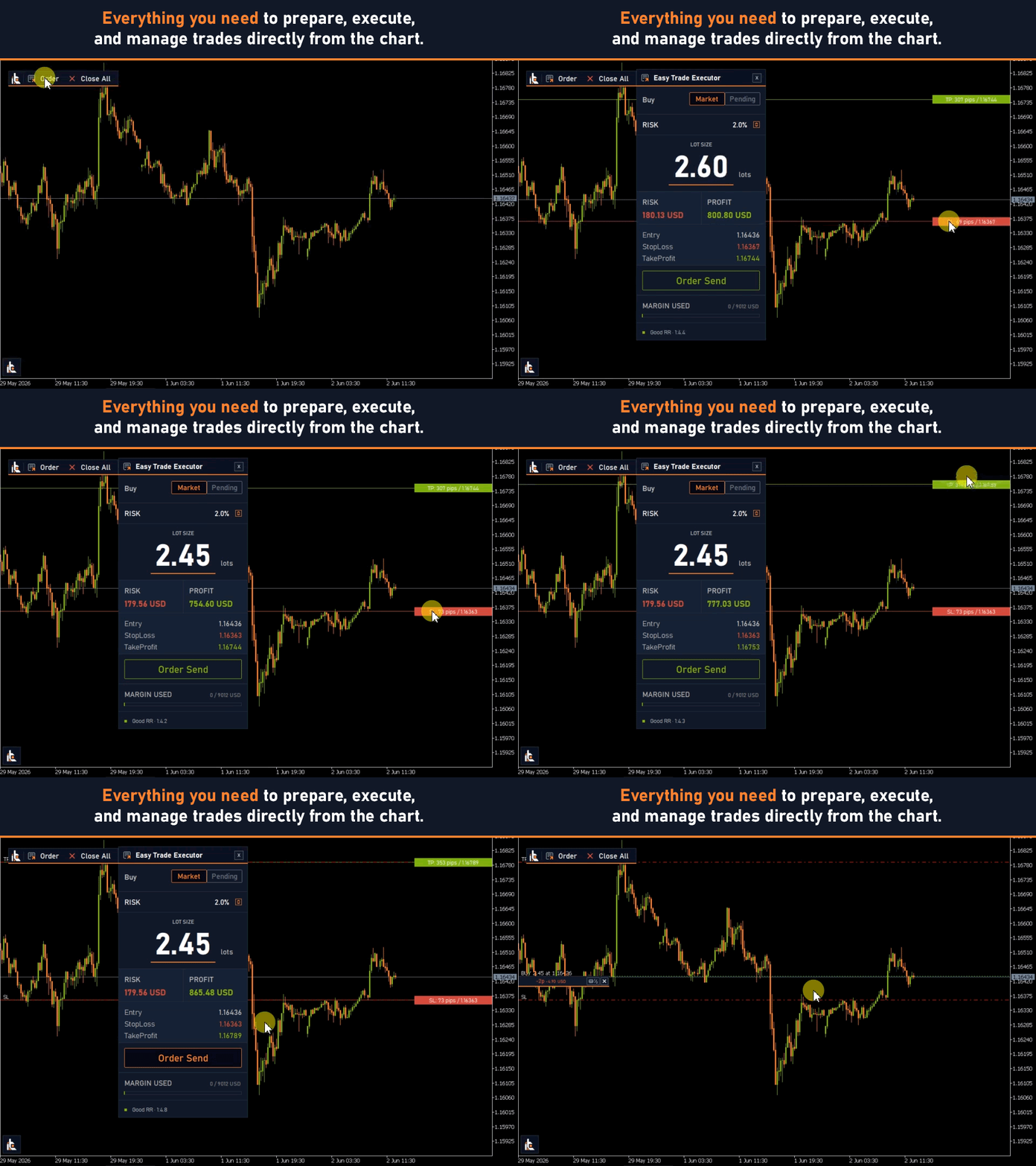
Easy Trade Executor allows you to fully set up a trade directly on the chart using interactive lines.

Simply place the following levels:

  • Open Price
  • Stop Loss
  • Take Profit

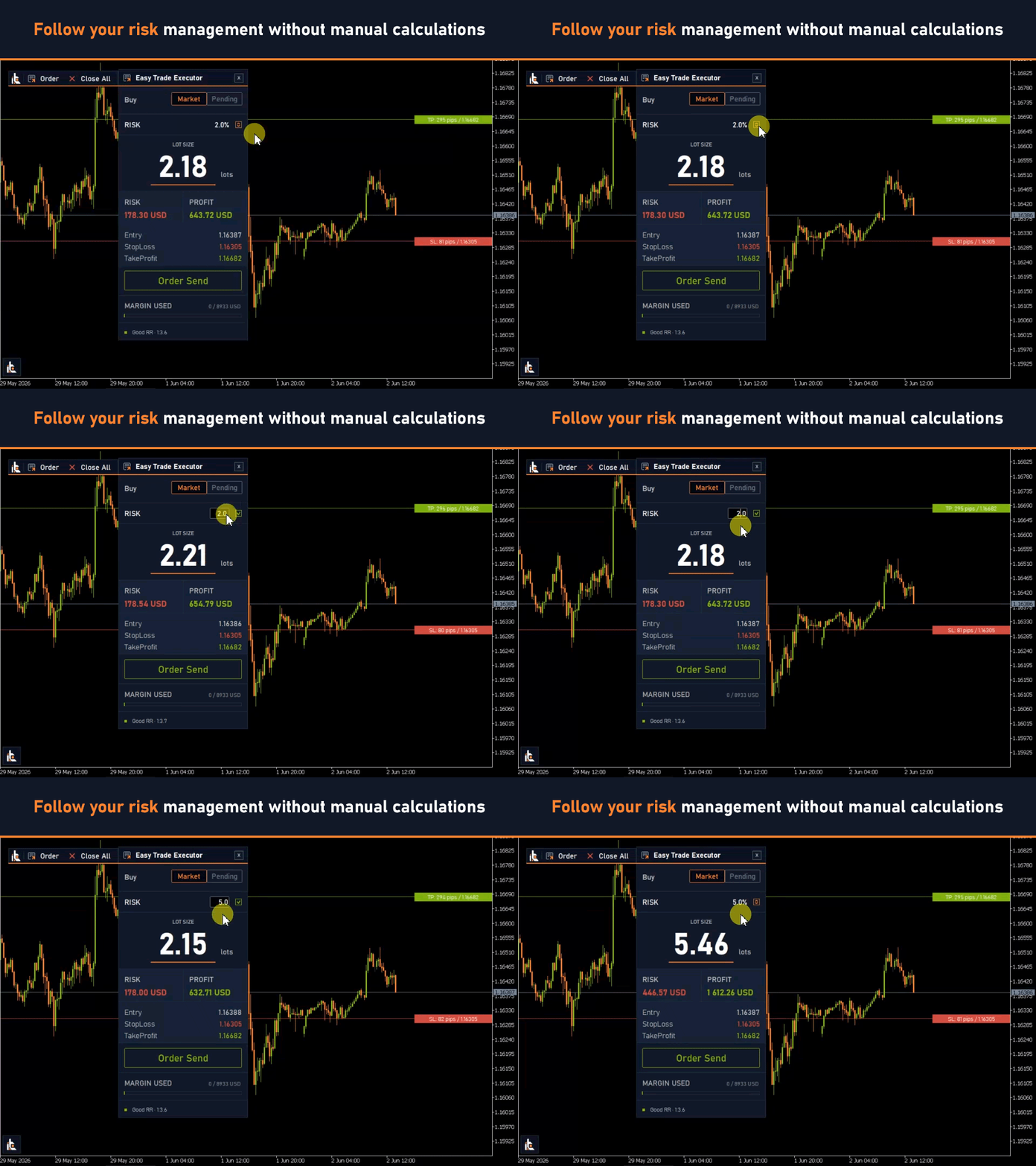
and the tool will automatically calculate the position size based on your selected risk.

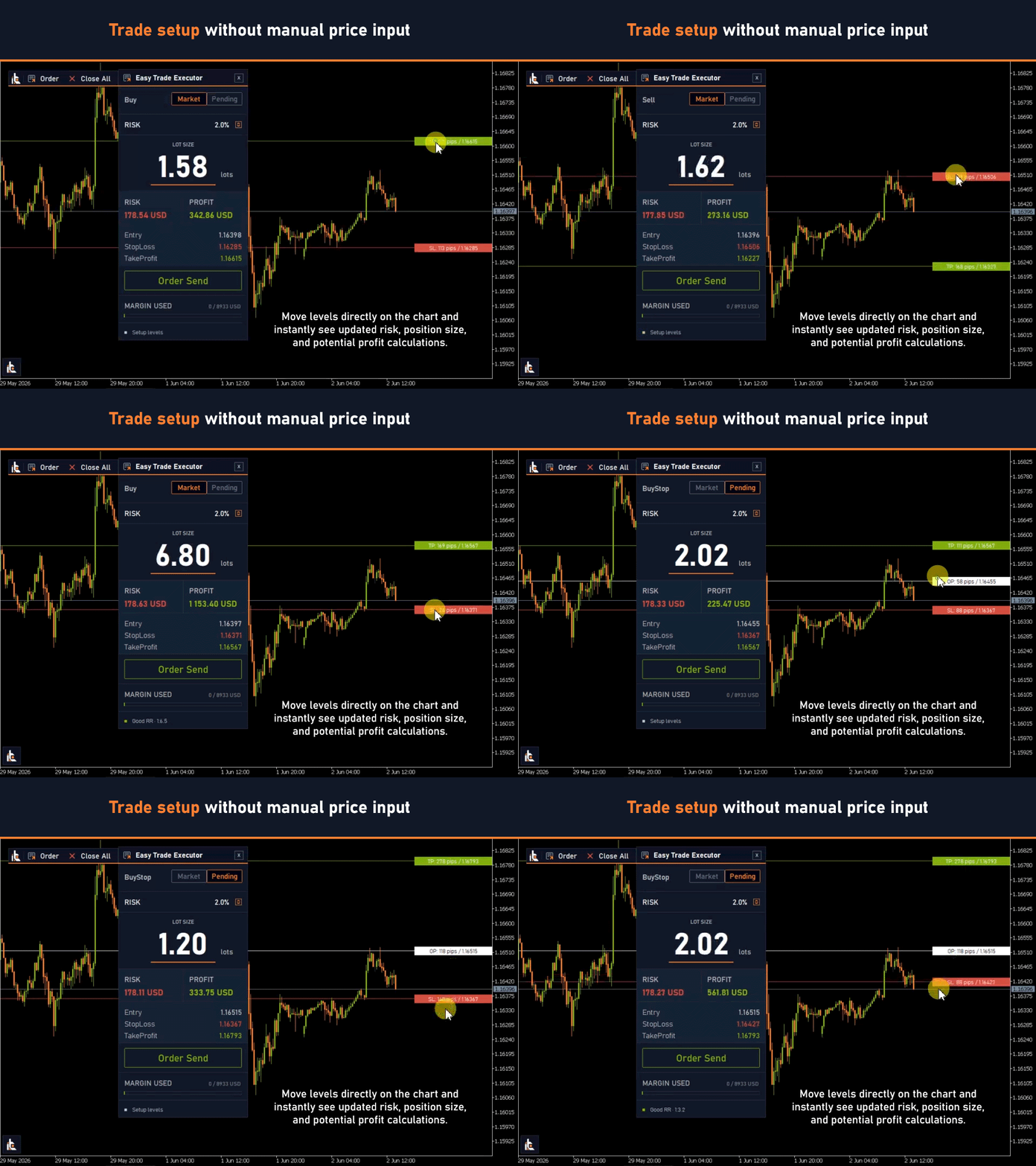
All trade parameters are updated in real time as the lines are moved, allowing you to instantly see how risk, potential profit, and position size change.

Convenient Drag & Drop Control

Entry, Stop Loss, and Take Profit lines can be freely moved directly on the chart. This allows you to quickly adjust trade parameters to changing market conditions without manually entering prices or performing unnecessary actions.


Precise Level Positioning

Many trading strategies require precise level placement down to just a few points.
Easy Trade Executor supports level adjustment using the keyboard arrow keys.

Quick Adjustment

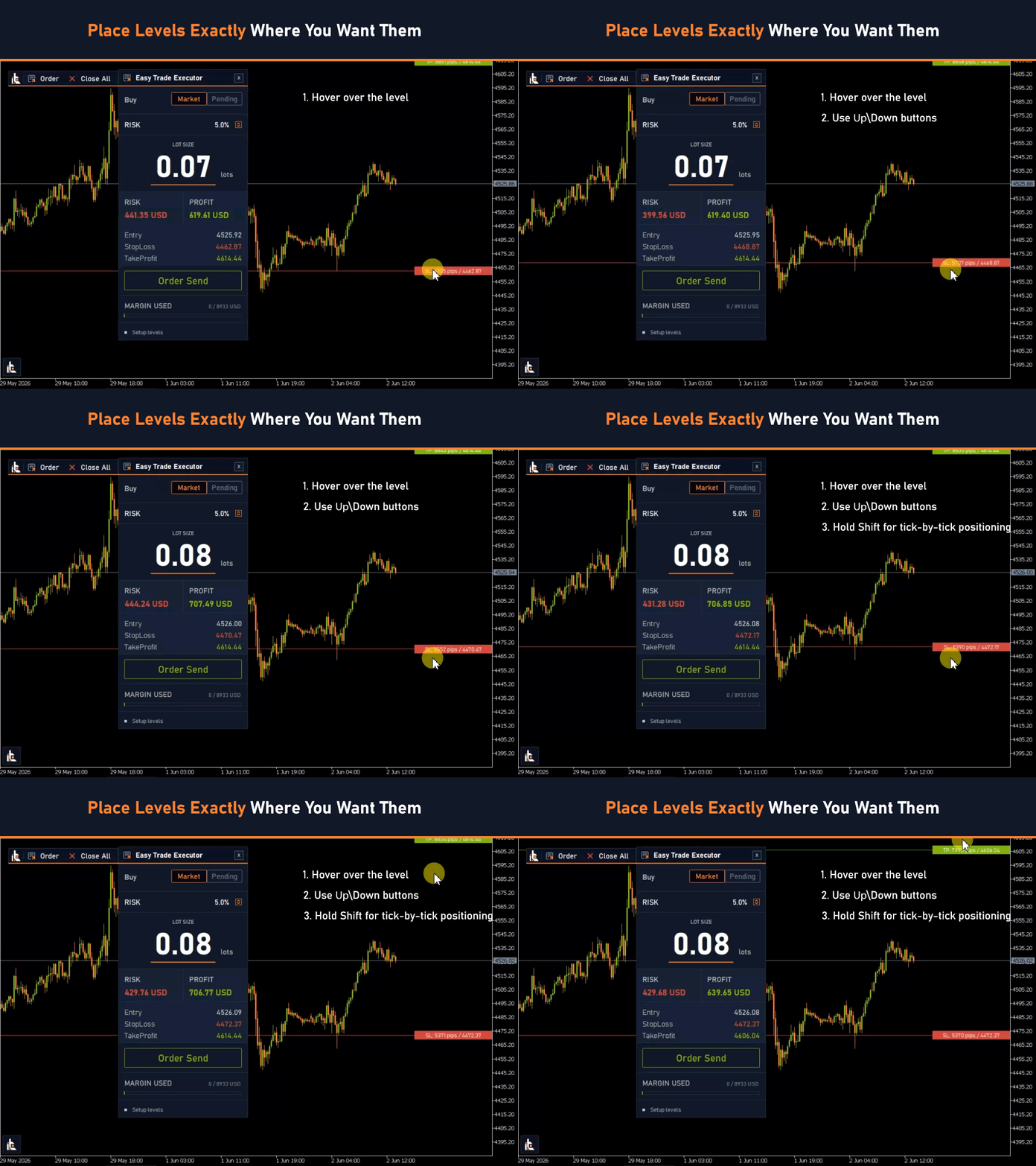
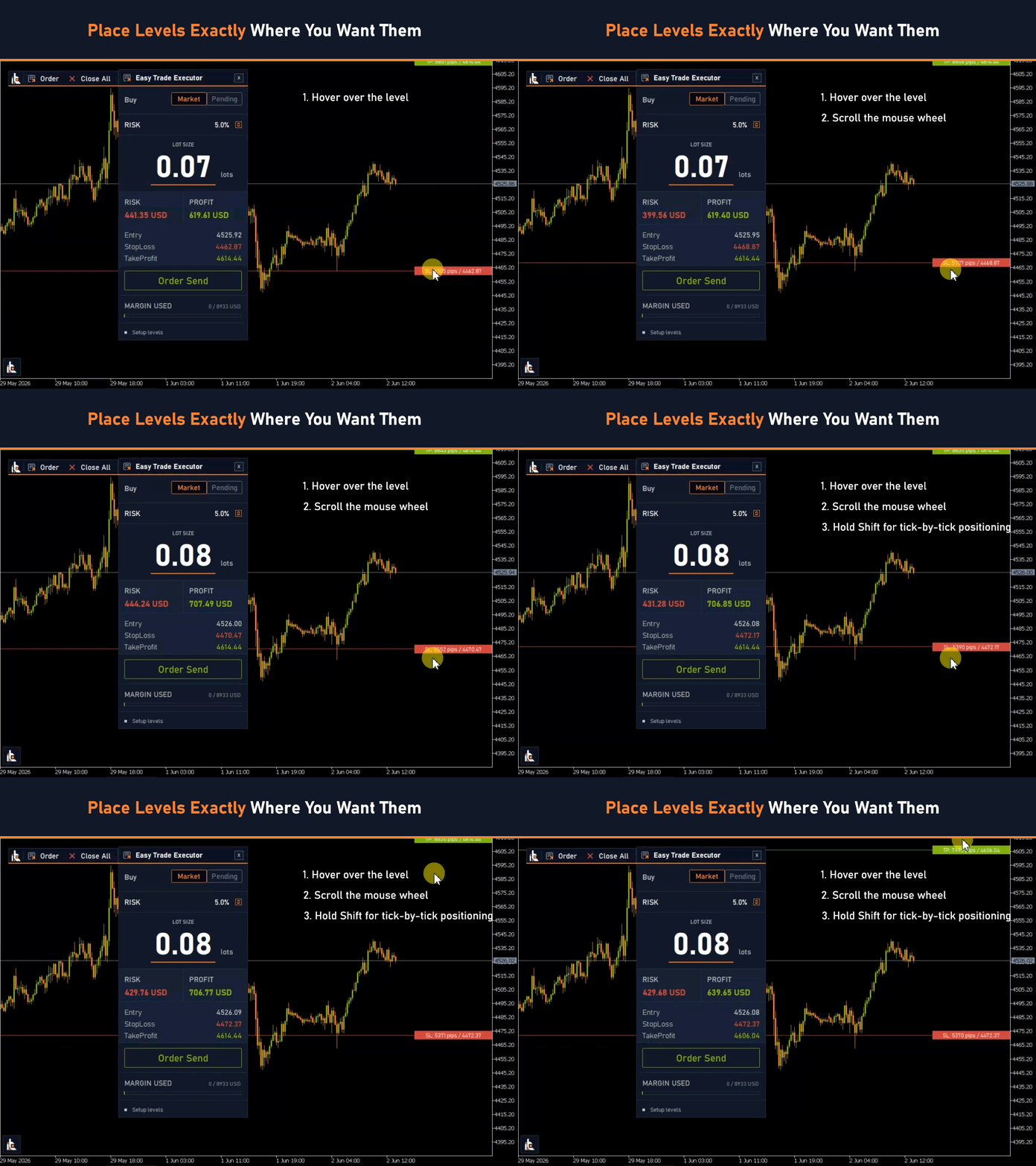
Hover your cursor over the desired line and press the Up/Down arrow keys to adjust the price precisely.

Point-by-Point Positioning

For maximum precision:

  1. Hover your cursor over the line
  2. Hold the Shift key
  3. Press the Up/Down arrow keys

In this mode, the line moves in the smallest possible increment, allowing you to position levels with maximum accuracy.

This is especially useful for scalping, intraday trading, level-based strategies, and trades with tight Stop Losses.


Managing Open Trades

Easy Trade Executor helps you not only open trades but also manage them after entry.

Available trade management features:

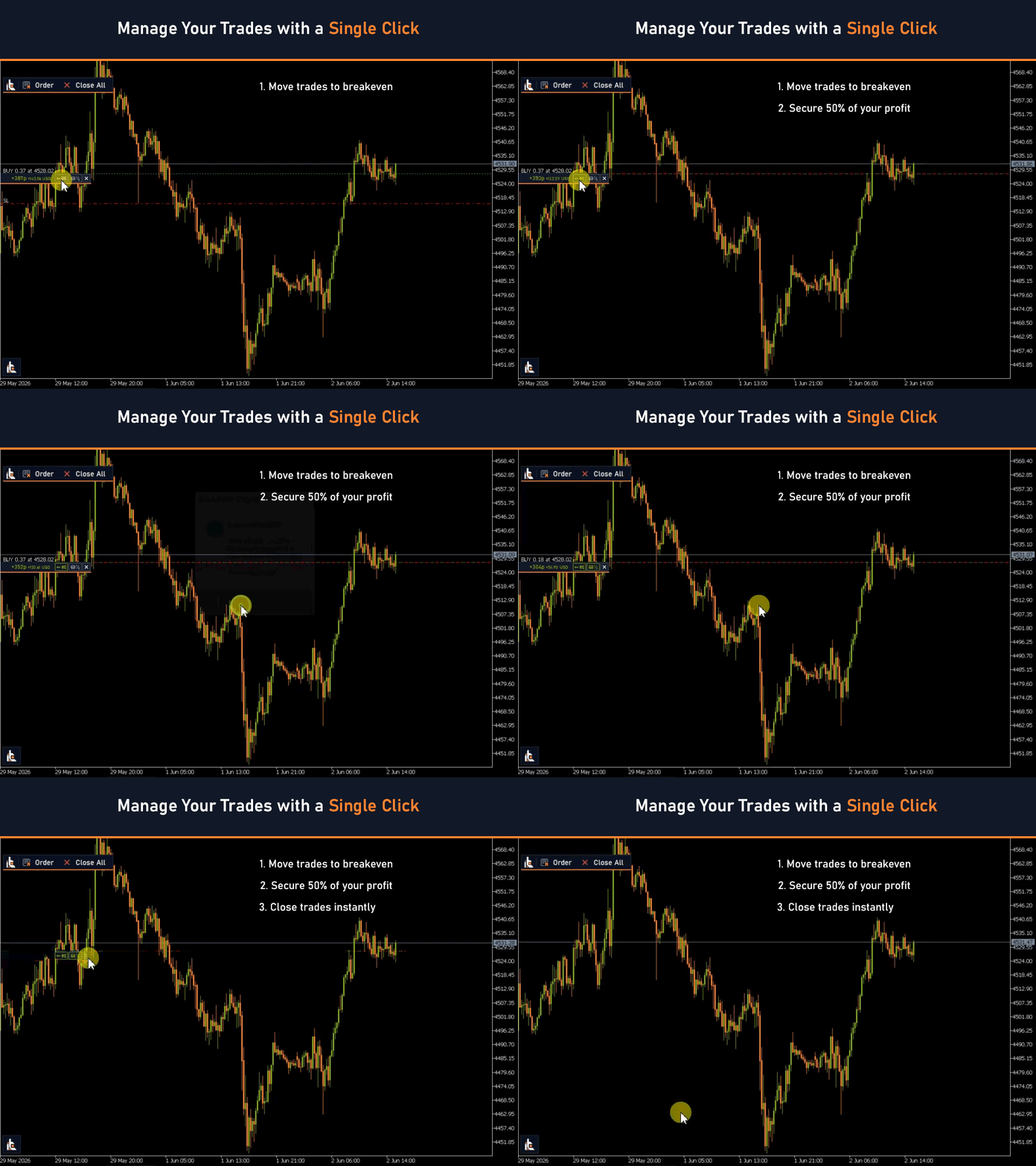
  • Trailing Stop
  • Breakeven adjustment including commissions and swaps
  • 50% partial position close
  • One-click closing of all open positions


Hotkeys for Faster Trading

Easy Trade Executor includes hotkeys for faster trade execution and position management.
This allows you to react more quickly and stay focused on the market.

Available hotkeys:

  • L — open / hide the calculator
  • S — open a trade
  • R — change risk size
  • Enter — save changes
  • T — enable / disable the Take Profit line
  • M — switch to Market orders (Buy / Sell)
  • P — switch to Pending orders (Stop / Limit)


Accurate Position Sizing for Any Instrument and Account Currency

Position sizing can vary significantly depending on the instrument type, contract specifications, and your account currency.

Easy Trade Executor automatically takes into account instrument specifications, pip value, contract size, and performs currency conversion when required.

Get accurate position sizing instantly without manual calculations or additional checks.

Supported markets:

  • Forex
  • Metals (Gold, Silver)
  • Crypto
  • Indices
  • Futures
  • Stocks
  • CFD

Automatic Account Currency Adaptation

If your account currency differs from the instrument's profit currency, Easy Trade Executor automatically applies the required conversion when calculating risk and position size.

You always see the correct position size regardless of your account currency and can follow your risk management rules without additional calculations.

Compatible with different symbol specifications and non-standard instrument names: EURUSD.a, mEURUSD, XAUUSDm, GOLDmicro, BTCUSD.pro, BTCUSDT, ETHUSDT, US100.cash, _US30, GER40_i, xNAS100, Boom1000Index, Crash500Index and many others.


How Easy Trade Executor Works

  1. Select the order type
  2. Place the Open Price and Stop Loss levels
  3. Easy Trade Executor automatically calculates the position size
  4. Open the trade directly from the panel
  5. Manage the position using trailing stop, breakeven, and partial close features


Easy Trade Executor helps you trade with greater confidence at every stage of a trade — from risk calculation to complete trade management.

The tool automatically calculates position size, helps prevent order placement mistakes, and allows you to manage trades from entry to exit.

No more switching between multiple terminal windows, manually calculating position size, or monitoring every market move. Easy Trade Executor helps you make trading decisions faster.
More from author
Universal Breakout MT5
Sergey Ermolov
4.23 (48)
Universal Breakout is a simple and flexible expert advisor for trading range breakouts without unnecessary complexity. You define the time interval — the EA automatically determines the levels, places orders, and manages the trade.   HOW THE RANGE BREAKOUT STRATEGY WORKS The breakout strategy is based on a simple logic: when price moves beyond a formed range, it often leads to a strong movement. The range can be based on: trading sessions (Asian, European, American) daily highs and lows individu
FREE
Valable ZigZag MT5
Sergey Ermolov
4.63 (19)
Most traders use ZigZag incorrectly. It does not help to understand the market — it creates false signals and misleads you about the trend. Valable ZigZag solves this problem by showing the real structure of price movement and the market direction. Limitations of the classic ZigZag The classic ZigZag reacts to too many movements. As a result: even minor pullbacks look like significant changes level breakouts are perceived as signals but fail to follow through it becomes difficult to distinguis
FREE
MTF Trend – A simple trend direction indicator across 3 timeframes. You open a chart and are not sure whether the market direction is aligned across different timeframes. MTF Trend shows it instantly — 3 arrows, 3 timeframes, one answer: are you trading with the trend or against it? Trend direction at a glance A compact dashboard appears on the chart. Each arrow shows the trend direction on its corresponding timeframe. Trend direction is determined using market structure: HH + HL → uptrend LH +
FREE
Full Fractals MT5
Sergey Ermolov
4.77 (22)
Full Fractals — Fractals Without Noise The standard Fractals indicator overloads the chart : dozens of points, making it difficult to understand which ones actually matter. As a result, market structure becomes unclear, and levels have to be determined manually. Full Fractals solves this problem — it leaves only the key points where price actually responded. The indicator is based on the classic Bill Williams fractal logic and does not repaint after formation. Used in live trading to identify ma

FREE
Universal Breakout
Sergey Ermolov
4.54 (35)
Universal Breakout is a simple and flexible expert advisor for trading range breakouts without unnecessary complexity. You define the time interval — the EA automatically determines the levels, places orders, and manages the trade.   HOW THE RANGE BREAKOUT STRATEGY WORKS The breakout strategy is based on a simple logic: when price moves beyond a formed range, it often leads to a strong movement. The range can be based on: trading sessions (Asian, European, American) daily highs and lows individu
FREE
Panther Trade Scenario — displays a clear trade scenario directly on the chart. The indicator removes the main problem in trading — uncertainty at the moment you need to act. Instead of trying to guess the best timing, you see exactly: where to enter, where to limit risk, and where to take profit.   Why most trading mistakes happen at the entry The problem is not that you don’t understand the market. In most cases, it looks like this: you see the move, understand the direction, but at the moment
Easy Lot Calculator — a fast and intuitive lot size calculator for MT5. Move the Stop Loss and Open Price levels directly on the chart, and the calculator instantly recalculates position size and trade risk in real time. Why Easy Lot Calculator? Easy Lot Calculator was built with a strong focus on simplicity, speed, and usability in real trading conditions. The calculator helps you instantly determine the correct position size without manual calculations or a complicated interface. With Easy Lot
FREE
Candle Countdown — Accurate Time to Close for MT5 Candle Countdown is a simple and precise tool that shows the remaining time until the current candle closes directly on the chart. When your entry depends on the candle close, even a few seconds matter. This indicator helps you see the exact time and make decisions without rushing or guessing. An indicator for precise control over candle closing time. The indicator displays: time remaining until candle close current server time spread Stop Level

FREE
MiloBot PRO MT5
Sergey Ermolov
4.8 (5)
Backtests from 2015 |  MT4 version |  FAQ MiloBot PRO  is a Forex Expert Advisor (EA) based on the  author's strategy  which has been developed, tested and optimized for more than 2 years. The main indicator of the MiloBot PRO’s reliability is developers’  real accounts totaling more than  100 000 USD . The MiloBot Pro’s advanced  algorithmic strategy  gives everyone the opportunity to earn the stable profit every month.  Copyrighted indicators   help the EA accurately to enter the market when
MTF Trend
Sergey Ermolov
MTF Trend – A simple trend direction indicator across 3 timeframes. You open a chart and are not sure whether the market direction is aligned across different timeframes. MTF Trend shows it instantly — 3 arrows, 3 timeframes, one answer: are you trading with the trend or against it? Trend direction at a glance A compact dashboard appears on the chart. Each arrow shows the trend direction on its corresponding timeframe. Trend direction is determined using market structure: HH + HL → uptrend LH +
FREE
Grid Hlevel MT5
Sergey Ermolov
4.56 (34)
MT4 version |  Valable ZigZag Indicator  |   FAQ The  Grid HLevel  Expert Advisor is perfect for those traders who want to make a stable profit in the Forex market every month. The Expert Advisor works  according to  the averaging strategy and I suggest you to use it correctly. To use it "correctly" means to open trades with averaging in the reversal point of the market and trade only in the direction of a global trend. As for the direction of the main trend, I suggest to determine it by the in
FREE
Trend Monitor VZ
Sergey Ermolov
3.67 (3)
Trend Monitor VZ – Market monitoring based on trend structure. If you analyze multiple instruments, checking trend direction can take a significant amount of time. Trend Monitor VZ brings all this information together in a single dashboard and displays trend direction across multiple instruments and timeframes at the same time. The entire market at a glance A market monitor appears directly on your chart, showing trend direction across selected instruments and timeframes. Trend direction is det
Panther Trade Scenario — displays a clear trade scenario directly on the chart. The indicator removes the main problem in trading — uncertainty at the moment you need to act. Instead of trying to guess the best timing, you see exactly: where to enter, where to limit risk, and where to take profit.   Why most trading mistakes happen at the entry The problem is not that you don’t understand the market. In most cases, it looks like this: you see the move, understand the direction, but at the moment
Owl Smart Levels MT5
Sergey Ermolov
4.03 (32)
When trading with the trend, the main difficulty is not finding a level, but understanding where an entry is actually valid. Price often reacts to levels but fails to follow through — which leads to false entries or missed moves. Owl Smart Levels does not just show levels , but zones formed based on market structure and pullbacks. This allows you to evaluate entry points differently and avoid a portion of false signals. What is included in the Owl Smart Levels system? Owl Smart Levels is not ju
Valable ZigZag
Sergey Ermolov
4.63 (8)
Most traders use ZigZag incorrectly. It does not help to understand the market — it creates false signals and misleads you about the trend. Valable ZigZag solves this problem by showing the real structure of price movement and the market direction. Limitations of the classic ZigZag The classic ZigZag reacts to too many movements. As a result: even minor pullbacks look like significant changes level breakouts are perceived as signals but fail to follow through it becomes difficult to distinguis
FREE
Full Fractals
Sergey Ermolov
4.45 (11)
Full Fractals — Fractals Without Noise The standard Fractals indicator overloads the chart : dozens of points, making it difficult to understand which ones actually matter. As a result, market structure becomes unclear, and levels have to be determined manually. Full Fractals solves this problem — it leaves only the key points where price actually responded. The indicator is based on the classic Bill Williams fractal logic and does not repaint after formation. Used in live trading to identify ma

FREE
Universal Box MT5
Sergey Ermolov
4.43 (7)
MT4 version   |  FAQ  |   EA Universal Breakout   Universal Box   plots   price ranges   on the chart which can be used later to trade on a price range breakout. There are many strategies with which you can apply this indicator. The indicator is set by default to mark   Asian, European and American trading session   ranges on the chart. Ranges are plotted as rectangles, the boundaries of which are the beginning and end time of the trading session, and the levels of maximum and minimum prices fo
FREE
Owl smart levels
Sergey Ermolov
4.26 (38)
When trading with the trend, the main difficulty is not finding a level, but understanding where an entry is actually valid. Price often reacts to levels but fails to follow through — which leads to false entries or missed moves. Owl Smart Levels does not just show levels , but zones formed based on market structure and pullbacks. This allows you to evaluate entry points differently and avoid a portion of false signals. What is included in the Owl Smart Levels system? Owl Smart Levels is not ju
Easy Lot Calculator — a fast and intuitive lot size calculator for MT4. Move the Stop Loss and Open Price levels directly on the chart, and the calculator instantly recalculates position size and trade risk in real time. Why Easy Lot Calculator? Easy Lot Calculator was built with a strong focus on simplicity, speed, and usability in real trading conditions. The calculator helps you instantly determine the correct position size without manual calculations or a complicated interface. With Easy Lot
FREE
Prop Drawdown Dashboard — full real-time visibility into your prop challenge account All critical account information — in one panel and updated in real time: current drawdown, challenge progress, and how close you are to critical limits . 10 built-in prop firm presets: FTMO, FundingPips, The5ers, FundedNext , and others. Simply select the firm — all limits and timezone settings are loaded automatically . No more violations caused by incorrect trading day reset times. The indicator automatically
FREE
Candle Countdown — Accurate Time to Close for MT4 Candle Countdown is a simple and precise tool that shows the remaining time until the current candle closes directly on the chart. When your entry depends on the candle close, even a few seconds matter. This indicator helps you see the exact time and make decisions without rushing or guessing. An indicator for precise control over candle closing time. The indicator displays: time remaining until candle close current server time spread Stop Level
FREE
Universal Box
Sergey Ermolov
5 (1)
MT5 version |  FAQ  | EA Universal Breakout   Universal Box plots price ranges on the chart which can be used later to trade on a price range breakout. There are many strategies with which you can apply this indicator. The indicator is set by default to mark Asian, European and American trading session ranges on the chart. Ranges are plotted as rectangles, the boundaries of which are the beginning and end time of the trading session, and the levels of maximum and minimum prices for that period.
FREE
Shuttle Runner
Sergey Ermolov
4 (20)
The swing strategy is the basis of the Shuttle Runner Expert Advisor . The strategy was described as far back as 2009 and is actively used by traders in the Forex market. Shuttle runner is a revised and improved version of this strategy. The basic gist of the strategy is this: This advisor should be traded  only during active market phases . And we know that the market is active during the European and American trading sessions (you can also take the Asian, but the prerequisite is the presence
FREE
Grid HLevel
Sergey Ermolov
4.56 (25)
MT5 version |  Valable ZigZag Indicator   |   FAQ The Grid HLevel Expert Advisor is perfect for those traders who want to make a stable profit in the Forex market every month. The Expert Advisor works  according to the averaging strategy and I suggest you to use it correctly. To use it "correctly" means to open trades with averaging in the reversal point of the market and trade only in the direction of a global trend. As for the direction of the main trend, I suggest to determine it by the indi
FREE
Trend Monitor VZ MT5
Sergey Ermolov
5 (1)
Trend Monitor VZ – Market monitoring based on trend structure. If you analyze multiple instruments, checking trend direction can take a significant amount of time. Trend Monitor VZ brings all this information together in a single dashboard and displays trend direction across multiple instruments and timeframes at the same time. The entire market at a glance A market monitor appears directly on your chart, showing trend direction across selected instruments and timeframes. Trend direction is det
Safety
Sergey Ermolov
5 (2)
I think everyone knows such a rule of money management as "Safe". For those who are not aware, the safe assumes closing half of the position after the profit on the transaction has equaled the size of the stop. Thus, even if the price reverses and catches the stop, you will not lose money, because exactly the same amount of profit was received when closing part of the position earlier. The Safety Expert Advisor has only one setting – the closing lot. Leaving it at position 0, the adviser will

FREE
MiloBot PRO
Sergey Ermolov
5 (3)
Backtests from 2015 |  MT5 version  |  FAQ MiloBot PRO  is a Forex Expert Advisor (EA) based on the  author's strategy  which has been developed, tested and optimized for more than 2 years. The main indicator of the MiloBot PRO’s reliability is developers’  real accounts totaling more than  100 000 USD . The MiloBot Pro’s advanced  algorithmic strategy  gives everyone the opportunity to earn the stable profit every month.  Copyrighted indicators   help the EA accurately to enter the market when
Easy Trade Executor is a tool for fast position sizing, trade execution, and trade management in MT5. Place Open Price, Stop Loss, and Take Profit levels directly on the chart, get automatic position size calculations, and open trades with controlled risk in just a few clicks. Why Easy Trade Executor? Easy Trade Executor is designed for traders who want more than just risk calculations — they want to manage trades quickly and efficiently directly from the chart. The tool combines position sizi
Filter:
No reviews
Reply to review