Session Breakout PRO

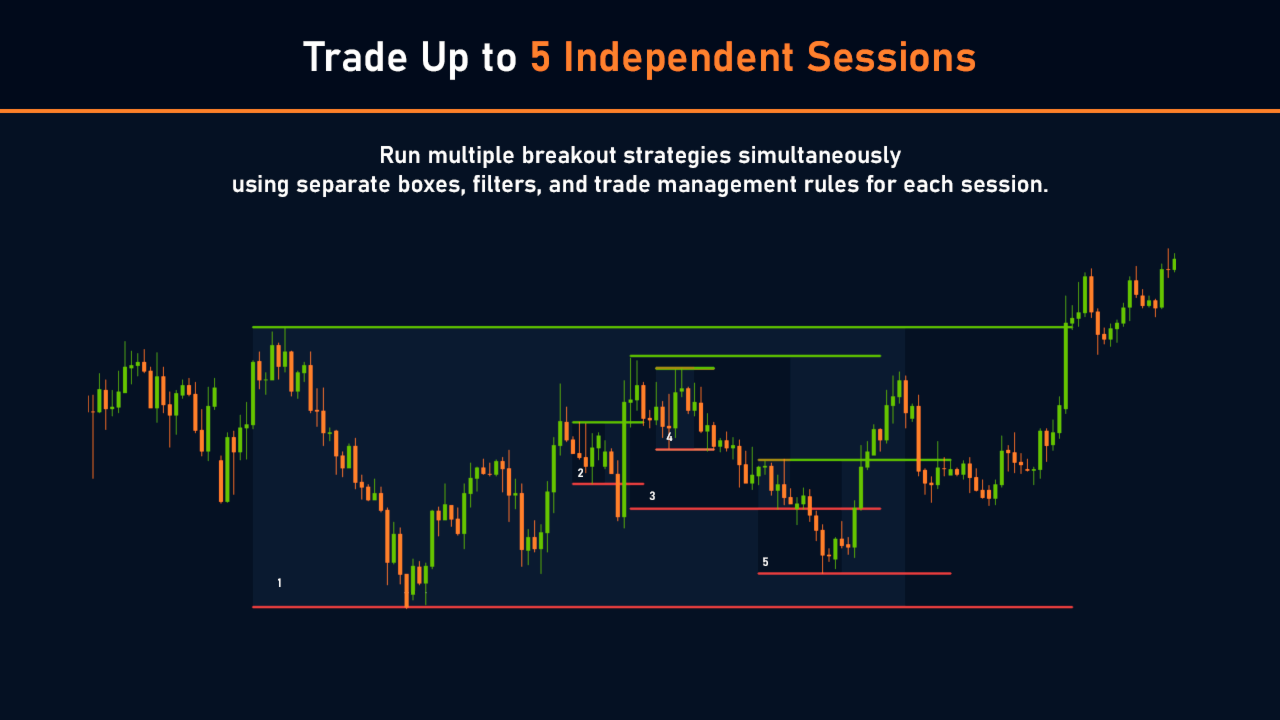
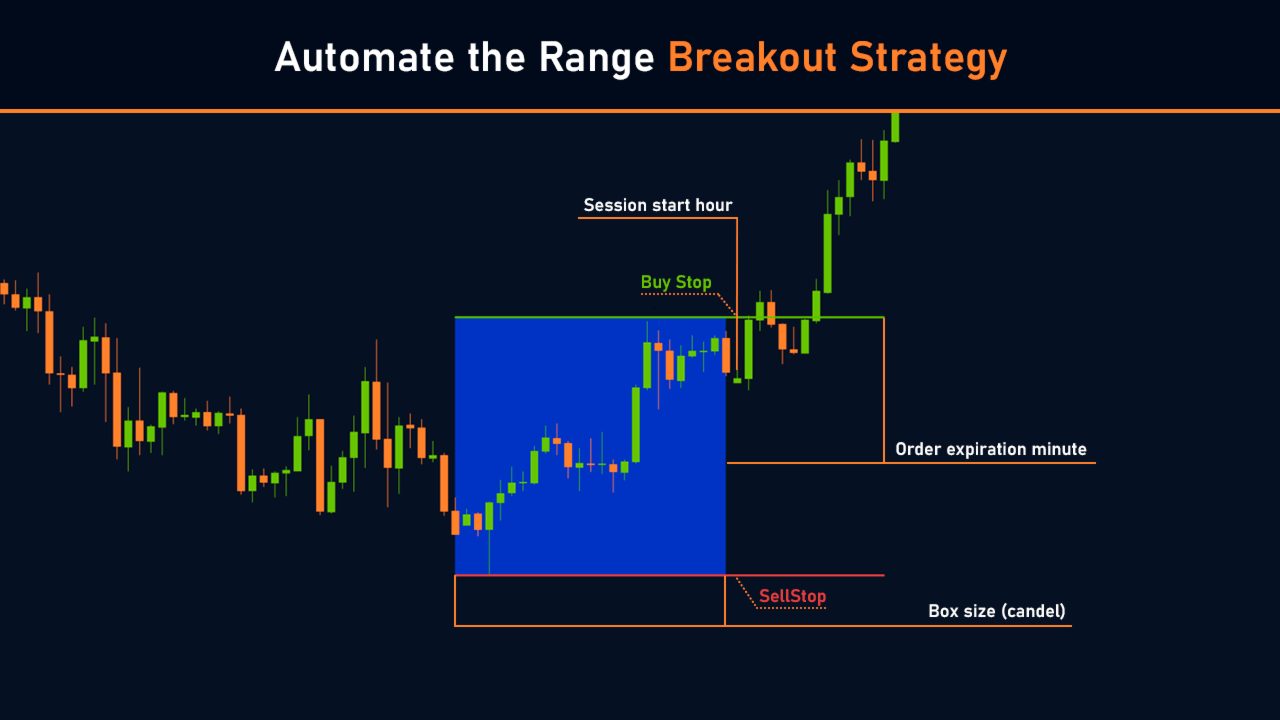
Session Breakout PRO is a professional Breakout EA designed for automated Forex trading and built around the classic Session Breakout strategy.

The EA supports multiple trading sessions, including the London Breakout and Asian Session Breakout, and combines advanced signal filtering, adaptive risk management, and modern risk-control tools. Its flexible configuration system allows traders to adapt the strategy to different currency pairs, CFDs, indices, metals, and other financial instruments, as well as to various market conditions and trading styles.

Gold Signalhttps://www.mql5.com/en/signals/2378603

Default settings are optimized for XAUUSD H1 (GOLD H1) | Session_Breakout_PRO_GOLD_H1.set | Reports.zip

Why Not Every Range Breakout Becomes a Profitable Trade

Range breakouts are among the most widely used market entry setups. However, a price move beyond the boundaries of a range does not automatically mean that a sustained trend is about to begin.

In practice, some breakouts quickly fall back into the range, some generate only a short-lived impulse, while others occur under unfavorable market conditions from the very start.

Even after a successful entry, the work is far from over. Markets can accelerate, slow down, move into consolidation, or completely reverse direction. As a result, trade performance often depends not only on the entry point itself but also on how the position is managed afterward.

This is why successful breakout trading requires more than simply identifying a range. Signal quality, current market conditions, and trade management logic are equally important parts of the process.


Signal Filtering System

Not all trading ranges offer the same quality of opportunity, and many breakout signals have a low probability of developing into meaningful price movement. One of the most common causes of losses in breakout trading is false breakouts and entries taken after a significant portion of the move has already occurred.

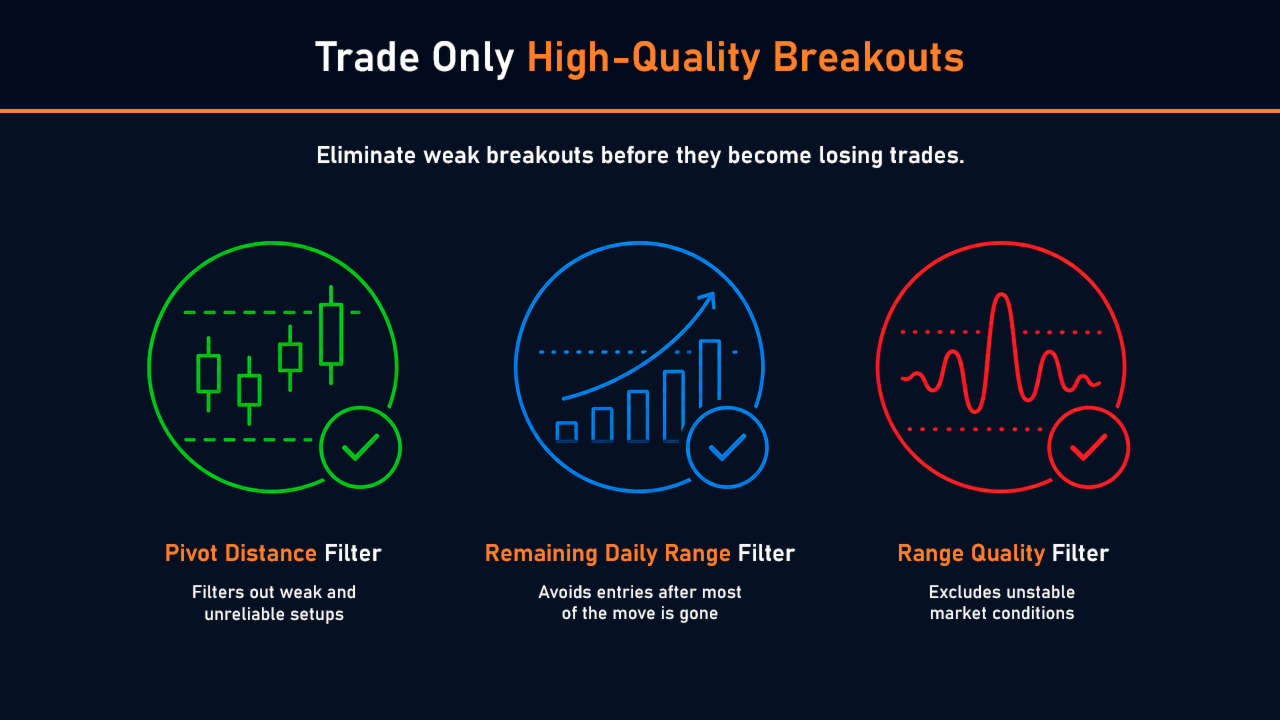
To improve entry quality, Session Breakout PRO applies multiple layers of signal filtering designed to eliminate weak market conditions before a position is opened.

Pivot Distance Filter

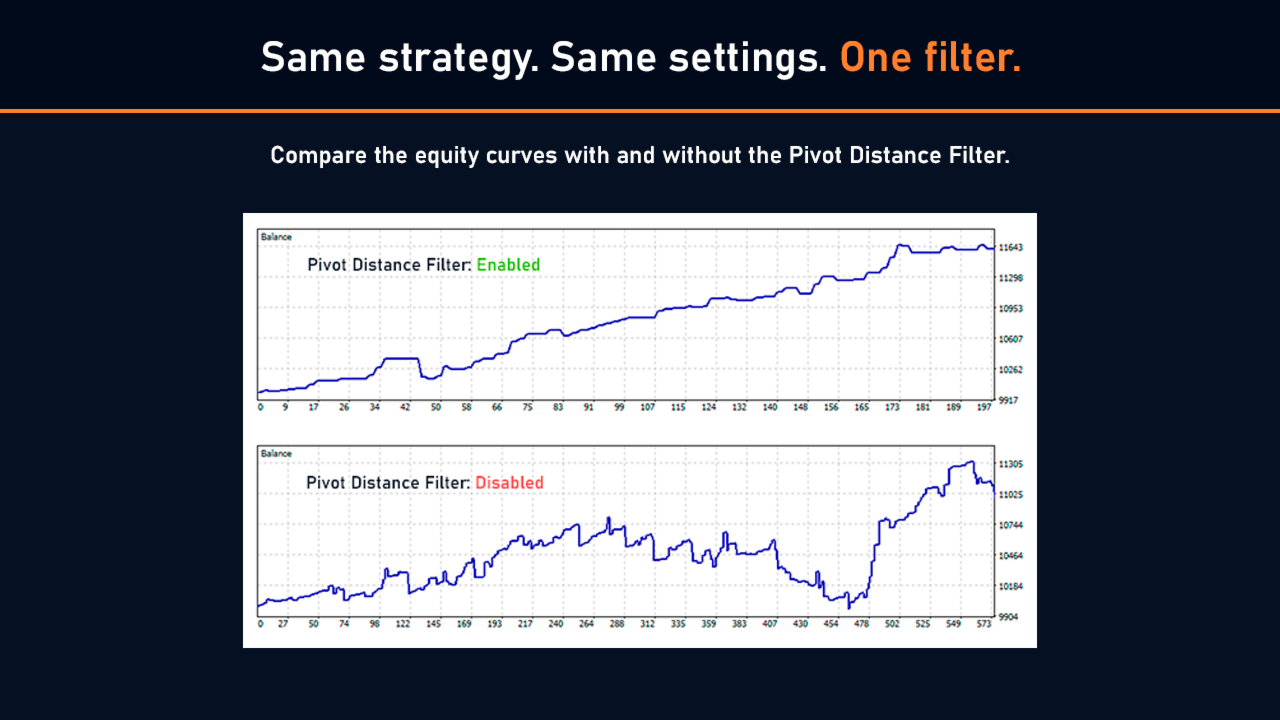
Filters out ranges where the high or low is formed too close to the first or last candle of the range. Such extremes are often part of an already established move and may reduce the reliability of the subsequent breakout signal.

Remaining Daily Range Filter

Helps avoid entries after a large portion of the daily move has already been completed. This is particularly important for volatile instruments such as Gold (XAUUSD), where most of the daily momentum may occur within a relatively short period of time. The filter focuses on setups that still offer sufficient room for further price expansion.

Range Quality Filter

Excludes unusual market conditions, reduces the impact of excessive volatility, and helps identify higher-quality breakout opportunities.

These filters significantly improve signal quality, reduce weak entries, and help traders focus on the most promising trading opportunities.

Want to learn more? A dedicated article explains each filter in detail, including practical examples and their impact on trading results:

Breakout Filtering: Why Fewer Trades Often Lead to Better Results


Flexible Configuration for Any Market and Trading Style

Session Breakout PRO is not tied to a specific instrument, trading session, or trade management approach. The EA can be adapted both to market characteristics and to the trader's individual preferences.

Suitable for Different Trading Instruments

Instead of relying on fixed Stop Loss and Take Profit values, the EA supports parameters calculated relative to the range size or the current market price. This approach helps maintain the relevance of settings as market volatility changes and asset prices evolve over time.

For example, a 100-point Stop Loss on Gold (XAUUSD) may have been perfectly reasonable several years ago. After a substantial increase in gold prices, however, the same stop distance represents something entirely different relative to current market conditions. Using values based on range size or a percentage of price helps avoid this issue and makes the trading system more robust across changing markets.

This approach allows traders to focus on identifying genuine market patterns rather than curve-fitting parameters to a specific price level. The result is a more universal trading model that can be applied across Forex, metals, indices, and other markets.

From Scalping to Trend Following

Different trade management approaches make it possible to adapt the same breakout strategy to different trading styles and market environments.

Some traders prefer to lock in profits quickly after the initial breakout impulse. Others are willing to hold positions much longer in pursuit of larger trend movements. Both approaches can be built around the same entry signal.

Thanks to its flexible trade management system, Session Breakout PRO can be used both for capturing short-term intraday moves and for managing longer-lasting trends.

Trade Your Own Rules

Session Breakout PRO includes additional trading restrictions and management rules that allow traders to adapt the EA to their own requirements and trading methodology:

  • automatic position closing before weekends;
  • day-of-week filtering;
  • limits on the number of simultaneously open trades;
  • control over re-entries after a completed trade;
  • automatic cancellation of opposite-side orders once one direction has been triggered.

This flexibility makes the EA suitable for both active intraday trading on volatile instruments and more conservative strategies that require tighter control over risk, trade frequency, and overall account exposure.


Trade Management After the Breakout

In breakout trading, overall performance often depends less on the quality of the entry and more on how the position is managed afterward.

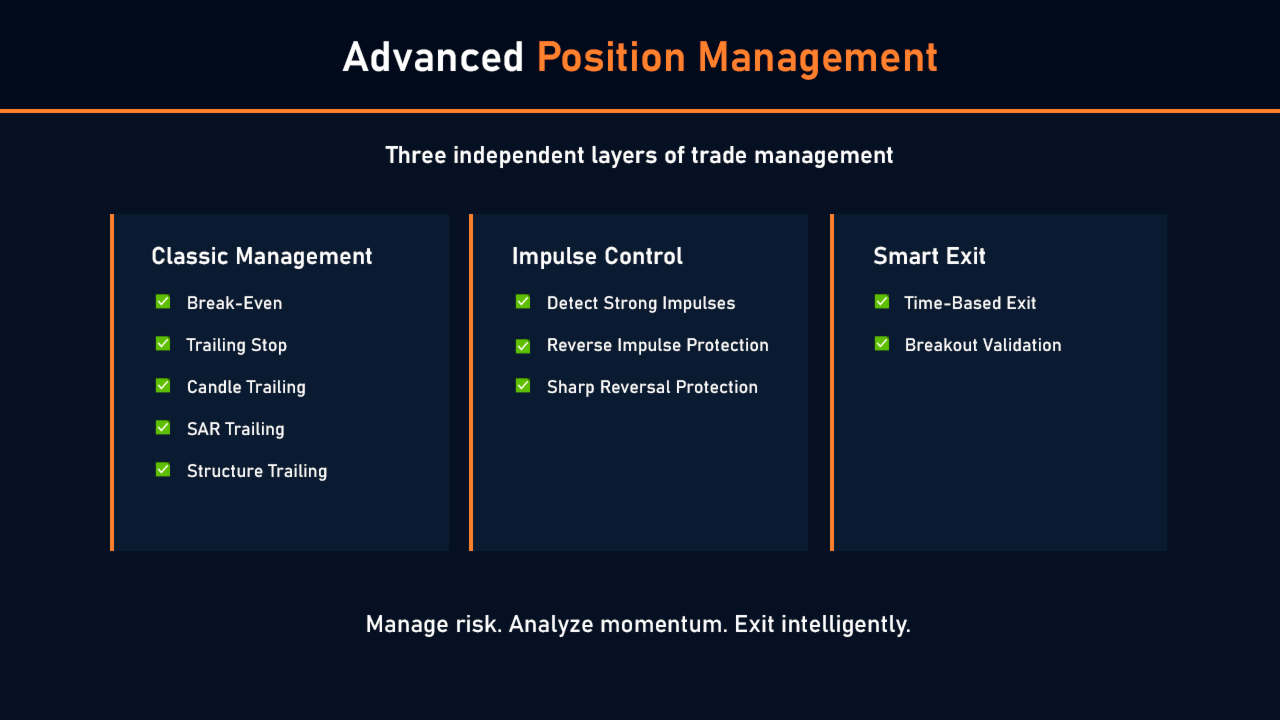
In Session Breakout PRO, trade management is divided into two independent modules.

The first module focuses on Stop Loss management and profit protection. Available management techniques include:

  • Breakeven;
  • Classic Trailing Stop;
  • Candlestick Shadow Trailing;
  • SAR Trailing;
  • Market Structure Trailing.

These tools are familiar to most traders and allow position management to be tailored to virtually any trading style.

The second module focuses on evaluating breakout quality after entry and managing exits based on market behavior.

Most EAs assume that once a trade is opened, all that remains is to wait for either the Stop Loss or Take Profit to be hit. In reality, markets behave far more dynamically. Sometimes a breakout generates a powerful momentum move worth locking in. Sometimes the expected follow-through never materializes. And sometimes reversal signals appear long before the Stop Loss would be reached.

To address these situations, Session Breakout PRO includes several additional exit scenarios:

  • Exit After Strong Momentum Move — locks in profits after a strong directional move before a significant retracement or reversal occurs.
  • Lack of Follow-Through Exit — closes trades where the expected breakout momentum fails to develop.
  • Strong Counter-Move Exit — exits positions when a significant move develops against the trade direction.

This approach evaluates not only the entry itself but also the quality of the price action that follows the breakout, resulting in more adaptive, flexible, and robust trade management.

After purchase, you will receive detailed guidance on configuring all EA features, including signal filtering, trade management, and risk control. If you have any questions regarding parameter selection or adapting the strategy to a specific instrument, you can always contact me via private messages.


Complete Trading Transparency

Many trading robots and Expert Advisors operate as a “black box”: traders can see the results of the strategy, but they have no clear understanding of why a trade was opened, which filter blocked a signal, or why a pending order was removed.

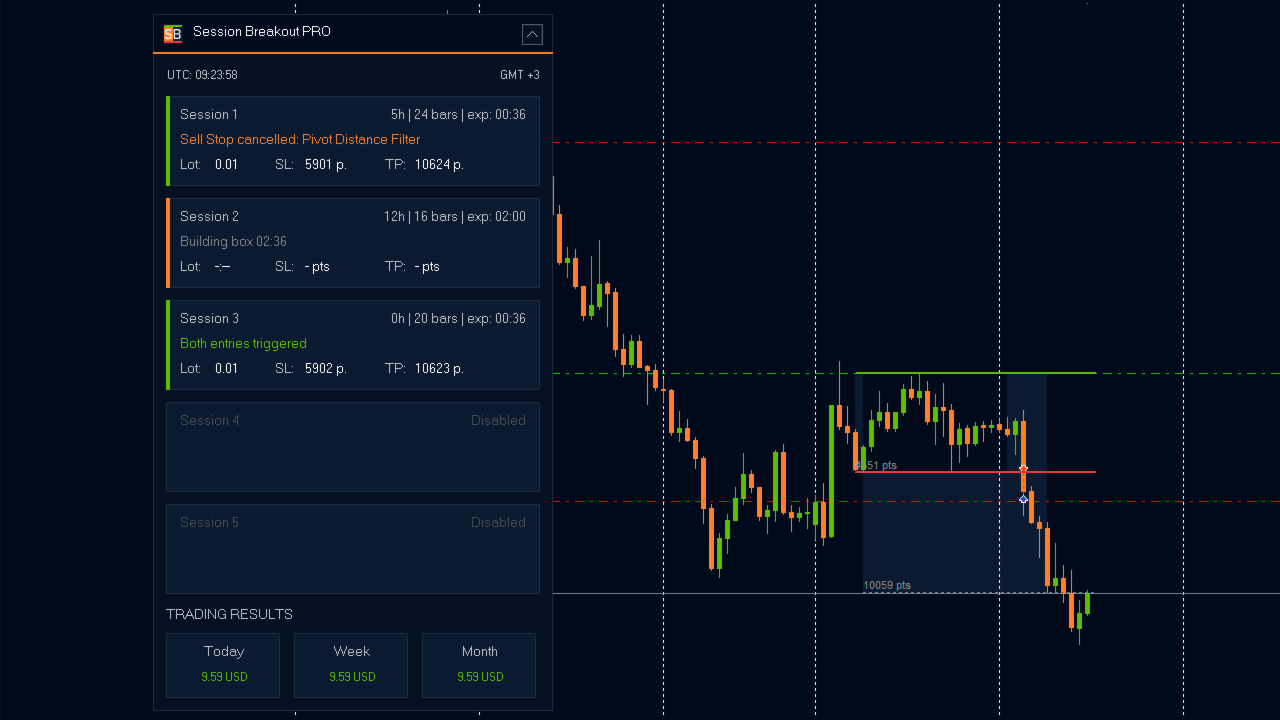
Session Breakout PRO makes the decision-making process fully transparent, allowing you to monitor every stage of the breakout strategy directly on the chart.

Signal Generation Monitoring

The EA displays trading ranges, breakout levels, and the parameters of each generated signal. This allows traders not only to see the outcome of the algorithm but also to understand the logic behind each trading decision.

Filter and Restriction Monitoring

If a signal does not meet the specified conditions, the EA displays the reason for rejecting the trade in the information panel. Traders can immediately identify which filter or restriction prevented the order from being placed.

Open Position Monitoring

Entry levels, pending orders, Stop Loss, and Take Profit levels are displayed directly on the chart. This makes it easy to evaluate the current state of the trading system at any time without having to analyze the EA journal.

As a result, traders receive more than just automated execution. They gain a clear understanding of how the EA analyzes the market, generates breakout signals, makes trading decisions, and manages open positions.


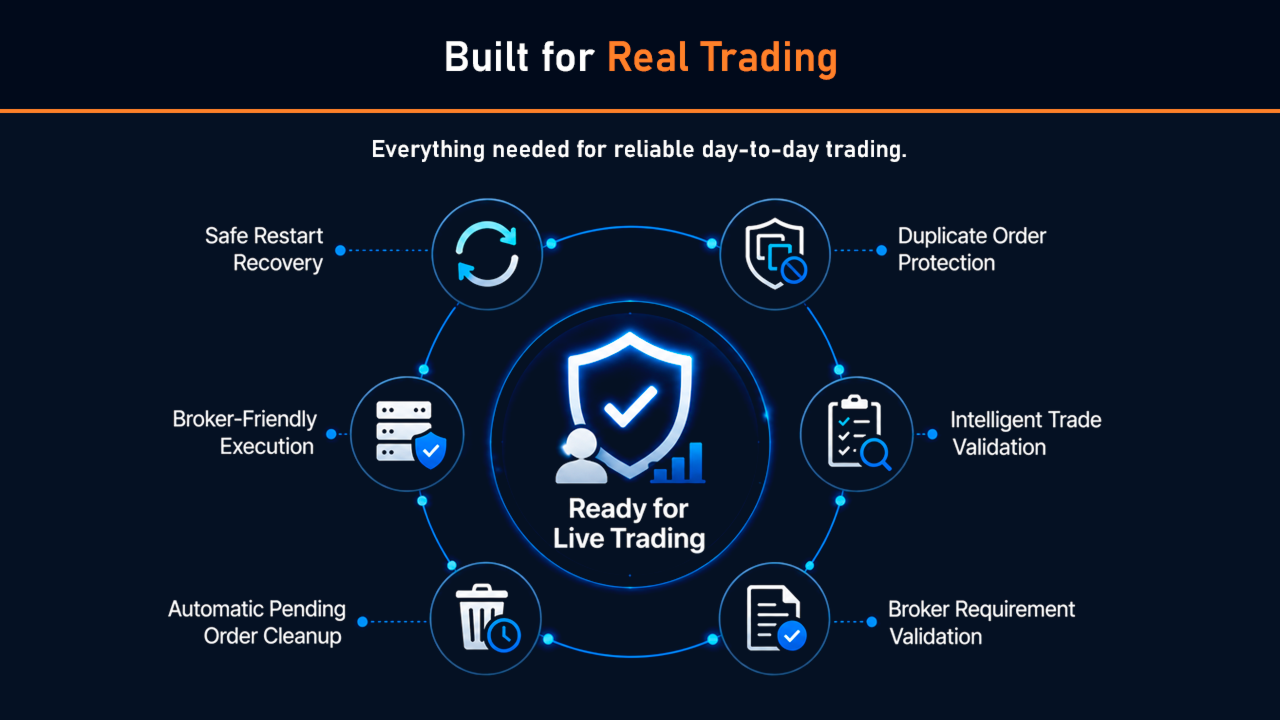
Built for Live Trading

A strong backtest alone does not make an EA suitable for live trading. In real-world conditions, automated systems encounter numerous technical challenges that only become apparent on live accounts, VPS environments, or broker trading servers.

Session Breakout PRO includes a range of built-in safeguards and validation mechanisms designed to ensure stable and reliable operation under real trading conditions.

  • Safe Restart Recovery — automatically restores operation after terminal restarts, VPS reboots, or connection interruptions.
  • Duplicate Order Protection — prevents duplicate orders and accidental position replication.
  • Intelligent Trade Validation — verifies trading conditions before sending an order to the market.
  • Broker Requirement Validation — automatically checks broker restrictions and symbol-specific trading requirements.
  • Automatic Pending Order Cleanup — removes outdated pending orders when they are no longer valid.
  • Broker-Friendly Execution — avoids excessive trading requests and operates efficiently with the broker's trading server.

As a result, Session Breakout PRO is designed not only for strategy testing and optimization but also for long-term autonomous operation on live trading accounts, providing consistent execution across a wide range of market conditions.


Who Is Session Breakout PRO For?

Session Breakout PRO was developed as a versatile solution for traders who use breakout strategies, systematic trading approaches, and automated execution.

The EA is suitable for:

  • traders who specialize in range breakouts and session-based trading;
  • users who prefer to automate signal detection and trade management;
  • algorithmic traders engaged in strategy testing and optimization;
  • traders who apply their own risk management and position management rules;
  • prop traders who require strict control over trading activity and risk limits;
  • traders working with highly volatile instruments, including Gold (XAUUSD).

Thanks to its flexible range settings, signal filters, and trade management logic, the EA can be used across multiple markets:

  • Forex;
  • Gold (XAUUSD);
  • Indices;
  • Commodities;
  • Cryptocurrency CFDs.

Although the EA can be applied to a wide variety of instruments, its architecture is particularly well suited to markets characterized by strong momentum and high volatility, where range breakouts often lead to powerful directional moves.

Session Breakout PRO does not impose a predefined trading style. Instead, it provides a comprehensive set of tools that allow traders to build their own trading model and adapt the strategy to specific markets, instruments, and personal preferences.


Ready-to-Use Settings and Ongoing Research

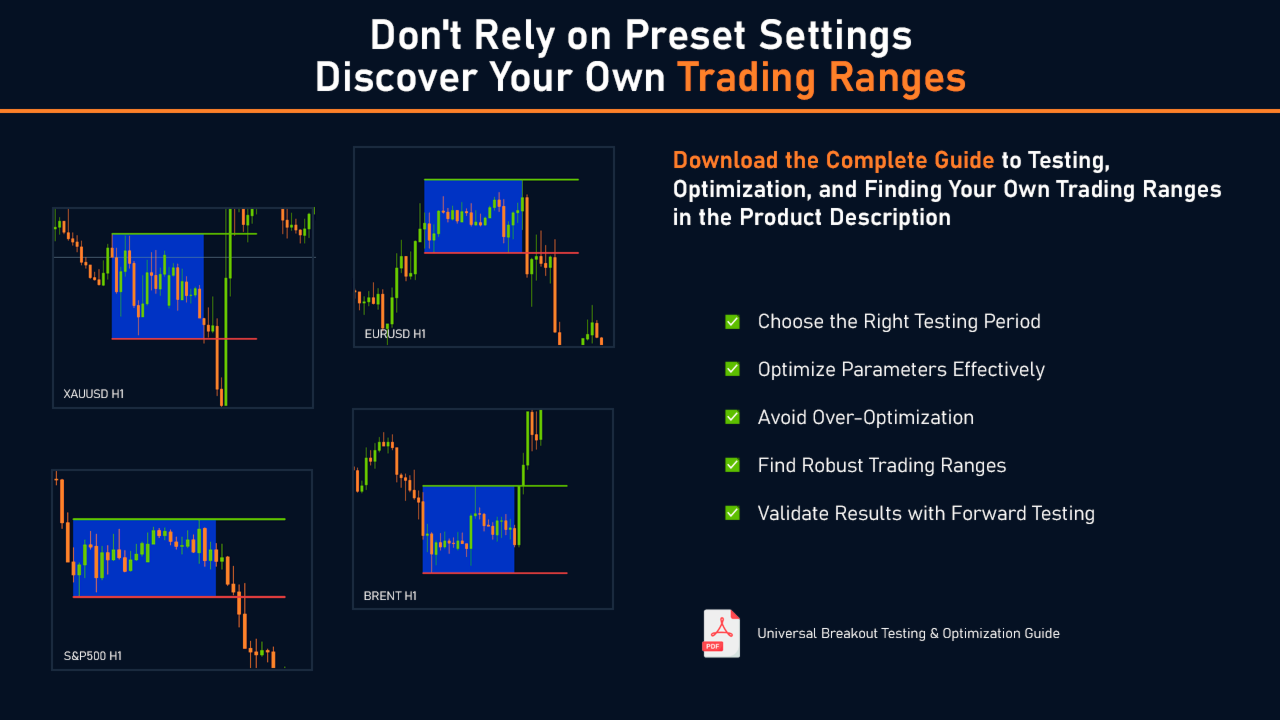
By default, Session Breakout PRO comes with a ready-to-use configuration optimized for trading Gold (XAUUSD). These settings are the result of extensive testing, optimization, and forward validation on real market data.

You can use the default configuration as a starting point or further customize the strategy to match your own requirements and preferred instruments.

Research into new markets and breakout trading models is ongoing. As new robust market patterns are identified and additional ready-made configurations are developed, updates will be shared with the private Session Breakout PRO user community.

As a result, you receive not only an automated breakout trading system but also access to ongoing research, testing results, and practical developments aimed at continuously improving and expanding the trading framework.


Explore the markets, discover your own trading edges, and turn them into a fully automated trading system with Session Breakout PRO.
More from author
Universal Breakout MT5
Sergey Ermolov
4.24 (49)
Universal Breakout is a simple and flexible expert advisor for trading range breakouts without unnecessary complexity. You define the time interval — the EA automatically determines the levels, places orders, and manages the trade. Download the Universal Breakout Testing & Optimization Guide.zip   HOW THE RANGE BREAKOUT STRATEGY WORKS The breakout strategy is based on a simple logic: when price moves beyond a formed range, it often leads to a strong movement. The range can be based on: trading s
FREE
Valable ZigZag MT5
Sergey Ermolov
4.63 (19)
Most traders use ZigZag incorrectly. It does not help to understand the market — it creates false signals and misleads you about the trend. Valable ZigZag solves this problem by showing the real structure of price movement and the market direction. Limitations of the classic ZigZag The classic ZigZag reacts to too many movements. As a result: even minor pullbacks look like significant changes level breakouts are perceived as signals but fail to follow through it becomes difficult to distinguis
FREE
MTF Trend – A simple trend direction indicator across 3 timeframes. You open a chart and are not sure whether the market direction is aligned across different timeframes. MTF Trend shows it instantly — 3 arrows, 3 timeframes, one answer: are you trading with the trend or against it? Trend direction at a glance A compact dashboard appears on the chart. Each arrow shows the trend direction on its corresponding timeframe. Trend direction is determined using market structure: HH + HL → uptrend LH +
FREE
Full Fractals MT5
Sergey Ermolov
4.77 (22)
Full Fractals — Fractals Without Noise The standard Fractals indicator overloads the chart : dozens of points, making it difficult to understand which ones actually matter. As a result, market structure becomes unclear, and levels have to be determined manually. Full Fractals solves this problem — it leaves only the key points where price actually responded. The indicator is based on the classic Bill Williams fractal logic and does not repaint after formation. Used in live trading to identify ma
FREE
Easy Lot Calculator
Sergey Ermolov
5 (1)
Easy Lot Calculator — a fast and intuitive lot size calculator for MT5. Move the Stop Loss and Open Price levels directly on the chart, and the calculator instantly recalculates position size and trade risk in real time. Why Easy Lot Calculator? Easy Lot Calculator was built with a strong focus on simplicity, speed, and usability in real trading conditions. The calculator helps you instantly determine the correct position size without manual calculations or a complicated interface. With Easy Lot
FREE
Universal Breakout
Sergey Ermolov
4.56 (36)
Universal Breakout is a simple and flexible expert advisor for trading range breakouts without unnecessary complexity. You define the time interval — the EA automatically determines the levels, places orders, and manages the trade. Download the Universal Breakout Testing & Optimization Guide.zip   HOW THE RANGE BREAKOUT STRATEGY WORKS The breakout strategy is based on a simple logic: when price moves beyond a formed range, it often leads to a strong movement. The range can be based on: trading s
FREE
Candle Countdown — Accurate Time to Close for MT5 Candle Countdown is a simple and precise tool that shows the remaining time until the current candle closes directly on the chart. When your entry depends on the candle close, even a few seconds matter. This indicator helps you see the exact time and make decisions without rushing or guessing. An indicator for precise control over candle closing time. The indicator displays: time remaining until candle close current server time spread Stop Level
FREE
Grid Hlevel MT5
Sergey Ermolov
4.56 (34)
MT4 version |  Valable ZigZag Indicator  |   FAQ The  Grid HLevel  Expert Advisor is perfect for those traders who want to make a stable profit in the Forex market every month. The Expert Advisor works  according to  the averaging strategy and I suggest you to use it correctly. To use it "correctly" means to open trades with averaging in the reversal point of the market and trade only in the direction of a global trend. As for the direction of the main trend, I suggest to determine it by the in
FREE
MTF Trend
Sergey Ermolov
MTF Trend – A simple trend direction indicator across 3 timeframes. You open a chart and are not sure whether the market direction is aligned across different timeframes. MTF Trend shows it instantly — 3 arrows, 3 timeframes, one answer: are you trading with the trend or against it? Trend direction at a glance A compact dashboard appears on the chart. Each arrow shows the trend direction on its corresponding timeframe. Trend direction is determined using market structure: HH + HL → uptrend LH +
FREE
Universal Box MT5
Sergey Ermolov
4.43 (7)
MT4 version   |  FAQ  |   EA Universal Breakout   Universal Box   plots   price ranges   on the chart which can be used later to trade on a price range breakout. There are many strategies with which you can apply this indicator. The indicator is set by default to mark   Asian, European and American trading session   ranges on the chart. Ranges are plotted as rectangles, the boundaries of which are the beginning and end time of the trading session, and the levels of maximum and minimum prices fo
FREE
Trend Monitor VZ
Sergey Ermolov
3.67 (3)
Trend Monitor VZ – Market monitoring based on trend structure. If you analyze multiple instruments, checking trend direction can take a significant amount of time. Trend Monitor VZ brings all this information together in a single dashboard and displays trend direction across multiple instruments and timeframes at the same time. The entire market at a glance A market monitor appears directly on your chart, showing trend direction across selected instruments and timeframes. Trend direction is det
Valable ZigZag
Sergey Ermolov
4.63 (8)
Most traders use ZigZag incorrectly. It does not help to understand the market — it creates false signals and misleads you about the trend. Valable ZigZag solves this problem by showing the real structure of price movement and the market direction. Limitations of the classic ZigZag The classic ZigZag reacts to too many movements. As a result: even minor pullbacks look like significant changes level breakouts are perceived as signals but fail to follow through it becomes difficult to distinguis
FREE
Easy Lot Calculator — a fast and intuitive lot size calculator for MT4. Move the Stop Loss and Open Price levels directly on the chart, and the calculator instantly recalculates position size and trade risk in real time. Why Easy Lot Calculator? Easy Lot Calculator was built with a strong focus on simplicity, speed, and usability in real trading conditions. The calculator helps you instantly determine the correct position size without manual calculations or a complicated interface. With Easy Lot
FREE
Owl Smart Levels MT5
Sergey Ermolov
4.03 (32)
When trading with the trend, the main difficulty is not finding a level, but understanding where an entry is actually valid. Price often reacts to levels but fails to follow through — which leads to false entries or missed moves. Owl Smart Levels does not just show levels , but zones formed based on market structure and pullbacks. This allows you to evaluate entry points differently and avoid a portion of false signals. What is included in the Owl Smart Levels system? Owl Smart Levels is not ju
Full Fractals
Sergey Ermolov
4.45 (11)
Full Fractals — Fractals Without Noise The standard Fractals indicator overloads the chart : dozens of points, making it difficult to understand which ones actually matter. As a result, market structure becomes unclear, and levels have to be determined manually. Full Fractals solves this problem — it leaves only the key points where price actually responded. The indicator is based on the classic Bill Williams fractal logic and does not repaint after formation. Used in live trading to identify ma
FREE
Universal Box
Sergey Ermolov
5 (1)
MT5 version |  FAQ  | EA Universal Breakout   Universal Box plots price ranges on the chart which can be used later to trade on a price range breakout. There are many strategies with which you can apply this indicator. The indicator is set by default to mark Asian, European and American trading session ranges on the chart. Ranges are plotted as rectangles, the boundaries of which are the beginning and end time of the trading session, and the levels of maximum and minimum prices for that period.
FREE
Prop Drawdown Dashboard — full real-time visibility into your prop challenge account All critical account information — in one panel and updated in real time: current drawdown, challenge progress, and how close you are to critical limits . 10 built-in prop firm presets: FTMO, FundingPips, The5ers, FundedNext , and others. Simply select the firm — all limits and timezone settings are loaded automatically . No more violations caused by incorrect trading day reset times. The indicator automatically
FREE
Candle Countdown — Accurate Time to Close for MT4 Candle Countdown is a simple and precise tool that shows the remaining time until the current candle closes directly on the chart. When your entry depends on the candle close, even a few seconds matter. This indicator helps you see the exact time and make decisions without rushing or guessing. An indicator for precise control over candle closing time. The indicator displays: time remaining until candle close current server time spread Stop Level
FREE
MiloBot PRO MT5
Sergey Ermolov
4.8 (5)
Backtests from 2015 |  MT4 version |  FAQ MiloBot PRO  is a Forex Expert Advisor (EA) based on the  author's strategy  which has been developed, tested and optimized for more than 2 years. The main indicator of the MiloBot PRO’s reliability is developers’  real accounts totaling more than  100 000 USD . The MiloBot Pro’s advanced  algorithmic strategy  gives everyone the opportunity to earn the stable profit every month.  Copyrighted indicators   help the EA accurately to enter the market when
Grid HLevel
Sergey Ermolov
4.56 (25)
MT5 version |  Valable ZigZag Indicator   |   FAQ The Grid HLevel Expert Advisor is perfect for those traders who want to make a stable profit in the Forex market every month. The Expert Advisor works  according to the averaging strategy and I suggest you to use it correctly. To use it "correctly" means to open trades with averaging in the reversal point of the market and trade only in the direction of a global trend. As for the direction of the main trend, I suggest to determine it by the indi
FREE
Owl smart levels
Sergey Ermolov
4.26 (38)
When trading with the trend, the main difficulty is not finding a level, but understanding where an entry is actually valid. Price often reacts to levels but fails to follow through — which leads to false entries or missed moves. Owl Smart Levels does not just show levels , but zones formed based on market structure and pullbacks. This allows you to evaluate entry points differently and avoid a portion of false signals. What is included in the Owl Smart Levels system? Owl Smart Levels is not ju
Panther Trade Scenario — displays a clear trade scenario directly on the chart. The indicator removes the main problem in trading — uncertainty at the moment you need to act. Instead of trying to guess the best timing, you see exactly: where to enter, where to limit risk, and where to take profit.   Why most trading mistakes happen at the entry The problem is not that you don’t understand the market. In most cases, it looks like this: you see the move, understand the direction, but at the moment
Shuttle Runner
Sergey Ermolov
4 (20)
The swing strategy is the basis of the Shuttle Runner Expert Advisor . The strategy was described as far back as 2009 and is actively used by traders in the Forex market. Shuttle runner is a revised and improved version of this strategy. The basic gist of the strategy is this: This advisor should be traded  only during active market phases . And we know that the market is active during the European and American trading sessions (you can also take the Asian, but the prerequisite is the presence
FREE
Trend Monitor VZ MT5
Sergey Ermolov
5 (1)
Trend Monitor VZ – Market monitoring based on trend structure. If you analyze multiple instruments, checking trend direction can take a significant amount of time. Trend Monitor VZ brings all this information together in a single dashboard and displays trend direction across multiple instruments and timeframes at the same time. The entire market at a glance A market monitor appears directly on your chart, showing trend direction across selected instruments and timeframes. Trend direction is det
Panther Trade Scenario — displays a clear trade scenario directly on the chart. The indicator removes the main problem in trading — uncertainty at the moment you need to act. Instead of trying to guess the best timing, you see exactly: where to enter, where to limit risk, and where to take profit.   Why most trading mistakes happen at the entry The problem is not that you don’t understand the market. In most cases, it looks like this: you see the move, understand the direction, but at the moment
Safety
Sergey Ermolov
5 (2)
I think everyone knows such a rule of money management as "Safe". For those who are not aware, the safe assumes closing half of the position after the profit on the transaction has equaled the size of the stop. Thus, even if the price reverses and catches the stop, you will not lose money, because exactly the same amount of profit was received when closing part of the position earlier. The Safety Expert Advisor has only one setting – the closing lot. Leaving it at position 0, the adviser will
FREE
MiloBot PRO
Sergey Ermolov
5 (3)
Backtests from 2015 |  MT5 version  |  FAQ MiloBot PRO  is a Forex Expert Advisor (EA) based on the  author's strategy  which has been developed, tested and optimized for more than 2 years. The main indicator of the MiloBot PRO’s reliability is developers’  real accounts totaling more than  100 000 USD . The MiloBot Pro’s advanced  algorithmic strategy  gives everyone the opportunity to earn the stable profit every month.  Copyrighted indicators   help the EA accurately to enter the market when
Easy Trade Executor is a tool for fast position sizing, trade execution, and trade management in MT4. Place Open Price, Stop Loss, and Take Profit levels directly on the chart, get automatic position size calculations, and open trades with controlled risk in just a few clicks. Why Easy Trade Executor? Easy Trade Executor is designed for traders who want more than just risk calculations — they want to manage trades quickly and efficiently directly from the chart. The tool combines position sizi
Easy Trade Executor is a tool for fast position sizing, trade execution, and trade management in MT5. Place Open Price, Stop Loss, and Take Profit levels directly on the chart, get automatic position size calculations, and open trades with controlled risk in just a few clicks. Why Easy Trade Executor? Easy Trade Executor is designed for traders who want more than just risk calculations — they want to manage trades quickly and efficiently directly from the chart. The tool combines position sizi
Filter:
No reviews
Reply to review