Quantum Forex EA
- Experts
- Version: 1.3
- Updated: 5 July 2025
- Activations: 10

Quantum Forex EA – Multi-Indicator Trading System
Description
Quantum Forex EA is a professional Expert Advisor for MetaTrader 5 that uses a combination of four popular technical indicators to make trading decisions. The EA is designed for automated trading in financial markets with flexible parameter configuration and a robust risk management system.
Key Features
Multi-Indicator Trading System
-
Moving Average (MA) – Analyzes the crossover of fast and slow moving averages
-
RSI (Relative Strength Index) – Detects overbought and oversold zones
-
MACD – Analyzes the crossover of the main and signal lines
-
Bollinger Bands – Trades from the boundaries of the Bollinger Bands
Flexible Signal Logic
-
Configurable number of indicators required to confirm a signal (2–4)
-
No longer requires unanimous agreement of all indicators
-
Can trade based on partial indicator confirmation
Professional Risk Management
-
Fixed Lot – Trades with a constant position size
-
Percentage Risk – Automatically calculates lot size based on account balance percentage
-
Controls the maximum number of simultaneous trades
-
Minimum distance between orders in points and time
-
Customizable Stop Loss and Take Profit
Stop Loss & Take Profit
-
Flexible SL/TP settings in points
-
Option to disable SL/TP (set to 0)
-
Automatic adaptation to broker conditions
Advanced Features
-
Trailing Stop – Automatically moves SL along with a profitable position
-
BreakEven – Moves a position to breakeven after reaching a certain profit
-
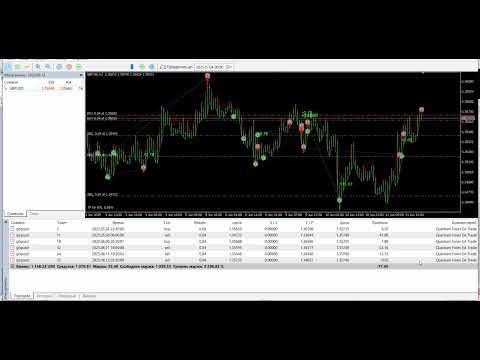
Trade Visualization – Displays closed trades on the chart with results
Operating Principle
The EA analyzes selected technical indicators and opens a position only when the set minimum number of indicators agree. This ensures high signal reliability and reduces false entries.
Logic Example:
If all 4 indicators are enabled and the setting is “minimum 3 for signal”:
-
A Buy signal is only given if at least 3 indicators show BUY
-
None of the indicators must show SELL
EA Settings
General
-
TimeFrame – Timeframe for indicator analysis
-
MagicNumber – Unique identifier for the EA
-
OrderComment – Comment for orders
-
MainLogicPauseSec – Pause between market checks (in seconds)
Order Filters
-
MinDistanceBetweenOrders – Minimum distance between orders (in points)
-
MinTimeBetweenOrders – Minimum time between orders (in minutes)
Risk Management
-
LotMethod – Lot calculation method (fixed or percentage)
-
RiskPercentPerTrade – Risk per trade as a percentage of balance
-
FixedLotSize – Fixed lot size
-
MaxTradesAllowed – Maximum number of simultaneous trades
Stop Loss & Take Profit
-
StopLossPoints – Stop loss size in points (0 = disabled)
-
TakeProfitPoints – Take profit size in points (0 = disabled)
Trailing and BreakEven
-
EnableTrailingStop – Enable trailing stop
-
TrailingStartPoints – Start trailing after X profit points
-
TrailingStopPoints – Distance of trailing stop from price
-
TrailingStepPoints – Trailing step size in points
-
EnableBreakEven – Enable breakeven
-
BreakEvenStartPoints – Start breakeven after X profit points
-
BreakEvenOffsetPoints – Breakeven offset from entry price
Indicators and Signals
-
MinIndicatorsForSignal – Minimum number of indicators required for a signal
Moving Average
-
EnableMA – Enable MA analysis
-
MA1Period – Period for slow MA
-
MA1Method – Calculation method for slow MA
-
MA1Price – Applied price for slow MA
-
MA2Period – Period for fast MA
-
MA2Method – Calculation method for fast MA
-
MA2Price – Applied price for fast MA
RSI (Relative Strength Index)
-
EnableRSI – Enable RSI analysis
-
RSIPeriod – RSI calculation period
-
RSIPrice – Applied price for RSI
-
RSI_Overbought – Overbought level
-
RSI_Oversold – Oversold level
MACD
-
EnableMACD – Enable MACD analysis
-
MACDFastEMA – Fast EMA period
-
MACDSlowEMA – Slow EMA period
-
MACDSignalSMA – Signal SMA period
Bollinger Bands
-
EnableBoll – Enable Bollinger Bands analysis
-
BollPeriod – Period for band calculation
-
BollDeviation – Standard deviation
-
BollShift – Band shift
-
BollMethod – Calculation method for midline
Visualization
-
ShowDealHistory – Show trade history on chart
-
BuyColorDraw – Color for buy trades
-
SellColorDraw – Color for sell trades
-
FontSize – Font size for chart labels
Advantages
-
Reliability – Multi-indicator signal filtering
-
Flexibility – Wide range of customizable parameters
-
Safety – Advanced risk management system
-
Automation – Fully automated trading
-
Visualization – Clear representation of trade results
-
Compatibility – Works with all instruments
Usage Recommendations
Timeframes
M5–H1 recommended. For best results, optimize on different timeframes to find the most profitable one.
Trading Instruments
-
Forex Pairs: EURUSD, GBPUSD, USDJPY, USDCHF, AUDUSD, NZDUSD, USDCAD, EURJPY, GBPJPY, EURGBP
-
Metals: XAUUSD (Gold), XAGUSD (Silver), XPTUSD (Platinum), XPDUSD (Palladium)
-
Energies: USOIL (WTI), UKOIL (Brent), NGAS (Natural Gas)
-
Cryptocurrencies: BTCUSD, ETHUSD, LTCUSD, and other popular crypto pairs
-
Indices: US30, US500, NAS100, GER30, UK100, JPN225, AUS200
Deposit
Recommended starting deposit: $1000 for stable operation
Optimization & Testing
Always test the EA on a demo account before live trading. For best results, optimize parameters using historical data of your chosen instrument.
Important Risk Information
Trading financial markets carries a high level of risk and may result in the loss of all invested capital. Past performance is not a guarantee of future returns. Only trade with funds you can afford to lose, and make sure to study risk management principles thoroughly before starting.