ADX Scalper Pro EA
- Experts
- Version: 1.0
- Activations: 5

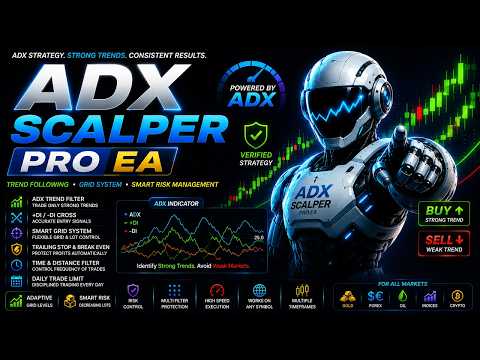
ADX Scalper Pro EA — Automated Expert Advisor for trend trading with the ADX indicator on MetaTrader 5
DESCRIPTION
ADX Scalper Pro EA is a fully automated Expert Advisor for MetaTrader 5 that uses the Average Directional Index (ADX) to assess trend strength and the +DI/−DI lines to determine trade direction. If the ADX value is below the set threshold, the market is treated as ranging and no new trades are opened. Trading only begins once sufficient trend strength has been confirmed. Trades are managed with Smart Risk capital management, controlled grid trading, Trailing Stop, Break Even, a time filter and built-in capital protection mechanisms.
The EA supports netting and hedging accounts and is suitable for trading gold (XAU/USD), Forex currency pairs, indices and other instruments.
KEY ADVANTAGES
• Filtering out ranging markets — ADX measures the strength of a move rather than its direction, so the EA skips the periods where directional strategies usually lose money
• Direction from +DI and −DI — entries follow the prevailing pressure in the market rather than a subjective reading of the trend
• Two signal modes — entering on the moment the lines cross gives rare, precise trades; entering on their relative position gives more opportunities throughout the trend
• Multi-timeframe calculation — trend strength can be assessed on a higher timeframe while trades are executed on the working one
• Smart Risk — the volume of each subsequent grid order decreases rather than increases, reducing the load on the deposit as the grid expands
• Adjustable trading frequency — the combined time-and-distance filter with four modes lets you set the EA up for rare entries or for active work
• Comprehensive capital protection — spread control, free margin control, time filter, daily trade limit and automatic verification of trading conditions before every entry
MAIN FEATURES
• ADX Trend Filter
• Smart Risk
• Grid Trading
• Trade Direction
• Time Filter
• Spread Control
• Daily Limit
• Stop Loss & Take Profit
• Break Even
• Trailing Stop
• Netting & Hedging
• Trade History
HOW THE EA WORKS
At the close of each bar the EA reads the ADX, +DI and −DI values on the selected timeframe and evaluates two conditions.
Trend strength. The ADX value is compared with the threshold. If it is below, the market is treated as ranging and the EA does not consider an entry at all, regardless of the other conditions.
Direction. If the trend is strong enough, the relative position of the directional lines is checked. A buy is considered when +DI is above −DI, a sell when the relationship is reversed. In strict mode the lines must additionally have been the other way round on the previous bar — that is, the cross must have happened at exactly this moment.
Opening trades. Once a signal has formed and matches the selected direction mode, the general safety rules are applied: the interval and distance between trades according to the selected filter mode, the current spread, the state of the trading session, the time filter and the sufficiency of free margin are all checked. The volume is adjusted to the broker's requirements if necessary. Once opened, the position is managed with a stop loss, take profit, trailing stop and breakeven, and with grid trading enabled the EA can add orders as the market moves against the position.
EA PARAMETERS
ADX Settings
ADXTimeframe — the timeframe on which the ADX indicator is calculated. It may differ from the working chart: this allows the trend to be assessed on a higher timeframe while trades are executed on a lower one.
ADXPeriod — the calculation period of the indicator. Larger values make the trend assessment smoother and slower, smaller ones make it more sensitive to the current movement.
ADXThreshold — the minimum ADX value at which trading is allowed. Below this threshold the market is treated as ranging and no trades are opened. The higher the value, the stricter the selection and the less frequently trades are made.
RequireDICross — defines the entry moment. When enabled, a trade is opened only on the bar where the +DI and −DI lines cross, which gives fewer signals but more precise entry points. When disabled, the EA trades throughout the trend for as long as one line stays above the other.
Lot Settings
LotMethod — the position volume calculation method: fixed lot or Smart Risk (automatic calculation from the balance size).
FixedLotSize — the lot size used in fixed-volume mode. Applies only when this mode is selected.
Grid Trading Settings
UseGrid — enables or disables grid trading when managing open positions.
GridStep — the distance in points between adjacent grid levels. The same parameter is used as the minimum distance between new entries when the distance filter is active.
MaxGridOrders — the maximum number of orders the EA can open in one direction while the grid is running. Limits the total risk.
Trading Direction
TradeDirection — defines the permitted trading direction: buys only (BUY), sells only (SELL), or both directions (BOTH). In BOTH mode the direction of a specific trade is determined by the indicator.
Stop Loss & Take Profit Settings
StopLoss — the stop loss size in points for each new position. A value of 0 disables the use of Stop Loss.
TakeProfit — the take profit size in points for automatic profit locking. A value of 0 disables the use of Take Profit.
Trailing Stop & BreakEven Settings
TrailingStop — enables or disables automatic management of profitable positions with a trailing stop.
TrailingStart — the minimum profit in points after which the trailing stop is activated.
TrailingDistance — the distance in points between the current price and the trailing stop level after it has been activated.
TrailingStep — the minimum price change required for each subsequent move of the trailing stop.
BreakEven — enables or disables the automatic move of a position to breakeven.
BreakEvenStart — the profit in points required to activate breakeven.
BreakEvenOffset — the stop loss offset into profit relative to the open price after the position has been moved to breakeven.
Trading Rules
MaxSpread — the maximum allowed spread in points for opening new trades. If the current spread is above this value, opening new positions is temporarily blocked.
MinutesBetweenTrades — the minimum time interval in minutes between the opening of new trades.
FilterMode — the operating mode of the entry filter: time only, distance only, time OR distance, or time AND distance simultaneously. Lets you regulate the trading frequency.
MagicNumber — a unique identifier that lets the EA distinguish its own trades from those of other EAs or manual trading.
TradeComment — a comment automatically added to all trades opened by the EA.
DailyLimit — enables or disables the limit on the maximum number of new trades during a single trading day.
MaxOrdersPerDay — the maximum number of trades the EA can open in one trading day.
Time Filter
EnableTimeFilter — enables or disables the time filter. When it is off, trading is allowed at any time and the other parameters in this group have no effect.
TradeMonday, TradeTuesday, TradeWednesday, TradeThursday, TradeFriday, TradeSaturday, TradeSunday — weekday switches. Trading can be allowed or blocked separately for each day. The day is taken from the broker's server time.
StartHour — the starting hour of the trading window (0–23) in the broker's server time.
StartMinute — the starting minute of the trading window (0–59).
EndHour — the ending hour of the trading window (0–23) in the broker's server time.
EndMinute — the ending minute of the trading window (0–59). If the start time is later than the end time, the window crosses midnight.
Display Settings
ShowPanel — enables or disables the display of the information panel on the chart.
ShowProfitStats — displays profit statistics for the day, week, month and the entire operating period of the EA.
ShowTradeHistory — enables the display of executed trade history directly on the chart.
BuyTradeColor — the display color for buy trades.
SellTradeColor — the display color for sell trades.
TradeFontSize — the font size of the trade history labels on the chart.
PanelBackColor — the background color of the information panel.
PanelTextColor — the text color of the information panel.
PanelEditColor — the color of the value fields inside the information panel.
SMART RISK
Smart Risk is a mode that calculates the position volume automatically from the balance size. The trade volume grows together with the deposit and decreases as it shrinks, so the load on the account stays proportionate to its current state.
The key feature of this mode shows itself when the grid is running: the volume of each subsequent order decreases rather than increases. This is what fundamentally separates Smart Risk from classic martingale, where every subsequent order doubles and the load on the deposit grows exponentially.
Before opening any position, the EA checks the available free margin and, if necessary, reduces the volume, aligning it to the broker's allowed lot step.
GRID TRADING
With grid trading enabled, the EA is not limited to a single position. As the market moves against the open side, it adds new orders at a defined step in points, forming an averaging grid. The total number of orders in one direction is limited by the MaxGridOrders parameter.
The EA keeps its own record of grid levels and entry prices, so the grid logic works equally correctly on netting and hedging accounts. Once the side is fully closed, the counter resets and the next signal starts a fresh cycle from the first level.
TIME FILTER
The time filter lets you restrict trading to certain weekdays and times of day. It is controlled by the EnableTimeFilter parameter and is disabled by default.
When the filter is enabled, trading is allowed only if both conditions are met: the current weekday is marked as allowed and the current time falls inside the defined window. If the window's start time is later than its end time, the window is treated as crossing midnight. All checks are performed in the broker's server time.
TRADE DIRECTION
BUY ONLY — the EA opens buy trades only; sell signals are ignored.
SELL ONLY — the EA opens sell trades only; buy signals are ignored.
BOTH — both sides are allowed. The direction of a specific trade is determined by the indicator: buys when +DI leads, sells when −DI leads.
CONCLUSION
ADX Scalper Pro EA combines the classic Average Directional Index indicator, Smart Risk capital management, controlled grid trading, a time filter and a full set of protective mechanisms in one fully automated Expert Advisor for MetaTrader 5. Filtering out ranging market segments, flexible sensitivity settings and full support for netting and hedging accounts make it applicable both for trading gold and for currency pairs, indices and other instruments.
The EA does not guarantee profit. Trading results depend on market conditions, the chosen settings, the broker's conditions and the trader's approach to risk management. Before using it on a live account, be sure to test it in the Strategy Tester and on a demo account.