
Stochastic Gold Scalper
- Experts
- Version: 5.3
- Updated: 13 July 2026
- Activations: 10

Stochastic Gold Scalper
Automatic Expert Advisor for MetaTrader 5 trading on candlestick patterns with optional Stochastic oscillator confirmation, controlled grid strategy, and flexible capital management
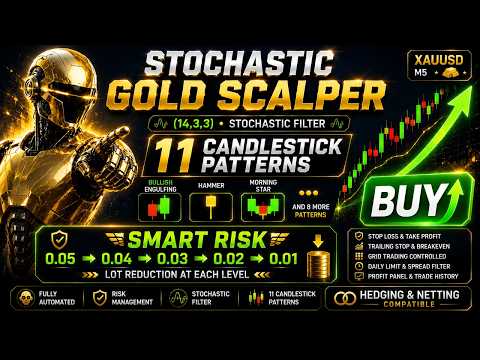
DESCRIPTIONStochastic Gold Scalper is a professional trading robot (Expert Advisor) for MetaTrader 5, designed for fully automatic and disciplined trading based on classical candlestick analysis.
Instead of trading based on subjective feelings, the system operates according to objective rules: it recognizes stable candlestick reversal patterns and opens trades in the corresponding direction. If necessary, each signal can be additionally confirmed by the Stochastic oscillator to filter out entries against overbought and oversold zones.
The Expert Advisor is focused on scalping on lower timeframes such as M5 and works well with gold (XAUUSD), Forex currency pairs, and indices.
MAIN FEATURES- Eleven candlestick reversal patterns with the ability to enable or disable each one individually.
- Optional Stochastic filter for confirming entries based on overbought and oversold zones.
- Controlled grid trading with fixed step and order limit.
- Smart Risk capital management with volume reduction at each grid level.
- Trading direction selection: buy only, sell only, or both directions.
- Stop Loss, Take Profit, Trailing Stop, and Break Even.
- Flexible entry filter based on time and distance with four operating modes.
- Spread control and daily trade limit.
- Informative panel with real-time profit statistics.
- Display of trade history directly on the chart.
- Full support for netting and hedging accounts.
At the close of each new bar, the trading system analyzes the candlestick structure and determines the presence of one of the supported reversal patterns. All pattern recognition algorithms are implemented directly in the code and do not use third-party indicators.
Bullish patterns generate a buy signal, bearish patterns generate a sell signal. The Doji pattern is recognized as a sign of market uncertainty and serves an informational purpose: it does not open trades on its own.
If the Stochastic filter is enabled, the signal undergoes additional verification: a buy is allowed only when the oscillator is below the oversold level, and a sell only when it is above the overbought level. If the filter is disabled, the decision is made solely based on the candlestick pattern.
The frequency of entries is not determined by the signal itself — it is controlled by built-in filters: minimum interval between trades, grid step, and daily limit.
EXPERT ADVISOR PARAMETERSSignal Settings
TimeFrame — the timeframe on which the Expert Advisor analyzes candles and generates trading signals. Default is M5.
Candlestick Patterns
BullishEngulfing — enables recognition of the "Bullish Engulfing" pattern (buy signal).
BearishEngulfing — enables recognition of the "Bearish Engulfing" pattern (sell signal).
Hammer — enables recognition of the "Hammer" pattern (buy signal).
HangingMan — enables recognition of the "Hanging Man" pattern (sell signal).
ShootingStar — enables recognition of the "Shooting Star" pattern (sell signal).
InvertedHammer — enables recognition of the "Inverted Hammer" pattern (buy signal).
Doji — enables recognition of the "Doji" pattern. The pattern is neutral and used for information purposes only, without opening trades.
MorningStar — enables recognition of the "Morning Star" pattern (buy signal).
EveningStar — enables recognition of the "Evening Star" pattern (sell signal).
PiercingLine — enables recognition of the "Piercing Line" pattern (buy signal).
DarkCloudCover — enables recognition of the "Dark Cloud Cover" pattern (sell signal).
Stochastic Filter
EnableStochFilter — enables or disables signal confirmation by the Stochastic oscillator. Disabled by default.
KPeriod — period of the main %K line of the oscillator.
DPeriod — period of the %D signal line.
Slowing — slowing parameter of the oscillator.
StochMethod — smoothing method (simple, exponential, and others).
StochPriceField — price field for oscillator calculation.
OverboughtLevel — overbought level; buy signals are blocked above it.
OversoldLevel — oversold level; sell signals are blocked below it.
Lot Settings
LotMethod — selection of position volume calculation method: fixed lot or Smart Risk (automatic calculation based on account balance).
FixedLotSize — lot size used in fixed volume trading mode.
Grid Trading Settings
UseGrid — enables or disables the use of the grid strategy when managing open positions.
GridStep — distance in points between adjacent grid levels. The higher the value, the less frequently additional orders are opened.
MaxGridOrders — maximum number of orders the Expert Advisor can open in one direction when using the grid strategy. Limits the total grid risk.
Trading Direction
TradeDirection — determines the trading direction: buy only (BUY), sell only (SELL), or both directions (BOTH).
Stop Loss & Take Profit Settings
StopLoss — Stop Loss size in points for each new position. A value of 0 disables the use of Stop Loss.
TakeProfit — Take Profit size in points for automatic profit fixation. A value of 0 disables the use of Take Profit.
Trailing Stop & BreakEven Settings
TrailingStop — enables or disables automatic management of profitable positions using Trailing Stop.
TrailingStart — minimum profit in points required to activate the Trailing Stop.
TrailingDistance — distance in points between the current price and the Trailing Stop level after activation.
TrailingStep — minimum price change required for the next Trailing Stop movement.
BreakEven — enables or disables automatic move to Break Even.
BreakEvenStart — profit size in points required to activate Break Even mode.
BreakEvenOffset — additional positive offset of the Stop Loss relative to the opening price after moving to Break Even.
Trading Rules
MaxSpread — maximum allowable spread for opening new trades. If the current spread exceeds this value, new position opening is temporarily blocked.
MinutesBetweenTrades — minimum time interval between opening new trades.
FilterMode — determines the operating mode of the entry filter: by time only, by distance only, by time OR distance, or by time AND distance.
MagicNumber — unique identifier that allows the Expert Advisor to distinguish its own trades from those of other advisors or manual trading.
TradeComment — comment automatically added to all trades opened by the Expert Advisor.
DailyLimit — enables or disables the restriction on the maximum number of new trades during one trading day.
MaxOrdersPerDay — maximum number of trades the Expert Advisor can open in one trading day.
Display Settings
ShowPanel — enables or disables the display of the information panel on the chart.
ShowProfitStats — displays profit statistics for the day, week, month, and the entire period of the Expert Advisor's operation.
ShowTradeHistory — enables the display of completed trade history directly on the chart.
BuyTradeColor — sets the display color for buy trades.
SellTradeColor — sets the display color for sell trades.
TradeFontSize — determines the font size of trade history labels on the chart.
PanelBackColor — sets the background color of the information panel.
PanelTextColor — sets the text color of the information panel.
PanelEditColor — sets the color of value fields inside the information panel.
CONCLUSIONStochastic Gold Scalper combines classical candlestick analysis, optional confirmation by the Stochastic oscillator, controlled grid logic, and Smart Risk capital management. The flexible choice of patterns, two volume calculation modes, and full support for any account types make it a universal solution for both daily trading on gold, Forex pairs, and indices, as well as for long-term optimization for specific instruments — with wide customization options and a high level of risk control.
The Expert Advisor does not guarantee profit. Trading results depend on market conditions, selected settings, and the trader's approach to risk management. Be sure to test the Expert Advisor in the Strategy Tester and on a demo account before use.










































I bought this EA today. I had tried testing it in Meta 5 Strategy Tester over the weekend, but unfortunately, it didn't work out. I then contacted the developer, Vladimir Shumikhin, and his service was truly exemplary. He responded immediately and provided me with all the necessary information, even though I hadn't yet purchased the EA. A truly outstanding supporter. I then applied the information, and the results were already good, which convinced me to buy the EA. Today, I installed it in the real demo mode. The trading session started at midnight, so Asian markets predominated, and it generated a $20 profit. That's really promising.