
Pivot Levels Pro EA
- Experts
- Version: 7.4
- Updated: 25 July 2026
- Activations: 10

Pivot Levels Pro EA — Automated Expert Advisor for Pivot level trading on MetaTrader 5
DESCRIPTION
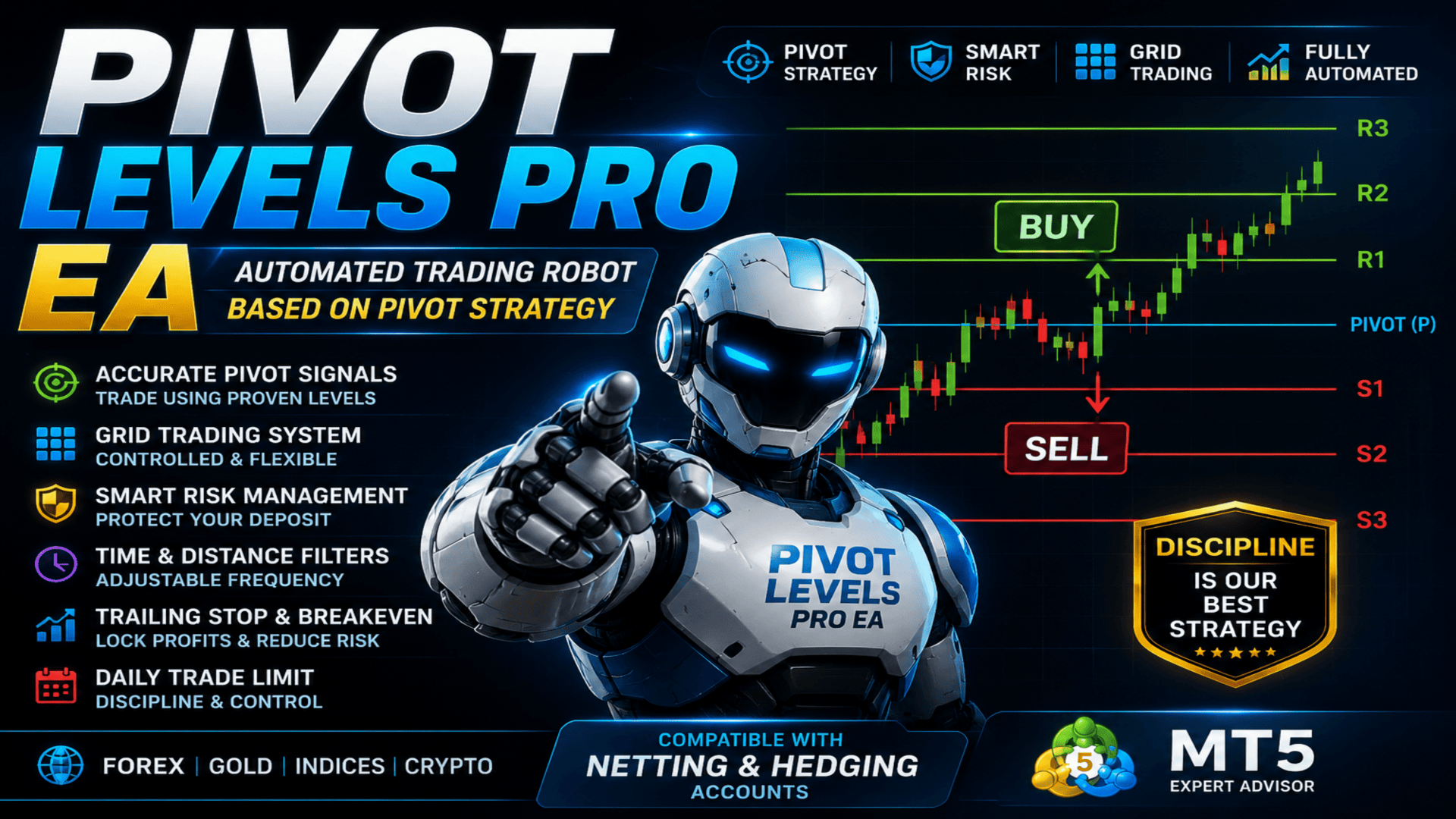
Pivot Levels Pro EA is a fully automated trading Expert Advisor for MetaTrader 5, built on trading with Pivot levels (Pivot Point Strategy). The EA automatically calculates and displays support and resistance levels on the chart, freeing the trader from manual calculations, and makes trading decisions based on the price position relative to the central Pivot level. Five calculation methods are supported — Classic, Fibonacci, Camarilla, Woodie and DeMark, which allows the logic to be adapted to different markets and trading styles.
The trade direction is determined at the close of the bar on the selected timeframe rather than by the instantaneous price inside the bar, which eliminates false intrabar signals. Positions are managed using Smart Risk money management, controlled Grid Trading, Trailing Stop, Break Even, a combined entry filter, a time filter and built-in trading-condition control mechanisms.
The EA supports netting and hedging accounts and is suitable for trading gold (XAU/USD), Forex currency pairs, indices, commodities and other instruments. The EA is well suited to traders who use Pivot Trading and Support and Resistance levels in MetaTrader 5.
KEY ADVANTAGES
Automatic calculation of Pivot levels — the EA calculates and displays the central Pivot together with the R1–R4 and S1–S4 levels with labels, freeing the trader from manual plotting and allowing them to focus on decisions rather than calculations
Five calculation methods — Classic, Fibonacci, Camarilla, Woodie and DeMark in a single product, making it possible to choose the level model to match a specific instrument and timeframe
Signal at bar close — the direction is determined by the price position relative to the central Pivot at candle close, which removes signal flicker inside the bar and makes the EA's behaviour predictable
Multi-timeframe calculation — Pivot levels can be calculated on one timeframe while trades are executed on another. This makes it possible to use higher-timeframe levels as the basis of the trading logic while working on lower periods
Smart Risk — the volume of each subsequent grid order decreases rather than increases, which reduces the load on the deposit as the series expands
Adjustable trading frequency — a combined time and distance filter with four modes lets you set the EA up for either rare entries or active operation
Trading-condition control — a check of the spread, free margin, trading-session status, the time filter and the daily trade limit is performed before each entry
Clear on-chart analytics — the information panel and the visual trade history help monitor the EA's operation in real time
MAIN FEATURES
Pivot Levels (Classic, Fibonacci, Camarilla, Woodie, DeMark)
Smart Risk
Grid Trading
Trade Direction
Time Filter
Spread Control
Daily Limit
Stop Loss & Take Profit
Break Even
Trailing Stop
Netting & Hedging
Information Panel
Trade History
HOW THE EA WORKS
Level calculation. When a new bar forms on the selected timeframe, the EA calculates the Pivot levels using the chosen method based on the data of the previous completed bar. For Classic, Fibonacci, Camarilla and Woodie, the central Pivot and the R1–R4 and S1–S4 levels are built; for the DeMark method its characteristic levels are calculated (Pivot, R1, S1). When display is enabled, the levels are shown on the chart as lines with labels.
Signal generation. The direction is determined by the closing price of the previous bar relative to the central Pivot level: a price above Pivot corresponds to a buy signal, a price below Pivot corresponds to a sell signal. The evaluation is performed at bar close, so the signal does not change while the current candle is forming.
Trade entry. When a signal has formed and matches the selected direction mode, the general control rules are applied: the interval and distance between trades are checked according to the selected filter mode, along with the current spread, the trading-session status, the time filter, the daily limit and sufficient free margin. The volume is adjusted to the broker's requirements if necessary. After opening, the position is managed with a stop loss, take profit, trailing stop and break even, and when grid trading is enabled the EA can add orders as the market moves against the position.
EA PARAMETERS
Pivot Settings
PivotType — the Pivot level calculation method: Classic, Fibonacci, Camarilla, Woodie or DeMark. It defines the formulas used to build the central level and the support and resistance levels.
PivotTimeframe — the timeframe on which the Pivot levels are calculated. It may differ from the working chart: this makes it possible to build levels on a higher timeframe while executing trades on a lower one.
DrawPivotLines — enables or disables the display of Pivot level lines on the chart.
PivotExtendDays — the length of the Pivot lines forward in chart time (in days) for better visual readability.
ShowLineLabels — enables or disables the level labels on the plotted lines.
PivotColorP, PivotColorR, PivotColorS — the colours of the central Pivot level, the resistance (R) levels and the support (S) levels.
PivotLineStyle — the style of the Pivot lines: solid, dashed and other options.
PivotLineWidth — the thickness of the Pivot lines.
Lot Settings
LotMethod — the position volume calculation method: fixed lot or Smart Risk (automatic calculation based on the balance size).
FixedLotSize — the lot size used in fixed-volume mode. It applies only when this mode is selected.
Grid Trading Settings
UseGrid — enables or disables grid trading when managing open positions.
GridStep — the distance in points between adjacent grid levels. The same parameter is used as the minimum distance between new entries when the distance filter is active.
MaxGridOrders — the maximum number of orders the EA can open in one direction during grid operation. It limits the cumulative risk.
Trading Direction
TradeDirection — defines the permitted trading direction: buy only (BUY), sell only (SELL) or both directions (BOTH). In BOTH mode, the direction of a specific trade is determined by the price position relative to Pivot.
Stop Loss & Take Profit Settings
StopLoss — the stop loss size in points for each new position. A value of 0 disables the use of Stop Loss.
TakeProfit — the take profit size in points for automatic profit taking. A value of 0 disables the use of Take Profit.
Trailing Stop & BreakEven Settings
TrailingStop — enables or disables automatic management of profitable positions with a trailing stop.
TrailingStart — the minimum profit in points after which the trailing stop is activated.
TrailingDistance — the distance in points between the current price and the trailing stop level after its activation.
TrailingStep — the minimum price change required for the next movement of the trailing stop.
BreakEven — enables or disables the automatic move of a position to break even.
BreakEvenStart — the profit in points required to activate break even.
BreakEvenOffset — the stop loss offset in profit relative to the opening price after the position is moved to break even.
Trading Rules
MaxSpread — the maximum allowed spread in points for opening new trades. If the current spread is above this value, opening new positions is temporarily blocked.
MinutesBetweenTrades — the minimum time interval in minutes between the opening of new trades.
FilterMode — the entry filter mode: time only, distance only, time OR distance, or both time AND distance at once. It allows the trading frequency to be adjusted.
MagicNumber — a unique identifier that allows the EA to distinguish its own trades from those of other EAs or from manual trading.
TradeComment — the comment automatically added to all trades opened by the EA.
DailyLimit — enables or disables the limit on the maximum number of new trades within a single trading day.
MaxOrdersPerDay — the maximum number of trades the EA can open during one trading day.
Time Filter
EnableTimeFilter — enables or disables the time filter. When it is off, trading is allowed at any time and the other parameters in this group have no effect.
TradeMonday, TradeTuesday, TradeWednesday, TradeThursday, TradeFriday, TradeSaturday, TradeSunday — the day-of-week switches. Trading can be allowed or disallowed separately for each day. The day is taken according to the broker's server time.
StartHour — the start hour of the trading window (0–23) in the broker's server time.
StartMinute — the start minute of the trading window (0–59).
EndHour — the end hour of the trading window (0–23) in the broker's server time.
EndMinute — the end minute of the trading window (0–59). If the start time is later than the end time, the window wraps past midnight.
Display Settings
ShowPanel — enables or disables the display of the information panel on the chart.
ShowProfitStats — displays profit statistics for the day, week, month and the entire operating period of the EA.
ShowTradeHistory — enables the display of the history of completed trades directly on the chart.
BuyTradeColor — the display colour of buy trades.
SellTradeColor — the display colour of sell trades.
TradeFontSize — the font size of the trade history labels on the chart.
PanelBackColor — the background colour of the information panel.
PanelTextColor — the text colour of the information panel.
PanelEditColor — the colour of the value fields inside the information panel.
SMART RISK
Smart Risk is a mode of automatic position volume calculation based on the balance size. The trade volume grows together with the deposit and decreases when it shrinks, so the load on the account remains proportional to its current state.
The key feature of this mode appears during grid operation: the volume of each subsequent order decreases rather than increases. This fundamentally distinguishes Smart Risk from the classic martingale, where each subsequent order doubles and the load on the deposit grows exponentially.
Calculation example. With a balance of 5,000 USD, the starting volume of the first order is 0.05 lots. As the grid expands, the volume of each subsequent level decreases by one step:
Balance: 5,000 USD
Level 1 — 0.05
Level 2 — 0.04
Level 3 — 0.03
Level 4 — 0.02
Level 5 — 0.01
Level 6+ — 0.01
Thus, instead of increasing the volume, the series is averaged with ever-smaller lots, and the cumulative load on the deposit grows much more slowly than with a martingale.
Before opening any position, the EA checks the available free margin and, if necessary, reduces the volume, bringing it to the broker's allowed lot step.
GRID TRADING
When grid trading is enabled, the EA is not limited to a single position. As the market moves against the open side, it adds new orders at a specified step in points, forming an averaging grid. The total number of orders in one direction is limited by the MaxGridOrders parameter.
The EA keeps its own internal record of the grid levels and entry prices, so the grid logic works equally correctly on netting and hedging accounts. After the side is fully closed, the internal counter is reset, and a new signal starts a fresh cycle from the first level.
Adding orders in the grid follows the same time and distance filtering rules as the first entry, which makes it possible to control the density of the series and the cumulative risk.
TIME FILTER
The time filter makes it possible to restrict trading to certain days of the week and times of day. It is controlled by the EnableTimeFilter parameter and is disabled by default.
When the filter is enabled, trading is allowed only if both conditions are met: the current day of the week is marked as allowed and the current time is within the specified window. If the window start time is later than the end time, the window is treated as wrapping past midnight. All checks are performed in the broker's server time.
TRADE DIRECTION
BUY ONLY — the EA opens buy trades only; sell signals are ignored.
SELL ONLY — the EA opens sell trades only; buy signals are ignored.
BOTH — both sides are allowed. The direction of a specific trade is determined by the price position relative to the central Pivot: buys when the price is above Pivot, sells when the price is below Pivot.
INFORMATION PANEL
When the panel is enabled, the EA displays a summary of its operation in the corner of the chart. The panel shows:
Profit for the day
Profit for the week
Profit for the month
Total profit for the entire operating period
BUY Grid — the current number of grid levels on the buy side
SELL Grid — the current number of grid levels on the sell side
Entry filter mode
The current value of the central Pivot level and the price position relative to it
Position management parameters: the state of Trailing Stop and Break Even, the Stop Loss and Take Profit values, the grid step and the trading direction
The panel updates as the EA operates and allows the trading state to be monitored without opening additional windows. The background, text and value-field colours are configurable.
TRADE HISTORY ON THE CHART
When history display is enabled, the EA plots completed trades directly on the chart. Entry and exit points are marked with arrows in separate colours for buys and sells, the entry and its corresponding exit are connected by a line, and a label with the financial result of the trade, including swap and commission, is displayed next to the exit.
The history objects are placed so as not to overlap the information panel, and they are automatically rebuilt when the chart is scrolled and its scale is changed. This provides a clear picture of how the EA operated on the current instrument and simplifies visual analysis of its behaviour.
CONCLUSION
Pivot Levels Pro EA combines automatic calculation of Pivot levels using five methods, Smart Risk, controlled grid trading and a flexible position management system. It supports the Classic, Fibonacci, Camarilla, Woodie and DeMark methods, a combined entry filter and a time filter, as well as a full set of trading-condition control mechanisms — in a single fully automated trading Expert Advisor for MetaTrader 5. Signal evaluation at bar close, multi-timeframe level calculation, a clear information panel and a visual trade history make the EA's operation transparent and convenient to monitor. Full support for netting and hedging accounts makes it applicable to trading gold, currency pairs, indices and other instruments.
The EA does not guarantee profit. Trading results depend on market conditions, the chosen settings, the broker's conditions and the trader's approach to risk management. Before using it on a live account, be sure to test it in the Strategy Tester and on a demo account.


















































Simply don't work. Save your money.
Yes, I did optimize it on all major pairs and it crashed out on all of them.
Vladimir