Risk control of your Robots

4

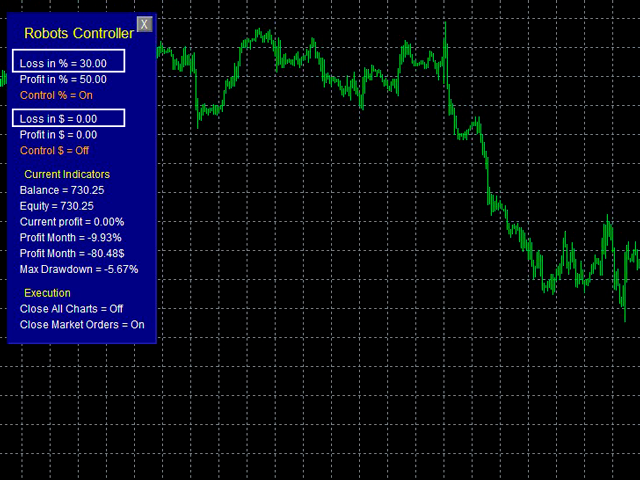
Risk Controller Expert Advisor, a program that allows you to control the total risk of your trading advisors on your account.

With this program, you can control the maximum risk that will be allowed on the account for all advisors.

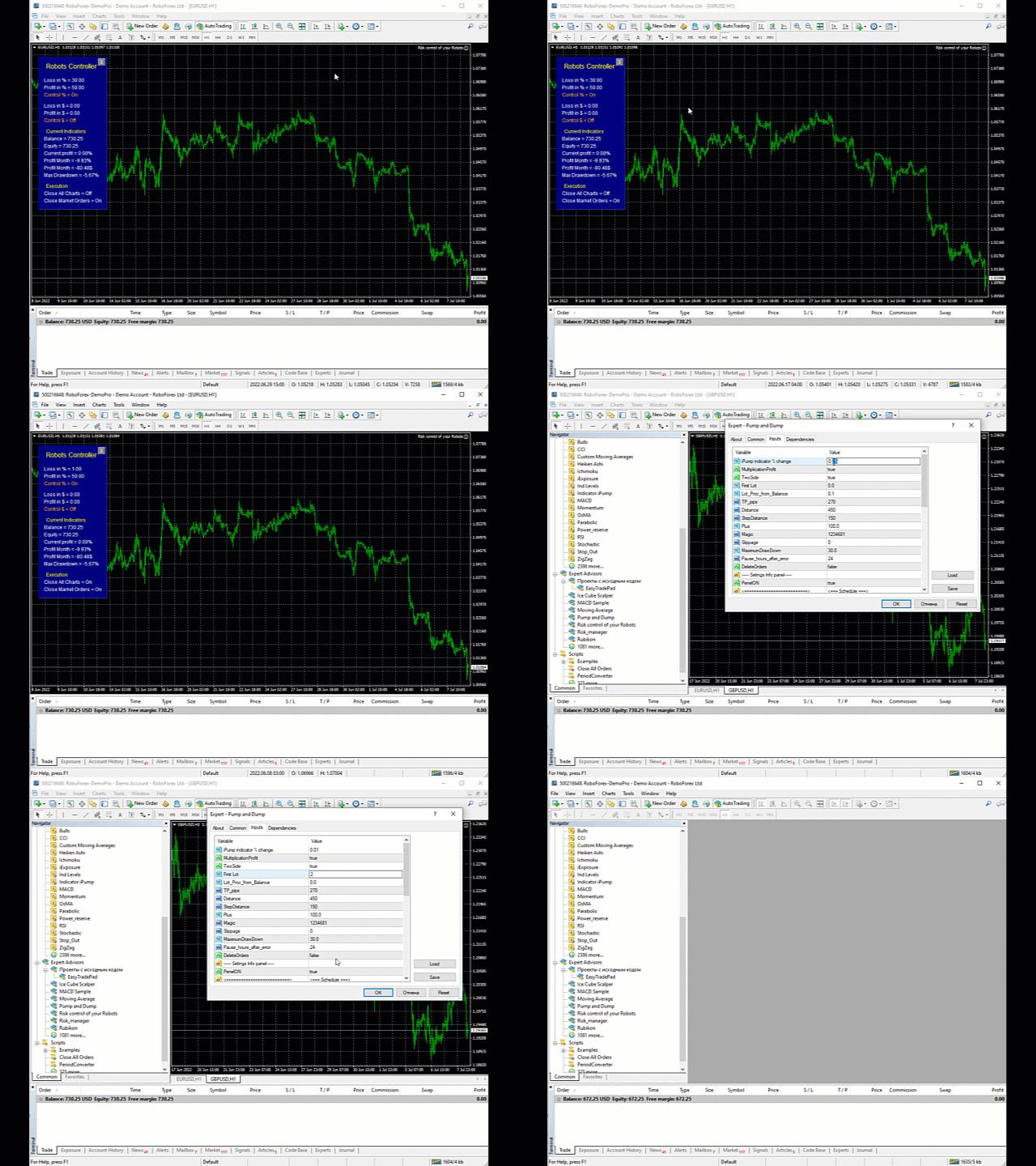
For example, you set the risk of 30% of the maximum drawdown, which means that if your equity trading robots exceed the risk of 30%, the Risk Controller will close all positions of advisers, and can also close all open charts, thereby preventing advisers from working further.

The Expert Advisor will be necessary for “restful sleep” when you trade averaging robots with martingale and want to limit the maximum losses from robots in case of force majeure or other unforeseen situations, because it is better to take a loss than to hope for a market reversal.

The Risk Controller Expert Advisor is a very important and, in my opinion, necessary program for every trader who trades robots.

 Control can be carried out both in the limiting monetary $ equivalent of the maximum losses on the account, and in % percentage.

For the adviser to work, simply attach it to the chart of a currency pair and set the maximum allowable risk in the deposit currency or in % of the current balance.

Advisor functions

  • closing of all positions upon reaching the total specified loss level $ and in%
  • closing all positions upon reaching the total profit in $ and in%
  • deletion of pending pending orders when a specified loss/profit is reached
  • sound signal when the specified profit / loss is reached

The following parameters can be configured in the Expert Advisor:

  • Closing all charts when triggered by the risk manager
  • Set price slippage
  • Set the number of attempts to close a position
  • Delay time between attempts to close orders


Description of settings


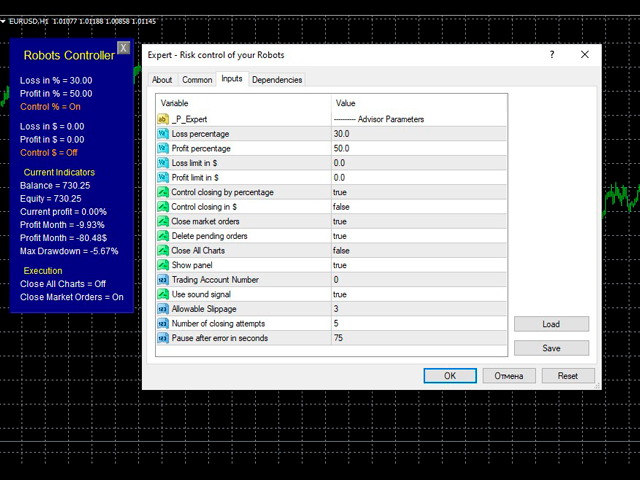
Profit percentage – the size of the maximum profit for all open positions, after which the adviser will record the profit and close the order.

Loss percentage – the size of the maximum loss for all open positions, after reaching which the adviser will fix the loss and close the order.

Profit limit in $ – the limit size of the maximum profit in the currency of your deposit on the achievement of which the adviser will record the profit and close the orders.

Loss limit in $ – the marginal amount of the maximum loss in the currency of your deposit on the achievement of which the adviser will fix the loss and close the order.

Control closing by percentage true / false – if true, the expert will control positions only by% balance change, controls the indicator Profit / Loss percentage.

Control closing in $ true / false – if true is selected, the adviser will control the positions by the indicators Loss / Profit limit in $, respectively, the control will be carried out in the deposit currency.

Close market orders true / false – if true is selected, orders are deleted if the risk is exceeded.

Delete pending orders true / false – if true is selected, pending orders are deleted if the risk is exceeded.

Close All Charts true / false – if true is selected, if you exceed the risk, all the charts in the terminal are closed, which indicates that it is time to pause the trade.

Show panel true / false – show / hide the information panel.

Trading Account Number – the account number on which the panel should work, if 0, then it works on any account.

Use sound signal true / false – use sound notification of risk management exceeding.

Allowable Slippage – allowable slippage.

Number of closing attempts – the number of attempts to close positions.

Pause after error in seconds – pause before a new attempt to close an order.
Reviews 1
Valter Oliveira
1736
Valter Oliveira 2023.11.09 00:20 
 

It's a great tool for managing other EAs that operate on the same account. I identified some opportunities for improvement, considering the resources I need to use: [1] Regarding the "Loss limit in $" and "Profit limit in $" parameters, if a zero value is entered in one of these parameters, the EA could disregard the limitation by this parameter in which a zero value was inserted; [2] Regarding the limitation by financial value ($), related to "Loss limit in $" and "Profit limit in $", there could be another parameter to establish whether the limitation will be on a daily, weekly or monthly basis. Specifically in my case, I would like to close trades if a daily profit or loss value is reached; [3] The option to "close all charts" is interesting, but it would be better if there was the possibility of just disabling automated trading (general of MT4) for all EAs instead of closing the charts. Many thanks to the developer for making this product available.

Recommended products
Send periodic (Health Check) notification from your MT4 terminal to your mobile phone to be sure that your MT4 terminal is still running. When you did not receive the notification, it means that your terminal is unavailable. Optional information like Account Equity and Trading Pairs are also available. Notification Period - 1 Hour, 2 Hours, 4 Hours, 8 Hours, 12 Hours, 24 Hours Attach EA to any H1 chart
Double Win
Yu Zheng Wang
Introducing the OrderManager: A Revolutionary Utility for MT4 Manage your trades like a pro with the all-new Order Manager utility for MetaTrader 4. Designed with simplicity and ease-of-use in mind, the Order Manager allows you to effortlessly define and visualize the risk associated with each trade, enabling you to make informed decisions and optimize your trading strategy.  Key Features: Risk Management: Define the risk of your trades quickly and easily, allowing you to make better decisio
AW Metatrader to Telegram
AW Trading Software Limited
An automated system for sending notifications so that none of your subscribers miss your trading events from your trading terminal. A utility that sends notifications to the Telegram messenger about any trading operations on your account. Step-by-step instructions for connecting the utility to a channel in Telegram ->  HERE  / MT5 -> HERE  Advantages: Easy setup and detailed instructions, Possibility to send adjustable screenshots, Customizable notification text using emoji, Adjustment of notif
RiskManager
Roman Zhitnik
5 (4)
The Expert Advisor is a risk manager helping users to control their trading. In the settings, it is possible to specify the parameters at which the risk manager force closes the opened trades and closes the terminal as well, if it is needed to prevent opening trades on emotions, which do not correspond to the trading strategy. Risk Manager settings Check limit to close - check the equity limit Limit to close (account currency)   - equity limit that is checked when  Check limit to close is activ
Superior Telegram Signals Multi-Platform Trade Copier & Notification System   Available for MetaTrader 4 and MetaTrader 5 Superior Telegram Signals   is a utility that connects a trading terminal to the Telegram application. It is designed to send automated trade notifications, chart screenshots, and account status updates to a specified Telegram chat, channel, or group. Use Cases This tool can be used by: Signal Providers:   To automate the broadcasting of trade signals, modifications, and clos
Chart Carousel
EARL CRISTOPHER GONZALES BIHIS
Chart Carousel is a utility that helps you manage your charts and symbols. Depending on how many symbols you set, the chart will automatically browse through each symbol in the order you put in the settings.   It will automatically change the symbol in the chart base on the set delay. - Press X to move forward to the next symbol. - Press Z to move backward to the previous symbol. Use comma(,) to separate each symbol.
The "Binary Lab Simulator" is a tool designed for practicing and verifying trading strategies. This tool operates 24/7, including weekends and non-trading hours, and supports various expiration periods such as 30 seconds, 1 minute, and 3 minutes, creating an environment similar to real trading. It is compatible with external tools for analyzing entry results. Multiple templates can be saved easily, allowing for seamless testing from the online environment to the simulator. "Binary Lab Simulator"
The utility is designed for manually placing the first order in trading with a user-defined magic number that corresponds to the magic number of the currently running EA. You can choose the direction for opening an order and open it using "The First Order". After that, disable "The First Order" and enable your trading expert, which picks up the newly placed order and considers it to be its own, managing it accordingly. Trading experience helps traders to better determine the trade direction than
Close Asistent
Catur Sulistiyanto A Md Tem
metatrader 4 close asisstent install ea in any pair and run it.. Congratulations on using the ea close assistant you can get free ea by registering FBS broker through my link https://fbs.partners?ibl=621087&ibp=24536958 Button Function : Close Open Order        = function to close all open orders Close Sell                    = function to close all open sell orders Close Buy                    = function to close all open buy orders Close Profit                 = function to close all profita
This tool working You can buy or sell from the button of this tool, the lot size can be filled manually, as for the close all buy button to end all buy positions, close all sell button to end all sell positions, Close All profit button to end  All  profit position, Close All Loss button to end all loss position, Delete Pending button to delete all Pending order, close all orders to end all orders. The variable, you can use close all percent for close all orders when profit in percent, if close
One Click Trader is a tool designed for MetaTrader 4 platform, which enables you to take your trading to the next level. It enables you to open, manage and close your trades in simple an efficient way by just one click of your mouse button. Up arrow minimizes the OCT panel Down arrow maximizes the OCT panel Right arrow displays the next panel with additional features Left arrow hides the panel with additional features Red SELL button enables you to open short market orders Red SELL STOP button e
**Multi-Function Trading Assistant EA - Complete User Manual** **Program Overview**   Multi-Function Trading Assistant is an advanced trading panel EA developed based on MQL4, specifically designed for the MetaTrader 4 platform. This program provides a one-stop order management solution with an intuitive visual interface and powerful batch operation capabilities. **Detailed Explanation of Core Functions** **1. Batch Order Management Functions** **1.1 One-Click Close All Orders of Current Tr
Ultimate MT4 to Telegram Public Channel sends controlled trades (via symbol, magic, comment) to a public telegram channel. It sends open and closed trades, including pending orders and TP/SL modifications, along with chart screenshots, to this public telegram channel. Additionally, you can send trade reports of open trades and summary profit/pip reports for day, week, or month. You can customize the design of the trade actions or reports with variables and emoticons.  A beautiful panel allows
FREE
Utility TimeLs Close Positions is a tool for managing and automating trade closing operations in MetaTrader 5. It provides flexible control over when and how open positions are closed based on time, symbol, direction, magic number, and comment filters. You can disable trading on specific days of the week You can set a specific time to close all open positions You can filter closing operations by symbol, direction (Buy/Sell), magic number, or comment You can execute up to three one-time scheduled
Please leave a 5 stars rating if you like this free tool! Thank you so much :) The "Risk Management Assistant" Expert Advisor Collection is a comprehensive suite of tools designed to enhance trading strategies by effectively managing risk across various market conditions. This collection comprises three key components:   averaging ,   switching , and   hedging   expert advisors, each offering distinct advantages tailored to different trading scenarios. This EA is a   development   of standard r
FREE
MT4 MT5 Trade Bridge for MetaTrader 4 is the MetaTrader 4 component of the MT4 MT5 Trade Bridge system. It allows a MetaTrader 4 terminal to work either as a Master or as a Slave in a local bridge connection with MetaTrader 5. When configured as Master , the MT4 component reads trading activity from the MetaTrader 4 terminal and writes structured trade data into a local bridge file. The connected MT5 component can then read this data and mirror the trading activity according to its selected set
HotKeys MT4
Alexey Valeev
3 (1)
This utility provides the ability to use hot keys in manual trading instantly responding to the current market situation. You can assign hot keys to open/close positions by their type, close all positions on the current chart and remove all orders on the current chart. You can also assign hot keys for five predefined trade volumes and switch between them if necessary with no need to change the volume manually from time to time. It is also possible to set the auto calculation of a trade volume in
================================ ENGLISH MANUAL ================================ Product Name: One-Click Close Utility v9.4 Developer: Gemini Partner Version: 9.40 Platform: MetaTrader 4 Type: Expert Advisor I. PRODUCT OVERVIEW --------------- One-Click Close is a professional order management utility designed for  MetaTrader 4 platform. It provides rapid batch closing operations through  intuitive button interface, integrated with intelligent risk management  system. Suitable for both manual
Telegram Signal Sender
Biswarup Banerjee
5 (1)
Elevate your forex signal-sharing game with the Telegram Signal Sender MT4, a powerful utility designed to automate and streamline the process of sending trade signals to your Telegram channel, perfect for both aspiring and established signal providers. Widely praised in trading communities like Forex Factory and Reddit’s r/Forex, and highlighted in discussions on Investopedia and MQL5 forums for its efficiency in signal dissemination, this tool is a favorite among traders looking to grow their
This utility allows you to easily close profit or loss positions. You can close profit or loss positions by clicking each buttons. If profit or loss positions reaches or exceed value specified as pips, they would be closed. This panel would be placed left bottom corner of the chart. If the users want to change the placement and functions contact me. Important :  -Check allow live trading. -Enable Auto Trade trading.
Risk to Reward Ratio
Faran Ataeiraveshti
4 (5)
Hello guys Another free! tool for traders. Risk to Reward Ratio: It is useful for every trader to calculate the size of loss concerning the size of profit so that he can judge whether it's a good trade or not. Also, it shows the loss and Profit in pips and percentages. MY NEWEST PRODUCT: HFT PROP PASSER You can set the colors of each part you want and the position of the texts. What if you can trade with this panel too?! See the link below Trader Assistant Mini MT4 You can see the MT5 version at
FREE
BreakEven ProSync EA – Trade Management & Risk Control Tool Overview BreakEven ProSync EA is an expert advisor for   MetaTrader 4  that helps traders manage open positions efficiently by   automating stop-loss adjustments   and ensuring position synchronization. This tool is designed for traders who want to standardize their stop-loss and take-profit levels across multiple trades while integrating a break-even function. The EA works by calculating the  average price   of all open positions and
DD Stopper
Michail Manelidis
DD Stopper for MT4 | Protect Your Account from Excess Drawdown DD Stopper is a lightweight and powerful risk management utility for MetaTrader 4 that automatically closes all trades when your account drawdown reaches a defined amount in USD. Protect your capital. Trade with discipline. Eliminate emotional decisions. What This Tool Does DD Stopper continuously monitors your account and: Tracks real-time drawdown (Balance vs Equity or floating loss) Closes all open trades instantly when the
FREE
Telegram Forwarder II
Yaser Sabbaghi
5 (2)
Telegram Forwarder can forward all activities related to trades and position taking as a signal to Telegram messenger. It can also forward indicators' alert to Telegram if you modify indicator code (I can do it for you too) to hand over alerts to Telegram Forwarder. This EA is intended for business and professional usage. You can introduce your own Telegram bot and customize water mark in screenshots. Telegram forwarder is able to forward signals for "new order", "modification of order", "Pendin

Trade Report Pro
Vu Trung Kien
3.5 (2)
Trade Report Pro is an EA that create professional graphic report of your trade history automatically and manually. It also send notification to your mobile or email once your account balance changed. Reports are saved by HTML and CSV format, while opening a quick summary report window inside MT4. Note: Demo version for testing can be downloaded at: https://www.mql5.com/en/market/product/5054 . Followings are highlight features: Report with full and professional statistics, which is better than
Waddah Attar Easy Positions Risk Management This EA gives you a full ability to close one position or close all positions . Close buy or sell trades in any position . Close profit or loss position . by clicking on a command button on the chart with confirmation message . Show you  a full information about your positions like : count - lots - average price - points - profit -  profit % - used margin for this position and the risk percent . and also the scrolled table of trades that position has
Break Even Helper for MT4 – Simple SL to Entry Utility Break Even Helper for MetaTrader 4 is a compact and effective tool that helps traders protect their open trades by automatically moving the Stop Loss (SL) to the entry price when a trade reaches a user-defined profit level (in points). Designed for risk-conscious traders, this utility simplifies SL management without relying on complex trailing systems or custom strategies. Looking for MetaTrader 5 version? I t is available separately in the
Spread Histogram displays spread changes at each price movement. The product is very useful for scalpers as it allows them to spot good market entry points. Small spreads can be used to open a new order or close the current one. This indicator is equipped with: maximum spread minimum spread up / down spread histogram average spread Inputs: AveragePeriod (determine the average of the "X" Histogram) Shift Report
This panel closes trading positions at multiple symbols. The panel displays the situation for all open symbols on the account: Balans - account balance Equity - account equity Margin - used margin Freemargin - free margin Summ Position - the summary position on the account, in lots Position buy - the summary buy position, in lots Position sell - the summary sell position, in lots Summ Profit - the total profit (loss) at all positions Profit buy - the total profit of buy positions Profit sell - t
Risk Control Utility MT4   designed for manual trading. It helps to calculate and control your risks, transfer transactions to breakeven and accompany positions with trailing stop. Easy to set up and use. It can be used for calculating a trading lot, calculating stop loss and take profit levels. Works with currency pairs, CFDs, stocks, indices, futures, cryptocurrencies Displays   volume,   potential loss and profit before   placing an order Ability to set the expiration time of a pending order
Buyers of this product also purchase
Local Trade Copier EA MT4
Juvenille Emperor Limited
4.96 (110)
Experience exceptionally  fast trade copying with the Local Trade Copier EA MT4 . With its easy 1-minute setup, this trade copier allows you to copy trades between multiple MetaTrader terminals on the same Windows computer or Windows VPS with lightning-fast copying speeds of under 0.5 seconds. Whether you're a beginner or a professional trader, the Local Trade Copier EA MT4 offers a wide range of options to customize it to your specific needs. It's the ultimate solution for anyone looking to inc
Forex Trade Manager MT4
InvestSoft
4.98 (443)
Trade Manager MT4 is an advanced position size calculator and trade management tool for MetaTrader 4, designed to help traders plan trades faster, control risk more precisely, and manage open positions directly from the chart. It combines order placement, risk based lot calculation, Stop Loss and Take Profit management, Break Even, Trailing Stop, Partial Close, Equity Protection, and external trade management in one panel. Whether you trade forex, indices, metals, commodities, or crypto, Trade M
Exp COPYLOT CLIENT for MT4
Vladislav Andruschenko
4.69 (65)
Professional Trade Copier for MetaTrader 4 Fast, professional, and reliable trade copier for MetaTrader 4 . COPYLOT helps you copy Forex trades between MetaTrader 4 and MetaTrader 5 terminals with flexible synchronization for different account setups. COPYLOT MT4 version supports: MetaTrader 4 to MetaTrader 4 MetaTrader 5 Hedge to MetaTrader 4 MetaTrader 5 Netting to MetaTrader 4   MT5 version Full Description + DEMO + PDF How To Buy How To Install How to get Log Files How To Test and Optimize A
Trade Assistant MT4
Evgeniy Kravchenko
4.43 (197)
It helps to calculate the risk per trade, the easy installation of a new order, order management with partial closing functions, trailing stop of 7 types and other useful functions. Additional materials and instructions Installation instructions   -   Application instructions   -   Trial version of the application for a demo account Line function -   shows on the chart the Opening line, Stop Loss, Take Profit. With this function it is easy to set a new order and see its additional characteris
A professional panel for manual trading that keeps the whole trade cycle in one window on the chart, from a precise entry to protecting your account. Size every position strictly to a defined risk, build the trade with lines directly on the chart using the RR Tool, and place market and pending orders, grids and OCO. The panel takes position management off your hands: partial closing across up to five levels, six types of trailing stop, breakeven and Virtual SL/TP. Daily, weekly and monthly limit
News Filter EA MT4
Rashed Samir
5 (9)
News Filter EA: Advanced Algo Trading Assistant News Filter EA is an advanced algo trading assistant designed to enhance your trading experience. By using the   News Filter EA , you can integrate a Forex economic news filter into your existing expert advisor, even if you do not have access to its source code. In addition to the news filter, you can also specify   trading days   and   hours   for your expert. The News Filter EA also includes   risk management   and   equity protection   features
Automatic profit locking when target profit is reached EquityTargetCloser   — is a utility expert advisor for MetaTrader 5 that automatically closes all market positions and deletes pending orders as soon as   equity exceeds the current balance by a specified profit amount . After all positions are closed, the target automatically increases: the new threshold = new balance + specified profit. The EA does not open trades, it only manages existing positions, helping to reliably lock in profit and
DrawDown Limiter MT4
Haidar Lionel Haj Ali
5 (8)
Drawdown Limiter EA You are in the right place if you were searching for Drawdown control, Drawdown limiter, Balance protection, Equity Protection or Daily Drawdown Limit related to Prop Firm, FTMO, or Funded account trading, or if you want to protect your trading account. Have you suffered from controlling your drawdown when trading funded accounts? This EA is meant for you. Prop firms usually set a rule called “Trader Daily Drawdown”, and if it is not respected, you are disqualified.  I am an
King Trade Copier MT4
Mohammed Maher Al-sayed Mohammed Ahmed Saleh
King Trade Copier MT4 – Lightning-Fast Local Trade Copier (Master + Slave in ONE file) King Trade Copier is a professional local trade copier that mirrors every trading action from one Master account to unlimited Slave accounts on the same PC or VPS — with an internal copy latency of just a few milliseconds. It was built by a real trader for daily real-money use, with one goal: whatever happens on the Master must happen on the Slave, instantly and without exceptions. Watch the demo video to s
SmartFastTrade AI
Muhammad Faisal Sagala
Transform Your Trading with SmartFastTrade AI: Speed and Ease at Your Fingertips! Introduction Are you a trader struggling with slow order execution? Do you want a tool that can assist you in making quick and accurate trading decisions? If yes, then SmartFastTrade AI is the answer to all your trading needs. With its unique combination of speed, user-friendliness, and advanced features, SmartFastTrade AI will help you unlock your full trading potential. Let's delve deeper into why this innovativ
Working Trial Download Copy Cat More Trade Copier MT4 is not just a simple local trade copier; it is a complete risk management and execution framework designed for today’s trading challenges. From prop firm challenges to personal portfolio management, it adapts to every situation with its blend of robust execution, capital protection, flexible configuration, and advanced trade handling. The copier works in both   Master (sender) and Slave (receiver)   modes, with real-time synchronization of
Telegram to MT4 Multi-Channel Copier automatically copies trading signals from your Telegram channels directly into MetaTrader 4. No bots, no browser extensions, no manual copying. You receive a signal on Telegram and the EA opens the trade on your terminal in a few seconds. The product includes two components: a Windows application that listens to your Telegram channels, and this Expert Advisor that executes the signals on your MT4 terminal. An MT5 version is also available. Setup guide and app
TradePanel MT4
Alfiya Fazylova
4.84 (95)
Trade Panel is a multi-functional trading assistant. The app contains over 50 trading functions for manual trading and allows you to automate most trading tasks. Before making a purchase, you can test the demo version on a demo account. Download the trial version of the application for a demonstration account: https://www.mql5.com/en/blogs/post/750865 . Full instructions here . Trade. Allows you to perform trading operations in one click: Open pending orders and positions with automatic risk cal
Master Close via Telegram can help you perform some management tasks on MT4/MT5 remotely via your Telegram by one click, easy to set up & use. Demo here (see more Master Notify   Master Control  ) ************************************************************************************ LIST OF COMMANDS: info_acc -  Get account info info_pen -   Get pending orders details info_pos -   Get positions details info_pos_sum -   Get positions summary close_pen -   Delete all pending orders close_pos_all -
Strategy Builder offers an incredible amount of functionality. It combines a trade panel with configurable automation (covert indicators into an EA), real-time statistics (profit & draw down) plus automatic optimization of SL, TP/exit, trading hours, indicator inputs. Multiple indicators can be combined into an single alert/trade signal and can include custom indicators, even if just have ex4 file or purchased from Market. The system is easily configured via a CONFIG button and associated pop-up
The product will copy all telegram signal to MT4   ( which you are member  ) , also it can work as remote copier.  Easy to set up, copy order instant, can work with almost signal formats, image signal, s upport to translate other language to English Work with all type of channel or group, even channel have "Restrict Saving Content", work with  multi channel, multi MT5 Work as remote copier: with signal have ticket number, it will copy exactly via ticket number. Support to backtest signal. How to
MT4 to Telegram Signal Provider   turns your trading account into a signal provider. Every trade action, whether manual, by EA or from your phone, is instantly sent as a message to Telegram. You can fully customize the format or use a ready-made template for quick setup. [ Demo ] [ Manual ] [ MT5 Version ] [ Discord Version ]  New: [ Telegram To MT5 ] Setup A step by step user guide is available. Key Features Ability to customize order details sent to subscribers You can create a tiered subs
Exp Averager
Vladislav Andruschenko
4.82 (22)
Averager for MetaTrader 4 — advanced trade recovery and position series management system A professional Expert Advisor created for traders who need a controlled way to average losing positions, build a structured trade basket, and manage exits with more flexibility. Averager is designed to open additional trades when positions move into drawdown, helping you improve the average entry price and manage the entire series as one coordinated structure. This is not just another averaging utility. It
PZ Trade Pad Pro MT4
PZ TRADING SLU
3.67 (3)
Effortlessly calculate lot sizes and manage trades to save time and avoid costly errors The Trade Pad Pro EA is a tool for the Metatrader Platform that aims to help traders manage their trades more efficiently and effectively. It has a user-friendly visual interface that allows users to easily place and manage an unlimited number of trades, helping to avoid human errors and enhance their trading activity. [ Installation Guide | Update Guide | Troubleshooting | FAQ | All Products ] One of the k
TradeMirror is a trade copier EA for MT4/MT5 platform. Tutorial Please click the Trademirror Tutorial link to view more tutorials. Why TradeMirror We understand the importance of security, stability and privacy for financial software, so we've gone the extra mile to harden these three elements in detail: Provides a user-friendly graphical interface that is easy to operate Focus on privacy and security, suitable for various financial scenarios with privacy requirements for order distribution Prec
FORBEX Market Watch Trading Hours PRO NEWS  Feel free to contact me for support, installation assistance, and upgrade. Professional Market Session, Trading Schedule & Economic News Dashboard for MetaTrader 4 FORBEX Market Watch Trading Hours PRO NEWS is an advanced all-in-one MT4 dashboard designed to provide traders with real-time market session monitoring, broker trading schedules, live countdowns, intelligent voice alerts, and economic news awareness from one clean professional interface. The
CloseIfProfitorLoss with Trailing
Vladislav Andruschenko
4.87 (31)
Close If Profit or Loss with Trailing for MetaTrader 4 — automatic closing by total profit or loss A reliable trade-management utility for MetaTrader 4 that automatically closes positions when the total profit or total loss reaches the level you set. The Expert Advisor monitors open trades, calculates floating profit and loss, can trail profit, and helps close positions faster than manual reaction. MetaTrader 4 is still used by many manual traders, grid traders, scalpers, and Expert Advisor use
LOOKING FOR THE MT5 VERSION? If you are using MetaTrader 5, click here to get the native version: https://www.mql5.com/en/market/product/155546 Multi-Currency Strength Dashboard PRO — Professional Currency Strength Indicator (MT4) Multi-Currency Strength Dashboard PRO is an advanced indicator for MetaTrader 4 that measures the relative strength of major Forex currencies in real-time. It analyzes up to 28 major pairs, calculates the normalized strength of the 8 main currencies, and display
Trade Manager Ultimate (MT4/MT5) - Professional Risk & Trailing Management Welcome to   Trade Manager Ultimate   — the ultimate risk management and trailing solution designed to make your manual trading intuitive, precise, and highly controlled. This is not just a dashboard; it's a comprehensive engine for seamless position management and advanced capital protection. Whether you are a professional scalper or a long-term trend follower, Trade Manager Ultimate adapts to your strategy, offering ins
Trade copier MT4
Alfiya Fazylova
4.56 (32)
Trade Copier is a professional utility designed to copy and synchronize trades between trading accounts. Copying occurs from the account / terminal of the supplier to the account / terminal of the recipient, which are installed on the same computer or VPS . PROMOTION - If you have already purchased the "Trade Copier MT5," you can receive the "Trade Copier MT4" for free (for copying MT4 > MT5 and MT4 < MT5). For more detailed information about the conditions, please contact us via private message
Trade Copier Global
Laszlo Tormasi
5 (15)
Trade Copier Global: The name speaks for itself. This copier allows you to copy orders between MT4 terminals even if they are not installed on the same computer. Features Copying trades between MT4 terminals around the world with a short delay. Automatically recognizes symbol prefixes. Can connect many Slaves to the same Master. Supports pending and market orders. Supports partial order close (with limitations, see below) Can send messages and notifications to the Slaves from the Master Several


Copier->Convenient and fast interface interaction, users can use it right away   ->>>> Recommended to use on Windows computers or VPS Windows Features: Diversified and personalized copy trading settings: 1. Different lot modes can be set for different signal sources 2. Different signal sources can be set for forward and reverse copy trading 3. Signals can be set with comments 4. Whether to calibrate the lot according to the contract lot Diversified and personalized copy order settings 2: 1. Dif
Trade panel Sniper
Andrey Kaunov
5 (4)
Простая в управлении Торговая панель обеспечит безопасную торговлю. Вычислит объём сделки от заданного уровня Stop Loss и величины убытка. Поможет рассчитать сейф, и в ноль закрыть неверную сделку. Интуитивно понятный интерфейс делает панель удобной в управлении, освобождая внимание трейдера для принятия решения о входе в сделку. Программа сделает все расчёты за вас. Поэтому работа с помощью панели Снайпер - оптимальное решение для торговли с соблюдением Мани-менеджмента. А это главный ключ к по
Grid Manual MT4
Alfiya Fazylova
4.71 (17)
Grid Manual is a trading panel for working with grid strategies. The utility is universal, has flexible settings and an intuitive interface. It works with a grid of orders not only in the direction of averaging losses, but also in the direction of increasing profits. The trader does not need to create and maintain a grid of orders, the utility will do it. It is enough to open an order and the Grid manual will automatically create a grid of orders for it and will accompany it until the close. Ful
Trader Evolution MT4
Siarhei Vashchylka
5 (2)
" Trader Evolution " - A utility designed for traders who use wave and technical analysis in their work. One tab of the utility is capable of money management and opening orders, and the other can help in making Elliott wave and technical analysis. Manual (Be sure to read before purchasing) | Version for MT5 Advantages 1. Trading in a few clicks. Immediate and pending orders are available in the panel 2. Money management. The program automatically selects the appropriate lot size 3. Simplifies
More from author
GoldPro MT5
Sergey Batudayev
5 (5)
GoldPro (MT5) — XAUUSD Expert Advisor with 2 selectable modes: Classic & Scalping GoldPro is an automated trading system for XAUUSD (Gold) built for traders who want structure, clear risk controls and an EA that can work in different market tempos. Inside one EA you can choose how it trades : 1) Classic Mode — calm logic for swings & pullbacks A classic approach focused on reversal / mean-reversion behavior (entries from market “exhaustion” zones) and structured position management. Basket-style
Telegram to MT5 Coppy
Sergey Batudayev
5 (10)
Telegram to MT5: The Ultimate Signal Copying Solution Simplify your trading with Telegram to MT5, the modern tool that copies trading signals directly from Telegram channels and chats to your MetaTrader 5 platform, without the need for DLLs. This powerful solution ensures precise signal execution, extensive customization options, saves time, and boosts your efficiency. [ Instructions and DEMO ] [ FAQ ] [ How atach logs properly ] [ Settings descrition ] Key Features Direct Telegram API Integrati
Risk Manager for MT5
Sergey Batudayev
4.31 (16)
Expert Advisor Risk Manager for MT5 is a very important and in my opinion necessary program for every trader. With this Expert Advisor, you will be able to control the risk in your trading account. Risk and profit control can be carried out both in monetary terms and in percentage terms. For the Expert Advisor to work, simply attach it to the currency pair chart and set the acceptable risk values ​​in the deposit currency or in % of the current balance. [Instruction for Risk Manager parameter
EasyTradePad for MT5
Sergey Batudayev
5 (5)
EasyTradePad – Trading Panel for MetaTrader 5 EasyTradePad is a tool for manual and semi-automated trading. The panel allows quick management of orders and positions, as well as risk management calculations in one click. [ DEMO and Instruction ] Panel Features: Open and close trades with predefined risk (% or deposit currency) Set SL and TP in points, percentages, or monetary values Calculate risk-to-reward ratio automatically Move stop loss to breakeven Partial position closing Trailing stop
GoldPro
Sergey Batudayev
5 (2)
GoldPro (MT4) — XAUUSD Expert Advisor with 2 selectable modes: Classic & Scalping GoldPro is an automated trading system for   XAUUSD (Gold)   built for traders who want structure, clear risk controls and an EA that can work in different market tempos. Inside one EA you can choose   how it trades : 1) Classic Mode — calm logic for swings & pullbacks A classic approach focused on reversal / mean-reversion behavior (entries from market “exhaustion” zones) and structured position management. Basket
Telegram to MT4 Coppy
Sergey Batudayev
4.09 (11)
Telegram to MT4: The Ultimate Signal Copying Solution Streamline your trading with Telegram to MT4 , the cutting-edge utility designed to copy trading signals directly from Telegram channels and chats to your MetaTrader 4 platform—without the need for DLLs. This robust solution ensures seamless execution of signals with unparalleled precision and customization options, saving you time and boosting your efficiency. [ Instructions and DEMO ] [ FAQ ] [ How atach logs properly ] [Settings descrition
EA Long Term MT5
Sergey Batudayev
5 (2)
Trading Advisor       Long Term is a Forex Expert Advisor that trades using a fixed stop loss and does not use grids/averaging. The adviser's strategy is based on identifying overbought and oversold areas of an asset using several technical indicators. The Expert Advisor determines the exact zones for entering the market and controls transactions taking into account the current trend and market conditions. The EA has carry-over to no-loss functions, so if the signal changes, some trades may be c
AI Trade Analyzer is an intelligent market analysis tool implemented in the indicator format. The program visualizes signals on the chart and helps the trader evaluate the market situation based on technical indicators and news background. Supported Models: The indicator is compatible with current ChatGPT models, including GPT-5.5 , GPT-5.4 , GPT-5.4-mini , GPT-5.4-nano , GPT-5.1 , GPT-4o , GPT-4o-mini , O1 , and GPT-3.5-turbo . GPT-5.5 is the newest model in the list, designed for deeper marke
Coppy Master MT4
Sergey Batudayev
4 (3)
Coppy Master MT4   is a trade copier tool for MetaTrader 4 and MetaTrader 5 terminals. It supports copying in both directions: from MT4 to MT5, from MT5 to MT4, as well as between accounts of the same type MT4 to MT4. To work correctly, all terminals must be running on the same PC or VPS. [ Instruction  and Demo ]  For copying to MetaTrader 4, a separate version —   Coppy Master MT5   — is required. Main Features: Copying Modes Supports both Master and Receiver roles. Flexible setup for sending
Coppy Master MT5
Sergey Batudayev
5 (2)
Coppy Master MT5 is a trade copier tool for MetaTrader 4 and MetaTrader 5 terminals. It supports copying in both directions: from MT5 to MT4, from MT4 to MT5, as well as between accounts of the same type. To work correctly, all terminals must be running on the same PC or VPS. [ Instruction  and Demo ]  For copying to MetaTrader 4, a separate version — Coppy Master MT4 — is required. Main Features: Copying Modes Supports both Master and Receiver roles. Flexible setup for sending and receiving tr
Smart Grid set EA
Sergey Batudayev
5 (1)
Smart Grid Set EA is a flexible and user-friendly expert advisor for placing pending orders in a grid. It supports breakeven logic, multiple trailing-stop modes, manual grid placement, customisable lot sizes, and an intuitive on-chart interface. It is ideal for traders who employ grid or averaging strategies. Key Features Places Buy Stop and Sell Stop orders in a customisable grid Supports individual lot sizes for each grid level Built-in trailing stop: classic, by candle highs/lows, or by movin
FREE
Automated trading should help you grow your capital — not confuse you with endless settings and theories. SPARK is a lightweight yet effective Expert Advisor designed to give beginners a confident start with a focus on precision and simplicity. Why is SPARK different? Focused on EUR/USD: The EA is specifically optimized for EUR/USD, one of the most liquid and stable currency pairs. Built on liquidity breakout logic: SPARK identifies and reacts to unique liquidity zones where price is likely to b
FREE
True Supply and Demand indicator       - will allow you to quickly determine the location of resistance and support levels on all timeframes. The indicator will be useful for those who use technical analysis in their trading. The indicator is easy to use, just drag and drop on the chart and the indicator will show you the most likely support and resistance levels. When switching timeframes, you will see the levels for the newly selected timeframe. Recommended Robot Scalper       -       test  
Stop Out Line MT5
Sergey Batudayev
4 (1)
Work logic Stop Out utility is a simple but very convenient indicator showing how many points are left to the Stop Out level / Its benefit lies in the fact that many traders deliberately overestimate the risk in trading in pursuit of profit, use the available margin at the maximum, and for this case it is very important to know where the broker can forcibly close your positions. Just place the indicator on the chart and depending on the open position in Buy or Sell, you will see the border m
FREE
Drawdown Detective Overview: Drawdown Detective is a utility script for MetaTrader 4 designed to help traders analyze their open and closed positions. It calculates key metrics including open position risk, potential profit/loss, the number of trades without Stop Loss or Take Profit, as well as monthly performance statistics such as net profit and maximum drawdown. Key Features: Open Trade Analysis: Automatically detects all currently traded instruments. Calculates net lot exposure per symbol. E
Main Trading Info for MT5
Sergey Batudayev
5 (1)
MetaTrader utility MTI (Main Trading Info) – shows the basic trading information for a trader, namely: average and current spread size Swap size for short and long positions Cost of 1 pip for 1 trading lot Stop Level size (minimum distance for placing pending orders) Time until the end of the current (red) and time until the start of the next (gray) trading session Recommended Robot Scalper -   https://www.mql5.com/en/market/product/77108 The time until the end of the current trading session is
FREE
Work logic Stop Out utility is a simple but very convenient indicator showing how many points are left to the Stop Out level / Its benefit lies in the fact that many traders deliberately overestimate the risk in trading in pursuit of profit, use the available margin at the maximum, and for this case it is very important to know where the broker can forcibly close your positions. Just place the indicator on the chart and depending on the open position in Buy or Sell, you will see the border m
FREE
Description of the advisor Smart Expert Advisor is an automatic grid trading advisor with auto-selection of settings for each trading pair. The Expert Advisor automatically selects the settings for each currency pair, thus you do not need to define the parameters for each pair, calculations are based on the volatility of the instrument being traded. At the time of trading, you can set the direction of entry points. Enable filter by trend. About strategy The EA is based on the logic of catching
PercentTradePad
Sergey Batudayev
The panel has the most intuitive interface that every beginner can handle. In the SLp column  – you need to specify the SL size in pips. If the value turns gray and at the same time the Bay / Sell buttons are also inactive, then you have specified a SL value that is less than that allowed before it was set by your broker. In the TP% column   – you indicate TP in% of the account balance. In the settings, you can choose on the basis of what this indicator will be calculated, by equity, balance or
Risk Manager for MT4
Sergey Batudayev
4.6 (10)
Expert Advisor Risk Manager for MT4 is a very important and in my opinion necessary program for every trader. With this Expert Advisor, you will be able to control the risk in your trading account. Risk and profit control can be carried out both in monetary terms and in percentage terms. For the Expert Advisor to work, simply attach it to the currency pair chart and set the acceptable risk values ​​in the deposit currency or in % of the current balance. Version for MT5 -  https://www.mql5.com
EasyTradePad
Sergey Batudayev
5 (5)
EasyTradePad – Trading Panel for MetaTrader 4 EasyTradePad is a tool for manual and semi-automated trading. The panel allows quick management of orders and positions, as well as risk management calculations in one click. [ DEMO and Instruction ] Panel Features: Open and close trades with predefined risk (% or deposit currency) Set SL and TP in points, percentages, or monetary values Calculate risk-to-reward ratio automatically Move stop loss to breakeven Partial position closing Trailing stop
Indicator iPump for MT4
Sergey Batudayev
3 (2)
The iPump indicator is a versatile indicator   that combines the advantages of three categories of indicators. simultaneous trend detection on several Timeframes defining zones of resistance and support determination of overbought and oversold zones Indicator functions: Defining a trend This function will be necessary for all traders who want to objectively assess the current market direction and avoid subjectivity. It will be clear and intuitive. Determination of support and resistance levels
Market Screener for MT4
Sergey Batudayev
5 (1)
This is a screener that allows to identify assets that are more than usually overbought (% growth) or oversold (% fall)  within a selected period of time (time frame). The market is ruled by the law, buy cheaper, sell more expensive,  but without an automatic scanner it is very difficult to identify assets overbought or oversold, say, within the current week, or the current hour, or month. There can be dozens or hundreds of instruments, sometimes it is simply not possible to physically analyze e
Work logic The importance of this indicator lies in the fact that it allows you to understand how much “fuel is still left at the instrument.” Imagine the situation, you left in a car with a half-discharged battery, on average, this amount of energy is usually enough for a car for 250 km, so if you want to, you cannot overcome a distance of 700 km. So for each instrument, there is a certain daily price movement, and as a result of statistical observations, it was revealed that 95% of the time t
MetaTrader utility MTI (Main Trading Info) – shows the basic trading information for a trader, namely: average and current spread size Swap size for short and long positions Cost of 1 pip for 1 trading lot Stop Level size (minimum distance for placing pending orders) Time until the end of the current (red) and time until the start of the next (gray) trading session The time until the end of the current trading session is displayed in red, the time until the opening of the next session is display
Impuls Pro MT4
Sergey Batudayev
5 (2)
The EA’s strategy is based on  Swing trading , with entries after sharp impulses calculated by the iPump indicator. The advisor has the ability to open manual trades with automatic support – for a downtrend ↓ we enter a trade after a corrective rise in the price, the asset falls into the overbought zone, we sell along the trend. – for an uptrend ↑, we enter a trade after a corrective fall in the price, the asset falls into the oversold zone, we buy along the trend. When trading on the selected
EA Pump and Dump for MT4
Sergey Batudayev
5 (1)
Strategy logic Pump and Dump Expert Advisor is a fully automated trading advisor created by a trader for traders. The strategy is “buy cheaper, sell more expensive”. Orders are opened after a significant rise / fall in price. The basic meaning of the Pump and Dump strategy is to buy an asset cheaper when the price falls, and sell it higher when the price rises. You have probably noticed that after sharp price movements in the market, a significant price rollback occurs in the opposite direction
Close All Orders for MT4 script - closes absolutely all orders, whether pending or market ones. Orders are closed at the current profit/loss indicators at the time of closing. The script is suitable for moments when you need to quickly close all orders at the current indicators. The script is very easy to use, just drag the script onto the chart and it will do its job. Add me as a friend , I have many other useful products.
EA Ice Cube Scalper
Sergey Batudayev
4.71 (21)
Trading Advisor Ice Cube Scalper -       it is a day scalper , making a large number of trades daily, taking several points with each transaction. The EA's strategy is based trade with the trend using the RSI indicator. The EA uses averaging with a multiplier lot, you need to understand this before using the EA, however the strategy performed well in both backtesting and live trading. Before use test the work of the adviser in the strategy tester for more understanding his work. To control risks
Script Close All Positive Orders for MT4       - will allow you to quickly close all profitable orders on your account. The script is   suitable   for moments   when you need to quickly close all profitable orders   . The script has the only parameter for setting Profit_in_pips - in it you specify how many points of profit should be on the order so that it falls under the conditions for closing the position. The script is very easy to use   , just drag and drop the script onto the chart and it w
Filter:
Valter Oliveira
1736
Valter Oliveira 2023.11.09 00:20 
 

It's a great tool for managing other EAs that operate on the same account. I identified some opportunities for improvement, considering the resources I need to use: [1] Regarding the "Loss limit in $" and "Profit limit in $" parameters, if a zero value is entered in one of these parameters, the EA could disregard the limitation by this parameter in which a zero value was inserted; [2] Regarding the limitation by financial value ($), related to "Loss limit in $" and "Profit limit in $", there could be another parameter to establish whether the limitation will be on a daily, weekly or monthly basis. Specifically in my case, I would like to close trades if a daily profit or loss value is reached; [3] The option to "close all charts" is interesting, but it would be better if there was the possibility of just disabling automated trading (general of MT4) for all EAs instead of closing the charts. Many thanks to the developer for making this product available.

Sergey Batudayev
27988
Reply from developer Sergey Batudayev 2023.11.09 08:17
The advisor itself, within its program, does not have the ability to physically enable or disable automatic trading in the trading terminal. This is impossible without the use of DLL, and the use of DLL in products displayed on the market is strictly prohibited. Regarding control for the day/week/month, in this program I have provided precisely the general logic for controlling all risk; this was done specifically for such a task as monitoring advisors with Martin. If you are interested in control for the day/week/month, you can consider this product https://www.mql5.com/ru/market/product/72214 Overall, thank you for your feedback.
Reply to review