Risk control of your Robots

4

Risk Controller Expert Advisor, un programma che ti consente di controllare il rischio totale dei tuoi consulenti di trading sul tuo conto.

Con questo programma, puoi controllare il rischio massimo che sarà consentito sul conto per tutti i consulenti.

Ad esempio, imposti il rischio del 30% del drawdown massimo, il che significa che se i tuoi robot di trading azionario superano il rischio del 30%, il Risk Controller chiuderà tutte le posizioni dei consulenti e può anche chiudere tutti i grafici aperti, impedendo così consiglieri di lavorare ulteriormente.

L'Expert Advisor sarà necessario per il "sonno ristoratore" quando scambi robot media con martingala e vuoi limitare le perdite massime dai robot in caso di forza maggiore o altre situazioni impreviste, perché è meglio subire una perdita che sperare in un inversione di mercato.

Советник Risk Controller, очень важная и по моему мнению необходимая программа для каждого трейдера который торгует роботами.

Il controllo può essere effettuato sia nell'equivalente in $ monetario limite delle perdite massime sul conto, sia in percentuale percentuale.

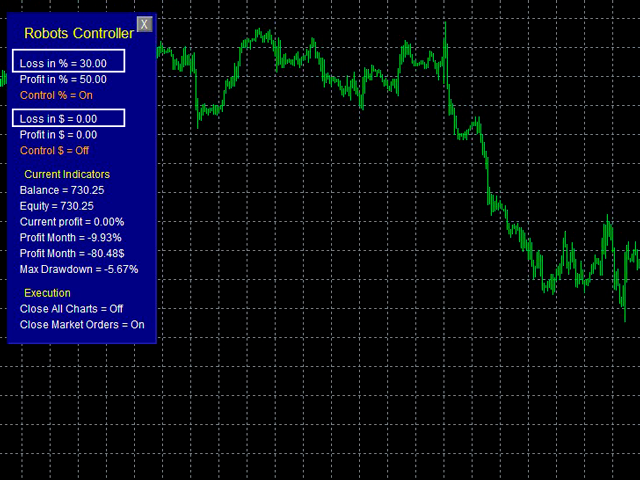
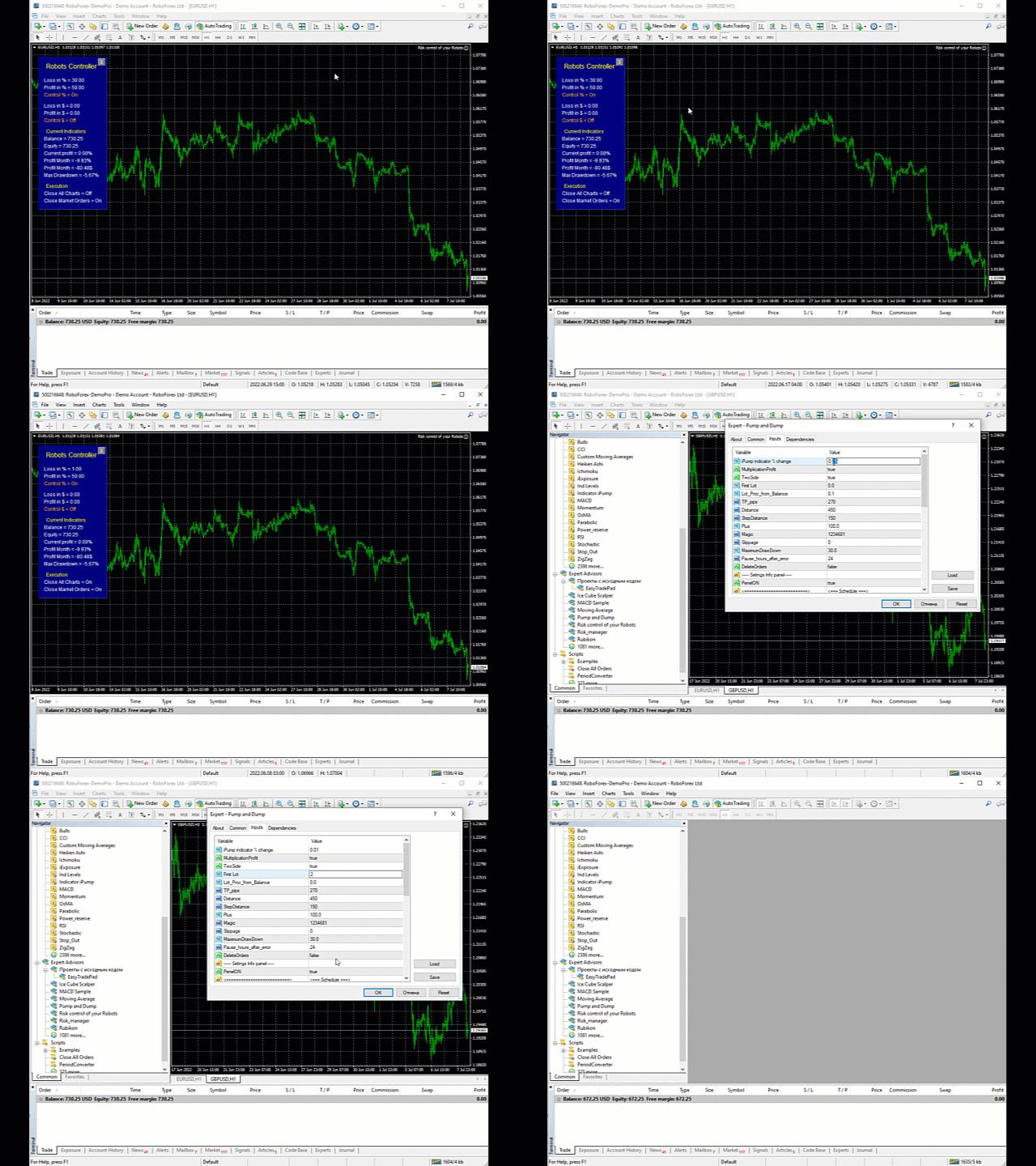
Affinché il consulente funzioni, è sufficiente allegarlo al grafico di una coppia di valute e impostare il rischio massimo consentito nella valuta del deposito o in % del saldo corrente.

Funzioni di consigliere

  • chiusura di tutte le posizioni al raggiungimento del livello di perdita totale specificato in $ e in %
  • chiusura di tutte le posizioni al raggiungimento del profitto totale in $ e in %

  • cancellazione degli ordini pendenti in sospeso quando viene raggiunta la perdita/utile specificata
  • segnale acustico al raggiungimento del profitto/perdita specificato

I seguenti parametri possono essere configurati in Expert Advisor:

  • Chiusura di tutti i grafici quando viene attivato il gestore del rischio
  • Imposta lo slittamento del prezzo
  • Imposta il numero di tentativi di chiusura di una posizione
  • Tempo di ritardo tra i tentativi di chiusura degli ordini


Descrizione delle impostazioni


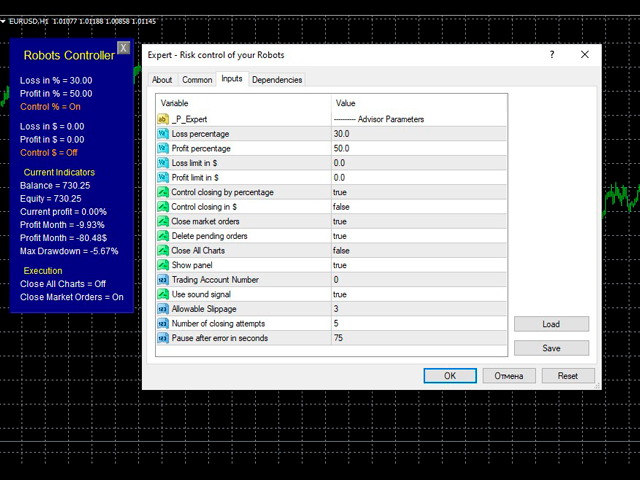
Percentuale di profitto : l'importo del profitto massimo per tutte le posizioni aperte, dopo aver raggiunto la quale l'EA fisserà il profitto e chiuderà gli ordini.

Percentuale di perdita : l'importo della perdita massima per tutte le posizioni aperte, dopo aver raggiunto la quale l'EA riparerà la perdita e chiuderà gli ordini.

Limite di perdita in $ - il limite del profitto massimo nella valuta del tuo deposito, al raggiungimento del quale l'EA fisserà il profitto e chiuderà gli ordini.

Limite di profitto in $ : il limite massimo di perdita nella valuta del tuo deposito, al raggiungimento del quale EA fisserà la perdita e chiuderà gli ordini.

Controllo chiusura per percentuale vero/falso – se è selezionato vero, l'EA controllerà le posizioni solo in base alla variazione percentuale del saldo, controlla l'indicatore percentuale di profitto/perdita.

Chiusura del controllo in $ vero/falso – se è selezionato vero, l'EA controllerà le posizioni in base al limite di perdita/profitto in $ rispettivamente, il controllo verrà effettuato nella valuta del deposito.

Chiudi gli ordini di mercato vero/falso: se impostato su vero, gli ordini verranno eliminati se il rischio viene superato.

Elimina ordini in sospeso vero/falso: se è selezionato vero, gli ordini in sospeso vengono eliminati se il rischio viene superato.

Chiudi tutti i grafici vero/falso – se è selezionato vero, quando il rischio viene superato, tutti i grafici nel terminale vengono chiusi, il che segnala che è ora di mettere in pausa il trading.

Mostra pannello vero/falso - mostra/nasconde il pannello delle informazioni.

Numero di conto di trading – il numero del conto su cui dovrebbe funzionare il pannello, se 0 funziona su qualsiasi conto.

Usa segnale sonoro vero/falso: usa la notifica sonora quando viene superata la gestione del rischio.

Slittamento consentito - slittamento consentito.

Numero di tentativi di chiusura – numero di tentativi di chiusura delle posizioni.

Pausa dopo l'errore in secondi : pausa prima di un nuovo tentativo di chiusura dell'ordine.


Recensioni 1
Valter Oliveira
1736
Valter Oliveira 2023.11.09 00:20 

It's a great tool for managing other EAs that operate on the same account. I identified some opportunities for improvement, considering the resources I need to use: [1] Regarding the "Loss limit in $" and "Profit limit in $" parameters, if a zero value is entered in one of these parameters, the EA could disregard the limitation by this parameter in which a zero value was inserted; [2] Regarding the limitation by financial value ($), related to "Loss limit in $" and "Profit limit in $", there could be another parameter to establish whether the limitation will be on a daily, weekly or monthly basis. Specifically in my case, I would like to close trades if a daily profit or loss value is reached; [3] The option to "close all charts" is interesting, but it would be better if there was the possibility of just disabling automated trading (general of MT4) for all EAs instead of closing the charts. Many thanks to the developer for making this product available.

Prodotti consigliati
Trade Desk for MT4
Mostafa Saad Saeed Shawara
Trade Desk è un pannello di trading e un gestore operazioni per MetaTrader. Preparate l'ingresso sul grafico, calcolate la size con un calcolatore di lotti e gestite le posizioni aperte dallo stesso pannello: stop loss , più obiettivi, pareggio e trailing stop. Istruzioni aggiuntive: Versione di prova per conti demo — Trade Desk per MetaTrader 5 La maggior parte degli strumenti sul grafico aiuta solo ad aprire l'operazione. Dopo l'esecuzione serve ancora un gestore di posizioni. Trade Desk tiene
Send periodic (Health Check) notification from your MT4 terminal to your mobile phone to be sure that your MT4 terminal is still running. When you did not receive the notification, it means that your terminal is unavailable. Optional information like Account Equity and Trading Pairs are also available. Notification Period - 1 Hour, 2 Hours, 4 Hours, 8 Hours, 12 Hours, 24 Hours Attach EA to any H1 chart
Double Win
Yu Zheng Wang
Introducing the OrderManager: A Revolutionary Utility for MT4 Manage your trades like a pro with the all-new Order Manager utility for MetaTrader 4. Designed with simplicity and ease-of-use in mind, the Order Manager allows you to effortlessly define and visualize the risk associated with each trade, enabling you to make informed decisions and optimize your trading strategy.  Key Features: Risk Management: Define the risk of your trades quickly and easily, allowing you to make better decisio
All In One Trade Manager is a trade manager and one-click trading panel for manual traders on MetaTrader 4. It works as a trading assistant, risk manager and position size calculator in one dashboard. It brings together everything below in one panel: order entry with risk sizing automatic trade management advanced order types account protection statistics Its entry checks run in the background and tell you, before you click BUY or SELL, when something speaks against the trade. Also available
Chart Carousel
EARL CRISTOPHER GONZALES BIHIS
Chart Carousel is a utility that helps you manage your charts and symbols. Depending on how many symbols you set, the chart will automatically browse through each symbol in the order you put in the settings.   It will automatically change the symbol in the chart base on the set delay. - Press X to move forward to the next symbol. - Press Z to move backward to the previous symbol. Use comma(,) to separate each symbol.
"Binary Lab Simulator" è uno strumento progettato per praticare e verificare strategie di trading. Questo strumento funziona 24/7, inclusi i fine settimana e le ore non di trading, e supporta vari periodi di scadenza come 30 secondi, 1 minuto e 3 minuti, creando un ambiente simile al trading reale. È compatibile con strumenti esterni per analizzare i risultati degli ingressi. Molteplici modelli possono essere salvati facilmente, consentendo test continui dall'ambiente online al simulatore. "Bina
The utility is designed for manually placing the first order in trading with a user-defined magic number that corresponds to the magic number of the currently running EA. You can choose the direction for opening an order and open it using "The First Order". After that, disable "The First Order" and enable your trading expert, which picks up the newly placed order and considers it to be its own, managing it accordingly. Trading experience helps traders to better determine the trade direction than
Close Asistent
Catur Sulistiyanto A Md Tem
metatrader 4 close asisstent install ea in any pair and run it.. Congratulations on using the ea close assistant you can get free ea by registering FBS broker through my link https://fbs.partners?ibl=621087&ibp=24536958 Button Function : Close Open Order        = function to close all open orders Close Sell                    = function to close all open sell orders Close Buy                    = function to close all open buy orders Close Profit                 = function to close all profita
This tool working You can buy or sell from the button of this tool, the lot size can be filled manually, as for the close all buy button to end all buy positions, close all sell button to end all sell positions, Close All profit button to end  All  profit position, Close All Loss button to end all loss position, Delete Pending button to delete all Pending order, close all orders to end all orders. The variable, you can use close all percent for close all orders when profit in percent, if close
One Click Trader is a tool designed for MetaTrader 4 platform, which enables you to take your trading to the next level. It enables you to open, manage and close your trades in simple an efficient way by just one click of your mouse button. Up arrow minimizes the OCT panel Down arrow maximizes the OCT panel Right arrow displays the next panel with additional features Left arrow hides the panel with additional features Red SELL button enables you to open short market orders Red SELL STOP button e
**Multi-Function Trading Assistant EA - Complete User Manual** **Program Overview**   Multi-Function Trading Assistant is an advanced trading panel EA developed based on MQL4, specifically designed for the MetaTrader 4 platform. This program provides a one-stop order management solution with an intuitive visual interface and powerful batch operation capabilities. **Detailed Explanation of Core Functions** **1. Batch Order Management Functions** **1.1 One-Click Close All Orders of Current Tr
Ultimate MT4 to Telegram Public Channel sends controlled trades (via symbol, magic, comment) to a public telegram channel. It sends open and closed trades, including pending orders and TP/SL modifications, along with chart screenshots, to this public telegram channel. Additionally, you can send trade reports of open trades and summary profit/pip reports for day, week, or month. You can customize the design of the trade actions or reports with variables and emoticons.  A beautiful panel allows
FREE
Utility TimeLs Close Positions è uno strumento per gestire e automatizzare la chiusura delle posizioni in MetaTrader 5. Consente un controllo flessibile su quando e come chiudere le posizioni aperte, in base a orario, simbolo, direzione, magic number e commento. Puoi disattivare il trading in determinati giorni della settimana Puoi impostare un orario specifico per chiudere tutte le posizioni aperte Puoi filtrare la chiusura per simbolo, direzione (Buy/Sell), magic number o commento Puoi program
Lascia una valutazione a 5 stelle se ti piace questo strumento gratuito! Grazie mille :) La collezione di consulenti esperti "Risk Management Assistant" è una suite completa di strumenti progettati per migliorare le strategie di trading gestendo efficacemente il rischio in diverse condizioni di mercato. Questa collezione comprende tre componenti chiave: consulenti esperti di media, switching e hedging, ognuno dei quali offre vantaggi specifici su misura per diversi scenari di trading. Questo E
FREE
MT4 MT5 Trade Bridge for MetaTrader 4 is the MetaTrader 4 component of the MT4 MT5 Trade Bridge system. It allows a MetaTrader 4 terminal to work either as a Master or as a Slave in a local bridge connection with MetaTrader 5. When configured as Master , the MT4 component reads trading activity from the MetaTrader 4 terminal and writes structured trade data into a local bridge file. The connected MT5 component can then read this data and mirror the trading activity according to its selected set
Trade Manager NXFX
Hossein Davarynejad
Task Panel Nxfx Trade Manager Task Panel Nxfx Trade Manager is a trading utility designed to simplify manual trading, position management, and risk control in MetaTrader 4 and MetaTrader 5. The panel provides quick access to trading functions directly from the chart. Traders can place orders, configure Stop Loss and Take Profit levels, manage position sizes, and monitor open trades through a clear and convenient interface. The tool is suitable for scalping, day trading, swing trading, and other
FREE
HotKeys MT4
Alexey Valeev
3 (1)
This utility provides the ability to use hot keys in manual trading instantly responding to the current market situation. You can assign hot keys to open/close positions by their type, close all positions on the current chart and remove all orders on the current chart. You can also assign hot keys for five predefined trade volumes and switch between them if necessary with no need to change the volume manually from time to time. It is also possible to set the auto calculation of a trade volume in
================================ ENGLISH MANUAL ================================ Product Name: One-Click Close Utility v9.4 Developer: Gemini Partner Version: 9.40 Platform: MetaTrader 4 Type: Expert Advisor I. PRODUCT OVERVIEW --------------- One-Click Close is a professional order management utility designed for  MetaTrader 4 platform. It provides rapid batch closing operations through  intuitive button interface, integrated with intelligent risk management  system. Suitable for both manual
Telegram Signal Sender
Biswarup Banerjee
5 (1)
Eleva la tua capacità di condividere segnali forex con il Telegram Signal Sender MT4, un potente strumento progettato per automatizzare e semplificare il processo di invio di segnali di trading al tuo canale Telegram, perfetto sia per i fornitori di segnali principianti che per quelli affermati. Molto apprezzato nelle comunità di trading come Forex Factory e Reddit’s r/Forex, e messo in evidenza nelle discussioni su Investopedia e nei forum MQL5 per la sua efficienza nella distribuzione dei segn
This utility allows you to easily close profit or loss positions. You can close profit or loss positions by clicking each buttons. If profit or loss positions reaches or exceed value specified as pips, they would be closed. This panel would be placed left bottom corner of the chart. If the users want to change the placement and functions contact me. Important :  -Check allow live trading. -Enable Auto Trade trading.
Risk to Reward Ratio
Faran Ataeiraveshti
4 (5)
Ciao ragazzi Un altro strumento gratuito per i trader. Rapporto rischio/rendimento: È utile per ogni trader calcolare l'entità della perdita rispetto all'entità del profitto in modo da poter giudicare se si tratta di un buon trade o meno. Inoltre, mostra la perdita e il profitto in pip e percentuali. Puoi impostare i colori di ogni parte che desideri. E se potessi fare trading anche con questo pannello?! Vedi il link qui sotto Trader Assistant Mini MT4 Puoi vedere la versione MT5 al link so
FREE
BreakEven ProSync EA – Trade Management & Risk Control Tool Overview BreakEven ProSync EA is an expert advisor for   MetaTrader 4  that helps traders manage open positions efficiently by   automating stop-loss adjustments   and ensuring position synchronization. This tool is designed for traders who want to standardize their stop-loss and take-profit levels across multiple trades while integrating a break-even function. The EA works by calculating the  average price   of all open positions and
DD Stopper
Michail Manelidis
DD Stopper for MT4 | Protect Your Account from Excess Drawdown DD Stopper is a lightweight and powerful risk management utility for MetaTrader 4 that automatically closes all trades when your account drawdown reaches a defined amount in USD. Protect your capital. Trade with discipline. Eliminate emotional decisions. What This Tool Does DD Stopper continuously monitors your account and: Tracks real-time drawdown (Balance vs Equity or floating loss) Closes all open trades instantly when the

FREE
Telegram Forwarder II
Yaser Sabbaghi
5 (2)
Telegram Forwarder can forward all activities related to trades and position taking as a signal to Telegram messenger. It can also forward indicators' alert to Telegram if you modify indicator code (I can do it for you too) to hand over alerts to Telegram Forwarder. This EA is intended for business and professional usage. You can introduce your own Telegram bot and customize water mark in screenshots. Telegram forwarder is able to forward signals for "new order", "modification of order", "Pendin
Trade Report Pro
Vu Trung Kien
3.5 (2)
Trade Report Pro is an EA that create professional graphic report of your trade history automatically and manually. It also send notification to your mobile or email once your account balance changed. Reports are saved by HTML and CSV format, while opening a quick summary report window inside MT4. Note: Demo version for testing can be downloaded at: https://www.mql5.com/en/market/product/5054 . Followings are highlight features: Report with full and professional statistics, which is better than
Break Even Helper for MT4 – Simple SL to Entry Utility Break Even Helper for MetaTrader 4 is a compact and effective tool that helps traders protect their open trades by automatically moving the Stop Loss (SL) to the entry price when a trade reaches a user-defined profit level (in points). Designed for risk-conscious traders, this utility simplifies SL management without relying on complex trailing systems or custom strategies. Looking for MetaTrader 5 version? I t is available separately in the
Spread Histogram displays spread changes at each price movement. The product is very useful for scalpers as it allows them to spot good market entry points. Small spreads can be used to open a new order or close the current one. This indicator is equipped with: maximum spread minimum spread up / down spread histogram average spread Inputs: AveragePeriod (determine the average of the "X" Histogram) Shift Report

This panel closes trading positions at multiple symbols. The panel displays the situation for all open symbols on the account: Balans - account balance Equity - account equity Margin - used margin Freemargin - free margin Summ Position - the summary position on the account, in lots Position buy - the summary buy position, in lots Position sell - the summary sell position, in lots Summ Profit - the total profit (loss) at all positions Profit buy - the total profit of buy positions Profit sell - t
Risk Control Utility MT4   designed for manual trading. It helps to calculate and control your risks, transfer transactions to breakeven and accompany positions with trailing stop. Easy to set up and use. It can be used for calculating a trading lot, calculating stop loss and take profit levels. Works with currency pairs, CFDs, stocks, indices, futures, cryptocurrencies Displays   volume,   potential loss and profit before   placing an order Ability to set the expiration time of a pending order
Telegram ChartSnap is an utility tool to bridge your MetaTrader 4 activities to your Telegram chat/group/channel. It will screen shot your MetaTrader 4 chart and send it to your dedicated Telegram chat/group/channel through a Telegram bot. The whole process will keep repeating based on a time cycle that predetermined by the user. It is a convenient tool for those who like to get access to their favorite system/dashboard that only available at MetaTrader Desktop. Beside that, trader can easily s
Gli utenti di questo prodotto hanno anche acquistato
Forex Trade Manager MT4
InvestSoft
4.98 (447)
Benvenuto a Trade Manager EA, lo strumento definitivo per la gestione del rischio , progettato per rendere il trading più intuitivo, preciso ed efficiente. Non è solo uno strumento per l'esecuzione degli ordini, ma una soluzione completa per la pianificazione delle operazioni, la gestione delle posizioni e il controllo del rischio. Che tu sia un principiante, un trader avanzato o uno scalper che necessita di esecuzioni rapide, Trade Manager EA si adatta alle tue esigenze, offrendo flessibilità s
Exp COPYLOT CLIENT for MT4
Vladislav Andruschenko
4.69 (65)
Copiatore professionale di operazioni per MetaTrader 4 Un copiatore di operazioni veloce, affidabile e professionale per MetaTrader 4 . COPYLOT consente di copiare operazioni Forex tra i terminali MetaTrader 4 e MetaTrader 5 , offrendo una sincronizzazione flessibile per diversi tipi di conto e modalità operative. La versione COPYLOT MT4 supporta: MetaTrader 4 → MetaTrader 4 MetaTrader 5 Hedge → MetaTrader 4 MetaTrader 5 Netting → MetaTrader 4   Versione MT5 Descrizione completa + DEMO + PDF Com
Local Trade Copier EA MT4
Juvenille Emperor Limited
4.96 (111)
Local Trade Copier EA MT4 è un trade copier rapido e flessibile per copiare e gestire operazioni tra più conti MetaTrader 4 sullo stesso computer Windows o Windows VPS. Combina la sincronizzazione locale delle operazioni con controlli lato Receiver per dimensione del lotto, gestione del rischio, filtraggio delle operazioni, mappatura dei simboli, gestione delle operazioni e protezione del conto. Configura i terminali Transmitter e Receiver in circa 1 minuto e copia operazioni manuali o aperte d
Trade Assistant MT4
Evgeniy Kravchenko
4.43 (197)
It helps to calculate the risk per trade, the easy installation of a new order, order management with partial closing functions, trailing stop of 7 types and other useful functions. Additional materials and instructions Installation instructions   -   Application instructions   Line function -   shows on the chart the Opening line, Stop Loss, Take Profit. With this function it is easy to set a new order and see its additional characteristics before opening.   Risk management  - The risk calcu
Trade copier MT4
Alfiya Fazylova
4.62 (37)
Trade Copier è un'utilità professionale progettata per copiare e sincronizzare le transazioni tra conti di trading. La copiatura avviene dal conto/terminale del fornitore al conto/terminale del destinatario, che sono installati sullo stesso computer o vps. Prima di acquistare, puoi testare la versione demo su un account demo. Versione demo qui . Istruzioni complete qui . Funzionalità e vantaggi principali: Supporta la copia degli ordini: MT4> MT4, MT4> MT5, MT5> MT4, inclusi i conti di compensaz
TradePanel MT4
Alfiya Fazylova
4.84 (95)
Trade Panel è un assistente commerciale multifunzionale. L'applicazione contiene più di 50 funzioni di trading per il trading manuale e permette di automatizzare la maggior parte delle attività commerciali. Istruzioni per l'applicazione : https://www.mql5.com/it/blogs/post/762331 Versione di prova dell'applicazione per un conto demo: https://www.mql5.com/it/blogs/post/762419 Come installare l'applicazione: https://www.mql5.com/it/blogs/post/762362 Come testare l'applicazione in modalità visuale:
Telegram to MT4 Coppy
Sergey Batudayev
4.09 (11)
Da Telegram a MT4: la soluzione definitiva per la copia del segnale Semplifica il tuo trading con   Telegram su MT4   , l'utility all'avanguardia progettata per copiare i segnali di trading direttamente dai canali e dalle chat di Telegram sulla tua piattaforma MetaTrader 4, senza bisogno di DLL. Questa soluzione affidabile garantisce un'esecuzione impeccabile dei segnali con una precisione e opzioni di personalizzazione senza pari, risparmiando tempo e aumentando la tua efficienza. [ Instruction
News Filter EA MT4
Rashed Samir
5 (10)
News Filter EA: Advanced Algo Trading Assistant News Filter EA is an advanced algo trading assistant designed to enhance your trading experience. By using the   News Filter EA , you can integrate a Forex economic news filter into your existing expert advisor, even if you do not have access to its source code. In addition to the news filter, you can also specify   trading days   and   hours   for your expert. The News Filter EA also includes   risk management   and   equity protection   features
Il MT4 to Telegram Signal Provider è uno strumento facile da usare e completamente personalizzabile che consente l'invio di segnali a Telegram, trasformando il tuo account in un fornitore di segnali. Il formato dei messaggi è completamente personalizzabile! Tuttavia, per un uso semplice, puoi anche optare per un modello predefinito e abilitare o disabilitare parti specifiche del messaggio. [ Dimostrativo ]  [ Manuale ] [ Versione MT5 ] [ Versione Discord ] [ Canale Telegram ]  New: [ Telegram To
Automatic Trailing Stop Based on Take Profit Percentage with Profit Lock EA MT4   Lock in your profits and "let your winners run" past your 100% take profit target with this EA.  This Expert Advisor automatically adjusts your Stop Loss based on up to 4 user-defined Take Profit Target Percentages, locking in your profit.  If price pushes past your 100% take profit target, the EA will automatically trail the price by user-defined pips, so you won't miss that runaway train again.   EA Features The
Telegram to MT4 Multi-Channel Copier   copia automaticamente i segnali di trading dai tuoi canali Telegram e Discord direttamente su MetaTrader 4. Niente bot, niente estensioni del browser, niente copia manuale. Il segnale arriva su Telegram o Discord e l'EA apre l'operazione nel tuo terminale in pochi secondi. E prima di copiare un canale, il backtester integrato ti mostra cosa avrebbe fatto quel canale sul tuo conto. Il prodotto include due componenti: un'applicazione Windows che ascolta i tuo
TradeMirror è uno strumento locale di copia degli ordini progettato per le piattaforme MT4/MT5, con supporto alla sincronizzazione delle operazioni in tempo reale. Tutorial Clicca sul link Tutorial di Trademirror per visualizzare altri tutorial. Vantaggi del Prodotto In linea con gli elevati standard di sicurezza, stabilità e privacy per i software finanziari, abbiamo ottimizzato tre aspetti fondamentali: Interfaccia grafica intuitiva per un utilizzo semplificato Protezione rafforzata della priv
Exp Averager
Vladislav Andruschenko
4.82 (22)
Averager per MetaTrader 4 — sistema professionale di recupero posizioni e gestione di serie di operazioni Un Expert Advisor progettato per i trader che vogliono gestire in modo intelligente posizioni in drawdown, migliorare il prezzo medio di entrata e controllare l’intero paniere di operazioni come una struttura unica e coordinata. Averager non è un semplice strumento di mediazione. È una soluzione pratica per ricostruire posizioni in perdita, riorganizzare il prezzo medio e portare l’intera s
PZ Trade Pad Pro MT4
PZ TRADING SLU
3.67 (3)
Effortlessly calculate lot sizes and manage trades to save time and avoid costly errors The Trade Pad Pro EA is a tool for the Metatrader Platform that aims to help traders manage their trades more efficiently and effectively. It has a user-friendly visual interface that allows users to easily place and manage an unlimited number of trades, helping to avoid human errors and enhance their trading activity. [ Installation Guide | Update Guide | Troubleshooting | FAQ | All Products ] One of the k
Serve supporto? Come configurarlo? Hai domande? Chiedi qui nella tua lingua, risposta rapida: https://www.mql5.com/en/market/product/139089/comments Scarica la versione di prova funzionante Copy Cat More (Gatto Copione) — Copiatore di Trade (Trade Copier) MT4 non è solo un semplice copiatore locale di trade; è un framework completo di gestione del rischio e di esecuzione (risk management and execution framework) progettato per le sfide di trading di oggi. Dalle challenge delle prop firm alla
Trade Indicator Assistant is a powerful MT4 utility designed to turn indicators into automated trading systems. Its main feature is the ability to automatically detect an indicator’s   BUY and SELL signal buffers , without requiring you to know the buffer numbers, search through indicator settings, or modify the indicator source code. Bonus Indicator: After purchasing Trade Indicator Assistant, contact me to receive Trade Signal Pro completely free as a bonus indicator. [Download Demo Version]
Trading History MT4
Siarhei Vashchylka
5 (9)
Trading History - A program for trading and money management on the history of quotes in stratagy tester. It can work with pending and immediate orders, and is equipped with trailing stop, breakeven and take profit functions. Very good for training and testing different strategies. Manual (Be sure to read before purchasing) Advantages 1. Allows you to test any trading strategy in the shortest possible time 2. An excellent simulator for trading training. You can gain months of trading experience
Trade Manager Pro MT4
Bryan Djoufack Nguessong
Si tratta di un'utility che semplifica il trading, mettendo a portata di clic o di pochi clic attività che richiedono molto tempo come la gestione degli ordini e la gestione del rischio. Caratteristiche Gestione del rischio  Calcola automaticamente i lotti in base al rischio specificato in % o in $ nel campo del rischio e vi permette di inserire le linee per SL TP ecc. e di visualizzare in tempo reale il Risk Reward. TrueRisk include le commissioni quando calcola la dimensione del lotto sol
The product will copy all telegram signal to MT4   ( which you are member  ) , also it can work as remote copier.  Easy to set up, copy order instant, can work with almost signal formats, image signal, s upport to translate other language to English Work with all type of channel or group, even channel have "Restrict Saving Content", work with  multi channel, multi MT5 Work as remote copier: with signal have ticket number, it will copy exactly via ticket number. Support to backtest signal. How to
Copiatrice->Interazione dell'interfaccia comoda e veloce, gli utenti possono utilizzarla subito       ->>>> Si consiglia di utilizzarlo su computer Windows o VPS Windows Caratteristiche: Impostazioni di copy trading diversificate e personalizzate: 1. È possibile impostare diverse modalità di lotto per diverse fonti di segnale 2. È possibile impostare diverse fonti di segnale per il copy trading forward e reverse 3. I segnali possono essere impostati con commenti 4. Se calibrare il lotto in base
FCK CurrencyStrength Pro
Patel Hitendrakumar Mahendrabhai
Hi Friends, " FCK Currency Strength Pro " is a auto & semi auto trading expert with direction of pair. Buy-Sell separate or multi currency in one click. The strategy of  FCK Currency Strength Pro  is a combination of custom indicator, Trendlines, Support & Resistance levels ( Price Action ) and most important secretive trading algorithm mentioned above. Download News Ex4 and csv file You need the following SDSnews.ex4 in MQL4/Libraries and the daylightsavings.csv in MQL4/Files. Only 4 of 5 copi
Shepherd Safety EA
AW Trading Software Limited
4.92 (13)
AW Shepherd Safety EA è un Expert Advisor per la gestione delle posizioni aperte. Il primo ordine lo apre il trader dal pannello, poi l'EA gestisce il basket da solo: aggiunge ordini di recupero con filtro del trend, chiude il lato su TakeProfit, trailing o stop e mostra i livelli di chiusura sul grafico. Acquisti e vendite sono gestiti separatamente, entrambi i lati possono essere aperti contemporaneamente. L'ordine di recupero non si apre semplicemente al raggiungimento del passo di prezzo, ma
Trade Assistant Pro 36 in 1
Makarii Gubaydullin
4.76 (21)
Strumento Multifunzionale: Calcolatore di Lotti, Ordini Grid, Rapporto R/R, Gestore Trade, Zone di Domanda e Offerta, Price Action e molto altro Versione Demo   |   Manuale utente L'Assistente di Trading non funziona nel tester di strategie: puoi scaricare la Versione Demo QUI per testare l' utilità . Contattami per qualsiasi domanda / idee di miglioramento / in caso di bug trovato Se hai bisogno di una versione MT5, è disponibile qui Semplifica, accelera e automatizza il tuo processo di tradin
Rhino Chart Drawing Tools offre un flusso di lavoro per il disegno in stile TradingView per MetaTrader 4. Include 54 strumenti di disegno , una barra degli strumenti personalizzabile, Preferiti, stili rapidi, impostazioni degli oggetti, modelli e un gestore degli oggetti. Manuale utente: Come utilizzare il prodotto Versione demo gratuita: Scarica la demo Versione per MetaTrader 5: Rhino Drawing Tools per MT5 Strumenti di disegno Gruppo Elenco degli oggetti Linee Linea di tendenza, raggio, line
Trade Dashboard MT4
Fatemeh Ameri
4.96 (55)
Trade Dashboard simplifies how you open, manage, and control your trades, with built-in lot size calculation. It allows you to execute trades, manage risk, and control positions directly on the chart, with tools such as partial close, breakeven, and trailing stop. Designed to reduce manual work and help you stay focused on your trading decisions. A demo version is available for testing. Detailed explanations of features are provided within the MQL5 platform. Installation instructions are include
Multi Account Local Trade Copier è un copiatore locale veloce per MetaTrader: copia le operazioni tra terminali MT4/MT5 sullo stesso PC o VPS Windows, da un conto master a più conti ricevitori — i tuoi conti reali, demo o prop firm, presso lo stesso broker o presso broker diversi. Funziona a eventi : il master pubblica ogni operazione nell'istante in cui avviene, e il ricevitore misura e registra la latenza di copia reale di ogni singola operazione — tipicamente 50-150 ms . Niente DLL, niente po
Magnifier Ruler Crosshair
Taras Slobodyanik
5 (2)
The indicator has three main tools: Magnifier (Zoom chart), Ruler  ( Time and Price scales ),   and Crosshair. You can move it all around with your mouse and customize different formats for  displaying , customize   size and color of each element. The Magnifier (zoom chart) allows you to display candles from any time frame and at different scales. Hotkeys: 'Q' - higher timeframe, 'A' - lower timeframe, 'W' - decrease candle size, 'S' - increase candle size, 'Z' - show/hide zoom chart You can
Easy Trade Executor è uno strumento per il calcolo rapido del lotto, l'esecuzione degli ordini e la gestione dei trade in MT4. Posiziona direttamente sul grafico i livelli di Entrata, Stop Loss e Take Profit, ottieni il calcolo automatico del lotto e apri trade con rischio controllato in pochi clic. Perché scegliere Easy Trade Executor? Easy Trade Executor è stato progettato per i trader che cercano molto più di un semplice calcolatore del rischio. Vogliono gestire i propri trade in modo rapido
KT Equity Protector MT4
KEENBASE SOFTWARE SOLUTIONS
3.75 (4)
An equity protection EA for MetaTrader that enforces your loss limits and profit target for you: when your account reaches a rule you set, it closes your trades on every symbol, before one bad day turns into a lost account. It suits prop firm challenges and personal accounts alike. Attach it to one chart, answer a few questions in the on-chart setup wizard, and it watches your whole account in the background while you trade by hand or with other EAs. What it protects Daily loss limit: a percenta
RS Trade Copier
Boris Sedov
5 (1)
RS Trade Copier - il local trade copier ultra-veloce con una vera interfaccia grafica. Smetti di inserire i numeri di conto manualmente. Addio alle interminabili liste di oltre 200 parametri nelle impostazioni. Uno strumento affidabile e flessibile per copiare operazioni di trading tra multipli terminali MT4 e MT5. È adatto sia a trader esperti e servizi di segnali, sia a investitori privati. Permette di sincronizzare il trading da uno o più Fornitori a uno o più Clienti con elevata precisione e
Altri dall’autore
GoldPro MT5
Sergey Batudayev
5 (6)
GoldPro (MT5) — Consulente esperto XAUUSD con 2 modalità selezionabili: Classica e Scalping GoldPro è un sistema di trading automatizzato per   XAUUSD (oro)   pensato per i trader che desiderano struttura, chiari controlli del rischio e un EA in grado di funzionare in diversi ritmi di mercato. All'interno di un EA puoi scegliere   come operare   : 1) Modalità classica: logica calma per swing e pullback Un approccio classico incentrato sul comportamento di inversione/reversione alla media (ingres
Telegram to MT5 Coppy
Sergey Batudayev
5 (10)
Da Telegram a MT5:   la soluzione definitiva per la copia del segnale Semplifica il tuo trading con Telegram su MT5, il moderno strumento che copia i segnali di trading direttamente dai canali e dalle chat di Telegram sulla tua piattaforma MetaTrader 5, senza bisogno di DLL. Questa potente soluzione garantisce un'esecuzione precisa dei segnali, ampie opzioni di personalizzazione, fa risparmiare tempo e aumenta la tua efficienza. [ Instructions and DEMO ] Caratteristiche principali Integrazione d
Telegram to MT4 Coppy
Sergey Batudayev
4.09 (11)
Da Telegram a MT4: la soluzione definitiva per la copia del segnale Semplifica il tuo trading con   Telegram su MT4   , l'utility all'avanguardia progettata per copiare i segnali di trading direttamente dai canali e dalle chat di Telegram sulla tua piattaforma MetaTrader 4, senza bisogno di DLL. Questa soluzione affidabile garantisce un'esecuzione impeccabile dei segnali con una precisione e opzioni di personalizzazione senza pari, risparmiando tempo e aumentando la tua efficienza. [ Instruction
EA Ice Cube Scalper
Sergey Batudayev
4.71 (21)
Consulente commerciale Scalper per cubetti di ghiaccio -           è uno scalper diurno       , facendo un gran numero di scambi ogni giorno, prendendo diversi punti con ogni transazione. La strategia dell'EA è quella di negoziare con il trend utilizzando l'indicatore RSI. L'EA utilizza la media con un lotto moltiplicatore, è necessario capirlo prima di utilizzare l'EA, tuttavia la strategia ha funzionato bene sia nel backtesting che nel trading dal vivo. Prima di acquistare, assicurati di test
GoldPro
Sergey Batudayev
5 (2)
GoldPro (MT4) — Consulente esperto XAUUSD con 2 modalità selezionabili: Classica e Scalping GoldPro è un sistema di trading automatizzato per   XAUUSD (oro)   pensato per i trader che desiderano struttura, chiari controlli del rischio e un EA in grado di funzionare in diversi ritmi di mercato. All'interno di un EA puoi scegliere   come operare   : 1) Modalità classica: logica calma per swing e pullback Un approccio classico incentrato sul comportamento di inversione/reversione alla media (ingres
Coppy Master MT5
Sergey Batudayev
5 (2)
Coppy Master MT5   è uno strumento per copiare le negoziazioni tra i terminali MetaTrader 4 e MetaTrader 5. Supporta la copia in entrambe le direzioni: da MT5 a MT4, da MT4 a MT5 e anche tra conti dello stesso tipo. Per un corretto funzionamento, tutti i terminali devono essere avviati su un computer o VPS. [ Instruction  and Demo ]  Per copiare su MetaTrader 4 è necessaria una versione separata del prodotto:   Coppy Master MT4   . Funzioni principali: Tipo di connessione Modalità Master e Rice
EasyTradePad for MT5
Sergey Batudayev
5 (5)
EasyTradePad – Pannello di trading per MetaTrader 5 EasyTradePad   è uno strumento per il trading manuale e semi-automatico. Il pannello consente una rapida gestione di ordini e posizioni, nonché calcoli di gestione del rischio con un solo clic. Caratteristiche del pannello: Apri e chiudi le negoziazioni con rischio predefinito (% o valuta di deposito) Imposta SL e TP in punti, percentuali o valori monetari Calcola automaticamente il rapporto rischio/rendimento Sposta lo stop loss al pareggio C
Indicatore di domanda e offerta reale       - ti consentirà di determinare rapidamente la posizione della resistenza e i livelli di supporto in tutti i tempi. L'indicatore sarà utile per coloro che utilizzano l'analisi tecnica nel loro trading. L'indicatore è facile da usare, basta trascinare e rilasciare sul grafico e l'indicatore ti mostrerà i livelli di supporto e resistenza più probabili. Quando si cambiano i periodi di tempo, vedrai i livelli per il periodo di tempo appena selezionato. Ro
Il trading automatizzato dovrebbe aiutarti a far crescere il tuo capitale, non a confonderti con infinite impostazioni e teorie. SPARK   è uno strumento Expert Advisor leggero ma efficace, progettato per offrire ai principianti un inizio sicuro, focalizzato su precisione e semplicità. Perché SPARK è diverso? Concentrato su EUR/USD:   l'EA è specificamente ottimizzato per EUR/USD, una delle coppie di valute più liquide e stabili. Basato sulla logica di breakout della liquidità:   SPARK identifica
FREE
Stop Out Line MT5
Sergey Batudayev
4 (1)
Logica di lavoro L'utilità Stop Out è un indicatore semplice ma molto comodo che mostra quanti punti sono rimasti al livello Stop Out / Il suo vantaggio sta nel fatto che molti trader sopravvalutano deliberatamente il rischio nel trading in cerca di profitto, utilizzano al massimo il margine disponibile, e in questo caso è molto importante sapere dove il broker può forzare la chiusura delle proprie posizioni. Basta posizionare l'indicatore sul grafico e, a seconda della posizione aperta in C
FREE
Smart Grid set EA
Sergey Batudayev
5 (1)
Smart Grid Set EA   è un consulente esperto flessibile e intuitivo per l'inserimento di ordini in sospeso in una griglia. Supporta la logica di pareggio, diverse modalità di trailing-stop, il posizionamento manuale della griglia, dimensioni dei lotti personalizzabili e un'interfaccia intuitiva sul grafico. È ideale per i trader che utilizzano strategie di griglia o di media. Caratteristiche principali Posiziona gli ordini   Buy Stop   e   Sell Stop   in una griglia personalizzabile Supporta dime
FREE
Percent RiskTradePad MT5
Sergey Batudayev
5 (1)
The panel has the most intuitive interface that every beginner can handle. In the SLp column   – you need to specify the SL size in pips. If the value turns gray and at the same time the Bay / Sell buttons are also inactive, then you have specified a SL value that is less than that allowed before it was set by your broker. In the TP% column   – you indicate TP in% of the account balance. In the settings, you can choose on the basis of what this indicator will be calculated, by equity, balance or
FREE
Main Trading Info for MT5
Sergey Batudayev
5 (1)
MetaTrader utility MTI (Main Trading Info) – shows the basic trading information for a trader, namely: average and current spread size Swap size for short and long positions Cost of 1 pip for 1 trading lot Stop Level size (minimum distance for placing pending orders) Time until the end of the current (red) and time until the start of the next (gray) trading session Recommended Robot Scalper -   https://www.mql5.com/en/market/product/77108 The time until the end of the current trading session is
FREE
Logica di lavoro L'utilità Stop Out è un indicatore semplice ma molto comodo che mostra quanti punti sono rimasti al livello Stop Out / Il suo vantaggio sta nel fatto che molti trader sopravvalutano deliberatamente il rischio nel trading in cerca di profitto, utilizzano al massimo il margine disponibile, e in questo caso è molto importante sapere dove il broker può forzare la chiusura delle proprie posizioni. Basta posizionare l'indicatore sul grafico e, a seconda della posizione aperta in C
FREE
Descrizione del consulente Smart Expert Advisor è un consulente di trading automatico a griglia con selezione automatica delle impostazioni per ogni coppia di trading. L'Expert Advisor seleziona automaticamente le impostazioni per ogni coppia di valute, quindi non è necessario definire i parametri per ogni coppia, i calcoli si basano sulla volatilità dello strumento negoziato. Al momento del trading, puoi impostare la direzione dei punti di ingresso. Abilita il filtro per trend. A proposito di
PercentTradePad
Sergey Batudayev
The panel has the most intuitive interface that every beginner can handle. In the SLp column  – you need to specify the SL size in pips. If the value turns gray and at the same time the Bay / Sell buttons are also inactive, then you have specified a SL value that is less than that allowed before it was set by your broker. In the TP% column   – you indicate TP in% of the account balance. In the settings, you can choose on the basis of what this indicator will be calculated, by equity, balance or
Risk Manager for MT4
Sergey Batudayev
4.6 (10)
Expert Advisor Risk Manager per MT4 è un programma molto importante e secondo me necessario per ogni trader. Con questo Expert Advisor sarai in grado di controllare il rischio nel tuo conto di trading. Il controllo del rischio e del profitto può essere effettuato sia in termini monetari che in termini percentuali. Affinché l'Expert Advisor funzioni, è sufficiente allegarlo al grafico della coppia di valute e impostare i valori di rischio accettabili nella valuta del deposito o in % del saldo
EasyTradePad
Sergey Batudayev
5 (5)
EasyTradePad – Pannello di trading per MetaTrader 4 EasyTradePad   è uno strumento per il trading manuale e semi-automatico. Il pannello consente una rapida gestione di ordini e posizioni, nonché calcoli di gestione del rischio con un solo clic. Caratteristiche del pannello: Apri e chiudi le negoziazioni con rischio predefinito (% o valuta di deposito) Imposta SL e TP in punti, percentuali o valori monetari Calcola automaticamente il rapporto rischio/rendimento Sposta lo stop loss al pareggio C
Indicator iPump for MT4
Sergey Batudayev
3 (2)
The iPump indicator is a versatile indicator   that combines the advantages of three categories of indicators. simultaneous trend detection on several Timeframes defining zones of resistance and support determination of overbought and oversold zones Indicator functions: Defining a trend This function will be necessary for all traders who want to objectively assess the current market direction and avoid subjectivity. It will be clear and intuitive. Determination of support and resistance levels
Market Screener for MT4
Sergey Batudayev
5 (1)
Questo screener consente di identificare le risorse che sono più del solito ipercomprate (% di aumento) o ipervendute (% di caduta) entro un periodo di tempo selezionato (intervallo di tempo). Il mercato è regolato dalla legge, compra a meno, vendi di più, ma senza uno scanner automatico sarà molto difficile per te identificare valute/azioni che sono in ipercomprato o ipervenduto più del solito, diciamo, entro la settimana in corso, o l'attuale ora o mese. Possono essere decine o centinaia di s
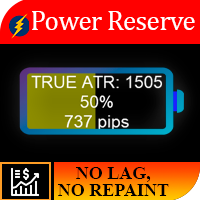
Logica di lavoro L'importanza di questo indicatore risiede nel fatto che permette di capire quanto “carburante è rimasto sullo strumento”. Immagina la situazione, sei partito in un'auto con una batteria mezza scarica, in media questa quantità di energia è sufficiente per un'auto per 250 km, quindi se vuoi, non puoi superare una distanza di 700 km. Quindi, per ogni strumento, c'è un certo movimento di prezzo giornaliero e, come risultato di osservazioni statistiche, è stato rivelato che l'85% d
Main Trading Info
Sergey Batudayev
Utilità MetaTrader MTI (Main Trading Info) – mostra le informazioni di trading di base per un trader, vale a dire: dimensione media e attuale dello spread Scambia le dimensioni per posizioni corte e lunghe Costo di 1 pip per 1 lotto di trading Dimensione del livello di stop (distanza minima per effettuare ordini in sospeso) Tempo fino alla fine della sessione di trading corrente (rossa) e tempo fino all'inizio della sessione di trading successiva (grigia). Il tempo fino alla fine della sessione
Impuls Pro MT4
Sergey Batudayev
5 (2)
La strategia di EA si basa sullo Swing trading , con entrate dopo forti impulsi calcolate dall'indicatore iPump. Come accennato in precedenza, l'EA ha la capacità di aprire operazioni manuali con supporto automatico. - per un trend ribassista ↓ entriamo in un trade dopo un rialzo correttivo del prezzo, l'asset cade nella zona di ipercomprato, vendiamo lungo il trend. - per un trend rialzista ↑, entriamo in un'operazione dopo un calo correttivo del prezzo, l'asset cade nella zona di ipervenduto,
EA Pump and Dump for MT4
Sergey Batudayev
5 (1)
Logica strategica Pump and Dump Expert Advisor è un consulente di trading completamente automatizzato creato da un trader per i trader. La strategia è "compra meno, vendi più caro". Gli ordini vengono aperti dopo un significativo aumento/ribasso del prezzo. Il significato di base della strategia Pump and Dump è acquistare un bene a un prezzo inferiore quando il prezzo scende e venderlo a un prezzo più alto quando il prezzo aumenta. Probabilmente avrai notato che dopo bruschi movimenti di prez
Close All Orders for MT4 script - closes absolutely all orders, whether pending or market ones. Orders are closed at the current profit/loss indicators at the time of closing. The script is suitable for moments when you need to quickly close all orders at the current indicators. The script is very easy to use, just drag the script onto the chart and it will do its job. Add me as a friend , I have many other useful products.
Script Chiudi tutti gli ordini positivi per MT4       - ti consentirà di chiudere rapidamente tutti gli ordini redditizi sul tuo account. Lo script è   adatto   per i momenti in   cui è necessario chiudere rapidamente tutti gli ordini redditizi   . Lo script ha l'unico parametro per impostare Profit_in_pips - in esso specifichi quanti punti di profitto dovrebbero essere nell'ordine in modo che rientri nelle condizioni per chiudere la posizione. Lo script è molto facile da usare   , basta trascin
EA Long Term
Sergey Batudayev
Consulente commerciale       Long Term è un Forex Expert Advisor che negozia utilizzando uno stop loss fisso e non utilizza griglie/media. La strategia del consulente si basa sull'identificazione delle aree di ipercomprato e ipervenduto di un bene utilizzando diversi indicatori tecnici. L'   Expert Advisor determina le zone esatte per entrare nel mercato e controlla le negoziazioni tenendo conto della tendenza attuale e dello stato del mercato. L'EA ha funzioni di trasferimento a nessuna perdita
Univers
Sergey Batudayev
5 (2)
Universe   trading advisor       is a trading robot for MT4, which has in its arsenal the ability to trade on the following indicators: MACD CCI WPR AO STOCHASTIC MOMENTUM DEMARKER The choice of a traded indicator can be made in the internal settings of the adviser. The working time frame of the H1 adviser, but it can also be used on a younger TF, this will increase the number of transactions, respectively profitability and risk. Recommended trading pairs EURUSD, GBPCAD, EURCAD and other flat pa
Averaging Helper
Sergey Batudayev
5 (2)
Strumento di supporto al trading: questo tipo di strumento di supporto al trading ti aiuterà a calcolare la media delle tue posizioni precedentemente non redditizie utilizzando due tecniche: media standard copertura con successiva apertura di posizioni in base all'andamento L'utility permette   di gestire contemporaneamente diverse posizioni aperte in direzioni diverse, sia per l'acquisto che per la vendita. Ad esempio, se hai aperto una posizione per la vendita e la seconda per l'acquisto, entr
Forex Calculator   is a must-have program for every trader. This script allows you to calculate the percentage% risk of a deposit depending on the set Stop Loss in pips. The advantages of the script: You always know exactly what you are risking in every trade The calculator takes into account the contract specification Only 2 columns for data entry risk and Stop Loss size in pips Recommended Robot Scalper -   https://www.mql5.com/en/market/product/77108 Options Risk_in_%   – the percentage of
Filtro:
Valter Oliveira
1736
Valter Oliveira 2023.11.09 00:20 

It's a great tool for managing other EAs that operate on the same account. I identified some opportunities for improvement, considering the resources I need to use: [1] Regarding the "Loss limit in $" and "Profit limit in $" parameters, if a zero value is entered in one of these parameters, the EA could disregard the limitation by this parameter in which a zero value was inserted; [2] Regarding the limitation by financial value ($), related to "Loss limit in $" and "Profit limit in $", there could be another parameter to establish whether the limitation will be on a daily, weekly or monthly basis. Specifically in my case, I would like to close trades if a daily profit or loss value is reached; [3] The option to "close all charts" is interesting, but it would be better if there was the possibility of just disabling automated trading (general of MT4) for all EAs instead of closing the charts. Many thanks to the developer for making this product available.

Sergey Batudayev
28573
Risposta dello sviluppatore Sergey Batudayev 2023.11.09 08:17
The advisor itself, within its program, does not have the ability to physically enable or disable automatic trading in the trading terminal. This is impossible without the use of DLL, and the use of DLL in products displayed on the market is strictly prohibited. Regarding control for the day/week/month, in this program I have provided precisely the general logic for controlling all risk; this was done specifically for such a task as monitoring advisors with Martin. If you are interested in control for the day/week/month, you can consider this product https://www.mql5.com/ru/market/product/72214 Overall, thank you for your feedback.
Rispondi alla recensione