Percent RiskTradePad MT5

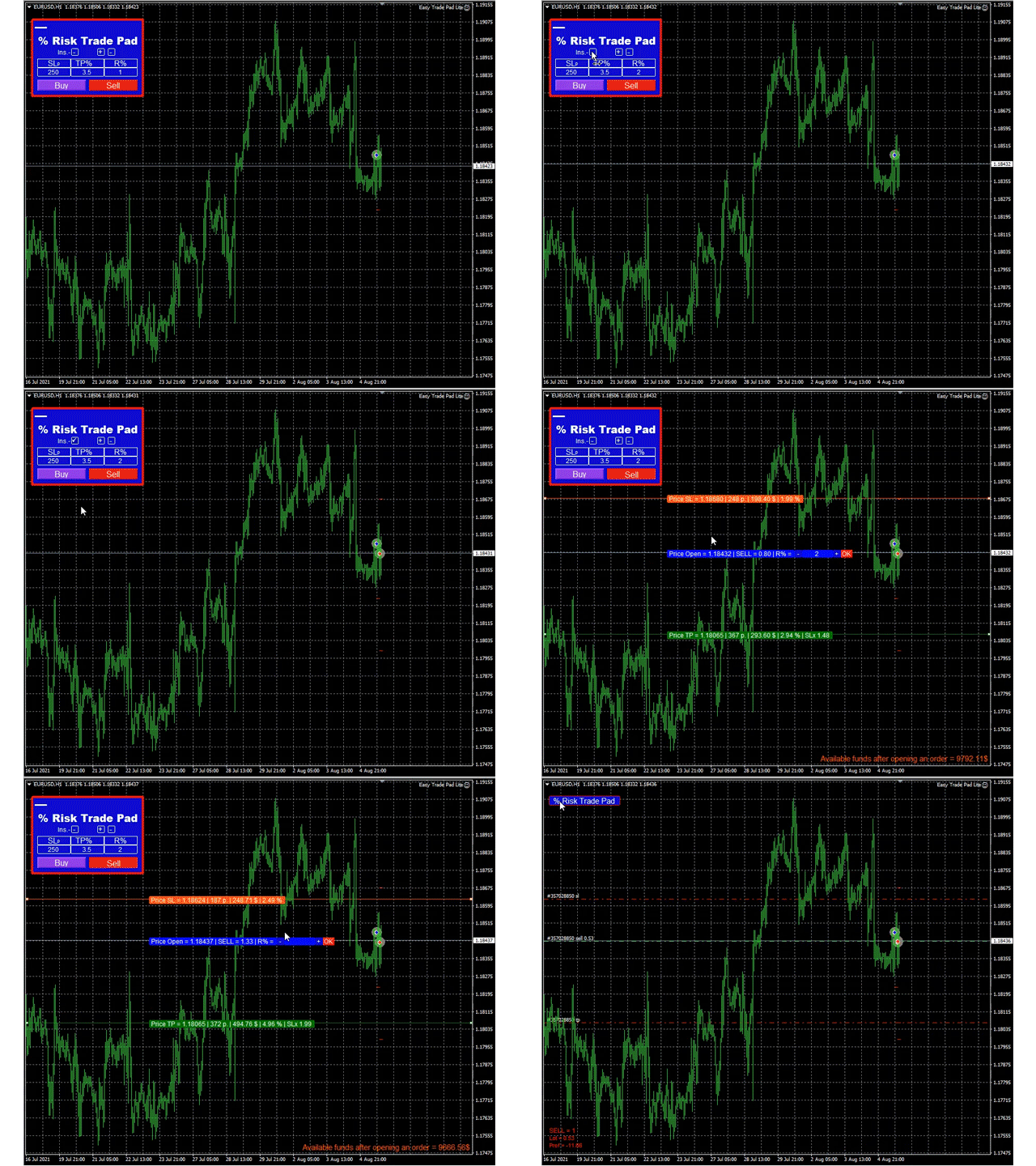
The panel has the most intuitive interface that every beginner can handle.

In the SLp column – you need to specify the SL size in pips. If the value turns gray and at the same time the Bay / Sell buttons are also inactive, then you have specified a SL value that is less than that allowed before it was set by your broker.

In the TP% column – you indicate TP in% of the account balance. In the settings, you can choose on the basis of what this indicator will be calculated, by equity, balance or free margin.

In the R% column, you can set the risk value for the trade.

Ins button. – allows you to immediately open an order with the set values, if it is disabled, then you can preset the parameters of the deal directly on the chart.

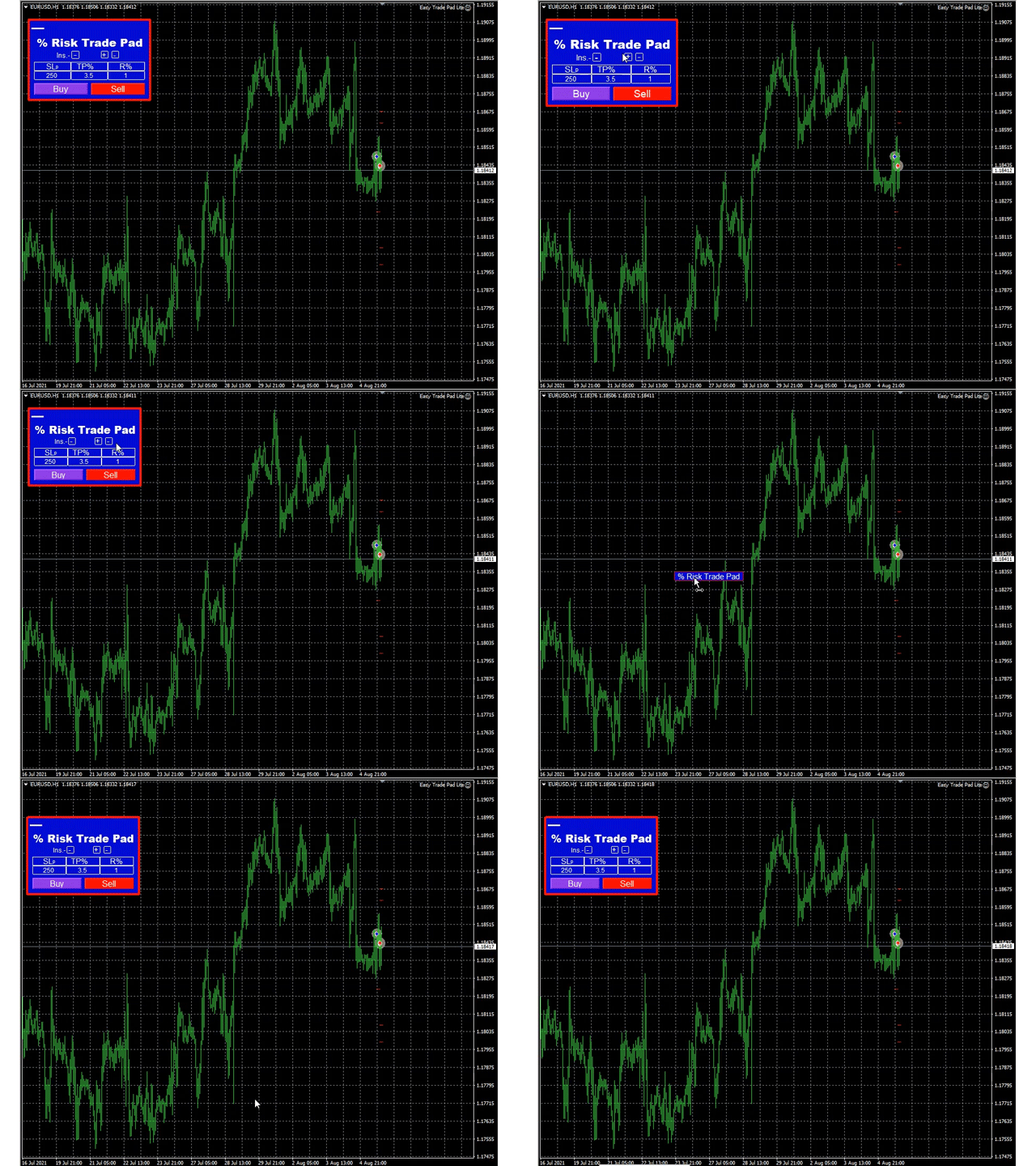
At the top,  you can minimize the panel on the chart by  clicking on the minus sign in the upper left corner.

PRO version of panel here - https://www.mql5.com/en/market/product/72256

It is also  possible to increase or decrease the size of the panel itself by  adjusting the + and – buttons located under the panel name.

If you also want to open pending orders and have a transfer to the breakeven, trailing stop, saving various settings for opening an order, supporting orders with various techniques, then consider a more functional EasyTradePadpanel, you can find it in my products.
Recommended products
ReverseTune
Konstantin Chernov
A script for quick reversing positions and/or orders. If you need to reverse a position with the same volume, open an opposite position of a different volume or change the type of existing orders (for example, Buy Limit -> Sell Limit, Buy Stop -> Sell Limit, etc.) with the same or different take profit/stop loss, this script will make all the routine for you! Allow AutoTrading before running the script. Usage: Run the script on a chart. Input Parameters: Language of messages displayed (EN, RU, D
The utility places trailing stop, breakeven, stop loss and take profit.‌ It is necessary to allow automated trading in the terminal settings. In testing mode, the utility opens Buy or Sell positions on the first ticks, which allows you to visually observe the given logic, changing the utility parameters. In real mode, the utility does not open positions. Discuss the complexities of Forex trading here:  chat "Age of Expert Advisors" . Parameters magic   - magic number. If less than 0, positions w
ChartSync MT5
Alfiya Fazylova
5 (2)
Chart Sync indicator - designed to synchronize graphic objects in terminal windows. Can be used as an addition to TradePanel . Before purchasing, you can test the Demo version on a demo account. Demo here . To work, install the indicator on the chart from which you want to copy objects. Graphic objects created on this chart will be automatically copied by the indicator to all charts with the same symbol. The indicator will also copy any changes in graphical objects. Input parameters: Exception -
GS trade report
Aleksander Gladkov
5 (1)
3 in 1 : Report + monitoring + sending messages (Telegram, ...) to optimize trading and use of advisors. Monitoring: Panel on the chart Sending messages to Telegram Sending messages to Email Sending Notifications Sending pop-up messages Sound notifications when the established Profit/Loss levels are exceeded Monitoring is activated by pressing the Start button. Profit for the period by currency pairs, hours and Magic number for the current account. Forms four tables: by symbols, by magic number
Instructions for Using Reverse Copier EA Attach EA to Charts Open MetaTrader and attach the EA to any chart on both accounts (master & slave). Make sure AutoTrading is enabled. Master Account (Signal Sender) Set Mode = Master in EA settings. This account will send trade signals. Slave Account (Signal Receiver) Set Mode = Slave in EA settings. This account will receive trades in reverse (opposite direction). Lot Multiplier In Slave EA settings, set Multiplier to control lot size. Example: 1.0
A professional tool for real-time monitoring of the account status and the work of Expert Advisors. Information about the account status can be sent to Telegram chats automatically at a specified interval or upon request. From the screenshots of the open charts of the terminal, you receive upon request from your Telegram bot. Account information includes: 13:02 Trade monitoring by Telegram v.1.0 (headline) Account : 6802ххх RoboForex-Pro (account information) Profit start: 2661 USD (profit earne
Focus Time Line
Masamitsu Takahashi
Easily capture the "target time" in an instant. Ultimate synchronization for multi-timeframe analysis. Where exactly is that time point from the higher timeframe on your lower timeframe? No more wasting time scrolling back and forth to find it. Focus on targeted time points with high precision all at once, not only on a single chart but by synchronizing multiple charts. Eliminate "scrolling stress" and maximize your analysis precision. A focus-specialized tool that will dramatically change your
Operational Management MT5
Leonardo Gabriel Caceres
Operative Management Pro – Advanced Trading Utility Operative Management Pro is a smart visual tool for traders who want to analyze and simulate their trades before placing them on the market. This panel displays in real-time the most important parameters of the current symbol: Current price and minimum lot size Required margin Spread cost in USD and pips Take Profit and Stop Loss value in USD Automatic risk and reward calculation With just a click on the chart, you can simulate BUY or SELL t
Virtual TP SL TS
Andrei Sviatlichny
Make your Take Profit, Stop Loss, and Trailing Stop levels invisible to the broker! Main option: STEALTH MODE Virtual Trailing Stop Virtual Take Profit Virtual Breakeven Virtual Stop Loss Virtual Orders Lifetime WARNING: The Expert Advisor does not place orders by itself. You must open orders yourself (including through the Expert panel) or use a third-party Expert on another chart of the same currency pair. Please specify the Magic number "-1" in the Expert settings for the Expert to process th
Quick Position Closer
Cristhian Alexander Gaibor Cuasquer
5 (1)
QUICK POSITION CLOSER - The Ultimate Trading Panel Tired of closing positions one by one? Transform your trading experience with Quick Position Closer - the most efficient and elegant solution for instant position management! WHAT DOES IT DO? Quick Position Closer is a professional control panel that allows you to close multiple positions instantly with just ONE CLICK . No more wasting precious time - protect your profits and cut losses in seconds! KEY FEATURES: INSTANT CLOSURE - All p
FREE
AW Metatrader to Telegram MT5
AW Trading Software Limited
5 (1)
An automated system for sending notifications so that none of your subscribers miss your trading events from your trading terminal. A utility that sends notifications to the Telegram messenger about any trading operations on your account. Step-by-step instructions for connecting the utility to a channel in Telegram ->  HERE  / MT4 -> HERE  Advantages: Easy setup and detailed instructions, Possibility to send adjustable screenshots, Customizable notification text using emoji, Adjustment of notifi
Fast Manager (MT5 Manager) is a high-speed utility designed for traders who need rapid execution and automated trade management. Built to streamline manual trading, this EA provides on-chart buttons for instant Buy/Sell execution and "Close All" functions, while automatically handling risk management behind the scenes. MT4 Version: https://www.mql5.com/en/market/product/132477?source=Site+Profile+Seller Key Features: One-Click Trading Panel: execute trades instantly using the on-chart Buy, Sel
HotKey Trade
Juan Pablo Sanchez Correa
HotKey Trade is a fast-execution panel that lets you trade with just the press of a key. Open BUY (C), SELL (V), or close all (X) orders instantly, without menus or clicks. Additionally, you can adjust the lot size with the ↑↓ arrows and view P&L, margin, and lot size in real time. Ideal for scalpers, manual traders, and those who value speed. Key-based operation - P&L and margin display - Dynamic lot size control - Compatible with any symbol and timeframe Key to BUY (Default: C) Key to SELL (De
OrderManager MT5
Lukas Roth
4.83 (24)
Introducing the Order Manager : A Revolutionary Utility for MT5 Manage your trades like a pro with the all-new Order Manager utility for MetaTrader 5. Designed with simplicity and ease-of-use in mind, the Order Manager allows you to effortlessly define and visualize the risk associated with each trade, enabling you to make informed decisions and optimize your trading strategy. For more information about the OrderManager, please refear to the manual. [ Demo ]  [ Manual ]  [ MT4 Version ]  [ Teleg
Close All Pro MT5 – Fast PnL Control is a powerful trade manager MT5 utility that gives you total control over your trades. With a single click, you can close all MT5 orders, monitor real-time profit and loss, and manage your floating PnL directly from a clean on-chart panel. The tool is lightweight, responsive, and built to help traders save time, reduce emotional stress, and maintain focus. Whether you trade manually or through an EA, this MT5 profit panel provides the visibility and precisio
HotKeys MT5
Alexey Valeev
This utility provides the ability to use hot keys in manual trading instantly responding to the current market situation. You can assign hot keys to open/close positions by their type, open/close all positions on the current chart and remove all orders on the current chart. You can also assign hot keys for five predefined trade volumes and switch between them if necessary with no need to change the volume manually from time to time. It is also possible to set the auto calculation of a trade volu
Discover the Forex Unlimited Tool – Your Ultimate Position Manager for MT5 Ready to take your trading to the next level? With our Forex Unlimited Tool, you no longer have to manually calculate your risk or second-guess your capital allocation. We have developed an advanced, user-friendly position management tool available in two versions : one for MetaTrader 4 and one for MetaTrader 5 . Please make sure you select the correct version that matches your trading platform when making your purchase,
Crystal Trade Manager – Advanced MT5 Risk and Trade Control Utility Overview Crystal Trade Manager (CTM) is a professional MetaTrader 5 utility designed for risk management, trade automation, and instant execution control. It provides traders with an integrated system for protecting equity, managing daily drawdowns, controlling lot sizes, and applying automation features such as automatic SL/TP, break-even, and trailing stop. The tool is suitable for manual traders, prop-firm challenge particip
Ultimate MT5 to Telegram Public Channel sends controlled trades (via symbol, magic, comment) to a public telegram channel. It sends open and closed trades, including pending orders and TP/SL modifications, along with chart screenshots, to this public telegram channel. Additionally, you can send trade reports of open trades and summary profit/pip reports for day, week, or month. You can customize the design of the trade actions or reports with variables and emoticons.  A beautiful panel allows
FREE
Introducing the "Auto Timed Close Operations", a useful utility for MetaTrader 5 traders! This utility has been developed to help traders of all levels automatically close their open positions at the exact moment they desire. With the "Auto Timed Close Operations", you gain the required control over your trades and can avoid unwanted surprises at the end of the day or at any other predefined time. We know how important it is to protect your profits and limit your losses, and that's exactly what
The informer provides information on the current state of open market positions. The visual presentation consists of two parts.  The left side contains the latest transactions executed on the account. Transactions are sorted by time. The right part shows the current state of the aggregate positions of the instruments. Sorting of positions is carried out in descending order of the margin load on the account. Updating and recalculating the status of positions is performed automatically and/or by
Auranos Support EA
Hani Omar Ismail El Sheikh
A very usefull EA helps you control Trailing Stop and Break even point for single order  it works seperately for Buy side and Sell side the EA displays some information useful when you load to your chart  all you need to do is to change the name of the pair you want to control TP and BEP it works with all pairs and all types of accounts  if you have any questions you can always write to us at info@auranos.me
Pending Orders Grid Complete System opens any combination of Buy Stop, Sell Stop, Buy Limit and Sell Limit pending orders and closes all existing pending orders. You will be able to Drag-and-Drop the Script on the chart and it will pick up the start price for the first position in the grid from the "Drop" point. Usually it should be in the area of Support/Resistance lines. Input Parameters Before placing all pending orders, the input window is opened allowing you to modify all input parameters:
Copy Mt5 to Mt4 and Mt5
Mikhail Mitin
2.6 (5)
Excellent Multiplatform Copier of deals. I use it regularly on VPS (copy from Mt5 to Mt4). Multiplatform : copying from MetaTrader 4 to MetaTrader 4; copying from MetaTrader 4 to MetaTrader 5; copying from MetaTrader 5 to MetaTrader 4; copying from MetaTrader 5 to MetaTrader 5. Modes: master   - the current terminal is   source of trades (deals are copied from it); slave   - the current terminal is the receiver of trades (trades are copied to it). from myself  - mode "deals multiplier" (usefu
Spread and Swap monitor
Gennadiy Stanilevych
5 (1)
The indicator is intended for determining the spread and swap size, the distance for setting stop orders and stop losses from the current price allowed and the risk per 1 point in the deposit currency. The indicator informs a trader about possible additional expenses and profits connected with transferring a position to the next trade session of the financial instrument. It also informs about the spread size and the distance of pending orders, stop loss and trailing from the current price. In ad
Telegram Trade Notifier for MT5 is a professional notification system that sends instant messages to your Telegram group or channel every time a trade is opened or closed on your MT5 account. MAIN FEATURES Sends notifications for every trade open and close Compatible with Telegram Groups, Channels, and Topics (threads) ️ Customizable scan frequency and filters Persistent memory (no duplicate messages after restart) Ignores trade history — sends only new events ️ 100% safe: no DLLs
Risk Controller Expert Advisor, a program that allows you to control the total risk of your trading advisors on your account. With this program, you can control the maximum risk that will be allowed on the account for all advisors. For example, you set the risk of 30% of the maximum drawdown, which means that if your equity trading robots exceed the risk of 30%, the Risk Controller will close all positions of advisers, and can also close all open charts, thereby preventing advisers from working
MT5 for Telegram Signals
Sergey Batudayev
5 (9)
The utility is designed to send signals from MT4 to Telegram. It has several unique features, allowing not only the sending of trade signals but also the following functionalities: Send messages directly from the terminal to Telegram Send emojis along with custom text Send text and images from Telegram All of these features enable users to manage a signal channel while focusing on trading and finding quality signals. [DEMO and  Instruction for utility] Customizable Signal Messages You can fully
Trend Lines Scalper
Magdalena Estefania Colonna
TREND LINES Scalper Professional Indicator OVERVIEW Trend Lines Scalper is a highly accurate, advanced indicator designed specifically for professional traders looking to maximize their scalping opportunities by automatically detecting trend lines and high-probability signals. This powerful algorithm combines classic technical analysis with modern technology, automatically identifying price patterns and generating accurate, real-time signals for successful scalping trades. MAIN FEATURES
Trade Panel MetaTrader 5 - feature-rich tool that adds the desired and highly-demanded functions to the terminal to enhance trading experience. Orders execution with one click You can open and close orders easily, using the panel. Buttons to open Market, Limit and Stop orders in both buy and sell directions are located on the Main tab, while there are multiple options to close already existing positions and cancel orders: Close/cancel all Close/cancel buy and sell positions/orders separately Clo
Buyers of this product also purchase
Trade Assistant MT5
Evgeniy Kravchenko
4.41 (205)
It helps to calculate the risk per trade, the easy installation of a new order, order management with partial closing functions, trailing stop of 7 types and other useful functions. Additional materials and instructions Installation instructions - Application instructions - Trial version of the application for a demo account Line function -   shows on the chart the Opening line, Stop Loss, Take Profit. With this function it is easy to set a new order and see its additional characteristics bef
Forex Trade Manager MT5
InvestSoft
4.97 (581)
Welcome to Trade Manager MT5 - the ultimate risk management tool designed to make trading more intuitive, precise, and efficient. This is not just an order placement tool; it's a comprehensive solution for seamless trade planning, position management, and enhanced control over risk. Whether you're a beginner taking your first steps, an advanced trader, or a scalper needing rapid executions, Trade Manager MT5 adapts to your needs, offering flexibility across all markets, from forex and indices t
Local Trade Copier EA MT5
Juvenille Emperor Limited
4.96 (116)
Experience exceptionally fast trade copying with the   Local Trade Copier EA MT5 . With its easy 1-minute setup, this trade copier allows you to copy trades between multiple MetaTrader terminals on the same Windows computer or Windows VPS with lightning-fast copying speeds of under 0.5 seconds. Whether you're a beginner or a professional trader, the   Local Trade Copier EA MT5   offers a wide range of options to customize it to your specific needs. It's the ultimate solution for anyone looking t
TradePanel MT5
Alfiya Fazylova
4.86 (147)
Trade Panel is a multifunctional trading assistant. The application contains more than 50 trading functions for manual trading and allows you to automate most trading operations. Attention, the application does not work in the strategy tester. Before purchasing, you can test the demo version on a demo account. The demo version is here . Full instructions here . Trade. Allows you to perform trading operations in one click: Open pending orders and positions with automatic risk calculation. Open mu
Beta Release The Telegram to MT5 Signal Trader is nearly at the official alpha release. Some features are still under development and you may encounter minor bugs. If you experience issues, please report them, your feedback helps improve the software for everyone. The price will increase after 20 sales. Remaining copies at $90: 2/20 . Telegram to MT5 Signal Trader is a powerful tool that automatically copies trading signals from Telegram channels or groups directly to your MetaTrader 5 account
Ultimate Extractor
Clifton Creath
5 (7)
Ultimate Extractor - Professional Trading Analytics for MT5 Ultimate Extractor transforms your MetaTrader 5 trading history into actionable insights with comprehensive analytics, interactive charts, and real-time performance tracking. What It Does Automatically analyzes your MT5 trading history across all Expert Advisors and generates detailed HTML reports with interactive visualizations. Tracks live performance metrics including open positions, floating P/L, and drawdown in real-time. Supports
Trade Dashboard MT5
Fatemeh Ameri
4.96 (106)
Tired of complex order placement and manual calculations? Trade Dashboard is your solution. With its user-friendly interface, placing orders becomes effortless, by a single click, you can open trades, set stop loss and take profit levels, manage trade lot size, and calculate risk to reward ratios, allowing you to only focus on your strategy. Say goodbye to manual calculations and streamline your trading experience with Trade Dashboard. Download  Demo Version  right now. You can find  Details of
Exp COPYLOT CLIENT for MT5
Vladislav Andruschenko
3.82 (34)
Trade copier for MT5 is a trade copier for the МetaТrader 5 platform. It copies forex trades  between any accounts   MT5 - MT5, MT4 - MT5 for the COPYLOT MT5 version (or MT4 - MT4 MT5 - MT4 for the COPYLOT MT4 version)    Reliable copier!         MT4 version Full Description +DEMO +PDF   How To Buy    How To Install     How to get Log Files    How To Test and Optimize    All products from Expforex You can also copy trades in the МТ4 terminal (МТ4 - МТ4, МТ5 - МТ4):     COPYLOT CLIENT for MT4
MT5 to Telegram Signal Provider turns your trading account into a signal provider. Every trade action, whether manual, by EA or from your phone, is instantly sent as a message to Telegram. You can fully customize the format or use a ready-made template for quick setup. [ Demo ] [ Manual ] [ MT4 Version ] [ Discord Version ]     New: [ Telegram To MT5 ] Setup A step by step user guide is available. Key Features Ability to customize order details sent to subscribers You can create a tiered subs
YuClusters
Yury Kulikov
4.93 (43)
Attention: You can view the program operation in the free version  YuClusters DEMO .  YuClusters is a professional market analysis system. The trader has unique opportunities to analyze the flow of orders, trade volumes, price movements using various charts, profiles, indicators, and graphical objects. YuClusters operates on data based on Time&Sales or ticks information, depending on what is available in the quotes of a financial instrument. YuClusters allows you to build graphs by combining da
Smart Stop Scanner – Multi-Asset Stop-Loss Intelligence for Modern Traders Overview The Smart Stop Scanner brings professional stop-loss monitoring to every chart. It analyzes market structure, detects meaningful breakouts, and identifies the most relevant protective levels across Forex, Gold, Indices, Metals, Crypto, and more. All results appear inside one clean, DPI-aware dashboard designed for clarity, speed, and instant decision-making. How Stop-Loss Levels Are Identified Instead of rely
Smart Stop Manager – Automated Stop-Loss Execution with Professional Precision Overview The Smart Stop Manager is the execution layer of the Smart Stop lineup, built for traders who require structured, reliable, and fully automated stop-loss management across multiple open positions. It continuously monitors active trades, calculates the optimal stop level using Smart Stop market-structure logic, and updates stops automatically with clean, transparent rules. Whether managing a single asset or
Copy Cat More Trade Copier MT5 is a local trade copier and a complete risk management and execution framework designed for today’s trading challenges. From prop firm challenges to personal portfolio management, it adapts to every situation with a blend of robust execution, capital protection, flexible configuration, and advanced trade handling. The copier works in both Master (sender) and Slave (receiver) modes, with real-time synchronization of market and pending orders, trade modifications, pa
The News Filter MT5
Leolouiski Gan
4.74 (19)
This product filters   all expert advisors and manual charts   during news time.  It is able to remove any of your EA during news and automatically reattach them after news ends. This product also comes with a complete  order management system   that can handle your open positions and pending orders before the release of any news. Once you purchase   The News Filter , you will no longer need to rely on built-in news filters for future expert advisors, as this product can filter them all from her
VirtualTradePad One Click Trading Panel
Vladislav Andruschenko
4.58 (72)
Trading Panel for trading in One click.  Working with positions and orders!  Trading from the  chart  or the  keyboard . With our trading panel, you can execute trades with a single click directly from the chart and perform trading operations 30 times faster than with the standard MetaTrader control. Automatic calculations of parameters and functions make trading faster and more convenient for traders. Graphic tips, info labels, and full information on trade deals are on the chart MetaTrader.  
Trade Manager DaneTrades
Levi Dane Benjamin
4.33 (27)
DaneTrades Trade Manager is a professional trade panel for MetaTrader 5, designed for fast, accurate execution with built‑in risk control. Place market or pending orders directly from the chart while the panel automatically calculates position size from your chosen risk, helping you stay consistent and avoid emotional decision‑making. The Trade Manager is built for manual traders who want structure: clear risk/reward planning, automation for repeatable management, and safeguards that help reduc
Seconds Chart MT5
Boris Sedov
4.59 (17)
Seconds Chart is a unique tool for creating second-based charts in MetaTrader 5 . With Seconds Chart , you can construct charts with timeframes set in seconds, providing unparalleled flexibility and precision in analysis that is unavailable with standard minute or hourly charts. For example, the S15 timeframe indicates a chart with candles lasting 15 seconds. You can use any indicators and Expert Advisors that support custom symbols. Working with them is just as convenient as on standard charts.
Mt5 To InterativeBrokers Copier allows you to copy deals from MT5 account to Interactive Brokers. With this, you can run your EA strategy on a MT5 Demo/Real Account, then copy all the deals to Interactive Brokers account real time. Features: 1. Copy or Invert-Copy deals Realtime from MT5 to IB Account. 2. Synchronizing positions of both accounts periodicaly, in case any missing copying. 3. You can choose only Buy position or Sell position. Symbols Setup: General Format:  {MT Symbol} -> {IB S
Auto Trade Copier for MT5
Vu Trung Kien
4.41 (27)
Auto Trade Copier is designed to copy trades to multiple MT4, MT5 and cTrader accounts/terminals with 100% accuracy. The provider and receiver accounts must be on the same PC/VPS. With this tool, you can copy trades to receiver accounts on the same PC/VPS. All trading actions will be copied from provider to receiver perfectly. This version can be used on MT5 accounts only. For MT4 accounts, you must use Auto Trade Copier (for MT4). Reference: - For MT4 receiver, please download Trade Receiver Fr
Trade Manager DashPlus
Henry Lyubomir Wallace
5 (12)
DashPlus is an advanced trade management tool designed to enhance your trading efficiency and effectiveness on the MetaTrader 5 platform. It offers a comprehensive suite of features, including risk calculation, order management, advanced grid systems, chart-based tools, and performance analytics. Key Features 1. Recovery Grid Implements an averaging and flexible grid system to manage trades during adverse market conditions. Allows for strategic entry and exit points to optimize trade recovery
Grid Manual MT5
Alfiya Fazylova
4.9 (20)
Grid Manual is a trading panel for working with grid strategies. The utility is universal, has flexible settings and an intuitive interface. It works with a grid of orders not only in the direction of averaging losses, but also in the direction of increasing profits. The trader does not need to create and maintain a grid of orders, the utility will do it. It is enough to open an order and the "Grid manual" will automatically create a grid of orders for it and will accompany it until the close. F
EasyInsight AIO MT5
Alain Verleyen
4.91 (11)
EASY Insight AIO – All-In-One Power for AI-Driven Trading Want to skip the setup and start scanning the entire market – Forex, Gold, Crypto, Indices, and even Stocks – in seconds? EASY Insight AIO is the complete plug-and-play solution for AI-powered trade analysis. It includes all core Stein Investments indicators built-in and automatically exports clean, structured CSV files – perfect for backtesting, AI prompts, and live market decision-making. No need to install or configure indicators manu
Cerberus Equity Watcher
Samuel Bandi Roccatello
5 (3)
Cerberus the Equity Watcher  is a risk management tool that constantly monitors your account equity and avoid major drawdowns, caused by faulty EAs or by your emotional behaviour if you are a discretional trader. It is extremely useful for systematic traders that rely on EAs that might contain bugs, or that might not performed well in unexpected market conditions.  Cerberus let you set a minimum equity value and (optionally) a  maximum value , if either of those are reached all positioned are f
Crypto Ticks and Depth
Rajesh Kumar Nait
5 (1)
Crypto Ticks for MetaTrader 5 – Real-Time Crypto Tick Data and Order Book Integration Overview Crypto Ticks streams real-time tick data and order book depth from major cryptocurrency exchanges directly into MetaTrader 5. Designed for traders who require precise market data for scalping, algorithmic strategies, and strategy testing. Supported Exchanges Binance : Spot (includes active chart window order book depth) and Futures (supports multiple symbols with order book depth) KuCoin : Spot and Fu
Telegram to MT5 Coppy
Sergey Batudayev
5 (7)
Telegram to MT5: The Ultimate Signal Copying Solution Simplify your trading with Telegram to MT5, the modern tool that copies trading signals directly from Telegram channels and chats to your MetaTrader 5 platform, without the need for DLLs. This powerful solution ensures precise signal execution, extensive customization options, saves time, and boosts your efficiency. [ Instructions and DEMO ] Key Features Direct Telegram API Integration Authenticate via phone number and secure code. Easily man
The product will copy all telegram signal to MT5 ( which you are member) , also it can work as remote copier.  Easy to set up, copy order instant, can work with almost signal formats, image signal,  s upport to translate other language to English Work with all type of channel or group, even channel have "Restrict Saving Content", work with  multi channel, multi MT5 Work as remote copier: with signal have ticket number, it will copy exactly via ticket number. Support to backtest signal. How to s
Strategy Builder offers an incredible amount of functionality. It combines a trade panel with configurable automation (covert indicators into an EA), real-time statistics (profit & draw down) plus automatic optimization of SL, TP/exit, trading hours, indicator inputs. Multiple indicators can be combined into an single alert/trade signal and can include custom indicators, even if just have ex4 file or purchased from Market. The system is easily configured via a CONFIG button and associated pop-u
HINN MagicEntry Extra
ALGOFLOW OÜ
4.64 (11)
HINN MAGIC ENTRY – the ultimate tool for entry and position management! Place orders by selecting a level directly on the chart! Key features: - Market, limit, and pending orders - Automatic lot size calculation - Automatic spread and commission accounting - Unlimited partitial take-profits  - Breakeven and trailing stop-loss  functions - Intuitive, adaptive, and customizable interface - Session and strong algorithmic level visualization - Works with any assets and account types Join the   ALG
HINN Lazy Trader
ALGOFLOW OÜ
5 (2)
Lazy Trader is your personal risk management assistant that independently finds the best market entries, manages positions, and helps you extract maximum profit from every trading idea! It monitors charts from M1 to W1 , finds optimal entry points based on your parameters, and manages trades without your involvement: - Got an idea on the daily chart? No need to wait for lower timeframes to form a signal — Lazy Trader will check everything and open all necessary positions while you live your lif
Zentral Trading Manager
Ray Zeanrik Parreno Fredeluces
5 (4)
Zentral Trading Manager Your Command Center for Precision Trading — Now Stronger than Ever Take control of your trades like never before. Zentral Trading Manager is your all-in-one manual trading panel for MetaTrader 5 — built for scalpers, day traders, and serious strategy execution. Fully compatible with both Mac and Windows laptops. High-DPI safe. No more layout issues. Key Features (Latest 2025 Update): • One-Click Close – Instantly close Buy/Sell, winning/losing trades, or even half positi
More from author
Telegram to MT5 Coppy
Sergey Batudayev
5 (7)
Telegram to MT5: The Ultimate Signal Copying Solution Simplify your trading with Telegram to MT5, the modern tool that copies trading signals directly from Telegram channels and chats to your MetaTrader 5 platform, without the need for DLLs. This powerful solution ensures precise signal execution, extensive customization options, saves time, and boosts your efficiency. [ Instructions and DEMO ] Key Features Direct Telegram API Integration Authenticate via phone number and secure code. Easily man
Ice Cube Scalper for MT5
Sergey Batudayev
4.5 (6)
Trading Advisor Ice Cube Scalper -     it is a day scalper , making a large number of trades daily, taking several points with each transaction. The EA's strategy is to trade with the trend using the RSI indicator. The EA uses averaging with a multiplier lot, you need to understand this before using the EA, however the strategy performed well in both backtesting and live trading. Before buying, be sure to test the work of the adviser in the strategy tester. Сontrol risks   To control risks in th
Risk Manager for MT5
Sergey Batudayev
4.35 (17)
Expert Advisor Risk Manager for MT5 is a very important and in my opinion necessary program for every trader. With this Expert Advisor, you will be able to control the risk in your trading account. Risk and profit control can be carried out both in monetary terms and in percentage terms. For the Expert Advisor to work, simply attach it to the currency pair chart and set the acceptable risk values ​​in the deposit currency or in % of the current balance. [Instruction for Risk Manager parameter
Averaging Helper
Sergey Batudayev
5 (2)
Averaging Helper - This sort of trading helper instrument will help you average out your previously unprofitable positions using two techniques: standard averaging hedging with the subsequent opening of positions according to the trend The utility has the ability to sort out several open positions in different directions at once, both for buy and for sell. For example, you opened 1 position for a sell and the second for a buy, and they are both unprofit, or one is in the unprofit and one is in
HYT utility
Sergey Batudayev
HYT (Help Your Trading) is a tool designed to help you average down your losing positions using two main techniques: Standard averaging. Hedging with subsequent opening of positions in the direction of the trend. This tool allows you to manage multiple positions opened in different directions, both for buying and selling. HYT automatically calculates the size of the next position, order price, direction for averaging, and closing the position with a specified take-profit level. It also provides
AI Trade Analyzer   is an intelligent market analysis tool implemented in the indicator format. The program visualizes signals on the chart and helps the trader evaluate the market situation based on technical indicators and news background. Supported Models: Compatible with the latest ChatGPT versions — GPT-5.1 , GPT-4o , GPT-4o-mini , O1 , and GPT-3.5-turbo . GPT-5.1 provides the highest precision, advanced context understanding, and deep analysis of complex trading situations. GPT-4o offers
GoldPro MT5
Sergey Batudayev
5 (4)
Welcome to the world of innovative and efficient gold trading with GoldPro - an advanced trading robot specifically designed to help you achieve success in the Gold market. The advisor uses the averaging technique, you should perceive this not as good or bad, but as an approach that works in the market, discarding the unipolar belief that one method is good and the other is bad, it exists and can be successfully applied, this is a fact. Reliability and Experience: GoldPro is the result of car
Coppy Master MT5
Sergey Batudayev
5 (1)
Coppy Master MT5 is a trade copier tool for MetaTrader 4 and MetaTrader 5 terminals. It supports copying in both directions: from MT5 to MT4, from MT4 to MT5, as well as between accounts of the same type. To work correctly, all terminals must be running on the same PC or VPS. [ Instruction  and Demo ]  For copying to MetaTrader 4, a separate version — Coppy Master MT4 — is required. Main Features: Copying Modes Supports both Master and Receiver roles. Flexible setup for sending and receiving tr
Indicator iPump for MT4
Sergey Batudayev
3 (2)
The iPump indicator is a versatile indicator   that combines the advantages of three categories of indicators. simultaneous trend detection on several Timeframes defining zones of resistance and support determination of overbought and oversold zones Indicator functions: Defining a trend This function will be necessary for all traders who want to objectively assess the current market direction and avoid subjectivity. It will be clear and intuitive. Determination of support and resistance levels
GoldPro
Sergey Batudayev
3.67 (3)
Welcome to the world of innovative and efficient gold trading with GoldPro - an advanced trading robot specifically designed to help you achieve success in the Gold market. The advisor uses the averaging technique, you should perceive this not as good or bad, but as an approach that works in the market, discarding the unipolar belief that one method is good and the other is bad, it exists and can be successfully applied, this is a fact. Reliability and Experience: GoldPro is the result of car
Telegram to MT4 Coppy
Sergey Batudayev
3.57 (7)
Telegram to MT4: The Ultimate Signal Copying Solution Streamline your trading with Telegram to MT4 , the cutting-edge utility designed to copy trading signals directly from Telegram channels and chats to your MetaTrader 4 platform—without the need for DLLs. This robust solution ensures seamless execution of signals with unparalleled precision and customization options, saving you time and boosting your efficiency. [ Instructions and DEMO ] Key Features Direct Telegram API Integration Authenticat
Work logic The importance of this indicator lies in the fact that it allows you to understand how much “fuel is still left at the instrument.” Imagine the situation, you left in a car with a half-discharged battery, on average, this amount of energy is usually enough for a car for 250 km, so if you want to, you cannot overcome a distance of 700 km. So for each instrument, there is a certain daily price movement, and as a result of statistical observations, it was revealed that 95% of the time t
Market Screener for MT4
Sergey Batudayev
5 (1)
This is a screener that allows to identify assets that are more than usually overbought (% growth) or oversold (% fall)  within a selected period of time (time frame). The market is ruled by the law, buy cheaper, sell more expensive,  but without an automatic scanner it is very difficult to identify assets overbought or oversold, say, within the current week, or the current hour, or month. There can be dozens or hundreds of instruments, sometimes it is simply not possible to physically analyze e
MT5 for Telegram Signals
Sergey Batudayev
5 (9)
The utility is designed to send signals from MT4 to Telegram. It has several unique features, allowing not only the sending of trade signals but also the following functionalities: Send messages directly from the terminal to Telegram Send emojis along with custom text Send text and images from Telegram All of these features enable users to manage a signal channel while focusing on trading and finding quality signals. [DEMO and  Instruction for utility] Customizable Signal Messages You can fully
Risk Manager for MT4
Sergey Batudayev
4.6 (10)
Expert Advisor Risk Manager for MT4 is a very important and in my opinion necessary program for every trader. With this Expert Advisor, you will be able to control the risk in your trading account. Risk and profit control can be carried out both in monetary terms and in percentage terms. For the Expert Advisor to work, simply attach it to the currency pair chart and set the acceptable risk values ​​in the deposit currency or in % of the current balance. Version for MT5 -  https://www.mql5.com
Automated trading should help you grow your capital — not confuse you with endless settings and theories. SPARK is a lightweight yet effective Expert Advisor designed to give beginners a confident start with a focus on precision and simplicity. Why is SPARK different? Focused on EUR/USD: The EA is specifically optimized for EUR/USD, one of the most liquid and stable currency pairs. Built on liquidity breakout logic: SPARK identifies and reacts to unique liquidity zones where price is likely to b
FREE
Work logic Stop Out utility is a simple but very convenient indicator showing how many points are left to the Stop Out level / Its benefit lies in the fact that many traders deliberately overestimate the risk in trading in pursuit of profit, use the available margin at the maximum, and for this case it is very important to know where the broker can forcibly close your positions. Just place the indicator on the chart and depending on the open position in Buy or Sell, you will see the border m
Coppy Master MT4
Sergey Batudayev
3.5 (2)
Coppy Master MT4   is a trade copier tool for MetaTrader 4 and MetaTrader 5 terminals. It supports copying in both directions: from MT4 to MT5, from MT5 to MT4, as well as between accounts of the same type MT4 to MT4. To work correctly, all terminals must be running on the same PC or VPS. [ Instruction  and Demo ]  For copying to MetaTrader 4, a separate version —   Coppy Master MT5   — is required. Main Features: Copying Modes Supports both Master and Receiver roles. Flexible setup for sending
EA Ice Cube Scalper
Sergey Batudayev
4.71 (21)
Trading Advisor Ice Cube Scalper -       it is a day scalper , making a large number of trades daily, taking several points with each transaction. The EA's strategy is based trade with the trend using the RSI indicator. The EA uses averaging with a multiplier lot, you need to understand this before using the EA, however the strategy performed well in both backtesting and live trading. Before use test the work of the adviser in the strategy tester for more understanding his work. To control risks
PatternEdge AI
Sergey Batudayev
Pattern Edge AI Smart Expert Advisor Based on Candlestick Patterns + DCA + Martingale Pattern Edge AI is a powerful, all-in-one trading robot that merges Price Action logic , fractal support/resistance zones , and an intelligent grid system with adaptive capital management. It's designed for traders who want high-probability entries while maintaining strict risk control . What Makes It Stand Out: Entry signals are generated using reliable candlestick patterns like the Hammer, Piercing Pattern, M
Impuls Pro
Sergey Batudayev
The EA’s strategy is based on  Swing trading , with entries after sharp impulses calculated by the iPump indicator. The advisor has the ability to open manual trades with automatic support – for a downtrend ↓ we enter a trade after a corrective rise in the price, the asset falls into the overbought zone, we sell along the trend. – for an uptrend ↑, we enter a trade after a corrective fall in the price, the asset falls into the oversold zone, we buy along the trend. When trading on the selected
The utility is designed to send a signal from MT4 to Discord. It has a number of unique features, allowing you not only to send trading signals, but also to perform the following functions: Send messages directly from the terminal to Discord Sending emojis along with custom text Send text and images directly from the MT4 terminal to Discord All this allows the user to maintain a channel with signals, focusing on trading and finding quality signals. Instructions for the utility Fully customizabl
The utility is designed to send a signal from MT5 to Discord. It has a number of unique features, allowing you not only to send trading signals, but also to perform the following functions: Send messages directly from the terminal to Discord Sending emojis along with custom text Send text and images directly from the MT5 terminal to Discord All this allows the user to maintain a channel with signals, focusing on trading and finding quality signals. Instructions for the utility Fully customizabl
Close All Orders for MT4 script - closes absolutely all orders, whether pending or market ones. Orders are closed at the current profit/loss indicators at the time of closing. The script is suitable for moments when you need to quickly close all orders at the current indicators. The script is very easy to use, just drag the script onto the chart and it will do its job. Add me as a friend , I have many other useful products.

Smart Grid Set EA is a flexible and user-friendly expert advisor for placing pending orders in a grid. It supports breakeven logic, multiple trailing-stop modes, manual grid placement, customisable lot sizes, and an intuitive on-chart interface. It is ideal for traders who employ grid or averaging strategies. Key Features Places Buy Stop and Sell Stop orders in a customisable grid Supports individual lot sizes for each grid level Built-in trailing stop: classic, by candle highs/lows, or by movin
FREE
Description of the advisor Smart Expert Advisor is an automatic grid trading advisor with auto-selection of settings for each trading pair. The Expert Advisor automatically selects the settings for each currency pair, thus you do not need to define the parameters for each pair, calculations are based on the volatility of the instrument being traded. At the time of trading, you can set the direction of entry points. Enable filter by trend. About strategy The EA is based on the logic of catching
PercentTradePad
Sergey Batudayev
The panel has the most intuitive interface that every beginner can handle. In the SLp column  – you need to specify the SL size in pips. If the value turns gray and at the same time the Bay / Sell buttons are also inactive, then you have specified a SL value that is less than that allowed before it was set by your broker. In the TP% column   – you indicate TP in% of the account balance. In the settings, you can choose on the basis of what this indicator will be calculated, by equity, balance or
EasyTradePad
Sergey Batudayev
5 (5)
EasyTradePad – Trading Panel for MetaTrader 4 EasyTradePad is a tool for manual and semi-automated trading. The panel allows quick management of orders and positions, as well as risk management calculations in one click. [ DEMO and Instruction ] Panel Features: Open and close trades with predefined risk (% or deposit currency) Set SL and TP in points, percentages, or monetary values Calculate risk-to-reward ratio automatically Move stop loss to breakeven Partial position closing Trailing stop
MetaTrader utility MTI (Main Trading Info) – shows the basic trading information for a trader, namely: average and current spread size Swap size for short and long positions Cost of 1 pip for 1 trading lot Stop Level size (minimum distance for placing pending orders) Time until the end of the current (red) and time until the start of the next (gray) trading session The time until the end of the current trading session is displayed in red, the time until the opening of the next session is display
Impuls Pro MT4
Sergey Batudayev
5 (2)
The EA’s strategy is based on  Swing trading , with entries after sharp impulses calculated by the iPump indicator. The advisor has the ability to open manual trades with automatic support – for a downtrend ↓ we enter a trade after a corrective rise in the price, the asset falls into the overbought zone, we sell along the trend. – for an uptrend ↑, we enter a trade after a corrective fall in the price, the asset falls into the oversold zone, we buy along the trend. When trading on the selected
Filter:
dol_amroth2002
125
dol_amroth2002 2021.12.02 15:34 
 

User didn't leave any comment to the rating

Sergey Batudayev
26074
Reply from developer Sergey Batudayev 2021.12.02 16:12
Thank you for your feedback, the function of memorizing sets is implemented in the EasyTradePad panel - https://www.mql5.com/en/market/product/72256
Reply to review