
KT Equity Protector MT5
- Utilities
-
KEENBASE SOFTWARE SOLUTIONS
 Keenbase Trading develops professional MetaTrader 4 and MetaTrader 5 indicators and Expert Advisors designed to help traders make more informed trading decisions.
 - Version: 3.1
- Updated: 1 July 2026
- Activations: 10
The one EA every MetaTrader trader should be running, but isn't.
Most accounts don't blow up because the strategy was wrong. They blow up because, in a bad moment, a trader let a loss run, doubled down, held trades into the weekend, gave back a winning week, or forgot the daily prop-firm limit by one bad click.
KT Equity Protector is the automated guardian that won't let that happen.
Install it on one chart. Set your rules once in a guided, plain-English wizard: daily loss, max drawdown, profit target, equity trailing stop, weekend close. From that moment, the EA watches your entire MetaTrader account in real time. Every position. Every symbol. Every tick. The second a line is crossed, it executes the action you chose: alert, close losing trades, close winners, close everything, or close everything and remove every other EA from the terminal so nothing can re-open positions.
No emotion. No delay. No hesitation. Just the hard, automated rule you wish you had the discipline to follow every day.
What KT Equity Protector Actually Does
KT Equity Protector is not a trading robot. It does not open trades, send signals, or try to predict where the market is going. Its job is narrower and more important: it watches your account in real time and enforces the rules you set.
It runs on one chart, but it protects your entire MetaTrader account. Every open position, every symbol, every manual click, every other EA you have running. The chart symbol does not matter. The timeframe does not matter. What matters is that your account is being watched.
The EA enforces five protection rules. You decide which ones to turn on, what limit to set, and what should happen when the limit is reached:
- Daily Loss Limit: Caps how much you can lose in a single trading day.
- Max loss / Drawdown: A single line in the sand for the whole account. If total losses ever reach it, the EA steps in.
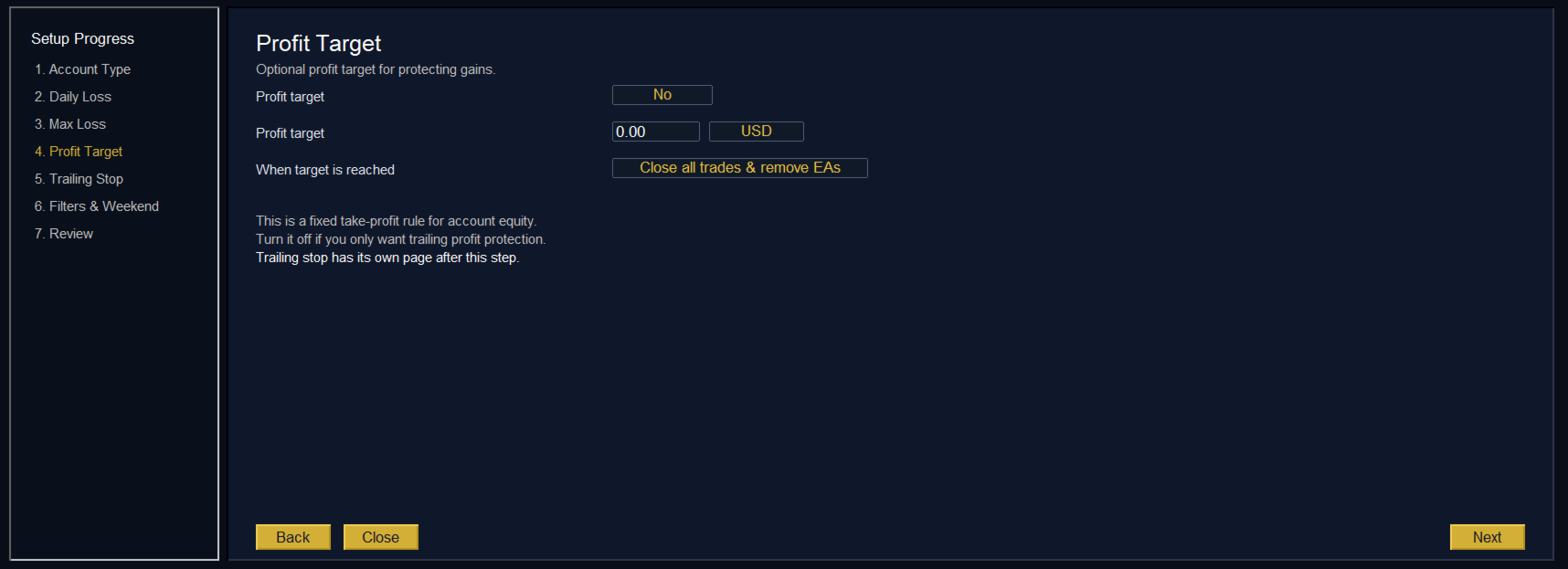
- Profit target: Once your account is up by the amount you choose, the EA closes trades and locks the win in.
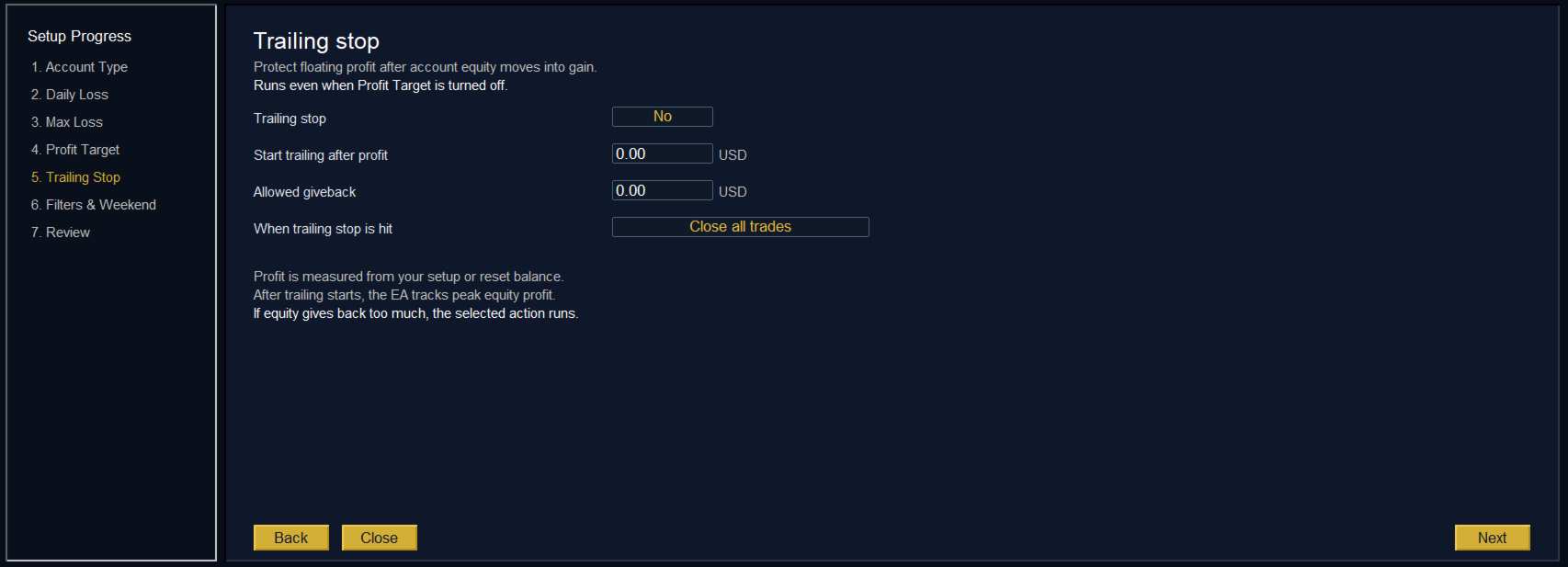
- Trailing profit lock: As your account grows, the EA tracks your highest point. If you start giving back too much of your gains, it closes trades before more slips away.
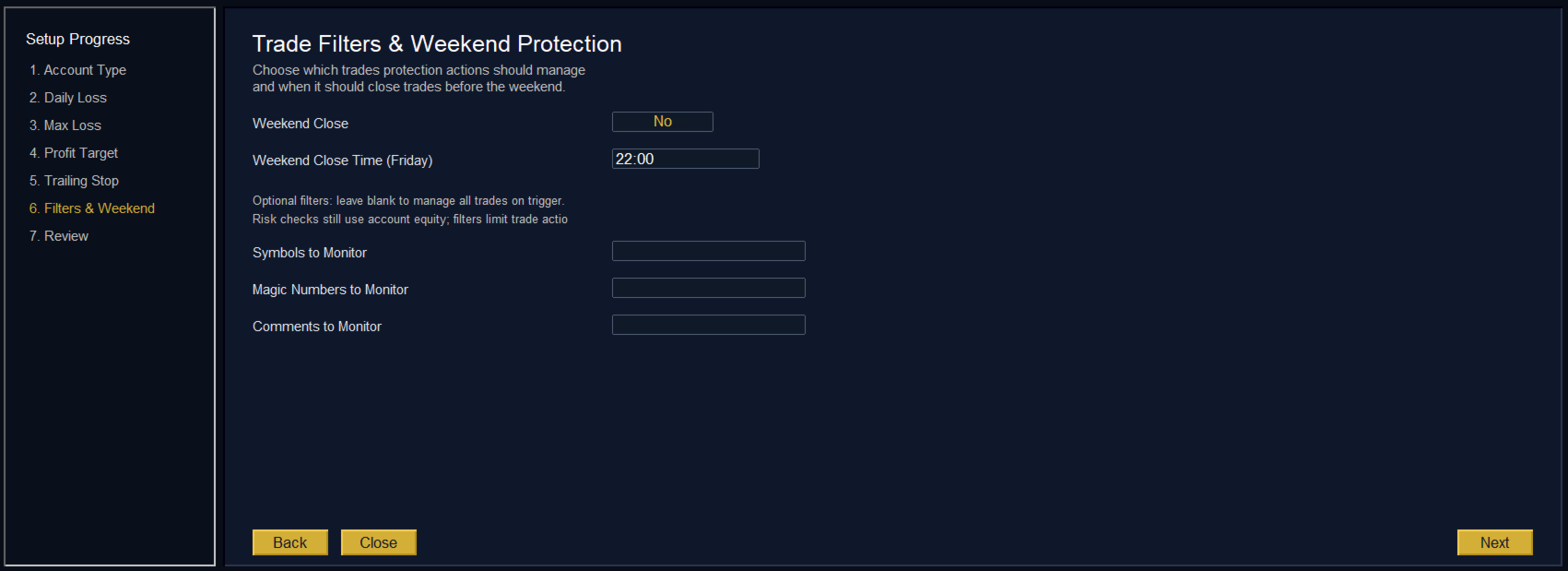
- Weekend Gap Protection: Automatically closes everything before Friday's close.
In plain language: it is your account's automatic safety net.
Two Profiles, One EA. Pick the One That Matches Your Account.
Risk discipline looks very different for a trader running their own $5,000 account than it does for someone trading a $100,000 funded challenge. So KT Equity Protector ships with both worlds built in, and the wizard's first step is asking which one you are. Pick the wrong one and you get features you don't need. Pick the right one and the entire EA reshapes around it.
Personal Account
For traders trading their own money. Maybe you run a portfolio of EAs. Maybe you swing trade manually. Maybe both. What you want is simple: a hard stop on the whole account, an optional profit target for when you're having a good run, an optional trailing profit lock when things are flying, and the freedom to sleep through the weekend gap.
Prop Firm Account
For funded traders, evaluation traders, and anyone trading under strict daily-loss and max-loss rules. This is where the full feature set unlocks:
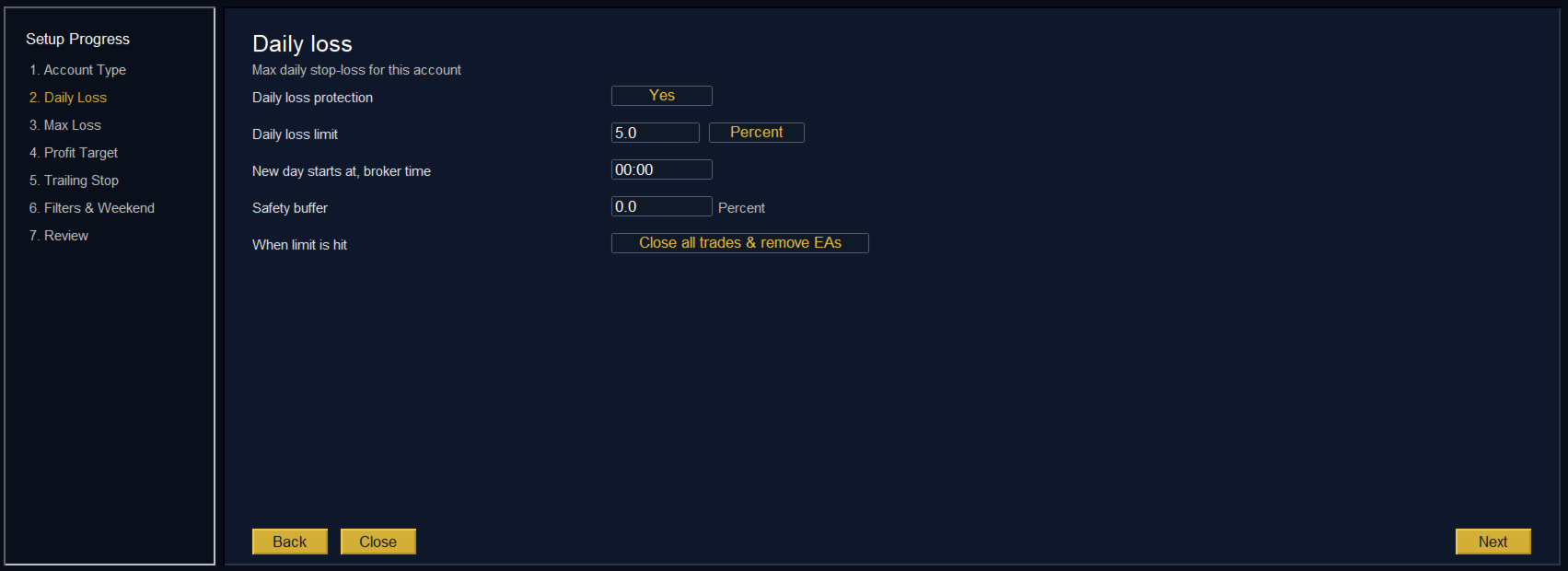
- Daily loss limit with a configurable safety buffer, so the EA acts at 4.5% instead of letting you actually touch the 5% breach line.
- Sticky peak tracking that mirrors how prop firms grade breaches. The worst point of the day counts, not where the account happens to be right now.
- Three drawdown anchor models: static initial balance, trailing highest balance, or trailing highest equity. Match the one your firm actually uses.
- Custom starting balance for the very common case where your funded amount (say $50,000 or $100,000) is not what your broker balance shows.
- Daily CSV log of every event, every trigger, every close attempt, every retcode. Exportable, timestamped, and ready if a firm ever questions a breach.
The wizard turns on daily-loss protection by default. The dashboard surfaces the metrics that decide whether your account survives. The defaults are tuned for the people most likely to fail a challenge without them.
You can switch any time
Picked the wrong profile? Open Settings from the dashboard, change it, and the EA reshapes around your new choice in a click. No reattach. No file edits. No drama.
Simple Setup Wizard
Open the input panel of most MetaTrader EAs and you get a wall of cryptic parameters. Dozens of toggles. Abbreviated names that only the developer understands. Default values that mean nothing in isolation, and combinations that only work if you read the manual cover to cover.
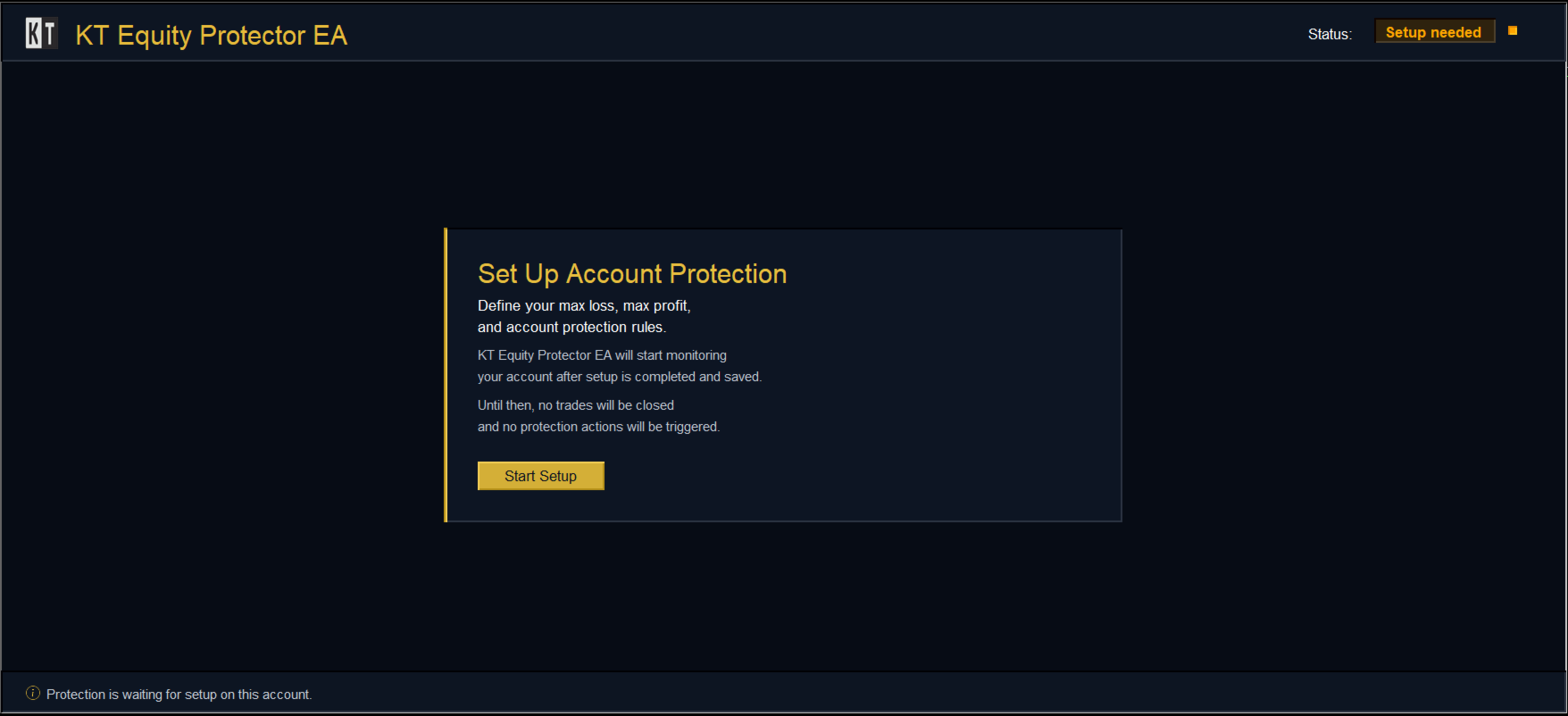
KT Equity Protector takes the opposite approach. Every protection setting lives inside a guided, in-chart wizard that opens the moment you attach the EA.
How the wizard works
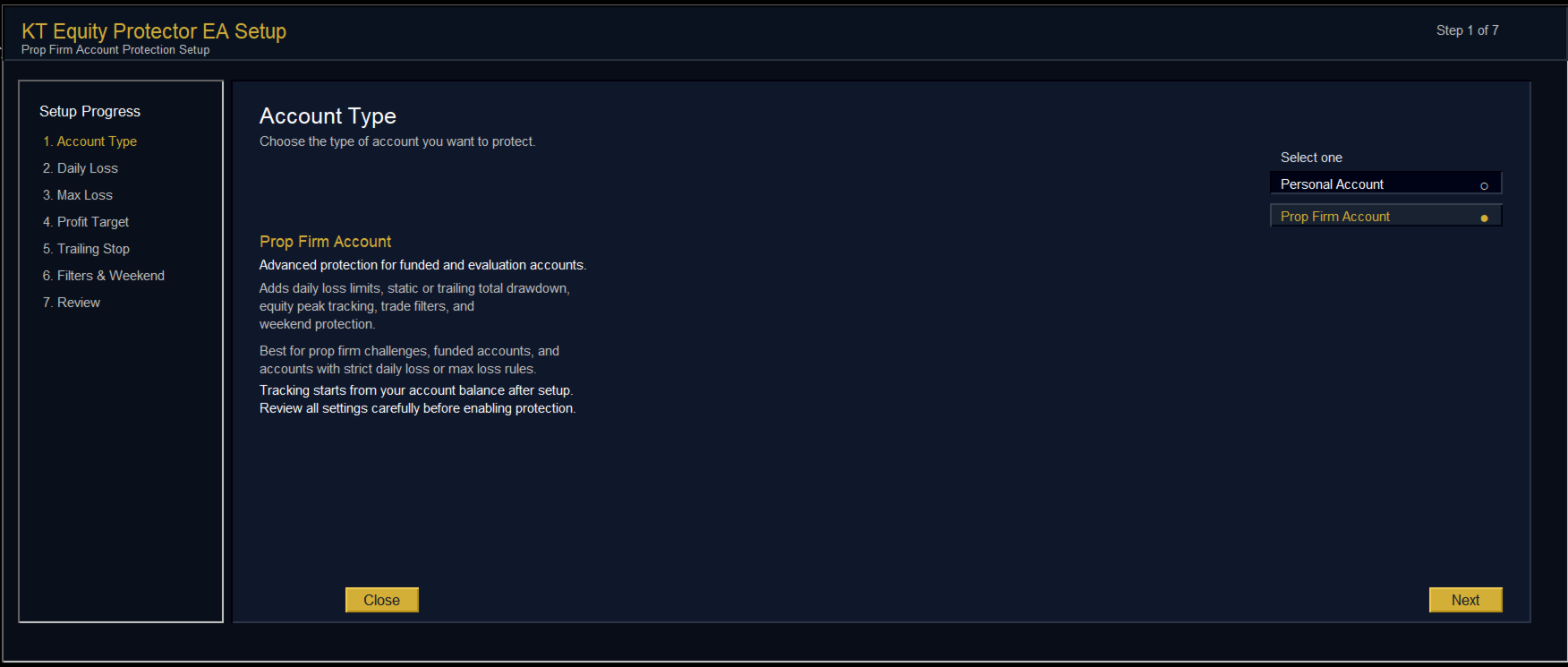
The wizard runs as a clean overlay on the chart. No external windows. No DLLs. No web technology. Just six or seven steps, depending on your profile, asking plain-English questions:
- What kind of account are you protecting?
- Do you want a daily loss limit, what should it be, and when does the day reset?
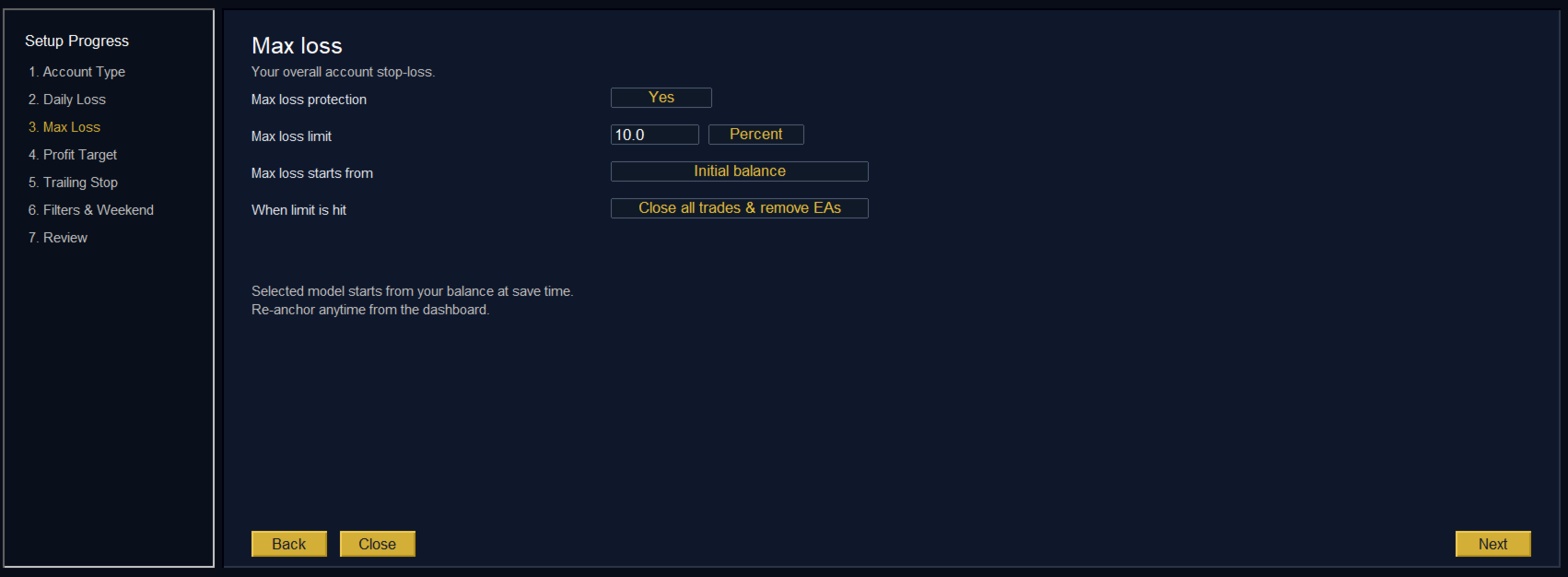
- What's your overall drawdown limit, and which anchor model matches your firm?
- Do you want a profit target?
- Do you want a trailing profit lock, at what activation point, with how much giveback allowed?
- Which trades should the EA manage, and do you want it to flatten before the weekend?
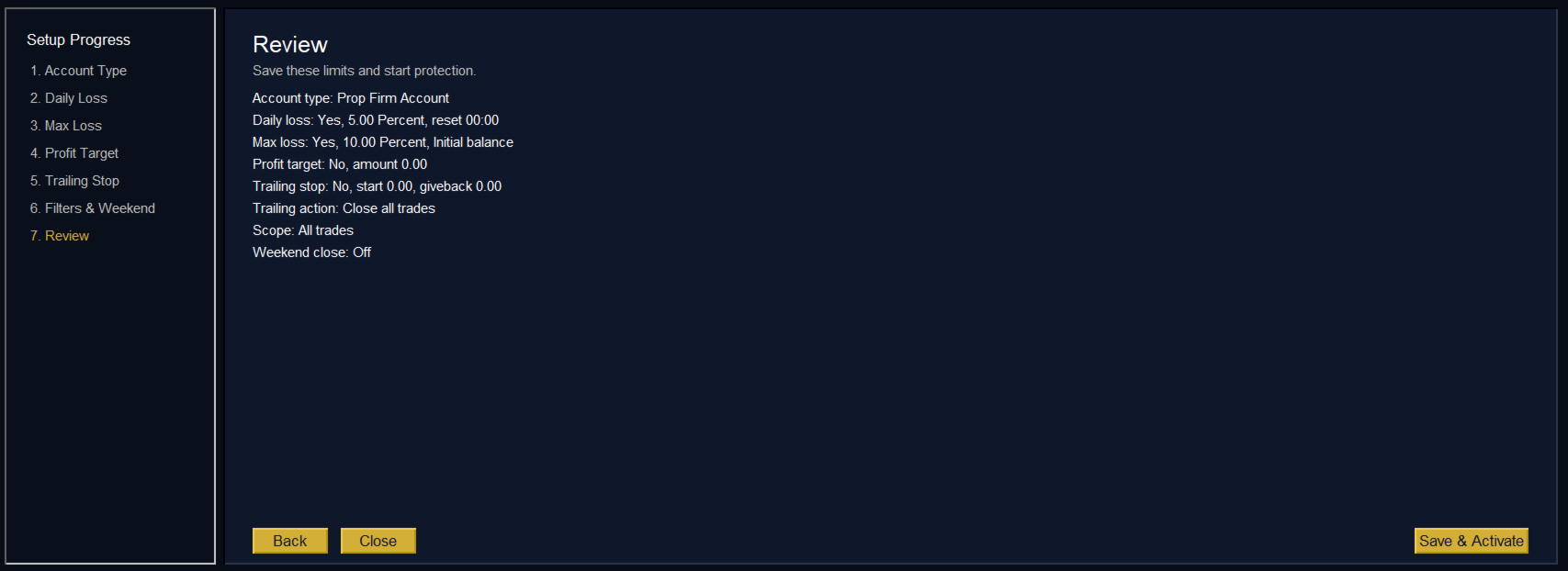
At the end, a review page summarizes every setting in plain language. You click Save and Activate. Protection is on.
If you prefer reading first, a full Setup and User Guide PDF is available here: Download User Guide
A Dashboard You'll Actually Want to Look At
Once setup is done, the wizard hands over to the live dashboard. It's the screen you'll glance at every trading day.
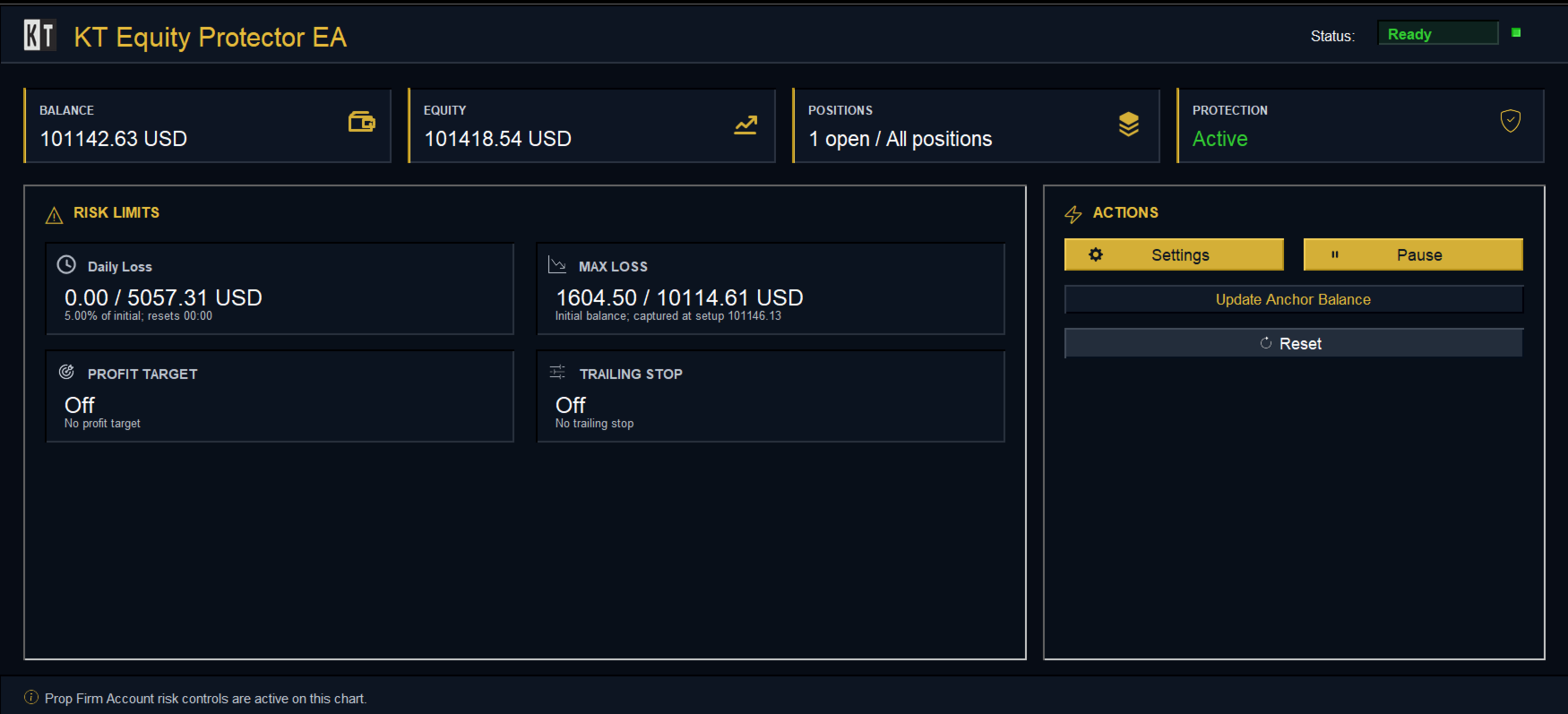
Four metric cards along the top show Balance, Equity (which flashes green or red with every tick), Positions in scope, and the current Protection state. A grid below holds one card per protection you enabled, with the consumed amount and percentage updating in real time. On the right, an action panel keeps Settings, Pause/Resume, Update Anchor, and Reset one click away.
A colour-coded status badge tells you everything at a glance. Green when armed. Gold when something needs attention. Red after a rule has fired. Silver when paused.
No browser windows. No popups stealing focus. Just a premium, native panel that adapts to your profile and stays out of the way until something important happens.
What Happens the Moment a Line Is Crossed
Every rule has its own action, set by you during setup. The options scale from gentle to decisive:
- Alert only. Notify, don't touch positions.
- Close losing trades. Cuts only what's bleeding.
- Close profitable trades. Useful for profit and trailing rules.
- Close all trades. Flattens every position in scope.
- Close all trades and remove every other EA. The strongest setting. Closes positions, then removes every other EA from the terminal so nothing can reopen them. The Equity Protector chart stays alive. This is the option that stops revenge trading and accidental EA restarts dead in their tracks.
When positions close, any pending orders cancel at the same time, automatically.
Filters: full-account protection, surgical execution
By default the EA acts on every trade. If you'd rather it manage only certain trades, filter by symbol, magic number, or comment. One important point: risk is always measured against your full account equity, because that's what your broker and prop firm actually see. Filters only decide which trades the EA is allowed to close. Run three EAs on one account, have the protector manage only one of them, and the daily-loss math still uses the whole account. That's how multi-EA portfolios stay safe.
Alerts that reach you without spamming you
Pick any combination of popup, sound, push notification, and email. Every alert is throttled so the same event cannot fire more than once a minute.
Built to Be Trusted with Real Money
Every reliability decision in this EA was made with one question in mind: what happens if it fails at the worst possible moment?
- Persistent state. Daily anchors, peak balance, peak equity, trailing armed flag, paused flag. All saved every second and restored exactly as you left them after a restart, crash, broker disconnect, weekend, or VPS reboot. Per account, so one terminal can host multiple isolated accounts cleanly.
- Single-instance lock. Only one chart can run the EA against a given account. Drop it on a second chart by mistake and that chart politely shows "already running" with a one-click remove button. No two protectors will ever fight over the same trade.
- Retry-with-backoff close logic. Close requests retry up to three times with a short pause between attempts, every return code logged. Symbol-aware filling modes mean closes work on every broker.
- Daily CSV audit log. Every trigger, action, close attempt, pause, and reset is timestamped and logged. Open it in Excel. Use it as a journal. Use it as proof if a prop firm ever questions a breach.
- No DLLs, no web calls, no third-party libraries. Pure MQL5, safe on locked-down VPSs, clean for terminal security checks.
Use It To...
Pass your prop firm challenge. Set the firm's exact daily and overall limits, add a small safety buffer, and the EA keeps you on the safe side of the line every trading day.
Stop revenge trading. Choose "close all and remove every other EA" on your daily-loss rule. Once the limit hits, the account is flat, every EA is off the terminal, and protection is locked until you physically click Reset.
Lock in a winning week. Combine a profit target with a trailing profit lock. Hit your target and you're out. Run past it and the trailing lock guarantees you walk away with most of the gain.
Skip the weekend gap. Friday 22:00 broker time, every position closes automatically. Sleep through Sunday opens.
Protect a multi-EA portfolio. Filters let the EA manage only the strategies you choose, while the daily-loss math still watches the whole account.
Set it once and trust it. A few clicks in the wizard. Protection is on. No complex input panel, no second-guessing, no spreadsheet of risk percentages on your desk.
One EA. One Chart. Your Whole Account, Protected.
You don't blow up an account because the chart was wrong. You blow up because you didn't have a rule, or you had a rule and broke it.
KT Equity Protector EA is the rule that doesn't break. It runs quietly in the background while you focus on your strategy. The first time it stops you crossing the line, it pays for itself many times over.
If you trade your own capital, install it for peace of mind.
If you trade a funded account, install it before your next session.
Either way, install it before the day you wish you had.




























































This EA is a game changer, easy to use and yet has a great advantage in terms of risk management. I have bought other risk management EAs before and abandoned them, but this one is highly commendable. Thanks