Trade monitoring by Telegram

A professional tool for real-time monitoring of the account status and the work of Expert Advisors.

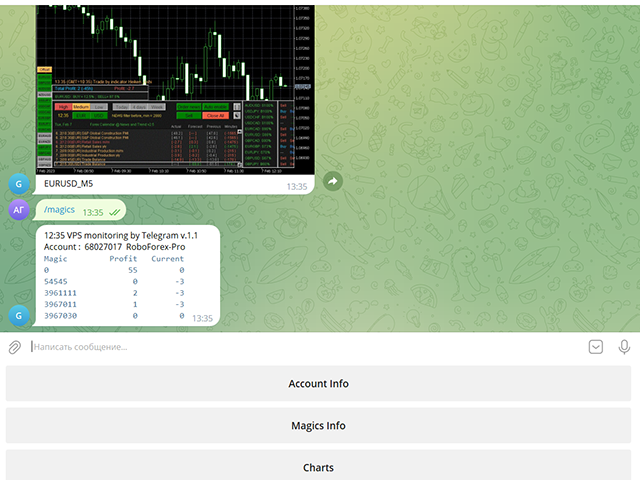
Information about the account status can be sent to Telegram chats automatically at a specified interval or upon request.

From the screenshots of the open charts of the terminal, you receive upon request from your Telegram bot.

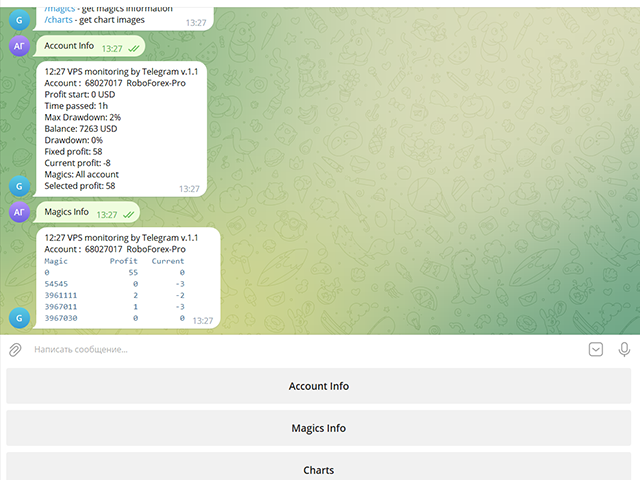
Account information includes:

  • 13:02 Trade monitoring by Telegram v.1.0 (headline)
  • Account : 6802ххх RoboForex-Pro (account information)
  • Profit start: 2661 USD (profit earned at the start)
  • Time passed: 3h
  • Max Drawdown: 2% (maximum drawdown)
  • Balance: 7389 USD (current balance)
  • Drawdown: -1 (current drawdown)
  • Fixed profit: 106 (received profit)
  • Current profit: 52 (current profit)
  • Magics: All account (filter setting)
  • Selected profit: 106 (filtered profit by currency pairs and magic number)

It is especially convenient to use it on a VPS server, which allows you to "see" the operation of the terminal and advisers without resorting to remote access.

Access to information about your trading account will be from all devices where Telegram is installed.

Security is provided by setting the Whitelist Usernames parameter.

Setting Telegram parameters

  1. Create your own bot using @BotFather with the /newbot command. Remember Token values and bot name
  2. Activate it in your chat: Find it in Telegram Contacts by name, click and press the "Start" button
  3. Find out your Chat ID with @userinfobot
  4. Find out someone else's Chat ID using a browser at https://web.telegram.org/z/
    Enter and set the mouse to the contact, then in the address bar after https://web.telegram.org/z/... the numerical value of Chat ID will appear
  5. Allow access in the terminal in Expert Advisor settings:
    4.1 Check Allow WebRequest for listed URL
    4.2 Add https://api.telegram.org/bot<Token>
  6. Use Token and Chat ID values in VPS monitoring by Telegram parameters

Operating procedure

When placing the utility on a chart, you should set the values of the Telegram Token and Telegram Chat ID parameters.

The list of Magic numbers is automatically populated based on transactions in the last month.

You can mark only those that will be tracked by the Selected profit parameter.

If the Magic numbers filter parameter has a non-empty value, then the Magic numbers list will be generated based on its information.

After completing the selection, activate the Telegram bot with the Use telegram bot button.

To get information from the bot to your Telegram channel, find it by name and activate its chat.

On the bot page, send him a message: /start or /help

The bot works with your trading account:
/info - get account information
/magics - get magics information
/charts - get chart images

And then you can manage requests using the bot menu buttons.

To get a screenshot, you will need to specify the currency pair and the period for which the bot will search for an open chart in the terminal.

    Parameters

    Use Telegram bot
    false Bot disabled on startup
    Use send auto messages
    true
    Use automatic message sending
    Timer auto messages, minutes
    60
    Auto send timer
    hide account number
    false
    Hide account number in messages
    Magic numbers filter (111,222,...)

    Magic number list for selective control
    Telegram Update Mode
    UPDATE_NORMAL
    Telegram work timer
    Telegram Token

    Token value of your Telegram bot (string)
    Telegram ChatID

    The value of the Chat ID of your Telegram channel (number)
    Telegram Whitelist Usernames

    List of channel names available to your bot
    Period for updating monitoring, sec

    Panel update timer
    Screenshot width, pixels
    950
    Screenshot Width
    Screenshot height, pixels
    650
    Screenshot Height

    If you purchased my advisor, your wishes will be taken into account when developing new versions

    Leave review and comments, they will help my products become better
    Recommended products
    Trade HotKeys is a manual trading utility that allows instant execution of trading actions using keyboard hotkeys. It is designed for discretionary and scalping traders who need fast order control without using MetaTrader 5 interface buttons. Instead of clicking chart buttons or navigating menus, you execute trading actions directly from the keyboard. What you can do Open BUY / SELL instantly via hotkeys Close BUY or SELL positions separately Close all positions with one key Reverse position (fl
    Compare Symbols Specifications is a utility indicator that is a summary interactive table of the analyzed parameters. Trading conditions in the market are constantly changing and tracking these changes is a time-consuming task. This tool allows you to compare the trading conditions of all symbols in a matter of seconds, and choose for trading those symbols that meet the requirements of the trading system. This tool will be useful to all traders and will help them to have up-to-date information
    ReverseTune
    Konstantin Chernov
    A script for quick reversing positions and/or orders. If you need to reverse a position with the same volume, open an opposite position of a different volume or change the type of existing orders (for example, Buy Limit -> Sell Limit, Buy Stop -> Sell Limit, etc.) with the same or different take profit/stop loss, this script will make all the routine for you! Allow AutoTrading before running the script. Usage: Run the script on a chart. Input Parameters: Language of messages displayed (EN, RU, D
    OrderManager MT5
    Lukas Roth
    4.81 (27)
    Introducing the Order Manager : A Revolutionary Utility for MT5 Manage your trades like a pro with the all-new Order Manager utility for MetaTrader 5. Designed with simplicity and ease-of-use in mind, the Order Manager allows you to effortlessly define and visualize the risk associated with each trade, enabling you to make informed decisions and optimize your trading strategy. For more information about the OrderManager, please refear to the manual. [ Demo ]  [ Manual ]  [ MT4 Version ]  [ Teleg
    GS trade report
    Aleksander Gladkov
    5 (1)
    3 in 1 : Report + monitoring + sending messages (Telegram, ...) to optimize trading and use of advisors. Monitoring: Panel on the chart Sending messages to Telegram Sending messages to Email Sending Notifications Sending pop-up messages Sound notifications when the established Profit/Loss levels are exceeded Monitoring is activated by pressing the Start button. Profit for the period by currency pairs, hours and Magic number for the current account. Forms four tables: by symbols, by magic number
    AW Metatrader to Telegram MT5
    AW Trading Software Limited
    5 (1)
    An automated system for sending notifications so that none of your subscribers miss your trading events from your trading terminal. A utility that sends notifications to the Telegram messenger about any trading operations on your account. Step-by-step instructions for connecting the utility to a channel in Telegram ->  HERE  / MT4 -> HERE  Advantages: Easy setup and detailed instructions, Possibility to send adjustable screenshots, Customizable notification text using emoji, Adjustment of notifi
    The utility places trailing stop, breakeven, stop loss and take profit.‌ It is necessary to allow automated trading in the terminal settings. In testing mode, the utility opens Buy or Sell positions on the first ticks, which allows you to visually observe the given logic, changing the utility parameters. In real mode, the utility does not open positions. Discuss the complexities of Forex trading here:  chat "Age of Expert Advisors" . Parameters magic   - magic number. If less than 0, positions w
    MarketMind AI
    Perpetual Chinemerem Vincent
    MarketMind AI Next-Generation Contextual Analysis for MetaTrader 5 Trade with the clarity of institutional-grade context. MarketMind AI is a professional decision-support system designed to bridge the gap between raw technical data and actionable market intelligence. Rather than generating signals or executing trades, MarketMind AI provides a structured, high-fidelity view of market conditions — enabling traders to make more informed discretionary decisions. USER GUIDE AND ANALYSIS PIPELINE AP
    T Manager for Price action Traders
    Haidar Lionel Haj Ali
    4.5 (10)
    T Manager, the ultimate trade management solution designed by traders for traders. If you are searching for a simple and efficient trade panel, trade manager, or trade assistant, you are at the right place.   The market contains a diverse number of those tools , but this one is designed by traders for traders . I designed this tool, and I am using it daily. Take my advice and stop buying tools blended with un-useful features that you will never use,   T Manager provides you with the essential y
    LiqStrike Trade Panel Pro
    Enmanuel De Jesus Hernandez Farias
    Trade Panel Pro MT5 – LiqStrike | MT5 Trade Panel | Risk Management | Position Manager Every second counts in trading. LiqStrike gives you total control — instantly. Built for serious traders who demand speed, precision and professional risk management in a single panel. MT5 Trade Panel with One Click Trading Advanced Risk Management — Auto Lot Calculator Position Manager for MetaTrader 5 Break Even & Trailing Stop per position Real-time USD tags on chart for SL & TP Compatible w
    This tool can help you close all open orders with one click, just click "Close all". If you only want to close profitable orders, click the "Close profitable" button. After clicking, all floating orders will be closed; If you only want to close the orders with floating losses, click the "Close losable" button. After clicking, all orders with floating losses will be closed. This tool has been tested for a year. The one-click position closing function is very complete, the position closing is time
    Metrics Pro for Telegram - MT5 Metrics Pro for Telegram is a reporting utility for MetaTrader 5 that automatically sends your account performance data to a Telegram chat or channel via the Telegram Bot API. It is designed for algo-traders, signal providers, and fund managers who need scheduled performance summaries delivered directly to their phone without checking the terminal manually. The utility runs in the background on a chart and posts formatted reports at a scheduled server time. Reports
    MQL Tool "Ofir Email to Telegram": Never Miss a Trading Alert Again! Tired of missing important alerts from your indicators and Expert Advisors (EAs)? Ofir Email to Telegram is the solution you've been waiting for! This revolutionary MQL tool automatically forwards all email alerts from your indicators and EAs directly to your Telegram account. Never again will you miss a trading opportunity or important notification! Here are just a few of the benefits of Ofir Email to Telegram: Quick and easy
    One Click Trader  is a tool designed for MetaTrader 4 platform, which enables you to take your trading to the next level. It enables you to open, manage and close your trades in simple an efficient way by just one click of your mouse button. "-"   ,  "+"  change OCT window size  Up arrow minimizes the OCT panel Down arrow maximizes the OCT panel Right arrow displays the next panel with additional features Left arrow hides the panel with additional features Red  SELL  button enables you to open s
    Virtual TP SL TS
    Andrei Sviatlichny
    Make your Take Profit, Stop Loss, and Trailing Stop levels invisible to the broker! Main option: STEALTH MODE Virtual Trailing Stop Virtual Take Profit Virtual Breakeven Virtual Stop Loss Virtual Orders Lifetime WARNING: The Expert Advisor does not place orders by itself. You must open orders yourself (including through the Expert panel) or use a third-party Expert on another chart of the same currency pair. Please specify the Magic number "-1" in the Expert settings for the Expert to process th
    Trade Panel MetaTrader 5 - feature-rich tool that adds the desired and highly-demanded functions to the terminal to enhance trading experience. Orders execution with one click You can open and close orders easily, using the panel. Buttons to open Market, Limit and Stop orders in both buy and sell directions are located on the Main tab, while there are multiple options to close already existing positions and cancel orders: Close/cancel all Close/cancel buy and sell positions/orders separately Clo
    Session panel
    Timo Mario Hoffmann
    Session Panel for MT5 Session Panel is a free MT5 indicator that gives you a fast and convenient live overview of the major trading sessions directly from the chart. Monitor Tokyo, London, and New York session times, see which session is currently active, track countdowns to the next session, and view session overlap information in one compact dashboard. Built for traders who want better market timing, clearer session awareness, and a cleaner chart workflow in live market conditions. Session Pan

    FREE
    TELEGRAM_NOTIFICATION is a utility that forwards real-time trade events from your MetaTrader 5 terminal to any Telegram chat, group, or channel. It tracks every order event (open, close, modify, cancel) and sends a formatted message within seconds. It can also generate a daily profit and loss report for a user-defined time window. Main Features Open alerts for market and pending orders (BUY, SELL, BUY LIMIT, SELL LIMIT, BUY STOP, SELL STOP) Close alerts with net profit, balance, equity, and dail
    LineTrader
    Nykolai Kalchenko
    LINE TRADER is a universal semi-automatic Expert Advisor for trading on vertical and horizontal levels.   The Expert Advisor actually consists of 4 buttons, with the help of which lines are drawn, and an information field, which displays information about trading on the account and separately for a currency pair.   The Expert Advisor automatically works on any lines selected by the trader. Lines can be drawn from any convenient angle. You just need to draw a line:   - OPEN - open an order;   -
    AutoBuy
    Andrey Fri
    AutoBuy - is a script place pending buy stop orders with automatic calculation of the volume (number of shares) depending on the risk of money on the deal. Inputs: Risk - number in USD of money put on the trade. BuyHighStep - the number of USD, a step up from the rates High of the current candle (bar) stock up to buy. Minimum value is 0.01 StopLossStep - the number in USD, the step from the price of the buy stop order down to close the deal at a loss. The minimum value of 0.10  TakeProfitStep -
    Title : Trade Assistant Manager MT5 Trade Assistant Manager — See your risk before you click Visual Risk Manager is a MetaTrader 5 chart utility for discretionary traders who want a clear, visual way to size positions . Place your Entry, Stop Loss, and Take Profit directly on the chart. The panel shows the lot size, the money at risk, the profit target in money, and the reward-to-risk ratio — updated as you move the lines. What you gain   Faster decisions   : - Automatically calculate the volum
    FREE
    Forget about enabling templates when you launch the window. Auto Template Master Service  is a professional utility tool that runs as a system service in MetaTrader 5, and it will do it for you. Unlike traditional indicators or expert advisors (EAs), the program runs in the background of the entire terminal and doesn't require you to add it to each window individually. As soon as you open a new chart of any instrument (Forex, Stocks, Crypto), the service immediately detects the new window and a
    EA Performance Monitor A utility for MetaTrader 5 that automatically detects all active Expert Advisors across open charts, maps each EA to its trading data, and displays real-time drawdown, profit, win rate, and open position metrics in a single panel. EA Performance Monitor is an automated tracking utility for MetaTrader 5. It scans all open charts at a configurable interval, identifies each running Expert Advisor by magic number and symbol, and displays their performance data in a structured
    FREE
    Support Or Resistance Alert Broken
    Jhojan Alberto Tobon Monsalve
    "Support or Resistance Alert Broken" is a simple and very intuitive tool that allows you to create or eliminate horizontal and trend supports and / or resistances with a simple click. When the support or resistance line is broken by the closing price at the end of the current candle, the "Support or Resistance Alert Broken" tool will send an alert with sound, as well as a notification to the MT4 or MT5 mobile application. This tool can send alerts from multiple pairs at the same time. Utility
    AUTO RISK MANAGER PRO: your partner in Forex trading! AUTO RISK MANAGER PRO_MT4 — version for MT4 Demo version + detailed description Stop losing money due to emotions! It’s time to trust risk management to a professional algorithm. Imagine this situation: the market suddenly moves against your position while you are sleeping, working, or spending time with your family. Sounds familiar? With Auto Risk Manager Pro — not anymore! Advantages: Revolutionary approach to risk management Automatic capi
    AKCAP Hotkey Tool
    AK Capital Markets Limited
    5 (3)
    Special offer for the next 10 copies Are you tired of manually navigating through menus and inputting data every time you want to execute a trade or open an order on Meta Trader? Our hotkey tool is here to make your life easier and boost your trading efficiency. Our tool is natively coded for lightning-fast performance and comes loaded with all the features you could possibly want. From pending orders and OCO orders to trailing and multiple buckets, it has everything a scalper could need. And
    Summary A simple yet powerful trade manager for MetaTrader 5 that combines lightning fast execution with bulletproof risk management  Features • Account summary showing balance, daily PnL, symbol and spread • Auto lot size calculation based on % of account risk per trade • Pre-defined stoploss and risk/reward targets • Breakeven toggle which moves stoploss to entry • Trailing stoploss toggle for active positions • Keyboard hotkeys for quick entries and exits • Lightweight and optimised for low
    Position Limit Monitor: Efficient Control of Your Trading Operations Have you ever worried about having too many open trades simultaneously? Would you like precise control over the maximum number of positions in your account? Position Limit Monitor is the solution you need. Main Features: • Real-time monitoring: Constantly supervises the number of open positions in your account. • Customizable limit: Easily set the maximum number of positions you want to keep open. • Automatic closure: When the
    Telegram to mt5 signal copier
    Chukwuemeka Kingsley Anyanwu
    5 (1)
    Copies Signal from any Telegram channel and instantly executes the trade on MT5 without admin rights! Do you receive trading signals on Telegram and wish they could execute instantly on Meta Trader 5? READ THIS FOR SETUP GUIDE Telegram to MT5 Signal Copier is a powerful bridge between your Telegram signal channels and MetaTrader 5. It listens to messages from a specific Telegram channel and automatically extracts trading signals — including symbol, action, entry price, stop loss, and take prof
    Breakout Map Engine Breakout Map Engine is a chart-based analysis tool for MetaTrader 5 designed to help traders understand breakout context rather than generate direct trading signals. The tool focuses on a common problem in gold trading (XAUUSD): breakouts often look convincing at first, but many of them fail shortly after. This makes it difficult to decide whether a move should be followed or avoided. Instead of providing entry signals, the tool visualizes key levels and evaluates the surrou
    Buyers of this product also purchase
    Trade Assistant MT5
    Evgeniy Kravchenko
    4.42 (210)
    It helps to calculate the risk per trade, the easy installation of a new order, order management with partial closing functions, trailing stop of 7 types and other useful functions. Additional materials and instructions Installation instructions - Application instructions - Trial version of the application for a demo account Line function -   shows on the chart the Opening line, Stop Loss, Take Profit. With this function it is easy to set a new order and see its additional characteristics bef
    Forex Trade Manager MT5
    InvestSoft
    4.98 (653)
    Welcome to Trade Manager MT5 - the ultimate risk management tool designed to make trading more intuitive, precise, and efficient. This is not just an order placement tool; it's a comprehensive solution for seamless trade planning, position management, and enhanced control over risk. Whether you're a beginner taking your first steps, an advanced trader, or a scalper needing rapid executions, Trade Manager MT5 adapts to your needs, offering flexibility across all markets, from forex and indices t
    Local Trade Copier EA MT5
    Juvenille Emperor Limited
    4.96 (138)
    Experience exceptionally fast trade copying with the   Local Trade Copier EA MT5 . With its easy 1-minute setup, this trade copier allows you to copy trades between multiple MetaTrader terminals on the same Windows computer or Windows VPS with lightning-fast copying speeds of under 0.5 seconds. Whether you're a beginner or a professional trader, the   Local Trade Copier EA MT5   offers a wide range of options to customize it to your specific needs. It's the ultimate solution for anyone looking t
    TradePanel MT5
    Alfiya Fazylova
    4.87 (154)
    Trade Panel is a multi-functional trading assistant. The app contains over 50 trading functions for manual trading and allows you to automate most trading tasks. Before making a purchase, you can test the demo version on a demo account. Download the trial version of the application for a demonstration account: https://www.mql5.com/en/blogs/post/750865 . Full instructions here . Trade. Allows you to perform trading operations in one click: Open pending orders and positions with automatic risk cal
    Quant AI Agents is NOT AN Expert Advisor. Quant AI Agents   is a   multi-agent AI trading framework   that turns natural-language strategy prompts into live.  WANT THE SAME RESULTS AS MY LIVE SIGNAL?   Use the exact same brokers I do:   IC MARKETS , IC TRADING   .  Unlike the centralized stock market, Forex has no single, unified price feed.  Every broker sources liquidity from different providers, creating unique data streams. Other brokers can only achieve trading performance equivalent to 60
    Power Candles Strategy Scanner - Self-Optimizing Multi-Symbol Setup Finder Power Candles Strategy Scanner runs the same self-optimizing engine that powers the Power Candles indicator - on every symbol in your Market Watch, side by side. One panel tells you which symbols are statistically tradable right now, which strategy wins on each, the optimal Stop Loss / Take Profit pair, and pings you the moment a fresh signal fires. This tool is part of the Stein Investments ecosystem - 18+ tools plus Max
    Beta Release The Telegram to MT5 Signal Trader is nearly at the official alpha release. Some features are still under development and you may encounter minor bugs. If you experience issues, please report them, your feedback helps improve the software for everyone. Telegram to MT5 Signal Trader is a powerful tool that automatically copies trading signals from Telegram channels or groups directly to your MetaTrader 5 account. It supports both public and private Telegram channels, and you can conn
    FarmedHedge Pair Trading Dashboard
    Tanapisit Tepawarapruek
    5 (3)
    Farmed Hedge Yield Farming | All Markets (Manual - Hybrid - Semi/Automated EA) MULTI-ASSET SUPPORT Trade any asset available on your broker - Forex: Major, Minor, Exotic pairs - Crypto: BTC, ETH, XRP, SOL, BNB - Stocks: Apple, Tesla, Amazon, Google, etc. - Commodities: Gold, Silver, Oil, Gas - Indices: US30, NAS100, SPX500, DAX40 - Any CFD your broker offers VERIFIED TRADING RESULTS - Farmed Hedge Yield Axi Copy:  https://www.mql5.com/en/signals/2356376 - Farmed Hedge Yield Exn Copy:   https:/
    Exp COPYLOT CLIENT for MT5
    Vladislav Andruschenko
    3.91 (33)
    Professional Trade Copier for MetaTrader 5 Fast, professional, and reliable trade copier for MetaTrader . COPYLOT allows you to copy Forex trades between MT4 and MT5 terminals with support for Hedge and Netting accounts. COPYLOT MT5 version supports: - MT5 Hedge to MT5 Hedge - MT5 Hedge to MT5 Netting - MT5 Netting to MT5 Hedge - MT5 Netting to MT5 Netting - MT4 to MT5 Hedge - MT4 to MT5 Netting MT4 version Full Description +DEMO +PDF How To Buy How To Install How to get Log Files H
    Trade Dashboard MT5
    Fatemeh Ameri
    4.94 (125)
    Trade Dashboard simplifies how you open, manage, and control your trades, with built-in lot size calculation. It allows you to execute trades, manage risk, and control positions directly on the chart, with tools such as partial close, breakeven, and trailing stop. Designed to reduce manual work and help you stay focused on your trading decisions. A demo version is available for testing. Detailed explanations of features are provided within the MQL5 platform. Installation instructions are include
    Trade copier MT5
    Alfiya Fazylova
    4.53 (43)
    Trade Copier is a professional utility designed to copy and synchronize trades between trading accounts. Copying occurs from the account / terminal of the supplier to the account / terminal of the recipient, which are installed on the same computer or VPS . PROMOTION - If you have already purchased the "Trade Copier MT5," you can receive the "Trade Copier MT4" for free (for copying MT4 > MT5 and MT4 < MT5). For more detailed information about the conditions, please contact us via private message
    Premium Trade Manager - Fast, Disciplined Trade Management for MetaTrader 5 Premium Trade Manager is a fast on-chart panel for MetaTrader 5 that takes the mechanical work out of every trade. You decide direction, symbol and timing - the panel sizes the position to your risk, places the order with stop and target, scales out in partials, trails the stop and watches the economic calendar for you. Its built-in news intelligence goes one step further: it scores upcoming events by their real, measure
    YuClusters
    Yury Kulikov
    4.93 (43)
    Attention: You can view the program operation in the free version  YuClusters DEMO .  YuClusters is a professional market analysis system. The trader has unique opportunities to analyze the flow of orders, trade volumes, price movements using various charts, profiles, indicators, and graphical objects. YuClusters operates on data based on Time&Sales or ticks information, depending on what is available in the quotes of a financial instrument. YuClusters allows you to build graphs by combining da
    MT5 to Telegram Signal Provider turns your trading account into a signal provider. Every trade action, whether manual, by EA or from your phone, is instantly sent as a message to Telegram. You can fully customize the format or use a ready-made template for quick setup. [ Demo ] [ Manual ] [ MT4 Version ] [ Discord Version ]     New: [ Telegram To MT5 ] Setup A step by step user guide is available. Key Features Ability to customize order details sent to subscribers You can create a tiered subs
    Seconds Chart MT5
    Boris Sedov
    4.59 (17)
    Seconds Chart is a unique tool for creating second-based charts in MetaTrader 5 . With Seconds Chart , you can construct charts with timeframes set in seconds, providing unparalleled flexibility and precision in analysis that is unavailable with standard minute or hourly charts. For example, the S15 timeframe indicates a chart with candles lasting 15 seconds. You can use any indicators and Expert Advisors that support custom symbols. Working with them is just as convenient as on standard charts.
    AntiOverfit PRO MT5
    Enrique Enguix
    5 (5)
    Before you buy an EA, check whether it really holds up or just got lucky in a backtest. Most robots are sold with a beautiful backtest. Rising equity curve. Good profit factor. Very few doubts. And yet, many of those EAs fall apart as soon as the market stops moving the way it did in that historical run. Why? Because a backtest only proves one thing: that the strategy worked on one specific price path. It does not prove it will hold up under different paths. It does not prove it is robust. And i
    Copy Cat More Trade Copier MT5 is a local trade copier and a complete risk management and execution framework designed for today’s trading challenges. From prop firm challenges to personal portfolio management, it adapts to every situation with a blend of robust execution, capital protection, flexible configuration, and advanced trade handling. The copier works in both Master (sender) and Slave (receiver) modes, with real-time synchronization of market and pending orders, trade modifications, pa
    AXR Prop Guard
    Stoyan Kirilov Karlov
    AXR Prop Guard AXR Prop Guard is an account-wide risk protection utility for MetaTrader 5. It is built for prop-firm traders, funded-account challenges, and serious private account protection. It is part of the AXR tool line. For updates and contact options, use the official MQL5 pages: AXR MQL5 Channel: product updates, release notes and new AXR tools Telegram: open the seller profile ; the Telegram contact is listed in the profile description. After purchase, please send me a private message t
    HINN MagicEntry Extra
    ALGOFLOW OÜ
    4.71 (14)
    HINN MAGIC ENTRY – the ultimate tool for entry and position management! Place orders by selecting a level directly on the chart! full description   ::  demo-version  :: 60-sec-video-description Key features: - Market, limit, and pending orders - Automatic lot size calculation - Automatic spread and commission accounting - Unlimited partitial take-profits  - Breakeven and trailing stop-loss and take-profit  functions - Invalidation leves - Intuitive, adaptive, and customizable interface - Works
    Timeless Charts
    Samuel Manoel De Souza
    5 (5)
    Timeless Charts is an all-in-one trading utility for professional traders. It combines custom chart types such as Seconds Charts and Renko with advanced order flow analysis using Footprints , Clusters , Volume Profiles , VWAP studies, and anchored analysis tools for deeper market insight. Trading and position management are handled directly from the chart through an integrated trade management panel , while Market Replay and Virtual Accounts provide environments for practicing trading skills and
    Custom Alerts AIO: All-in-One Market Scanner – No Setup Required Overview Custom Alerts AIO is the fastest and easiest way to monitor multiple markets for real-time trading signals—without any setup or extra licenses. It comes with all required Stein Investments indicators already embedded, making it the perfect plug-and-play solution for traders who value simplicity and performance. Just load it to any chart and start receiving alerts across Forex, Metals, Crypto, and Indices. Shares can be a
    Trading View ToMT5
    Mirel Daniel Gheonu
    The Ultimate TradingView to MT5 Bridge Automation Stop manual trading and latency issues. TradingView to MT5 Copier PRO is the fastest and most reliable bridge to execute your TradingView alerts directly on MetaTrader 5. This EA executes your trades instantly using High-Speed WebSocket technology . Installation instructions and Trial version  Key Features  Trade Copier  Ultra-Fast Execution: Uses WebSocket connectivity (faster than standard WebRequest) to minimize slippage.  Universal Broker
    Uber Trade Manager
    Meelis Hynninen
    4.88 (16)
    The UTM Trade Manager is a powerful, yet intuitive trading tool offering fast, efficient trade execution and advanced features such as the "Ignore Spread" mode and a built-in local trade copier, and others. Designed to simplify your trading operations, it provides a user-friendly graphical interface and on-chart controls for seamless management. Important Notice: This manager may experience performance issues on systems with less than 8GB of RAM or when running on Mac ARM (M1) systems using emul
    Anchor Trade Manager
    Kalinskie Gilliam
    5 (2)
    Anchor: The EA Manager Run your full EA portfolio without conflicts, without stacked risk, and without watching every chart yourself. Anchor coordinates up to 64 Expert Advisors on a single account so only one trades at a time. Attach Anchor to any chart. Type your EA names and magic numbers in one line. Anchor handles the rest. Built for portfolios. Built for discipline. Built for prop firms. The Problem Running multiple EAs on the same account creates risk. Two gold EAs can open opposite posit
    Footprint Chart Pro — Professional OrderFlow EA for MetaTrader 5 Version 6.34 | Professional tool for real traders | Institutional-Grade Visualization DEMO USERS - PLEASE SELECT EVERY TICK / REAL TICK WHEN TESTING AND YOU HAVE DOWNLOADED HISTORICAL DATA. IF YOU SEE A WAITING SCREEN AND IT IS NOT DOWNLOADING, IT MEANS YOU HAVE LOW HISTORICAL DATA. TRY 1 MIN AND 5 MIN FIRST ON 1 DAY DATA. ONE DAY DATA SHOULD BE THE NEWEST AND MOST CURRENT DATE. PLEASE WAIT UNTIL THE MARKET HAS ROLLED OVER PERIOD.
    Bots Builder Pro MT5
    Andrey Barinov
    4.17 (6)
    This is exactly what the name says. Visual strategy builder . One of a kind. Turn your trading strategies and ideas into Expert Advisors without writing single line of code. Generate mql source code files with a few clicks and get your fully functional Expert Advisors, which are ready for live execution, strategy tester and cloud optimization. There are very few options for those who have no programming skills and can not create their trading solutions in the MQL language. Now, with Bots Builde
    Ultimate Extractor
    Clifton Creath
    5 (9)
    Ultimate Extractor - Professional Trading Analytics for MT5 *****this is the local HTML version of Ultimate Extractor. !!!!!it is not compatible with Cloud!!!! For the online version please reach out to me directly****** Ultimate Extractor transforms your MetaTrader 5 trading history into actionable insights with comprehensive analytics, interactive charts, and real-time performance tracking. What It Does Automatically analyzes your MT5 trading history across all Expert Advisors and generates
    VirtualTradePad One Click Trading Panel
    Vladislav Andruschenko
    4.59 (74)
    Trading Panel for MetaTrader 5 — professional one-click trading from chart and keyboard A powerful trading panel for active manual trading, designed to open, manage, and close trades far faster and more efficiently than the standard MetaTrader interface. This panel is built for traders who want full control over positions, pending orders, profit management, and trading execution inside one professional workspace. This is not just another utility. It is a complete trading cockpit for MetaTrader
    AlgoRadar
    Stephen J Martret
    5 (4)
    AlgoRadar is an on-chart analytics dashboard for MT5 that aggregates Expert Advisor performance across multiple accounts, brokers, and platforms, including both MT4 and MT5 data, into a single live view on your MT5 chart. All analysis runs from the chart interface, with no external applications or manual report processing required. EA Analysis and Ranking For traders running multiple Expert Advisors, AlgoRadar provides a consolidated view of each EA's performance across accounts. Active EAs a
    Telegram to MT5 Multi-Channel Copier automatically copies trading signals from your Telegram channels directly into MetaTrader 5. No bots, no browser extensions, no manual copying. You receive a signal on Telegram and the EA opens the trade on your terminal in a few seconds. The product includes two components: a Windows application that listens to your Telegram channels, and this Expert Advisor that executes the signals on your MT5 terminal. An MT4 version is also available. Setup guide and app
    More from author
    GS smart5
    Aleksander Gladkov
    5 (6)
    Best price Advanced grid algorithm,includes trend accounting, news, hedging and Risk manager. Can close the loss in case of market reversal and wait for the trend. For hedging, the following are used: Limit drawdown for Hedge zone parameter, pending orders and/or opening a position opposite to the loss. Can take into account not only the moment of news publication, but also the current accumulated index of the impact of news of a currency pair. Traders who purchase GS smart5 receive a persona
    Get news
    Aleksander Gladkov
    5 (1)
    Utility for reading news from investing.com To access the site, you need to add WebRequest in the Options terminal menu on the Expert Advisors tab: https://sslecal2.investing.com If reading is successful, a message about writing the file is displayed. The INV_week_this.txt file is written to the MQL4\Files folder of the terminal and is kept up to date, updating data according to its own timer. The  INV_week_last.txt   file is recorded on Saturday and saves the news data of the previous week .
    FREE
    GS spread
    Aleksander Gladkov
    The indicator calculates the current spread for each tick using the formula Spread=(ASK-BID)/Point. Schedule of changes in the boundaries spread over the timeframe displayed in a separate window from the date of accession of the indicator. Two lines corresponding to the minimum and maximum spread values are displayed. The indicator window is self-adjusted according to the minimum and maximum values from the moment of launch. The minimum and maximum values for the entire period of the indicator o
    FREE
    GS grid
    Aleksander Gladkov
    5 (4)
    Uses an advanced grid algorithm with no martingale or limited Martingale (default) (version for MT5: GS grid5 ) . Defines and control the current trend; It switches himself its parameters in accordance with the current market conditions ; Flexible customizable grid algorithm with or without martingale; Drawdown reduction algorithm (DD Reduction Algoritm); Hedge algorithm; Interactive trade control buttons; The ability to open / close orders manually; News filter to prevent trading during news
    GS target
    Aleksander Gladkov
    5 (2)
    The automatic adviser of the new generation with parameters: Target profit per month (10%, 25%, 50%, 75%, 100%) - choice of strategy Stop Loss Limit, USD Filter News Forex Factory (true, false) Parameters for setting the lot size Uses the news feed from Forex Factory to prevent trading during news releases. Set up to work on EURUSD timeframe M15. Works on USD accounts with a leverage from 1:500 and a Deposit from 500USD.   Enough for work: Decide on the size of the deposit that you can trust h
    GS smart
    Aleksander Gladkov
    5 (1)
    Best price, read GS smart channel ! Sale! Advanced grid algorithm,includes news and trend accounting and hedging. Can close the loss in case of market reversal and wait for the trend. For hedging, the following are used: Limit drawdown for Hedge zone parameter, pending orders and/or opening a position opposite to the loss. Can take into account not only the moment of news publication, but also the current accumulated index of the impact of news of a currency pair. Traders who purchase GS smar
    GS trendS
    Aleksander Gladkov
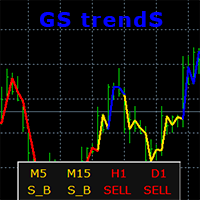
    GS trendS is a trend indicator that can be used for any Forex financial instrument. The indicator does not redraw and does not lag. Recommended timeframe H1. It is possible to select the trend algorithm settings {Only Open, Average Open/Close, Average High/Low} The color indicates the direction of the trend: yellow - direction can be SELL or BUY (S_B) blue - uptrend (BUY) red - downward trend (SELL) The indicator panel displays trend values of 5 timeframes for the current price level. The va
    ATR RSI i4
    Aleksander Gladkov
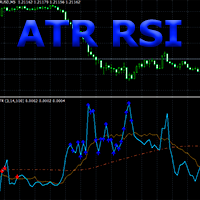
    Composition of ATR and RSI indicators. The ATR RSI indicator compares two calculations of the ATR indicator with the Fast and Slow periods on one chart, plus the line of the average and the overbought and oversold zones of the RSI indicator. ATR shows the values of the volatility change in the currency pair in points, taking into account the period specified as a parameter. The entry points provided by the RSI indicator show a very good risk-reward ratio in volatile and trending markets. ATR RS
    ATR RSI x4
    Aleksander Gladkov
    The Expert Advisor implements a trading strategy based on overbought and oversold zones of ATR RSI i4 indicator signals, which is included in the code . Trend Following, Counter Trend system , DD reduction Algoritm and Level Trading algoritm are used. To start trading, simply attach the EA to the chart, preferably EURUSD H1 timeframe. Live results can be viewed here . To trade with the new Forex instrument (EURUSD H1 by default), it is recommended to set up the parameter values by testing, initi
    Gain since start
    Aleksander Gladkov
    It will perfectly complement your working Expert Advisor or manual trading with up-to-date information. There is a sound notification of exceeding the established profit and loss limits of open SELL and BUY orders. Moreover, for each currency pair EURUSD, GBPUSD, XAUUSD, and others, various sound alerts are activated in English. Results are displayed on a special panel on the chart from the moment the indicator is activated: Elapsed time Fixed profit Current profit SELL Current profit BUY Maximu
    Trends and News
    Aleksander Gladkov
    5 (1)
    With the Trend and News indicator you will always be up to date : News + Trends + Forecast News Displayed on the chart as vertical lines with a description in the form of a tooltip The text displays two news: the previous published and the next expected They have filters: by importance (High, Medium, Low) and time period (Day, 4 days, Week) Full table of news for a given period (T button) Controlling the display of vertical lines on the chart and the sound signal before and after the publicati
    GS Trend5
    Aleksander Gladkov
    The advisor is designed for autonomous automatic round-the-clock trading on the EUR/USD pair, timeframe M15. There is a protection of the deposit from significant drawdown and a mode for saving a profitable transaction. Trades one deal. With the set parameters, it turns out to be one per day on average. How it works Uses the author's algorithm for analyzing three indicators and the direction of market movement to make a decision to open a deal. RSI Stochastic Bands market direction Opens an orde
    GS grid5
    Aleksander Gladkov
    F ully automated Expert Advisor using the advanced grid algorithm and constrained Martingale (MT4 version: GS grid ). Set up to work on EURUSD timeframe M15. Test 2021 shows a high percentage of winning orders: more than 98%. Works on HEDGING accounts with a leverage of 1:500 and a Deposit from 1000USD. Can use the news feed from Forex Factory to prevent trading during news release (Filter News Forex Factory=true;). To access the options terminal menu on the Expert Advisors tab, you must enable
    GS target5
    Aleksander Gladkov
    The revolutionary automatic adviser of the new generation with three parameters: Target profit per month (from 10% to 100%) Degree of risk (SuperLow, Low, Medium, High) Stop Loss Limit, USD Set up to work on EURUSD timeframe M15. Works on HEDGING accounts with a leverage of 1:500 and a Deposit from 500USD.   Enough for work: Decide on the size of the deposit that you can trust him Set the value of the desired profit per month (from 10 to 100 percent) Select the degree of risk (Low, Medium,
    It will perfectly complement your working Expert Advisor or manual trading with up-to-date information. There is a sound notification of exceeding the established profit and loss limits of open SELL and BUY orders. Moreover, for each currency pair EURUSD, GBPUSD, XAUUSD, and others, various sound alerts are activated in English. Indicators are displayed on a special panel on the chart from the moment the indicator is activated: Elapsed time Fixed profit Current profit Maximum drawdown Current d
    GS trade report
    Aleksander Gladkov
    5 (1)
    3 in 1 : Report + monitoring + sending messages (Telegram, ...) to optimize trading and use of advisors. Monitoring: Panel on the chart Sending messages to Telegram Sending messages to Email Sending Notifications Sending pop-up messages Sound notifications when the established Profit/Loss levels are exceeded Monitoring is activated by pressing the Start button. Profit for the period by currency pairs, hours and Magic number for the current account. Forms four tables: by symbols, by magic number
    News impact L
    Aleksander Gladkov
    Uses the built-in news calendar of the MT5 terminal or the Investing.com website (in the latter case, the Get news5 utility is required) Has the Scale parameter={100%, 110%, 125%, ...} to adjust the comfortable size of the text and control elements Tells you in which direction it is safer to open positions 3 in 1: News + Trends + Forecast News for the selected period: current and in tabular form Actual trends for 5 customizable timeframes and trend reversal levels Forecast of exchange rate mo
    Trade maker
    Aleksander Gladkov
    Multi-currency trading on one chart! Creation and management of positions with trailing and breakeven, risk management and other useful functions. To fix profits, the Target profit parameter is provided; if it is greater than zero, all positions will be closed if the set value is exceeded. All positions and orders have set Stop Loss and Take profit. For multi-currency trading, taking into account the impact of news and switching symbols on the chart, it is useful to use the News impact indicato
    Bars news
    Aleksander Gladkov
    Indicator of news linked to a bar. The published current value of the news has a characteristic impact on the currency it relates to: positive, negative, neutral . The indicator summarizes all these values for the selected period, taking into account the importance of the news: high, medium, low . As a result, a percentage is calculated for the currency pair, which shows the news of which currency is dominant. If the value is positive, then the pair has news pressure towards BUY, if negative - S
    Get news5
    Aleksander Gladkov
    Utility for reading news from investing.com To access the site, you need to add WebRequest in the Options terminal menu on the Expert Advisors tab: https://sslecal2.investing.com If reading is successful, a message about writing the file is displayed. The INV_week_this.txt file is written to the MQL5\Files folder of the terminal and is kept up to date, updating data according to its own timer. The  INV_week_last.txt   file is recorded on Saturday and saves the news data of the previous week .
    GS trend I
    Aleksander Gladkov
    The trend indicator has the ability to adjust the viewing depth and sensitivity, does not repaint and does not lag. In addition to the current trend, the chart displays trends for 5 more periods with zero trend levels for them. This allows for a comprehensive assessment of the nature of the trend movement. There is a possibility to choose the trend algorithm settings {Only Open, Average Open/Close, Average High/Low} The trend indicator can be used for any Forex financial instruments. The color s
    Filter:
    No reviews
    Reply to review