Anchor Trade Manager

5
  • Utilities
  • Kalinskie Gilliam
    Kalinskie Gilliam
    Trident - Professional trading systems built by experienced analysts and developers 🔱
    ABOUT US
    Kalinskie Gilliam — Developer
    - 9 years US Military Intelligence (Special Operations Data Analyst)
    - Master's Degree in Computer Science
    - Based in Switzerland
  • Version: 5.23
  • Updated: 23 August 2026
  • Activations: 8

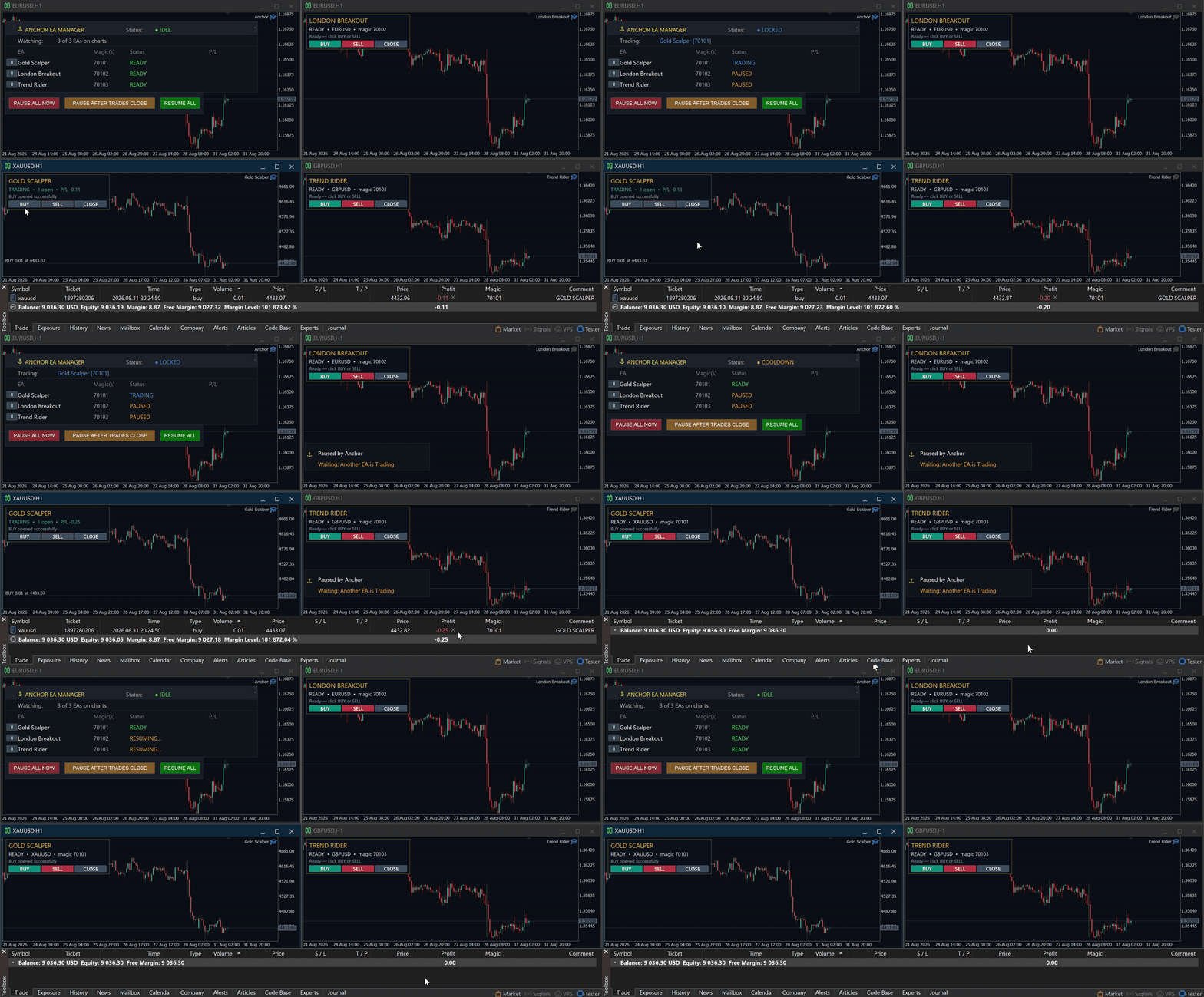
Your EAs cannot see each other, but Anchor can.

Anchor gives you one place to coordinate your EAs, manage risk, and decide when trading is allowed. It works alongside the trading bots you already use without any changes to them.

The Problem

One EA opens a trade. Then another starts trading. The next thing you know, you wake up to multiple grids built across your account. Each EA may be doing exactly what it was designed to do, but together they can place far more risk on your account than you intended.

Even when using just one EA, it may not include the account protection, news controls, or the trading schedule you want. And you cannot watch every chart 24 hours a day.

The Solution

Anchor watches your selected EAs together. It does not replace their strategies or change how they find trades.

You choose exactly which EAs Anchor manages. For example, you can allow only one of multiple grid EAs to trade at a time while your single-trade EAs continue normally.

Anchor will not pause or control the EAs you leave out. Their trades are affected only if you deliberately enable account-wide drawdown protections.

Choose how many managed EAs may trade at once. Set the limit to one and, when one starts trading, the others wait until its trades close. Or allow several to trade while still limiting how many can be active together.

Optional Strict Priority mode decides which EA keeps its trade if several open at almost the same time. Lower-priority EAs are paused and their trades are closed. You can also allow an EA to finish managing its existing trades before it is paused.

Pause or resume individual EAs from the on-chart panel, or control them all at once. Start with one EA and add more later. Anchor supports up to 64 managed EAs.

Need separate groups with different rules? Run another Anchor instance on a separate chart. Each instance manages only the EAs assigned to it.

Setup is simple: attach Anchor to one chart and enter the names and magic numbers found in your EA settings. An EA using several different magic numbers can be organized and managed as a single EA.

(Reach out to me if you need help figuring out your EA's magic numbers!)

Who Is Anchor For?

Use Anchor with one EA or a full EA portfolio, on personal or prop accounts.

Manual traders can also choose to include their open trades in Anchor's drawdown, news and scheduled closing actions.

Protection

Anchor provides three optional layers of drawdown protection. Per-EA limits watch each managed EA's open loss. Account-wide limits watch the whole account. Daily drawdown limits count both closed and open losses, then reset automatically at your chosen time.

Push notifications can report drawdown events, pauses, trading schedule resumes and forced closes through the MT5 mobile app.

News, Schedule and Trade Controls

The news filter can pause managed EAs before selected economic events and resume them after the risk window. Choose the timing, currencies and news importance, or pause only EAs exposed to a specific currency.

The scheduler controls trading hours using your broker's time. Set daily, overnight or weekend windows and choose whether to pause, wait for open trades to close, or completely close those selected trades.

Direction controls can restrict selected EAs to buy-only or sell-only trading. Anchor can also cancel pending orders when an EA is paused so an old order cannot open a new trade.

Clear and Reliable Control

The panel shows which EAs are ready, trading, paused, blocked or waiting. Anchor remembers its control state through chart reloads, terminal interruptions and restarts.

Requirements

MetaTrader 5. One chart per Anchor instance, using any symbol or timeframe.

Before first use, open Tools > Options > Expert Advisors and uncheck the "Disable Algorithmic Trading when..." options.

WebRequest permission is needed only for the optional news filter.

Not compatible with the built-in MQL5 VPS. Anchor requires a full MT5 installation on your computer or a Windows VPS.

Strict Priority and coverage for trades you place manually require a hedging account.

Full documentation and personal setup support are included. Message me after purchasing and I will help you configure Anchor for your EAs.

Anchor is a coordination and risk-control tool, not a trading strategy or signal provider. Test your complete setup on a demo account first. Trading involves risk, and Anchor cannot guarantee trading performance or prevent every loss.

Reviews 12
spankler
89
spankler 2026.09.08 10:46 
 

Definitely the best utility on the market for me. It helps manage mutliple EAs, and can ensure that only one fire at each time. Even after I've stopped using grid EAs, I still find a great use for Anchor in assisting my start/end trading hours, or managing drawdowns and configurations. Easily one of the most worthwhile purchases for me!

Developer is also friendly and helpful at each step of the way, and always takes his time offering to check my logs/set files regarding any issues I've faced.

Am totally happy with this purchase and recommend it to anyone who needs a utility tool for their EAs.

KPopMakerHK
163
KPopMakerHK 2026.08.28 01:51 
 

I've been using Anchor EA Manager for months. Highly recommended if you want better control of your trades, account, and capital. 👍 Thank again!

Ferran Lopez Navarro
3559
Ferran Lopez Navarro 2026.08.14 03:54 
 

Anchor has become the control center of my whole EA setup. I run many EAs across several accounts and Anchor handles everything around them — slots, drawdown limits, news filter, scheduling — without touching a single line of their code. It simply works. And Kali is on another level: fast replies, listens to feedback, and every update lands polished. The best tool of its kind on the market, kept to perfection by its developer. 5 stars, easily.

Recommended products
Risk Trade Management Panel
Yim Chung Eric Liong Wee Kwong
Risk Panel is an on-chart position sizing, order execution and trade management utility for MetaTrader 5. Additional materials and instructions Instructions It is built for discretionary traders who choose their own entries but want to calculate volume, prepare orders and manage positions directly from the chart. The panel does not provide trading signals and does not choose when to trade. How it works Enter the amount you want to risk, in money or as a percentage of your balance or equity. Pos
Ultimate Pro Trading Panel — All-In-One Manual & Grid Trading Dashboard Pro Trading Panel   is an all-in-one on-chart control panel that gives discretionary and semi-automated traders a complete toolkit for entries, exits, risk management, and grid trading — without leaving the chart. Every function is visual, draggable, and updates in real time. If you want to test this utility feel free to download the basic preview version of this tool here:  https://www.mql5.com/en/market/product/181435 Who
This tool will perform Trailing stop loss and Break even management for orders. Helps you limit or reduce the time spend watching orders on the screen, especially when you need to go to sleep. Just add this EA to 1 chart, you can manage all pairs. You can filter orders by comment, magic number, symbol and order ticket number. When Breakeven it can add shift/offset pips (to cover the commission...). You can try in strategy tester before purchase. The EA will add Buy and Sell alternately, so you
Advance Trade Manager
Jose Rodrgues Chaves
ADVANCE TRADE MANAGER A complete, tabbed trade-management dashboard for MetaTrader 5 that puts every routine trade operation on one compact panel. No more hunting through menus — open, protect, scale and manage positions from a single interface. The panel is a pure GUI overlay . It never touches your existing chart objects, indicators, arrows or manual lines. All chart objects it creates use the dedicated EGF_Z_ (zones) prefix, and trigger lines use the panel's own object names — so nothing else
RRtoolBox
David Ruiz Moreno
RRtoolbox - Professional Tools: Risk:Reward Trading Tool (SL/TP Horizontals + Pending orders + Diagonals), Alerts set on trend lines (for alerts on diagonal levels), SelfManagement (BE, partials...), close/cancelling by time, Statistics, Info and trading on chart. One-Click Trading with Visual Risk:Reward Management RRtoolbox is a comprehensive trading panel that combines one-click order execution,  statistics and  powerful visual Risk:Reward tools, alerts set with trendlines, on chart butt
Gold Live Position Executor
Paul Cervin Mitch Villarin
Gold Live Position Executor Category: Utilities (Order management, Risk management, Panels) "The disciplined trader's shortcut — proper position sizing, every single trade, without doing the math yourself." A risk-management and order-execution utility , not an autonomous robot. Drag from entry to stop-loss and it calculates your exact lot size, risk, and reward — then places the trade with one click, exactly when and how you decide. No spreadsheets, no mental math under pressure. This is a uti
Trading Utility for Forex Currency Pairs Only not for Gold  Functions Auto Lot Calculation based on Risk Auto stoploss  Auto TakeProfit Breakeven Auto Close Half % Close in percentage with respect to the PIPs Pending Orders BuyLimit Sell Limit with distances BuyStop Sell Stop    with distances Trading Informations Risk in percentage For Multiple trades Combine Takeprofit and Combine Stoplosses
Equity Master Stop v2 MT5
Frank William Jr Colbert
Trading tool combining a sophisticated equity stop-loss, dynamic take-profit management (Breakeven & Trailing), and symbol-group-based closing logic. It is a complete risk management and trade supervision tool. Features: All features of `Equity Master Stop v1` (floating profit/loss limits, exit protection, skip hours). Take-Profit Override: Can force a TP on any order to lock in a `MAX_FLOATING_PROFIT`. Step Breakeven: Locks in increasing amounts of profit as a trade moves favorably (e.g., aft
CRYPTO ZEUS DUAL-CORE PROTOCOL  Advanced Crypto Matrix: Supertrend AI + External Sync Module - [NEW] 24/7 Crypto Unlock: The EA now fully supports weekend trading by auto-detecting Crypto assets. - [NEW] Continuous Trend Rider: Re-enters trades continuously on pullbacks if the macro-trend remains strong, maximizing profit on long runs. - [NEW] Ghost Trailing Stop: Added a virtual trailing stop to fully ride breakouts instead of exiting at fixed Fibo targets. - [NEW] Preset System: Added a buil
CoPilot dashboard MT5
Frederic Jacques Collomb
CoPilot — Daily Trading Dashboard Know your numbers. Trade with clarity. MT4 version What is CoPilot? CoPilot is a professional-grade trading assistant that displays in real time all your daily performance statistics directly on the chart — with a live equity curve that updates trade by trade. Designed for active traders who need instant visibility into their session without leaving the chart, CoPilot aggregates every closed trade of the day across all symbols and presents them in a clean, color
Trade Vista Pro
Chiiambwe Mulbnga
TradeVista Pro — Professional Trade & Risk Management Panel TradeVista Pro is a professional all-in-one trade execution and position management panel for MetaTrader 5 , designed for traders who want faster order management, precise risk control, and a cleaner way to manage open positions directly from the chart. Instead of constantly switching between the MT5 Trade tab, order windows, and chart controls, TradeVista Pro brings essential trading-management functions together in one intuitive inter
Truvana Trend Campaign Manager EA (TCM) Advanced Basket Management & Profit Locking Tool for Trend Traders Short Description Turn strong trends into managed campaigns. Truvana TCM is a professional trade management EA designed for traders who already know how to identify trends and execute entries. The EA automatically manages basket expansion, validates risk before adding positions, and locks profits using a broker-side Basket Stop Price (BSP). No martingale. No grid recovery. No signal genera
Bastion is a monitor-and-close-only risk manager for prop-firm traders. It watches your account against your firm's daily-loss and maximum-drawdown limits in real time and force-closes your open positions BEFORE you cross a line. It never opens a trade of its own, so it stays fully within the tools allowed by FTMO, FundedNext, The5ers, FTUK and FXIFY. Why traders fail challenges A large share of failed evaluations end on a single daily-loss breach: a moment of inattention, a news spike, one tra
The Stop Loss Manger - SL Mange With the Stop Loss Manager you can finally sleep peacefully while it effectively manages your risk in stock market trading. Simply set your individual stop loss limits and let the manager trade for you. Never worry about losses again - the Stop Loss Manager takes care of it for you! Get the ultimate support for your trading now and maximize your profits with ease. Join the community of successful traders who swear by Stop Loss Manager today. Function overview: 1.
MANAGING YOUR FOREX TRADING LIKE A PROFESSIONAL WITH   POSITION SIZE   CALCULATOR Position Size Calculator – an MT5 indicator, is a user-friendly tool that allows you to determine your required forex trading size for each trade based on how much you want to risk and available capital in your forex trading account. Load the calculator onto your chart and simply draglines to show your stop loss and take profit level. The calculator will automatically calculate the trade size instantly. This indica
Rsi Cloud PullBack
Sylvestre Setufa Djagbavi
Do you want trading robots? Read this: Before investing in a trading robot, take a moment to understand what it entails. Trading is a game of probabilities. No one can guarantee a profit on every trade or every month. What truly matters is long-term profitability.  If you can't accept that, there's no point in buying my robot. Go find another job.  Don’t buy a robot based solely on its price or popularity on a platform. An expensive bot isn’t necessarily profitable.  Even with a profitable robot
Overview Mirror Signals Service EA (Text only)   is a powerful monitoring Expert Advisor that automatically sends   real-time Telegram notifications   for all important trade events on your MetaTrader 5 account. It is engineered specifically for   signal providers ,   trade-copier operators ,   auditors ,   educators , and   professional trading services   that require immediate, detailed, and reliable reporting. Everything from   entries, exits, SL/TP changes, comment changes, trailing sto
Bneu News Filter Pro
Marvinson Salavia Caballero
Bneu News Filter is a trading utility for MetaTrader 5 that monitors economic calendar events and manages trading activity during high-impact news releases. The utility provides automatic position protection, real-time spread monitoring, and optional news trading functionality through a visual panel interface. Main Functionality Economic Calendar Integration Automatic retrieval of economic calendar events from the MetaTrader 5 built-in calendar. Monitors 8 major currencies: USD, EUR, GBP, JP
Overview RealCost Risk Governor MT5 is an account and trade-risk monitoring utility for MetaTrader 5. It does not predict price movement and does not provide buy or sell signals. It watches configured risk limits and shows a compact on-chart panel for daily P/L, floating P/L, equity drawdown, trade count, open positions, pending orders, total lots, and chart spread. The default mode is alert-only. If the trader explicitly enables protection actions, the utility can close scoped positions, del
Pro Gold System Indicator
PEDRO JOAQUIM GONCALVES GOMES
ADVANCED FUNCTIONALITIES: Trend Score (0-100) with visual bar Intelligent signals with adjustable strength (1-10) Risk management with automatic TP/SL Audible and visual alerts Price zones with smooth filling Multi-indicator analysis (RSI, ATR, BB, EMAs) DESIGN FEATURES Modern Visual: Smooth and well-spaced lines (EMA with 2-3px width) Vibrant and professional colors (Sky Blue, Orange, Gold) Modern arrows (code 233/234) for buy/sell signals Configurable dark/light theme Adjustable transparency f
Noize Absorption Index - is the manual trading system that measures the difference of pressure between bears forces and bulls forces. Green line - is a noize free index that showing curent situation. Zero value of index shows totally choppy/flat market.Values above zero level shows how powerfull bullish wave is and values below zero measures bearish forces.Up arrow appears on bearish market when it's ready to reverse, dn arrow appears on weak bullish market, as a result of reverse expectation.
Trade Manager Pro Guardian
Tochukwu Joseph Unaegbu
Trade Manager Pro A complete discretionary trade-management cockpit for MetaTrader 5 — direction-aware position planning, prop-firm rule enforcement, a live correlation heat map, a pre-trade checklist gate, and one-click execution, all in a single on-chart panel. Overview Trade Manager Pro is not a signal-generating "black box" EA. It does not predict market direction and makes no profitability promises. Instead, it is a risk and execution management tool built for discretionary traders — partic
Delta Profile Volume
Teresinha Moraes Correia
Technical Description of the Indicator – Delta Profile for MetaTrader 5 The Delta Profile is an indicator developed for MetaTrader 5 focused on detailed analysis of volume flow within a defined range of candles. It organizes and displays information about the imbalance of positive volumes (associated with upward movements) and negative volumes (associated with downward movements) at different price levels. The result is a clear view of the chart points where the highest concentration of trades o
Trade Insight Pro Trade Insight Pro is an advanced trading performance analytics utility for MetaTrader 5. It transforms your MT5 trading history into clear and useful performance statistics directly on the chart. The utility is designed for traders who want to understand their historical results in greater detail, identify performance patterns, compare BUY and SELL behavior, and review their trading activity using objective data. Trade Insight Pro does not generate trading signals and does
TradeControl Pro – Advanced Trade Manager for MetaTrader TradeControl Pro is a trade management tool for MetaTrader that enables structured and efficient management of trading positions directly on the chart. The application combines a clearly designed user interface with automated calculations and flexible control options for different trading approaches. The integrated on-chart panel is organized in a tabular layout and divided into three main sections (tabs): Execution , Close , and Info . Th
Trade Manager DaneTrades
Levi Dane Benjamin
4.23 (30)
DaneTrades Trade Manager is a professional trade panel for MetaTrader 5, designed for fast, accurate execution with built‑in risk control. Place market or pending orders directly from the chart while the panel automatically calculates position size from your chosen risk, helping you stay consistent and avoid emotional decision‑making. The Trade Manager is built for manual traders who want structure: clear risk/reward planning, automation for repeatable management, and safeguards that help reduc
Automatic Trade Calculation Panel   One-Klick-Trading Automatic calculation of Lot sice Atuomatic calulation of Stop-Loss and TakeProfit Up to 3 partial closings Trailingstop (Stop-Loss moves automatically)   The lot size is calculated by the previously determined risk (e.g. 1.0% of the account size) and the distance of the Stop Loss from the entry point. The distance from the Stop Loss to the entry point results from the ATR indicator multiplied by a freely selectable factor. The Stop Loss and
Pattern Recognition EA
Claudiu-georgian Zavera
Pattern Recognition EA - From Learn to Earn. The market repeats itself. This EA finds every past repeat of the current candle sequence - and lets history vote the direction. ONE SHAPE. EVERY REPEAT IN HISTORY VOTES. The last N candles on your signal timeframe form a shape. The EA scans the history you choose - a fixed number of bars or everything your broker provides - for the SAME shape, and checks what happened next, every single time. Only when enough repeats exist AND a clear majority of t
Trade Assistant 38 in 1
Makarii Gubaydullin
4.91 (23)
Multifunctional tool: Lot Calculator, Grid Orders, R/R ratio, Trade Manager, Supply and Demand zones, Price Action and much more Demo version   |   User manual Trade Assistant   doesn't work in the strategy tester : you can download the   Demo Version HERE  to test the utility . Contact me   for any questions  / ideas for improvement / in case of a bug found If you need a MT4 version, it is available here Simplify, speed up and automate your trading   process . Expand the standard terminal capa
Aathmaa Algo
Deivanayagam Deivanayagam Arumugam
Aathmaa Algo — Fixed-Risk Multi-Symbol Expert Advisor     Check the live signal   ·   Read the setup guide   ·    Trade what the market gives you. Risk only what you decide in advance. AATHMAA is a multi-symbol EA built on one rule: every position opens with a fixed, known stop-loss, and every winning position is managed forward for as long as the market agrees with it. No averaging down, no martingale, no widening stops to "wait out" a loss. Runs on  USDJPY, GBPUSD, EURUSD, and XAUUSD  simul

Buyers of this product also purchase
Trade Assistant MT5
Evgeniy Kravchenko
4.43 (216)
It helps to calculate the risk per trade, the easy installation of a new order, order management with partial closing functions, trailing stop of 7 types and other useful functions. Additional materials and instructions Installation instructions - Application instructions - Trial version of the application for a demo account Line function -   shows on the chart the Opening line, Stop Loss, Take Profit. With this function it is easy to set a new order and see its additional characteristics bef


Forex Trade Manager MT5
InvestSoft
4.98 (685)
Trade Manager MT5 is an advanced position size calculator and trade management tool for MetaTrader 5, designed to help traders plan trades faster, control risk more precisely, and manage open positions directly from the chart. It combines order placement, risk based lot calculation, Stop Loss and Take Profit management, Break Even, Trailing Stop, Partial Close, Equity Protection, and external trade management in one panel. Whether you trade forex, indices, metals, commodities, crypto, or future
Telegram to MT5 MultiChannel Copier
Sergio Marquez Uroz
4.61 (18)
Telegram to MT5 Multi-Channel Copier   automatically copies trading signals from your Telegram channels straight to MetaTrader 5. No bots, no browser extensions, no manual copying. A signal arrives in Telegram and the EA opens the trade in your terminal within seconds. And before you copy a channel, the built-in backtester shows you what that channel would have done in your account. The product has two components: a Windows application that listens to your Telegram channels, and this Expert Advi
================================================================================ POC BREAKOUT - V20.72. Full Professional Grade Toolkit ================================================================================ POC Breakout is a full MetaTrader 5 trading dashboard for discretionary traders who want breakout signals, Point of Control (POC) context, volume profiles, order flow, market structure, news, alerts, and advanced trade planning in one professional workspace. Attached directly to you
TradePanel MT5
Alfiya Fazylova
4.88 (170)
Trade Panel is a multi-functional trading assistant. The app contains over 50 trading functions for manual trading and allows you to automate most trading tasks. Application instructions: https://www.mql5.com/en/blogs/post/756482 Trial version of the application for a demo account: https://www.mql5.com/en/blogs/post/750865 How to install the application: https://www.mql5.com/en/blogs/post/756239 How to test the application in visual mode: https://www.mql5.com/en/blogs/post/770277 How to install
Copy Telegram signals with your own trading rules Telegram to MT5 Signal Trader automatically copies text-based trading signals from public and private Telegram channels and groups into MetaTrader 5. Manage multiple providers and MT5 accounts from one desktop app, with individual risk and trade settings for each provider . No Telegram bot or API setup needed for copying. Simply sign in with your own Telegram account by phone or QR code and select the channels or groups you have already joined. Y
Power Candles Strategy Scanner - Self-Optimizing Multi-Symbol Setup Finder Self-optimizing settings work one chart at a time, and finding where they pay off right now means opening chart after chart. Power Candles Strategy Scanner runs the same self-optimizing engine as the Power Candles indicator on every symbol in your Market Watch, side by side. One panel ranks where it pays off: the winning strategy per symbol, its optimized Stop Loss and Take Profit. An alert fires the moment a fresh signal
FarmedHedge Pair Trading Dashboard
Tanapisit Tepawarapruek
5 (5)
Farmed Hedge Yield Farming | All Markets (Manual - Hybrid - Semi/Automated EA) VERIFIED TRADING RESULTS - Farmed Hedge Yield Axi Copy:  https://www.mql5.com/en/signals/2356376 - Farmed Hedge Yield Exn Copy:   https://www.mql5.com/en/signals/2356404 - Farmed Hedge Yield V Copy:  https://www.mql5.com/en/signals/2357156 IMPORTANT NOTICE: FarmedHedge is a MANUAL-FOCUSED TRADING UTILITY ,not a fully automated EA. Results shown on this Signal include manual trades and overall strategic management.
Grid Manual MT5
Alfiya Fazylova
4.73 (22)
Grid Manual is a trading panel for working with grid strategies. The utility is universal, has flexible settings and an intuitive interface. It works with a grid of orders not only in the direction of averaging losses, but also in the direction of increasing profits. The trader does not need to create and maintain a grid of orders, the utility will do it. It is enough to open an order and the "Grid manual" will automatically create a grid of orders for it and will accompany it until the close. F
Footprint Chart Pro — Professional OrderFlow EA for MetaTrader 5 Version 6.34 | Professional tool for real traders | Institutional-Grade Visualization DEMO USERS - PLEASE SELECT EVERY TICK / REAL TICK WHEN TESTING AND YOU HAVE DOWNLOADED HISTORICAL DATA. IF YOU SEE A WAITING SCREEN AND IT IS NOT DOWNLOADING, IT MEANS YOU HAVE LOW HISTORICAL DATA. TRY 1 MIN AND 5 MIN FIRST ON 1 DAY DATA. ONE DAY DATA SHOULD BE THE NEWEST AND MOST CURRENT DATE. PLEASE WAIT UNTIL THE MARKET HAS ROLLED OVER PERIOD.
Welcome to ENTRY IN THE ZONE AND SMC MULTI TIMEFRAME /  Official Website :   https://www.fableedge.net Entry In The Zone and SMC Multi Timeframe is a real-time market analysis tool based on Smart Money Concepts (SMC), designed to analyze market structure, price direction, and key trading zones. It supports both Single-Timeframe Analysis and Multi-Timeframe Analysis, providing a clearer view of the overall market structure across multiple timeframes, with real-time BUY / SELL signals that do not
Premium Trade Manager - The Trade Panel With a Coach Built In Premium Trade Manager puts a trading coach inside your chart, with a full execution engine underneath it. Set the trade up the way you always do, then let Max, your AI trading coach, read that exact setup against your live account and give you a straight verdict before you commit: is the stop disciplined, is the risk sane, is a high-impact release minutes away, are you near a prop-firm limit. Below sits the engine that runs everything
Trade Indicator Assistant   is a powerful MT5 utility designed to turn indicators into automated trading systems. Its main feature is the ability to automatically detect an indicator’s   BUY and SELL signal buffers , without requiring you to know the buffer numbers, search through indicator settings, or modify the indicator source code. Bonus Indicator:   After purchasing Trade Indicator Assistant, contact me to receive   Trade Signal Pro   completely free as a bonus indicator. [Download Demo V
Quant Panel
Kevin Craig E Gittins
QUANT PANEL Independent per-algo analytics, protected MT5 history and professional PDF reporting Quant Panel is built for traders who run several Expert Advisors or strategies on one MT5 account and need to know how each algo is actually performing. Instead of treating the terminal as one combined portfolio, Quant Panel groups closed positions by EA comment or magic number and calculates every strategy independently. It gives you one clear dashboard for comparing algos, finding weak systems and
YuClusters
Yury Kulikov
4.93 (43)
Attention: You can view the program operation in the free version  YuClusters DEMO .  YuClusters is a professional market analysis system. The trader has unique opportunities to analyze the flow of orders, trade volumes, price movements using various charts, profiles, indicators, and graphical objects. YuClusters operates on data based on Time&Sales or ticks information, depending on what is available in the quotes of a financial instrument. YuClusters allows you to build graphs by combining da
DrawDown Limiter
Haidar Lionel Haj Ali
5 (23)
DrawDown Limiter v5.0 — Advanced Account Protection Controller DrawDown Limiter v5.0 is a client-side account protection controller designed to supervise your trading account and automatically react when configured risk, profit, news, schedule, rollover, or position limits are reached. It can monitor manual trades, automated strategies, multiple Expert Advisors, pending orders and floating positions from one dedicated chart. It can protect the complete account or be configured to supervise a spe
Smart Stop Scanner – Multi-Asset Stop-Loss Intelligence for Modern Traders Overview The Smart Stop Scanner brings professional stop-loss monitoring to every chart. It analyzes market structure, detects meaningful breakouts, and identifies the most relevant protective levels across Forex, Gold, Indices, Metals, Crypto, and more. All results appear inside one clean, DPI-aware dashboard designed for clarity, speed, and instant decision-making. This tool is part of the Stein Investments ecosystem
Binance Quotes Updater
Andrey Khatimlianskii
5 (1)
This service is designed to stream online cryptocurrency quotes   from the Binance exchange to your MetaTrader 5 terminal. You will find it perfectly suitable if you want to see the quotes of cryptocurrencies in real time — in the Market watch window and on the MetaTrader 5 charts. After running the service, you will have fully featured and automatically updated  cryptocurrency charts in your MetaTrader 5. You can apply templates, color schemes, technical indicators and any non-trading tools to
The Expert Advisor will help you forward all alert from  MetaTrader 5 to Telegram channel/ group.  All alert must save to folder <Data folder>MQL5\Files\Alerts\ , text file with format *.txt and screenshot with format *.gif or *.png. Parameters: - Telegram Bot Token: - create bot on Telegram and get token. - Telegram Chat ID:  - input your Telegram user ID,  group / channel ID - Forward Alert: - default true, to forward alert. - Send message as caption of Screenshot: - default false, set true t
Prop Guardian Risk Manager MT5 – Drawdown, Risk & Hedge Protection for Prop Firm and Managed Accounts Prop Guardian Risk Manager is a professional risk-control utility for MetaTrader 5, designed for prop firm traders, money managers and anyone who wants strict account-level risk protection. It does not generate trading signals, strategy entries or trading decisions. Instead, it runs in the background, monitors your account risk and can automatically block new exposure, close managed positions or
Mentfx Mmanage mt5
Anton Jere Calmes
4.25 (8)
The added video will showcase all functionality, effectiveness, and uses of the trade manager. Drag and Drop Trade Manager. Draw your entry and have the tool calculate the rest. Advanced targeting and close portions of a trade directly available in tool (manage trades while you sleep). Market order or limit order on either side with factored spread. Just draw the entry, the tool does the rest. Hotkey setup to make it simple. Draw where you want to enter, and the stop loss, the tool calculates al
The product will copy all telegram signal to MT5 ( which you are member) , also it can work as remote copier.  Easy to set up, copy order instant, can work with almost signal formats, image signal,  s upport to translate other language to English Work with all type of channel or group, even channel have "Restrict Saving Content", work with  multi channel, multi MT5 Work as remote copier: with signal have ticket number, it will copy exactly via ticket number. Support to backtest signal. How to s
EA Overfitter
Stephen J Martret
5 (1)
That backtest looks great. But will it still be making money tomorrow, next week, next month? EA Overfitter re-runs your EA on 100 price histories it has never seen. One score tells you if the edge is real. A backtest tells you what an EA did on one price history — the one that happened to occur. What you cannot tell from it is how much of that result was the strategy and how much was the particular path. EA Overfitter answers that. It builds up to 100 synthetic price histories your EA has n
EasyInsight AIO MT5
Alain Verleyen
4.92 (12)
EASY Insight AIO – All-In-One Power for AI-Driven Trading Want to skip the setup and start scanning the entire market – Forex, Gold, Crypto, Indices, and even Stocks – in seconds? EASY Insight AIO is the complete plug-and-play solution for AI-powered trade analysis. It includes all core Stein Investments indicators built-in and automatically exports clean, structured CSV files – perfect for backtesting, AI prompts, and live market decision-making. No need to install or configure indicators manu
MT5 Trading Deck
Manuel Michiels
5 (2)
One button. One trade. MT5 Trading Deck is a hotkey trading panel for MetaTrader 5 that turns the platform into a keyboard-driven execution cockpit. Stop loss, take profit and lot size are pre-calculated for every key; the moment you press, a market order is live on the broker. A complete technical user manual is attached in the product Comments section. It documents every input parameter, the full hotkey map, the recommended Stream Deck XL layout, and the advanced workflows for Pre-Limit orders
VERON LINK MASTER MT5 — Real-time Multi-Account Dashboard & Sync Controller Veron Link Master is a high-performance, centralized monitoring and synchronization control center designed for MetaTrader 5. Built specifically for traders managing multiple accounts, prop firm portfolios, grid/martingale EAs, or client networks, Veron Link Master provides a seamless, ultra-modern dark-themed GUI dashboard directly on your MT5 terminal. ️ Important Requirement / System Usage: To use this system, yo
FUTURES ORDERFLOW FOOTPRINT CHART Professional OrderFlow EA for MetaTrader 5 Version 1.01| Professional tool for real traders | Institutional-Grade Visualization STRATEGY TESTER USERS - PLEASE SELECT EVERY REAL TICK WHEN TESTING AND YOU HAVE DOWNLOADED HISTORICAL DATA. IF YOU SEE A WAITING SCREEN AND IT IS NOT DOWNLOADING, IT MEANS YOU HAVE LOW HISTORICAL DATA. TRY 1 MIN AND 5 MIN FIRST ON 1 DAY DATA. ONE DAY DATA SHOULD BE THE NEWEST AND MOST CURRENT DATE. PLEASE WAIT UNTIL THE MARKET HAS ROL
EA Slipstream
Stephen J Martret
5 (1)
Your backtest filled every order at the price it asked for. Your account does not. EA Slipstream measures what execution costs your EA, using your own fills, slippages and spreads to show you the true performance of your EA. A backtest prices every trade at the level the EA named. In live trading a pending order fills at whatever price is available when it triggers, a stop closes wherever the market is when it is hit, and the spread at that moment is whatever the account was quoting. The differ
Veron Link Slave – Synchronized Grid, Martingale & Breakout Management Short Description Advanced synchronization tool designed to manage Grid, Martingale, and Breakout EAs. Automatically sends close-basket signals to the Master account upon profit target completion, minimizing slippage across different brokers. Full Description Veron Link Slave is a specialized utility developed to enhance the execution efficiency and risk management of multi-account or multi-broker trading setups. It is desig
EA Auditor
Stephen J Martret
5 (5)
EA Auditor is an independent analysis tool for traders evaluating Expert Advisors and trading signals on MetaTrader 5. It audits backtest reports, reviews posted developer signals, and cross-verifies the two against each other to help traders assess strategies before committing capital. The MQL5 market offers a wide range of Expert Advisors from many developers, with varying approaches, quality, and transparency. EA Auditor provides a consistent, data-driven framework for reviewing them, answer
More from author
Neptune EA MT5
Kalinskie Gilliam
4.71 (28)
Neptune: A Gold Trend-Following EA A professional trend-following system designed for XAUUSD. Attach to a single chart with any timeframe. Neptune manages its own internal timeframes. Neptune identifies high-probability entries using multi-factor confirmation, then protects profits with adaptive trailing stops and exits. Built for traders who want a genuine system, not gimmicks. Purchase Neptune and receive an additional EA for free. Message us after purchase for details. Price increases with ea
Filter:
spankler
89
spankler 2026.09.08 10:46 
 

Definitely the best utility on the market for me. It helps manage mutliple EAs, and can ensure that only one fire at each time. Even after I've stopped using grid EAs, I still find a great use for Anchor in assisting my start/end trading hours, or managing drawdowns and configurations. Easily one of the most worthwhile purchases for me!

Developer is also friendly and helpful at each step of the way, and always takes his time offering to check my logs/set files regarding any issues I've faced.

Am totally happy with this purchase and recommend it to anyone who needs a utility tool for their EAs.

KPopMakerHK
163
KPopMakerHK 2026.08.28 01:51 
 

I've been using Anchor EA Manager for months. Highly recommended if you want better control of your trades, account, and capital. 👍 Thank again!

Kalinskie Gilliam
1745
Reply from developer Kalinskie Gilliam 2026.09.01 00:19
Greatly appreciate the review KPopMaker! Really glad Anchor's been helping you manage everything. And thank you for sticking with it these past few months! :)
Ferran Lopez Navarro
3559
Ferran Lopez Navarro 2026.08.14 03:54 
 

Anchor has become the control center of my whole EA setup. I run many EAs across several accounts and Anchor handles everything around them — slots, drawdown limits, news filter, scheduling — without touching a single line of their code. It simply works. And Kali is on another level: fast replies, listens to feedback, and every update lands polished. The best tool of its kind on the market, kept to perfection by its developer. 5 stars, easily.

Kalinskie Gilliam
1745
Reply from developer Kalinskie Gilliam 2026.09.01 00:26
Big thanks Ferry! Very glad that Anchor has become such an integral part of your setup. And I really appreciate all the feedback you've shared along the way, it has genuinely helped with new updates and continuous improvements! :)
Michael Arthur Schorr
2734
Michael Arthur Schorr 2026.08.05 20:21 
 

User didn't leave any comment to the rating

Kalinskie Gilliam
1745
Reply from developer Kalinskie Gilliam 2026.08.12 11:23
Thanks Michael! Hedging has come up a few times now so it's something I'm looking at. Can't promise anything just yet but it's on the list. Appreciate the review :)
yunkayyy
209
yunkayyy 2026.07.28 01:37 
 

Fantastic well made tool for EA portfolios. Dev is very helpfull and open to feedback

Kalinskie Gilliam
1745
Reply from developer Kalinskie Gilliam 2026.08.12 11:23
Thank you yunkay! Honestly most of what's in Anchor has came from feedback, so please keep it coming!
Thierry Ouellet
3434
Thierry Ouellet 2026.07.16 20:48 
 

A must have tool for anyone running multiple EAs! And even for a single EA, its advanced drawdown protection and news filter is really useful!

Kalinskie Gilliam
1745
Reply from developer Kalinskie Gilliam 2026.08.12 11:24
Thanks Thierry! And good point on the single EA thing. A lot of people don't realize the benefits for a single EA that doesn't have DD control or a news filter built in.
Christopher Robert Walker
325
Christopher Robert Walker 2026.07.12 18:31 
 

Exceptional EA, I use it to protect my balance/equity with the built in DD control. There are some great features that will be very useful to anyone using multiple EA's and don't want them to trade together or only want to allow them to trade to your own schedule. Very unique EA. Highly recommend.

Kalinskie Gilliam
1745
Reply from developer Kalinskie Gilliam 2026.08.12 11:34
Thanks Chris! Glad the DD control is doing its thing. Appreciate you always taking the time to write these up :)
Amit-AX
776
Amit-AX 2026.06.17 16:42 
 

A genius tool every MQL user should have. Saved me from multiple overlapping trades and manage my EA collection. If you run multiple EAs please consider this as it's well worth it and probably save you from losing a lot of money and margin. Thank you to DEV for continuous updates and top quality EA.

Kalinskie Gilliam
1745
Reply from developer Kalinskie Gilliam 2026.08.12 11:51
Appreciate that Amit! I always hated having overlapping trades hit SL and so that was the whole reason I built this in the first place. More updates on the way!
tomtomwazhere
681
tomtomwazhere 2026.05.07 00:41 
 

User didn't leave any comment to the rating

Kalinskie Gilliam
1745
Reply from developer Kalinskie Gilliam 2026.08.12 13:13
Thank you Tom! QQ and QA together is one of the more common setups I see. Glad it's working out!
Ellis Jack Kington
210
Ellis Jack Kington 2026.03.30 12:19 
 

does exactly what it says on the tin - very helpful for when you don't want to over extend your risk on gold or any symbol + dd protection and a news filter - I use it mostly for my gold grid ea's so they don't open positions at the same time - great job kali :)

Kalinskie Gilliam
1745
Reply from developer Kalinskie Gilliam 2026.08.12 13:15
Cheers Kington! Gold grids stacking on top of each other is exactly what started this whole thing. And thanks for the feedback along the way too, the EA name section in the manual exists because of you haha
Dani12555
610
Dani12555 2026.03.22 19:53 
 

User didn't leave any comment to the rating

Kalinskie Gilliam
1745
Reply from developer Kalinskie Gilliam 2026.08.12 13:16
Thanks Dani! The weekend BTC use case is a good one for Anchor's scheduler windows. Appreciate the detailed writeup! :)
Luca Barone
2077
Luca Barone 2026.03.18 18:10 
 

Very useful utility for managing multiple EAs in a single account. I personally use it to limit EAs that don't have DD control Thank again!

Kalinskie Gilliam
1745
Reply from developer Kalinskie Gilliam 2026.08.12 13:17
Thanks Luca! Wrapping up EAs that have no DD control of their own is honestly one of the best uses for Anchor. Glad it's helping!
Reply to review