
Premium Trade Manager
- Utilities
- Version: 3.3
- Updated: 7 October 2026
- Activations: 10

Premium Trade Manager - The Trade Panel With a Coach Built In
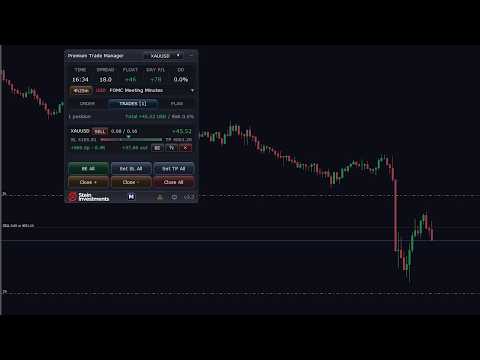
Premium Trade Manager puts a trading coach inside your chart, with a full execution engine underneath it. Set the trade up the way you always do, then let Max, your AI trading coach, read that exact setup against your live account and give you a straight verdict before you commit: is the stop disciplined, is the risk sane, is a high-impact release minutes away, are you near a prop-firm limit. Below sits the engine that runs everything after the click: one-click risk-sized entry, a plan you drag on the chart and can still move once the trade is live, up to four partial take-profits, seven ways to trail, live prop-firm compliance, a news guard, and a spread that grades its own cost. You make the call. Max gives it a second look. The panel handles the rest.
Try it hands-on before you buy. Click through the live panel right in your browser, the fastest way to feel how it works before you own it. stein.investments/products/premium-trade-manager
AT A GLANCE
- Max, the coach in your chart: a pre-trade check on the exact trade you have set up, in your own language
- Spread Intelligence: the true cost of every market, graded on the instrument's own terms
- Risk-sized entry: one-click BUY and SELL, position size worked out from your stop
- On-chart planning: drag entry, stop and target, watch the risk update live
- Targets you can still move: every level sits on the chart, draggable while the trade runs
- Exit on autopilot: up to four partial take-profits and seven ways to trail
- Prop compliance, live: eight forex prop firms, every limit on a bar in the panel
- News guard: a live calendar, events scored by real impact
- One instance, every chart: manage your whole book from a single panel
You make the call. Max gives it a second look. The panel runs the rest. The detail on each of these is below.
Buy once, keep it. Your purchase price is locked for life, and every future update is free, major releases included.
MAX, THE COACH IN YOUR CHART · A SECOND PAIR OF EYES BEFORE YOU COMMIT
Every other trade manager on the market executes your click. Premium Trade Manager weighs it first. A standard panel can size a lot and place an order, but it cannot tell you that your 15-pip stop sits right in front of a high-impact release, that your risk has drifted above what your prop firm allows today, or that the stop is too tight for how this symbol moves. Max can, because he reads the real numbers behind the trade you have on the chart.
Set the trade up, drag the lines, see the risk. Then, instead of clicking Execute, click the Max button next to it. Max takes the planned order and your live account with it, and returns a clear verdict on this exact trade: whether the stop is disciplined, whether the risk is sane against your account and your daily limit, whether a high-impact event is close enough to matter, and how much room your prop limits still leave. When it is clean, he keeps it short and tells you to press Execute. When something is off, he names it in plain language and leaves the decision to you. The trade you would have taken on autopilot now gets a second look, on every entry, for the price of one click.
Max greets you by name, answers in your own language, and remembers the conversation. The read is grounded in your balance, your risk setting, your stop source, the next event on your calendar and your prop status, not in generic advice. The coach is part of an active Stein Investments membership; the trade panel itself is yours with the one-time purchase.
SPREAD INTELLIGENCE · KNOW THE TRUE COST OF EVERY MARKET
The spread is a tax on every trade, and what counts as wide is not the same on EURUSD as it is on gold or a crypto pair. Premium Trade Manager reads the spread on each instrument's own terms. It learns what a normal spread looks like on the symbol you trade, flags one that runs unusually wide right now, and grades the cost so a glance tells you whether a market is cheap, fair, expensive, or simply too costly to trade. A market like gold, with a naturally wider spread, reads correctly instead of sitting on a permanent warning. And when a trade is on the chart, the panel shows how much of your stop the spread is eating, so the real cost is in front of you before you commit.
RISK-SIZED ORDER ENTRY · YOUR RISK, THE TOOL'S ARITHMETIC
Set the risk you want, a percent of the account or a fixed lot, and Premium Trade Manager calculates the position size from your stop distance, every time, down to the broker's lot step. BUY and SELL are one click, and pending orders go the same way. A margin cap per trade keeps a fat-finger entry from over-leveraging the account. Every send is visible while it happens: the panel shows the broker round-trip live and locks the buttons until the broker confirms, so a click never fires twice. If MetaTrader's algo-trading permission is off, the panel names the exact layer that blocks the order and the fix, right in the Order tab.
TRADE PLANNING ON THE CHART · SEE THE TRADE BEFORE YOU COMMIT
Entry, stop and target appear as lines on the chart. Drag them where you want them and watch the position size and the money at risk update live. The stop can come from several sources: Smart Stop places it on the chart's structural swing points, FX Trend reads the trend, ATR adapts to each symbol's volatility, or you drag it on the chart or fix it in points. The sources run as a fallback chain, and the chart label tells you which one actually placed your stop. Attach the panel to any symbol and it works without re-tuning.
Anything that speaks against the trade lands where you are about to click: a card directly under the Execute button, one finding per line. Amber is worth knowing, red is worth stopping for, and the card carries the highest severity present. Spread, trend, news and your daily loss are all read on the trade you have actually set up, not in general. When nothing speaks against it, no card appears and the chart stays quiet.
PARTIAL TAKE-PROFITS AND TRAILING · BANK PROFIT, LET THE REST RUN
Take profit as a single target, or split the exit into up to four partial levels, each with its own reward multiple and close percentage, and the panel scales the position out automatically as each level is reached. Once profit is banked, the trailing stop carries the remainder: choose Break-Even, Classic, Step, ATR, PSAR, FX Trend or Smart Stop, each configured on its own. Trailing and partials keep running for as long as the panel is on the chart.
Your levels are measured against the risk you took at entry, never against wherever the stop sits right now. That one decision is what lets you trail a stop up under structure without a target firing early: a level is where you put it, and it stays there. If you would rather have the target track the stop at a constant reward ratio, a single setting turns that back on.
MANAGING AN OPEN TRADE · THE PLAN STAYS IN YOUR HANDS
Most panels go quiet the moment you click. This one keeps the plan in front of you. Every level stays on the chart on its own line: each partial labelled with its share, its reward multiple, its distance and what it pays in your account currency, and the stop labelled with what it costs you. You can read what your plan is worth without opening a single dialog. Click a marker to hide a line, and the chart is as quiet as you want it.
Grab any level and drag it. The line follows, and the reward multiple, the pips and the money move with it while you are still holding it. Let go and the level is set. A level you placed by hand stays exactly where you put it. Drag the stop beyond your entry and its label turns green and shows you what it now secures.
The plan belongs to the trade, not to the chart. Switch symbol, switch timeframe, reload the panel or change your settings later, and an open trade keeps the targets you gave it; settings shape the next trade, not the one already running. With several orders on one symbol, every stop and target line carries its own tag with direction and lot size, so you always know which line belongs to which order.
PROP-FIRM COMPLIANCE · YOUR PANEL KNOWS THE RULES
A prop challenge rarely fails for lack of knowledge. You know the rule, but it fails because the number gets worked out in your head, mid-trade, under pressure, against the wrong anchor. Premium Trade Manager does that math for you, live, and Max factors it into every pre-trade check. Pick your firm, program and account size in three steps, across eight of the most-used forex prop firms: FTMO, FundedNext, FundingPips, The 5%ers, The Funded Trader, Alpha Capital, E8 Markets and Goat Funded Trader, with every program and account size each one offers.
The PROP tab shows your live distance to each limit as a bar: the daily loss, the max drawdown measured exactly as your firm measures it, the profit target in the Eval phase, and a minimum-trading-days counter. Green while there is room, amber to warn, red at the limit. When a hard limit is reached, the EXECUTE button turns to BLOCKED and the order that would breach it is stopped before it reaches the broker. Prop firms change their rules, so the values refresh over a secured channel without an EA update. A standalone daily-loss limit is there for any account: hit it and the panel closes its own positions and locks trading until the next session.
NEWS INTELLIGENCE · EVENTS SCORED BY REAL IMPACT
Premium Trade Manager carries a live economic calendar and blocks new entries inside a window you set around high-impact events. Instead of trusting a fixed label, it re-measures each event against how the market actually reacted to it, and keeps a separate impact scale for gold. An event the calendar calls high impact that the market routinely shrugs off stops costing you setups; an event that punches above its label gets the caution it deserves. And because Max reads the same calendar, the release at half past the hour shows up in your pre-trade check, not in your stop-out. Since version 3.2 the guard also reaches the trade that is already open. Hard Close on News stays off until you switch it on: give it a lead time in minutes and a scope, every position the panel manages or only the currency of the release, and it closes those positions and deletes their pending orders before the event lands. Both the entry block and the hard close run on that measured scale, the releases the market actually moved on, whatever colour a calendar gives them.
MULTI-SYMBOL MODE · ONE INSTANCE, EVERY CHART
In All-Symbols mode a single panel manages every position that carries its magic number, across every symbol you trade: trailing, partials and bulk actions all reach the whole portfolio from one chart. Prefer an instance to stay on its own symbol? Switch it to Chart Only. The magic number is yours to set, so the panel can manage trades that came from elsewhere: point it at 0 for the trades you place by hand in MetaTrader, or at another EA's number to manage its positions. Run two instances on the same magic number and the tool warns you on start, so two panels never fight over the same trade. When several positions are open, the bulk actions manage them in one move: break-even all, set the stop or the target on all, close every winner, close every loser, or close all.
THE PANEL · EVERYTHING ON ONE SURFACE
Every control lives in the on-chart panel: order entry, the settings tabs, the bulk actions, the Max drawer, and a live read of the day's profit, loss and drawdown for the trades the tool manages. Settings are edited in the panel and saved per chart. A glass design, light and dark themes and a panel zoom round it off.
SUGGESTED WORKFLOW
- Attach Premium Trade Manager to a chart: one instance in All-Symbols mode manages everything you trade.
- Set your risk: a percent of the account, or a fixed lot. The panel sizes every order from there.
- Pick your prop preset: if you trade a funded account, set firm, program and account size once.
- Plan the trade: drag entry, stop and target on the chart and read the live risk figure and the spread cost.
- Ask Max: one click gives you a second read before you commit.
- Execute and let the panel manage it: partials scale out, the stop trails, the news guard holds new entries, and the PROP tab keeps every limit in view.
KEY FEATURES
- Max, your AI trading coach, built into the panel: a pre-trade check on the exact trade on your chart, in your own language, grounded in your live account
- Spread Intelligence: the spread graded per instrument, from cheap to too costly, plus its cost as a share of your stop on the live trade
- One-click BUY and SELL with automatic risk-based lot sizing, in percent or fixed lot, with a margin cap per trade
- Draggable entry, stop and target lines with a live risk readout
- Stop from Smart Stop pivots, FX Trend, ATR, dragged or fixed in points, with a fallback chain and a source label
- Up to four partial take-profit levels with automatic scale-out, each drawn on the chart with its share, reward multiple, distance and money
- Every level draggable while the trade runs, with the numbers following as you move it
- Targets measured against your entry risk, so trailing your stop never fires a partial early
- Pre-trade findings as a card under the Execute button, one per line, ranked by severity
- Risk per open trade in your account currency, and a stop that shows what it secures once it is past your entry
- Seven trailing methods: Break-Even, Classic, Step, ATR, PSAR, FX Trend and Smart Stop
- Prop-firm compliance: eight forex firms, Eval and Funded modes, live bars for daily loss, max drawdown, profit target and trading days, with a hard block on the order that would breach a limit
- Prop rules refresh over a secured channel, no EA update when a firm changes a limit
- News intelligence: a live economic calendar with impact-scored blackout windows
- Multi-Symbol mode: one instance manages every chart, or restrict it to one
- Live order visibility, bulk actions across the book, and a standalone daily-loss auto-close
- Glass design with light and dark themes, works on any broker symbol and any MetaTrader 5 build
SUPPORTED MARKETS
Premium Trade Manager works on every symbol your broker offers, and the spread grading and the ATR-based stop adapt to whatever you trade:
- Forex · all majors, minors and crosses
- Indices · US30, US500, NAS100, DE40, UK100, JP225 and more
- Metals · Gold and the other metals your broker lists
- Crypto and CFDs · BTCUSD, ETHUSD and the instruments your broker provides
All standard timeframes are supported. Premium Trade Manager runs on live charts for real-time trading.
GETTING STARTED
- Buy Premium Trade Manager on the MQL5 Market and MetaTrader 5 downloads it to your Experts folder automatically.
- Allow the addresses you will use under Tools > Options > Expert Advisors: https://revden.io for the live news calendar and the automatic prop-rule updates, and https://stein.investments for Max, the coach. The panel shows the exact address for each on first start.
- Drag it onto any chart and the panel loads ready to use.
- Set your default risk and, if you trade a funded account, your prop preset.
- Redeem the two months of membership that come with your purchase: your copy prints an activation code to the Experts log, and stein.investments turns it into your membership.
- For the coach itself, paste your Max API key from your Stein Investments profile into the panel's Max setting, then ask Max before any trade. The activation code and the API key are two different things: the code buys you the membership, the key lets the panel talk to Max.
NOTES
- Max, the AI coach, requires an active Stein Investments membership. The trade panel and all of its execution features are yours with the one-time purchase and work on their own.
- Premium Trade Manager is a manual trading tool for the live chart. The free demo also runs in the Strategy Tester with the full panel, so you can click your way through it before you buy; it needs terminal build 6090 or newer. The news calendar and Max both work off a live connection and stay quiet in the Tester.
You make the call. Max gives it a second look. The panel runs the rest. That is Premium Trade Manager.






























































The Premium Trade Manager is an outstanding risk management solution designed for traders who view risk control as one of the most important parts of the trading process. For me personally, it brings a powerful sense of psychological ease — every position is managed from start to finish according to the exact risk parameters I’ve set, and I only need to define those parameters once. Every trade thereafter is handled automatically and consistently. One feature that truly stands out is its ability to manage all positions sharing the same magic number from a single chart. There’s no need to attach the manager to multiple charts, which is absolutely priceless in my workflow. Combined with its other advanced and forward-thinking capabilities, this tool has become an essential part of my trading setup.