Lucky Trade Panel MT5

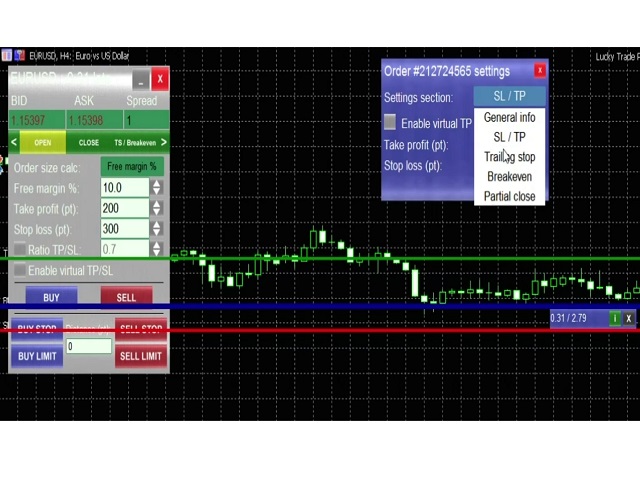
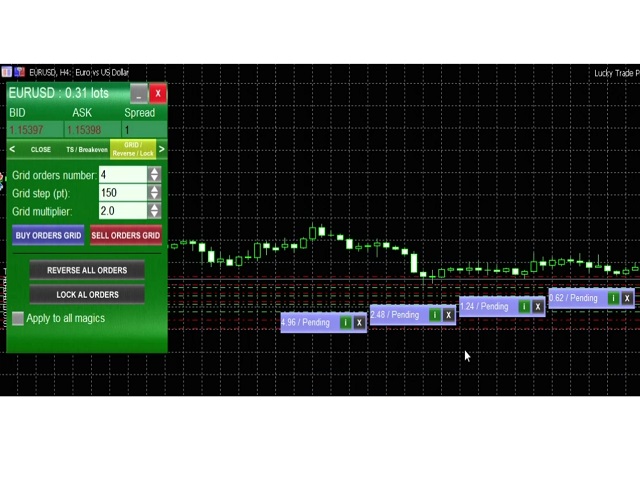
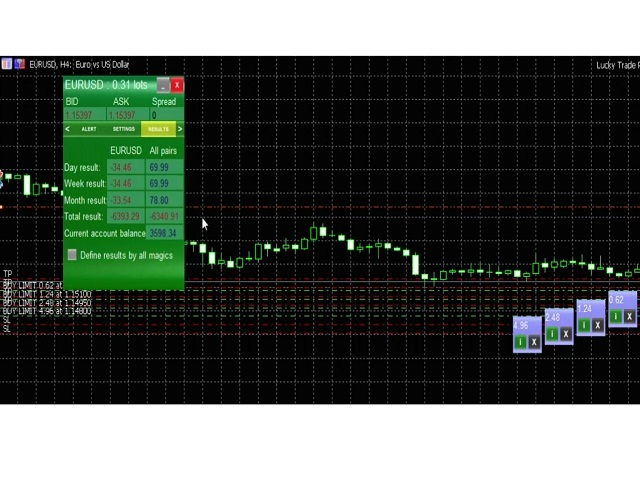
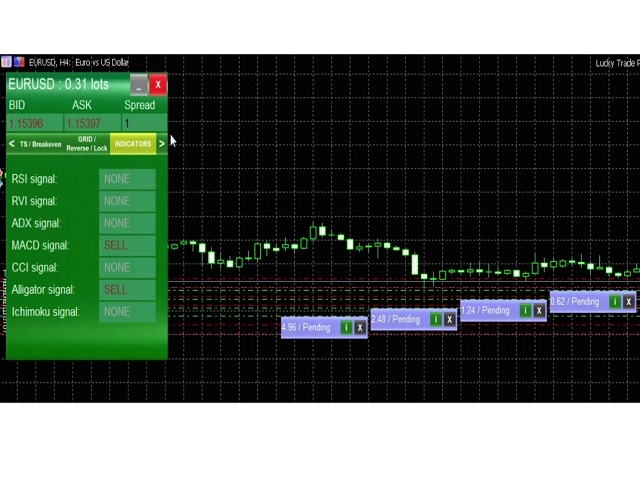
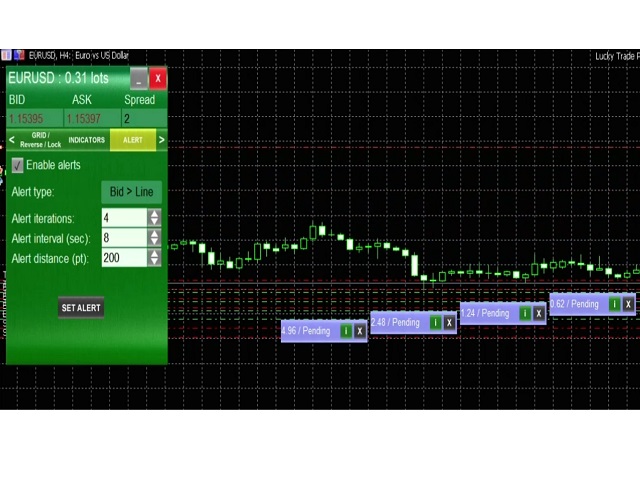
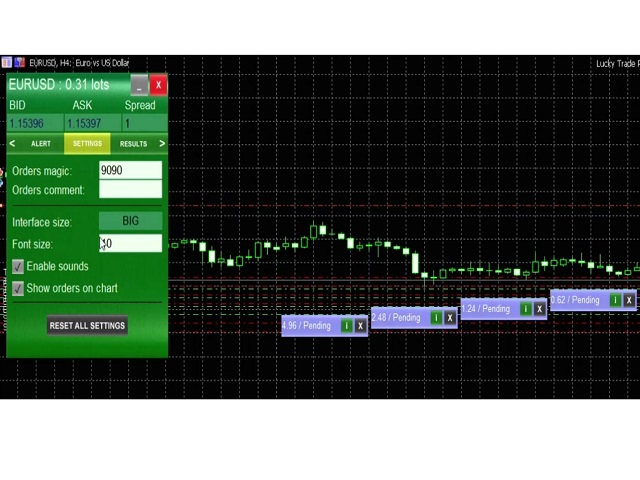
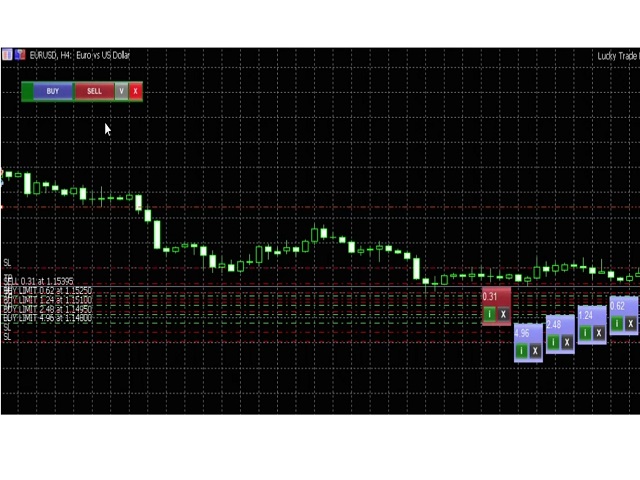
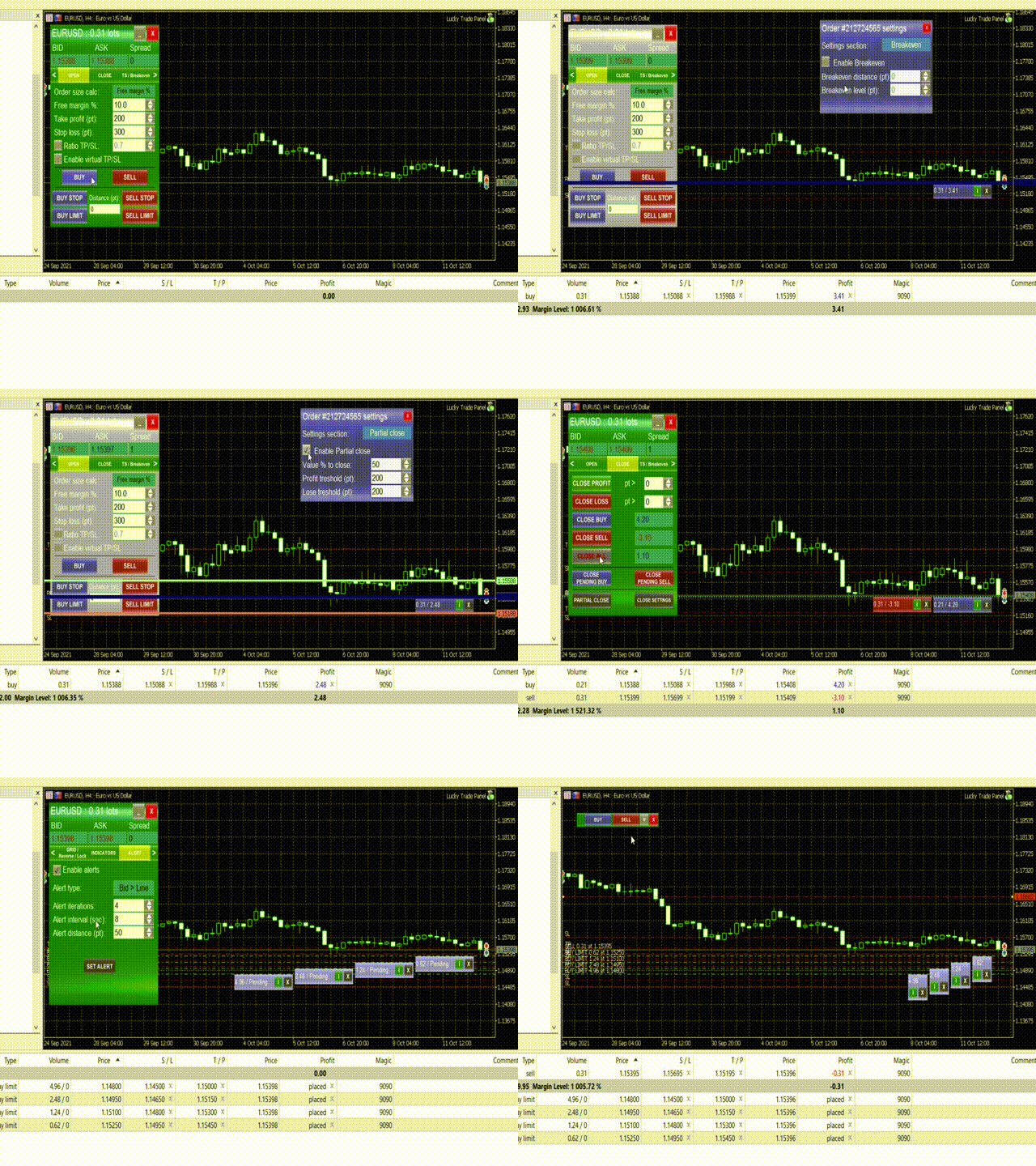
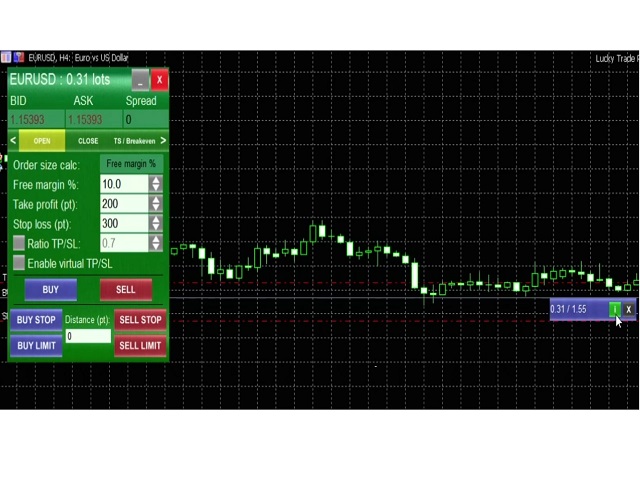
Trading panel for manual trading. Has a fairly wide functionality. Allows you to automatically calculate the order size, open both market and pending orders. It has a wide range of options for closing orders, it is possible to partially close orders, close orders after reaching a certain profit or loss, separately close profitable and unprofitable, buy and sell, as well as pending orders. The panel also contains a simple implementation of a grid of pending orders, reverse and lock functions, trailing stop and breakeven. Also, using this panel, you can view summary information on the results of trading on your account.

You can try free version of the panel for EURUSD only here - Demo version

MT4 version

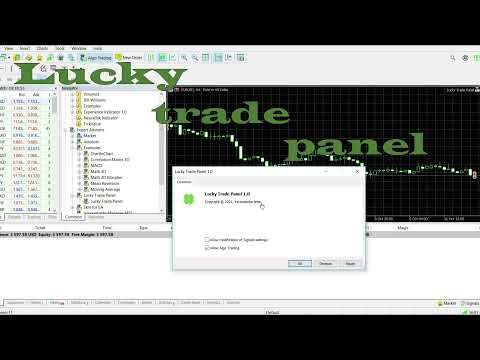
The trading panel cannot be tested in the strategy tester. Before using, I recommend watching the video.
Recommended products
Spread Analysis Utility MT5
AL MOOSAWI ABDULLAH JAFFER BAQER
• Please test the product in the Strategy Tester before purchasing to understand how it works. • If you face any issues, contact me via private message—I’m always available to help. • After purchase, send me a screenshot of your order to receive a   FREE EA   as a gift. Spread Analysis Utility MT5 – Monitor & Analyze Broker Spreads in Real Time! Do you want to track your broker's spread fluctuations with precision? Spread Analysis Utility MT5 gives you real-time insights into the spread behavio
The Ultimate All-In-One Trade Manager & Prop Firm Guardian for MT5. Nexus Pro Trade Manager is the most advanced, all-in-one trading assistant designed for both manual traders and Prop Firm challengers. Featuring a stunning, lag-free UI (Dark/Light mode), it completely transforms your MT5 into a professional trading terminal. Whether you are trading a personal account or trying to pass evaluations for FTMO, FundedNext, or other prop firms, Nexus Pro protects your capital, automates your risk cal
Lot Size Calculator, Risk Manager and Trade Panel for MetaTrader 5 Lot Size Calculator Risk Manager Panel MT5 (This is the free edition of Lot Architect PRO ) is a trading utility for MetaTrader 5 that combines a lot size calculator, position size calculator, risk manager and trade panel in one chart-based interface. The utility calculates position size from a selected risk value and displays the planned trade information before order execution. Entry, Stop Loss and Take Profit levels can be en
FREE
| Fully-automated Smart Money Concept (ICT) inspired trading solution with multi-strategy capabilities | Built by a grid trader >> for grid traders.  This is MT5 version, click  here  for  Blue CARA MT4  (settings and logics are same in both versions)     Real monitoring signal  -->  Cara Gold Intro Blue CARA EA   ('CARA') - short for  C omprehensive  A lgorithmic   R esponsive   A dvisor is a next-gen  multi-currency    multi-timeframe  EA base on the widely known (and perhaps the most popul
Wulf BTC Bot
Riaan Adriaan Swanepoel
Wulf BTC Bot is a high-precision automated algorithmic trading system engineered for Bitcoin (BTC) on the H1 timeframe. It leverages a robust entry logic combining cyclical momentum and trend exhaustion via the Schaff Trend Cycle (STC) , dynamic breakout boundaries ( Lowest/Highest Price channels), and volatility-adaptive exits powered by ATR . The Expert Advisor is 100% Standalone , packing all custom indicators and math engines directly inside the .ex5 binary, requiring zero external dependenc
Easy Trade Executor is a tool for fast position sizing, trade execution, and trade management in MT5. Place Open Price, Stop Loss, and Take Profit levels directly on the chart, get automatic position size calculations, and open trades with controlled risk in just a few clicks. Why Easy Trade Executor? Easy Trade Executor is designed for traders who want more than just risk calculations — they want to manage trades quickly and efficiently directly from the chart. The tool combines position sizi
Stormer RSI 2
Ricardo Rodrigues Lucca
This strategy was learned from Stormer to be used on B3. Basically, 15 minutes before closing the market, it will check RSI and decided if it will open an position. This strategy do not define a stop loss. If the take profit reach the entry price it will close at market the position. The same happens if the maximal number of days is reached. It is created to brazilian people, so all configuration are in portuguese. Sorry Activations allowed have been set to 50.
DYJ Game Device
Daying Cao
5 (1)
DYJ Game Device   is an EA , It has a graphical interface operation,It includes manual opening and quick closing buttons or mobile opening buttons. that follows the virtual transaction record of any dyj indicator to actually open and close positions. You can follow orders according to 5 major strategies Trend mode: Accept the profit and loss ratio assigned to each trader by the market at the close of each day. The actual operation is 1 order each time, with a fixed number of lots each time, such
Manus Pro
Itumeleng Mohlouwa Kgotso Tladi
MANUS PRO EA The Trading Revolution You've Been Waiting For Are you TIRED of watching other traders make consistent profits while your account bleeds red?   The financial markets don't wait for anyone – and neither should you. MANUS PRO isn't just another Expert Advisor... it's your   TICKET TO FINANCIAL FREEDOM . Why MANUS PRO is Different (And Why Everyone's Talking About It) FOR BEGINNERS: Your Trading Mentor That Never Sleeps Zero Learning Curve   – Install, activate, and watch it wo
NHS Risk Manager PRO NHS Risk Manager PRO is a professional trade-management and risk-control Expert Advisor for MetaTrader 5, built around one core idea: protect the account first, execute with precision second . At its center is a dedicated prop-firm compliance framework that tracks the rules that actually get funded accounts disqualified — daily drawdown, total drawdown, profit targets, and minimum trading days — and enforces them automatically instead of relying on the trader to remember the
Exclusive EA for FOREX HEDGE account The EA (FuzzyLogicTrendEA) is based on fuzzy logic strategies based on the analysis of a set of 5 indicators and filters. Each indicator and filter has a weight in the calculation and, when the fuzzy logic result reaches the value defined in the EA parameter, a negotiation is opened seeking a pre-defined gain. As additional functions it is possible to define maximum spread, stop loss and so on . Recommended Symbol: EURUSD, AUDUSD, GBPUSD, NZDUSD, USDCAD, AU
Short Description A professional MT5 trade management dashboard for managing open trades, risk, trailing stop, break-even, partial close, daily loss guard and trade history directly from the chart. Full Description Smart Trade Manager Dashboard MT5 is a professional trade management panel built for traders who want faster control, clearer account visibility and stronger risk discipline directly from the chart. It is not a signal system and it does not open trades automatically. The dashboard foc
User Manual Buy Trading Utility, Get 2 indicators FREE ! After purchase contact me for your " TWO indicators GIFT (Any one you want) ", adding you in group. Trading Utility MT5 The manual trader's cockpit. Size every trade by risk, place it from the chart, and manage it without ever opening the order dialog. Eight tabs, seven trailing engines, and every stop and target draggable with one click. One panel between you and the order window. Risk-sized entries, draggable stops, seven trailing modes
Broker Analysis Utility MT5
AL MOOSAWI ABDULLAH JAFFER BAQER
• Please test the product in the Strategy Tester before purchasing to understand how it works. • If you face any issues, contact me via private message—I’m always available to help. • After purchase, send me a screenshot of your order to receive a   FREE EA   as a gift. Broker Analysis Utility – Your Ultimate Broker Performance Monitor! Get Full Transparency on Your Broker's Execution Quality! Are you a trader who values precision, transparency, and performance? Broker Analysis Utility is an es
This tool will perform Trailing stop loss and Break even management for orders. Helps you limit or reduce the time spend watching orders on the screen, especially when you need to go to sleep. Just add this EA to 1 chart, you can manage all pairs. You can filter orders by comment, magic number, symbol and order ticket number. When Breakeven it can add shift/offset pips (to cover the commission...). You can try in strategy tester before purchase. The EA will add Buy and Sell alternately, so you
PROMO: ONLY 10 LEFT AT $90! Next price:        $199 Price will be kept high to limit number of users for this strategy. This EA starts trading at the open of   London (UK) Session . It is based on analysis of advanced statistical distributions combined with short to medium term reversal patterns which have mean-reversion attributes. The EA includes several smart features and allows you to trade with a fixed or automatic lot size. The EA is not sensitive to spreads but can be backtested on both
Key Benefits at a Glance: Lorentzian ML signal generation Majority voting across 3 timeframes Automatic market regime detection Smart equity recovery with group profit targets 1% risk‑based adaptive lot sizing ATR‑based dynamic SL/TP & trailing Emergency drawdown cut Live on‑chart info panel Hybrid Lorentzian Gold ML EA v2.0 – Intelligent Adaptive Trading for XAUUSD Next‑Gen Machine Learning Core A Lorentzian KNN classifier analyzes 5 normalized features (RSI, WaveTren
FREE
Scalping bot for the gold/dollar pair (XAU/USD) — a powerful and versatile solution for traders, designed to deliver maximum efficiency in a dynamic market. This bot is specifically engineered for scalping: it analyzes price changes and places trades even before significant market movements begin. This allows it to secure advantageous positions early and capitalize on even the smallest market fluctuations. Key Features: Flexibility: Adapts to any market conditions and suits your trading strategy
Aegis DAX Scalper EA is a MetaTrader 5 Expert Advisor designed for short-term trading on GER40/DAX40. The system combines a M5 trend filter with M1 pullback entries, RSI confirmation, candle structure analysis, spread filtering, volatility filtering and automated trade management. The EA does not use grid, martingale or recovery basket logic. Each trade is opened with a real stop loss and managed through break-even and trailing stop rules. Version 1.01 includes improved compatibility with di
Viking Alpha DAX Ivar Edition
Valdeci Carlos Dos Passos Albuquerque
Viking Alpha DAX — Germany 40 Expert Advisor for MetaTrader 5 LAUNCH PROMO Only 10 copies at launch price. Price increases with each sale. Launch price: $297 Next price: $497 Final price: $997 Live Performance: FX Blue — Vikingtradingbots What Makes Viking Alpha DAX Different Most DAX robots fail for one simple reason: they treat the Germany 40 like a forex pair. It isn't. The DAX has a heartbeat — a specific rhythm tied to the Frankfurt Stock Exchange opening, the European session structure, an
Trade Panel Pro — Professional Risk Management & Order Execution Terminal for MetaTrader 5 Trade Panel Pro is an advanced, all-in-one utility for MetaTrader 5, designed for active day traders and professionals. It combines precise risk calculation with lightning-fast order execution, helping you protect your capital and manage multi-target trades with ease. Main Advantages and Key Features Automated Lot Calculation: Forget manual volume calculations! The panel instantly calculates the exact
BulkOp Trade Manager
Ahmed Jumaa Saif Ali Almheiri
BulkOp Trade Manager Trade faster. Manage smarter. Close with confidence. BulkOp Trade Manager is a powerful MT5 utility EA built for traders who need speed, control, and clean execution directly from the chart. It is designed for active manual traders, scalpers, gold traders, and anyone who wants to manage multiple positions with less delay and fewer clicks. Why BulkOp? Ultra-fast Buy and Sell execution One-click Bulk Close Profit One-click Bulk Close Loss Keyboard trading control Bulk order e
GoldEdge
Andrii Hurin
GoldEdge – Turn Gold’s Volatility Into Your Edge GoldEdge is a professional, fully automated Expert Advisor built exclusively for trading XAU/USD (Gold) . It merges multi-timeframe market structure analysis , precise price action setups , and trend confirmation filters to deliver high-probability trades with built-in risk management . Whether you prefer aggressive scalping or conservative swing trading , GoldEdge adapts to your style while protecting your capital. Key Advantages Engineered
Recovery Assistant Pro for MT5 Professional Manual Recovery Trading Assistant Recovery Assistant Pro is a powerful and easy-to-use Manual Trading Assistant EA. Helps calculate the appropriate Lot Size . Designed to help traders recover losing positions back to profit based on the desired Target USD . Reduces the complexity of Recovery calculations and minimizes errors caused by manual calculations. With a beautiful and user-friendly trading panel (shown above), you can control your trades qu
## Product Title ``` SuperDOM — Advanced Depth of Market Trading Panel ``` --- ## Short Description  ``` Professional SuperDOM panel for MT5. Interactive price grid with one-click BUY/SELL/FLAT, pending orders on any level, Trailing Stop (ATR or fixed), and 5 draggable info panels. Works with US Stocks, CFDs, Metals, Indices and B3. Auto-detects resolution (4K/2K/FHD/HD). ``` --- ## Full Description  ### Overview SuperDOM is a professional Depth of Market trading panel for MetaTrader 5.
ProTrade EA
Jim Ariel Camarce Ignao
Key Features   Automated Candle Pattern Recognition 10 Professional Patterns : Detects Bullish/Bearish Engulfing, Hammer/Shooting Star, Morning/Evening Star, Piercing/Dark Cloud, and 6 additional professional candlestick patterns Smart Filtering : Combine multiple patterns with configurable confirmation logic Volume Confirmation : Optional volume filter to validate pattern strength Multi-Timeframe Analysis : Separate execution and bias timeframes for better timing   Trading Dashboard Int
Trade Assistant 38 in 1
Makarii Gubaydullin
4.91 (23)
Multifunctional tool: Lot Calculator, Grid Orders, R/R ratio, Trade Manager, Supply and Demand zones, Price Action and much more Demo version   |   User manual Trade Assistant   doesn't work in the strategy tester : you can download the   Demo Version HERE  to test the utility . Contact me   for any questions  / ideas for improvement / in case of a bug found If you need a MT4 version, it is available here Simplify, speed up and automate your trading   process . Expand the standard terminal capa
ID Trade_Bot BS - an effective tool for automated trading using RSI Trade_Bot BS is an efficient solution for automated trading based on RSI, allowing flexible parameter customization and risk management. Thanks to the ability to choose a trading mode, dynamic Stop-Loss and Take-Profit levels, and trading mode adjustment (buying, selling, or both), it is suitable for various trading strategies. Key Features: Uses the RSI indicator to determine market conditions. Automatically opens an
GoldEdge Quantum Grid Scalper
Vittaya Klangpimanarkart
Short Description A smart grid scalping system designed to generate consistent profits from market fluctuations, combining precision entries with adaptive grid recovery and controlled risk management. Full Description GoldEdge Grid Scalper Pro is a high-efficiency trading system built to capitalize on small price movements using a structured grid and precision scalping logic. Unlike traditional grid systems that carry high risk, this EA is engineered with controlled exposure and intelligen
RiskCopilot
Carlos Adrian Feged Zapata
RiskCopilot Utility - Your Intelligent Trading Assistant "See Your Risk. Master Your Trade." RiskCopilot Utility is the ultimate risk management and position sizing solution for MetaTrader 5. This comprehensive trading assistant provides real-time calculations, advanced risk assessment tools, and professional trade analytics without taking control of your trading decisions. Perfect for both novice and professional traders seeking precise risk management across all asset classes. You focus on yo
Buyers of this product also purchase
Trade Assistant MT5
Evgeniy Kravchenko
4.41 (216)
It helps to calculate the risk per trade, the easy installation of a new order, order management with partial closing functions, trailing stop of 7 types and other useful functions. Additional materials and instructions Installation instructions - Application instructions - Trial version of the application for a demo account Line function -   shows on the chart the Opening line, Stop Loss, Take Profit. With this function it is easy to set a new order and see its additional characteristics bef
Forex Trade Manager MT5
InvestSoft
4.98 (673)
Trade Manager MT5 is an advanced position size calculator and trade management tool for MetaTrader 5, designed to help traders plan trades faster, control risk more precisely, and manage open positions directly from the chart. It combines order placement, risk based lot calculation, Stop Loss and Take Profit management, Break Even, Trailing Stop, Partial Close, Equity Protection, and external trade management in one panel. Whether you trade forex, indices, metals, commodities, crypto, or future
TradePanel MT5
Alfiya Fazylova
4.88 (167)
Trade Panel is a multi-functional trading assistant. The app contains over 50 trading functions for manual trading and allows you to automate most trading tasks. Before making a purchase, you can test the demo version on a demo account. Download the trial version of the application for a demonstration account: https://www.mql5.com/en/blogs/post/750865 . Full instructions here . Trade. Allows you to perform trading operations in one click: Open pending orders and positions with automatic risk cal
Local Trade Copier EA MT5
Juvenille Emperor Limited
4.97 (146)
Experience exceptionally fast trade copying with the   Local Trade Copier EA MT5 . With its easy 1-minute setup, this trade copier allows you to copy trades between multiple MetaTrader terminals on the same Windows computer or Windows VPS with lightning-fast copying speeds of under 0.5 seconds. Whether you're a beginner or a professional trader, the   Local Trade Copier EA MT5   offers a wide range of options to customize it to your specific needs. It's the ultimate solution for anyone looking t
Astro Trade MT5
Indra Maulana
5 (2)
25% discount due to the launch of AstroTrade : 100$ >>> 75$ (Only for the first 10 purchases) AstroTrade Trading Assistant AstroTrade is a comprehensive multi-functional trading utility developed for the MetaTrader 5 platform. It integrates essential tools for trade execution, risk management, and technical monitoring into a single unified interface. The application is designed to assist traders in managing their daily operations through a visual and structured environment. Visual Trade Execu
================================================================================ POC BREAKOUT - V20.72. Full Professional Grade Toolkit ================================================================================ POC Breakout is a full MetaTrader 5 trading dashboard for discretionary traders who want breakout signals, Point of Control (POC) context, volume profiles, order flow, market structure, news, alerts, and advanced trade planning in one professional workspace. Attached directly to you
Beta Release The Telegram to MT5 Signal Trader is nearly at the official alpha release. Some features are still under development and you may encounter minor bugs. If you experience issues, please report them, your feedback helps improve the software for everyone. Telegram to MT5 Signal Trader is a powerful tool that automatically copies trading signals from Telegram channels or groups directly to your MetaTrader 5 account. It supports both public and private Telegram channels, and you can conn
Telegram to MT5 Multi-Channel Copier automatically copies trading signals from your Telegram channels directly into MetaTrader 5. No bots, no browser extensions, no manual copying. You receive a signal on Telegram and the EA opens the trade on your terminal in a few seconds. The product includes two components: a Windows application that listens to your Telegram channels, and this Expert Advisor that executes the signals on your MT5 terminal. An MT4 version is also available. Setup guide and app
Grid Manual MT5
Alfiya Fazylova
4.73 (22)
Grid Manual is a trading panel for working with grid strategies. The utility is universal, has flexible settings and an intuitive interface. It works with a grid of orders not only in the direction of averaging losses, but also in the direction of increasing profits. The trader does not need to create and maintain a grid of orders, the utility will do it. It is enough to open an order and the "Grid manual" will automatically create a grid of orders for it and will accompany it until the close. F
Trade copier MT5
Alfiya Fazylova
4.58 (52)
Trade Copier is a professional utility designed to copy and synchronize trades between trading accounts. Copying occurs from the account / terminal of the supplier to the account / terminal of the recipient, which are installed on the same computer or VPS . PROMOTION - If you have already purchased the "Trade Copier MT5," you can receive the "Trade Copier MT4" for free (for copying MT4 > MT5 and MT4 < MT5). For more detailed information about the conditions, please contact us via private message
Exp COPYLOT CLIENT for MT5
Vladislav Andruschenko
3.97 (35)
Professional Trade Copier for MetaTrader 5 Fast, professional, and reliable trade copier for MetaTrader . COPYLOT allows you to copy Forex trades between MT4 and MT5 terminals with support for Hedge and Netting accounts. COPYLOT MT5 version supports: - MT5 Hedge to MT5 Hedge - MT5 Hedge to MT5 Netting - MT5 Netting to MT5 Hedge - MT5 Netting to MT5 Netting - MT4 to MT5 Hedge - MT4 to MT5 Netting MT4 version Full Description +DEMO +PDF How To Buy How To Install How to get Log Files H
Telegram To MT5 Ultra
Mirel Daniel Gheonu
5 (4)
Telegram To MT5 — Signal Copier Turn the trading calls from your Telegram channels into real MT5 orders — automatically, on as many accounts as you like, with risk and rules fully under your control. Telegram To MT5 connects the VIP / signal channels you already follow on Telegram to your MetaTrader 5 terminal. A free companion desktop app reads the messages (even from channels that block bots), and this Expert Advisor executes them on your account — applying your own risk settings, symbol mappi
Premium Trade Manager - The Trade Panel With a Coach Built In Premium Trade Manager puts a trading coach inside your chart, with a full execution engine underneath it. Set the trade up the way you always do, then let Max, your AI trading coach, read that exact setup against your live account and give you a straight verdict before you commit: is the stop disciplined, is the risk sane, is a high-impact release minutes away, are you near a prop-firm limit. Below sits the engine that runs everything
Timeless Charts
Samuel Manoel De Souza
5 (8)
Timeless Charts is an all-in-one trading utility for professional traders. It combines custom chart types such as Seconds Charts and Renko with advanced order flow analysis using Footprints , Clusters , Volume Profiles , VWAP studies, and anchored analysis tools for deeper market insight. Trading and position management are handled directly from the chart through an integrated trade management panel , while Market Replay and Virtual Accounts provide environments for practicing trading skills and
Footprint Chart Pro — Professional OrderFlow EA for MetaTrader 5 Version 6.34 | Professional tool for real traders | Institutional-Grade Visualization DEMO USERS - PLEASE SELECT EVERY TICK / REAL TICK WHEN TESTING AND YOU HAVE DOWNLOADED HISTORICAL DATA. IF YOU SEE A WAITING SCREEN AND IT IS NOT DOWNLOADING, IT MEANS YOU HAVE LOW HISTORICAL DATA. TRY 1 MIN AND 5 MIN FIRST ON 1 DAY DATA. ONE DAY DATA SHOULD BE THE NEWEST AND MOST CURRENT DATE. PLEASE WAIT UNTIL THE MARKET HAS ROLLED OVER PERIOD.
Trade Copier Ultimate
Janitha Sandaruwan Amaradasa Wickramasingha Arachchilage
5 (4)
Trade Copier Ultimate - Telegram to MT5 Signal Copier Trade Copier Ultimate automatically copies Telegram trading signals into MetaTrader 5. The EA can read signal messages, detect the symbol, order type, entry price, Stop Loss, Take Profit levels and selected update commands, then execute or manage the trade in MT5 using your lot and risk settings. It is more than a basic Telegram to MT5 copier. TCU also supports Bot API and user-account Bridge workflows, Discord signal routing, local MT5 to MT
FarmedHedge Pair Trading Dashboard
Tanapisit Tepawarapruek
5 (3)
Farmed Hedge Yield Farming | All Markets (Manual - Hybrid - Semi/Automated EA) VERIFIED TRADING RESULTS - Farmed Hedge Yield Axi Copy:  https://www.mql5.com/en/signals/2356376 - Farmed Hedge Yield Exn Copy:   https://www.mql5.com/en/signals/2356404 - Farmed Hedge Yield V Copy:  https://www.mql5.com/en/signals/2357156 * Before purchasing, please feel free to send me a message if you have any questions about the product or setup. ** After purchase,  Contact me via private message to receive t
Global Investing FX Terminal
Santiago Nicolas Pla Casuriaga
The Global Investing FX Terminal is an all-in-one FX dashboard for MetaTrader 5 — CB policy rates, CFTC COT positioning, carry rankings, economic surprises, options skew, retail sentiment, and correlations, thirteen panels in total — rendered on a single zero-flicker canvas overlay and refreshing every 10 seconds from one attached EA. No external software required. Professional FX analysis requires simultaneous access to data that normally lives in separate platforms: rate derivatives, governmen
Signal Trading View to MT5 Pro
Mirel Daniel Gheonu
4.5 (2)
Signal TradingView to MT5 Pro  Instant professional execution between TradingView and MetaTrader 5 Automate your trading strategy with the most robust communication bridge between TradingView alerts and real execution in MT5. Designed for traders who demand speed, flexibility, and impeccable risk management, this Expert Advisor transforms any alert message into a precise market or limit order.   Install and TEST the TRIAL version HERE STRENGTHS AND ADVANTAGES Universal Parsing Engine (Propriet
Trading Chaos Expert
Gennadiy Stanilevych
5 (11)
This software has no equals in the world and represents a universal trade "console" covering trading signals, automated market entry, setting of Stop Loss and Take Profit, as well as Trailing Profit for multiple trades at the same time in a single open window. Intuitive control of the Expert Advisor in "three clicks" ensures a comprehensive use of all its functions on different computers, including tablets PCs. Interacting with additional signal indicators that mark the chart to give a real mark
Power Candles Strategy Scanner - Self-Optimizing Multi-Symbol Setup Finder Power Candles Strategy Scanner runs the same self-optimizing engine that powers the Power Candles indicator - on every symbol in your Market Watch, side by side. One panel tells you which symbols are statistically tradable right now, which strategy wins on each, the optimal Stop Loss / Take Profit pair, and pings you the moment a fresh signal fires. This tool is part of the Stein Investments ecosystem - 18+ tools plus Max
MT5 to Telegram Signal Provider turns your trading account into a signal provider. Every trade action, whether manual, by EA or from your phone, is instantly sent as a message to Telegram. You can fully customize the format or use a ready-made template for quick setup. [ Demo ] [ Manual ] [ MT4 Version ] [ Discord Version ]     New: [ Telegram To MT5 ] Setup A step by step user guide is available. Key Features Ability to customize order details sent to subscribers You can create a tiered subs
Custom Alerts AIO: All-in-One Market Scanner – No Setup Required Overview Custom Alerts AIO is the fastest and easiest way to monitor multiple markets for real-time trading signals—without any setup or extra licenses. It comes with all required Stein Investments indicators already embedded, making it the perfect plug-and-play solution for traders who value simplicity and performance. Just load it to any chart and start receiving alerts across Forex, Metals, Crypto, and Indices. Shares can be a
Welcome to ENTRY IN THE ZONE WITH SMC MULTI TIMEFRAME Entry In The Zone and SMC Multi Timeframe is a real-time market analysis tool based on Smart Money Concepts (SMC), designed to analyze market structure, price direction, and key trading zones. It supports both Single-Timeframe Analysis and Multi-Timeframe Analysis, providing a clearer view of the overall market structure across multiple timeframes, with real-time BUY / SELL signals that do not repaint. It is designed to help filter trading op
Trade Dashboard MT5
Fatemeh Ameri
4.95 (132)
Trade Dashboard simplifies how you open, manage, and control your trades, with built-in lot size calculation. It allows you to execute trades, manage risk, and control positions directly on the chart, with tools such as partial close, breakeven, and trailing stop. Designed to reduce manual work and help you stay focused on your trading decisions. A demo version is available for testing. Detailed explanations of features are provided within the MQL5 platform. Installation instructions are include
Trade Manager DaneTrades
Levi Dane Benjamin
4.23 (30)
DaneTrades Trade Manager is a professional trade panel for MetaTrader 5, designed for fast, accurate execution with built‑in risk control. Place market or pending orders directly from the chart while the panel automatically calculates position size from your chosen risk, helping you stay consistent and avoid emotional decision‑making. The Trade Manager is built for manual traders who want structure: clear risk/reward planning, automation for repeatable management, and safeguards that help reduc
Anchor Trade Manager
Kalinskie Gilliam
5 (7)
Anchor: The EA Manager Your EAs manage their own trades. Anchor manages the account around them. Anchor gives you one place to control your EAs, manage risk and decide when trading is allowed. Any EA, any vendor, any broker or symbol. No source-code changes required. The Problem Most EAs only know what they are doing. They cannot see when another EA is already trading, when several EAs open and are stacking risk or when the account has reached your loss limit. Even using just one EA, it may not
Working Demo Download Copy Cat More Trade Copier MT5 is a local trade copier and a complete risk management and execution framework designed for today’s trading challenges. From prop firm challenges to personal portfolio management, it adapts to every situation with a blend of robust execution, capital protection, flexible configuration, and advanced trade handling. The copier works in both Master (sender) and Slave (receiver) modes, with real-time synchronization of market and pending orders,
VirtualTradePad PRO SE MT5 — professional trading control center for MetaTrader 5 VirtualTradePad PRO SE is a premium chart-based trading panel and trade-management workspace for MetaTrader 5 . It is designed for traders who want faster execution, clearer position control, structured trade management, visual level planning and a professional workflow directly from the chart. This is not only a BUY / SELL panel. PRO SE combines manual trading, pending orders, position management, partial exits, b
YuClusters
Yury Kulikov
4.93 (43)
Attention: You can view the program operation in the free version  YuClusters DEMO .  YuClusters is a professional market analysis system. The trader has unique opportunities to analyze the flow of orders, trade volumes, price movements using various charts, profiles, indicators, and graphical objects. YuClusters operates on data based on Time&Sales or ticks information, depending on what is available in the quotes of a financial instrument. YuClusters allows you to build graphs by combining da
More from author
EasyGRID MT5
Nina Yermolenko
5 (1)
The utility places a grid of pending orders . You can select the number of orders in the grid, the step between orders, multiplier for the order size, SL and TP levels, magic number etc. If you use a profit bucket , please note that it applies to all orders on the current currency pair with the current magic. If you want to use several grids with independent profit buckets at the same time, run several copies of the utility and specify different magics in the settings. MT4 version of the utility
FREE
EasyReverse MT5
Nina Yermolenko
5 (1)
Utility for order reversal. Closes orders on the chart on which it is launched and opens orders with the opposite direction instead of them. Has a simple and intuitive graphical interface. It is also possible to automatically reverse newly opened orders. MT4 version of the utility-  https://www.mql5.com/en/market/product/74771 If you like this utility, take a look at my other products - https://www.mql5.com/en/users/nina_yermolenko/seller
FREE
EasyClose MT4
Nina Yermolenko
4 (1)
A simple and convenient utility for closing orders. It can close both all orders together as well as buy, sell or pending orders separately. Has an intuitive graphical interface. MT5 version of the utility -  https://www.mql5.com/en/market/product/78599 If you like this utility, take a look at my other products -   https://www.mql5.com/en/users/nina_yermolenko/seller
FREE
EasyGRID MT4
Nina Yermolenko
5 (8)
The utility places a grid of pending orders. You can select the number of orders in the grid, the step between orders, multiplier for the order size, SL and TP levels and the magic number. If you use a   profit bucket , please note that it applies to all orders on the current currency pair with the current magic. If you want to use several grids with independent profit buckets at the same time, run several copies of the utility and specify different magics in the settings. MT5 version of the ut
FREE
Utility for order reversal. Closes orders on the chart on which it is launched and opens orders with the opposite direction instead of them. Has a simple and intuitive graphical interface. It is also possible to automatically reverse newly opened orders. MT5 version of the utility -  https://www.mql5.com/en/market/product/74770 If you like this utility, take a look at my other products -   https://www.mql5.com/en/users/nina_yermolenko/seller
FREE
EasyClose MT5
Nina Yermolenko
5 (1)
A simple and convenient utility for closing orders. It can close both all orders together as well as buy, sell or pending orders separately. Has an intuitive graphical interface. MT4 version of the utility -  https://www.mql5.com/en/market/product/78601 If you like this utility, take a look at my other products -   https://www.mql5.com/en/users/nina_yermolenko/seller
FREE
Trading panel for manual trading. Has a fairly wide functionality. Allows you to automatically calculate the order size, open both market and pending orders. It has a wide range of options for closing orders, it is possible to partially close orders, close orders after reaching a certain profit or loss, separately close profitable and unprofitable, buy and sell, as well as pending orders. The panel also contains a simple implementation of a grid of pending orders, reverse and lock functions, tr
FREE
Trading panel for manual trading. Has a fairly wide functionality. Allows you to automatically calculate the order size, open both market and pending orders. It has a wide range of options for closing orders, it is possible to partially close orders, close orders after reaching a certain profit or loss, separately close profitable and unprofitable, buy and sell, as well as pending orders. The panel also contains a simple implementation of a grid of pending orders, reverse and lock functions, tr
FREE
This utility is a graphical shell for other Expert Advisors that do not have their own graphical shell or whose graphical shell you do not like. Just run the utility on a free chart of any currency pair, specify in the input parameters the "Magic Number" of the advisor to which you want to connect the utility, and a graphical shell will appear on the graph, containing information about the traded currency pairs, current positions and trading results of your advisor. If you like this utility, tak
FREE
EasyLock MT5
Nina Yermolenko
The utility opens an order in the opposite direction from already open positions on the currency pair on which it is launched, creating a lock of orders. The utility has a simple interface and is easy to use. MT4 version of the utility -  https://www.mql5.com/en/market/product/78127 If you like this utility, take a look at my other products -   https://www.mql5.com/en/users/nina_yermolenko/seller
FREE
Skin for EA MT4
Nina Yermolenko
5 (1)
This utility is a graphical shell for other Expert Advisors that do not have their own graphical shell or whose graphical shell you do not like. Just run the utility on a free chart of any currency pair, specify in the input parameters the "Magic Number" of the advisor to which you want to connect the utility, and a graphical shell will appear on the graph, containing information about the traded currency pairs, current positions and trading results of your advisor. If you like this utility, ta
FREE
Account Info Manager (AIM)   is a utility designed to view information on the results of the work of advisors on a trading account. The utility can group orders by their magics or comments, thereby making it possible to analyze separately the results of the work of each Expert Advisor that traded on the account. Using this utility, you can view information on the number of orders opened by the advisor, percentage of winning orders, profit value, profit factor, average order size, maximum drawdo
Lucky Trade Panel MT4
Nina Yermolenko
5 (1)
Trading panel for manual trading. Has a fairly wide functionality. Allows you to automatically calculate the order size, open both market and pending orders. It has a wide range of options for closing orders, it is possible to partially close orders, close orders after reaching a certain profit or loss, separately close profitable and unprofitable, buy and sell, as well as pending orders. The panel also contains a simple implementation of a grid of pending orders, reverse and lock functions, tr
Brainstorm MT4
Nina Yermolenko
The EA is based on artificial intelligence that you can train to trade using eight standard indicators. The EA is very flexible - all training and trading parameters used in the EA are available to the user. The EA has a news filter to reduce the risk of high currency fluctuations when big news is released, virtual stop loss and take profit levels allow you to hide these values ​​from your broker, high spread and slippage filters allow you to avoid losses when opening orders. During the first pa
EasyLock MT4
Nina Yermolenko
5 (1)
The utility opens an order in the opposite direction from already open positions on the currency pair on which it is launched, creating a lock of orders. The utility has a simple interface and is easy to use. MT5 version of the utility -  https://www.mql5.com/en/market/product/78126 If you like this utility, take a look at my other products -   https://www.mql5.com/en/users/nina_yermolenko/seller
FREE
The utility is designed to save funds on your trading account. There is support for three levels of minimum equity and free margin. For each level, you can set partial (by a certain percentage) or complete closing of all market orders. The partial close percentage is applied for each order separately based on its current size (i.e. the size at the time the equity or free margin reaches the appropriate level). Upon reaching the last third level, the utility can close all charts, which will make i
The utility displays in a convenient form the historical trades made on the account. You can filter trades by magic or comcent, display only profitable or losing trades, and only buy or sell trades. Using this utility, you can see trade entry and exit points, stop loss and take profit levels, trade profit, magic number and comment, order ticket and order size - you only need to run the utility on the chart of the currency pair you want information on get and customize the input parameters. MT5
Account Info Manager (AIM) is a utility designed to view information on the results of the work of advisors on a trading account. The utility can group orders by their magics or comments, thereby making it possible to analyze separately the results of the work of each Expert Advisor that traded on the account. Using this utility, you can view information on the number of orders opened by the advisor, percentage of winning orders, profit value, profit factor, average order size, maximum drawdown
Brainstorm MT5
Nina Yermolenko
The EA is based on artificial intelligence that you can train to trade using eight standard indicators. The EA is very flexible - all training and trading parameters used in the EA are available to the user. The EA has a news filter to reduce the risk of high currency fluctuations when big news is released, virtual stop loss and take profit levels allow you to hide these values ​​from your broker, high spread and slippage filters allow you to avoid losses when opening orders. During the first pa
The utility is designed to save funds on your trading account. There is support for three levels of minimum equity and free margin. For each level, you can set partial (by a certain percentage) or complete closing of all market orders. The partial close percentage is applied for each order separately based on its current size (i.e. the size at the time the equity or free margin reaches the appropriate level). Upon reaching the last third level, the utility can close all charts, which will make i
The utility displays in a convenient form the historical trades made on the account. You can filter trades by magic or comcent, display only profitable or losing trades, and only buy or sell trades. Using this utility, you can see trade entry and exit points, stop loss and take profit levels, trade profit, magic number and comment, order ticket and order size - you only need to run the utility on the chart of the currency pair you want information on get and customize the input parameters. MT4
Filter:
krisnara123
2210
krisnara123 2024.08.08 18:15 
 

User didn't leave any comment to the rating

Reply to review