Smart Order v1

Smart Order | Control Panel & Chart Trading [PLUS]

A multilingual quick-order and order-planning panel for MetaTrader 5.

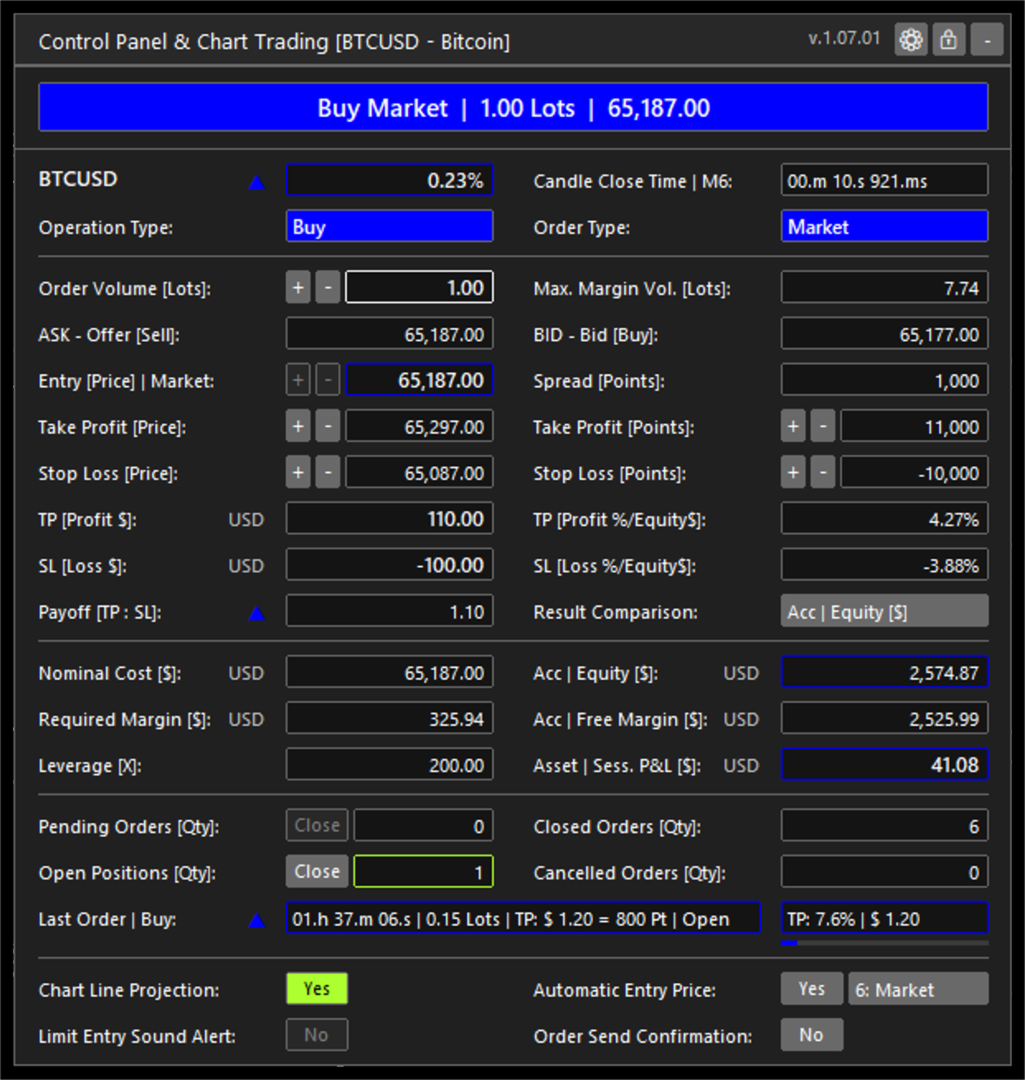
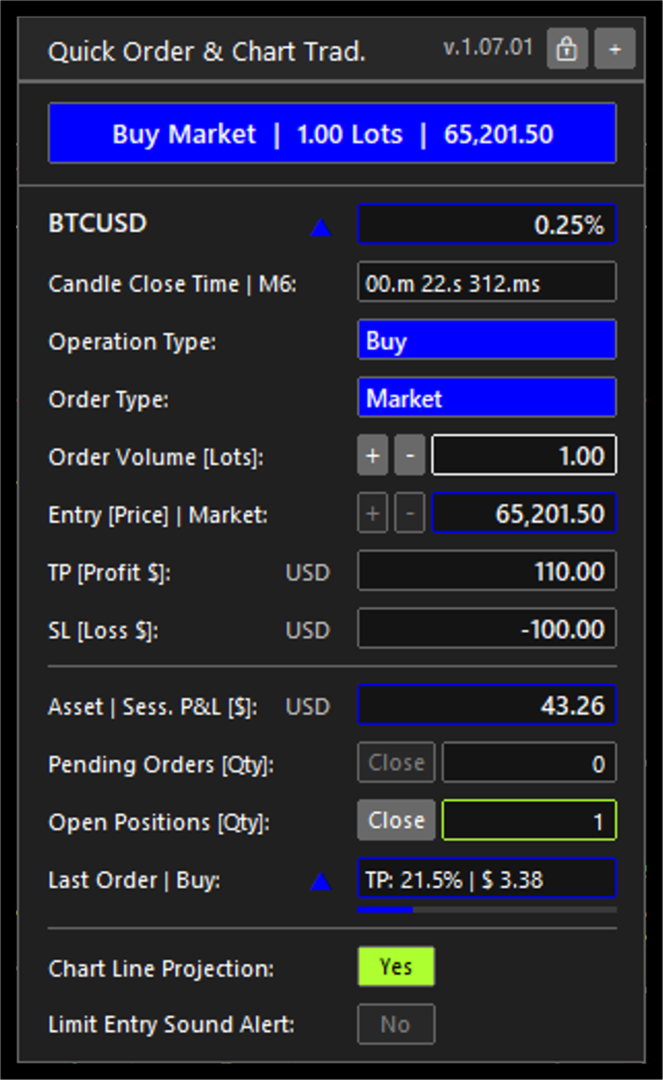
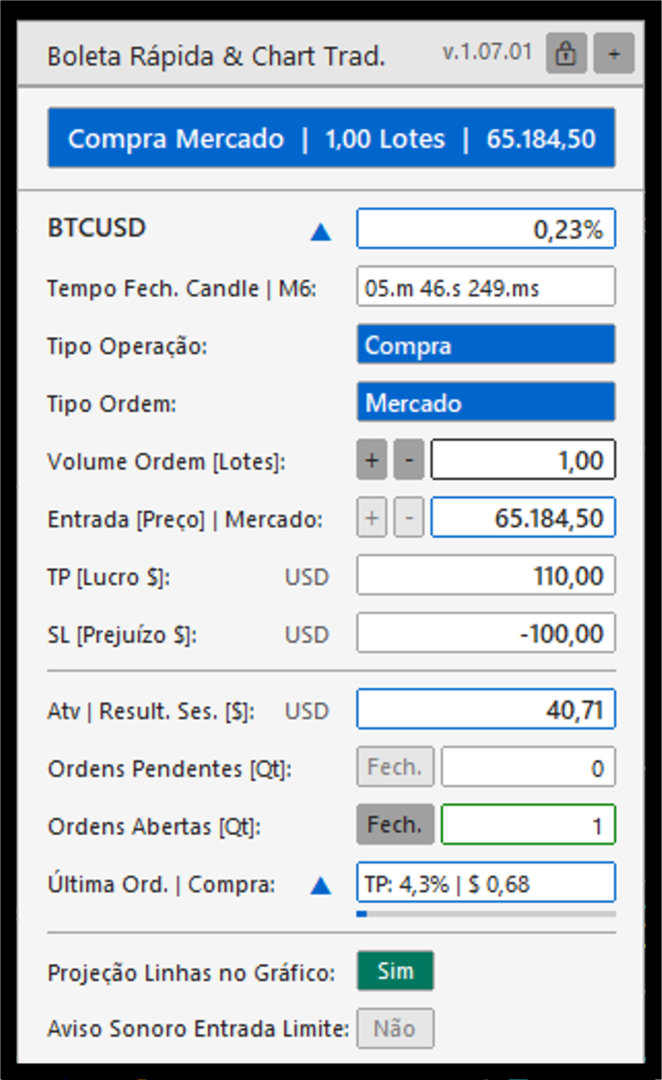
Control Panel & Chart Trading is an Expert Advisor for MetaTrader 5 that places a focused trading panel on the active chart. It brings together two complementary workflows: quick market-order preparation for active intraday use, and structured planning for market or limit orders.

For day trading and scalping workflows, the compact panel keeps the essential order controls on the chart: operation type, order type, volume, entry and protective levels. This reduces screen navigation while preserving the trader's control over every order decision. It does not promise execution speed, fill quality or trading results.

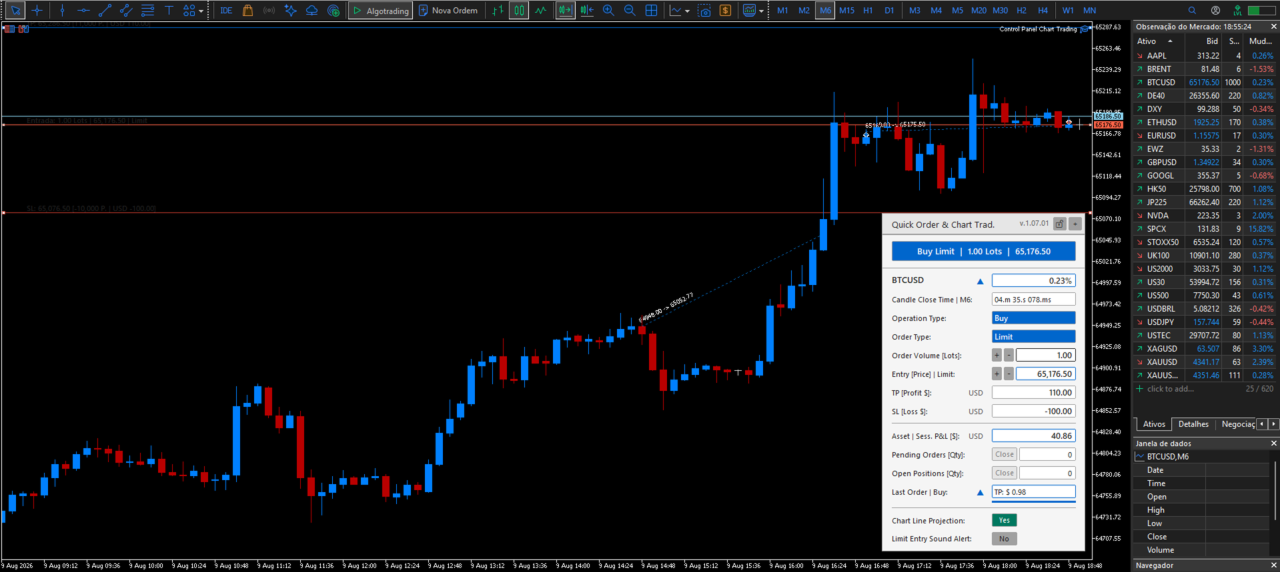
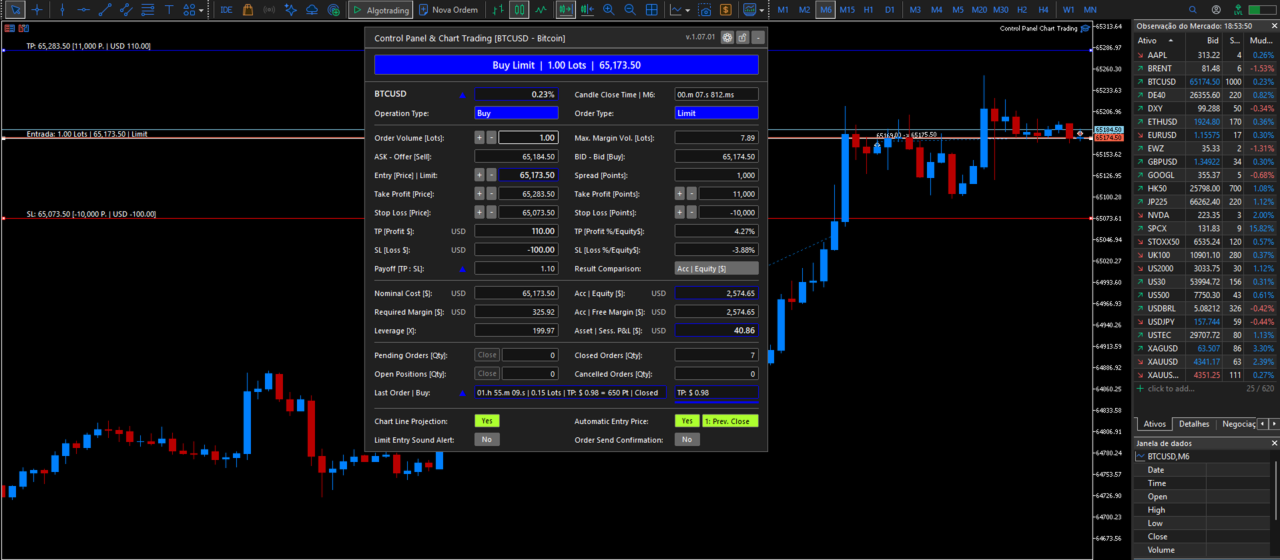
For planned trades, the panel visualizes entry, Take Profit and Stop Loss levels directly on the chart. It uses the active symbol and account data supplied by MetaTrader 5 to show projected order values in account currency, point distances, estimated margin and volume limits. This helps the trader review the relationship between the order parameters without manually calculating points, contract values or margin requirements.

The panel also updates operating context in real time, including spread, account equity, free margin, active-symbol session result, order counts and the latest order state. When a position is open, its progress toward the registered Take Profit or Stop Loss level is shown in a concise field.


Multilingual workflow and user configuration


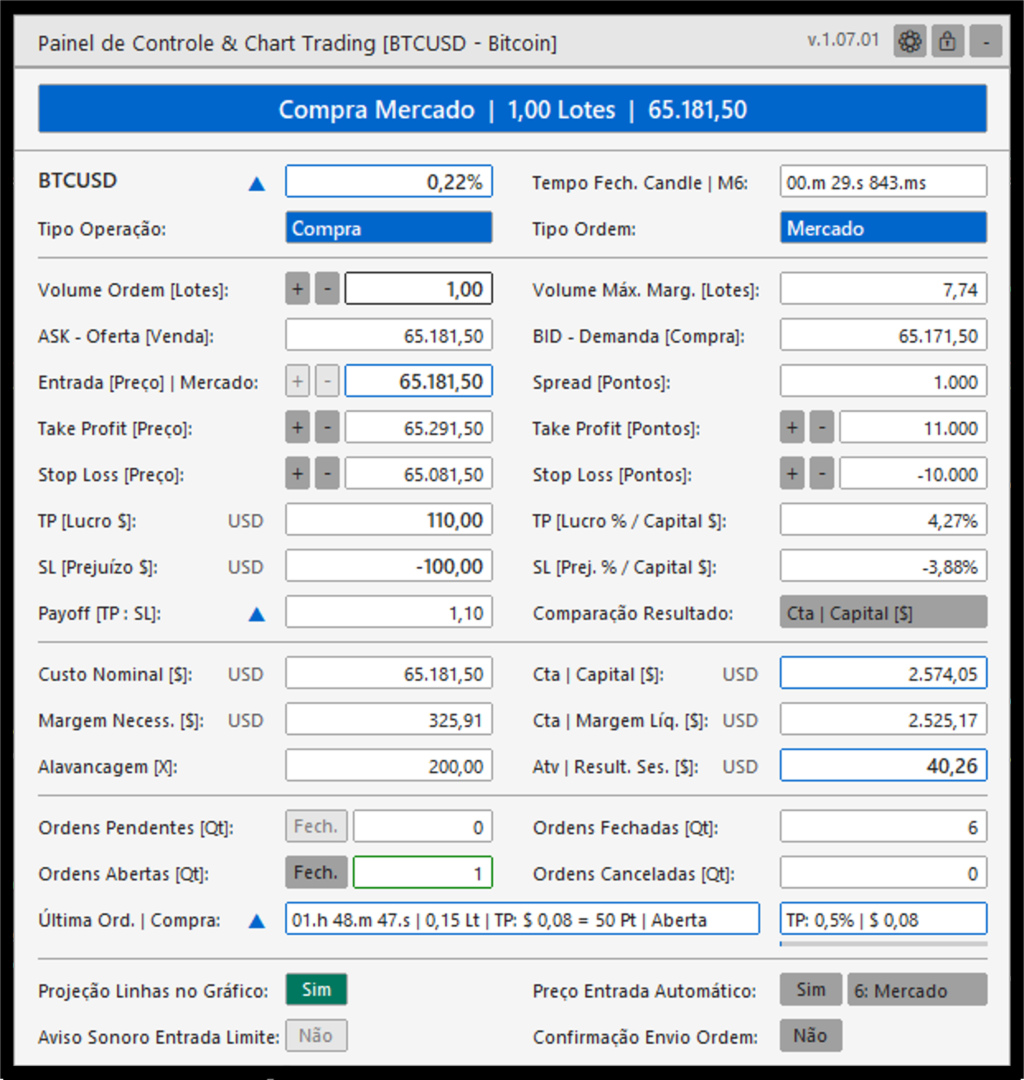
Control Panel & Chart Trading is designed for traders who operate MetaTrader 5 in different languages and need the same workflow across accounts and symbols. The on-chart panel can be displayed in Portuguese (Brazil), English, French, Spanish, German, Japanese, Simplified Chinese or Russian. Number formatting can follow the selected panel language or be selected independently, helping users read prices and account values in their preferred convention.

The user can also define the panel theme, compact or expanded layout, chart position, default order type, initial volume, Take Profit and Stop Loss distances, and the spread alert threshold. Chart-line color, style, width, information-text size and alignment are configurable. For limit-order planning, users can select automatic entry references based on the previous candle or adjust the entry manually. The standard MetaTrader 5 Inputs window remains in English in the Market build; the panel displayed on the chart is localized at runtime.


Alerts and operational awareness

The panel provides visual context before and during the order-preparation workflow. It highlights a spread that exceeds the configured proportion of the Take Profit distance, identifies relevant candle-close timing conditions and can show the presence of pending orders. An optional sound alert can notify the user when the current price reaches a configured limit-entry level. These functions are informational aids; they do not replace the trader's assessment or guarantee that an order will be executed.


Main functions

- Use a compact quick-order workflow to send configured buy or sell market orders from the chart.

- Prepare buy and sell market orders or limit orders with volume, entry price, Take Profit and Stop Loss levels in one panel.

- Display and adjust entry, Take Profit and Stop Loss lines directly on the chart.

- Use the previous candle close, high, low or open as an automatic limit-entry reference. Manual entry and current market price are also available.

- Check the broker's minimum stop distance and freeze distance before sending or changing an order.

- Check order volume limits, estimated margin and available margin before order submission.

- Display the current spread, risk and reward relationship, projected order values in account currency, account equity, free margin, order counts and active-symbol session information.

- Show a concise summary of the latest order, including its state and progress toward its registered Take Profit or Stop Loss level while the position remains open.

- Provide an optional sound alert when price reaches a limit-entry level.

- Display visual alerts for contextual conditions, including a spread above the configured limit and relevant candle-close timing.

- Close pending orders or open positions for the active symbol from the panel.


Interface and configuration

- Dark and light color themes.

- Compact and expanded panel formats, with selectable chart positions.

- Portuguese, English, French, Spanish, German, Japanese, Simplified Chinese and Russian interface options.

- Number formatting that can follow the selected language or be configured separately.

- Configurable default order type, initial volume, Take Profit and Stop Loss distances, and spread-alert threshold.

- Configurable limit-entry sound alert and audio files for buy and sell scenarios.

- Configurable chart-line colors, styles, widths, text size and alignment.


Order handling

The Expert Advisor reads the trading conditions of the active symbol before sending or modifying an order. It applies the broker stop and freeze distances to help avoid invalid price requests. For transient price or connection responses, it uses a limited retry policy and a duplicate-request guard instead of repeatedly sending orders.


Important information

Control Panel & Chart Trading is a trading tool. It does not provide investment advice, trading signals or a guarantee of execution or financial results. The trader remains responsible for verifying order parameters and understanding the risks of trading before sending an order.

Recommended products
Forget about enabling templates when you launch the window. Auto Template Master Service  is a professional utility tool that runs as a system service in MetaTrader 5, and it will do it for you. Unlike traditional indicators or expert advisors (EAs), the program runs in the background of the entire terminal and doesn't require you to add it to each window individually. As soon as you open a new chart of any instrument (Forex, Stocks, Crypto), the service immediately detects the new window and a
Guardian Magic GT
Carlos Eduardo Rivas Istacuy
Guardian Magic GT - Risk Management Expert Advisor for MetaTrader 5 PROTECT YOUR TRADING CAPITAL WITH INTELLIGENT RISK MANAGEMENT Guardian Magic GT is a professional-grade Expert Advisor designed to safeguard your trading operations by implementing sophisticated risk control mechanisms. Whether you run a single bot or manage multiple automated trading systems simultaneously, Guardian Magic GT provides real-time monitoring and automatic position management to ensure your account stays within your
CloseAtTime EA Scheduled Position Closer for MetaTrader 5 MQL5  |  Version 1.00  |  Magic Number Independent  |  Any Broker  |  Any Symbol Set the time. Walk away. CloseAtTime does the rest. Overview CloseAtTime EA is a precision trade management utility for MetaTrader 5. It monitors the broker server clock on every tick and closes your open positions at the exact second you define - no manual intervention required. The EA is intentionally focused. It does not open trades, does not apply ma
THIS PRODUCT CAN NOT BE TEST IN STRATEGY TESTER. PLEASE TRY DEMO VERSION: https://www.mql5.com/en/market/product/58096 RISK AND TRADE MANAGER RISK AND TRADE MANAGER   is an advanced trading panel designed for manual trading.   Utility helps to manage trades effectively and efficiently with a single click. MAIN FEATURES Convert and display Stop Loss (SL)   Pips into % and amount to view the clear picture of the trades if SL hits. Fund allocation for individual trade in % and in amount. Get alert
Shved Position Pips Label   is a professional utility indicator for MetaTrader 5 that displays the real-time floating profit or loss of all your active positions directly on the chart. No more switching to the "Trade" tab at the bottom of the terminal — all crucial information about your running trades is positioned right in front of your eyes next to the current price line! Key Advantages: Smooth Price-Anchored Alignment:   The labels are anchored to the last bar and smoothly slide vertically f
TradeTech Titan
Vasile Silviu Urs
The TradeTech Titan Expert Advisor (EA) harnesses a diverse array of standard indicators to initiate trades. Once conditions are favorable, an additional layer of finely adjustable filters or thresholds ensures optimal entry points. These thresholds, ranging from 1 to 100, offer customizable trade filtering. Every trade is secured with a virtual StopLoss and virtual TakeProfit value. The EA avoids risky strategies, such as the Martingale system or any methods involving increasing lot sizes, and
Simple Position Manager
Mathew Louis Sau Kinminja
Simple Position Manager is a professional-grade MT5 script designed for efficient trade management. This versatile tool allows traders to quickly apply Take Profit, Stop Loss, and Breakeven settings across multiple open positions with precision and reliability. Key Features Multi-Position Management Apply TP/SL to all open positions of the current symbol simultaneously Intelligent position filtering by symbol Batch modification capabilities Smart Breakeven Technology Automated breakeven tri
FREE
Risk Manager for MT5
Sergey Batudayev
4.31 (16)
Expert Advisor Risk Manager for MT5 is a very important and in my opinion necessary program for every trader. With this Expert Advisor, you will be able to control the risk in your trading account. Risk and profit control can be carried out both in monetary terms and in percentage terms. For the Expert Advisor to work, simply attach it to the currency pair chart and set the acceptable risk values ​​in the deposit currency or in % of the current balance. [Instruction for Risk Manager parameter

SAB Advance Assistant is a manual trade-management panel for MetaTrader 5. Build every trade visually on the chart, control your exact risk, and let the built-in engine handle partial take-profits, break-even and trailing — all from one clean, resizable panel. Designed for discretionary and ICT/SMC traders who want precision without spreadsheets. KEY FEATURES - Draggable Entry, Stop Loss, TP1-TP5 and Final TP lines with live labels   (pips, cash amount, R:R, % and price) - Automatic lot sizin
Overview of KS Multiple Independent Strategies Auto Trading 1.9 EA This is a professional-grade MQL5 Expert Advisor (EA) designed primarily for gold trading (XAUUSD) on MetaTrader 5. It supports multiple independent trading strategies, advanced risk management, and various filters to optimize performance. The EA emphasizes automation, profit protection, and integration with external tools like Telegram and Discord. It operates on any timeframe but is configurable for specific sessions and news
SQXHK presents: Portfolio Peak2Valley Preserver EA (MAE/MFE Enhanced) Take absolute control of your portfolio's exit strategy with Profit Taker EA . Designed as a utility expert advisor, this tool continuously monitors your account's aggregate open positions and pending orders, executing an institutional-grade, mathematical exit sequence based on your strategy's historical or desired MAE (Maximum Adverse Excursion) and MFE (Maximum Favorable Excursion) metrics. Whether you trade manually or depl
StopLoss and TakeProfit Utility MT5 for automatic setting of stop loss and take profit levels. Created by a professional trader for traders.   The utility   works with any market orders opened by a trader manually or using advisors. Can filter trades by magic number. The utility can work with any number of orders simultaneously. WHAT THE UTILITY CAN DO: Set virtual stop loss and take profit from 1 pip Real   stop loss and take profit W ork with each order separately (   stop loss and take prof
Size Calculator allow you to calculate the size you need for your position giving two parametres: the number of pips risked and the money risked, for example if you want to risk 20 USD on 200 pips, then you will need to input 200 in the case reserved for pips and 20 in the case reserved for risk, the size will appear in left top carner of the chart in your metatrader 4 platform,    Size Calculator  support the following symbols : EURUSD GBPUSD AUDUSD NZDUSD  GOLD WTI  EURJPY GBPJPY USDJPY AUDJP
Trade Copilot - Semi-Automatic Risk Management Panel for Gold (XAUUSD) and any instrument Trade Copilot is a semi-automatic trading panel built for manual traders who want an EA's discipline without giving up control of their own entries. You decide the direction and the level - the panel handles risk sizing, stop-loss placement, take-profit management, and trade protection automatically. KEY FEATURES - Risk-based lot sizing - choose Risk %, Risk $, or Fixed Lot; the panel calculates positio
XAU Gold Matrix M2 Grid Scalper EA XAU Gold Matrix M2 Grid Scalper EA is a professional MetaTrader 5 Expert Advisor created mainly for Gold / XAUUSD traders who want more control, more structure and a smoother trading experience on lower timeframes. This EA is designed to help traders follow short-term Gold movement with a clear trading system, controlled basket management, safety filters and a practical chart panel. Instead of watching the market all the time and managing every position manua
Aurum Intraday EA
Rodrigo Leonardo Favreau Giuliodoro
Aurum Intraday EA – Advanced Gold Trading Algorithm The Aurum Intraday EA is a powerful automated trading system designed specifically for Gold (XAUUSD) traders who want to capture strong intraday movements while maintaining full control over risk and strategy configuration. Built with a robust algorithm and optimized for H1 and H4 timeframes (H4 recommended) , this Expert Advisor is capable of identifying high-probability opportunities in the gold market and executing trades with precision and
Tiger Lite
Dang Cong Duong
Tiger Lite recreate the history of entry and exit orders. The goal is that you can grasp their strategy how to play. CSV format support for WEB, MT4 and MT5 platforms. The sequence of steps is described in the photo. Note: Please choose the existing date and symbol on the CSV file. For MT4/5, export historical data and copy the records to excel, save it with the extension CSV. For MT4/MT5/WEB, save the name with format mt4.csv/mt5.csv/web.csv If you get the history from another source and your
FREE
Initial Balance Indicator for MQL5 The Initial Balance Indicator is a powerful trading tool for the MetaTrader 5 (MT5) platform that helps traders analyze market structure by marking the Initial Balance (IB) range of a trading session. This range is typically formed during the first X minutes of a trading session (e.g., the first hour in futures markets) and acts as a key reference for potential price movements. Key Features: Customizable Time Period: Define the exact start and end time for the
Bybit BTC Scalper
STANTON ROUX
3.9 (10)
BTC Scalper - Automated RSI Breakout Strategy for BTCUSD Unlock the power of automated trading with BTC Scalper! This expert advisor is a fully autonomous trading strategy, designed to capitalize on fast-moving BTCUSD markets. It leverages a potent combination of RSI Breakouts and two Exponential Moving Averages (EMA) to find high-probability trade entries, ensuring optimal confluence for success. Key Features: Fully Automated Trading : Set it, forget it, and let BTC Scalper handle your trades 2
FREE
NQ Trading System – Professional NASDAQ Trading Algorithm NQ Trading System is an advanced fully automated trading algorithm developed for the NASDAQ (US100) market, designed with a focus on controlled risk and consistent long-term growth. This system is built using over 20 years of market experience and real trading data. The goal is not to open random trades, but to analyze market behavior, wait for the right conditions, and manage profits intelligently. Installation & Usage (Important) Thi
Equity Expiration MT5
Frank William Jr Colbert
A time-based position expiration system that moves trades to a "watch list" after they reach a certain age. It does not close them immediately but waits for them to hit a profit target (or loss target) before exiting. Features: Global and Magic-specific expiration periods (format: HH:MM:SS). Tracks expired trades separately and only closes them when a `MIN_PROFIT_CLOSE` target is met (or loss target if "Close Only Profitable" is false). Includes a manual control and statistics reporting functi
Real-Time Spread Display Tool A   real-time spread display tool   is a specialized software or application designed to provide traders and investors with instant, live data on the   spread —the difference between the bid price (the price at which buyers are willing to purchase an asset) and the ask price (the price at which sellers are willing to sell it)—for various financial instruments. This tool is critical in markets such as forex (FX), stocks, futures, and cryptocurrencies, where price f
SmartRisk MA Pro
Oleg Polyanchuk
SmartRisk MA Pro Strategy Overview: SmartRisk MA Pro is an optimized, risk-oriented automated trading strategy (Expert Advisor) developed for the MetaTrader 5 platform. It is designed to identify trading opportunities based on price deviations from moving averages and incorporates a comprehensive capital management system. The Expert Advisor operates on a "new bar" logic, ensuring stability and predictability in trade signal execution. Operating Principles and Trading Logic: At its core, the st
Multi Account Trade Desk MT5 ## Short description Account-wide MASTER-to-SLAVE trade copier for MetaTrader 5 with per-account risk sizing, automatic broker symbol matching, live readiness monitoring and parallel execution. ## Product description Multi Account Trade Desk MT5 is built for traders who manage several MT5 accounts and want one central place to control risk, account readiness and trade replication. Attach the same EA as MASTER on the source terminal and as SLAVE on every target
MA Bradley Ea
Youssef Fadl Allah
Bradley EA – Professional Automated Trading System Bradley EA is a fully automated Expert Advisor developed for MetaTrader 5. It is designed to identify high-probability trading opportunities using a disciplined and rule-based trading approach. The system continuously analyzes market conditions and executes trades automatically without emotional intervention, helping traders maintain consistency and precision. Built with reliability and performance in mind, Bradley EA combines advanced market a
BulkOp Trade Manager
Ahmed Jumaa Saif Ali Almheiri
BulkOp Trade Manager Trade faster. Manage smarter. Close with confidence. BulkOp Trade Manager is a powerful MT5 utility EA built for traders who need speed, control, and clean execution directly from the chart. It is designed for active manual traders, scalpers, gold traders, and anyone who wants to manage multiple positions with less delay and fewer clicks. Why BulkOp? Ultra-fast Buy and Sell execution One-click Bulk Close Profit One-click Bulk Close Loss Keyboard trading control Bulk order e

Quick Order Closer
Danny Giovanni Romero Lozano
Demo Version Here : https://www.mql5.com/en/market/product/170598 The fastest on the entire platform, try it with 50 open trades or more This Expert Advisor provides a fast and intuitive way to manage and close open trading positions directly from the chart using a clean button-based interface. With a single click, traders can instantly close positions based on different conditions, improving execution speed and overall trade management efficiency. Key Features Close all open positions instant
NineEdge Pro EA
Mohammed Eltayeb Mohammed Khairalla
NineEdge Pro EA Multi-Strategy | Multi-Timeframe Trading System for MetaTrader 5 NineEdge Pro EA is a MetaTrader 5 Expert Advisor that combines multiple independent trading logic modules into a single execution system. The EA is designed to operate across different market conditions by using rule-based strategies on multiple timeframes. The system focuses on structured trade execution, configurable risk parameters, and clean order management. All trading decisions are made automatically based o
CryptoGrid AI Pro
Alex Amuyunzu Raymond
CryptoGrid AI Pro – Trade Bitcoin, Crypto, and USD Forex pairs with smart candlestick pattern recognition and a powerful multi-level grid system. Overview CryptoGrid AI Pro is an advanced Expert Advisor that merges candlestick pattern recognition with a robust grid trading system . It is optimized for Bitcoin (BTCUSD) but also performs effectively on major USD Forex pairs (EURUSD, GBPUSD, USDJPY, XAUUSD, etc.) and other volatile cryptocurrencies. The EA provides both automatic and semi-automa
Bollinger Precision EA is a fully automated trading system for MetaTrader 5 that combines Bollinger Bands strategy with advanced risk and position management . It is designed for both beginner and professional traders who want consistent, controlled, and low-risk trading . Features: Automatically opens Buy/Sell positions based on Bollinger Bands signals Adaptive Lot calculation based on account balance and risk Stop Loss and Take Profit management Advanced risk scaling : partial close at 50% & 7
Buyers of this product also purchase
Trade Assistant MT5
Evgeniy Kravchenko
4.41 (215)
It helps to calculate the risk per trade, the easy installation of a new order, order management with partial closing functions, trailing stop of 7 types and other useful functions. Additional materials and instructions Installation instructions - Application instructions - Trial version of the application for a demo account Line function -   shows on the chart the Opening line, Stop Loss, Take Profit. With this function it is easy to set a new order and see its additional characteristics bef
Forex Trade Manager MT5
InvestSoft
4.98 (668)
Trade Manager MT5 is an advanced position size calculator and trade management tool for MetaTrader 5, designed to help traders plan trades faster, control risk more precisely, and manage open positions directly from the chart. It combines order placement, risk based lot calculation, Stop Loss and Take Profit management, Break Even, Trailing Stop, Partial Close, Equity Protection, and external trade management in one panel. Whether you trade forex, indices, metals, commodities, crypto, or future
================================================================================ POC BREAKOUT - V20.72. Full Professional Grade Toolkit ================================================================================ POC Breakout is a full MetaTrader 5 trading dashboard for discretionary traders who want breakout signals, Point of Control (POC) context, volume profiles, order flow, market structure, news, alerts, and advanced trade planning in one professional workspace. Attached directly to you
TradePanel MT5
Alfiya Fazylova
4.88 (166)
Trade Panel is a multi-functional trading assistant. The app contains over 50 trading functions for manual trading and allows you to automate most trading tasks. Before making a purchase, you can test the demo version on a demo account. Download the trial version of the application for a demonstration account: https://www.mql5.com/en/blogs/post/750865 . Full instructions here . Trade. Allows you to perform trading operations in one click: Open pending orders and positions with automatic risk cal
Beta Release The Telegram to MT5 Signal Trader is nearly at the official alpha release. Some features are still under development and you may encounter minor bugs. If you experience issues, please report them, your feedback helps improve the software for everyone. Telegram to MT5 Signal Trader is a powerful tool that automatically copies trading signals from Telegram channels or groups directly to your MetaTrader 5 account. It supports both public and private Telegram channels, and you can conn
FarmedHedge Pair Trading Dashboard
Tanapisit Tepawarapruek
5 (3)
Farmed Hedge Yield Farming | All Markets (Manual - Hybrid - Semi/Automated EA) MULTI-ASSET SUPPORT Trade any asset available on your broker - Forex: Major, Minor, Exotic pairs - Crypto: BTC, ETH, XRP, SOL, BNB - Stocks: Apple, Tesla, Amazon, Google, etc. - Commodities: Gold, Silver, Oil, Gas - Indices: US30, NAS100, SPX500, DAX40 - Any CFD your broker offers VERIFIED TRADING RESULTS - Farmed Hedge Yield Axi Copy:  https://www.mql5.com/en/signals/2356376 - Farmed Hedge Yield Exn Copy:   https:/
Exp COPYLOT CLIENT for MT5
Vladislav Andruschenko
3.97 (35)
Professional Trade Copier for MetaTrader 5 Fast, professional, and reliable trade copier for MetaTrader . COPYLOT allows you to copy Forex trades between MT4 and MT5 terminals with support for Hedge and Netting accounts. COPYLOT MT5 version supports: - MT5 Hedge to MT5 Hedge - MT5 Hedge to MT5 Netting - MT5 Netting to MT5 Hedge - MT5 Netting to MT5 Netting - MT4 to MT5 Hedge - MT4 to MT5 Netting MT4 version Full Description +DEMO +PDF How To Buy How To Install How to get Log Files H
Anchor Trade Manager
Kalinskie Gilliam
5 (6)
Anchor: The EA Manager Your EAs manage their own trades. Anchor manages the account around them. Anchor gives you one place to control your EAs, manage risk and decide when trading is allowed. Any EA, any vendor, any broker or symbol. No source-code changes required. The Problem Most EAs only know what they are doing. They cannot see when another EA is already trading, when several EAs open and are stacking risk or when the account has reached your loss limit. Even using just one EA, it may not
Telegram to MT5 Multi-Channel Copier automatically copies trading signals from your Telegram channels directly into MetaTrader 5. No bots, no browser extensions, no manual copying. You receive a signal on Telegram and the EA opens the trade on your terminal in a few seconds. The product includes two components: a Windows application that listens to your Telegram channels, and this Expert Advisor that executes the signals on your MT5 terminal. An MT4 version is also available. Setup guide and app
Footprint Chart Pro — Professional OrderFlow EA for MetaTrader 5 Version 6.34 | Professional tool for real traders | Institutional-Grade Visualization DEMO USERS - PLEASE SELECT EVERY TICK / REAL TICK WHEN TESTING AND YOU HAVE DOWNLOADED HISTORICAL DATA. IF YOU SEE A WAITING SCREEN AND IT IS NOT DOWNLOADING, IT MEANS YOU HAVE LOW HISTORICAL DATA. TRY 1 MIN AND 5 MIN FIRST ON 1 DAY DATA. ONE DAY DATA SHOULD BE THE NEWEST AND MOST CURRENT DATE. PLEASE WAIT UNTIL THE MARKET HAS ROLLED OVER PERIOD.
Premium Trade Manager - The Trade Panel With a Coach Built In Premium Trade Manager puts a trading coach inside your chart, with a full execution engine underneath it. Set the trade up the way you always do, then let Max, your AI trading coach, read that exact setup against your live account and give you a straight verdict before you commit: is the stop disciplined, is the risk sane, is a high-impact release minutes away, are you near a prop-firm limit. Below sits the engine that runs everything
Power Candles Strategy Scanner - Self-Optimizing Multi-Symbol Setup Finder Power Candles Strategy Scanner runs the same self-optimizing engine that powers the Power Candles indicator - on every symbol in your Market Watch, side by side. One panel tells you which symbols are statistically tradable right now, which strategy wins on each, the optimal Stop Loss / Take Profit pair, and pings you the moment a fresh signal fires. This tool is part of the Stein Investments ecosystem - 18+ tools plus Max
Adam FTMO MT5
Vyacheslav Izvarin
5 (2)
ADAM EA Special Version for FTMO Please use ShowInfo= false for backtesting ! Our 1st EA created using ChatGPT technology Trade only GOOD and checked PROP FIRMS  Default parameters for Challenge $100,000 Tested on EURUSD and GBPUSD only  Use 15MIN Time Frame Close all deals and Auto-trading  before Weekend at 12:00 GMT+3  Friday For Prop Firms MUST use special Protector  https://www.mql5.com/en/market/product/94362 --------------------------------------------------------------------------------
YuClusters
Yury Kulikov
4.93 (43)
Attention: You can view the program operation in the free version  YuClusters DEMO .  YuClusters is a professional market analysis system. The trader has unique opportunities to analyze the flow of orders, trade volumes, price movements using various charts, profiles, indicators, and graphical objects. YuClusters operates on data based on Time&Sales or ticks information, depending on what is available in the quotes of a financial instrument. YuClusters allows you to build graphs by combining da
Welcome to ENTRY IN THE ZONE WITH SMC MULTI TIMEFRAME Entry In The Zone and SMC Multi Timeframe is a real-time market analysis tool based on Smart Money Concepts (SMC), designed to analyze market structure, price direction, and key trading zones. It supports both Single-Timeframe Analysis and Multi-Timeframe Analysis, providing a clearer view of the overall market structure across multiple timeframes, with real-time BUY / SELL signals that do not repaint. It is designed to help filter trading op
EA Auditor
Stephen J Martret
5 (4)
EA Auditor is an independent analysis tool for traders evaluating Expert Advisors and trading signals on MetaTrader 5. It audits backtest reports, reviews posted developer signals, and cross-verifies the two against each other to help traders assess strategies before committing capital. The MQL5 market offers a wide range of Expert Advisors from many developers, with varying approaches, quality, and transparency. EA Auditor provides a consistent, data-driven framework for reviewing them, answer
The product will copy all telegram signal to MT5 ( which you are member) , also it can work as remote copier.  Easy to set up, copy order instant, can work with almost signal formats, image signal,  s upport to translate other language to English Work with all type of channel or group, even channel have "Restrict Saving Content", work with  multi channel, multi MT5 Work as remote copier: with signal have ticket number, it will copy exactly via ticket number. Support to backtest signal. How to s
Timeless Charts
Samuel Manoel De Souza
5 (7)
Timeless Charts is an all-in-one trading utility for professional traders. It combines custom chart types such as Seconds Charts and Renko with advanced order flow analysis using Footprints , Clusters , Volume Profiles , VWAP studies, and anchored analysis tools for deeper market insight. Trading and position management are handled directly from the chart through an integrated trade management panel , while Market Replay and Virtual Accounts provide environments for practicing trading skills and
VirtualTradePad One Click Trading Panel
Vladislav Andruschenko
4.59 (74)
Trading Panel for MetaTrader 5 — professional one-click trading from chart and keyboard A powerful trading panel for active manual trading, designed to open, manage, and close trades far faster and more efficiently than the standard MetaTrader interface. This panel is built for traders who want full control over positions, pending orders, profit management, and trading execution inside one professional workspace. This is not just another utility. It is a complete trading cockpit for MetaTrader
Elevate Your Trading Signals with Our Advanced Telegram Bridge EA It’s time to captivate your audience with real-time trading updates that are both professional and visually appealing. Contact me to see the demo and get a trial version We have significantly invested in user friendly features that create a unique experience for customers and providers.  SIGNAL BRIDGE is able to deliver 100% COPIER FRIENDLY SIGNALS for all business cases, even bypassing Metatrader logics where other EAs struggle!
Quant AI Agents
Ho Tuan Thang
5 (1)
Quant AI Agents are independent trading Expert Advisors. Instead of trading using a fixed strategy like other conventional EAs, Quant AI Agents   is a   multi-agent AI trading framework   that turns natural-language strategy prompts into live.  WANT THE SAME RESULTS AS MY LIVE SIGNAL?   Use the exact same brokers I do:   IC MARKETS , IC TRADING   .  Unlike the centralized stock market, Forex has no single, unified price feed.  Every broker sources liquidity from different providers, creating un
VirtualTradePad PRO SE MT5 — professional trading control center for MetaTrader 5 VirtualTradePad PRO SE is a premium chart-based trading panel and trade-management workspace for MetaTrader 5 . It is designed for traders who want faster execution, clearer position control, structured trade management, visual level planning and a professional workflow directly from the chart. This is not only a BUY / SELL panel. PRO SE combines manual trading, pending orders, position management, partial exits, b
Trade Manager DaneTrades
Levi Dane Benjamin
4.23 (30)
DaneTrades Trade Manager is a professional trade panel for MetaTrader 5, designed for fast, accurate execution with built‑in risk control. Place market or pending orders directly from the chart while the panel automatically calculates position size from your chosen risk, helping you stay consistent and avoid emotional decision‑making. The Trade Manager is built for manual traders who want structure: clear risk/reward planning, automation for repeatable management, and safeguards that help reduc
KT Equity Protector MT5
KEENBASE SOFTWARE SOLUTIONS
3.6 (5)
The one EA every MetaTrader trader should be running, but isn't. Most accounts don't blow up because the strategy was wrong. They blow up because, in a bad moment, a trader let a loss run, doubled down, held trades into the weekend, gave back a winning week, or forgot the daily prop-firm limit by one bad click. KT Equity Protector is the automated guardian that won't let that happen. Install it on one chart. Set your rules once in a guided, plain-English wizard: daily loss, max drawdown, profit
Trader Evolution
Siarhei Vashchylka
5 (7)
" Trader Evolution " - A utility designed for traders who use wave and technical analysis in their work. One tab of the utility is capable of money management and opening orders, and the other can help in making Elliott wave and technical analysis. Manual (Be sure to read before purchasing) | Version for MT4 Advantages 1. Trading in a few clicks. Immediate and pending orders are available in the panel 2. Money management. The program automatically selects the appropriate lot size 3. Simplifies
Features   With MT5 to Interactive Brokers(IB) Trader, you can: 1. Load chart data from IB to MT5, and Analyze with all standard or customer Indicators. 2. Place Orders to IB Account Directly in MT5. 3. Make your Own EAs upon IB Securities by only making minus changes of the trading function. Usage 1) Installation Copy the "Mt5ToIBTraderEn.ex4" and sample files to [MT5 Data Folder]->MQL5->Experts.  2)  MT5 Settings Add the IP Address to the MT5 Allowed URLs in 'Tools->Options->Expert Adviso
MT5 to Telegram Signal Provider turns your trading account into a signal provider. Every trade action, whether manual, by EA or from your phone, is instantly sent as a message to Telegram. You can fully customize the format or use a ready-made template for quick setup. [ Demo ] [ Manual ] [ MT4 Version ] [ Discord Version ]     New: [ Telegram To MT5 ] Setup A step by step user guide is available. Key Features Ability to customize order details sent to subscribers You can create a tiered subs
Patrex pro
Chioma Obunadike
5 (2)
Patrex Pro: Maximize Your Trading Potential Patrex Pro is an advanced trading bot designed to help traders optimize their trading strategies and maximize their potential returns. With its cutting-edge technology and user-friendly interface, Patrex Pro is the ultimate tool for traders seeking to elevate their trading game. Get MT4 Version Key Features: 1. Position Hedging: Patrex Pro allows users to hedge their positions based on their individual risk tolerance and market analysis. 2. Advanced R
EasyInsight AIO MT5
Alain Verleyen
4.92 (12)
EASY Insight AIO – All-In-One Power for AI-Driven Trading Want to skip the setup and start scanning the entire market – Forex, Gold, Crypto, Indices, and even Stocks – in seconds? EASY Insight AIO is the complete plug-and-play solution for AI-powered trade analysis. It includes all core Stein Investments indicators built-in and automatically exports clean, structured CSV files – perfect for backtesting, AI prompts, and live market decision-making. No need to install or configure indicators manu
FUTURES ORDERFLOW FOOTPRINT CHART Professional OrderFlow EA for MetaTrader 5 Version 1.01| Professional tool for real traders | Institutional-Grade Visualization STRATEGY TESTER USERS - PLEASE SELECT EVERY REAL TICK WHEN TESTING AND YOU HAVE DOWNLOADED HISTORICAL DATA. IF YOU SEE A WAITING SCREEN AND IT IS NOT DOWNLOADING, IT MEANS YOU HAVE LOW HISTORICAL DATA. TRY 1 MIN AND 5 MIN FIRST ON 1 DAY DATA. ONE DAY DATA SHOULD BE THE NEWEST AND MOST CURRENT DATE. PLEASE WAIT UNTIL THE MARKET HAS ROL
Filter:
No reviews
Reply to review