Multi Account Trade Desk MT5

Multi Account Trade Desk MT5

## Short description

Account-wide MASTER-to-SLAVE trade copier for MetaTrader 5 with per-account risk
sizing, automatic broker symbol matching, live readiness monitoring and
parallel execution.

## Product description

Multi Account Trade Desk MT5 is built for traders who manage several MT5
accounts and want one central place to control risk, account readiness and trade
replication.

Attach the same EA as MASTER on the source terminal and as SLAVE on every target
terminal. One SLAVE instance monitors the entire account, so you do not need to
attach the copier to every symbol chart.

When a new MASTER position or pending order appears, the system creates one
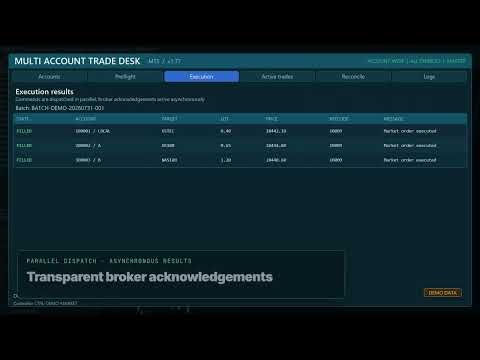
logical trade plan and sends commands to all READY accounts in parallel. Each
SLAVE uses its own live broker price and contract specification to calculate
volume and validate spread, margin, stop levels and trading permissions.

### Main features

- One EX5 file with selectable MASTER and SLAVE modes
- Account-wide monitoring of all symbols
- Copies manual trades, Trade Assistant entries and EA trades
- Market orders, pending orders, SL/TP modifications, partial closes and closes
- Per-account Fixed lot, percentage, fixed-money and proportional sizing
- Automatic cross-broker symbol matching for Forex, metals, energy and major
  index aliases such as USTEC / US100 / NAS100 and DE40 / GER40 / DAX40
- Prefix and suffix handling including `.idx`, `.cash`, `.sml`, `.pro`, `.r`,
  `_SB`, `+` and similar broker naming conventions
- Continuous background preflight with lot, risk, margin, spread and reason
- Parallel command batches with asynchronous broker acknowledgements
- Short market-command TTL to reject delayed execution
- Per-account spread, lot, daily loss, drawdown, open risk, position, session,
  direction and order-type limits
- Read-only reconciliation report
- Persistent settings and restart recovery
- Duplicate-command protection and no automatic retry after uncertain execution
- CSV event logging

### Important operating model

The product synchronizes MT5 terminals that are running under the same Windows
user or VPS environment through the MetaTrader Common Files directory. Every
trading account requires its own logged-in MT5 terminal. No DLL and no WebRequest
configuration are required.

### Safety defaults

SLAVE live execution is disabled by default. Real-account execution has a
second independent safety lock. Existing MASTER positions are not imported on
startup unless explicitly enabled. Reconciliation is report-only and never
repairs or reopens a position automatically.

### Recommended first test

Use demo accounts first. Configure one MASTER and one SLAVE, enable demo live
execution, verify the Preflight page, then open a small trade with a real Stop
Loss. Add more SLAVE terminals only after confirming the complete open,
modify and close workflow.

### Risk notice

Trading and trade copying involve financial risk. Broker prices, contract
specifications, execution policies, slippage and connectivity can differ between
accounts. Always test the complete configuration on demo accounts before using
real funds.


Multi Account Trade Desk MT5 — Inputs Guide

The same single EX5 file is installed on every MetaTrader 5 terminal. The
`InpOperatingMode` input decides whether that copy works as the MASTER or as a
SLAVE.

## Operating mode

| Input | Values | Purpose |
|---|---|---|
| `InpOperatingMode` | `MASTER` / `SLAVE` | `MASTER` monitors source trades and manages connected accounts. `SLAVE` validates and executes commands on one target terminal. |

## MASTER settings

| Input | Default | What it does |
|---|---:|---|
| `InpHeartbeatWarningSeconds` | `3` | Shows a warning when a SLAVE heartbeat has not been refreshed for this many seconds. |
| `InpHeartbeatOfflineSeconds` | `10` | Marks the SLAVE offline after this timeout. Must be greater than the warning value. |
| `InpRegistryRefreshMs` | `500` | How often the MASTER refreshes the shared account registry and acknowledgements. |
| `InpMaximumDisplayedAccounts` | `20` | Maximum number of discovered accounts kept in the dashboard list. |
| `InpMaximumBatchAccounts` | `50` | Hard safety ceiling for the number of accounts in one parallel command batch. |

## MASTER readiness monitor

These parameters create the informational background trade plan shown on the
Preflight tab. They do not place an order by themselves.

| Input | Default | What it does |
|---|---:|---|
| `InpPreflightDirection` | `BUY` | Direction used by the background readiness example. |
| `InpPreflightStopDistancePoints` | `500` | Example Stop Loss distance, in broker points, used for continuous risk and margin validation. |
| `InpPreflightRiskReward` | `2.0` | Example Take Profit distance expressed as a multiple of the Stop Loss distance. |
| `InpDefaultRiskPercent` | `1.0` | Default percentage-risk value used for the readiness plan before account-specific settings are applied. |
| `InpControllerReferenceLot` | `0.01` | Reference source lot used by controller-lot sizing modes. It is not forced onto SLAVE accounts. |
| `InpPreflightTTLSeconds` | `10` | Preflight requests older than this are rejected as stale. |
| `InpIncludeMasterAccount` | `true` | Adds the MASTER account to the same risk, readiness and monitoring workflow. |
| `InpBackgroundPreflightMs` | `1000` | Interval between automatic readiness recalculations. |
| `InpMarketCommandTTLms` | `1500` | Maximum lifetime of a market command. An expired command is rejected instead of being executed late. |
| `InpAllOrNothingBatch` | `false` | When `false`, blocked/offline accounts are skipped and READY accounts continue. When `true`, any blocked account prevents the entire batch. |

## MASTER trade copier

| Input | Default | What it does |
|---|---:|---|
| `InpCopyMasterTrades` | `true` | Enables account-wide copying of new positions, pending orders, modifications and closes from the MASTER account. |
| `InpSourceMagicFilter` | `-1` | `-1` accepts every magic number. Set a specific magic number to copy only one source EA. |
| `InpCopyManualTrades` | `true` | Includes trades with magic number `0`, such as manual orders and trades opened by a chart assistant. |
| `InpSourceCommentContains` | empty | Optional case-sensitive source comment filter. Empty means no comment restriction. |
| `InpTargetGroup` | empty | Empty targets every enabled account. Enter a group name to target only matching SLAVE account settings. |
| `InpCopyExistingPositionsOnStart` | `false` | If enabled, imports positions that already existed when the MASTER started. Keep disabled unless intentional to avoid unexpected duplication. |

## SLAVE settings

| Input | Default | What it does |
|---|---:|---|
| `InpHeartbeatIntervalMs` | `1000` | How often the SLAVE publishes account state, balance, equity, symbol and safety status. Minimum accepted value is 250 ms. |
| `InpAllowLiveExecution` | `false` | Primary execution lock. No market or pending command can trade while this is disabled. |
| `InpAllowRealAccountExecution` | `false` | Independent second lock for real-money accounts. Demo accounts do not require this second permission. |

## Account settings controlled from the MASTER dashboard

These are saved automatically for each discovered account and restored after a
terminal restart.

| Control | Purpose |
|---|---|
| `Enabled` | Includes or excludes this account from all command batches. |
| `Emergency Lock` | Immediately blocks new execution for this account without deleting its other settings. |
| `Group` | Logical account group used by `InpTargetGroup`. |
| `Sizing mode` | Chooses Fixed lot, Balance %, Equity %, Fixed money, Controller lot ratio or another supported risk-sizing method. |
| `Sizing value` | Numeric value interpreted by the selected sizing mode. |
| `Maximum spread` | Blocks execution when the local SLAVE spread exceeds this number of broker points. `0` disables this limit. |
| `Maximum lot` | Caps calculated volume. `0` disables the cap. A value below the broker minimum blocks the order rather than silently changing risk. |
| `Automatic symbol matching` | Maps broker aliases such as `USTEC`, `US100`, `NAS100`, `DE40`, `GER40`, `XAUUSD` and `GOLD`, including common prefixes and suffixes. |
| `Daily loss` | Blocks new entries after the configured realized daily loss. `0` disables this limit. |
| `Drawdown %` | Blocks new entries after the configured daily equity drawdown percentage. `0` disables this limit. |
| `Maximum open risk` | Limits estimated money risk across currently open managed positions. `0` disables the limit. |
| `Maximum positions` | Maximum simultaneous positions for this account. `0` disables the limit. |
| `Per symbol` | Maximum simultaneous positions on one target symbol. `0` disables the limit. |
| `Daily reset (min)` | Broker-server minute of day when daily counters reset: `0` is 00:00 and `1439` is 23:59. |
| `Maximum deviation` | Permitted market-order deviation in broker points. |
| `Session start / end` | Allowed broker-server trading window expressed as minutes from midnight. |
| `Market ON/OFF` | Allows or blocks market orders. |
| `Pending ON/OFF` | Allows or blocks pending orders. |
| `Long ON/OFF` | Allows or blocks BUY exposure. |
| `Short ON/OFF` | Allows or blocks SELL exposure. |

## Important MT5 permissions

- The MT5 `Algo Trading` toolbar button must be enabled on each trading terminal.
- `Allow Algo Trading` must be enabled in the EA properties.
- One SLAVE instance is enough per target terminal because it works account-wide
  and monitors every symbol.
- Each trading account still requires its own logged-in MT5 terminal instance.
- Market commands are never retried automatically after an uncertain execution;
  this prevents accidental duplicate positions.
Recommended products
Neopips Engine EA
Md Billal Hossain
NeoPips Engine EA – The Ultimate Trading Revolution Has Arrived! “The real power of trading lies in seeing what others miss. NeoPips Engine doesn’t follow the market — it masters it.” About NeoPips Engine EA: Your Intelligent Trading Ally NeoPips Engine EA is not your average trading robot. It’s a multi-dimensional, AI-optimized expert advisor crafted for traders who demand precision, adaptability, and long-term performance. Unlike outdated bots with rigid rules, NeoPips Engine is a livin
Equity Tracker MT5 Equity Tracker MT5 is a monitoring Expert Advisor for MetaTrader 5 that reports trading activity, account status and technical conditions through notification messages. The Expert Advisor operates independently from trading logic and does not influence order execution or trade management. The product does not open, modify or close trades. It performs observation and notification tasks only. Purpose Equity Tracker MT5 is intended for traders who want to stay informed about thei
BulkOp Trade Manager
Ahmed Jumaa Saif Ali Almheiri
BulkOp Trade Manager Trade faster. Manage smarter. Close with confidence. BulkOp Trade Manager is a powerful MT5 utility EA built for traders who need speed, control, and clean execution directly from the chart. It is designed for active manual traders, scalpers, gold traders, and anyone who wants to manage multiple positions with less delay and fewer clicks. Why BulkOp? Ultra-fast Buy and Sell execution One-click Bulk Close Profit One-click Bulk Close Loss Keyboard trading control Bulk order e
Risk Manager for MT5
Sergey Batudayev
4.31 (16)
Expert Advisor Risk Manager for MT5 is a very important and in my opinion necessary program for every trader. With this Expert Advisor, you will be able to control the risk in your trading account. Risk and profit control can be carried out both in monetary terms and in percentage terms. For the Expert Advisor to work, simply attach it to the currency pair chart and set the acceptable risk values ​​in the deposit currency or in % of the current balance. [Instruction for Risk Manager parameter
AutoCloseTPSL
Calvin Andrew Jenkins
Expert advisor that automatically closes all open positions when a specific profit amount or loss amount is reached. The profit and loss amounts are configurable inputs and can be set when attaching the EA to a chart. This EA has proven to be useful in high quantity trading strategies to control and minimize risk. The EA works for all account currencies and is designed to close out all trades once the desired profit or loss is hit.
SmartRisk MA Pro
Oleg Polyanchuk
SmartRisk MA Pro Strategy Overview: SmartRisk MA Pro is an optimized, risk-oriented automated trading strategy (Expert Advisor) developed for the MetaTrader 5 platform. It is designed to identify trading opportunities based on price deviations from moving averages and incorporates a comprehensive capital management system. The Expert Advisor operates on a "new bar" logic, ensuring stability and predictability in trade signal execution. Operating Principles and Trading Logic: At its core, the st
Aureus Edge Gold Trader
Craig Joshua Binnekamp
️ Aureus Edge Gold Trader (v2.10) The Specialist Engine for XAUUSD Aureus Edge is not a "jack-of-all-trades" bot. It is a high-precision Expert Advisor engineered strictly for Gold (XAUUSD) . While it includes stability protocols to pass global market validation, every line of logic is optimized for the unique volatility and liquidity of the Gold market . ️ Built for Professional Capital Preservation Unlike popular EAs that use dangerous recovery grids, Aureus Edge focuses on disciplined br
Protected profit
Vasiliy Pritchin
Protected profit это логическое продолжение проекта Equity monitor. Исправлены недочёты и внесены дополнительные моменты. В данном продукте разработан процентный  Traling stop, как на отдельную позицию, так и на дневную прибыль в целом. Есть возможность закрыть позицию по заданному проценту убытка, а так же можно закрыть все позиции по проценту дневной прибыли. Настройки просты и понятны.  Например: Риск на позицию 1% Позиция закроется если процент убытка превысит 1%. Traling 3% допустимое сниже
Exp COPYLOT CLIENT for MT5
Vladislav Andruschenko
3.97 (35)
Professional Trade Copier for MetaTrader 5 Fast, professional, and reliable trade copier for MetaTrader . COPYLOT allows you to copy Forex trades between MT4 and MT5 terminals with support for Hedge and Netting accounts. COPYLOT MT5 version supports: - MT5 Hedge to MT5 Hedge - MT5 Hedge to MT5 Netting - MT5 Netting to MT5 Hedge - MT5 Netting to MT5 Netting - MT4 to MT5 Hedge - MT4 to MT5 Netting MT4 version Full Description +DEMO +PDF How To Buy How To Install How to get Log Files H
Aurum Intraday EA
Rodrigo Leonardo Favreau Giuliodoro
Aurum Intraday EA – Advanced Gold Trading Algorithm The Aurum Intraday EA is a powerful automated trading system designed specifically for Gold (XAUUSD) traders who want to capture strong intraday movements while maintaining full control over risk and strategy configuration. Built with a robust algorithm and optimized for H1 and H4 timeframes (H4 recommended) , this Expert Advisor is capable of identifying high-probability opportunities in the gold market and executing trades with precision and
Code Green
Md Wakiluzzaman Raz
Code Green EA This is a breakout strategy featuring advanced market confirmation and robust risk management. The system is designed to be highly flexible, offering the choice to utilize a Martingale recovery module or trade without it. Performance & Transparency This EA is built to provide realistic, sustainable results rather than inflated or unrealistic returns. While I have conducted my own internal forward testing, I encourage all traders to verify the strategy’s performance independently on
SolarTrade Suite Financial Robot: LaunchPad Market Expert - designed to open trades! This is a trading robot that uses special innovative and advanced algorithms to calculate its values, Your Assistant in the World of Financial Markets. Use our set of indicators from the SolarTrade Suite series to better choose the moment to launch this robot. Check out our other products from the SolarTrade Suite series at the bottom of the description. Do you want to confidently navigate the world of inves
SOLOMON Statistical Arbitrage PRO Advanced Pairs Trading EA with Kalman Filter + Monte Carlo Optimization Overview SOLOMON Statistical Arbitrage PRO is a sophisticated pairs trading Expert Advisor designed for serious traders who want to profit from mean-reversion opportunities between two correlated financial instruments. Using advanced statistical methods including Kalman Filter for dynamic hedge ratio calculation, Monte Carlo simulation for optimal Z-Score detection, and robust risk manageme
Introduction to EA Auto Martingale MT5 Auto Martingale is an Expert Advisor (EA) that helps you easily create Dollar Cost Averaging (DCA) trades from your manual trades. With advanced settings, the EA Auto Martingale allows you to create a perfect Martingale strategy in your own way, optimizing profits and managing risks effectively. I will increase the price by 10 USD for every 10 orders Main Features of Auto Martingale: 1. Magic Number : Default is 0. This value will automatically be based o
Black Viper GOLD
Ignacio Agustin Mene Franco
Black Viper GOLD v2.0 — Expert Advisor MT5 Pair: XAU/USD | Timeframe: M1 (Scalping) | Minimum Capital: $1,000 USD Overview Black Viper GOLD is a professional Expert Advisor for MetaTrader 5, specifically designed to trade the XAU/USD pair on the M1 timeframe using a high-precision scalping strategy. It combines four advanced technical analysis systems with dynamic risk management, session filters, and an aggressive turbo mode, all within a robust framework focused on capital preservation. In
DR Trade and Risk Manager: The Foundational Algorithmic Risk Console for MT5 For the discretionary trader, the greatest adversary is not the market; it is the undisciplined self. You have a solid strategy, but in moments of high pressure, do you follow your rules with perfect consistency? Do you cut losses without hesitation? Do you let winners run without cutting them short out of fear? For most, the answer is no. This gap between strategy and execution is where profits are lost. DR Trade and R
Basic working principles of EA will have 2 main systems. 1. Timed order opening means that at the specified time the EA will open 1 Buy order and 1 Sell order. 2. When the graph is strong, the EA will remember the speed of the graph. is the number of points per second which can be determined You can set the number of orders in the function ( Loop Order ). The order closing system uses the trailling moneym Loss system, but I set it as a percentage to make it easier to calculate when the capital
Trading panel for manual trading. Has a fairly wide functionality. Allows you to automatically calculate the order size, open both market and pending orders. It has a wide range of options for closing orders, it is possible to partially close orders, close orders after reaching a certain profit or loss, separately close profitable and unprofitable, buy and sell, as well as pending orders. The panel also contains a simple implementation of a grid of pending orders, reverse and lock functions, tr
Local Trade Copier by RWBTradeLab — copy trades between MetaTrader 5 accounts on the same PC, instantly and reliably. One lightweight tool that turns any MT5 account into a Master (signal source) or a Client (copier) — just pick the role in the inputs. Perfect for managing multiple accounts, copying your own strategy across brokers, or running prop-firm and personal accounts side by side. No DLL required · Works across different brokers & account types · One file, both roles ——————————————
Bober Real MT5
Arnold Bobrinskii
4.88 (16)
Bober Real MT5 is a fully automatic Forex trading Expert Advisor. This robot was made in 2014 year and did a lot of profitbale trades during this period. So far over 7000% growth on my personal account. There was many updates but 2019 update is the best one. The robot can run on any instrument, but the results are better with EURGBP, GBPUSD, on the M5 timeframe. Robot doesn't show good results in tester or live account if you run incorrect sets. Set files for Live accounts availible only for cu
SBR Canvas — Expert Advisor for MetaTrader 5 Overview SBR Canvas is a comprehensive, fully visual trading assistant for MetaTrader 5. It combines automated trade execution with an advanced drag-and-drop control panel built directly onto the chart canvas, giving traders real-time control over every aspect of their trading strategy without leaving the chart. Advice for all trader using this Expert Advisor - Safest amount to use this $5000 - $10000 as a starting point. Core Trading Engine Direc
HMA Scalper Pro EA
Vladimir Shumikhin
5 (2)
HMA Scalper Pro EA — Automated Trading Advisor Based on Hull Moving Average (HMA) for MetaTrader 5 OVERVIEW HMA Scalper Pro EA is a professional trading robot (Expert Advisor) for MetaTrader 5 that trades in the direction of the Hull Moving Average (HMA). The HMA indicator determines the current trend direction, and the EA opens trades in that direction, enhanced by Smart Risk capital management, adaptive grid trading, trailing stop, breakeven, and time filters. The EA supports both Netting a
Lycan
Leo Carlo Bermudez
Lycan is an automated S calping system optimized for XAUUSD (Gold) on the MetaTrader platform. The EA does not use grid or martingale recovery methods. It applies volatility-based stop loss protection and rule-based filters (spread, news, and session) to select scalp trade opportunities using confirmed breakout strength, rather than relying on high-frequency or recovery-based entries. Core Principle: No Grid, No Martingale, Dual Scalp Strategy System Lycan does not add to losing positions, doe
FREE
Gold Ray
Dmitriq Evgenoeviz Ko
Gold Ray MT5 — The Art of the Golden Ratio in Trading Gold Ray is more than just a trading robot. It's the culmination of years of research into the dynamics of gold ( XAUUSD ), embodied in a highly accurate spectral analysis algorithm. While most expert advisors use outdated indicators, Gold Ray works with the price structure itself, calculating the trajectory of the "golden ray"—the moment when market liquidity and volatility converge into a powerful directional impulse. Why is Gold Ray your
EN DESARROLLO, TESTING PERIOD. PRISM KellyEngine aplica disciplina de riesgo profesional directamente en tu flujo MT5. Te ayuda a: definir lotaje de forma consistente, limitar sobrecarga de riesgo, proteger cuenta en escenarios de volatilidad. Ideal para traders que quieren dejar atras el lotaje por intuicion. Parametros principales  Riesgo base por operacion (%) Limite maximo de lotaje Umbral de confianza Multiplicadores de seguridad Incluye Motor de sizing adaptable Controles de limites de ri
PROMO: ONLY 10 LEFT AT $90! Next price:        $199 Price will be kept high to limit number of users for this strategy. This EA starts trading at the open of   London (UK) Session . It is based on analysis of advanced statistical distributions combined with short to medium term reversal patterns which have mean-reversion attributes. The EA includes several smart features and allows you to trade with a fixed or automatic lot size. The EA is not sensitive to spreads but can be backtested on both
Introducing Neural Bitcoin Impulse - an innovative trading bot created using neural network training technology on voluminous market data sets. The built-in mathematical model of artificial intelligence searches for the potential impulse of each next market bar and uses the resulting patterns of divergence and convergence between the predictive indicators and the price to form high-precision reversal points for opening trading positions. The trading robot is based on the Neural Bar Impulse ind

NEURAL GOLD EDGE: The AI-Powered Revolution in XAUUSD Scalping NEURAL GOLD EDGE represents the pinnacle of automated trading technology. Developed specifically for the XAUUSD (Gold) market, this Expert Advisor combines advanced neural network logic with price action analysis to exploit market volatility like never before. Unlike traditional EAs that rely on lagging indicators, NEURAL GOLD EDGE analyzes market structure in real-time, executing trades with surgical precision. The result is
Copy trading EA
Dimitar Shuytsov
# DS_Copy_EA - User Description DS_Copy_EA is a MetaTrader 5 Expert Advisor that copies trades between MT5 terminals running on the same machine. One EA instance acts as a **Provider** (signal source) and another acts as a **Receiver** (copier). The mode is selected in the EA settings. **How it works:** 1. The **Provider** publishes its open positions internally every 500ms 2. The **Receiver** reads every 1 second, detects new/changed/closed positions, and mirrors them on its own account 3. I
Только сейчас вы можете приобрести  TradeOps Command Center с 10% скидкой всего за 630$. Акция действует до 01.04.2026 Для получение инструкции об использование утилиты обратитесь в личные сообщения! TradeOps Command Center — Профессиональный инструмент контроля риска и дисциплины в трейдинге TradeOps Command Center — это многофункциональная утилита для MetaTrader 5, разработанная для трейдеров, которые стремятся к системному и дисциплинированному подходу к торговле. Продукт объединяет в себе у
Buyers of this product also purchase
Trade Assistant MT5
Evgeniy Kravchenko
4.43 (214)
It helps to calculate the risk per trade, the easy installation of a new order, order management with partial closing functions, trailing stop of 7 types and other useful functions. Additional materials and instructions Installation instructions - Application instructions - Trial version of the application for a demo account Line function -   shows on the chart the Opening line, Stop Loss, Take Profit. With this function it is easy to set a new order and see its additional characteristics bef
Forex Trade Manager MT5
InvestSoft
4.98 (668)
Trade Manager MT5 is an advanced position size calculator and trade management tool for MetaTrader 5, designed to help traders plan trades faster, control risk more precisely, and manage open positions directly from the chart. It combines order placement, risk based lot calculation, Stop Loss and Take Profit management, Break Even, Trailing Stop, Partial Close, Equity Protection, and external trade management in one panel. Whether you trade forex, indices, metals, commodities, crypto, or future
TradePanel MT5
Alfiya Fazylova
4.88 (162)
Trade Panel is a multi-functional trading assistant. The app contains over 50 trading functions for manual trading and allows you to automate most trading tasks. Before making a purchase, you can test the demo version on a demo account. Download the trial version of the application for a demonstration account: https://www.mql5.com/en/blogs/post/750865 . Full instructions here . Trade. Allows you to perform trading operations in one click: Open pending orders and positions with automatic risk cal

Beta Release The Telegram to MT5 Signal Trader is nearly at the official alpha release. Some features are still under development and you may encounter minor bugs. If you experience issues, please report them, your feedback helps improve the software for everyone. Telegram to MT5 Signal Trader is a powerful tool that automatically copies trading signals from Telegram channels or groups directly to your MetaTrader 5 account. It supports both public and private Telegram channels, and you can conn
Trade Manager DaneTrades
Levi Dane Benjamin
4.23 (30)
DaneTrades Trade Manager is a professional trade panel for MetaTrader 5, designed for fast, accurate execution with built‑in risk control. Place market or pending orders directly from the chart while the panel automatically calculates position size from your chosen risk, helping you stay consistent and avoid emotional decision‑making. The Trade Manager is built for manual traders who want structure: clear risk/reward planning, automation for repeatable management, and safeguards that help reduc
Power Candles Strategy Scanner - Self-Optimizing Multi-Symbol Setup Finder Power Candles Strategy Scanner runs the same self-optimizing engine that powers the Power Candles indicator - on every symbol in your Market Watch, side by side. One panel tells you which symbols are statistically tradable right now, which strategy wins on each, the optimal Stop Loss / Take Profit pair, and pings you the moment a fresh signal fires. This tool is part of the Stein Investments ecosystem - 18+ tools plus Max
FarmedHedge Pair Trading Dashboard
Tanapisit Tepawarapruek
5 (3)
Farmed Hedge Yield Farming | All Markets (Manual - Hybrid - Semi/Automated EA) MULTI-ASSET SUPPORT Trade any asset available on your broker - Forex: Major, Minor, Exotic pairs - Crypto: BTC, ETH, XRP, SOL, BNB - Stocks: Apple, Tesla, Amazon, Google, etc. - Commodities: Gold, Silver, Oil, Gas - Indices: US30, NAS100, SPX500, DAX40 - Any CFD your broker offers VERIFIED TRADING RESULTS - Farmed Hedge Yield Axi Copy:  https://www.mql5.com/en/signals/2356376 - Farmed Hedge Yield Exn Copy:   https:/
================================================================================ POC BREAKOUT - V20.72. Full Professional Grade Toolkit ================================================================================ POC Breakout is a full MetaTrader 5 trading dashboard for discretionary traders who want breakout signals, Point of Control (POC) context, volume profiles, order flow, market structure, news, alerts, and advanced trade planning in one professional workspace. Attached directly to you
Anchor Trade Manager
Kalinskie Gilliam
5 (6)
Anchor: The EA Manager Run your full EA portfolio without conflicts, without stacked risk, and without watching every chart yourself. Anchor coordinates up to 64 Expert Advisors on a single account, including daily loss protection built for prop firm rules. Attach Anchor to any chart. Type your EA names and magic numbers in one line. Click OK. Anchor begins coordinating immediately. Built for portfolios. Built for prop firms. Built for discipline. The Problem Running multiple EAs on the same acc
Footprint Chart Pro — Professional OrderFlow EA for MetaTrader 5 Version 6.34 | Professional tool for real traders | Institutional-Grade Visualization DEMO USERS - PLEASE SELECT EVERY TICK / REAL TICK WHEN TESTING AND YOU HAVE DOWNLOADED HISTORICAL DATA. IF YOU SEE A WAITING SCREEN AND IT IS NOT DOWNLOADING, IT MEANS YOU HAVE LOW HISTORICAL DATA. TRY 1 MIN AND 5 MIN FIRST ON 1 DAY DATA. ONE DAY DATA SHOULD BE THE NEWEST AND MOST CURRENT DATE. PLEASE WAIT UNTIL THE MARKET HAS ROLLED OVER PERIOD.
Premium Trade Manager - The Trade Panel With a Coach Built In Premium Trade Manager puts a trading coach inside your chart, with a full execution engine underneath it. Set the trade up the way you always do, then let Max, your AI trading coach, read that exact setup against your live account and give you a straight verdict before you commit: is the stop disciplined, is the risk sane, is a high-impact release minutes away, are you near a prop-firm limit. Below sits the engine that runs everything
Timeless Charts
Samuel Manoel De Souza
5 (7)
Timeless Charts is an all-in-one trading utility for professional traders. It combines custom chart types such as Seconds Charts and Renko with advanced order flow analysis using Footprints , Clusters , Volume Profiles , VWAP studies, and anchored analysis tools for deeper market insight. Trading and position management are handled directly from the chart through an integrated trade management panel , while Market Replay and Virtual Accounts provide environments for practicing trading skills and
Unlimited Trade Copier Pro MT5 is a tool to copy trade remotely to multiple MT4, MT5 and cTrader accounts at different computers/locations over internet. This is an ideal solution for you if you are a signal provider and want to copy your trades to other receivers globally on your own rules. One provider can copy trades to multiple receivers and one receiver can get trade from multiple providers as well. The provider can even set the subscription expiry for each receiver, so that receiver will n
Welcome to ENTRY IN THE ZONE WITH SMC MULTI TIMEFRAME Entry In The Zone with  SMC Multi Timeframe  is a professional trading indicator built on Smart Money Concepts (SMC), combining market structure analysis with a No Repaint BUY / SELL signal system in a single indicator. It helps traders understand market structure more clearly, identify key price zones, and focus on higher-quality trading opportunities. By combining Multi-Timeframe Analysis, Points of Interest (POIs), and real-time signals, t
HINN Lazy Trader
ALGOFLOW OÜ
5 (1)
LIMITED SUMMER SALE -40% ! ONLY $470 insead of $790!  Maximum real discount! ONLY UNTIL 08/22 The core idea: using the user interface, you configure the parameters the chart must meet before entering a position (or positions), choose which entry models to use, and set the rules for when trading and planning should end. Lazy Trader  handles the rest: it  takes over all the routine chart watching and execution! full description  :: 3 key videos [1] ->  [2]   ->  [3] What can it do? - Understand
EA Auditor
Stephen J Martret
5 (4)
EA Auditor is an independent analysis tool for traders evaluating Expert Advisors and trading signals on MetaTrader 5. It audits backtest reports, reviews posted developer signals, and cross-verifies the two against each other to help traders assess strategies before committing capital. The MQL5 market offers a wide range of Expert Advisors from many developers, with varying approaches, quality, and transparency. EA Auditor provides a consistent, data-driven framework for reviewing them, answer
VirtualTradePad PRO SE MT5 — professional trading control center for MetaTrader 5 VirtualTradePad PRO SE is a premium chart-based trading panel and trade-management workspace for MetaTrader 5 . It is designed for traders who want faster execution, clearer position control, structured trade management, visual level planning and a professional workflow directly from the chart. This is not only a BUY / SELL panel. PRO SE combines manual trading, pending orders, position management, partial exits, b
EasyInsight AIO MT5
Alain Verleyen
4.92 (12)
EASY Insight AIO – All-In-One Power for AI-Driven Trading Want to skip the setup and start scanning the entire market – Forex, Gold, Crypto, Indices, and even Stocks – in seconds? EASY Insight AIO is the complete plug-and-play solution for AI-powered trade analysis. It includes all core Stein Investments indicators built-in and automatically exports clean, structured CSV files – perfect for backtesting, AI prompts, and live market decision-making. No need to install or configure indicators manu
ManHedger MT5
Peter Mueller
4.83 (6)
THIS EA IS A SEMI-AUTO EA, IT NEEDS USER INPUT. Manual & Test Version Please TEST this product before BUYING  and watch my video about it. The price of the ManHedger will increase to 250$ after 20 copies sold. Contact me for user support or bug reports or if you want the MT4 version! MT4 Version  I do not guarantee any profits or financial success using this EA. With this Expert Advisor, you can: Implement your own Zone Recovery strategy to capitalize on trending markets. Create Grid trading s
The product will copy all telegram signal to MT5 ( which you are member) , also it can work as remote copier.  Easy to set up, copy order instant, can work with almost signal formats, image signal,  s upport to translate other language to English Work with all type of channel or group, even channel have "Restrict Saving Content", work with  multi channel, multi MT5 Work as remote copier: with signal have ticket number, it will copy exactly via ticket number. Support to backtest signal. How to s
Quant AI Agents
Ho Tuan Thang
5 (1)
Quant AI Agents are independent trading Expert Advisors. Instead of trading using a fixed strategy like other conventional EAs, Quant AI Agents   is a   multi-agent AI trading framework   that turns natural-language strategy prompts into live.  WANT THE SAME RESULTS AS MY LIVE SIGNAL?   Use the exact same brokers I do:   IC MARKETS , IC TRADING   .  Unlike the centralized stock market, Forex has no single, unified price feed.  Every broker sources liquidity from different providers, creating un
MT5 to Telegram Signal Provider turns your trading account into a signal provider. Every trade action, whether manual, by EA or from your phone, is instantly sent as a message to Telegram. You can fully customize the format or use a ready-made template for quick setup. [ Demo ] [ Manual ] [ MT4 Version ] [ Discord Version ]     New: [ Telegram To MT5 ] Setup A step by step user guide is available. Key Features Ability to customize order details sent to subscribers You can create a tiered subs
Grid Manual MT5
Alfiya Fazylova
4.73 (22)
Grid Manual is a trading panel for working with grid strategies. The utility is universal, has flexible settings and an intuitive interface. It works with a grid of orders not only in the direction of averaging losses, but also in the direction of increasing profits. The trader does not need to create and maintain a grid of orders, the utility will do it. It is enough to open an order and the "Grid manual" will automatically create a grid of orders for it and will accompany it until the close. F
TradeMirror is a local order replication tool designed for MT4/MT5 platforms, supporting real-time trading synchronization. Tutorial Please click the Trademirror Tutorial link to view more tutorials. Product Advantages Aligned with the high standards of security, stability, and privacy protection for financial software, we have optimized three core dimensions: Intuitive graphical interface for user-friendly operation Enhanced privacy protection to meet sensitive data isolation requirements in fi
Trade Copier Pro MT5
Vu Trung Kien
3.67 (3)
Trade Copier Pro MT5 is a tool to copy trade remotely to multiple MT4, MT5 and cTradfer accounts at different computers/locations over internet. This is an ideal solution for you if you are a signal provider and want to copy your trades to other receivers globally on your own rules. One provider can copy trades to multiple receivers and one receiver can get trade from multiple providers as well. The provider can even set the subscription expiry for each receiver, so that receiver will not be abl
YuClusters
Yury Kulikov
4.93 (43)
Attention: You can view the program operation in the free version  YuClusters DEMO .  YuClusters is a professional market analysis system. The trader has unique opportunities to analyze the flow of orders, trade volumes, price movements using various charts, profiles, indicators, and graphical objects. YuClusters operates on data based on Time&Sales or ticks information, depending on what is available in the quotes of a financial instrument. YuClusters allows you to build graphs by combining da
Telegram to MT5 Coppy
Sergey Batudayev
5 (10)
Telegram to MT5: The Ultimate Signal Copying Solution Simplify your trading with Telegram to MT5, the modern tool that copies trading signals directly from Telegram channels and chats to your MetaTrader 5 platform, without the need for DLLs. This powerful solution ensures precise signal execution, extensive customization options, saves time, and boosts your efficiency. [ Instructions and DEMO ] [ FAQ ] [ How atach logs properly ] [ Settings descrition ] Key Features Direct Telegram API Integrati
DrawDown Limiter
Haidar Lionel Haj Ali
5 (20)
Drawdown Limiter EA You are in the right place if you were searching for Drawdown control, Drawdown limiter, Balance protection, Equity Protection or Daily Drawdown Limit related to Prop Firm, FTMO, or Funded account trading, or if you want to protect your trading account. Have you suffered from controlling your drawdown when trading funded accounts? This EA is meant for you. Prop firms usually set a rule called “Trader Daily Drawdown”, and if it is not respected, you are disqualified.  I am an
The News Filter MT5
Leolouiski Gan
4.78 (23)
This product filters   all expert advisors and manual charts   during news time.  It is able to remove any of your EA during news and automatically reattach them after news ends. This product also comes with a complete  order management system   that can handle your open positions and pending orders before the release of any news. Once you purchase   The News Filter , you will no longer need to rely on built-in news filters for future expert advisors, as this product can filter them all from her
My Chart Generator
Trade The Volume Waves Single Member P.C.
What if your chart adapted to the market instead of the clock?   THE PROBLEM IT SOLVES   Instead of trying to find the best indicator that fits your timeframe chart, build a chart and find the most appropriate indicator.   My Chart Generator is a MetaTrader 5 background service that builds  live, fully historical three types of custom charts :1. Range/Volume Balanced chart, 2.  Range/Volume Absorption chart and 3. Constant Volume chart from any symbol — Forex pairs, crypto, indices, commodities,
More from author
Range Breakout EA  Hey there! Our Range Breakout EA is built to help you take advantage of those early moves in the Asian session. Here’s how it works: during a specific time window, it marks the highest and lowest points to create a range. Then, it sets up buy and sell limit orders just outside that range, so you’re ready to catch a breakout in either direction! :) For safety, the stop loss goes at the opposite end of the range, but you can customize it in the settings if you like. The take pro
FREE
Initial Balance Indicator for MQL5 The Initial Balance Indicator is a powerful trading tool for the MetaTrader 5 (MT5) platform that helps traders analyze market structure by marking the Initial Balance (IB) range of a trading session. This range is typically formed during the first X minutes of a trading session (e.g., the first hour in futures markets) and acts as a key reference for potential price movements. Key Features: Customizable Time Period: Define the exact start and end time for the
Range Breakout with new ranges every day for better results. Inputs for every day with size filter. You can optimize it for every day with your settings , or i can send profitable settings for live trading longterm. Its not grid system its only for persons who know what is algotrading and not looking for overfitting grid strategies which can blow your account.
Nasdaq Scalping EA
Serhii Honcharov
Short Description: Automated trading on NASDAQ 100 using M15 timeframe. Advanced risk management, trend and breakout detection. Full Description: Trade NASDAQ 100 efficiently with this fully automated Expert Advisor designed for the M15 timeframe. The bot uses a combination of trend-following and breakout strategies to enter and manage trades. Key Features: Works on NASDAQ 100 (US100) , timeframe M15 . Automated trade execution : no manual intervention required. Smart risk management : customi
In this video, I’m testing a Gold trading bot for MetaTrader 5 on the 3-hour timeframe. This Expert Advisor is designed for XAUUSD and uses a systematic trading approach with automated entries, exits, and risk management. The goal of this backtest is to see how the strategy performs on gold across different market conditions, including trends, pullbacks, volatility spikes, and ranging periods. Backtest overview: • Symbol: XAUUSD / Gold • Platform: MetaTrader 5 • Type: Expert Advisor • Timefra
Gold Limit EA is an automated trading system for MetaTrader 5, designed for trading XAUUSD on the H1 timeframe. The Expert Advisor uses a limit-entry based approach. Instead of entering the market immediately, the EA waits for price to reach a predefined entry area and places pending orders according to the internal strategy logic. This approach is designed to avoid emotional trading decisions and keep the execution fully systematic. The EA includes automatic entry management, stop loss place
Pair Divergence Hybrid Pair Divergence Hybrid is a MetaTrader 5 Expert Advisor designed for statistical pair trading between two selected instruments. The EA analyzes the relationship between two symbols and looks for moments when their statistical spread diverges from its normal range. When the divergence reaches the configured threshold, the EA opens a two-leg basket position: one symbol is bought and the second symbol is sold, or vice versa. The exit logic is based on statistical mean reversi
Risk Assist MT5
Serhii Honcharov
Visual MT5 trade planner with draggable entry, SL and TP, risk sizing and order management. ## Full description Risk Assistant MT5 is a manual trading utility for planning, sizing and managing orders directly on a MetaTrader 5 chart. The utility does not generate trading signals and does not decide when to enter the market. The trader selects the direction, entry, stop loss, take profit and acceptable risk. Risk Assistant displays the planned trade, calculates the volume and sends the order
Filter:
No reviews
Reply to review