VirtualTradePad One Click Trading Panel

4.59

Trading Panel for MetaTrader 5 — professional one-click trading from chart and keyboard

A powerful trading panel for active manual trading, designed to open, manage, and close trades far faster and more efficiently than the standard MetaTrader interface. This panel is built for traders who want full control over positions, pending orders, profit management, and trading execution inside one professional workspace.

This is not just another utility. It is a complete trading cockpit for MetaTrader 5 that transforms manual trading into a faster, cleaner, and more visual process. Trading directly from the chart, keyboard control, automatic calculations, graphic hints, and advanced position-management tools make this panel a serious working instrument for both active and disciplined traders. 

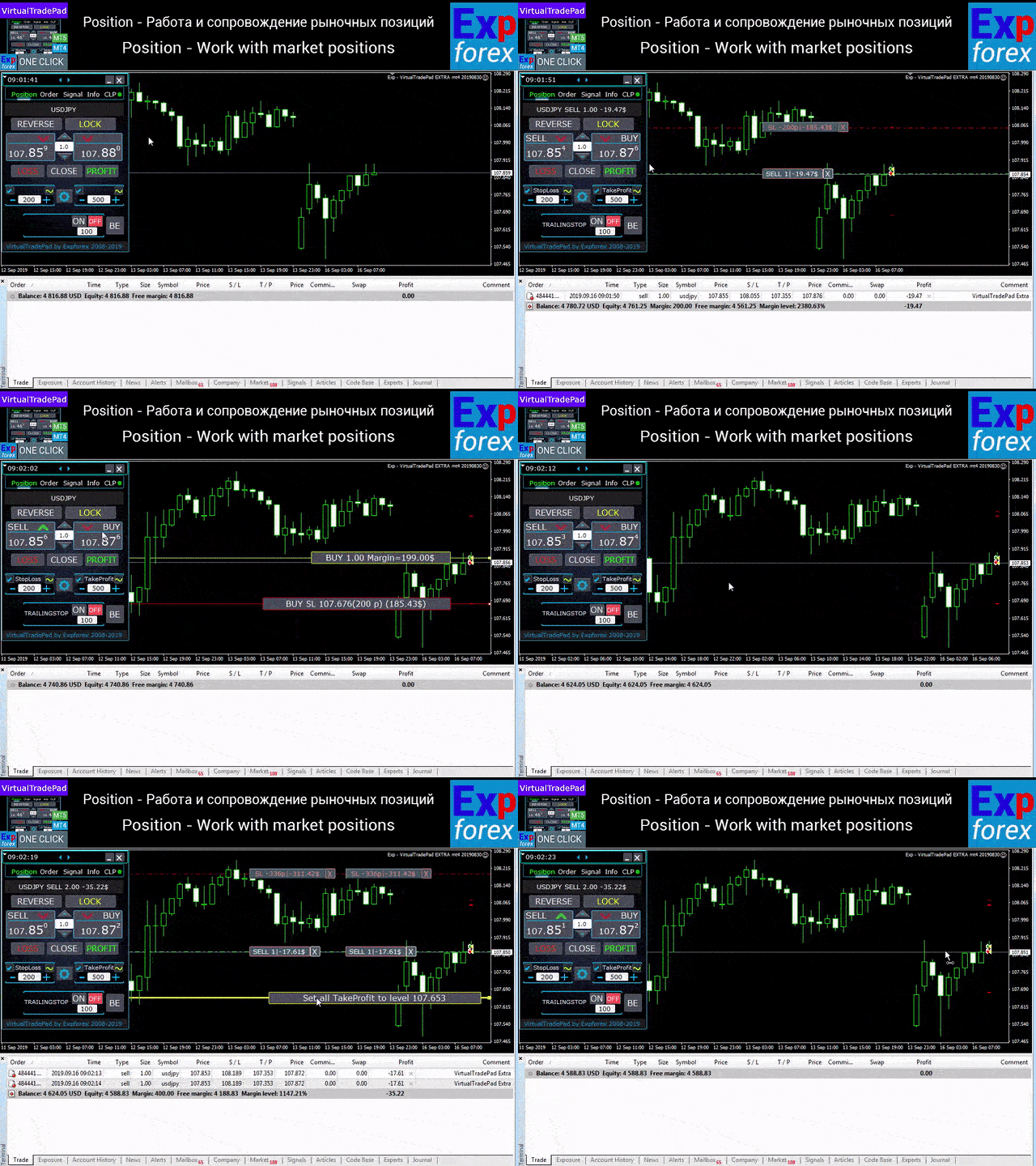
With our panel, you can execute trades in one click directly from the chart and perform trading operations up to 30 times faster than with standard MetaTrader controls. 

New premium version available: Upgrade your workflow with VirtualTradePad PRO SE — the next-generation professional trading panel for MetaTrader 5 and MetaTrader 4.

Why traders choose this panel

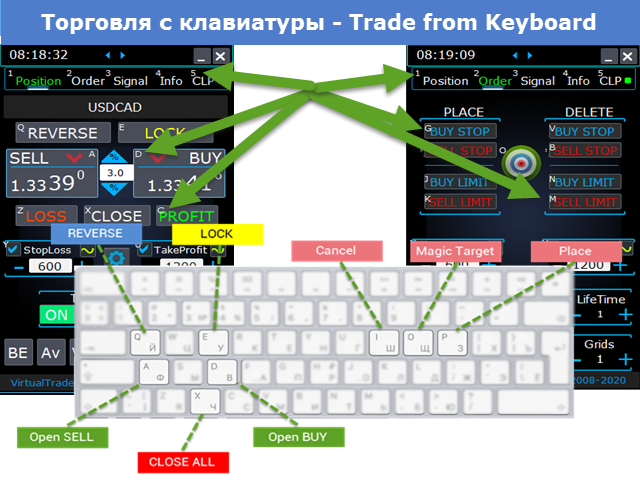
  • One-click trading from the chart and from the keyboard
  • Fast opening, closing, modification, and management of trades
  • Deep control over positions, pending orders, and total profit
  • Automatic calculations that remove routine work from the trader
  • Visual trading management directly on the chart
  • A professional feature set for manual trading and semi-automatic trade management

The core idea of the panel

This panel was developed as a universal trading cockpit for MetaTrader 5, where the most important actions are placed inside a fast, intuitive, and highly visual interface.

Opening and closing positions, reverse, lock, partial close, autolot, real and virtual stops, grid management, mouse trading, and keyboard control are all combined into one efficient working environment. 

The panel does not simply help you click faster. It helps organize the entire trading process so that the trader sees the situation clearly, reacts faster, and performs routine operations with much more precision and less friction.

Main capabilities

Trade execution and closing: BUY, SELL, close, delete, modify, reverse, lock, and partial close.

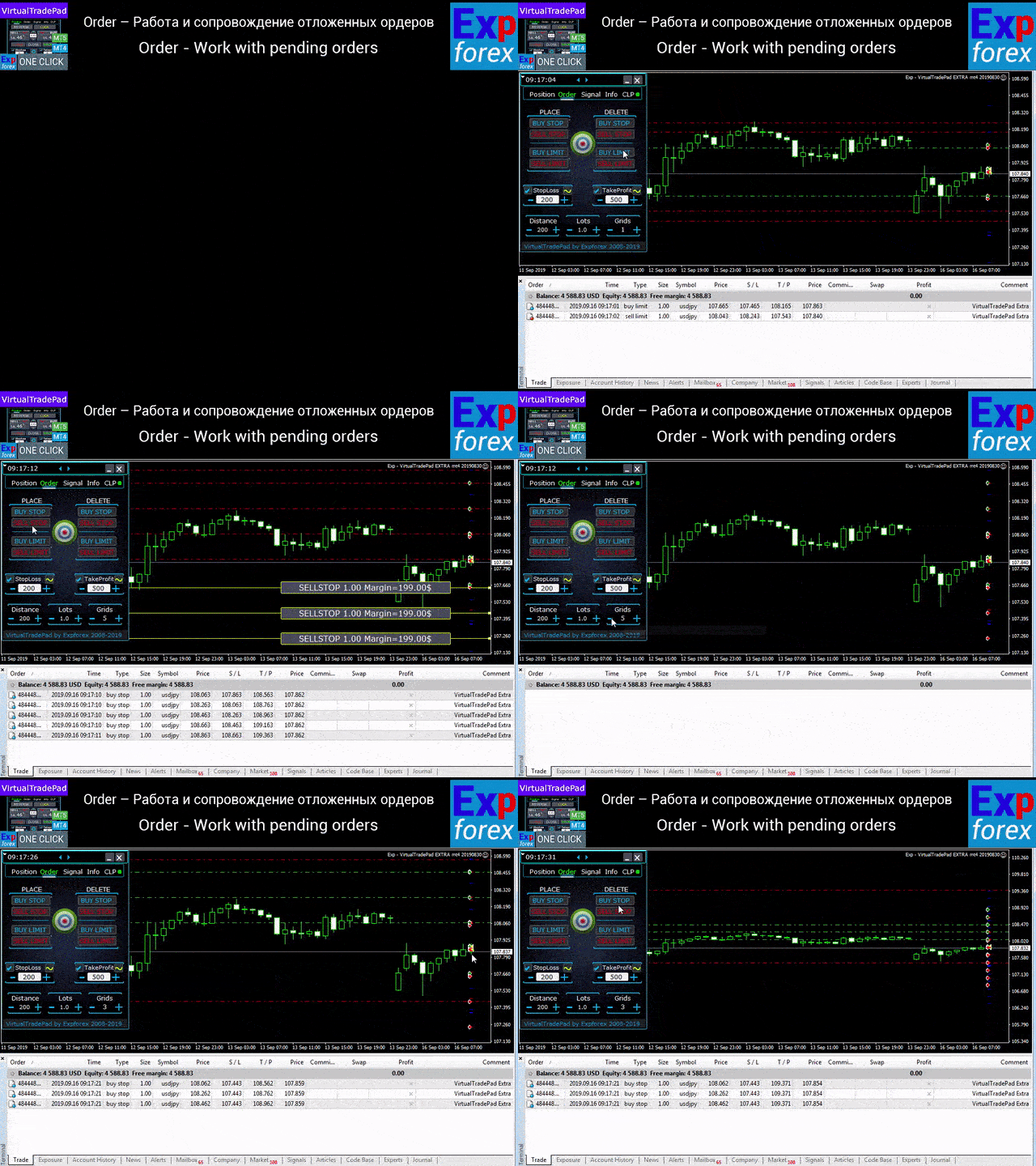
Order management: Buy Stop, Sell Stop, Buy Limit, Sell Limit, order grids, order deletion, order modification, and full order-series control.

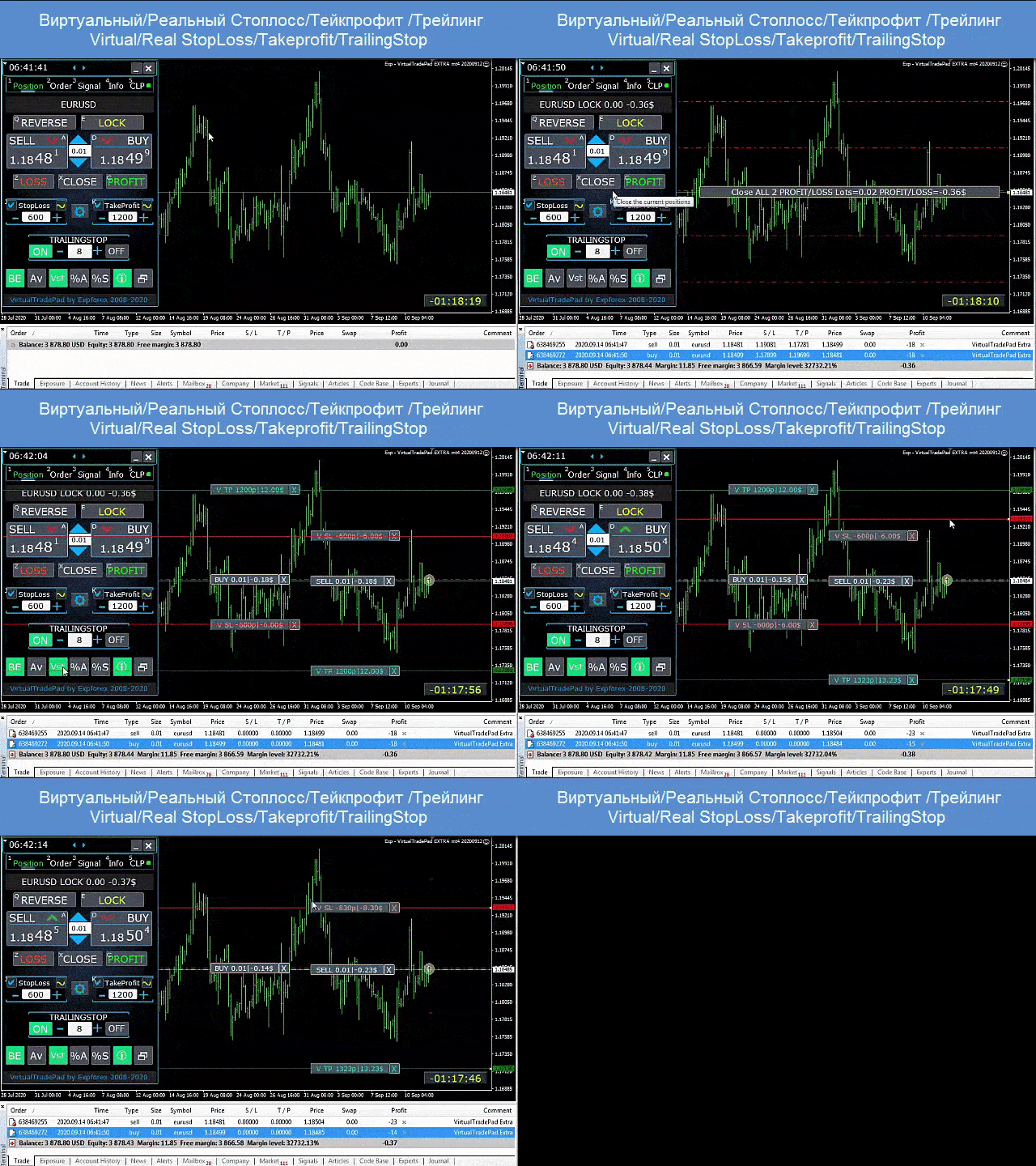
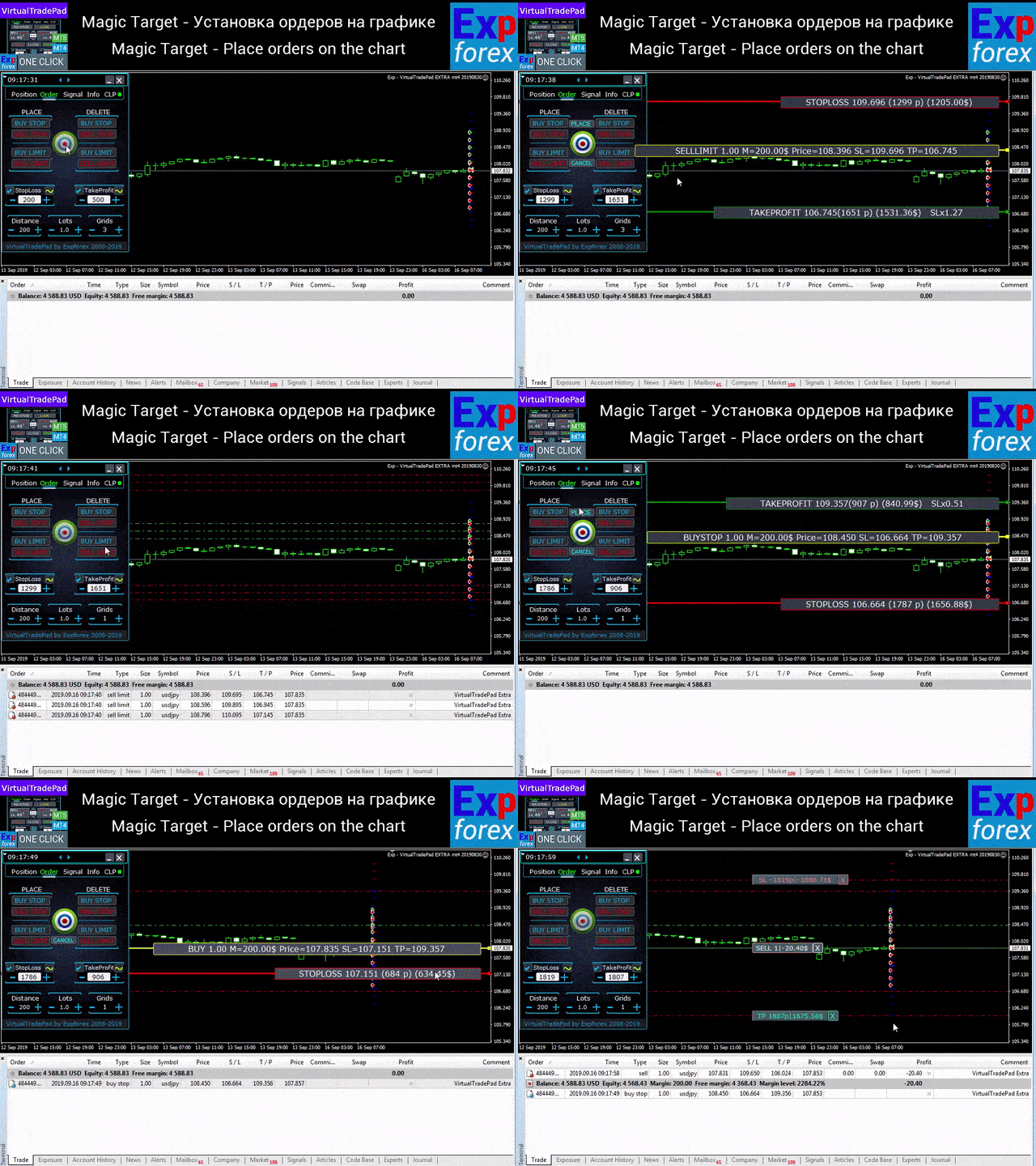
Position management: Stop Loss, Take Profit, trailing stop, breakeven, common Stop Loss / Take Profit for a grid, and average-price-based management.

Automatic calculations: autolot, dynamic lot as a percentage of balance or based on Stop Loss, total profit / loss logic, virtual and real protective levels.

Visual execution: chart-based order placement, mouse trading, line-based trade management, graphic hints, and information labels directly on the chart. {index=3}

Panel structure

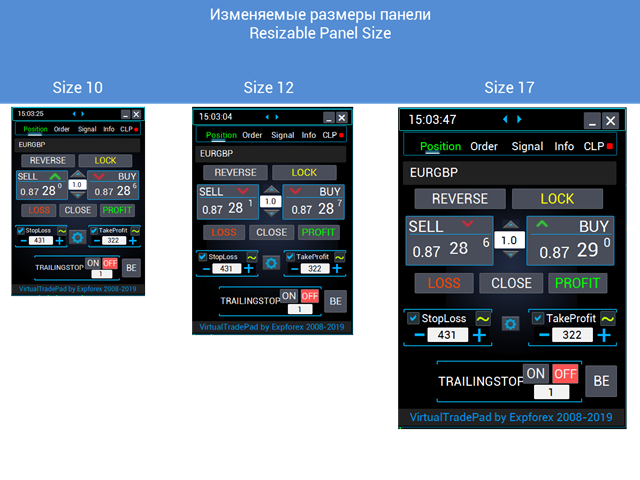
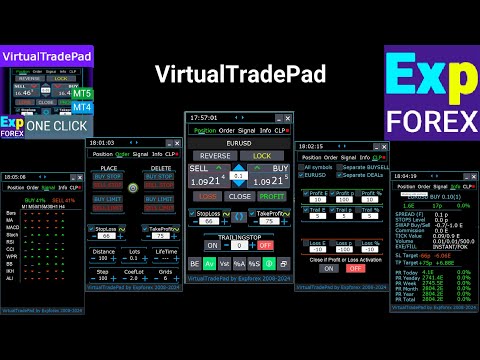
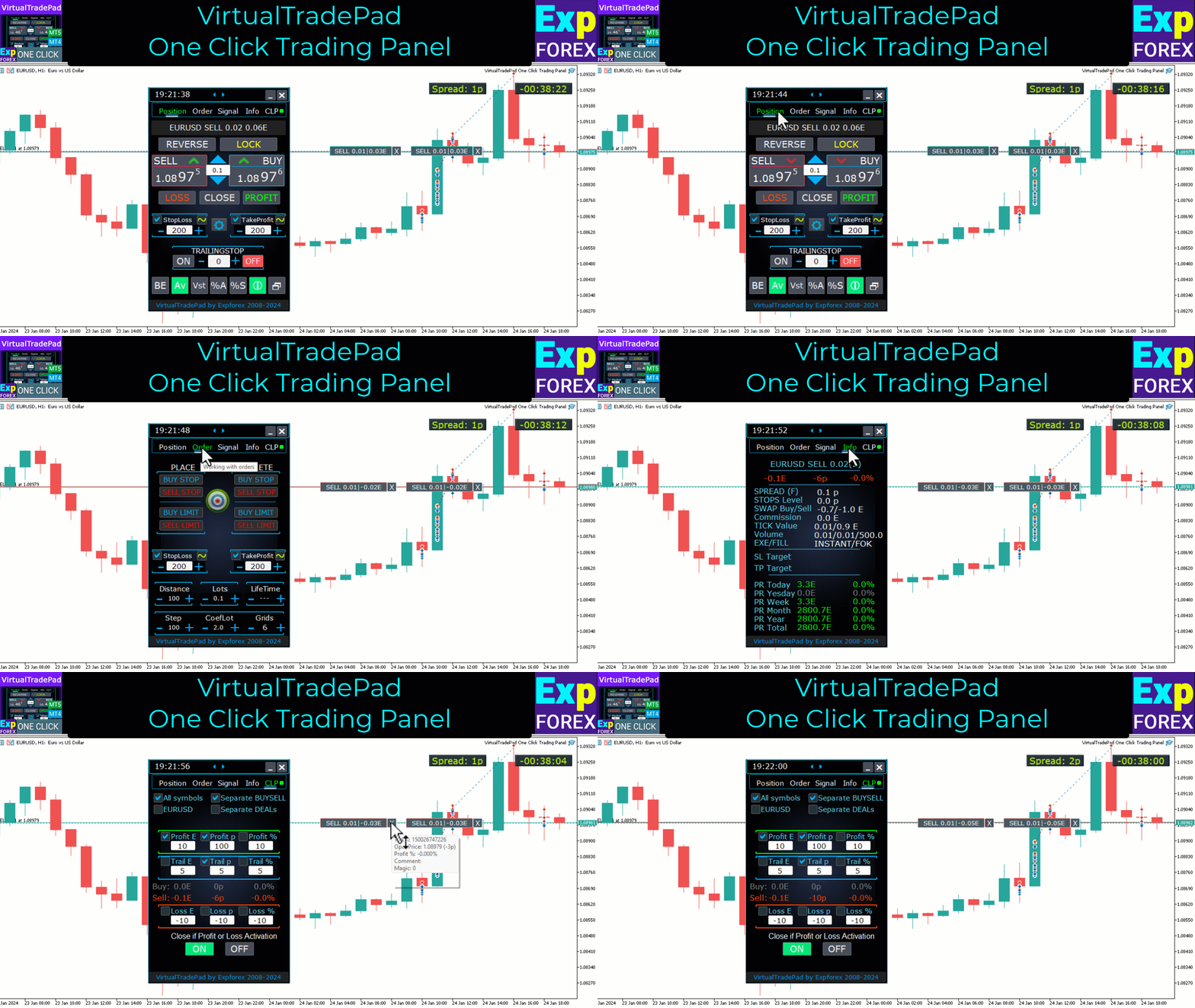
The panel includes 5 major tabs, each designed for a specific group of trading tasks: Positions, Pending Orders, Account Information, Signals, and Total Profit. 

Positions tab — work with open positions

  • open / close BUY and SELL
  • reverse all positions
  • lock the total position
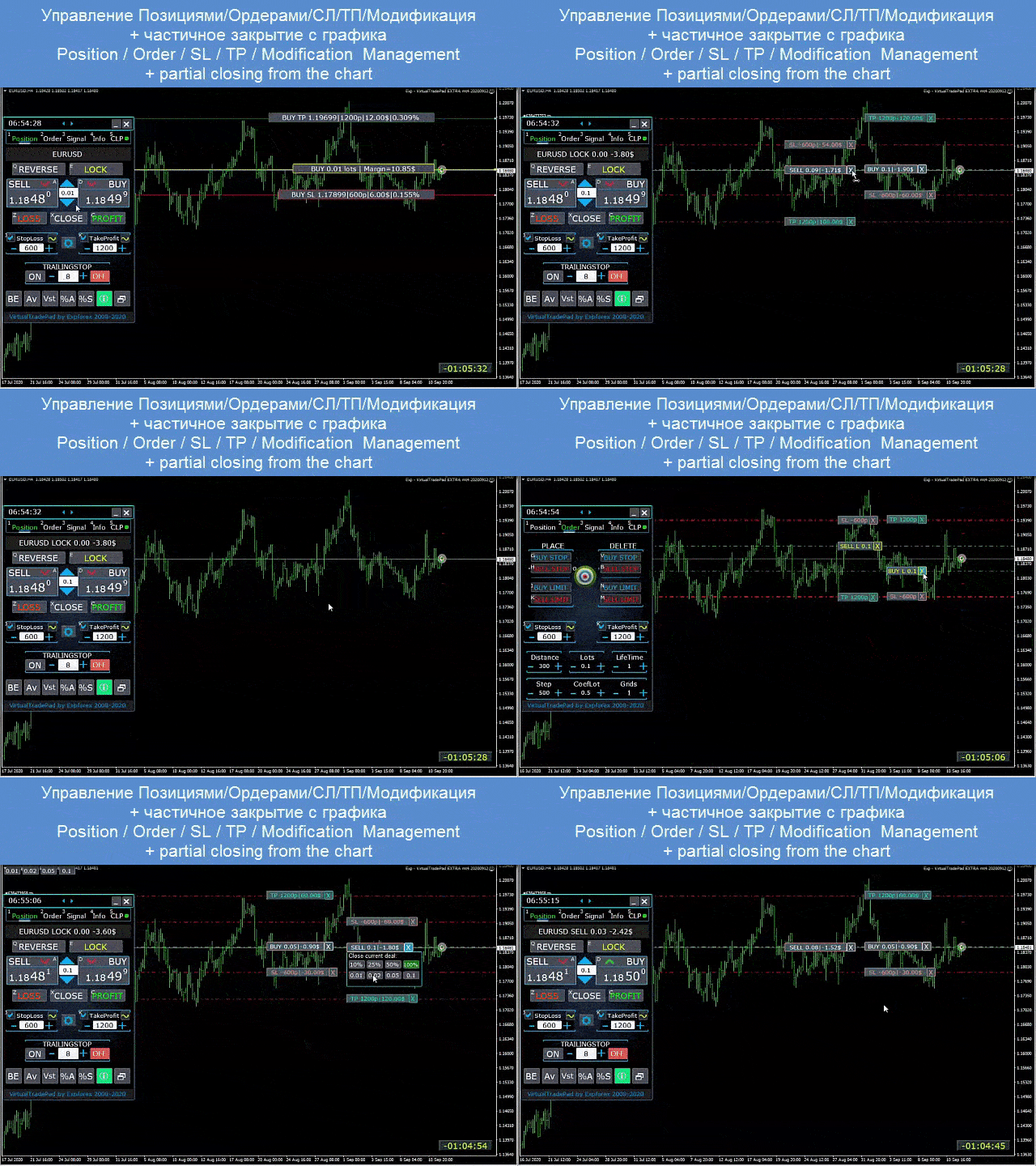
  • modify Stop Loss / Take Profit
  • set common Stop Loss / Take Profit for a grid of positions
  • enable trailing stop
  • enable breakeven
  • close only profitable or only losing positions
  • manage positions directly from the chart
  • partial close directly on the chart
  • autolot / dynamic lot as a percentage of balance or Stop Loss
  • switch between real and virtual Stop Loss / Take Profit
  • average trailing stop and breakeven for the entire position grid from the average price

Orders tab — work with pending and limit orders

  • place and delete Buy Stop, Sell Stop, Buy Limit, Sell Limit
  • build order grids with lot increase and adjustable grid distance
  • set orders and positions with the mouse and chart lines
  • set a common Stop Loss / Take Profit for the full order series
  • modify and remove pending orders directly from the chart

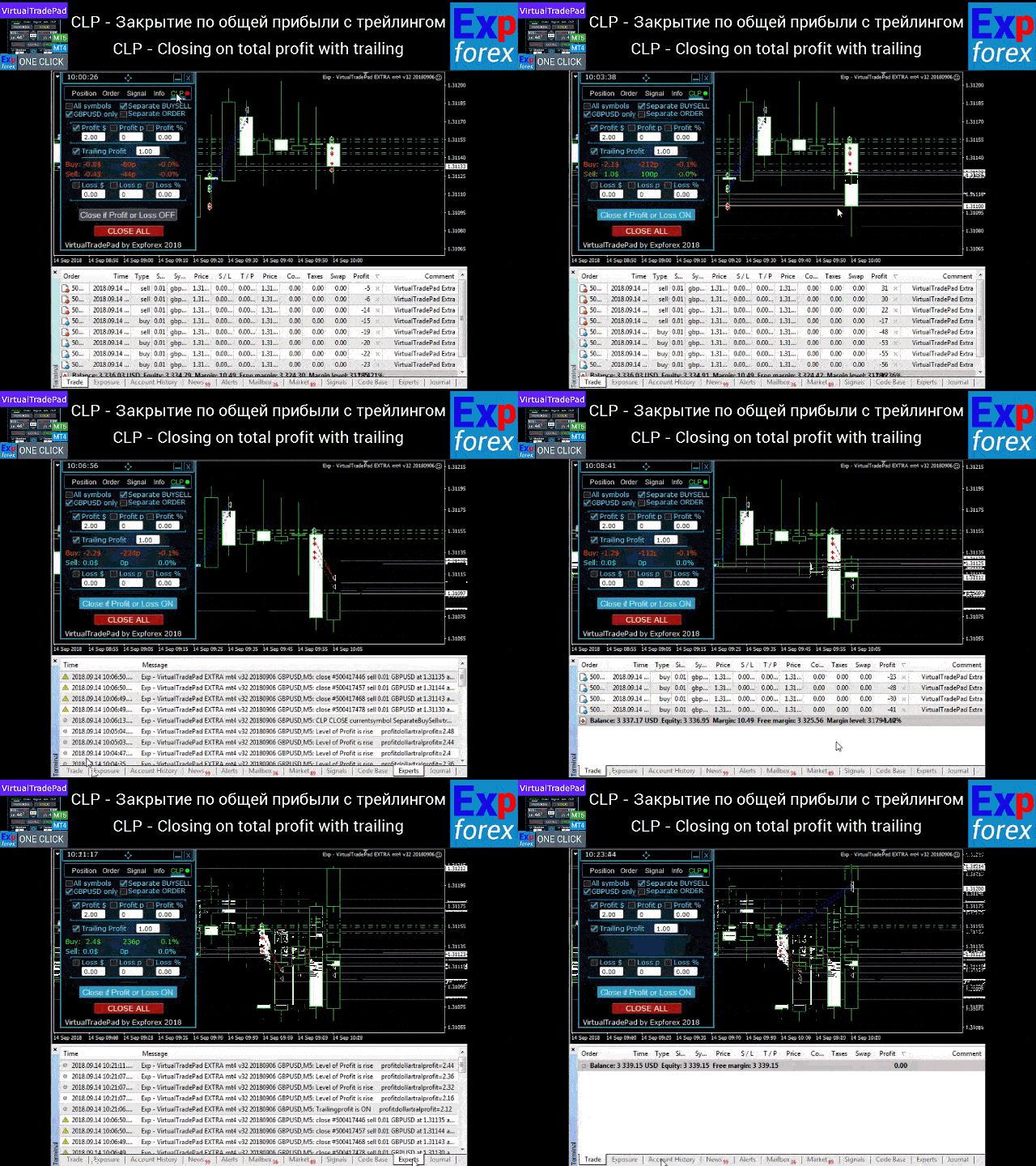
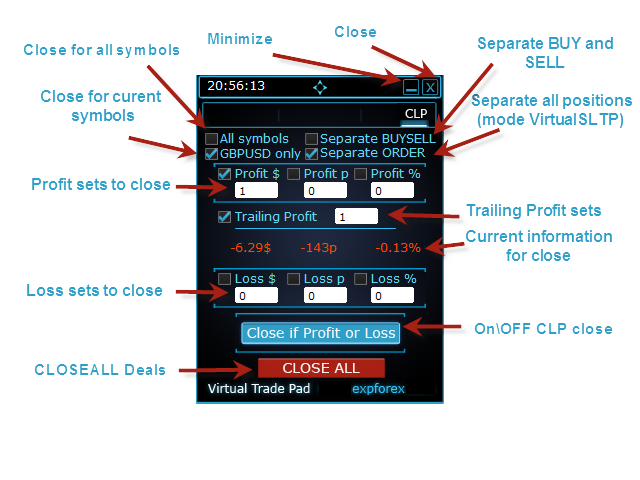
CLP tab — close by total profit or total loss

  • close by total profit or loss in points, dollars, or percent
  • close BUY and SELL directions separately
  • enable virtual Stop Loss / Take Profit for separate or total positions
  • trail total profit in points, dollars, or percent

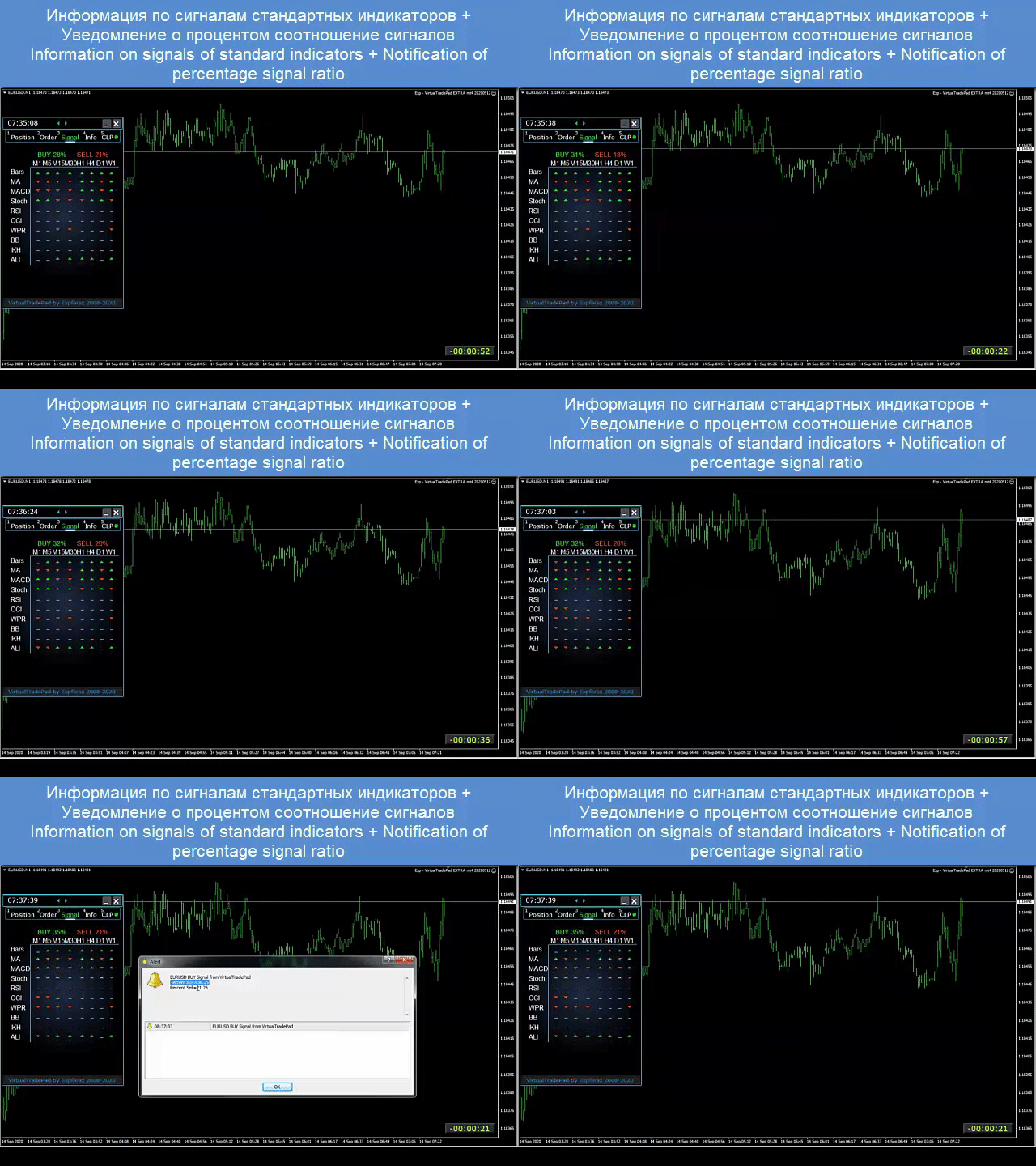
Signals tab

This tab displays signals from 10 standard indicators across 8 timeframes, shows the cumulative percentage of BUY and SELL signals, and can also be used to automatically open positions when the combined signal reaches the defined threshold. 

INFO tab

The information tab displays the current specification of the selected symbol, current Stop Loss and Take Profit targets, and trading performance for today, yesterday, the week, and the month. 

Real trading advantages

  • speeds up manual trading dramatically
  • reduces repetitive routine operations
  • helps the trader react faster to market movement
  • improves control over grids, positions, and total profit management
  • brings a clearer and more professional chart-based workflow into MetaTrader

Who this panel is for

  • active manual traders
  • traders working with position series and order grids
  • traders who manage Stop Loss, Take Profit, trailing, and breakeven manually
  • those who want to remove unnecessary routine from MetaTrader
  • those who want a professional trading assistant rather than a simple collection of buttons

The panel works with any account type and any broker. The interface remains lightweight, responsive, and intuitive, while still delivering a serious set of practical trading tools. It supports both chart trading and keyboard trading. 

Additional recommendations

For fully automated trading, I recommend The XCustom.

If you want to learn how to work in the strategy tester, take a look at our free utility TesterPad.

Tags: Expforex, Vladon, Manual Trade, Trade Panel, Panel Trade, Trade Utility, Take Profit, Tool Management, Management Tool, Forex Helper, Forex Trade, Quick Tool, TradePad, Virtual Trade Pad, Trader Assistant, CLP, Close if Profit or Loss, Trailing Profit, Smart Trailing Stop
Reviews 123
Fredi Sesarianto
139
Fredi Sesarianto 2026.04.07 11:41 

i cant trade anymore without virtual tradepad..

edit, ALL 5 stars , quick response on quetion .

Nguyen Tho
96
Nguyen Tho 2026.02.06 11:01 

When I change the time frame to view on the chart, the trading history still displays, even though I have turned off this feature on the chart. Please guide me on how to disable it on your software.

Chanon Chaichanachot
297
Chanon Chaichanachot 2025.11.29 07:22 

In the "Risk Manager/Prohibit Opening" please consider adding "deny trading during these time" "00:00-15:35, 22:55-24:00" for examples I'm currently using "AutoTrading Scheduler" as a work around. Thank You... Great Tool!

***I'm using autotrade/autoclose by signals(on VPS), so it would prevent EA from opening new trade during certain time while maintaining floating trade.

Recommended products
HedgeSafe Trade Assistant A risk-first manual trading panel for MetaTrader 5. HedgeSafe helps you prepare, validate and manage a trade directly on the chart before you press BUY or SELL. HedgeSafe is not a signal service, market predictor, AI bot or automatic strategy. It does not choose trade direction and does not promise profit. You remain in control of every trading decision. Main capabilities Lot calculation from a percentage of account balance or a fixed amount in account currency. Stop Lo
MrRexo Trade Panel
ARKADIUSZ KROL MULTIPRO
MrRexo Trade Panel - MT5 Manual Trading Utility MrRexo Trade Panel is an on-chart trading panel for MetaTrader 5 , created for traders who manage positions manually and want fast execution, clear risk control and practical chart-based order management in one interface. The panel combines a manual order dashboard, risk-based lot calculator, visual R:R planning, Break Even tools, Trailing Stop management, position protection, session tools, trend context, price levels and chart overlays. It can be

Click Trading
Jawad Tauheed
5 (3)
One Click Trading – Auto TP SL Developer TraderLinkz Version 1.00 Category Utility What it does Adds missing TP and SL to your manual trades and pending orders Sets them once per ticket Lets you move TP and SL afterward Works on hedging and netting accounts Scans on every tick and reacts on trade events Why you want it You place faster entries You get consistent risk and exit targets You reduce fat finger errors You keep full manual control Quick start Attach the EA to any chart Keep TP and SL e
FREE
The Ultimate All-In-One Trade Manager & Prop Firm Guardian for MT5. Nexus Pro Trade Manager is the most advanced, all-in-one trading assistant designed for both manual traders and Prop Firm challengers. Featuring a stunning, lag-free UI (Dark/Light mode), it completely transforms your MT5 into a professional trading terminal. Whether you are trading a personal account or trying to pass evaluations for FTMO, FundedNext, or other prop firms, Nexus Pro protects your capital, automates your risk cal
Open Risk Budget Cap
Md Nasar Uddin Redoy
Open Risk Budget Cap enforces a total open stop-loss risk budget across your account. It does not choose direction and does not open discretionary trades on a live chart. Attach it to one chart; the symbol and timeframe do not matter. What it measures Every open position and every pending order is priced to its stop-loss in account currency using OrderCalcProfit. Positions or orders without a stop-loss are counted and shown on the panel as "without stop-loss". They are excluded from the budget
Auto SLTP Maker MT5
Oleg Remizov
5 (1)
Auto SLTP Maker MT5  is an assistant for all those who forget to set StopLoss and/or TakeProfit in deal parameters, or trade on a very fast market and fail to place them in time. This tool automatically tracks trades without StopLoss and/or TakeProfit and checks what level should be set in accordance with the settings. The tool works both with market and pending orders. The type of orders to work with can be set in the parameters. It can track either trades for the instrument it runs on, or all
DDKiller Pro
Njaratahiry Michael Randrianiaina
Stop Blowing Your Account. Once and For All. DDKiller Pro is the MT5 risk guardian that runs silently on your chart and shuts down trading the moment you hit a limit — whether you're grinding a prop firm challenge or managing your own CFD account. The problem every trader knows: You set your rules. You break them anyway. One revenge trade. One overleveraged position. One session that erases a month of gains. DDKiller Pro removes that decision from your hands entirely. What it does: The second yo
TradePilotmt5
Hossein Khalil Alishir
TradePilot Expert Advisor (EA) for MetaTrader 5 TradePilot is a professional and user-friendly Expert Advisor (EA) for MetaTrader 5 (MT5) . It simplifies automated trading , risk management , and trade execution with a smart trading panel . Perfect for beginners and experienced traders looking for a reliable trade manager EA with automated lot size calculation and smart position management. Key Advantages User-Friendly Trading Panel: Customizable panel with buttons and hotkeys for fast ex
Symbol Manager for MT5
Taras Slobodyanik
5 (3)
Symbol Manager or Grid Manager, designed to group orders into one position (by Symbol or by Magic Number). This utility will be useful to multi-currency traders (many EAs), who can have multiple orders on several pairs. You will be able to see the total number of lots, the total profit, and set virtual stop loss and virtual take profit. To set a real TP (or SL), you must first set the virtual value, and then enter the command in this cell: "set". If you want to set real TP/SL for all orders at
Trade Vista Pro
Chiiambwe Mulbnga
TradeVista Pro — Professional Trade & Risk Management Panel TradeVista Pro is a professional all-in-one trade execution and position management panel for MetaTrader 5 , designed for traders who want faster order management, precise risk control, and a cleaner way to manage open positions directly from the chart. Instead of constantly switching between the MT5 Trade tab, order windows, and chart controls, TradeVista Pro brings essential trading-management functions together in one intuitive inter
FREE
Turbo Close All
Phami Thanh Hoang
Turbo Close All is a powerful and versatile script designed to help traders quickly and efficiently manage their trading positions and pending orders on MetaTrader 5. With its advanced features and customizable settings, this script is an essential tool for traders who want to streamline their trading process and maintain control over their positions and orders. Key Features: Comprehensive Closing Options: Turbo Close All allows you to close all market positions and/or delete pending orders bas
TradePad Pro
Trading Toolkit
5 (1)
TradePad Pro is a dynamic trading tool equipped with diverse order functions and advanced features. It offers eight different order types - Market Buy, Market Sell, Buy Limit, Sell Limit, Buy Stop, Sell Stop, along with two additional functions (Pro Sell & Pro Buy) demonstrated in our YouTube tutorial. The NewsAlert system delivers real-time market news, ensuring you're always up-to-date with crucial market shifts. The latest addition to TradePad Pro is the innovative Equity Defense tool. This
Your stop is already on the MT5 chart. What lot size keeps your loss within the risk you chose? Easy Trade Executor (ETE) shows the lot, loss at the stop, profit at take profit and required margin. After entry, you set the rules: move to breakeven, Close 50% or start a trailing stop. The panel carries out each action according to your rules. Open it and go from sizing the lot to closing the trade in a few clicks on your MT5 chart. See the lot and key order numbers before you click Send Lot from
Breakevan Utility
Jose Luis Thenier Villa
BreakEvan Utility  Is a simple tool in a panel with this utilities: This utility will draw a Golden Line in the chart applied showing the breakeven price, considering all the positions opened for that specific symbol. Also the information panel shows: Balance Breakeven Price for that chart Force Breakeven (for that symbol) as ON/OFF Force Breakeven Global (takes into account all trades opened) as ON/OFF Total Lots opened for Symbol Total Lots opened Global And two buttons: Force Breakeven: Whe
Equity Sculper EA
Christopher Calmerin
Put your trading profits to work. Equity Sculptor EA is an MT5 trade-management tool that uses new closed profits to gradually reduce losing positions across your account. Account-wide management: All symbols and magic numbers, including manual trades. Two funding modes: Rescue Wallet or Legacy Balance. Flexible settings: Customize profit allocation, trim size and trade selection. Clear dashboard: View your funds, performance and configurations. Persistent tracking: Saved accounting continues af
Veron Link Slave – Synchronized Grid, Martingale & Breakout Management Short Description Advanced synchronization tool designed to manage Grid, Martingale, and Breakout EAs. Automatically sends close-basket signals to the Master account upon profit target completion, minimizing slippage across different brokers. Full Description Veron Link Slave is a specialized utility developed to enhance the execution efficiency and risk management of multi-account or multi-broker trading setups. It is desig
Tool Auto Modify SLTP – Protect Your Trades, Optimize Your Strategy In trading, risk is always present. Just one forgotten SL/TP can turn a promising trade into a loss. Even experienced traders occasionally make mistakes. That’s why Tool Auto Modify SLTP was created – to keep you protected and let you focus on your strategy. Key Features: Manage Orders for All Symbols: Monitor and adjust SL/TP for all your trading pairs. Three Flexible Risk Modes: Point-Based: Set fixed SL/TP distances. Account
Crypto_Forex Indicator "WPR with 2 Moving Averages" for MT5, No Repaint. - WPR itself is one of the best oscillators for scalping. - "WPR and 2 Moving Averages" Indicator allows you to see Fast and Slow Moving Averages of WPR oscillator. - Indicator gives opportunities to see the price corrections very early. - It is very easy to set up this indicator via parameters, it can be used on any time-frame. - You can see Buy and Sell entry conditions on the pictures. - With PC and Mobile alerts on WP
The complete Smart Money Concepts suite for the serious SMC trader: auto structure, real-time alerts, multi-timeframe dashboard, and trade signals, with over 45 professional features. This is the advanced Pro edition of the SMC Drawing Tools. While the Lite version provides manual drawing utilities, the Pro version transforms your chart into an automated, real-time SMC trading system. The default settings are pre-configured with my own personal trading inputs, so the indicator is optimized and r
CosmiCLab SMC FIBO CosmiCLab SMC FIBO is a professional trading indicator designed for traders who use Smart Money Concepts (SMC), market structure analysis and Fibonacci retracement levels. The indicator automatically detects market swings and builds Fibonacci levels based on the latest impulse movement. It also identifies market structure changes such as BOS (Break of Structure) and CHOCH (Change of Character), helping traders understand the current market direction. CosmiCLab SMC FIBO also pr
Capital Management EA – Smart Risk Management & Profit Optimization for MT5 Take control of your trading capital with smart, automated strategies — fully optimized for MetaTrader 5 (MT5). Looking to protect your capital and maximize profits through automated money management strategies ? Capital Management EA is the all-in-one Expert Advisor for MetaTrader 5 (MT5) that helps you trade smarter, not harder. Core Features: 5-in-1 Capital Management Strategies – Built-in versatility Gr
Expert TP SL v04
Mikhail Ostashov
Expert TP SL v04 - Professional Trading Assistant with AI Motivation System Advanced manual trading tool with automatic risk management, overtrading protection, and intelligent psychological support for disciplined trading. PRODUCT OVERVIEW Expert TP SL v04 is a comprehensive trading assistant designed for manual traders who want to maintain emotional discipline while automating risk calculations. This isn't just another order placement tool - it's a complete trading psychology system that pr
Lot calculator tool MT5
Ernestas Kvedaras
3.67 (3)
More stable MetaTrader 4 version is available here:  Lot Calculator Tool . This tool helps you to automatically calculate and manage risk, conveniently place orders visually, schedule orders, trail stops, move them to break-even and more. Features Place market or pending orders using draggable lines Schedule orders Calculate and limit risk using various methods See current spread See time till next candle Set custom order comments Trail stops Move stops to break-even See order profit/loss in p
TradeArchitect Grid Manager  is a chart-based manual trading utility for MetaTrader 5. It combines visual trade planning, risk-based position sizing, market and pending order execution, position management, and optional martingale or anti-martingale progression. The utility does not generate trading signals and does not decide when to buy or sell. The trader chooses the direction, Entry, Stop Loss and Take Profit. GridPlan Trade Manager performs the calculations, checks the plan and manages th
DeepTrade ScalpPanel
Yasir Mohammed Sachit Sachit
DeepTrade Scalp Panel is a fast, professional on-chart control panel built for scalpers who need to act in a fraction of a second. Open market orders instantly, drop pending orders with one tap, and let the panel handle Stop Loss, Take Profit, break-even and trailing automatically. No more fumbling with the order window while the move runs away from you.   KEY FEATURES - Instant BUY / SELL market execution with one tap - Fast pending orders: BUY STOP, SELL STOP, BUY LIMIT, SELL LIMIT placed at
Trade Manager and Risk Calculator Ppm Short Description A comprehensive on-chart utility panel for manual trade execution, position management, and real-time risk calculation. Full Description Overview PPM  is an advanced on-chart utility designed to streamline manual trading and position management. The panel provides a centralized interface to execute market orders, calculate position sizes based on risk parameters, and manage existing trades across multiple symbols. It is designed as a visu
SLTPSetter
Raphael Djangmah Osro Agbo
SLTPSetter - StopLoss Take Profit Setter HOW DOES IT WORK? Risk and account management is a very critical aspect of trading. Before entering a position, you must be fully aware how much you will be willing to loss both in percentage and value. This is where SLTPSetter gets you covered.  All you need to do is attach the indicator on the chart and PRESS BUY OR SELL automatically, all parameters needed for placing the trades will be provided at the top left corner of the screen. Feel free to adjust
Ultimate Pro Trading Panel — All-In-One Manual & Grid Trading Dashboard Pro Trading Panel   is an all-in-one on-chart control panel that gives discretionary and semi-automated traders a complete toolkit for entries, exits, risk management, and grid trading — without leaving the chart. Every function is visual, draggable, and updates in real time. If you want to test this utility feel free to download the basic preview version of this tool here:  https://www.mql5.com/en/market/product/181435 Who
Bastion is a monitor-and-close-only risk manager for prop-firm traders. It watches your account against your firm's daily-loss and maximum-drawdown limits in real time and force-closes your open positions BEFORE you cross a line. It never opens a trade of its own, so it stays fully within the tools allowed by FTMO, FundedNext, The5ers, FTUK and FXIFY. Why traders fail challenges A large share of failed evaluations end on a single daily-loss breach: a moment of inattention, a news spike, one tra
Candlestick Pattern Scanner is a multi-timeframe and multi-symbol dashboard and alert system that checks all timeframes and currency pairs for different candlestick patterns that are formed in them. Scanner is integrated   with support and resistance zones so you can check the candlestick patterns in most important areas of the chart to find breakout and reversal patterns in the price chart. Download demo version   (works on M4,M6,M12,H3,H8 timeframes and 20 symbols of Market Watch window) Read
Buyers of this product also purchase
Trade Assistant MT5
Evgeniy Kravchenko
4.43 (216)
It helps to calculate the risk per trade, the easy installation of a new order, order management with partial closing functions, trailing stop of 7 types and other useful functions. Additional materials and instructions Installation instructions - Application instructions Line function -   shows on the chart the Opening line, Stop Loss, Take Profit. With this function it is easy to set a new order and see its additional characteristics before opening.   Risk management  - The risk calculation
Forex Trade Manager MT5
InvestSoft
4.98 (689)
Trade Manager MT5 is an advanced position size calculator and trade management tool for MetaTrader 5, designed to help traders plan trades faster, control risk more precisely, and manage open positions directly from the chart. It combines order placement, risk based lot calculation, Stop Loss and Take Profit management, Break Even, Trailing Stop, Partial Close, Equity Protection, and external trade management in one panel. Whether you trade forex, indices, metals, commodities, crypto, or future
FarmedHedge Pair Trading Dashboard
Tanapisit Tepawarapruek
5 (7)
Farmed Hedge Yield Farming | All Markets (Manual - Hybrid - Semi/Automated EA) VERIFIED TRADING RESULTS - Farmed Hedge Yield Axi Copy:  https://www.mql5.com/en/signals/2356376 - Farmed Hedge Yield Exn Copy:   https://www.mql5.com/en/signals/2356404 - Farmed Hedge Yield V Copy:  https://www.mql5.com/en/signals/2357156 IMPORTANT NOTICE: FarmedHedge is a MANUAL-FOCUSED TRADING UTILITY ,not a fully automated EA. Results shown on this Signal include manual trades and overall strategic management.
Telegram to MT5 MultiChannel Copier
Sergio Marquez Uroz
4.68 (22)
Telegram to MT5 Multi-Channel Copier   automatically copies trading signals from your Telegram and Discord channels straight to MetaTrader 5. No bots, no browser extensions, no manual copying. A signal arrives in Telegram or Discord and the EA opens the trade in your terminal within seconds. And before you copy a channel, the built-in backtester shows you what that channel would have done in your account. The product has two components: a Windows application that listens to your Telegram channel
TradePanel MT5
Alfiya Fazylova
4.88 (173)
Trade Panel is a multi-functional trading assistant. The app contains over 50 trading functions for manual trading and allows you to automate most trading tasks. Application instructions: https://www.mql5.com/en/blogs/post/756482 Trial version of the application for a demo account: https://www.mql5.com/en/blogs/post/750865 How to install the application: https://www.mql5.com/en/blogs/post/756239 How to test the application in visual mode: https://www.mql5.com/en/blogs/post/770277 How to install
Copy Telegram signals with your own trading rules Telegram to MT5 Signal Trader automatically copies text-based trading signals from public and private Telegram channels and groups into MetaTrader 5. Manage multiple providers and MT5 accounts from one desktop app, with individual risk and trade settings for each provider . No Telegram bot or API setup needed for copying. Simply sign in with your own Telegram account by phone or QR code and select the channels or groups you have already joined. Y
EA Overfitter
Stephen J Martret
5 (4)
That backtest looks great. But will it still be making money tomorrow, next week, next month? EA Overfitter re-runs your EA on 100 price histories it has never seen. One score tells you if the edge is real. A backtest tells you what an EA did on one price history — the one that happened to occur. What you cannot tell from it is how much of that result was the strategy and how much was the particular path. EA Overfitter answers that. It builds up to 100 synthetic price histories your EA has n
The product will copy all telegram signal to MT5 ( which you are member) , also it can work as remote copier.  Easy to set up, copy order instant, can work with almost signal formats, image signal,  s upport to translate other language to English Work with all type of channel or group, even channel have "Restrict Saving Content", work with  multi channel, multi MT5 Work as remote copier: with signal have ticket number, it will copy exactly via ticket number. Support to backtest signal. How to s
News Trade EA MT5
Konstantin Kulikov
4.55 (11)
Present to you the useful robot that I have been using for several years. It can be used in both semi-automatic mode and fully automatic mode. >>> Chat <<< The program contains flexible settings for trading on the news of the economic calendar. It cannot be checked in the strategy tester. Only real work. Download the latest archive of settings: https://www.mql5.com/en/blogs/post/747929 Signals monitoring: https://www.mql5.com/en/signals/author/test-standart When creating your own sets of setti
================================================================================ POC BREAKOUT - V20.72. Full Professional Grade Toolkit ================================================================================ POC Breakout is a full MetaTrader 5 trading dashboard for discretionary traders who want breakout signals, Point of Control (POC) context, volume profiles, order flow, market structure, news, alerts, and advanced trade planning in one professional workspace. Attached directly to you
Welcome to Entry In The Zone with SMC Multi Timeframe  —  COMPLETE SMC ANALYSIS SYSTEM — ALL IN ONE INDICATOR  Entry In The Zone with SMC Multi Timeframe  An indicator designed for market analysis based on Smart Money Concepts (SMC), displaying Market Structure, Key Zones (Order Blocks, Supply & Demand Zones, and Fair Value Gaps), Liquidity, and real-time BUY / SELL signals. It supports both Single-Timeframe and Multi-Timeframe analysis, along with the Confluence at Zone feature, which helps you
EA Auditor
Stephen J Martret
5 (7)
EA Auditor is an independent analysis tool for traders evaluating Expert Advisors and trading signals on MetaTrader 5. It audits backtest reports, reviews posted developer signals, and cross-verifies the two against each other to help traders assess strategies before committing capital. The MQL5 market offers a wide range of Expert Advisors from many developers, with varying approaches, quality, and transparency. EA Auditor provides a consistent, data-driven framework for reviewing them, answer
AW Shepherd Safety MT5
AW Trading Software Limited
5 (5)
AW Shepherd Safety EA is an Expert Advisor for managing open positions. The trader opens the first order from the panel, and from there the EA runs the basket on its own: it adds recovery orders with a trend filter, closes a side on TakeProfit, trailing or stop, and shows the close levels on the chart. Buys and sells are managed separately, and both sides can be open at the same time. A recovery order opens not just on a price step but once Parabolic SAR, two MAs or candle color show a reversal
News Filter EA
Rashed Samir
5 (2)
News Filter EA: Advanced Algo Trading Assistant News Filter EA is an advanced algo trading assistant designed to enhance your trading experience. By using the News Filter EA , you can integrate a Forex economic news filter into your existing expert advisor, even if you do not have access to its source code. In addition to the news filter, you can also specify trading days and hours for your expert. The News Filter EA also includes risk management  and equity protection features. MT4 Version Ma
MT5 to Telegram Signal Provider turns your trading account into a signal provider. Every trade action, whether manual, by EA or from your phone, is instantly sent as a message to Telegram. You can fully customize the format or use a ready-made template for quick setup. [ Demo ] [ Manual ] [ MT4 Version ] [ Discord Version ]     New: [ Telegram To MT5 ] Setup A step by step user guide is available. Key Features Ability to customize order details sent to subscribers You can create a tiered subs
RETAILBERG FOOTPRINT CHART PRO — Order-Flow Workspace for MetaTrader 5 Version 7.00  |  Professional System  |  31 tools  |  One chart A full 150-page illustrated User Manual is included. Please read the full manual to understand this feature packed footprint chart elements and ui. https://www.mql5.com/en/blogs/post/777982 DEMO / STRATEGY TESTER — PLEASE READ FIRST
VirtualTradePad PRO SE MT5 — professional trading control center for MetaTrader 5 VirtualTradePad PRO SE is a premium chart-based trading panel and trade-management workspace for MetaTrader 5 . It is designed for traders who want faster execution, clearer position control, structured trade management, visual level planning and a professional workflow directly from the chart. This is not only a BUY / SELL panel. PRO SE combines manual trading, pending orders, position management, partial exits, b
Trader Evolution
Siarhei Vashchylka
5 (7)
" Trader Evolution " - A utility designed for traders who use wave and technical analysis in their work. One tab of the utility is capable of money management and opening orders, and the other can help in making Elliott wave and technical analysis. Manual (Be sure to read before purchasing) | Version for MT4 Advantages 1. Trading in a few clicks. Immediate and pending orders are available in the panel 2. Money management. The program automatically selects the appropriate lot size 3. Simplifies
AW Trade Manager
AW Trading Software Limited
AW Trade Manager is a trade panel for MetaTrader 5 with a risk/reward tool on the chart. A trade is planned with Entry, Stop Loss and Take Profit lines dragged with the mouse: plates show price, distance and money, zones show profit and loss, and the volume is calculated from the risk. Before sending, the confirmation window shows the whole trade with risk, margin and the rules of the position. Manual and instruction -> HERE / Free LIVE Demo -> HERE To manage a position after the entry the panel
On-Chart Trade Assistant & Risk Management Panel Ergotick Trade Manager gives you a complete set of trading tools directly on your MetaTrader 5 chart: a trade panel with lot size calculator, visual R:R tool, and daily loss limit protection; a separate statistics panel that tracks your performance and past trades; and an economic calendar you can toggle with one click. Built for scalpers, day traders, and prop firm traders. Ergotick Trade Manager is fast , light on resources , and stable , so it
Master Your Trading Discipline   Stop losing your hard-earned gains to overtrading and emotional decisions. The Discipline Tool is your ultimate trading assistant, ensuring strict risk management in real-time. Key Protection Features: Advanced Drawdown Defense : Automatically halts trading if your daily drawdown exceeds a preset threshold (percentage or dollar amount). Real-Time Equity Lock : Safeguard profits by referencing peak equity, ensuring drawdown stays within control. Hard Profit Target
Dealer Panel
Mian Rameez Ali
Dealer's Panel No signal decides anything here — a hand does. One click, and the panel calculates what's underneath: lot size from risk, target from a 30-step balance ladder that remembers exactly how far an account has climbed. Toggle between market and pending without touching an input field. Set a stop, and the take-profit can write itself — a fixed share of the balance, translated into price with no arithmetic left for the trader to get wrong. One trade live at a time; it won't let a seco
Astro Trade MT5
Indra Maulana
5 (8)
25% discount on the release of the tool: only for the next 3 buyers Send a message to receive a demo version. AstroTrade Trading Assistant AstroTrade is a comprehensive multi-functional trading utility developed for the MetaTrader 5 platform. It integrates essential tools for trade execution, risk management, and technical monitoring into a single unified interface. The application is designed to assist traders in managing their daily operations through a visual and structured environment. Vi
Bneu Prop Firm Pass System
Marvinson Salavia Caballero
5 (1)
BNEU PROP FIRM PASS SYSTEM v2.37 PRODUCT OVERVIEW Bneu Prop Firm Pass System is a professional risk management and account protection utility for MetaTrader 5. Attach to any chart and configure your account rules. The system monitors daily loss, maximum drawdown, profit target, trading days, open risk, margin usage, news events, pending orders, weekend restrictions, and rollover restrictions from one dashboard. It includes a 5-tab premium dashboard, prop firm presets, custom rules, Risk Sentine
Anchor Trade Manager
Kalinskie Gilliam
5 (8)
Your EAs cannot see each other, but Anchor can. Anchor gives you one place to coordinate your EAs, manage risk, and decide when trading is allowed. It works alongside the trading bots you already use without any changes to them. The Problem One EA opens a trade. Then another starts trading. The next thing you know, you wake up to multiple grids built across your account. Each EA may be doing exactly what it was designed to do, but together they can place far more risk on your account than you in
AlgoRadar
Stephen J Martret
5 (4)
AlgoRadar is an on-chart analytics dashboard for MT5 that aggregates Expert Advisor performance across multiple accounts, brokers, and platforms, including both MT4 and MT5 data, into a single live view on your MT5 chart. All analysis runs from the chart interface, with no external applications or manual report processing required. EA Analysis and Ranking For traders running multiple Expert Advisors, AlgoRadar provides a consolidated view of each EA's performance across accounts. Active EAs a
REVDEN AI Desk: Run Your Trading From One Conversation With Your Own AI, on REVDEN's Market Context Imagine running your trading from one conversation. REVDEN AI Desk brings it into MetaTrader 5: you ask your own AI how it reads the market, and it answers from REVDEN's full context on the symbols you trade, with their state, their risk picture and the releases ahead. Its proposals arrive with entry, stop, target and risk, and you approve the ones that fit. Your rules change the same way: write w
Power Candles Strategy Scanner - Self-Optimizing Multi-Symbol Setup Finder Self-optimizing settings work one chart at a time, and finding where they pay off right now means opening chart after chart. Power Candles Strategy Scanner runs the same self-optimizing engine as the Power Candles indicator on every symbol in your Market Watch, side by side. One panel ranks where it pays off: the winning strategy per symbol, its optimized Stop Loss and Take Profit. An alert fires the moment a fresh signal
Smart Renko Chart
Gianny Alexander Lugo Sanchez
This Expert Advisor creates a custom symbol (for example EURUSD_RK) from the symbol of the chart and converts the same chart to Renko. The chart keeps updating tick by tick. A control panel on the chart lets you change the Renko type and the way the brick size is calculated without restarting. Markets It works on any symbol that your broker offers in the terminal: forex pairs, stocks, indices, metals, energies, cryptocurrencies and synthetic indices. The brick size can be set in points, as a per
Trade Manager DaneTrades
Levi Dane Benjamin
4.13 (31)
DaneTrades Trade Manager is a professional trade panel for MetaTrader 5, designed for fast, accurate execution with built‑in risk control. Place market or pending orders directly from the chart while the panel automatically calculates position size from your chosen risk, helping you stay consistent and avoid emotional decision‑making. The Trade Manager is built for manual traders who want structure: clear risk/reward planning, automation for repeatable management, and safeguards that help reduc
More from author
Exp COPYLOT CLIENT for MT5
Vladislav Andruschenko
3.97 (35)
Professional Trade Copier for MetaTrader 5 Fast, professional, and reliable trade copier for MetaTrader . COPYLOT allows you to copy Forex trades between MT4 and MT5 terminals with support for Hedge and Netting accounts. COPYLOT MT5 version supports: - MT5 Hedge to MT5 Hedge - MT5 Hedge to MT5 Netting - MT5 Netting to MT5 Hedge - MT5 Netting to MT5 Netting - MT4 to MT5 Hedge - MT4 to MT5 Netting MT4 version Full Description +DEMO +PDF How To Buy How To Install How to get Log Files H
Exp COPYLOT CLIENT for MT4
Vladislav Andruschenko
4.69 (65)
Professional Trade Copier for MetaTrader 4 Fast, professional, and reliable trade copier for MetaTrader 4 . COPYLOT helps you copy Forex trades between MetaTrader 4 and MetaTrader 5 terminals with flexible synchronization for different account setups. COPYLOT MT4 version supports: MetaTrader 4 to MetaTrader 4 MetaTrader 5 Hedge to MetaTrader 4 MetaTrader 5 Netting to MetaTrader 4   MT5 version Full Description + DEMO + PDF How To Buy How To Install How to get Log Files How To Test and Optimize A
VirtualTradePad PRO SE MT5 — professional trading control center for MetaTrader 5 VirtualTradePad PRO SE is a premium chart-based trading panel and trade-management workspace for MetaTrader 5 . It is designed for traders who want faster execution, clearer position control, structured trade management, visual level planning and a professional workflow directly from the chart. This is not only a BUY / SELL panel. PRO SE combines manual trading, pending orders, position management, partial exits, b
Exp5 AI Sniper for MT5
Vladislav Andruschenko
2 (3)
AI Sniper for MetaTrader 5 — Smart Trading Robot Built for Precision AI Sniper is a powerful and intelligent trading robot for MetaTrader 5 , designed for traders who want more than a basic Expert Advisor. It combines advanced market logic, adaptive trading behavior, and smart entry timing to help identify high-probability BUY and SELL opportunities in fast-moving markets. AI Sniper is a self-optimizing MT5 trading system created to analyze the market in real time, react to changing conditions,
Exp TickSniper PRO FULL
Vladislav Andruschenko
3.9 (58)
TickSniper for MetaTrader 5 — High-Speed Tick Scalper with Automatic Parameter Adaptation A professional fully automated tick scalper that automatically adapts its working parameters to the current trading instrument. TickSniper for MetaTrader 5 is built for traders who want a fast, intelligent, and nearly ready-to-run trading system without manually adjusting dozens of settings for every currency pair. The Expert Advisor analyzes quote flow, tick speed, spread behavior, and symbol specificatio
Premium Partial Close and Trailing Stop assistant EA for MetaTrader 5. Automatically closes part of a profitable position during a rollback and continues managing the remaining volume with smart trailing logic. Exp Trail Partial Close PRO for MT5 is a professional trade management Expert Advisor designed to protect floating profit step by step. The EA tracks an open profitable position, fixes profit levels as price moves forward, waits for a controlled rollback, then closes a selected part of

Averager FULL
Vladislav Andruschenko
4.64 (14)
Averager for MetaTrader 5 — professional averaging and position series management system A powerful Expert Advisor designed to average positions that move into drawdown, with support for additional entries both against the trend and in the trend direction. This product is made for traders who need more than a simple averaging tool — it is a flexible position-management solution for controlling a trade series, improving the average entry price, and managing the entire basket toward a common prof
Exp5 The xCustomEA for MT5
Vladislav Andruschenko
4.27 (11)
The xCustomEA for MetaTrader 5 — Universal Trading Expert Advisor for Custom Indicators Turn almost any custom indicator into a fully automated trading workflow. The xCustomEA for MetaTrader 5 is a universal Expert Advisor designed to read signals from your custom indicators and execute trades based on the logic you define. You only need to specify the indicator name, signal buffers, and core parameters. The EA then uses this data to automate execution, trade management, and signal handling. It
Exp5 Swing PRO for MT5
Vladislav Andruschenko
3 (2)
The Swing model-based trading strategy involves placing two opposing pending orders with increased lots. As the market price moves in a certain direction, one of the orders is triggered while the lot size of the other is increased.  This approach allows traders to capture profit while minimizing risks, making it a reliable way to trade forex, stocks, and commodities. The use of this strategy in financial trading has been widely recognized for its ability to facilitate informed decision-making,
Exp Tick Hamster MT5
Vladislav Andruschenko
3.59 (17)
Tick Hamster for MetaTrader 5 — Fully Automatic Trading Expert Advisor Trading without complicated setup. Tick Hamster for MetaTrader 5 is a fully automated Expert Advisor created for traders who want a simple, ready-to-run solution with automatic internal optimization for any trading symbol. This product is designed for users who prefer a clean start, minimal setup, and a trading system that adapts its internal logic automatically. Install it on a chart, set the lot size, and let the algorithm
CloseIfProfitorLoss with Trailing
Vladislav Andruschenko
4.88 (32)
Close If Profit or Loss with Trailing for MetaTrader 4 — automatic closing by total profit or loss A reliable trade-management utility for MetaTrader 4 that automatically closes positions when the total profit or total loss reaches the level you set. The Expert Advisor monitors open trades, calculates floating profit and loss, can trail profit, and helps close positions faster than manual reaction. MetaTrader 4 is still used by many manual traders, grid traders, scalpers, and Expert Advisor use
Profit or Loss Pad
Vladislav Andruschenko
4.27 (11)
Close If Profit or Loss with Trailing for MetaTrader 5 — automatic profit and loss control for your trading account A professional risk-management utility for MetaTrader 5, designed to automatically close positions when the total profit or total loss reaches your predefined level. The Expert Advisor can monitor open trades, calculate floating profit or loss, apply profit trailing, and close positions according to your trading rules. This is not just a simple close-all script. It is a complete a
Lib5 EAPadPRO for MT5
Vladislav Andruschenko
4.5 (6)
EAPADPRO Library for MetaTrader 5 is a free professional interface library for adding a modern information panel to your Expert Advisor. The library is created for MQL5 developers who want to give their trading programs a cleaner, more informative and more professional visual presentation directly on the MetaTrader 5 chart. MetaTrader 5 Expert Advisors often contain complex logic, multiple settings, Magic number filters, order execution rules and strategy values. EAPADPRO helps present this info
FREE
Exp5 Tester PAD for Strategy Tester
Vladislav Andruschenko
4.53 (30)
The utility allows you to manually test your strategies in the strategy tester. One-click trading on the visualization chart. Convenient and complete functionality for testing trading skills is now available in the strategy tester as well. Forex Tester Pad is a trading simulator for strategy tester. Trading using indicators. The main functions of our utility        MT4 version Full Description +DEMO +PDF   How To Buy    How To Install       How to get Log Files     How To Test and Optimize    
FREE
Exp Assistant 5
Vladislav Andruschenko
4.77 (127)
Auto Setting, stop loss, take profit, trailing stop, breakeven levels, enabling virtual stop loss and take profit. Exp Assistant will help you organize maintenance of your positions. This program, the Expert Advisor, is designed to automatically set the  Real or Virtual   Stop Loss and Take Profit  levels for your positions while trading.  You can easily manage all the operations of the Expert Advisor from the control panel on the chart.  If you face any difficulty in setting stop loss, take pro
FREE
SAFETYLOCK for MetaTrader 5 — premium protective locking and risk-management system SAFETYLOCK for MT5 is a professional utility for MetaTrader 5 that automatically creates an opposite protective pending order for an already opened position. When a trader or another Expert Advisor opens a trade, SAFETYLOCK can place a protective Buy Stop or Sell Stop at the specified distance. If the market moves against the original position, this order is activated and forms a controlled safety lock structure.


Exp5 Duplicator
Vladislav Andruschenko
4.78 (9)
Duplicator for MetaTrader 5 — professional position duplicator inside one terminal A reliable Expert Advisor for traders who want to automatically duplicate already opened positions in MetaTrader 5, increase volume, apply custom lot settings, and manage duplicates with precise rules. It is a practical tool for manual trading, algorithmic systems, and flexible management of existing positions inside one terminal. Duplicator for MT5 does not open positions by its own trading strategy. Its role is
Exp4 The xCustomEA for MT4
Vladislav Andruschenko
4 (5)
The xCustomEA for MetaTrader 4 — Universal Trading Expert Advisor for Custom Indicators Build your own trading system around almost any custom indicator. The xCustomEA for MetaTrader 4 is a universal Expert Advisor designed to receive signals from your custom indicators and execute trades according to your configured logic. You define the indicator name, signal buffers, and core parameters, and the EA uses this data to automate trading. It is a practical solution for traders and developers who n
Exp Averager
Vladislav Andruschenko
4.82 (22)
Averager for MetaTrader 4 — advanced trade recovery and position series management system A professional Expert Advisor created for traders who need a controlled way to average losing positions, build a structured trade basket, and manage exits with more flexibility. Averager is designed to open additional trades when positions move into drawdown, helping you improve the average entry price and manage the entire series as one coordinated structure. This is not just another averaging utility. It
Exp4 THE X FULL Universal EA for MT4
Vladislav Andruschenko
4.06 (17)
Universal indicator advisor for MetaTrader 4 with a wide range of functions, working on standard indicators. Strategy builder in 1 Expert Advisor. Lots of trading indicators from the standard MetaTrader set. Possibility to choose 1 out of 20 signals and 5 out of 20 filters. More than a hundred parameters for individual customization to suit your requirements. For each signal, you can customize the indicator parameters, select a timeframe, and specify a signal bar. Links: The X for MetaTrader 5
Exp5 COPYLOT MASTER for MT5
Vladislav Andruschenko
4.42 (12)
Exp5 - COPYLOT MASTER is a trade copier for МetaТrader 5 and MetaTrader 4. It copies Forex trades from any accounts. Installation This Expert Advisor is a master copier. Install the Expert Advisor in the terminal from which you want to copy trades. Specify any text label name as pathWrite, for example, "COPY". Install COPYLOT MASTER for MT5 on the terminal from which you want to copy trades.  Then install  COPYLOT Client MT4  on the MT4  terminal to which you want to copy. Or  Copylot Client MT5
FREE
Exp TickSniper
Vladislav Andruschenko
3.97 (30)
TickSniper for MetaTrader 4 — High-Speed Tick Scalper with Automatic Parameter Adaptation A professional fully automated Expert Advisor for tick scalping that automatically adapts its working parameters to each currency pair. TickSniper for MetaTrader 4 was created for traders who want a fast, intelligent, and practically ready-to-use trading system without manually optimizing dozens of settings for every instrument. The Expert Advisor analyzes current quotes, tick arrival speed, symbol specifi
Exp Swing
Vladislav Andruschenko
4.44 (64)
It uses the model of a famous strategy called Swinger (Pendulum, Cheburashka) - alternate placing of pending orders with increased lot. The strategy lies in placing two opposite pending orders. When the price moves in a certain direction, one pending order is triggered, while the lot size of the other order is increased. The EA provides three types of opening pending orders (TypeofTrade) Auto-opening after placement (Instant opening AutoTrade) Opening and management after manual opening (Manual
FREE
Exp Tick Hamster MT4
Vladislav Andruschenko
3.62 (13)
Tick Hamster for MetaTrader 4 — Fully Automatic Trading Expert Trading without complicated setup. Tick Hamster is an automated trading Expert Advisor for MetaTrader 4 designed for traders who want a simple, ready-to-run solution with automatic internal optimization. The system is built for users who prefer to start quickly, avoid deep parameter tuning, and use an Expert Advisor that adapts its logic to the current trading symbol. Install it, set your lot size, and let the algorithm work. Tick Ha
Exp Assistant 4
Vladislav Andruschenko
4.88 (76)
AutoSetting stop loss, take profit, trailing stop, breakeven levels, enabling virtual stops. Exp Assistant will help you organize maintenance of your positions. This Expert Advisor will set all the necessary stop loss and take profit levels for your positions. All the Expert Advisor operation is managed from the control panel on the chart. If you have open positions, but your Expert Advisor cannot set stop loss, take profit, trailing stop or breakeven, and if you trade manually, you can use the
FREE
VirtualTradePad mt4 Extra
Vladislav Andruschenko
4.85 (61)
Trading Panel for trading in 1 click.  Working with positions and orders!  Trading from the chart or the keyboard. Using our trading panel, you can trade in one click from the chart and perform trading operations 30 times faster than the standard MetaTrader control. Automatic calculations of parameters and functions that make life easier for a trader and help a trader conduct their trading activities much faster and more conveniently. Graphic tips and full information on trade deals on the chart
Ind5 Extra Report Pad
Vladislav Andruschenko
4.77 (35)
Traders Diary: This is a statistics panel providing analysis of your trading account for MetaTrader 5. The analysis results are displayed on the chart in real time. Multicurrency trading is very popular.        MT4 version Full Description +PDF   How To Buy    How To Install       How to get Log Files     How To Test and Optimize     All products from Expforex However, greater the amount of trades, the more difficult it is to analyze the profitability of each of them. Analyzing trades by mont
FREE
Exp COPYLOT MASTER for MT4
Vladislav Andruschenko
4.52 (27)
Trade copier for МetaТrader 4. It copies forex trades, positions, orders  from any accounts. # It is one of the best МТ4   -   МТ4, МТ5   -   МТ5, МТ4   -   МТ5, МТ5   -   МТ4   trade copiers today. #  The unique copying algorithm exactly copies all trades from the master account to your client account. High operation speed. Tough error handling. A powerful set of features. #  All these qualities are combined in a single program - EXP - COPYLOT . #  The program can be run on multiple terminal b
FREE
Exp4 Tester PAD for Strategy Tester
Vladislav Andruschenko
4.9 (20)
The utility allows you to manually test your strategies in the strategy tester. One-click trading on the visualization chart. The latest version of the utility offers advanced features for traders to manually test their trading strategies. With the strategy tester, you can now evaluate the effectiveness of your trading strategies in a simulated environment. This functionality allows you to analyze the performance of your trading techniques and refine them to improve your trading skills. Moreover
FREE
Ind5 InfoPad Information Panel
Vladislav Andruschenko
4.89 (9)
INFOPad is an information panel that creates information on the selected currency pair in the MetaTrader 5 terminal. There are 5 functions of this indicator: Shows the main and main information on the selected symbol: Ask BID, Spread, Stop Level, Swap, Tick value, Commission prices; Shows the future targets of SL target and TP Target (The number of points of the established stop loss and take profit, the dollar amount); It shows the profit received for the periods: Today, Week, Month, Year, Tot
FREE
Filter:
Fredi Sesarianto
139
Fredi Sesarianto 2026.04.07 11:41 

i cant trade anymore without virtual tradepad..

edit, ALL 5 stars , quick response on quetion .

Vladislav Andruschenko
313916
Reply from developer Vladislav Andruschenko 2026.04.07 11:49
Thank you ^-)
Nguyen Tho
96
Nguyen Tho 2026.02.06 11:01 

When I change the time frame to view on the chart, the trading history still displays, even though I have turned off this feature on the chart. Please guide me on how to disable it on your software.

Vladislav Andruschenko
313916
Reply from developer Vladislav Andruschenko 2026.02.06 11:13
Xin chào! Với MT5, để tắt hiển thị lịch sử lệnh trên biểu đồ (và không bị bật lại khi đổi khung thời gian), bạn làm như sau: 1) Tắt hiển thị lịch sử lệnh trên chart
Mở biểu đồ cần xem Nhấn F8 (Thuộc tính biểu đồ / Properties) Vào tab Common (Chung) Bỏ chọn Show trade history (Hiển thị lịch sử giao dịch) Nhấn OK
Chanon Chaichanachot
297
Chanon Chaichanachot 2025.11.29 07:22 

In the "Risk Manager/Prohibit Opening" please consider adding "deny trading during these time" "00:00-15:35, 22:55-24:00" for examples I'm currently using "AutoTrading Scheduler" as a work around. Thank You... Great Tool!

***I'm using autotrade/autoclose by signals(on VPS), so it would prevent EA from opening new trade during certain time while maintaining floating trade.

Vladislav Andruschenko
313916
Reply from developer Vladislav Andruschenko 2025.11.29 08:09
Hi, thank you. Do you mean to prevent opening from the panel?
Ivan Nedelko
825
Ivan Nedelko 2025.10.20 07:20 

Привет, почему при открытии позиции с мекджик баттон не видно на графике уровни стопов и тейка? И приходится потом вручную их добавлять! Раньше такого не было!

Vladislav Andruschenko
313916
Reply from developer Vladislav Andruschenko 2025.10.20 08:04
Приветствую. скорее всего стоплосс и тейкпрофит не включен в панели. нужно см отреть скриншот. Эти функции не изменялись
Sergio Henrique
126
Sergio Henrique 2025.09.18 16:15 

Excelente !!!

Vladislav Andruschenko
313916
Reply from developer Vladislav Andruschenko 2025.09.18 17:56
Thank you
4131199
180
4131199 2025.09.01 08:18 

Hi, can please add me in friend list? I have some questions needed your support. Thanks

Vladislav Andruschenko
313916
Reply from developer Vladislav Andruschenko 2025.09.01 09:13
Hello Yes. You can add questions about VTP on the Comments saction
Kalen
488
Kalen 2025.05.19 09:47 

I've been using the MT4/MT5 versions for years now. I could not trade without this tool, its amazing. One problem I'm having right now though is as follows: If I have my Stop loss set at 100, and my Take profit at 200, when I go to click the "Buy" button, and I show on the chart where my Take profit and Stop loss would be, they are reversed. So for a buy in this case, my Stop loss would show 200, and my Take profit 100, even though that is the opposit for what I have them set at. This goes for clicking the "Sell" button. Basically, the Take profit and Stop loss previews are backwards, which is very frustrating. Otherwise it is a perfect app. Ok it also has a few formatting issues with previews and numbers on the chart, but cmon its an amazing EA and worth your money!

-Edit: The issue is being worked on, and I'm sure will be fixed soon. Perfect product and great support from the developer :)

Vladislav Andruschenko
313916
Reply from developer Vladislav Andruschenko 2025.05.19 09:49
Thank you for your feedback. I will definitely check it out. Can you attach the log file from the advisor to the comments section?
MarcieliRaimondi
41
MarcieliRaimondi 2025.05.15 03:42 

User didn't leave any comment to the rating

Vladislav Andruschenko
313916
Reply from developer Vladislav Andruschenko 2025.05.15 04:24
👋 Olá! Você pode verificar quantas ativações ainda possui diretamente no seu perfil da MQL5.com. 🔗 Seu perfil: https://www.mql5.com/pt/users/marcieliraimondi/market 📌 Vá até a aba “Mercado” e role a página para baixo para ver a lista dos produtos comprados e o número de ativações restantes. ✅ Por favor, envie uma captura de tela dessa seção para confirmação. ℹ️ Informações adicionais:
Você pode instalar o robô em até 10 computadores diferentes (PC pessoal, servidor VPS, notebook do trabalho, etc.). Não há limite para o número de contas ou terminais de negociação. No entanto, mudanças no hardware (como substituição do HD/SSD, processador ou até uma atualização do Windows) podem consumir uma nova ativação. Lembre-se de que cada instalação consome recursos do sistema (CPU/RAM), e executar muitos terminais ao mesmo tempo pode afetar o desempenho.
Gabriel Muela Garcia
219
Gabriel Muela Garcia 2025.01.28 12:50 

hola . es posible operar con virtual pad en dxtrade o en ctrader ?

9concious
19
9concious 2024.12.30 10:44 

There is a delay of closing multiple positions be it sl or tp if I remove the ea its fine with basic mt5 bulk operation

Vladislav Andruschenko
313916
Reply from developer Vladislav Andruschenko 2024.12.30 10:59
Hello. Please give more information in the comments section. Stoploss and takeprofit are closing on the server. not on the terminal. Or are you talking about virtual stoploss takeprofit? Tell more in the comments section. Attach log files from the expert and a picture example.
Temuri
44
Temuri 2024.12.02 10:43 

по моему мнению один из самих лучших, если не самая лучшая для ручнои торговли.

Vladislav Andruschenko
313916
Reply from developer Vladislav Andruschenko 2024.12.30 11:00
Спасибо.
Kurt-
357
Kurt- 2024.10.22 06:00 

Отличный советник. Давно пользуюсь, с начало на мт 4, сейчас на мт 5. На мт 5 долго загружалось, были заедания, обязателен сд диск, сейчас работает, как на 4. Похоже это сам терминал доработали, это уже месяцев 10. Удобен расчитывает позицию, маржу, может еще своп можно сделать чтоб расчитывал и коммисию, все сразу видно, отличная программа.

Vladislav Andruschenko
313916
Reply from developer Vladislav Andruschenko 2024.10.22 08:10
Спасибо за отзыв. Идей очень много. Но не хватает времени на все. В план листе ещё много задач, которые хочется осуществить в этой панели.. главное вдохновение.
WALID ALI
337
WALID ALI 2024.08.17 18:52 

1. the Pad not allowing you to Enter the price of TP and SL before you enter the trade only contain the TP and SL in points , I mean when I want to Enter Long or Short with Certain Price for TP and SL .

2.the expert advisor is frozen in the chart all the day when I trying to activate it or just move it to another place in the chart cant do it , and not working and frozen and restart the mt5 terminal several time and also frozen all the day at BTCUSD chart

Vladislav Andruschenko
313916
Reply from developer Vladislav Andruschenko 2024.08.17 19:23
FULL INFO about your problem: How to make Files https://www.mql5.com/en/blogs/post/732566 ⚠️⚠️⚠️
▶️Youtube: https://www.youtube.com/watch?v=yedpin0LPnQ
Marco
598
Marco 2024.08.15 18:07 

Amazing trade assistant, It's just missing CLP loss fields to allow positive values, how to achieve it? When I input a positive value it automatically converts into negative, to allow positive values is important to lock profits on both sides, positive SL like a trailing stop which one adjust manually according to market conditions, specially useful when handling a basket of several positions.

Thanks again

Vladislav Andruschenko
313916
Reply from developer Vladislav Andruschenko 2024.08.15 19:14
Thank you. You can use positive value:
AutoCorrect_LevelCLP = trueIn the loss field, you can now enter only minus values;
if the user enters +10, then the system will automatically set it to -10.
In the profit field, you can now enter only positive values;
if the user enters -10, then the system will automatically set it to +10.
CLP_TralOptions, you can enter only a positive value.
Otherwise, the Expert Advisor will return an error. if AutoCorrect_LevelCLP =false
 you can set trailing profit to be triggered from the minus zone
wilsonvivas32
909
wilsonvivas32 2024.08.05 04:45 

User didn't leave any comment to the rating

Vladislav Andruschenko
313916
Reply from developer Vladislav Andruschenko 2024.08.05 08:03
Thank you.
imarafelix
51
imarafelix 2024.04.30 18:05 

Hi! Is it possible to remove the prices that keep appearing on the screen? If yes, could you please explain how? Thank you.

Vladislav Andruschenko
313916
Reply from developer Vladislav Andruschenko 2024.04.30 19:27
Hello. What you mean price? Can you add image to the comment page? https://www.mql5.com/en/market/product/167#!tab=comments&page=62&comment=53225834
dedelimasilva
19
dedelimasilva 2024.04.22 15:26 

Bom dia acabei de comprar o produto e ele não esta abrindo posições no gráfico gostaria de suporte para resolver esse problema att

Vladislav Andruschenko
313916
Reply from developer Vladislav Andruschenko 2024.04.22 16:45
Esta é a seção de revisão do programa.
Se você tiver algum problema, escreva na página de comentários com capturas de tela e registros.
⚠️⚠️⚠️ INFORMAÇÃO COMPLETA sobre o seu problema: Como fazer arquivos https://www.mql5.com/pt/blogs/post/742962 ⚠️⚠️⚠️
▶️Youtube: https://www.youtube.com/watch?v=yedpin0LPnQ
Panagiotis Stefanou
230
Panagiotis Stefanou 2024.04.08 04:26 

i dont know why and im trying to figure out on demo and on vpn server everything works like charm CLP works perfect trail stops and order all good but when you try to put it on a server CLP doesnt do anything and on the other hand its start doing breakevens even if you turn it off even if you turn all trails and stop it still does put breakevens so in the end it becomes useless hope the developer help with this im waiting him due to his closed only friends chat but im hoping he can solve the bugs

Vladislav Andruschenko
313916
Reply from developer Vladislav Andruschenko 2024.04.20 11:24
I wrote about this problem to the service desk, the developers of the terminal. Unfortunately, I can't solve this problem. The problem is in the MeTattrader terminal. Previously everything worked fine.
https://www.mql5.com/en/forum/464363#comment_52793484 Please update and use extern inputs for the VPS from MetaQuotes
idrisslamou
110
idrisslamou 2024.03.03 01:55 

Really great product as a scalper it is the perfect tool specifically the one click be for all positions on the chart. But I got a concern it slows down when there is volatility in the market an update will be great.

Vladislav Andruschenko
313916
Reply from developer Vladislav Andruschenko 2024.03.03 08:10
Hello. Thank you. Are you talking about requotes from a broker when there is volatility? That is, you need to look at the terminal log, perhaps your broker often returns requotes and slippage? Can you add video example?
Stupid Genius
26
Stupid Genius 2024.02.26 08:38 

good program, a little bit slow when open/close positions. if its possible to put info about actual position profit (point, percentage) in position tab instead info tab, for me is better, beacause i can protect my profit inserting instantly points behind actual price...

Vladislav Andruschenko
313916
Reply from developer Vladislav Andruschenko 2024.02.26 08:52
Hello. opening and closing depends on your broker. look in the terminal log. maybe there are requotes there. Or slippage. Also, you can click on the information line and it will change the information output.
Reply to review