VirtualTradePad One Click Trading Panel

4.59

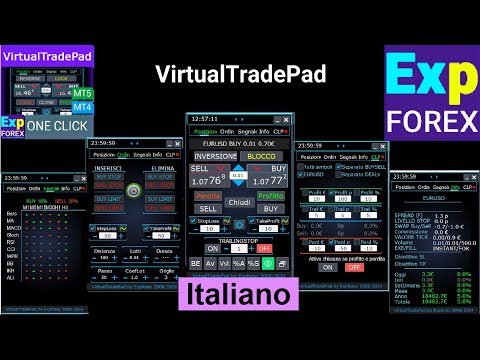
Pannello di trading per il trading in 1 clic. Lavorare con posizioni e ordini! Trading dal grafico o dalla tastiera.

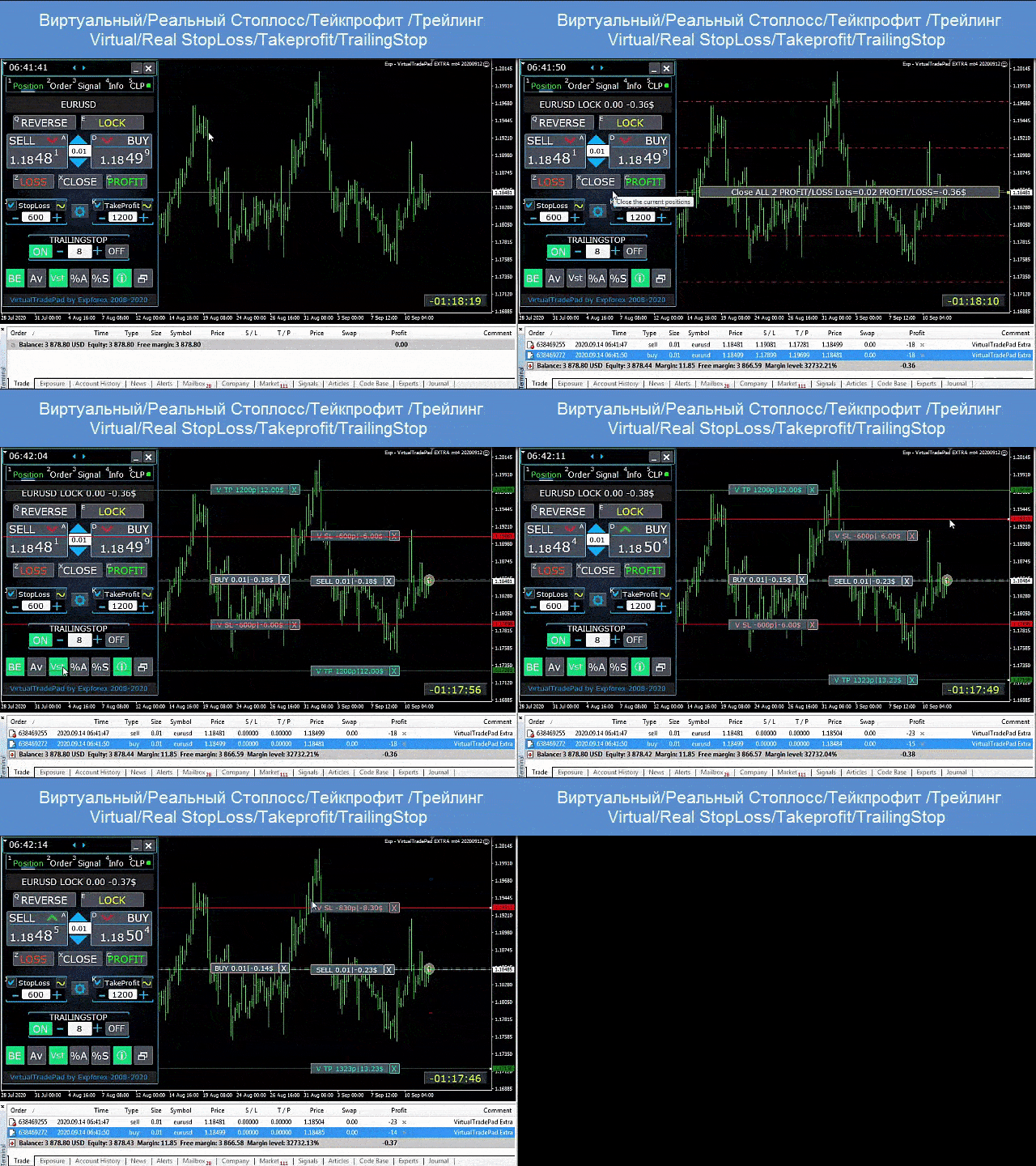
  • Con il nostro pannello di trading, puoi eseguire operazioni con un solo clic direttamente dal grafico ed eseguire operazioni di trading 30 volte più velocemente rispetto al controllo MetaTrader standard.
  • I calcoli automatici di parametri e funzioni rendono il trading più veloce e conveniente per i trader.
  • Suggerimenti grafici, etichette informative e informazioni complete sugli accordi commerciali si trovano nel grafico MetaTrader.

Apertura e Chiusura, Inversione e Blocco, Chiusura Parziale / Autolot. Stop loss/take profit virtuale/reale/trailing stop/breakeven, Griglia degli ordini...

Il pannello di controllo del trading degli ordini principali in  МetaТrader 5 : compra, vendi, buystop, buylimit, sellstop, selllimit, chiudi, cancella, modifica, trailing stop, stoploss, takeproft.

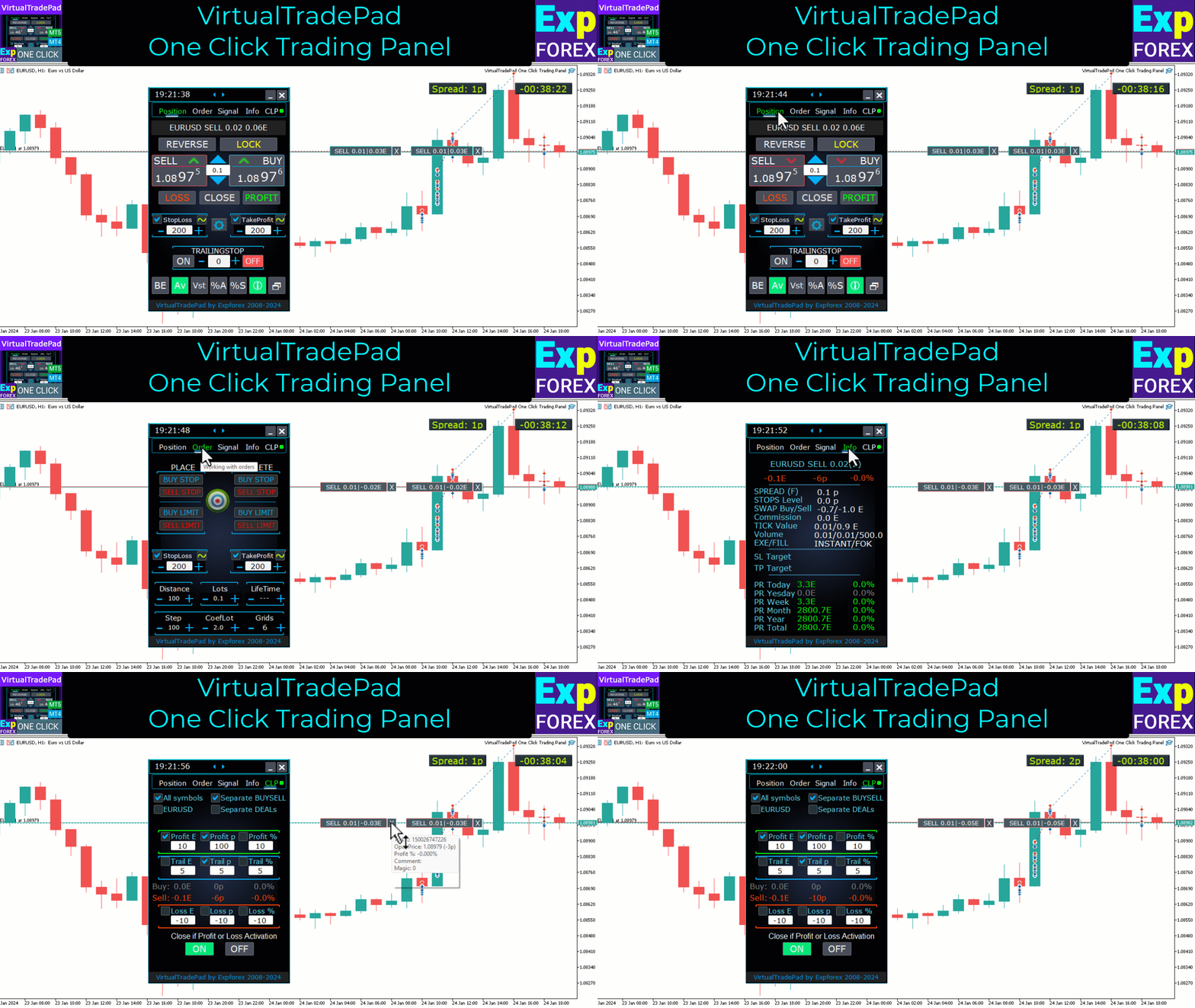
5 schede : Lavora con le posizioni, Lavora con gli ordini in sospeso, Lavora con le informazioni sull'account, Pannello dei segnali, Chiudi profitto totale.

Link

  • Per il trading completamente automatizzato, consiglio     L'XCustom  
  • Se vuoi imparare a fare trading nel    tester di strategia , dai un'occhiata alla nostra utility gratuita TesterPad

    Schede di lavoro

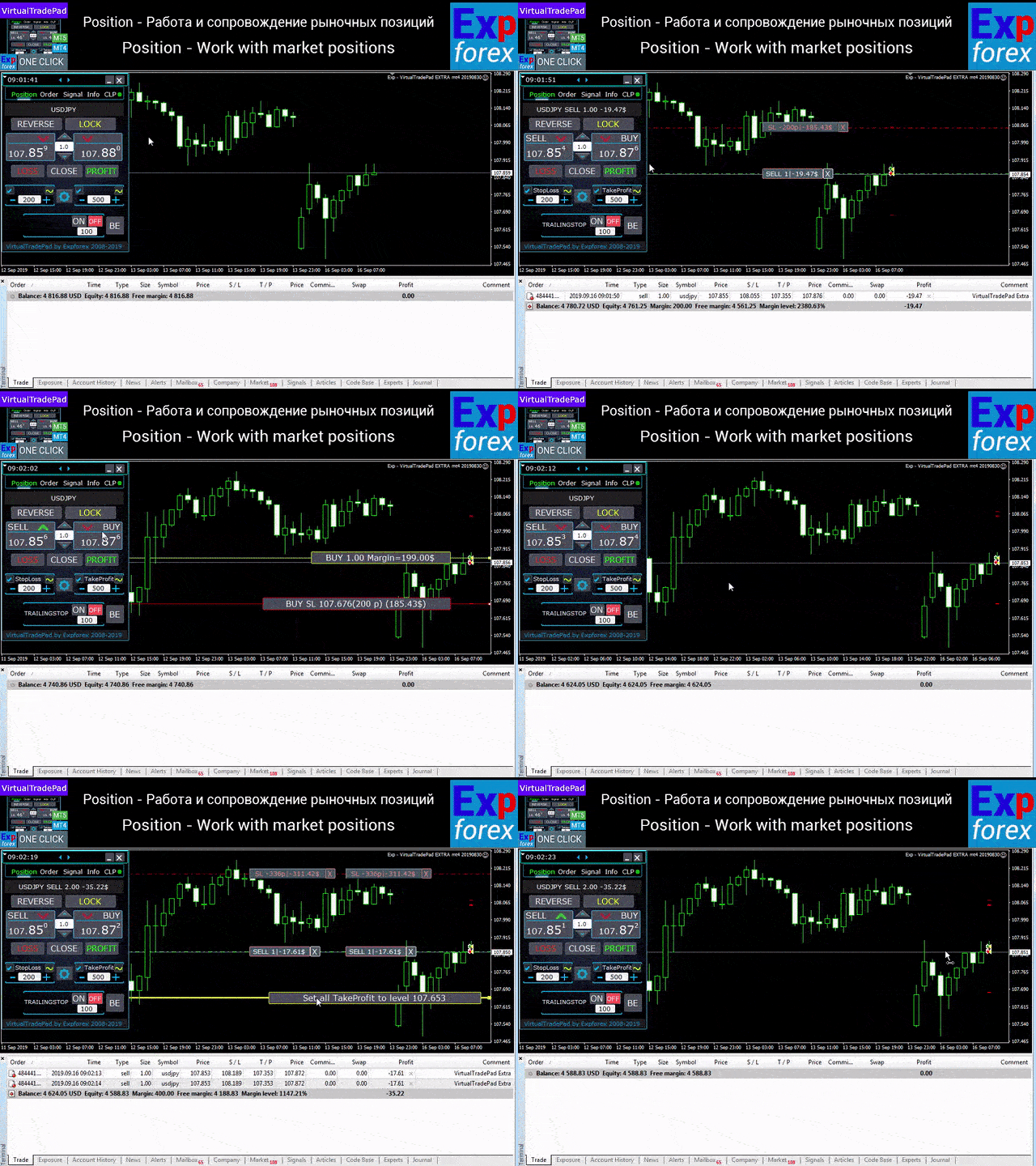
    Scheda Posizioni - Lavora con le posizioni:

    • Apertura/chiusura ACQUISTA e VENDI,
    • Invertire tutte le posizioni,
    • Bloccare una posizione comune,
    • Stop Loss / Take Profit,
    • Imposta uno stop loss/take profit comune per la griglia di posizione,
    • Fermata finale,
    • Pareggiare
    • Chiudere solo posizioni redditizie/in perdita,
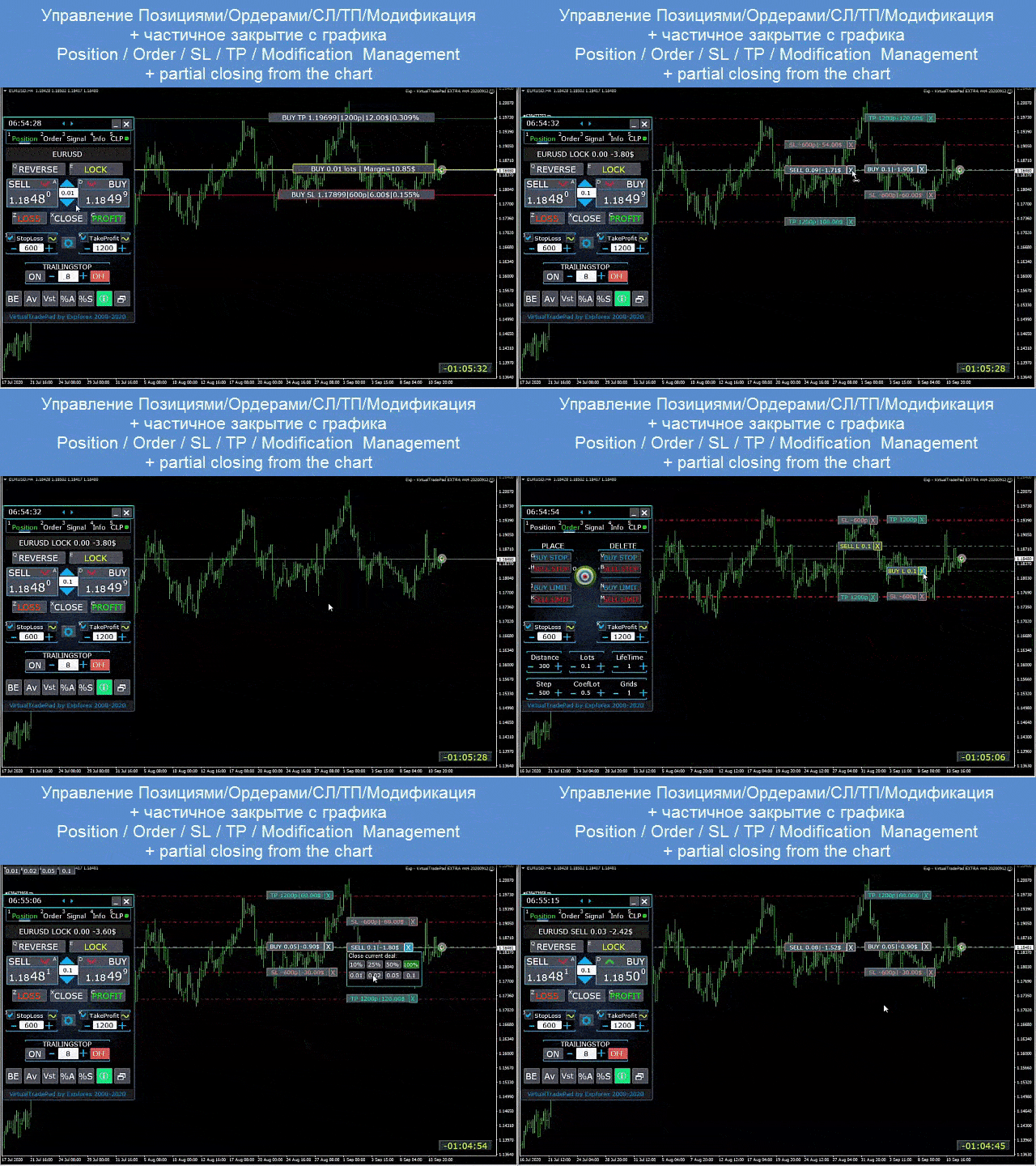
    • Gestione della posizione / stop loss / take profit dal grafico terminale,
    • Chiusura parziale delle posizioni sul grafico;
    • Lotto automatico / lotto dinamico come percentuale del saldo o dello stop loss impostato
    • Abilitazione/disabilitazione di Stop Loss e Take Profit reali/virtuali
    • Griglia delle posizioni di Trailing Stop / Breakeven medi totali dal prezzo medio

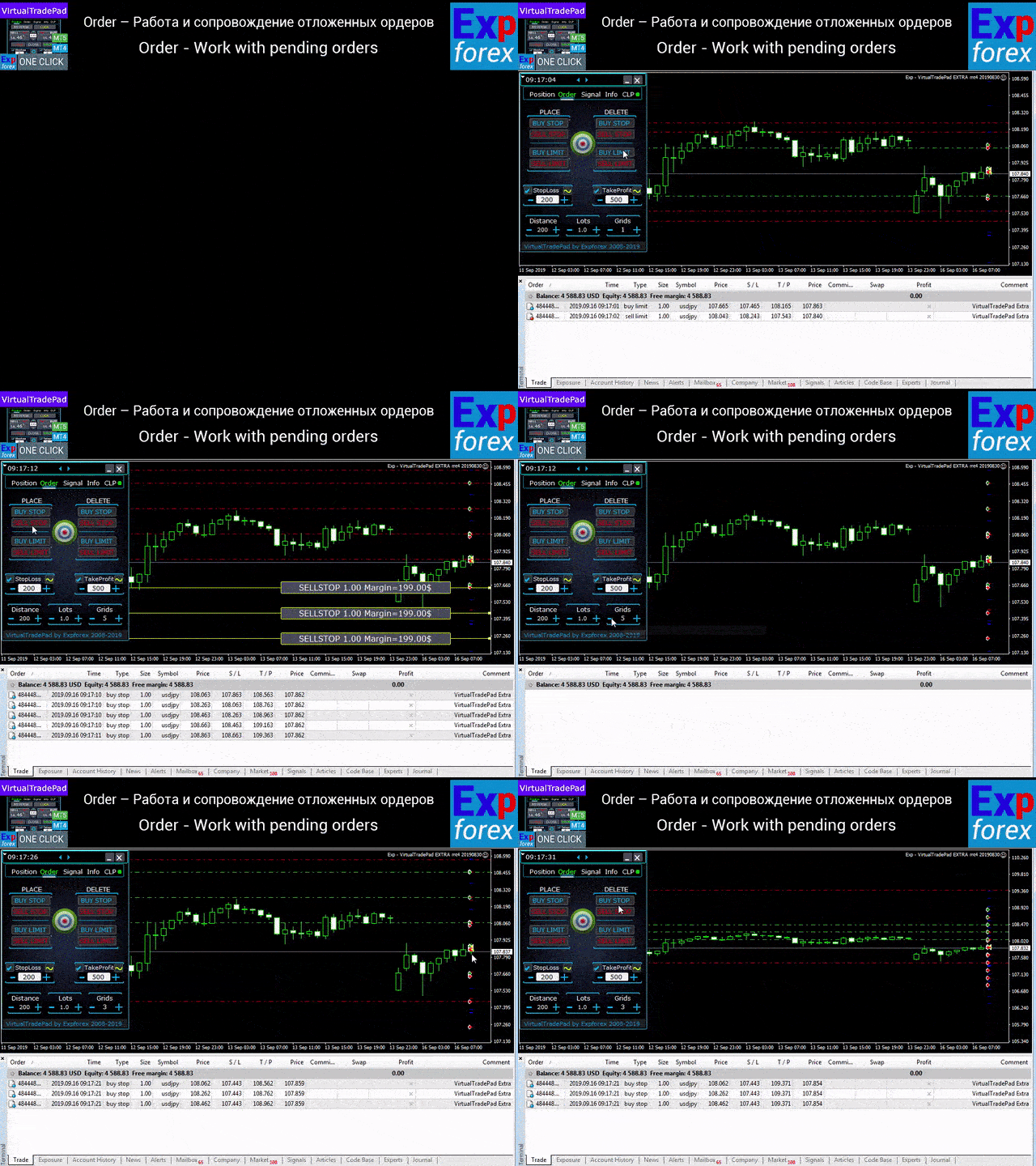
    Scheda Ordini - Gestione degli ordini in sospeso e limite:

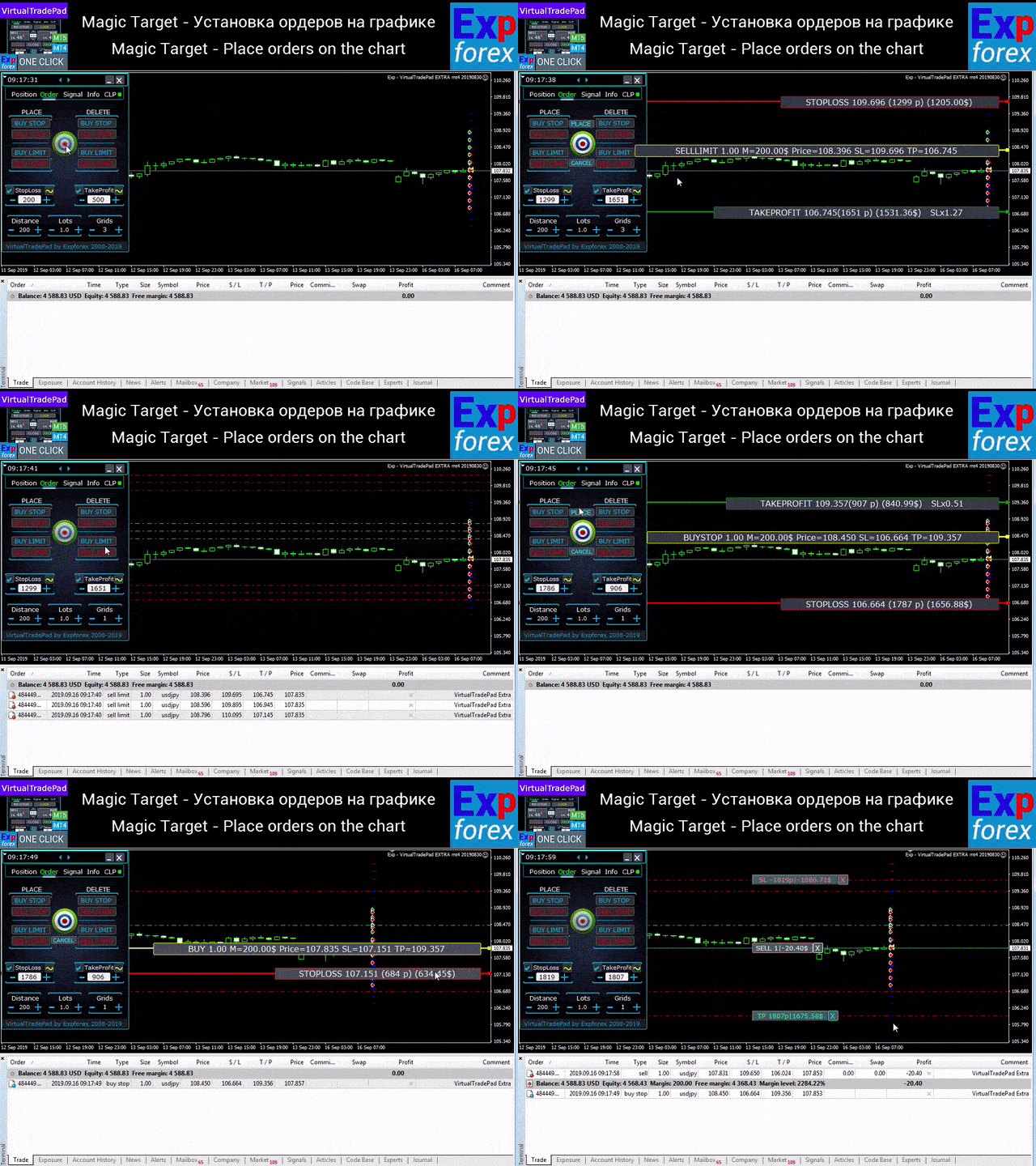
    • In attesa / Elimina BuyStop SellStop BuyLimit SellLimit,
    • Costruire una griglia di ordini con aumento di lotti, distanza griglia,
    • Impostare ordini/posizioni con il mouse e le linee sul grafico,
    • Fissare uno stop loss/take profit comune per l'intera serie di ordini,
    • Lavorare con ordini in sospeso dal grafico! Rimozione, Modifica ordini direttamente dal grafico.

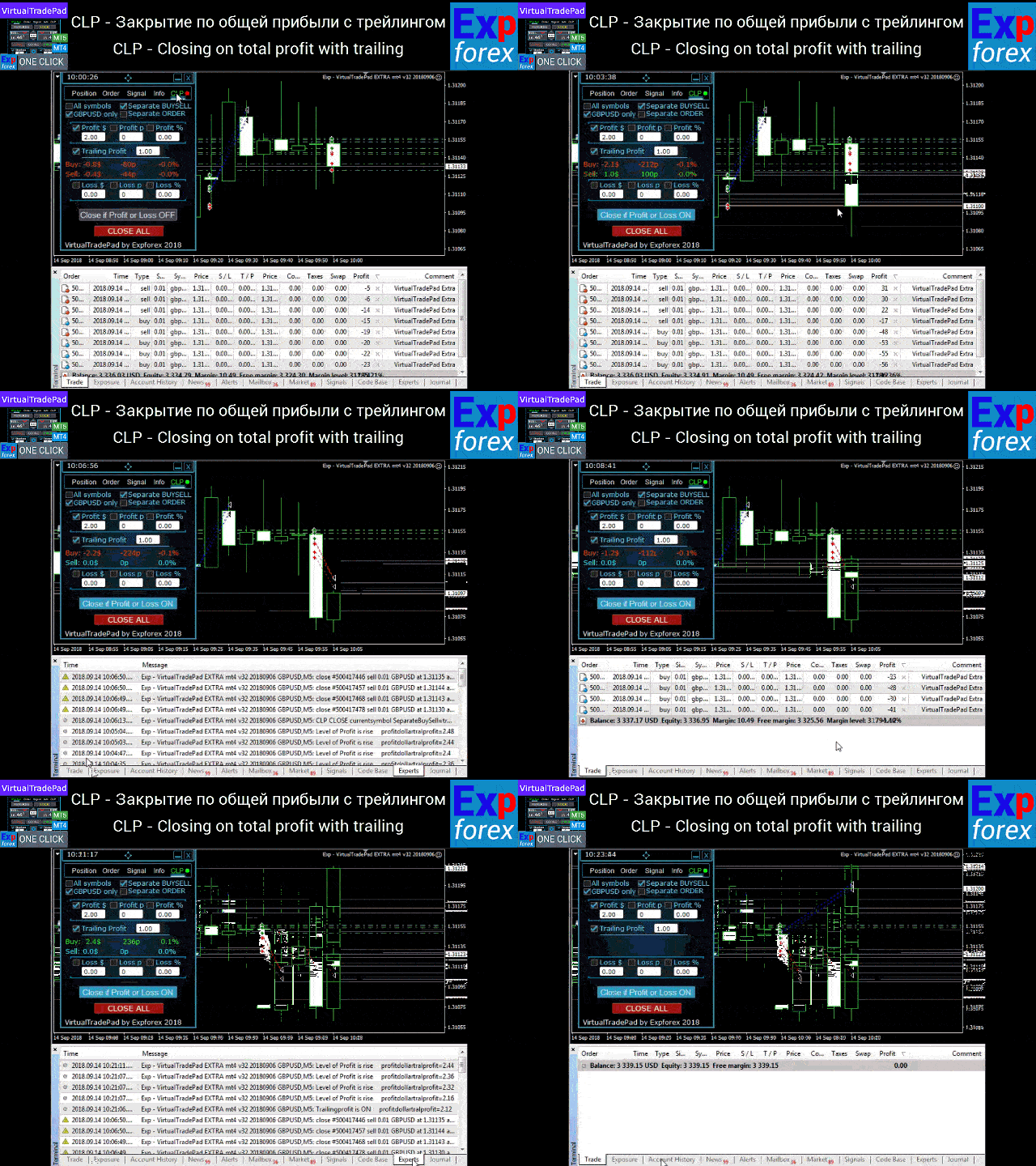
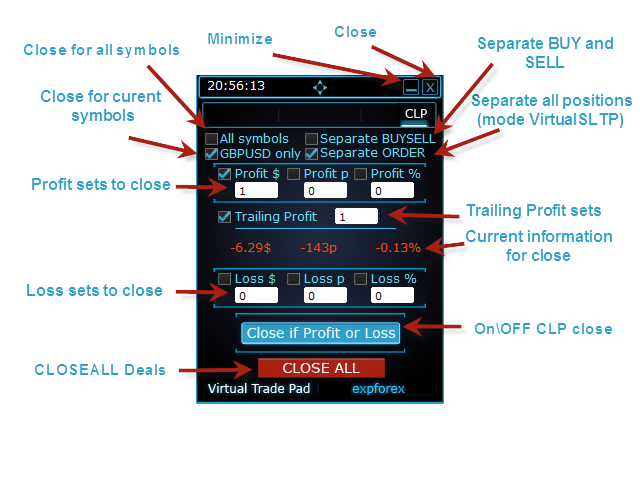
    Scheda CLP - Lavora con la funzione di chiusura per profitti o perdite totali.

    • Chiusura a profitto/perdita totale in punti, dollari, percentuale.
    • Chiudi separatamente ACQUISTA / VENDI,
    • Abilita lo stop loss/take profit virtuale per una posizione separata/generale.
    • Trailingstop del profitto totale in punti, dollari, percentuale.

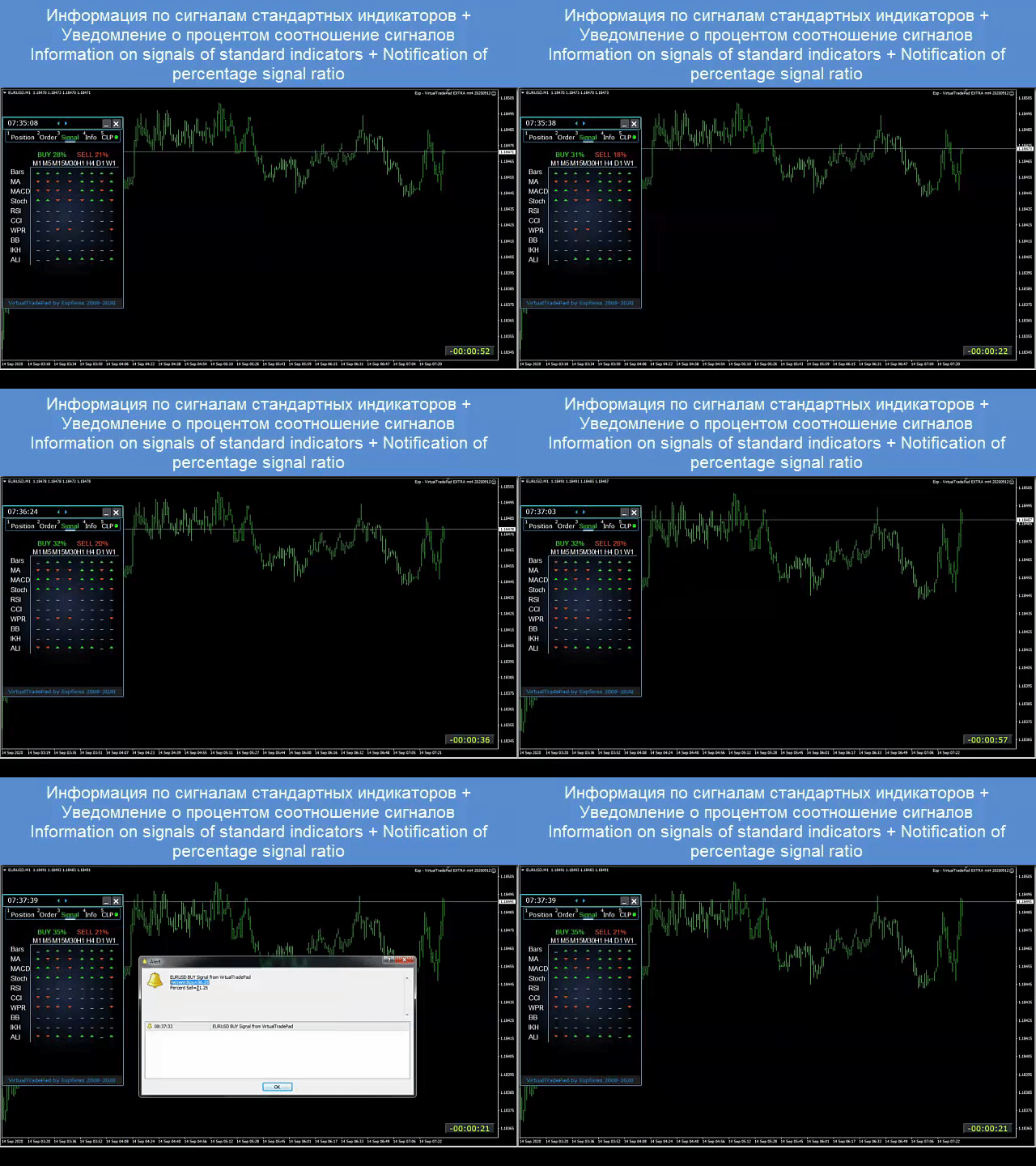
      Scheda Segnali

      Mostra il segnale da 10 indicatori standard e 8 tempi. Mostra anche la percentuale cumulativa di segnali nelle direzioni ACQUISTA e VENDI. È inoltre possibile aprire posizioni automaticamente al superamento del segnale cumulativo.

      Scheda INFO

      Visualizza le specifiche correnti del simbolo selezionato, gli attuali obiettivi di stop loss e take profit, nonché il profitto per il giorno corrente, il giorno passato, la settimana, il mese.

      Caratteristiche principali:

      • Funziona su qualsiasi tipo di conto e broker.
      • Non richiede competenze specifiche.
      • Interfaccia intuitiva e diretta.
      • Solo le funzioni più importanti.
      • Risposta rapida a qualsiasi comando.
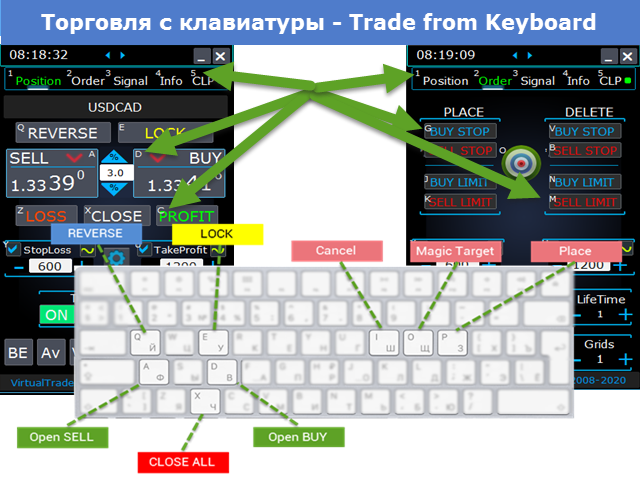
      • Fai trading utilizzando la tastiera (per farlo, imposta TRUE il parametro KeyBoardTrade nelle impostazioni) o i pulsanti sul grafico


      #tags Expforex, Vladon, Commercio manuale, Pannello commerciale, Pannello commerciale, Utilità commerciale, Autotest, Take Profit, Gestione degli strumenti, Strumento di gestione, Assistente Forex, Commercio virtuale, Formazione commercio virtuale, Strumento rapido, Tester manuale, Backtest manuale, TesterPad , Tradepad, Virtual Trade Pad, орговая панель #tags Expforex, Vladon, Manual Trade , Trade Panel ,Panel Trade,Trade Utility ,Self Test ,Take Profit ,Tool Management ,Management Tool ,Forex helper ,Forex Trade ,Training virtual trade ,Quick Tool, Manual Tester, Manual Backtest,TesterPad, Tradepad, Virtual Trade Pad, Торговая панель , Trader Assistant ,CLP,CloseifProfitorLoss,Close Profit,Total Profit, Close if Profit or Loss , Trailing Profit, Smart Trailing Stop

      Recensioni 122
      Nguyen Tho
      64
      Nguyen Tho 2026.02.06 11:01 
       

      When I change the time frame to view on the chart, the trading history still displays, even though I have turned off this feature on the chart. Please guide me on how to disable it on your software.

      Chanon Chaichanachot
      294
      Chanon Chaichanachot 2025.11.29 07:22 
       

      In the "Risk Manager/Prohibit Opening" please consider adding "deny trading during these time" "00:00-15:35, 22:55-24:00" for examples I'm currently using "AutoTrading Scheduler" as a work around. Thank You... Great Tool!

      ***I'm using autotrade/autoclose by signals(on VPS), so it would prevent EA from opening new trade during certain time while maintaining floating trade.

      Ivan Nedelko
      815
      Ivan Nedelko 2025.10.20 07:20 
       

      Привет, почему при открытии позиции с мекджик баттон не видно на графике уровни стопов и тейка? И приходится потом вручную их добавлять! Раньше такого не было!

      Prodotti consigliati
      Net Exposure & Net Average Price is a lightweight utility Expert Advisor for MetaTrader 5 hedge accounts . This tool helps traders instantly understand their true market exposure when multiple Buy and Sell positions are open on the same symbol. What the EA Does The EA displays a clear on-chart panel showing: Total Buy Trades Total Buy Lots Total Sell Trades Total Sell Lots Net Lots (Net Exposure) Net Average Price (hedge-adjusted breakeven) The Net Average Price represents the true breakeven
      Trading Utility for Forex Currency Pairs Only not for Gold  Functions Auto Lot Calculation based on Risk Auto stoploss  Auto TakeProfit Breakeven Auto Close Half % Close in percentage with respect to the PIPs Pending Orders BuyLimit Sell Limit with distances BuyStop Sell Stop    with distances Trading Informations Risk in percentage For Multiple trades Combine Takeprofit and Combine Stoplosses
      SL TP Panel
      Mikhail Ostashov
      SL TP Panel — Visual Trading Panel for MT5 A convenient trading panel that lets you place pending orders by simply dragging lines on the chart. Stop Loss, Take Profit, order type, and lot size — everything is controlled with your mouse in seconds. Who is this for This panel is designed for manual traders who value speed of execution. Instead of opening the order window, filling in fields, and calculating levels — just drag a line to the desired price and click one button. Key Features Visua
      Trade Assistant 38 in 1
      Makarii Gubaydullin
      4.91 (23)
      Strumento multifunzionale: Calcolatore di Lotto, Ordini Grid, Rapporto R/R, Gestore di Trade, Zone di Domanda e Offerta, Price Action e molto altro Versione Demo   |   Manuale Utente L'Assistente di Trading   non funziona nel tester di strategie : puoi scaricare la   Versione Demo QUI  per testare l' utilità . Contattami   per qualsiasi domanda  / idee di miglioramento / in caso di bug riscontrato Se hai bisogno di una versione MT4, è disponibile qui Semplifica, accelera e automatizza il tuo  
      Symbol Manager for MT5
      Taras Slobodyanik
      5 (3)
      Symbol Manager or Grid Manager, designed to group orders into one position (by Symbol or by Magic Number). This utility will be useful to multi-currency traders (many EAs), who can have multiple orders on several pairs. You will be able to see the total number of lots, the total profit, and set virtual stop loss and virtual take profit. To set a real TP (or SL), you must first set the virtual value, and then enter the command in this cell: "set". If you want to set real TP/SL for all orders at
      TradePilotmt5
      Hossein Khalil Alishir
      TradePilot Expert Advisor (EA) for MetaTrader 5 TradePilot is a professional and user-friendly Expert Advisor (EA) for MetaTrader 5 (MT5) . It simplifies automated trading , risk management , and trade execution with a smart trading panel . Perfect for beginners and experienced traders looking for a reliable trade manager EA with automated lot size calculation and smart position management. Key Advantages User-Friendly Trading Panel: Customizable panel with buttons and hotkeys for fast ex
      SmartTrail PRO MT5 — All-in-One Trade Management Panel Your all-in-one trade management companion for MetaTrader 5. SmartTrail PRO takes the stress out of position management. Whether you trade manually or use Expert Advisors, it protects your capital with intelligent, volatility-adaptive stop management — across all symbols, all account types, automatically. Why SmartTrail PRO? Most traders lose not because of bad entries, but because of poor exits. SmartTrail PRO solves this by providing a com

      Expert TP SL v04
      Mikhail Ostashov
      Expert TP SL v04 - Professional Trading Assistant with AI Motivation System Advanced manual trading tool with automatic risk management, overtrading protection, and intelligent psychological support for disciplined trading. PRODUCT OVERVIEW Expert TP SL v04 is a comprehensive trading assistant designed for manual traders who want to maintain emotional discipline while automating risk calculations. This isn't just another order placement tool - it's a complete trading psychology system that pr
      StealthTrade Commander   is an advanced visual trading panel and risk-management utility designed for manual traders, scalpers, and Prop-Firm challengers. This tool helps you execute trades visually directly from the chart, hide your Stop Loss and Take Profit levels from the broker, and strictly control your daily drawdown—a crucial feature for passing and keeping Prop-Firm funded accounts.  KEY FEATURES:  Risk Guardian (Prop-Firm Protector) Max Daily Loss Limit:   Automatically closes all trade

      Inverted_Chart_EA Utility Expert Advisor Inverted_Chart_EA creates and maintains a mirror-inverted chart of any symbol and timeframe. It automatically generates a custom instrument (e.g. US30_INV ) and keeps its price history updated in real time, with bars mirrored around a chosen pivot. This utility gives traders a new way to analyze the market from a different perspective by flipping the chart upside down. Why use an inverted chart? Highlight hidden patterns – price formations that look ordin
      Turbo Close All
      Phami Thanh Hoang
      Turbo Close All is a powerful and versatile script designed to help traders quickly and efficiently manage their trading positions and pending orders on MetaTrader 5. With its advanced features and customizable settings, this script is an essential tool for traders who want to streamline their trading process and maintain control over their positions and orders. Key Features: Comprehensive Closing Options: Turbo Close All allows you to close all market positions and/or delete pending orders bas
      Tool Auto Modify SLTP – Protect Your Trades, Optimize Your Strategy In trading, risk is always present. Just one forgotten SL/TP can turn a promising trade into a loss. Even experienced traders occasionally make mistakes. That’s why Tool Auto Modify SLTP was created – to keep you protected and let you focus on your strategy. Key Features: Manage Orders for All Symbols: Monitor and adjust SL/TP for all your trading pairs. Three Flexible Risk Modes: Point-Based: Set fixed SL/TP distances. Account
      Rivoluziona il tuo trading MT5 con il monitoraggio del margine: sblocca informazioni immediate sul margine! Stanco di lottare con i dettagli sui margini mancanti di MT5? Dì addio ai noiosi calcoli manuali e alle infinite congetture! Presentazione del Margin Monitor: l'indicatore MT5 definitivo progettato specificamente per i trader che richiedono precisione e semplicità nella gestione del rischio. Infine, ottieni una visione cristallina del tuo margine per posizione direttamente sul tuo grafico
      Margin Call Shield – Defend Your Margin on Your Terms Margin Call Shield is a tool for MetaTrader 5 traders who want to decide for themselves which open positions are closed during margin call situations before the platform does so automatically based on its internal rules. By default, the broker or platform decides which positions to close, often using undisclosed algorithms. Margin Call Shield lets you set this order according to your own strategy. Why Was Margin Call Shield Created? In a mar
      Candlestick Pattern Scanner is a multi-timeframe and multi-symbol dashboard and alert system that checks all timeframes and currency pairs for different candlestick patterns that are formed in them. Scanner is integrated   with support and resistance zones so you can check the candlestick patterns in most important areas of the chart to find breakout and reversal patterns in the price chart. Download demo version   (works on M4,M6,M12,H3,H8 timeframes and 20 symbols of Market Watch window) Read
      Overview Mirror Signals Service EA (Text only)   is a powerful monitoring Expert Advisor that automatically sends   real-time Telegram notifications   for all important trade events on your MetaTrader 5 account. It is engineered specifically for   signal providers ,   trade-copier operators ,   auditors ,   educators , and   professional trading services   that require immediate, detailed, and reliable reporting. Everything from   entries, exits, SL/TP changes, comment changes, trailing sto
      Short Description: FTMO Protector PRO MT5 is an EA designed to protect your funded account by managing risk and ensuring compliance with the Prop Firm's trading rules. This EA automatically monitors equity levels, closes trades when profit targets or drawdown limits are reached, and provides a visual display of key account metrics.  EA w orks with all different Prop Firm service providers. Overview: FTMO Protector PRO MT5 is an Drawdown Safeguard Expert Advisor meticulously crafted for trade
      Fast execution utility for manual traders. Drag-and-drop visual trading, split take-profits, and single-ticket management system. Speed, Precision, and Risk Control. KAB Trade Manager is built for traders who need to execute fast but keep risk tight. It integrates all essential tools into floating, collapsible windows. Core Functions: Instant Order Execution:   Market and Pending orders with automatic Lot sizing based on SL distance. Focus Ticket Manager:   A dedicated window to monitor and mana
      Il DYJ MOBILE GAMING TRADING WINNER può utilizzare i vari terminali (TELEFONO CELLULARE, WEB, TRADINGVIEW, MT5) per il trading manuale e quindi elaborato automaticamente da EA. Il trading mobile può utilizzare le varie modalità di griglia di EA, la modalità scalp, la modalità di arbitraggio di copertura e la modalità di ordine indipendente per aprire le posizioni manualmente, EA può impostare automaticamente lo stop loss per l'apertura mobile. E usa il tuo cellulare per aprire una griglia, sc
      Utility per la gestione automatica degli ordini e dei rischi. Ti permette di trarre il massimo dai profitti e limitare le tue perdite. Creato da un trader praticante per i trader. L'utilità è facile da usare, funziona con qualsiasi ordine di mercato aperto manualmente da un trader o con l'aiuto di consulenti. Può filtrare gli scambi per numero magico. L'utilità può funzionare con qualsiasi numero di ordini contemporaneamente. Ha le seguenti funzioni: 1. Impostazione dei livelli di stop loss
      You can change the time period of the chart at the touch of a button. You can also change multiple charts at the touch of a button. You can also change multiple charts at the touch of a button,   saving you the trouble of changing time periods. We are live-streaming the actual operation of the system. Please check for yourself if it is usable. Please check it out for yourself. https://www.youtube.com/@ganesha_forex We do not guarantee your investment results. Investments should be made at you
      It's a trading dashboard appears on strategy tester, allows you to backtest your own strategies, testing them on multiple symbols and timeframes. It is equipped with useful features such as risk management, trailing stops, breakeven points, and more, enabling you to evaluate and refine your strategies effectively. Trading panels are typically designed to facilitate real-time trading and may not function properly on a strategy tester. However, this particular trading panel is specifically designe
      Step into the world of Forex trading with confidence, clarity, and precision using Gold Indicator a next-generation tool engineered to take your trading performance to the next level. Whether you’re a seasoned professional or just beginning your journey in the currency markets, Gold Indicator equips you with powerful insights and help you trade smarter, not harder. Built on the proven synergy of three advanced indicators, Gold Indicator focuses exclusively on medium and long-term trends elimina
      GGP Trade Copier MT5
      Mohammadmahmood Pirayeh
      GGP Trade Copier  EA is an automatic trading bot that can help traders automatically replicate the trading strategies and operations from one trading terminal to others by experiencing exceptionally fast trade copying system. Its easy-to-use setup allows you to copy trades between multiple MetaTrader terminals on the same Windows computer or Windows VPS with lightning-fast copying speeds of under 0.5 seconds. The software supports multiple trading varieties, including Forex, commodities, stocks
      TradingCoPilot
      Viktor Mitrofanov
      Trading Co-Pilot for MetaTrader 5 Advanced Position Management for Manual Traders Trading Co-Pilot is a professional trade management assistant designed for traders who open positions manually and want precise, automated control over risk and profit handling. It does not open trades. It manages them intelligently. You focus on entries. The Co-Pilot protects and optimizes the exit. How It Works Once you open a manual position, Trading Co-Pilot automatically: • Applies Stop Loss • Sets Take Profit
      FREE
      Trading Performance Analyzer v3   is a comprehensive MetaTrader 5 tool that combines professional-grade performance analytics with powerful trade management capabilities in a beautifully designed, fully customizable interface. KEY FEATURES Advanced Analytics Dashboard Real-time Performance Metrics:   Profit, win rate, profit factor, expectancy, streaks Equity Curve Visualization:   Dual-tone area chart with smooth gradients Period Statistics:   Automatic breakdown by Week/Month/Year Daily P
      FREE
      Local Copy Trader Utility - Professional Copy Trading System Overview Local Copy Trader Utility is the complete solution for mirroring trades between MetaTrader 5 accounts. With both Master and Slave functionality in one powerful Expert Advisor, it delivers reliable, lightning-fast trade copying with zero external dependencies. Perfect for managing multiple accounts, following trading signals, or transferring trades between brokers, this system ensures your positions stay perfectly synchronized
      # Equity Monitor Pro  ## Short Description Equity Monitor Pro is a professional equity p**Equity Monitor Pro** is a powerful risk management tool that automatically protects your trading account by monitoring equity levels and enforcing prop firm style rules. Whether you're taking an FTMO challenge, trading a funded account, or just want to protect your capital, this EA runs silently alongside your trading strategy and takes action when it matters most. Protection tool designed for prop firm
      Overview Mirror Signals EA is a powerful monitoring Expert Advisor that automatically sends real-time Telegram notifications for all important trade events on your MetaTrader 5 account. It is engineered specifically for signal providers , trade-copier operators , auditors , educators , and professional trading services that require immediate, detailed, and reliable reporting. Everything from entries, exits, SL/TP changes, comment changes, trailing stop activations, pending order modifications
      RiskCopilot
      Carlos Adrian Feged Zapata
      ITALIANO RiskCopilot Utility - Il Tuo Assistente di Trading Intelligente "Vedi il Tuo Rischio. Padroneggia il Tuo Trading." RiskCopilot Utility è la soluzione definitiva per la gestione del rischio e il dimensionamento delle posizioni per MetaTrader 5. Questo assistente di trading completo fornisce calcoli in tempo reale, strumenti avanzati di valutazione del rischio e analisi professionali senza controllare le tue decisioni di trading. Perfetto sia per trader principianti che professional
      Gli utenti di questo prodotto hanno anche acquistato
      Trade Assistant MT5
      Evgeniy Kravchenko
      4.42 (208)
      It helps to calculate the risk per trade, the easy installation of a new order, order management with partial closing functions, trailing stop of 7 types and other useful functions. Additional materials and instructions Installation instructions - Application instructions - Trial version of the application for a demo account Line function -   shows on the chart the Opening line, Stop Loss, Take Profit. With this function it is easy to set a new order and see its additional characteristics bef
      Forex Trade Manager MT5
      InvestSoft
      4.96 (620)
      Benvenuto a Trade Manager EA, lo strumento definitivo per la gestione del rischio , progettato per rendere il trading più intuitivo, preciso ed efficiente. Non è solo uno strumento per l'esecuzione degli ordini, ma una soluzione completa per la pianificazione delle operazioni, la gestione delle posizioni e il controllo del rischio. Che tu sia un principiante, un trader avanzato o uno scalper che necessita di esecuzioni rapide, Trade Manager EA si adatta alle tue esigenze, offrendo flessibilità s
      TradePanel MT5
      Alfiya Fazylova
      4.86 (148)
      Trade Panel è un assistente commerciale multifunzionale. L'applicazione contiene più di 50 funzioni di trading per il trading manuale e consente di automatizzare la maggior parte delle operazioni di trading. Attenzione, l'applicazione non funziona nel tester di strategia. Prima dell'acquisto, puoi testare la versione demo su un conto demo. Versione demo qui . Istruzioni complete qui . Commercio. Ti consente di eseguire operazioni di trading con un clic: Apri ordini e posizioni pendenti con calco
      Versione Beta Telegram to MT5 Signal Trader è quasi pronto per il rilascio ufficiale in versione alpha. Alcune funzionalità sono ancora in fase di sviluppo e potresti riscontrare piccoli bug. Se riscontri problemi, ti preghiamo di segnalarli, il tuo feedback aiuta a migliorare il software per tutti. Telegram to MT5 Signal Trader è uno strumento potente che copia automaticamente segnali di trading da canali o gruppi Telegram al tuo account MetaTrader 5 . Supporta canali pubblici e privati e cons
      FarmedHedge Pair Trading Dashboard
      Tanapisit Tepawarapruek
      5 (1)
      Farmed Hedge Yield Farming - Professional Pair Trading Dashboard (Manual - Hybrid - Semi/Automated EA) VERSION 3 - WILD HARVEST UPDATE Trading Approach: - Manual Trading: Primary focus - Auto Pilot: Optional supplementary feature - Full Automation: Not the main purpose Recommended Timeframe: H1-H4 DEMO VERSION Download the free demo to test functionality. Use Strategy Tester with Visual Mode to see how it works. VERSION 3 - NEW FEATURES Summary Dashboard (SRA Panel) - Quick pair selection w
      Copy Cat More Trade Copier MT5 (Gatto Copiatore MT5) è un copiatore di trade locale e un framework completo di gestione del rischio ed esecuzione progettato per le sfide di trading odierne. Dalle sfide delle prop firm alla gestione di portafogli personali, si adatta a ogni situazione con una combinazione di esecuzione robusta, protezione del capitale, configurazione flessibile e gestione avanzata dei trade. Il copiatore funziona sia in modalità Master (mittente) che Slave (ricevente), con sincro
      ApexGuard Suite
      Vadym Kalashnyk
      ApexGuard Suite — профессиональная панель контроля риска и дисциплины для MetaTrader 5 ApexGuard Suite — это комплексный инструмент для трейдеров, который помогает структурировать торговлю, контролировать риски и принимать более взвешенные решения прямо внутри терминала MetaTrader 5. Приложение не совершает сделки за вас — его задача дать полный контроль над состоянием счёта, рисками и торговым процессом в удобном визуальном формате. Интерфейс построен как единая панель с вкладками, где каждая о
      Trade Manager DashPlus
      Henry Lyubomir Wallace
      5 (13)
      DashPlus è uno strumento avanzato di gestione delle operazioni progettato per migliorare l'efficienza e l'efficacia del trading sulla piattaforma MetaTrader 5. Offre una suite completa di funzionalità, tra cui calcolo del rischio, gestione degli ordini, sistemi di griglia avanzati, strumenti basati su grafici e analisi delle prestazioni. Caratteristiche Principali 1. Griglia di Recupero Implementa un sistema di griglia flessibile e di media per gestire le operazioni in condizioni di mercato avve
      Telegram to MT5 Coppy
      Sergey Batudayev
      5 (8)
      Da Telegram a MT5:   la soluzione definitiva per la copia del segnale Semplifica il tuo trading con Telegram su MT5, il moderno strumento che copia i segnali di trading direttamente dai canali e dalle chat di Telegram sulla tua piattaforma MetaTrader 5, senza bisogno di DLL. Questa potente soluzione garantisce un'esecuzione precisa dei segnali, ampie opzioni di personalizzazione, fa risparmiare tempo e aumenta la tua efficienza. [ Instructions and DEMO ] Caratteristiche principali Integrazione d
      YuClusters
      Yury Kulikov
      4.93 (43)
      Attention: You can view the program operation in the free version  YuClusters DEMO .  YuClusters is a professional market analysis system. The trader has unique opportunities to analyze the flow of orders, trade volumes, price movements using various charts, profiles, indicators, and graphical objects. YuClusters operates on data based on Time&Sales or ticks information, depending on what is available in the quotes of a financial instrument. YuClusters allows you to build graphs by combining da
      The product will copy all telegram signal to MT5 ( which you are member) , also it can work as remote copier.  Easy to set up, copy order instant, can work with almost signal formats, image signal,  s upport to translate other language to English Work with all type of channel or group, even channel have "Restrict Saving Content", work with  multi channel, multi MT5 Work as remote copier: with signal have ticket number, it will copy exactly via ticket number. Support to backtest signal. How to s
      MT5 to Telegram Signal Provider è un'utilità facile da usare e completamente personalizzabile che consente l'invio di segnali specificati a una chat, canale o gruppo Telegram, rendendo il tuo account un fornitore di segnali. A differenza della maggior parte dei prodotti concorrenti, non utilizza importazioni DLL. [ Dimostrativo ] [ Manuale ] [ Versione MT4 ] [ Versione Discord ] [ Canale Telegram ]  New: [ Telegram To MT5 ] Configurazione Una guida utente passo-passo è disponibile. Nessuna cono
      Ultimate Extractor
      Clifton Creath
      5 (9)
      Ultimate Extractor - Professional Trading Analytics for MT5 *****this is the local HTML version of Ultimate Extractor. Check out Ultimate Extractor Cloud on mql5 for the Cloud version****** Ultimate Extractor transforms your MetaTrader 5 trading history into actionable insights with comprehensive analytics, interactive charts, and real-time performance tracking. What It Does Automatically analyzes your MT5 trading history across all Expert Advisors and generates detailed HTML reports with inte
      Auto Trade Copier for MT5
      Vu Trung Kien
      4.41 (27)
      Auto Trade Copier is designed to copy trades to multiple MT4, MT5 and cTrader accounts/terminals with 100% accuracy. The provider and receiver accounts must be on the same PC/VPS. With this tool, you can copy trades to receiver accounts on the same PC/VPS. All trading actions will be copied from provider to receiver perfectly. This version can be used on MT5 accounts only. For MT4 accounts, you must use Auto Trade Copier (for MT4). Reference: - For MT4 receiver, please download Trade Receiver Fr
      Custom Alerts AIO: Monitora tutti i mercati — senza alcuna configurazione Panoramica Custom Alerts AIO è una soluzione di monitoraggio dei mercati pronta all’uso che non richiede alcuna configurazione. Tutti gli indicatori necessari — FX Power, FX Volume, FX Dynamic, FX Levels, IX Power — sono integrati internamente. Non vengono mostrati grafici, rendendolo ideale per generare alert in tempo reale in modo discreto ed efficiente. Supporta tutte le classi di asset offerte dal tuo broker: Forex,
      Anchor: The EA Manager A coordination system for traders running multiple EAs. Anchor ensures only one EA can trade at a time, preventing conflicting positions and keeping your portfolio safer. Attach Anchor to any chart. Configure your EAs and their magic numbers. Anchor handles the rest. Built for portfolios. Built for discipline. Built for prop firms. The Problem Running multiple EAs on the same account creates risk. Two gold EAs can open opposite positions on the same candle. Three EA
      Trade Manager DaneTrades
      Levi Dane Benjamin
      4.36 (28)
      Trade Manager per aiutarti a entrare e uscire rapidamente dalle operazioni calcolando automaticamente il tuo rischio. Incluse funzionalità che ti aiutano a prevenire l'eccessivo trading, il vendetta trading e il trading emotivo. Le operazioni possono essere gestite automaticamente e i parametri di performance del conto possono essere visualizzati in un grafico. Queste caratteristiche rendono questo pannello ideale per tutti i trader manuali e aiuta a migliorare la piattaforma MetaTrader 5. Suppo
      Telegram To MT5 Receiver
      Levi Dane Benjamin
      4.53 (15)
      Copia i segnali da qualsiasi canale di cui sei membro (compresi quelli privati e ristretti) direttamente sul tuo MT5.  Questo strumento è stato progettato con l'utente in mente offrendo molte funzionalità necessarie per gestire e monitorare gli scambi. Questo prodotto è presentato in un'interfaccia grafica facile da usare e visivamente accattivante. Personalizza le tue impostazioni e inizia ad utilizzare il prodotto in pochi minuti! Guida per l'utente + Demo  | Versione MT4 | Versione Discord
      Effortlessly calculate lot sizes and manage trades to save time and avoid costly errors The Trade Pad Pro EA is a tool for the Metatrader Platform that aims to help traders manage their trades more efficiently and effectively. It has a user-friendly visual interface that allows users to easily place and manage an unlimited number of trades, helping to avoid human errors and enhance their trading activity. One of the key features of the Trade Pad Pro EA is its focus on risk and position manageme
      Patrex pro
      Chioma Obunadike
      5 (1)
      Patrex Pro: Maximize Your Trading Potential Patrex Pro is an advanced trading bot designed to help traders optimize their trading strategies and maximize their potential returns. With its cutting-edge technology and user-friendly interface, Patrex Pro is the ultimate tool for traders seeking to elevate their trading game. Get MT4 Version Key Features: 1. Position Hedging: Patrex Pro allows users to hedge their positions based on their individual risk tolerance and market analysis. 2. Advanced R
      MarketCoachPanel
      Maria Makarchuk
      4 (1)
      MarketCoach Panel — инструмент дисциплины и контроля риска для трейдера MarketCoach Panel — это вспомогательная панель для MetaTrader 5, разработанная для повышения дисциплины в торговле, контроля риска и принятия более осознанных решений. Приложение не совершает сделки и не является торговым советником. Оно помогает трейдеру анализировать текущую ситуацию и соблюдать собственные правила стратегии. Основные возможности • Расчёт лота по риску Автоматический расчёт объёма позиции на основе: проце
      EchoTrade Telegram to MT5 Copier
      Perpetual Chinemerem Vincent
      5 (1)
      EchoTrade Telegram to MT5 Copier Seamless, Instant, and Reliable Signal Copying - Direct from Telegram to MetaTrader 5! The product does not run in the strategy tester but you can get free trial version here  for testing before purchase. Tired of manually executing trades from Telegram signals? EchoTrade automates the process, instantly copying trades from any Telegram channel or group directly into your MT5 account—accurately, efficiently, and without delay. Key Features: Universal Compatibi
      PhantomBreak Radar — индикатор для MetaTrader 5, предназначенный для выявления ложных пробоев уровней (fake breakout) и рыночных ловушек. Инструмент помогает трейдерам находить моменты, когда цена прокалывает экстремум диапазона, но затем возвращается обратно — формируя потенциальную точку входа в противоположном направлении. Индикатор автоматически анализирует ценовой диапазон за выбранный период, отслеживает выход за его границы и фиксирует повторный вход цены внутрь диапазона. В таких ситуаци
      Entry In The Zone and SMC Multi Timeframe is a real-time market analysis tool developed based on Smart Money Concepts (SMC). It is designed to analyze market structure, price direction, reversal points, and key zones across multiple timeframes in a systematic way. The system displays Points of Interest (POI) and real-time No Repaint signals, with instant alerts when price reaches key zones or when signals occur within those zones. It functions as both an Indicator and a Signal System (2-in-1), c
      Только сейчас вы можете приобрести  TradeOps Command Center с 10% скидкой всего за 630$. Акция действует до 01.04.2026 Для получение инструкции об использование утилиты обратитесь в личные сообщения! TradeOps Command Center — Профессиональный инструмент контроля риска и дисциплины в трейдинге TradeOps Command Center — это многофункциональная утилита для MetaTrader 5, разработанная для трейдеров, которые стремятся к системному и дисциплинированному подходу к торговле. Продукт объединяет в себе у
      Footprint Chart Pro — Professional Order Flow EA for MetaTrader 5 Version 6.31 | Professional tool for real traders | Institutional-Grade Visualization DEMO USERS - PLEASE SELECT EVERY TICK / REAL TICK WHEN TESTING AND YOU HAVE DOWNLOADED HISTORICAL DATA. IF YOU SEE A WAITING SCREEN AND IT IS NOT DOWNLOADING, IT MEANS YOU HAVE LOW HISTORICAL DATA. TRY 1 MIN AND 5 MIN FIRST ON 1 DAY DATA. ONE DAY DATA SHOULD BE THE NEWEST AND MOST CURRENT DATE. IMPORTANT - Recommended Price Bucket in Points for
      Spot vs Future Arbitrage EA  is a sophisticated, fully automated Expert Advisor engineered for MT5, delivering consistent profits through pure price arbitrage on Gold (XAUUSD). Spot vs Future Arbitrage EA  Requirement - Your Broker should provide SPOT and FUTURE for trading. This EA deploys a market-neutral hedge by simultaneously opening one long position in Gold spot and one short position in Gold futures. Risk is minimized via perfect offset—market swings affect both equally—while profits a
      Il Local Trade Copier EA è una soluzione per i singoli trader o account manager che devono eseguire segnali commerciali da fonti esterne o che devono gestire più account contemporaneamente, senza la necessità di un account MAM o PAMM. Copia da un massimo di 8 account master su account slave illimitati [ Guida all'installazione | Guida all'aggiornamento | Risoluzione dei problemi | Domande frequenti | Tutti i prodotti ] 100% self-hosted Facile da installare e utilizzare Nessun programma di insta
      The product will copy all  Discord  signal   to MT5   ( which you are member  ) , also it can work as remote copier.  Easy to set up. Work with almost signal formats, support to translate other language to English Work with multi channel, multi MT5. Work with Image signal. Copy order instant, auto detect symbol. Work as remote copier: with signal have ticket number, it will copy exactly via ticket number. How to setup and guide: Let read all details about setup and download Discord To MetaTrader
      Dynamic Fibonacci Grid
      Tsvetan Tsvetanov
      5 (1)
      Presentazione dell’ultima versione del Dynamic Fibonacci Grid Dashboard per MT5. Ora dotato di molte nuove funzionalità, questo nuovo dashboard trasforma la tua esperienza di trading e ti permette di osservare il mercato e l’azione dei prezzi da una prospettiva completamente nuova. Scopri nuove possibilità grazie all’analisi simultanea di più timeframe e simboli. Interfaccia user-friendly per il trading manuale e la gestione delle posizioni, con capacità ampliata di applicare strategie automati
      Altri dall’autore
      Exp5 AI Sniper for MT5
      Vladislav Andruschenko
      2 (2)
      Il nostro team è entusiasta di presentare Trading Robot, il consulente esperto di trading intelligente all'avanguardia per il terminale MetaTrader. AI Sniper   è un robot commerciale intelligente e auto-ottimizzante progettato sia per i terminali MT5 . Sfrutta un algoritmo intelligente e strategie di trading avanzate per massimizzare il tuo potenziale di trading. Con 15 anni di esperienza nel trading delle borse e del mercato azionario, abbiamo sviluppato funzionalità innovative di gestione del
      Exp COPYLOT CLIENT for MT5
      Vladislav Andruschenko
      3.82 (34)
      Trade copyr per MT5 è un trade copyr per la piattaforma МetaТrader 5   . Copia le negoziazioni forex   tra       eventuali conti   MT5   -   MT5, MT4   -   MT5 per la versione COPYLOT MT5 (o MT4   -   MT4 MT5   -   MT4 per la versione COPYLOT MT4) Fotocopiatrice affidabile! Versione MT4 Descrizione completa   +DEMO +PDF Come comprare Come installare     Come ottenere i file di registro     Come testare e ottimizzare     Tutti i prodotti di Expforex Puoi anche copiare le operazioni nel termina
      Exp COPYLOT CLIENT for MT4
      Vladislav Andruschenko
      4.69 (65)
      Copiatore commerciale per MetaTrader 4.       Copia le operazioni, le posizioni e gli ordini forex da qualsiasi conto. È uno dei migliori copiatori commerciali       MT4 - MT4, MT5 - MT4       per il       COPYLOT MT4       versione (o       MT4 - MT5 MT5 - MT5       per il       COPYLOT MT5       versione). Versione MT5 Descrizione completa   +DEMO +PDF Come comprare Come installare     Come ottenere i file di registro     Come testare e ottimizzare     Tutti i prodotti di Expforex Versione
      Exp TickSniper PRO FULL
      Vladislav Andruschenko
      3.97 (58)
      Exp-TickSniper -   scalper tick ad alta velocità con selezione automatica dei parametri per ogni coppia di valute automaticamente. Sogni un consulente che calcoli automaticamente i parametri di trading? Ottimizzato e messo a punto automaticamente? La versione completa del sistema per MetaTrader 4:       TickSniper   scalper   per MetaTrader 4 TickSniper - Descrizione completa       + DEMO + PDF L'EA è stato sviluppato sulla base dell'esperienza acquisita in quasi 10 anni di programmazione EA.
      Exp4 AI Sniper for MT4
      Vladislav Andruschenko
      2.33 (3)
      Il nostro team è entusiasta di presentare Trading Robot, il consulente esperto di trading intelligente all'avanguardia per il terminale MetaTrader. AI Sniper   è un robot commerciale intelligente e auto-ottimizzante progettato sia per i terminali   MT4   . Utilizzando un algoritmo sofisticato e metodologie di trading all'avanguardia,   AI Sniper   incarna l'eccellenza nell'ottimizzazione del trading. Con oltre 15 anni di vasta esperienza sia nei mercati borsistici che azionari, il nostro team h
      Profit or Loss Pad
      Vladislav Andruschenko
      4.27 (11)
      Chiusura delle posizioni in MetaTrader 5 al raggiungimento del profitto/perdita totale con la funzione di trailing del profitto.   CloseIfProfitorLoss con Trailing Puoi abilitare le   fermate virtuali (ordine separato)   , calcolo e chiusura per le posizioni   ACQUISTA e VENDI separatamente (Separate BUY SELL)   , chiudendo e calcolando   tutti i simboli o solo il simbolo corrente (Tutti i simboli)   , abilita il trailing for profit (   Trailing   Profit) Le posizioni vengono chiuse in base a u
      VirtualTradePad mt4 Extra
      Vladislav Andruschenko
      4.86 (59)
      Pannello di trading per il trading in 1 clic.   Lavorare con posizioni e ordini!   Trading dal grafico o dalla tastiera. Utilizzando il nostro pannello di trading, puoi fare trading con un clic dal grafico ed eseguire operazioni di trading 30 volte più velocemente rispetto al controllo MetaTrader standard. Calcoli automatici di parametri e funzioni che semplificano la vita di un trader e lo aiutano a condurre le proprie attività di trading in modo molto più rapido e conveniente. Suggerimenti gra
      Exp Averager
      Vladislav Andruschenko
      4.82 (22)
      Exp-Averager   è progettato per calcolare la media delle operazioni che hanno ricevuto un certo prelievo aprendo operazioni di media. Il consulente ha la capacità di aprire nuove posizioni in tendenza o contro la tendenza attuale. Include anche una funzione intelligente di trailing stop che si applica a una serie di posizioni. Il consulente può aumentare o diminuire la dimensione del lotto delle posizioni. Questa è una strategia ampiamente utilizzata per riportare le posizioni in perdita al pre
      Exp4 Duplicator
      Vladislav Andruschenko
      4.5 (22)
      L'Expert Advisor   ripete   operazioni e posizioni un numero prestabilito di volte sul tuo conto   MetaTrader 4   . Copia tutte le operazioni aperte manualmente o da un altro Expert Advisor. Copia i segnali e aumenta il lotto dai segnali   ! Aumenta il numero di altri EA. Sono supportate le seguenti funzioni: lotto personalizzato per operazioni copiate, copia di Stop Loss, Take Profit, utilizzo di trailing stop. Versione MT5 Descrizione completa +DEMO +PDF Come comprare Come installare     C
      Exp Assistant 5
      Vladislav Andruschenko
      4.77 (122)
      Impostazione automatica, stop loss, take profit, trailing stop, livelli di pareggio, attivazione di stop loss e take profit   virtuali   . Exp Assistant   ti aiuterà a organizzare il mantenimento delle tue posizioni. Questo programma, l'Expert Advisor, è progettato per impostare automaticamente il   Reale o il Virtuale       Livelli   di Stop Loss e Take Profit   per le tue posizioni durante il trading. Puoi gestire facilmente tutte le operazioni dell'Expert Advisor dal pannello di controllo sul
      FREE
      Exp5 Duplicator
      Vladislav Andruschenko
      4.75 (8)
      Expert Advisor Duplicator   ripete   operazioni/posizioni/ un numero prestabilito di volte sul tuo conto   MetaTrader 5   . Copia tutte le operazioni aperte manualmente o da un altro Expert Advisor. È possibile aumentare la dimensione del lotto dei segnali. Copia i segnali e aumenta il lotto dai segnali! Aumento del lotto del segnale MQL5 Sono supportate le seguenti funzioni: lotto personalizzato per operazioni copiate, copia di StopLoss, TakeProfit, utilizzo di trailing stop e molto altro. Ver
      Exp5 Swing PRO for MT5
      Vladislav Andruschenko
      La strategia di trading basata sul modello Swing prevede l'immissione di due ordini pendenti opposti con lotti aumentati. Quando il prezzo di mercato si muove in una certa direzione, uno degli ordini viene attivato mentre la dimensione del lotto dell'altro viene aumentata. Questo approccio consente ai trader di ottenere profitti riducendo al minimo i rischi, rendendolo un modo affidabile per negoziare forex, azioni e materie prime. L’uso di questa strategia nel trading finanziario è stato ampiam
      Exp Tick Hamster MT5
      Vladislav Andruschenko
      3.59 (17)
      Esperto con ottimizzazione automatica di tutti i parametri per qualsiasi simbolo di trading per MetaTrader 5. Trading EA senza impostazioni! Tic Tac   Hamster   - Questo è un   esperto di trading automatizzato per neofiti e utenti che non vogliono creare un consulente! La strategia di trading di questo consulente di trading è stata testata per   7 anni. Fare trading è più facile che mai con il nostro esperto di trading automatico, progettato appositamente per i principianti. Dite addio alla secc
      Exp5 Tester PAD for Strategy Tester
      Vladislav Andruschenko
      4.53 (30)
      L'utilità ti consente di testare manualmente le tue strategie nel tester di strategia. Trading con un clic sul grafico di visualizzazione. Funzionalità comode e complete per testare le abilità di trading sono ora disponibili anche nel tester di strategia. Forex Tester Pad è un simulatore di trading per tester di strategia. Trading utilizzando gli indicatori. Le principali funzioni della nostra utilità Versione MT4 Descrizione completa +DEMO +PDF Come comprare Come installare     Come ottenere
      FREE
      Lib5 EAPadPRO for MT5
      Vladislav Andruschenko
      4.5 (6)
      Library to add the Information Panel to your Expert Advisor for MetaTrader 5. We can not guarantee that the information and interface of the program will give you a profit on deals, but we will definitely say that even the simplest interface of the program can strengthen the first impression. Detailed description and instructions for adding our panel to your Expert Advisor are in our blog: LIB - EAPADPRO Step-by-step instruction Detailed description of our panel and instructions for using EAPADP
      FREE
      Exp5 COPYLOT MASTER for MT5
      Vladislav Andruschenko
      4.36 (11)
      Exp5 - COPYLOT MASTER è una copiatrice commerciale per МetaТrader 5 e MetaTrader 4. Copia le operazioni Forex da qualsiasi conto. Installazione Questo Expert Advisor è un master copiatore. Installa l'Expert Advisor nel terminale da cui vuoi copiare le operazioni. Specificare qualsiasi nome di etichetta di testo come pathWrite, ad esempio "COPY". Installa COPYLOT MASTER per MT5 sul terminale da cui vuoi copiare le operazioni. Quindi installa   COPYLOT Client MT4   sul   terminale MT4 su cui vuoi
      FREE
      CloseIfProfitorLoss with Trailing
      Vladislav Andruschenko
      4.87 (31)
      Chiusura delle posizioni in MetaTrader 4 al raggiungimento del profitto/perdita totale con la funzione di trailing del profitto. Puoi abilitare le fermate virtuali (ordine separato) . Calcolo e chiusura per le posizioni ACQUISTA e VENDI separatamente (Separate BUY SELL) . Chiusura e calcolo di tutti i simboli o solo del simbolo corrente (Tutti i simboli) . Abilita il trailing per il profitto ( Trailing Profit ). Chiudi su profitti e perdite totali su valuta di deposito, punti, o percentuale del
      Exp Swing
      Vladislav Andruschenko
      4.51 (59)
      Utilizza il modello di una famosa strategia chiamata Swinger (Pendulum, Cheburashka) - posizionamento alternativo di ordini pendenti con aumento del lotto. La strategia consiste nel piazzare due ordini pendenti opposti. Quando il prezzo si muove in una determinata direzione, viene attivato un ordine pendente, mentre la dimensione del lotto dell'altro ordine viene aumentata. L'EA prevede tre tipologie di apertura degli ordini pendenti (TypeofTrade) Apertura automatica dopo il posizionamento (Ape
      FREE
      Exp SafetyLock PRO
      Vladislav Andruschenko
      4.57 (28)
      SAFETYLOCK è lo strumento ideale per i trader che desiderano proteggere le proprie operazioni da improvvise inversioni di mercato, impostando automaticamente un ordine opposto per ogni posizione aperta. Quando un trader o un EA apre una nuova posizione, SAFETYLOCK crea immediatamente un ordine in sospeso opposto. N el caso in cui la posizione inizi a generare perdite, l'ordine pendente viene attivato, bloccando la posizione e limitando così le perdite potenziali. Questo EA offre una gamma compl
      Exp TickSniper
      Vladislav Andruschenko
      3.97 (30)
      Exp-TickSniper   è uno scalper di tick veloce che seleziona automaticamente i parametri per ciascuna coppia di valute separatamente. L'EA è stato sviluppato sulla base dell'esperienza acquisita in quasi 10 anni di programmazione EA. L'EA esegue operazioni a breve termine utilizzando il trailing stop intelligente e in base ai dati correnti della coppia di valute, alle sue quotazioni, alle specifiche e allo spread. La strategia di media viene utilizzata per prevenire le perdite causate dall'algor
      Exp5 The xCustomEA for MT5
      Vladislav Andruschenko
      4.27 (11)
      Consulente di trading universale su indicatori personalizzati per MetaTrader 5. Costruttore di strategia. Scrivi il nome del tuo indicatore con   Arrow   e buffer di segnale e il nostro EA   xCustomEA   negozia su questi segnali. Puoi anche utilizzare molte delle nostre funzioni integrate. Versione per MetaTrader4:   la   versione   xCustomEA per il terminale MetaTrader 4 La funzionalità del consulente di trading universale The xCustomEA duplica esattamente tutti i parametri del nostro consulen
      Exp Assistant 4
      Vladislav Andruschenko
      4.88 (76)
      AutoSetting stop loss, take profit, trailing stop, livelli di pareggio, abilitazione di stop virtuali. Exp Assistant   ti aiuterà a organizzare il mantenimento delle tue posizioni. Questo Expert Advisor imposterà tutti i livelli di stop loss e take profit necessari per le tue posizioni. Tutte le operazioni di Expert Advisor sono gestite dal pannello di controllo sulla carta. Se hai posizioni aperte, ma il tuo Expert Advisor non può impostare stop loss, take profit, trailing stop o pareggio e se
      FREE
      Ind5 Extra Report Pad
      Vladislav Andruschenko
      4.76 (34)
      Traders Diary: questo è un pannello di statistiche che fornisce l'analisi del tuo conto di trading per MetaTrader 5. I risultati dell'analisi vengono visualizzati sul grafico in tempo reale. Il trading multivaluta è molto popolare. Versione MT4 Descrizione completa +PDF Come comprare Come installare     Come ottenere i file di registro     Come testare e ottimizzare     Tutti i prodotti di Expforex Tuttavia, maggiore è la quantità di operazioni, più difficile è analizzare la redditività di
      FREE
      Exp COPYLOT MASTER for MT4
      Vladislav Andruschenko
      4.52 (27)
      Copiatore commerciale per МetaТrader 4. Copia le operazioni, le posizioni e gli ordini forex da qualsiasi conto. # È una delle migliori fotocopiatrici   commerciali   МТ4   -   МТ4, МТ5   -   МТ5, МТ4   -   МТ5, МТ5   -   МТ4 oggi. #       L'algoritmo di copia unico copia esattamente tutte le operazioni dal conto principale al conto cliente. Elevata velocità di funzionamento. Difficile gestione degli errori. Un potente set di funzionalità. #       Tutte queste qualità sono combinate in un unico
      FREE
      Averager FULL
      Vladislav Andruschenko
      4.62 (13)
      Exp-Averager   è progettato per calcolare la media delle operazioni che hanno ricevuto un certo prelievo aprendo operazioni di media. Il consulente può aprire ulteriori posizioni in tendenza e contro tendenza! Include un trailing stop medio per una serie di posizioni! Stanno aumentando e diminuendo molto. Una strategia popolare per portare posizioni non redditizie al prezzo medio. Versione MT4 Descrizione completa +DEMO +PDF Come comprare Come installare     Come ottenere i file di registro
      Ind5 InfoPad Information Panel
      Vladislav Andruschenko
      4.89 (9)
      INFOPad è un pannello informativo che crea informazioni sulla coppia di valute selezionata nel terminale MetaTrader 5. Ci sono 5 funzioni di questo indicatore: Mostra le informazioni principali e principali sul simbolo selezionato: Ask BID, Spread, Stop Level, Swap, Tick value, Commissioni; Mostra gli obiettivi futuri del target SL e del target TP (il numero di punti dello stop loss e del take profit stabiliti, l'importo in dollari); Mostra il profitto ricevuto per i periodi: Oggi, Settimana, M
      FREE
      Exp4 Tester PAD for Strategy Tester
      Vladislav Andruschenko
      4.89 (19)
      L'utilità ti consente di testare manualmente le tue strategie nel tester di strategia. Trading con un clic sul grafico di visualizzazione. L'ultima versione dell'utilità offre funzionalità avanzate che consentono ai trader di testare manualmente le proprie strategie di trading. Con il tester di strategia ora puoi valutare l'efficacia delle tue strategie di trading in un ambiente simulato. Questa funzionalità ti consente di analizzare le prestazioni delle tue tecniche di trading e di perfezionarl
      FREE
      Ind4 Extra Report Pad
      Vladislav Andruschenko
      4.62 (39)
      Traders Diary: questo è un pannello di statistiche che fornisce l'analisi del tuo conto di trading per MetaTrader 4. I risultati dell'analisi vengono visualizzati sul grafico in tempo reale. Il trading multivaluta è molto popolare al giorno d'oggi. Tuttavia, maggiore è la quantità di scambi, più difficile è analizzare la redditività di ciascuno di essi. Versione MT5 Descrizione completa +PDF Come comprare Come installare     Come ottenere i file di registro     Come testare e ottimizzare  
      FREE
      Market Time Pad
      Vladislav Andruschenko
      4.29 (7)
      L'indicatore che mostra l'ora corrente nei principali mercati del mondo. Visualizza anche la sessione corrente. Molto facile da usare. Non occupa molto spazio su un grafico. Può essere utilizzato insieme a Expert Advisor e altri pannelli, come   VirtualTradePad   . La versione in stile classico. Cari amici e utenti dei nostri EA, aggiungete le vostre valutazioni nella sezione   Recensioni. Tutti gli aggiornamenti al nostro software forex sono   gratuiti   ! Questa è un'utilità di trading gratu
      FREE
      Exp5 Close Minus by Plus for MT5
      Vladislav Andruschenko
      4.43 (7)
      EA può chiudere posizioni non redditizie cercando e chiudendo posizioni redditizie   . Questo assistente   cerca   , tra tutte le posizioni, quella meno   redditizia   nel terminale. Inoltre, ricercando le restanti posizioni redditizie, calcola una serie di posizioni che possono coprire la perdita quando il   profitto   di una o più posizioni è maggiore della perdita di un'altra posizione. Se viene trovata una serie di tali posizioni, il consulente le chiude. Una serie di posizioni può essere c
      FREE
      Filtro:
      Nguyen Tho
      64
      Nguyen Tho 2026.02.06 11:01 
       

      When I change the time frame to view on the chart, the trading history still displays, even though I have turned off this feature on the chart. Please guide me on how to disable it on your software.

      Vladislav Andruschenko
      301334
      Risposta dello sviluppatore Vladislav Andruschenko 2026.02.06 11:13
      Xin chào! Với MT5, để tắt hiển thị lịch sử lệnh trên biểu đồ (và không bị bật lại khi đổi khung thời gian), bạn làm như sau: 1) Tắt hiển thị lịch sử lệnh trên chart
      Mở biểu đồ cần xem Nhấn F8 (Thuộc tính biểu đồ / Properties) Vào tab Common (Chung) Bỏ chọn Show trade history (Hiển thị lịch sử giao dịch) Nhấn OK
      Chanon Chaichanachot
      294
      Chanon Chaichanachot 2025.11.29 07:22 
       

      In the "Risk Manager/Prohibit Opening" please consider adding "deny trading during these time" "00:00-15:35, 22:55-24:00" for examples I'm currently using "AutoTrading Scheduler" as a work around. Thank You... Great Tool!

      ***I'm using autotrade/autoclose by signals(on VPS), so it would prevent EA from opening new trade during certain time while maintaining floating trade.

      Vladislav Andruschenko
      301334
      Risposta dello sviluppatore Vladislav Andruschenko 2025.11.29 08:09
      Hi, thank you. Do you mean to prevent opening from the panel?
      Ivan Nedelko
      815
      Ivan Nedelko 2025.10.20 07:20 
       

      Привет, почему при открытии позиции с мекджик баттон не видно на графике уровни стопов и тейка? И приходится потом вручную их добавлять! Раньше такого не было!

      Vladislav Andruschenko
      301334
      Risposta dello sviluppatore Vladislav Andruschenko 2025.10.20 08:04
      Приветствую. скорее всего стоплосс и тейкпрофит не включен в панели. нужно см отреть скриншот. Эти функции не изменялись
      Sergio Henrique
      126
      Sergio Henrique 2025.09.18 16:15 
       

      Excelente !!!

      Vladislav Andruschenko
      301334
      Risposta dello sviluppatore Vladislav Andruschenko 2025.09.18 17:56
      Thank you
      4131199
      180
      4131199 2025.09.01 08:18 
       

      Hi, can please add me in friend list? I have some questions needed your support. Thanks

      Vladislav Andruschenko
      301334
      Risposta dello sviluppatore Vladislav Andruschenko 2025.09.01 09:13
      Hello Yes. You can add questions about VTP on the Comments saction
      Kalen
      488
      Kalen 2025.05.19 09:47 
       

      I've been using the MT4/MT5 versions for years now. I could not trade without this tool, its amazing. One problem I'm having right now though is as follows: If I have my Stop loss set at 100, and my Take profit at 200, when I go to click the "Buy" button, and I show on the chart where my Take profit and Stop loss would be, they are reversed. So for a buy in this case, my Stop loss would show 200, and my Take profit 100, even though that is the opposit for what I have them set at. This goes for clicking the "Sell" button. Basically, the Take profit and Stop loss previews are backwards, which is very frustrating. Otherwise it is a perfect app. Ok it also has a few formatting issues with previews and numbers on the chart, but cmon its an amazing EA and worth your money!

      -Edit: The issue is being worked on, and I'm sure will be fixed soon. Perfect product and great support from the developer :)

      Vladislav Andruschenko
      301334
      Risposta dello sviluppatore Vladislav Andruschenko 2025.05.19 09:49
      Thank you for your feedback. I will definitely check it out. Can you attach the log file from the advisor to the comments section?
      MarcieliRaimondi
      41
      MarcieliRaimondi 2025.05.15 03:42 
       

      L'utente non ha lasciato alcun commento sulla valutazione.

      Vladislav Andruschenko
      301334
      Risposta dello sviluppatore Vladislav Andruschenko 2025.05.15 04:24
      👋 Olá! Você pode verificar quantas ativações ainda possui diretamente no seu perfil da MQL5.com. 🔗 Seu perfil: https://www.mql5.com/pt/users/marcieliraimondi/market 📌 Vá até a aba “Mercado” e role a página para baixo para ver a lista dos produtos comprados e o número de ativações restantes. ✅ Por favor, envie uma captura de tela dessa seção para confirmação. ℹ️ Informações adicionais:
      Você pode instalar o robô em até 10 computadores diferentes (PC pessoal, servidor VPS, notebook do trabalho, etc.). Não há limite para o número de contas ou terminais de negociação. No entanto, mudanças no hardware (como substituição do HD/SSD, processador ou até uma atualização do Windows) podem consumir uma nova ativação. Lembre-se de que cada instalação consome recursos do sistema (CPU/RAM), e executar muitos terminais ao mesmo tempo pode afetar o desempenho.
      Navega2020
      35
      Navega2020 2025.01.28 12:50 
       

      hola . es posible operar con virtual pad en dxtrade o en ctrader ?

      9concious
      19
      9concious 2024.12.30 10:44 
       

      There is a delay of closing multiple positions be it sl or tp if I remove the ea its fine with basic mt5 bulk operation

      Vladislav Andruschenko
      301334
      Risposta dello sviluppatore Vladislav Andruschenko 2024.12.30 10:59
      Hello. Please give more information in the comments section. Stoploss and takeprofit are closing on the server. not on the terminal. Or are you talking about virtual stoploss takeprofit? Tell more in the comments section. Attach log files from the expert and a picture example.
      Temuri
      44
      Temuri 2024.12.02 10:43 
       

      по моему мнению один из самих лучших, если не самая лучшая для ручнои торговли.

      Vladislav Andruschenko
      301334
      Risposta dello sviluppatore Vladislav Andruschenko 2024.12.30 11:00
      Спасибо.
      Kurt-
      357
      Kurt- 2024.10.22 06:00 
       

      Отличный советник. Давно пользуюсь, с начало на мт 4, сейчас на мт 5. На мт 5 долго загружалось, были заедания, обязателен сд диск, сейчас работает, как на 4. Похоже это сам терминал доработали, это уже месяцев 10. Удобен расчитывает позицию, маржу, может еще своп можно сделать чтоб расчитывал и коммисию, все сразу видно, отличная программа.

      Vladislav Andruschenko
      301334
      Risposta dello sviluppatore Vladislav Andruschenko 2024.10.22 08:10
      Спасибо за отзыв. Идей очень много. Но не хватает времени на все. В план листе ещё много задач, которые хочется осуществить в этой панели.. главное вдохновение.
      WALID ALI
      337
      WALID ALI 2024.08.17 18:52 
       

      1. the Pad not allowing you to Enter the price of TP and SL before you enter the trade only contain the TP and SL in points , I mean when I want to Enter Long or Short with Certain Price for TP and SL .

      2.the expert advisor is frozen in the chart all the day when I trying to activate it or just move it to another place in the chart cant do it , and not working and frozen and restart the mt5 terminal several time and also frozen all the day at BTCUSD chart

      Vladislav Andruschenko
      301334
      Risposta dello sviluppatore Vladislav Andruschenko 2024.08.17 19:23
      FULL INFO about your problem: How to make Files https://www.mql5.com/en/blogs/post/732566 ⚠️⚠️⚠️
      ▶️Youtube: https://www.youtube.com/watch?v=yedpin0LPnQ
      Marco
      529
      Marco 2024.08.15 18:07 
       

      Amazing trade assistant, It's just missing CLP loss fields to allow positive values, how to achieve it? When I input a positive value it automatically converts into negative, to allow positive values is important to lock profits on both sides, positive SL like a trailing stop which one adjust manually according to market conditions, specially useful when handling a basket of several positions.

      Thanks again

      Vladislav Andruschenko
      301334
      Risposta dello sviluppatore Vladislav Andruschenko 2024.08.15 19:14
      Thank you. You can use positive value:
      AutoCorrect_LevelCLP = trueIn the loss field, you can now enter only minus values;
      if the user enters +10, then the system will automatically set it to -10.
      In the profit field, you can now enter only positive values;
      if the user enters -10, then the system will automatically set it to +10.
      CLP_TralOptions, you can enter only a positive value.
      Otherwise, the Expert Advisor will return an error. if AutoCorrect_LevelCLP =false
       you can set trailing profit to be triggered from the minus zone
      wilsonvivas32
      909
      wilsonvivas32 2024.08.05 04:45 
       

      L'utente non ha lasciato alcun commento sulla valutazione.

      Vladislav Andruschenko
      301334
      Risposta dello sviluppatore Vladislav Andruschenko 2024.08.05 08:03
      Thank you.
      imarafelix
      51
      imarafelix 2024.04.30 18:05 
       

      Hi! Is it possible to remove the prices that keep appearing on the screen? If yes, could you please explain how? Thank you.

      Vladislav Andruschenko
      301334
      Risposta dello sviluppatore Vladislav Andruschenko 2024.04.30 19:27
      Hello. What you mean price? Can you add image to the comment page? https://www.mql5.com/en/market/product/167#!tab=comments&page=62&comment=53225834
      dedelimasilva
      19
      dedelimasilva 2024.04.22 15:26 
       

      Bom dia acabei de comprar o produto e ele não esta abrindo posições no gráfico gostaria de suporte para resolver esse problema att

      Vladislav Andruschenko
      301334
      Risposta dello sviluppatore Vladislav Andruschenko 2024.04.22 16:45
      Esta é a seção de revisão do programa.
      Se você tiver algum problema, escreva na página de comentários com capturas de tela e registros.
      ⚠️⚠️⚠️ INFORMAÇÃO COMPLETA sobre o seu problema: Como fazer arquivos https://www.mql5.com/pt/blogs/post/742962 ⚠️⚠️⚠️
      ▶️Youtube: https://www.youtube.com/watch?v=yedpin0LPnQ
      Panagiotis Stefanou
      230
      Panagiotis Stefanou 2024.04.08 04:26 
       

      i dont know why and im trying to figure out on demo and on vpn server everything works like charm CLP works perfect trail stops and order all good but when you try to put it on a server CLP doesnt do anything and on the other hand its start doing breakevens even if you turn it off even if you turn all trails and stop it still does put breakevens so in the end it becomes useless hope the developer help with this im waiting him due to his closed only friends chat but im hoping he can solve the bugs

      Vladislav Andruschenko
      301334
      Risposta dello sviluppatore Vladislav Andruschenko 2024.04.20 11:24
      I wrote about this problem to the service desk, the developers of the terminal. Unfortunately, I can't solve this problem. The problem is in the MeTattrader terminal. Previously everything worked fine.
      https://www.mql5.com/en/forum/464363#comment_52793484 Please update and use extern inputs for the VPS from MetaQuotes
      idrisslamou
      110
      idrisslamou 2024.03.03 01:55 
       

      Really great product as a scalper it is the perfect tool specifically the one click be for all positions on the chart. But I got a concern it slows down when there is volatility in the market an update will be great.

      Vladislav Andruschenko
      301334
      Risposta dello sviluppatore Vladislav Andruschenko 2024.03.03 08:10
      Hello. Thank you. Are you talking about requotes from a broker when there is volatility? That is, you need to look at the terminal log, perhaps your broker often returns requotes and slippage? Can you add video example?
      Stupid Genius
      26
      Stupid Genius 2024.02.26 08:38 
       

      good program, a little bit slow when open/close positions. if its possible to put info about actual position profit (point, percentage) in position tab instead info tab, for me is better, beacause i can protect my profit inserting instantly points behind actual price...

      Vladislav Andruschenko
      301334
      Risposta dello sviluppatore Vladislav Andruschenko 2024.02.26 08:52
      Hello. opening and closing depends on your broker. look in the terminal log. maybe there are requotes there. Or slippage. Also, you can click on the information line and it will change the information output.
      Rodsmarques
      24
      Rodsmarques 2024.01.22 16:20 
       

      Como ativar numa conta da FTMO ?

      Vladislav Andruschenko
      301334
      Risposta dello sviluppatore Vladislav Andruschenko 2024.01.22 16:25
      I think you need to contact ftmo to activate your account.
      Rispondi alla recensione