RiskGuard Pro MT5
- Utilities
- Version: 1.0
- Activations: 5

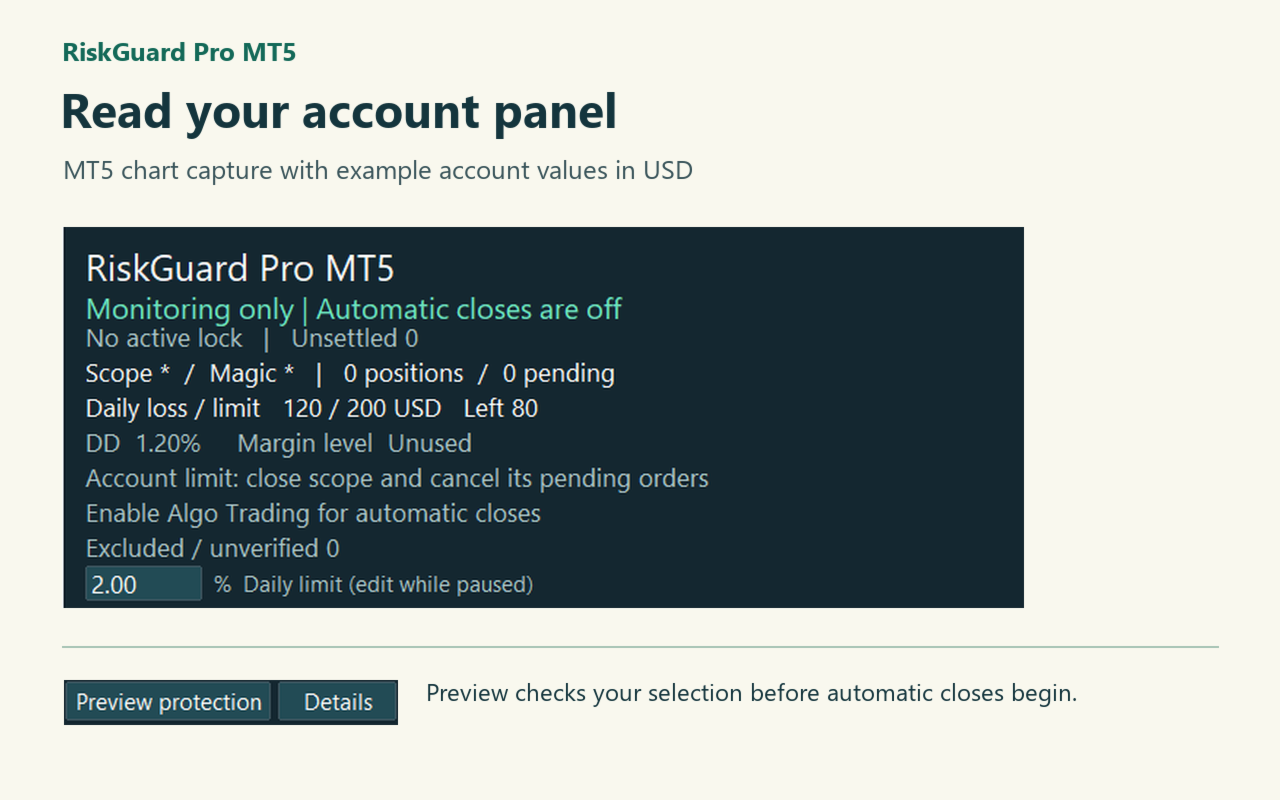
How much more can my account lose today? Attach RiskGuard to one chart to see today's loss, the limit you chose and the amount remaining. It watches open trades placed by you and by your other trading robots. The first time it starts, it only monitors.
First setup on a demo account
- Attach RiskGuard to one chart. On first use it monitors without closing trades.
- Set your daily limit. Select Preview protection and check how many positions and pending orders are in scope.
- If the counts look right, allow Algo Trading in MT5 and for the EA, then select Start protection. Pause protection stops new requests.
Choose a daily limit
For example, if the day starts with a balance of 10,000 and you choose 2%, the daily limit is 200 in your account currency. A current loss of 120 leaves 80. The calculation includes closed trades and open gains or losses, including positions carried overnight. Deposits and withdrawals are accounted for separately.
What happens at the limit?
RiskGuard requests closure of eligible positions and cancellation of eligible pending orders. A daily lock continues until the next daily reset, in broker server time. A newly opened trade in scope can be closed during this lock. If you excluded a trade, its loss still counts toward the account limit, but it stays outside the close list.
The chart interface is available in English and Japanese. Keep the terminal connected and Algo Trading enabled for automatic closes. RiskGuard reacts after it detects a trade. Price gaps, slippage and connection loss can cause a loss above the limit.
Inputs to check first
- Japanese: Chart language: false for English, true for Japanese. You can also switch on the chart.
- DailyUnit / DailyLimit: Daily loss unit and value. The default is 2% of the opening balance. Choose AccountMoney for a sum in account currency, PercentOfBalance for a percentage, or Disabled to turn it off.
- ManagedSymbols / ManagedMagics: Symbols and EA identifiers allowed to close. Use * for all, or comma-separated lists. Use the exact symbol names from your broker.
- IncludeManual: Include manual trades (magic number 0). On by default; the symbol and magic filters still apply.
Optional controls
- WeeklyUnit / WeeklyLimit / MonthlyUnit / MonthlyLimit: Weekly and monthly loss units and values. Use the same units as the daily limit. Both are off by default.
- EquityFloor / MaxDrawdownPct: Minimum equity (account value including open gains and losses), and maximum percentage drop from the observed equity high. In custom mode, 0 turns each off.
- UseMarginStages / WarningLevel / ReduceLevel / EmergencyLevel: Enable three margin levels; off by default. At the default thresholds: warn at 300% or below, seek a margin-improving reduction at 200%, and request closure of all eligible positions at 120%.
- BasketProfit / BasketLoss / BuyProfit / BuyLoss / SellProfit / SellLoss: Profit and loss thresholds for all eligible positions, buys only or sells only, respectively. Enter positive amounts in account currency; 0 disables an individual threshold.
- MaxHoldingHours / FridayExit / FridayTime: Maximum holding time in hours (0 = off). Enable FridayExit to close eligible positions from FridayTime, initially 20:00 broker server time.
- PropPreset / ContractCapital / PropDailyPct / PropTotalPct: CustomRules uses your own limits. FixedFloor uses contractual starting capital; TrailingFloor measures the drop from the observed equity high. The three values set starting capital, daily loss % and total loss %. Check your provider’s rules.
- DayReset: Daily reset in broker server time; default 00:00.
- NewsAction / MinutesBefore / MinutesAfter: Action around high-impact releases and minutes before/after. Default: NotifyOnly, 15 minutes each side. NewsOff disables it; CloseAffected requests closes and cancels pending orders in scope for affected instruments.
- CFDNewsMap: Match CFD symbols to news currencies, e.g. XAUUSD=USD,US500=USD. Use your broker’s exact names.
- DeviationPoints / PopupAlerts: Allowed price deviation on close requests (default 30 points) and MT5 pop-up alerts (off by default).
The panel also shows currency exposure. After restarting the same terminal, check the protection mode restored from local storage.