VirtualTradePad One Click Trading Panel

4.59

MetaTrader 5용 트레이딩 패널 — 차트와 키보드에서 실행하는 프로페셔널 원클릭 트레이딩

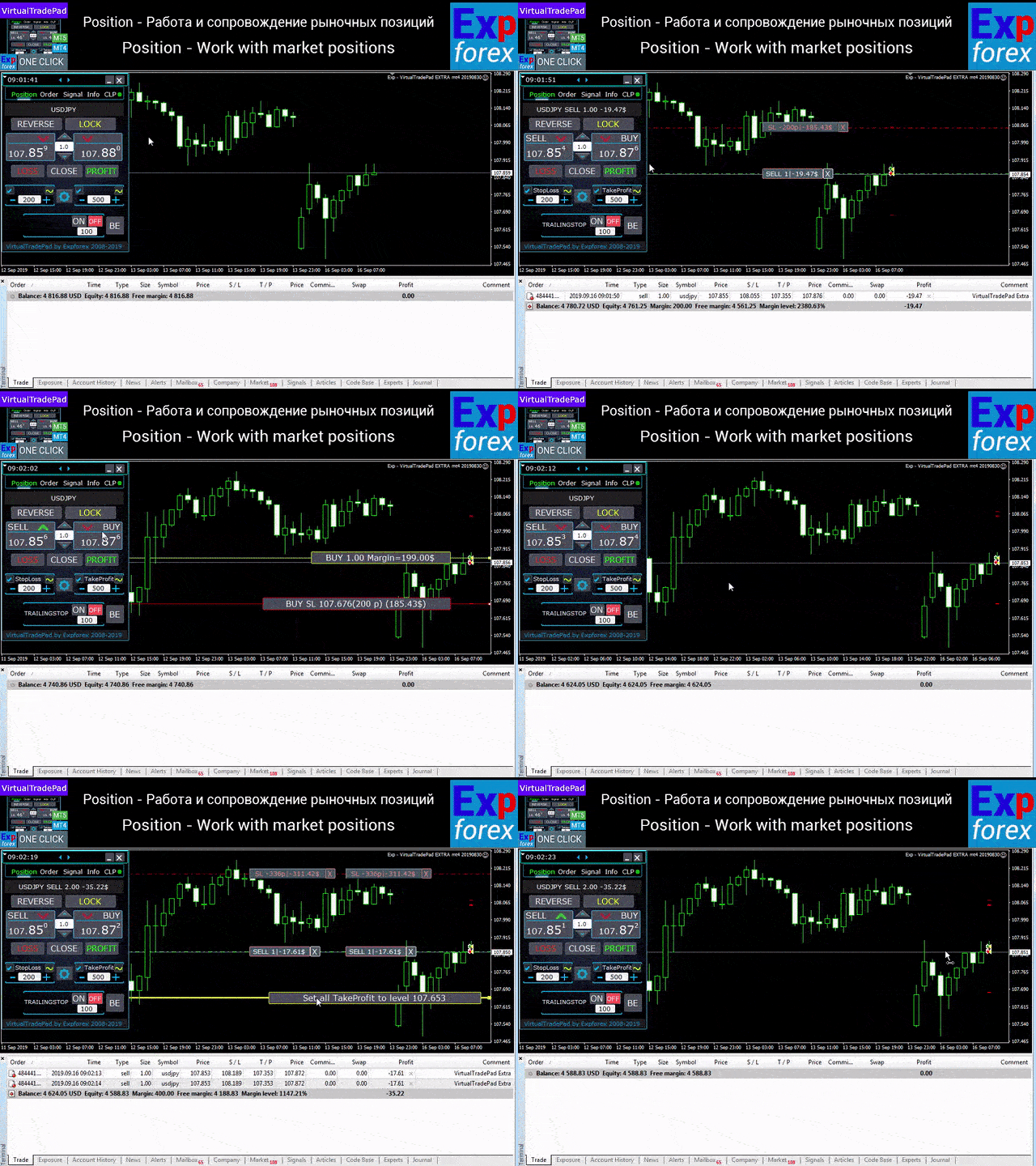
활동적인 트레이더를 위해 설계된 고급 Trading Panel로, MetaTrader 기본 인터페이스보다 훨씬 빠르고 직관적으로 포지션과 주문을 열고, 관리하고, 종료할 수 있습니다. 이 패널은 포지션 관리, 대기 주문 제어, 총수익 관리, 체결 속도를 하나의 전문적인 작업 공간에 통합하고 싶은 트레이더를 위한 솔루션입니다.

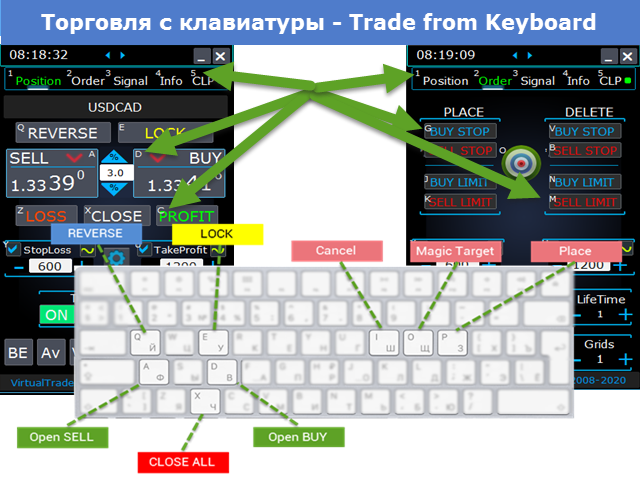
이것은 단순한 보조 유틸리티가 아닙니다. MetaTrader 5를 위한 진정한 trading cockpit입니다. 차트에서 직접 거래하고, 키보드로 빠르게 명령을 실행하며, 자동 계산과 시각적 가이드를 통해 수동 트레이딩을 더 빠르고, 더 명확하고, 더 편리하게 만들어 줍니다. 

이 패널을 사용하면 차트에서 단 한 번의 클릭으로 거래를 실행할 수 있으며, 표준 MetaTrader 컨트롤보다 최대 30배 빠르게 거래 작업을 수행할 수 있습니다.

왜 트레이더들이 이 패널을 선택하는가

  • 원클릭 트레이딩 — 차트와 키보드 양쪽에서 실행 가능
  • 포지션 및 주문의 빠른 실행, 종료, 수정
  • 포지션, 대기 주문, 총수익에 대한 깊이 있는 제어
  • 자동 계산으로 반복 작업을 대폭 줄임
  • 차트 위에서 직접 이루어지는 시각적 관리
  • 수동 트레이딩과 반자동 관리에 모두 적합한 프로페셔널 기능 세트

이 패널의 핵심 아이디어

이 패널은 MetaTrader 5를 위한 범용 trading cockpit으로 설계되었습니다. 가장 중요한 거래 작업을 빠르고, 명확하고, 시각적으로 다룰 수 있도록 구성한 작업 환경입니다.

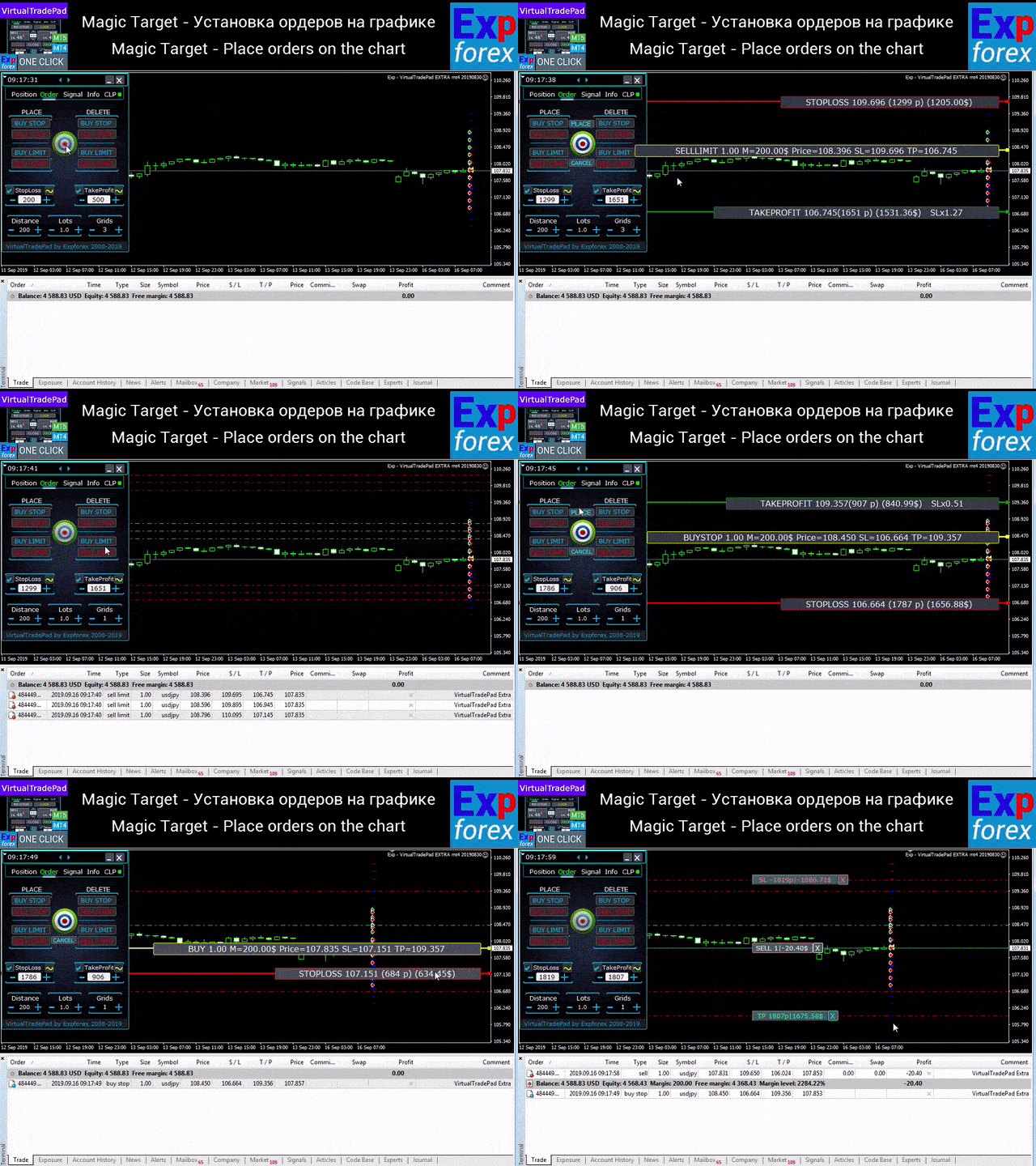
포지션 오픈과 종료, reverse, lock, 부분 청산, Autolot, 실제 / 가상 Stop Loss 및 Take Profit, 주문 그리드, 마우스 조작, 키보드 트레이딩까지, 실전 트레이딩에 필요한 핵심 기능이 하나의 효율적인 환경 안에 통합되어 있습니다. 

단순히 “더 빨리 클릭하는 것”이 목적이 아닙니다. 더 명확한 시야, 더 빠른 대응, 더 적은 마찰로 트레이딩 결정을 실행할 수 있도록 전체 작업 흐름을 전문적으로 정리해 주는 것이 이 패널의 가치입니다.

주요 기능

거래 실행 및 종료: BUY, SELL, Close, Delete, Modify, Reverse, Lock, Partial Close.

주문 관리: Buy Stop, Sell Stop, Buy Limit, Sell Limit, 주문 그리드, 주문 삭제, 주문 수정, 시리즈 전체 제어.

포지션 관리: Stop Loss, Take Profit, Trailing Stop, Breakeven, 포지션 그리드 전체에 대한 공통 Stop Loss / Take Profit, 평균 가격 기반 관리 로직.

자동 계산: Autolot, 잔고 비율 또는 Stop Loss 기반의 동적 로트, 총이익 / 총손실 관리, 실제 / 가상 보호 레벨.

시각적 실행: 차트에서 직접 주문 배치, 마우스 조작, 가격 라인 기반 제어, 정보 라벨, 그래픽 힌트 표시.

패널 구성

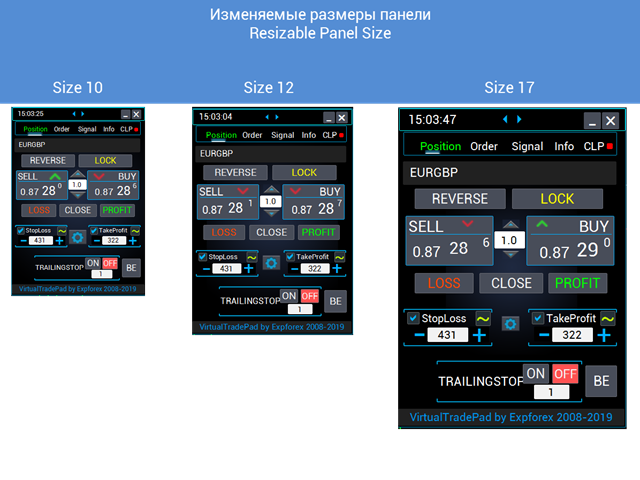
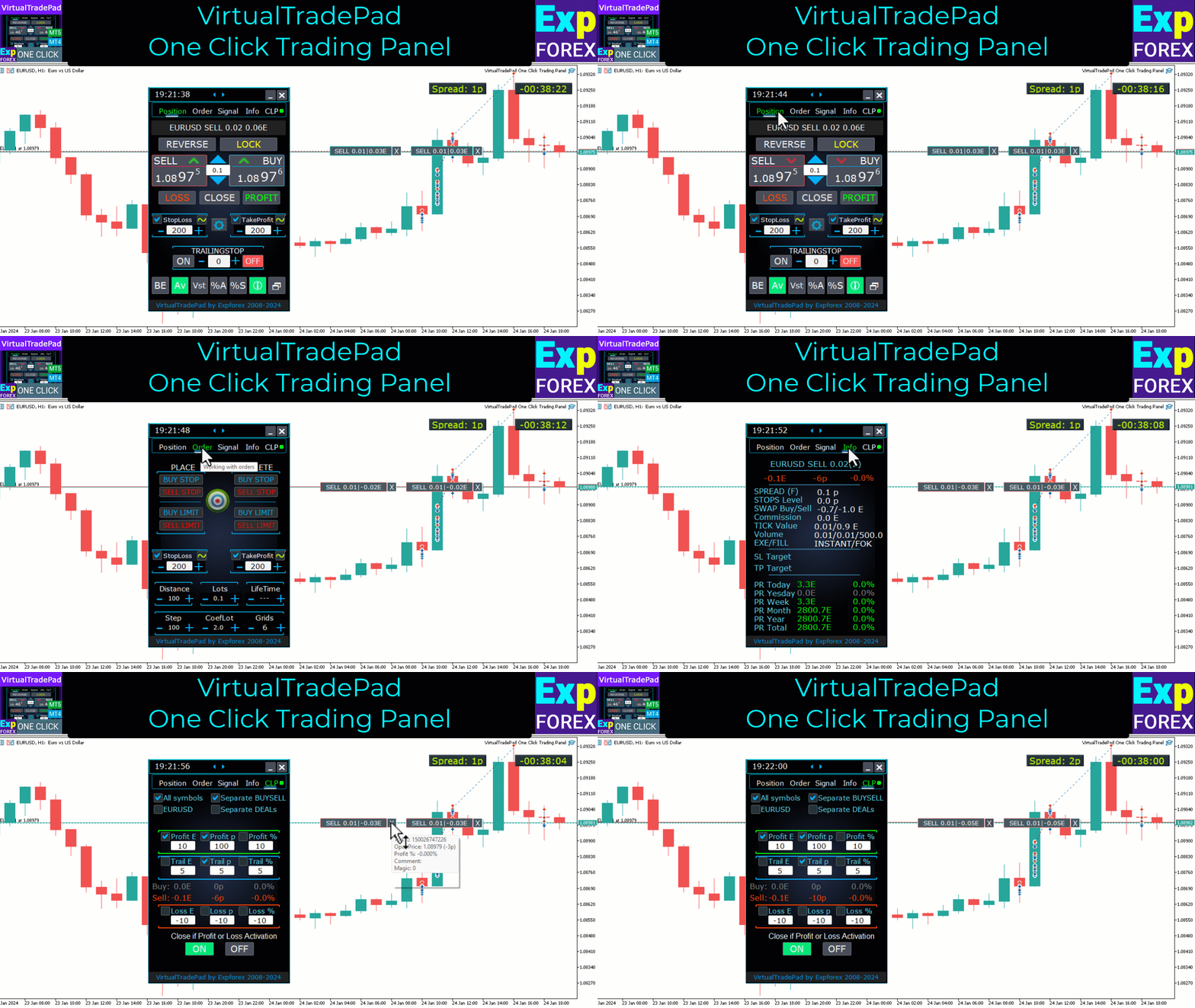
이 패널에는 5개의 핵심 탭이 있으며, 각각 서로 다른 거래 작업을 담당합니다. Positions, Pending Orders, Account Information, Signals, Total Profit입니다. 

Positions 탭 — 오픈 포지션 관리

  • BUY / SELL 오픈 및 종료
  • 모든 포지션 reverse
  • 총 포지션 lock
  • Stop Loss / Take Profit 수정
  • 포지션 그리드 전체에 공통 Stop Loss / Take Profit 설정
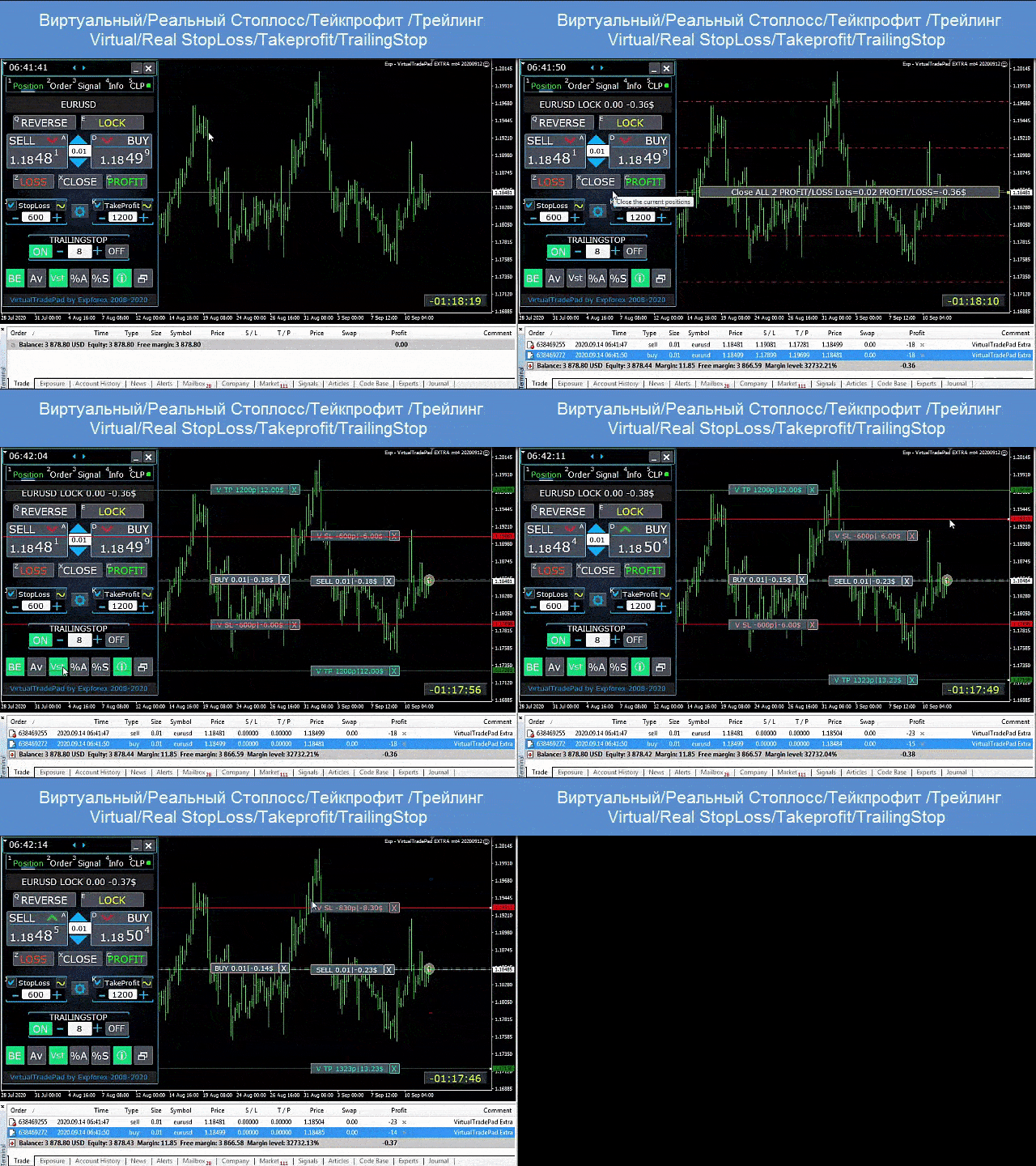
  • Trailing Stop 활성화
  • Breakeven 활성화
  • 수익 포지션만 또는 손실 포지션만 종료
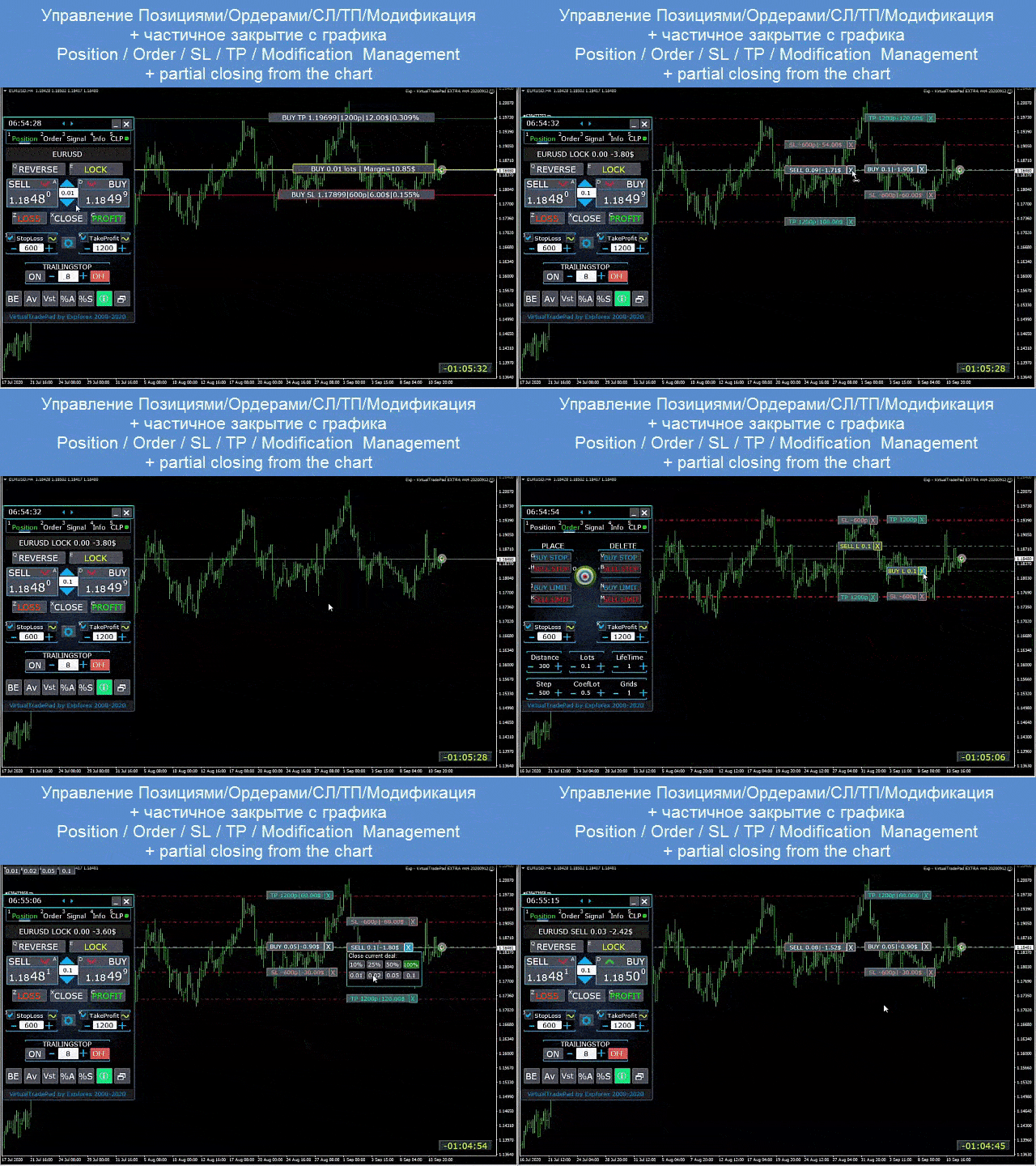
  • 차트에서 직접 포지션 관리
  • 차트 위에서 부분 청산
  • Autolot / 잔고 비율 또는 Stop Loss 기반 동적 로트
  • 실제 / 가상 Stop Loss 및 Take Profit 전환
  • 평균 가격 기준 글로벌 Trailing Stop / Breakeven 관리

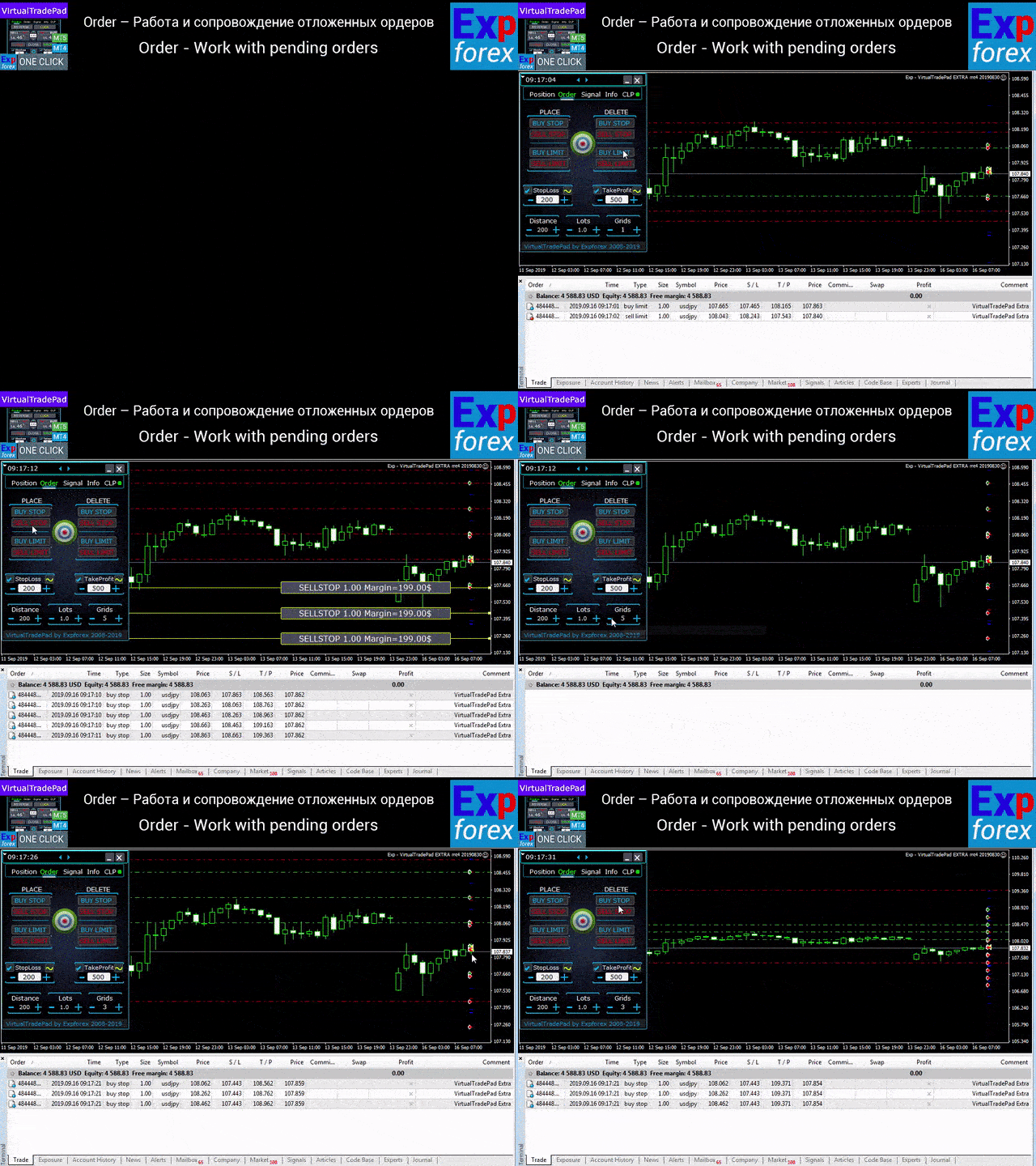
Orders 탭 — 대기 주문 및 지정가 주문 관리

  • Buy Stop, Sell Stop, Buy Limit, Sell Limit 설치 및 삭제
  • 로트 증가 및 거리 설정이 가능한 주문 그리드 구축
  • 마우스와 차트 라인을 사용한 주문 / 포지션 배치
  • 전체 주문 시리즈에 대한 공통 Stop Loss / Take Profit 설정
  • 차트에서 직접 대기 주문 수정 및 삭제

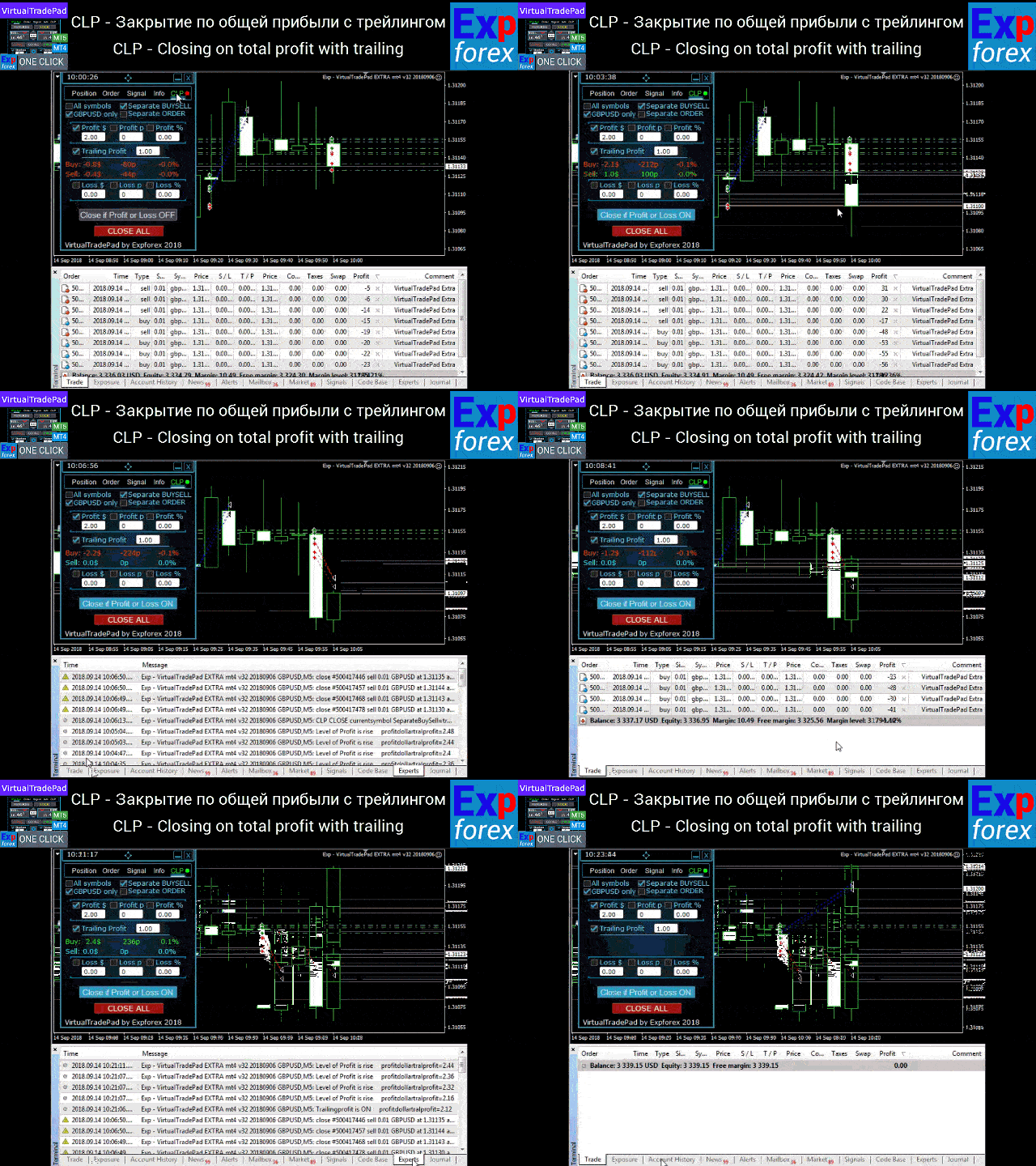
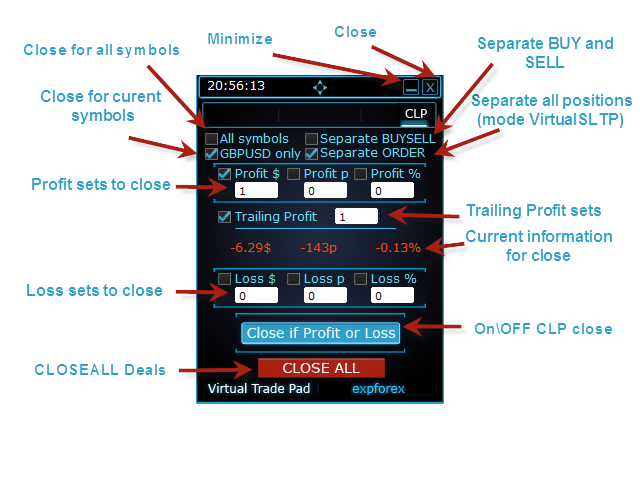
CLP 탭 — 총이익 또는 총손실 기준 청산

  • 포인트, 달러, 퍼센트 기준으로 총이익 / 총손실 청산
  • BUY와 SELL을 각각 별도로 청산
  • 개별 / 전체 포지션에 대해 가상 Stop Loss / Take Profit 활성화
  • 포인트, 달러, 퍼센트 기준 총이익 Trailing Stop 적용

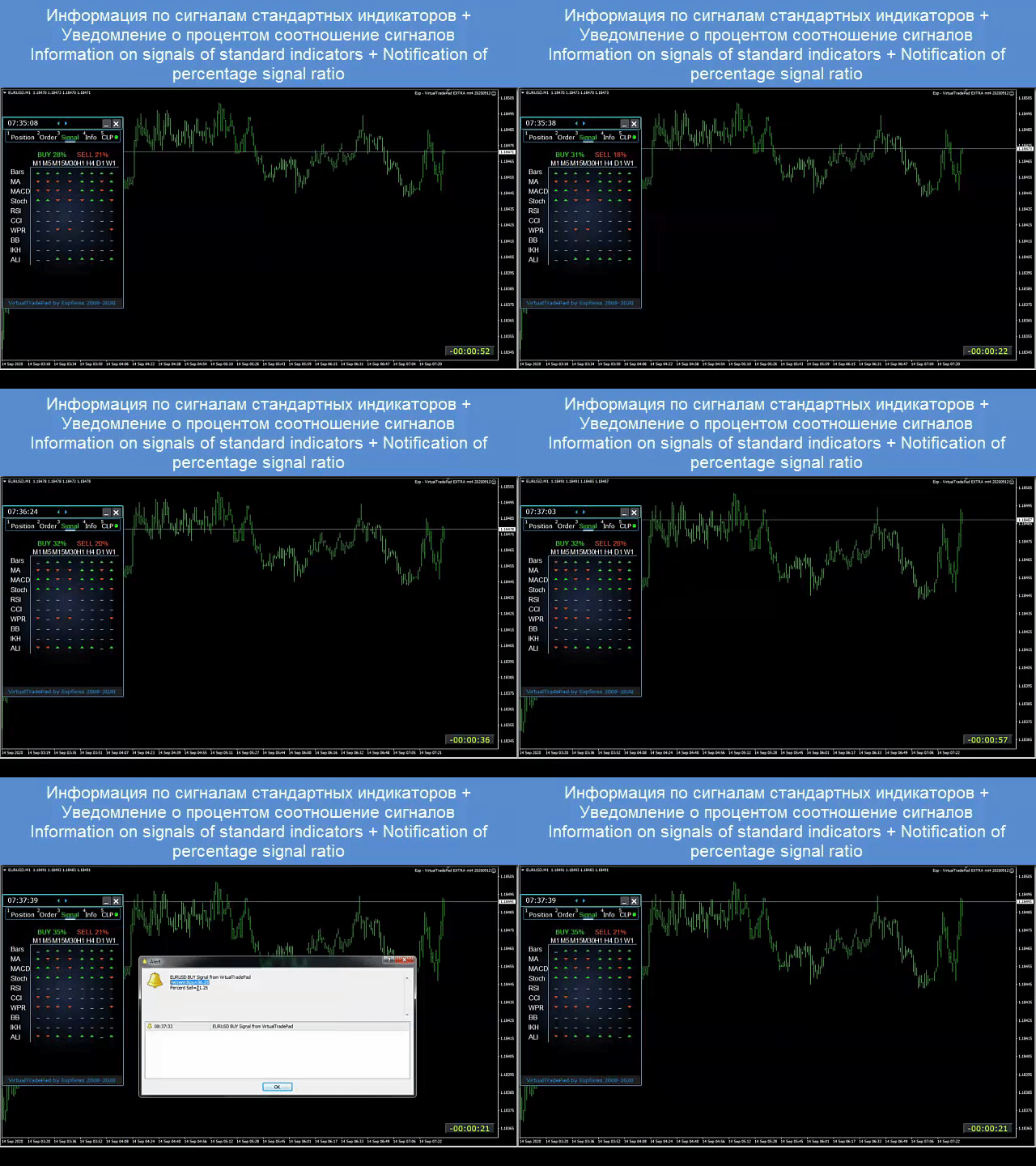
Signals 탭

이 탭은 10개의 표준 인디케이터8개의 시간 프레임에서 신호를 표시하며, BUY / SELL 방향의 누적 신호 비율도 보여줍니다. 또한 설정된 기준을 초과하면 자동으로 포지션을 여는 것도 가능합니다. 

INFO 탭

선택된 심볼의 현재 사양, 현재 Stop Loss 및 Take Profit 목표, 그리고 오늘 / 어제 / 주간 / 월간 이익 정보를 보여줍니다. 

실전 트레이딩에서의 장점

  • 수동 트레이딩 속도를 크게 향상
  • 반복적인 작업을 줄여 줌
  • 시장 변화에 더 빠르게 대응 가능
  • 그리드, 포지션, 총이익 관리를 더 정밀하게 수행
  • MetaTrader 안에서 더 전문적이고 시각적인 워크플로를 구축

이 패널이 적합한 트레이더

  • 활동적인 manual trader
  • 그리드 주문과 포지션 시리즈를 사용하는 트레이더
  • Stop Loss, Take Profit, Trailing, Breakeven을 수동 관리하는 트레이더
  • MetaTrader 안에서 불필요한 작업을 줄이고 싶은 사람
  • 단순한 버튼 모음이 아닌, 진짜 전문적인 trading assistant를 원하는 사람

이 패널은 모든 계좌 유형과 모든 브로커에서 동작합니다. 인터페이스는 가볍고 빠르며 직관적이면서도, 실전적으로 강력한 기능을 제공합니다. 키보드 트레이딩과 차트 트레이딩 모두 지원합니다.

추가 추천

완전 자동매매를 원한다면 The XCustom을 추천합니다.

전략 테스터 학습이 필요하다면 무료 유틸리티 TesterPad를 확인해 보세요.

태그: Expforex, Vladon, Manual Trade, Trade Panel, Panel Trade, Trade Utility, Self Test, Take Profit, Tool Management, Management Tool, Forex Helper, Forex Trade, Training Virtual Trade, Quick Tool, Manual Tester, Manual Backtest, TesterPad, TradePad, Virtual Trade Pad, 수동 거래, 트레이딩 패널, 거래 유틸리티, 트레이더 어시스턴트, 수익 관리, CLP, Close if Profit or Loss, Trailing Profit, Smart Trailing Stop
리뷰 123
Fredi Sesarianto
139
Fredi Sesarianto 2026.04.07 11:41 
 

i cant trade anymore without virtual tradepad..

edit, ALL 5 stars , quick response on quetion .

Nguyen Tho
94
Nguyen Tho 2026.02.06 11:01 
 

When I change the time frame to view on the chart, the trading history still displays, even though I have turned off this feature on the chart. Please guide me on how to disable it on your software.

Chanon Chaichanachot
299
Chanon Chaichanachot 2025.11.29 07:22 
 

In the "Risk Manager/Prohibit Opening" please consider adding "deny trading during these time" "00:00-15:35, 22:55-24:00" for examples I'm currently using "AutoTrading Scheduler" as a work around. Thank You... Great Tool!

***I'm using autotrade/autoclose by signals(on VPS), so it would prevent EA from opening new trade during certain time while maintaining floating trade.

추천 제품
Episode Health Monitor Episode Health Monitor is a trading utility for MetaTrader 5 designed to analyze the real-time condition of active trading positions directly on the chart. The tool evaluates the current “trading episode” - a group of open positions - and provides a structured view of risk, stability, and distance to potential failure. Instead of relying only on profit/loss or price movement, it helps identify whether the current position is stable, weakening, or approaching a critical st
DDKiller Pro
Njaratahiry Michael Randrianiaina
Stop Blowing Your Account. Once and For All. DDKiller Pro is the MT5 risk guardian that runs silently on your chart and shuts down trading the moment you hit a limit — whether you're grinding a prop firm challenge or managing your own CFD account. The problem every trader knows: You set your rules. You break them anyway. One revenge trade. One overleveraged position. One session that erases a month of gains. DDKiller Pro removes that decision from your hands entirely. What it does: The second yo
This tool will perform Trailing stop loss and Break even management for orders. Helps you limit or reduce the time spend watching orders on the screen, especially when you need to go to sleep. Just add this EA to 1 chart, you can manage all pairs. You can filter orders by comment, magic number, symbol and order ticket number. When Breakeven it can add shift/offset pips (to cover the commission...). You can try in strategy tester before purchase. The EA will add Buy and Sell alternately, so you
Expert TP SL v04 - Professional Trading Assistant with AI Motivation System Advanced manual trading tool with automatic risk management, overtrading protection, and intelligent psychological support for disciplined trading. PRODUCT OVERVIEW Expert TP SL v04 is a comprehensive trading assistant designed for manual traders who want to maintain emotional discipline while automating risk calculations. This isn't just another order placement tool - it's a complete trading psychology system that pr
Exp5 Duplicator
Vladislav Andruschenko
4.78 (9)
Duplicator for MetaTrader 5 — 하나의 터미널 안에서 동작하는 전문 포지션 복제 시스템 MetaTrader 5에서 이미 열려 있는 포지션을 자동으로 복제하고, 전체 거래 규모를 확장하며, 사용자 지정 로트 규칙을 적용하고, 복제 포지션을 정교한 로직으로 관리하려는 트레이더를 위한 신뢰성 높은 Expert Advisor입니다. 수동 매매, 알고리즘 매매, 그리고 이미 존재하는 포지션을 더 유연하게 관리하려는 사용자에게 적합한 실전형 도구입니다. Duplicator for MT5는 자체 매매 전략으로 새로운 포지션을 열지 않습니다. 이 제품의 역할은 MetaTrader 5 계정 안에 이미 존재하는 포지션을 감시하고, 사용자가 설정한 조건에 따라 복제 포지션을 생성하는 것입니다. 복제 횟수, 로트 크기, Stop Loss, Take Profit, 코멘트, 추가 관리 조건까지 세밀하게 설정할 수 있습니다. 서로 다른 플랫폼이나 다른 터미널 간 복사 기능이 아니라, 같
SLTPSetter
Raphael Djangmah Osro Agbo
SLTPSetter - StopLoss Take Profit Setter HOW DOES IT WORK? Risk and account management is a very critical aspect of trading. Before entering a position, you must be fully aware how much you will be willing to loss both in percentage and value. This is where SLTPSetter gets you covered.  All you need to do is attach the indicator on the chart and PRESS BUY OR SELL automatically, all parameters needed for placing the trades will be provided at the top left corner of the screen. Feel free to adjust

Auto SLTP Maker MT5  is an assistant for all those who forget to set StopLoss and/or TakeProfit in deal parameters, or trade on a very fast market and fail to place them in time. This tool automatically tracks trades without StopLoss and/or TakeProfit and checks what level should be set in accordance with the settings. The tool works both with market and pending orders. The type of orders to work with can be set in the parameters. It can track either trades for the instrument it runs on, or all
Smart TP SL Manager MT5 Smart TP SL Manager MT5 is a trade management utility for MetaTrader 5 designed to monitor and manage position protection directly from the chart through a compact panel. The tool focuses on a common problem in manual trading: loss of control over stop loss, take profit, and position risk when multiple trades are active. Instead of relying on manual checking or switching between terminal windows, the panel provides a structured view of protection status and risk conditio

Overview Mirror Signals Service EA (Text only)   is a powerful monitoring Expert Advisor that automatically sends   real-time Telegram notifications   for all important trade events on your MetaTrader 5 account. It is engineered specifically for   signal providers ,   trade-copier operators ,   auditors ,   educators , and   professional trading services   that require immediate, detailed, and reliable reporting. Everything from   entries, exits, SL/TP changes, comment changes, trailing sto
Trade Assistant 38 in 1
Makarii Gubaydullin
4.91 (23)
다기능 도구: 로트 계산기, 그리드 주문, R/R 비율, 트레이드 관리자, 수급 구역, 가격 행동 등 데모 버전   |   사용자 설명서 트레이드 어시스턴트   는 전략 테스터에서 작동하지 않습니다 :   여기에서 데모 버전을 다운로드  하여 유틸리티 를 테스트하세요. 질문/개선 아이디어/버그 발견 시 연락주세요 MT4 버전이 필요하시면 여기 에서 이용 가능합니다 거래   프로세스 를 간소화, 가속화, 자동화하세요. 이   대시보드 로 표준 터미널 기능을 확장합니다. 트레이딩 패널은  모든 거래 상품에서 작동: 외환, 주식, 지수, 암호화폐 등. 1. 새 거래 개시 : 로트 / 위험 / RR 계산 : 수동 거래를 위한 위험 관리 로트 계산기 (위험 크기 기반 거래량 계산) 위험 계산기 (로트 크기 기반 위험 금액) 위험 대비 보상   비율 그리드 주문:  + 동적 간격 옵션, 로트 분할 옵션 주문 활성화 트리거, + 매수 스톱리밋 / 매도 스톱리밋 가상 SL, 가상 TP (숨김
TradePilotmt5
Hossein Khalil Alishir
TradePilot Expert Advisor (EA) for MetaTrader 5 TradePilot is a professional and user-friendly Expert Advisor (EA) for MetaTrader 5 (MT5) . It simplifies automated trading , risk management , and trade execution with a smart trading panel . Perfect for beginners and experienced traders looking for a reliable trade manager EA with automated lot size calculation and smart position management. Key Advantages User-Friendly Trading Panel: Customizable panel with buttons and hotkeys for fast ex
Capital Management EA – Smart Risk Management & Profit Optimization for MT5 Take control of your trading capital with smart, automated strategies — fully optimized for MetaTrader 5 (MT5). Looking to protect your capital and maximize profits through automated money management strategies ? Capital Management EA is the all-in-one Expert Advisor for MetaTrader 5 (MT5) that helps you trade smarter, not harder. Core Features: 5-in-1 Capital Management Strategies – Built-in versatility Gr
Tool Auto Modify SLTP – Protect Your Trades, Optimize Your Strategy In trading, risk is always present. Just one forgotten SL/TP can turn a promising trade into a loss. Even experienced traders occasionally make mistakes. That’s why Tool Auto Modify SLTP was created – to keep you protected and let you focus on your strategy. Key Features: Manage Orders for All Symbols: Monitor and adjust SL/TP for all your trading pairs. Three Flexible Risk Modes: Point-Based: Set fixed SL/TP distances. Account

Trading Utility for Forex Currency Pairs Only not for Gold  Functions Auto Lot Calculation based on Risk Auto stoploss  Auto TakeProfit Breakeven Auto Close Half % Close in percentage with respect to the PIPs Pending Orders BuyLimit Sell Limit with distances BuyStop Sell Stop    with distances Trading Informations Risk in percentage For Multiple trades Combine Takeprofit and Combine Stoplosses
Noize Absorption Index
Ekaterina Saltykova
Noize Absorption Index - is the manual trading system that measures the difference of pressure between bears forces and bulls forces. Green line - is a noize free index that showing curent situation. Zero value of index shows totally choppy/flat market.Values above zero level shows how powerfull bullish wave is and values below zero measures bearish forces.Up arrow appears on bearish market when it's ready to reverse, dn arrow appears on weak bullish market, as a result of reverse expectation.
This EA is there to take your trade closing stress away. Quickly close as many trades as you have opened at the click of a button, INCLUDING PENDING ORDERS. This works on the MT5 platform whether it be currencies, Indices, stocks or Deriv synthetic indices. I have saved it under utilities as it is a utility, however, to install this, you have to save the file in you "EA" folder. That is; Go to "File", then "Open Data Folder", "MQL5" and then "Experts". Paste this file there. Restart MT5 and you'
Inverted_Chart_EA Utility Expert Advisor Inverted_Chart_EA creates and maintains a mirror-inverted chart of any symbol and timeframe. It automatically generates a custom instrument (e.g. US30_INV ) and keeps its price history updated in real time, with bars mirrored around a chosen pivot. This utility gives traders a new way to analyze the market from a different perspective by flipping the chart upside down. Why use an inverted chart? Highlight hidden patterns – price formations that look ordin
Equity Protector Pro MT5 Equity Protector Pro MT5 is a risk control utility for MetaTrader 5 designed to monitor account exposure and enforce predefined risk limits directly on the chart. In a standard MT5 setup, traders can see balance, equity, and floating profit. However, when multiple positions are open — especially on fast-moving instruments like XAUUSD - it becomes difficult to understand how close the account is to a risk threshold, or whether the current structure is still safe. This to
SwiftEdge Scalper 완전한 수동 제어 기능을 갖춘 전문 틱 스캘핑 EA 스캘핑은 순간적인 결정, 정밀한 리스크 관리, 원활한 주문 실행을 요구합니다. 가격 움직임을 관찰하면서 손익분기점 계산, 트레일링 스탑, 여러 포지션을 관리하는 것은 적절한 도구 없이는 압도적입니다. SwiftEdge Scalper는 활발한 스캘퍼와 데이 트레이더를 위해 설계된 전문 트레이딩 어시스턴트입니다. 원클릭 또는 키보드 단축키로 거래를 실행하고 EA가 자동으로 손익분기점, 트레일링 스탑, 포지션 관리를 처리합니다. 이것은 자동 거래 로봇이 아닙니다 — 당신이 결정할 때만 거래합니다. 자세히 알아보기: 완전한 설정 가이드 및 문서 (English) 한정 제공: 처음 50회 다운로드는 무료입니다! 그 후에는 이 제품이 유료로 전환됩니다. 지금 다운로드하여 무료 사본을 확보하세요. 주요 기능 원클릭 거래: 패널 버튼 또는 사용자 정의 키보드 단축키(B/S/A/C/E/M)를 통해 즉시 BUY/SEL
King ElChart Manual Trade Panel
Mohammed Maher Al-sayed Mohammed Ahmed Saleh
King Chart – Manual Trading Panel for MetaTrader 5 Overview King Chart is a simple yet powerful manual trading panel built for traders who want speed, precision, and clarity. It enables quick order execution, clear lot control, and real-time account monitoring  all directly on your MT5 chart. Main Features Multi-Lot Trade Execution 3 Buy and 3 Sell buttons for instant execution Each button is tied to a custom lot size field Designed for flexible scaling in or out of trades Position Management D
Lot calculator tool MT5
Ernestas Kvedaras
3.67 (3)
More stable MetaTrader 4 version is available here:  Lot Calculator Tool . This tool helps you to automatically calculate and manage risk, conveniently place orders visually, schedule orders, trail stops, move them to break-even and more. Features Place market or pending orders using draggable lines Schedule orders Calculate and limit risk using various methods See current spread See time till next candle Set custom order comments Trail stops Move stops to break-even See order profit/loss in p
Bneu Prop Firm Pass System
Marvinson Salavia Caballero
Compacted conversationBneu Prop Firm Pass System v2.25 — Prop Firm Risk Management Utility for MetaTrader 5 Bneu Prop Firm Pass System is a professional on-chart risk management utility for MetaTrader 5. It is designed to help traders monitor prop firm challenge rules, funded-account restrictions, account risk, news exposure, pending orders, session restrictions, and trade management from one clean dashboard. The system includes a 5-tab premium dashboard, prop firm rule presets, custom rule c
RRtoolBox
David Ruiz Moreno
RRtoolbox - Professional Tools: Risk:Reward Trading Tool (SL/TP Horizontals + Pending orders + Diagonals), Alerts set on trend lines (for alerts on diagonal levels), SelfManagement (BE, partials...), close/cancelling by time, Statistics, Info and trading on chart. One-Click Trading with Visual Risk:Reward Management RRtoolbox is a comprehensive trading panel that combines one-click order execution,  statistics and  powerful visual Risk:Reward tools, alerts set with trendlines, on chart butt
LotCalculatorPro
Reynaldo Jr Audencial Pascual
LotCalculatorPro + Smart Trading Panel LotCalculatorPro는 차트에서 직접 리스크 관리, 로트 크기 계산, 거래 실행을 간편하게 할 수 있도록 설계된 강력한 올인원 트레이딩 도우미 입니다. 이 도구는 트레이더가 리스크를 관리하고, 정확한 로트 크기를 계산하며, 손익분기점(Break-even), 부분 청산, 일일 수익/손실 보호와 같은 스마트 기능을 통해 거래를 자동으로 관리하도록 도와줍니다. 특히 MetaTrader 5 환경에서 깔끔하고 효율적인 트레이딩 워크플로우 를 원하는 Forex 트레이더, Prop Firm 트레이더, 리스크 관리 중심 트레이더 에게 이상적입니다. 기본 설정: 일일 목표 수익: 시작 잔액의 2% 일일 최대 손실: 시작 잔액의 1% 주요 기능 LotCalculatorPro 다음 정보를 기반으로 자동으로 정확한 로트 크기 를 계산합니다. 진입 가격 (Entry Price) 손절 가격 (Stop Loss) USD 기준
Equity Shield Pro 1.1 NEW VERSION  Equity Shield Pro 1.1 is a powerful utility EA designed to safeguard your trading account by actively monitoring and enforcing equity protection and profit management rules. Whether you’re trading personal accounts or working through proprietary firm challenges, this EA ensures strict adherence to risk and profit targets, enabling you to maintain discipline and consistency. Fully compatible with all challenge types, Equity Shield Pro 1.1 is specifically craft
ChangePeriod MT5
Kazuya Yamaoka
You can change the time period of the chart at the touch of a button. You can also change multiple charts at the touch of a button. You can also change multiple charts at the touch of a button,   saving you the trouble of changing time periods. We are live-streaming the actual operation of the system. Please check for yourself if it is usable. Please check it out for yourself. https://www.youtube.com/@ganesha_forex We do not guarantee your investment results. Investments should be made at you
Timeframe Trading Limiter
AL MOOSAWI ABDULLAH JAFFER BAQER
Timeframe Trading Limiter is a professional risk management and trade discipline utility designed for MetaTrader 5. It empowers traders to enforce strict, automated limits on the number of trades and the maximum allowable drawdown within each trading period, based directly on the chart timeframe selected. Whether you are a discretionary trader prone to overtrading, a prop firm challenge participant needing to adhere to strict rules, or an algorithmic trader running multiple strategies, this tool
Click Trading
Jawad Tauheed
5 (2)
One Click Trading – Auto TP SL Developer TraderLinkz Version 1.00 Category Utility What it does Adds missing TP and SL to your manual trades and pending orders Sets them once per ticket Lets you move TP and SL afterward Works on hedging and netting accounts Scans on every tick and reacts on trade events Why you want it You place faster entries You get consistent risk and exit targets You reduce fat finger errors You keep full manual control Quick start Attach the EA to any chart Keep TP and SL e
FREE
Symbol Manager for MT5
Taras Slobodyanik
5 (3)
Symbol Manager or Grid Manager, designed to group orders into one position (by Symbol or by Magic Number). This utility will be useful to multi-currency traders (many EAs), who can have multiple orders on several pairs. You will be able to see the total number of lots, the total profit, and set virtual stop loss and virtual take profit. To set a real TP (or SL), you must first set the virtual value, and then enter the command in this cell: "set". If you want to set real TP/SL for all orders at
CosmiCLab FIBO
Kirils Subins
CosmiCLab SMC FIBO CosmiCLab SMC FIBO is a professional trading indicator designed for traders who use Smart Money Concepts (SMC), market structure analysis and Fibonacci retracement levels. The indicator automatically detects market swings and builds Fibonacci levels based on the latest impulse movement. It also identifies market structure changes such as BOS (Break of Structure) and CHOCH (Change of Character), helping traders understand the current market direction. CosmiCLab SMC FIBO also pr
이 제품의 구매자들이 또한 구매함
Trade Assistant MT5
Evgeniy Kravchenko
4.42 (210)
거래당 위험 계산, 라인을 사용한 손쉬운 신규 주문, 부분 청산 기능을 통한 주문 관리, 7가지 유형의 트레일링 스탑 및 기타 유용한 기능을 제공합니다. 추가 자료 및 지침 설치 지침   -   애플리케이션 지침   -   데모 계정용 애플리케이션 평가판 라인 기능       - 차트에 개시선, 손절매, 차익실현을 표시합니다. 이 기능을 사용하면 새로운 주문을 쉽게 하고 개봉 전에 추가 특성을 볼 수 있습니다. 위기 관리       -       위험 계산 기능은 설정된 위험과 손절매 주문의 크기를 고려하여 새 주문의 볼륨을 계산합니다. 이를 통해 손절매 크기를 설정하고 동시에 설정된 위험을 존중할 수 있습니다. 로트 계산 버튼 - 위험 계산을 활성화/비활성화합니다. 필요한 위험 값은 위험 필드에 0에서 100 사이의 백분율 또는 예금 통화로 설정됩니다. 설정 탭에서 위험 계산 옵션을 선택합니다. $ 통화, % 잔액, % 지분, % 자유 마진, % 사용자 정의, % AB 이전
Trade Manager EA에 오신 것을 환영합니다. 이 도구는 거래를 보다 직관적이고 정확하며 효율적으로 만들기 위해 설계된 궁극적인 리스크 관리 도구 입니다. 단순한 주문 실행 도구가 아닌, 원활한 거래 계획, 포지션 관리 및 리스크 제어를 위한 종합 솔루션입니다. 초보자부터 고급 트레이더, 빠른 실행이 필요한 스캘퍼에 이르기까지 Trade Manager EA는 외환, 지수, 상품, 암호화폐 등 다양한 시장에서 유연성을 제공합니다. Trade Manager EA를 사용하면 복잡한 계산은 이제 과거의 일이 됩니다. 시장을 분석하고 진입, 손절 및 익절 수준을 차트의 수평선으로 표시한 후 리스크를 설정하면, Trade Manager가 이상적인 포지션 크기를 즉시 계산하고 SL 및 TP 값을 실시간으로 표시합니다. 모든 거래가 간편하게 관리됩니다. 주요 기능: 포지션 크기 계산기 : 정의된 리스크에 따라 거래 크기를 즉시 결정합니다. 간단한 거래 계획 : 진입, 손절, 익절을 위한
TradePanel MT5
Alfiya Fazylova
4.87 (154)
Trade Panel은 다기능 거래 도우미입니다. 이 애플리케이션에는 50개 이상의 수동 거래 기능이 포함되어 있으며 대부분의 거래 작업을 자동화할 수 있습니다. 구매하기 전에 데모 계정에서 데모 버전을 테스트할 수 있습니다. 데모 계정용 애플리케이션 체험판 다운로드: https://www.mql5.com/en/blogs/post/750865 . 전체 지침 여기 . 거래. 한 번의 클릭으로 거래를 수행할 수 있습니다: 리스크 자동 계산과 함께 예약 주문 및 포지션 열기. 한 번의 클릭으로 여러 주문 및 포지션 열기. 주문 그리드 열기. 예약 주문 및 포지션을 그룹별로 닫기. 포지션 방향 전환 (Buy 닫기 > Sell 열기, Sell 닫기 > Buy 열기). 포지션 잠금 (부족한 포지션을 열어 Buy와 Sell 포지션의 수량을 동일하게 만들기). 모든 포지션 한 번의 클릭으로 부분적으로 닫기. 모든 포지션의 테이크 프로핏과 스톱로스를 같은 가격 수준에 설정. 모든 포지션의 스톱로스를
Farmed Hedge Yield Farming | All Markets (Manual - Hybrid - Semi/Automated EA) MULTI-ASSET SUPPORT Trade any asset available on your broker - Forex: Major, Minor, Exotic pairs - Crypto: BTC, ETH, XRP, SOL, BNB - Stocks: Apple, Tesla, Amazon, Google, etc. - Commodities: Gold, Silver, Oil, Gas - Indices: US30, NAS100, SPX500, DAX40 - Any CFD your broker offers VERIFIED TRADING RESULTS - Farmed Hedge Yield Axi Copy:  https://www.mql5.com/en/signals/2356376 - Farmed Hedge Yield Exn Copy:   https:/
베타 출시 Telegram to MT5 Signal Trader 는 곧 공식 알파 버전을 출시할 예정입니다. 일부 기능은 아직 개발 중이며, 작은 버그가 발생할 수 있습니다. 문제가 있으면 꼭 보고해 주세요. 여러분의 피드백은 소프트웨어 개선에 도움이 됩니다. Telegram to MT5 Signal Trader 는 Telegram 채널 또는 그룹의 거래 신호를 자동으로 MetaTrader 5 계정으로 복사하는 강력한 도구입니다. 공개 및 비공개 채널을 모두 지원하며, 여러 신호 제공자를 여러 MT5 계정에 연결할 수 있습니다. 소프트웨어는 빠르고 안정적으로 동작하며, 복사된 거래를 완벽히 제어할 수 있습니다. 인터페이스는 깔끔하며 대시보드와 차트가 시각적으로 구성되어 있고, 직관적인 네비게이션이 가능합니다. 여러 Signal Account를 관리하고, 공급자별 설정을 세밀하게 조정하며, 모든 동작을 실시간으로 모니터링할 수 있습니다. 필수 조건 MQL의 제한으로 인해 EA는 Te
파워 캔들 전략 스캐너 - 자체 최적화 다중 종목 설정 찾기 도구 파워 캔들 전략 스캐너는 마켓 워치에 등록된 모든 종목에 대해 파워 캔들 지표와 동일한 자체 최적화 엔진을 동시에 실행합니다. 하나의 패널에서 현재 통계적으로 거래 가능한 종목, 각 종목별 최적의 전략, 최적의 손절매/익절 조합을 알려주며, 새로운 신호가 발생하면 즉시 알림을 전송합니다. 이 도구는 Stein Investments 에코시스템의 일부입니다. 18개 이상의 도구와 함께 당신의 1대1 AI 트레이딩 멘토 Max.  항상 대기 중, 모든 인디케이터를 깊이 있게 이해, 무언가를 차근차근 생각해보고 싶은 순간에 도움을 줍니다.  https://stein.investments 에서 만나보세요 완벽한 시장 모니터링. 종목당 3,000건 이상의 자동 최적화. 2가지 알림 유형. 한 번의 클릭으로 차트를 전환하고 바로 거래하세요. 이 도구가 필요한 이유 대부분의 다중 종목 스캐너는 가격 변동만 보여줍니다. 티커별
YuClusters
Yury Kulikov
4.93 (43)
Attention: You can view the program operation in the free version  YuClusters DEMO .  YuClusters is a professional market analysis system. The trader has unique opportunities to analyze the flow of orders, trade volumes, price movements using various charts, profiles, indicators, and graphical objects. YuClusters operates on data based on Time&Sales or ticks information, depending on what is available in the quotes of a financial instrument. YuClusters allows you to build graphs by combining da
AntiOverfit PRO MT5
Enrique Enguix
5 (4)
EA를 구매하기 전에, 이 시스템이 정말 버티는지 아니면 백테스트에서 운 좋게 좋아 보였던 것뿐인지 먼저 확인하세요. 대부분의 로봇은 보기 좋은 백테스트와 함께 판매됩니다. 우상향 곡선. 좋은 Profit Factor. 의심할 이유가 거의 없어 보입니다. 그런데도 그런 EA들 중 많은 수가 시장이 그 과거 구간처럼 움직이지 않기 시작하는 순간 무너지기 시작합니다. 왜 그럴까요? 백테스트가 증명하는 것은 딱 한 가지뿐이기 때문입니다. 그 전략이 특정한 하나의 가격 경로에서는 작동했다는 것. 다른 경로에서도 버틴다는 뜻은 아닙니다. 견고하다는 뜻도 아닙니다. 당연히 당신의 돈을 쓸 가치가 있다는 뜻도 아닙니다. 당신이 EA를 사는 이유는 과거의 예쁜 곡선을 감상하기 위해서가 아닙니다. 계속 변하는 시장에서 실제로 쓰기 위해서입니다. AntiOverfit PRO가 하는 일 AntiOverfit PRO는 MetaTrader 5용 Expert Advisor가 정말 탄탄한지, 아니면 특정한
Copy Cat More Trade Copier MT5 (복사 고양이 MT5) 는 오늘날의 거래 과제를 위해 설계된 로컬 거래 복사기이자 완전한 위험 관리 및 실행 프레임워크입니다. 프롭펌 챌린지부터 개인 포트폴리오 관리까지, 견고한 실행, 자본 보호, 유연한 구성 및 고급 거래 처리의 조합으로 모든 상황에 적응합니다. 복사기는 마스터(송신자)와 슬레이브(수신자) 모드 모두에서 작동하며, 시장 주문과 예약 주문, 거래 수정, 부분 청산 및 헷지 청산 작업의 실시간 동기화를 제공합니다. 데모 및 실계좌, 거래 또는 투자자 로그인과 호환되며, EA, 터미널 또는 VPS가 재시작되어도 지속적인 거래 메모리 시스템을 통해 복구를 보장합니다. 고유 ID로 여러 마스터와 슬레이브를 동시에 관리할 수 있으며, 브로커 간 차이는 접두사/접미사 조정 또는 사용자 정의 심볼 매핑을 통해 자동으로 처리됩니다. 매뉴얼/설정  | Copy Cat More MT4 | 채널  특별 기능: 설정이 간편함 —
The product will copy all telegram signal to MT5 ( which you are member) , also it can work as remote copier.  Easy to set up, copy order instant, can work with almost signal formats, image signal,  s upport to translate other language to English Work with all type of channel or group, even channel have "Restrict Saving Content", work with  multi channel, multi MT5 Work as remote copier: with signal have ticket number, it will copy exactly via ticket number. Support to backtest signal. How to s
Anchor Trade Manager
Kalinskie Gilliam
5 (2)
Anchor: The EA Manager Run your full EA portfolio without conflicts, without stacked risk, and without watching every chart yourself. Anchor coordinates up to 64 Expert Advisors on a single account so only one trades at a time. Attach Anchor to any chart. Type your EA names and magic numbers in one line. Anchor handles the rest. Built for portfolios. Built for discipline. Built for prop firms. The Problem Running multiple EAs on the same account creates risk. Two gold EAs can open opposite posit
Telegram to MT5 Coppy
Sergey Batudayev
5 (9)
Telegram에서 MT5로:   최고의 신호 복사 솔루션 DLL 없이도 Telegram 채널과 채팅에서 MetaTrader 5 플랫폼으로 거래 신호를 직접 복사하는 최신 도구인 Telegram to MT5를 사용하여 거래를 간소화하세요. 이 강력한 솔루션은 정밀한 신호 실행, 광범위한 사용자 정의 옵션을 제공하고 시간을 절약하며 효율성을 높여줍니다. [ Instructions and DEMO ] 주요 특징 직접 Telegram API 통합 전화번호와 보안 코드를 통해 인증하세요. 사용자 친화적인 EXE 브리지를 통해 채팅 ID를 쉽게 관리하세요. 여러 채널/채팅을 추가, 삭제, 새로 고침하여 동시에 신호를 복사합니다. 고급 필터를 사용한 신호 파싱 예외 단어(예: "보고서", "결과")가 포함된 원치 않는 신호를 건너뜁니다. 유연한 SL 및 TP 형식을 지원합니다: 가격, 핍 또는 포인트. 가격 대신 포인트를 지정하는 신호에 대한 진입 포인트를 자동으로 계산합니다. 주문 맞춤화 및
Footprint Chart Pro — Professional OrderFlow EA for MetaTrader 5 Version 6.34 | Professional tool for real traders | Institutional-Grade Visualization DEMO USERS - PLEASE SELECT EVERY TICK / REAL TICK WHEN TESTING AND YOU HAVE DOWNLOADED HISTORICAL DATA. IF YOU SEE A WAITING SCREEN AND IT IS NOT DOWNLOADING, IT MEANS YOU HAVE LOW HISTORICAL DATA. TRY 1 MIN AND 5 MIN FIRST ON 1 DAY DATA. ONE DAY DATA SHOULD BE THE NEWEST AND MOST CURRENT DATE. PLEASE WAIT UNTIL THE MARKET HAS ROLLED OVER PERIOD.
HINN Lazy Trader
ALGOFLOW OÜ
5 (2)
The core idea: using the user interface, you configure the parameters the chart must meet before entering a position (or positions), choose which entry models to use, and set the rules for when trading and planning should end. Lazy Trader  handles the rest: it  takes over all the routine chart watching and execution! full description  :: 3 key videos [1] ->  [2]   ->  [3] What can it do? - Understands Larry Williams market structure - Understands swing market structure by Michael Huddleston
AXR Prop Guard
Stoyan Kirilov Karlov
AXR Prop Guard AXR Prop Guard 는 MetaTrader 5용 계좌 전체 리스크 보호 유틸리티입니다. prop firm 트레이더, funded-account challenges, 그리고 개인 계좌의 진지한 리스크 보호를 위해 설계되었습니다. AXR 도구 라인의 일부입니다. 업데이트와 연락 옵션은 공식 MQL5 페이지를 이용해 주세요: AXR MQL5 Channel: 제품 업데이트, 릴리스 노트, 새로운 AXR 도구 Telegram: 판매자 프로필 열기 ; Telegram 연락처는 프로필 설명에 표시되어 있습니다. 구매 후 사용자 매뉴얼과 사용 가능한 set files를 받으려면 개인 메시지를 보내 주세요. 핵심 질문: 이 계좌가 아직 설정된 리스크 규칙 안에 있는가, 그리고 현재 거래가 Stop Loss에 도달하면 무엇이 더 잘못될 수 있는가? 왜 도움이 되는가 많은 funded account 실패는 진입 신호가 없어서 발생하지 않습니다. 원인은 규칙 위반입
Timeless Charts
Samuel Manoel De Souza
5 (5)
Timeless Charts is an advanced charting solution designed for professional traders seeking for custom charts / custom timeframes , including seconds charts / seconds timeframe, renko charts / renko bars, cluster charts / footprint charts and advanced tools present in most of the popular platforms. Unlike traditional offline charts or simplistic custom indicators, this solution constructs fully custom bars with true timestamp accuracy , down to miliseconds, allowing for a powerful and precise tr
Bots Builder Pro MT5
Andrey Barinov
4.17 (6)
This is exactly what the name says. Visual strategy builder . One of a kind. Turn your trading strategies and ideas into Expert Advisors without writing single line of code. Generate mql source code files with a few clicks and get your fully functional Expert Advisors, which are ready for live execution, strategy tester and cloud optimization. There are very few options for those who have no programming skills and can not create their trading solutions in the MQL language. Now, with Bots Builde
Trade Manager DaneTrades
Levi Dane Benjamin
4.28 (29)
거래 관리자는 위험을 자동으로 계산하는 동시에 거래를 빠르게 시작하고 종료하는 데 도움을 줍니다. 과잉 거래, 복수 거래 및 감정 거래를 방지하는 데 도움이 되는 기능이 포함되어 있습니다. 거래를 자동으로 관리할 수 있으며 계정 성과 지표를 그래프로 시각화할 수 있습니다. 이러한 기능은 이 패널을 모든 수동 거래자에게 이상적으로 만들고 MetaTrader 5 플랫폼을 향상시키는 데 도움이 됩니다. 다중 언어 지원. MT4 버전  |  사용자 가이드 + 데모 트레이드 매니저는 전략 테스터에서 작동하지 않습니다. 데모를 보려면 사용자 가이드로 이동하세요. 위기 관리 % 또는 $를 기준으로 위험 자동 조정 고정 로트 크기 또는 거래량과 핍을 기반으로 한 자동 로트 크기 계산을 사용하는 옵션 RR, Pips 또는 Price를 사용한 손익분기점 손실 설정 추적 중지 손실 설정 목표 달성 시 모든 거래를 자동으로 마감하는 최대 일일 손실률(%)입니다. 과도한 손실로부터 계정을 보호하고 과도한
Local Trade Copier EA 는 외부 소스에서 거래 신호를 실행해야 하거나 MAM 또는 PAMM 계정 없이 동시에 여러 계정을 관리해야 하는 개인 거래자 또는 계정 관리자를 위한 솔루션입니다. 최대 8개의 마스터 계정에서 무제한 슬레이브 계정으로 복사합니다. [ 설치 가이드 | 업데이트 가이드 | 문제 해결 | 자주하는 질문 | 모든 제품 ] 100% 자체 호스팅 설치 및 사용이 간편함 설치 프로그램, 구성 파일, 서버, 메모리 파이프 또는 DLL이 사용되지 않음 EA를 영원히 사용하기 위한 1000번의 활성화 로컬 실행, 네트워크 대기 시간 없음 필요한 모든 기능을 구현합니다. 최대 8개의 마스터 계정 및 무제한 슬레이브 계정 모든 브로커 및 DD/NDD/ECN/STP 실행과 함께 작동 다른 계정 통화를 사용하는 계정에서 작동 라이브 계정과 데모 계정 간에 구분 없이 작동 마스터 및 슬레이브 계정에서 기호 이름의 접미사 지원 매직 넘버 및 주문 댓글로 필터링 다른 거래
MT5 to Telegram Signal Provider 는 사용하기 쉽고 완전히 커스터마이즈 가능한 유틸리티로, 특정 신호를 Telegram의 채팅, 채널 또는 그룹으로 전송하고, 귀하의 계정을 신호 제공자 로 만듭니다. 경쟁 제품과 달리 DLL 임포트를 사용하지 않습니다. [ 데모 ] [ 매뉴얼 ] [ MT4 버전 ] [ 디스코드 버전 ] [ 텔레그램 채널 ]  New: [ Telegram To MT5 ] 설정 단계별 사용자 가이드 가 제공됩니다. 텔레그램 API에 대한 지식은 필요하지 않습니다; 개발자가 제공하는 모든 것이 필요합니다. 주요 특징 구독자에게 보낸 주문 상세 정보를 커스터마이즈할 수 있습니다. 예를 들어, 브론즈, 실버, 골드와 같은 계층 구독 모델을 만들 수 있습니다. 골드 구독에서는 모든 신호를 받습니다. id, 심볼, 또는 코멘트로 주문을 필터링할 수 있습니다. 주문이 실행된 차트의 스크린샷이 포함됩니다 보낸 스크린샷에 닫힌 주문을 그려 추가 검증을 합니다
Grid Manual MT5
Alfiya Fazylova
4.9 (21)
"Grid Manual"은 주문 그리드 작업을 위한 거래 패널입니다. 이 유틸리티는 보편적이며 유연한 설정과 직관적인 인터페이스를 제공합니다. 그것은 손실을 평균화하는 방향뿐만 아니라 이익을 증가시키는 방향으로 주문 그리드와 함께 작동합니다. 거래자는 주문 그리드를 만들고 유지할 필요가 없으며 유틸리티에서 수행합니다. 거래자가 주문을 시작하는 것으로 충분하며 "Grid Manual"는 자동으로 그를 위한 주문 그리드를 생성하고 거래가 마감될 때까지 그와 동행할 것입니다. 전체 설명 및 데모 버전 여기 . 유틸리티의 주요 기능: 모바일 터미널을 포함하여 어떤 방식으로든 열린 주문과 함께 작동합니다. "제한" 및 "중지"의 두 가지 유형의 그리드와 함께 작동합니다. 고정 및 동적(ATR 표시기 기반)의 두 가지 유형의 그리드 간격 계산과 함께 작동합니다. 오픈 오더 그리드의 설정을 변경할 수 있습니다. 차트에서 각 주문 그리드의 손익분기점 수준을 표시합니다. 각 주문 그리드에 대한 이익
Trade Manager DashPlus
Henry Lyubomir Wallace
5 (13)
DashPlus 는 MetaTrader 5 플랫폼에서 거래 효율성과 효과를 향상시키기 위해 설계된 고급 거래 관리 도구입니다. 리스크 계산, 주문 관리, 고급 그리드 시스템, 차트 기반 도구 및 성과 분석 등 포괄적인 기능을 제공합니다. 주요 기능 1. 리커버리 그리드 불리한 시장 상황에서 거래를 관리하기 위한 평균화 및 유연한 그리드 시스템을 구현합니다. 거래 회복을 최적화할 수 있도록 전략적인 진입 및 종료 포인트를 제공합니다. 2. 스택 그리드 강한 시장 움직임 동안 포지션을 추가하여 유리한 거래에서 잠재적 수익을 극대화하도록 설계되었습니다. 유리한 시장 트렌드에서 승률을 높이며 거래를 확장할 수 있도록 합니다. 3. 손익(P&L) 라인 차트에서 잠재적인 수익 및 손실 시나리오를 시각적으로 표현합니다. 설정을 조정하고 P&L 라인을 드래그하여 실행 전에 다양한 거래 결과를 평가할 수 있습니다. 4. 바스켓 모드 동일한 심볼에 여러 포지션을 단일 집계 포지션으로 결합하여 관리합니
Trade Copier Pro MT5 is a tool to copy trade remotely to multiple MT4, MT5 and cTradfer accounts at different computers/locations over internet. This is an ideal solution for you if you are a signal provider and want to copy your trades to other receivers globally on your own rules. One provider can copy trades to multiple receivers and one receiver can get trade from multiple providers as well. The provider can even set the subscription expiry for each receiver, so that receiver will not be abl
Ultimate Extractor
Clifton Creath
5 (9)
Ultimate Extractor - Professional Trading Analytics for MT5 *****this is the local HTML version of Ultimate Extractor. !!!!!it is not compatible with Cloud!!!! For the online version please reach out to me directly****** Ultimate Extractor transforms your MetaTrader 5 trading history into actionable insights with comprehensive analytics, interactive charts, and real-time performance tracking. What It Does Automatically analyzes your MT5 trading history across all Expert Advisors and generates
Prop Guardian Risk Manager MT5 – Daily and Overall Drawdown Protection for Prop Firm Traders Prop Guardian Risk Manager is a professional risk-control utility for MetaTrader 5, created for traders who operate under prop firm rules. It does not open trades and does not implement any trading strategy. Instead, it runs in the background, monitors your account risk and can automatically block trading or close exposure when your own limits are reached. Use it as a safety layer on top of your manual t
Entry In The Zone and SMC Multi Timeframe   is a real-time 2-in-1 market analysis tool that combines market structure analysis and a No Repaint BUY / SELL signal system into a single indicator, built on Smart Money Concepts (SMC) — a widely adopted framework used by professional traders to understand market structure. This indicator helps you see the market more clearly, make decisions based on structure rather than guesswork, and focus on high-probability zones where price is more likely to rea
Custom Alerts AIO: 다중 시장을 동시에 모니터링 – 설정 없이 즉시 사용 가능 개요 Custom Alerts AIO 는 복잡한 설정 없이 즉시 사용할 수 있는 통합 시장 모니터링 도구입니다. FX Power, FX Volume, FX Dynamic, FX Levels, IX Power 등 필요한 모든 지표가 내장되어 있어 별도의 설치나 구성 없이 알림 기능을 바로 사용할 수 있습니다. 차트 그래픽 없이 작동하며, Forex, 금속, 지수, 암호화폐 등 주요 자산군을 모두 지원합니다. 주식(Symbols)은 별도로 입력하여 추가할 수 있으나, MetaTrader에서는 일반적으로 제한적으로만 사용됩니다. 1. 왜 Custom Alerts AIO를 선택해야 하나요? 추가 라이선스가 필요 없습니다 • 모든 Stein Investments 지표가 내장되어 있어 별도 구매가 필요 없습니다. • 즉시 알림 기능을 시작할 수 있어 빠르고 간편합니다. 모든 시장을 하나의 도구로
Telegram To MT5 Receiver
Levi Dane Benjamin
4.31 (16)
가입한 모든 채널에서 (개인 및 제한된 채널 포함) 시그널을 바로 MT5로 복사합니다.   이 도구는 사용자를 고려하여 설계되었으며 거래를 관리하고 모니터하는 데 필요한 많은 기능을 제공합니다. 이 제품은 사용하기 쉽고 시각적으로 매력적인 그래픽 인터페이스로 제공됩니다. 설정을 사용자 정의하고 제품을 몇 분 안에 사용할 수 있습니다! 사용자 가이드 + 데모  | MT4 버전 | 디스코드 버전 데모를 시도하려면 사용자 가이드로 이동하십시오. Telegram To MT5 수신기는 전략 테스터에서 작동하지 않습니다! Telegram To MT5 특징 여러 채널에서 동시에 신호를 복사합니다. 개인 및 제한된 채널에서 신호를 복사합니다. Bot 토큰이나 채팅 ID가 필요하지 않습니다.   (원하는 경우에는 사용할 수 있습니다) 위험 % 또는 고정된 로트로 거래합니다. 특정 심볼을 제외합니다. 모든 신호를 복사할지 또는 복사할 신호를 사용자 정의할지 선택할 수 있습니다. 모든 신호를 인
Auto Trade Copier is designed to copy trades to multiple MT4, MT5 and cTrader accounts/terminals with 100% accuracy. The provider and receiver accounts must be on the same PC/VPS. With this tool, you can copy trades to receiver accounts on the same PC/VPS. All trading actions will be copied from provider to receiver perfectly. This version can be used on MT5 accounts only. For MT4 accounts, you must use Auto Trade Copier (for MT4). Reference: - For MT4 receiver, please download Trade Receiver Fr
Trader Evolution
Siarhei Vashchylka
5 (7)
" Trader Evolution " - A utility designed for traders who use wave and technical analysis in their work. One tab of the utility is capable of money management and opening orders, and the other can help in making Elliott wave and technical analysis. Manual (Be sure to read before purchasing) | Version for MT4 Advantages 1. Trading in a few clicks. Immediate and pending orders are available in the panel 2. Money management. The program automatically selects the appropriate lot size 3. Simplifies
제작자의 제품 더 보기
Exp5 AI Sniper for MT5
Vladislav Andruschenko
2 (3)
AI Sniper for MetaTrader 5 — 정밀한 실행을 위해 설계된 지능형 트레이딩 로봇 AI Sniper 는 MetaTrader 5 를 위해 개발된 강력하고 지능적인 트레이딩 로봇으로, 단순한 일반형 Expert Advisor를 넘어서는 성능과 완성도를 원하는 트레이더를 위해 설계되었습니다. 고급 시장 로직, 적응형 매매 구조, 그리고 정교한 진입 타이밍 분석을 결합하여 변동성이 큰 시장에서 확률 높은 BUY 및 SELL 기회를 식별할 수 있도록 돕습니다. AI Sniper 는 MT5 환경에 최적화된 자기 최적화형 트레이딩 시스템으로, 시장을 실시간으로 분석하고 변화하는 조건에 반응하며, 속도·논리·정밀성을 바탕으로 거래를 실행하도록 설계되었습니다. AI Sniper 는 단순한 진입 공식만 사용하는 일반적인 자동매매 로봇이 아닙니다. 더 깊이 있는 시장 평가를 기반으로 하며, 기술적 분석, 전략 필터, 그리고 가격 변동마다 수행되는 지속적인 내부 계산을 결합해 구축되었습
Exp COPYLOT CLIENT for MT5
Vladislav Andruschenko
3.91 (33)
MetaTrader 5용 전문 트레이드 복사기 MetaTrader 용 빠르고 전문적이며 신뢰할 수 있는 트레이드 복사기 입니다. COPYLOT 은 MT4와 MT5 터미널 간의 Forex 거래 복사를 지원하며, Hedge 및 Netting 계좌를 모두 지원합니다. COPYLOT MT5 버전 지원 구성: - MT5 Hedge → MT5 Hedge - MT5 Hedge → MT5 Netting - MT5 Netting → MT5 Hedge - MT5 Netting → MT5 Netting - MT4 → MT5 Hedge - MT4 → MT5 Netting MT4 버전 전체 설명 + DEMO + PDF 구매 방법 설치 방법 로그 파일 확인 방법 테스트 및 최적화 방법 Expforex의 모든 제품 MT4 터미널로도 거래를 복사할 수 있습니다(MT4 → MT4, MT5 → MT4): COPYLOT CLIENT for MT4 COPYLOT은 2개, 3개, 심지어 10개의 터미널과 동시에 작동할
Exp COPYLOT CLIENT for MT4
Vladislav Andruschenko
4.69 (65)
MetaTrader 4용 전문 트레이드 복사기 MetaTrader 4 용 빠르고 안정적이며 전문적인 트레이드 복사기입니다. COPYLOT 은 MetaTrader 4 와 MetaTrader 5 터미널 간에 Forex 거래를 복사할 수 있으며, 다양한 계좌 유형과 운용 방식에 맞춰 유연한 동기화 환경을 제공합니다. COPYLOT MT4 버전 지원 방식: MetaTrader 4 → MetaTrader 4 MetaTrader 5 Hedge → MetaTrader 4 MetaTrader 5 Netting → MetaTrader 4   MT5 버전 상세 설명 + DEMO + PDF 구매 방법 설치 방법 로그 파일 확인 방법 테스트 및 최적화 방법 Expforex의 모든 제품 MetaTrader 5 버전 을 사용하면 MetaTrader 5 → MetaTrader 5 및 MetaTrader 4 → MetaTrader 5 복사도 지원됩니다: COPYLOT CLIENT for MT5 COPYLOT 은
Exp TickSniper PRO FULL
Vladislav Andruschenko
3.97 (58)
TickSniper for MetaTrader 5 — 자동 파라미터 적응 기능을 갖춘 고속 Tick Scalper 복잡한 수동 설정 없이 현재 거래 종목에 맞춰 자동으로 로직을 조정하는 완전 자동 Expert Advisor입니다. TickSniper for MetaTrader 5는 통화쌍마다 수많은 설정을 직접 맞추지 않고도, 빠르고 똑똑하며 거의 바로 사용할 수 있는 시스템을 원하는 트레이더를 위해 설계되었습니다. 이 Expert Advisor는 시세 흐름, 틱 도착 속도, 스프레드 특성, 심볼 사양을 분석한 뒤, 거래와 포지션 관리에 필요한 핵심 파라미터를 자동으로 계산합니다. 그 결과 하나의 로직으로도 여러 통화쌍에서 최소한의 개입만으로 운용할 수 있습니다. TickSniper는 단순한 자동 스캘퍼가 아닙니다. Forex와 MetaTrader용 Expert Advisor를 오랫동안 개발해 온 실전 경험을 바탕으로 구축된, 완성도 높은 자동매매 시스템입니다. TickSniper
Exp5 Swing PRO for MT5
Vladislav Andruschenko
5 (1)
Swing 모델 기반 거래 전략에는 증가된 랏으로 두 개의 반대되는 보류 주문을 넣는 것이 포함됩니다. 시장 가격이 특정 방향으로 움직이면 주문 중 하나가 실행되고 다른 주문의 로트 크기가 늘어납니다. 이 접근 방식을 통해 거래자는 위험을 최소화하면서 이익을 얻을 수 있으므로 외환, 주식 및 상품을 거래하는 안정적인 방법이 됩니다. 금융 거래에서 이 전략을 사용하는 것은 특히 변동성이 큰 시장에서 정보에 입각한 의사 결정을 촉진하는 능력으로 널리 인식되어 왔습니다. 그 효과는 시장 동향을 파악하고 이를 활용하는 동시에 시장 위험에 대한 노출을 줄이는 능력에 기인합니다. 따라서 거래 성과를 최적화하려는 거래자들에게 인기 있는 선택입니다. ONLY for HEDGING account type EA는 세 가지 유형의 보류 주문 개시(TypeofTrade)를 제공합니다. 배치 후 자동 개설(즉시 AutoTrade 개설) 수동개설 후 개설 및 관리(수동개설 ManualTrade) 고/저 레벨
Profit or Loss Pad
Vladislav Andruschenko
4.27 (11)
Close If Profit or Loss with Trailing for MetaTrader 5 — 총 이익 또는 총 손실 기준 자동 청산 도구 MetaTrader 5용 전문 리스크 관리 유틸리티로, 설정한 총 이익 또는 총 손실 수준에 도달하면 포지션을 자동으로 청산하도록 설계되었습니다. Expert Advisor는 열린 포지션을 모니터링하고, 현재 변동 손익을 계산하며, 이익 트레일링을 적용하고 설정된 규칙에 따라 포지션을 청산할 수 있습니다. 이 제품은 단순한 “전체 청산” 스크립트가 아닙니다. 이익, 손실, 드로다운, 변동 손익을 관리하기 위한 실전형 트레이딩 관리 도구입니다. 트레이더가 미리 명확한 청산 규칙을 설정하고, 시장 변동성이 큰 상황에서도 수동 대응의 지연과 감정적 판단을 줄일 수 있도록 도와줍니다. Close If Profit or Loss with Trailing 은 수동 매매, 다른 Expert Advisors, 그리드 시스템, 물타기 전략, 복구 전략,
CloseIfProfitorLoss with Trailing
Vladislav Andruschenko
4.87 (31)
이익 추적 기능으로 총 이익/손실에 도달하면 MetaTrader 4에서 포지션을 청산합니다. 가상 정지 (별도 주문) 을 활성화할 수 있습니다. BUY 및 SELL 포지션을 별도로 계산하고 마감합니다 (BUY SELL 별도). 모든 심볼 또는 현재 심볼 만 닫고 계산합니다 (모든 심볼). 이익을 위해 후행 추적 을 활성화합니다 (후행 이익). 예금 통화, 포인트, 잔액의 %에 대한 총 손익을 마감합니다. 이 애플리케이션은 다른 EA와 함께 또는 수동 거래와 함께 모든 계정에서 사용하도록 설계되었습니다. MT5 버전 전체 설명 + DEMO + PDF 구입 방법 설치하는 방법 로그 파일을 얻는 방법 테스트 및 최적화 방법 Expforex의 모든 제품 일부 쌍 또는 모든 쌍의 총 거래 잔액이 설정에서 지정된 값보다 크거나 같으면 모든 포지션이 닫히고 주문이 삭제됩니다. 이 버전은 지정된 이익 수준에서 포지션을 마감할 수 있을 뿐만 아니라 더 나은 결과를 위해 이익을 추적할 수도 있습니다
Exp4 AI Sniper for MT4
Vladislav Andruschenko
2.33 (3)
AI Sniper for MetaTrader 4 — 정밀한 실행을 위해 설계된 지능형 트레이딩 로봇 AI Sniper 는 MetaTrader 4 전용으로 개발된 스마트하고 적응형인 트레이딩 로봇입니다. 단순한 일반형 Forex 봇이 아니라, 더 높은 정밀도와 더 명확한 구조, 그리고 더 전문적인 자동매매 환경을 원하는 트레이더를 위해 설계되었습니다. AI Sniper for MT4 는 고급 알고리즘 로직, 실시간 시장 해석, 그리고 정교하게 설계된 실행 구조를 결합하여 BUY 및 SELL 기회를 더욱 높은 품질로 포착할 수 있도록 돕습니다. AI Sniper 는 시장의 원초적인 가격 움직임을 보다 명확하고 구조적인 트레이딩 판단으로 전환합니다. 시스템은 가격 행동, 시장 환경, 기술적 조건을 지속적으로 평가하여 더 유리한 진입 구간과 더 견고한 관리 시나리오를 찾아냅니다. Forex 시장과 금융시장 전반에서 축적된 15년 이상의 실전 경험을 바탕으로, 이 Expert Advisor는
Averager FULL
Vladislav Andruschenko
4.64 (14)
MetaTrader 5용 Averager — 전문적인 평균 단가 조정 및 포지션 시리즈 관리 시스템 드로우다운에 들어간 포지션을 평균 단가 조정으로 관리하고, 추세 방향과 역추세 방향 모두에서 추가 진입까지 지원하는 강력한 Expert Advisor입니다. 이것은 단순한 물타기 도구가 아닙니다. 포지션 시리즈의 평균 진입가를 조정하고, 전체 바스켓의 공통 청산 지점을 관리하며, 수익 회복 구조를 더 유연하게 만들기 위한 전문 관리 시스템입니다. Averager는 독립적인 자동매매 전략이 아닙니다. 이미 열려 있는 거래를 감시하고, 평균 단가 조정, 추가 진입, 공통 트레일링 스톱을 통해 전체 포지션 시리즈를 관리하는 데 특화된 도구입니다. 수동 매매를 하는 트레이더, 자신의 진입 신호를 사용하는 트레이더, 또는 다른 매매 시스템과 함께 운용하려는 트레이더에게 적합합니다. 손실 구간에 들어간 포지션과 진행 중인 포지션을 하나의 명확한 구조 안에서 전문적으로 관리하고 싶은 사용자에게
Exp Tick Hamster MT4
Vladislav Andruschenko
3.62 (13)
Tick Hamster for MetaTrader 4 — 간편하게 사용할 수 있는 완전 자동 Expert Advisor 복잡한 설정 없이 바로 사용할 수 있습니다. Tick Hamster는 MetaTrader 4용 자동 매매 Expert Advisor로, 다양한 거래 심볼에 맞춰 내부 로직을 자동으로 최적화하며 빠르고 간편하게 자동매매를 시작하고 싶은 트레이더를 위해 설계되었습니다. 세부 파라미터를 직접 조정하고 싶지 않거나, 최대한 단순한 방식으로 자동매매를 시작하고 싶은 사용자를 위한 제품입니다. 차트에 설치하고 거래 로트만 지정하면, 나머지 핵심 로직은 EA가 자동으로 처리합니다. Tick Hamster는 TickSniper와 동일한 기본 매매 아이디어를 기반으로 하지만, 대부분의 설정 항목을 제거한 간소화 버전입니다. 지속적인 수동 조정 없이 자동화를 선호하는 사용자에게 더 편리한 구성을 제공합니다. MT5 버전 | 전체 설명 + DEMO + PDF | 구매 방법 | 설치 방
Exp Assistant 5
Vladislav Andruschenko
4.77 (125)
자동 설정, 손실 중지, 이익 실현, 추적 중지, 손익분기 수준,   가상   중지 손실 및 이익 실현. Exp Assistant는   귀하의 직위 유지 관리를 조직하는 데 도움을 줄 것입니다. Expert Advisor라는 이 프로그램은   Real 또는 Virtual을   자동으로 설정하도록 설계되었습니다.       거래하는 동안 포지션에 대한   손실 중지 및 이익 실현   수준. Expert Advisor의 모든 작업을 차트의 제어판에서 쉽게 관리할 수 있습니다. 미결 포지션   에 대해 손절매, 이익실현,   추적 손절매   ,   손익분기   점을 설정하는 데 어려움이 있거나 수동으로 거래하는 것을 선호하는 경우 보조 도구를 사용할 수 있습니다. 거래에 대한 손절매 설정 및 이익 실현, 추적 손절 설정, 필요한 경우 손절매를 손익분기점으로 이동하는 등 필요한 작업을 자동으로 수행합니다. 보조 도구에는   포물선형 Sar   표시를   기반으로 하는 후행 중지 기능도 있습
FREE
Exp5 Tester PAD for Strategy Tester
Vladislav Andruschenko
4.53 (30)
이 유틸리티를 사용하면 전략 테스터에서 전략을 수동으로 테스트할 수 있습니다. 시각화 차트에서 원클릭 거래. 거래 기술을 테스트하기 위한 편리하고 완벽한 기능을 이제 전략 테스터에서도 사용할 수 있습니다. Forex Tester Pad는 전략 테스터를 위한 트레이딩 시뮬레이터입니다. 지표를 이용한 거래. 우리 유틸리티의 주요 기능 MT4 버전 전체 설명 +DEMO +PDF 구입 방법 설치하는 방법     로그 파일을 얻는 방법     테스트 및 최적화 방법     Expforex의 모든 제품 MetaTrader 전략 테스터 4 및 5에서 작동합니다. 거래, 포지션, 주문 관리 모든 지표로 작업할 가능성 Stoploss, Takeprofit, Trailingstop, 주문 그리드; EAPAD PRO 차트 친화적 대시보드; 1클릭으로 속도제어, 일시정지, 차트제어가 가능합니다. 등등. 경고: 이 패널은 전략 테스터를 위한 것입니다! 실시간 차트에서 원클릭 거래를 하려면   Meta
FREE
Lib5 EAPadPRO for MT5
Vladislav Andruschenko
4.5 (6)
Library to add the Information Panel to your Expert Advisor for MetaTrader 5. We can not guarantee that the information and interface of the program will give you a profit on deals, but we will definitely say that even the simplest interface of the program can strengthen the first impression. Detailed description and instructions for adding our panel to your Expert Advisor are in our blog: LIB - EAPADPRO Step-by-step instruction Detailed description of our panel and instructions for using EAPADP
FREE
Exp Tick Hamster MT5
Vladislav Andruschenko
3.59 (17)
Tick Hamster for MetaTrader 5 — 간편하게 사용할 수 있는 완전 자동 Expert Advisor 복잡한 설정 없이 바로 시작할 수 있습니다. Tick Hamster for MetaTrader 5는 빠르게 자동매매를 시작하고 싶지만 복잡한 설정에는 시간을 쓰고 싶지 않은 트레이더를 위해 설계된 Expert Advisor입니다. 다양한 거래 심볼에 맞춰 내부 로직을 자동으로 최적화하여 보다 간결하고 효율적인 운용 환경을 제공합니다. 긴 파라미터 목록을 직접 조정하고 싶지 않거나, 더 직관적이고 가벼운 자동매매 솔루션을 원하는 사용자에게 적합합니다. 차트에 설치하고 거래 로트만 지정하면, 핵심 거래 로직은 시스템이 자동으로 처리합니다. Tick Hamster는 TickSniper와 동일한 핵심 매매 아이디어를 기반으로 하지만, 대부분의 수동 설정을 제거한 간결한 버전입니다. 지속적인 세부 조정 없이 자동화의 장점을 활용하고 싶은 사용자에게 잘 맞는 구조입니다. MT
Exp4 Duplicator
Vladislav Andruschenko
4.5 (22)
Duplicator for MetaTrader 4 — 하나의 터미널 안에서 동작하는 전문 거래 및 주문 복제 시스템 이미 열려 있는 거래를 자동으로 복제하고, 로트를 확장하며, 자체적인 수량 규칙을 적용하고, 복제 포지션을 정교한 로직으로 관리하고 싶은 트레이더를 위한 강력한 Expert Advisor입니다. 수동 매매, 자동매매 시스템, 그리고 이미 존재하는 포지션을 더 유연하게 관리하려는 사용자에게 매우 실용적인 도구입니다. Duplicator는 자체 매매 전략으로 새로운 거래를 열지 않습니다. 이 제품의 역할은 MetaTrader 4 안에 이미 존재하는 포지션과 주문을 감시하고, 사용자가 지정한 규칙에 따라 정확한 복제본을 만드는 것입니다. 복제 개수, 로트 크기, Stop Loss, Take Profit, 필터, 추가 관리 조건까지 세밀하게 설정할 수 있습니다. 서로 다른 터미널 사이에서 거래를 복사하는 도구가 아니라, 같은 터미널 내부에서 스마트하게 거래와 주문을 복제하고
Exp5 COPYLOT MASTER for MT5
Vladislav Andruschenko
4.42 (12)
Exp5 - COPYLOT MASTER는 MetaТrader 5 및 MetaTrader 4용 거래 복사기입니다. 모든 계정에서 Forex 거래를 복사합니다. 설치 이 Expert Advisor는 마스터 복사기입니다. 거래를 복사하려는 터미널에 Expert Advisor를 설치합니다. 텍스트 레이블 이름을 pathWrite로 지정하십시오(예: "COPY"). 거래를 복사하려는 터미널에 COPYLOT MASTER for MT5를 설치합니다. 그런 다음 복사하려는  MT4  터미널에 COPYLOT Client MT4를 설치합니다.  또는  MetaTrader 5용  Copylot 클라이언트 MT5 MT4용 COPYLOT MASTER를   다운로드할 수도 있습니다. COPYLOT - 전체 설명 및 매뉴얼 참고: 설정 목록은 설명 탭에서 찾을 수 있습니다. EA는 차트 1개로 설정해야 합니다! 기본적으로 저희 고문은 귀하의 계정에서 모든 포지션과 주문을 복사합니다! 주문은 활성화(포지션)
FREE
Exp SafetyLock PRO
Vladislav Andruschenko
4.57 (28)
SAFETYLOCK for MetaTrader 4 는 급격한 시장 반전에 대비해 반대 방향의 안전 주문을 자동으로 배치하여 열린 포지션을 보호하도록 설계된 프리미엄 거래 보호 유틸리티입니다. 트레이더 또는 Expert Advisor (EA)가 포지션을 열자마자 SAFETYLOCK for MT4 는 반대 방향의 해당 대기 주문(Buy Stop 또는 Sell Stop)을 생성합니다. 시장이 원래 거래에 불리하게 움직이면 대기 주문이 활성화되어 보호 잠금 구조를 형성하며, 이를 통해 트레이더는 드로우다운을 제어하고 복구 로직을 더욱 효율적으로 구성할 수 있습니다. 이 Expert Advisor는 포지션을 유연하게 관리할 수 있도록 해줍니다. 원래 거래를 닫거나, 활성화된 안전 포지션에 트레일링을 적용하거나, 더 큰 랏으로 잠금 구조를 확장하거나, 시장 상황에 따라 여러 안전 관리 시나리오를 조합할 수 있습니다. SAFETYLOCK for MT4 는 또한 대기 주문 가격의 동적 이동을 지원
Exp Swing
Vladislav Andruschenko
4.51 (59)
그것은 Swinger(Pendulum, Cheburashka)라고 하는 유명한 전략의 모델을 사용합니다. 전략은 두 개의 반대되는 보류 중인 주문을 배치하는 것입니다. 가격이 특정 방향으로 이동하면 하나의 보류 주문이 트리거되고 다른 주문의 로트 크기가 증가합니다. EA는 세 가지 유형의 개설 보류 주문(TypeofTrade)을 제공합니다. 배치 후 자동 개설(즉시 개설 AutoTrade) 수동 개봉 후 개봉 및 관리 (수동 개봉 ManualTrade) 높음/낮음 수준으로 열기(과거 막대 TFTrade의 경우 높음 낮음) OCO(One-Cancels-the-Other) 주문은 두 개의 주문으로 구성된 조건부 주문의 일종입니다. 두 번째 주문이 체결되면 첫 번째 주문은 자동으로 취소됩니다. 스윙 - 전체 설명 MT5 version 구입 방법 설치하는 방법     로그 파일을 얻는 방법     테스트 및 최적화 방법     Expforex의 모든 제품 작동 원리 시작 시 Expe
FREE
SAFETYLOCK for MetaTrader 5 — 프리미엄 보호 잠금 및 리스크 관리 시스템 SAFETYLOCK for MT5 는 MetaTrader 5용 전문 유틸리티로, 이미 열린 포지션에 대해 반대 방향의 보호용 대기 주문을 자동으로 생성합니다. 트레이더 또는 다른 Expert Advisor가 포지션을 열면 SAFETYLOCK은 지정된 거리에서 보호용 Buy Stop 또는 Sell Stop을 배치할 수 있습니다. 시장이 원래 포지션과 반대 방향으로 움직이면 이 주문이 활성화되어 제어된 safety lock 구조를 형성합니다. 이는 단순한 hedge도 아니고 무계획적인 물타기도 아닙니다. SAFETYLOCK은 열린 포지션 모니터링, 보호 주문 활성화, 랏 배수 사용, 보호 포지션 관리, 사전 정의된 규칙에 따른 후속 작업 제어 등 recovery 시나리오를 미리 준비할 수 있도록 도와줍니다. 중요: SAFETYLOCK은 수익을 보장하지 않으며 시장 리스크를 제거하지 않습니다.
VirtualTradePad mt4 Extra
Vladislav Andruschenko
4.85 (61)
한 번의 클릭으로 거래할 수 있는 거래 패널.   위치 및 주문 작업!   차트 또는 키보드에서 거래. 거래 패널을 사용하면 차트에서 클릭 한 번으로 거래하고 표준 MetaTrader 컨트롤보다 30배 빠르게 거래 작업을 수행할 수 있습니다. 거래자의 삶을 더 쉽게 만들고 거래자가 훨씬 빠르고 편리하게 거래 활동을 수행할 수 있도록 도와주는 매개변수 및 기능의 자동 계산. 차트의 무역 거래에 대한 그래픽 팁 및 전체 정보. MT5 버전 전체 설명   +DEMO +PDF 구입 방법 설치하는 방법     로그 파일을 얻는 방법     테스트 및 최적화 방법     Expforex의 모든 제품 열기 및 닫기, 반전 및 잠금, 부분 닫기/오토로트. 가상/실제 손절매/이익 실현/후행 정지/손익분기점, 주문 그리드 .... MetaТrader 4   의 주요 요청 거래 제어판   : 구매, 판매, 구매 중지, 구매 제한, 판매 중지, 판매 제한, 닫기, 삭제, 수정, 후행 중지, 손절매,
Exp TickSniper
Vladislav Andruschenko
3.97 (30)
TickSniper for MetaTrader 4 — 자동 파라미터 적응 기능을 갖춘 고속 Tick Scalper 복잡한 수동 설정 없이, 각 통화쌍에 맞춰 자동으로 운용 파라미터를 조정하는 완전 자동 Expert Advisor입니다. TickSniper for MetaTrader 4는 통화쌍마다 수많은 설정을 직접 조정하지 않고도, 빠르고 똑똑하며 거의 바로 사용할 수 있는 시스템을 원하는 트레이더를 위해 설계되었습니다. 이 Expert Advisor는 현재 시세, 틱 도착 속도, 심볼 사양, 스프레드 특성, 기타 실시간 시장 요소를 분석한 뒤, 거래와 포지션 관리에 필요한 핵심 파라미터를 자동으로 계산합니다. TickSniper는 단순한 일반형 scalper가 아닙니다. Forex와 MetaTrader용 Expert Advisor를 장기간 개발해 온 실전 경험을 바탕으로 구축된, 완성도 높은 자동매매 시스템입니다. TickSniper for MetaTrader 5 버전 | 전체
Exp5 Duplicator
Vladislav Andruschenko
4.78 (9)
Duplicator for MetaTrader 5 — 하나의 터미널 안에서 동작하는 전문 포지션 복제 시스템 MetaTrader 5에서 이미 열려 있는 포지션을 자동으로 복제하고, 전체 거래 규모를 확장하며, 사용자 지정 로트 규칙을 적용하고, 복제 포지션을 정교한 로직으로 관리하려는 트레이더를 위한 신뢰성 높은 Expert Advisor입니다. 수동 매매, 알고리즘 매매, 그리고 이미 존재하는 포지션을 더 유연하게 관리하려는 사용자에게 적합한 실전형 도구입니다. Duplicator for MT5는 자체 매매 전략으로 새로운 포지션을 열지 않습니다. 이 제품의 역할은 MetaTrader 5 계정 안에 이미 존재하는 포지션을 감시하고, 사용자가 설정한 조건에 따라 복제 포지션을 생성하는 것입니다. 복제 횟수, 로트 크기, Stop Loss, Take Profit, 코멘트, 추가 관리 조건까지 세밀하게 설정할 수 있습니다. 서로 다른 플랫폼이나 다른 터미널 간 복사 기능이 아니라, 같
Exp THE X FULL
Vladislav Andruschenko
4.79 (29)
표준 지표에서 작업하는 MetaTrader 5용 범용 자동 전문가 고문. 유니버셜EA 생성자 EA에는 다양한 기능이 제공됩니다. 20개의 신호 중 하나를 선택하여 포지션을 열고 20개의 필터 중 5개를 선택하여 MetaTrader 패키지에 포함된 표준 지표의 신호를 분류할 수 있습니다. 또한, 표시기 매개변수를 조정하고, 시간 프레임을 선택하고, 각 신호에 대한 신호 막대를 지정할 수 있습니다. 또한 메타 트레이더 4 터미널위한 X EA를 다운로드 할 수 있습니다   MT4에 대한 X 주의   ! 새로운 범용 거래 고문   Exp -   맞춤형 지표에서 작업하는 xCustomEA: MetaTrader 5   용   xCustomEA 확장 MetaTrader 4   용   xCustomEA 확장 EA에는 다음 기능이 포함됩니다. 반대 추세 평균, 추세 방향으로 추가 개방, 후행 정지, 손익분기점, 총 손익으로 마감, 가상 손절매 이익 실현 및 후행 정지, 포지션 또는 보류/지정가 주
Ind5 Extra Report Pad
Vladislav Andruschenko
4.76 (34)
Traders Diary: MetaTrader 5의 거래 계정에 대한 분석을 제공하는 통계 패널입니다. 분석 결과는 실시간으로 차트에 표시됩니다. 다중 통화 거래는 매우 인기가 있습니다.  MT4 버전 전체 설명 +PDF 구입 방법 설치하는 방법     로그 파일을 얻는 방법     테스트 및 최적화 방법     Expforex의 모든 제품 하지만 거래량이 많을수록 각 거래의 수익성을 분석하기는 더 어려워집니다. 월별 거래를 분석하고 각 거래별 통계를 계산하는 것은 훨씬 더 어려운 작업입니다. 트레이딩 시스템의 성과를 종합적으로 파악하고 싶다면 이 목표를 달성하는 데 도움이 되는 여러 도구를 사용할 수 있습니다. 이러한 도구에는 보고서, 통계, myfxbook, 트레이딩 일지, 계좌 분석, 수익률 통계, 분석, 혁신적인 대시보드 등이 있습니다. 이러한 도구를 활용하면 트레이딩 시스템의 성과를 자세히 분석하고 강점 및 잠재적 약점 영역에 대한 귀중한 통찰력을 얻을 수 있습니다
FREE
Exp Assistant 4
Vladislav Andruschenko
4.88 (76)
자동 설정 손절매, 이익실현, 후행 정지, 손익분기점 수준, 가상 정지 활성화. Exp Assistant   는 직위 유지 관리를 도와드립니다. 이 전문가 고문은 필요한 모든 손절매를 설정하고 귀하의 포지션에 대한 이익 수준을 취할 것입니다. 모든 Expert Advisor 작업은 차트의 제어판에서 관리됩니다. 열린 포지션이 있지만 Expert Advisor가 손절매, 이익 실현, 후행 정지 또는 손익분기점을 설정할 수 없고 수동으로 거래하는 경우 보조자를 사용할 수 있습니다. 자동으로 손절매를 배치하고 거래에 대한 이익을 얻고 필요할 때 후행 손절매를 켜거나 손절매를 손익분기점으로 이동합니다. 또한 Parabolic Sar 표시기를 기반으로 한 후행 정지 기능이 있습니다. MT5 버전 전체 설명 +DEMO +PDF 구입 방법 설치하는 방법     로그 파일을 얻는 방법     테스트 및 최적화 방법     Expforex의 모든 제품 어시스턴트의 9가지 주요 기능: 매수 매도
FREE
Exp4 Tester PAD for Strategy Tester
Vladislav Andruschenko
4.9 (20)
이 유틸리티를 사용하면 전략 테스터에서 전략을 수동으로 테스트할 수 있습니다. 시각화 차트에서 원클릭 거래. 최신 버전의 유틸리티는 거래자가 거래 전략을 수동으로 테스트할 수 있는 고급 기능을 제공합니다. 이제 전략 테스터를 사용하여 시뮬레이션된 환경에서 거래 전략의 효율성을 평가할 수 있습니다. 이 기능을 사용하면 거래 기술의 성과를 분석하고 이를 개선하여 거래 기술을 향상시킬 수 있습니다. 또한, 전략 테스터는 시각화 차트에서 원클릭 거래를 통해 편리하고 효율적인 거래 실행 방법을 제공합니다. 이 기능을 사용하면 다른 화면을 전환할 필요 없이 원하는 가격 수준에서 즉시 거래를 시작하고 종료할 수 있습니다. 전략 테스터에서 사용할 수 있는 전체 기능을 사용하면 거래 전략을 시뮬레이션 및 개선하고 결과를 분석하며 거래 기술을 효과적이고 효율적으로 최적화할 수 있습니다. MT5 버전 전체 설명 +DEMO +PDF 구입 방법 설치하는 방법     로그 파일을 얻는 방법     테스
FREE
Exp5 The xCustomEA for MT5
Vladislav Andruschenko
4.27 (11)
The xCustomEA for MetaTrader 5 — 사용자 지정 지표용 범용 Expert Advisor 거의 모든 사용자 지정 지표를 자동매매 전략으로 전환할 수 있습니다. The xCustomEA for MetaTrader 5는 사용자의 커스텀 지표에서 신호를 읽고, 설정한 로직에 따라 자동으로 주문을 실행하는 범용 Expert Advisor입니다. 지표 이름, 신호 버퍼, 핵심 파라미터만 지정하면 EA가 해당 정보를 바탕으로 자동매매를 수행합니다. 새로운 아이디어가 생길 때마다 로봇을 처음부터 다시 만들지 않아도 되기 때문에, 지표 기반 전략을 빠르게 실전 운용에 연결하고 싶은 트레이더와 개발자에게 매우 실용적인 솔루션입니다. The xCustomEA는 단순한 신호 연결 도구가 아닙니다. 사용자 지정 지표 연동 기능과 The X 제품군의 강력한 거래 프레임워크를 결합하여, 진입, 청산, 필터, 보호, 포지션 관리까지 하나의 환경 안에서 구성할 수 있습니다. The xCus
Exp COPYLOT MASTER for MT4
Vladislav Andruschenko
4.52 (27)
MetaТrader 4용 거래 복사기. 모든 계정에서 외환 거래, 포지션, 주문을 복사합니다. 오늘날 최고의 МТ4   -   МТ4, МТ5   -   МТ5, МТ4   -   МТ5, МТ5   -   МТ4 무역 복사기 중 하나입니다. 고유한 복사 알고리즘은 마스터 계정에서 고객 계정으로 모든 거래를 정확하게 복사합니다. 높은 작동 속도. 힘든 오류 처리. 강력한 기능 세트. 이러한 모든 자질은 단일 프로그램인 EXP - COPYLOT에 결합됩니다. 프로그램은 여러 터미널 바인딩에서 실행할 수 있습니다. 하나의 계정에서 거래되는 다양한 투자자 계정 거래의 동기화 장치로 사용하십시오. - COPYLOT은 거래를 다른 터미널로 복사합니다. 설치 CopyLot Master - 위치 및 주문을 복사하려는 계정에 설치할 전문가. 포지션을 투자 계좌로 복사하려는 터미널에 이 전문가를 설치하십시오. 텍스트 레이블 이름을 pathWrite(pathRead)로 지정하십시오(예: "COPY")
FREE
Exp Averager
Vladislav Andruschenko
4.82 (22)
MetaTrader 4용 Averager — 전문적인 평균 단가 조정 및 포지션 시리즈 관리 시스템 드로우다운에 들어간 포지션을 더 체계적으로 복구하고, 평균 진입가를 개선하며, 전체 포지션 바스켓을 하나의 전략적 구조로 관리하기 위해 설계된 Expert Advisor입니다. 이것은 단순한 물타기 도구가 아니라, 손실 구간의 포지션을 더 효율적으로 재구성하고, 공통 청산 지점까지 더 현실적으로 접근하도록 돕는 실전형 관리 시스템입니다. Averager는 독립적인 자동매매 시스템이 아닙니다. 스스로 진입 신호를 찾는 전략이 아니라, 이미 열려 있는 거래를 추적하면서 평균화, 추가 진입, 공통 트레일링 스톱을 통해 포지션 시리즈 전체를 더 정교하게 관리하는 데 목적이 있습니다. 수동 매매를 하는 트레이더, 자신만의 진입 신호를 사용하는 트레이더, 또는 다른 거래 시스템과 함께 운용하려는 사용자에게 적합합니다. 단일 포지션이 아니라 여러 포지션을 하나의 바스켓으로 운영하고 싶은 경우 특
Ind5 InfoPad Information Panel
Vladislav Andruschenko
4.89 (9)
INFOPad는 MetaTrader 5 터미널에서 선택한 통화 쌍에 대한 정보를 생성하는 정보 패널입니다. 이 표시기에는 5가지 기능이 있습니다. 선택한 기호에 대한 주요 및 주요 정보를 표시합니다. 매도호가 매수, 스프레드, 스탑 레벨, 스왑, 틱 값, 수수료 가격; SL 목표와 TP 목표의 미래 목표를 보여줍니다(설정된 손절매와 이익실현의 포인트 수, 달러 금액). 그것은 기간 동안 받은 이익을 보여줍니다: 오늘, 주, 월, 연도, 선택한 통화에 대한 총 이익; 현재 오픈 포지션, 로트(볼륨), 포지션 수, 포지션 이익(포인트, 달러, 퍼센트)을 보여줍니다. 미결 거래에 대한 차트에 대한 추가 정보를 표시합니다. 그것은 손절매 및 이익 수준 및 이러한 정지 수준의 목표를 보여줍니다. 심볼에서 트랜잭션이 열리거나 트랜잭션이 닫히거나 트랜잭션이 수정될 때 로그 파일에 정보를 기록합니다. 거래를 열 때, 거래를 닫을 때, 거래를 수정할 때 사운드 파일을 재생합니다. 거래 개시, 거래
FREE
필터:
Fredi Sesarianto
139
Fredi Sesarianto 2026.04.07 11:41 
 

i cant trade anymore without virtual tradepad..

edit, ALL 5 stars , quick response on quetion .

Vladislav Andruschenko
305917
개발자의 답변 Vladislav Andruschenko 2026.04.07 11:49
Thank you ^-)
Nguyen Tho
94
Nguyen Tho 2026.02.06 11:01 
 

When I change the time frame to view on the chart, the trading history still displays, even though I have turned off this feature on the chart. Please guide me on how to disable it on your software.

Vladislav Andruschenko
305917
개발자의 답변 Vladislav Andruschenko 2026.02.06 11:13
Xin chào! Với MT5, để tắt hiển thị lịch sử lệnh trên biểu đồ (và không bị bật lại khi đổi khung thời gian), bạn làm như sau: 1) Tắt hiển thị lịch sử lệnh trên chart
Mở biểu đồ cần xem Nhấn F8 (Thuộc tính biểu đồ / Properties) Vào tab Common (Chung) Bỏ chọn Show trade history (Hiển thị lịch sử giao dịch) Nhấn OK
Chanon Chaichanachot
299
Chanon Chaichanachot 2025.11.29 07:22 
 

In the "Risk Manager/Prohibit Opening" please consider adding "deny trading during these time" "00:00-15:35, 22:55-24:00" for examples I'm currently using "AutoTrading Scheduler" as a work around. Thank You... Great Tool!

***I'm using autotrade/autoclose by signals(on VPS), so it would prevent EA from opening new trade during certain time while maintaining floating trade.

Vladislav Andruschenko
305917
개발자의 답변 Vladislav Andruschenko 2025.11.29 08:09
Hi, thank you. Do you mean to prevent opening from the panel?
Ivan Nedelko
815
Ivan Nedelko 2025.10.20 07:20 
 

Привет, почему при открытии позиции с мекджик баттон не видно на графике уровни стопов и тейка? И приходится потом вручную их добавлять! Раньше такого не было!

Vladislav Andruschenko
305917
개발자의 답변 Vladislav Andruschenko 2025.10.20 08:04
Приветствую. скорее всего стоплосс и тейкпрофит не включен в панели. нужно см отреть скриншот. Эти функции не изменялись
Sergio Henrique
126
Sergio Henrique 2025.09.18 16:15 
 

Excelente !!!

Vladislav Andruschenko
305917
개발자의 답변 Vladislav Andruschenko 2025.09.18 17:56
Thank you
4131199
180
4131199 2025.09.01 08:18 
 

Hi, can please add me in friend list? I have some questions needed your support. Thanks

Vladislav Andruschenko
305917
개발자의 답변 Vladislav Andruschenko 2025.09.01 09:13
Hello Yes. You can add questions about VTP on the Comments saction
Kalen
488
Kalen 2025.05.19 09:47 
 

I've been using the MT4/MT5 versions for years now. I could not trade without this tool, its amazing. One problem I'm having right now though is as follows: If I have my Stop loss set at 100, and my Take profit at 200, when I go to click the "Buy" button, and I show on the chart where my Take profit and Stop loss would be, they are reversed. So for a buy in this case, my Stop loss would show 200, and my Take profit 100, even though that is the opposit for what I have them set at. This goes for clicking the "Sell" button. Basically, the Take profit and Stop loss previews are backwards, which is very frustrating. Otherwise it is a perfect app. Ok it also has a few formatting issues with previews and numbers on the chart, but cmon its an amazing EA and worth your money!

-Edit: The issue is being worked on, and I'm sure will be fixed soon. Perfect product and great support from the developer :)

Vladislav Andruschenko
305917
개발자의 답변 Vladislav Andruschenko 2025.05.19 09:49
Thank you for your feedback. I will definitely check it out. Can you attach the log file from the advisor to the comments section?
MarcieliRaimondi
41
MarcieliRaimondi 2025.05.15 03:42 
 

사용자가 평가에 대한 코멘트를 남기지 않았습니다

Vladislav Andruschenko
305917
개발자의 답변 Vladislav Andruschenko 2025.05.15 04:24
👋 Olá! Você pode verificar quantas ativações ainda possui diretamente no seu perfil da MQL5.com. 🔗 Seu perfil: https://www.mql5.com/pt/users/marcieliraimondi/market 📌 Vá até a aba “Mercado” e role a página para baixo para ver a lista dos produtos comprados e o número de ativações restantes. ✅ Por favor, envie uma captura de tela dessa seção para confirmação. ℹ️ Informações adicionais:
Você pode instalar o robô em até 10 computadores diferentes (PC pessoal, servidor VPS, notebook do trabalho, etc.). Não há limite para o número de contas ou terminais de negociação. No entanto, mudanças no hardware (como substituição do HD/SSD, processador ou até uma atualização do Windows) podem consumir uma nova ativação. Lembre-se de que cada instalação consome recursos do sistema (CPU/RAM), e executar muitos terminais ao mesmo tempo pode afetar o desempenho.
Gabriel Muela Garcia
159
Gabriel Muela Garcia 2025.01.28 12:50 
 

hola . es posible operar con virtual pad en dxtrade o en ctrader ?

9concious
19
9concious 2024.12.30 10:44 
 

There is a delay of closing multiple positions be it sl or tp if I remove the ea its fine with basic mt5 bulk operation

Vladislav Andruschenko
305917
개발자의 답변 Vladislav Andruschenko 2024.12.30 10:59
Hello. Please give more information in the comments section. Stoploss and takeprofit are closing on the server. not on the terminal. Or are you talking about virtual stoploss takeprofit? Tell more in the comments section. Attach log files from the expert and a picture example.
Temuri
44
Temuri 2024.12.02 10:43 
 

по моему мнению один из самих лучших, если не самая лучшая для ручнои торговли.

Vladislav Andruschenko
305917
개발자의 답변 Vladislav Andruschenko 2024.12.30 11:00
Спасибо.
Kurt-
357
Kurt- 2024.10.22 06:00 
 

Отличный советник. Давно пользуюсь, с начало на мт 4, сейчас на мт 5. На мт 5 долго загружалось, были заедания, обязателен сд диск, сейчас работает, как на 4. Похоже это сам терминал доработали, это уже месяцев 10. Удобен расчитывает позицию, маржу, может еще своп можно сделать чтоб расчитывал и коммисию, все сразу видно, отличная программа.

Vladislav Andruschenko
305917
개발자의 답변 Vladislav Andruschenko 2024.10.22 08:10
Спасибо за отзыв. Идей очень много. Но не хватает времени на все. В план листе ещё много задач, которые хочется осуществить в этой панели.. главное вдохновение.
WALID ALI
339
WALID ALI 2024.08.17 18:52 
 

1. the Pad not allowing you to Enter the price of TP and SL before you enter the trade only contain the TP and SL in points , I mean when I want to Enter Long or Short with Certain Price for TP and SL .

2.the expert advisor is frozen in the chart all the day when I trying to activate it or just move it to another place in the chart cant do it , and not working and frozen and restart the mt5 terminal several time and also frozen all the day at BTCUSD chart

Vladislav Andruschenko
305917
개발자의 답변 Vladislav Andruschenko 2024.08.17 19:23
FULL INFO about your problem: How to make Files https://www.mql5.com/en/blogs/post/732566 ⚠️⚠️⚠️
▶️Youtube: https://www.youtube.com/watch?v=yedpin0LPnQ
Marco
546
Marco 2024.08.15 18:07 
 

Amazing trade assistant, It's just missing CLP loss fields to allow positive values, how to achieve it? When I input a positive value it automatically converts into negative, to allow positive values is important to lock profits on both sides, positive SL like a trailing stop which one adjust manually according to market conditions, specially useful when handling a basket of several positions.

Thanks again

Vladislav Andruschenko
305917
개발자의 답변 Vladislav Andruschenko 2024.08.15 19:14
Thank you. You can use positive value:
AutoCorrect_LevelCLP = trueIn the loss field, you can now enter only minus values;
if the user enters +10, then the system will automatically set it to -10.
In the profit field, you can now enter only positive values;
if the user enters -10, then the system will automatically set it to +10.
CLP_TralOptions, you can enter only a positive value.
Otherwise, the Expert Advisor will return an error. if AutoCorrect_LevelCLP =false
 you can set trailing profit to be triggered from the minus zone
wilsonvivas32
909
wilsonvivas32 2024.08.05 04:45 
 

사용자가 평가에 대한 코멘트를 남기지 않았습니다

Vladislav Andruschenko
305917
개발자의 답변 Vladislav Andruschenko 2024.08.05 08:03
Thank you.
imarafelix
51
imarafelix 2024.04.30 18:05 
 

Hi! Is it possible to remove the prices that keep appearing on the screen? If yes, could you please explain how? Thank you.

Vladislav Andruschenko
305917
개발자의 답변 Vladislav Andruschenko 2024.04.30 19:27
Hello. What you mean price? Can you add image to the comment page? https://www.mql5.com/en/market/product/167#!tab=comments&page=62&comment=53225834
dedelimasilva
19
dedelimasilva 2024.04.22 15:26 
 

Bom dia acabei de comprar o produto e ele não esta abrindo posições no gráfico gostaria de suporte para resolver esse problema att

Vladislav Andruschenko
305917
개발자의 답변 Vladislav Andruschenko 2024.04.22 16:45
Esta é a seção de revisão do programa.
Se você tiver algum problema, escreva na página de comentários com capturas de tela e registros.
⚠️⚠️⚠️ INFORMAÇÃO COMPLETA sobre o seu problema: Como fazer arquivos https://www.mql5.com/pt/blogs/post/742962 ⚠️⚠️⚠️
▶️Youtube: https://www.youtube.com/watch?v=yedpin0LPnQ
Panagiotis Stefanou
230
Panagiotis Stefanou 2024.04.08 04:26 
 

i dont know why and im trying to figure out on demo and on vpn server everything works like charm CLP works perfect trail stops and order all good but when you try to put it on a server CLP doesnt do anything and on the other hand its start doing breakevens even if you turn it off even if you turn all trails and stop it still does put breakevens so in the end it becomes useless hope the developer help with this im waiting him due to his closed only friends chat but im hoping he can solve the bugs

Vladislav Andruschenko
305917
개발자의 답변 Vladislav Andruschenko 2024.04.20 11:24
I wrote about this problem to the service desk, the developers of the terminal. Unfortunately, I can't solve this problem. The problem is in the MeTattrader terminal. Previously everything worked fine.
https://www.mql5.com/en/forum/464363#comment_52793484 Please update and use extern inputs for the VPS from MetaQuotes
idrisslamou
110
idrisslamou 2024.03.03 01:55 
 

Really great product as a scalper it is the perfect tool specifically the one click be for all positions on the chart. But I got a concern it slows down when there is volatility in the market an update will be great.

Vladislav Andruschenko
305917
개발자의 답변 Vladislav Andruschenko 2024.03.03 08:10
Hello. Thank you. Are you talking about requotes from a broker when there is volatility? That is, you need to look at the terminal log, perhaps your broker often returns requotes and slippage? Can you add video example?
Stupid Genius
26
Stupid Genius 2024.02.26 08:38 
 

good program, a little bit slow when open/close positions. if its possible to put info about actual position profit (point, percentage) in position tab instead info tab, for me is better, beacause i can protect my profit inserting instantly points behind actual price...

Vladislav Andruschenko
305917
개발자의 답변 Vladislav Andruschenko 2024.02.26 08:52
Hello. opening and closing depends on your broker. look in the terminal log. maybe there are requotes there. Or slippage. Also, you can click on the information line and it will change the information output.
리뷰 답변