
EA Overfitter
- Utilities
-
Stephen J Martret
 With over 23 years of experience trading Forex, Gold, and other financial markets, I have worked extensively with both discretionary (manual) and algorithmic trading strategies across a wide range of market conditions.
 - Version: 1.17
- Updated: 11 October 2026
- Activations: 10
That backtest looks great. But will it still be making money tomorrow, next week, next month?
EA Overfitter re-runs your EA on 100 price histories it has never seen. One score tells you if the edge is real.
A backtest tells you what an EA did on one price history — the one that happened to occur. What you cannot tell from it is how much of that result was the strategy and how much was the particular path.
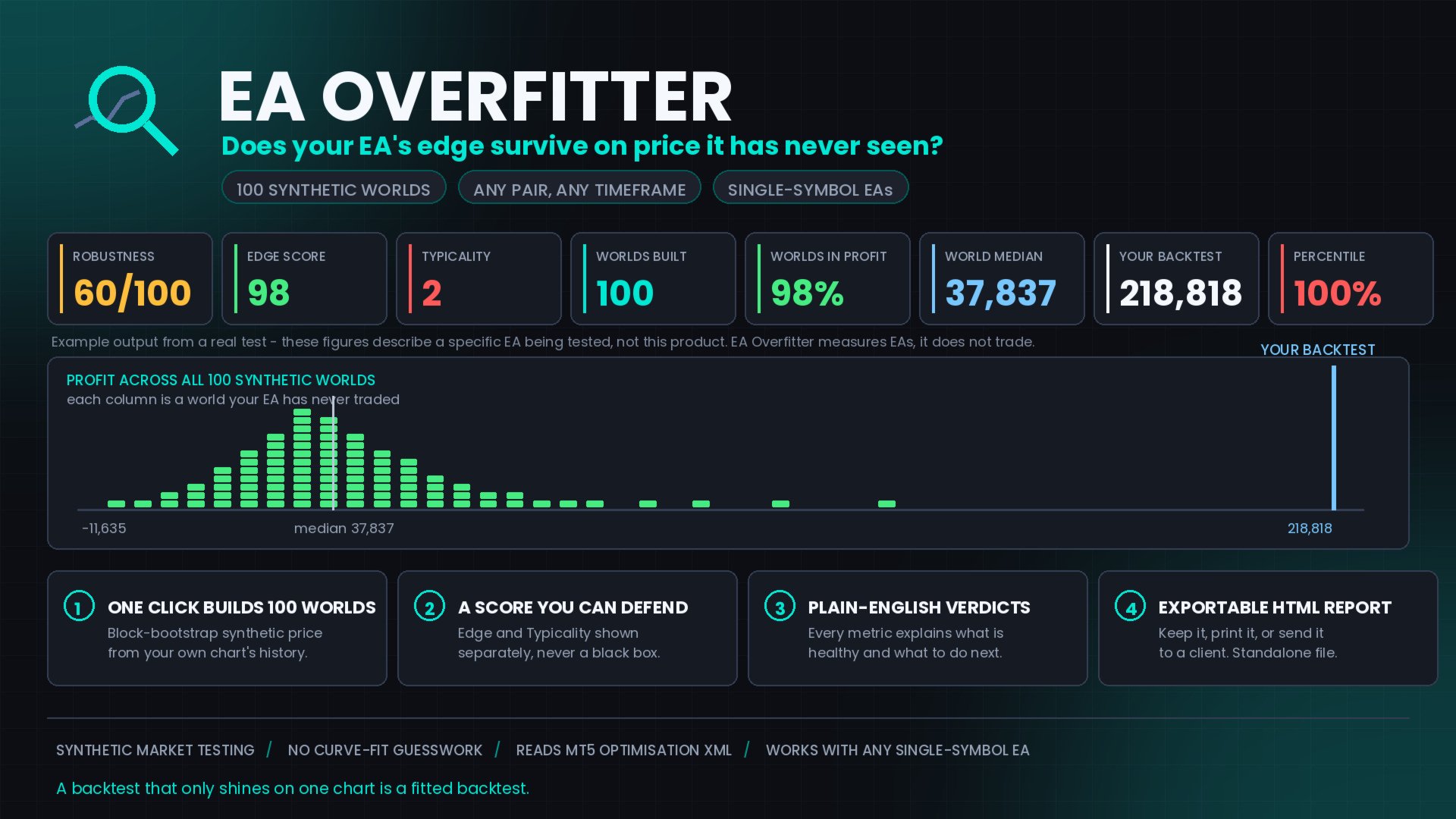
EA Overfitter answers that. It builds up to 100 synthetic price histories your EA has never traded, re-runs the strategy across all of them, and shows you the full range of results it produces. Instead of one number from one lucky or unlucky path, you get a realistic picture: how often the strategy makes money on unfamiliar data, what a typical outcome looks like rather than the best one, and how far your backtest sits from it.
The worlds are rebuilt from your own recent history, so this is not a forecast — no test that starts from past data can be. It tells you whether the edge depends on one specific ordering of price, and how far the backtest figure sits from a typical one. That is the question worth answering before money is committed.
EA Overfitter answers that. It builds up to 100 synthetic price histories your EA has never traded, re-runs the strategy across all of them, and shows you the full range of results it produces. Instead of one number from one lucky or unlucky path, you get a realistic picture: how often the strategy makes money on unfamiliar data, what a typical outcome looks like rather than the best one, and how far your backtest sits from it.
The worlds are rebuilt from your own recent history, so this is not a forecast — no test that starts from past data can be. It tells you whether the edge depends on one specific ordering of price, and how far the backtest figure sits from a typical one. That is the question worth answering before money is committed.
Three Steps
1. Build. Pick a period and a number of worlds on the chart, then press Build. EA Overfitter creates synthetic symbols from your chart's M1 history — same volatility and contract specs, price paths that never happened — and sets your other symbols aside so only the worlds get tested.
2. Test. Open the Strategy Tester, choose your EA, set the dates shown on screen, and run the optimisation across the worlds. Export the results to XML.
3. Analyse. Press Analyze Results. EA Overfitter finds the newest file and reads it.
The Score
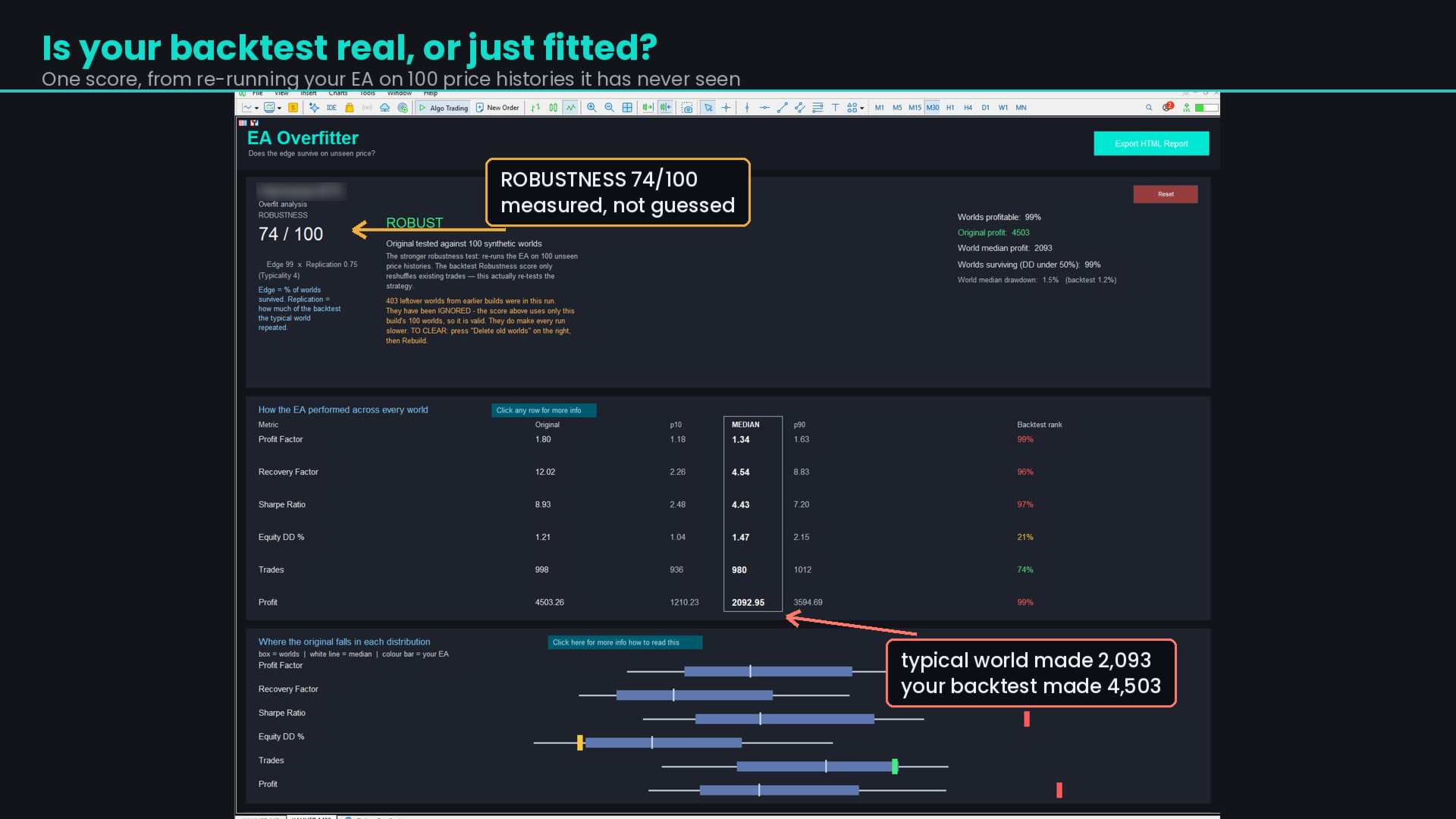
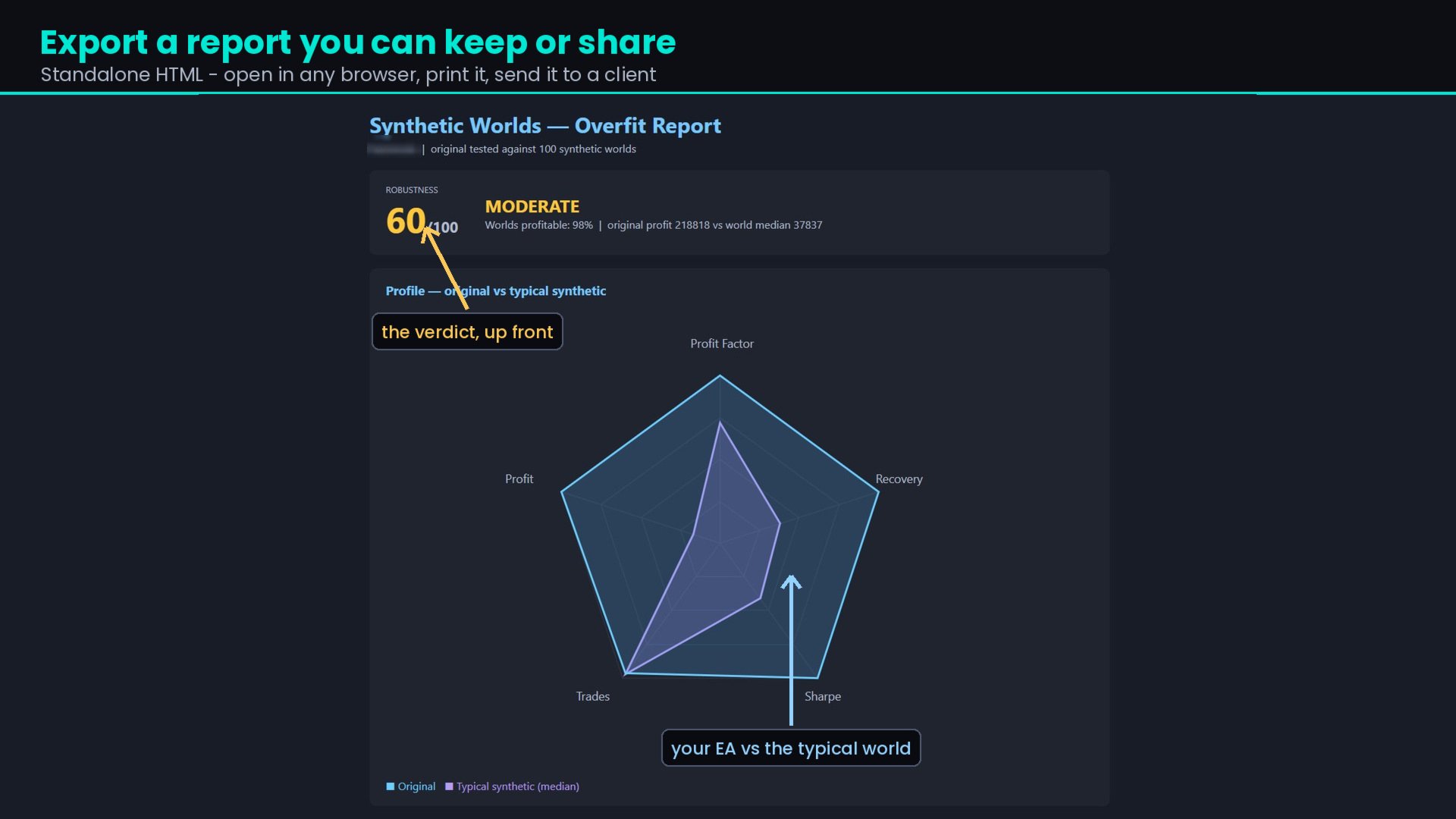
One number out of 100, built from two figures shown beneath it: Score = Edge × Replication.
Edge — the share of worlds the EA came through both profitable and solvent. It must have made money and kept drawdown under 50%. A world where the account would not have survived to collect the profit does not count.
Replication — how much of the backtest the typical world actually reproduced. An EA whose backtest holds up keeps its Edge score; one whose backtest is three times the typical world keeps a third of it. Replication can only reduce the score, never raise it.
The worlds carry no drift, so an EA that simply held a rising market earns nothing here. Most bootstrap tests pass that EA by construction. This one does not.
An EA can have a real edge and a flattering backtest. That gets its own verdict — EDGE REAL, BACKTEST OPTIMISTIC — and the advice is to expect the world median rather than the backtest figure.
Edge — the share of worlds the EA came through both profitable and solvent. It must have made money and kept drawdown under 50%. A world where the account would not have survived to collect the profit does not count.
Replication — how much of the backtest the typical world actually reproduced. An EA whose backtest holds up keeps its Edge score; one whose backtest is three times the typical world keeps a third of it. Replication can only reduce the score, never raise it.
The worlds carry no drift, so an EA that simply held a rising market earns nothing here. Most bootstrap tests pass that EA by construction. This one does not.
An EA can have a real edge and a flattering backtest. That gets its own verdict — EDGE REAL, BACKTEST OPTIMISTIC — and the advice is to expect the world median rather than the backtest figure.
What You See
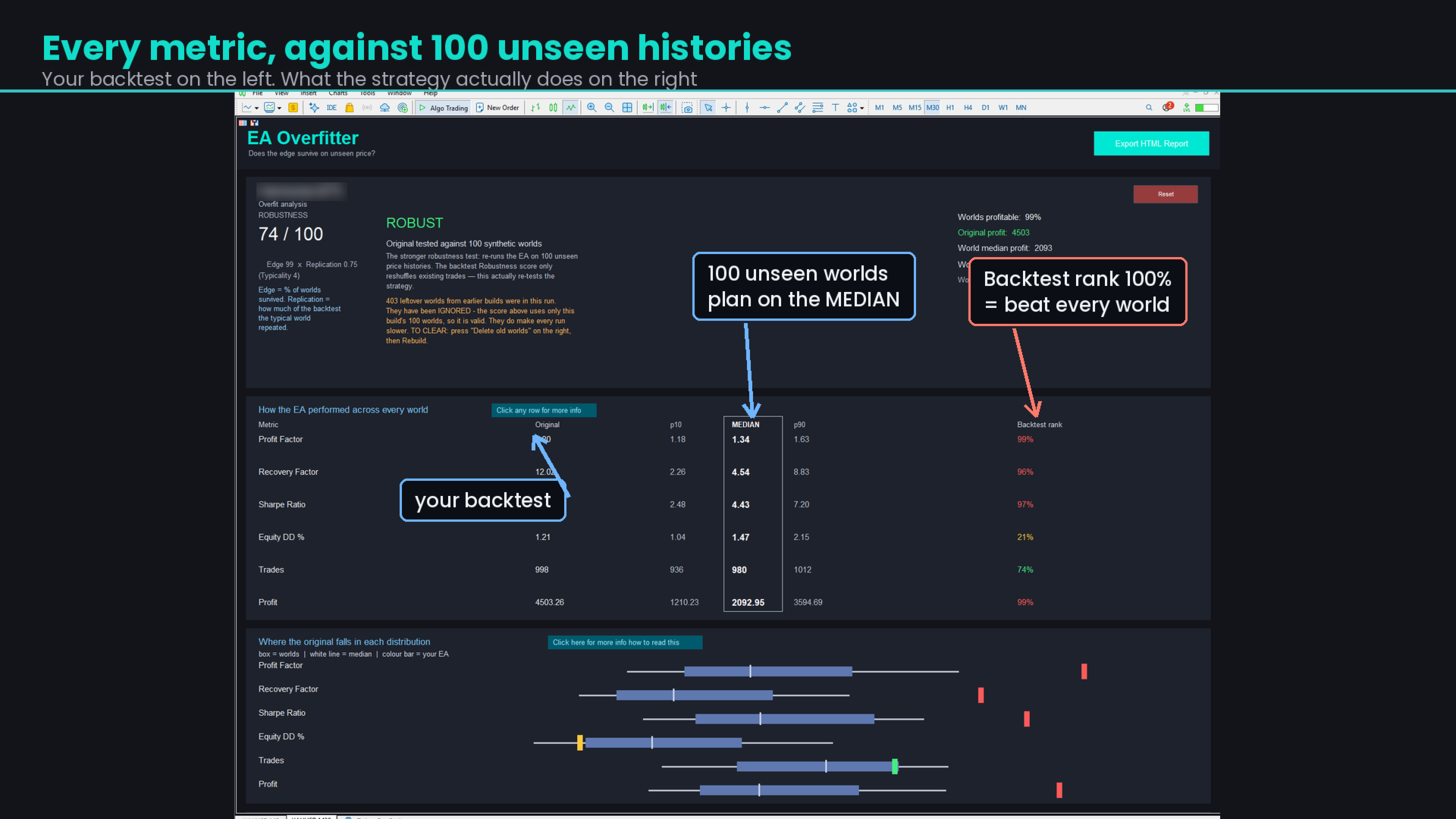
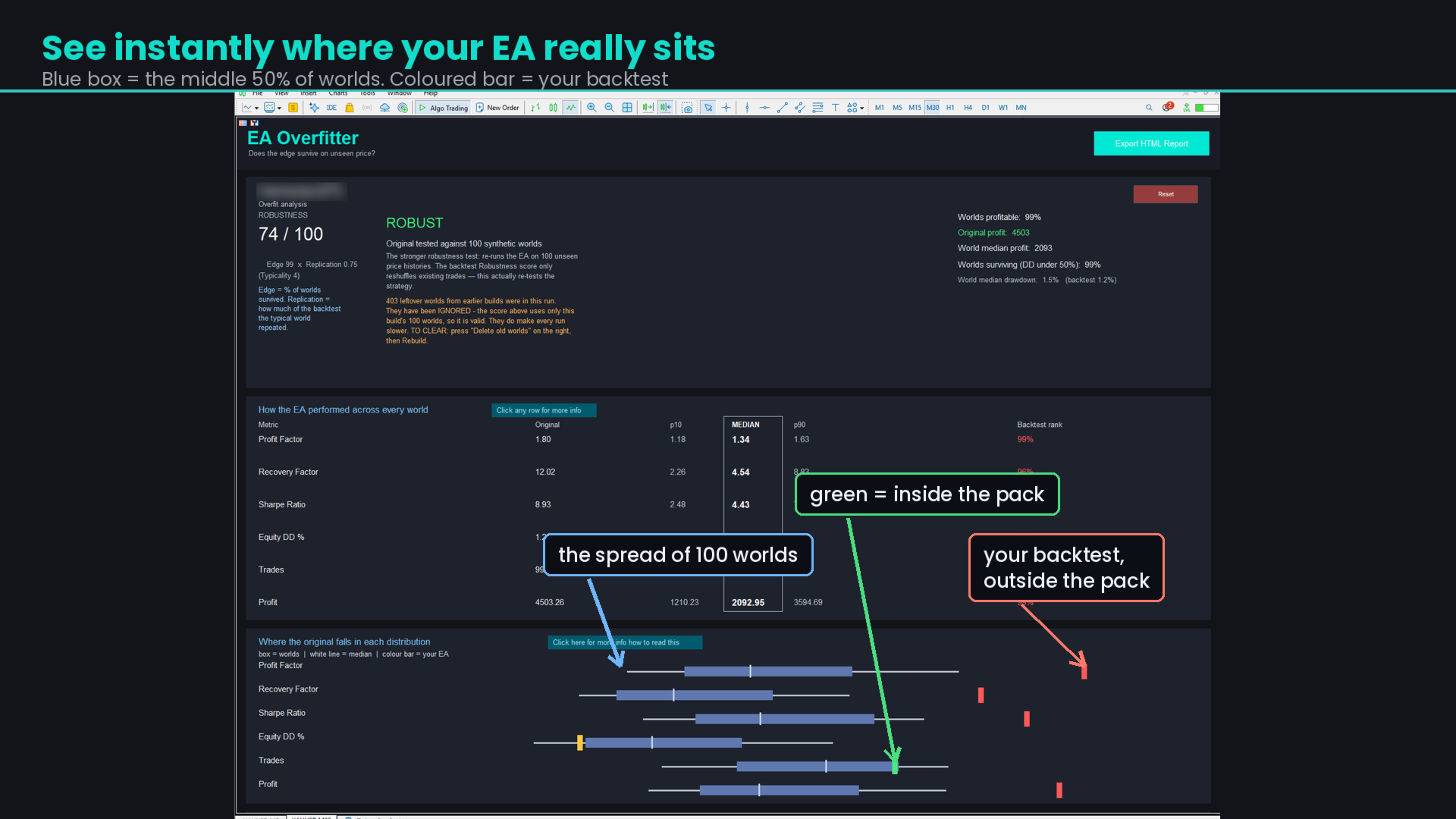
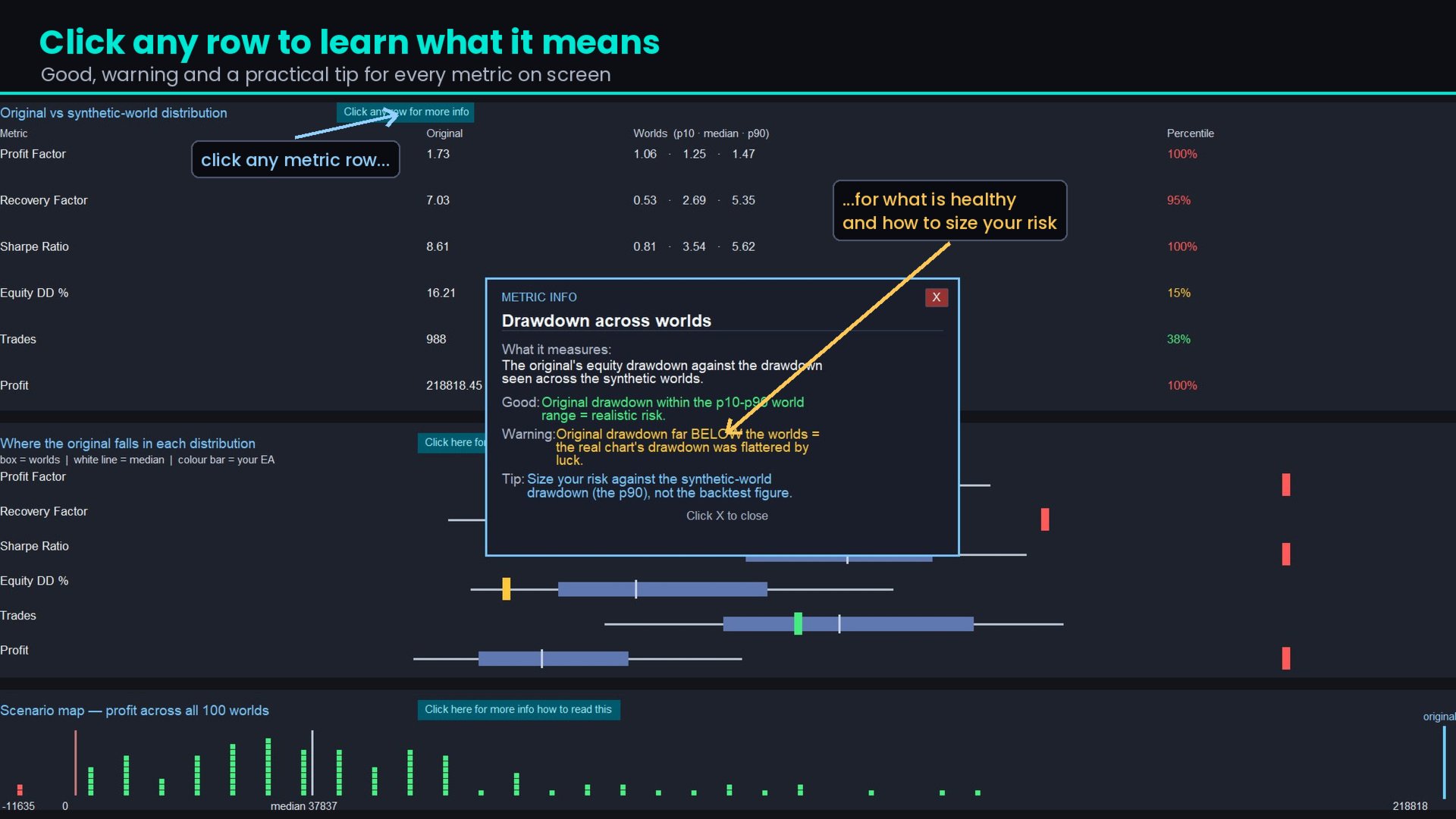
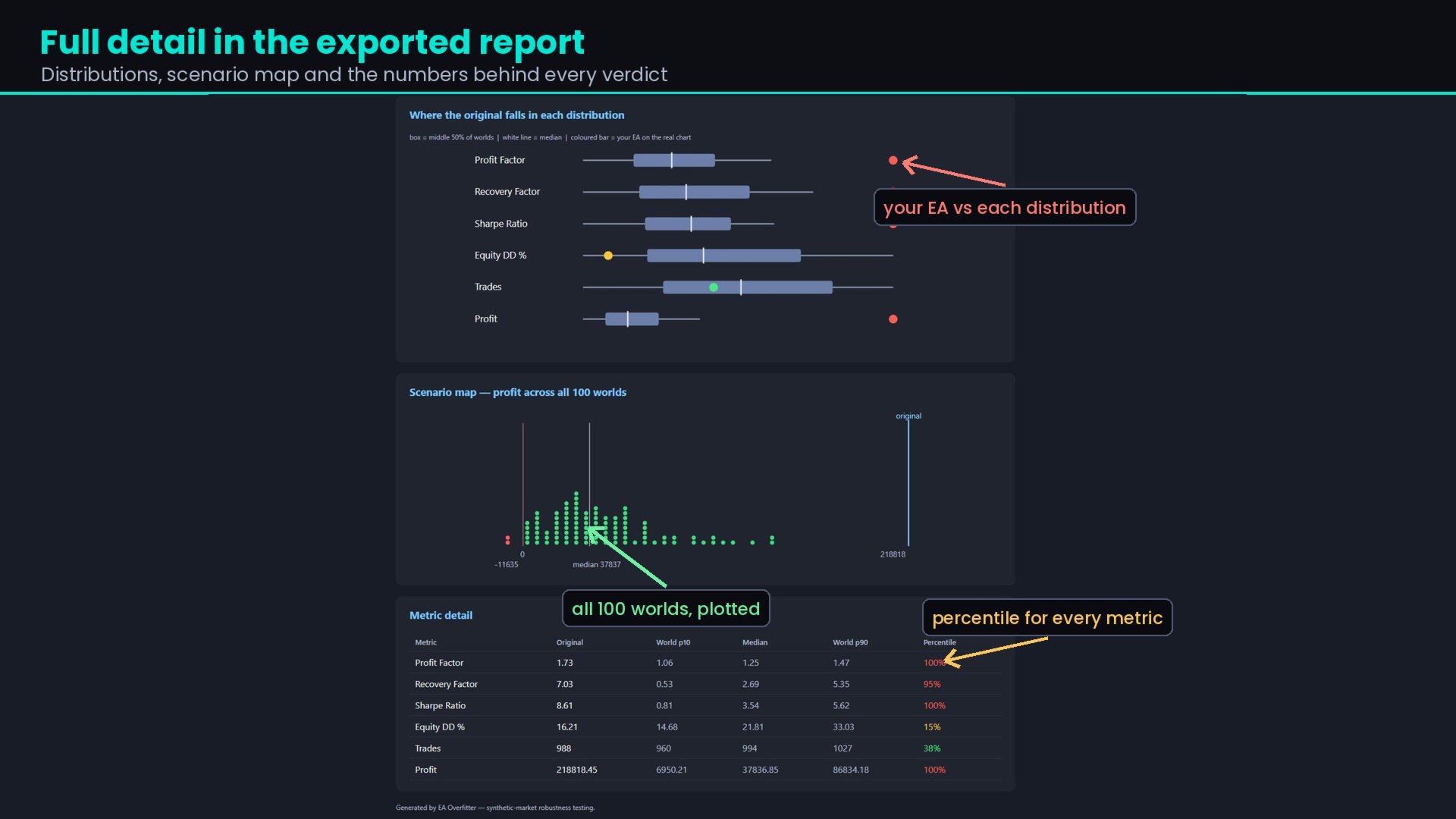
Distribution table — every metric with the worlds' p10, median and p90 beside your backtest, and its percentile rank. Click any row for an explanation.
Distribution plot — box plots of the worlds with your backtest marked, so outliers are obvious at a glance.
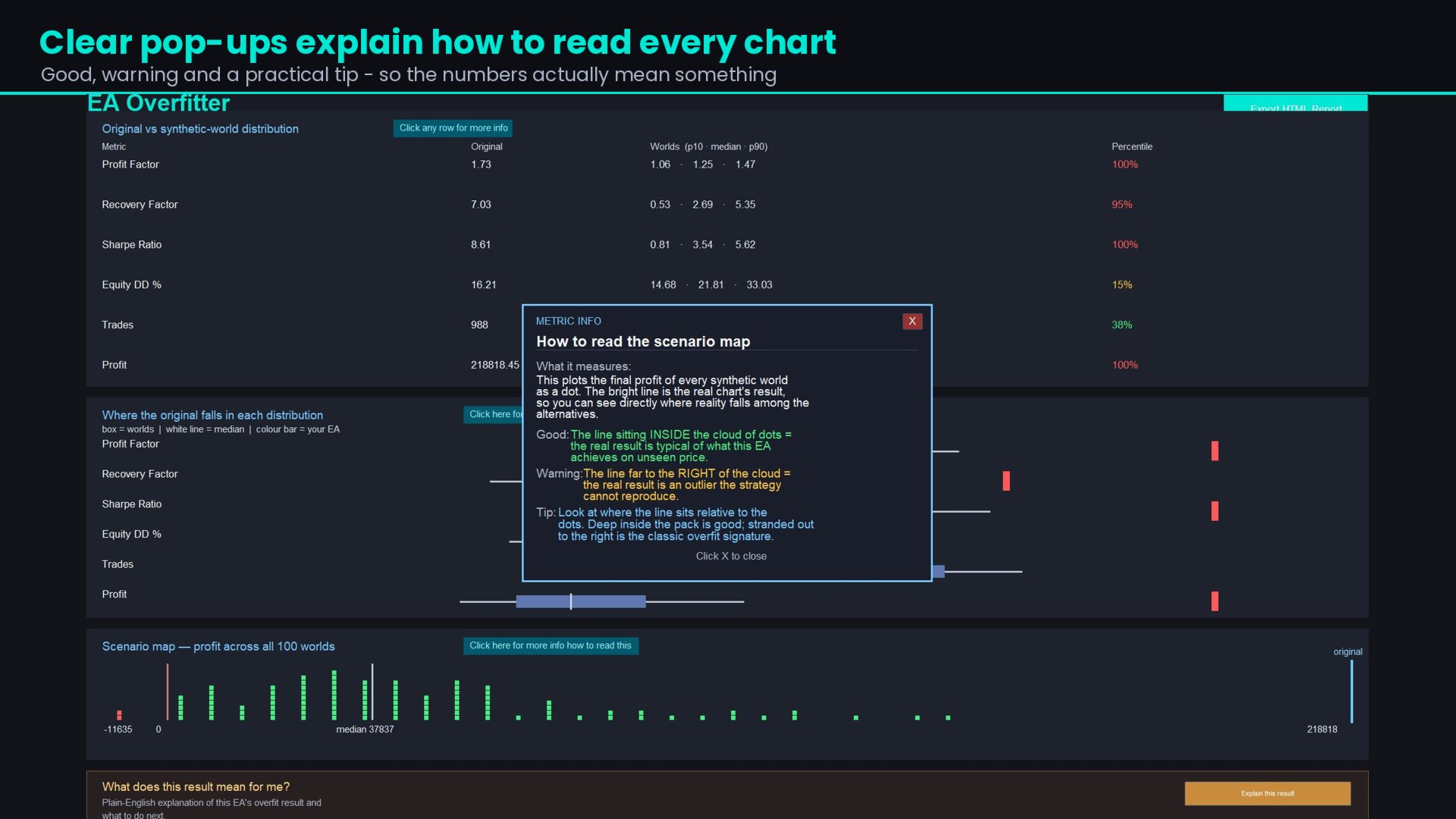
Scenario map — the profit of all 100 worlds, with the median and your backtest marked on it.
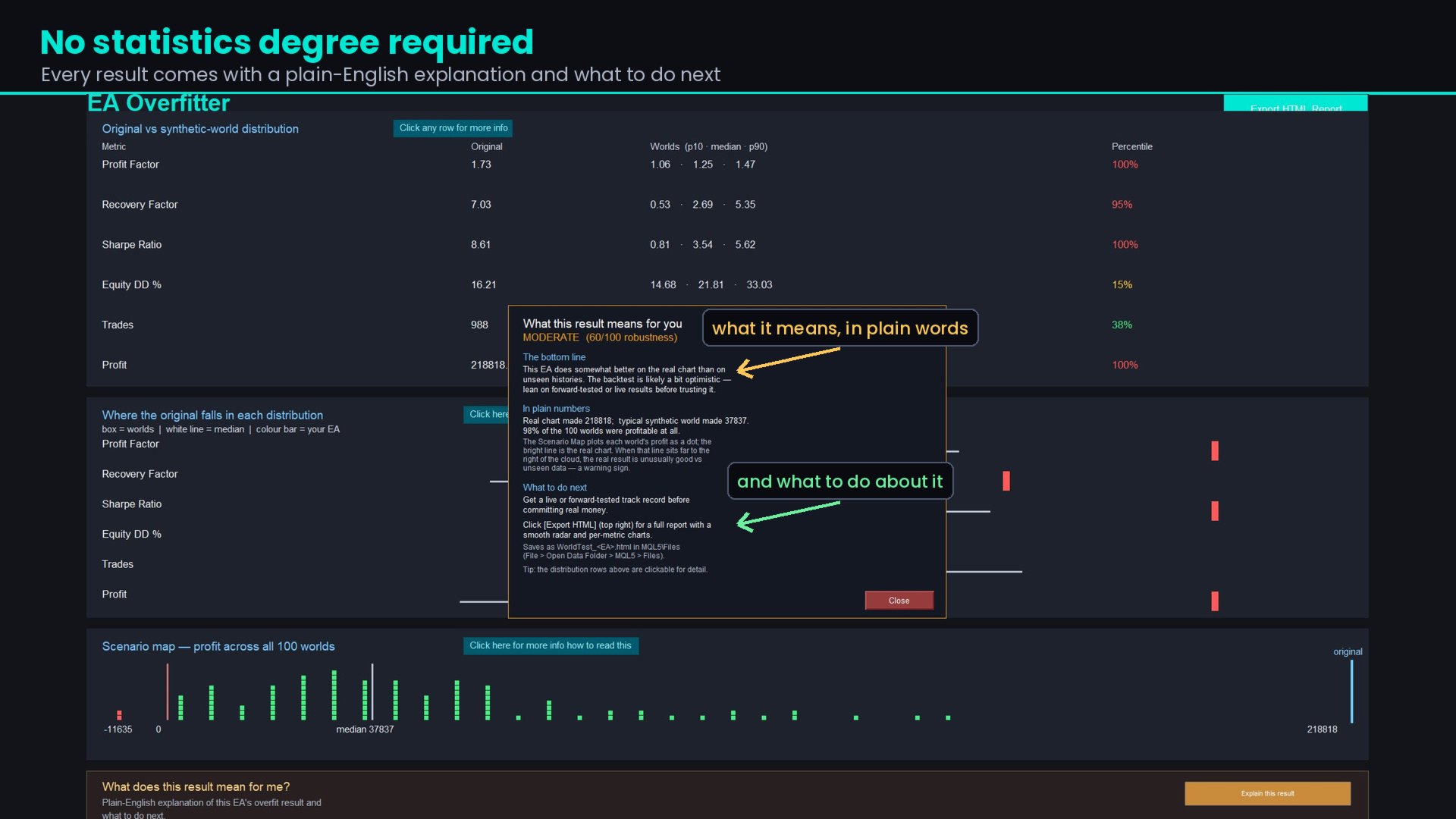
Plain-English verdict — what the result means and what to do next. No statistics background needed.
HTML report — a standalone file you can keep, print or send to a client.
It Tells You When Something Is Wrong
A test that quietly returns a meaningless number is worse than one that fails. EA Overfitter checks its own inputs and says so when the worlds are too thin, when they barely differ from each other, when the results file contains no worlds, when Market Watch is empty, when MetaTrader has served a cached run instead of testing, when the results file is one you have already analysed, or when worlds from an earlier build have crept into the run. Where the test cannot be trusted, the score is capped so it cannot read as a pass.
What It Needs
Single-symbol EAs. MetaTrader 5 tests one symbol per pass, so an EA that reads other pairs gets the real market data for those pairs. The tool detects this and declines to score it.
M1 history for your symbol, downloaded for you if your broker has it.
One optimisation run, which you start — MT5 does not let an EA launch the tester.
A few minutes and a few hundred megabytes to build. The panel shows the size first.
EA Overfitter does not trade. It measures other EAs.
Who It Is For
Anyone about to buy or run an EA. The backtest looks good — but will it still be making money tomorrow, next week, next month? If you can put the EA in the Strategy Tester, you can see how it behaves across a hundred histories it has never traded, before you commit money to it and before a live account teaches you the same lesson more expensively.
Traders already running EAs. Test the ones in your portfolio and find out which are carrying a real edge and which were simply lucky on the history they were built on.
Developers. Validate your own work before you list it, and know what your EA's typical result looks like rather than only its best one.
Getting Started
Attach EA Overfitter to the chart you want tested, choose a period and world count, and press Build. Follow the three steps on screen — a built-in guide covers each one, including the settings that commonly cause a run to finish instantly with no trades.
What's Included
EA Overfitter with the full build, test and analysis workflow, clickable explanations for every metric, the exportable HTML report, and updates through the MQL5 comments section. Message me for the full detailed manual
How This Differs From EA Auditor
EA Auditor is my other MQL5 product — you will find it on my profile alongside this one. The two ask different questions about the same EA, and neither replaces the other.
EA Auditor asks whether the backtest is honest. It reads a backtest report or a live MQL5 signal and looks for the things that make a good-looking result untrustworthy: martingale and grid progression, unnaturally smooth equity curves, gaps around major market events, perfect entries, missing stop losses, history-reader indicators, lot progression patterns and dozens of other checks. It also audits live signals, compares a signal against its own backtest, and simulates prop firm rule sets. It is instant, needs no re-running, and works on any EA including multi-pair strategies.
EA Overfitter asks whether the strategy holds up. It takes the EA and re-runs it on price that never existed, producing entirely new trades rather than examining old ones. That is the stronger test of whether an edge generalises to unfamiliar data — but it costs a build and a tester run, and applies to single-symbol EAs.
A backtest can be completely genuine and still be curve-fitted. It can also be manipulated in ways no amount of re-testing would reveal. Auditor catches the first kind of problem, Overfitter catches the second, and an EA worth trading should survive both.

















































Perfect tool to see if any EA survives in different market conditions/regime. Stephen is a top notch dev and his support is one of the best. It is a "must have" utility for anyone who has wasted so much money on useless bots that only work for a few weeks.