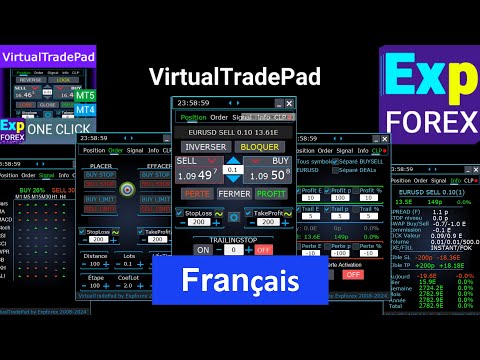
VirtualTradePad One Click Trading Panel

4.59

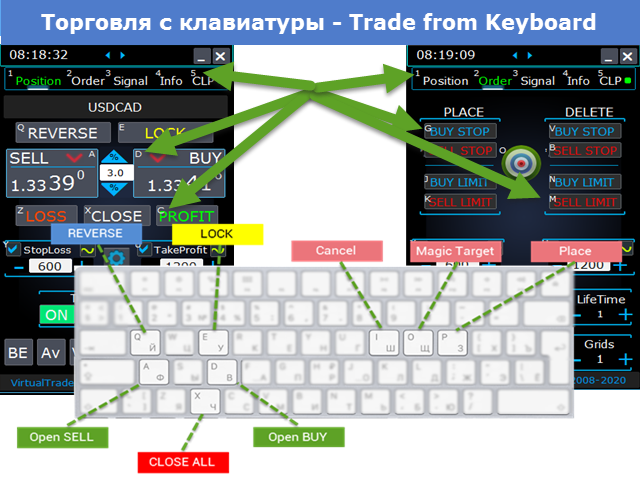
Panneau de trading pour trader en 1 clic. Travailler avec des positions et des commandes! Trading à partir du graphique ou du clavier.

  • Avec notre panneau de trading, vous pouvez exécuter des transactions en un seul clic directement depuis le graphique et effectuer des opérations de trading 30 fois plus rapidement qu'avec le contrôle MetaTrader standard.
  • Les calculs automatiques des paramètres et des fonctions rendent le trading plus rapide et plus pratique pour les traders.
  • Des conseils graphiques, des étiquettes d'informations et des informations complètes sur les accords commerciaux se trouvent sur le graphique MetaTrader.

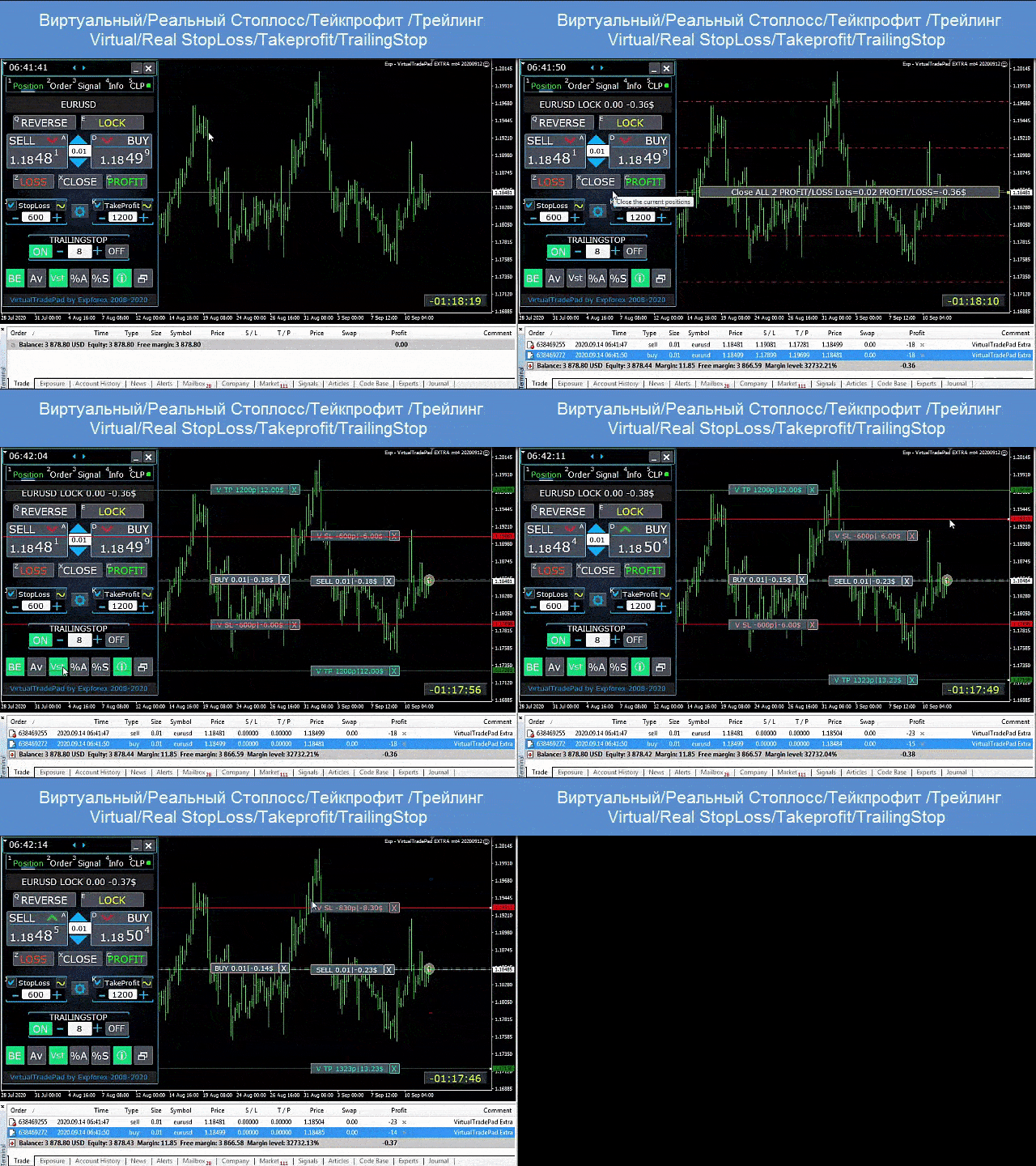
Ouverture et Fermeture, Inversion et Verrouillage, Fermeture Partielle / Autolot. Stop loss virtuel/réel/take profit / trailing stop / breakeven, Grille d'ordres...

Le panneau de contrôle de trading des principaux ordres dans  МetaТrader 5 : acheter, vendre, buystop, buylimit, sellstop, selllimit, fermer, supprimer, modifier, trailing stop, stoploss, takeproft.

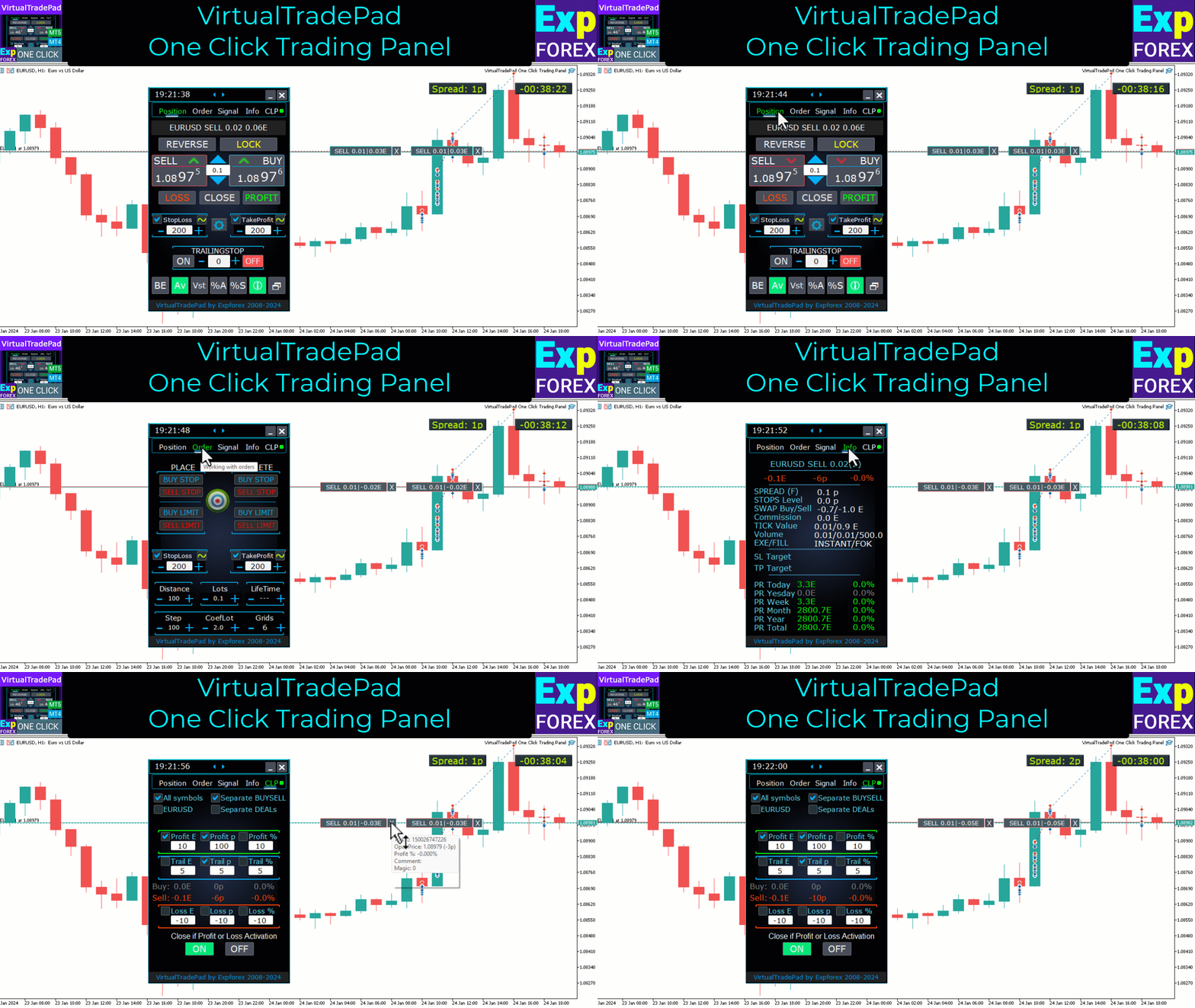
5 onglets : Travailler avec des positions, Travailler avec des commandes en attente, Travailler avec des informations de compte, Panneau Signal, Fermer le profit total.

Liens

  • Pour un trading entièrement automatisé, je recommande     Le XCustom  
  • Si vous voulez apprendre à trader le    testeur de stratégie , consultez notre utilitaire gratuit TesterPad

    Onglets de travail

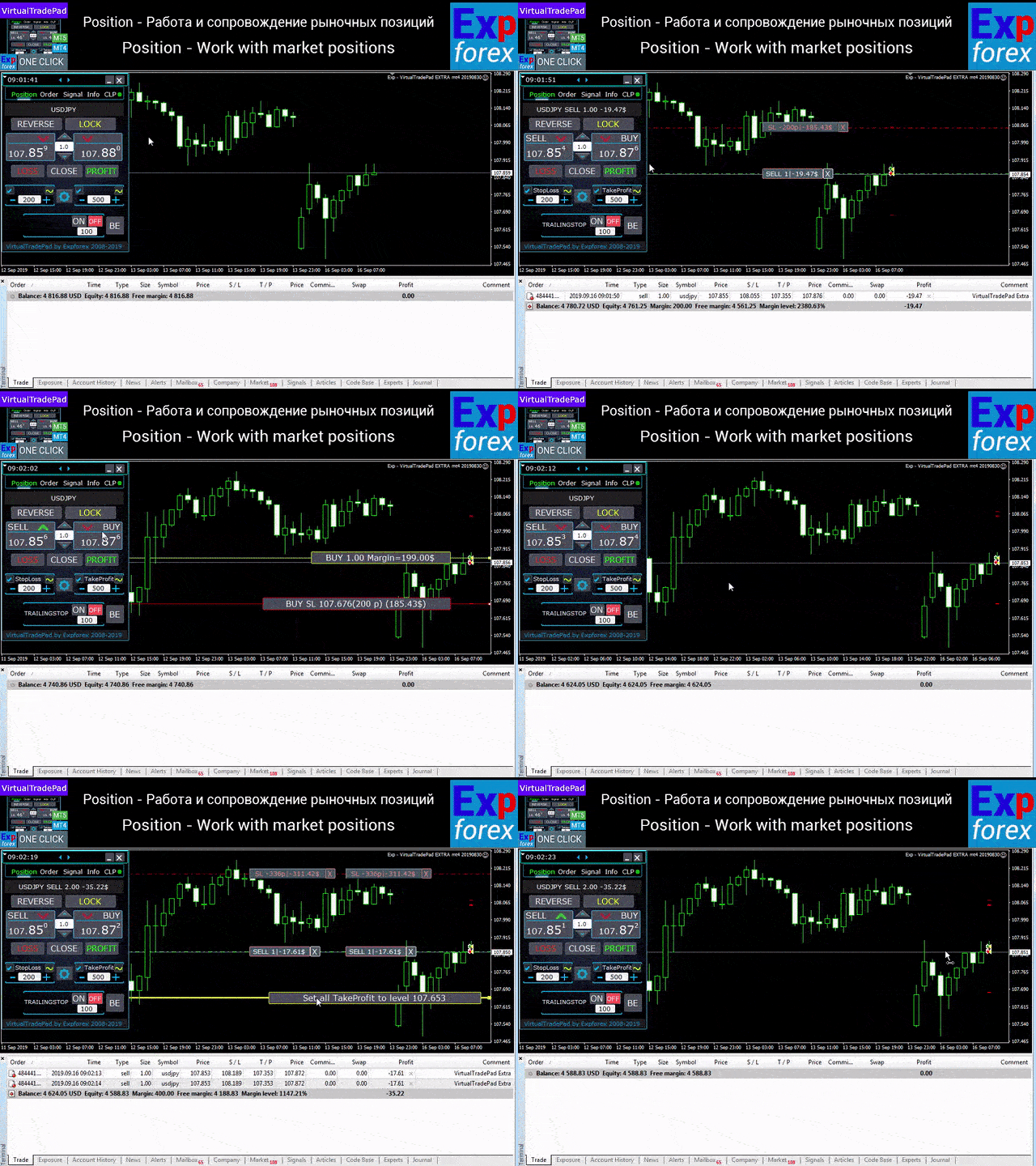
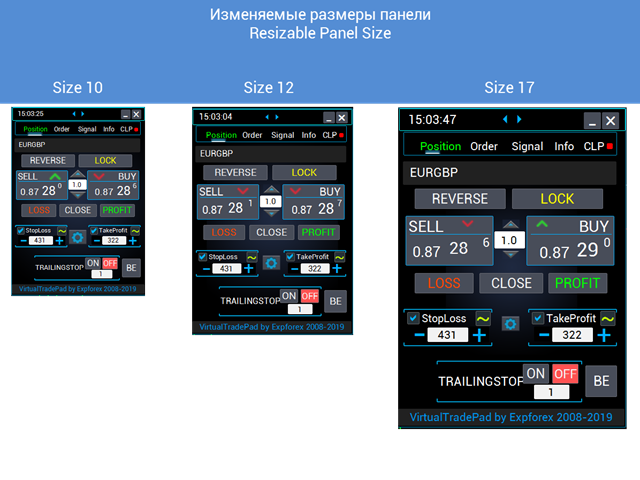
    Onglet Postes - Travailler avec des postes :

    • Ouverture / Fermeture ACHETER et VENDRE,
    • Inverser toutes les positions,
    • Verrouillage d'une position commune,
    • Stop Loss / Take Profit,
    • Mettre en place un stop loss / take profit commun pour la grille de position,
    • Arrêt de fuite,
    • Seuil de rentabilité
    • Ne fermer que les positions rentables / déficitaires,
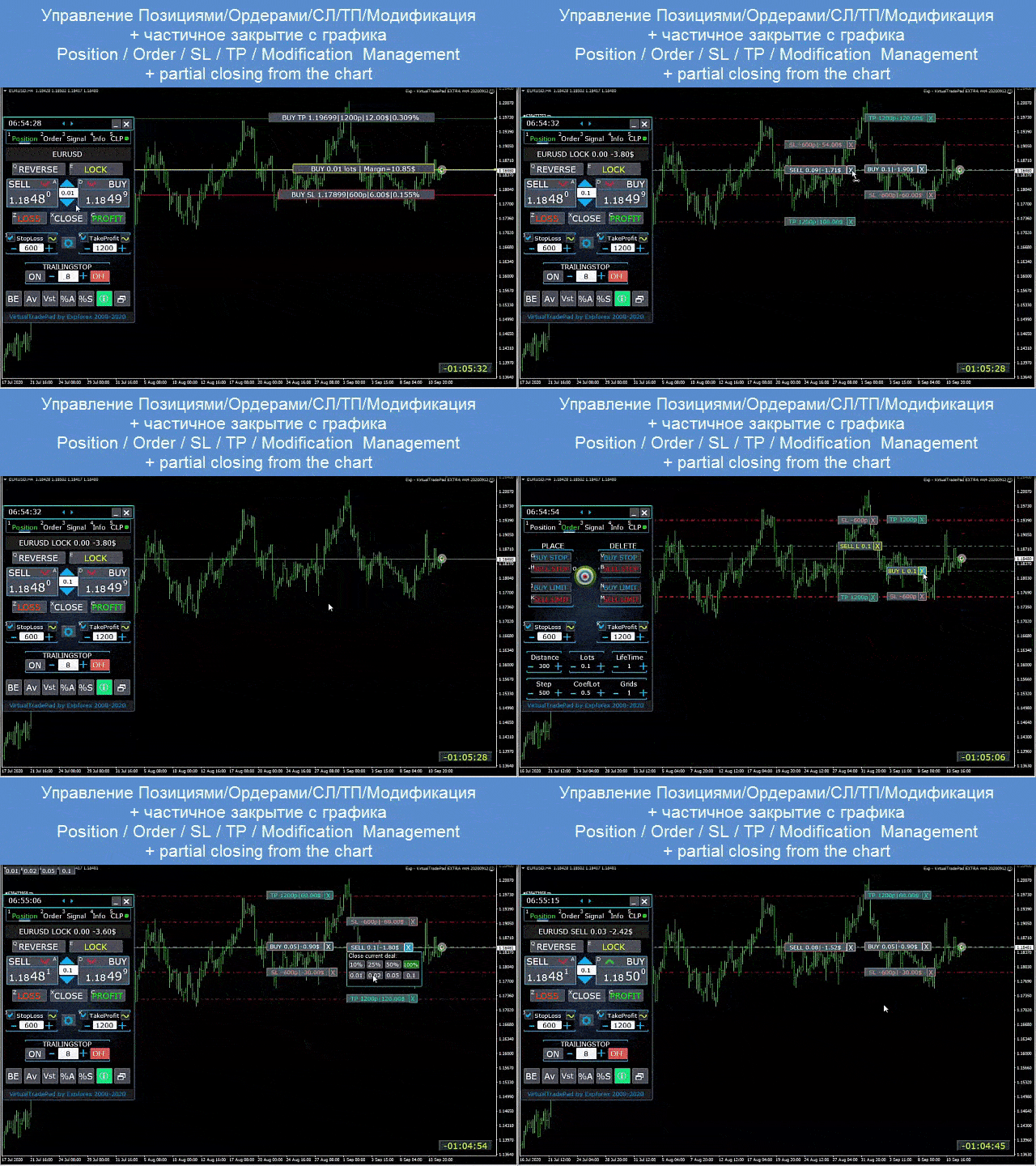
    • Gestion des positions / stop loss / take profit du graphique terminal,
    • Fermeture partielle des positions sur le graphique ;
    • Autolot / Lot dynamique en pourcentage du solde ou du stop loss défini
    • Activer / Désactiver le Stop Loss réel / Virtuel et le Take Profit
    • Grilles moyennes totales des positions stop suiveur / seuil de rentabilité à partir du prix moyen

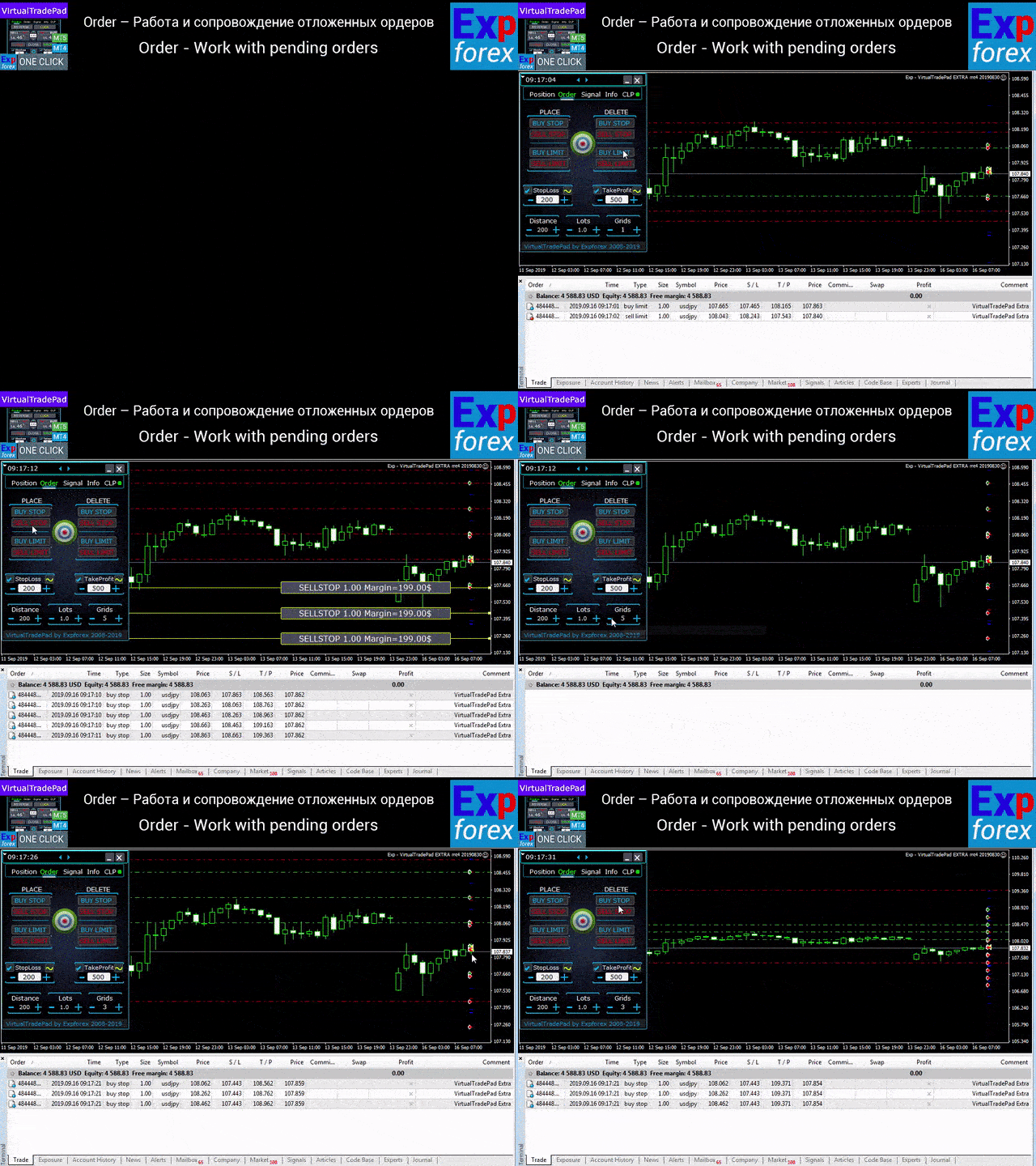
    Onglet Commandes - Travailler avec les commandes en attente et à cours limité :

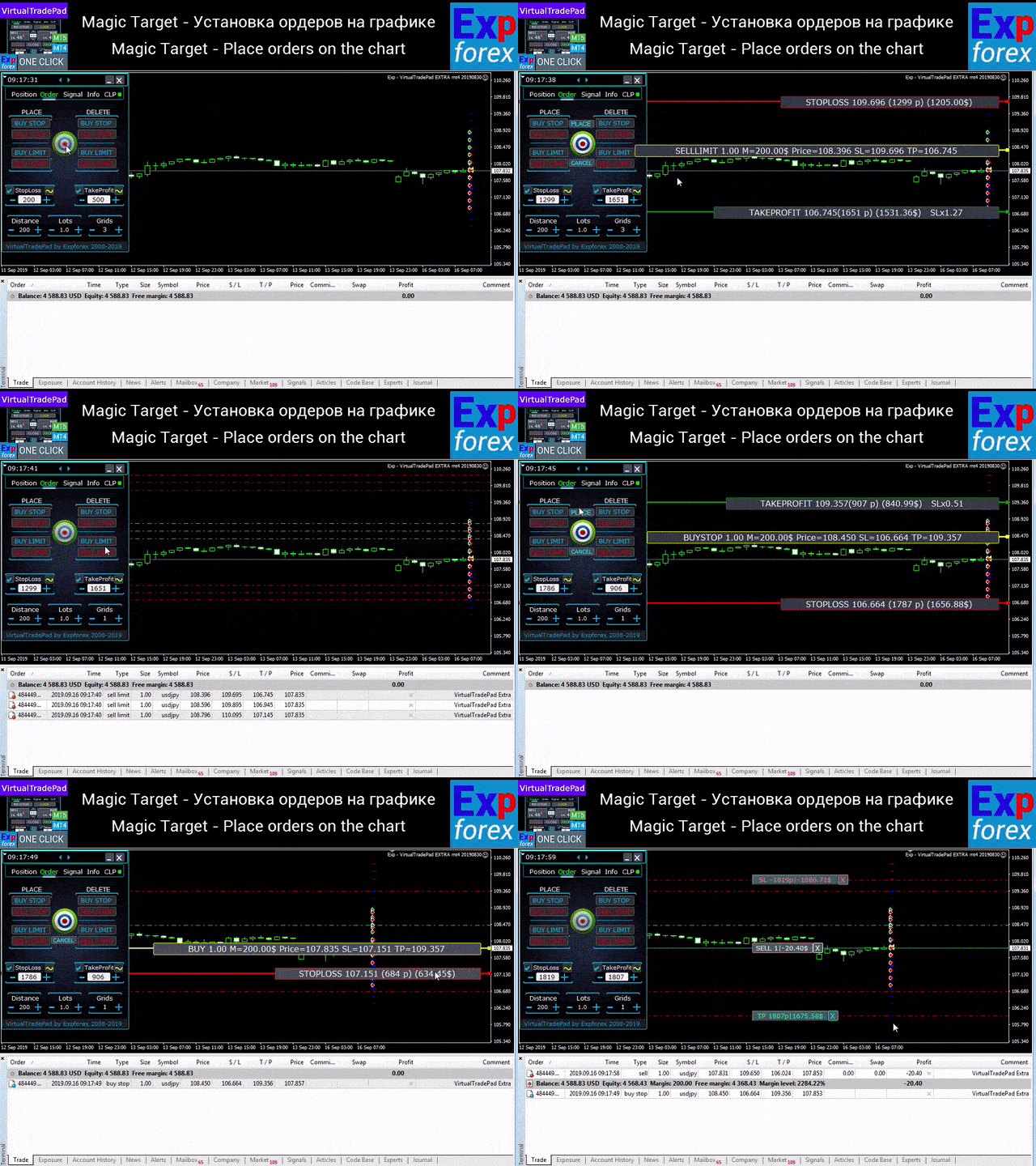
    • En attente / Supprimer BuyStop SellStop BuyLimit SellLimit,
    • Construire une grille de commandes avec augmentation des lots, distance de grille,
    • Paramétrage des ordres/positions avec la souris et des lignes sur le graphique,
    • Fixation d'un stop loss / take profit commun pour toute la série d'ordres,
    • Travailler avec les commandes en attente du graphique ! Suppression, modification des commandes directement depuis le graphique.

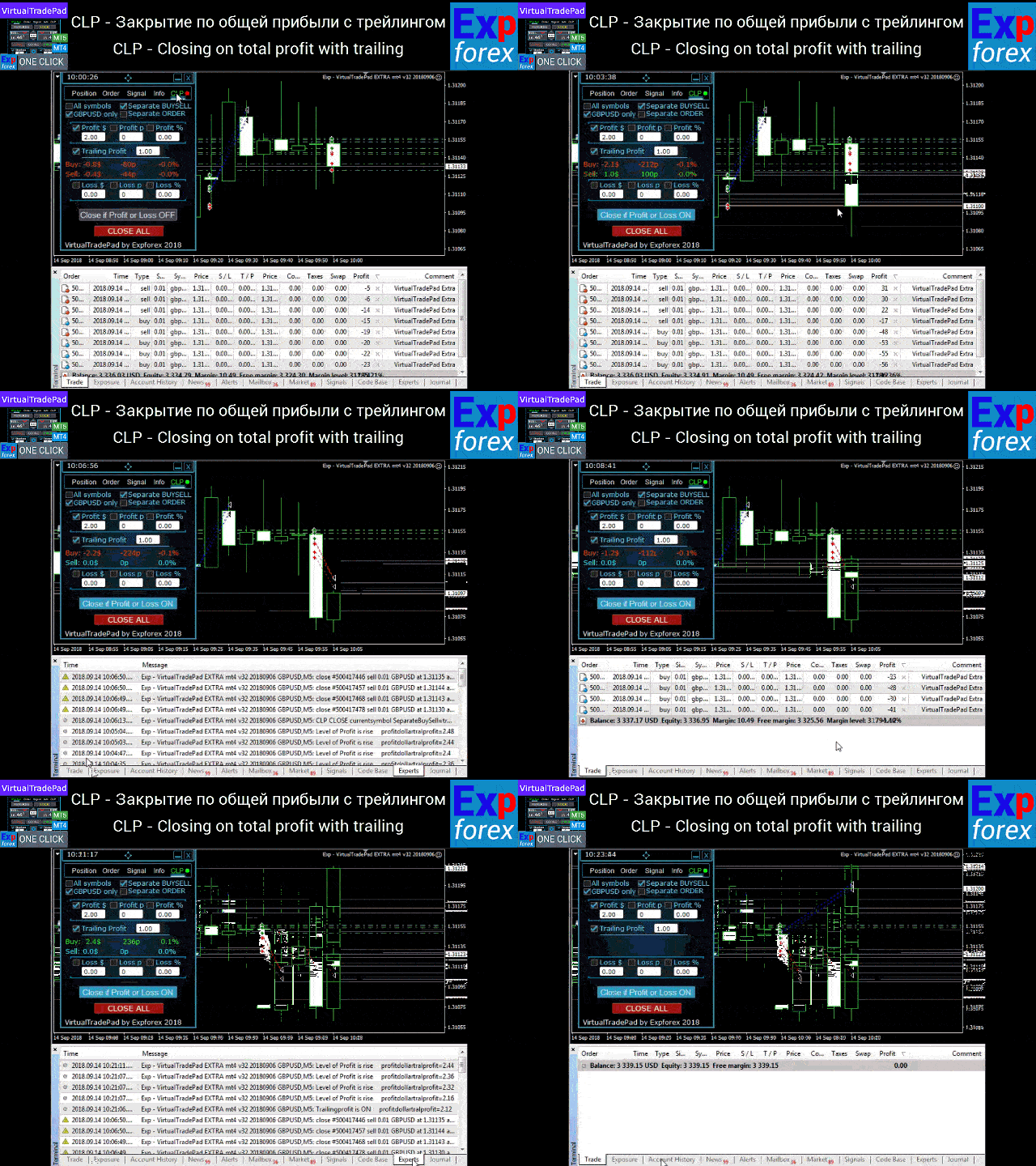
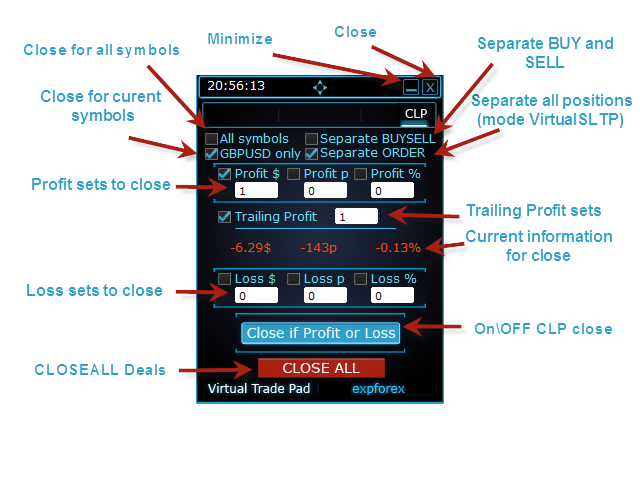
    Onglet CLP - Travaillez avec la fonction de fermeture pour le total des profits ou des pertes.

    • Clôture au profit/perte total en points, dollars, pourcentage.
    • Fermer séparément ACHETER / VENDRE,
    • Activez le stop loss / take profit virtuel pour une position séparée / générale.
    • Trailingstop du profit total en points, dollars, pourcentage.

      Onglet Signaux

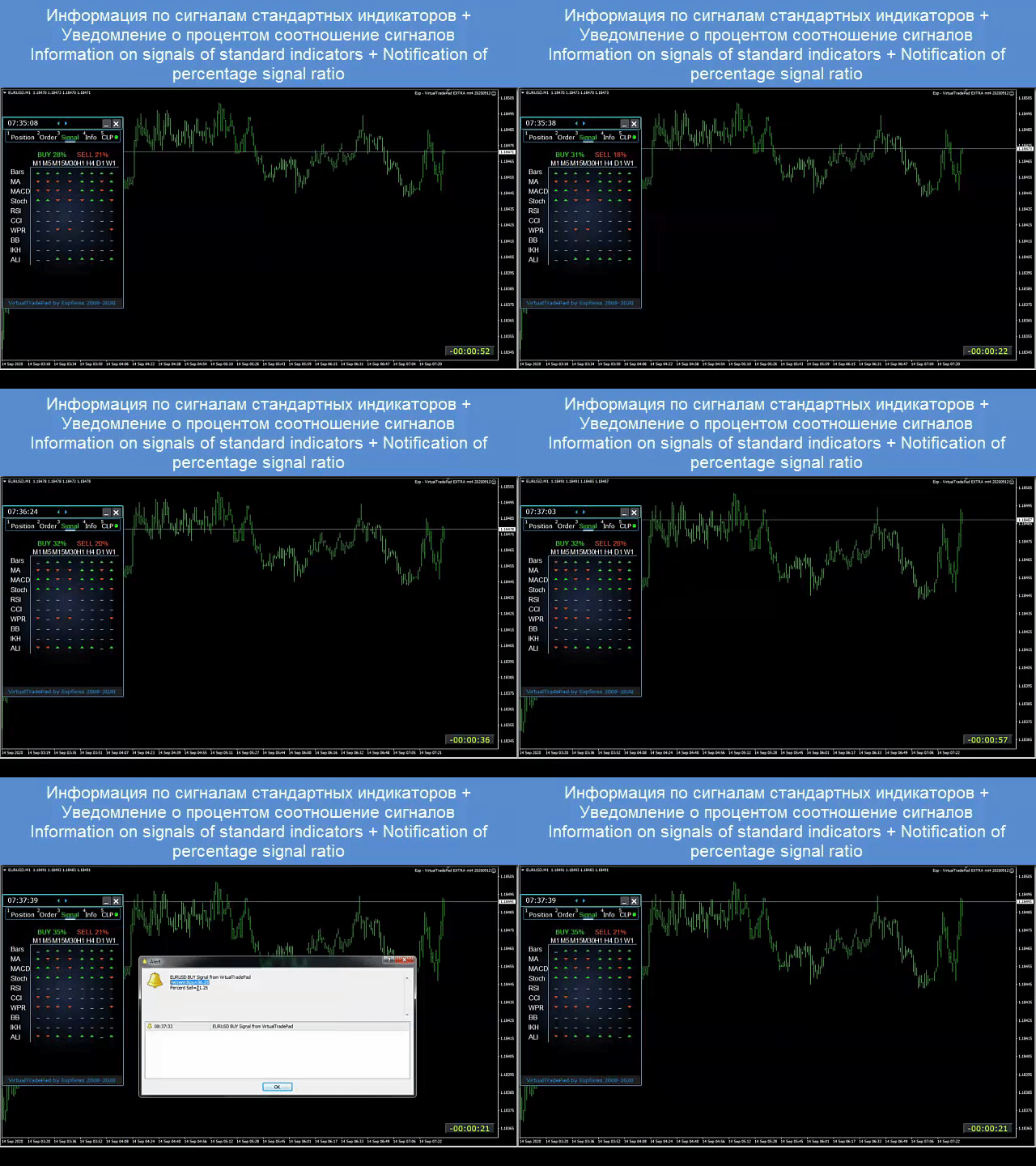
      Affiche le signal de 10 indicateurs standard et 8 délais. Il montre également le pourcentage cumulé de signaux dans les directions ACHAT et VENTE. Il est également possible d'ouvrir des positions automatiquement lorsque le signal cumulé est dépassé.

      Onglet INFO

      Affiche la spécification actuelle du symbole sélectionné, les objectifs de stop loss et de profit actuels, ainsi que le profit pour la journée en cours, le jour précédent, la semaine, le mois.

      Caractéristiques principales:

      • Fonctionne sur tout type de compte et un courtier.
      • Il ne nécessite pas de compétences particulières.
      • Interface intuitive et simple.
      • Seules les fonctions les plus importantes.
      • Réponse rapide à n'importe quelle commande.
      • Tradez à l'aide du clavier (Pour ce faire, définissez TRUE le paramètre KeyBoardTrade dans les paramètres) ou des boutons sur le graphique


      #tags Expforex, Vladon, Commerce manuel, Panneau de commerce, Commerce de panneaux, Utilitaire de commerce, Auto-test, Profit, Gestion des outils, Outil de gestion, Assistant Forex, Commerce de forex, Formation au commerce virtuel, Outil rapide, Testeur manuel, Backtest manuel, TesterPad , Tradepad, Virtual Trade Pad, орговая панель #tags Expforex, Vladon, Manual Trade , Trade Panel ,Panel Trade,Trade Utility ,Self Test ,Take Profit ,Tool Management ,Management Tool ,Forex helper ,Forex Trade ,Training virtual trade ,Quick Tool, Manual Tester, Manual Backtest,TesterPad, Tradepad, Virtual Trade Pad, Торговая панель , Trader Assistant ,CLP,CloseifProfitorLoss,Close Profit,Total Profit, Close if Profit or Loss , Trailing Profit, Smart Trailing Stop

      Avis 123
      Fredi Sesarianto
      139
      Fredi Sesarianto 2026.04.07 11:41 
       

      i cant trade anymore without virtual tradepad..

      edit, ALL 5 stars , quick response on quetion .

      Nguyen Tho
      94
      Nguyen Tho 2026.02.06 11:01 
       

      When I change the time frame to view on the chart, the trading history still displays, even though I have turned off this feature on the chart. Please guide me on how to disable it on your software.

      Chanon Chaichanachot
      299
      Chanon Chaichanachot 2025.11.29 07:22 
       

      In the "Risk Manager/Prohibit Opening" please consider adding "deny trading during these time" "00:00-15:35, 22:55-24:00" for examples I'm currently using "AutoTrading Scheduler" as a work around. Thank You... Great Tool!

      ***I'm using autotrade/autoclose by signals(on VPS), so it would prevent EA from opening new trade during certain time while maintaining floating trade.

      Produits recommandés
      Episode Health Monitor Episode Health Monitor is a trading utility for MetaTrader 5 designed to analyze the real-time condition of active trading positions directly on the chart. The tool evaluates the current “trading episode” - a group of open positions - and provides a structured view of risk, stability, and distance to potential failure. Instead of relying only on profit/loss or price movement, it helps identify whether the current position is stable, weakening, or approaching a critical st
      CosmiCLab SMC FIBO CosmiCLab SMC FIBO is a professional trading indicator designed for traders who use Smart Money Concepts (SMC), market structure analysis and Fibonacci retracement levels. The indicator automatically detects market swings and builds Fibonacci levels based on the latest impulse movement. It also identifies market structure changes such as BOS (Break of Structure) and CHOCH (Change of Character), helping traders understand the current market direction. CosmiCLab SMC FIBO also pr
      Net Exposure & Net Average Price is a lightweight utility Expert Advisor for MetaTrader 5 hedge accounts . This tool helps traders instantly understand their true market exposure when multiple Buy and Sell positions are open on the same symbol. What the EA Does The EA displays a clear on-chart panel showing: Total Buy Trades Total Buy Lots Total Sell Trades Total Sell Lots Net Lots (Net Exposure) Net Average Price (hedge-adjusted breakeven) The Net Average Price represents the true breakeven
      Trading Utility for Forex Currency Pairs Only not for Gold  Functions Auto Lot Calculation based on Risk Auto stoploss  Auto TakeProfit Breakeven Auto Close Half % Close in percentage with respect to the PIPs Pending Orders BuyLimit Sell Limit with distances BuyStop Sell Stop    with distances Trading Informations Risk in percentage For Multiple trades Combine Takeprofit and Combine Stoplosses
      Trade Assistant 38 in 1
      Makarii Gubaydullin
      4.91 (23)
      Outil multifonctionnel : Calculateur de Lot, Ordres Grid, Ratio R/R, Gestionnaire de Trades, Zones d'Offre et de Demande, Price Action et bien plus Version Démo   |   Manuel d'Utilisation L'Assistant de Trading   ne fonctionne pas dans le testeur de stratégies : vous pouvez télécharger la   Version Démo ICI  pour tester l' utilitaire . Contactez-moi   pour toute question  / idée d'amélioration / en cas de bug détecté Si vous avez besoin d'une version MT4, elle est disponible ici Simplifiez, acc
      Symbol Manager for MT5
      Taras Slobodyanik
      5 (3)
      Symbol Manager or Grid Manager, designed to group orders into one position (by Symbol or by Magic Number). This utility will be useful to multi-currency traders (many EAs), who can have multiple orders on several pairs. You will be able to see the total number of lots, the total profit, and set virtual stop loss and virtual take profit. To set a real TP (or SL), you must first set the virtual value, and then enter the command in this cell: "set". If you want to set real TP/SL for all orders at
      RSI Currency Strength Meter is a powerful and elegant multi-currency indicator that measures the real-time relative strength of the 8 major currencies using RSI logic. By calculating the smoothed performance of each currency across its major pairs and applying the RSI formula, it delivers clean and responsive strength lines that make it easy to spot which currencies are truly strong or weak at any moment. This indicator is particularly useful for visualizing currency correlations and divergence
      TradePilotmt5
      Hossein Khalil Alishir
      TradePilot Expert Advisor (EA) for MetaTrader 5 TradePilot is a professional and user-friendly Expert Advisor (EA) for MetaTrader 5 (MT5) . It simplifies automated trading , risk management , and trade execution with a smart trading panel . Perfect for beginners and experienced traders looking for a reliable trade manager EA with automated lot size calculation and smart position management. Key Advantages User-Friendly Trading Panel: Customizable panel with buttons and hotkeys for fast ex
      Trade Assistant Risk Calculator is an all-in-one floating trading panel (Expert Advisor) designed for professional manual traders on MetaTrader 5. It combines Visual Chart Trading , Automatic Risk Calculation , and Advanced Position Management into a single, compact interface. Stop calculating lot sizes manually. Stop guessing your Risk:Reward ratio. Simply drag lines on the chart, and the EA calculates the exact lot size to match your risk percentage, equity, or money target. Important Notes Th
      Expert TP SL v04 - Professional Trading Assistant with AI Motivation System Advanced manual trading tool with automatic risk management, overtrading protection, and intelligent psychological support for disciplined trading. PRODUCT OVERVIEW Expert TP SL v04 is a comprehensive trading assistant designed for manual traders who want to maintain emotional discipline while automating risk calculations. This isn't just another order placement tool - it's a complete trading psychology system that pr
      Inverted_Chart_EA Utility Expert Advisor Inverted_Chart_EA creates and maintains a mirror-inverted chart of any symbol and timeframe. It automatically generates a custom instrument (e.g. US30_INV ) and keeps its price history updated in real time, with bars mirrored around a chosen pivot. This utility gives traders a new way to analyze the market from a different perspective by flipping the chart upside down. Why use an inverted chart? Highlight hidden patterns – price formations that look ordin
      Turbo Close All
      Phami Thanh Hoang
      Turbo Close All is a powerful and versatile script designed to help traders quickly and efficiently manage their trading positions and pending orders on MetaTrader 5. With its advanced features and customizable settings, this script is an essential tool for traders who want to streamline their trading process and maintain control over their positions and orders. Key Features: Comprehensive Closing Options: Turbo Close All allows you to close all market positions and/or delete pending orders bas
      Tool Auto Modify SLTP – Protect Your Trades, Optimize Your Strategy In trading, risk is always present. Just one forgotten SL/TP can turn a promising trade into a loss. Even experienced traders occasionally make mistakes. That’s why Tool Auto Modify SLTP was created – to keep you protected and let you focus on your strategy. Key Features: Manage Orders for All Symbols: Monitor and adjust SL/TP for all your trading pairs. Three Flexible Risk Modes: Point-Based: Set fixed SL/TP distances. Account
      ZeroG RR Ratio Tool
      Pedro Matias Ambrosio
      Title:   ZeroG RR Ratio Tool Description:   Trade with absolute precision, zero emotions, and visually stunning aesthetics. The   ZeroG RR Ratio Tool   is a premium, fully interactive Risk Management panel built for modern traders, prop firm funded accounts, and scalpers who demand speed and accuracy. Stop calculating lot sizes manually. Simply drag your Entry, Stop Loss, and Take Profit lines directly on the chart, and the ZeroG engine will instantly calculate your exact lot size based on your
      Margin Call Shield – Defend Your Margin on Your Terms Margin Call Shield is a tool for MetaTrader 5 traders who want to decide for themselves which open positions are closed during margin call situations before the platform does so automatically based on its internal rules. By default, the broker or platform decides which positions to close, often using undisclosed algorithms. Margin Call Shield lets you set this order according to your own strategy. Why Was Margin Call Shield Created? In a mar
      Candlestick Pattern Scanner is a multi-timeframe and multi-symbol dashboard and alert system that checks all timeframes and currency pairs for different candlestick patterns that are formed in them. Scanner is integrated   with support and resistance zones so you can check the candlestick patterns in most important areas of the chart to find breakout and reversal patterns in the price chart. Download demo version   (works on M4,M6,M12,H3,H8 timeframes and 20 symbols of Market Watch window) Read
      Overview Mirror Signals Service EA (Text only)   is a powerful monitoring Expert Advisor that automatically sends   real-time Telegram notifications   for all important trade events on your MetaTrader 5 account. It is engineered specifically for   signal providers ,   trade-copier operators ,   auditors ,   educators , and   professional trading services   that require immediate, detailed, and reliable reporting. Everything from   entries, exits, SL/TP changes, comment changes, trailing sto
      Short Description: FTMO Protector PRO MT5 is an EA designed to protect your funded account by managing risk and ensuring compliance with the Prop Firm's trading rules. This EA automatically monitors equity levels, closes trades when profit targets or drawdown limits are reached, and provides a visual display of key account metrics.  EA w orks with all different Prop Firm service providers. Overview: FTMO Protector PRO MT5 is an Drawdown Safeguard Expert Advisor meticulously crafted for trade
      Fast execution utility for manual traders. Drag-and-drop visual trading, split take-profits, and single-ticket management system. Speed, Precision, and Risk Control. KAB Trade Manager is built for traders who need to execute fast but keep risk tight. It integrates all essential tools into floating, collapsible windows. Core Functions: Instant Order Execution:   Market and Pending orders with automatic Lot sizing based on SL distance. Focus Ticket Manager:   A dedicated window to monitor and mana
      Le DYJ MOBILE GAMING TRADING WINNER peut utiliser vos différents terminaux (TÉLÉPHONE MOBILE, WEB, TRADINGVIEW, MT5) pour le trading manuel, puis traité automatiquement par EA. Le trading mobile peut utiliser les différents modes de grille d'EA, le mode scalp, le mode d'arbitrage de couverture et le mode d'ordre indépendant pour ouvrir des positions manuellement, EA peut définir automatiquement le stop loss pour l'ouverture mobile. Et utilisez votre téléphone portable pour ouvrir une grille,
      Equity Protector Pro MT5 Equity Protector Pro MT5 is a risk control utility for MetaTrader 5 designed to monitor account exposure and enforce predefined risk limits directly on the chart. In a standard MT5 setup, traders can see balance, equity, and floating profit. However, when multiple positions are open — especially on fast-moving instruments like XAUUSD - it becomes difficult to understand how close the account is to a risk threshold, or whether the current structure is still safe. This to
      Utilitaire de gestion automatique des commandes et des risques. Permet de tirer le maximum des bénéfices et de limiter vos pertes. Créé par un commerçant pratiquant pour les commerçants. L'utilitaire est facile à utiliser, fonctionne avec tous les ordres de marché ouverts manuellement par un trader ou avec l'aide de conseillers. Peut filtrer les transactions par nombre magique. L'utilitaire peut fonctionner avec n'importe quel nombre de commandes en même temps. A les fonctions suivantes : 1
      You can change the time period of the chart at the touch of a button. You can also change multiple charts at the touch of a button. You can also change multiple charts at the touch of a button,   saving you the trouble of changing time periods. We are live-streaming the actual operation of the system. Please check for yourself if it is usable. Please check it out for yourself. https://www.youtube.com/@ganesha_forex We do not guarantee your investment results. Investments should be made at you
      It's a trading dashboard appears on strategy tester, allows you to backtest your own strategies, testing them on multiple symbols and timeframes. It is equipped with useful features such as risk management, trailing stops, breakeven points, and more, enabling you to evaluate and refine your strategies effectively. Trading panels are typically designed to facilitate real-time trading and may not function properly on a strategy tester. However, this particular trading panel is specifically designe
      Step into the world of Forex trading with confidence, clarity, and precision using Gold Indicator a next-generation tool engineered to take your trading performance to the next level. Whether you’re a seasoned professional or just beginning your journey in the currency markets, Gold Indicator equips you with powerful insights and help you trade smarter, not harder. Built on the proven synergy of three advanced indicators, Gold Indicator focuses exclusively on medium and long-term trends elimina
      TradePad
      Ruslan Khasanov
      5 (1)
      TradePad est un outil pour le trading manuel et algorithmique. Nous vous présentons une solution simple pour des opérations de trading rapides et le contrôle des positions sur plusieurs instruments de trading. Attention, l'application ne fonctionne pas dans le testeur de stratégie! Version d'essai de l'application pour un compte démo et une description de tous les outils L'interface de l'application est adaptée aux moniteurs haute résolution, simple et intuitive. Pour un travail confortable, le
      Trade Manager Dashboard MT5 – Description Trade Manager Dashboard MT5 is a powerful manual trading assistant designed to help traders execute and manage trades quickly and efficiently directly from the chart. The EA provides an intuitive dashboard that allows traders to control risk management, order execution, trailing stop, and DCA (Dollar Cost Averaging) in one place without manually calculating lot sizes or modifying orders. This tool is ideal for traders who want to improve execution speed,
      GGP Trade Copier MT5
      Mohammadmahmood Pirayeh
      GGP Trade Copier  EA is an automatic trading bot that can help traders automatically replicate the trading strategies and operations from one trading terminal to others by experiencing exceptionally fast trade copying system. Its easy-to-use setup allows you to copy trades between multiple MetaTrader terminals on the same Windows computer or Windows VPS with lightning-fast copying speeds of under 0.5 seconds. The software supports multiple trading varieties, including Forex, commodities, stocks
      GoldEdge Quantum Grid Scalper
      Vittaya Klangpimanarkart
      Short Description A smart grid scalping system designed to generate consistent profits from market fluctuations, combining precision entries with adaptive grid recovery and controlled risk management. Full Description GoldEdge Grid Scalper Pro is a high-efficiency trading system built to capitalize on small price movements using a structured grid and precision scalping logic. Unlike traditional grid systems that carry high risk, this EA is engineered with controlled exposure and intelligen
      SL TP Panel
      Mikhail Ostashov
      SL TP Panel — Visual Trading Panel for MT5 A convenient trading panel that lets you place pending orders by simply dragging lines on the chart. Stop Loss, Take Profit, order type, and lot size — everything is controlled with your mouse in seconds. Who is this for This panel is designed for manual traders who value speed of execution. Instead of opening the order window, filling in fields, and calculating levels — just drag a line to the desired price and click one button. Key Features Visua
      Les acheteurs de ce produit ont également acheté
      Trade Assistant MT5
      Evgeniy Kravchenko
      4.42 (208)
      It helps to calculate the risk per trade, the easy installation of a new order, order management with partial closing functions, trailing stop of 7 types and other useful functions. Additional materials and instructions Installation instructions - Application instructions - Trial version of the application for a demo account Line function -   shows on the chart the Opening line, Stop Loss, Take Profit. With this function it is easy to set a new order and see its additional characteristics bef
      Bienvenue sur Trade Manager EA, l’outil ultime de gestion des risques conçu pour rendre le trading plus intuitif, précis et efficace. Ce n’est pas seulement un outil d’exécution d’ordres ; c’est une solution complète pour la planification des trades, la gestion des positions et le contrôle des risques. Que vous soyez débutant, trader expérimenté ou scalpeur ayant besoin d’une exécution rapide, Trade Manager EA s’adapte à vos besoins, offrant une flexibilité sur tous les marchés, des devises et i
      TradePanel MT5
      Alfiya Fazylova
      4.87 (151)
      Trade Panel est un assistant commercial multifonction. L'application contient plus de 50 fonctions de trading pour le trading manuel et permet d'automatiser la plupart des tâches commerciales. Attention ! Les réductions sont limitées dans le temps, chaque mardi le prix augmentera de 5$ (jusqu'à 100$). Avant l'achat, vous pouvez tester la version de démonstration sur un compte de démonstration. Télécharger la version d'essai de l'application pour un compte de démonstration : https://www.mql5.com/
      Version Bêta Le Telegram to MT5 Signal Trader est presque prêt pour la sortie officielle en version alpha. Certaines fonctionnalités sont encore en développement et vous pourriez rencontrer de petits bugs. Si vous rencontrez des problèmes, merci de les signaler, vos retours aident à améliorer le logiciel pour tout le monde. Telegram to MT5 Signal Trader est un outil puissant qui copie automatiquement les signaux de trading depuis des chaînes ou groupes Telegram vers votre compte MetaTrader 5 .
      Farmed Hedge Yield Farming | All Markets (Manual - Hybrid - Semi/Automated EA) MULTI-ASSET SUPPORT Trade any asset available on your broker - Forex: Major, Minor, Exotic pairs - Crypto: BTC, ETH, XRP, SOL, BNB - Stocks: Apple, Tesla, Amazon, Google, etc. - Commodities: Gold, Silver, Oil, Gas - Indices: US30, NAS100, SPX500, DAX40 - Any CFD your broker offers VERIFIED TRADING RESULTS - Farmed Hedge Yield Axi Copy:  https://www.mql5.com/en/signals/2356376 - Farmed Hedge Yield Exn Copy:   https:/
      Footprint Chart Pro — Professional OrderFlow EA for MetaTrader 5 Version 6.34 | Professional tool for real traders | Institutional-Grade Visualization DEMO USERS - PLEASE SELECT EVERY TICK / REAL TICK WHEN TESTING AND YOU HAVE DOWNLOADED HISTORICAL DATA. IF YOU SEE A WAITING SCREEN AND IT IS NOT DOWNLOADING, IT MEANS YOU HAVE LOW HISTORICAL DATA. TRY 1 MIN AND 5 MIN FIRST ON 1 DAY DATA. ONE DAY DATA SHOULD BE THE NEWEST AND MOST CURRENT DATE. PLEASE WAIT UNTIL THE MARKET HAS ROLLED OVER PERIOD.
      HINN Lazy Trader
      ALGOFLOW OÜ
      5 (2)
      Limited time offer: 20% off for a few days only!  - Annual subscription $360 instead of $450  - Lifetime plan $550 instead of $690 The core idea: using the user interface, you configure the parameters the chart must meet before entering a position (or positions), choose which entry models to use, and set the rules for when trading and planning should end. Lazy Trader  handles the rest: it  takes over all the routine chart watching and execution! full description  :: 3 key videos [1] ->  [2]   -
      Copy Cat More Trade Copier MT5 (Chat Copieur MT5) est un copieur de trades local et un framework complet de gestion des risques et d'exécution conçu pour les défis commerciaux d'aujourd'hui. Des défis de prop firms à la gestion de portefeuille personnel, il s'adapte à chaque situation avec une combinaison d'exécution robuste, de protection du capital, de configuration flexible et de gestion avancée des trades. Le copieur fonctionne à la fois en mode Master (expéditeur) et Slave (récepteur), avec
      MT5 to Telegram Signal Provider est un utilitaire facile à utiliser et entièrement personnalisable qui permet l'envoi de signaux spécifiés vers un chat, un canal ou un groupe Telegram, transformant ainsi votre compte en fournisseur de signaux. Contrairement à la plupart des produits concurrents, il n'utilise pas d'importations DLL. [ Démonstration ] [ Manuel ] [ Version MT4 ] [ Version Discord ] [ Canal Telegram ]  New: [ Telegram To MT5 ] Configuration Un guide utilisateur étape par étape est
      Ultimate Extractor
      Clifton Creath
      5 (9)
      Ultimate Extractor - Professional Trading Analytics for MT5 *****this is the local HTML version of Ultimate Extractor. !!!!!it is not compatible with Cloud!!!! For the online version please reach out to me directly****** Ultimate Extractor transforms your MetaTrader 5 trading history into actionable insights with comprehensive analytics, interactive charts, and real-time performance tracking. What It Does Automatically analyzes your MT5 trading history across all Expert Advisors and generates
      Trader Evolution
      Siarhei Vashchylka
      5 (7)
      " Trader Evolution " - A utility designed for traders who use wave and technical analysis in their work. One tab of the utility is capable of money management and opening orders, and the other can help in making Elliott wave and technical analysis. Manual (Be sure to read before purchasing) | Version for MT4 Advantages 1. Trading in a few clicks. Immediate and pending orders are available in the panel 2. Money management. The program automatically selects the appropriate lot size 3. Simplifies
      Trade Manager DashPlus
      Henry Lyubomir Wallace
      5 (13)
      DashPlus est un outil de gestion de trading avancé conçu pour améliorer l'efficacité et la performance de vos transactions sur la plateforme MetaTrader 5. Il offre un ensemble complet de fonctionnalités, incluant le calcul des risques, la gestion des ordres, des systèmes de grilles avancés, des outils basés sur les graphiques et des analyses de performance. Fonctionnalités principales 1. Grille de récupération Implémente un système de grille flexible et de moyenne pour gérer les transactions dan
      Trade Manager DaneTrades
      Levi Dane Benjamin
      4.36 (28)
      Trade Manager pour vous aider à entrer et sortir rapidement des transactions tout en calculant automatiquement votre risque. Y compris des fonctionnalités pour vous aider à éviter le sur-trading, le trading de vengeance et le trading émotionnel. Les transactions peuvent être gérées automatiquement et les mesures de performances du compte peuvent être visualisées dans un graphique. Ces fonctionnalités rendent ce panneau idéal pour tous les traders manuels et contribuent à améliorer la plateforme
      Telegram to MT5 Coppy
      Sergey Batudayev
      5 (8)
      Télégramme vers MT5 :   la solution ultime pour copier des signaux Simplifiez votre trading avec Telegram vers MT5, l'outil moderne qui copie les signaux de trading directement des canaux et chats Telegram vers votre plateforme MetaTrader 5, sans DLL. Cette solution puissante garantit une exécution précise des signaux, de nombreuses options de personnalisation, un gain de temps et une efficacité accrue. [ Instructions and DEMO ] Caractéristiques principales Intégration directe de l'API Telegram
      Anchor Trade Manager
      Kalinskie Gilliam
      5 (2)
      Anchor: The EA Manager A coordination system for traders running multiple EAs. Anchor ensures only one EA can trade at a time, preventing conflicting positions and keeping your portfolio safer. Attach Anchor to any chart. Configure your EAs and their magic numbers. Anchor handles the rest. Built for portfolios. Built for discipline. Built for prop firms. The Problem Running multiple EAs on the same account creates risk. Two gold EAs can open opposite positions on the same candle. Three EA
      The product will copy all telegram signal to MT5 ( which you are member) , also it can work as remote copier.  Easy to set up, copy order instant, can work with almost signal formats, image signal,  s upport to translate other language to English Work with all type of channel or group, even channel have "Restrict Saving Content", work with  multi channel, multi MT5 Work as remote copier: with signal have ticket number, it will copy exactly via ticket number. Support to backtest signal. How to s
      ManHedger MT5
      Peter Mueller
      4.83 (6)
      THIS EA IS A SEMI-AUTO EA, IT NEEDS USER INPUT. Manual & Test Version Please TEST this product before BUYING  and watch my video about it. The price of the ManHedger will increase to 250$ after 20 copies sold. Contact me for user support or bug reports or if you want the MT4 version! MT4 Version  I do not guarantee any profits or financial success using this EA. With this Expert Advisor, you can: Implement your own Zone Recovery strategy to capitalize on trending markets. Create Grid trading s
      AntiOverfit PRO MT5
      Enrique Enguix
      5 (3)
      AntiOverfit PRO : la vérité dérangeante sur les backtests Avant d’acheter cet EA, arrêtez-vous un instant. Vous venez de trouver un système qui promet 250 % par an. Le backtest a l’air spectaculaire. Le vendeur vous demande 399 dollars, ou peut-être 1 999. Sur le papier, tout semble tenir debout. Mais il y a un problème : ce backtest ne prouve pas ce que vous pensez qu’il prouve. Un historique, à lui seul, ne prouve pas grand-chose. La seule chose qu’il confirme, c’est que cette logique a fonct
      YuClusters
      Yury Kulikov
      4.93 (43)
      Attention: You can view the program operation in the free version  YuClusters DEMO .  YuClusters is a professional market analysis system. The trader has unique opportunities to analyze the flow of orders, trade volumes, price movements using various charts, profiles, indicators, and graphical objects. YuClusters operates on data based on Time&Sales or ticks information, depending on what is available in the quotes of a financial instrument. YuClusters allows you to build graphs by combining da
      Custom Alerts AIO : Surveillez tous les marchés à la fois — sans aucune configuration Présentation Custom Alerts AIO est une solution de surveillance du marché prête à l’emploi, sans configuration nécessaire. Tous les indicateurs requis — FX Power, FX Volume, FX Dynamic, FX Levels, IX Power — sont directement intégrés. Aucun graphique n’est affiché, ce qui rend cet outil idéal pour la génération d’alertes en temps réel. Il prend en charge toutes les classes d’actifs proposées par votre courtie
      Telegram To MT5 Receiver
      Levi Dane Benjamin
      4.31 (16)
      Copiez les signaux de n'importe quel canal dont vous êtes membre (y compris les canaux privés et restreints) directement sur votre MT5.  Cet outil a été conçu en pensant à l'utilisateur et offre de nombreuses fonctionnalités nécessaires pour gérer et surveiller les trades. Ce produit est présenté dans une interface graphique conviviale et attrayante. Personnalisez vos paramètres et commencez à utiliser le produit en quelques minutes ! Guide de l'utilisateur + Démo  | Version MT4 | Version Disc
      EA Auditor
      Stephen J Martret
      5 (1)
      EA AUDITOR - VERIFY EA'S BEFORE YOU BUY The Only Independent EA & Signal Verification Tool for MetaTrader 5 MAKE SMARTER EA PURCHASES. EVERY TIME. The MQL5 market is home to some genuinely outstanding Expert Advisors built by talented developers — strategies that can transform your trading. But it can also include EAs with history readers coded in to produce fake backtest results, curve-fitted strategies, manipulated signals, and EAs falsely marketed as "AI-powered" or "machine learning" when th
      Ultimate Trailing Stop EA MT5

      BLAKE STEVEN RODGER
      4.13 (8)
      This EA Utility allows you to manage (with advanced filtering) unlimited open orders (manual or EA) with 16 trailing stop methods: fixed, percent, ATR Exit, Chandelier Exit, Moving Average, Candle High Low Exit, Bollinger Bands, Parabolic, Envelope, Fractal, Ichimoku Kijun-Sen, Alligator, Exit After X Minutes or Bars, RSI and Stochastic. The trailing stop can be either real or virtual, and you can exit fully or with a partial close percent on touch or bar close.  Moreover, you can add (override
      Entry In The Zone and SMC Multi Timeframe   is a real-time 2-in-1 market analysis tool that combines market structure analysis and a No Repaint BUY / SELL signal system into a single indicator, built on Smart Money Concepts (SMC) — a widely adopted framework used by professional traders to understand market structure. This indicator helps you see the market more clearly, make decisions based on structure rather than guesswork, and focus on high-probability zones where price is more likely to rea
      Resiko
      Monita Melyana Sinurat
      This tool functions to: 1. Manage Risk - Set SL and TP for all open orders - Close all open orders according to the set risk 2. Manage Orders - This tool also functions as an assistant for Martingale or Grid trading, according to the set order spacing. This tool is ideal for traders who prefer to use Grid or Martingale systems with strict risk management..........
      Introduction Our system is more than just a tool—it’s your personal guide in the dynamic trading landscape. Expertly developed and optimized using advanced strategies, this groundbreaking predictor gives traders a powerful edge. It’s not just about the features; it’s about a trading journey that stands out from the crowd. Get ready for an enhanced trading experience like never before! What It Does Next Candle Prediction: Imagine gaining insights into the market’s next move before it happens. Our
      Crypto Charting
      Rajesh Kumar Nait
      5 (5)
      Crypto Charting for MT5 – Intégration des graphiques cryptos dans MetaTrader 5 Présentation Crypto Charting for MT5 fournit des graphiques OHLC en temps réel via WebSocket. Il prend en charge plusieurs plateformes d’échange avec une synchronisation automatique dans MT5. Fonctionnalités Données en temps réel via WebSocket Mise à jour automatique des données historiques Synchronisation programmée après perte de connexion Compatibilité avec tous les intervalles de temps MT5 Données OHLCV complètes
      Trend Cue Basket Manager
      Mohammadreza Faghanimakrani
      Trend Cue is a basket-management utility for MetaTrader 5 hedging accounts. You open the first trade. You choose the direction, the timing, and the lot size. Trend Cue then manages the basket that forms around that decision — setting take-profit levels based on real market volatility, optionally building a grid of additional entries, tracking your average price, and protecting your account with drawdown limits that act on the entire basket rather than on individual positions. It works on any ins
      EasyInsight AIO MT5
      Alain Verleyen
      4.92 (12)
      EASY Insight AIO – La solution tout-en-un pour un trading intelligent et sans effort Présentation Imaginez pouvoir analyser l’ensemble du marché — Forex, Or, Crypto, Indices et même Actions — en quelques secondes, sans aucune analyse manuelle de graphiques, sans installation complexe ni configuration d’indicateurs. EASY Insight AIO est votre outil d’exportation ultime, prêt à l’emploi, pour un trading alimenté par l’IA. Il fournit une vue d’ensemble du marché dans un fichier CSV propre — prêt
      Custom Alerts MT5
      Daniel Stein
      5 (8)
      Custom Alerts : Surveillez plusieurs marchés sans jamais manquer une configuration clé Présentation Custom Alerts est une solution dynamique pour les traders qui souhaitent surveiller plusieurs instruments de manière centralisée. En intégrant les données de nos outils phares — comme FX Power, FX Volume, FX Dynamic, FX Levels et IX Power — Custom Alerts vous alerte automatiquement des mouvements importants du marché sans avoir à surveiller plusieurs graphiques ou risquer de manquer des opportun
      Plus de l'auteur
      Exp COPYLOT CLIENT for MT5
      Vladislav Andruschenko
      3.82 (34)
      Copieur professionnel de trades pour MetaTrader 5 Un copieur de trades rapide, professionnel et fiable pour MetaTrader . COPYLOT permet de copier des trades Forex entre les terminaux MT4 et MT5 avec prise en charge des comptes Hedge et Netting . La version MT5 de COPYLOT prend en charge : - MT5 Hedge → MT5 Hedge - MT5 Hedge → MT5 Netting - MT5 Netting → MT5 Hedge - MT5 Netting → MT5 Netting - MT4 → MT5 Hedge - MT4 → MT5 Netting Version MT4 Description complète + DEMO + PDF Comment acheter Comme
      Exp TickSniper PRO FULL
      Vladislav Andruschenko
      3.97 (58)
      Exp-TickSniper - scalpeur de ticks à   grande vitesse avec sélection automatique des paramètres pour chaque paire de devises automatiquement. Vous rêvez d'un conseiller qui calculera automatiquement les paramètres de trading ? Optimisé et réglé automatiquement ? La version complète du système pour MetaTrader 4:       TickSniper   scalper   pour MetaTrader 4 TickSniper - Description complète       + DÉMO + PDF L'EA a été développé sur la base de l'expérience acquise en près de 10 ans de program
      Exp COPYLOT CLIENT for MT4
      Vladislav Andruschenko
      4.65 (66)
      Copieur de trades professionnel pour MetaTrader 4 Un copieur de trades rapide, fiable et professionnel pour MetaTrader 4 . COPYLOT permet de copier des opérations Forex entre les terminaux MetaTrader 4 et MetaTrader 5 , avec une synchronisation flexible adaptée à différents types de comptes et styles de trading. La version COPYLOT MT4 prend en charge : MetaTrader 4 → MetaTrader 4 MetaTrader 5 Hedge → MetaTrader 4 MetaTrader 5 Netting → MetaTrader 4   Version MT5 Description complète + DEMO + PDF
      VirtualTradePad mt4 Extra
      Vladislav Andruschenko
      4.85 (61)
      Panneau de trading pour trader en 1 clic.   Travailler avec des positions et des commandes!   Trading à partir du graphique ou du clavier. En utilisant notre panel de trading, vous pouvez trader en un clic à partir du graphique et effectuer des opérations de trading 30 fois plus rapidement que le contrôle MetaTrader standard. Des calculs automatiques de paramètres et de fonctions qui facilitent la vie d'un trader et aident un trader à mener ses activités de trading beaucoup plus rapidement et pl
      Exp5 Swing PRO for MT5
      Vladislav Andruschenko
      5 (1)
      La stratégie de trading basée sur le modèle Swing consiste à placer deux ordres en attente opposés avec des lots accrus. Lorsque le prix du marché évolue dans une certaine direction, l’un des ordres est déclenché tandis que la taille du lot de l’autre augmente. Cette approche permet aux traders de réaliser des profits tout en minimisant les risques, ce qui en fait un moyen fiable de négocier des devises, des actions et des matières premières. L'utilisation de cette stratégie dans le trading fina
      Exp5 AI Sniper for MT5
      Vladislav Andruschenko
      2 (2)
      AI Sniper pour MetaTrader 5 — un robot de trading intelligent conçu pour la précision AI Sniper est un robot de trading puissant et intelligent pour MetaTrader 5 , développé pour les traders qui attendent bien plus qu’un Expert Advisor classique. Il combine une logique de marché avancée, un comportement adaptatif et un timing d’entrée précis afin d’identifier des opportunités BUY et SELL à forte probabilité sur des marchés dynamiques et volatils. AI Sniper est un système de trading auto-optimisé
      Exp TickSniper
      Vladislav Andruschenko
      3.97 (30)
      Exp-TickSniper   est un scalpeur de tick rapide qui sélectionne automatiquement les paramètres pour chaque paire de devises séparément. L'EA a été développé sur la base de l'expérience acquise en près de 10 ans de programmation EA. L'EA effectue des transactions à court terme à l'aide d'un stop suiveur intelligent et sur la base des données de paire de devises actuelles, de ses cotations, de ses spécifications et de son spread. La stratégie de moyennage est utilisée pour éviter les pertes causé
      Exp Tick Hamster MT5
      Vladislav Andruschenko
      3.59 (17)
      Expert avec optimisation automatique de tous les paramètres pour n'importe quel symbole de trading pour MetaTrader 5. Échange d'EA sans paramètres ! Cocher   Hamster   - Il s'agit d'un   expert en trading automatisé pour les débutants et les utilisateurs qui ne souhaitent pas créer de conseiller ! La stratégie de trading de ce trading advisor est testée depuis   7 ans. Le trading n'a jamais été aussi facile qu'avec notre expert en trading automatisé, conçu spécialement pour les débutants. Dites
      Exp Assistant 5
      Vladislav Andruschenko
      4.77 (125)
      Réglage automatique, stop loss, take profit, trailing stop, seuils de rentabilité, permettant un stop loss   virtuel   et un take profit. Exp Assistant   vous aidera à organiser le maintien de vos positions. Ce programme, l'Expert Advisor, est conçu pour définir automatiquement le   réel ou le virtuel       Niveaux   Stop Loss et Take Profit   pour vos positions pendant la négociation. Vous pouvez facilement gérer toutes les opérations de l'Expert Advisor depuis le panneau de contrôle sur la car
      FREE
      Exp5 Duplicator
      Vladislav Andruschenko
      4.78 (9)
      Expert Advisor Duplicator   répète les   transactions/positions/un nombre prédéfini de fois sur votre compte   MetaTrader 5   . Il copie toutes les transactions ouvertes manuellement ou par un autre Expert Advisor. Il est possible d'augmenter la taille du lot des signaux. Copie les positions et augmente le lot à partir des positions ! Les fonctions suivantes sont prises en charge : lot personnalisé pour les transactions copiées, copie de StopLoss, TakeProfit, utilisation du stop suiveur et bien
      Exp5 Tester PAD for Strategy Tester
      Vladislav Andruschenko
      4.53 (30)
      L'utilitaire vous permet de tester manuellement vos stratégies dans le testeur de stratégie. Trading en un clic sur le graphique de visualisation. Une fonctionnalité pratique et complète permettant de tester les compétences en trading est désormais également disponible dans le testeur de stratégie. Forex Tester Pad est un simulateur de trading pour testeur de stratégie. Trading à l'aide d'indicateurs. Les principales fonctions de notre utilitaire Version MT4 Description complète +DEMO +PDF Comm
      FREE
      Exp5 The xCustomEA for MT5
      Vladislav Andruschenko
      4.27 (11)
      Conseiller commercial universel sur les indicateurs personnalisés pour MetaTrader 5. Constructeur de stratégie. Écrivez le nom de votre indicateur avec   Arrow   et les tampons de signal, et nos   échanges   EA xCustomEA sur ces signaux. Vous pouvez également utiliser plusieurs de nos fonctions intégrées. Version pour MetaTrader4 :   La   version   xCustomEA pour le terminal MetaTrader 4 La fonctionnalité du conseiller de trading universel Le xCustomEA duplique exactement tous les paramètres de
      Lib5 EAPadPRO for MT5
      Vladislav Andruschenko
      4.5 (6)
      Library to add the Information Panel to your Expert Advisor for MetaTrader 5. We can not guarantee that the information and interface of the program will give you a profit on deals, but we will definitely say that even the simplest interface of the program can strengthen the first impression. Detailed description and instructions for adding our panel to your Expert Advisor are in our blog: LIB - EAPADPRO Step-by-step instruction Detailed description of our panel and instructions for using EAPADP
      FREE
      Exp Swing
      Vladislav Andruschenko
      4.51 (59)
      Il utilise le modèle d'une stratégie célèbre appelée Swinger (Pendule, Cheburashka) - passation alternative des commandes en attente avec un lot accru. La stratégie consiste à passer deux ordres en attente opposés. Lorsque le prix évolue dans une certaine direction, un ordre en attente est déclenché, tandis que la taille du lot de l'autre ordre est augmentée. L'EA propose trois types d'ouverture d'ordres en attente (TypeofTrade) Ouverture automatique après placement (ouverture instantanée AutoT
      FREE
      Profit or Loss Pad
      Vladislav Andruschenko
      4.27 (11)
      Clôture des positions dans MetaTrader 5 après avoir atteint le bénéfice/perte total avec la fonction de suivi des bénéfices.   FermerIfProfitorLoss with Trailing Vous pouvez activer les   arrêts virtuels (ordre séparé)   , calcul et clôture des positions   ACHAT et VENTE séparément (ACHETER VENTE séparé)   , fermeture et calcul de   tous les symboles ou du symbole courant uniquement (Tous les symboles)   , activer le suivi pour le profit (   Trailing   Profit) Les positions sont fermées sur la
      CloseIfProfitorLoss with Trailing
      Vladislav Andruschenko
      4.87 (31)
      Clôture des positions dans MetaTrader 4 après avoir atteint le bénéfice/perte total avec la fonction de suivi des bénéfices. Vous pouvez activer les arrêts virtuels (ordre séparé) . Calcul et clôture des positions ACHAT et VENTE séparément (ACHAT VENTE séparé) . Fermeture et calcul de tous les symboles ou du symbole courant uniquement (Tous les symboles) . Activer le suivi pour le profit ( Trailing Profit ). Clôture sur le total des profits et pertes en devise de dépôt, en points, ou en % du so
      Exp5 COPYLOT MASTER for MT5
      Vladislav Andruschenko
      4.42 (12)
      Exp5 - COPYLOT MASTER est un copieur commercial pour МetaТrader 5 et MetaTrader 4. Il copie les transactions Forex à partir de n'importe quel compte. Installation Cet Expert Advisor est un copieur maître. Installez l'Expert Advisor dans le terminal à partir duquel vous souhaitez copier les transactions. Spécifiez n'importe quel nom d'étiquette de texte comme pathWrite, par exemple, "COPY". Installez COPYLOT MASTER pour MT5 sur le terminal à partir duquel vous souhaitez copier les transactions. I
      FREE
      Averager FULL
      Vladislav Andruschenko
      4.62 (13)
      Exp-Averager   est conçu pour faire la moyenne de vos transactions qui ont reçu un certain retrait en ouvrant des transactions de moyenne. Le conseiller peut ouvrir des positions supplémentaires en tendance et à contre-tendance ! Comprend un stop suiveur moyen pour une série de positions ! Ils augmentent et diminuent beaucoup. Une stratégie populaire pour ramener les positions non rentables au prix moyen. Version MT4 Description complète +DEMO +PDF Comment acheter Comment installer     Comme
      SAFETYLOCK for MetaTrader 5 est un utilitaire premium de gestion des risques conçu pour protéger les positions ouvertes contre les retournements soudains du marché en plaçant automatiquement un ordre de sécurité opposé. Lorsqu'un trader ou un Expert Advisor (EA) ouvre une position, SAFETYLOCK for MT5 crée instantanément un ordre en attente correspondant (Buy Stop ou Sell Stop). Si la position initiale commence à entrer en drawdown, l'ordre en attente est activé et forme un safety lock protecteur

      Assistant EA premium de clôture partielle et trailing stop pour MetaTrader 5. Ferme automatiquement une partie d’une position profitable lors d’un repli et continue de gérer le volume restant avec une logique de trailing intelligente. Exp Trail Partial Close PRO for MT5 est un Expert Advisor professionnel de gestion de position, conçu pour protéger les profits flottants étape par étape. L’EA suit une position ouverte en profit, fixe les niveaux de profit à mesure que le prix avance, attend un

      Exp Assistant 4
      Vladislav Andruschenko
      4.88 (76)
      AutoSetting stop loss, take profit, trailing stop, seuils de rentabilité, permettant des arrêts virtuels. Exp Assistant   vous aidera à organiser la maintenance de vos positions. Cet Expert Advisor définira tous les niveaux de stop loss et de take profit nécessaires pour vos positions. Toutes les opérations de l'Expert Advisor sont gérées depuis le panneau de contrôle sur la carte. Si vous avez des positions ouvertes, mais que votre Expert Advisor ne peut pas définir de stop loss, take profit, t


      FREE
      Exp COPYLOT MASTER for MT4
      Vladislav Andruschenko
      4.52 (27)
      Copieur de commerce pour МetaТrader 4. Il copie les transactions de change, les positions et les ordres de tous les comptes. # C'est l'un des meilleurs МТ4   -   МТ4, МТ5   -   МТ5, МТ4   -   МТ5, МТ5   -   МТ4 copieurs commerciaux aujourd'hui. #       L'algorithme de copie unique copie exactement toutes les transactions du compte principal vers votre compte client. Vitesse de fonctionnement élevée. Traitement des erreurs difficile. Un ensemble puissant de fonctionnalités. #       Toutes ces qua
      FREE
      Exp4 AI Sniper for MT4
      Vladislav Andruschenko
      2.33 (3)
      AI Sniper pour MetaTrader 4 — un robot de trading intelligent conçu pour la précision AI Sniper est un robot de trading intelligent et adaptatif, développé spécialement pour MetaTrader 4 . Il n’a pas été conçu pour être simplement un robot Forex de plus, mais pour offrir aux traders une solution plus précise, plus structurée et nettement plus professionnelle. AI Sniper pour MT4 associe une logique algorithmique avancée, une lecture du marché en temps réel et une exécution soigneusement pensée af
      Ind5 Extra Report Pad
      Vladislav Andruschenko
      4.76 (34)
      Journal des traders : Il s'agit d'un panneau de statistiques fournissant une analyse de votre compte de trading pour MetaTrader 5. Les résultats de l'analyse sont affichés sur le graphique en temps réel. Le trading multidevises est très populaire. Version MT4 Description complète +PDF Comment acheter Comment installer     Comment obtenir des fichiers journaux     Comment tester et optimiser     Tous les produits de Expforex Cependant, plus le nombre de transactions est élevé, plus il est dif
      FREE
      Exp4 Duplicator
      Vladislav Andruschenko
      4.5 (22)
      L'Expert Advisor   répète les   transactions et les positions un nombre prédéfini de fois sur votre compte   MetaTrader 4   . Il copie toutes les transactions ouvertes manuellement ou par un autre Expert Advisor. Copie les positions et augmente le lot à partir des positions ! Augmente le lot des autres EA. Les fonctions suivantes sont prises en charge : lot personnalisé pour les transactions copiées, copie du Stop Loss, Take Profit, utilisation du stop suiveur. Version MT5 Description complète
      Exp THE X FULL
      Vladislav Andruschenko
      4.79 (29)
      Expert Advisor automatique universel pour MetaTrader 5 travaillant sur des indicateurs standards. UniverselEA Le constructeur EA est fourni avec un grand nombre de fonctions. Vous pouvez sélectionner l'un des 20 signaux pour ouvrir une position et 5 des 20 filtres pour trier les signaux des indicateurs standard inclus dans le package MetaTrader. En outre, vous pouvez ajuster les paramètres de l'indicateur, sélectionner une période et spécifier une barre de signal pour chaque signal. Vous pouvez
      Ind5 InfoPad Information Panel
      Vladislav Andruschenko
      4.89 (9)
      INFOPad est un panneau d'information qui crée des informations sur la paire de devises sélectionnée dans le terminal MetaTrader 5. Il y a 5 fonctions de cet indicateur : Affiche les informations principales et principales sur le symbole sélectionné : Ask BID, Spread, Stop Level, Swap, Tick value, Commissions ; Affiche les objectifs futurs de la cible SL et de la cible TP (le nombre de points du stop loss et du take profit établis, le montant en dollars); Il montre le bénéfice reçu pour les péri
      FREE
      Exp SafetyLock PRO
      Vladislav Andruschenko
      4.57 (28)
      SAFETYLOCK for MetaTrader 4 est un utilitaire premium de protection des trades conçu pour défendre les positions ouvertes contre les retournements brusques du marché en plaçant automatiquement un ordre de sécurité opposé. Dès qu'un trader ou un Expert Advisor (EA) ouvre une position, SAFETYLOCK for MT4 crée un ordre en attente correspondant (Buy Stop ou Sell Stop) dans la direction opposée. Si le marché évolue contre le trade initial, l'ordre en attente est déclenché et forme un verrou de protec
      Exp4 Tester PAD for Strategy Tester
      Vladislav Andruschenko
      4.89 (19)
      L'utilitaire vous permet de tester manuellement vos stratégies dans le testeur de stratégie. Trading en un clic sur le graphique de visualisation. La dernière version de l'utilitaire offre des fonctionnalités avancées permettant aux traders de tester manuellement leurs stratégies de trading. Avec le testeur de stratégie, vous pouvez désormais évaluer l'efficacité de vos stratégies de trading dans un environnement simulé. Cette fonctionnalité vous permet d'analyser les performances de vos techniq
      FREE
      Exp Averager
      Vladislav Andruschenko
      4.82 (22)
      Exp-Averager   est conçu pour faire la moyenne de vos transactions qui ont reçu un certain retrait en ouvrant des transactions de moyenne. Le conseiller a la possibilité d'ouvrir de nouvelles positions en tendance ou à contre-courant. Il comprend également une fonction intelligente de stop suiveur qui s'applique à une série de positions. Le conseiller peut augmenter ou diminuer la taille du lot des positions. Il s'agit d'une stratégie largement utilisée pour ramener les positions perdantes au p
      Filtrer:
      Fredi Sesarianto
      139
      Fredi Sesarianto 2026.04.07 11:41 
       

      i cant trade anymore without virtual tradepad..

      edit, ALL 5 stars , quick response on quetion .

      Vladislav Andruschenko
      304710
      Réponse du développeur Vladislav Andruschenko 2026.04.07 11:49
      Thank you ^-)
      Nguyen Tho
      94
      Nguyen Tho 2026.02.06 11:01 
       

      When I change the time frame to view on the chart, the trading history still displays, even though I have turned off this feature on the chart. Please guide me on how to disable it on your software.

      Vladislav Andruschenko
      304710
      Réponse du développeur Vladislav Andruschenko 2026.02.06 11:13
      Xin chào! Với MT5, để tắt hiển thị lịch sử lệnh trên biểu đồ (và không bị bật lại khi đổi khung thời gian), bạn làm như sau: 1) Tắt hiển thị lịch sử lệnh trên chart
      Mở biểu đồ cần xem Nhấn F8 (Thuộc tính biểu đồ / Properties) Vào tab Common (Chung) Bỏ chọn Show trade history (Hiển thị lịch sử giao dịch) Nhấn OK
      Chanon Chaichanachot
      299
      Chanon Chaichanachot 2025.11.29 07:22 
       

      In the "Risk Manager/Prohibit Opening" please consider adding "deny trading during these time" "00:00-15:35, 22:55-24:00" for examples I'm currently using "AutoTrading Scheduler" as a work around. Thank You... Great Tool!

      ***I'm using autotrade/autoclose by signals(on VPS), so it would prevent EA from opening new trade during certain time while maintaining floating trade.

      Vladislav Andruschenko
      304710
      Réponse du développeur Vladislav Andruschenko 2025.11.29 08:09
      Hi, thank you. Do you mean to prevent opening from the panel?
      Ivan Nedelko
      815
      Ivan Nedelko 2025.10.20 07:20 
       

      Привет, почему при открытии позиции с мекджик баттон не видно на графике уровни стопов и тейка? И приходится потом вручную их добавлять! Раньше такого не было!

      Vladislav Andruschenko
      304710
      Réponse du développeur Vladislav Andruschenko 2025.10.20 08:04
      Приветствую. скорее всего стоплосс и тейкпрофит не включен в панели. нужно см отреть скриншот. Эти функции не изменялись
      Sergio Henrique
      126
      Sergio Henrique 2025.09.18 16:15 
       

      Excelente !!!

      Vladislav Andruschenko
      304710
      Réponse du développeur Vladislav Andruschenko 2025.09.18 17:56
      Thank you
      4131199
      180
      4131199 2025.09.01 08:18 
       

      Hi, can please add me in friend list? I have some questions needed your support. Thanks

      Vladislav Andruschenko
      304710
      Réponse du développeur Vladislav Andruschenko 2025.09.01 09:13
      Hello Yes. You can add questions about VTP on the Comments saction
      Kalen
      488
      Kalen 2025.05.19 09:47 
       

      I've been using the MT4/MT5 versions for years now. I could not trade without this tool, its amazing. One problem I'm having right now though is as follows: If I have my Stop loss set at 100, and my Take profit at 200, when I go to click the "Buy" button, and I show on the chart where my Take profit and Stop loss would be, they are reversed. So for a buy in this case, my Stop loss would show 200, and my Take profit 100, even though that is the opposit for what I have them set at. This goes for clicking the "Sell" button. Basically, the Take profit and Stop loss previews are backwards, which is very frustrating. Otherwise it is a perfect app. Ok it also has a few formatting issues with previews and numbers on the chart, but cmon its an amazing EA and worth your money!

      -Edit: The issue is being worked on, and I'm sure will be fixed soon. Perfect product and great support from the developer :)

      Vladislav Andruschenko
      304710
      Réponse du développeur Vladislav Andruschenko 2025.05.19 09:49
      Thank you for your feedback. I will definitely check it out. Can you attach the log file from the advisor to the comments section?
      MarcieliRaimondi
      41
      MarcieliRaimondi 2025.05.15 03:42 
       

      L'utilisateur n'a laissé aucun commentaire sur la note

      Vladislav Andruschenko
      304710
      Réponse du développeur Vladislav Andruschenko 2025.05.15 04:24
      👋 Olá! Você pode verificar quantas ativações ainda possui diretamente no seu perfil da MQL5.com. 🔗 Seu perfil: https://www.mql5.com/pt/users/marcieliraimondi/market 📌 Vá até a aba “Mercado” e role a página para baixo para ver a lista dos produtos comprados e o número de ativações restantes. ✅ Por favor, envie uma captura de tela dessa seção para confirmação. ℹ️ Informações adicionais:
      Você pode instalar o robô em até 10 computadores diferentes (PC pessoal, servidor VPS, notebook do trabalho, etc.). Não há limite para o número de contas ou terminais de negociação. No entanto, mudanças no hardware (como substituição do HD/SSD, processador ou até uma atualização do Windows) podem consumir uma nova ativação. Lembre-se de que cada instalação consome recursos do sistema (CPU/RAM), e executar muitos terminais ao mesmo tempo pode afetar o desempenho.
      Gabriel Muela Garcia
      139
      Gabriel Muela Garcia 2025.01.28 12:50 
       

      hola . es posible operar con virtual pad en dxtrade o en ctrader ?

      9concious
      19
      9concious 2024.12.30 10:44 
       

      There is a delay of closing multiple positions be it sl or tp if I remove the ea its fine with basic mt5 bulk operation

      Vladislav Andruschenko
      304710
      Réponse du développeur Vladislav Andruschenko 2024.12.30 10:59
      Hello. Please give more information in the comments section. Stoploss and takeprofit are closing on the server. not on the terminal. Or are you talking about virtual stoploss takeprofit? Tell more in the comments section. Attach log files from the expert and a picture example.
      Temuri
      44
      Temuri 2024.12.02 10:43 
       

      по моему мнению один из самих лучших, если не самая лучшая для ручнои торговли.

      Vladislav Andruschenko
      304710
      Réponse du développeur Vladislav Andruschenko 2024.12.30 11:00
      Спасибо.
      Kurt-
      357
      Kurt- 2024.10.22 06:00 
       

      Отличный советник. Давно пользуюсь, с начало на мт 4, сейчас на мт 5. На мт 5 долго загружалось, были заедания, обязателен сд диск, сейчас работает, как на 4. Похоже это сам терминал доработали, это уже месяцев 10. Удобен расчитывает позицию, маржу, может еще своп можно сделать чтоб расчитывал и коммисию, все сразу видно, отличная программа.

      Vladislav Andruschenko
      304710
      Réponse du développeur Vladislav Andruschenko 2024.10.22 08:10
      Спасибо за отзыв. Идей очень много. Но не хватает времени на все. В план листе ещё много задач, которые хочется осуществить в этой панели.. главное вдохновение.
      WALID ALI
      337
      WALID ALI 2024.08.17 18:52 
       

      1. the Pad not allowing you to Enter the price of TP and SL before you enter the trade only contain the TP and SL in points , I mean when I want to Enter Long or Short with Certain Price for TP and SL .

      2.the expert advisor is frozen in the chart all the day when I trying to activate it or just move it to another place in the chart cant do it , and not working and frozen and restart the mt5 terminal several time and also frozen all the day at BTCUSD chart

      Vladislav Andruschenko
      304710
      Réponse du développeur Vladislav Andruschenko 2024.08.17 19:23
      FULL INFO about your problem: How to make Files https://www.mql5.com/en/blogs/post/732566 ⚠️⚠️⚠️
      ▶️Youtube: https://www.youtube.com/watch?v=yedpin0LPnQ
      Marco
      542
      Marco 2024.08.15 18:07 
       

      Amazing trade assistant, It's just missing CLP loss fields to allow positive values, how to achieve it? When I input a positive value it automatically converts into negative, to allow positive values is important to lock profits on both sides, positive SL like a trailing stop which one adjust manually according to market conditions, specially useful when handling a basket of several positions.

      Thanks again

      Vladislav Andruschenko
      304710
      Réponse du développeur Vladislav Andruschenko 2024.08.15 19:14
      Thank you. You can use positive value:
      AutoCorrect_LevelCLP = trueIn the loss field, you can now enter only minus values;
      if the user enters +10, then the system will automatically set it to -10.
      In the profit field, you can now enter only positive values;
      if the user enters -10, then the system will automatically set it to +10.
      CLP_TralOptions, you can enter only a positive value.
      Otherwise, the Expert Advisor will return an error. if AutoCorrect_LevelCLP =false
       you can set trailing profit to be triggered from the minus zone
      wilsonvivas32
      909
      wilsonvivas32 2024.08.05 04:45 
       

      L'utilisateur n'a laissé aucun commentaire sur la note

      Vladislav Andruschenko
      304710
      Réponse du développeur Vladislav Andruschenko 2024.08.05 08:03
      Thank you.
      imarafelix
      51
      imarafelix 2024.04.30 18:05 
       

      Hi! Is it possible to remove the prices that keep appearing on the screen? If yes, could you please explain how? Thank you.

      Vladislav Andruschenko
      304710
      Réponse du développeur Vladislav Andruschenko 2024.04.30 19:27
      Hello. What you mean price? Can you add image to the comment page? https://www.mql5.com/en/market/product/167#!tab=comments&page=62&comment=53225834
      dedelimasilva
      19
      dedelimasilva 2024.04.22 15:26 
       

      Bom dia acabei de comprar o produto e ele não esta abrindo posições no gráfico gostaria de suporte para resolver esse problema att

      Vladislav Andruschenko
      304710
      Réponse du développeur Vladislav Andruschenko 2024.04.22 16:45
      Esta é a seção de revisão do programa.
      Se você tiver algum problema, escreva na página de comentários com capturas de tela e registros.
      ⚠️⚠️⚠️ INFORMAÇÃO COMPLETA sobre o seu problema: Como fazer arquivos https://www.mql5.com/pt/blogs/post/742962 ⚠️⚠️⚠️
      ▶️Youtube: https://www.youtube.com/watch?v=yedpin0LPnQ
      Panagiotis Stefanou
      230
      Panagiotis Stefanou 2024.04.08 04:26 
       

      i dont know why and im trying to figure out on demo and on vpn server everything works like charm CLP works perfect trail stops and order all good but when you try to put it on a server CLP doesnt do anything and on the other hand its start doing breakevens even if you turn it off even if you turn all trails and stop it still does put breakevens so in the end it becomes useless hope the developer help with this im waiting him due to his closed only friends chat but im hoping he can solve the bugs

      Vladislav Andruschenko
      304710
      Réponse du développeur Vladislav Andruschenko 2024.04.20 11:24
      I wrote about this problem to the service desk, the developers of the terminal. Unfortunately, I can't solve this problem. The problem is in the MeTattrader terminal. Previously everything worked fine.
      https://www.mql5.com/en/forum/464363#comment_52793484 Please update and use extern inputs for the VPS from MetaQuotes
      idrisslamou
      110
      idrisslamou 2024.03.03 01:55 
       

      Really great product as a scalper it is the perfect tool specifically the one click be for all positions on the chart. But I got a concern it slows down when there is volatility in the market an update will be great.

      Vladislav Andruschenko
      304710
      Réponse du développeur Vladislav Andruschenko 2024.03.03 08:10
      Hello. Thank you. Are you talking about requotes from a broker when there is volatility? That is, you need to look at the terminal log, perhaps your broker often returns requotes and slippage? Can you add video example?
      Stupid Genius
      26
      Stupid Genius 2024.02.26 08:38 
       

      good program, a little bit slow when open/close positions. if its possible to put info about actual position profit (point, percentage) in position tab instead info tab, for me is better, beacause i can protect my profit inserting instantly points behind actual price...

      Vladislav Andruschenko
      304710
      Réponse du développeur Vladislav Andruschenko 2024.02.26 08:52
      Hello. opening and closing depends on your broker. look in the terminal log. maybe there are requotes there. Or slippage. Also, you can click on the information line and it will change the information output.
      Répondre à l'avis