VirtualTradePad One Click Trading Panel

4.59

MetaTrader 5 için Trading Panel — grafik ve klavyeden profesyonel tek tıkla işlem kontrolü

Aktif traderlar için geliştirilmiş güçlü bir Trading Panel; işlemleri standart MetaTrader arayüzüne göre çok daha hızlı açmanıza, yönetmenize ve kapatmanıza yardımcı olur. Bu çözüm; pozisyonları, bekleyen emirleri, toplam kârı ve işlem yürütmesini tek bir profesyonel çalışma alanında kontrol etmek isteyen kullanıcılar için tasarlanmıştır.

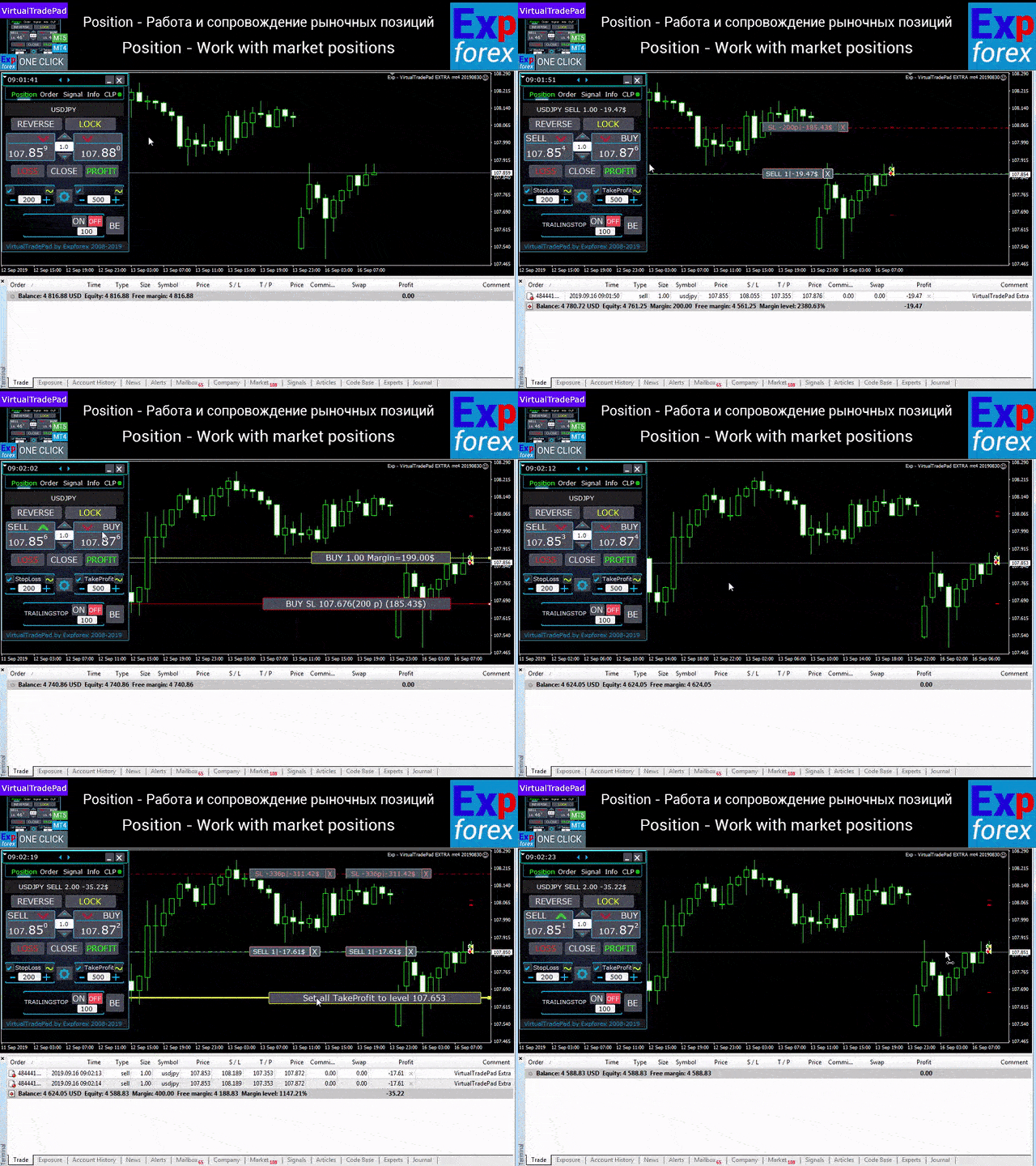
Bu sadece sıradan bir yardımcı araç değildir. MetaTrader 5 için gerçek bir trading cockpit’tir. Doğrudan grafikten işlem açma, klavyeden hızlı komut verme, otomatik hesaplamalar ve görsel yönetim araçları sayesinde manuel işlemi daha hızlı, daha net, daha görsel ve daha hassas hale getirir. 

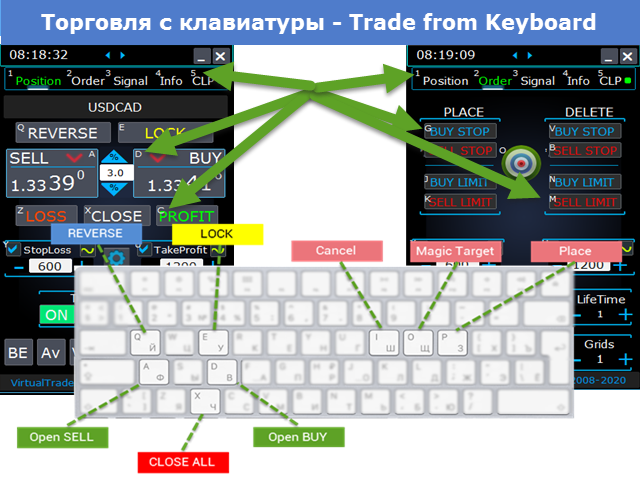
Bu panel ile işlemleri doğrudan grafikten tek tıkla açabilir ve standart MetaTrader kontrollerine göre işlem operasyonlarını 30 kata kadar daha hızlı gerçekleştirebilirsiniz. 

Yeni premium sürüm çıktı: VirtualTradePad PRO SE ile işlem çalışma sürecinizi geliştirin — MetaTrader 5 ve MetaTrader 4 için yeni nesil profesyonel işlem paneli.

Neden traderlar bu paneli seçiyor

  • Tek tıkla işlem — hem grafik üzerinden hem de klavyeden
  • Emirleri hızlı açma, kapatma ve düzenleme
  • Pozisyonlar, bekleyen emirler ve toplam kâr üzerinde derin kontrol
  • Tekrarlayan işleri azaltan otomatik hesaplamalar
  • Doğrudan grafik üzerinde görsel yönetim
  • Manuel işlem ve yarı otomatik yönetim için profesyonel özellik seti

Panelin temel fikri

Bu panel, MetaTrader 5 için evrensel bir trading cockpit olarak tasarlanmıştır. En önemli işlem aksiyonlarını hızlı, net ve görsel bir arayüzde bir araya getirir.

Pozisyon açma ve kapama, reverse, lock, kısmi kapama, Autolot, gerçek ve sanal Stop Loss / Take Profit, emir gridleri, fare ile işlem ve klavyeden kontrol gibi tüm kritik işlevler tek bir verimli çalışma ortamında toplanmıştır. 

Amaç sadece daha hızlı tıklamak değildir. Amaç; traderın tüm işlem sürecini daha iyi organize etmesini, durumu daha net görmesini ve kararlarını daha az sürtünmeyle, daha yüksek hassasiyetle uygulamasını sağlamaktır.

Ana işlevler

İşlem açma ve kapama: BUY, SELL, Close, Delete, Modify, Reverse, Lock ve Partial Close.

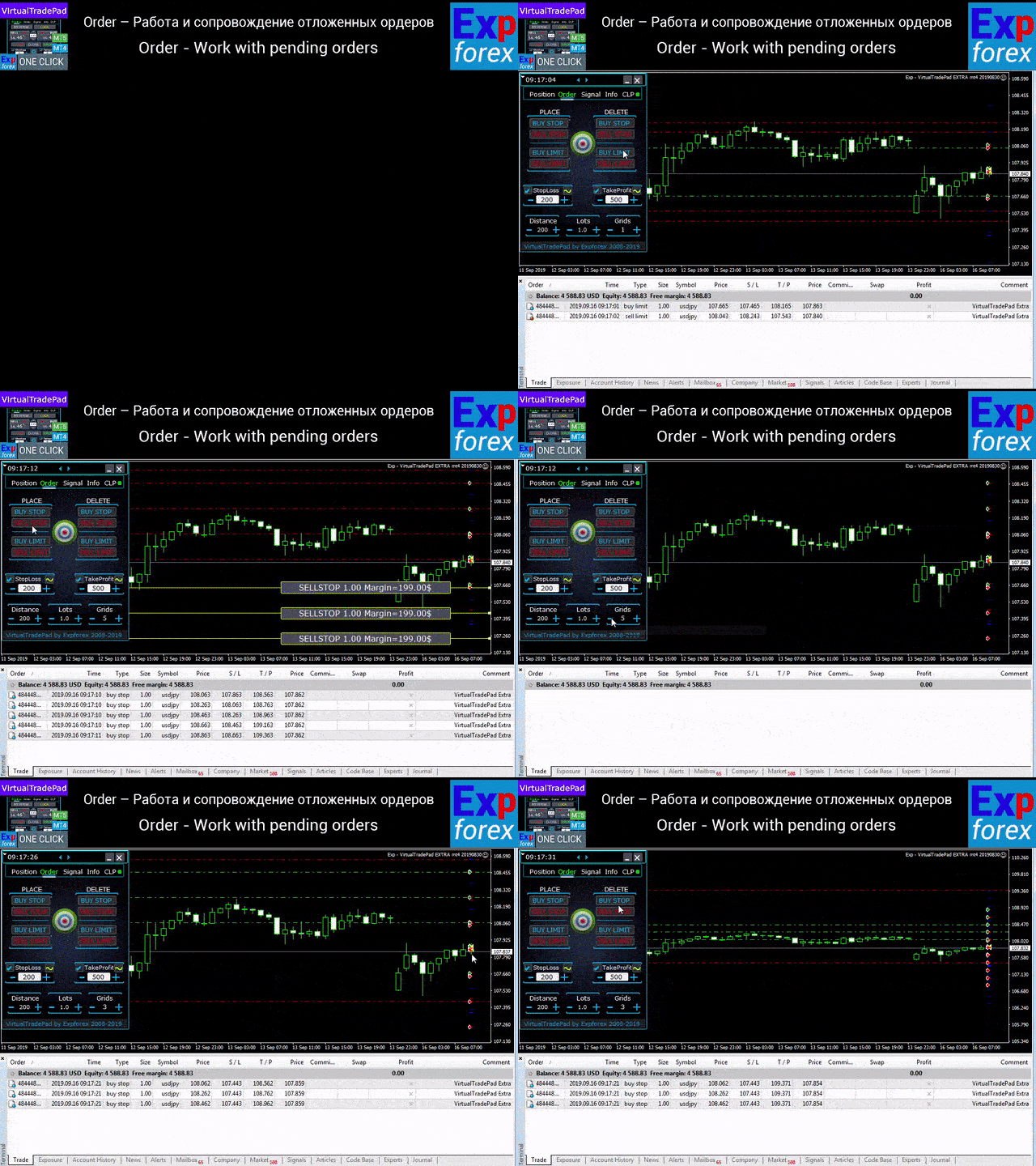
Emir yönetimi: Buy Stop, Sell Stop, Buy Limit, Sell Limit, emir gridleri, silme, değiştirme ve emir serilerinin kontrolü.

Pozisyon yönetimi: Stop Loss, Take Profit, trailing stop, breakeven, gridler için ortak koruma seviyeleri ve ortalama fiyata dayalı yönetim mantığı.

Otomatik hesaplamalar: Autolot, bakiyenin yüzdesine veya Stop Loss’a dayalı dinamik lot, toplam kâr / toplam zarar mantığı ve gerçek / sanal koruma seviyeleri.

Görsel işlem yönetimi: grafikten emir yerleştirme, fare ile çalışma, kontrol çizgileri, bilgi etiketleri ve grafik ipuçları.

Panel yapısı

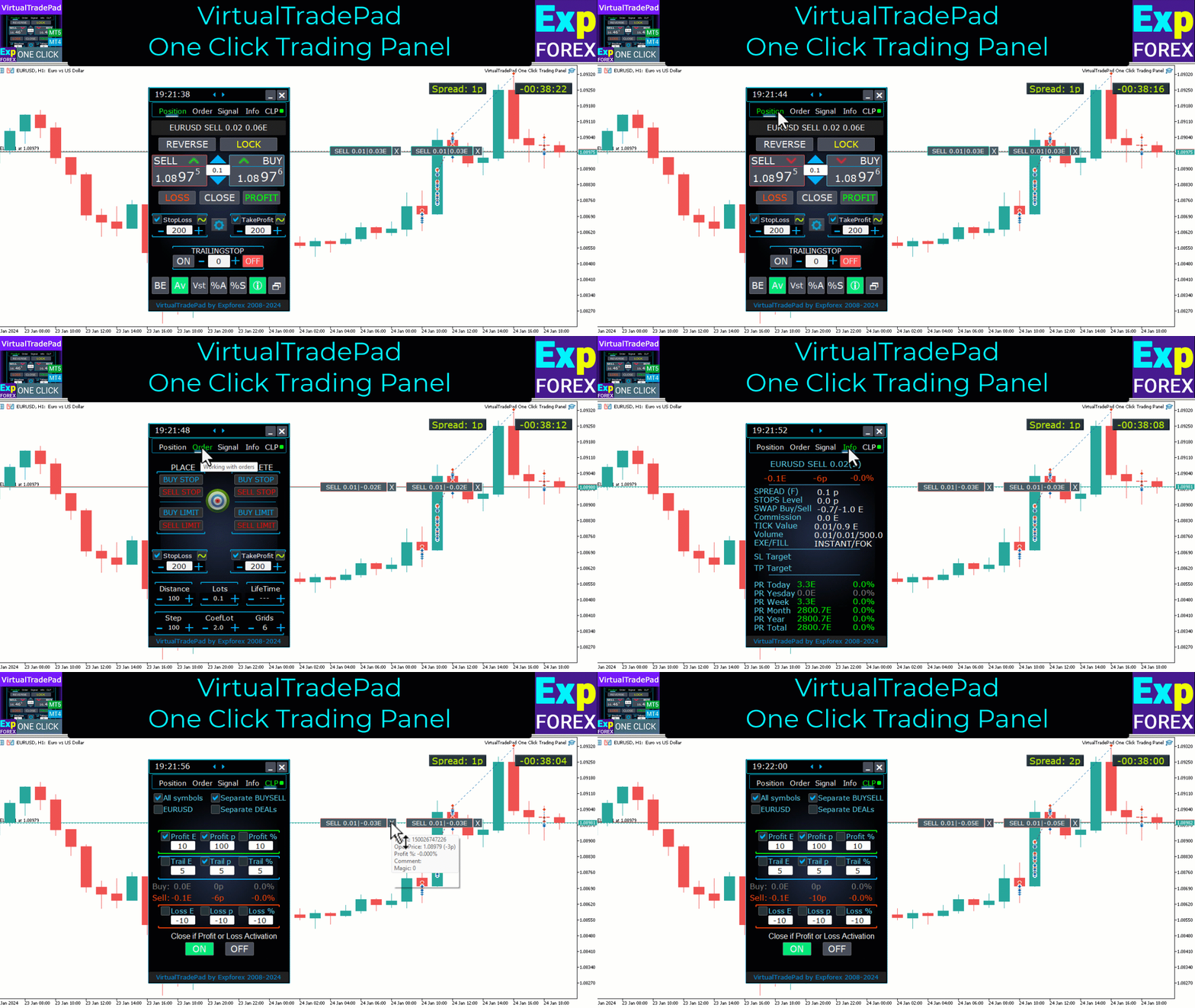
Panel 5 ana sekmeden oluşur ve her biri belirli bir işlem grubuna hizmet eder: Positions, Pending Orders, Account Information, Signals ve Total Profit.

Positions sekmesi — açık pozisyonlarla çalışma

  • BUY ve SELL açma / kapama
  • tüm pozisyonları tersine çevirme
  • toplam pozisyonu kilitleme
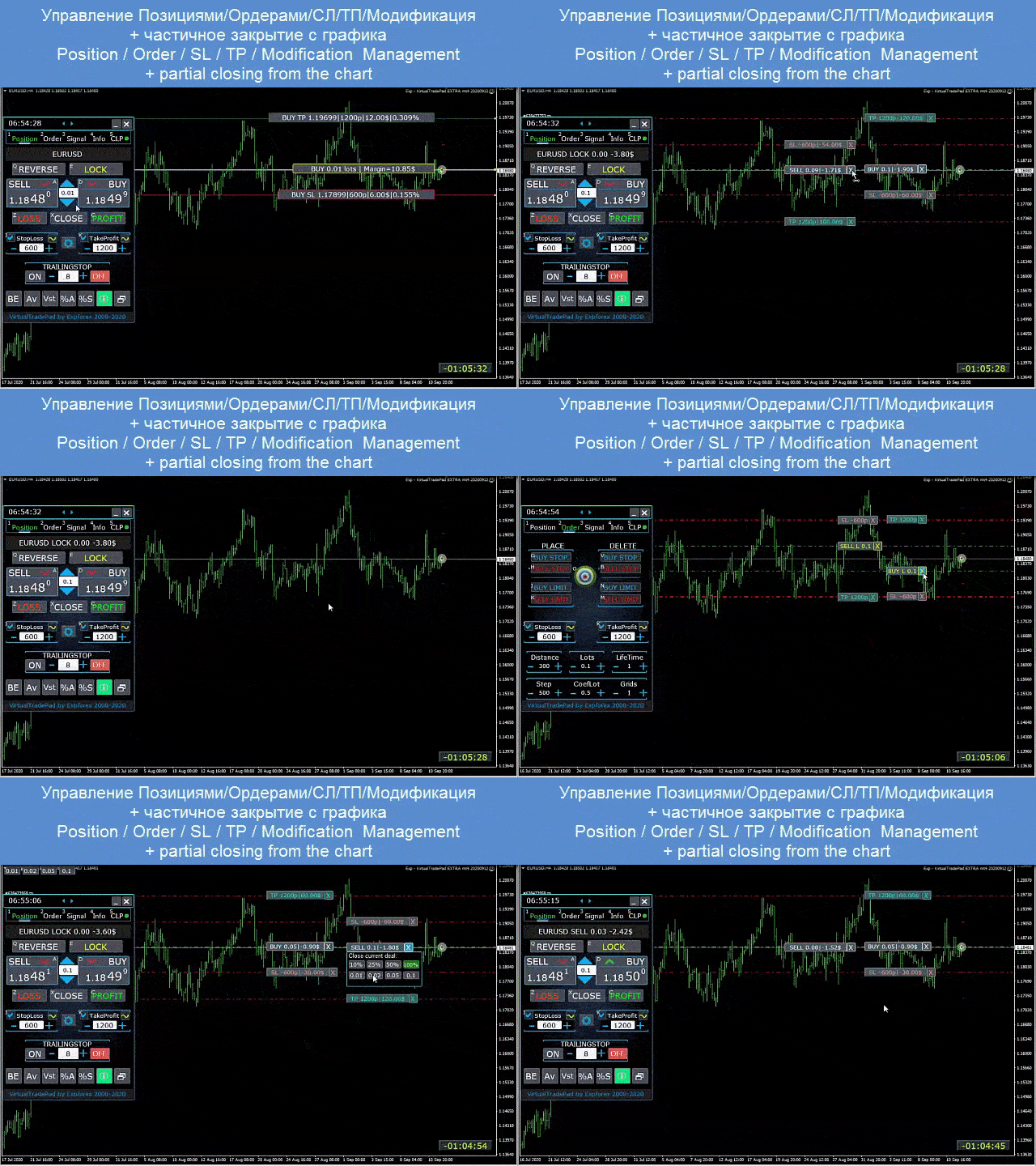
  • Stop Loss / Take Profit değiştirme
  • pozisyon gridine ortak Stop Loss / Take Profit ayarlama
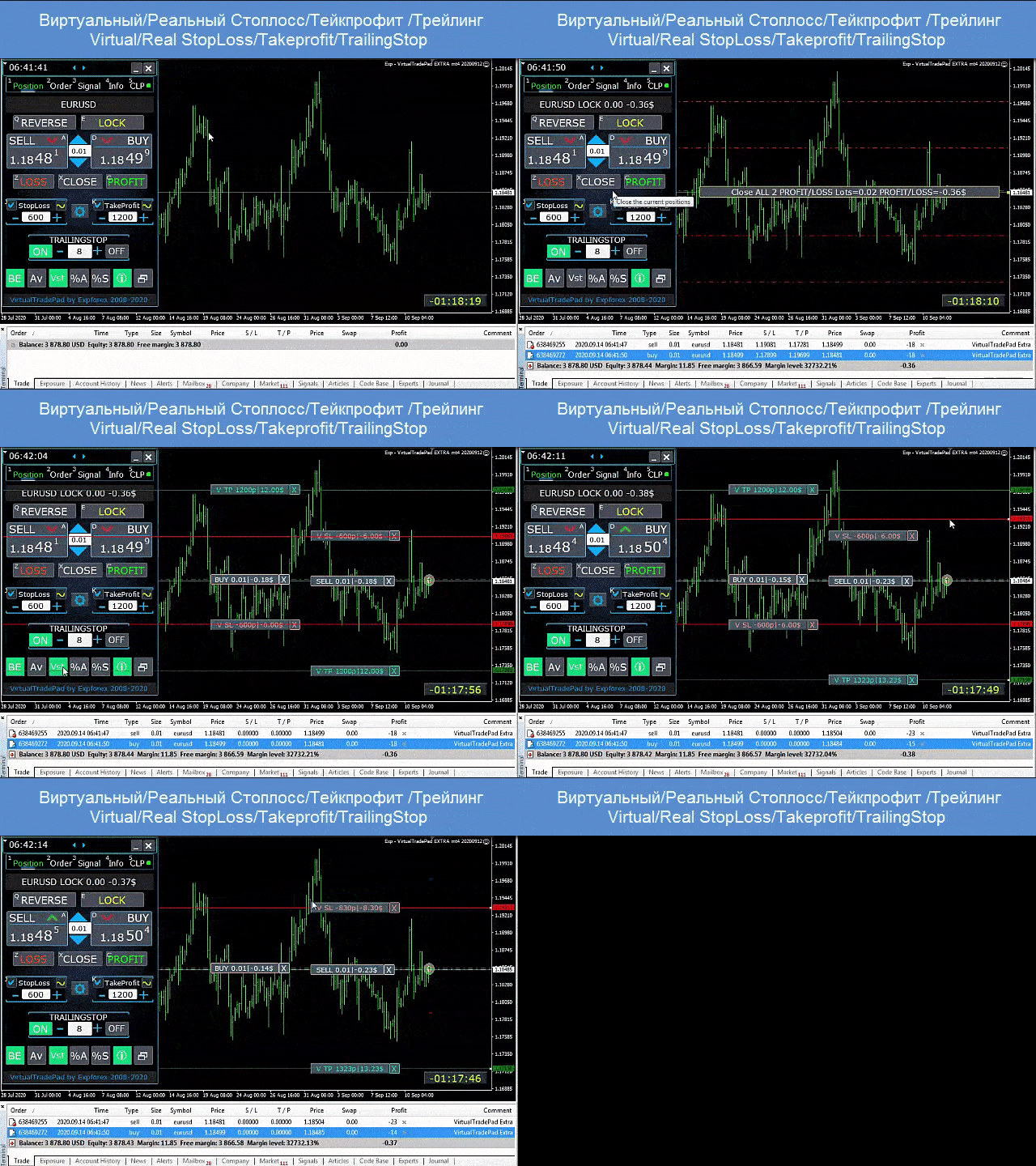
  • trailing stop etkinleştirme
  • breakeven etkinleştirme
  • sadece kârlı veya sadece zarardaki pozisyonları kapatma
  • pozisyonları doğrudan grafikten yönetme
  • grafik üzerinde kısmi kapama
  • Autolot / bakiyenin yüzdesine veya Stop Loss’a göre dinamik lot
  • gerçek / sanal Stop Loss ve Take Profit arasında geçiş
  • ortalama fiyata göre global trailing stop / breakeven yönetimi

Orders sekmesi — bekleyen ve limit emirlerle çalışma

  • Buy Stop, Sell Stop, Buy Limit ve Sell Limit yerleştirme ve kaldırma
  • artan lot ve ayarlanabilir mesafe ile emir gridleri oluşturma
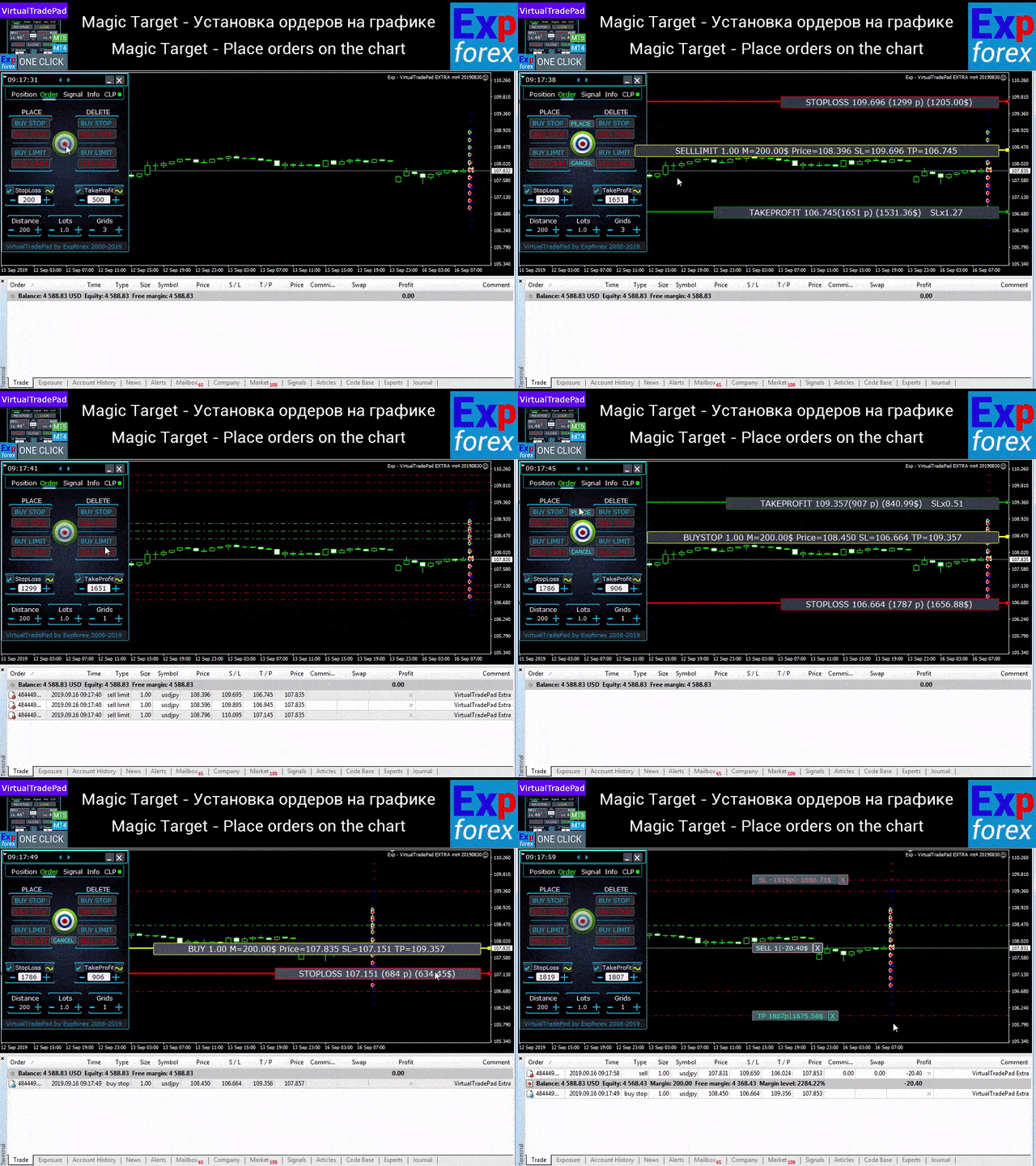
  • fare ve grafik çizgileri ile emir / pozisyon yerleştirme
  • tüm emir serisi için ortak Stop Loss / Take Profit ayarlama
  • emirleri doğrudan grafikten değiştirme ve kaldırma

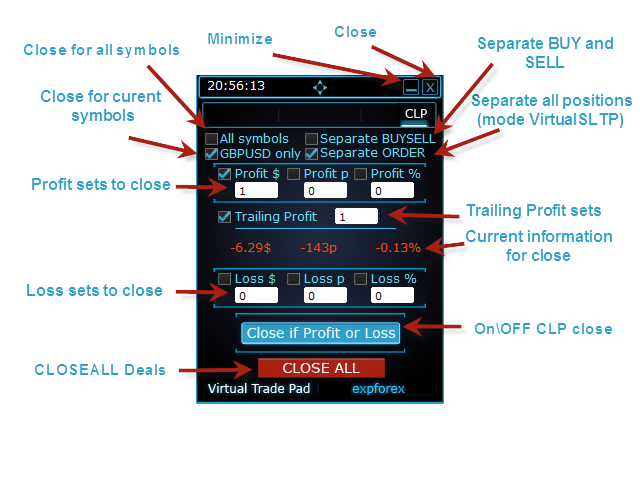
CLP sekmesi — toplam kâr veya toplam zararda kapatma

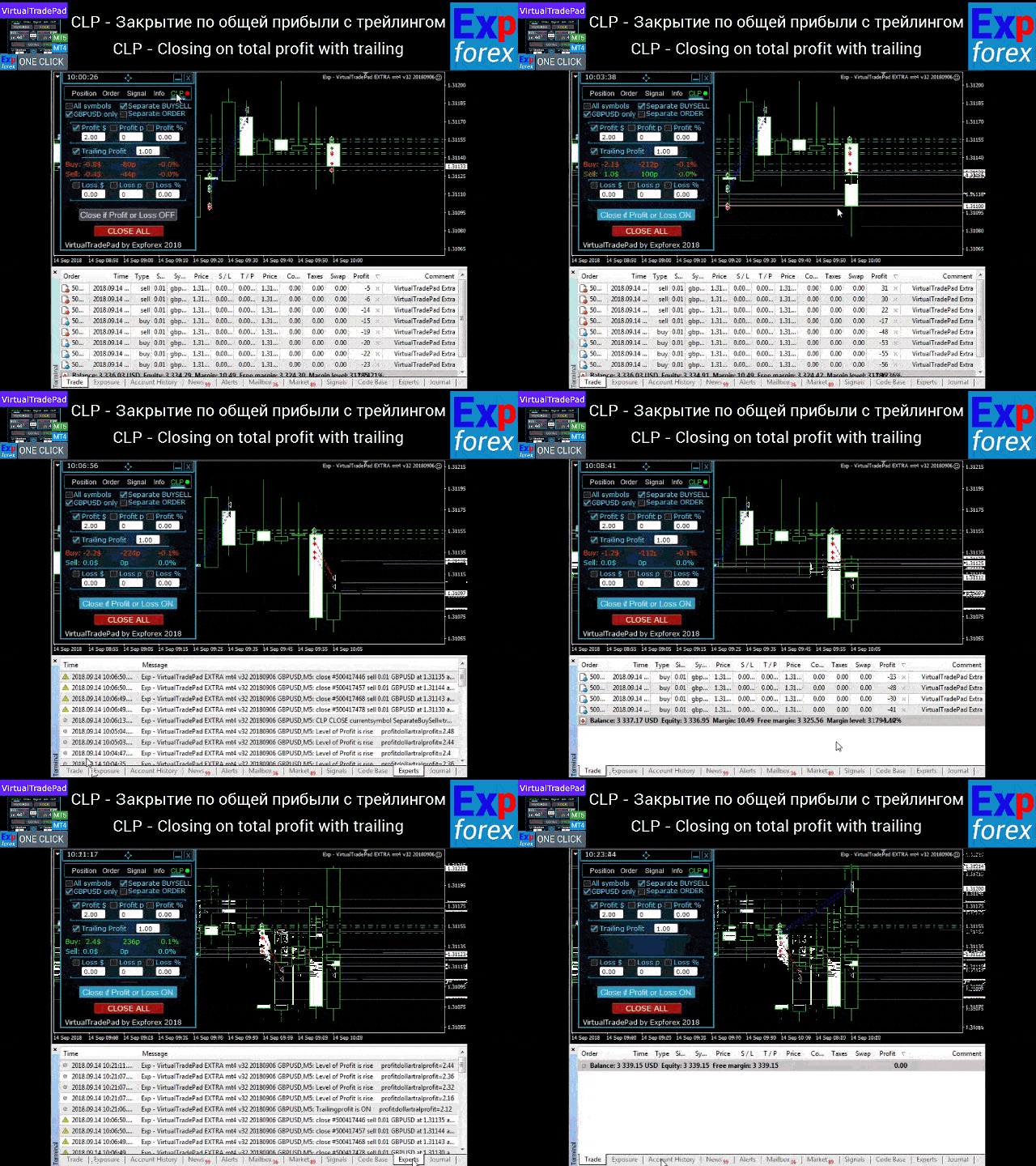
  • toplam kâr veya toplam zararda puan, dolar veya yüzde ile kapatma
  • BUY ve SELL işlemlerini ayrı ayrı kapatma
  • tekil veya toplam pozisyonlar için sanal Stop Loss / Take Profit etkinleştirme
  • toplam kâr üzerinde puan, dolar veya yüzde bazlı trailing stop uygulama

Signals sekmesi

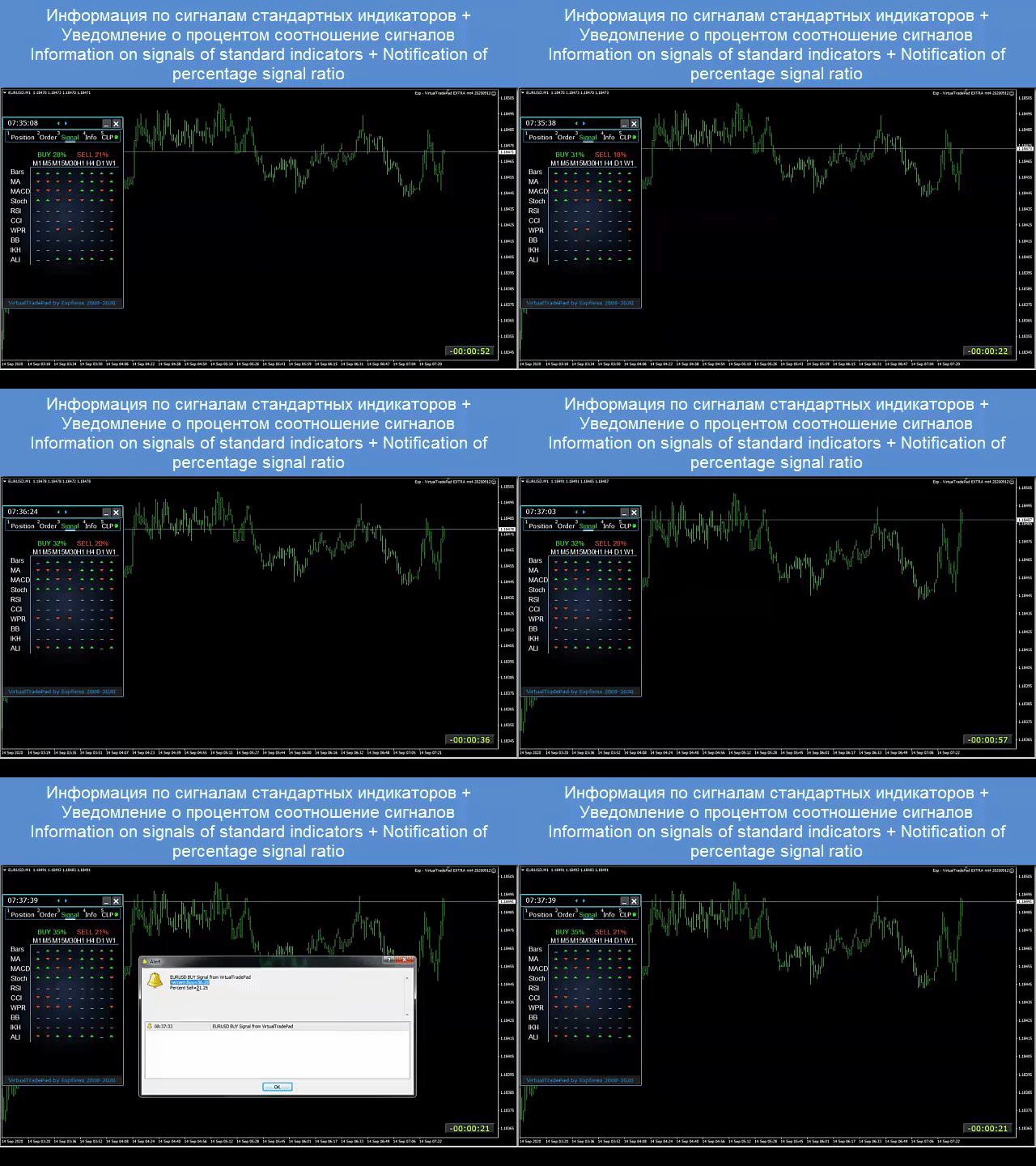
Bu sekme, 10 standart indikatörden ve 8 zaman diliminden gelen sinyalleri gösterir; ayrıca BUY / SELL yönlerindeki kümülatif sinyal yüzdesini de görüntüler. Belirlenen toplam sinyal seviyesi aşıldığında otomatik pozisyon açılması da mümkündür. 

INFO sekmesi

Seçilen sembolün mevcut özelliklerini, güncel Stop Loss ve Take Profit hedeflerini, ayrıca bugünkü, dünkü, haftalık ve aylık kâr bilgilerini gösterir. 

Gerçek işlemlerde sağladığı avantajlar

  • manuel işlemleri belirgin şekilde hızlandırır
  • tekrarlayan işleri azaltır
  • piyasa hareketlerine daha hızlı tepki vermeyi sağlar
  • grid, pozisyon ve toplam kâr yönetimini geliştirir
  • MetaTrader içinde daha net, daha görsel ve daha profesyonel bir iş akışı oluşturur

Bu panel kimler için uygundur

  • aktif manual traderlar için
  • grid emirler ve pozisyon serileriyle çalışan traderlar için
  • Stop Loss, Take Profit, trailing ve breakeven’ı manuel yönetenler için
  • MetaTrader içindeki gereksiz adımları azaltmak isteyenler için
  • sadece bir düğme koleksiyonu değil, gerçek bir profesyonel trading assistant arayanlar için

Panel her hesap türü ve her broker ile çalışır. Arayüz hafif, hızlı ve sezgisel kalırken aynı zamanda güçlü bir işlem araç seti sunar. Hem klavyeden işlem hem de doğrudan grafikten işlem desteklenir. 

Ek öneriler

Tam otomatik işlem için The XCustom ürününü öneririm.

Strategy tester kullanmayı öğrenmek istiyorsanız ücretsiz aracımız TesterPad’e göz atın. 

Etiketler: Expforex, Vladon, Manual Trade, Trade Panel, Panel Trade, Trade Utility, Self Test, Take Profit, Tool Management, Management Tool, Forex Helper, Forex Trade, Training Virtual Trade, Quick Tool, Manual Tester, Manual Backtest, TesterPad, TradePad, Virtual Trade Pad, Manuel işlem, Trading paneli, İşlem yardımcı aracı, Trader asistanı, Kâr yönetimi, CLP, Close if Profit or Loss, Trailing Profit, Smart Trailing Stop
Değerlendirmeler 123
Fredi Sesarianto
139
Fredi Sesarianto 2026.04.07 11:41 

i cant trade anymore without virtual tradepad..

edit, ALL 5 stars , quick response on quetion .

Nguyen Tho
96
Nguyen Tho 2026.02.06 11:01 

When I change the time frame to view on the chart, the trading history still displays, even though I have turned off this feature on the chart. Please guide me on how to disable it on your software.

Chanon Chaichanachot
299
Chanon Chaichanachot 2025.11.29 07:22 

In the "Risk Manager/Prohibit Opening" please consider adding "deny trading during these time" "00:00-15:35, 22:55-24:00" for examples I'm currently using "AutoTrading Scheduler" as a work around. Thank You... Great Tool!

***I'm using autotrade/autoclose by signals(on VPS), so it would prevent EA from opening new trade during certain time while maintaining floating trade.

Önerilen ürünler
Ultimate Pro Trading Panel — All-In-One Manual & Grid Trading Dashboard Pro Trading Panel   is an all-in-one on-chart control panel that gives discretionary and semi-automated traders a complete toolkit for entries, exits, risk management, and grid trading — without leaving the chart. Every function is visual, draggable, and updates in real time. If you want to test this utility feel free to download the basic preview version of this tool here:  https://www.mql5.com/en/market/product/181435 Who
This tool will perform Trailing stop loss and Break even management for orders. Helps you limit or reduce the time spend watching orders on the screen, especially when you need to go to sleep. Just add this EA to 1 chart, you can manage all pairs. You can filter orders by comment, magic number, symbol and order ticket number. When Breakeven it can add shift/offset pips (to cover the commission...). You can try in strategy tester before purchase. The EA will add Buy and Sell alternately, so you
Expert TP SL v04 - Professional Trading Assistant with AI Motivation System Advanced manual trading tool with automatic risk management, overtrading protection, and intelligent psychological support for disciplined trading. PRODUCT OVERVIEW Expert TP SL v04 is a comprehensive trading assistant designed for manual traders who want to maintain emotional discipline while automating risk calculations. This isn't just another order placement tool - it's a complete trading psychology system that pr
The Ultimate All-In-One Trade Manager & Prop Firm Guardian for MT5. Nexus Pro Trade Manager is the most advanced, all-in-one trading assistant designed for both manual traders and Prop Firm challengers. Featuring a stunning, lag-free UI (Dark/Light mode), it completely transforms your MT5 into a professional trading terminal. Whether you are trading a personal account or trying to pass evaluations for FTMO, FundedNext, or other prop firms, Nexus Pro protects your capital, automates your risk cal
Bastion is a monitor-and-close-only risk manager for prop-firm traders. It watches your account against your firm's daily-loss and maximum-drawdown limits in real time and force-closes your open positions BEFORE you cross a line. It never opens a trade of its own, so it stays fully within the tools allowed by FTMO, FundedNext, The5ers, FTUK and FXIFY. Why traders fail challenges A large share of failed evaluations end on a single daily-loss breach: a moment of inattention, a news spike, one tra
DDKiller Pro
Njaratahiry Michael Randrianiaina
Stop Blowing Your Account. Once and For All. DDKiller Pro is the MT5 risk guardian that runs silently on your chart and shuts down trading the moment you hit a limit — whether you're grinding a prop firm challenge or managing your own CFD account. The problem every trader knows: You set your rules. You break them anyway. One revenge trade. One overleveraged position. One session that erases a month of gains. DDKiller Pro removes that decision from your hands entirely. What it does: The second yo
Exp5 Duplicator
Vladislav Andruschenko
4.78 (9)
Duplicator for MetaTrader 5 — tek terminal içinde profesyonel pozisyon çoğaltıcı MetaTrader 5 içinde önceden açılmış pozisyonları otomatik olarak çoğaltmak, hacmi artırmak, özel lot ayarları uygulamak ve kopyaları hassas kurallarla yönetmek isteyen yatırımcılar için güvenilir bir Expert Advisor. Manuel işlem, algoritmik sistemler ve tek terminal içinde mevcut pozisyonların esnek yönetimi için pratik bir araçtır. Duplicator for MT5 kendi işlem stratejisine göre pozisyon açmaz. Görevi, MetaTrader
SLTPSetter
Raphael Djangmah Osro Agbo
SLTPSetter - StopLoss Take Profit Setter HOW DOES IT WORK? Risk and account management is a very critical aspect of trading. Before entering a position, you must be fully aware how much you will be willing to loss both in percentage and value. This is where SLTPSetter gets you covered.  All you need to do is attach the indicator on the chart and PRESS BUY OR SELL automatically, all parameters needed for placing the trades will be provided at the top left corner of the screen. Feel free to adjust
TradeVista Pro — Professional Trade & Risk Management Panel TradeVista Pro is a professional all-in-one trade execution and position management panel for MetaTrader 5 , designed for traders who want faster order management, precise risk control, and a cleaner way to manage open positions directly from the chart. Instead of constantly switching between the MT5 Trade tab, order windows, and chart controls, TradeVista Pro brings essential trading-management functions together in one intuitive inter
Open Risk Budget Cap enforces a total open stop-loss risk budget across your account. It does not choose direction and does not open discretionary trades on a live chart. Attach it to one chart; the symbol and timeframe do not matter. What it measures Every open position and every pending order is priced to its stop-loss in account currency using OrderCalcProfit. Positions or orders without a stop-loss are counted and shown on the panel as "without stop-loss". They are excluded from the budget
Auto SLTP Maker MT5  is an assistant for all those who forget to set StopLoss and/or TakeProfit in deal parameters, or trade on a very fast market and fail to place them in time. This tool automatically tracks trades without StopLoss and/or TakeProfit and checks what level should be set in accordance with the settings. The tool works both with market and pending orders. The type of orders to work with can be set in the parameters. It can track either trades for the instrument it runs on, or all
Overview Mirror Signals Service EA (Text only)   is a powerful monitoring Expert Advisor that automatically sends   real-time Telegram notifications   for all important trade events on your MetaTrader 5 account. It is engineered specifically for   signal providers ,   trade-copier operators ,   auditors ,   educators , and   professional trading services   that require immediate, detailed, and reliable reporting. Everything from   entries, exits, SL/TP changes, comment changes, trailing sto
Trading tool combining a sophisticated equity stop-loss, dynamic take-profit management (Breakeven & Trailing), and symbol-group-based closing logic. It is a complete risk management and trade supervision tool. Features: All features of `Equity Master Stop v1` (floating profit/loss limits, exit protection, skip hours). Take-Profit Override: Can force a TP on any order to lock in a `MAX_FLOATING_PROFIT`. Step Breakeven: Locks in increasing amounts of profit as a trade moves favorably (e.g., aft
TradePilotmt5
Hossein Khalil Alishir
TradePilot Expert Advisor (EA) for MetaTrader 5 TradePilot is a professional and user-friendly Expert Advisor (EA) for MetaTrader 5 (MT5) . It simplifies automated trading , risk management , and trade execution with a smart trading panel . Perfect for beginners and experienced traders looking for a reliable trade manager EA with automated lot size calculation and smart position management. Key Advantages User-Friendly Trading Panel: Customizable panel with buttons and hotkeys for fast ex
Capital Management EA – Smart Risk Management & Profit Optimization for MT5 Take control of your trading capital with smart, automated strategies — fully optimized for MetaTrader 5 (MT5). Looking to protect your capital and maximize profits through automated money management strategies ? Capital Management EA is the all-in-one Expert Advisor for MetaTrader 5 (MT5) that helps you trade smarter, not harder. Core Features: 5-in-1 Capital Management Strategies – Built-in versatility Gr
Easy Trade Executor, MT5 için hızlı pozisyon büyüklüğü hesaplama, emir yürütme ve işlem yönetimi aracıdır. Open Price, Stop Loss ve Take Profit seviyelerini doğrudan grafik üzerine yerleştirin, pozisyon büyüklüğünü otomatik olarak hesaplayın ve yalnızca birkaç tıklamayla kontrollü risk altında işlemler açın. Neden Easy Trade Executor? Easy Trade Executor, yalnızca risk hesaplamakla kalmayıp işlemlerini doğrudan grafik üzerinden hızlı ve verimli şekilde yönetmek isteyen yatırımcılar için tasarla
TRADE MANAGER G2 – PRODUCT DESCRIPTION By Ida Bagus Putu Mahardika Trade Manager G2 – All-in-One Trading Panel for Professional Execution & Risk Management Trade Manager G2 is a next-generation trading panel designed to give you full control over order execution, position management, and profit optimization in real time on MetaTrader 5. With a modern card-based user interface and individual TP actions per level, this panel elevates your trading experience to the next level. KEY ADVANTAGES OF
Tool Auto Modify SLTP – Protect Your Trades, Optimize Your Strategy In trading, risk is always present. Just one forgotten SL/TP can turn a promising trade into a loss. Even experienced traders occasionally make mistakes. That’s why Tool Auto Modify SLTP was created – to keep you protected and let you focus on your strategy. Key Features: Manage Orders for All Symbols: Monitor and adjust SL/TP for all your trading pairs. Three Flexible Risk Modes: Point-Based: Set fixed SL/TP distances. Account
TradeArchitect Grid Manager  is a chart-based manual trading utility for MetaTrader 5. It combines visual trade planning, risk-based position sizing, market and pending order execution, position management, and optional martingale or anti-martingale progression. The utility does not generate trading signals and does not decide when to buy or sell. The trader chooses the direction, Entry, Stop Loss and Take Profit. GridPlan Trade Manager performs the calculations, checks the plan and manages th
INTRODUCTORY LAUNCH OFFER: $139 • Exclusive introductory price for the first 10 copies only. • Price will be permanently adjusted to $279 after the first 10 activations. • Next price step: $199 -> Final price: $279. Fortress Risk Manager is an institutional-grade, all-in-one Capital Protection and Risk Management Cockpit built natively for MetaTrader 5. Engineered specifically for prop firm challenge accounts, funded trader programs, and discipl
HedgeSafe Trade Assistant Risk kontrolünü önceliklendiren MetaTrader 5 manuel işlem paneli. HedgeSafe, BUY veya SELL düğmesine basmadan önce işlemi doğrudan grafik üzerinde hazırlamanıza, doğrulamanıza ve yönetmenize yardımcı olur. HedgeSafe bir sinyal hizmeti, piyasa tahmin aracı, yapay zekâ botu veya otomatik strateji değildir. İşlem yönünü seçmez ve kâr vaat etmez. Her işlem kararı traderın sorumluluğundadır. Başlıca özellikler Hesap bakiyesinin yüzdesine veya hesap para birimindeki sabit tut
Pattern Recognition EA
Claudiu-georgian Zavera
Pattern Recognition EA - From Learn to Earn. The market repeats itself. This EA finds every past repeat of the current candle sequence - and lets history vote the direction. ONE SHAPE. EVERY REPEAT IN HISTORY VOTES. The last N candles on your signal timeframe form a shape. The EA scans the history you choose - a fixed number of bars or everything your broker provides - for the SAME shape, and checks what happened next, every single time. Only when enough repeats exist AND a clear majority of t
Trading Utility for Forex Currency Pairs Only not for Gold  Functions Auto Lot Calculation based on Risk Auto stoploss  Auto TakeProfit Breakeven Auto Close Half % Close in percentage with respect to the PIPs Pending Orders BuyLimit Sell Limit with distances BuyStop Sell Stop    with distances Trading Informations Risk in percentage For Multiple trades Combine Takeprofit and Combine Stoplosses
Noize Absorption Index - is the manual trading system that measures the difference of pressure between bears forces and bulls forces. Green line - is a noize free index that showing curent situation. Zero value of index shows totally choppy/flat market.Values above zero level shows how powerfull bullish wave is and values below zero measures bearish forces.Up arrow appears on bearish market when it's ready to reverse, dn arrow appears on weak bullish market, as a result of reverse expectation.
This EA is there to take your trade closing stress away. Quickly close as many trades as you have opened at the click of a button, INCLUDING PENDING ORDERS. This works on the MT5 platform whether it be currencies, Indices, stocks or Deriv synthetic indices. I have saved it under utilities as it is a utility, however, to install this, you have to save the file in you "EA" folder. That is; Go to "File", then "Open Data Folder", "MQL5" and then "Experts". Paste this file there. Restart MT5 and you'
Inverted_Chart_EA Utility Expert Advisor Inverted_Chart_EA creates and maintains a mirror-inverted chart of any symbol and timeframe. It automatically generates a custom instrument (e.g. US30_INV ) and keeps its price history updated in real time, with bars mirrored around a chosen pivot. This utility gives traders a new way to analyze the market from a different perspective by flipping the chart upside down. Why use an inverted chart? Highlight hidden patterns – price formations that look ordin
SwiftEdge Scalper Tam Manuel Kontrollü Profesyonel Tick Scalping EA Scalping, anlık kararlar, hassas risk yönetimi ve kusursuz emir yürütme gerektirir. Fiyat hareketini izlerken başabaş hesaplamalarını, takip eden stopları ve birden fazla pozisyonu yönetmek, doğru araçlar olmadan bunaltıcıdır. SwiftEdge Scalper, aktif scalper'lar ve günlük trader'lar için tasarlanmış profesyonel trading asistanınızdır. Tek tıklama veya klavye kısayolu ile işlem yapın, EA otomatik olarak başabaş, takip eden stop
CYGNIX RISK GLADIATOR — Professional Trade Manager & Risk Guardian for MT5 Guard every position. Manage every trade. Sleep at night. Cygnix Risk Gladiator is a professional-grade position management Expert Advisor that watches every open trade on your account and automatically applies institutional-level risk controls in real time. It does not generate signals — it protects, manages, and exits trades opened by you, your strategies, or any other EA. Built for IC Markets and fully compatible w
Apex Terminal is a trade panel for MetaTrader 5 that sizes every position from your risk and manages it from entry to exit. Set how much you accept to lose and where the stop-loss goes. Before you click, the panel shows the lot, the loss at the stop and the profit at the full target. One click opens the trade with the stop-loss and the whole take-profit ladder already in place. TRADE - Position size from % of balance or equity, a fixed amount of money or a fixed lot. The lot is rounded down t
More stable MetaTrader 4 version is available here:  Lot Calculator Tool . This tool helps you to automatically calculate and manage risk, conveniently place orders visually, schedule orders, trail stops, move them to break-even and more. Features Place market or pending orders using draggable lines Schedule orders Calculate and limit risk using various methods See current spread See time till next candle Set custom order comments Trail stops Move stops to break-even See order profit/loss in p
Bu ürünün alıcıları ayrıca şunları da satın alıyor
Trade Assistant MT5
Evgeniy Kravchenko
4.43 (216)
It helps to calculate the risk per trade, the easy installation of a new order, order management with partial closing functions, trailing stop of 7 types and other useful functions. Additional materials and instructions Installation instructions - Application instructions - Trial version of the application for a demo account Line function -   shows on the chart the Opening line, Stop Loss, Take Profit. With this function it is easy to set a new order and see its additional characteristics bef
Trade Manager EA’ye hoş geldiniz! Ticaretin daha sezgisel, hassas ve verimli hale gelmesi için tasarlanmış nihai risk yönetim aracı ile tanışın. Bu sadece bir emir verme aracı değil; ticaret planlaması, pozisyon yönetimi ve risk kontrolü için kapsamlı bir çözüm. İster yeni başlayan bir yatırımcı olun, ister deneyimli bir trader ya da hızlı emir gerektiren bir scalper, Trade Manager EA ihtiyaçlarınıza uyum sağlar ve forex, endeksler, emtialar ve kripto paralar dahil tüm piyasalarda esneklik sunar
================================================================================ POC BREAKOUT - V20.72. Full Professional Grade Toolkit ================================================================================ POC Breakout is a full MetaTrader 5 trading dashboard for discretionary traders who want breakout signals, Point of Control (POC) context, volume profiles, order flow, market structure, news, alerts, and advanced trade planning in one professional workspace. Attached directly to you
Telegram to MT5 Multi-Channel Copier   , Telegram ve Discord kanallarınızdaki alım-satım sinyallerini doğrudan MetaTrader 5'e otomatik kopyalar. Bot yok, tarayıcı uzantısı yok, elle kopyalama yok. Sinyal Telegram'a veya Discord'a düşer ve EA birkaç saniye içinde terminalinizde işlemi açar. Ve bir kanalı kopyalamadan önce, yerleşik backtester o kanalın hesabınızda ne yapmış olacağını gösterir. Ürün iki bileşenden oluşur: Telegram kanallarınızı dinleyen bir Windows uygulaması ve sinyalleri MT5 ter
TradePanel MT5
Alfiya Fazylova
4.88 (170)
Trade Panel, çok işlevli bir ticaret asistanıdır. Uygulama, manuel ticaret için 50'den fazla ticaret fonksiyonu içerir ve çoğu ticaret görevini otomatikleştirmeyi mümkün kılar. Uygulama talimatları: https://www.mql5.com/en/blogs/post/756482 Demo hesabı için uygulamanın deneme sürümü: https://www.mql5.com/en/blogs/post/750865 Uygulamayı nasıl kurulur: https://www.mql5.com/en/blogs/post/756239 Uygulamayı görsel modda nasıl test edilir: https://www.mql5.com/en/blogs/post/770277 Uygulamayı VPS MetaT
Telegram sinyallerini kendi işlem kurallarınızla kopyalayın Telegram to MT5 Signal Trader , herkese açık ve özel Telegram kanallarındaki ve gruplarındaki metin tabanlı işlem sinyallerini otomatik olarak MetaTrader 5'e kopyalar. Tek bir masaüstü uygulamasından birden fazla sinyal sağlayıcısını ve MT5 hesabını yönetin; her sağlayıcı için ayrı risk ve işlem ayarları belirleyin. Sinyal kopyalamak için Telegram botu veya API kurulumu gerekmez. Kendi Telegram hesabınızla telefon numarası veya QR kod k
Farmed Hedge Yield Farming | All Markets (Manual - Hybrid - Semi/Automated EA) VERIFIED TRADING RESULTS - Farmed Hedge Yield Axi Copy:  https://www.mql5.com/en/signals/2356376 - Farmed Hedge Yield Exn Copy:   https://www.mql5.com/en/signals/2356404 - Farmed Hedge Yield V Copy:  https://www.mql5.com/en/signals/2357156 IMPORTANT NOTICE: FarmedHedge is a MANUAL-FOCUSED TRADING UTILITY ,not a fully automated EA. Results shown on this Signal include manual trades and overall strategic management.
The product will copy all telegram signal to MT5 ( which you are member) , also it can work as remote copier.  Easy to set up, copy order instant, can work with almost signal formats, image signal,  s upport to translate other language to English Work with all type of channel or group, even channel have "Restrict Saving Content", work with  multi channel, multi MT5 Work as remote copier: with signal have ticket number, it will copy exactly via ticket number. Support to backtest signal. How to s
Power Candles Strateji Tarayıcısı - Kendi Kendini Optimize Eden Çoklu Sembol Kurulum Bulucu Power Candles Strateji Tarayıcısı , Power Candles göstergesini çalıştıran aynı kendinden optimize edici motoru, Piyasa İzleyicinizdeki her sembol üzerinde yan yana çalıştırır. Tek bir panel, şu anda istatistiksel olarak hangi sembollerin işlem yapılabilir olduğunu, her birinde hangi stratejinin kazandığını, en uygun Stop Loss / Take Profit çiftini gösterir ve yeni bir sinyal geldiği anda size bildirim gön
Entry In The Zone with SMC Multi Timeframe is a real-time market analysis tool based on Smart Money Concepts (SMC), designed to analyze market structure, price direction, and key trading zones. It supports both Single-Timeframe and Multi-Timeframe Analysis, providing a clearer view of overall market structure across multiple timeframes, with real-time BUY / SELL signals designed with a strict focus on No-Repaint principles.   The signals are designed to help filter unclear setups and evaluate tr
Quant AI Agents are independent trading Expert Advisors. Instead of trading using a fixed strategy like other conventional EAs, Quant AI Agents   is a   multi-agent AI trading framework   that turns natural-language strategy prompts into live.  WANT THE SAME RESULTS AS MY LIVE SIGNAL?   Use the exact same brokers I do:   IC MARKETS , IC TRADING   .  Unlike the centralized stock market, Forex has no single, unified price feed.  Every broker sources liquidity from different providers, creating un
Grid Manual MT5
Alfiya Fazylova
4.73 (22)
Grid Manual, sipariş ızgarasıyla çalışmak için kullanılan bir ticaret yardımcı programıdır. Yardımcı program evrenseldir, esnek ayarlara ve sezgisel bir arayüze sahiptir. Sadece kayıpların ortalaması yönünde değil, aynı zamanda kazanç artışı yönünde de bir emir ızgarası ile çalışır. Tüccarın bir emir ızgarası oluşturmasına ve eşlik etmesine gerek yoktur, bu yardımcı programı yapacaktır. Emri açmanız yeterlidir ve Grid manual otomatik olarak ona bir emir ızgarası oluşturacak ve kapanana kadar ona
Trade Indicator Assistant   is a powerful MT5 utility designed to turn indicators into automated trading systems. Its main feature is the ability to automatically detect an indicator’s   BUY and SELL signal buffers , without requiring you to know the buffer numbers, search through indicator settings, or modify the indicator source code. Bonus Indicator:   After purchasing Trade Indicator Assistant, contact me to receive   Trade Signal Pro   completely free as a bonus indicator. [Download Demo V
Footprint Chart Pro — Professional OrderFlow EA for MetaTrader 5 Version 6.34 | Professional tool for real traders | Institutional-Grade Visualization DEMO USERS - PLEASE SELECT EVERY TICK / REAL TICK WHEN TESTING AND YOU HAVE DOWNLOADED HISTORICAL DATA. IF YOU SEE A WAITING SCREEN AND IT IS NOT DOWNLOADING, IT MEANS YOU HAVE LOW HISTORICAL DATA. TRY 1 MIN AND 5 MIN FIRST ON 1 DAY DATA. ONE DAY DATA SHOULD BE THE NEWEST AND MOST CURRENT DATE. PLEASE WAIT UNTIL THE MARKET HAS ROLLED OVER PERIOD.
FUTURES ORDERFLOW FOOTPRINT CHART Professional OrderFlow EA for MetaTrader 5 Version 1.01| Professional tool for real traders | Institutional-Grade Visualization STRATEGY TESTER USERS - PLEASE SELECT EVERY REAL TICK WHEN TESTING AND YOU HAVE DOWNLOADED HISTORICAL DATA. IF YOU SEE A WAITING SCREEN AND IT IS NOT DOWNLOADING, IT MEANS YOU HAVE LOW HISTORICAL DATA. TRY 1 MIN AND 5 MIN FIRST ON 1 DAY DATA. ONE DAY DATA SHOULD BE THE NEWEST AND MOST CURRENT DATE. PLEASE WAIT UNTIL THE MARKET HAS ROL
The Patch It never opens a trade. It walks behind the ones that did. Every open position, every pending order — checked twice a second for the one thing that's easy to forget: a stop, a target. Found bare, it doesn't ask. It writes the missing number in, measured in points from wherever the position began, and moves on to the next. No strategy, no opinion on direction. Just the quiet assumption that nothing should ever sit on the market unprotected — not because someone decided it shouldn't,
Your EAs cannot see each other, but Anchor can. Anchor gives you one place to coordinate your EAs, manage risk, and decide when trading is allowed. It works alongside the trading bots you already use without any changes to them. The Problem One EA opens a trade. Then another starts trading. The next thing you know, you wake up to multiple grids built across your account. Each EA may be doing exactly what it was designed to do, but together they can place far more risk on your account than you in
Floor Watch
Syed Tauqeer Hussain Shah
Floor Watch One number, watched every thirty seconds: how far equity has fallen since the day began — or since its highest point, if it's told to trail the peak instead of the open. Cross the line and it doesn't argue. Every open position closes, every pending order vanishes, and anything that slips through afterward gets shut the moment it appears. Not asked. Removed. The floor holds until the clock turns 5 AM Pakistan time — then, and only then, does the day start over. One rule. No except
YuClusters
Yury Kulikov
4.93 (43)
Attention: You can view the program operation in the free version  YuClusters DEMO .  YuClusters is a professional market analysis system. The trader has unique opportunities to analyze the flow of orders, trade volumes, price movements using various charts, profiles, indicators, and graphical objects. YuClusters operates on data based on Time&Sales or ticks information, depending on what is available in the quotes of a financial instrument. YuClusters allows you to build graphs by combining da
MT4 to Discord Signal Provider , ticaret sinyallerini doğrudan Discord'a göndermek için tasarlanmış kullanıcı dostu ve tamamen özelleştirilebilir bir araçtır. Bu araç, ticaret hesabınızı etkili bir sinyal sağlayıcısına dönüştürür. Mesaj formatlarını tarzınıza uyacak şekilde özelleştirin! Kolay kullanım için önceden tasarlanmış şablonlardan seçim yapın ve hangi mesaj öğelerini dahil etmek veya çıkarmak istediğinize karar verin. [ Demo ] [ Kullanım Kılavuzu ] [ MT4 Versiyonu ] [ Telegram Versiyonu
MT5 to Telegram Signal Provider , hesabınızı bir sinyal sağlayıcı haline getirerek belirtilen sinyalleri Telegram'ın sohbetine, kanalına veya grubuna göndermeyi sağlayan kullanımı kolay, tamamen özelleştirilebilir bir araçtır. Rakip ürünlerin çoğunun aksine, DLL içe aktarması yapmaz. [ Demo ] [ Kılavuz ] [ MT4 Versiyonu ] [ Discord Versiyonu ] [ Telegram Kanalı ]  New: [ Telegram To MT5 ] Kurulum Adım adım bir kullanıcı kılavuzu mevcuttur. Telegram API'si hakkında bilgi gerekmemektedir; ihtiyac
Ultimate Extractor - Professional Trading Analytics for MT5 *****this is the local HTML version of Ultimate Extractor. !!!!!it is not compatible with Cloud!!!! For the online version please reach out to me directly****** Ultimate EA manager also now available when you use cloud pro and above for free!! Ultimate Extractor transforms your MetaTrader 5 trading history into actionable insights with comprehensive analytics, interactive charts, and real-time performance tracking. What It Does Automa
Advanced Daily Trading Limiter PRO Professional Risk Management. Uncompromising Trading Discipline. One undisciplined trading session can erase weeks of consistent profits. Whether it's overtrading, revenge trading, or exceeding a prop firm's daily risk limits, emotional decisions often become a trader's biggest obstacle—not the market itself. Advanced Daily Trading Limiter PRO is a comprehensive risk management and discipline enforcement utility for MetaTrader 5, designed to help traders stay
Bir kez satın alın. Şu anda sunulan ve gelecekte yayımlayacağım tüm MT4 ve MT5 göstergelerimi ek ücret ödemeden edinin. Satın aldıktan sonra edinme talimatları için benimle iletişime geçin. Her 10 satın alımdan sonra fiyatın 50$ artırılarak en fazla 999$ olması planlanmaktadır. Ödeme sırasında Market’te görünen fiyat geçerlidir. Güvendiğiniz göstergeyi kullanmaya devam edin. Çevresindeki işleri otomatikleştirin. Sizin sinyaliniz. Sizin kurallarınız. Sizin işlem yürütmeniz. Güvendiğiniz bir MT5
AI Trading Assistant | Discord/Telegram → MetaTrader 5 Automation An advanced automation framework that enables natural language trade instructions sent from Discord or Telegram to be executed automatically on MetaTrader 5 using n8n workflows and a custom Expert Advisor. This solution integrates modern workflow automation with MetaTrader 5, allowing users to send trade instructions such as: “buy EURUSD 1% risk 30 pip SL 3R TP” “sell GBPUSD now 2% 20 SL 60 TP” “buy limit EURUSD at 1.0850 with 1%
Riskinizi otomatik olarak hesaplarken işlemlere hızlı bir şekilde girip çıkmanıza yardımcı olacak Ticaret Yöneticisi. Aşırı Ticaret, İntikam Ticareti ve Duygusal Ticaretten korunmanıza yardımcı olacak özellikler içerir. İşlemler otomatik olarak yönetilebilir ve hesap performans ölçümleri bir grafikte görselleştirilebilir. Bu özellikler, bu paneli tüm manuel yatırımcılar için ideal kılar ve MetaTrader 5 platformunun geliştirilmesine yardımcı olur. Çoklu Dil desteği. MT4 Sürümü  |  Kullanım Kılavu
Premium Trade Manager - İçine Koç Yerleştirilmiş İşlem Paneli Premium Trade Manager , grafiğinizin içine bir trading koçu yerleştirir; altında tam bir yürütme motoru çalışır. İşlemi her zamanki gibi kurun, ardından yapay zeka trading koçunuz Max, o kurulumu tam olarak okusun ve canlı hesabınıza göre taahhüt etmeden önce size net bir değerlendirme sunsun: stop disiplinli bir yaklaşıma uyuyor mu, risk büyüklüğü makul mü, yüksek etkili bir haber dakikalar sonra mı geliyor, prop firm limitinize yakl
EASY Insight AIO – Akıllı ve zahmetsiz yatırım için hepsi bir arada çözüm Genel Bakış Tüm piyasayı — Forex, Altın, Kripto, Endeksler ve hatta Hisseler — saniyeler içinde, manuel grafik incelemesi, gösterge kurulumu ya da karmaşık ayarlar olmadan analiz edebildiğinizi hayal edin. EASY Insight AIO , yapay zekâ destekli yatırım için nihai, kullanıma hazır dışa aktarma aracınızdır. Tüm piyasanın kapsamlı bir anlık görüntüsünü tek bir temiz CSV dosyasında sunar; bu dosya ChatGPT, Claude, Gemini, Pe
VirtualTradePad PRO SE MT5 — MetaTrader 5 için profesyonel işlem kontrol merkezi VirtualTradePad PRO SE , MetaTrader 5 için grafik tabanlı premium bir işlem paneli ve trade yönetim çalışma alanıdır. Daha hızlı emir yürütme, daha net pozisyon kontrolü, yapılandırılmış trade yönetimi, görsel seviye planlama ve doğrudan grafik üzerinden profesyonel bir çalışma akışı isteyen traderlar için tasarlanmıştır. Bu yalnızca basit bir BUY / SELL paneli değildir. PRO SE; manuel işlem, bekleyen emirler, pozis
Daily Trading Limiter
AL MOOSAWI ABDULLAH JAFFER BAQER
5 (8)
• Please test the product in the Strategy Tester before purchasing to understand how it works. • If you face any issues, contact me via private message—I’m always available to help. • After purchase, send me a screenshot of your order to receive a FREE EA as a gift. Daily Trading Limiter — the rule you cannot break Every trader knows the number. Three trades. Two percent. One bad day and stop. And every trader has watched themselves take the fourth trade anyway. The problem was never knowing th
Yazarın diğer ürünleri
Exp COPYLOT CLIENT for MT4
Vladislav Andruschenko
4.69 (65)
MetaTrader 4 için profesyonel işlem kopyalayıcı MetaTrader 4 için hızlı, güvenilir ve profesyonel bir işlem kopyalayıcı. COPYLOT , MetaTrader 4 ve MetaTrader 5 terminalleri arasında Forex işlemlerinin kopyalanmasını sağlar ve farklı hesap türleri ile işlem senaryoları için esnek senkronizasyon sunar. COPYLOT MT4 sürümü şunları destekler: MetaTrader 4 → MetaTrader 4 MetaTrader 5 Hedge → MetaTrader 4 MetaTrader 5 Netting → MetaTrader 4   MT5 sürümü Tam açıklama + DEMO + PDF Nasıl satın alınır Nası
Exp COPYLOT CLIENT for MT5
Vladislav Andruschenko
3.97 (35)
MetaTrader 5 için profesyonel işlem kopyalayıcı MetaTrader için hızlı, profesyonel ve güvenilir bir işlem kopyalayıcı . COPYLOT , MT4 ve MT5 terminalleri arasında Forex işlemlerini kopyalamanıza olanak tanır ve Hedge ile Netting hesaplarını destekler. COPYLOT MT5 sürümü şunları destekler: - MT5 Hedge → MT5 Hedge - MT5 Hedge → MT5 Netting - MT5 Netting → MT5 Hedge - MT5 Netting → MT5 Netting - MT4 → MT5 Hedge - MT4 → MT5 Netting MT4 sürümü Tam açıklama + DEMO + PDF Nasıl satın alınır Nasıl kurul
Exp5 Swing PRO for MT5
Vladislav Andruschenko
3 (2)
Swing modeline dayalı ticaret stratejisi, artan lotlarla iki karşıt bekleyen emrin yerleştirilmesini içerir. Piyasa fiyatı belirli bir yönde hareket ettikçe emirlerden biri tetiklenirken diğerinin lot büyüklüğü artar. Bu yaklaşım, yatırımcıların riskleri en aza indirirken kar elde etmelerine olanak tanır ve bu da onu forex, hisse senetleri ve emtia ticareti için güvenilir bir yol haline getirir. Bu stratejinin finansal ticarette kullanılması, özellikle değişken piyasalarda bilinçli karar almayı
Exp5 AI Sniper for MT5
Vladislav Andruschenko
2 (3)
AI Sniper for MetaTrader 5 — hassasiyet için tasarlanmış akıllı işlem robotu AI Sniper , MetaTrader 5 için geliştirilmiş güçlü ve akıllı bir işlem robotudur; sıradan bir Expert Advisor’dan çok daha fazlasını bekleyen traderlar için tasarlanmıştır. Gelişmiş piyasa mantığını, uyarlanabilir işlem davranışını ve hassas giriş zamanlamasını bir araya getirerek, dinamik ve volatil piyasalarda yüksek olasılıklı BUY ve SELL fırsatlarını belirlemeye yardımcı olur. AI Sniper , piyasayı gerçek zamanlı anali
VirtualTradePad PRO SE MT5 — MetaTrader 5 için profesyonel işlem kontrol merkezi VirtualTradePad PRO SE , MetaTrader 5 için grafik tabanlı premium bir işlem paneli ve trade yönetim çalışma alanıdır. Daha hızlı emir yürütme, daha net pozisyon kontrolü, yapılandırılmış trade yönetimi, görsel seviye planlama ve doğrudan grafik üzerinden profesyonel bir çalışma akışı isteyen traderlar için tasarlanmıştır. Bu yalnızca basit bir BUY / SELL paneli değildir. PRO SE; manuel işlem, bekleyen emirler, pozis
Exp TickSniper PRO FULL
Vladislav Andruschenko
3.9 (58)
TickSniper for MetaTrader 5 — otomatik parametre uyarlamasına sahip yüksek hızlı tick scalper Karmaşık manuel ayarlar gerektirmeden, mevcut işlem enstrümanına göre kendi çalışma mantığını otomatik olarak uyarlayan tamamen otomatik bir Expert Advisor. TickSniper for MetaTrader 5, her döviz çifti için onlarca ayarı manuel olarak optimize etmek istemeyen ve hızlı, akıllı, neredeyse kullanıma hazır bir sistem arayan yatırımcılar için tasarlanmıştır. Expert Advisor; fiyat akışını, tick geliş hızını,
Exp5 Duplicator
Vladislav Andruschenko
4.78 (9)
Duplicator for MetaTrader 5 — tek terminal içinde profesyonel pozisyon çoğaltıcı MetaTrader 5 içinde önceden açılmış pozisyonları otomatik olarak çoğaltmak, hacmi artırmak, özel lot ayarları uygulamak ve kopyaları hassas kurallarla yönetmek isteyen yatırımcılar için güvenilir bir Expert Advisor. Manuel işlem, algoritmik sistemler ve tek terminal içinde mevcut pozisyonların esnek yönetimi için pratik bir araçtır. Duplicator for MT5 kendi işlem stratejisine göre pozisyon açmaz. Görevi, MetaTrader
Averager FULL
Vladislav Andruschenko
4.64 (14)
MetaTrader 5 için Averager — profesyonel ortalama alma ve pozisyon serisi yönetim sistemi Drawdown'a giren pozisyonların ortalamasını almak için geliştirilen, hem trend yönünde hem de trendin tersine ek işlemler açabilen güçlü bir Expert Advisor. Bu ürün yalnızca basit bir ortalama alma aracı değildir. İşlem serisini yönetmek, ortalama giriş fiyatını iyileştirmek ve tüm sepeti ortak bir kâr noktasına taşımak için geliştirilmiş esnek bir çözümdür. Averager bağımsız bir otomatik işlem stratejisi
Exp TickSniper
Vladislav Andruschenko
3.97 (30)
TickSniper for MetaTrader 4 — otomatik parametre uyarlamasına sahip yüksek hızlı tick scalper Karmaşık manuel ayarlar gerektirmeden, her döviz çiftine göre çalışma parametrelerini otomatik olarak uyarlayan tamamen otomatik bir Expert Advisor. TickSniper for MetaTrader 4, her enstrüman için onlarca ayarı tek tek optimize etmek istemeyen ve hızlı, akıllı, neredeyse kullanıma hazır bir sistem arayan yatırımcılar için tasarlanmıştır. Expert Advisor; mevcut fiyatları, tick geliş hızını, sembol özell
SAFETYLOCK for MetaTrader 5 , zıt yönde bir güvenlik emrini otomatik olarak yerleştirerek açık pozisyonları ani piyasa dönüşlerinden korumak için tasarlanmış premium bir risk yönetimi yardımcı aracıdır. Bir trader veya Expert Advisor (EA) bir pozisyon açtığında, SAFETYLOCK for MT5 anında buna karşılık gelen bir bekleyen emir oluşturur (Buy Stop veya Sell Stop). Orijinal pozisyon drawdown bölgesine girmeye başladığında, bekleyen emir aktive olur ve koruyucu bir safety lock oluşturur; bu da riski
VirtualTradePad mt4 Extra
Vladislav Andruschenko
4.85 (61)
1 tıklama ile ticaret için Ticaret Paneli.   Pozisyonlar ve emirlerle çalışmak!   Grafikten veya klavyeden alım satım. Alım satım panelimizi kullanarak, grafikten tek bir tıklamayla alım satım yapabilir ve alım satım işlemlerini standart MetaTrader kontrolünden 30 kat daha hızlı gerçekleştirebilirsiniz. Bir tüccar için hayatı kolaylaştıran ve bir tüccarın ticaret faaliyetlerini çok daha hızlı ve daha rahat gerçekleştirmesine yardımcı olan parametrelerin ve işlevlerin otomatik hesaplamaları. Graf
Profit or Loss Pad
Vladislav Andruschenko
4.27 (11)
Close If Profit or Loss with Trailing for MetaTrader 5 — toplam kâr veya toplam zarar ile otomatik pozisyon kapatma MetaTrader 5 için geliştirilmiş profesyonel bir risk yönetimi aracıdır. Toplam kâr veya toplam zarar ayarlanan seviyeye ulaştığında pozisyonları otomatik olarak kapatmak için tasarlanmıştır. Expert Advisor açık pozisyonları izler, değişken kâr/zarar sonucunu hesaplar, kâr takibi uygulayabilir ve işlemleri sizin kurallarınıza göre kapatabilir. Bu basit bir “hepsini kapat” scripti d
Exp Tick Hamster MT4
Vladislav Andruschenko
3.62 (13)
Tick Hamster for MetaTrader 4 — kolay kullanılabilen tam otomatik Expert Advisor Karmaşık ayarlar olmadan işlem yapın. Tick Hamster, MetaTrader 4 için geliştirilmiş otomatik bir Expert Advisor’dır. Farklı işlem sembollerine göre iç mantığını otomatik olarak optimize eder ve hızlı, sade ve pratik bir otomatik işlem çözümü arayan yatırımcılar için tasarlanmıştır. Detaylı parametre ayarlarıyla uğraşmak istemeyen ve otomatik işlemi mümkün olduğunca basit şekilde kullanmak isteyen kullanıcılar için u
Lib5 EAPadPRO for MT5
Vladislav Andruschenko
4.5 (6)
EAPADPRO Library for MetaTrader 5 , Expert Advisor’ınıza modern bir bilgi paneli eklemek için kullanılan ücretsiz ve profesyonel bir arayüz kütüphanesidir. Bu kütüphane, trading programlarını MetaTrader 5 grafiği üzerinde daha temiz, daha bilgilendirici ve daha profesyonel bir görsel sunuma taşımak isteyen MQL5 geliştiricileri için tasarlanmıştır. MetaTrader 5 Expert Advisors genellikle daha karmaşık mantık, çok sayıda ayar, Magic number filtreleri, emir yürütme kuralları ve dahili strateji değe
FREE
Yardımcı program, strateji test cihazında stratejilerinizi manuel olarak test etmenize olanak tanır. Görselleştirme grafiğinde tek tıklamayla işlem yapın. Ticaret becerilerini test etmek için kullanışlı ve eksiksiz işlevsellik artık strateji test cihazında da mevcut. Forex Tester Pad, strateji test cihazı için bir ticaret simülatörüdür. Göstergeleri kullanarak ticaret. Yardımcı programımızın ana fonksiyonları MT4 sürümü Tam tanım +DEMO +PDF Nasıl alınır Nasıl kurulur     Günlük Dosyaları nası
FREE
Exp Assistant 5
Vladislav Andruschenko
4.77 (126)
Otomatik Ayarlama, zararı durdurma, kar alma, takip eden durdurma, başabaş seviyeleri, zararı   sanal olarak   durdurma ve kar almayı etkinleştirme. Exp Assistant,   pozisyonlarınızın bakımını organize etmenize yardımcı olacaktır. Uzman Danışman olarak adlandırılan bu program,   Gerçek veya Sanal'ı   otomatik olarak ayarlamak için tasarlanmıştır.       İşlem yaparken pozisyonlarınız için   Zararı Durdur ve Kar Al   seviyeleri. Expert Advisor'ın tüm işlemlerini grafik üzerinde yer alan kontrol pa
FREE
Close If Profit or Loss with Trailing for MetaTrader 4 — toplam kâr veya toplam zarar ile otomatik kapatma MetaTrader 4 için pratik bir işlem yönetimi aracıdır. Toplam kâr veya toplam zarar belirlediğiniz seviyeye ulaştığında, seçilen pozisyonları otomatik olarak kapatabilir. Expert Advisor açık işlemleri izler, değişken kâr/zarar sonucunu hesaplar, Trailing Profit kullanabilir ve pozisyonları manuel müdahaleden daha hızlı yönetmenize yardımcı olur. MetaTrader 4 hâlâ manuel trader’lar, scalper’
Exp5 The xCustomEA for MT5
Vladislav Andruschenko
4.27 (11)
The xCustomEA for MetaTrader 5 — özel göstergeler için evrensel Expert Advisor Neredeyse her özel göstergeyi otomatik işlem stratejisine dönüştürün. The xCustomEA for MetaTrader 5, kendi göstergelerinizden gelen sinyalleri okuyup sizin belirlediğiniz mantığa göre işlemleri açmak için geliştirilmiş evrensel bir Expert Advisor’dır. Gösterge adını, sinyal buffer’larını ve temel parametreleri belirtmeniz yeterlidir; EA bu verileri kullanarak işlem yürütmesini otomatik hale getirir. Her yeni fikir iç
Exp4 The xCustomEA for MT4
Vladislav Andruschenko
4 (5)
The xCustomEA for MetaTrader 4 — özel göstergeler için evrensel Expert Advisor Neredeyse her özel göstergeyi otomatik işlem stratejisine dönüştürün. The xCustomEA for MetaTrader 4, kendi göstergelerinizden gelen sinyalleri okuyup sizin belirlediğiniz mantığa göre işlemleri açmak için geliştirilmiş evrensel bir Expert Advisor’dır. Gösterge adını, sinyal buffer’larını ve temel parametreleri belirtmeniz yeterlidir; EA bu verileri kullanarak işlem yürütmesini otomatik hale getirir. Her yeni fikir iç
Exp5 COPYLOT MASTER for MT5
Vladislav Andruschenko
4.42 (12)
Exp5 - COPYLOT MASTER, МetaТrader 5 ve MetaTrader 4 için bir ticaret fotokopisidir. Forex işlemlerini herhangi bir hesaptan kopyalar. Kurulum Bu Uzman Danışman, bir ana fotokopi makinesidir. İşlemleri kopyalamak istediğiniz terminale Expert Advisor'ı kurun. Herhangi bir metin etiketi adını pathWrite olarak belirtin, örneğin "KOPYALA". İşlemleri kopyalamak istediğiniz terminale COPYLOT MASTER for MT5 yükleyin. Ardından, kopyalamak istediğiniz   MT4   terminaline COPYLOT Client MT4'ü kurun.   Veya
FREE
Exp Swing
Vladislav Andruschenko
4.45 (65)
Swinger (Pendulum, Cheburashka) adı verilen ünlü bir stratejinin modelini kullanır - bekleyen emirlerin artan lotla alternatif olarak yerleştirilmesi. Strateji iki zıt bekleyen emrin verilmesinde yatmaktadır. Fiyat belirli bir yönde hareket ettiğinde bekleyen bir emir tetiklenirken diğer emrin lot büyüklüğü artar. EA, üç tür bekleyen açılış emri sağlar (TypeofTrade) Yerleştirme sonrası otomatik açılma (Anlık açılış AutoTrade) Manuel açma sonrası açma ve yönetim (Manuel açma ManualTrade) Yüksek/
FREE
Exp Tick Hamster MT5
Vladislav Andruschenko
3.59 (17)
Tick Hamster for MetaTrader 5 — kolay kullanılabilen tam otomatik Expert Advisor Karmaşık ayarlar olmadan hemen başlayın. Tick Hamster for MetaTrader 5, otomatik işlemi hızlı şekilde kullanmak isteyen ancak detaylı kurulumla vakit kaybetmek istemeyen yatırımcılar için geliştirilmiş bir Expert Advisor’dır. Farklı işlem sembollerine göre iç mantığını otomatik olarak optimize eder ve daha sade, daha verimli bir kullanım sunar. Uzun parametre listeleriyle uğraşmak istemeyen ve daha pratik bir otomat
MetaTrader 5 için premium Partial Close ve Trailing Stop yardımcı EA. Kârdaki bir pozisyonun bir kısmını geri çekilme sırasında otomatik olarak kapatır ve kalan hacmi akıllı trailing mantığı ile yönetmeye devam eder. Exp Trail Partial Close PRO for MT5 , açık kârı adım adım korumak için tasarlanmış profesyonel bir işlem yönetimi Expert Advisor’ıdır. EA, kârdaki açık bir pozisyonu takip eder, fiyat ileri yönde hareket ettikçe kâr seviyelerini sabitler, kontrollü bir geri çekilme bekler, ardında

Exp COPYLOT MASTER for MT4
Vladislav Andruschenko
4.52 (27)
МetaТrader 4 için ticaret fotokopisi. Herhangi bir hesaptan forex işlemlerini, pozisyonlarını, emirlerini kopyalar. # Bugünün   en iyi МТ4   -   МТ4, МТ5   -   МТ5, МТ4   -   МТ5, МТ5   -   МТ4   ticari fotokopi makinelerinden biridir. #       Benzersiz kopyalama algoritması, tüm işlemleri ana hesaptan müşteri hesabınıza tam olarak kopyalar. Yüksek çalışma hızı. Zor hata işleme. Güçlü bir dizi özellik. #       Tüm bu nitelikler tek bir programda birleştirilmiştir - EXP - COPYLOT. #       Program
FREE
Exp Assistant 4
Vladislav Andruschenko
4.88 (76)
Otomatik Ayar kaybı durdurma, kar alma, takip eden durdurma, başabaş seviyeleri, sanal durdurmaları etkinleştirme. Exp Assistant   , pozisyonlarınızın bakımını organize etmenize yardımcı olacaktır. Bu Uzman Danışman, pozisyonlarınız için gerekli tüm stop loss ve kâr seviyelerini belirleyecektir. Tüm Expert Advisor işlemi, tablodaki kontrol panelinden yönetilir. Açık pozisyonlarınız varsa ancak Uzman Danışmanınız zarar durdur, kar al, takip eden stop veya başabaş ayarlayamıyorsa ve manuel olarak
FREE
Ind5 Extra Report Pad
Vladislav Andruschenko
4.77 (35)
Tüccar Günlüğü: Bu, MetaTrader 5 için işlem hesabınızın analizini sağlayan bir istatistik panelidir. Analiz sonuçları grafikte gerçek zamanlı olarak görüntülenir. Çoklu para birimi ticareti çok popüler. MT4 sürümü Tam tanım +PDF Nasıl alınır Nasıl kurulur     Günlük Dosyaları nasıl alınır?     Nasıl Test Edilir ve Optimize Edilir     Expforex'in tüm ürünleri Bununla birlikte, işlem miktarı arttıkça, her birinin karlılığını analiz etmek daha zor hale gelir. İşlemleri aylara göre analiz etmek
FREE
Exp Averager
Vladislav Andruschenko
4.82 (22)
Averager for MetaTrader 4 — profesyonel pozisyon kurtarma ve işlem sepeti yönetim sistemi Drawdown'a giren açık işlemleri daha kontrollü yönetmek, ortalama giriş fiyatını iyileştirmek ve tüm pozisyon serisini tek bir mantık altında toparlamak isteyen yatırımcılar için geliştirilmiş profesyonel bir Expert Advisor. Averager yalnızca yeni işlemler ekleyen basit bir ortalama alma aracı değildir. Mevcut pozisyonları yeniden yapılandıran, zarar baskısını azaltan ve tüm sepeti daha verimli bir çıkış n
Ind5 InfoPad Information Panel
Vladislav Andruschenko
4.89 (9)
INFOPad, MetaTrader 5 terminalinde seçilen döviz çifti hakkında bilgi oluşturan bir bilgi panelidir. Bu göstergenin 5 işlevi vardır: Seçilen sembol üzerinde ana ve ana bilgileri gösterir: Teklif Sor, Spread, Stop Level, Swap, Tick değeri, Komisyon fiyatları; SL hedefinin ve TP Hedefinin gelecekteki hedeflerini gösterir (Kurulan zararı durdur ve kârı al puanlarının sayısı, dolar tutarı); Dönemler için alınan karı gösterir: Bugün, Hafta, Ay, Yıl, Seçilen para birimi için toplam kâr; Mevcut açık p
FREE
Yardımcı program, strateji test cihazında stratejilerinizi manuel olarak test etmenize olanak tanır. Görselleştirme grafiğinde tek tıklamayla işlem yapın. Yardımcı programın en son sürümü, yatırımcıların ticaret stratejilerini manuel olarak test etmeleri için gelişmiş özellikler sunar. Strateji test cihazıyla artık ticaret stratejilerinizin etkinliğini simüle edilmiş bir ortamda değerlendirebilirsiniz. Bu işlevsellik, ticaret tekniklerinizin performansını analiz etmenize ve bunları ticaret becer
FREE
EA, kârlı pozisyonları arayıp kapatarak kârsız pozisyonları kapatabilir   . Bu asistan   , tüm pozisyonlar arasında   terminaldeki   en   kârsız pozisyonu   arar   . Ayrıca, kalan kârlı pozisyonları arayarak, bir veya daha fazla pozisyonun   kârının   başka bir pozisyonun kaybından fazla olması durumunda zararı karşılayabilecek bir dizi pozisyon hesaplar. Bu tür bir dizi pozisyon bulunursa danışman bunları kapatır. Bir dizi konum kesinlikle herhangi bir konumdan oluşabilir. Maksimum sayıları da
FREE
Filtrele:
Fredi Sesarianto
139
Fredi Sesarianto 2026.04.07 11:41 

i cant trade anymore without virtual tradepad..

edit, ALL 5 stars , quick response on quetion .

Vladislav Andruschenko
313407
Geliştiriciden yanıt Vladislav Andruschenko 2026.04.07 11:49
Thank you ^-)
Nguyen Tho
96
Nguyen Tho 2026.02.06 11:01 

When I change the time frame to view on the chart, the trading history still displays, even though I have turned off this feature on the chart. Please guide me on how to disable it on your software.

Vladislav Andruschenko
313407
Geliştiriciden yanıt Vladislav Andruschenko 2026.02.06 11:13
Xin chào! Với MT5, để tắt hiển thị lịch sử lệnh trên biểu đồ (và không bị bật lại khi đổi khung thời gian), bạn làm như sau: 1) Tắt hiển thị lịch sử lệnh trên chart
Mở biểu đồ cần xem Nhấn F8 (Thuộc tính biểu đồ / Properties) Vào tab Common (Chung) Bỏ chọn Show trade history (Hiển thị lịch sử giao dịch) Nhấn OK
Chanon Chaichanachot
299
Chanon Chaichanachot 2025.11.29 07:22 

In the "Risk Manager/Prohibit Opening" please consider adding "deny trading during these time" "00:00-15:35, 22:55-24:00" for examples I'm currently using "AutoTrading Scheduler" as a work around. Thank You... Great Tool!

***I'm using autotrade/autoclose by signals(on VPS), so it would prevent EA from opening new trade during certain time while maintaining floating trade.

Vladislav Andruschenko
313407
Geliştiriciden yanıt Vladislav Andruschenko 2025.11.29 08:09
Hi, thank you. Do you mean to prevent opening from the panel?
Ivan Nedelko
825
Ivan Nedelko 2025.10.20 07:20 

Привет, почему при открытии позиции с мекджик баттон не видно на графике уровни стопов и тейка? И приходится потом вручную их добавлять! Раньше такого не было!

Vladislav Andruschenko
313407
Geliştiriciden yanıt Vladislav Andruschenko 2025.10.20 08:04
Приветствую. скорее всего стоплосс и тейкпрофит не включен в панели. нужно см отреть скриншот. Эти функции не изменялись
Sergio Henrique
126
Sergio Henrique 2025.09.18 16:15 

Excelente !!!

Vladislav Andruschenko
313407
Geliştiriciden yanıt Vladislav Andruschenko 2025.09.18 17:56
Thank you
4131199
180
4131199 2025.09.01 08:18 

Hi, can please add me in friend list? I have some questions needed your support. Thanks

Vladislav Andruschenko
313407
Geliştiriciden yanıt Vladislav Andruschenko 2025.09.01 09:13
Hello Yes. You can add questions about VTP on the Comments saction
Kalen
488
Kalen 2025.05.19 09:47 

I've been using the MT4/MT5 versions for years now. I could not trade without this tool, its amazing. One problem I'm having right now though is as follows: If I have my Stop loss set at 100, and my Take profit at 200, when I go to click the "Buy" button, and I show on the chart where my Take profit and Stop loss would be, they are reversed. So for a buy in this case, my Stop loss would show 200, and my Take profit 100, even though that is the opposit for what I have them set at. This goes for clicking the "Sell" button. Basically, the Take profit and Stop loss previews are backwards, which is very frustrating. Otherwise it is a perfect app. Ok it also has a few formatting issues with previews and numbers on the chart, but cmon its an amazing EA and worth your money!



-Edit: The issue is being worked on, and I'm sure will be fixed soon. Perfect product and great support from the developer :)

Vladislav Andruschenko
313407
Geliştiriciden yanıt Vladislav Andruschenko 2025.05.19 09:49
Thank you for your feedback. I will definitely check it out. Can you attach the log file from the advisor to the comments section?
MarcieliRaimondi
41
MarcieliRaimondi 2025.05.15 03:42 

Kullanıcı değerlendirmeye herhangi bir yorum bırakmadı

Vladislav Andruschenko
313407
Geliştiriciden yanıt Vladislav Andruschenko 2025.05.15 04:24
👋 Olá! Você pode verificar quantas ativações ainda possui diretamente no seu perfil da MQL5.com. 🔗 Seu perfil: https://www.mql5.com/pt/users/marcieliraimondi/market 📌 Vá até a aba “Mercado” e role a página para baixo para ver a lista dos produtos comprados e o número de ativações restantes. ✅ Por favor, envie uma captura de tela dessa seção para confirmação. ℹ️ Informações adicionais:
Você pode instalar o robô em até 10 computadores diferentes (PC pessoal, servidor VPS, notebook do trabalho, etc.). Não há limite para o número de contas ou terminais de negociação. No entanto, mudanças no hardware (como substituição do HD/SSD, processador ou até uma atualização do Windows) podem consumir uma nova ativação. Lembre-se de que cada instalação consome recursos do sistema (CPU/RAM), e executar muitos terminais ao mesmo tempo pode afetar o desempenho.
Gabriel Muela Garcia
219
Gabriel Muela Garcia 2025.01.28 12:50 

hola . es posible operar con virtual pad en dxtrade o en ctrader ?

9concious
19
9concious 2024.12.30 10:44 

There is a delay of closing multiple positions be it sl or tp if I remove the ea its fine with basic mt5 bulk operation

Vladislav Andruschenko
313407
Geliştiriciden yanıt Vladislav Andruschenko 2024.12.30 10:59
Hello. Please give more information in the comments section. Stoploss and takeprofit are closing on the server. not on the terminal. Or are you talking about virtual stoploss takeprofit? Tell more in the comments section. Attach log files from the expert and a picture example.
Temuri
44
Temuri 2024.12.02 10:43 

по моему мнению один из самих лучших, если не самая лучшая для ручнои торговли.

Vladislav Andruschenko
313407
Geliştiriciden yanıt Vladislav Andruschenko 2024.12.30 11:00
Спасибо.
Kurt-
357
Kurt- 2024.10.22 06:00 

Отличный советник. Давно пользуюсь, с начало на мт 4, сейчас на мт 5. На мт 5 долго загружалось, были заедания, обязателен сд диск, сейчас работает, как на 4. Похоже это сам терминал доработали, это уже месяцев 10. Удобен расчитывает позицию, маржу, может еще своп можно сделать чтоб расчитывал и коммисию, все сразу видно, отличная программа.

Vladislav Andruschenko
313407
Geliştiriciden yanıt Vladislav Andruschenko 2024.10.22 08:10
Спасибо за отзыв. Идей очень много. Но не хватает времени на все. В план листе ещё много задач, которые хочется осуществить в этой панели.. главное вдохновение.
WALID ALI
339
WALID ALI 2024.08.17 18:52 

1. the Pad not allowing you to Enter the price of TP and SL before you enter the trade only contain the TP and SL in points , I mean when I want to Enter Long or Short with Certain Price for TP and SL .

2.the expert advisor is frozen in the chart all the day when I trying to activate it or just move it to another place in the chart cant do it , and not working and frozen and restart the mt5 terminal several time and also frozen all the day at BTCUSD chart

Vladislav Andruschenko
313407
Geliştiriciden yanıt Vladislav Andruschenko 2024.08.17 19:23
FULL INFO about your problem: How to make Files https://www.mql5.com/en/blogs/post/732566 ⚠️⚠️⚠️
▶️Youtube: https://www.youtube.com/watch?v=yedpin0LPnQ
Marco
585
Marco 2024.08.15 18:07 

Amazing trade assistant, It's just missing CLP loss fields to allow positive values, how to achieve it? When I input a positive value it automatically converts into negative, to allow positive values is important to lock profits on both sides, positive SL like a trailing stop which one adjust manually according to market conditions, specially useful when handling a basket of several positions.

Thanks again

Vladislav Andruschenko
313407
Geliştiriciden yanıt Vladislav Andruschenko 2024.08.15 19:14
Thank you. You can use positive value:
AutoCorrect_LevelCLP = trueIn the loss field, you can now enter only minus values;
if the user enters +10, then the system will automatically set it to -10.
In the profit field, you can now enter only positive values;
if the user enters -10, then the system will automatically set it to +10.
CLP_TralOptions, you can enter only a positive value.
Otherwise, the Expert Advisor will return an error. if AutoCorrect_LevelCLP =false
 you can set trailing profit to be triggered from the minus zone
wilsonvivas32
909
wilsonvivas32 2024.08.05 04:45 

Kullanıcı değerlendirmeye herhangi bir yorum bırakmadı

Vladislav Andruschenko
313407
Geliştiriciden yanıt Vladislav Andruschenko 2024.08.05 08:03
Thank you.
imarafelix
51
imarafelix 2024.04.30 18:05 

Hi! Is it possible to remove the prices that keep appearing on the screen? If yes, could you please explain how? Thank you.

Vladislav Andruschenko
313407
Geliştiriciden yanıt Vladislav Andruschenko 2024.04.30 19:27
Hello. What you mean price? Can you add image to the comment page? https://www.mql5.com/en/market/product/167#!tab=comments&page=62&comment=53225834
dedelimasilva
19
dedelimasilva 2024.04.22 15:26 

Bom dia acabei de comprar o produto e ele não esta abrindo posições no gráfico gostaria de suporte para resolver esse problema att

Vladislav Andruschenko
313407
Geliştiriciden yanıt Vladislav Andruschenko 2024.04.22 16:45
Esta é a seção de revisão do programa.
Se você tiver algum problema, escreva na página de comentários com capturas de tela e registros.
⚠️⚠️⚠️ INFORMAÇÃO COMPLETA sobre o seu problema: Como fazer arquivos https://www.mql5.com/pt/blogs/post/742962 ⚠️⚠️⚠️
▶️Youtube: https://www.youtube.com/watch?v=yedpin0LPnQ
Panagiotis Stefanou
230
Panagiotis Stefanou 2024.04.08 04:26 

i dont know why and im trying to figure out on demo and on vpn server everything works like charm CLP works perfect trail stops and order all good but when you try to put it on a server CLP doesnt do anything and on the other hand its start doing breakevens even if you turn it off even if you turn all trails and stop it still does put breakevens so in the end it becomes useless hope the developer help with this im waiting him due to his closed only friends chat but im hoping he can solve the bugs

Vladislav Andruschenko
313407
Geliştiriciden yanıt Vladislav Andruschenko 2024.04.20 11:24
I wrote about this problem to the service desk, the developers of the terminal. Unfortunately, I can't solve this problem. The problem is in the MeTattrader terminal. Previously everything worked fine.
https://www.mql5.com/en/forum/464363#comment_52793484 Please update and use extern inputs for the VPS from MetaQuotes
idrisslamou
110
idrisslamou 2024.03.03 01:55 

Really great product as a scalper it is the perfect tool specifically the one click be for all positions on the chart. But I got a concern it slows down when there is volatility in the market an update will be great.

Vladislav Andruschenko
313407
Geliştiriciden yanıt Vladislav Andruschenko 2024.03.03 08:10
Hello. Thank you. Are you talking about requotes from a broker when there is volatility? That is, you need to look at the terminal log, perhaps your broker often returns requotes and slippage? Can you add video example?
Stupid Genius
26
Stupid Genius 2024.02.26 08:38 

good program, a little bit slow when open/close positions. if its possible to put info about actual position profit (point, percentage) in position tab instead info tab, for me is better, beacause i can protect my profit inserting instantly points behind actual price...

Vladislav Andruschenko
313407
Geliştiriciden yanıt Vladislav Andruschenko 2024.02.26 08:52
Hello. opening and closing depends on your broker. look in the terminal log. maybe there are requotes there. Or slippage. Also, you can click on the information line and it will change the information output.
Değerlendirmeye yanıt